EP1158444A1 - Logiciel d'application personnalisable commandé par données - Google Patents
Logiciel d'application personnalisable commandé par données Download PDFInfo
- Publication number
- EP1158444A1 EP1158444A1 EP01304674A EP01304674A EP1158444A1 EP 1158444 A1 EP1158444 A1 EP 1158444A1 EP 01304674 A EP01304674 A EP 01304674A EP 01304674 A EP01304674 A EP 01304674A EP 1158444 A1 EP1158444 A1 EP 1158444A1
- Authority
- EP
- European Patent Office
- Prior art keywords
- file
- items
- metadata
- stored
- user
- Prior art date
- Legal status (The legal status is an assumption and is not a legal conclusion. Google has not performed a legal analysis and makes no representation as to the accuracy of the status listed.)
- Withdrawn
Links
Images




Classifications
-
- G—PHYSICS
- G06—COMPUTING OR CALCULATING; COUNTING
- G06Q—INFORMATION AND COMMUNICATION TECHNOLOGY [ICT] SPECIALLY ADAPTED FOR ADMINISTRATIVE, COMMERCIAL, FINANCIAL, MANAGERIAL OR SUPERVISORY PURPOSES; SYSTEMS OR METHODS SPECIALLY ADAPTED FOR ADMINISTRATIVE, COMMERCIAL, FINANCIAL, MANAGERIAL OR SUPERVISORY PURPOSES, NOT OTHERWISE PROVIDED FOR
- G06Q10/00—Administration; Management
- G06Q10/06—Resources, workflows, human or project management; Enterprise or organisation planning; Enterprise or organisation modelling
Definitions
- This invention concerns a general purpose computerised record keeping and process control system that is readily customisable to the particular needs of each user.
- the invention provides a data driven solution to customisation for the users.
- aspects of the invention include a customisable data driven record keeping and process controlling computer system, and a customisation process and customisable software programs for such a system.
- Records are commonly stored in electronic form in databases.
- the records can be retrieved for use by applications software. For instance, names and addresses can be retrieved by word processing software to automatically populate letters as they are produced.
- Fig. 1 provides a graphic overview of common corporate financial operations that are situated between internal customers and external vendors. Many sub-processes, such as those for order fulfillment and accounts payable, are not shown. This includes multiple decomposable tasks that potentially involve multiple agents working within or across organizational units on different types of documents (purchase orders, invoices, etc.) with information systems. This diagram highlights the need for a super application process manager to sit on top of several exisitng disparate systems in order to provide a uniform view via integrated processes. The cost of physically integrating these diverse applications is not justified when compared to the cost of a flexible out of the box solution.
- a customisable data driven record keeping and process controlling computer system existing as data in a database, including:
- One metadata form may have many form items, and many form items may belong to one form.
- the metadata may be stored in tables as a form header table (ww_form table), and a form fields table (ww_form_item table).
- the header table may include as a primary key "form_id", and as a foreign key "user_id”.
- the form fields table may include the key "form_id" as a foreign key.
- the user profile definition may be stored in a table, and this table may include as a primary key "user_id" which links to the metadata.
- the process definition may be stored in a table, and this table may include as a primary key “process_id”, and as foreign keys “form_id” which links to the metadata, and "user_id".
- the process definition may be stored with the processes listed in a first table and the step items in a second table.
- One process may have many step items.
- the "process_id” is the primary key in the first table and a foreign key in the second table.
- the file definition may be stored in a table, and this table may include as a key "file_id”.
- An advantage of an embodiment of the system is that no new tables are created by users using the system, they merely enter data to populate the existing tables.
- An embodiment of the invention also extends to a customisable data driven record keeping and process controlling computer system, existing as data in a database, including:
- Each process may be associated with access privileges according to a predetermined hierachy, and the access privileges may be stored in a further table which includes as a foreign key "process_id". This key is the link between the three process tables.
- a file also may have its own access privileges, and these may be stored in a further table.
- the files may be stored in folders, which may be arranged in a hierarchy.
- the folders also have their own access privileges, and these may be different for different fields of data.
- a user may be associated with many files and process. As the access is changed a user, at any given time, may or may not be able to see a file or process, or particular process steps or fields of data. The access may be changed by changing the access privileges.
- a user profile may have an effect on the access available to a user in relation to the access privileges.
- the inbox icon may signal, for instance by flashing.
- a user entity may reside in a data table and have a number of attributes. All users residing in the user entity have attributes which can be User ID, User Name, User Manager, and so on.
- Each entity may also reside in data tables, such as Form, Department or Product.
- Each entity may have a number of attributes, for instance a Department entity may have a Department ID attribute, a Department Name attribute, a Department Cost Centre attribute and so on.
- the structure of the system is generally invisible to users, and it operates to display various forms to the user to enter only data. Data may be entered by making selections from pop lists, similar to a combo box or pull-down selection box. In this way the system is fully customisable with user programming.
- a customisation process for a data driven record keeping and process controlling computer system existing as data in a database, including the following steps:
- the second aspect is also a customisation process for a data driven record keeping and process controlling computer system, existing as data in a database, including the following steps:
- a customisable software program for a data driven record keeping and process controlling computer system existing as data in a database, including: a software defined data structure and associated functionality, having:
- This aspect is also a customisable software program for a data driven record keeping and process controlling computer system, existing as data in a database, including:
- the invention encompasses the linking of independently functioning software applications and databases (transactional, analytic, and collaborative) via new software components e.g., the super application process manager & context repository.
- the solution is applied to a specific business process.
- a convergence around a major business process such as customer management is more manageable near term than a deep, process-aware convergence happening at one time covering all business processes.
- a process-aware solution architecture around a specific business process domain (e.g., customer relationship management or procurement/supplier management).
- the resulting solution would include application integration, context capture and management, and other infrastructure-level services.
- Fig. 1 is a schematic diagram of corporate financial operations.
- Fig. 2 is a block diagram of current web based technology.
- Fig. 3 is a block diagram outlining the underlying technology of the invention.
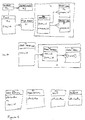
- Figure 4 is a block diagram of the core structure and processes of and example of the invention.
- Figure 5 is a table diagram of part of the structure of Figure 4.
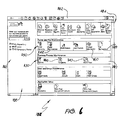
- Figure 6 is a desktop for navigation.
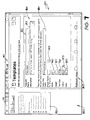
- Figure 7 is a desktop for template creation.
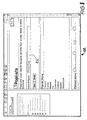
- Figure 8 is a desktop for pop list creation.
- Figure 9 is a desktop for changing the order of users in a Work Flow.
- Figure 10 is a desktop for folder maintenance.
- Figure 11 is a desktop showing a document ready to publish.
- An embodiment of a system according to the invention is based on data and not code in contrast to previously proposed systems. appearing in the new space of Process Driven Webs.
- Data configuration means that processes are constructed without the need for computer code to be generated.
- the system of the invention is loaded as software in a personal computer or toher processor, having a display screen and a keyboard as a data input device.
- a business user is able to create a super application covering existing systems and processes by merely describing the relationships between those systems.
- the data provided by the user is then stored and used by the Process Manager. This method allows the user to be able to make adhoc changes to these Super Applications & Processes without the need for downtime as there is no compiling of code or testing. In fact here is no need to perform the typical events associated with traditional development when the rules of a business change.
- Fig. 2 represents the conventional thinking on web based technology. It highlights the separation between the 3 layers of a typical software implementation. Notice that the business layer which is key to a dynamic environment is static. This means that programmers are required every time the rules governing a business change. This leads to a competitive deficiency.
- An embodiment of the system of the invention performs everything that is traditionally done through code by using data. This provides for dynamic inserts and changes that can be done in an adhoc way without bringing the system down. This obviously leads to savings in cost from a pure technology point of view without taking into account the return on investment achieved by integrating processes; see Fig. 3.
- Figure 2 is a block diagram of part of the structure of Figure 4.
- system 10 includes metadata 11, processes 12, user profiles 13, workflow routing 14 and data 15.
- the metadata 11 can be seen to be comprised of the form header table 20 and the fields in a form table 21.
- One form can have many form items, and many form items belong to one form.
- the user profiles 13 link to the metadata 11 using the user_id.
- a process is stored in the process table 30 and is made up of multiple process items in the process item table 31, and each process is associated with access privileges stored in a process access table 32. The link between all of these is the key process_id.
- the form_id from the process table 30 links to the form_id in the form table 20 in the metadata 11.
- Files are stored in a files table 40, and a file also has its own privileges stored in the file_access table 41.
- the files are stored in multiple folders, table 42, and the folders also have their own access privileges, stored in table 43.
- a user has multiple files and also multiple processes.
- Workflow Routing 14 is based on switching file permissions On / Off. For Files this manifests itself as information moving in a centralised system. The process/template manifests itself to the user by flashing in the Inboxes.
- a user entity 50 which resides in Data 15 has a number of attributes. All users will reside in the user entity, and within the user entity the attributes can be User ID, User Name, User Manager, etc.
- Various other entities can reside in data tables, for example Form 51; Department 52; Product 53.
- Each entity can have a number of attributes.
- the department entity will have a Department ID attribute, a Department Name attribute, a Department Cost Centre attribute etc.
- a user interface 16 is indicated schematically in Figure 4.
- Interface 16 operates to display forms containing selected form items for data input to create user entities having selected profiles, processes having selected steps and file instances, or documents. Data is all that is required to be input by the users and no new tables are created, only existing tables are populated with the entered data.
- the link between metadata and the listings enables files to be subjected to processes specified by user entities.
- the processes manifest delivery of documents to users in a specified order by sequentially changing the access level users have to the document.
- the inbox icon may signal, for instance by flashing.
- This example of the invention is accessible using a browser to view a series of desktops 101.
- the desktop displays generally fill the screen as shown in Figure 6.
- a toolbar 102 At the top of the desktop there is a toolbar 102.
- the left hand side pane is a folder tree 103 which used to find documents stored in a repository.
- the right hand side pane is a working section 104 which is usually titled with the task in hand or the current location. Unused areas, such as 105 are also present in the page.
- the desktops can be used to perform a variety of functions, some of which will now be described.
- Templates are the equivalent of the paper forms used traditionally by businesses for process control and record keeping. Because templates are used online they are easier to store and distribute. With the correct implementation of templates, a paperless office can be achieved.
- a file that that is created using a template is the equivalent of a completed form. Using a particular template to create a file also determines in which folder within the repository that file will be stored.
- a template is created using the Figure 7 desktop 110, by setting the appropriate options using the following procedure:
- a template can be edited using the following procedure:
- a template can be deleted using the following procedure:
- a Pop List is similar to a combo box or pull-down selection box that you will find in other applications. It is a field that you can include in a Template that allows you to pull down a list of options from which you can select the value you want for the field.
- a pop list 115 can be created using the following procedure:
- a pop list can be edited using the following procedure:
- a pop list can be deleted using the following procedure:
- Some documents have fields that are only relevant to some users, such as the "For office use only" sections. Other documents have fields which you might not want some users to see, such as approval or evaluation fields. In such cases, you can set the field permission for that field so that only specified users can see it on the document. Users without permission will be able to see all other fields, but the specified field will just not appear at all, so they won't even know that it exists.
- a Work Flow is a series of steps that a document will follow before it is available in the Document Repository for other users to view. It is used when a document has to be approved by certain users before it becomes valid.
- the Work Flow process defines which users the document is forwarded to and in what order each user will receive it.
- a consulting Time Sheet may have to be approved by the client and then the consultant's manager.
- the Time Sheet Approval Work Flow Process would use the Time Sheet Template and have the client as the first user, then the manager as the second user.
- the Time Sheet would be published by the consultant and forwarded to the client who may approve it. Then it will be forwarded to the manager who might reject it back to the client for some changes. If the changes are made and the client sends it on again for approval, the manager will receive it again and approve it. Then it will be stored in the Document Repository for use by the accounts department and other relevant users.
- a new Work Flow can be created using the following procedure:
- a Work Flow can be deleted using the following procedure
- Folders can be created as required by following the procedure below:
- Folders can be edited using the procedure below:
- Access to the folder is restricted to particular individuals or groups. Those users who have not been granted access will be unable to see the folder in the navigation pane and will be unaware of its existence.
- a group or individual may be granted either of the following privilege levels: Read Access: Users will see the folder in the navigation pane and they will be able to open the folder but not publish documents to or remove them from the folder.
- Write Access In addition to "Read Access" privileges, users can choose this folder to store a file when publishing a Work Flow they are permitted to use.
- Files are usually maintained as records and therefore never deleted. If it is decided that a file should be deleted then this task must be carried out by an administrator.
- Rapid Business SolutionTM enables you to create an advanced document searching and publishing module by just setting up a Work Flow Process as described in the previous section.
- This Folder structure consists of a Folder which has the same name as the Work Flow Process. Under that there are Folders named All , Search and Publish.
- the All Folder will immediately take you to a list of all documents in the repository that use the template that are associated with the Work Flow.
- the Search Folder will take you to an Advanced Find screen enabling you to search for any document that has been published using this Work Flow Process.
- An example of the latter situation is if there is a Time Sheet that shows that an employee has worked an exceptional number of hours, you may want to send it on to a Managing Director so that he is aware of the employee's effort.
- Ad-hoc Work Flows can be created by any user involved in a pre-defined Work Flow or you can publish a document specifically to send it to a user or group of users.
- Inboxes appear at the bottom of each users' screen if the "ICON_WORK_FLOW" application parameter is set to ON and "Display Inbox For Work Flow Items” is set to YES in the user's profile. These notify the user when a document has been sent to them via a Work Flow.
- Inboxes Up to four Inboxes may exist, each of which represents a circumstance under which the user receives that particular document.
- the inboxes automatically check for incoming documents and notify you when one arrives by a flashing "new" and appearing full.
- INBOX_REFRESH_SECONDS There is a parameter to set the number of seconds between each check called INBOX_REFRESH_SECONDS.
- the default is 900 seconds.
- the user may also refresh their Inboxes manually at any time by clicking the "Refresh Inbox" hyperlink.
- the Waiting for Action Inbox contains all documents that the user has received through pre-defined Work Flows or if they have been selected as a user in an ad-hoc Work Flow.
- the Returned Inbox notifies you if a document in a pre-defined Work Flow which you approved and sent to another user has been rejected by that user and returned to you. These documents will require some amendments.
- a user can elect to send Work Flow files on an ad-hoc basis to their manager. If they do, then these files will be placed in the manager's Direct Reports Inbox. Also, the Direct Reports Inbox icon on the manager's desktop will flash and appear full, notifying them that files have arrived.
- a user can elect to send Work Flow files on an ad-hoc basis to everyone. This is called a public broadcast. If they do, then these files will be placed in everyone's Public Broadcasts Inbox. Also, the Public Broadcasts Inbox icon on everyone's desktops will flash and appear full, notifying them that files have arrived.
- a user can publish a Work Flow by clicking on the Rapid Business Solutions Publish subfolder for that Work Flow. They will only be able to do this however if they have been granted permission to view both the Work Flow folder and its Publish subfolder.
- Folders can be configured to provide access to other resources located on your network drives, your corporate intranet or on the world wide web thus providing staff with a single point of access to what they need during the day.
- the Advanced Find feature enables you to search for a document based on the Work Flow to which it is assigned and gives you the power to search the content of a document on a particular field in the document.
- a first phase users use the forms to make selections of fields and to enter data to construct customised forms.
- the customised forms are used to enter data to create customised user entities having selected profiles, processes having selected steps and file instances, or documents.
- BPR business process reengineering
- An intranet/extranet is a TCP/IP network that provides a foundation for sharing information in a corporate setting. It supports sub-systems for applications such as network management, group-ware, and conferencing; and it provides access through a Web browser to corporate information in networked file systems and database management systems.
- business processes that access and update information are buried in programs and dispersed across execution scripts and Web pages. As a result, they can appear disjointed, unstructured, or opaque to many users.
- changing these business processes often requires programming skill, which disables rather than empowers many process stakeholders. For these reasons, CGI programming languages, document markup languages, or database access languages are poor choices for describing business processes. They do not help people describe, understand, try out, and revise the core processes they routinely perform.
- PDWs add subsystems that support configurational redesign, integration, and continuous improvement of organizational processes.
- PDWs can be implemented in different ways, for example, through workflow and database management systems, network operating environments, or ad hoc Web-based scripting. In the case of the described embodiment, they require a formal business process model that can be represented as data.
- the iLaunch PDW can use this representation to interpret a process model so that, for example, links to Web pages or frames are automatically updated where process actions occur. This contrasts with conventional intranets that use handcrafted links and CGI programs to deliver business transaction steps, which require tedious editing and reprogramming to accommodate process changes.
- applications consist of three levels: user interface, business rules or process, and data. Integration across applications can be achieved at any of these levels. If one achieves the linkage only at the user interface level, however, each user bears the burden of semantic discontinuity. In such a scenario, users have the ability to view any and all types of information to which they are authorized. However, users must sort out any inconsistency in meaning across the disparate information they see. Integration at the user interface level is only "skin-deep.”
- a more meaningful convergence strategy can be achieved by examining business process requirements. This leads to considering the underlying data infrastructure to support the processes causing the intranet/extranet to be linked to the extended process and data structures defined.
- a process manager ranging across applications is needed to keep state information relating a user to specific tasks within an extended business process.
- This super application process manager enables the definition of a process that spans either existing applications or new applications to form a closed loop system. Existing applications could be encapsulated and then accessed to provide bounded, well-defined functions with specified inputs and outputs.
- Businessware addresses the need to tie applications together at a business-rule level, the process definition role of the super application process manager.
- the super application process manager can serve a key role in support of information sharing. It can direct the persistent storage of process context or state information that is anticipated to be relevant to future users who seek to learn from the experience of others. Not all state information should be preserved, but a process definition can establish priorities on which state information should be retained, anticipating future needs for contextual information. Using this prioritization, the super application process manager sends selected process state information to a context repository as deemed necessary to support future context-based search and retrieval.
- a marketing manager reviews the initial sales results after a discount offer and decides whether to extend it.
- a portfolio manager after viewing a forecast predicting end-of-quarter performance, decides whether to sell an asset before the end of the quarter to affect the final results.
- the process manager can flag and store the information describing these decisions and the context in which they were made. Maintaining this context enables future users to access information relevant to their role in a specific business process.
- XML is well positioned to become a metadata standard for enabling access to broader sources of data in support of diverse transactional, analytic, and knowledge management applications.
- the broad adoption of XML also would make possible a higher degree of automation, such as intelligent agents deployed to read XML-based metadata.
- Agent technology promises the ability to support an extended business process by bridging autonomously developed and separately executing business applications.
- the software for the system by which the process of the invention is executed can be stored on any suitable computer-readable medium, such as floppy disk, computer harddrive, CD-ROM, Flash ROM, non-volatile ROM and RAM.
- the medium can be magnetically or optically readable.
Landscapes
- Engineering & Computer Science (AREA)
- Business, Economics & Management (AREA)
- Human Resources & Organizations (AREA)
- Strategic Management (AREA)
- Economics (AREA)
- Entrepreneurship & Innovation (AREA)
- Educational Administration (AREA)
- Game Theory and Decision Science (AREA)
- Development Economics (AREA)
- Marketing (AREA)
- Operations Research (AREA)
- Quality & Reliability (AREA)
- Tourism & Hospitality (AREA)
- Physics & Mathematics (AREA)
- General Business, Economics & Management (AREA)
- General Physics & Mathematics (AREA)
- Theoretical Computer Science (AREA)
- Information Retrieval, Db Structures And Fs Structures Therefor (AREA)
Applications Claiming Priority (2)
| Application Number | Priority Date | Filing Date | Title |
|---|---|---|---|
| US579363 | 1984-02-13 | ||
| US57936300A | 2000-05-25 | 2000-05-25 |
Publications (1)
| Publication Number | Publication Date |
|---|---|
| EP1158444A1 true EP1158444A1 (fr) | 2001-11-28 |
Family
ID=24316590
Family Applications (1)
| Application Number | Title | Priority Date | Filing Date |
|---|---|---|---|
| EP01304674A Withdrawn EP1158444A1 (fr) | 2000-05-25 | 2001-05-25 | Logiciel d'application personnalisable commandé par données |
Country Status (1)
| Country | Link |
|---|---|
| EP (1) | EP1158444A1 (fr) |
Cited By (4)
| Publication number | Priority date | Publication date | Assignee | Title |
|---|---|---|---|---|
| WO2003105025A1 (fr) * | 2002-06-07 | 2003-12-18 | Didier Guillonnet | Interface homme-machine destinee a gerer simultanement des informations de type heterogenes |
| US7403989B2 (en) | 2002-01-08 | 2008-07-22 | Sap Ag | Facilitating improved workflow |
| US7599942B1 (en) * | 2001-07-26 | 2009-10-06 | Fileonq, Inc. | Customizable information management system |
| US9104287B2 (en) | 2005-10-27 | 2015-08-11 | International Business Machines Corporation | System and method for data collection interface creation and data collection administration |
-
2001
- 2001-05-25 EP EP01304674A patent/EP1158444A1/fr not_active Withdrawn
Non-Patent Citations (1)
| Title |
|---|
| No Search * |
Cited By (7)
| Publication number | Priority date | Publication date | Assignee | Title |
|---|---|---|---|---|
| US7599942B1 (en) * | 2001-07-26 | 2009-10-06 | Fileonq, Inc. | Customizable information management system |
| US8176093B2 (en) * | 2001-07-26 | 2012-05-08 | Fileonq, Inc. | Customizable information management system |
| USRE47071E1 (en) * | 2001-07-26 | 2018-10-02 | Fileonq, Inc. | Customizable information management system |
| USRE47094E1 (en) * | 2001-07-26 | 2018-10-23 | Fileonq, Inc. | Customizable information management system |
| US7403989B2 (en) | 2002-01-08 | 2008-07-22 | Sap Ag | Facilitating improved workflow |
| WO2003105025A1 (fr) * | 2002-06-07 | 2003-12-18 | Didier Guillonnet | Interface homme-machine destinee a gerer simultanement des informations de type heterogenes |
| US9104287B2 (en) | 2005-10-27 | 2015-08-11 | International Business Machines Corporation | System and method for data collection interface creation and data collection administration |
Similar Documents
| Publication | Publication Date | Title |
|---|---|---|
| US7131071B2 (en) | Defining an approval process for requests for approval | |
| US6308188B1 (en) | System and method for building a web site with automated workflow | |
| US7107268B1 (en) | Centralized system and method for managing enterprise operations | |
| AU2011202413B2 (en) | An automated publishing system that facilitates collaborative editing and accountability through virtual document architecture | |
| US6185587B1 (en) | System and method for building a web site with automated help | |
| US7403989B2 (en) | Facilitating improved workflow | |
| US7343348B2 (en) | System for performing real-estate transactions over a computer network using participant templates | |
| KR101033446B1 (ko) | 데이터 통합 시스템의 사용자 인터페이스 | |
| US20020049961A1 (en) | Rule-based personalization framework | |
| US20070136357A1 (en) | Methods and apparatus for designing a workflow process using inheritance | |
| US8239226B2 (en) | Methods and apparatus for combining properties and methods from a plurality of different data sources | |
| EP1367513A2 (fr) | Système de flux de travaux amélioré | |
| EP1160715A2 (fr) | Système informatique pour la conservation de données et le contrôle de processus | |
| Perran et al. | Beginning SharePoint 2010: Building Business Solutions with SharePoint | |
| EP1158444A1 (fr) | Logiciel d'application personnalisable commandé par données | |
| US20060122859A1 (en) | Communities of practice environment | |
| US20070143711A1 (en) | Methods and apparatus for displaying a setup sequence | |
| US20070208777A1 (en) | Methods and apparatus for designing a workflow process using resource maps and process maps | |
| Antonovich | Office and SharePoint 2007 user’s guide: Integrating SharePoint with Excel, Outlook, Access, and Word | |
| Murphy et al. | Beginning Sharepoint 2007: Building Team Solutions | |
| Simpson | Managing the use of style guides in an organisational setting: practical lessons in ensuring UI consistency | |
| US20040205590A1 (en) | Extensible object-oriented document system and method | |
| US12095886B2 (en) | Entity card utilization | |
| US20070136367A1 (en) | Methods and apparatus for dynamically modifying a business object definition | |
| Webb | Essential SharePoint 2007: A Practical Guide for Users, Administrators and Developers |
Legal Events
| Date | Code | Title | Description |
|---|---|---|---|
| PUAI | Public reference made under article 153(3) epc to a published international application that has entered the european phase |
Free format text: ORIGINAL CODE: 0009012 |
|
| AK | Designated contracting states |
Kind code of ref document: A1 Designated state(s): AT BE CH CY DE DK ES FI FR GB GR IE IT LI LU MC NL PT SE TR |
|
| AX | Request for extension of the european patent |
Free format text: AL;LT;LV;MK;RO;SI |
|
| AKX | Designation fees paid | ||
| REG | Reference to a national code |
Ref country code: DE Ref legal event code: 8566 |
|
| STAA | Information on the status of an ep patent application or granted ep patent |
Free format text: STATUS: THE APPLICATION IS DEEMED TO BE WITHDRAWN |
|
| 18D | Application deemed to be withdrawn |
Effective date: 20020529 |