EP1406182A1 - Verfahren und Informationsanzeigesystem zur automatischen Lieferung von technischen Informationen eines rechnergesteuerten Endgerätes - Google Patents
Verfahren und Informationsanzeigesystem zur automatischen Lieferung von technischen Informationen eines rechnergesteuerten Endgerätes Download PDFInfo
- Publication number
- EP1406182A1 EP1406182A1 EP20020022155 EP02022155A EP1406182A1 EP 1406182 A1 EP1406182 A1 EP 1406182A1 EP 20020022155 EP20020022155 EP 20020022155 EP 02022155 A EP02022155 A EP 02022155A EP 1406182 A1 EP1406182 A1 EP 1406182A1
- Authority
- EP
- European Patent Office
- Prior art keywords
- terminal
- steps
- sequence
- ssz
- sqm
- Prior art date
- Legal status (The legal status is an assumption and is not a legal conclusion. Google has not performed a legal analysis and makes no representation as to the accuracy of the status listed.)
- Withdrawn
Links
- 238000000034 method Methods 0.000 title claims abstract description 28
- 230000001360 synchronised effect Effects 0.000 claims description 3
- 230000006870 function Effects 0.000 description 34
- 230000001419 dependent effect Effects 0.000 description 12
- 230000002452 interceptive effect Effects 0.000 description 8
- 238000013499 data model Methods 0.000 description 5
- 230000001960 triggered effect Effects 0.000 description 5
- 230000008569 process Effects 0.000 description 3
- 238000012545 processing Methods 0.000 description 3
- 238000004891 communication Methods 0.000 description 2
- 238000013461 design Methods 0.000 description 2
- 230000004044 response Effects 0.000 description 2
- 230000003068 static effect Effects 0.000 description 2
- 238000012546 transfer Methods 0.000 description 2
- 230000000007 visual effect Effects 0.000 description 2
- 238000013459 approach Methods 0.000 description 1
- 230000008901 benefit Effects 0.000 description 1
- 230000001427 coherent effect Effects 0.000 description 1
- 238000011161 development Methods 0.000 description 1
- 230000018109 developmental process Effects 0.000 description 1
- 238000010586 diagram Methods 0.000 description 1
- 230000008571 general function Effects 0.000 description 1
- 239000000463 material Substances 0.000 description 1
- 230000006855 networking Effects 0.000 description 1
- 239000013589 supplement Substances 0.000 description 1
- 238000012549 training Methods 0.000 description 1
Images


Classifications
-
- H—ELECTRICITY
- H04—ELECTRIC COMMUNICATION TECHNIQUE
- H04M—TELEPHONIC COMMUNICATION
- H04M1/00—Substation equipment, e.g. for use by subscribers
- H04M1/72—Mobile telephones; Cordless telephones, i.e. devices for establishing wireless links to base stations without route selection
- H04M1/724—User interfaces specially adapted for cordless or mobile telephones
-
- H—ELECTRICITY
- H04—ELECTRIC COMMUNICATION TECHNIQUE
- H04M—TELEPHONIC COMMUNICATION
- H04M2250/00—Details of telephonic subscriber devices
- H04M2250/56—Details of telephonic subscriber devices including a user help function
Definitions
- the present invention relates to a method for automatically providing technical information, such as configuration data or user guidelines, of a computerized terminal, especially of a mobile phone, to a user, for instance to an end-user or support center personal. Furthermore, the present invention relates to an information display system for execution of such method.
- a computerized terminal is any electronic device for data processing or data transfer with an interface for entering information or input data into an integrated processor or for receiving and displaying information to the user of the terminal.
- Such computerized terminals may be mobile hand-held computers, such as so-called palm tops, or mobile phones.
- WAP functions wireless application protocol, that means a standardised mobile interactive wireless data service.
- the invention is based on the concept that proper handling of the enormous amount of data requires a particularly structurized system.
- An approach for structurization is provided in recognition of the fact that, even though various types or models of terminals may deviate from each other significantly with respect to technical details, the functions or procedures they perform typically are customer-oriented and hence are similar even for different individual types or models. Consequently, these common functions or procedures are chosen as the basis for standardization of processes that are applicable to all types or models of terminals. In dependence of the kind of the standardised operation, some of these operations may be terminal independent, other may be terminal dependent. These standardised operations or procedures areheld available in a suitable database, and on demand, i. e. when requested by a user or an operator, a relevant sequence of steps is loaded and is combined with terminal-specific technical information in order to yield the complete information as needed in the guidelines or manuals.
- the information is structured in two different data formats.
- the first data format covers process-oriented information, which in a standardised way applies to a multitude of different terminal types.
- said process-oriented information is terminal-independent or terminal-dependent.
- all types of terminals typically perform operations such as "Make a call” or "Delete a number”, but only a number of types of terminals perform operations such as "WAP set-up” or "SMS set-up".
- WAP set-up or "SMS set-up”.
- These operations which are common to all various types of terminals, are terminal-independent and standardised by modelled data.
- the other operations are terminal-dependent and also standardised by modelled data.
- the second data format covers terminal-specific data, for instance number and kind of keys, number and kind of lists, menus or edits of one of the terminal types (also called terminal models). These second individual terminal-specific data - specific data for each kind of terminal type - are stored and if required are loaded. On the basis of these two data formats, individual manuals or guidelines or parts thereof are generated automatically and fast based upon the standardisedstandardised operations or scenarios as a sequence of steps characteristic for the execution of the identified function. On demand, in each step the standardised operations and the terminal-specific information of the selected terminal type are loaded to supplement and complete the information on display.
- Such combinations of terminal-specific information with standardisedstandardised operations realized for example as software models may describe user interface properties of one of the terminal types dependent from terminal-specific information as well as steps to perform the various tasks of one scenario which is independent from terminal-specific information.
- the standardised modelled operations or scenarios describe the behavior or execution of one of the terminal's user interface relevant to the identified operation.
- the technical information, especially the instruction file may be expressed in a relatively simple way at a high level of abstraction, for instance abstract data models of WAP functions, e-mail functions, or calendar-functions independent or dependent from the specific terminal, but independent from terminal-specific data.
- Such open architecture allows the system to be integrated with existing service support center solutions. Furthermore, it allows mobile service centers to be constructed as in a terminal-independent manner as possible, because terminal-specific data or information is separately handled by generating into each single step.
- guidelines on how to perform the selected function in the selected terminal type may be generated in a simple, step-by-step way, providing detailed information for each step involved in the respective sequence.
- the display of information may be controlled, e. g. in form of detailed instructions for usage or configuration.
- the user or operator may be guided through the selected scenario step by step or alternatively triggered by given time sequences.
- the user or operator preferably is guided based on structurized menues, e. g. by offering a selection of available scenarios and/or available individual terminal models.
- the user or operator may be guided through the relevant information based upon menues, particularly in form of subsequent steps each of which is completed by technical information of the selected model.
- a sequence of steps associated with the selected scenario is displayed on screen, and on selection of one of these steps, detailed technical information, such as sequence of keys, is loaded and displayed.
- a WAP function (e. g. "Set up WAP” or “use WAP”) might be selected by the user.
- a standardised sequence of steps necessary to perform this operation is identified.
- stored information characteristic for the individual terminal in question is used to generate an individualized sequence of steps that is to be performed to execute the selected function with the selected terminal.
- This individual sequence of steps to be performed (e. g. a sequence of 12 steps for the set-up function or 32 steps for the use function) is displayed to the user. If needed or available, individual steps within this individual sequence of steps are supplemented and completed by terminal specific technical data such as key codes or design rules.
- the individual step may be displayed as a sequence of keys that need to be pressed in order to execute the respective step.
- the data output may be carried out in text form or as a graphic animation.
- Both the standardised sequence of steps and the individualized sequence of steps or terminal-specific operations may be put on display on a time triggered or an interactive basis.
- the information characteristic for each individual step is displayed in a continuous animation, providing for sufficient time intervals between adjacent steps in order to allow for the user follow up with the animated display.
- a terminal independent i/o- interface is used.
- This independent interface provides the technical information to one or more users or operators in an interactive manner that provides actual responses to the actual user inputs during the generating of the sequence of steps. Therefore, the method as well as the information display system represent a self-care system with a common terminal independent interface monitored and controlled by a user or an operator.
- This independent interface gives terminal owner or service support personal their own personal interface or a standardised interface where they can interactively use and/or configure their or the selected terminal. For instance, in dependence of demand at the independent interface service settings can be transmitted directly over a mobile network to the terminal.
- the information display system can draw in a simulated manner on the independent interface such like a training module the step-by-step instructions - how to manually configure or use the terminal, e.g. the mobile phone or palm top - in textual form or as a graphical animation.
- a number of backup points also called stable point or check points
- the passing of backup points is monitored by the system such that in all cases information about the backup point that during execution was passed last is held available. If in this system, a user looses orientation with respect to the potentially large amount of information on display, the information display system provides a user-controlled reset optionand more particularly, a so-called “panic button” or “I am lost”-button, which when pressed will cause to reset the execution of the sequence of steps to the most recent backup point that was properly passed on user demand.
- a further aspect of the present invention relates to use of the information display system for providing support services and more particular, to integrate the information display system in service center solutions of a support center, such as call center of a supplier hotline.
- the information display system may comprise a host computer linked with a client computer and receiving input from the client computer to execute the sequence of steps in dependence of the identified terminal type and the identified scenario.
- the standardised sequence of steps is designed or generated such that regardless of user or operator inputs, the user's or operator's terminal model or computer typically cannot be crashed by the user or operator inputs.
- a particular advantage obtainable with the invention is that by separate identification, processing and storing of terminal-independent or terminal-dependent sequence-modelled data on the one hand side, such as standardisedstandardised operations or processes, and terminal-specific information on the other hand side, such as technical details or design specifics of individual terminal types, a relatively simple and straightforward generation of a large variety of detailed user information is possible.
- terminal-independent or terminal-dependent sequence-modelled data on the one hand side
- terminal-specific information on the other hand side
- terminal-specific information such as technical details or design specifics of individual terminal types
- a relatively simple and straightforward generation of a large variety of detailed user information is possible.
- specific sequences of steps characteristic for the execution of the selected standard function in the selected terminal are made available. Based upon these terminal specific sequences of steps, detailed manuals or user guidelines may be generated on demand by combination with terminal specific technical information and without the necessity to continuously hold available a large amount of various individual scenarios.
- user specific options such as language preferences or country specific background information may render the detailed information displayed to the user
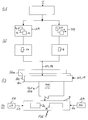
- Figure 1 shows a block diagram that illustrates a particularly structurized flowchart 1 for automatically providing technical information 2, such as user and/or configuration guidelines, of a computerized terminal 4 to a user 6.
- a computerized terminal 4 may be any electronic device for data processing or data transfer with an interface for entering information or input data and/or for receiving and displaying information to the user 6 of the terminal 4.
- a mobile phone is used as an example of the computerized terminal 4 to provide a thorough understanding of the present invention.
- the flowchart 1 comprises for a various types or models of terminals 4, such as mobile phones from a variety of suppliers, a number of terminal-dependent or terminal-independent standardisedoperations F1 to Fn, such as "WAP functions", “Network functions”, “Call-by-call functions”. These standardised operations F1 to Fn are common functions F, also called scenarios, that are applicable to all types or models of terminals 4. Both, the standardised operations F1 to Fn and the various types of terminals 4 are standardised by modelled data. These modelled date are provided in separate data formats to identified, structured and stored the standardised operations F1 to Fn as sequence models SM and the various types of terminals 4 as terminal models TM.
- the standardised operations F1 to Fn or scenarios based on the sequence models SM are stored as terminal-independent or terminal-dependent modelled data for a number of terminal procedures.
- the terminal models TM are stored as terminal-specific modelled data for a number of terminal-specific components, structures and/or languages.
- a first step S1 For identifying the relevant standardised operation F1 to Fn and relevant terminal-specific data TM, in a first step S1 one of the various types of terminals 4 is identified in dependence of input-data I. Based on terminal-specific information, those standardised operations F1 to Fn are identified that are available on the selected terminal 4. For example, individual types of mobile phones may offer certain features that are not provided by other types of mobile phones, and this terminal-dependent discrepancy is reflected by the terminal-dependent selection of available standardised operations F1 to Fn.
- a terminal 4 e.g. a given model of one of mobile phones of one of suppliers
- an operation F1, F2 or Fn e.g. "Make a call”
- the relevant standardazied operation F1 to Fn may be structured terminal-independent or terminal-dependent.
- a sequence of steps SQ1 to SQm characteristic for the execution of the identified operation F1 or Fn is loaded or generated on the basis of said both data formats - loaded terminal-independent or terminal-dependent modelled data SM (shortly called sequence model SM) and terminal-specific modelled data TM (shortly called terminal model TM).
- sequence model SM terminal-independent or terminal-dependent modelled data
- TM terminal-specific modelled data
- individual steps within this individual sequence of steps SQ1 to SQm are supplemented and completed in form of a subsequent steps SS1 to SSz.
- the subsequent steps SS1 to SSz for the selected terminal 4 may be comprise a sequence of keys or operations that need to be pressed in order to execute the respective step.
- user-specific information UM and/or interface-specific information IM may also be loaded in each step of the functional sequence of steps SQ1 to SQm as well as of the terminal-specific sequence of steps SS1 to SSz.
- user-specific information UM language settings, view settings and/or time settings are loaded.
- interface-specific information IM online or offline settings are loaded.
- step S4 as a result, the generated sequence of steps SQ1 to SQm and if needed or available the generated subsequent steps SS1 to SSz (also called steps of terminal-specific operations) are displayed to the user 6.
- Relevant technical information 2 may also be displayed.
- a text model FM and an animation model AM are created and stored.
- the text model FM defines the textual contents of a particular guide in a particular language.
- the generation of the text model FM is based on two data sources - on the sequence model SM and a language template LM.
- the displaying of said animation sequence 2b is synchronized with displaying of said text 2a.
- the technical information 2 in text form 2a describes in detail step-by-step (e.g. as a list) which key is to be pressed and is synchronized with the technical information 2 displayed as a graphic animation sequence 2b, which shows the visual representation of this list step-by-step.
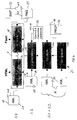
- Figure 2 shows an example for a terminal-independent input/output interface 8 (shortly called i/o interface 8) for provide the technical information 2 to one or more users 6 or operators in an interactive manner.
- i/o interface 8 For selection of one of the various models of terminals 4 and one of the standardised operations F1 to Fn, the i/o interface 8 is divided into different i/o parts 8a to 8e.
- the different i/o parts 8a to 8e are used for identifying a request of the user 6 or an operator and/or for displaying technical information 2 or in dependence of demand at the i/o interface 8 for transmitting service settings directly over a mobile network to the terminal 4.
- one of the i/o part 8a is structured for selecting one of the various models of terminals 4.
- Another i/o part 8b is structured for selecting one of the standardasid operations F1 to Fn.
- the represented scenarios may be displayed in a hierarchical structure, e.g. in a operation or scenario menue.
- various higher-level operations F1 to Fn such as a "WAP function” or "Answer a call”
- another i/o part 8c is structured for selecting or settings general functions or parameters, such as relevant links to the selected terminal 4. For example, if a terminal 4 from a given supplier is selected the link is referred to the homepage of the said supplier.
- additional i/o parts 8e and 8d may be structured for control the displayed functions F1 to Fn and/or for selecting parameters, such as language of the displayed data, and/or for contact the author of the i/o interface 8 for support.
- said control i/o parts 8d and 8e comprise control buttons 10 for input information or a command or a request.
- Figure 3 shows an example of a display of the i/o interface 8 for a selected standardised operation F1 and more particularly, the sixth step SQ6 of the whole represented sequence of 12 steps SQ1 to SQ12 for an identified terminal 4.
- the standardised step SQ6 of the selected sequence of steps SQ1 to SQ12 comprises subsequent steps SS1 to SSz displayed to the user 6 as technical information 2.
- the output of the subsequent steps SS1 to SSz is carried out as said technical information 2 in text form 2a and as a graphic animation 2b in different i/o parts 8b and 8a.
- Both the standardazid sequence of steps SQ1 to SQ12 and the individual sequence of steps SS1 to SSz may be put on display on a time triggered basis or an interactive basis.
- the technical information 2 characteristic for each individual step SS1 to SSz is displayed in a continuous animation 2b, providing for sufficient time intervals between adjacent steps in order to allow for the user 6 follow up with the animated display in i/o part 8a.
- the i/o interface 8 provides the technical information 2 to the user 6, for instance an end-user or an operator, in an interactive manner that provides actual responses to the actual user 6 inputs I during the generating of the sequence of steps SS1 to SSz or SQ1 to SQ12.
- control buttons 10 such as "back-button”, “next-button”, “show-me-button”, “cancel-button”, are implemented in the control i/o part 8d of the i/o interface 8.
- a user-controlled reset option 10a in form of a virtual button is implemented to reset the execution of the relevant sequence of steps SQ1 to SQ12 or SS1 to SSz to a backup point.
- a number of backup points also called stable point or checkpoint
- buttons 10a so-called “panic button” or “I am lost”-button may be activated, which when pressed will cause to reset the execution of the sequence of steps SQ1 to SQ12 or SS1 to SSz to the most recent backup point that was properly passed on user demand.
- Figure 4 shows as an exemplary hardware platform for certain aspects of various embodiments of the present invention an information display system 12.
- the process of said information display system 12 is described as follows.
- the information display system 12 generates the technical information 2 in four steps S1 to S4. Each step S1 to S4 results in a data model being identified, structured and stored as mentioned before.
- These data models are the terminal model TM, the sequence model SM, the text model FM and the animation model AM.
- the information display system 12 comprises a plurality of data-bases with following structure:
- the information display system 12 comprises an input module 22 for identifying one of said terminal type 4 and one of said standardised operations F1 to Fn.
- Said input module 22 may comprised two sub-modules 22a, 22b for identifying different terminal models TM for the selected terminal type 4.
- the relevant terminal models TM are normally stored in the second data-base 16 - one data-base per type or model of terminals 4.
- the second data-base 16 consists of three parts or modules, such as sub-data-bases which are connected with said input modules 22a, 22b.
- the terminal model TM defines the user interface (shortly called UI) behavior of the specific terminal 4.
- the terminal model TM consists of the following three parts:
- Said UI component definition defines a set of building blocks (components) that are used to construct the selected model of terminal 4.
- building blocks are menues, selection lists, dialogs, and text editing fields.
- the UI component definition defines the behavior of these components in terms of actions or user commands that can be performed by the user on a specific component. For example, the definition may state that in order to select an item from a specific type of list, the user must press a certain button.
- the UI structure definition defines the UI hierarchy of the terminal 4. It is based on terms of the components from the UI component definition. For example, the UI structure definition may state that a named menu component has a particular list of named items (components) of a particular type. In addition to the UI hierarchy, the structure definition also defines the structure of the state of the terminal 4. Often, the behavior of the terminal's UI depends on the state of the terminal 4, and hence it is necessary to model aspects of the physical terminals memory. Furthermore, the UI structure definition ties particular UI components to particular state elements, ensuring that the particular component can set or retrieve the current state.
- the static text strings used in the terminal's UI are separated from the UI component and UI structure definitions, making these definitions language-independent. This simplify the job of adding support for additional languages to the terminal model.
- the UI structural model and the UI component model are stored in one base per model of terminal 4.
- the UI language models are stored in one base per model of terminal 4 and per language.
- a scenario is structured and stored by a standardised sequence of steps SQ1 to SQm or SS1 to SSz for usage functions or procedures enriched with terminal-specific interface or function information TM.
- the information display system 12 For loading or generating the sequence of steps SQ1 to SQm or SS1 to SSZ, the information display system 12 comprises a generator module 24.
- the sequence model SM defines the sequence of steps SQ1 to SQm and/or SS1 to SSz (e.g. key presses) needed to perform a particular task on a particular terminal 4.
- An example could be how to check for voice mail on a selected terminal 4, such as a terminal of one of the suppliers.
- the sequence model SM is based on the following data sources:
- Scenario definitions or sequence models SM consist of a number of steps (e.g. sequence of steps SQ1 to SQm), which may be consist of a number of operations (e.g. subsequent steps SS1 to SSz), which may be consist of a number of details.
- Each step represents a group of operations, which form a logical sub-scenario or sub-guidelines.
- An example of a step could be entering a voice mail dial-in number. To continue the example, this step could consist of the following operations:
- the scenario description (typically) stops at the operation level.
- the information display system 12 breaks operations into sequences of details.
- a detail represents one or more key presses, typically on a single key.
- the navigation operation maybe consist of the following details:
- scenario descriptions or sequence models SM define so-called checkpoints or backup points at suitable points.
- a checkpoint indicates that the user should be asked to verify that they are on track.
- Scenario descriptions need not be linear. They may contain branches, providing the user with multiple paths through the scenario. Furthermore, the scenario descriptions are parameterised (as is the terminal model). The parameters are used to isolate operator- or user-specific parameter or values (e.g. user-specific parameter UM or interface-specific parameter IM) from the scenario definitions themselves. This allows a scenario description to be reused for multiple operators and for multiple users.
- operator- or user-specific parameter or values e.g. user-specific parameter UM or interface-specific parameter IM
- the dial-in number could be an operator specific parameter, or it could be user-specific, especially end-user-specific.
- the information display system 12, also called guide engine, read the parameter set UM and/or IM from an input module 26 before generating the sequence model SM by the generator module 24. During generation, the parameter values UM, IM are used to expand operations into details.
- a further aspect is the text model FM, which defines the textual contents of a particular guide in a particular language.
- the text model FM is based on two data sources:
- the sequence model SM is generally language-independent. It expresses the sequence of details (e.g. SQ1 to SQm, SS1 to SSz) to be performed, but not in a textual formal suited for humans.
- the information display system 12 uses a set of language-specific text models FM or templates LM, one for each type of step, operation and detail.
- the language template LM is not specific to a particular terminal or scenario. It is used across all scenarios F1 to Fn on all terminals 4.
- a language-specific template LM consists of static text combined with a number of placeholders.
- the information display system 12 substitutes the placeholders with concrete values obtained from the sequence model SM.
- An example of a placeholder could be the value typed into an input field.
- the guide engine or information display system 12 traverses the sequence model SM and building a corresponding guide text model TM containing entries for each step, operation and detail in the scenario.
- This textual representation can subsequently be presented to the user 6 on an output module 28 via, e.g. an HTML browser as a text 2a on the i/o interface 8.
- the above mentioned animation model AM defines more specifically the graphical contents of a particular guide.
- the animation model AM is constructed from two data sources:
- Said animation template MM defines parameterized building blocks needed to create animations of scenarios or functions F1 to Fn for a particular terminal 4.
- Animation building blocks often correspond to components defined in the UI component model.
- the UI component model may define the behavior of a selection list, whereas the animation template describes the visual representation of this particular list.
- the information display system 12 builds animation models AM for scenarios F1 to Fn by combining animation building blocks into sequences (e.g. SQ1 to SQm, SS1 to SSz).
- sequences e.g. SQ1 to SQm, SS1 to SSz.
- the sequence of, and parameters for, the building blocks is obtained by traversing the sequence model SM.
- the animation model AM can be presented to the user 6, through an animation player, e.g. Macromedia Flash Player on said output module 28.
- an animation player e.g. Macromedia Flash Player on said output module 28.
Landscapes
- Engineering & Computer Science (AREA)
- Human Computer Interaction (AREA)
- Computer Networks & Wireless Communication (AREA)
- Signal Processing (AREA)
- User Interface Of Digital Computer (AREA)
Priority Applications (1)
| Application Number | Priority Date | Filing Date | Title |
|---|---|---|---|
| EP20020022155 EP1406182A1 (de) | 2002-10-02 | 2002-10-02 | Verfahren und Informationsanzeigesystem zur automatischen Lieferung von technischen Informationen eines rechnergesteuerten Endgerätes |
Applications Claiming Priority (1)
| Application Number | Priority Date | Filing Date | Title |
|---|---|---|---|
| EP20020022155 EP1406182A1 (de) | 2002-10-02 | 2002-10-02 | Verfahren und Informationsanzeigesystem zur automatischen Lieferung von technischen Informationen eines rechnergesteuerten Endgerätes |
Publications (1)
| Publication Number | Publication Date |
|---|---|
| EP1406182A1 true EP1406182A1 (de) | 2004-04-07 |
Family
ID=31985043
Family Applications (1)
| Application Number | Title | Priority Date | Filing Date |
|---|---|---|---|
| EP20020022155 Withdrawn EP1406182A1 (de) | 2002-10-02 | 2002-10-02 | Verfahren und Informationsanzeigesystem zur automatischen Lieferung von technischen Informationen eines rechnergesteuerten Endgerätes |
Country Status (1)
| Country | Link |
|---|---|
| EP (1) | EP1406182A1 (de) |
Citations (4)
| Publication number | Priority date | Publication date | Assignee | Title |
|---|---|---|---|---|
| US5485505A (en) * | 1993-11-23 | 1996-01-16 | Bellsouth Corporation | Apparatus and method for remotely initiating operation of a cellular telephone |
| US5884315A (en) * | 1996-05-09 | 1999-03-16 | Philips Electronics North America Corporation | System and method for handling technical hardware related information |
| US5922071A (en) * | 1994-09-09 | 1999-07-13 | Compaq Computer Corporation | Learning commands which automatically launch a computer program |
| US6377956B1 (en) * | 1999-02-22 | 2002-04-23 | Siemens Corporate Research, Inc. | Automatically configuring product manual by binding document objects in logical structure to proper versions of component documents in a document database |
-
2002
- 2002-10-02 EP EP20020022155 patent/EP1406182A1/de not_active Withdrawn
Patent Citations (4)
| Publication number | Priority date | Publication date | Assignee | Title |
|---|---|---|---|---|
| US5485505A (en) * | 1993-11-23 | 1996-01-16 | Bellsouth Corporation | Apparatus and method for remotely initiating operation of a cellular telephone |
| US5922071A (en) * | 1994-09-09 | 1999-07-13 | Compaq Computer Corporation | Learning commands which automatically launch a computer program |
| US5884315A (en) * | 1996-05-09 | 1999-03-16 | Philips Electronics North America Corporation | System and method for handling technical hardware related information |
| US6377956B1 (en) * | 1999-02-22 | 2002-04-23 | Siemens Corporate Research, Inc. | Automatically configuring product manual by binding document objects in logical structure to proper versions of component documents in a document database |
Similar Documents
| Publication | Publication Date | Title |
|---|---|---|
| Cockton et al. | Design principles for interactive software | |
| EP1535453B1 (de) | System und prozess zum entwickeln einer sprachanwendung | |
| US7694273B2 (en) | Automatic modification of a graphical program based on corresponding changes to a diagram with states and state transitions | |
| Moore | Python GUI Programming with Tkinter: Develop responsive and powerful GUI applications with Tkinter | |
| AU2003270997B2 (en) | Active content wizard: execution of tasks and structured content | |
| CN111190598B (zh) | 基于控件库拖拽式开发的燃机监控软件画面组态方法 | |
| US10515001B2 (en) | System and method for automating testing of software applications | |
| US20060142989A1 (en) | Method and apparatus for pattern based generation of graphical user interfaces (GUI) | |
| CN107391134B (zh) | 一种通用移动应用交互界面自动生成与动态变换方法与装置 | |
| CN110765013A (zh) | 一种流程自动化执行方法及系统 | |
| CN108132879A (zh) | 自动化软件测试方法、平台、终端及介质 | |
| US7342583B2 (en) | Automated system and method to develop computer-administered research questionnaires using a virtual questionnaire model | |
| Bastide et al. | A tool-supported design framework for safety critical interactive systems | |
| US20040027379A1 (en) | Integrated visual development system for creating computer-implemented dialog scripts | |
| CN115202840A (zh) | 任务创建与管理方法、系统、存储介质以及电子设备 | |
| Gery | The future of EPSS | |
| EP1406182A1 (de) | Verfahren und Informationsanzeigesystem zur automatischen Lieferung von technischen Informationen eines rechnergesteuerten Endgerätes | |
| CN113934414A (zh) | 基于Vue.js的移动端组件库的应用方法、装置及移动端组件库 | |
| JPH08190476A (ja) | 対話型プログラムの開発支援装置 | |
| Bitter et al. | LabVIEW Advanced Programming Techiniques | |
| WO2003085521A1 (fr) | Procede et dispositif de generation de logiciels executables sur mesure et evolutifs sans programmation informatique | |
| Ginn | CLIsis: An interface for visually impaired users of apache ISIS applications | |
| EP1497776A2 (de) | Verfahren und rechnersysteme zur zugriffsverwaltung eines benutzers zu betriebsmitteln | |
| Stephanidis et al. | Engineering universal access: unified user interfaces | |
| Baraban et al. | for Psychological Support: Integrating |
Legal Events
| Date | Code | Title | Description |
|---|---|---|---|
| PUAI | Public reference made under article 153(3) epc to a published international application that has entered the european phase |
Free format text: ORIGINAL CODE: 0009012 |
|
| AK | Designated contracting states |
Kind code of ref document: A1 Designated state(s): AT BE BG CH CY CZ DE DK EE ES FI FR GB GR IE IT LI LU MC NL PT SE SK TR |
|
| AX | Request for extension of the european patent |
Extension state: AL LT LV MK RO SI |
|
| AKX | Designation fees paid | ||
| REG | Reference to a national code |
Ref country code: DE Ref legal event code: 8566 |
|
| STAA | Information on the status of an ep patent application or granted ep patent |
Free format text: STATUS: THE APPLICATION IS DEEMED TO BE WITHDRAWN |
|
| 18D | Application deemed to be withdrawn |
Effective date: 20041008 |