EP2210198B1 - System and method for searching for documents - Google Patents
System and method for searching for documents Download PDFInfo
- Publication number
- EP2210198B1 EP2210198B1 EP08840057.7A EP08840057A EP2210198B1 EP 2210198 B1 EP2210198 B1 EP 2210198B1 EP 08840057 A EP08840057 A EP 08840057A EP 2210198 B1 EP2210198 B1 EP 2210198B1
- Authority
- EP
- European Patent Office
- Prior art keywords
- documents
- search
- sources
- search query
- law
- Prior art date
- Legal status (The legal status is an assumption and is not a legal conclusion. Google has not performed a legal analysis and makes no representation as to the accuracy of the status listed.)
- Active
Links
Images







Classifications
-
- G—PHYSICS
- G06—COMPUTING OR CALCULATING; COUNTING
- G06F—ELECTRIC DIGITAL DATA PROCESSING
- G06F16/00—Information retrieval; Database structures therefor; File system structures therefor
- G06F16/90—Details of database functions independent of the retrieved data types
- G06F16/95—Retrieval from the web
- G06F16/953—Querying, e.g. by the use of web search engines
- G06F16/9535—Search customisation based on user profiles and personalisation
-
- G—PHYSICS
- G06—COMPUTING OR CALCULATING; COUNTING
- G06F—ELECTRIC DIGITAL DATA PROCESSING
- G06F16/00—Information retrieval; Database structures therefor; File system structures therefor
- G06F16/90—Details of database functions independent of the retrieved data types
- G06F16/95—Retrieval from the web
- G06F16/953—Querying, e.g. by the use of web search engines
- G06F16/9538—Presentation of query results
Definitions
- the present disclosure is directed in general toward a system and method for searching for documents, and particularly toward a system and method for searching for law-related documents over a network.
- LexisNexis ® has a proprietary product for searching statutes, case law, articles from legal publications, and other law-related documents, as do other private and governmental entities.
- Other search tools exist as well, such as online search tools for searching legal content or general content on the Internet (e.g., Law.com, Google.com, Clusty.com, etc.).
- search tools permit users to perform a search and to filter the results according to certain categories.
- some existing search tools permit users to search for law-related documents on the Internet.
- these and other search tools leave room for improvement in order to provide a more user-friendly and effective search tool for searching for legal content on the Internet.
- the embodiments disclosed herein include new and improved search tool features that enhance the user searching experience and provide for more manageable, effective, and targeted searches.
- a computer system includes one or more processors, and a memory storage storing one or more instructions for implementing a search tool.
- the instructions when executed, instruct the computer system to perform a set of steps.
- the steps include receiving a search query from a user computer, the search query including one or more search terms to use to perform a first search.
- the steps further include, based on the one or more search terms, performing the first search to determine a set of law-related documents responsive to the search query, each individual law-related document of the set of law-related documents including a source tag indicating one or more recommended sources related to the individual document; from the source tags, determining sources most frequently associated with the set of documents, and providing for display at the user computer a list of one or more law-related documents of the set of law-related documents responsive to the search query, a list of one or more recommended sources in which to perform a second search for documents, wherein the one or more recommended sources are based on analysis of the documents responsive to the search query such that the one or more recommended sources include the said sources most frequently associated with the set of law-related documents, and a list of legal topics associated with the responsive documents.
- a method for searching for documents includes receiving a first search query from a user computer, the first search query including one or more search terms.
- the method also includes determining a set of documents responsive to the search query, each individual document of the set of documents including a source tag indicating one or more recommended sources related to the individual document; from the source tags, determining sources most frequently associated with the set of documents; and providing for display a set of one or more recommended sources in which to search for documents, wherein the set of one or more recommended sources includes the said sources most frequently associated with the set of documents.
- the method additionally includes receiving a selection of a recommended source from the set of one or more recommended sources.
- the method further includes, based on the selection, executing a second search query in the selected recommended source, the second search query including the one or more search terms, and in response to the second search query, providing for display a list of one or more documents responsive to the second search query.
- a method for searching for documents includes receiving a search query entered into a search query window, the search query including one or more search terms, determining a set of documents responsive to the search query, determining a set of citations cited in the set of documents, and providing for display the set of citations, so that the most frequent citation can be determined by a user by viewing a displayed list of the set of citations.
- US7209915 discloses a method and system for routing a query to one or more providers.
- the system may include a search interface for presenting a service list including one or more services offered by the one or more providers, permitting selection of one or more of the one or more services, and a query entry for receiving input of the query.
- a search processor is capable of receiving and parsing the query.
- a service recognizer for a particular provider is capable of receiving and analyzing one or more terms of the query to determine if the particular provider is a match for the query.
- a query router can route the query to the particular provider if the particular provider is determined to be a match and block the query to the particular provider if the particular provider is determined not to be a match.
- a results interface presents results of the query.
- US5960422 discloses an automated system for use in an information retrieval system, which optimizes selection of sources in a distributed information system for query searching.
- a training set of documents is created for each source by randomly selecting significant portions of the documents thereof.
- a test set documents is created for each source from the documents not included in the training set.
- Each document in the training and test set is defined in terms of features/attributes and a name as samples representing individual sources.
- Pattern recognizing means process the samples to recognize patterns in the documents to distinguish one source from another source.
- Rule generating means provide a set of DNF rules from the patterns as a model representing each source.
- the test set of documents is expressed in terms of DNF rules.
- Evaluating means create a final classification model after minimizing any error between the DNF rules for the training and test sets.
- Query means enable a user to express a query in terms of features/attributes and DNF rules which when applied to the final model automatically select the optimal sources for query searching.
- the sources may also be expressed in taxonomic groupings which reduces the number of data sources and speeds query searching on a distributive information network by a user.
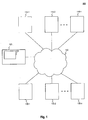
- Fig. 1 depicts a system 100 in which the disclosed search tool may be implemented.
- System 100 may include, for example, documents 110-1, 110-2, etc., through 110-n, central computer system 120, which includes search tool 122, user computer systems 130-1, 130-2, etc., through 130-n, and network 140.
- System 100 may include additional components as well.
- Documents 110-1 through 110-n may include any number of searchable documents that may be retrieved and viewed by a user.
- each document 110-1 through 110-n may be stored on a storage system accessible via the Internet using a universal resource locator (URL) or other address identifier.
- Each document may thus be Web page or other document accessible via a URL or network 140.
- Copies of documents 110-1 through 110-n and/or document information associated with documents 110-1 through 110-n may be stored on central computer system 120.
- Documents 110-1 through 110-n may be retrievable from publicly available sources (e.g., Web logs ("blogs"), online newspaper articles, government Websites, etc.), and may include any type of document accessible via the Internet (e.g., html documents, pdf documents, spreadsheet documents, word processing documents, etc.). Documents 110-1 through 110-n may be law-related documents that relate to statutes, court cases, and/or other legal content.
- publicly available sources e.g., Web logs ("blogs"), online newspaper articles, government Websites, etc.
- Documents 110-1 through 110-n may be law-related documents that relate to statutes, court cases, and/or other legal content.
- Network 140 may be any computer network capable of storing and providing access to documents 110-1 through 110-n, and capable of connecting central computer system 120 and user computer systems 130-1 through 130-n.
- network 140 is a computer network such as the Internet.
- Central computer system 120 may include one or more computers capable of providing access to documents 110-1 through 110-n and capable of communicating with user computer systems 130-1 through 130-n.
- Central computer system 120 may include any components typically associated with a search and retrieval information system, such as one or more processors, one or more storage devices, and one or more computer-readable media (e.g., memory storage) storing computer-readable instructions for implementing a search tool, such as search tool 122.
- the instructions may be implemented using one or more sets of computer language code (e.g., C++, Java, XML, AJAX, etc.).
- central computer system 120 may be a server system running a FAST ESPTM search platform. The server may collect and store, and/or provide access to documents 110-1 through 110-n.
- Central computer system 120 may include search tool 122 to allow users to search for and retrieve documents 110-1 through 110-n.
- Search tool 122 may include computer-readable instructions implemented via one or more computer programs that permit users to search for and retrieve law-related documents according to the methods described herein.
- search tool 122 includes instructions for implementing a user interface, instructions for processing requests and commands received from a user via the user interface, and additional instructions for performing searches, retrieving information, and filtering results, as described further below.
- the instructions may be carried out using software products and platforms such as, for example, JavaTM, OracleTM, AJAX, FAST ESPTM, etc.
- User computer systems 130-1 through 130-n may include one or more desktop computers, laptop computers, personal digital assistants (PDAs), cellular phones, or other processing devices capable of carrying out the methods disclosed herein.
- a user computer system 130-1 is a computer including one or more processors, one or more memory storage devices, one or more input devices (e.g., keyboard, mouse, touch pad, etc.), a display screen, a network interface, software (e.g., a Web browser program, associated plug-ins, word processing programs, etc.) configured to allow a user to access and use the search tool 122 described herein, and other components.
- Law-related documents or “legal content” as used herein refer to legal statutes, legal rules, court decisions, law-related blog entries, law-related magazine or newspaper articles, law-related electronic publications, and any other published material that relates to the law.
- Law-related documents may include documents from any source (e.g., government Web sites, private Web sites, subscription-based online sources, blog sites, newsgroups, etc.).
- the content of law-related documents may be scanned or otherwise analyzed (e.g., using a webcrawler, word or pattern recognition software, and/or similar technology) for particular terms, patterns, and/or categories of information (herein referred to as document information), which can be used to search for and filter search results.
- a law-related document may relate to a particular subject (e.g., science and technology, law and legal systems, government and public administration, etc.); may include geographical information (e.g., continent, country, state, or other geographical references found in the document, such as a geographical region for the publication, a geographical location mentioned in the document content, etc.); may be related to a particular industry (e.g., energy and utilities, health care, etc.); may include company, person, or university information; may be in a particular language; may include certain keywords or phrases; may be from a particular source or type of source (e.g., online newspaper, online blog, or government website, or a particular Web site, particular blog, etc.); may include document data (e.g., HTML or other title, document size, character encoding, document date, etc.); and may include additional information or metadata.
- geographical information e.g., continent, country, state, or other geographical references found in the document, such as a geographical region for the publication, a geographical location mentioned in the document content
- Each law-related document may also be associated with one or more legal topics, and can thus be classified based on one or more fields of law (e.g., criminal law and procedure, computer and Internet law, governments, communications law, patent law, etc.).
- Each law-related document may also include citations to one or more sources and/or sections or sub-sections within those sources (e.g., reporters, statutes, sections within statutes, rules, sections within rules, court cases, websites, blog sites, etc.).
- the document information for a particular document may be extracted, stored, and indexed so that the document can be searched for based on the information.
- the document information may be obtained from the document by using, for example, text or pattern recognition programmed to recognize certain text or patterns in the document content that match certain criteria (e.g., particular words, citation formats, numerical information, etc.), dictionaries, or other information matching processes.
- each category of information associated with a document may have one or more sub-categories.
- the subject "science and technology” may have one or more sub-categories (e.g., ecology and environmental science, engineering, earth and atmospheric science, biology, etc.) also associated with the document, and thus may be indexed in a hierarchical manner.
- the category and sub-category information about a law-related document can be stored and indexed so that the document can later be searched for based on the information, according to the embodiments disclosed herein.
- documents are collected based on administrator selection and/or webcrawler programs that collectively search the Web for law-related articles.
- an administrator may visit certain sources, such as government websites, online newspapers, blogs, etc., that include legal content, and may use a webcrawler to add documents (e.g., web pages) retrieved from the sources to the set of documents 110-1 through 110-n.
- documents may be indexed based on their content (e.g., based on extracted document information) so that they can be retrieved in response to a search request.
- users may suggest to add certain documents (e.g., web pages) to the set of documents 110-1 through 110-n by, for example, submitting one or more URLs using a graphical user interface (GUI) as further described below.
- GUI graphical user interface
- Figs. 2a-2n depict an exemplary graphical user interface (GUI) 200 for implementing search tool 122 to search for, filter, and retrieve law-related documents.
- GUI 200 may be implemented using a Web browser or other browser program, and may include a number of windows for implementing a search.
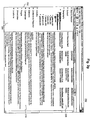
- Fig. 2a depicts an initial search query window 201
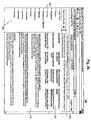
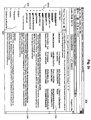
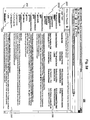
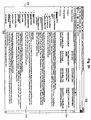
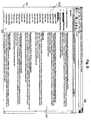
- Figs. 2b - 2i depict a search results window 202
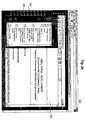
- Figs. 2j and 2k depict a document view window 203
- Fig. 2l depicts a recommended source search window 204
- Fig. 2m depicts an integrated search query window 205
- Fig. 2n depicts an integrated search results window 206.
- Fig. 2a depicts a search query window 201 for entering an initial search by a user.
- Search query window 201 may include search entry box 2011 and search button 2012.
- a user may input text (e.g., one or more terms, using optional boolean expressions or other known search expressions) into search entry box 2011 and select search button 2012 to execute a search for the entered text.
- search entry box and search button are shown, other mechanisms for initiating a search query may be used.
- search results window 202 may include information related to a result set of documents retrieved as a result of a search entered by a user.
- search results window 202 may include a result set portion 210, a filter portion 220, and a recommended source portion 230.
- Result set portion 210 includes a list of documents retrieved as a result of a search.
- search tool 122 may search for documents from document set 110-1 through 110-n that include the term or terms of the search query.
- a scrollable list of resulting documents may be returned to GUI 200.
- a search for "nepa compliance" was executed, and the result set includes 1,629 documents.
- the result set is displayed in result set portion 210 of search results window 202 as a scrollable, navigable list of documents. For example, a user may navigate through the list using navigation buttons 2101 and/or scroll bar 2102.
- a user may select a document included in the result set list (e.g., by clicking on a link, etc.) in order to view the document.
- a document view window 203 such as depicted in Figs. 2j and 2k may be displayed.
- the document view window 203 is described further below.
- a search may result in a large number of results (e.g., thousands, hundreds of thousands, etc.).
- a user may filter the result set to search for particular categories of documents.
- Filter portion 220 may include hierarchical, expandable filters that can be selected to narrow search results.
- the filters may be organized according to different taxonomies. A user may then select one or more categories or sub-categories within one or more of the taxonomies to filter search results.
- the different taxonomies may include filtering documents according to legal topic (e.g., criminal law and procedure, computer and Internet law, governments, communications law, patent law, etc.); subject (e.g., science and technology, law and legal systems, government and public administration, etc.); geography (e.g., continent, country, state, or other geographical region); industry (e.g., energy and utilities, health care, etc.); citations included in the documents (e.g., statutes, court decisions, etc.); company; person; university; language; keywords or phrases; document source or type of source (e.g., online newspaper, online blog, or government website, or a particular Web site, particular blog, etc.); or other taxonomies.
- legal topic e.g., criminal law and procedure, computer and Internet law, governments, communications law, patent law, etc.
- subject e.g., science and technology, law and legal systems, government and public administration, etc.
- geography e.g., continent, country, state, or other geographical region
- industry
- a user may use filter portion 220 to select one or more taxonomies and/or categories within the taxonomies to narrow the results of a search. For example, as depicted in Fig. 2c , a user may select the "legal topic" taxonomy, in which case a hierarchical list 2201 of categories representing different legal topics may be displayed. The categories included within the selected taxonomy for a particular result set of documents may only be categories that are associated with at least one of the documents in the result set. In other words, a search for "nepa compliance" may return documents that have been indexed as being related to environmental law, government, energy & utilities, etc., but may not return any documents related to family law.
- the categories of environmental law, government, energy & utilities, etc. are included in the legal topic taxonomy and may be displayed in filter portion 220 of search results window 202 for the "nepa compliance" search query, but a category for family law will not appear.
- a predetermined number of categories maybe initially shown (e.g., five, ten, etc.), but the list of categories may be expanded by a user selection (e.g., by selecting the a "see more results" link, such as depicted in list 2201).
- a user selection e.g., by selecting the a "see more results" link, such as depicted in list 2201.
- an indication of the number or percentage of the documents in the result set that are classified in each category may also be shown.
- the displayed categories may be ordered based on these numbers or percentages. In this way, a user can immediately and easily determine which categories in the taxonomy are most prevalent for the terms included in the search query. For example, as depicted in Fig.
- search tool 122 organizes the disparate, decentralized legal content publicly available on the Web in a manner that expedites the review of documents related to particular legal fields. As a result, a user need not separately search different government sites, blogs, and newspaper and magazine sources, but instead can use search tool 122 to quickly search for only the relevant topics of legal content on the Web that the user desires.
- Each category within a taxonomy may include additional sub-categories, which may also be used to further filter search results.
- additional sub-categories may also be used to further filter search results.
- a hierarchical list 2202 of sub-categories for the environmental law category has been selected (e.g., National Environmental Policy Act, Natural Resources & Public Lands, etc.).
- a user may filter the search results by selecting one or more categories and/or sub-categories.
- the results list displayed in result set portion 210 of search results window 202 is updated to only include those documents matching the category or sub-category, and the selected category or sub-category may be displayed in an applied filter portion 240 of search results window 202 (shown, for example, in Fig. 2e ).
- applied filter portion 240 indicates to a user which filters have been applied to the result set.
- Fig. 2e depicts an exemplary search for which the search results were filtered based on two different sub-categories within the legal topic taxonomy.
- Additional filter categories or sub-categories can be added (e.g., by selecting a link or other selection object) and existing applied filter categories or sub-categories can be removed (e.g., by selecting a delete icon or other selection object within applied filter portion 240).
- Filter portion 220 of search results window 202 may also permit a user to filter search results based on subject (depicted in Fig. 2f ), geographical location (depicted in Fig. 2g ), industry (depicted in Fig. 2h ), and other taxonomies.
- multiple filters may be applied from different taxonomies. For example, the user may select a particular legal topic from the legal topic taxonomy and also select a geographical location from the geographical taxonomy to narrow a set of search results.
- filter portion 220 of search results window 202 additionally includes a taxonomy for filtering search results according to citations.
- each law-related document may include citations to one or more sources and/or sections or sub-sections within those sources (e.g., reporters, statutes, rules, court cases, websites, blog sites, etc.).
- sources e.g., reporters, statutes, rules, court cases, websites, blog sites, etc.
- a user may therefore narrow search results based on the citations included in the documents of the search results, and may also view the number of cites to particular sources or sections and sub-sections within those sources for a result set of documents.
- Citation list 2203 represents a set of citations present in the result set of documents for the selected search.
- Citation list 2203 may be organized hierarchically to include at one level a publication category (e.g., law reporter, etc.), at another level a citation sub-category (e.g., statutes, rules, court decisions, etc.).
- Each level of the hierarchy may be expanded or contracted. Only a single level may be included for all of the citations (e.g., by selecting the "Citations" taxonomy shown in Fig. 2b ), the single level including a category for each citation without including a level for publications.
- An indication of the percentage or number of times each citation was cited in the document set may be included, thereby serving as a visual aid to quickly indicate to a user which statutes, court decisions, etc., are most often cited for the result set.
- Fig. 2i only depicts bars indicating a relative number of cites for each citation, an indication of the actual number of cites for each citation, or the percentage of cites to each citation compared to the total number of cites in the result set may be included as well.
- a user can immediately determine which statutes, rules, court decisions, etc., are most often cited in documents related to a particular search term.
- a user may wish to determine which statute is most often cited in documents related to "nepa compliance.”
- the user need only enter the term "nepa compliance” as a search query, and select "Citations by Reporter” or “Citations” as a filter, and search tool 122 provides a search results window 202 that displays a list of the statutes cited in the result set for "nepa compliance" in order from most frequently cited to least frequently cited.
- a user may select a publication or citation displayed in citation list 2203 (e.g., by selecting a link) in order to filter the search results to include only documents that include the selected citation.
- result set portion 210 of search results window 202 will display a list of search results which include the selected citation.
- the resulting search results may then be further filtered according to one or more additional categories or sub-categories from filter portion 220.
- a user may alternatively or additionally select a link for each citation in citation list 2203 to further research the citation (e.g., view the citation, search for documents that cite to the citation, determine whether the citation, if a legal citation, is still valid, etc.). For example, a user may select a link to search for documents that cite to the a particular citation to determine whether the citation is still valid, which may cause a pop-up window to appear for a proprietary search tool (e.g., a LexisNexis ® proprietary legal search tool), which permits a user to perform the appropriate analysis.
- a proprietary search tool e.g., a LexisNexis ® proprietary legal search tool
- search tool 122 retrieves the selected document (e.g., from its source on the Internet or from local storage on central computer system 120), and transmits the document to the user at one of computer systems 130-1 through 130-n for display.
- a selected document 250 may be displayed in document view window 203.
- Document view window 203 may be overlaid over search results window 202.
- a user may view the selected document without the need to open a new browser window.
- the user can navigate within the selected document in the same way a user navigates in a standard Web browser (e.g., selecting links, entering text into text boxes, scrolling, etc.).
- Document view window 203 may be closed, for example, by selecting a "close" selection object, which returns the display to search results window 202.
- document view window 203 is implemented using computer code such as AJAX, for example.
- a selected document 250 may be displayed in document view window 203 in different formats, depending on the type of document.
- an HTML-type document may be displayed in document view window 203 as a standard HTML web page.
- a PDF-type document, or word processing or spreadsheet-type document may be displayed in document view window 203 as it would appear in its native format.
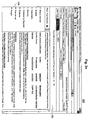
- Fig. 2k depicts a PDF-type document displayed with a review window, a table of contents window, and various tool bars and icons that would be displayed in a native, non-web-based format.
- a user may suggest one or more documents to be added to the set of documents 110-1 through 110-n. For example, should a user know of a URL on the web that includes legal content, the user may select a "Suggest A Site" link or the like, which permits the user to send a message to central computer system 120 to request that one or more pages associated with the URL be added to the set of documents 110-1 through 110-n. The request may be reviewed by an administrator, who may then add the URL and/or related URLs to the set of documents 110-1 through 110-n.
- search results window 202 includes recommended source portion 230.
- Recommended source portion 230 includes a list of a number of sources that may be of particular relevance to the entered search query. For example, as shown in Fig. 2b , for a search for "nepa compliance," recommended source portion 230 includes a number of sources (e.g., Natural Gas Week, Foster Natural Gas Report, National Environmental Policy Act of 1969 (NEPA) Legislative History, etc.), which may be likely to include information related to the entered search query.
- System 100 may include any number of sources which can be recommended as a result of a search. Sources may include legal sources, such as treatises, industry specific journals, government web sites, etc., or other topical sources. A user may not be aware of all of the available sources in which to search for documents, so recommended source portion 230 serves as an aid for recommending topically relevant sources.
- a user may select one of the sources listed in recommended source portion 230 to search that source using the terms included in the search query.
- One or more of the recommended sources may be searchable only using a proprietary search tool (e.g., a fee-based service that may require a username, password, etc.). If one of these sources is selected and a user is not already logged in to the proprietary search tool, the user may be prompted for login information (e.g., usemame, password, etc.). If a user is already logged into the proprietary search tool, however, then no further login information may be necessary, and the search terms from the search query may be automatically included in a search query for the selected source.
- login information e.g., usemame, password, etc.
- the terms from the initial search query are input into a search entry box for the selected source, and a user may review the search terms before selecting to execute a search in the selected source.
- the terms from the initial search query are automatically used to execute a search query in the selected source, without user intervention.
- Fig. 2l depicts exemplary search results 260 for a search in a selected source, displayed in a recommended source search window 204.
- Window 204 may be overlaid over search results window 202, may take over GUI 200 in place of search results window 202, or may appear in a new browser window.
- search results 260 include search results from a selected source (e.g., National Environmental Policy Act of 1969 (NEPA) Legislative History) from recommended source portion 230 of search results window 202, for the search terms initially entered into search entry box 2011.
- NEPA National Environmental Policy Act of 1969
- a user may select one or more of the search results to view the resulting document.
- an integrated search query window 205 as shown in Fig. 2m may be included as part of a proprietary search tool.
- Integrated search query window 205 may include a search form 270 that includes features available for the proprietary search tool (e.g., search query entry portion 2702, source selection buttons for the search, etc.) and may also include a selection box, such as box 2701, that instructs the system to search the web for publicly available documents, such as documents 110-1 through 110-n discussed previously.
- a window such as integrated search results window 206 depicted in Fig. 2n may be displayed.
- Integrated search results window 206 shows tabs 2801 which may be alternately selected to view either proprietary search results (e.g., "Lexis Results") or non-proprietary results (e.g., "WebResults").
- proprietary search results e.g., "Lexis Results”
- non-proprietary results e.g., "WebResults”
- web search results 280 are displayed in response to a search executed using an integrated search query window integrated with a proprietary search tool.
- the search results 280 are in the same format as the search results depicted in search results window 202, except that search results 280 are displayed as one tab that is a portion of an integrated search results window 206.
- a user may perform one or more of the steps discussed previously to view a document, filter a search, search a recommended resource, etc.
- Integrated search results window 206 may be used to avoid the need to require a login into the proprietary search tool when a user selects a recommended resource in recommended source portion 230. Therefore, if a user selects a recommended source from integrated search results window 206, the resulting search results may be automatically displayed in the "Lexis Results" tab or another tab that is part of the proprietary search product.
- the sources that appear in recommended source portion 230 may be determined according to one or more selection methods.
- the recommended sources may be determined based on a search-results-based analysis.
- a result set of documents responsive to and retrieved as a result of a search query may be analyzed to determine which sources to recommend in recommended source portion 230.
- each resulting document has associated document information that may be indexed (e.g., an associated term vector that includes a set of terms and keywords extracted from the document).
- each resulting document may have an associated source tag that indicates one or more recommended sources related to the document.
- the source tag may be added as metadata to the document by the document author, an administrator, or other manual or automatic procedure.
- Central computer system 120 may additionally store a source database including sources and one or more keywords and/or concepts associated with each source.
- the source database is constructed by sampling documents from each topical collection or source, and extracting keywords or phrases from each sampled document. The keywords and phrases may then be combined for the set of sampled documents to determine keywords, topics, and/or concepts associated with the source.
- the keywords, topics, and/or concepts may be organized in a prioritized manner based on the frequency of occurrence of the extracted keywords and phrases, and may be stored in a database or other data store as a term vector.
- the result set of retrieved documents for the search query is analyzed to determine, based on each document's associated source tag, which sources are most frequently associated with the result set of documents.
- the document information for each document in the result set is analyzed to determine a most frequent set of document information.
- the most frequently occurring document information among the documents in the result set which may be stored as a term vector, may then be compared to the term vector associated with each source in the source database to determine which sources are most likely to be relevant to the result set of documents. For example, sources having term vectors in the source database with the highest degree of similarity to the term vector representing the result set of documents may be included as recommended sources.
- Additional analyses or algorithms may be used in order to select the recommended sources. For example, a combined analysis may be used that determines both a most frequent source tag, and most frequent document information for a result set of documents, and assigns a certain weight to the source tags and a certain weight to the document information to determine which sources are most relevant to the search query. As another example, each document in the result set may be assigned a weight value, such that source tags or document information in that document may carry more weight towards determining a most relevant source. For example, documents that include a plurality of occurrences of an entered search term may be given more weight than documents that include only one occurrence of the search term.
- user information or other profile data for a user performing a search may indicate that a particular user prefers certain sources, or only subscribes to certain sources.
- those sources can be included in the list of recommended sources, or can be given priority in the list of recommended sources (e.g., placed at the top of the list, etc.).
- Exemplary methods for performing searches are depicted in Figs. 3a and 3b .
- the described methods may be carried out using the GUI 200 and system 100 described above.
- Fig. 3a depicts a method for searching for documents.
- central computer system 120 may receive a search query.
- the search query may include one or more search terms received from a search query window (e.g., search query window 201) of a user computer (e.g., one of user computer systems 130-1 through 130-n).
- a set of recommended sources may be determined and provided to a user. For example, using one or more of the recommended source selection methods described above, central computer system 120 may determine a set of recommended sources based on entered search terms and/or selected filters. The recommended sources may then be provided (e.g., transmitted over network 140) for display at one of user computer systems 130-1 through 130-n, to be displayed, for example, on GUI 200, as a list of sources in a recommended source portion 230 of a search results window 202.
- one of the displayed recommended sources is selected.
- the recommended source may be selected by a user clicking on a link or other selectable object for the recommended source.
- a search query may be executed in the selected source.
- the search query may include the same terms as the initial search query received from search query window 201.
- the selected source may be a proprietary search tool which requires a user login (e.g., either prior to the beginning of method 300 or during method 300).
- the search query executed in the selected source may be executed automatically (e.g., without a user re-entering search terms or selecting a search link) or may be executed with some user interaction (e.g., with a user changing or entering search terms and/or selecting a search link).
- the results of the search query may be provided for display.
- the results may be provided as a list of responsive documents obtained from the selected source and which include the search terms.
- the results may be provided in a window such as, for example, recommended source search window 204 shown in Fig. 2l .
- the results may be displayed in an integrated search tool (e.g., integrating a proprietary search tool and a public search tool), such as depicted in Figs. 2m and 2n .
- the results may be provided, for example, to one of user computer systems 130-1 through 130-n.
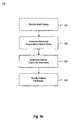
- Fig. 3b depicts a method for searching for documents, including determining citations cited in the documents.
- central computer system 120 may receive a search query.
- the search query may include one or more search terms received from a search query window (e.g., search query window 201) of a user computer (e.g., one of user computer systems 130-1 through 130-n).
- central computer system 120 may determine a result set of documents that is responsive to the search query. For example, a set of documents 110-1 through 110-n may be responsive to the search query.
- central computer system 120 may determine a set of citations included in the documents that are responsive to the search query.
- the citations may be determined in response to a user's selection of a "Citation" taxonomy, and may be collected by a webcrawler or other analysis program that extracts data having recognized citation formats from the documents.
- the citations may be stored and compiled as a list, such that each citation for the set of citations may be listed along with a frequency of occurrence for the citation within the set of documents.
- the set of citations is provided for display.
- central computer system 120 may transmit the citations to a user computer for display in filter portion 220 of search results window 202.
- the citations may be displayed alongside the responsive set of documents, such as depicted in search results window 202 of Fig. 2i .
- the displayed list may be organized based on frequency of citation occurrence, and may include an indicator of the frequency, such as an indicator bar (e.g., indicating relative frequency compared to other citations), a number of occurrences, or a percentage value.
- the user can determine the frequency of occurrence of the citations simply by viewing the displayed list and without having to perform any further selections or analysis.
- steps of method 300 and 302 can be combined, such that a search is performed based on one or more search terms, search results are determined, the search results are filtered according to one or more citations (and/or one or more other categories), a list of recommended sources is then provided based on the result set retrieved using the original search terms and the selected filter category, and a second search is then performed in a selected recommended source.
- one or more of the methods described above may additionally be combined with the selection of one or more categories from the "Legal Topic" taxonomy, such that a set of documents may be filtered to include only documents associated with a desired legal topic or set of legal topics.
- search tool 122 may be used to organize the heterogeneous legal content existing on the web so it can be searched and reviewed in a focused, efficient manner.
- Programs based on the written description and disclosed methods are within the skill of an experienced developer.
- the various programs or program modules can be created using any of the techniques known to one skilled in the art or can be designed in connection with existing software.
- program sections or program modules can be designed in or by means of .Net Framework, .Net Compact Framework (and related languages, such as Visual Basic, C, etc.), Java, C++, HTML, HTMUAJAX combinations, XML, or HTML with included Java applets.
- One or more of such software sections or modules can be integrated into a computer system or existing browser software.
- user computer systems 130-1 through 130-n and central computer system 120 are depicted as separate entities in communication over a network, one or more of computer systems 130-1 through 130-n and central computer system 120 may be included in a single device or system.
Landscapes
- Engineering & Computer Science (AREA)
- Databases & Information Systems (AREA)
- Theoretical Computer Science (AREA)
- Data Mining & Analysis (AREA)
- Physics & Mathematics (AREA)
- General Engineering & Computer Science (AREA)
- General Physics & Mathematics (AREA)
- Information Retrieval, Db Structures And Fs Structures Therefor (AREA)
Description
- This application claims the benefit of priority to
U.S. Provisional Application No. 60/960,793, filed on October 15, 2007 - The present disclosure is directed in general toward a system and method for searching for documents, and particularly toward a system and method for searching for law-related documents over a network.
- Various databases and search tools exist for searching for and reviewing documents, such as law-related documents, over a computer network. For example, LexisNexis® has a proprietary product for searching statutes, case law, articles from legal publications, and other law-related documents, as do other private and governmental entities. Other search tools exist as well, such as online search tools for searching legal content or general content on the Internet (e.g., Law.com, Google.com, Clusty.com, etc.).
- Some of these search tools permit users to perform a search and to filter the results according to certain categories. In addition, some existing search tools permit users to search for law-related documents on the Internet. However, these and other search tools leave room for improvement in order to provide a more user-friendly and effective search tool for searching for legal content on the Internet.
- The embodiments disclosed herein include new and improved search tool features that enhance the user searching experience and provide for more manageable, effective, and targeted searches.
- In one embodiment, a computer system is disclosed. The computer system includes one or more processors, and a memory storage storing one or more instructions for implementing a search tool. The instructions, when executed, instruct the computer system to perform a set of steps. The steps include receiving a search query from a user computer, the search query including one or more search terms to use to perform a first search. The steps further include, based on the one or more search terms, performing the first search to determine a set of law-related documents responsive to the search query, each individual law-related document of the set of law-related documents including a source tag indicating one or more recommended sources related to the individual document; from the source tags, determining sources most frequently associated with the set of documents, and providing for display at the user computer a list of one or more law-related documents of the set of law-related documents responsive to the search query, a list of one or more recommended sources in which to perform a second search for documents, wherein the one or more recommended sources are based on analysis of the documents responsive to the search query such that the one or more recommended sources include the said sources most frequently associated with the set of law-related documents, and a list of legal topics associated with the responsive documents.
- In another embodiment, a method for searching for documents is disclosed. The method includes receiving a first search query from a user computer, the first search query including one or more search terms. The method also includes determining a set of documents responsive to the search query, each individual document of the set of documents including a source tag indicating one or more recommended sources related to the individual document; from the source tags, determining sources most frequently associated with the set of documents; and providing for display a set of one or more recommended sources in which to search for documents, wherein the set of one or more recommended sources includes the said sources most frequently associated with the set of documents. The method additionally includes receiving a selection of a recommended source from the set of one or more recommended sources. The method further includes, based on the selection, executing a second search query in the selected recommended source, the second search query including the one or more search terms, and in response to the second search query, providing for display a list of one or more documents responsive to the second search query.
- A method for searching for documents is disclosed. The method includes receiving a search query entered into a search query window, the search query including one or more search terms, determining a set of documents responsive to the search query, determining a set of citations cited in the set of documents, and providing for display the set of citations, so that the most frequent citation can be determined by a user by viewing a displayed list of the set of citations.
- It is to be understood that both the foregoing general description and the following detailed description are exemplary and explanatory only and are not restrictive of the embodiments claimed.
-
US7209915 discloses a method and system for routing a query to one or more providers. The system may include a search interface for presenting a service list including one or more services offered by the one or more providers, permitting selection of one or more of the one or more services, and a query entry for receiving input of the query. A search processor is capable of receiving and parsing the query. A service recognizer for a particular provider is capable of receiving and analyzing one or more terms of the query to determine if the particular provider is a match for the query. A query router can route the query to the particular provider if the particular provider is determined to be a match and block the query to the particular provider if the particular provider is determined not to be a match. A results interface presents results of the query. -
US5960422 discloses an automated system for use in an information retrieval system, which optimizes selection of sources in a distributed information system for query searching. A training set of documents is created for each source by randomly selecting significant portions of the documents thereof. A test set documents is created for each source from the documents not included in the training set. Each document in the training and test set is defined in terms of features/attributes and a name as samples representing individual sources. Pattern recognizing means process the samples to recognize patterns in the documents to distinguish one source from another source. Rule generating means provide a set of DNF rules from the patterns as a model representing each source. The test set of documents is expressed in terms of DNF rules. Evaluating means create a final classification model after minimizing any error between the DNF rules for the training and test sets. Query means enable a user to express a query in terms of features/attributes and DNF rules which when applied to the final model automatically select the optimal sources for query searching. The sources may also be expressed in taxonomic groupings which reduces the number of data sources and speeds query searching on a distributive information network by a user. - The accompanying drawings, which are incorporated in and constitute a part of this disclosure, illustrate various disclosed embodiments. In the drawings:
-
Figure 1 illustrates an exemplary system for implementing a search tool, consistent with certain disclosed embodiments; -
Figures 2a - 2n illustrate different portions of an exemplary graphical user interface (GUI) for implementing a search tool, consistent with certain disclosed embodiments; and -
Figures 3a and3b illustrate methods of using a search tool, consistent with certain disclosed embodiments. - Reference will now be made in detail to the disclosed embodiments, examples of which are illustrated in the accompanying drawings. Wherever possible, the same reference numbers will be used throughout the drawings to refer to the same or like parts.
-
Fig. 1 depicts asystem 100 in which the disclosed search tool may be implemented.System 100 may include, for example, documents 110-1, 110-2, etc., through 110-n,central computer system 120, which includessearch tool 122, user computer systems 130-1, 130-2, etc., through 130-n, andnetwork 140.System 100 may include additional components as well. - Documents 110-1 through 110-n may include any number of searchable documents that may be retrieved and viewed by a user. For example, each document 110-1 through 110-n may be stored on a storage system accessible via the Internet using a universal resource locator (URL) or other address identifier. Each document may thus be Web page or other document accessible via a URL or
network 140. Copies of documents 110-1 through 110-n and/or document information associated with documents 110-1 through 110-n may be stored oncentral computer system 120. Documents 110-1 through 110-n may be retrievable from publicly available sources (e.g., Web logs ("blogs"), online newspaper articles, government Websites, etc.), and may include any type of document accessible via the Internet (e.g., html documents, pdf documents, spreadsheet documents, word processing documents, etc.). Documents 110-1 through 110-n may be law-related documents that relate to statutes, court cases, and/or other legal content. - Network 140 may be any computer network capable of storing and providing access to documents 110-1 through 110-n, and capable of connecting
central computer system 120 and user computer systems 130-1 through 130-n. For example,network 140 is a computer network such as the Internet. -
Central computer system 120 may include one or more computers capable of providing access to documents 110-1 through 110-n and capable of communicating with user computer systems 130-1 through 130-n.Central computer system 120 may include any components typically associated with a search and retrieval information system, such as one or more processors, one or more storage devices, and one or more computer-readable media (e.g., memory storage) storing computer-readable instructions for implementing a search tool, such assearch tool 122. The instructions may be implemented using one or more sets of computer language code (e.g., C++, Java, XML, AJAX, etc.). For example,central computer system 120 may be a server system running a FAST ESP™ search platform. The server may collect and store, and/or provide access to documents 110-1 through 110-n.Central computer system 120 may includesearch tool 122 to allow users to search for and retrieve documents 110-1 through 110-n. -
Search tool 122 may include computer-readable instructions implemented via one or more computer programs that permit users to search for and retrieve law-related documents according to the methods described herein. For example,search tool 122 includes instructions for implementing a user interface, instructions for processing requests and commands received from a user via the user interface, and additional instructions for performing searches, retrieving information, and filtering results, as described further below. The instructions may be carried out using software products and platforms such as, for example, Java™, Oracle™, AJAX, FAST ESP™, etc. - User computer systems 130-1 through 130-n may include one or more desktop computers, laptop computers, personal digital assistants (PDAs), cellular phones, or other processing devices capable of carrying out the methods disclosed herein. For example, a user computer system 130-1 is a computer including one or more processors, one or more memory storage devices, one or more input devices (e.g., keyboard, mouse, touch pad, etc.), a display screen, a network interface, software (e.g., a Web browser program, associated plug-ins, word processing programs, etc.) configured to allow a user to access and use the
search tool 122 described herein, and other components. - Although the figures and descriptions below are described with regard to law-related documents, the disclosed embodiments may apply to other systems that maintain searchable and retrievable documents.
- The terms "law-related documents" or "legal content" as used herein refer to legal statutes, legal rules, court decisions, law-related blog entries, law-related magazine or newspaper articles, law-related electronic publications, and any other published material that relates to the law. Law-related documents may include documents from any source (e.g., government Web sites, private Web sites, subscription-based online sources, blog sites, newsgroups, etc.). The content of law-related documents may be scanned or otherwise analyzed (e.g., using a webcrawler, word or pattern recognition software, and/or similar technology) for particular terms, patterns, and/or categories of information (herein referred to as document information), which can be used to search for and filter search results. For example, a law-related document may relate to a particular subject (e.g., science and technology, law and legal systems, government and public administration, etc.); may include geographical information (e.g., continent, country, state, or other geographical references found in the document, such as a geographical region for the publication, a geographical location mentioned in the document content, etc.); may be related to a particular industry (e.g., energy and utilities, health care, etc.); may include company, person, or university information; may be in a particular language; may include certain keywords or phrases; may be from a particular source or type of source (e.g., online newspaper, online blog, or government website, or a particular Web site, particular blog, etc.); may include document data (e.g., HTML or other title, document size, character encoding, document date, etc.); and may include additional information or metadata.
- Each law-related document may also be associated with one or more legal topics, and can thus be classified based on one or more fields of law (e.g., criminal law and procedure, computer and Internet law, governments, communications law, patent law, etc.). Each law-related document may also include citations to one or more sources and/or sections or sub-sections within those sources (e.g., reporters, statutes, sections within statutes, rules, sections within rules, court cases, websites, blog sites, etc.).
- The document information for a particular document may be extracted, stored, and indexed so that the document can be searched for based on the information. The document information may be obtained from the document by using, for example, text or pattern recognition programmed to recognize certain text or patterns in the document content that match certain criteria (e.g., particular words, citation formats, numerical information, etc.), dictionaries, or other information matching processes.
- In addition, each category of information associated with a document may have one or more sub-categories. For example, the subject "science and technology" may have one or more sub-categories (e.g., ecology and environmental science, engineering, earth and atmospheric science, biology, etc.) also associated with the document, and thus may be indexed in a hierarchical manner. The category and sub-category information about a law-related document can be stored and indexed so that the document can later be searched for based on the information, according to the embodiments disclosed herein.
- In one example, documents are collected based on administrator selection and/or webcrawler programs that collectively search the Web for law-related articles. For example, an administrator may visit certain sources, such as government websites, online newspapers, blogs, etc., that include legal content, and may use a webcrawler to add documents (e.g., web pages) retrieved from the sources to the set of documents 110-1 through 110-n. Accordingly those documents may be indexed based on their content (e.g., based on extracted document information) so that they can be retrieved in response to a search request. In a further example, users may suggest to add certain documents (e.g., web pages) to the set of documents 110-1 through 110-n by, for example, submitting one or more URLs using a graphical user interface (GUI) as further described below.
- An exemplary system and method for searching for law-related documents will now be described in connection with
Figs. 2a - 2n . -
Figs. 2a-2n depict an exemplary graphical user interface (GUI) 200 for implementingsearch tool 122 to search for, filter, and retrieve law-related documents. For example,GUI 200 may be implemented using a Web browser or other browser program, and may include a number of windows for implementing a search. For example,Fig. 2a depicts an initialsearch query window 201,Figs. 2b - 2i depict a search resultswindow 202,Figs. 2j and2k depict adocument view window 203,Fig. 2l depicts a recommendedsource search window 204,Fig. 2m depicts an integratedsearch query window 205, andFig. 2n depicts an integratedsearch results window 206. -
Fig. 2a depicts asearch query window 201 for entering an initial search by a user.Search query window 201 may includesearch entry box 2011 andsearch button 2012. A user may input text (e.g., one or more terms, using optional boolean expressions or other known search expressions) intosearch entry box 2011 andselect search button 2012 to execute a search for the entered text. Although a search entry box and search button are shown, other mechanisms for initiating a search query may be used. - In response to an executed search query, a search results window, such as
search results window 202 depicted inFig. 2b may be displayed. Search resultswindow 202 may include information related to a result set of documents retrieved as a result of a search entered by a user. For example,search results window 202 may include a result setportion 210, afilter portion 220, and a recommendedsource portion 230. - Result set
portion 210 includes a list of documents retrieved as a result of a search. For example, in response to a search query,search tool 122 may search for documents from document set 110-1 through 110-n that include the term or terms of the search query. A scrollable list of resulting documents may be returned toGUI 200. For example, as depicted inFig. 2b , a search for "nepa compliance" was executed, and the result set includes 1,629 documents. The result set is displayed in result setportion 210 ofsearch results window 202 as a scrollable, navigable list of documents. For example, a user may navigate through the list using navigation buttons 2101 and/orscroll bar 2102. - A user may select a document included in the result set list (e.g., by clicking on a link, etc.) in order to view the document. In response, a
document view window 203, such as depicted inFigs. 2j and2k may be displayed. Thedocument view window 203 is described further below. - In certain situations, a search may result in a large number of results (e.g., thousands, hundreds of thousands, etc.). Using
filter portion 220 of the search resultswindow 202, a user may filter the result set to search for particular categories of documents. -
Filter portion 220 may include hierarchical, expandable filters that can be selected to narrow search results. The filters may be organized according to different taxonomies. A user may then select one or more categories or sub-categories within one or more of the taxonomies to filter search results. - For example, the different taxonomies may include filtering documents according to legal topic (e.g., criminal law and procedure, computer and Internet law, governments, communications law, patent law, etc.); subject (e.g., science and technology, law and legal systems, government and public administration, etc.); geography (e.g., continent, country, state, or other geographical region); industry (e.g., energy and utilities, health care, etc.); citations included in the documents (e.g., statutes, court decisions, etc.); company; person; university; language; keywords or phrases; document source or type of source (e.g., online newspaper, online blog, or government website, or a particular Web site, particular blog, etc.); or other taxonomies.
- A user may use
filter portion 220 to select one or more taxonomies and/or categories within the taxonomies to narrow the results of a search. For example, as depicted inFig. 2c , a user may select the "legal topic" taxonomy, in which case ahierarchical list 2201 of categories representing different legal topics may be displayed. The categories included within the selected taxonomy for a particular result set of documents may only be categories that are associated with at least one of the documents in the result set. In other words, a search for "nepa compliance" may return documents that have been indexed as being related to environmental law, government, energy & utilities, etc., but may not return any documents related to family law. In such a case, the categories of environmental law, government, energy & utilities, etc., are included in the legal topic taxonomy and may be displayed infilter portion 220 ofsearch results window 202 for the "nepa compliance" search query, but a category for family law will not appear. - When a taxonomy is selected, a predetermined number of categories maybe initially shown (e.g., five, ten, etc.), but the list of categories may be expanded by a user selection (e.g., by selecting the a "see more results" link, such as depicted in list 2201). In addition to a list of the categories, an indication of the number or percentage of the documents in the result set that are classified in each category may also be shown. The displayed categories may be ordered based on these numbers or percentages. In this way, a user can immediately and easily determine which categories in the taxonomy are most prevalent for the terms included in the search query. For example, as depicted in
Fig. 2c , the legal topics that are most frequently associated with the result set from the "nepa compliance" search query are environmental law, governments, and energy and utilities law, shown with bars indicating a relative frequency of occurrence for each legal topic. By depicting the search results according to legal topic,search tool 122 organizes the disparate, decentralized legal content publicly available on the Web in a manner that expedites the review of documents related to particular legal fields. As a result, a user need not separately search different government sites, blogs, and newspaper and magazine sources, but instead can usesearch tool 122 to quickly search for only the relevant topics of legal content on the Web that the user desires. - Each category within a taxonomy may include additional sub-categories, which may also be used to further filter search results. For example, as depicted in
Fig. 2d , ahierarchical list 2202 of sub-categories for the environmental law category has been selected (e.g., National Environmental Policy Act, Natural Resources & Public Lands, etc.). A user may filter the search results by selecting one or more categories and/or sub-categories. In one example, upon selection of a category or sub-category for filtering, the results list displayed in result setportion 210 ofsearch results window 202 is updated to only include those documents matching the category or sub-category, and the selected category or sub-category may be displayed in an appliedfilter portion 240 of search results window 202 (shown, for example, inFig. 2e ). In this way, appliedfilter portion 240 indicates to a user which filters have been applied to the result set. -
Fig. 2e depicts an exemplary search for which the search results were filtered based on two different sub-categories within the legal topic taxonomy. As a result, in the example ofFig. 2e , only three documents remain that match both of the selected sub-categories. Additional filter categories or sub-categories can be added (e.g., by selecting a link or other selection object) and existing applied filter categories or sub-categories can be removed (e.g., by selecting a delete icon or other selection object within applied filter portion 240). -
Filter portion 220 ofsearch results window 202 may also permit a user to filter search results based on subject (depicted inFig. 2f ), geographical location (depicted inFig. 2g ), industry (depicted inFig. 2h ), and other taxonomies. In addition, multiple filters may be applied from different taxonomies. For example, the user may select a particular legal topic from the legal topic taxonomy and also select a geographical location from the geographical taxonomy to narrow a set of search results. - In one example,
filter portion 220 ofsearch results window 202 additionally includes a taxonomy for filtering search results according to citations. As described previously, each law-related document may include citations to one or more sources and/or sections or sub-sections within those sources (e.g., reporters, statutes, rules, court cases, websites, blog sites, etc.). A user may therefore narrow search results based on the citations included in the documents of the search results, and may also view the number of cites to particular sources or sections and sub-sections within those sources for a result set of documents. - For example, as depicted in
Fig. 2i , the "Citations by Reporter" taxonomy has been selected. As a result, ahierarchical citation list 2203 of reporters and statutes is displayed.Citation list 2203 represents a set of citations present in the result set of documents for the selected search.Citation list 2203 may be organized hierarchically to include at one level a publication category (e.g., law reporter, etc.), at another level a citation sub-category (e.g., statutes, rules, court decisions, etc.). Each level of the hierarchy may be expanded or contracted. Only a single level may be included for all of the citations (e.g., by selecting the "Citations" taxonomy shown inFig. 2b ), the single level including a category for each citation without including a level for publications. - An indication of the percentage or number of times each citation was cited in the document set may be included, thereby serving as a visual aid to quickly indicate to a user which statutes, court decisions, etc., are most often cited for the result set. Although
Fig. 2i only depicts bars indicating a relative number of cites for each citation, an indication of the actual number of cites for each citation, or the percentage of cites to each citation compared to the total number of cites in the result set may be included as well. As a result, a user can immediately determine which statutes, rules, court decisions, etc., are most often cited in documents related to a particular search term. For example, a user may wish to determine which statute is most often cited in documents related to "nepa compliance." Thus, to do so, as depicted inFigs. 2a ,2b and2i , the user need only enter the term "nepa compliance" as a search query, and select "Citations by Reporter" or "Citations" as a filter, andsearch tool 122 provides a search resultswindow 202 that displays a list of the statutes cited in the result set for "nepa compliance" in order from most frequently cited to least frequently cited. - A user may select a publication or citation displayed in citation list 2203 (e.g., by selecting a link) in order to filter the search results to include only documents that include the selected citation. In response, result set
portion 210 ofsearch results window 202 will display a list of search results which include the selected citation. The resulting search results may then be further filtered according to one or more additional categories or sub-categories fromfilter portion 220. - A user may alternatively or additionally select a link for each citation in
citation list 2203 to further research the citation (e.g., view the citation, search for documents that cite to the citation, determine whether the citation, if a legal citation, is still valid, etc.). For example, a user may select a link to search for documents that cite to the a particular citation to determine whether the citation is still valid, which may cause a pop-up window to appear for a proprietary search tool (e.g., a LexisNexis® proprietary legal search tool), which permits a user to perform the appropriate analysis. - At any point when a list of one or more documents is displayed in result set
portion 210 ofsearch results window 202, a user may view a listed document by selecting a link or other selection object for the listed document. Upon selection of one of the listed documents,search tool 122 retrieves the selected document (e.g., from its source on the Internet or from local storage on central computer system 120), and transmits the document to the user at one of computer systems 130-1 through 130-n for display. - As depicted in
Fig. 2j , a selecteddocument 250 may be displayed indocument view window 203.Document view window 203 may be overlaid oversearch results window 202. As a result, a user may view the selected document without the need to open a new browser window. The user can navigate within the selected document in the same way a user navigates in a standard Web browser (e.g., selecting links, entering text into text boxes, scrolling, etc.). In one example, while a user is navigating a selected document indocument view window 203, the user cannot make any selections insearch results window 202.Document view window 203 may be closed, for example, by selecting a "close" selection object, which returns the display to searchresults window 202. In one example,document view window 203 is implemented using computer code such as AJAX, for example. - A selected
document 250 may be displayed indocument view window 203 in different formats, depending on the type of document. For example, an HTML-type document may be displayed indocument view window 203 as a standard HTML web page. However, a PDF-type document, or word processing or spreadsheet-type document may be displayed indocument view window 203 as it would appear in its native format. For example,Fig. 2k depicts a PDF-type document displayed with a review window, a table of contents window, and various tool bars and icons that would be displayed in a native, non-web-based format. - Turning back to
search results window 202, when viewingsearch results window 202, a user may suggest one or more documents to be added to the set of documents 110-1 through 110-n. For example, should a user know of a URL on the web that includes legal content, the user may select a "Suggest A Site" link or the like, which permits the user to send a message tocentral computer system 120 to request that one or more pages associated with the URL be added to the set of documents 110-1 through 110-n. The request may be reviewed by an administrator, who may then add the URL and/or related URLs to the set of documents 110-1 through 110-n. - In one example,
search results window 202 includes recommendedsource portion 230.Recommended source portion 230 includes a list of a number of sources that may be of particular relevance to the entered search query. For example, as shown inFig. 2b , for a search for "nepa compliance," recommendedsource portion 230 includes a number of sources (e.g., Natural Gas Week, Foster Natural Gas Report, National Environmental Policy Act of 1969 (NEPA) Legislative History, etc.), which may be likely to include information related to the entered search query.System 100 may include any number of sources which can be recommended as a result of a search. Sources may include legal sources, such as treatises, industry specific journals, government web sites, etc., or other topical sources. A user may not be aware of all of the available sources in which to search for documents, sorecommended source portion 230 serves as an aid for recommending topically relevant sources. - A user may select one of the sources listed in recommended
source portion 230 to search that source using the terms included in the search query. One or more of the recommended sources may be searchable only using a proprietary search tool (e.g., a fee-based service that may require a username, password, etc.). If one of these sources is selected and a user is not already logged in to the proprietary search tool, the user may be prompted for login information (e.g., usemame, password, etc.). If a user is already logged into the proprietary search tool, however, then no further login information may be necessary, and the search terms from the search query may be automatically included in a search query for the selected source. In one example, the terms from the initial search query are input into a search entry box for the selected source, and a user may review the search terms before selecting to execute a search in the selected source. In another example, the terms from the initial search query are automatically used to execute a search query in the selected source, without user intervention. -
Fig. 2l depictsexemplary search results 260 for a search in a selected source, displayed in a recommendedsource search window 204.Window 204 may be overlaid oversearch results window 202, may take overGUI 200 in place ofsearch results window 202, or may appear in a new browser window. In the example depicted inFig. 2l , search results 260 include search results from a selected source (e.g., National Environmental Policy Act of 1969 (NEPA) Legislative History) from recommendedsource portion 230 ofsearch results window 202, for the search terms initially entered intosearch entry box 2011. A user may select one or more of the search results to view the resulting document. - As described above, the sources returned as recommended sources may include sources available to subscribers of a proprietary search tool. Therefore, an integrated
search query window 205 as shown inFig. 2m may be included as part of a proprietary search tool. Integratedsearch query window 205 may include asearch form 270 that includes features available for the proprietary search tool (e.g., searchquery entry portion 2702, source selection buttons for the search, etc.) and may also include a selection box, such asbox 2701, that instructs the system to search the web for publicly available documents, such as documents 110-1 through 110-n discussed previously. - If the user selects
selection box 2701 and executes a search, a window such as integratedsearch results window 206 depicted inFig. 2n may be displayed. Integrated search resultswindow 206 showstabs 2801 which may be alternately selected to view either proprietary search results (e.g., "Lexis Results") or non-proprietary results (e.g., "WebResults"). As shown inFig. 2n ,web search results 280 are displayed in response to a search executed using an integrated search query window integrated with a proprietary search tool. The search results 280 are in the same format as the search results depicted insearch results window 202, except that search results 280 are displayed as one tab that is a portion of an integratedsearch results window 206. Within the selected tab, a user may perform one or more of the steps discussed previously to view a document, filter a search, search a recommended resource, etc. Integrated search resultswindow 206 may be used to avoid the need to require a login into the proprietary search tool when a user selects a recommended resource in recommendedsource portion 230. Therefore, if a user selects a recommended source from integratedsearch results window 206, the resulting search results may be automatically displayed in the "Lexis Results" tab or another tab that is part of the proprietary search product. - The sources that appear in recommended
source portion 230 may be determined according to one or more selection methods. For example, the recommended sources may be determined based on a search-results-based analysis. - In a search-results-based analysis, a result set of documents responsive to and retrieved as a result of a search query (e.g., based on entered search terms) may be analyzed to determine which sources to recommend in recommended
source portion 230. For example, each resulting document has associated document information that may be indexed (e.g., an associated term vector that includes a set of terms and keywords extracted from the document). In addition each resulting document may have an associated source tag that indicates one or more recommended sources related to the document. The source tag may be added as metadata to the document by the document author, an administrator, or other manual or automatic procedure. -
Central computer system 120 may additionally store a source database including sources and one or more keywords and/or concepts associated with each source. In one example, the source database is constructed by sampling documents from each topical collection or source, and extracting keywords or phrases from each sampled document. The keywords and phrases may then be combined for the set of sampled documents to determine keywords, topics, and/or concepts associated with the source. The keywords, topics, and/or concepts may be organized in a prioritized manner based on the frequency of occurrence of the extracted keywords and phrases, and may be stored in a database or other data store as a term vector. - In one example, to determine a recommended source for a search query, the result set of retrieved documents for the search query is analyzed to determine, based on each document's associated source tag, which sources are most frequently associated with the result set of documents. In another example, instead of analyzing source tags, the document information for each document in the result set is analyzed to determine a most frequent set of document information. The most frequently occurring document information among the documents in the result set, which may be stored as a term vector, may then be compared to the term vector associated with each source in the source database to determine which sources are most likely to be relevant to the result set of documents. For example, sources having term vectors in the source database with the highest degree of similarity to the term vector representing the result set of documents may be included as recommended sources.
- Additional analyses or algorithms may be used in order to select the recommended sources. For example, a combined analysis may be used that determines both a most frequent source tag, and most frequent document information for a result set of documents, and assigns a certain weight to the source tags and a certain weight to the document information to determine which sources are most relevant to the search query. As another example, each document in the result set may be assigned a weight value, such that source tags or document information in that document may carry more weight towards determining a most relevant source. For example, documents that include a plurality of occurrences of an entered search term may be given more weight than documents that include only one occurrence of the search term. Furthermore, user information or other profile data for a user performing a search may indicate that a particular user prefers certain sources, or only subscribes to certain sources. In such a case, those sources can be included in the list of recommended sources, or can be given priority in the list of recommended sources (e.g., placed at the top of the list, etc.).
- Exemplary methods for performing searches are depicted in
Figs. 3a and3b . The described methods may be carried out using theGUI 200 andsystem 100 described above. - For example,
Fig. 3a depicts a method for searching for documents. Instep 302,central computer system 120 may receive a search query. For example, the search query may include one or more search terms received from a search query window (e.g., search query window 201) of a user computer (e.g., one of user computer systems 130-1 through 130-n). - In
step 304, a set of recommended sources may be determined and provided to a user. For example, using one or more of the recommended source selection methods described above,central computer system 120 may determine a set of recommended sources based on entered search terms and/or selected filters. The recommended sources may then be provided (e.g., transmitted over network 140) for display at one of user computer systems 130-1 through 130-n, to be displayed, for example, onGUI 200, as a list of sources in a recommendedsource portion 230 of a search resultswindow 202. - In
step 306, one of the displayed recommended sources is selected. For example, the recommended source may be selected by a user clicking on a link or other selectable object for the recommended source. - In
step 308, based on the selected source, a search query may be executed in the selected source. For example, as discussed above, the search query may include the same terms as the initial search query received fromsearch query window 201. The selected source may be a proprietary search tool which requires a user login (e.g., either prior to the beginning ofmethod 300 or during method 300). In addition, the search query executed in the selected source may be executed automatically (e.g., without a user re-entering search terms or selecting a search link) or may be executed with some user interaction (e.g., with a user changing or entering search terms and/or selecting a search link). - In
step 310, the results of the search query may be provided for display. For example, the results may be provided as a list of responsive documents obtained from the selected source and which include the search terms. The results may be provided in a window such as, for example, recommendedsource search window 204 shown inFig. 2l . In an alternative way the results may be displayed in an integrated search tool (e.g., integrating a proprietary search tool and a public search tool), such as depicted inFigs. 2m and2n . The results may be provided, for example, to one of user computer systems 130-1 through 130-n. -
Fig. 3b depicts a method for searching for documents, including determining citations cited in the documents. For example, instep 322,central computer system 120 may receive a search query. For example, the search query may include one or more search terms received from a search query window (e.g., search query window 201) of a user computer (e.g., one of user computer systems 130-1 through 130-n). - In
step 324,central computer system 120 may determine a result set of documents that is responsive to the search query. For example, a set of documents 110-1 through 110-n may be responsive to the search query. - In
step 326,central computer system 120 may determine a set of citations included in the documents that are responsive to the search query. For example, the citations may be determined in response to a user's selection of a "Citation" taxonomy, and may be collected by a webcrawler or other analysis program that extracts data having recognized citation formats from the documents. The citations may be stored and compiled as a list, such that each citation for the set of citations may be listed along with a frequency of occurrence for the citation within the set of documents. - In
step 328, the set of citations is provided for display. For example,central computer system 120 may transmit the citations to a user computer for display infilter portion 220 ofsearch results window 202. The citations may be displayed alongside the responsive set of documents, such as depicted insearch results window 202 ofFig. 2i . The displayed list may be organized based on frequency of citation occurrence, and may include an indicator of the frequency, such as an indicator bar (e.g., indicating relative frequency compared to other citations), a number of occurrences, or a percentage value. As such, the user can determine the frequency of occurrence of the citations simply by viewing the displayed list and without having to perform any further selections or analysis. - Additional methods may be performed as well, in accordance with the
system 100 andGUI 200 described above. For example, steps ofmethod - As another example, one or more of the methods described above may additionally be combined with the selection of one or more categories from the "Legal Topic" taxonomy, such that a set of documents may be filtered to include only documents associated with a desired legal topic or set of legal topics. In providing such a filter,
search tool 122 may be used to organize the heterogeneous legal content existing on the web so it can be searched and reviewed in a focused, efficient manner. - The foregoing description has been presented for purposes of illustration. Modifications and adaptations will be apparent to those skilled in the art from consideration of the specification and practice of the disclosed examples. For example, the described implementations include software, but systems and methods consistent with the disclosed examples may be implemented as a combination of hardware and software or in hardware alone. Examples of hardware include computing or processing systems, including personal computers, servers, laptops, mainframes, micro-processors and the like. Additionally, one skilled in the art will appreciate that aspects of the disclosed examples, can be stored on a computer's memory storage system, or on other computer readable media, such as secondary storage devices, for example, hard disks, floppy disks, or CD ROM, or other forms of RAM or ROM, USB media, DVD, or other optical drive media.
- Computer programs based on the written description and disclosed methods are within the skill of an experienced developer. The various programs or program modules can be created using any of the techniques known to one skilled in the art or can be designed in connection with existing software. For example, program sections or program modules can be designed in or by means of .Net Framework, .Net Compact Framework (and related languages, such as Visual Basic, C, etc.), Java, C++, HTML, HTMUAJAX combinations, XML, or HTML with included Java applets. One or more of such software sections or modules can be integrated into a computer system or existing browser software.
- Though user computer systems 130-1 through 130-n and
central computer system 120 are depicted as separate entities in communication over a network, one or more of computer systems 130-1 through 130-n andcentral computer system 120 may be included in a single device or system.
Claims (14)
- A method for searching for documents, comprising:receiving (302) a first search query from a user computer (130-1, 130-n), the first search query including one or more search terms;determining a set of documents responsive to the search query, each individual document of the set of documents including a source tag indicating one or more recommended sources related to the individual document;from the source tags, determining sources most frequently associated with the set of documents;providing (304) for display a set of one or more recommended sources in which to search for documents, wherein the set of one or more recommended sources includes said sources most frequently associated with the set of documents;receiving (306) a selection of a recommended source from the set of one or more recommended sources;based on the selection, executing (308) a second search query in the selected recommended source, the second search query including the one or more search terms; andin response to the second search query, providing (310) for display a list of one or more documents responsive to the second search query.
- The method of claim 1, further comprising:in response to the first search query, providing for display along with the set of one or more recommended sources, a list of one or more documents responsive to the first search query.
- The method of claim 1, wherein:the one or more recommended sources include one or more searchable electronic publications including retrievable documents,the first search query is for law-related documents publicly available on the web; andthe second search query is for law-related documents available via a proprietary search tool.
- The method of claim 1, further comprising:determining a set of documents responsive to the first search query;determining a set of citations cited in the set of documents; andproviding for display the set of citations, so that the most frequent citation can be determined by a user by viewing a displayed list of the set of citations.
- The method of claim 4, further comprising:receiving a selection of one of the citations; andin response to the selection:providing for display a list of a subset of documents, the subset of documents including documents from the set of documents that include the selected citation, andproviding for display the set of one or more recommended sources in which to search for documents.
- The method of claim 5, wherein:the set of one or more recommended sources is determined based on the search terms and the selected citation.
- The method of claim 1, wherein the one or more recommended sources are selected from a database, and further comprising:constructing the database by, for each of a plurality of sources, sampling documents from the source, extracting keywords from each sampled document in the source, and storing the extracted keywords as a term vector.
- A computer system, comprising:one or more processors; anda memory storage storing one or more instructions for implementing a search tool, wherein the instructions, when executed, instruct the computer system to perform at least the steps of:receiving (302) a search query from a user computer (130-1, 130-n), the search query including one or more search terms to use to perform a first search; andbased on the one or more search terms, performing (308) the first search to determine a set of law-related documents responsive to the search query, each individual law-related document of the set of law-related documents including a source tag indicating one or more recommended sources related to the individual document;from the source tags, determining sources most frequently associated with the set of documents; andproviding (310) for display at the user computer:a list of one or more law-related documents of the set of law-related documents responsive to the search query,a list of one or more recommended sources in which to perform a second search for documents, wherein the one or more recommended sources are based on analysis of the documents responsive to the search query such that the one or more recommended sources include said sources most frequently associated with the set of law-related documents, anda list of legal topics associated with the responsive documents.
- The computer system of claim 8, wherein the search query is a first search query, and wherein the search tool further permits the computer system to perform the steps of:receiving a selection of a recommended source from the list of one or more recommended sources;based on the selection, executing a second search query in the selected recommended source, the second search query including the one or more search terms; andtransmitting for display at the user computer a list of one or more law-related documents, in response to the second search query.
- The computer system of claim 9, wherein the instructions further instruct the computer system to perform the steps of:determining a set of law-related documents responsive to the first search query;determining a set of citations cited in the set of law-related documents; andproviding for display the set of citations.
- The computer system of claim 8, wherein the instructions further instruct the computer system to perform the steps of:determining a set of law-related documents responsive to the search query;determining a set of legal topics associated with the set of law-related documents; and including the set of legal topics in the list of legal topics.
- The computer system of claim 11, wherein the search tool further permits the computer system to perform the steps of:receiving a selection of one of the legal topics; andin response to the selection, transmitting for display a list of a subset of documents, the subset of documents including a subset of law-related documents from the provided list of law-related documents.
- The computer system of claim 12, wherein the list of one or more recommended sources depends on the one or more search terms and the selected legal topic.
- The computer system of claim 8, further comprising:a database that stores a list of a plurality of sources, wherein the instructions, when executed, further instruct the computer system to:construct the database by, for each of the plurality of sources, sampling documents from the source, extracting keywords from each sampled document in the source, and storing the extracted keywords as a term vector; andselect the list of one or more recommended sources from the plurality of sources stored in the database.
Priority Applications (1)
| Application Number | Priority Date | Filing Date | Title |
|---|---|---|---|
| EP16178930.0A EP3104288A1 (en) | 2007-10-15 | 2008-10-14 | System and method for searching for documents |
Applications Claiming Priority (2)
| Application Number | Priority Date | Filing Date | Title |
|---|---|---|---|
| US96079307P | 2007-10-15 | 2007-10-15 | |
| PCT/US2008/011695 WO2009051681A1 (en) | 2007-10-15 | 2008-10-14 | System and method for searching for documents |
Related Child Applications (1)
| Application Number | Title | Priority Date | Filing Date |
|---|---|---|---|
| EP16178930.0A Division EP3104288A1 (en) | 2007-10-15 | 2008-10-14 | System and method for searching for documents |
Publications (2)
| Publication Number | Publication Date |
|---|---|
| EP2210198A1 EP2210198A1 (en) | 2010-07-28 |
| EP2210198B1 true EP2210198B1 (en) | 2016-07-13 |
Family
ID=40085441
Family Applications (2)
| Application Number | Title | Priority Date | Filing Date |
|---|---|---|---|
| EP16178930.0A Withdrawn EP3104288A1 (en) | 2007-10-15 | 2008-10-14 | System and method for searching for documents |
| EP08840057.7A Active EP2210198B1 (en) | 2007-10-15 | 2008-10-14 | System and method for searching for documents |
Family Applications Before (1)
| Application Number | Title | Priority Date | Filing Date |
|---|---|---|---|
| EP16178930.0A Withdrawn EP3104288A1 (en) | 2007-10-15 | 2008-10-14 | System and method for searching for documents |
Country Status (6)
| Country | Link |
|---|---|
| US (2) | US8290983B2 (en) |
| EP (2) | EP3104288A1 (en) |
| AU (1) | AU2008311937B2 (en) |
| CA (1) | CA2702651C (en) |
| HK (1) | HK1232321A1 (en) |
| WO (1) | WO2009051681A1 (en) |
Cited By (2)
| Publication number | Priority date | Publication date | Assignee | Title |
|---|---|---|---|---|
| EP4432131A1 (en) | 2023-03-15 | 2024-09-18 | Secunet Security Networks Aktiengesellschaft | Method for searching sensitive documents and system therefor |
| EP4711951A1 (en) | 2024-09-13 | 2026-03-18 | secunet Security Networks Aktiengesellschaft | Method for browsing confidential information objects |
Families Citing this family (51)
| Publication number | Priority date | Publication date | Assignee | Title |
|---|---|---|---|---|
| CA2512488C (en) * | 2002-12-30 | 2013-08-13 | Thomson Corporation | Knowledge-management systems for law firms |
| US9177050B2 (en) | 2005-10-04 | 2015-11-03 | Thomson Reuters Global Resources | Systems, methods, and interfaces for extending legal search results |
| US8583419B2 (en) * | 2007-04-02 | 2013-11-12 | Syed Yasin | Latent metonymical analysis and indexing (LMAI) |
| US8305239B2 (en) * | 2007-05-17 | 2012-11-06 | Zi Corporation Of Canada, Inc. | Service access method and apparatus |
| CA2702651C (en) | 2007-10-15 | 2019-07-02 | Lexisnexis Group | System and method for searching for documents |
| US7950631B2 (en) * | 2007-10-22 | 2011-05-31 | Lennox Industries Inc. | Water distribution tray |
| US8019769B2 (en) * | 2008-01-18 | 2011-09-13 | Litera Corp. | System and method for determining valid citation patterns in electronic documents |
| US8756219B2 (en) * | 2008-11-04 | 2014-06-17 | Microsoft Corporation | Relevant navigation with deep links into query |
| US8843476B1 (en) * | 2009-03-16 | 2014-09-23 | Guangsheng Zhang | System and methods for automated document topic discovery, browsable search and document categorization |
| US8412679B1 (en) * | 2009-03-31 | 2013-04-02 | Intuit Inc. | Method and system for identifying obsolete discussion threads in a forum |
| US20110078603A1 (en) * | 2009-09-29 | 2011-03-31 | George Paulose Koomullil | Method and system of providing search results for a query |
| US20110099464A1 (en) * | 2009-10-28 | 2011-04-28 | Yahoo! Inc. | Mechanism for adding content from a search to a document or message |
| US8429181B2 (en) * | 2009-11-02 | 2013-04-23 | Jpm Music, Llc | System and method for providing music |
| US11113299B2 (en) | 2009-12-01 | 2021-09-07 | Apple Inc. | System and method for metadata transfer among search entities |
| US20130304818A1 (en) * | 2009-12-01 | 2013-11-14 | Topsy Labs, Inc. | Systems and methods for discovery of related terms for social media content collection over social networks |
| US20110191335A1 (en) * | 2010-01-29 | 2011-08-04 | Lexisnexis Risk Data Management Inc. | Method and system for conducting legal research using clustering analytics |
| IN2012DN06634A (en) * | 2010-01-29 | 2015-10-23 | Lexisnexis Division Of Reed Elsevier Inc | |
| US20120215738A1 (en) * | 2011-02-23 | 2012-08-23 | Tologix Software Inc. | System and methods for the management, structuring, and access to a legal documents database |
| CN102760124B (en) * | 2011-04-25 | 2014-11-12 | 阿里巴巴集团控股有限公司 | Pushing method and system for recommended data |
| US9122666B2 (en) * | 2011-07-07 | 2015-09-01 | Lexisnexis, A Division Of Reed Elsevier Inc. | Systems and methods for creating an annotation from a document |
| US8972845B2 (en) * | 2011-07-10 | 2015-03-03 | Jianqing Wu | Method for improving document review performance |
| US8977613B1 (en) * | 2012-06-12 | 2015-03-10 | Firstrain, Inc. | Generation of recurring searches |
| CN103678269A (en) * | 2012-08-30 | 2014-03-26 | 国际商业机器公司 | Information processing method and device |
| US8874569B2 (en) * | 2012-11-29 | 2014-10-28 | Lexisnexis, A Division Of Reed Elsevier Inc. | Systems and methods for identifying and visualizing elements of query results |
| US9547698B2 (en) | 2013-04-23 | 2017-01-17 | Google Inc. | Determining media consumption preferences |
| US9405822B2 (en) | 2013-06-06 | 2016-08-02 | Sheer Data, LLC | Queries of a topic-based-source-specific search system |
| US9298785B2 (en) | 2013-07-19 | 2016-03-29 | Paypal, Inc. | Methods, systems, and apparatus for generating search results |
| US9355158B2 (en) | 2013-08-29 | 2016-05-31 | Google Inc. | Modifying search results based on selection of one of the search results |
| US9348945B2 (en) | 2013-08-29 | 2016-05-24 | Google Inc. | Modifying search results based on dismissal action associated with one or more of the search results |
| US9547699B2 (en) * | 2013-09-09 | 2017-01-17 | Microsoft Technology Licensing, Llc | Providing enhanced connection data for shared resources |
| KR101553848B1 (en) * | 2014-02-17 | 2015-09-17 | 네이버 주식회사 | Method for offering result of search and system for executing the method |
| CN105095229A (en) * | 2014-04-29 | 2015-11-25 | 国际商业机器公司 | Method for training topic model, method for comparing document content and corresponding device |
| US10417301B2 (en) * | 2014-09-10 | 2019-09-17 | Adobe Inc. | Analytics based on scalable hierarchical categorization of web content |
| US10140671B2 (en) * | 2015-04-22 | 2018-11-27 | Lex Machina, Inc. | Motion mapping and analytics |
| US20160342590A1 (en) * | 2015-05-20 | 2016-11-24 | Fti Consulting, Inc. | Computer-Implemented System And Method For Sorting, Filtering, And Displaying Documents |
| US11379538B1 (en) | 2016-05-19 | 2022-07-05 | Artemis Intelligence Llc | Systems and methods for automatically identifying unmet technical needs and/or technical problems |
| US10817511B2 (en) | 2016-06-30 | 2020-10-27 | Intel Corporation | Search dimensionality expansion |
| JP2018013893A (en) * | 2016-07-19 | 2018-01-25 | Necパーソナルコンピュータ株式会社 | Information processing apparatus, information processing method, and program |
| US11392651B1 (en) * | 2017-04-14 | 2022-07-19 | Artemis Intelligence Llc | Systems and methods for automatically identifying unmet technical needs and/or technical problems |
| US10839157B2 (en) * | 2017-10-09 | 2020-11-17 | Talentful Technology Inc. | Candidate identification and matching |
| US11488602B2 (en) | 2018-02-20 | 2022-11-01 | Dropbox, Inc. | Meeting transcription using custom lexicons based on document history |
| US10657954B2 (en) * | 2018-02-20 | 2020-05-19 | Dropbox, Inc. | Meeting audio capture and transcription in a collaborative document context |
| US10467335B2 (en) | 2018-02-20 | 2019-11-05 | Dropbox, Inc. | Automated outline generation of captured meeting audio in a collaborative document context |
| US11170017B2 (en) | 2019-02-22 | 2021-11-09 | Robert Michael DESSAU | Method of facilitating queries of a topic-based-source-specific search system using entity mention filters and search tools |
| GB2597207A (en) * | 2019-05-17 | 2022-01-19 | Slice Legal Inc | Conversational user interface system and method of operation |
| US11689379B2 (en) | 2019-06-24 | 2023-06-27 | Dropbox, Inc. | Generating customized meeting insights based on user interactions and meeting media |
| WO2022006244A1 (en) * | 2020-06-30 | 2022-01-06 | RELX Inc. | Methods and systems for performing legal brief analysis |
| US11762916B1 (en) | 2020-08-17 | 2023-09-19 | Artemis Intelligence Llc | User interface for identifying unmet technical needs and/or technical problems |
| US20250390503A1 (en) * | 2022-07-14 | 2025-12-25 | Kevin John Greiner | Systems and methods for connectivity between content management systems and mlr, stakeholder and platform integration |
| US20240143659A1 (en) * | 2022-10-26 | 2024-05-02 | Ancestry.Com Operations Inc. | Recommendation of entry collections based on machine learning |
| US12681974B2 (en) * | 2023-09-06 | 2026-07-14 | RELX Inc. | Systems and methods for database clustering in parsing legal search queries |
Family Cites Families (11)
| Publication number | Priority date | Publication date | Assignee | Title |
|---|---|---|---|---|
| US5819260A (en) | 1996-01-22 | 1998-10-06 | Lexis-Nexis | Phrase recognition method and apparatus |
| US5926811A (en) | 1996-03-15 | 1999-07-20 | Lexis-Nexis | Statistical thesaurus, method of forming same, and use thereof in query expansion in automated text searching |
| US5960422A (en) * | 1997-11-26 | 1999-09-28 | International Business Machines Corporation | System and method for optimized source selection in an information retrieval system |
| WO2001035274A1 (en) | 1999-11-10 | 2001-05-17 | Walters Edward J | More efficient database research system |
| US7209915B1 (en) * | 2002-06-28 | 2007-04-24 | Microsoft Corporation | Method, system and apparatus for routing a query to one or more providers |
| US20060047656A1 (en) * | 2004-09-01 | 2006-03-02 | Dehlinger Peter J | Code, system, and method for retrieving text material from a library of documents |
| EP1653384A3 (en) * | 2004-10-27 | 2006-07-19 | Elsevier B.V. | Methods and software for analysis of research publications |
| US8805781B2 (en) * | 2005-06-15 | 2014-08-12 | Geronimo Development | Document quotation indexing system and method |
| US8095876B1 (en) * | 2005-11-18 | 2012-01-10 | Google Inc. | Identifying a primary version of a document |
| JP2007241459A (en) * | 2006-03-06 | 2007-09-20 | Fuji Xerox Co Ltd | Document data analyzer |
| CA2702651C (en) | 2007-10-15 | 2019-07-02 | Lexisnexis Group | System and method for searching for documents |
-
2008
- 2008-10-14 CA CA2702651A patent/CA2702651C/en active Active
- 2008-10-14 US US12/285,764 patent/US8290983B2/en active Active
- 2008-10-14 EP EP16178930.0A patent/EP3104288A1/en not_active Withdrawn
- 2008-10-14 WO PCT/US2008/011695 patent/WO2009051681A1/en not_active Ceased
- 2008-10-14 EP EP08840057.7A patent/EP2210198B1/en active Active
- 2008-10-14 AU AU2008311937A patent/AU2008311937B2/en active Active
-
2010
- 2010-10-26 HK HK17105884.9A patent/HK1232321A1/en unknown
-
2012
- 2012-09-12 US US13/612,477 patent/US8849789B2/en active Active
Cited By (4)
| Publication number | Priority date | Publication date | Assignee | Title |
|---|---|---|---|---|
| EP4432131A1 (en) | 2023-03-15 | 2024-09-18 | Secunet Security Networks Aktiengesellschaft | Method for searching sensitive documents and system therefor |
| DE102023106510A1 (en) | 2023-03-15 | 2024-09-19 | Secunet Security Networks Aktiengesellschaft | Procedure for searching sensitive documents and system for doing so |
| EP4711951A1 (en) | 2024-09-13 | 2026-03-18 | secunet Security Networks Aktiengesellschaft | Method for browsing confidential information objects |
| DE102024126482A1 (en) | 2024-09-13 | 2026-03-19 | Secunet Security Networks Aktiengesellschaft | Procedures for searching confidential information objects |
Also Published As
| Publication number | Publication date |
|---|---|
| US20120331420A1 (en) | 2012-12-27 |
| AU2008311937B2 (en) | 2014-06-12 |
| CA2702651A1 (en) | 2009-04-23 |
| US20090150827A1 (en) | 2009-06-11 |
| HK1232321A1 (en) | 2018-01-05 |
| US8849789B2 (en) | 2014-09-30 |
| AU2008311937A1 (en) | 2009-04-23 |
| EP2210198A1 (en) | 2010-07-28 |
| WO2009051681A1 (en) | 2009-04-23 |
| EP3104288A1 (en) | 2016-12-14 |
| CA2702651C (en) | 2019-07-02 |
| US8290983B2 (en) | 2012-10-16 |
Similar Documents
| Publication | Publication Date | Title |
|---|---|---|
| US8290983B2 (en) | System and method for searching for documents | |
| US8204881B2 (en) | Information search, retrieval and distillation into knowledge objects | |
| US9384245B2 (en) | Method and system for assessing relevant properties of work contexts for use by information services | |
| US8478749B2 (en) | Method and apparatus for determining relevant search results using a matrix framework | |
| US20150178350A1 (en) | Automatic method and system for formulating and transforming representations of context used by information services | |
| US20150088846A1 (en) | Suggesting keywords for search engine optimization | |
| US20100131485A1 (en) | Method and system for automatic construction of information organization structure for related information browsing | |
| US8180751B2 (en) | Using an encyclopedia to build user profiles | |
| US20110208715A1 (en) | Automatically mining intents of a group of queries | |
| KR102107474B1 (en) | Social issue deduction system and method using crawling | |
| KR20100112512A (en) | Apparatus for searching contents and method for searching contents | |
| JP2008186452A (en) | Retrieval system and retrieval method | |
| KR102687013B1 (en) | Method for intelligent document search through analyzing search keyword based on generative ai model | |
| US20080091672A1 (en) | Process for analyzing interrelationships between internet web sited based on an analysis of their relative centrality | |
| CN103942268A (en) | Method and device for combining search and application and application interface | |
| Golub | Automated subject classification of textual Web pages, based on a controlled vocabulary: Challenges and recommendations | |
| Manna et al. | Information retrieval-based question answering system on foods and recipes | |
| Bhardwaj et al. | Structure and functions of metasearch engines: an evaluative study | |
| JP4842921B2 (en) | Search system and method | |
| HK1143645B (en) | System and method for searching for documents | |
| KR100371805B1 (en) | Method and system for providing related web sites for the current visitting of client | |
| Lobo et al. | A novel method for analyzing best pages generated by query term synonym combination | |
| Modi et al. | A Comparative Study of Various Page Ranking Algorithms | |
| Lobo et al. | Synonym Combination | |
| Casali et al. | Automatic Gathering of Educational Digital Resources to Populate Repositories |
Legal Events
| Date | Code | Title | Description |
|---|---|---|---|
| PUAI | Public reference made under article 153(3) epc to a published international application that has entered the european phase |
Free format text: ORIGINAL CODE: 0009012 |
|
| 17P | Request for examination filed |
Effective date: 20100513 |
|
| AK | Designated contracting states |
Kind code of ref document: A1 Designated state(s): AT BE BG CH CY CZ DE DK EE ES FI FR GB GR HR HU IE IS IT LI LT LU LV MC MT NL NO PL PT RO SE SI SK TR |
|
| AX | Request for extension of the european patent |
Extension state: AL BA MK RS |
|
| REG | Reference to a national code |
Ref country code: HK Ref legal event code: DE Ref document number: 1143645 Country of ref document: HK |
|
| DAX | Request for extension of the european patent (deleted) | ||
| 17Q | First examination report despatched |
Effective date: 20111202 |
|
| GRAP | Despatch of communication of intention to grant a patent |
Free format text: ORIGINAL CODE: EPIDOSNIGR1 |
|
| INTG | Intention to grant announced |
Effective date: 20160128 |
|
| GRAS | Grant fee paid |
Free format text: ORIGINAL CODE: EPIDOSNIGR3 |
|
| GRAA | (expected) grant |
Free format text: ORIGINAL CODE: 0009210 |
|
| RIN1 | Information on inventor provided before grant (corrected) |
Inventor name: FREISTHLER, ANDREW Inventor name: BENNET, ZACHARY. W Inventor name: MILLER, DAVID, JAMES Inventor name: AINSWORTH,RICHARD Inventor name: MEYER, RONALD Inventor name: STIVER, MARK, C. Inventor name: EDALA, NARASIMHA, R Inventor name: LORITZ, DONALD Inventor name: CALTON, JASON |
|
| AK | Designated contracting states |
Kind code of ref document: B1 Designated state(s): AT BE BG CH CY CZ DE DK EE ES FI FR GB GR HR HU IE IS IT LI LT LU LV MC MT NL NO PL PT RO SE SI SK TR |
|
| REG | Reference to a national code |
Ref country code: GB Ref legal event code: FG4D |
|
| REG | Reference to a national code |
Ref country code: AT Ref legal event code: REF Ref document number: 812821 Country of ref document: AT Kind code of ref document: T Effective date: 20160715 Ref country code: CH Ref legal event code: EP |
|
| REG | Reference to a national code |
Ref country code: IE Ref legal event code: FG4D |
|
| REG | Reference to a national code |
Ref country code: DE Ref legal event code: R096 Ref document number: 602008045123 Country of ref document: DE |
|
| REG | Reference to a national code |
Ref country code: LT Ref legal event code: MG4D |
|
| REG | Reference to a national code |
Ref country code: NL Ref legal event code: MP Effective date: 20160713 |
|
| REG | Reference to a national code |
Ref country code: AT Ref legal event code: MK05 Ref document number: 812821 Country of ref document: AT Kind code of ref document: T Effective date: 20160713 |
|
| PG25 | Lapsed in a contracting state [announced via postgrant information from national office to epo] |
Ref country code: IT Free format text: LAPSE BECAUSE OF FAILURE TO SUBMIT A TRANSLATION OF THE DESCRIPTION OR TO PAY THE FEE WITHIN THE PRESCRIBED TIME-LIMIT Effective date: 20160713 Ref country code: HR Free format text: LAPSE BECAUSE OF FAILURE TO SUBMIT A TRANSLATION OF THE DESCRIPTION OR TO PAY THE FEE WITHIN THE PRESCRIBED TIME-LIMIT Effective date: 20160713 Ref country code: NO Free format text: LAPSE BECAUSE OF FAILURE TO SUBMIT A TRANSLATION OF THE DESCRIPTION OR TO PAY THE FEE WITHIN THE PRESCRIBED TIME-LIMIT Effective date: 20161013 Ref country code: LT Free format text: LAPSE BECAUSE OF FAILURE TO SUBMIT A TRANSLATION OF THE DESCRIPTION OR TO PAY THE FEE WITHIN THE PRESCRIBED TIME-LIMIT Effective date: 20160713 Ref country code: NL Free format text: LAPSE BECAUSE OF FAILURE TO SUBMIT A TRANSLATION OF THE DESCRIPTION OR TO PAY THE FEE WITHIN THE PRESCRIBED TIME-LIMIT Effective date: 20160713 Ref country code: FI Free format text: LAPSE BECAUSE OF FAILURE TO SUBMIT A TRANSLATION OF THE DESCRIPTION OR TO PAY THE FEE WITHIN THE PRESCRIBED TIME-LIMIT Effective date: 20160713 Ref country code: IS Free format text: LAPSE BECAUSE OF FAILURE TO SUBMIT A TRANSLATION OF THE DESCRIPTION OR TO PAY THE FEE WITHIN THE PRESCRIBED TIME-LIMIT Effective date: 20161113 |
|
| PG25 | Lapsed in a contracting state [announced via postgrant information from national office to epo] |
Ref country code: GR Free format text: LAPSE BECAUSE OF FAILURE TO SUBMIT A TRANSLATION OF THE DESCRIPTION OR TO PAY THE FEE WITHIN THE PRESCRIBED TIME-LIMIT Effective date: 20161014 Ref country code: BE Free format text: LAPSE BECAUSE OF NON-PAYMENT OF DUE FEES Effective date: 20160713 Ref country code: PT Free format text: LAPSE BECAUSE OF FAILURE TO SUBMIT A TRANSLATION OF THE DESCRIPTION OR TO PAY THE FEE WITHIN THE PRESCRIBED TIME-LIMIT Effective date: 20161114 Ref country code: AT Free format text: LAPSE BECAUSE OF FAILURE TO SUBMIT A TRANSLATION OF THE DESCRIPTION OR TO PAY THE FEE WITHIN THE PRESCRIBED TIME-LIMIT Effective date: 20160713 Ref country code: PL Free format text: LAPSE BECAUSE OF FAILURE TO SUBMIT A TRANSLATION OF THE DESCRIPTION OR TO PAY THE FEE WITHIN THE PRESCRIBED TIME-LIMIT Effective date: 20160713 Ref country code: LV Free format text: LAPSE BECAUSE OF FAILURE TO SUBMIT A TRANSLATION OF THE DESCRIPTION OR TO PAY THE FEE WITHIN THE PRESCRIBED TIME-LIMIT Effective date: 20160713 Ref country code: SE Free format text: LAPSE BECAUSE OF FAILURE TO SUBMIT A TRANSLATION OF THE DESCRIPTION OR TO PAY THE FEE WITHIN THE PRESCRIBED TIME-LIMIT Effective date: 20160713 Ref country code: ES Free format text: LAPSE BECAUSE OF FAILURE TO SUBMIT A TRANSLATION OF THE DESCRIPTION OR TO PAY THE FEE WITHIN THE PRESCRIBED TIME-LIMIT Effective date: 20160713 |
|
| REG | Reference to a national code |
Ref country code: DE Ref legal event code: R097 Ref document number: 602008045123 Country of ref document: DE |
|
| PG25 | Lapsed in a contracting state [announced via postgrant information from national office to epo] |
Ref country code: RO Free format text: LAPSE BECAUSE OF FAILURE TO SUBMIT A TRANSLATION OF THE DESCRIPTION OR TO PAY THE FEE WITHIN THE PRESCRIBED TIME-LIMIT Effective date: 20160713 Ref country code: EE Free format text: LAPSE BECAUSE OF FAILURE TO SUBMIT A TRANSLATION OF THE DESCRIPTION OR TO PAY THE FEE WITHIN THE PRESCRIBED TIME-LIMIT Effective date: 20160713 |
|
| REG | Reference to a national code |
Ref country code: DE Ref legal event code: R119 Ref document number: 602008045123 Country of ref document: DE |
|
| PLBE | No opposition filed within time limit |
Free format text: ORIGINAL CODE: 0009261 |
|
| STAA | Information on the status of an ep patent application or granted ep patent |
Free format text: STATUS: NO OPPOSITION FILED WITHIN TIME LIMIT |
|
| PG25 | Lapsed in a contracting state [announced via postgrant information from national office to epo] |
Ref country code: CZ Free format text: LAPSE BECAUSE OF FAILURE TO SUBMIT A TRANSLATION OF THE DESCRIPTION OR TO PAY THE FEE WITHIN THE PRESCRIBED TIME-LIMIT Effective date: 20160713 Ref country code: SK Free format text: LAPSE BECAUSE OF FAILURE TO SUBMIT A TRANSLATION OF THE DESCRIPTION OR TO PAY THE FEE WITHIN THE PRESCRIBED TIME-LIMIT Effective date: 20160713 Ref country code: BG Free format text: LAPSE BECAUSE OF FAILURE TO SUBMIT A TRANSLATION OF THE DESCRIPTION OR TO PAY THE FEE WITHIN THE PRESCRIBED TIME-LIMIT Effective date: 20161013 Ref country code: DK Free format text: LAPSE BECAUSE OF FAILURE TO SUBMIT A TRANSLATION OF THE DESCRIPTION OR TO PAY THE FEE WITHIN THE PRESCRIBED TIME-LIMIT Effective date: 20160713 |
|
| REG | Reference to a national code |
Ref country code: CH Ref legal event code: PL |
|
| 26N | No opposition filed |
Effective date: 20170418 |
|
| REG | Reference to a national code |
Ref country code: IE Ref legal event code: MM4A |
|
| REG | Reference to a national code |
Ref country code: FR Ref legal event code: ST Effective date: 20170630 |
|
| PG25 | Lapsed in a contracting state [announced via postgrant information from national office to epo] |
Ref country code: DE Free format text: LAPSE BECAUSE OF NON-PAYMENT OF DUE FEES Effective date: 20170503 Ref country code: LI Free format text: LAPSE BECAUSE OF NON-PAYMENT OF DUE FEES Effective date: 20161031 Ref country code: FR Free format text: LAPSE BECAUSE OF NON-PAYMENT OF DUE FEES Effective date: 20161102 Ref country code: CH Free format text: LAPSE BECAUSE OF NON-PAYMENT OF DUE FEES Effective date: 20161031 |
|
| PG25 | Lapsed in a contracting state [announced via postgrant information from national office to epo] |
Ref country code: SI Free format text: LAPSE BECAUSE OF FAILURE TO SUBMIT A TRANSLATION OF THE DESCRIPTION OR TO PAY THE FEE WITHIN THE PRESCRIBED TIME-LIMIT Effective date: 20160713 Ref country code: LU Free format text: LAPSE BECAUSE OF NON-PAYMENT OF DUE FEES Effective date: 20161014 |
|
| REG | Reference to a national code |
Ref country code: HK Ref legal event code: GR Ref document number: 1143645 Country of ref document: HK |
|
| PG25 | Lapsed in a contracting state [announced via postgrant information from national office to epo] |
Ref country code: IE Free format text: LAPSE BECAUSE OF NON-PAYMENT OF DUE FEES Effective date: 20161014 |
|
| PG25 | Lapsed in a contracting state [announced via postgrant information from national office to epo] |
Ref country code: CY Free format text: LAPSE BECAUSE OF FAILURE TO SUBMIT A TRANSLATION OF THE DESCRIPTION OR TO PAY THE FEE WITHIN THE PRESCRIBED TIME-LIMIT Effective date: 20160713 Ref country code: HU Free format text: LAPSE BECAUSE OF FAILURE TO SUBMIT A TRANSLATION OF THE DESCRIPTION OR TO PAY THE FEE WITHIN THE PRESCRIBED TIME-LIMIT; INVALID AB INITIO Effective date: 20081014 |
|
| PG25 | Lapsed in a contracting state [announced via postgrant information from national office to epo] |
Ref country code: MC Free format text: LAPSE BECAUSE OF FAILURE TO SUBMIT A TRANSLATION OF THE DESCRIPTION OR TO PAY THE FEE WITHIN THE PRESCRIBED TIME-LIMIT Effective date: 20160713 Ref country code: TR Free format text: LAPSE BECAUSE OF FAILURE TO SUBMIT A TRANSLATION OF THE DESCRIPTION OR TO PAY THE FEE WITHIN THE PRESCRIBED TIME-LIMIT Effective date: 20160713 Ref country code: MT Free format text: LAPSE BECAUSE OF NON-PAYMENT OF DUE FEES Effective date: 20161031 |
|
| PGFP | Annual fee paid to national office [announced via postgrant information from national office to epo] |
Ref country code: GB Payment date: 20250923 Year of fee payment: 18 |