EP2466436A1 - Tragbare elektronische Vorrichtung mit Tastatur und Touchscreen für eine zweite Vielzahl Zeichen. - Google Patents
Tragbare elektronische Vorrichtung mit Tastatur und Touchscreen für eine zweite Vielzahl Zeichen. Download PDFInfo
- Publication number
- EP2466436A1 EP2466436A1 EP10194708A EP10194708A EP2466436A1 EP 2466436 A1 EP2466436 A1 EP 2466436A1 EP 10194708 A EP10194708 A EP 10194708A EP 10194708 A EP10194708 A EP 10194708A EP 2466436 A1 EP2466436 A1 EP 2466436A1
- Authority
- EP
- European Patent Office
- Prior art keywords
- touch
- portable electronic
- electronic device
- characters
- sensitive display
- Prior art date
- Legal status (The legal status is an assumption and is not a legal conclusion. Google has not performed a legal analysis and makes no representation as to the accuracy of the status listed.)
- Ceased
Links
Images



Classifications
-
- G—PHYSICS
- G06—COMPUTING OR CALCULATING; COUNTING
- G06F—ELECTRIC DIGITAL DATA PROCESSING
- G06F3/00—Input arrangements for transferring data to be processed into a form capable of being handled by the computer; Output arrangements for transferring data from processing unit to output unit, e.g. interface arrangements
- G06F3/01—Input arrangements or combined input and output arrangements for interaction between user and computer
- G06F3/048—Interaction techniques based on graphical user interfaces [GUI]
- G06F3/0487—Interaction techniques based on graphical user interfaces [GUI] using specific features provided by the input device, e.g. functions controlled by the rotation of a mouse with dual sensing arrangements, or of the nature of the input device, e.g. tap gestures based on pressure sensed by a digitiser
- G06F3/0488—Interaction techniques based on graphical user interfaces [GUI] using specific features provided by the input device, e.g. functions controlled by the rotation of a mouse with dual sensing arrangements, or of the nature of the input device, e.g. tap gestures based on pressure sensed by a digitiser using a touch-screen or digitiser, e.g. input of commands through traced gestures
- G06F3/04886—Interaction techniques based on graphical user interfaces [GUI] using specific features provided by the input device, e.g. functions controlled by the rotation of a mouse with dual sensing arrangements, or of the nature of the input device, e.g. tap gestures based on pressure sensed by a digitiser using a touch-screen or digitiser, e.g. input of commands through traced gestures by partitioning the display area of the touch-screen or the surface of the digitising tablet into independently controllable areas, e.g. virtual keyboards or menus
-
- H—ELECTRICITY
- H04—ELECTRIC COMMUNICATION TECHNIQUE
- H04M—TELEPHONIC COMMUNICATION
- H04M1/00—Substation equipment, e.g. for use by subscribers
- H04M1/72—Mobile telephones; Cordless telephones, i.e. devices for establishing wireless links to base stations without route selection
- H04M1/724—User interfaces specially adapted for cordless or mobile telephones
- H04M1/72466—User interfaces specially adapted for cordless or mobile telephones with selection means, e.g. keys, having functions defined by the mode or the status of the device
-
- H—ELECTRICITY
- H04—ELECTRIC COMMUNICATION TECHNIQUE
- H04M—TELEPHONIC COMMUNICATION
- H04M2250/00—Details of telephonic subscriber devices
- H04M2250/22—Details of telephonic subscriber devices including a touch pad, a touch sensor or a touch detector
-
- H—ELECTRICITY
- H04—ELECTRIC COMMUNICATION TECHNIQUE
- H04M—TELEPHONIC COMMUNICATION
- H04M2250/00—Details of telephonic subscriber devices
- H04M2250/70—Details of telephonic subscriber devices methods for entering alphabetical characters, e.g. multi-tap or dictionary disambiguation
Definitions
- the present disclosure relates to portable electronic devices including touch-sensitive displays and the control of such portable electronic devices.
- Portable electronic devices include, for example, several types of mobile stations such as simple cellular telephones, smart telephones, wireless personal digital assistants (PDAs), and laptop computers with wireless 802.11 or Bluetooth capabilities.
- PIM personal information manager
- a touch-sensitive display also known as a touchscreen display, is particularly useful on handheld devices, which are small and have limited space for user input and output.
- the information displayed on the touch-sensitive displays may be modified depending on the functions and operations being performed.
- a portable electronic device that includes a body having a front face, a touch-sensitive display exposed at the front face of the body, a keyboard at the front face, the keyboard associated with a first plurality of characters excluding numerical characters, such that keys of the keyboard are each associated with a respective single one of the first plurality of characters, a memory, and a processor.
- the processor is coupled to the touch-sensitive display, the keyboard, and the memory to execute a program stored in the memory to cause the portable electronic device to display a second plurality of characters utilizing the touch-sensitive display in response to receipt of an input to display the second plurality of characters.
- FIG. 1 is a simplified block diagram of one example of a portable electronic device in accordance with the present disclosure
- FIG. 2 is a front view of an example of a portable electronic device in accordance with the present disclosure
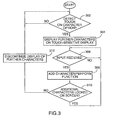
- FIG. 3 is a flowchart illustrating an example of a method of controlling a portable electronic device in accordance with the present disclosure
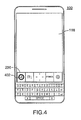
- FIG. 4 and FIG. 5 illustrate examples of the portable electronic device of FIG. 2 receiving an input and displaying further characters
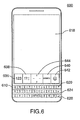
- FIG. 6 illustrates another example of a portable electronic device in accordance with the present disclosure.
- a portable electronic device includes a body having a front face, a touch-sensitive display exposed at the front face of the body, a keyboard at the front face, the keyboard associated with a first plurality of characters excluding numerical characters, such that keys of the keyboard are each associated with a respective single one of the first plurality of characters, a memory, and a processor.
- the processor is coupled to the touch-sensitive display, the keyboard, and the memory to execute a program stored in the memory to cause the portable electronic device to display a second plurality of characters utilizing the touch-sensitive display in response to receipt of an input to display the second plurality of characters.
- the disclosure generally relates to an electronic device, which is a portable electronic device in the embodiments described herein.
- portable electronic devices include mobile, or handheld, wireless communication devices such as pagers, cellular phones, cellular smart-phones, wireless organizers, personal digital assistants, wirelessly enabled notebook computers, and so forth.
- the portable electronic device may also be a portable electronic device without wireless communication capabilities, such as a handheld electronic game device, digital photograph album, digital camera, or other device.
- FIG. 1 A block diagram of an example of a portable electronic device 100 is shown in FIG. 1 .
- the portable electronic device 100 includes multiple components, such as a processor 102 that controls the overall operation of the portable electronic device 100. Communication functions, including data and voice communications, are performed through a communication subsystem 104. Data received by the portable electronic device 100 is decompressed and decrypted by a decoder 106. The communication subsystem 104 receives messages from and sends messages to a wireless network 150.
- the wireless network 150 may be any type of wireless network, including, but not limited to, data wireless networks, voice wireless networks, and networks that support both voice and data communications.
- a power source 142 such as one or more rechargeable batteries or a port to an external power supply, powers the portable electronic device 100.
- the processor 102 interacts with other components, such as Random Access Memory (RAM) 108, memory 110, a display 112 with a touch-sensitive overlay 114 operably connected or coupled to an electronic controller 116 that together comprise a touch-sensitive display 118, a keyboard 120, an auxiliary input/output (I/O) subsystem 124, a data port 126, a speaker 128, a microphone 130, short-range communications 132, and other device subsystems 134.
- the processor 102 may optionally interact with one or more actuators (not shown) to provide tactile feedback and one or more force sensors (not shown) to detect a force imparted on the touch-sensitive display 118. Interaction with a graphical user interface is performed through the touch-sensitive overlay 114.
- the processor 102 interacts with the touch-sensitive overlay 114 via the electronic controller 116.
- Information such as text, characters, symbols, images, icons, and other items that may be displayed or rendered on a portable electronic device, is displayed on the touch-sensitive display 118 via the processor 102.
- the processor 102 may interact with an accelerometer 136 that may be utilized to detect direction of gravitational forces or gravity-induced reaction forces.
- the keyboard 120 may be coupled to a controller that is coupled to the processor 102 to identify characters associated with keys.
- the portable electronic device 100 uses a Subscriber Identity Module or a Removable User Identity Module (SIM/RUIM) card 138 for communication with a network, such as the wireless network 150.
- SIM/RUIM Removable User Identity Module
- user identification information may be programmed into memory 110.
- the portable electronic device 100 includes an operating system 146 and software programs or components 148 that are executed by the processor 102 and are typically stored in a persistent, updatable store such as the memory 110. Additional applications or programs may be loaded onto the portable electronic device 100 through the wireless network 150, the auxiliary I/O subsystem 124, the data port 126, the short-range communications subsystem 132, or any other suitable subsystem 134.
- a received signal such as a text message, an e-mail message, or web page download is processed by the communication subsystem 104 and input to the processor 102.
- the processor 102 processes the received signal for output to the display 112 and/or to the auxiliary I/O subsystem 124.
- a subscriber may generate data items, for example e-mail messages, which may be transmitted over the wireless network 150 through the communication subsystem 104.
- the speaker 128 outputs audible information converted from electrical signals
- the microphone 130 converts audible information into electrical signals for processing.
- the touch-sensitive display 118 may be any suitable touch-sensitive display, such as a capacitive, resistive, infrared, surface acoustic wave (SAW) touch-sensitive display, strain gauge, optical imaging, dispersive signal technology, acoustic pulse recognition, and so forth, as known in the art.
- a capacitive touch-sensitive display may include a capacitive touch-sensitive overlay 114.
- the overlay 114 may be an assembly of multiple layers in a stack including, for example, a substrate, a ground shield layer, a barrier layer, one or more capacitive touch sensor layers separated by a substrate or other barrier, and a cover.
- the capacitive touch sensor layers may be any suitable material, such as patterned indium tin oxide (ITO).
- One or more touches may be detected by the touch-sensitive display 118.
- the processor 102 may determine attributes of the touch, including a location of a touch.
- Touch location data may include an area of contact or a single point of contact, such as a point at or near a center of the area of contact.
- the location of a detected touch may include x and y components, e.g., horizontal and vertical components, respectively, with respect to one's view of the touch-sensitive display 118.
- the x location component may be determined by a signal generated from one touch sensor
- the y location component may be determined by a signal generated from another touch sensor.
- a signal is provided to the controller 116 in response to detection of a touch.
- a touch may be detected from any suitable object, such as a finger, thumb, appendage, or other items, for example, a stylus, pen, or other pointer, depending on the nature of the touch-sensitive display 118. Multiple simultaneous touches may be detected.
- the touch-sensitive display 118 may also be configured to detect a gesture.
- a gesture such as a swipe, is a type of touch, that begins at an origin point and continues to a finishing point while touch contact is maintained.
- a swipe may be long or short in distance, or duration, or both distance and duration.
- Two points of the swipe may be utilized to determine a vector that describes a direction of the swipe.
- the direction may be referenced with respect to the touch-sensitive display 118, the orientation of the information displayed on the touch-sensitive display 118, or another reference.
- the origin point and the finishing point of the swipe may be utilized to determine the magnitude or distance of the swipe.
- the duration of the swipe may be determined from the origin point and finishing point of the swipe in time.
- the processor 102 receives data from the controller 116 to determine the direction, magnitude, and duration of the swipe.
- FIG. 2 A front view of an example of the portable electronic device 100 is shown in FIG. 2 .
- the portable electronic device 100 includes a body 202 that includes a back, sidewalls, and a front face 208.
- the touch-sensitive display 118 is disposed in the body 202 and exposed at the front face 208 for user-interaction.
- the keyboard 120 may be a physical keyboard such as a mechanical keyboard 120 that includes a plurality of mechanical keys 210 that, when depressed, send a signal to the processor 120.
- the keyboard is also located in the front face 208 of the body 202 and, in the orientation of the portable electronic device 100 shown in the example of FIG. 2 , is located under the touch-sensitive display 118.
- the keyboard 120 includes four rows of mechanical keys 210. Alternatively, fewer rows of keys may be utilized.
- Each of the mechanical keys 210 of the keyboard 120 is associated only with a single alphabetical character, punctuation mark, or keyboard function.
- each one of the mechanical keys 210 is associated with only one of an alphabetical character, a punctuation mark, and a keyboard function and none of the mechanical keys 210 are associated with numerical characters.
- the keyboard is in a QWERTY keyboard layout.
- Other keyboard layouts including AZERTY, QWERTZ, and Dvorak keyboard layouts may be utilized.
- two keys 212, 214 are associated with punctuation marks including the period and the comma, respectively, and one key 216 is associated with a space function, namely a space key 216 (also known as a spacebar).
- the remaining four keys are associated with functions, including two shift keys 222, a delete key 224 (also known as a backspace key), and an enter key 226 (also known as a return key).
- the keyboard 120 includes 33 mechanical keys 210.
- the aspect ratio of the key width 228 of the mechanical keys 210 to the key height 230 is about one as the key width 228 is approximately equal to the key height 230.
- key width is utilized when referring to mechanical keys 210 to describe the dimension of the key in the horizontal direction, as illustrated by the reference numeral 228 shown in the portrait orientation of the portable electronic device 100 illustrated in FIG. 2 .
- key height is utilized when referring to mechanical keys 210 to describe the dimension of the key in the vertical direction, as illustrated by the reference numeral 230 shown in the portrait orientation of the portable electronic device 100 illustrated in FIG. 2 .
- the horizontal key pitch is greater than the vertical key pitch.
- the horizontal key pitch may be about equal to the vertical key pitch.
- the horizontal key pitch is the horizontal spacing from the middle of a key associated with an alphabetical letter to the middle of a horizontally adjacent key associated with an alphabetical letter.
- the vertical key pitch is the vertical spacing from the middle of a key associated with an alphabetical letter to the middle of a vertically adjacent key associated with an alphabetical letter.
- the key height 230 of the mechanical keys 210 may be reduced.
- the key height 230 of the keys 120 may be reduced as only a single character, or keyboard function representation is printed on each of the mechanical keys 120. Additional characters are not printed on the mechanical keys 120 and therefore less space is utilized for the representations.
- the total keyboard height 232 may also be reduced.
- keyboard height is utilized when referring to the keyboard as being the total dimension of the keyboard in the direction illustrated by the reference numeral 232 shown in the portrait orientation of the portable electronic device 100 illustrated in FIG. 2 .
- the touch-sensitive display 118 is shown in FIG. 2 in the portrait orientation in which the width of the touch-sensitive display 118 is less than the height of the touch-sensitive display 118. With the reduced keyboard height 232 of the keyboard 120 further space is available to accommodate the touch-sensitive display 118.
- the touch-sensitive display 118 extends over a majority of the front face 208 of the portable electronic device 100, providing increased display area in comparison to other portable electronic devices with mechanical keyboards.
- Information in the form of characters may be entered on the touch-sensitive display 118 in any suitable application such as an electronic mail application, a calendar application, a web browser application, an address book application, or any other suitable application resident on or accessible utilizing the portable electronic device 100.
- keys 210 of the mechanical keyboard 120 are depressed, resulting in a signal received at the processor 102.
- characters may be entered utilizing the touch-sensitive display 118.
- options to provide further selectable characters are displayed on the touch-sensitive display 118.
- the options are displayed as virtual buttons and include, for example, a numerical character option 236, a punctuation option 238, a symbol option 240, and an emoticon option 242.
- a virtual navigation device 244 is also provided.
- the virtual navigation device 244 may act as a touchpad for controlling a cursor or other indicator on another portion of the touch-sensitive display 118, for example.
- a touch at a location on the touch-sensitive display 118 that is associated with the numerical character option 236 causes display of a virtual keypad including the numerals 0 through 9.
- a numeral may be selected by a touch on the area associated with the numeral on the touch-sensitive display 118.
- a touch at a location on the touch-sensitive display 118 that is associated with the punctuation option 238 causes display of a plurality of buttons, each associated with a punctuation mark such as a semicolon, a colon, and others, for example.
- a punctuation mark may be selected by a touch on the area associated with the punctuation mark on the touch-sensitive display 118.
- a touch at a location on the touch-sensitive display 118 that is associated with the symbol option 240 causes display of a plurality of buttons, each associated with a symbol, such as a equal symbol, a plus symbol, or any other suitable symbol.
- a symbol may be selected by a touch on the area associated with the symbol on the touch-sensitive display 118.
- a touch at a location on the touch-sensitive display 118 that is associated with the emoticon option 242 causes display of a plurality of buttons, each associated with an emoticon.
- An emoticon may be selected by a touch on the area associated with the emoticon on the touch-sensitive display 118.
- information may be entered utilizing the keyboard 120 and the touch-sensitive display 118.
- Alphabetical characters may be entered utilizing keys 210 of the keyboard 120.
- Numerals, for example, or other characters which are excluded from the keyboard 120, may be selected utilizing the touch-sensitive display 118.
- FIG. 3 describes an example of a method of controlling an electronic device to enter information.
- the method may be carried out by software executed by, for example, the processor 102. Coding of software for carrying out such a method is within the scope of a person of ordinary skill in the art given the present description.
- the method may contain additional or fewer processes than shown and described, and may be performed in a different order.
- Computer-readable code executable by, for example, the processor 102 of the portable electronic device 100 to perform the method may be stored in a computer-readable medium.
- further associated selectable characters are displayed at 304.
- the further characters may include characters that are not associated with the mechanical keys 210 on the keyboard 120.
- a function associated with the input is performed or a character associated with the input is entered at 308.
- the input may be depression of one of the mechanical keys 210 of the keyboard 120 associated with either a character or with a function.
- the input may be receipt of a touch on the touch-sensitive display 118.
- the touch may be detected at a location associated with a further character on the touch-sensitive display 118 or at a location associated with a function on the touch-sensitive display 118.
- display of the further characters continues and the process continues at 306.
- display of the further characters on the touch-sensitive display is discontinued at 312 and the process continues at 302.
- FIG. 3 and additionally to FIG. 4 and FIG. 5 illustrate examples of the portable electronic device of FIG. 2 receiving an input and displaying further characters.
- a touch illustrated by the circle 402 is detected on the numerical character option 236 at 302.
- the virtual keypad 502 including the numerals 0 through 9 and the decimal symbol, is displayed at 304. Additional virtual keys are provided for entry of, for example, a currency symbol, or a mathematical symbol.
- a lock key 504 is provided to lock the numerals 0 through 9 on the touch-sensitive display 118.
- the further characters are locked on the touch-sensitive display 118 at 308 and therefore display of the further characters continues until another touch is received on the lock key 504 to unlock the characters.
- characters that are excluded from the keyboard 120 may be selected utilizing virtual keys that are selectively displayed in response to receipt of selection of an option to display the further characters.
- FIG. 6 A front view of another example of another example of a portable electronic device 600 is shown in FIG. 6 .
- the portable electronic device 600 of FIG. 6 is similar to the portable electronic device 100 described with reference to FIG 2 .
- Many of the features described with reference to the portable electronic device 600 of FIG. 6 are similar to the features of the portable electronic device of FIG. 2 and similar features may not be described again in detail.
- the keyboard 620 is a mechanical keyboard such that the keyboard 620 includes a plurality of mechanical keys 610 that, when depressed, send a signal to the processor.
- the keyboard 620 in the present example includes three rows of mechanical keys 610.
- Each of the mechanical keys 610 of the keyboard 620 is associated with only a single alphabetical character or keyboard function. Thus, each one of the mechanical keys 610 is associated with only one of an alphabetical character, and a keyboard function and none of the mechanical keys 610 are associated with numerical characters or with punctuation symbols.
- the keyboard is in a QWERTY keyboard layout with a spacebar inserted between the key associated with the letter "V" and the key associated with the letter "B".
- Other keyboard layouts including AZERTY, QWERTZ, and Dvorak keyboard layouts may be utilized.
- one key 616 is associated with a space function, namely a space key 216 (also known as a spacebar).
- the two remaining keys are associated with functions, including a delete key 624 (also known as a backspace key) and an enter key 626 (also known as a return key).
- the keyboard 620 includes 29 mechanical keys 610.
- the horizontal key pitch may be about equal to the vertical key pitch.
- the horizontal key pitch is the horizontal spacing from the middle of a key associated with an alphabetical letter to the middle of a horizontally adjacent key associated with an alphabetical letter.
- the vertical key pitch is the vertical spacing from the middle of a key associated with an alphabetical letter to the middle of a vertically adjacent key associated with an alphabetical letter.
- the touch-sensitive display 618 is shown in FIG. 6 in the portrait orientation in which the width of the touch-sensitive display 618 is less than the height of the touch-sensitive display 618. With the reduced keyboard height of the keyboard 620 further space is available to accommodate the touch-sensitive display 618.
- the touch-sensitive display 618 extends over a majority of the front face of the portable electronic device 600, providing increased display area in comparison to other portable electronic devices with mechanical keyboards.
- Information in the form of characters may be entered on the touch-sensitive display 618 in any suitable application.
- keys of the mechanical keyboard are depressed, resulting in a signal received at the processor.
- characters may be entered utilizing the touch-sensitive display 618.
- options to provide further selectable characters are displayed on the touch-sensitive display 618.
- the options are displayed as virtual buttons and include, for example, a numerical character option 636, a punctuation option 638, a symbol option 640, and an emoticon option 642.
- a virtual navigation device 644 is also provided.
- the virtual navigation device 644 may act as a touchpad for controlling a cursor or other indicator on another portion of the touch-sensitive display 618, for example.
- Information may be entered utilizing the keyboard 620 and the touch-sensitive display 618.
- Alphabetical characters may be entered utilizing the keyboard 620.
- Numerals, punctuation, or other characters which are excluded from the keyboard 620, may be selected utilizing the touch-sensitive display 618.
- the mechanical keys 610 of the keyboard 620 may include touch sensors such that the mechanical keys 610 are also touch-sensitive.
- touch-sensitive keys 610 facilitates further input or functionality utilizing the mechanical keys 610 of the keyboard 620.
- the keyboard is a physical keyboard. Rather than a mechanical keyboard 120 as described above, the keyboard 120 may be a touch-sensitive keyboard including touch-sensitive keys.
Landscapes
- Engineering & Computer Science (AREA)
- General Engineering & Computer Science (AREA)
- Theoretical Computer Science (AREA)
- Human Computer Interaction (AREA)
- Physics & Mathematics (AREA)
- General Physics & Mathematics (AREA)
- Input From Keyboards Or The Like (AREA)
- User Interface Of Digital Computer (AREA)
Priority Applications (3)
| Application Number | Priority Date | Filing Date | Title |
|---|---|---|---|
| EP10194708A EP2466436A1 (de) | 2010-12-13 | 2010-12-13 | Tragbare elektronische Vorrichtung mit Tastatur und Touchscreen für eine zweite Vielzahl Zeichen. |
| CN201110405118.9A CN102591417B (zh) | 2010-12-13 | 2011-12-08 | 包括触敏显示器的便携式电子设备 |
| CA2761454A CA2761454C (en) | 2010-12-13 | 2011-12-12 | Portable electronic device including touch-sensitive display |
Applications Claiming Priority (1)
| Application Number | Priority Date | Filing Date | Title |
|---|---|---|---|
| EP10194708A EP2466436A1 (de) | 2010-12-13 | 2010-12-13 | Tragbare elektronische Vorrichtung mit Tastatur und Touchscreen für eine zweite Vielzahl Zeichen. |
Publications (1)
| Publication Number | Publication Date |
|---|---|
| EP2466436A1 true EP2466436A1 (de) | 2012-06-20 |
Family
ID=43898981
Family Applications (1)
| Application Number | Title | Priority Date | Filing Date |
|---|---|---|---|
| EP10194708A Ceased EP2466436A1 (de) | 2010-12-13 | 2010-12-13 | Tragbare elektronische Vorrichtung mit Tastatur und Touchscreen für eine zweite Vielzahl Zeichen. |
Country Status (3)
| Country | Link |
|---|---|
| EP (1) | EP2466436A1 (de) |
| CN (1) | CN102591417B (de) |
| CA (1) | CA2761454C (de) |
Families Citing this family (2)
| Publication number | Priority date | Publication date | Assignee | Title |
|---|---|---|---|---|
| US10268291B2 (en) | 2012-08-27 | 2019-04-23 | Sony Interactive Entertainment Inc. | Information processing device, information processing method, program, and information storage medium |
| US10503398B2 (en) | 2014-11-26 | 2019-12-10 | Blackberry Limited | Portable electronic device and method of controlling display of selectable elements |
Citations (8)
| Publication number | Priority date | Publication date | Assignee | Title |
|---|---|---|---|---|
| US5311175A (en) * | 1990-11-01 | 1994-05-10 | Herbert Waldman | Method and apparatus for pre-identification of keys and switches |
| EP0982910A1 (de) * | 1998-08-24 | 2000-03-01 | Lucent Technologies Inc. | Taste mit echo |
| WO2003030497A2 (en) * | 2001-09-28 | 2003-04-10 | Telefonaktiebolag L M Ericsson (Publ) | Portable communication terminal a slidable keypad |
| US20070155434A1 (en) * | 2006-01-05 | 2007-07-05 | Jobs Steven P | Telephone Interface for a Portable Communication Device |
| US20080266262A1 (en) * | 2007-04-27 | 2008-10-30 | Matias Duarte | Shared symbol and emoticon key and methods |
| EP2000884A1 (de) * | 2007-06-08 | 2008-12-10 | Research In Motion Limited | Formverändernde Anzeige für ein tragbares elektronisches Gerät |
| US20090051669A1 (en) * | 2007-08-23 | 2009-02-26 | Samsung Electronics Co., Ltd. | Apparatus and method for inputting function key |
| WO2010029448A1 (en) * | 2008-09-12 | 2010-03-18 | Sony Ericsson Mobile Communications Ab | Keypad and electronic apparatus for removing language variance |
Family Cites Families (3)
| Publication number | Priority date | Publication date | Assignee | Title |
|---|---|---|---|---|
| KR20020090001A (ko) * | 2001-05-25 | 2002-11-30 | 이순 | 착탈가능한 키보드 장치 및 그 키보드 장치가 장착되는개인 휴대 정보기기 |
| US20080055263A1 (en) * | 2006-09-06 | 2008-03-06 | Lemay Stephen O | Incoming Telephone Call Management for a Portable Multifunction Device |
| US9298336B2 (en) * | 2009-05-28 | 2016-03-29 | Apple Inc. | Rotation smoothing of a user interface |
-
2010
- 2010-12-13 EP EP10194708A patent/EP2466436A1/de not_active Ceased
-
2011
- 2011-12-08 CN CN201110405118.9A patent/CN102591417B/zh active Active
- 2011-12-12 CA CA2761454A patent/CA2761454C/en active Active
Patent Citations (8)
| Publication number | Priority date | Publication date | Assignee | Title |
|---|---|---|---|---|
| US5311175A (en) * | 1990-11-01 | 1994-05-10 | Herbert Waldman | Method and apparatus for pre-identification of keys and switches |
| EP0982910A1 (de) * | 1998-08-24 | 2000-03-01 | Lucent Technologies Inc. | Taste mit echo |
| WO2003030497A2 (en) * | 2001-09-28 | 2003-04-10 | Telefonaktiebolag L M Ericsson (Publ) | Portable communication terminal a slidable keypad |
| US20070155434A1 (en) * | 2006-01-05 | 2007-07-05 | Jobs Steven P | Telephone Interface for a Portable Communication Device |
| US20080266262A1 (en) * | 2007-04-27 | 2008-10-30 | Matias Duarte | Shared symbol and emoticon key and methods |
| EP2000884A1 (de) * | 2007-06-08 | 2008-12-10 | Research In Motion Limited | Formverändernde Anzeige für ein tragbares elektronisches Gerät |
| US20090051669A1 (en) * | 2007-08-23 | 2009-02-26 | Samsung Electronics Co., Ltd. | Apparatus and method for inputting function key |
| WO2010029448A1 (en) * | 2008-09-12 | 2010-03-18 | Sony Ericsson Mobile Communications Ab | Keypad and electronic apparatus for removing language variance |
Non-Patent Citations (3)
| Title |
|---|
| JBRINK.NET, LLC: "TouchTerm 2.3 Guide", 25 December 2008 (2008-12-25), XP002635296, Retrieved from the Internet <URL:http://www.ajidev.com/jbnet/touchterm/tt_guide.html> [retrieved on 20110503] * |
| JBRINK.NET, LLC: "TouchTerm 2.3 Guide", 25 December 2008 (2008-12-25), XP002635297, Retrieved from the Internet <URL:http://replay.web.archive.org/20081225094309/http://jbrink.net/touchterm/tt_guide.html> [retrieved on 20110503] * |
| TOUCHTERM SUPPORT: "TouchTerm new overlay keyboard", 22 November 2008 (2008-11-22), XP002635304, Retrieved from the Internet <URL:http://groups.google.com/group/touchterm/browse_thread/thread/8f0ff0b6fd5aef9a> [retrieved on 20110503] * |
Also Published As
| Publication number | Publication date |
|---|---|
| CA2761454A1 (en) | 2012-06-13 |
| CA2761454C (en) | 2015-08-04 |
| CN102591417B (zh) | 2016-05-25 |
| CN102591417A (zh) | 2012-07-18 |
Similar Documents
| Publication | Publication Date | Title |
|---|---|---|
| US11249636B2 (en) | Portable electronic device having touch-sensitive display with variable repeat rate | |
| US8730188B2 (en) | Gesture input on a portable electronic device and method of controlling the same | |
| US8863020B2 (en) | Portable electronic device and method of controlling same | |
| US20110086674A1 (en) | Electronic device including touch-sensitive display and method of controlling same | |
| US20110128230A1 (en) | Portable electronic device and method of controlling same | |
| US9285836B2 (en) | Portable electronic device including touch-sensitive display | |
| CA2725195A1 (en) | Portable electronic device and method of controlling same | |
| US9665250B2 (en) | Portable electronic device and method of controlling same | |
| US10503257B2 (en) | Portable electronic device and method of providing haptic feedback | |
| US8866747B2 (en) | Electronic device and method of character selection | |
| CA2761454C (en) | Portable electronic device including touch-sensitive display | |
| US8884881B2 (en) | Portable electronic device and method of controlling same | |
| US20110163963A1 (en) | Portable electronic device and method of controlling same | |
| US20120146910A1 (en) | Portable electronic device including touch-sensitive display | |
| EP2469384A1 (de) | Tragbare elektronische Vorrichtung und Kontrollverfahren dafür | |
| CA2821674C (en) | Portable electronic device and method of controlling same | |
| HK1170574A (en) | Portable electronic device including keyboard and touch-sensitive display for second plurality of characters | |
| EP2466435A1 (de) | Tragbare elektronische Vorrichtung mit Tastatur und Touchscreen für eine zweite Vielzahl Zeichen. | |
| CA2766875C (en) | Portable electronic device and method of controlling same | |
| EP2328068B1 (de) | Tragbare elektronische Vorrichtung und Steuerungsverfahren dafür | |
| EP2662752B1 (de) | Gerät und Verfahren zur Zeicheneingabe in einer tragbaren elektronischen Vorrichtung | |
| CA2756315C (en) | Portable electronic device and method of controlling same | |
| EP2570893A1 (de) | Elektronische Vorrichtung und Verfahren zur Zeichenauswahl | |
| EP2624101A1 (de) | Elektronische Vorrichtung mit berührungsempfindlicher Anzeige und Verfahren zur Bereitstellung der Eingabe an der elektronischen Vorrichtung | |
| EP2620835A1 (de) | Elektronische Vorrichtung und Verfahren zur Bereitstellung der Eingabe an der elektronischen Vorrichtung |
Legal Events
| Date | Code | Title | Description |
|---|---|---|---|
| PUAI | Public reference made under article 153(3) epc to a published international application that has entered the european phase |
Free format text: ORIGINAL CODE: 0009012 |
|
| 17P | Request for examination filed |
Effective date: 20101213 |
|
| AK | Designated contracting states |
Kind code of ref document: A1 Designated state(s): AL AT BE BG CH CY CZ DE DK EE ES FI FR GB GR HR HU IE IS IT LI LT LU LV MC MK MT NL NO PL PT RO RS SE SI SK SM TR |
|
| AX | Request for extension of the european patent |
Extension state: BA ME |
|
| REG | Reference to a national code |
Ref country code: HK Ref legal event code: DE Ref document number: 1170574 Country of ref document: HK |
|
| RAP1 | Party data changed (applicant data changed or rights of an application transferred) |
Owner name: BLACKBERRY LIMITED |
|
| 17Q | First examination report despatched |
Effective date: 20130814 |
|
| RAP1 | Party data changed (applicant data changed or rights of an application transferred) |
Owner name: BLACKBERRY LIMITED |
|
| STAA | Information on the status of an ep patent application or granted ep patent |
Free format text: STATUS: THE APPLICATION HAS BEEN REFUSED |
|
| 18R | Application refused |
Effective date: 20141016 |