EP2908232B1 - Display control device, display control method and program for managing the layout of software applications - Google Patents
Display control device, display control method and program for managing the layout of software applications Download PDFInfo
- Publication number
- EP2908232B1 EP2908232B1 EP13844730.5A EP13844730A EP2908232B1 EP 2908232 B1 EP2908232 B1 EP 2908232B1 EP 13844730 A EP13844730 A EP 13844730A EP 2908232 B1 EP2908232 B1 EP 2908232B1
- Authority
- EP
- European Patent Office
- Prior art keywords
- window
- application
- application window
- identification region
- display
- Prior art date
- Legal status (The legal status is an assumption and is not a legal conclusion. Google has not performed a legal analysis and makes no representation as to the accuracy of the status listed.)
- Not-in-force
Links
Images










Classifications
-
- G—PHYSICS
- G06—COMPUTING OR CALCULATING; COUNTING
- G06F—ELECTRIC DIGITAL DATA PROCESSING
- G06F3/00—Input arrangements for transferring data to be processed into a form capable of being handled by the computer; Output arrangements for transferring data from processing unit to output unit, e.g. interface arrangements
- G06F3/01—Input arrangements or combined input and output arrangements for interaction between user and computer
- G06F3/048—Interaction techniques based on graphical user interfaces [GUI]
- G06F3/0487—Interaction techniques based on graphical user interfaces [GUI] using specific features provided by the input device, e.g. functions controlled by the rotation of a mouse with dual sensing arrangements, or of the nature of the input device, e.g. tap gestures based on pressure sensed by a digitiser
- G06F3/0488—Interaction techniques based on graphical user interfaces [GUI] using specific features provided by the input device, e.g. functions controlled by the rotation of a mouse with dual sensing arrangements, or of the nature of the input device, e.g. tap gestures based on pressure sensed by a digitiser using a touch-screen or digitiser, e.g. input of commands through traced gestures
-
- G—PHYSICS
- G06—COMPUTING OR CALCULATING; COUNTING
- G06F—ELECTRIC DIGITAL DATA PROCESSING
- G06F3/00—Input arrangements for transferring data to be processed into a form capable of being handled by the computer; Output arrangements for transferring data from processing unit to output unit, e.g. interface arrangements
- G06F3/01—Input arrangements or combined input and output arrangements for interaction between user and computer
- G06F3/048—Interaction techniques based on graphical user interfaces [GUI]
- G06F3/0481—Interaction techniques based on graphical user interfaces [GUI] based on specific properties of the displayed interaction object or a metaphor-based environment, e.g. interaction with desktop elements like windows or icons, or assisted by a cursor's changing behaviour or appearance
- G06F3/0482—Interaction with lists of selectable items, e.g. menus
-
- G—PHYSICS
- G06—COMPUTING OR CALCULATING; COUNTING
- G06F—ELECTRIC DIGITAL DATA PROCESSING
- G06F3/00—Input arrangements for transferring data to be processed into a form capable of being handled by the computer; Output arrangements for transferring data from processing unit to output unit, e.g. interface arrangements
- G06F3/01—Input arrangements or combined input and output arrangements for interaction between user and computer
- G06F3/048—Interaction techniques based on graphical user interfaces [GUI]
- G06F3/0481—Interaction techniques based on graphical user interfaces [GUI] based on specific properties of the displayed interaction object or a metaphor-based environment, e.g. interaction with desktop elements like windows or icons, or assisted by a cursor's changing behaviour or appearance
-
- G—PHYSICS
- G06—COMPUTING OR CALCULATING; COUNTING
- G06F—ELECTRIC DIGITAL DATA PROCESSING
- G06F3/00—Input arrangements for transferring data to be processed into a form capable of being handled by the computer; Output arrangements for transferring data from processing unit to output unit, e.g. interface arrangements
- G06F3/01—Input arrangements or combined input and output arrangements for interaction between user and computer
- G06F3/048—Interaction techniques based on graphical user interfaces [GUI]
- G06F3/0481—Interaction techniques based on graphical user interfaces [GUI] based on specific properties of the displayed interaction object or a metaphor-based environment, e.g. interaction with desktop elements like windows or icons, or assisted by a cursor's changing behaviour or appearance
- G06F3/04817—Interaction techniques based on graphical user interfaces [GUI] based on specific properties of the displayed interaction object or a metaphor-based environment, e.g. interaction with desktop elements like windows or icons, or assisted by a cursor's changing behaviour or appearance using icons
-
- G—PHYSICS
- G06—COMPUTING OR CALCULATING; COUNTING
- G06F—ELECTRIC DIGITAL DATA PROCESSING
- G06F3/00—Input arrangements for transferring data to be processed into a form capable of being handled by the computer; Output arrangements for transferring data from processing unit to output unit, e.g. interface arrangements
- G06F3/01—Input arrangements or combined input and output arrangements for interaction between user and computer
- G06F3/048—Interaction techniques based on graphical user interfaces [GUI]
- G06F3/0484—Interaction techniques based on graphical user interfaces [GUI] for the control of specific functions or operations, e.g. selecting or manipulating an object, an image or a displayed text element, setting a parameter value or selecting a range
- G06F3/04842—Selection of displayed objects or displayed text elements
-
- G—PHYSICS
- G06—COMPUTING OR CALCULATING; COUNTING
- G06F—ELECTRIC DIGITAL DATA PROCESSING
- G06F3/00—Input arrangements for transferring data to be processed into a form capable of being handled by the computer; Output arrangements for transferring data from processing unit to output unit, e.g. interface arrangements
- G06F3/01—Input arrangements or combined input and output arrangements for interaction between user and computer
- G06F3/048—Interaction techniques based on graphical user interfaces [GUI]
- G06F3/0484—Interaction techniques based on graphical user interfaces [GUI] for the control of specific functions or operations, e.g. selecting or manipulating an object, an image or a displayed text element, setting a parameter value or selecting a range
- G06F3/04847—Interaction techniques to control parameter settings, e.g. interaction with sliders or dials
-
- G—PHYSICS
- G06—COMPUTING OR CALCULATING; COUNTING
- G06F—ELECTRIC DIGITAL DATA PROCESSING
- G06F3/00—Input arrangements for transferring data to be processed into a form capable of being handled by the computer; Output arrangements for transferring data from processing unit to output unit, e.g. interface arrangements
- G06F3/01—Input arrangements or combined input and output arrangements for interaction between user and computer
- G06F3/048—Interaction techniques based on graphical user interfaces [GUI]
- G06F3/0487—Interaction techniques based on graphical user interfaces [GUI] using specific features provided by the input device, e.g. functions controlled by the rotation of a mouse with dual sensing arrangements, or of the nature of the input device, e.g. tap gestures based on pressure sensed by a digitiser
- G06F3/0488—Interaction techniques based on graphical user interfaces [GUI] using specific features provided by the input device, e.g. functions controlled by the rotation of a mouse with dual sensing arrangements, or of the nature of the input device, e.g. tap gestures based on pressure sensed by a digitiser using a touch-screen or digitiser, e.g. input of commands through traced gestures
- G06F3/04883—Interaction techniques based on graphical user interfaces [GUI] using specific features provided by the input device, e.g. functions controlled by the rotation of a mouse with dual sensing arrangements, or of the nature of the input device, e.g. tap gestures based on pressure sensed by a digitiser using a touch-screen or digitiser, e.g. input of commands through traced gestures for inputting data by handwriting, e.g. gesture or text
Definitions
- the present disclosure relates to a display control apparatus, a display control method, and a program.
- a method is known of displaying a so-called taskbar on a screen of a computer capable of executing a plurality of applications, and providing a user interface for switching display of an application window and the like via the taskbar (e.g., see Patent Literature 1 below).
- Patent Literature 1 JP H08-255066A
- US 5,179,655 A relates to a multiwindow method and an apparatus for a work station having multiwindow function according to which the existing window is altered if it is determined that a new window overlaps with an existing window or even hides the existing window.
- US 2006/0075359 A1 describes a system and a method for managing a floating window, wherein, when a floating window overlaps an active window operated by a user, the floating window is moved, resized or removed.
- US 2003/0142139 A1 relates to an automatic window representation adjustment according to which the most active window is presented in front, while other, less active windows are presented dependent on their activity by an icon or with adjusted transparency.
- JP 05324239 A describes a multiwindow display controller according to which a title of a window is replaced if it is hidden by another window.
- JP 2000-207090 A discloses that a shape of a window partially overlapped by another window is varied so that the overlap is removed.
- the invention provides a display control apparatus in accordance with claim 1.
- the invention provides a method of controlling display of each of a plurality of application windows in accordance with claim 13.
- the invention provides a program in accordance with claim 14. Further aspects of the invention are set forth in the dependent claims, the drawings and the following description of embodiments.
- a display control apparatus including a detection unit configured to detect a user operation, and a window control unit configured to display a plurality of application windows on a screen, and control display of each application window based on the user operation detected by the detection unit. If it is determined that it is difficult to identify a first application window associated with a first application due to at least a portion of the first application window being hidden by a second application window, the window control unit is configured to control display of the first application window so that identification information for identifying the first application is visible to a user.
- a method of controlling display of each of a plurality of application windows based on a user operation in a display control apparatus configured to display the plurality of application windows including determining whether it is difficult to identify a first application window associated with a first application due to at least a portion of the first application window being hidden by a second application window, and controlling display of the first application window so that identification information for identifying the first application is visible to a user if it is determined that it is difficult to identify the first application.
- a program for causing a computer in a display control apparatus configured to display a plurality of application windows on a screen to function as a detection unit configured to detect a user operation, and a window control unit configured to display a plurality of application windows on a screen, and control display of each application window based on the user operation detected by the detection unit. If it is determined that it is difficult to identify a first application window associated with a first application due to at least a portion of the first application window being hidden by a second application window, the window control unit is configured to control display of the first application window so that identification information for identifying the first application is visible to a user.
- FIG. 1 is an explanatory diagram illustrating an outline of a display control apparatus 100.
- the display control apparatus 100 includes a display 104.
- an application window W1 and an application window W2 are displayed.
- the application window W1 is associated with a first application.
- the application window W2 is associated with a second application.
- the first application and the second application may the same type of application, or different types of application.
- the first application is a music playback application
- the second application is an image playback application.
- the display control apparatus 100 includes a windows framework for supporting multiple windows.
- This windows framework may be, for example, a function of the operating system of the display control apparatus 100, or may be a function of middleware or an application additionally installed in the display control apparatus 100.
- a taskbar is not displayed.
- each application window includes an identification region for identifying an application. The user grasps which window corresponds to which application by visually looking at the identification region.
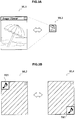
- FIG. 2A is an explanatory diagram illustrating a first example of a window layout of the application windows that can be displayed.
- a window layout WL1 includes an identification region R11, a content region R12, and a control button R13.
- the identification region R11 is a rectangular text area arranged along an upper side of the window. The name of the application is displayed using this text area. The identification region R11 may also be arranged along another side of the window instead of the upper side. The shape of the identification region may be a shape other than a rectangular shape. In the text area, the name of the content (a file name etc.) may be displayed instead of the name of the application.
- the content region R12 displays the content of the application.
- the control button R13 is a user interface commonly arranged on a plurality of application windows in order to control the applications. For example, a function for closing an application, for example, may be allocated to the control button R13.
- FIG. 2B is an explanatory diagram illustrating a second example of a window layout of the application windows that can be displayed.
- a window layout WL2 includes an identification region R21, a content region R22, and a control button R23.
- the identification region R21 is a rectangular region arranged at the upper left corner of the window. An application icon may be displayed using this region.
- the identification region R21 may also be arranged in another corner of the window instead of the upper left corner.
- the shape of the identification region may be a shape other than a rectangular shape.
- FIGS. 3A and 3B are explanatory diagrams illustrating a change in the window layout.
- the window layout WL1 is again illustrated on the left of FIG. 3A .
- a window layout WL3 is illustrated on the right of FIG. 3A .
- the window layout WL3 only has an identification region. A content thumbnail is displayed using this identification region.
- the window layout WL1 can be changed to the window layout WL3, or the window layout WL3 can be changed to the window layout WL1.
- the window layout WL2 is again illustrated on the left of FIG. 3B .
- a window layout WL4 is illustrated on the right of FIG. 3B .
- an identification region 41 is arranged in the lower right corner of the window.
- the window layout WL2 can be changed to the window layout WL4, or the window layout WL4 can be changed to the window layout WL2. It is noted that the combinations of window layouts described here are merely an example.
- a taskbar is not displayed on the display 104. Instead of displaying a taskbar, the user can identify each application and manage the application windows by looking at the identification region of each application window.
- a portable or a compact electronic device often does not have much display space. Consequently, a situation can arise in which a plurality of application windows overlap each other. Under such circumstances, if it is difficult to identify an application window due to the application window being hidden, user activities made via the application window can be hindered. Accordingly, the display control apparatus 100 avoids a situation in which user activities are hindered based on a configuration that is described in detail below.
- the display control apparatus 100 may be, for example, an image processing apparatus such as a personal computer (PC), a smartphone, a personal digital assistant (PDA), a digital camera, a content player, or a game terminal. Further, these devices may be mounted in the display control apparatus 100, or the display control apparatus 100 may be a module that remotely controls the display of these devices.
- PC personal computer
- PDA personal digital assistant
- these devices may be mounted in the display control apparatus 100, or the display control apparatus 100 may be a module that remotely controls the display of these devices.
- FIG. 4 is a block diagram illustrating an example of a hardware configuration of the display control apparatus 100 according to an embodiment.
- the display control apparatus 100 includes an imaging unit 102, the display 104, a display driver 106, an input device 108, an audio output device 109, an I/O controller 110, a communication unit 112, a storage unit 114, a bus 116, and a control unit 118.
- the imaging unit 102 is a camera module including an imaging element, such as a charge-coupled device (CCD) or a complementary metal oxide semiconductor (CMOS).
- the imaging unit 102 is configured to generate captured images by imaging real space.
- the display 104 is a display module including a screen constructed from an liquid crystal display (LCD), an organic light-emitting diode (OLED), or a cathode ray tube (CRT) and the like.
- the display 104 is driven by the display driver 106.
- the display driver 106 is a driver that drives the display 104.
- the display driver 106 drives the display 104 to display an output image generated by the control unit 118 on the screen of the display 104.
- the input device 108 is used by the user to operate the display control apparatus 100 or to input information into the display control apparatus 100.
- the input device 108 may include, for example, a touch sensor that is integrated with the display 104. Further, the input device 108 may also include a pointing device, such as a mouse or a touch pad. In addition, the input device 108 may also include various other types of devices, such as a keyboard, a keypad, buttons, a wheel and the like.
- the audio output device 109 is used by the display control apparatus 100 to output audio.
- the audio output device 109 may include a speaker.
- the input device 108 and the audio output device 109 are driven by the I/O controller 110.
- the I/O controller 110 is a control module for controlling the input device 108 and the audio output device 109.
- the I/O controller 110 converts a signal input from the input device 108 into an input signal that can be interpreted by the control unit 118, and outputs the input signal to the control unit 118. Further, the I/O controller 110 causes a speaker of the audio output device 109 to play output audio generated by the control unit 118.
- the communication unit 112 is a communication interface configured to mediate communication by the display control apparatus 100 with another apparatus.
- the communication unit 112 supports an arbitrary wireless communication protocol or wired communication protocol, and establishes a communication connection with another apparatus.
- the storage unit 114 which is configured from a storage medium such as a semiconductor memory or a hard disk, stores programs and data for processing by the display control apparatus 100.
- the data to be stored by the storage unit 114 may be, for example, the data in a window database (DB), which is described below.
- DB window database
- a portion of the programs and the data described in the present specification may be acquired from an external data source (e.g., a data server, network storage, or an external memory etc.), without being stored by the storage unit 114.
- the bus 116 connects the imaging unit 102, the display driver 106, the I/O controller 110, the communication unit 112, the storage unit 114, and the control unit 118 to each other.
- the control unit 118 corresponds to a processor such as a central processing unit (CPU) or a digital signal processor (DSP).
- the control unit 118 activates various functions (which are described below) of the display control apparatus 100 by executing a program stored by the storage unit 114 or another storage medium.
- FIG. 5 is a block diagram illustrating an example of a configuration of a logical function of the display control apparatus 100 according to the present embodiment. Note that, for ease of description, function elements that are not directly associated with the gist of the technology according to the present disclosure are omitted from the diagram. As illustrated in FIG. 5 , the display control apparatus 100 includes an application unit 120, a window DB 130, a detection unit 140, and a window control unit 150.
- the application unit 120 is configured to execute applications.
- the application unit 120 can execute a plurality of applications in parallel.
- the applications executed by the application unit 120 may be any type of application.
- applications such as an Internet browser, a mailer, an SNS client, a content player, a calculator, a remote controller and the like, may be executed by the application unit 120.
- each application When each application is started by the application unit 120, that application generates identification information for identifying itself to the user, and outputs the generated identification information to the window control unit 150.
- this identification information may be an icon, the name of the application, the name or thumbnail of the content to be handled by that application and the like.
- each application generates an application image during execution, and outputs the generated application image to the window control unit 150.
- an application window is built by the window control unit 150 using the identification information and the application image.
- the window DB 130 is a database that stores window data 132 defining the configuration of the application window of each application.
- each application window has, as described above, an identification region. If the window is not displayed as an icon, each application may also have a content region. Several control buttons may also be provided for each application.
- FIG. 6A is an explanatory diagram illustrating a first data example of the window data 132.
- the window data 132 has seven data items, an "application ID", an "initial position”, an “initial size”, a “current position”, a “current size”, a “layout ID”, and a "priority level”.
- the application ID is an identifier for uniquely identifying each application.
- the initial position indicates a display position of the application window in the screen when each application was started (e.g., the coordinates (X I ,Y I ) of the upper left apex of the window in a two-dimensional coordinate system (X,Y) with an origin at the upper left apex of the screen).
- the initial size indicates the width and the height (W I ,H I ) of the application window when each application was started.
- the current position indicates a display position (Xc,Yc) in the screen of the application window that is updated during execution of the application.
- the current size indicates the width and the height (Wc,Hc) of the application window that is updated during execution of the application.
- the layout ID indicates an identifier for identifying the window layout to be applied for the application window of each application. Various layout IDs may be defined depending on where and how large the identification region to be displayed in each application window is, or what type of identification information the identification region is to display.
- the priority level is a parameter used to determine which window is to be displayed in front when a plurality of application windows are overlapping. Application windows having a higher priority level are displayed in front of application windows having a lower priority level.
- the priority level may be, for example, a number in a predetermined range (e.g., 0 to 9).
- FIG. 6B is an explanatory diagram illustrating a second data example of the window data 132.
- the window data 132 has eight data items, the "application ID”, the “initial position”, the “initial size”, the “current position”, the “current size”, an "IR position", an “IR size”, and an "IR type”.
- the IR (identification region) position indicates the position of the identification region in the application window (e.g., the coordinates (U R ,V R ) of the upper left apex of the identification region in a two-dimensional coordinate system (U,V) with an origin at the upper left apex of the application window).
- the IR size indicates the width and the height (W R ,H R ) of the identification region.
- the IR type indicates the type (e.g., icon, application name, content name, or thumbnail etc.) of the identification information to be displayed in the identification region.
- the window data 132 may be defined by each application. In such a case, each application, for example, notifies the window control unit 150 of a data value (a value of the ID, position, or size etc.) when that application was started.
- the window data 132 may instead be defined in advance and stored by the window DB 130.
- the window data 132 may have a data item that is commonly defined for a plurality of applications. Note that a part of the data items of the window data 132 described here may be omitted, or an extra data item may be employed.
- the detection unit 140 is configured to detect a user operation by monitoring an input signal from the I/O controller 110. User operations can be carried out in various ways using the input device 108. When the detection unit 140 detects a user operation for operating an application window, the detection unit 140 notifies the window control unit 150 of an operation event indicating the details (type, operation position, operation direction, operation amount etc.) of the detected user operation.
- the type of user operation can be differentiated based on the type of touch gesture (e.g., tap, double tap, flick, or drag etc.), or based on the type of button that was pressed.
- dragging of the identification region may be interpreted as movement of the window
- dragging of a window edge may be interpreted as change in the size of the window
- a double tap of the identification region may be interpreted as movement a switch to the very front, respectively.
- the detection unit 140 can notify the application unit 120 of the an operation event.
- the window control unit 150 builds the application window to be associated with each application based on the window data 132 stored by the window DB 130, and displays the built application windows on the screen.
- the window control unit 150 builds application windows that include an identification region displaying identification information, and a content region displaying an application image.
- the window control unit 150 may acquire from each application data (e.g., the layout ID illustrated in FIG. 6A , or the IR position and IR size illustrated in FIG. 6B ) specifying the arrangement of the identification region in the application window.
- each application data e.g., the layout ID illustrated in FIG. 6A , or the IR position and IR size illustrated in FIG. 6B .
- the arrangement of the identification region in the application window may instead be commonly defined in advance across a plurality of applications in the window DB 130.
- the window design of each application is simple, which allows the development costs of the application to be suppressed.
- the window control unit 150 displays a plurality of application windows on the screen.
- the window control unit 150 may arrange the application windows having a higher priority level that is given to each window in front (in the depth direction).
- the window control unit 150 controls the display of each application window based on the user operation detected by the detection unit 140. For example, in the present embodiment, the window control unit 150 determines whether a first application associated with a first application window is difficult to identify due to at least a portion of the first application window being hidden by a second application window. If the window control unit 150 determines that the first application is difficult to identify, the window control unit 150 controls the display of each application window so that the identification information for identifying the first application is visible to the user.
- the window control unit 150 determines the identifiability of the applications each time the position, the size, or a ranking in the depth direction of any of the applications changes. For example, the window control unit 150 can determine the identifiability of the first application based on a positional relationship between the identification region of the first application window and a second application window. In a first method, the window control unit 150 may determine that the first application is difficult to identify if a reference point in the identification region of the first application window is hidden by the second application window. Alternatively, in a second method, the window control unit 150 may determine that the first application is difficult to identify if a predetermined ratio of the identification region of the first application window is hidden by the second application window.
- FIG. 7A is an explanatory diagram illustrating the first method for determining the identifiability of an application.
- the application window W3 is a window associated with a music playback application
- the application window W4 is a window associated with an image playback application.
- An identification region R3 of the application window W3 illustrates a music playback application icon.
- a point P3 is a reference point positioned in the center of the identification region R3.
- the application window W4 is positioned in front of the application window W3.
- the identification region R3 of the application window W3 is not hidden by the application window W4.
- the application window W3 is moved in an upward direction based on a user operation.
- the application window W4 overlaps the identification region R3 of the application window W3, a reference point P3 of the identification region R3 is not hidden by the application window W4. If the user operation continues so that the state reaches the state illustrated on the right of FIG. 7A , the application window W4 hides the reference point P3 of the identification region R3 of the application window W3. In such a state, the window control unit 150 can determine that it has become difficult for the user to identify the application associated with the application window W3.
- the identifiability determination can be easily implemented.
- the reference point may be positioned at another location instead of the center of the identification region, such as at any of the apexes or on any of the sides of the identification region. Further, the position of the reference point may be determined based on the window data 132. In addition, a plurality of reference points may be present in one identification region.
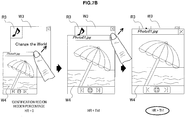
- FIG. 7B is an explanatory diagram illustrating the second method for determining the identifiability of an application.
- two application windows W3 and W4 are again illustrated.
- the application window W4 is positioned in front of the application window W3.
- the identification region R3 of the application window W3 is not hidden by the application window W4.
- the application window W3 is increased in size in the upper right direction based on a user operation.
- the application window W4 overlaps the identification region R3 of the application window W3.
- Th1 a predetermined threshold
- the window control unit 150 can determine that it has become difficult for the user to identify the application associated with the application window W3.
- the determination of identifiability of the application can be carried out without defining a reference point.
- Th1 may be defined for each application, or may be commonly defined across a plurality of applications. Further, a threshold may be used that depends on the type of identification information.
- the window control unit 150 adjusts the display of the application window based on the result of such a determination of identifiability.
- a display attribute of each application window adjusted by the window control unit 150 includes at least one among the display position, the window size, an icon display state, a window layout, and a transparency level. In the following section, several scenarios of control by the window control unit 150 are specifically described.
- the window control unit 150 determines that the first application is difficult to identify, the window control unit 150 moves the first application window so that the identification region of the first application window is visible to the user.
- the window control unit 150 determines the direction of movement of the first application window based on the operation direction of the second application window hiding the identification region of the first application window.
- the movement amount of the first application window may also be determined based on the operation amount of the second application window.
- FIG. 8 is an explanatory diagram illustrating the first scenario of window control. As illustrated on the left of FIG. 8 , two application windows W3 and W4 are displayed on the display 104.
- the application window W4 is positioned in front of the application window W3.
- the user drags and moves the application window W4 in an upward direction.
- the window control unit 150 also moves the application window W3 in an upward direction (arrow A1 on the right of FIG. 8 ). Consequently, the identification region R3 of the application window W3 maintains a position that is visible to the user.
- the window control unit 150 determines that the first application is difficult to identify, the window control unit 150 moves the first application window so that the identification region of the first application window is visible to the user.
- the window control unit 150 determines the direction of movement of the first application window based on the operation direction of the second application window hiding the identification region of the first application window.
- FIG. 9 is an explanatory diagram illustrating the second scenario of window control.
- two application windows W4 and W5 are displayed on the display 104.
- the application window W5 is positioned in front of the application window W4.
- the user drags and moves the application window W5 in a downward direction. If it is determined by the window control unit 150 that as a result of moving the application window W5 the application associated with the application window W4 is difficult to identify, the window control unit 150 moves the application window W4 in a downward direction.
- the movement amount of the application window W5 corresponds to the operation amount (arrow A2 on the right of FIG.
- the application window W4 is moved so that content region of the application window W4 moves off the screen while the identification region R4 of the application window W4 remains on the screen (arrow A3 on the right of FIG. 9 ). Consequently, while the identification region R4 of the application window W4 is maintained in a visible state, the obstructing window is moved away from the vicinity of the application window W5 that the user is paying attention to.
- the window control unit 150 determines that the first application is difficult to identify, the window control unit 150 changes the size of the first application window so that the identification region of the first application window is visible to the user.
- the window control unit 150 determines the direction of the change in size of the first application window based on the operation direction of the second application window hiding the identification region of the first application window.
- the amount of change in size of the first application window may also be determined based on the operation amount of the second application window.
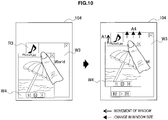
- FIG. 10 is an explanatory diagram illustrating the third scenario of window control.
- two application windows W3 and W4 are displayed on the display 104.
- the application window W4 is positioned in front of the application window W3.
- the user drags and moves the application window W4 in an upward direction. If it is determined by the window control unit 150 that as a result of moving the application window W4 the application associated with the application window W3 is difficult to identify, the window control unit 150 lengthens the height of the application window W3 in an upward direction (arrow A4 on the right of FIG. 10 ). Consequently, the identification region R3 of the application window W3 maintains a position that is visible to the user.
- the window control unit 150 determines that the first application is difficult to identify, the window control unit 150 changes the size of the first application window so that the identification region of the first application window is visible to the user.
- the window control unit 150 determines the direction of the change in size of the first application window based on the operation direction of the second application window hiding the identification region of the first application window.
- the amount of change in size of the first application window may also be determined based on the operation amount of the second application window.
- FIG. 11 is an explanatory diagram illustrating the fourth scenario of window control.
- two application windows W4 and W5 are displayed on the display 104.
- the application window W5 is positioned in front of the application window W4.
- the user drags and moves the application window W5 in a downward direction. If it is determined by the window control unit 150 that as a result of moving the application window W5 the application associated with the application window W4 is difficult to identify, the window control unit 150 shortens the height and width of the application window W4 in a left-downward direction (arrow A5 on the right of FIG. 11 ). Consequently, the identification region R4 of the application window W4 maintains a position that is visible to the user.
- the window control unit 150 determines that the first application is difficult to identify, the window control unit 150 displays an icon of the first application window, and displays the icon of the first application window at a position that is not hidden by the second application window.
- This icon has a role as identification information for identifying the first application.
- the display of the icon may be handled as a kind of change in the window layout.
- FIG. 12 is an explanatory diagram illustrating the fifth scenario of window control.
- two application windows W3 and W4 are displayed on the display 104.
- the application window W4 is positioned in front of the application window W3.
- the user drags and moves the application window W4 in an upward direction.
- the window control unit 150 displays an icon of the application window W3 (arrow A6 on the right of FIG. 12 ). Consequently, the identification region R3 (here, the icon) of the application window W3 maintains a position that is visible to the user.
- the window control unit 150 determines that the first application is difficult to identify, the window control unit 150 changes the layout of the first application window so that the identification region of the first application window moves to a position that is not hidden by the second application window.
- FIG. 13 is an explanatory diagram illustrating the sixth scenario of window control. As illustrated on the left of FIG. 13 , two application windows W3 and W4 are displayed on the display 104. The application window W4 is positioned in front of the application window W3. An identification region R3a of the application window W3 is arranged at the upper left corner of the window. In the sixth scenario, the user drags and moves the application window W4 in an upward direction.
- the window control unit 150 changes the window layout of the application window W3, and replaces the identification region R3a at the upper left corner with an identification region R3b at the lower right corner (arrow A7 on the right of FIG. 13 ). Consequently, the identification region R3b of the application window W3 is visible after the user operation.
- the window control unit 150 determines that the first application is difficult to identify, the window control unit 150 changes the layout of the first application window so that the identification region of the first application window moves to a position that is not hidden by the second application window. Further, the window control unit 150 displays second identification information different from first identification information displayed on the identification region before processing corresponding to layout change on the identification region after that processing.
- FIG. 14 is an explanatory diagram illustrating the seventh scenario of window control. As illustrated on the left of FIG. 14 , two application windows W4 and W5 are displayed on the display 104. The application window W5 is positioned in front of the application window W5. An identification region R4a of the application window W4 is arranged along an upper side of the application window W4. In the seventh scenario, the user enlarges the size of the application window W5 by dragging an edge of the application window W5 (arrow A1 on the right of FIG. 14 ).
- the window control unit 150 changes the window layout of the application window W4, and replaces the identification region R4a with an identification region R4b at the lower left corner (arrow A9 on the right of FIG. 14 ). Further, the window control unit 150 also changes the identification information indicated by the identification region in order to change the shape of the identification region during the layout change. In the example illustrated in FIG. 14 , name (file name) of the content that is the identification information in the identification region R4a is changed to the thumbnail of the content in the identification region R4b after the layout change. Consequently, even after the user operation, the user can easily identify which application the application window W4 is for.
- the window control unit 150 is not limited to layout change, the window control unit 150 may also move the windows, change the size, or change the identification information before or after displaying the icon. Further, even in the case of changing the size instead of the shape of the identification region, the window control unit 150 may also change the identification information based on that change in size.
- the window control unit 150 determines that the first application is difficult to identify, the window control unit 150 changes the layout of the first application window so that the identification region of the first application window moves to a position that is not hidden by the second application window.
- FIG. 15 is an explanatory diagram illustrating the eighth scenario of window control. As illustrated on the left of FIG. 15 , two application windows W4 and W5 are displayed on the display 104. The application window W4 is positioned in front of the application window W5. An identification region R5a of the application window W4 is positioned along an upper side of the window. In the eighth scenario, the user drags and moves the application window W4 in an upward direction (arrow A10 on the right of FIG. 15 ).
- the window control unit 150 changes the window layout of the application window W5, deletes the identification region R5a, and displays a new identification region R5b below the application window W5 (arrow A11 on the right of FIG. 15 ).
- the new identification region R5b indicates a thumbnail of the content in the form of a balloon. Consequently, even after the user operation, the user can easily identify which application the application window W5 is for.
- the window control unit 150 determines that the first application is difficult to identify, the window control unit 150 makes at least a portion of the second application window overlapping the identification region of the first application window transparent.
- FIG. 16 is an explanatory diagram illustrating the ninth scenario of window control.
- two application windows W3 and W4 are displayed on the display 104.
- the application window W4 is positioned in front of the application window W3.
- the user drags and moves the application window W4 in an upward direction.
- the window control unit 150 makes at least a portion of the application window W4 overlapping the identification region R3 of the application window W3 transparent (the right of FIG. 16 ). Consequently, the identification region R3 of the application window W3 maintains a position that is visible to the user.
- the window control unit 150 may also make the application window W4 transparent in the vicinity of the operation position of the application window W4 operated on by the user so that the user operation is not obstructed.
- the window control unit 150 limits operation of the second application window so that the second application window is not arranged at a position where it is difficult to identify the first application window.
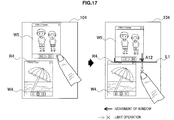
- FIG. 17 is an explanatory diagram illustrating the tenth scenario of window control.
- two application windows W4 and W5 are displayed on the display 104.
- the identification region R4 of the application window W4 is arranged along an upper side of the window.
- the user drags and moves the application window W5 in a downward direction (arrow A12 on the right of FIG. 17 ).
- the window control unit 150 limits the movement of the application window W5 (line L1 on the right of FIG. 17 ). Consequently, the identification region R4 of the application window W4 maintains a position that is visible to the user.
- the application window operated on by the user hides another application window.
- the technology according to the present disclosure can be similarly applied even in cases in which the application window to be operated on by the user is hidden behind another application window.
- the determination regarding which window is hidden by which other window depends on the priority level given to each application window.
- the priority level may be given based on the operated order (a higher priority level given to the window operated on later etc.), or the priority level may be given based on some other condition, such as a usage frequency of each application or a system setting.
- the window control unit 150 arranges the first application window in front of the second application window regardless of the priority levels before the detection.
- FIG. 18 is an explanatory diagram illustrating the eleventh scenario of window control. As illustrated on the left of FIG. 18 , two application windows W3 and W4 are displayed on the display 104. The priority level of the application window W4 is higher than the priority level of the application window W3, so the application window W4 is positioned in front of the application window W3. The identification region R3a of the application window W3 is arranged at the upper left corner of the window. In the eleventh scenario, the user drags and moves the application window W3 in a downward direction (arrow A13 on the center of FIG. 18 ). Here, the priority level based on this operation is not changed.
- the window control unit 150 changes the window layout of the application window W3, and replaces the identification region R3a at the upper left corner with an identification region R3b at the lower right corner. For example, when the user double taps the application window W3 (reference symbol T1 on the right of FIG. 18 ), the window control unit 150 updates the priority level of the application window W3 to a higher value than the priority level of the application window W4, and moves the application window W3 in front of the application window W4.
- the window control unit 150 changes the window layout of the application window W4, and replaces the identification region R4a of the application window W4 with an identification region R4c in the form of a balloon. Through this series of operations, the identification regions of the application windows W3 and W4 are maintained in a state visible to the user.
- the window control unit 150 may display an animation that appears as if the display attribute is smoothly (continuously) changing. This can prevent the user from missing the correspondence between the application windows (or identification regions) before and after the change.
- FIG. 19 is a flowchart illustrating an example of a flow of processing executed by the display control apparatus 100 in the present embodiment. Note that at the point when the flowchart starts, a plurality of applications are already being executed by the application unit 120.
- Step S110 the detection unit 140 continuously monitors for user operations. Then, when a user operation on an application window is detected by the detection unit 140, the processing proceeds to Step S120 (Step S115).
- the window control unit 150 updates at least one of the current position, the current size, and the priority level of the operation target application window based on the user operation detected by the detection unit 140 (Step S120). Next, the window control unit 150 determines whether among a plurality of application windows to be displayed there is an application window whose identification region is hidden (Step S125). If it is determined that there is an application window whose identification region is hidden, the window control unit 150 adjusts a display attribute of the application window so that the identification region is visible (Step S130). This adjustment of the display attribute can be carried out based on, for example, one or a plurality of the first to eleventh scenarios described above.
- the window control unit 150 builds each of the plurality of application windows based on the display attribute updated in Step S120 or adjusted in Step S130, and displays the application windows on the screen (Step S135). Then, the processing returns to Step S110.
- the identifiability of an application can be determined based on a positional relationship between just the identification region of the application window, instead of the whole application window, with another application window. Therefore, for example, it is acceptable for the content region of the application window to be hidden by another application window. Accordingly, the limited display region of a portable or a compact electronic device can be efficiently utilized, and the whole of the application window that the user is paying attention to and the identification region for other applications can be appropriately displayed.
- the direction of that movement or size change can be determined based on an operation direction by the user.
- the user since there is an indirect relationship between the user operation and the movement of the window, the user can be avoid being confused by changes to the display of an application window that is not supposed to be being operated on.
- identification information about a hidden application can be maintained in a visible state.
- the application window that is not the target of the operation does not move, a more natural user interface can be provided to the user.
- the series of processing carried out by each of the apparatuses described in the present specification may be typically achieved by software.
- Programs that compose such software achieving the series of processing may be stored in advance for example on a storage medium provided inside or outside the apparatuses.
- Such programs are written into random access memory (RAM) and executed by a processor such as a CPU.
- RAM random access memory
Landscapes
- Engineering & Computer Science (AREA)
- General Engineering & Computer Science (AREA)
- Theoretical Computer Science (AREA)
- Human Computer Interaction (AREA)
- Physics & Mathematics (AREA)
- General Physics & Mathematics (AREA)
- User Interface Of Digital Computer (AREA)
Applications Claiming Priority (2)
| Application Number | Priority Date | Filing Date | Title |
|---|---|---|---|
| JP2012226788 | 2012-10-12 | ||
| PCT/JP2013/076035 WO2014057814A1 (ja) | 2012-10-12 | 2013-09-26 | 表示制御装置、表示制御方法及びプログラム |
Publications (3)
| Publication Number | Publication Date |
|---|---|
| EP2908232A1 EP2908232A1 (en) | 2015-08-19 |
| EP2908232A4 EP2908232A4 (en) | 2016-06-29 |
| EP2908232B1 true EP2908232B1 (en) | 2019-04-03 |
Family
ID=50453247
Family Applications (1)
| Application Number | Title | Priority Date | Filing Date |
|---|---|---|---|
| EP13844730.5A Not-in-force EP2908232B1 (en) | 2012-10-12 | 2013-09-26 | Display control device, display control method and program for managing the layout of software applications |
Country Status (6)
| Country | Link |
|---|---|
| US (1) | US10509537B2 (ja) |
| EP (1) | EP2908232B1 (ja) |
| JP (1) | JP6264293B2 (ja) |
| CN (1) | CN103729156B (ja) |
| TW (1) | TW201421346A (ja) |
| WO (1) | WO2014057814A1 (ja) |
Families Citing this family (23)
| Publication number | Priority date | Publication date | Assignee | Title |
|---|---|---|---|---|
| USD758387S1 (en) * | 2014-05-05 | 2016-06-07 | Tencent Technology (Shenzhen) Company Limited | Portion of a display screen with animated graphical user interface |
| US20160378967A1 (en) * | 2014-06-25 | 2016-12-29 | Chian Chiu Li | System and Method for Accessing Application Program |
| US20160139785A1 (en) * | 2014-11-16 | 2016-05-19 | Cisco Technology, Inc. | Multi-modal communications |
| US10275133B2 (en) | 2015-01-16 | 2019-04-30 | Taro Kaneko | Moving image playback method, moving image playback device, and computer readable storage medium storing a moving image playback program |
| CN106484382B (zh) * | 2015-08-31 | 2019-06-21 | 阿里巴巴集团控股有限公司 | 一种弹框显示的方法和设备 |
| JP6977710B2 (ja) * | 2016-03-24 | 2021-12-08 | ソニーグループ株式会社 | 情報処理装置、情報処理方法、およびプログラム |
| WO2017221409A1 (ja) * | 2016-06-24 | 2017-12-28 | ヤマハ株式会社 | 情報処理装置、スマートフォン、プログラムおよび情報処理方法 |
| JP6374456B2 (ja) * | 2016-09-02 | 2018-08-15 | ファナック株式会社 | 電子機器及び数値制御装置 |
| JP6809267B2 (ja) * | 2017-02-10 | 2021-01-06 | 富士ゼロックス株式会社 | 情報処理装置、情報処理システム及びプログラム |
| CN107071331B (zh) * | 2017-03-08 | 2019-05-24 | 西安万像电子科技有限公司 | 图像显示方法、装置和系统、存储介质及处理器 |
| CN109002292B (zh) * | 2018-06-11 | 2022-02-11 | 广州环通信息技术有限公司 | 一种基于网页弹出层的弹框实现方法及系统 |
| CN109151547B (zh) * | 2018-08-30 | 2021-07-23 | 广州虎牙信息科技有限公司 | 一种轮播方法、装置、终端及存储介质 |
| JP6802229B2 (ja) * | 2018-09-25 | 2020-12-16 | ファナック株式会社 | 射出成形機の表示装置及び表示システム |
| JP7244242B2 (ja) | 2018-09-26 | 2023-03-22 | シュナイダーエレクトリックホールディングス株式会社 | 操作入力制御装置 |
| JP7466123B2 (ja) | 2019-06-19 | 2024-04-12 | グリー株式会社 | コンピュータプログラム、サーバ装置、端末装置、プログラム生成方法、及び方法 |
| CN111176506A (zh) * | 2019-12-25 | 2020-05-19 | 华为技术有限公司 | 一种屏幕显示方法及电子设备 |
| CN114253433B (zh) * | 2020-09-24 | 2024-09-24 | 荣耀终端有限公司 | 一种动态元素控制方法、电子设备和计算机可读存储介质 |
| CN114253434A (zh) * | 2020-09-25 | 2022-03-29 | 武汉斗鱼鱼乐网络科技有限公司 | 系统交互界面的控制方法、装置、存储介质及电子设备 |
| CN115705120A (zh) * | 2021-08-10 | 2023-02-17 | 荣耀终端有限公司 | 应用程序的切换方法、图形界面及相关装置 |
| CN113835577B (zh) * | 2021-09-24 | 2025-09-05 | 维沃移动通信有限公司 | 显示方法、装置、电子设备及存储介质 |
| US20240393912A1 (en) * | 2022-08-26 | 2024-11-28 | Rakuten Group, Inc. | Video display for avoiding hiding of particular element displayed on screen |
| WO2024158207A1 (ko) * | 2023-01-26 | 2024-08-02 | 삼성전자 주식회사 | 윈도우의 상태를 전환하는 전자 장치 및 그의 동작 방법 |
| WO2024172402A1 (ko) * | 2023-02-17 | 2024-08-22 | 삼성전자 주식회사 | 적어도 하나의 아이콘의 크기 변경에 따라 화면의 구성을 변경하는 전자 장치 및 그 제어 방법 |
Family Cites Families (17)
| Publication number | Priority date | Publication date | Assignee | Title |
|---|---|---|---|---|
| JPH0727349B2 (ja) * | 1985-07-01 | 1995-03-29 | 株式会社日立製作所 | マルチウインドウの表示制御方式 |
| US5179655A (en) * | 1986-06-05 | 1993-01-12 | Yasuhiro Noguchi | Multiwindow control method and apparatus for work station having multiwindow function |
| US5140678A (en) * | 1990-05-04 | 1992-08-18 | International Business Machines Corporation | Computer user interface with window title bar icons |
| US5305435A (en) * | 1990-07-17 | 1994-04-19 | Hewlett-Packard Company | Computer windows management system and method for simulating off-screen document storage and retrieval |
| JPH05324239A (ja) | 1992-05-21 | 1993-12-07 | Fuji Xerox Co Ltd | マルチウィンドウ表示制御装置 |
| JPH06266525A (ja) * | 1993-03-16 | 1994-09-22 | Fuji Electric Co Ltd | マルチウィンドウ画面制御方法 |
| JPH0773003A (ja) * | 1993-09-06 | 1995-03-17 | Matsushita Electric Ind Co Ltd | ウインドウタイトル表示制御装置及びウインドウタイトル表示制御方法 |
| JPH07248891A (ja) * | 1994-03-10 | 1995-09-26 | Fuji Facom Corp | マルチウィンドウ画面の制御方法 |
| EP0717344B1 (en) | 1994-12-13 | 2001-10-31 | Microsoft Corporation | Taskbar with start menu |
| JP3970949B2 (ja) * | 1995-11-28 | 2007-09-05 | 富士通株式会社 | ディスプレイ装置付き情報処理装置 |
| JP2000207090A (ja) | 1999-01-11 | 2000-07-28 | Toshiba Corp | 表示制御装置と表示制御方法 |
| US7146573B2 (en) * | 2002-01-28 | 2006-12-05 | International Business Machines Corporation | Automatic window representation adjustment |
| US9298474B2 (en) * | 2004-10-06 | 2016-03-29 | International Business Machines Corporation | System and method for managing a floating window |
| US20060253791A1 (en) * | 2005-05-03 | 2006-11-09 | Kuiken David P | Simplified interactive graphical user interfaces for sorting through a stack of overlapping windows on a display in order along the Z (depth) axis |
| JP4883791B2 (ja) * | 2007-04-04 | 2012-02-22 | キヤノン株式会社 | 情報処理装置及び表示方法 |
| JP4361945B2 (ja) * | 2007-07-24 | 2009-11-11 | 株式会社エヌ・ティ・ティ・ドコモ | 情報処理装置およびプログラム |
| JP2009031862A (ja) * | 2007-07-24 | 2009-02-12 | Ntt Docomo Inc | 情報処理装置およびプログラム |
-
2013
- 2013-09-26 US US14/427,381 patent/US10509537B2/en not_active Expired - Fee Related
- 2013-09-26 EP EP13844730.5A patent/EP2908232B1/en not_active Not-in-force
- 2013-09-26 WO PCT/JP2013/076035 patent/WO2014057814A1/ja not_active Ceased
- 2013-09-26 JP JP2014540801A patent/JP6264293B2/ja not_active Expired - Fee Related
- 2013-09-30 CN CN201310462161.8A patent/CN103729156B/zh not_active Expired - Fee Related
- 2013-10-02 TW TW102135676A patent/TW201421346A/zh unknown
Non-Patent Citations (1)
| Title |
|---|
| None * |
Also Published As
| Publication number | Publication date |
|---|---|
| JPWO2014057814A1 (ja) | 2016-09-05 |
| US20150234551A1 (en) | 2015-08-20 |
| CN103729156B (zh) | 2018-02-06 |
| CN103729156A (zh) | 2014-04-16 |
| EP2908232A1 (en) | 2015-08-19 |
| JP6264293B2 (ja) | 2018-01-24 |
| WO2014057814A1 (ja) | 2014-04-17 |
| TW201421346A (zh) | 2014-06-01 |
| US10509537B2 (en) | 2019-12-17 |
| EP2908232A4 (en) | 2016-06-29 |
Similar Documents
| Publication | Publication Date | Title |
|---|---|---|
| EP2908232B1 (en) | Display control device, display control method and program for managing the layout of software applications | |
| US10908703B2 (en) | User terminal device and method for controlling the user terminal device thereof | |
| JP6559403B2 (ja) | コンテンツ表示装置、コンテンツ表示方法及びプログラム | |
| CN105224166B (zh) | 便携式终端及其显示方法 | |
| CN105229590B (zh) | 具有笔的用户终端装置和用户终端装置的控制方法 | |
| US9389981B2 (en) | Hierarchical live graphs for performance data display | |
| US9423934B2 (en) | Method for displaying background screen in mobile device and mobile device adapted thereto | |
| US8924885B2 (en) | Desktop as immersive application | |
| CN104603733B (zh) | 用户终端装置及其控制方法 | |
| KR102137731B1 (ko) | 전자 장치, 전자 장치의 알림 정보 표시 방법 | |
| KR20150056074A (ko) | 전자 장치가 외부 디스플레이 장치와 화면을 공유하는 방법 및 전자 장치 | |
| JPWO2010095255A1 (ja) | 情報処理装置、表示制御方法および表示制御プログラム | |
| CN112286612A (zh) | 信息显示方法、装置及电子设备 | |
| KR20150039552A (ko) | 전자 장치의 디스플레이 조작 방법 및 그 전자 장치 | |
| JP5783610B2 (ja) | 入力表示制御装置、シンクライアントシステム、入力表示制御方法およびプログラム | |
| JP2009252083A (ja) | 情報処理装置、ウィンドウ表示方法および表示制御プログラム | |
| KR20140028383A (ko) | 사용자 단말 장치 및 그 제어 방법 | |
| US10895955B2 (en) | Apparatus and method for grouping and displaying icons on a screen | |
| US9582158B2 (en) | Efficient usage of screen real estate on an electronic device | |
| TWI493434B (zh) | 電子裝置和應用軟體介面調整方法 |
Legal Events
| Date | Code | Title | Description |
|---|---|---|---|
| PUAI | Public reference made under article 153(3) epc to a published international application that has entered the european phase |
Free format text: ORIGINAL CODE: 0009012 |
|
| 17P | Request for examination filed |
Effective date: 20150428 |
|
| AK | Designated contracting states |
Kind code of ref document: A1 Designated state(s): AL AT BE BG CH CY CZ DE DK EE ES FI FR GB GR HR HU IE IS IT LI LT LU LV MC MK MT NL NO PL PT RO RS SE SI SK SM TR |
|
| AX | Request for extension of the european patent |
Extension state: BA ME |
|
| DAX | Request for extension of the european patent (deleted) | ||
| RA4 | Supplementary search report drawn up and despatched (corrected) |
Effective date: 20160527 |
|
| RIC1 | Information provided on ipc code assigned before grant |
Ipc: G06F 3/0488 20130101ALI20160520BHEP Ipc: G06F 3/0481 20130101ALI20160520BHEP Ipc: G06F 3/048 20060101AFI20160520BHEP |
|
| GRAP | Despatch of communication of intention to grant a patent |
Free format text: ORIGINAL CODE: EPIDOSNIGR1 |
|
| STAA | Information on the status of an ep patent application or granted ep patent |
Free format text: STATUS: GRANT OF PATENT IS INTENDED |
|
| INTG | Intention to grant announced |
Effective date: 20181024 |
|
| GRAS | Grant fee paid |
Free format text: ORIGINAL CODE: EPIDOSNIGR3 |
|
| GRAA | (expected) grant |
Free format text: ORIGINAL CODE: 0009210 |
|
| STAA | Information on the status of an ep patent application or granted ep patent |
Free format text: STATUS: THE PATENT HAS BEEN GRANTED |
|
| AK | Designated contracting states |
Kind code of ref document: B1 Designated state(s): AL AT BE BG CH CY CZ DE DK EE ES FI FR GB GR HR HU IE IS IT LI LT LU LV MC MK MT NL NO PL PT RO RS SE SI SK SM TR |
|
| REG | Reference to a national code |
Ref country code: GB Ref legal event code: FG4D |
|
| REG | Reference to a national code |
Ref country code: CH Ref legal event code: EP Ref country code: AT Ref legal event code: REF Ref document number: 1116559 Country of ref document: AT Kind code of ref document: T Effective date: 20190415 |
|
| REG | Reference to a national code |
Ref country code: DE Ref legal event code: R096 Ref document number: 602013053437 Country of ref document: DE |
|
| REG | Reference to a national code |
Ref country code: IE Ref legal event code: FG4D |
|
| REG | Reference to a national code |
Ref country code: NL Ref legal event code: FP |
|
| REG | Reference to a national code |
Ref country code: LT Ref legal event code: MG4D |
|
| REG | Reference to a national code |
Ref country code: AT Ref legal event code: MK05 Ref document number: 1116559 Country of ref document: AT Kind code of ref document: T Effective date: 20190403 |
|
| PG25 | Lapsed in a contracting state [announced via postgrant information from national office to epo] |
Ref country code: NO Free format text: LAPSE BECAUSE OF FAILURE TO SUBMIT A TRANSLATION OF THE DESCRIPTION OR TO PAY THE FEE WITHIN THE PRESCRIBED TIME-LIMIT Effective date: 20190703 Ref country code: FI Free format text: LAPSE BECAUSE OF FAILURE TO SUBMIT A TRANSLATION OF THE DESCRIPTION OR TO PAY THE FEE WITHIN THE PRESCRIBED TIME-LIMIT Effective date: 20190403 Ref country code: LT Free format text: LAPSE BECAUSE OF FAILURE TO SUBMIT A TRANSLATION OF THE DESCRIPTION OR TO PAY THE FEE WITHIN THE PRESCRIBED TIME-LIMIT Effective date: 20190403 Ref country code: SE Free format text: LAPSE BECAUSE OF FAILURE TO SUBMIT A TRANSLATION OF THE DESCRIPTION OR TO PAY THE FEE WITHIN THE PRESCRIBED TIME-LIMIT Effective date: 20190403 Ref country code: HR Free format text: LAPSE BECAUSE OF FAILURE TO SUBMIT A TRANSLATION OF THE DESCRIPTION OR TO PAY THE FEE WITHIN THE PRESCRIBED TIME-LIMIT Effective date: 20190403 Ref country code: AL Free format text: LAPSE BECAUSE OF FAILURE TO SUBMIT A TRANSLATION OF THE DESCRIPTION OR TO PAY THE FEE WITHIN THE PRESCRIBED TIME-LIMIT Effective date: 20190403 Ref country code: PT Free format text: LAPSE BECAUSE OF FAILURE TO SUBMIT A TRANSLATION OF THE DESCRIPTION OR TO PAY THE FEE WITHIN THE PRESCRIBED TIME-LIMIT Effective date: 20190803 Ref country code: ES Free format text: LAPSE BECAUSE OF FAILURE TO SUBMIT A TRANSLATION OF THE DESCRIPTION OR TO PAY THE FEE WITHIN THE PRESCRIBED TIME-LIMIT Effective date: 20190403 Ref country code: CZ Free format text: LAPSE BECAUSE OF FAILURE TO SUBMIT A TRANSLATION OF THE DESCRIPTION OR TO PAY THE FEE WITHIN THE PRESCRIBED TIME-LIMIT Effective date: 20190403 |
|
| PG25 | Lapsed in a contracting state [announced via postgrant information from national office to epo] |
Ref country code: GR Free format text: LAPSE BECAUSE OF FAILURE TO SUBMIT A TRANSLATION OF THE DESCRIPTION OR TO PAY THE FEE WITHIN THE PRESCRIBED TIME-LIMIT Effective date: 20190704 Ref country code: BG Free format text: LAPSE BECAUSE OF FAILURE TO SUBMIT A TRANSLATION OF THE DESCRIPTION OR TO PAY THE FEE WITHIN THE PRESCRIBED TIME-LIMIT Effective date: 20190703 Ref country code: RS Free format text: LAPSE BECAUSE OF FAILURE TO SUBMIT A TRANSLATION OF THE DESCRIPTION OR TO PAY THE FEE WITHIN THE PRESCRIBED TIME-LIMIT Effective date: 20190403 Ref country code: LV Free format text: LAPSE BECAUSE OF FAILURE TO SUBMIT A TRANSLATION OF THE DESCRIPTION OR TO PAY THE FEE WITHIN THE PRESCRIBED TIME-LIMIT Effective date: 20190403 Ref country code: PL Free format text: LAPSE BECAUSE OF FAILURE TO SUBMIT A TRANSLATION OF THE DESCRIPTION OR TO PAY THE FEE WITHIN THE PRESCRIBED TIME-LIMIT Effective date: 20190403 |
|
| PG25 | Lapsed in a contracting state [announced via postgrant information from national office to epo] |
Ref country code: IS Free format text: LAPSE BECAUSE OF FAILURE TO SUBMIT A TRANSLATION OF THE DESCRIPTION OR TO PAY THE FEE WITHIN THE PRESCRIBED TIME-LIMIT Effective date: 20190803 Ref country code: AT Free format text: LAPSE BECAUSE OF FAILURE TO SUBMIT A TRANSLATION OF THE DESCRIPTION OR TO PAY THE FEE WITHIN THE PRESCRIBED TIME-LIMIT Effective date: 20190403 |
|
| REG | Reference to a national code |
Ref country code: DE Ref legal event code: R097 Ref document number: 602013053437 Country of ref document: DE |
|
| PG25 | Lapsed in a contracting state [announced via postgrant information from national office to epo] |
Ref country code: EE Free format text: LAPSE BECAUSE OF FAILURE TO SUBMIT A TRANSLATION OF THE DESCRIPTION OR TO PAY THE FEE WITHIN THE PRESCRIBED TIME-LIMIT Effective date: 20190403 Ref country code: DK Free format text: LAPSE BECAUSE OF FAILURE TO SUBMIT A TRANSLATION OF THE DESCRIPTION OR TO PAY THE FEE WITHIN THE PRESCRIBED TIME-LIMIT Effective date: 20190403 Ref country code: SK Free format text: LAPSE BECAUSE OF FAILURE TO SUBMIT A TRANSLATION OF THE DESCRIPTION OR TO PAY THE FEE WITHIN THE PRESCRIBED TIME-LIMIT Effective date: 20190403 Ref country code: RO Free format text: LAPSE BECAUSE OF FAILURE TO SUBMIT A TRANSLATION OF THE DESCRIPTION OR TO PAY THE FEE WITHIN THE PRESCRIBED TIME-LIMIT Effective date: 20190403 |
|
| PLBE | No opposition filed within time limit |
Free format text: ORIGINAL CODE: 0009261 |
|
| STAA | Information on the status of an ep patent application or granted ep patent |
Free format text: STATUS: NO OPPOSITION FILED WITHIN TIME LIMIT |
|
| PG25 | Lapsed in a contracting state [announced via postgrant information from national office to epo] |
Ref country code: IT Free format text: LAPSE BECAUSE OF FAILURE TO SUBMIT A TRANSLATION OF THE DESCRIPTION OR TO PAY THE FEE WITHIN THE PRESCRIBED TIME-LIMIT Effective date: 20190403 Ref country code: SM Free format text: LAPSE BECAUSE OF FAILURE TO SUBMIT A TRANSLATION OF THE DESCRIPTION OR TO PAY THE FEE WITHIN THE PRESCRIBED TIME-LIMIT Effective date: 20190403 |
|
| 26N | No opposition filed |
Effective date: 20200106 |
|
| PG25 | Lapsed in a contracting state [announced via postgrant information from national office to epo] |
Ref country code: TR Free format text: LAPSE BECAUSE OF FAILURE TO SUBMIT A TRANSLATION OF THE DESCRIPTION OR TO PAY THE FEE WITHIN THE PRESCRIBED TIME-LIMIT Effective date: 20190403 |
|
| PG25 | Lapsed in a contracting state [announced via postgrant information from national office to epo] |
Ref country code: MC Free format text: LAPSE BECAUSE OF FAILURE TO SUBMIT A TRANSLATION OF THE DESCRIPTION OR TO PAY THE FEE WITHIN THE PRESCRIBED TIME-LIMIT Effective date: 20190403 Ref country code: SI Free format text: LAPSE BECAUSE OF FAILURE TO SUBMIT A TRANSLATION OF THE DESCRIPTION OR TO PAY THE FEE WITHIN THE PRESCRIBED TIME-LIMIT Effective date: 20190403 |
|
| REG | Reference to a national code |
Ref country code: CH Ref legal event code: PL |
|
| PG25 | Lapsed in a contracting state [announced via postgrant information from national office to epo] |
Ref country code: IE Free format text: LAPSE BECAUSE OF NON-PAYMENT OF DUE FEES Effective date: 20190926 Ref country code: CH Free format text: LAPSE BECAUSE OF NON-PAYMENT OF DUE FEES Effective date: 20190930 Ref country code: LI Free format text: LAPSE BECAUSE OF NON-PAYMENT OF DUE FEES Effective date: 20190930 Ref country code: LU Free format text: LAPSE BECAUSE OF NON-PAYMENT OF DUE FEES Effective date: 20190926 |
|
| REG | Reference to a national code |
Ref country code: BE Ref legal event code: MM Effective date: 20190930 |
|
| PG25 | Lapsed in a contracting state [announced via postgrant information from national office to epo] |
Ref country code: BE Free format text: LAPSE BECAUSE OF NON-PAYMENT OF DUE FEES Effective date: 20190930 |
|
| GBPC | Gb: european patent ceased through non-payment of renewal fee |
Effective date: 20190926 |
|
| PG25 | Lapsed in a contracting state [announced via postgrant information from national office to epo] |
Ref country code: GB Free format text: LAPSE BECAUSE OF NON-PAYMENT OF DUE FEES Effective date: 20190926 |
|
| PGFP | Annual fee paid to national office [announced via postgrant information from national office to epo] |
Ref country code: DE Payment date: 20200925 Year of fee payment: 8 Ref country code: FR Payment date: 20200914 Year of fee payment: 8 Ref country code: NL Payment date: 20200925 Year of fee payment: 8 |
|
| PG25 | Lapsed in a contracting state [announced via postgrant information from national office to epo] |
Ref country code: CY Free format text: LAPSE BECAUSE OF FAILURE TO SUBMIT A TRANSLATION OF THE DESCRIPTION OR TO PAY THE FEE WITHIN THE PRESCRIBED TIME-LIMIT Effective date: 20190403 |
|
| PG25 | Lapsed in a contracting state [announced via postgrant information from national office to epo] |
Ref country code: HU Free format text: LAPSE BECAUSE OF FAILURE TO SUBMIT A TRANSLATION OF THE DESCRIPTION OR TO PAY THE FEE WITHIN THE PRESCRIBED TIME-LIMIT; INVALID AB INITIO Effective date: 20130926 Ref country code: MT Free format text: LAPSE BECAUSE OF FAILURE TO SUBMIT A TRANSLATION OF THE DESCRIPTION OR TO PAY THE FEE WITHIN THE PRESCRIBED TIME-LIMIT Effective date: 20190403 |
|
| REG | Reference to a national code |
Ref country code: DE Ref legal event code: R119 Ref document number: 602013053437 Country of ref document: DE |
|
| REG | Reference to a national code |
Ref country code: NL Ref legal event code: MM Effective date: 20211001 |
|
| PG25 | Lapsed in a contracting state [announced via postgrant information from national office to epo] |
Ref country code: NL Free format text: LAPSE BECAUSE OF NON-PAYMENT OF DUE FEES Effective date: 20211001 Ref country code: MK Free format text: LAPSE BECAUSE OF FAILURE TO SUBMIT A TRANSLATION OF THE DESCRIPTION OR TO PAY THE FEE WITHIN THE PRESCRIBED TIME-LIMIT Effective date: 20190403 |
|
| PG25 | Lapsed in a contracting state [announced via postgrant information from national office to epo] |
Ref country code: FR Free format text: LAPSE BECAUSE OF NON-PAYMENT OF DUE FEES Effective date: 20210930 Ref country code: DE Free format text: LAPSE BECAUSE OF NON-PAYMENT OF DUE FEES Effective date: 20220401 |