EP4258133A1 - Verfahren und vorrichtung, vorrichtung und speichermedium zur bearbeitung von tutorialbasierten multimediaressourcen - Google Patents
Verfahren und vorrichtung, vorrichtung und speichermedium zur bearbeitung von tutorialbasierten multimediaressourcen Download PDFInfo
- Publication number
- EP4258133A1 EP4258133A1 EP21913493.9A EP21913493A EP4258133A1 EP 4258133 A1 EP4258133 A1 EP 4258133A1 EP 21913493 A EP21913493 A EP 21913493A EP 4258133 A1 EP4258133 A1 EP 4258133A1
- Authority
- EP
- European Patent Office
- Prior art keywords
- tutorial
- editing
- resource
- page
- video
- Prior art date
- Legal status (The legal status is an assumption and is not a legal conclusion. Google has not performed a legal analysis and makes no representation as to the accuracy of the status listed.)
- Pending
Links
Images



Classifications
-
- G—PHYSICS
- G06—COMPUTING OR CALCULATING; COUNTING
- G06F—ELECTRIC DIGITAL DATA PROCESSING
- G06F16/00—Information retrieval; Database structures therefor; File system structures therefor
- G06F16/90—Details of database functions independent of the retrieved data types
- G06F16/95—Retrieval from the web
- G06F16/957—Browsing optimisation, e.g. caching or content distillation
-
- G—PHYSICS
- G09—EDUCATION; CRYPTOGRAPHY; DISPLAY; ADVERTISING; SEALS
- G09B—EDUCATIONAL OR DEMONSTRATION APPLIANCES; APPLIANCES FOR TEACHING, OR COMMUNICATING WITH, THE BLIND, DEAF OR MUTE; MODELS; PLANETARIA; GLOBES; MAPS; DIAGRAMS
- G09B5/00—Electrically-operated educational appliances
- G09B5/06—Electrically-operated educational appliances with both visual and audible presentation of the material to be studied
- G09B5/065—Combinations of audio and video presentations, e.g. videotapes, videodiscs, television systems
-
- H—ELECTRICITY
- H04—ELECTRIC COMMUNICATION TECHNIQUE
- H04N—PICTORIAL COMMUNICATION, e.g. TELEVISION
- H04N21/00—Selective content distribution, e.g. interactive television or video on demand [VOD]
- H04N21/40—Client devices specifically adapted for the reception of or interaction with content, e.g. set-top-box [STB]; Operations thereof
- H04N21/47—End-user applications
- H04N21/472—End-user interface for requesting content, additional data or services; End-user interface for interacting with content, e.g. for content reservation or setting reminders, for requesting event notification, for manipulating displayed content
-
- G—PHYSICS
- G06—COMPUTING OR CALCULATING; COUNTING
- G06F—ELECTRIC DIGITAL DATA PROCESSING
- G06F16/00—Information retrieval; Database structures therefor; File system structures therefor
- G06F16/70—Information retrieval; Database structures therefor; File system structures therefor of video data
- G06F16/74—Browsing; Visualisation therefor
- G06F16/748—Hypervideo
-
- G—PHYSICS
- G06—COMPUTING OR CALCULATING; COUNTING
- G06F—ELECTRIC DIGITAL DATA PROCESSING
- G06F3/00—Input arrangements for transferring data to be processed into a form capable of being handled by the computer; Output arrangements for transferring data from processing unit to output unit, e.g. interface arrangements
- G06F3/01—Input arrangements or combined input and output arrangements for interaction between user and computer
- G06F3/048—Interaction techniques based on graphical user interfaces [GUI]
- G06F3/0484—Interaction techniques based on graphical user interfaces [GUI] for the control of specific functions or operations, e.g. selecting or manipulating an object, an image or a displayed text element, setting a parameter value or selecting a range
- G06F3/04845—Interaction techniques based on graphical user interfaces [GUI] for the control of specific functions or operations, e.g. selecting or manipulating an object, an image or a displayed text element, setting a parameter value or selecting a range for image manipulation, e.g. dragging, rotation, expansion or change of colour
-
- G—PHYSICS
- G06—COMPUTING OR CALCULATING; COUNTING
- G06F—ELECTRIC DIGITAL DATA PROCESSING
- G06F3/00—Input arrangements for transferring data to be processed into a form capable of being handled by the computer; Output arrangements for transferring data from processing unit to output unit, e.g. interface arrangements
- G06F3/01—Input arrangements or combined input and output arrangements for interaction between user and computer
- G06F3/048—Interaction techniques based on graphical user interfaces [GUI]
- G06F3/0484—Interaction techniques based on graphical user interfaces [GUI] for the control of specific functions or operations, e.g. selecting or manipulating an object, an image or a displayed text element, setting a parameter value or selecting a range
- G06F3/04847—Interaction techniques to control parameter settings, e.g. interaction with sliders or dials
-
- G—PHYSICS
- G06—COMPUTING OR CALCULATING; COUNTING
- G06F—ELECTRIC DIGITAL DATA PROCESSING
- G06F3/00—Input arrangements for transferring data to be processed into a form capable of being handled by the computer; Output arrangements for transferring data from processing unit to output unit, e.g. interface arrangements
- G06F3/01—Input arrangements or combined input and output arrangements for interaction between user and computer
- G06F3/048—Interaction techniques based on graphical user interfaces [GUI]
- G06F3/0484—Interaction techniques based on graphical user interfaces [GUI] for the control of specific functions or operations, e.g. selecting or manipulating an object, an image or a displayed text element, setting a parameter value or selecting a range
- G06F3/0486—Drag-and-drop
-
- G—PHYSICS
- G06—COMPUTING OR CALCULATING; COUNTING
- G06F—ELECTRIC DIGITAL DATA PROCESSING
- G06F3/00—Input arrangements for transferring data to be processed into a form capable of being handled by the computer; Output arrangements for transferring data from processing unit to output unit, e.g. interface arrangements
- G06F3/01—Input arrangements or combined input and output arrangements for interaction between user and computer
- G06F3/048—Interaction techniques based on graphical user interfaces [GUI]
- G06F3/0487—Interaction techniques based on graphical user interfaces [GUI] using specific features provided by the input device, e.g. functions controlled by the rotation of a mouse with dual sensing arrangements, or of the nature of the input device, e.g. tap gestures based on pressure sensed by a digitiser
- G06F3/0488—Interaction techniques based on graphical user interfaces [GUI] using specific features provided by the input device, e.g. functions controlled by the rotation of a mouse with dual sensing arrangements, or of the nature of the input device, e.g. tap gestures based on pressure sensed by a digitiser using a touch-screen or digitiser, e.g. input of commands through traced gestures
- G06F3/04883—Interaction techniques based on graphical user interfaces [GUI] using specific features provided by the input device, e.g. functions controlled by the rotation of a mouse with dual sensing arrangements, or of the nature of the input device, e.g. tap gestures based on pressure sensed by a digitiser using a touch-screen or digitiser, e.g. input of commands through traced gestures for inputting data by handwriting, e.g. gesture or text
-
- G—PHYSICS
- G09—EDUCATION; CRYPTOGRAPHY; DISPLAY; ADVERTISING; SEALS
- G09B—EDUCATIONAL OR DEMONSTRATION APPLIANCES; APPLIANCES FOR TEACHING, OR COMMUNICATING WITH, THE BLIND, DEAF OR MUTE; MODELS; PLANETARIA; GLOBES; MAPS; DIAGRAMS
- G09B5/00—Electrically-operated educational appliances
- G09B5/06—Electrically-operated educational appliances with both visual and audible presentation of the material to be studied
-
- G—PHYSICS
- G11—INFORMATION STORAGE
- G11B—INFORMATION STORAGE BASED ON RELATIVE MOVEMENT BETWEEN RECORD CARRIER AND TRANSDUCER
- G11B27/00—Editing; Indexing; Addressing; Timing or synchronising; Monitoring; Measuring tape travel
- G11B27/02—Editing, e.g. varying the order of information signals recorded on, or reproduced from, record carriers
- G11B27/031—Electronic editing of digitised analogue information signals, e.g. audio or video signals
-
- G—PHYSICS
- G11—INFORMATION STORAGE
- G11B—INFORMATION STORAGE BASED ON RELATIVE MOVEMENT BETWEEN RECORD CARRIER AND TRANSDUCER
- G11B27/00—Editing; Indexing; Addressing; Timing or synchronising; Monitoring; Measuring tape travel
- G11B27/10—Indexing; Addressing; Timing or synchronising; Measuring tape travel
- G11B27/11—Indexing; Addressing; Timing or synchronising; Measuring tape travel by using information not detectable on the record carrier
-
- G—PHYSICS
- G11—INFORMATION STORAGE
- G11B—INFORMATION STORAGE BASED ON RELATIVE MOVEMENT BETWEEN RECORD CARRIER AND TRANSDUCER
- G11B27/00—Editing; Indexing; Addressing; Timing or synchronising; Monitoring; Measuring tape travel
- G11B27/10—Indexing; Addressing; Timing or synchronising; Measuring tape travel
- G11B27/34—Indicating arrangements
-
- H—ELECTRICITY
- H04—ELECTRIC COMMUNICATION TECHNIQUE
- H04N—PICTORIAL COMMUNICATION, e.g. TELEVISION
- H04N21/00—Selective content distribution, e.g. interactive television or video on demand [VOD]
- H04N21/40—Client devices specifically adapted for the reception of or interaction with content, e.g. set-top-box [STB]; Operations thereof
- H04N21/43—Processing of content or additional data, e.g. demultiplexing additional data from a digital video stream; Elementary client operations, e.g. monitoring of home network or synchronising decoder's clock; Client middleware
- H04N21/431—Generation of visual interfaces for content selection or interaction; Content or additional data rendering
- H04N21/4312—Generation of visual interfaces for content selection or interaction; Content or additional data rendering involving specific graphical features, e.g. screen layout, special fonts or colors, blinking icons, highlights or animations
- H04N21/4316—Generation of visual interfaces for content selection or interaction; Content or additional data rendering involving specific graphical features, e.g. screen layout, special fonts or colors, blinking icons, highlights or animations for displaying supplemental content in a region of the screen, e.g. an advertisement in a separate window
-
- H—ELECTRICITY
- H04—ELECTRIC COMMUNICATION TECHNIQUE
- H04N—PICTORIAL COMMUNICATION, e.g. TELEVISION
- H04N21/00—Selective content distribution, e.g. interactive television or video on demand [VOD]
- H04N21/40—Client devices specifically adapted for the reception of or interaction with content, e.g. set-top-box [STB]; Operations thereof
- H04N21/43—Processing of content or additional data, e.g. demultiplexing additional data from a digital video stream; Elementary client operations, e.g. monitoring of home network or synchronising decoder's clock; Client middleware
- H04N21/431—Generation of visual interfaces for content selection or interaction; Content or additional data rendering
- H04N21/4318—Generation of visual interfaces for content selection or interaction; Content or additional data rendering by altering the content in the rendering process, e.g. blanking, blurring or masking an image region
-
- H—ELECTRICITY
- H04—ELECTRIC COMMUNICATION TECHNIQUE
- H04N—PICTORIAL COMMUNICATION, e.g. TELEVISION
- H04N21/00—Selective content distribution, e.g. interactive television or video on demand [VOD]
- H04N21/40—Client devices specifically adapted for the reception of or interaction with content, e.g. set-top-box [STB]; Operations thereof
- H04N21/47—End-user applications
- H04N21/472—End-user interface for requesting content, additional data or services; End-user interface for interacting with content, e.g. for content reservation or setting reminders, for requesting event notification, for manipulating displayed content
- H04N21/47217—End-user interface for requesting content, additional data or services; End-user interface for interacting with content, e.g. for content reservation or setting reminders, for requesting event notification, for manipulating displayed content for controlling playback functions for recorded or on-demand content, e.g. using progress bars, mode or play-point indicators or bookmarks
-
- H—ELECTRICITY
- H04—ELECTRIC COMMUNICATION TECHNIQUE
- H04N—PICTORIAL COMMUNICATION, e.g. TELEVISION
- H04N21/00—Selective content distribution, e.g. interactive television or video on demand [VOD]
- H04N21/80—Generation or processing of content or additional data by content creator independently of the distribution process; Content per se
- H04N21/85—Assembly of content; Generation of multimedia applications
- H04N21/854—Content authoring
-
- H—ELECTRICITY
- H04—ELECTRIC COMMUNICATION TECHNIQUE
- H04N—PICTORIAL COMMUNICATION, e.g. TELEVISION
- H04N5/00—Details of television systems
- H04N5/222—Studio circuitry; Studio devices; Studio equipment
- H04N5/262—Studio circuits, e.g. for mixing, switching-over, change of character of image, other special effects ; Cameras specially adapted for the electronic generation of special effects
-
- H—ELECTRICITY
- H04—ELECTRIC COMMUNICATION TECHNIQUE
- H04N—PICTORIAL COMMUNICATION, e.g. TELEVISION
- H04N5/00—Details of television systems
- H04N5/222—Studio circuitry; Studio devices; Studio equipment
- H04N5/262—Studio circuits, e.g. for mixing, switching-over, change of character of image, other special effects ; Cameras specially adapted for the electronic generation of special effects
- H04N5/272—Means for inserting a foreground image in a background image, i.e. inlay, outlay
-
- G—PHYSICS
- G06—COMPUTING OR CALCULATING; COUNTING
- G06F—ELECTRIC DIGITAL DATA PROCESSING
- G06F2203/00—Indexing scheme relating to G06F3/00 - G06F3/048
- G06F2203/048—Indexing scheme relating to G06F3/048
- G06F2203/04806—Zoom, i.e. interaction techniques or interactors for controlling the zooming operation
Definitions
- the present disclosure relates to the field of data processing, and in particular to a method and apparatus for editing multimedia resource based on a tutorial, a device, and a storage medium
- a common learning method to learn is to watch the tutorials.
- video editing techniques can be learned by watching video editing tutorials
- image processing techniques can be learn by watching image processing tutorials.
- the user opens the relevant operating software and learns the operation while watching the tutorial. Therefore, usually the user needs to use one device to play the tutorial while using another device to learn the operation, which is obviously a waste of device resources.
- a method and apparatus for editing multimedia resource based on a tutorial, a device, and a storage medium are provided according to the present disclosure, which can realize a function of learning multimedia resource editing operations while watching tutorials via one device, so as to reduce the occupation of device resources.
- a method for editing multimedia resource based on a tutorial includes:
- the method before the playing the tutorial video on the resource editing page in the form of the floating window, the method further includes: jumping from a tutorial playing page to the resource editing page, in response to a trigger operation for an editing entry on the tutorial playing page.
- the method before the jumping from the tutorial playing page to the resource editing page, the method further includes:
- the method before the jumping from the tutorial playing page to the resource editing page, the method further includes:
- the method further includes:
- the tutorial video includes a first video clip and a second video clip adjacent to each other, and the method further includes:
- the detecting whether the editing operation indicated by the first video clip is completed on the resource editing page, in the process of playing the first video clip further includes: detecting whether a preset operation in the editing operation indicated by the first video clip is completed on the resource editing page, in the process of playing the first video clip.
- the method further includes: displaying a processing result corresponding to the multimedia resource in a user draft list, in response to an editing completion operation for the multimedia resource on the resource editing page, where the processing result carries a tutorial identifier, and the tutorial identifier is used to indicate that the processing result is generated based on a tutorial video.
- an apparatus for editing multimedia resource based on a tutorial includes: an acquisition module and a playing module.
- the acquisition module is configured to acquire a tutorial video.
- the playing module is configured to play the tutorial video on a resource editing page in a form of a floating window; where the tutorial video is used to instruct a user to perform an editing operation on an imported multimedia resource on the resource editing page.
- a computer readable storage medium is provided according to the present disclosure, and instructions are stored in the computer readable storage medium, where the instructions when executed by a terminal device, cause the terminal device to implement the above method.
- a device in a fourth aspect, includes: a memory; a processor; and a computer program stored in the memory and executable on the processor.
- the processor implements the above method.
- the tutorial video is acquired first and then is played on the resource editing page in the form of the floating window, which can instruct a user to perform an editing operation on an imported multimedia resource on the resource editing page.
- the function of learning multimedia resource editing while watching the tutorial video on only one device can be achieved in the embodiments of the present disclosure, which can reduce the occupation of device resources.
- a common method for learning the multimedia resource editing is to watch the tutorials to learn the editing method for multimedia resources.
- at least two devices are required to complete the function of learning multimedia resources editing while watching tutorials. Specifically, one device is used to play the tutorial video, and another device is used to open editing software of the multimedia resource. In this way, the user may operate the editing software of the multimedia resource while watching the tutorial video to finally achieve the purpose of learning multimedia resource editing via the tutorial video.
- a method for editing multimedia resource based on a tutorial is provided according to the present disclosure.
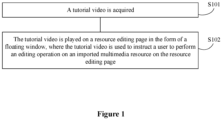
- the tutorial video is acquired, and then the tutorial video is played on a resource editing page in a form of a floating window.
- the tutorial video is used to instruct a user to perform an editing operation on an imported multimedia resource on the resource editing page. In this way, only one device is used to play the tutorial video and edit multimedia resources, which can reduce the occupation of device resources.
- Figure 1 illustrates a flow chart of a method for editing multimedia resource based on a tutorial according to an embodiment of the present disclosure.
- the method includes steps S101 and S102 as follows.
- the tutorial video refers to display an editing process for a certain effect of a multimedia resource in a form of a video, and the purpose of which is to guide the user to learn.
- the tutorial video may include a tutorial video for audio and video editing, a tutorial video for image effect processing, and the like.
- the tutorial video is played on a resource editing page in a form of a floating window, where the tutorial video is used to instruct a user to perform an editing operation on an imported multimedia resource on the resource editing page.
- the resource editing page may be an audio and video editing operation page, an image effect processing page and the like.
- the acquired tutorial video is played on the resource editing page in the form of the floating window.
- the multimedia resource may include image resource, audio and video resource and the like.
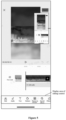
- Figure 2 illustrates a schematic effect diagram of an audio and video editing page according to an embodiment of the present disclosure.
- the tutorial video is played on the audio and video editing page in the form of the floating window.
- the user may perform an editing operation on the imported audio and video resource on the audio and video editing page, based on the tutorial video in the process of playing the tutorial video. In this way, the function of learning the audio and video editing while watching the tutorial video on one device can be achieved.
- the tutorial video is played on the resource editing page in the form of the floating window, which can instruct a user to perform an editing operation on an imported multimedia resource on the resource editing page.
- the function of learning the multimedia resource editing while watching the tutorial video on only one device can be achieved in the embodiment of the present disclosure, which can reduce the occupation of device resources.
- a method for editing multimedia resource based on a tutorial is further provided according to the present disclosure.
- a trigger operation for an editing entry on a tutorial playing page is received, a jump from the tutorial playing page to the resource editing page is performed and the tutorial video played on the tutorial playing page is acquired to play the tutorial video on the resource editing page in the form of the floating window, thereby instructing the user to perform an editing operation on an imported multimedia resource on the resource editing page.
- Figure 3 illustrates a schematic effect diagram of jumping from a tutorial playing page to a resource editing page according to an embodiment of the present disclosure.
- the editing entry is provided on the tutorial playing page.
- the jump from the tutorial playing page to the resource editing page corresponding to the editing entry is triggered, and the tutorial video played on the tutorial playing page is acquired to play the tutorial video on the resource editing page in the form of the floating window.
- the resource editing page can be understood with reference to the schematic effect diagram of the audio and video editing page shown in Figure 2 .
- a method for editing multimedia resource based on a tutorial is further provided according to an embodiment of the present disclosure.
- a tutorial search box is provided on the resource editing page. The user can search for tutorial videos by inputting a keyword in the tutorial search box. Then, a tutorial video is selected from the searched tutorial videos and played on the resource editing page in the form of the floating window. Thus, user requirement of learning multimedia resource editing while watching the tutorial video on the same device is met.
- this embodiment of the present disclosure does not limit the scenario of triggering the tutorial video played on the resource editing page in the form of the floating window.
- the multimedia resource is imported on the resource editing page in advance.
- a material source selection window is first displayed.
- Figure 4 illustrates a schematic effect diagram of displaying a material source selection window after an editing entry is triggered according to an embodiment of the present disclosure.
- the tutorial-associated material refers to multimedia resource carried in the imported tutorial video.
- the user personal resource refers to importing user personal multimedia resource.
- the author of the tutorial video can associate materials with the tutorial before posting the tutorial.
- multimedia resource can be selected from the personal resources of the author, and posted in association with the tutorial video. In this way, users who study the tutorial video can use the associated multimedia resource to perform the editing operation.
- a material source selection window is displayed. If a selection operation for tutorial-associated material on the material source selection window is received from the user, a first material associated with the tutorial video is downloaded, and the first material is imported into the material editing page. If a selection operation for user personal resources on the material source selection window is received from the user, a second material selected from the user personal resources is imported into the resource editing page. Specifically, after a selection operation for user personal resources on the material source selection window is received from the user, a jump from the tutorial playing page to a display page of the user personal resources is performed. The user can select at least one material to import to the resource editing page.
- first material and the second material imported into the resource editing page are used as objects for the user to perform the editing operation on the resource editing page.
- the tutorial playing page after receiving the trigger operation for the editing entry on the tutorial playing page, can be directly jumped to the display page of the user personal resources. After the user selects at least one material on the display page of the user personal resources, the at least one material is imported into the resource editing page, which is used as a multimedia resource to be edited.
- the first material associated with the tutorial video can be directly downloaded, and be imported into the resource editing page.
- the user in the process of playing the tutorial video on the resource editing page in the form of the floating window, the user can perform some operations, such as zooming in on or zooming out on the floating window, to adjust the display of the floating window to meet the user requirements.
- the floating window when a zoom-in operation on the floating window is received, the floating window is zoomed in on the resource editing page.
- a zoom-out operation on the floating window is received, the floating window is zoomed out on the resource editing page.
- the user can also drag the floating window to adjust the display position of the floating window. Specifically, once a dragging operation for the floating window is received, the floating window is displayed in a preset area corresponding to the dragging direction of the dragging operation on the resource editing page.
- the preset area is independent from an area where the editing control is displayed on the resource editing page.
- Figure 5 is taken as an example.
- Figure 5 is a schematic diagram of an audio and video editing page according to an embodiment of the present disclosure.
- the floating window playing the tutorial video is dragged by the user, the dragged floating window cannot cover the display area of the editing control on the resource editing page, so as to ensure that the floating window does not interfere with the editing operation of the user on the imported multimedia resource on the resource editing page.
- the tutorial video includes a first video clip and a second video clip adjacent to each other.
- the editing operation indicated by the first video clip include three editing operations in sequence, which are adding stickers, adding audio and adding special effects. Then, whether the above three editing operations indicated by the first video clip are completed on the resource editing page is detected, in the process of playing the first video clip. On detecting that the above three editing operations indicated by the first video clip have been completed on the resource editing page, the second video clip is played.
- the preset operation in the process of playing the first video clip, it is detected whether a preset operation in the editing operation indicated by the first video clip is completed on the resource editing page.
- the preset operation may be the last operation in the editing operations indicated by the first video clip, such as the above operation of adding special effects. In this case, it is detected whether the above operation of adding special effects is completed on the resource editing page, in the process of playing the first video clip.
- the preset operation may also be the first operation and the last operation in the editing operations indicated by the first video clip.
- a processing result corresponding to the multimedia resource is displayed in a user draft list.
- the processing result carries a tutorial identifier, and the tutorial identifier is used to indicate that the processing result is generated based on a tutorial video.
- the user processes the multimedia resource based on the tutorial video, to obtain a processing result.
- the processing result may be an edited video, an image after an effect operation and the like.
- the processing result of the user can be displayed in the user draft list.
- a tutorial identifier may be marked in the processing result, to indicate that the processing result is generated based on a tutorial video.
- FIG. 6 is a schematic structural diagram of an apparatus for editing multimedia resource based on a tutorial according to an embodiment of the present disclosure.
- the apparatus includes: an acquisition module 601 and a playing module 602.
- the acquisition module 601 is configured to acquire a tutorial video.
- the playing module 602 is configured to play the tutorial video on a resource editing page in a form of a floating window, where the tutorial video is used to instruct a user to perform an editing operation on an imported multimedia resource on the resource editing page.
- the apparatus further includes: a first jumping module configured to jump from a tutorial playing page to the resource editing page, in response to a trigger operation for an editing entry on the tutorial playing page.
- the apparatus further includes: a first display module, a downloading module and a first importing module.
- the first display module is configured to display a material source selection window, in response to the trigger operation for the editing entry on the tutorial playing page.
- the downloading module is configured to download a first material associated with the tutorial video, in a case that a selection operation for a tutorial-associated material on the material source selection window is received, and import the first material into the resource editing page.
- the first importing module is configured to import a second material selected from user personal resources into the resource editing page, in a case that a selection operation for user personal resource on the material source selection window is received.
- the apparatus further includes: a second jumping module and a second importing module.
- the second jumping module is configured to jump from the tutorial playing page to a display page of user personal resource, in response to the trigger operation for the editing entry on the tutorial playing page.
- the second importing module is configured to import at least one material into the resource editing page, in response to a selection operation for the at least one material on the display page of user personal resource.
- the apparatus further includes: a first display module or a second display module.
- the first display module is configured to zoom in on the floating window on the resource editing page in response to a zoom-in operation for the floating window, or zoom out on the floating window on the resource editing page in response to a zoom-out operation for the floating window.
- the second display module is configured to display the floating window in a preset area corresponding to a dragging direction of a dragging operation on the resource editing page, in response to the dragging operation for the floating window, where the preset area is independent from a display area of an editing control on the resource editing page.
- the tutorial video includes a first video clip and a second video clip adjacent to each other, and the apparatus further includes: a detecting module and a triggering module.
- the detecting module is configured to detect whether an editing operation indicated by the first video clip is completed on the resource editing page, in a process of playing the first video clip.
- the triggering module is configured to trigger a play of the second video clip, in response to detecting that the editing operation indicated by the first video clip has been completed on the resource editing page.
- the detecting module is further configured to detect whether a preset operation in the editing operation indicated by the first video clip is completed on the resource editing page, in the process of playing the first video clip.
- the apparatus further includes: a second display module configured to display a processing result corresponding to the multimedia resource in a user draft list, in response to an editing completion operation for the multimedia resource on the resource editing page, where the processing result carries a tutorial identifier, and the tutorial identifier is configured to indicate that the processing result is generated based on a tutorial video.
- a second display module configured to display a processing result corresponding to the multimedia resource in a user draft list, in response to an editing completion operation for the multimedia resource on the resource editing page, where the processing result carries a tutorial identifier, and the tutorial identifier is configured to indicate that the processing result is generated based on a tutorial video.
- the tutorial video is played on the resource editing page in the form of the floating window, so as to instruct the user to perform the editing operation on the imported multimedia resource on the resource editing page.
- the function of learning multimedia resource editing while watching the tutorial video on only one device can be achieved in the embodiments of the present disclosure, which can reduce the occupation of device resources.
- a computer readable storage medium is further provided according to an embodiment of the present disclosure. Instructions are stored in the computer readable storage medium. The instructions, when executed by a terminal device, cause the terminal device to implement the method for editing the multimedia resource based on the tutorial described in the embodiments of the present disclosure.
- the device for editing the multimedia resource based on the tutorial may include: a processor 701, a memory 702, an input apparatus 703 and an output apparatus 704.
- the device for editing the multimedia resource based on the tutorial may include one or more processors 701.
- One processor is taken as an example in Figure 7 .
- the processor 701, the memory 702, the input apparatus 703 and the output apparatus 704 may be connected through a bus or in other manner. In Figure 7 , a connection through the bus is taken as an example.
- the memory 702 may be configured to store a software program and module.
- the processor 701 runs the software program and module stored in the memory 702, to perform various functional applications and data processing of the tutorial-based multimedia resource editing device.
- the memory 702 may mainly include a program memory area and a data memory area. An operating system, an application required by at least one function and the like are stored in the program memory area.
- the memory 702 may include a high-speed random access memory, and may further include a non-volatile memory, such as at least one disk storage device, a flash device or other volatile solid-state storage device.
- the input apparatus 703 may be configured to receive inputted number or character information, and generate a signal related to user settings and function control of the tutorial-based multimedia resource editing device.
- the processor 701 may load an executable file corresponding to the processes of one or more application programs into the memory 702 in response to an instruction.
- the processor 701 runs the application programs stored in the memory 702, thereby realizing various functions in the above tutorial-based multimedia resource editing device.
Landscapes
- Engineering & Computer Science (AREA)
- Theoretical Computer Science (AREA)
- Multimedia (AREA)
- General Engineering & Computer Science (AREA)
- General Physics & Mathematics (AREA)
- Physics & Mathematics (AREA)
- Signal Processing (AREA)
- Human Computer Interaction (AREA)
- Databases & Information Systems (AREA)
- Business, Economics & Management (AREA)
- Educational Administration (AREA)
- Educational Technology (AREA)
- Data Mining & Analysis (AREA)
- Marketing (AREA)
- Computer Security & Cryptography (AREA)
- Television Signal Processing For Recording (AREA)
- Digital Computer Display Output (AREA)
- User Interface Of Digital Computer (AREA)
Applications Claiming Priority (2)
| Application Number | Priority Date | Filing Date | Title |
|---|---|---|---|
| CN202011598483.1A CN114692033A (zh) | 2020-12-29 | 2020-12-29 | 基于教程的多媒体资源编辑方法、装置、设备及存储介质 |
| PCT/CN2021/129742 WO2022142750A1 (zh) | 2020-12-29 | 2021-11-10 | 基于教程的多媒体资源编辑方法, 装置, 设备及存储介质 |
Publications (2)
| Publication Number | Publication Date |
|---|---|
| EP4258133A1 true EP4258133A1 (de) | 2023-10-11 |
| EP4258133A4 EP4258133A4 (de) | 2024-04-24 |
Family
ID=82133093
Family Applications (1)
| Application Number | Title | Priority Date | Filing Date |
|---|---|---|---|
| EP21913493.9A Pending EP4258133A4 (de) | 2020-12-29 | 2021-11-10 | Verfahren und vorrichtung, vorrichtung und speichermedium zur bearbeitung von tutorialbasierten multimediaressourcen |
Country Status (5)
| Country | Link |
|---|---|
| US (1) | US20230343233A1 (de) |
| EP (1) | EP4258133A4 (de) |
| JP (1) | JP7602047B2 (de) |
| CN (1) | CN114692033A (de) |
| WO (1) | WO2022142750A1 (de) |
Cited By (2)
| Publication number | Priority date | Publication date | Assignee | Title |
|---|---|---|---|---|
| EP4304185A4 (de) * | 2021-03-26 | 2024-08-28 | Beijing Zitiao Network Technology Co., Ltd. | Verfahren und vorrichtung zum clipping von multimedia-ressourcen, vorrichtung und speichermedium |
| US20240402902A1 (en) * | 2021-11-29 | 2024-12-05 | Beijing Zitiao Network Technology Co., Ltd. | Video processing method and apparatus, device, and medium |
Families Citing this family (2)
| Publication number | Priority date | Publication date | Assignee | Title |
|---|---|---|---|---|
| CN116320553A (zh) * | 2021-12-20 | 2023-06-23 | 北京字跳网络技术有限公司 | 视频合集的展示方法、装置、电子设备及可读存储介质 |
| CN115484490B (zh) * | 2022-09-15 | 2024-06-11 | 北京字跳网络技术有限公司 | 一种视频处理方法、装置、设备及存储介质 |
Family Cites Families (16)
| Publication number | Priority date | Publication date | Assignee | Title |
|---|---|---|---|---|
| US5601432A (en) * | 1995-01-20 | 1997-02-11 | Mastery Rehabilitation Systems, Inc. | Educational organizer |
| JP2003167659A (ja) * | 2001-11-28 | 2003-06-13 | Fujitsu Ltd | 情報処理装置および情報オブジェクトの表示方法 |
| US7878808B1 (en) * | 2003-09-19 | 2011-02-01 | Sap Ag | Multiple application interactive tutorial player |
| US9449524B2 (en) * | 2010-11-05 | 2016-09-20 | International Business Machines Corporation | Dynamic role-based instructional symbiont for software application instructional support |
| US20100218100A1 (en) * | 2009-02-25 | 2010-08-26 | HNTB Holdings, Ltd. | Presentation system |
| US9665234B2 (en) * | 2013-04-16 | 2017-05-30 | Autodesk, Inc. | Community enhanced tutorials: improving tutorials with multiple demonstrations |
| US10638082B2 (en) * | 2014-08-28 | 2020-04-28 | Gregory A. Pearson, Inc. | Systems and methods for picture-in-picture video conference functionality |
| CN105005430B (zh) * | 2015-07-17 | 2019-05-14 | 深圳市金立通信设备有限公司 | 一种窗口显示方法及终端 |
| US20170102938A1 (en) * | 2015-10-09 | 2017-04-13 | Dell Products L.P. | Identifying a potential mentor for a computer-administered test |
| CN105867762A (zh) * | 2015-12-31 | 2016-08-17 | 乐视网信息技术(北京)股份有限公司 | 播放中视频的显示方法及装置 |
| CN106657601B (zh) * | 2016-10-31 | 2019-10-01 | 努比亚技术有限公司 | 智能终端操作的引导装置及方法 |
| CN108108214A (zh) * | 2017-12-18 | 2018-06-01 | 维沃移动通信有限公司 | 一种操作引导方法、装置及移动终端 |
| CN108307232A (zh) * | 2018-02-24 | 2018-07-20 | 北京奇艺世纪科技有限公司 | 一种视频评论在线编辑与同步播放方法及装置 |
| US11030796B2 (en) | 2018-10-17 | 2021-06-08 | Adobe Inc. | Interfaces and techniques to retarget 2D screencast videos into 3D tutorials in virtual reality |
| CN111770288B (zh) * | 2020-06-23 | 2022-12-09 | Oppo广东移动通信有限公司 | 视频编辑方法、装置、终端及存储介质 |
| CN112073649B (zh) * | 2020-09-04 | 2022-12-13 | 北京字节跳动网络技术有限公司 | 多媒体数据的处理方法、生成方法及相关设备 |
-
2020
- 2020-12-29 CN CN202011598483.1A patent/CN114692033A/zh active Pending
-
2021
- 2021-11-10 JP JP2023539926A patent/JP7602047B2/ja active Active
- 2021-11-10 EP EP21913493.9A patent/EP4258133A4/de active Pending
- 2021-11-10 WO PCT/CN2021/129742 patent/WO2022142750A1/zh not_active Ceased
-
2023
- 2023-06-28 US US18/343,209 patent/US20230343233A1/en not_active Abandoned
Cited By (4)
| Publication number | Priority date | Publication date | Assignee | Title |
|---|---|---|---|---|
| EP4304185A4 (de) * | 2021-03-26 | 2024-08-28 | Beijing Zitiao Network Technology Co., Ltd. | Verfahren und vorrichtung zum clipping von multimedia-ressourcen, vorrichtung und speichermedium |
| US12106778B2 (en) | 2021-03-26 | 2024-10-01 | Beijing Zitiao Network Technology Co., Ltd. | Multimedia resource clipping method and apparatus, device and storage medium |
| US20240402902A1 (en) * | 2021-11-29 | 2024-12-05 | Beijing Zitiao Network Technology Co., Ltd. | Video processing method and apparatus, device, and medium |
| US12346549B2 (en) * | 2021-11-29 | 2025-07-01 | Beijing Zitiao Network Technology Co., Ltd. | Video processing method and apparatus, device, and medium |
Also Published As
| Publication number | Publication date |
|---|---|
| WO2022142750A1 (zh) | 2022-07-07 |
| JP7602047B2 (ja) | 2024-12-17 |
| JP2024502804A (ja) | 2024-01-23 |
| CN114692033A (zh) | 2022-07-01 |
| US20230343233A1 (en) | 2023-10-26 |
| EP4258133A4 (de) | 2024-04-24 |
Similar Documents
| Publication | Publication Date | Title |
|---|---|---|
| US20230343233A1 (en) | Tutorial-based multimedia resource editing method and apparatus, device, and storage medium | |
| EP4343514A1 (de) | Anzeigeverfahren und -vorrichtung sowie vorrichtung und speichermedium | |
| CN106303723B (zh) | 视频处理方法和装置 | |
| US8826169B1 (en) | Hiding content of a digital content item | |
| CN117251091A (zh) | 信息交互方法、装置、设备、存储介质及程序产品 | |
| EP4679293A1 (de) | Verfahren und vorrichtung zur gemeinsamen nutzung von inhalten, vorrichtung, computerlesbares speichermedium und produkt | |
| US20250016420A1 (en) | Information replay method and apparatus, electronic device, computer storage medium, and product | |
| US8276077B2 (en) | Method and apparatus for automatic annotation of recorded presentations | |
| US9152297B2 (en) | Interactive content creation system | |
| EP4668133A1 (de) | Interaktionsverfahren und -vorrichtung auf basis von medieninhalt, vorrichtung und speichermedium | |
| EP4300980A1 (de) | Videoverarbeitungsverfahren und -vorrichtung sowie elektronische vorrichtung und speichermedium | |
| US20240007718A1 (en) | Multimedia browsing method and apparatus, device and mediuim | |
| EP4344191A1 (de) | Verfahren und vorrichtung zur bearbeitung einer multimedia-ressourcenszene, vorrichtung und speichermedium | |
| EP4538906A1 (de) | Verfahren, vorrichtung und vorrichtung zur verarbeitung von favoriten und speichermedium | |
| WO2017016101A1 (zh) | 搜索结果的展现方法、装置和搜索引擎 | |
| CN111859856A (zh) | 信息显示方法、装置、电子设备及存储介质 | |
| EP4543020A1 (de) | Videoverarbeitungsverfahren, -vorrichtung und -vorrichtung sowie speichermedium | |
| CN114584716A (zh) | 图片处理方法、装置、设备及存储介质 | |
| CN121743576A (zh) | 一种列表流的实现方法、装置、电子设备及存储介质 | |
| CN111639154B (zh) | 直播搜题方法、装置、终端设备和存储介质 | |
| JP2025525782A (ja) | マルチメディアリソース処理方法、装置、デバイス、及び記憶媒体 | |
| US20240295950A1 (en) | Video collection presentation method and apparatus, electronic device, and readable storage medium | |
| JP7760602B2 (ja) | マルチメディアコンテンツ展示方法、装置、機器および記憶媒体 | |
| US20240404560A1 (en) | Tutorial-based multimedia resource editing method and apparatus, device, and storage medium | |
| CN118708827A (zh) | 信息展示方法、装置、设备、存储介质及产品 |
Legal Events
| Date | Code | Title | Description |
|---|---|---|---|
| STAA | Information on the status of an ep patent application or granted ep patent |
Free format text: STATUS: THE INTERNATIONAL PUBLICATION HAS BEEN MADE |
|
| PUAI | Public reference made under article 153(3) epc to a published international application that has entered the european phase |
Free format text: ORIGINAL CODE: 0009012 |
|
| STAA | Information on the status of an ep patent application or granted ep patent |
Free format text: STATUS: REQUEST FOR EXAMINATION WAS MADE |
|
| 17P | Request for examination filed |
Effective date: 20230705 |
|
| AK | Designated contracting states |
Kind code of ref document: A1 Designated state(s): AL AT BE BG CH CY CZ DE DK EE ES FI FR GB GR HR HU IE IS IT LI LT LU LV MC MK MT NL NO PL PT RO RS SE SI SK SM TR |
|
| REG | Reference to a national code |
Ref country code: DE Ref legal event code: R079 Free format text: PREVIOUS MAIN CLASS: G06F0016957000 Ipc: G06F0016740000 |
|
| DAV | Request for validation of the european patent (deleted) | ||
| DAX | Request for extension of the european patent (deleted) | ||
| A4 | Supplementary search report drawn up and despatched |
Effective date: 20240327 |
|
| RIC1 | Information provided on ipc code assigned before grant |
Ipc: H04N 21/854 20110101ALI20240321BHEP Ipc: H04N 21/472 20110101ALI20240321BHEP Ipc: H04N 5/272 20060101ALI20240321BHEP Ipc: G11B 27/00 20060101ALI20240321BHEP Ipc: G09B 5/06 20060101ALI20240321BHEP Ipc: G06F 3/04883 20220101ALI20240321BHEP Ipc: G06F 3/0486 20130101ALI20240321BHEP Ipc: G06F 3/04847 20220101ALI20240321BHEP Ipc: G06F 3/04845 20220101ALI20240321BHEP Ipc: H04N 21/431 20110101ALI20240321BHEP Ipc: G06F 16/74 20190101AFI20240321BHEP |
|
| STAA | Information on the status of an ep patent application or granted ep patent |
Free format text: STATUS: EXAMINATION IS IN PROGRESS |
|
| 17Q | First examination report despatched |
Effective date: 20250425 |