WO2010027088A1 - 情報処理装置及びプログラム - Google Patents
情報処理装置及びプログラム Download PDFInfo
- Publication number
- WO2010027088A1 WO2010027088A1 PCT/JP2009/065679 JP2009065679W WO2010027088A1 WO 2010027088 A1 WO2010027088 A1 WO 2010027088A1 JP 2009065679 W JP2009065679 W JP 2009065679W WO 2010027088 A1 WO2010027088 A1 WO 2010027088A1
- Authority
- WO
- WIPO (PCT)
- Prior art keywords
- target image
- window
- unit
- operation direction
- range
- Prior art date
- Legal status (The legal status is an assumption and is not a legal conclusion. Google has not performed a legal analysis and makes no representation as to the accuracy of the status listed.)
- Ceased
Links
Images







Classifications
-
- G—PHYSICS
- G06—COMPUTING OR CALCULATING; COUNTING
- G06F—ELECTRIC DIGITAL DATA PROCESSING
- G06F3/00—Input arrangements for transferring data to be processed into a form capable of being handled by the computer; Output arrangements for transferring data from processing unit to output unit, e.g. interface arrangements
- G06F3/01—Input arrangements or combined input and output arrangements for interaction between user and computer
- G06F3/048—Interaction techniques based on graphical user interfaces [GUI]
- G06F3/0487—Interaction techniques based on graphical user interfaces [GUI] using specific features provided by the input device, e.g. functions controlled by the rotation of a mouse with dual sensing arrangements, or of the nature of the input device, e.g. tap gestures based on pressure sensed by a digitiser
- G06F3/0489—Interaction techniques based on graphical user interfaces [GUI] using specific features provided by the input device, e.g. functions controlled by the rotation of a mouse with dual sensing arrangements, or of the nature of the input device, e.g. tap gestures based on pressure sensed by a digitiser using dedicated keyboard keys or combinations thereof
- G06F3/04895—Guidance during keyboard input operation, e.g. prompting
-
- G—PHYSICS
- G06—COMPUTING OR CALCULATING; COUNTING
- G06F—ELECTRIC DIGITAL DATA PROCESSING
- G06F3/00—Input arrangements for transferring data to be processed into a form capable of being handled by the computer; Output arrangements for transferring data from processing unit to output unit, e.g. interface arrangements
- G06F3/01—Input arrangements or combined input and output arrangements for interaction between user and computer
- G06F3/048—Interaction techniques based on graphical user interfaces [GUI]
-
- G—PHYSICS
- G06—COMPUTING OR CALCULATING; COUNTING
- G06F—ELECTRIC DIGITAL DATA PROCESSING
- G06F3/00—Input arrangements for transferring data to be processed into a form capable of being handled by the computer; Output arrangements for transferring data from processing unit to output unit, e.g. interface arrangements
- G06F3/01—Input arrangements or combined input and output arrangements for interaction between user and computer
- G06F3/048—Interaction techniques based on graphical user interfaces [GUI]
- G06F3/0481—Interaction techniques based on graphical user interfaces [GUI] based on specific properties of the displayed interaction object or a metaphor-based environment, e.g. interaction with desktop elements like windows or icons, or assisted by a cursor's changing behaviour or appearance
-
- G—PHYSICS
- G06—COMPUTING OR CALCULATING; COUNTING
- G06F—ELECTRIC DIGITAL DATA PROCESSING
- G06F3/00—Input arrangements for transferring data to be processed into a form capable of being handled by the computer; Output arrangements for transferring data from processing unit to output unit, e.g. interface arrangements
- G06F3/01—Input arrangements or combined input and output arrangements for interaction between user and computer
- G06F3/048—Interaction techniques based on graphical user interfaces [GUI]
- G06F3/0487—Interaction techniques based on graphical user interfaces [GUI] using specific features provided by the input device, e.g. functions controlled by the rotation of a mouse with dual sensing arrangements, or of the nature of the input device, e.g. tap gestures based on pressure sensed by a digitiser
- G06F3/0489—Interaction techniques based on graphical user interfaces [GUI] using specific features provided by the input device, e.g. functions controlled by the rotation of a mouse with dual sensing arrangements, or of the nature of the input device, e.g. tap gestures based on pressure sensed by a digitiser using dedicated keyboard keys or combinations thereof
- G06F3/04892—Arrangements for controlling cursor position based on codes indicative of cursor displacements from one discrete location to another, e.g. using cursor control keys associated to different directions or using the tab key
-
- G—PHYSICS
- G09—EDUCATION; CRYPTOGRAPHY; DISPLAY; ADVERTISING; SEALS
- G09G—ARRANGEMENTS OR CIRCUITS FOR CONTROL OF INDICATING DEVICES USING STATIC MEANS TO PRESENT VARIABLE INFORMATION
- G09G5/00—Control arrangements or circuits for visual indicators common to cathode-ray tube indicators and other visual indicators
- G09G5/08—Cursor circuits
-
- G—PHYSICS
- G09—EDUCATION; CRYPTOGRAPHY; DISPLAY; ADVERTISING; SEALS
- G09G—ARRANGEMENTS OR CIRCUITS FOR CONTROL OF INDICATING DEVICES USING STATIC MEANS TO PRESENT VARIABLE INFORMATION
- G09G5/00—Control arrangements or circuits for visual indicators common to cathode-ray tube indicators and other visual indicators
- G09G5/14—Display of multiple viewports
Definitions
- the present invention relates to a GUI (Graphical User Interface).
- a method for selecting one of a plurality of images (windows, icons, etc.) displayed on the screen a method using an input device such as a mouse and a predetermined operation direction such as a so-called cross key can be selected.
- a manipulator indicating the above.
- images are generally arranged along the operation direction so as to be suitable for operation by such an operator.
- the cross key the images are regularly arranged (lattice, row, etc.) so that all images can be selected by operation in four directions (up and down, left and right). Is generally (see, for example, Patent Document 1). JP 2006-1113714 A (FIG. 5, FIG. 7 etc.)
- the arrangement does not always follow the operation direction of the operator. For example, even if there is an image that is “right” in a broad sense when a certain position is used as a reference, the image is, in a narrow sense, “upper right (upward right)” with respect to the reference position. Sometimes, it may be “lower right (lower right)”. Then, when a certain image is displayed at the reference position and another image is displayed on each of “upper right” and “lower right” of the certain image, the certain image is selected and “ Any other image can be selected by performing an operation of instructing “right”. In such a case, if the next image is selected without any judgment criteria, an appropriate operation by the user is hindered.
- An object of the present invention is to allow a user to easily grasp an image that can be selected next when selectable positions are limited to a predetermined direction and there are a plurality of images at positions that can be regarded as the predetermined direction. To do.
- the present invention provides a first display means for displaying a plurality of target images to be selected in the display area of the display unit, and a single target image from the plurality of target images displayed in the display area.
- a selection unit for selecting, a receiving unit for receiving an instruction for an operation direction, and a direction corresponding to the operation direction as viewed from the target image selected by the selection unit when the instruction for the operation direction is received by the receiving unit
- the other target image not selected by the selection unit is displayed in the display area
- a transition unit that transitions the target image selected by the selection unit to the other target image
- a selection by the selection unit A guide image that guides the operation direction corresponding to the transition is displayed between the target image that is displayed and another target image that can be transitioned from the target image by the transition unit.
- Second transition means when the coordinate axis in the direction intersecting the operation direction is defined for the display area, the coordinates of both ends of the coordinate axis of the area where the target image is displayed. And when there are a plurality of other target images in the direction corresponding to the operation direction, between the coordinates at both ends specified by the coordinate specifying unit for each of the plurality of other target images, and A range specifying unit that specifies, for each of the other target images, a range that overlaps the coordinates of both ends specified by the coordinate specifying unit with respect to the target image selected by the selecting unit, and a range specified by the range specifying unit And a determination unit that determines another target image that can be transitioned, and the selection unit selects when the operation direction is received by the reception unit. To provide an information processing apparatus characterized by shifting the image in the other subject image determined by the determining means.
- the determining means determines another target image having a larger range specified by the range specifying means as another target image that can be transitioned.
- the determining unit may include another target image having a larger ratio of the range specified by the range specifying unit with respect to the range between the coordinates at both ends specified by the coordinate specifying unit, as another target image that can be transitioned. You may decide.
- the transition means includes distance specifying means for specifying a distance between the target image selected by the selecting means and the other target image, and the determining means is configured by the range specifying means. Another target image that can be transitioned is determined according to the specified range and the distance specified by the distance specifying means.
- the program according to the present invention is characterized by causing a computer to function as these information processing apparatuses.
- the program according to the present invention can also be provided in the form of being downloaded to a computer via a network such as the Internet, and being made available after being installed.
- the present invention can also be specified as a recording medium such as an optical disk storing such a program.
- a selectable position is limited to a predetermined direction and there are a plurality of images at positions that can be regarded as the predetermined direction
- an image that makes the user intuitively consider that direction is Since it is determined as an image that can be selected and a guide image is displayed in the vicinity of the determined image, the user can easily grasp the image that can be selected next.
- Block diagram showing physical configuration of communication terminal device The figure which shows the logical structure of a communication terminal device Functional block diagram showing functions realized by communication terminal device
- the figure which illustrates the display mode of a window and a guidance image The figure which illustrates the display mode of a window and a guidance image
- the figure for demonstrating the range of the direction according to the operation direction The flowchart which shows the process which determines one selection candidate window from several non-selection windows Illustration for explaining the overlapping range
- the flowchart which shows the processing performed when there is an instruction to change the selection window The figure for demonstrating the display position of a guidance image
- the figure for demonstrating the display position of a guidance image Diagram for explaining how to identify the overlapping range when there is "upper right" as the operation direction
- FIG. 1 is a block diagram showing a physical configuration of a communication terminal apparatus according to an embodiment of the present invention.
- the communication terminal device 10 includes a control unit 11, a wireless communication unit 12, a display unit 13, and an operation unit 14.
- the communication terminal device 10 of the present embodiment is assumed to be a mobile phone provided with means for inputting and outputting voices such as a microphone and a speaker (not shown).
- the control unit 11 includes a CPU (Central Processing Unit) 11a, a ROM (Read Only Memory) 11b, a RAM (Random Access Memory) 11c, and an EEPROM (Electronically Erasable and Programmable ROM) 11d.
- the CPU 11a uses the RAM 11c as a work area.
- a program stored in the ROM 11b or the EEPROM 11d is executed, and thereby the operation of each unit of the communication terminal device 10 is controlled.
- the wireless communication unit 12 includes an antenna 12a and performs data communication with a predetermined mobile communication network wirelessly.
- the display unit 13 includes a liquid crystal display and a liquid crystal driving circuit, and displays an image corresponding to display data supplied from the control unit 11 in a predetermined display area.
- the operation unit 14 includes a plurality of keys (operators), and supplies operation information corresponding to the user's pressing operation to the control unit 11.
- Keys provided on the operation unit 14 include keys for selecting windows (hereinafter referred to as “direction keys”).
- the user can select a window by operating a direction key.
- the direction key is a so-called cross key that can alternatively select four directions of up, down, left, and right as an operation direction, but a direction other than up, down, left, and right such as an oblique direction (upper right or lower left). May be selected.
- the key here may be a so-called hard button or a touch sensor provided on the liquid crystal display.
- the display part 13 of this embodiment shall have a rectangular display area.
- This rectangle is a side whose short side extends in the left-right direction and whose long side extends in the vertical direction.
- orthogonal coordinates are defined for this display area, the horizontal direction is the X axis, and the vertical direction is the Y axis. The origin of this coordinate is not particularly limited.
- the ROM 11b stores several programs in advance.
- the preinstalled program includes a multitask operating system (hereinafter referred to as “multitask OS”), a Java (registered trademark) platform, and a native application.
- the multitasking OS is an operating system that supports various functions such as allocation of a virtual memory space necessary for realizing pseudo parallel execution of a plurality of tasks.
- the Java platform is a program group described in accordance with CDC (Connected Device Configuration) that is a configuration for realizing a Java execution environment 140 described later in the communication terminal device 10 equipped with a multitask OS.
- the native application is a program that realizes basic functions in the communication terminal device 10 such as a telephone call.
- the EEPROM 11d has a Java application storage area in which Java applications are stored.
- a Java application includes a JAR (Java Archive) file obtained by combining an entity program that describes a processing procedure itself under the Java execution environment and an image file and an audio file that are used when the entity program is executed, and the JAR file.
- ADF Application Descriptor File
- the Java application is created by a content provider or a communication provider, stored in an external server device, and the like, and is appropriately downloaded from those server devices in response to a request from the communication terminal device 10.
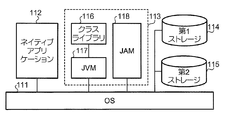
- FIG. 2 is a diagram illustrating a logical configuration of each unit realized in the control unit 11 of the communication terminal device 10 by executing various programs stored in the ROM 11b and the EEPROM 11d.
- a native application 112 and a Java execution environment 113 are realized on the OS 111, and the EEPROM 11d includes a first storage 114 and a second storage 115. Secured.
- the Java execution environment 113 is realized by the Java platform in the ROM 11b.
- the Java execution environment 113 includes a class library 116, a JVM (Java Virtual Machine) 117, and a JAM (Java Application Manager) 118.
- the class library 116 is a combination of program modules (classes) having specific functions combined into one file.
- the JVM 117 is a Java execution environment optimized for the above-described CDC, and has a function of interpreting and executing bytecode provided as a Java application.
- the JAM 118 has a function of managing download, installation, activation, termination, and the like of Java applications.
- the first storage 114 is an area for storing Java applications (Jar files and ADFs) downloaded under the management of the JAM 118.
- the second storage 115 is an area for storing data generated when the Java application is executed after the end thereof, and an individual storage area is assigned to each installed Java application. .
- the data in the storage area allocated to a certain Java application can be rewritten only while the Java application is being executed, and another Java application cannot be rewritten.
- the Java application of this embodiment includes an application for displaying a plurality of windows.
- Java applications for displaying a plurality of windows include a “list display application” and a “widget”.
- the list display application is an application for displaying one or more windows in the display area of the display unit 13 and controlling the display mode.
- a “widget” refers to an application that realizes a predetermined function by displaying a window by a list display application.
- the “window” refers to a part of the display area of the display unit 13 assigned to a certain widget, and is displayed by an image that can be distinguished from other parts. Each window is given identification information for identifying each window. The shape and size (area) of the window is determined for each widget, but it does not prevent it from being variable.
- the window is an example of the “target image” in the present invention.
- widgets there are a plurality of widgets, and each widget realizes a different function.
- Examples of widgets are those that display the date and time by displaying an image simulating a clock in the window (hereinafter referred to as “clock widget”), and those that display characters entered by the user in the window like a memorandum. (Hereinafter referred to as “memo widget”) and those that play video or music (hereinafter referred to as “playback widget”).
- the widget may acquire information such as news and weather forecast via the wireless communication unit 12 at an appropriate timing, and display according to the acquired information.
- the configuration of the communication terminal device 10 of the present embodiment is as described above. Based on this configuration, the communication terminal apparatus 10 executes a plurality of applications in response to a user request.
- the communication terminal device 10 of the present embodiment realizes a so-called multi-window system by displaying a plurality of widget windows. That is, the communication terminal device 10 is in a state of executing the list display application when displaying a plurality of windows.
- the user can select one of the plurality of windows by operating the direction key of the operation unit 14 and can change the selected window.
- the selected window is referred to as a “selected window”, and the unselected window is referred to as a “non-selected window”.
- “selecting” a window means giving an input focus to the window.
- the communication terminal apparatus 10 puts the widget corresponding to the window selected by the user into a state in which processing different from that when the window is not selected is executed.
- each widget can execute different processing depending on whether or not the corresponding window is being selected.
- the clock widget executes processing for displaying the date and time when not selected, but can execute processing for changing the date and appearance (color, etc.) when selected.
- the memo widget executes a process of displaying characters and the like when not selected, but can execute a process of changing (editing) the characters and the like when selected.
- the playback widget executes processing for playing video or music when not selected, but can perform processing for adjusting volume, pausing, fast-forwarding, etc. when selected. .
- Such processing is performed according to the user's operation, such as changing the time if the user performs an operation to adjust the time.
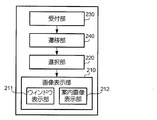
- FIG. 3 is a functional block diagram showing functions realized when the control unit 11 of the communication terminal apparatus 10 displays a plurality of windows. As shown in the figure, the control unit 11 of the communication terminal apparatus 10 realizes each function corresponding to the image display unit 210, the selection unit 220, the reception unit 230, and the transition unit 240 by executing the stored program. To do.
- the image display unit 210 has a function of causing the display unit 13 to display an image.
- the image display unit 210 includes a window display unit 211 and a guide image display unit 212.
- the window display unit 211 has a function of controlling window display. When a plurality of windows are displayed, the window display unit 211 displays the selected window and the non-selected window separately.
- the guide image display unit 212 has a function of displaying an image (hereinafter referred to as “guide image”) that guides a window in which selection can be changed, that is, an unselected window that can be changed to a selected window by a certain operation.
- transition refers to changing the selection target from one window to another.
- the guide image is preferably an image that intuitively recalls the operation direction, for example, an image representing an arrow. Note that, unlike the selection image in the present invention, the guidance image is not a selection target.
- the selection unit 220 has a function of selecting one window from the windows displayed on the display unit 13 and setting this as a selection window. When there is one window displayed on the display unit 13, the selection unit 220 sets that window as the selection window. In addition, when a plurality of windows are displayed on the display unit 13, the selection unit 220 selects one window based on a predetermined rule. The selection unit 220 sets the window of the widget that has been activated most recently as the selection window, or determines the selection window according to the operation of the direction key by the user. The result of selection by the selection unit 220 is reflected in the image display by the image display unit 210.
- the accepting unit 230 has a function of accepting an instruction to change the selection window.
- the instruction to change the selection window is performed by the user specifying one of the up, down, left, and right operation directions with the direction keys in a state where a certain window is selected.
- the receiving unit 230 supplies the acquired operation information to the transition unit 240.
- the transition unit 240 has a function of transitioning the selection window according to the instruction received by the reception unit 230.
- the transition unit 240 identifies the operation direction represented by the instruction received by the reception unit 230, and when a non-selected window is displayed in the operation direction as viewed from the selected window, the non-selected window is changed to the selected window. Make a decision.
- the result of determination by the transition unit 240 is supplied to the selection unit 220 and is reflected in the image display by the image display unit 210.
- FIGS. 4 and 5 are diagrams illustrating examples of display modes of windows and guide images. These drawings illustrate the case where the window Wa is a selection window.
- the image display unit 210 displays a window Wa that is a selected window surrounded by a frame F in order to distinguish the selected window from the non-selected windows (Wb 1 to Wb 4 ).
- the display mode is not limited to this example.
- the selected window may be blinked or the non-selected window may be made translucent.
- the image display unit 210 displays a guide image corresponding to each operation direction.
- the guide images Gu, Gd, Gl, and Gr are displayed in these four directions. Is displayed.
- the guidance image for this operation direction is not displayed.
- the non-selected window in the direction indicated by the guide image is referred to as a “selection candidate window”. That is, a selection candidate window is a non-selection window that can become a selection window by instructing an operation direction next when a certain window is a selection window, and can subsequently be changed to a selection window.
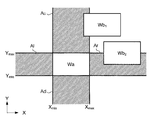
- the “direction according to the operation direction” refers to a direction included in a range that can be regarded as the operation direction.
- the window that can be regarded as “right” in the present embodiment is a window that is at least partially included in the area Ar shown in FIG.
- the area Ar is obtained by specifying the maximum value and the minimum value on the X axis and the Y axis of the area where the selection window Wa is displayed.
- the area Ar is an area where the coordinate in the X-axis direction is “X max ” or more and the coordinate in the Y-axis direction is “Y min ” or more and “Y max ” or less.
- the window Wb 1 shown in FIG. 6 is a non-selected window that is “above” the selected window Wa.
- the window Wb 2 shown in FIG. 6 is a non-selected window that is “right” with respect to the selected window Wa.
- the communication terminal device 10 in such a case, even if the operation direction in which there are a plurality of non-selected windows is instructed, one non-selected window is selected from the plurality of non-selected windows so that the predetermined one non-selected window becomes a selection candidate window. It has a criterion for determining the selection window.
- FIG. 7 is a flowchart showing processing for determining one selection candidate window from a plurality of non-selected windows.
- the communication terminal device 10 executes this process for each operation direction. That is, in this embodiment, the communication terminal device 10 executes this process in four directions, up, down, left, and right.
- this process is executed in advance before the transition operation by the transition unit 240. This is because the guide image cannot be displayed at an appropriate position unless the selection candidate window is determined. Also, by executing this process in advance before the transition operation, the transition operation can be completed earlier than when executing this process after receiving a transition instruction.
- control unit 11 determines whether or not a plurality of non-selected windows are displayed in a direction corresponding to the target operation direction (either up, down, left, or right) (step S11). If a plurality of non-selected windows are not displayed in the direction corresponding to the target operation direction, the selection candidate window is uniquely determined or the selection candidate window cannot exist, so this processing is executed. There is no need to do. Therefore, the control part 11 complete
- the control unit 11 displays each of the windows that are currently selected windows and the plurality of non-selected windows.
- the identified area is identified, and the coordinates of both ends in the direction orthogonal to the target operation direction are identified for each identified area (steps S12 and S13). For example, if the target operation direction is the right, that is, the X-axis direction, the control unit 11 specifies the coordinates of the upper and lower ends of the window in the Y-axis direction.
- the coordinates specified at this time are coordinates corresponding to “Y min ” and “Y max ” in FIG. Note that the process of step S12 and the process of step S13 differ only in whether the object whose coordinates are specified is a selection window or a non-selection window, and therefore the order thereof is arbitrary.
- the control unit 11 determines a range in which the coordinates of both ends of the selected window specified in step S12 overlap with the coordinates of both ends of the non-selected window specified in step S13.
- Each of the plurality of non-selected windows is specified (step S14).
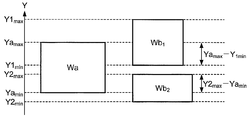
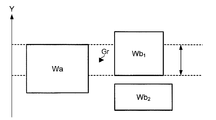
- FIG. 8 is a diagram for explaining the processing in step S14.
- the maximum value in the Y-axis direction of the area where the selection window Wa is displayed is “Ya max ” and the minimum value is “Ya min ”.
- the maximum value in the Y-axis direction of the area where the non-selected window Wb 1 is displayed is “Y1 max ”, the minimum value is “Y1 min ”, and the Y-axis of the area where the non-selected window Wb 2 is displayed
- the maximum value in the direction is “Y2 max ”, and the minimum value is “Y2 min ”.
- the range in which the coordinates at both ends of the selected window Wa overlap with the coordinates at both ends of the non-selected window Wb 1 is “Ya max ⁇ Y1 min ”.
- the range in which the coordinates at both ends of the selected window Wa overlap with the coordinates at both ends of the non-selected window Wb 2 is “Y2 max ⁇ Ya min ”.
- the control unit 11 After specifying the overlapping range in step S14, the control unit 11 performs a process of determining a selection candidate window based on the specified overlapping range (step S15). This process is hereinafter referred to as “determination process”. The determination process only needs to determine the selection candidate window according to the overlapping range identified in step S14. For example, the determination process includes a determination process depending on the size of the overlapping range and a determination process depending on the size of the overlapping range with respect to the coordinates of both ends of the non-selected window specified in step S13. . The former is a comparison between “Ya max ⁇ Y1 min ” and “Y2 max ⁇ Ya min ” when described with reference to FIG.
- the control unit 11 determines that a non-selected window (non-selected window Wb 1 in the figure) having a larger overlapping range is a selection candidate window. Meanwhile, the latter will be described with reference to FIG. 8, the magnitude of the "(Ya max -Y1 min) / ( Y1 max -Y1 min) " and "(Y2 max -Ya min) / ( Y2 max -Y2 min) " Are compared. In this case, the control unit 11 determines a non-selected window (non-selected window Wb 2 in the figure) having a larger overlapping range ratio as a selection candidate window.
- FIG. 9 is a flowchart showing the processing executed when there is an instruction to change the selection window.
- the control unit 11 acquires operation information corresponding to the instruction to change the selection window (step S21), and specifies the operation direction represented by the operation information (step S22). Moreover, the control part 11 judges whether the selection candidate window corresponding to the specified operation direction is displayed (step S23). In addition, if the selection candidate window corresponding to the specified operation direction is not displayed, the control unit 11 ends the process without changing the selection window.
- the control unit 11 specifies the identification information of the selection candidate window (step S24).
- the control unit 11 sets the selection candidate window represented by the identification information as a new selection window, and reflects the contents of the change in the display by the display unit 13 (step S25). What is changed at this time is the position of the guide image, the position of the display indicating the selection window (for example, the frame F in FIG. 4), or the like. Therefore, in this step, the process shown in FIG. 7 is also executed.
- the guide image is displayed at an appropriate position between the selection window and the selection candidate window.
- the display position of the guide image is determined as follows, for example. 10 and 11 are diagrams for explaining the display position of the guide image.
- the control unit 11 uses the overlapping range specified in step S14 described above. Therefore, when determining the display position of the guidance image according to this example, the control unit 11 is a case where only one non-selected window is displayed in the direction corresponding to the target operation direction in step S11 described above. Even if it exists, acquisition of a coordinate is performed regarding the said operation direction (step S12 and S13).
- the control unit 11 specifies a range where the coordinates at both ends specified for the selection window overlap with the coordinates at both ends specified for the selection candidate window, and sets the midpoint of the overlapping range as the display position of the guide image Gr.
- the coordinates determined in this way are the coordinates in the axial direction orthogonal to the operation direction.
- the coordinate in the axial direction parallel to the operation direction may be in the middle of the selection window and the selection candidate window, or may be a position near one of the windows.
- the example shown in FIG. 10 is a case where the selection candidate window in the right direction is the window Wb 1 .
- the rightward candidate window for selection is the case of the window Wb 2.
- the display position of the guide image Gr changes according to the display position of the selection candidate window with respect to the selection window.
- the communication terminal device 10 of the present embodiment which of the non-selected windows is the selection candidate window can be displayed by the guide image, a plurality of non-selected windows can be regarded as the operation direction. Even when is displayed, it is possible for the user to easily grasp a window that can be transited next.
- the communication terminal apparatus 10 determines a selection candidate window based on the above-described “overlap range” and its “ratio”.
- a window with more “overlapping range” or a window with a higher “ratio” can be said to be more in line with the operation direction in a narrow sense than other windows that do not.
- a window having a larger “overlap range” has a side closer to a straight line extending in the target operation direction from the center of the selected window than other windows.
- a window having a higher “ratio” has a center closer to a straight line extending from the center of the selected window in the target operation direction than the other windows. Such a window is perceived by the user as being closer to the “operation direction”. Therefore, according to the communication terminal device 10 of the present embodiment, a window that is more intuitively understood by the user as the target operation direction can be determined as the selection candidate window.
- the present invention can be implemented in a form different from the above-described embodiment.
- the present invention can also be implemented in the following forms, for example. Further, the following modifications may be combined as appropriate.
- the present invention determines the “distance” between the selected window and the non-selected window in addition to the above-described “overlap range” and its “ratio” when determining a selection candidate window (that is, a target image that can be transitioned next). You may consider it.
- the “distance” here may be the length of a straight line connecting the center of the selected window and the center of the non-selected window, or an arbitrary position of the area where the selected window is displayed and the area where the non-selected window is displayed. It may be the shortest of straight lines connecting arbitrary positions.
- the control unit 11 specifies a distance according to the above-described procedure, and determines a selection candidate window according to the specified distance and the above-described overlapping range (or the ratio thereof).
- the control unit 11 can employ a plurality of methods when using the distance and the overlapping range in combination. For example, when there are a plurality of non-selected windows with the largest overlapping range, the control unit 11 may select a window with a shorter specified distance among these non-selected windows as a selection candidate window, The corresponding point (numerical value) and the point corresponding to the length of the distance may be calculated, and the selection candidate window may be determined based on the sum of the points.
- the “operation direction” in the present invention is not limited to the above-described four directions of up, down, left and right, and may be more or less.
- the operation direction may be three directions or eight directions.
- four keys “2”, “4”, “6”, and “8” are used to indicate the up / down / left / right directions as the operation direction, and “1”, “3” , “7” and “9” can be used to instruct an oblique direction as an operation direction.
- FIG. 12 is a diagram for explaining a method for specifying an overlapping range when there is “upper right” as the operation direction.
- “upper right” refers to the direction indicated by the arrow Aur in the figure.
- window Wa is a selected window
- windows Wb 1 and Wb 2 are non-selected windows.
- the control unit 11 defines a coordinate axis orthogonal to the operation direction with respect to the display area, and in the same manner as in the above-described embodiment, Specify the coordinates of both ends of the non-selected window, and specify the overlapping range.
- the coordinates of both ends of the window Wa are a 1 and a 2
- the coordinates of both ends of the window Wb 1 are b 11 and b 12
- the coordinates of both ends of the window Wb 2 are b 21 .
- a b 22 overlapping range in this case, the window Wb 1 is a range indicated by the arrow Ab 1 (a 1 ⁇ b 12 ), the window Wb 2 is in the range (b 21 ⁇ a 2) indicated by arrow Ab 2 .
- the coordinate axis defined for specifying the overlapping range is preferably a direction orthogonal to the operation direction, that is, a direction that forms an angle of 90 ° with respect to the operation direction, but intersects the operation direction.
- the direction to do is sufficient. Therefore, the coordinate axes need not be at an angle of exactly 90 ° with respect to the operation direction, and can be allowed to deviate.
- “orthogonal” in the above-described embodiment and this example may be considered to include a range that can be considered to be substantially orthogonal.
- the window may have a plurality of modes as display modes when selected.
- the plurality of display modes may change stepwise according to a predetermined operation.
- FIG. 13 is a diagram illustrating a display mode of the selection window.
- FIG. 13A is an example of an aspect in which the selection window Wa is displayed together with the non-selection windows Wb 1 to Wb 3
- FIG. 13B is an example of an aspect in which only the selection window Wa is displayed in an enlarged manner. .
- the display mode as shown in FIG. 13A when each window is small and it is difficult to visually recognize the display contents, it is preferable that the display is enlarged as shown in FIG.
- the enlarged display shown in FIG. 13B may be performed when the display shown in FIG. 13A is performed in advance and a predetermined operation is performed at that time.
- the display mode of the selection window is in two stages, the stage shown in FIG. 13A and the stage shown in FIG.
- the widget may be able to execute different processing for each stage of the selection window display.
- the date and time are displayed in a predetermined display mode when not selected, and the date and time are displayed in a display mode different from that when not selected at the stage shown in FIG. 13A.
- Processing for changing the date and appearance may be executed at the stage shown in FIG.
- the display at the time of non-selection displays only the time, and the display at the time of selection may display a date, a day of the week, etc. in addition to the time.
- the window in the present invention is not limited to the display area assigned to the “widget” in the above-described embodiment, but may be a display area assigned to another application (for example, a native application).
- the widget is not limited to the Java application, and may be realized as another application.
- a plurality of windows are displayed by executing the list display application that is a Java application.
- the display of the plurality of windows is performed by another application such as an OS. It may be realized.
- the widget can also acquire information via means other than the wireless communication unit 12.
- the information processing apparatus according to the present invention includes a so-called IC tag
- information stored in the IC tag may be acquired.
- the information processing apparatus according to the present invention has a positioning function using GPS (Global Positioning System) or the like, position information (latitude and longitude, distance from a predetermined point, etc.) is acquired using the positioning function. May be.
- GPS Global Positioning System
- the “target image” in the present invention may be an image to be selected by the user's operation and does not have to be a window.
- the “target image” in the present invention is all images displayed in a certain range of the display area for the purpose of selection by the user, and may be, for example, a so-called icon.
- the “target image” in the present invention includes characters and symbols regardless of whether it is a still image or a moving image.
- the information processing apparatus can be regarded as the control unit 11 or the communication terminal apparatus 10.
- the transition unit and the reception unit are realized by the cooperation of the control unit 11 and the operation unit 14.
- what corresponds to the operation in the present invention may be a result of recognizing a voice instruction, for example, without pressing a key.
- the present invention is applied to a mobile phone, but the present invention can also be applied to other electronic devices.
- the present invention can be applied to various information processing apparatuses such as a communication terminal apparatus such as a PDA (Personal Digital Assistance), a camera, a portable music player, and a portable game machine.
- a communication terminal apparatus such as a PDA (Personal Digital Assistance)
- a camera such as a portable music player
- a portable game machine such as a portable game machine.
- the present invention is particularly suitable when the pointing direction when selecting a position is limited, such as using a cross key.
- each function shown in FIG. 3 realized by the communication terminal device 10 described above can be realized by a combination of a plurality of programs, or can be realized by cooperation of a plurality of hardware resources.
- the operation corresponding to the image display unit 210, the selection unit 220, and the reception unit 230 and the operation corresponding to the transition unit 240 may be executed by different programs, or hardware resources for executing these operations may be used. It may be different.
Landscapes
- Engineering & Computer Science (AREA)
- General Engineering & Computer Science (AREA)
- Theoretical Computer Science (AREA)
- Human Computer Interaction (AREA)
- Physics & Mathematics (AREA)
- General Physics & Mathematics (AREA)
- User Interface Of Digital Computer (AREA)
- Position Input By Displaying (AREA)
Abstract
Description
図1は、本発明の一実施形態である通信端末装置の物理的構成を示すブロック図である。同図に示すように、通信端末装置10は、制御部11と、無線通信部12と、表示部13と、操作部14とを備える。なお、本実施形態の通信端末装置10は、図示せぬマイクやスピーカ等の音声を入出力する手段を備えた、携帯電話機であるとする。
エリアとして用いてROM11bやEEPROM11dに記憶されたプログラムを実行し、これにより通信端末装置10の各部の動作を制御する。無線通信部12は、アンテナ12aを備え、所定の移動通信網とのデータ通信を無線で行う。表示部13は、液晶ディスプレイや液晶駆動回路を備え、制御部11から供給される表示データに応じた画像を所定の表示領域に表示する。操作部14は、複数のキー(操作子)を備え、ユーザの押下操作に応じた操作情報を制御部11に供給する。操作部14が備えるキーには、ウィンドウを選択するためのキー(以下「方向キー」という。)が含まれる。ユーザは、方向キーを操作することにより、ウィンドウを選択することが可能である。なお、方向キーは、本実施形態においては上下左右の4方向を操作方向として択一的に選択できる、いわゆる十字キーであるとするが、斜め方向(右上や左下)など、上下左右以外の方向を選択できるものであってもよい。また、ここでいうキーは、いわゆるハードボタンであってもよいし、液晶ディスプレイに重ねて設けられたタッチセンサであってもよい。
イダ又は通信事業者により作成されて外部のサーバ装置などに格納され、通信端末装置10からの要求に応じてそれらのサーバ装置から適宜ダウンロードされるようになっている。
図6は、本実施形態における操作方向に応じた方向の範囲を説明するための図である。例えば、本実施形態において「右」にあるとみなすことができるウィンドウは、その少なくとも一部が同図に示す領域Arに含まれるウィンドウである。ここにおいて、領域Arは、選択ウィンドウWaが表示されている領域のX軸及びY軸における最大値及び最小値を特定することで得られる。領域Arは、X軸方向の座標が「Xmax」以上であり、Y軸方向の座標が「Ymin」以上「Ymax」以下である領域である。
図6に示すウィンドウWb2は、選択ウィンドウWaに対して「右」にある非選択ウィン
ドウである。
なお、本処理は、本実施形態においては、遷移部240による遷移の動作の前にあらかじめ実行される。なぜならば、選択候補ウィンドウが決定されていなければ、案内画像を適切な位置に表示することができないからである。また、遷移の動作の前にあらかじめ本処理を実行することで、遷移の指示を受け付けてから本処理を実行する場合に比べ、遷移の動作を早く終了させることができる。
図8は、ステップS14の処理を説明するための図である。ここにおいて、選択ウィンドウWaが表示される領域のY軸方向の最大値を「Yamax」、最小値を「Yamin」とする。また、同様に、非選択ウィンドウWb1が表示される領域のY軸方向の最大値を「Y1max」、最小値を「Y1min」とし、非選択ウィンドウWb2が表示される領域のY軸方向の最大値を「Y2max」、最小値を「Y2min」とする。このとき、選択ウィンドウWaの両端の座標間と非選択ウィンドウWb1の両端の座標間とが重複する範囲は、「Yamax-Y1min」である。同様に、選択ウィンドウWaの両端の座標間と非選択ウィンドウWb2の両端の座標間とが重複する範囲は、「Y2max-Yamin」である。
図10及び図11は、案内画像の表示位置を説明するための図である。案内画像Grを表示するとき、制御部11は、上述したステップS14において特定される重複範囲を利用する。よって、制御部11は、この例に従って案内画像の表示位置を決定する場合には、上述したステップS11において、対象の操作方向に応じた方向に非選択ウィンドウが一つだけ表示されている場合であっても、当該操作方向に関して座標の取得(ステップS12及びS13)を行う。
に示す例は、右方向の選択候補ウィンドウがウィンドウWb2の場合である。このように
、案内画像Grの表示位置は、選択ウィンドウに対する選択候補ウィンドウの表示位置に応じて変化する。
本発明は、上述した実施形態と異なる形態で実施することが可能である。本発明は、例えば、以下のような形態で実施することも可能である。また、以下に示す変形例は、各々を適宜に組み合わせてもよい。
本発明は、選択候補ウィンドウ(すなわち、次に遷移され得る対象画像)を決定する場合に、上述した「重複範囲」やその「比率」に加え、選択ウィンドウと非選択ウィンドウとの「距離」を考慮してもよい。ここでいう「距離」は、選択ウィンドウの中心と非選択ウィンドウの中心とを結ぶ直線の長さでもよいし、選択ウィンドウが表示される領域の任意の位置と非選択ウィンドウが表示される領域の任意の位置とを結ぶ直線のうちの最短のものであってもよい。
本発明における「操作方向」は、上述した上下左右の4方向に限られず、より多くても少なくてもよい。例えば、操作方向は、3方向や8方向であってもよい。例えば、いわゆるテンキーを方向キーの代用とする場合、「2」、「4」、「6」、「8」の4個のキーで上下左右を操作方向として指示し、「1」、「3」、「7」、「9」の4個のキーで斜め方向を操作方向として指示することができる。
本発明において、ウィンドウは、選択された場合の表示態様として複数の態様を有し得る。この場合において、複数の表示態様は、所定の操作に応じて段階的に変化するものであってもよい。
図13は、選択ウィンドウの表示態様を例示する図である。図13(a)は、選択ウィンドウWaを非選択ウィンドウWb1~Wb3とともに表示する態様の例であり、図13(b)は、選択ウィンドウWaのみを拡大して表示する態様の例である。例えば、図13(a)のような表示態様では各々のウィンドウが小さく、その表示内容を視認することが困難である場合には、図13(b)に示すように拡大表示するとよい。
本発明におけるウィンドウは、上述した実施形態における「ウィジェット」に割り当てられた表示領域に限らず、他のアプリケーション(例えば、ネイティブアプリケーション)に割り当てられた表示領域であってもよい。同様に、ウィジェットも、Javaアプリケーションに限らず、他のアプリケーションとして実現されてもよい。さらに、上述した実施形態においては、Javaアプリケーションである一覧表示アプリケーションを実行することにより複数のウィンドウを表示させるようにしたが、複数のウィンドウを表示させることは、例えばOSによるなど、他のアプリケーションによって実現されてもよい。
本発明における「対象画像」は、ユーザの操作による選択の対象となる画像であればよく、ウィンドウである必要はない。本発明における「対象画像」は、ユーザが選択することを目的として表示領域の一定の範囲に表示される画像のすべてであり、例えば、いわゆるアイコンであってもよい。また、本発明における「対象画像」は、静止画であるか動画であるかを問わず、また、文字や記号を含むものである。
上述した実施形態において、本発明に係る情報処理装置に相当するものは、制御部11であるとみなすこともできるし、通信端末装置10であるとみなすこともできる。通信端末装置10を本発明に係る情報処理装置としてみた場合、遷移手段や受付手段は、制御部11と操作部14の協働によって実現される。なお、本発明における操作に相当するものは、キーの押下によらず、例えば、音声による指示を認識した結果であってもよい。
Claims (5)
- 表示部の表示領域に、選択の対象である対象画像を複数表示する第1表示手段と、
前記表示領域に表示された複数の対象画像から一の対象画像を選択する選択手段と、
操作方向の指示を受け付ける受付手段と、
前記受付手段により操作方向の指示が受け付けられた場合において、前記選択手段により選択されている対象画像からみて当該操作方向に応じた方向に前記選択手段により選択されていない他の対象画像が前記表示領域に表示されている場合、前記選択手段が選択する対象画像を当該他の対象画像に遷移させる遷移手段と、
前記選択手段により選択されている対象画像と前記遷移手段により当該対象画像から遷移され得る他の対象画像との間に、当該遷移に対応する操作方向を案内する案内画像を表示する第2表示手段とを備え、
前記遷移手段は、
前記操作方向に交差する方向の座標軸を前記表示領域に対して定義した場合における、前記対象画像が表示される領域の前記座標軸における両端の座標を特定する座標特定手段と、
前記操作方向に応じた方向に前記他の対象画像が複数ある場合に、当該複数の他の対象画像のそれぞれについて前記座標特定手段が特定した両端の座標間と前記選択手段により選択されている対象画像について前記座標特定手段が特定した両端の座標間とが重複する範囲を前記他の対象画像毎に特定する範囲特定手段と、
前記範囲特定手段により特定された範囲に応じて、遷移され得る他の対象画像を決定する決定手段とを有し、
前記受付手段により操作方向が受け付けられた場合に、前記選択手段が選択する対象画像を前記決定手段により決定された他の対象画像に遷移させる
ことを特徴とする情報処理装置。 - 前記決定手段は、
前記範囲特定手段により特定された範囲がより多い他の対象画像を、遷移され得る他の対象画像と決定する
ことを特徴とする請求項1に記載の情報処理装置。 - 前記決定手段は、
前記座標特定手段により特定された両端の座標間の範囲に対する前記範囲特定手段により特定された範囲の比率がより大きい他の対象画像を、遷移され得る他の対象画像と決定する
ことを特徴とする請求項1に記載の情報処理装置。 - 前記遷移手段は、
前記選択手段により選択されている対象画像と前記他の対象画像との距離を特定する距離特定手段を有し、
前記決定手段が、前記範囲特定手段により特定された範囲と前記距離特定手段により特定された距離とに応じて、遷移され得る他の対象画像を決定する
ことを特徴とする請求項1ないし3のいずれかに記載の情報処理装置。 - コンピュータを、
表示部の所定の表示領域に、選択の対象である対象画像を複数表示させるステップと、
前記表示領域に表示された複数の対象画像から一の対象画像を選択するステプと、
操作方向の指示を受け付けるステップと、
操作方向が受け付けられた場合において、前記選択手段により選択されている対象画像からみて当該操作方向に応じた方向に前記選択手段により選択されていない他の対象画像が前記表示領域に表示されている場合、前記選択される対象画像を当該他の対象画像に遷移させるステップと、
前記選択されている対象画像と当該対象画像から遷移され得る他の対象画像との間に、当該遷移に対応する操作方向を案内する案内画像を表示するステップと
を実行するプログラムであって、
前記遷移ステップにおいて、
前記操作方向に交差する方向の座標軸を前記表示領域に対して定義した場合における、前記対象画像が表示される領域の前記座標軸における両端の座標を特定する座標特定ステップと、
前記操作方向に応じた方向に前記他の対象画像が複数ある場合に、当該複数の他の対象画像のそれぞれについて前記特定された両端の座標間と前記選択手段により選択されている対象画像について前記座標特定ステップにおいて特定した座標間とが重複する範囲を前記他の対象画像毎に特定する範囲特定ステップと、
前記範囲特定ステップにおいて特定された範囲に応じて、遷移され得る他の対象画像を決定する決定ステップとを実行し、
前記操作方向が受け付けられた場合に、前記選択される対象画像を前記決定ステップにおいて決定された他の対象画像に遷移させる
ことを特徴とするプログラム。
Priority Applications (3)
| Application Number | Priority Date | Filing Date | Title |
|---|---|---|---|
| EP09811611.4A EP2328071B1 (en) | 2008-09-08 | 2009-09-08 | Information processing device and program |
| US13/061,810 US8843833B2 (en) | 2008-09-08 | 2009-09-08 | Information-processing device and program |
| CN200980135023.0A CN102150119B (zh) | 2008-09-08 | 2009-09-08 | 信息处理设备 |
Applications Claiming Priority (2)
| Application Number | Priority Date | Filing Date | Title |
|---|---|---|---|
| JP2008230221A JP5185745B2 (ja) | 2008-09-08 | 2008-09-08 | 情報処理装置及びプログラム |
| JP2008-230221 | 2008-09-08 |
Publications (1)
| Publication Number | Publication Date |
|---|---|
| WO2010027088A1 true WO2010027088A1 (ja) | 2010-03-11 |
Family
ID=41797250
Family Applications (1)
| Application Number | Title | Priority Date | Filing Date |
|---|---|---|---|
| PCT/JP2009/065679 Ceased WO2010027088A1 (ja) | 2008-09-08 | 2009-09-08 | 情報処理装置及びプログラム |
Country Status (5)
| Country | Link |
|---|---|
| US (1) | US8843833B2 (ja) |
| EP (1) | EP2328071B1 (ja) |
| JP (1) | JP5185745B2 (ja) |
| CN (1) | CN102150119B (ja) |
| WO (1) | WO2010027088A1 (ja) |
Cited By (1)
| Publication number | Priority date | Publication date | Assignee | Title |
|---|---|---|---|---|
| WO2021159645A1 (zh) * | 2020-02-13 | 2021-08-19 | 北京翼鸥教育科技有限公司 | 多个视频窗口动态排布的发起、同步方法及系统 |
Families Citing this family (17)
| Publication number | Priority date | Publication date | Assignee | Title |
|---|---|---|---|---|
| USD619144S1 (en) | 2008-03-04 | 2010-07-06 | Apple Inc. | Icon for a display screen or portion thereof |
| JP4976353B2 (ja) * | 2008-09-08 | 2012-07-18 | 株式会社エヌ・ティ・ティ・ドコモ | 情報処理装置及びプログラム |
| USD686637S1 (en) * | 2009-03-11 | 2013-07-23 | Apple Inc. | Display screen or portion thereof with icon |
| US10068157B2 (en) * | 2012-05-10 | 2018-09-04 | Apple Inc. | Automatic detection of noteworthy locations |
| KR20200108110A (ko) * | 2013-07-25 | 2020-09-16 | 인터디지털 씨이 페이튼트 홀딩스 | 객체들을 디스플레이하기 위한 방법 및 디바이스 |
| CN104571786B (zh) * | 2013-10-25 | 2018-09-14 | 富泰华工业(深圳)有限公司 | 具有动态拼图界面的电子装置及其控制方法与系统 |
| US10521079B2 (en) | 2014-04-03 | 2019-12-31 | Clarion Co., Ltd. | Vehicle-mounted information device |
| KR101617216B1 (ko) * | 2014-05-07 | 2016-05-02 | 삼성전자 주식회사 | 디스플레이장치 및 영상의 오브젝트 하이라이트를 표시하는 방법 |
| USD826979S1 (en) * | 2017-04-03 | 2018-08-28 | Google Llc | Display screen with animated graphical user interface |
| JP2018195025A (ja) * | 2017-05-16 | 2018-12-06 | 富士通株式会社 | 情報処理装置、情報処理システム、及び情報処理方法 |
| USD822711S1 (en) | 2017-06-05 | 2018-07-10 | Apple Inc. | Display screen or portion thereof with graphical user interface |
| USD829759S1 (en) * | 2017-10-03 | 2018-10-02 | Google Llc | Display screen with graphical user interface |
| USD854562S1 (en) * | 2017-10-13 | 2019-07-23 | Facebook, Inc. | Display screen with graphical user interface for games in messaging applications |
| USD862511S1 (en) * | 2017-11-02 | 2019-10-08 | Google Llc | Display screen or portion thereof with transitional graphical user interface |
| USD875759S1 (en) * | 2018-05-12 | 2020-02-18 | Canva Pty Ltd. | Display screen or portion thereof with a graphical user interface |
| USD875761S1 (en) * | 2018-05-12 | 2020-02-18 | Canva Pty Ltd. | Display screen or portion thereof with a graphical user interface |
| CN111596812B (zh) * | 2019-02-21 | 2023-04-18 | 阿里巴巴集团控股有限公司 | 信息显示方法、设备及存储介质 |
Citations (3)
| Publication number | Priority date | Publication date | Assignee | Title |
|---|---|---|---|---|
| JPH05150903A (ja) * | 1991-11-26 | 1993-06-18 | Pfu Ltd | カーソル移動処理方式 |
| JP2003330592A (ja) * | 2002-05-10 | 2003-11-21 | Sony Corp | 表示制御装置および方法、記録媒体、並びにプログラム |
| JP2006113714A (ja) | 2004-10-13 | 2006-04-27 | Matsushita Electric Ind Co Ltd | Guiによる情報選択装置 |
Family Cites Families (7)
| Publication number | Priority date | Publication date | Assignee | Title |
|---|---|---|---|---|
| US5510811A (en) | 1992-11-25 | 1996-04-23 | Microsoft Corporation | Apparatus and method for controlling cursor movement |
| JPH0798629A (ja) * | 1993-04-28 | 1995-04-11 | Nec Corp | ペン入力型情報処理装置 |
| CN1192301C (zh) | 1997-08-28 | 2005-03-09 | 汤姆森消费电子有限公司 | 在包含不同显示区域的显示屏中漫游的系统和方法 |
| US7055108B2 (en) * | 2001-07-13 | 2006-05-30 | Wind River Systems, Inc. | Directional focus manager |
| WO2005089895A1 (ja) * | 2004-03-22 | 2005-09-29 | Nintendo Co., Ltd. | ゲーム装置、ゲームプログラム、ゲームプログラムを記憶した記憶媒体およびゲーム制御方法 |
| JP4176741B2 (ja) * | 2005-05-25 | 2008-11-05 | 株式会社スクウェア・エニックス | 移動先情報設定装置及び方法、プログラム、並びに記録媒体 |
| JP4137952B2 (ja) * | 2006-05-01 | 2008-08-20 | ソニー・エリクソン・モバイルコミュニケーションズ株式会社 | 情報処理装置、情報処理方法、情報処理プログラム、及び携帯端末装置 |
-
2008
- 2008-09-08 JP JP2008230221A patent/JP5185745B2/ja active Active
-
2009
- 2009-09-08 EP EP09811611.4A patent/EP2328071B1/en not_active Not-in-force
- 2009-09-08 WO PCT/JP2009/065679 patent/WO2010027088A1/ja not_active Ceased
- 2009-09-08 US US13/061,810 patent/US8843833B2/en not_active Expired - Fee Related
- 2009-09-08 CN CN200980135023.0A patent/CN102150119B/zh not_active Expired - Fee Related
Patent Citations (3)
| Publication number | Priority date | Publication date | Assignee | Title |
|---|---|---|---|---|
| JPH05150903A (ja) * | 1991-11-26 | 1993-06-18 | Pfu Ltd | カーソル移動処理方式 |
| JP2003330592A (ja) * | 2002-05-10 | 2003-11-21 | Sony Corp | 表示制御装置および方法、記録媒体、並びにプログラム |
| JP2006113714A (ja) | 2004-10-13 | 2006-04-27 | Matsushita Electric Ind Co Ltd | Guiによる情報選択装置 |
Non-Patent Citations (1)
| Title |
|---|
| See also references of EP2328071A4 |
Cited By (1)
| Publication number | Priority date | Publication date | Assignee | Title |
|---|---|---|---|---|
| WO2021159645A1 (zh) * | 2020-02-13 | 2021-08-19 | 北京翼鸥教育科技有限公司 | 多个视频窗口动态排布的发起、同步方法及系统 |
Also Published As
| Publication number | Publication date |
|---|---|
| EP2328071A1 (en) | 2011-06-01 |
| JP5185745B2 (ja) | 2013-04-17 |
| JP2010066831A (ja) | 2010-03-25 |
| US8843833B2 (en) | 2014-09-23 |
| EP2328071B1 (en) | 2016-10-26 |
| CN102150119B (zh) | 2015-06-17 |
| CN102150119A (zh) | 2011-08-10 |
| US20110167389A1 (en) | 2011-07-07 |
| EP2328071A4 (en) | 2014-04-09 |
Similar Documents
| Publication | Publication Date | Title |
|---|---|---|
| JP5185745B2 (ja) | 情報処理装置及びプログラム | |
| JP5249686B2 (ja) | 情報処理装置及びプログラム | |
| JP5253936B2 (ja) | 情報処理装置及びプログラム | |
| JP4971203B2 (ja) | 情報処理装置及びプログラム | |
| EP2328070B1 (en) | Information processing device and program | |
| JP2010066324A (ja) | 情報処理装置及びプログラム | |
| JP5100616B2 (ja) | 情報処理装置及びプログラム | |
| JP5184268B2 (ja) | 情報処理装置及びプログラム | |
| JP5155786B2 (ja) | 情報処理装置及びプログラム | |
| KR100782549B1 (ko) | 모바일 기기의 포인팅 인터페이스 구현방법 및 그 장치 |
Legal Events
| Date | Code | Title | Description |
|---|---|---|---|
| WWE | Wipo information: entry into national phase |
Ref document number: 200980135023.0 Country of ref document: CN |
|
| 121 | Ep: the epo has been informed by wipo that ep was designated in this application |
Ref document number: 09811611 Country of ref document: EP Kind code of ref document: A1 |
|
| REEP | Request for entry into the european phase |
Ref document number: 2009811611 Country of ref document: EP |
|
| WWE | Wipo information: entry into national phase |
Ref document number: 2009811611 Country of ref document: EP |
|
| WWE | Wipo information: entry into national phase |
Ref document number: 13061810 Country of ref document: US |
|
| NENP | Non-entry into the national phase |
Ref country code: DE |