WO2010050154A1 - 情報処理装置 - Google Patents
情報処理装置 Download PDFInfo
- Publication number
- WO2010050154A1 WO2010050154A1 PCT/JP2009/005532 JP2009005532W WO2010050154A1 WO 2010050154 A1 WO2010050154 A1 WO 2010050154A1 JP 2009005532 W JP2009005532 W JP 2009005532W WO 2010050154 A1 WO2010050154 A1 WO 2010050154A1
- Authority
- WO
- WIPO (PCT)
- Prior art keywords
- touch panel
- information processing
- operation input
- touch
- call
- Prior art date
- Legal status (The legal status is an assumption and is not a legal conclusion. Google has not performed a legal analysis and makes no representation as to the accuracy of the status listed.)
- Ceased
Links
Images






Classifications
-
- G—PHYSICS
- G06—COMPUTING OR CALCULATING; COUNTING
- G06F—ELECTRIC DIGITAL DATA PROCESSING
- G06F3/00—Input arrangements for transferring data to be processed into a form capable of being handled by the computer; Output arrangements for transferring data from processing unit to output unit, e.g. interface arrangements
- G06F3/01—Input arrangements or combined input and output arrangements for interaction between user and computer
- G06F3/03—Arrangements for converting the position or the displacement of a member into a coded form
- G06F3/041—Digitisers, e.g. for touch screens or touch pads, characterised by the transducing means
- G06F3/0416—Control or interface arrangements specially adapted for digitisers
-
- G—PHYSICS
- G06—COMPUTING OR CALCULATING; COUNTING
- G06F—ELECTRIC DIGITAL DATA PROCESSING
- G06F3/00—Input arrangements for transferring data to be processed into a form capable of being handled by the computer; Output arrangements for transferring data from processing unit to output unit, e.g. interface arrangements
- G06F3/01—Input arrangements or combined input and output arrangements for interaction between user and computer
- G06F3/048—Interaction techniques based on graphical user interfaces [GUI]
- G06F3/0487—Interaction techniques based on graphical user interfaces [GUI] using specific features provided by the input device, e.g. functions controlled by the rotation of a mouse with dual sensing arrangements, or of the nature of the input device, e.g. tap gestures based on pressure sensed by a digitiser
- G06F3/0488—Interaction techniques based on graphical user interfaces [GUI] using specific features provided by the input device, e.g. functions controlled by the rotation of a mouse with dual sensing arrangements, or of the nature of the input device, e.g. tap gestures based on pressure sensed by a digitiser using a touch-screen or digitiser, e.g. input of commands through traced gestures
- G06F3/04886—Interaction techniques based on graphical user interfaces [GUI] using specific features provided by the input device, e.g. functions controlled by the rotation of a mouse with dual sensing arrangements, or of the nature of the input device, e.g. tap gestures based on pressure sensed by a digitiser using a touch-screen or digitiser, e.g. input of commands through traced gestures by partitioning the display area of the touch-screen or the surface of the digitising tablet into independently controllable areas, e.g. virtual keyboards or menus
-
- H—ELECTRICITY
- H04—ELECTRIC COMMUNICATION TECHNIQUE
- H04M—TELEPHONIC COMMUNICATION
- H04M1/00—Substation equipment, e.g. for use by subscribers
- H04M1/66—Substation equipment, e.g. for use by subscribers with means for preventing unauthorised or fraudulent calling
-
- H—ELECTRICITY
- H04—ELECTRIC COMMUNICATION TECHNIQUE
- H04M—TELEPHONIC COMMUNICATION
- H04M1/00—Substation equipment, e.g. for use by subscribers
- H04M1/72—Mobile telephones; Cordless telephones, i.e. devices for establishing wireless links to base stations without route selection
- H04M1/724—User interfaces specially adapted for cordless or mobile telephones
- H04M1/72469—User interfaces specially adapted for cordless or mobile telephones for operating the device by selecting functions from two or more displayed items, e.g. menus or icons
-
- H—ELECTRICITY
- H04—ELECTRIC COMMUNICATION TECHNIQUE
- H04M—TELEPHONIC COMMUNICATION
- H04M1/00—Substation equipment, e.g. for use by subscribers
- H04M1/02—Constructional features of telephone sets
- H04M1/0202—Portable telephone sets, e.g. cordless phones, mobile phones or bar type handsets
- H04M1/0206—Portable telephones comprising a plurality of mechanically joined movable body parts, e.g. hinged housings
- H04M1/0241—Portable telephones comprising a plurality of mechanically joined movable body parts, e.g. hinged housings using relative motion of the body parts to change the operational status of the telephone set, e.g. switching on/off, answering incoming call
- H04M1/0245—Portable telephones comprising a plurality of mechanically joined movable body parts, e.g. hinged housings using relative motion of the body parts to change the operational status of the telephone set, e.g. switching on/off, answering incoming call using open/close detection
-
- H—ELECTRICITY
- H04—ELECTRIC COMMUNICATION TECHNIQUE
- H04M—TELEPHONIC COMMUNICATION
- H04M1/00—Substation equipment, e.g. for use by subscribers
- H04M1/60—Substation equipment, e.g. for use by subscribers including speech amplifiers
- H04M1/6033—Substation equipment, e.g. for use by subscribers including speech amplifiers for providing handsfree use or a loudspeaker mode in telephone sets
- H04M1/6041—Portable telephones adapted for handsfree use
-
- H—ELECTRICITY
- H04—ELECTRIC COMMUNICATION TECHNIQUE
- H04M—TELEPHONIC COMMUNICATION
- H04M1/00—Substation equipment, e.g. for use by subscribers
- H04M1/66—Substation equipment, e.g. for use by subscribers with means for preventing unauthorised or fraudulent calling
- H04M1/663—Preventing unauthorised calls to a telephone set
-
- H—ELECTRICITY
- H04—ELECTRIC COMMUNICATION TECHNIQUE
- H04M—TELEPHONIC COMMUNICATION
- H04M1/00—Substation equipment, e.g. for use by subscribers
- H04M1/66—Substation equipment, e.g. for use by subscribers with means for preventing unauthorised or fraudulent calling
- H04M1/667—Preventing unauthorised calls from a telephone set
- H04M1/67—Preventing unauthorised calls from a telephone set by electronic means
-
- H—ELECTRICITY
- H04—ELECTRIC COMMUNICATION TECHNIQUE
- H04M—TELEPHONIC COMMUNICATION
- H04M2250/00—Details of telephonic subscriber devices
- H04M2250/16—Details of telephonic subscriber devices including more than one display unit
-
- H—ELECTRICITY
- H04—ELECTRIC COMMUNICATION TECHNIQUE
- H04M—TELEPHONIC COMMUNICATION
- H04M2250/00—Details of telephonic subscriber devices
- H04M2250/22—Details of telephonic subscriber devices including a touch pad, a touch sensor or a touch detector
-
- H—ELECTRICITY
- H04—ELECTRIC COMMUNICATION TECHNIQUE
- H04W—WIRELESS COMMUNICATION NETWORKS
- H04W52/00—Power management, e.g. Transmission Power Control [TPC] or power classes
- H04W52/02—Power saving arrangements
- H04W52/0209—Power saving arrangements in terminal devices
- H04W52/0261—Power saving arrangements in terminal devices managing power supply demand, e.g. depending on battery level
- H04W52/0267—Power saving arrangements in terminal devices managing power supply demand, e.g. depending on battery level by controlling user interface components
- H04W52/027—Power saving arrangements in terminal devices managing power supply demand, e.g. depending on battery level by controlling user interface components by controlling a display operation or backlight unit
-
- Y—GENERAL TAGGING OF NEW TECHNOLOGICAL DEVELOPMENTS; GENERAL TAGGING OF CROSS-SECTIONAL TECHNOLOGIES SPANNING OVER SEVERAL SECTIONS OF THE IPC; TECHNICAL SUBJECTS COVERED BY FORMER USPC CROSS-REFERENCE ART COLLECTIONS [XRACs] AND DIGESTS
- Y02—TECHNOLOGIES OR APPLICATIONS FOR MITIGATION OR ADAPTATION AGAINST CLIMATE CHANGE
- Y02D—CLIMATE CHANGE MITIGATION TECHNOLOGIES IN INFORMATION AND COMMUNICATION TECHNOLOGIES [ICT], I.E. INFORMATION AND COMMUNICATION TECHNOLOGIES AIMING AT THE REDUCTION OF THEIR OWN ENERGY USE
- Y02D30/00—Reducing energy consumption in communication networks
- Y02D30/70—Reducing energy consumption in communication networks in wireless communication networks
Definitions
- the present invention relates to an information processing apparatus, and more particularly to an information processing apparatus equipped with a touch panel.
- a touch panel device As an input / output interface of an information processing apparatus, there is a touch panel device that can display various operation units by switching display, and can perform predetermined operation input by touching the displayed operation unit.
- many touch panel devices are mounted on mobile phones, and the touch panel is used as a display screen and as an operation unit. Thereby, the operability is improved while realizing an increase in the size of the display screen due to the increase in functionality.
- an operator may unintentionally touch an operation unit displayed on the touch panel, and may cause an erroneous operation.
- the body such as the face may touch the touch panel.
- an operation button that does not need to be operated may be unexpectedly operated even during a call, causing an erroneous operation.
- an information processing terminal equipped with a touch panel operates on a screen where the key positions are not constant, when an incoming call is received during touch panel operation, the display screen switches to the incoming call screen and the input operation is performed at the same time. As a result, there is a possibility that an incoming call will be answered due to an erroneous operation due to occurrence of a situation unintended by the operator.
- the communication terminal device disclosed in Patent Document 1 sets an input enabled area in a part of the touch panel during a call in order to prevent malfunction during the call. Thereby, since it becomes impossible to input outside the input effective area during a call, erroneous operations are suppressed.
- Patent Documents 2 and 3 a telephone terminal with a touch panel configured to invalidate an operator's operation during a predetermined time when an incoming call is received, thereby avoiding an operator's erroneous operation uniformly. It is disclosed.
- an object of the present invention is to solve the above-mentioned problem “occurrence of erroneous operation and deterioration of operability in an information processing apparatus equipped with a touch panel”.
- an information processing apparatus provides: A touch panel that displays predetermined information and receives a touch operation input, and a control unit that controls the operation of the information processing apparatus itself equipped with the touch panel. Then, the control unit detects the occurrence of the predetermined process executed by the control unit, and the touch operation input to the touch panel when the process occurrence detection unit detects the occurrence of the predetermined process. And panel control means for invalidating. Further, the panel control means cancels the invalidation of the touch operation input to the touch panel after a predetermined time has elapsed from the occurrence of the predetermined process, and the predetermined process corresponding to the generated predetermined process.
- a touch operation input receivable area in which the touch panel can accept a touch operation input to the touch panel is set in the touch panel, The configuration is as follows.
- the program which is the other form of this invention is: A touch panel that displays predetermined information and receives a touch operation input, and a control unit that controls the operation of the information processing apparatus itself equipped with the touch panel, Process generation detecting means for detecting occurrence of a predetermined process executed by the control unit, and panel control for invalidating a touch operation input to the touch panel when the occurrence of the predetermined process is detected by the process occurrence detecting means Is a program for realizing the means.
- the panel control means equipped in the information processing terminal by the program cancels the invalidity of the touch operation input to the touch panel after a predetermined time has elapsed from the occurrence of the predetermined process, and the occurrence Corresponding to the predetermined process, the touch operation input receivable area in which the touch panel can accept the touch operation input for the predetermined process is set in the touch panel.
- an information processing method includes: An information processing apparatus comprising: a touch panel that displays predetermined information and receives a touch operation input; and a control unit that controls the operation of the information processing apparatus itself equipped with the touch panel.
- the occurrence of a predetermined process executed by the control unit is detected.
- the touch operation input to the touch panel is invalidated, and a preset time has elapsed since the occurrence of the predetermined process.
- the touch operation input receivable area in which the touch panel can accept the touch operation input for the predetermined process corresponding to the generated predetermined process is set in the touch panel.
- the configuration is as follows.
- the present invention which is configured as described above, can effectively suppress erroneous operations in an information processing apparatus equipped with a touch panel, and can improve the convenience of the operator.
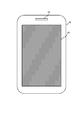
- FIG. 1 is a diagram illustrating an external configuration of a mobile phone according to Embodiment 1.
- FIG. 2 is a functional block diagram illustrating an internal configuration of a mobile phone according to Embodiment 1.
- FIG. 3 is a diagram illustrating a display example of a touch panel provided in the mobile phone according to Embodiment 1.
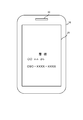
- FIG. 3 is a diagram illustrating a display example of a touch panel provided in the mobile phone according to Embodiment 1.
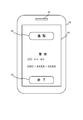
- FIG. 3 is a diagram illustrating a display example of a touch panel provided in the mobile phone according to Embodiment 1.
- FIG. 3 is a diagram illustrating a display example of a touch panel provided in the mobile phone according to Embodiment 1.
- FIG. 3 is a diagram illustrating an example of use of the mobile phone according to Embodiment 1.
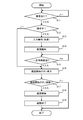
- FIG. 3 is a flowchart illustrating an operation of the mobile phone according to the first embodiment.
- 6 is a diagram illustrating an example of a posture and display of a mobile phone according to Embodiment 2.
- FIG. 10 is a functional block diagram illustrating an internal configuration of a mobile phone according to Embodiment 3.
- FIG. 10 is a diagram illustrating a display example of a touch panel equipped in a mobile phone according to Embodiment 3.
- FIG. 10 is a flowchart illustrating an operation of the mobile phone according to the third embodiment.
- 10 is a flowchart illustrating an operation of the mobile phone according to the third embodiment.
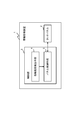
- FIG. 10 is a block diagram illustrating an outline of a configuration of a mobile phone according to a fourth embodiment.
- FIG. 1 is a diagram showing an external configuration of a mobile phone.
- FIG. 2 is a functional block diagram showing the internal configuration of the mobile phone.
- 3 to 6 are diagrams showing display examples of the mobile phone.
- FIG. 7 is a diagram illustrating an example of using a mobile phone.
- FIG. 8 is a flowchart showing the operation of the mobile phone.
- a mobile phone will be described as an example of an information processing apparatus equipped with a touch panel.
- the information processing apparatus of the present invention is not limited to being a mobile phone, but may be a portable information processing terminal such as a PDA (Personal Digital Assistant) or a portable game machine, and further be portable.
- the information processing apparatus may be an installation type information processing apparatus.
- a mobile phone 10 has a substantially rectangular casing having a predetermined thickness, and includes a touch panel 20 on the surface thereof.
- the touch panel 20 functions as a display device that displays predetermined information, and also functions as an input device that receives a touch operation input on the panel surface.
- the touch panel 20 displays various icons 21 as operation button displays as shown in FIG.
- the touch panel 20 detects a touch operation input indicating that the icon 21 is selected when the operator presses the display location of the icon 21 with a stylus pen or a finger.
- the mobile phone 10 includes a speaker 30 that outputs a received sound on the surface of the casing.
- the speaker 30 is provided at the central portion on one end side (upper end side in FIG. 1) in the longitudinal direction of the substantially rectangular casing. Then, the operator usually puts his ear on the speaker 30 during a call.
- the mobile phone 10 is also provided with a microphone that captures the transmission sound that is the voice of the operator, but is not shown here and the description thereof is omitted.
- the mobile phone 10 includes a control unit 40 that performs call processing, display processing and input processing on the touch panel 20, and controls the operation of the mobile phone 10 itself. ing.
- an external speaker 50 that outputs an incoming call notification sound and an operation sound is provided.
- control unit 40 includes a process detection unit 41 and a panel control unit 42 constructed by incorporating the program according to the present invention.
- the process detection unit 41 has a function of detecting the occurrence of a predetermined process executed by the control unit 40.
- the “predetermined process” detected by the process detection unit 41 is a “call incoming process” in the present embodiment.
- “call reception processing” means that an incoming call is notified to the operator by receiving a call signal transmitted from an external transmitter such as a radio base station by calling from another telephone. Say what to do. Then, when detecting the incoming call, the process detection unit 41 notifies the panel control unit 42 of the occurrence of the incoming call and the content of the incoming call (such as the telephone number on the calling side).
- the panel control unit 42 (panel control means) invalidates the touch operation input to the touch panel 20 when receiving the notification of the incoming call processing as described above. That is, even if a touch operation input is detected on the touch panel 20, such input content is not accepted. At this time, the panel control unit 42 invalidates the touch panel 20 without accepting the touch operation input on the entire surface of the touch panel 20, as indicated by the hatched area in FIG.
- the panel control unit 42 continues invalidating the touch operation input to the touch panel 20 as described above for a preset time. That is, when an incoming call is detected, the touch panel 20 cannot be operated for about 1 second or 2 seconds. In other words, the panel control unit 42 invalidates the operation of the touch panel 20 for a certain period of time after detecting the incoming call, and thereafter cancels the invalid state and makes the touch operation input to the touch panel 20 possible again.
- a timer circuit mounted in the mobile phone 10 is used for measurement of a certain time during which the operation of the touch panel 20 is invalidated.
- the fixed time for invalidating the operation is set in advance as short as 1 or 2 seconds as described above.
- the panel control unit 42 when detecting an incoming call, erases the operation button display that has been displayed on the touch panel 20 so far. That is, as described above, the touch operation input is invalidated, and all the operation button displays that can be visually determined to be input are not displayed.
- panel control unit 42 displays information notifying the occurrence of the incoming call on touch panel 20. For example, as shown in FIG. 4, a display indicating “incoming call”, the telephone number “090-XXXX-XXX” of the caller, and the telephone number data stored in the mobile phone 10 in association with this telephone number. Display of the name of the caller “Mr. ⁇ ⁇ ” is displayed.
- the panel control unit 42 controls to output an incoming call notification sound from the external speaker 50.
- the incoming call notification sound is not output as described above.
- the panel control unit 42 vibrates a vibration (not shown) equipped in the mobile phone 10 together with the incoming call display. Control as follows. In this way, the panel control unit 42 outputs notification information for notifying an incoming call to the outside using a preset notification unit.
- the panel control unit 42 can accept an operation input for the incoming call notification process when the invalid state of the operation of the touch panel 20 is canceled after a predetermined time has elapsed since the incoming call was detected.
- the button display is displayed on the touch panel 20. Specifically, as shown in FIG. 5, a “call” button display 22 that enables a touch operation input to instruct the start of a call and a touch operation input to instruct a call rejection or hold can be performed as processing for an incoming call. “End” button display 23 is displayed.
- the panel control unit 42 displays the “call” button display 22 on one end side in the longitudinal direction of the touch panel 20 that is substantially rectangular (a central portion in the short side direction and one end side in the long side direction). indicate.
- the display is performed on the one end side provided with the speaker 30 that outputs the received sound. That is, the “call” button display 22 is displayed at a location where the operator's ear will touch when the call state is entered.
- the panel control unit 42 instructs “communication start” to an area around the “notification” button display 22, that is, an area within a predetermined range on one end side, as shown in a shaded area 24 of FIG. It is set as a region for detecting a touch operation input (a touch operation input receivable region). Specifically, as shown in FIG. 6, an area 24 occupying approximately one third in the longitudinal direction from the end portion on the speaker 30 side of the touch panel 20 is set to function as a “call” button.
- the panel control unit 42 detects a contact operation input for the shaded area 24 set around the “call” button display 22, the panel control unit 42 accepts the contact operation input as an input for instructing “call start”. Then, as described above, the call state is entered.
- the shaded area 25 formed around the “END” button display 23 shown in FIG. 6 also functions in the same manner as the “END” button display 23. That is, when the panel control unit 42 detects a contact operation input to the shaded area 25 set around the “end” button display 23, the panel control unit 42 receives the contact operation input as an input for instructing “end of call”.
- the areas 24 and 25 in which the touch operation input for instructing “call start” and “call end” can be input by shading. Not actually. However, in order to show the area where the touch operation input is possible, graphics and information such as shading as shown in FIG. 6 may be displayed in this area.
- the operator 60 usually touches the ear 61 or the cheek as shown in FIG. 7 on the side of the speaker 30 that outputs the reception sound of the touch panel 20. Then, the periphery of the speaker 30 inevitably comes into contact with the ear 61 and the cheek. At this time, as described above, the area 24 on which the touch operation input of “call start” can be input on the side where the speaker 30 is formed is wider than the “call” button display 22 so as to spread over the entire width of the touch panel 20. The possibility that the ears 61 and the cheeks of the operator 60 are in contact with the region 24 is increased.
- buttons 22 and 23 are displayed on the touch panel 20 after the invalid state of the operation of the touch panel 20 is canceled after a certain period of time has elapsed since the incoming call was detected.
- these buttons 22 and 23 need not be displayed.
- the ear 61 automatically comes into contact with the area 24 in which “Contact start” can be input by touch operation, and naturally A call can be started.
- the regions 24 and 25 in which the touch operation can be input at the position and the area illustrated in FIG. 6 is set on the touch panel 20 after canceling the invalid state of the operation of the touch panel 20 is illustrated.
- the areas 24 and 25 are set according to processing that has occurred in the mobile phone 10. For example, in the above-described example, when “incoming call” is detected by the mobile phone 10, setting data is stored in advance so that the regions 24 and 25 in which the touch operation can be input at the position and area as described above are set. The mobile phone 10 is set. Therefore, in other interrupt processing, for example, when an incoming e-mail is detected, the operation is disabled for a certain period of time. A region where the touch operation can be input at the set position or area is set on the touch panel 20. Accordingly, it is possible to set a region where a contact operation can be input at a position and area that are easy for the operator to operate according to the processing that occurs, and the operability can be improved.
- the mobile phone 10 receives a call from the radio base station, and a call incoming process occurs. Then, the cellular phone 10 detects the incoming call processing (Yes in step S1, processing occurrence detection step), and notifies the panel control unit 42 of it.
- the mobile phone 10 invalidates the touch operation input to the touch panel 20 (step S2, panel control step). Specifically, even if a touch operation input is detected at any place on the touch panel 20, such input content is not accepted. That is, as shown in the hatched area in FIG. 3, the touch operation input is not accepted on the entire surface of the touch panel 20 and is invalidated. Note that the mobile phone 10 deletes the operation button display or the like if the operation button display or the like operated by the operator is displayed on the touch panel 20 immediately before this.
- the mobile phone 10 invalidates the touch operation input to the touch panel 20 and simultaneously displays caller information such as the name of the caller and the telephone number on the touch panel 20 as shown in FIG. To do. That is, the operator is visually notified of an incoming call (step S3). Further, at this time, the mobile phone 10 may use other methods such as outputting an incoming call notification sound from the external speaker 50, vibrating the housing itself, or displaying a lamp in accordance with the incoming call notification setting. To make an incoming call notification. During this time, of course, the touch operation input to the touch panel 20 remains invalid.
- the mobile phone 10 can accept a touch operation input to the touch panel 20.
- a certain time for example, 1 second or 2 seconds
- the input from the touch panel 20 becomes invalid only for a certain period set in advance from the time of detection of an incoming call, and then returns to the original state and can be input from the touch panel 20.
- the mobile phone 10 displays a “call” button display 22 which is an operation button display for instructing “start of call” on the touch panel 20 (step S5).
- a “call” button display 22 which is an operation button display for instructing “start of call” on the touch panel 20 (step S5).
- the image is displayed near one end in the longitudinal direction of the rectangular touch panel 20, that is, on one end where the speaker 30 is provided.
- an “end” button display 23 is displayed near the other end in the longitudinal direction of the touch panel 20 on the opposite side.
- the cellular phone 10 receives an input of the “call” operation when the operator touches the “call” button display 22 with a finger or the like (Yes in step S6). Then, the mobile phone 10 shifts to a call state (step S7), and then the other party hangs up and the call ends (step S8). When the operator touches the “end” button display 23, the cellular phone 10 rejects the call and disconnects or shifts to a call holding state.
- the mobile phone 10 when the invalidation of input to the touch panel 20 is released and the “call” button display 22 in step S5 is displayed, the mobile phone 10 also touches the call start instruction around the “call” button display 22. It is set as an area 24 that can be input by operation. Then, as shown in FIG. 6, when there is a touch operation input in an area 24 about one third from the end located on the speaker 30 side of the touch panel 20 toward the center in the longitudinal direction, The mobile phone 10 receives an instruction input. As a result, the operator inputs a contact operation around the “call” button display 22 so that the mobile phone 10 enters a call start state.
- the operator 60 recognizes the incoming call by the incoming call notification output from the mobile phone 10 as shown in Step S3, as shown in FIG.
- the operator 60 places the speaker 30 that outputs the received sound of the touch panel 20 on the ear 61.
- the touch panel 20 of the mobile phone 10 is in an incapable input state, but since 1 or 2 seconds elapse before it is carried to the ear, the input invalid state of the touch panel 20 is cancelled. .
- the area 24 in which the touch operation input of “communication start” is formed on the side of the touch panel 20 where the speaker 30 is formed, but the ear 61 and the cheek of the operator 60 are necessarily in the area 24. Touch.
- the mobile phone 10 receives a touch operation input of “call start” and shifts to a call state.
- the display position and size of the above-described “call” button display 22 and the area 24 in which a call start instruction set in the vicinity thereof can be input by a touch operation correspond to the generated call incoming process. It is set in advance.
- the setting data is stored in, for example, a storage device in the mobile phone 10, and each button display is set so as to be set with reference to the setting data when a predetermined process such as a call incoming process is detected. And set the area where touch operation can be input.
- the touch operation input to the touch panel 20 becomes invalid immediately after processing such as incoming call is generated. Therefore, even if the operator receives an incoming call while performing an input operation on the touch panel 20, and the input operation is continued, the input to the touch panel is invalid and cannot be accepted. . As a result, erroneous operation of the mobile phone 10 can be suppressed.
- the case where the occurrence of an incoming call is detected by the mobile phone 10 is taken as an example as the timing at which the touch operation input on the touch panel 20 is invalidated.
- the timing at which the input to the touch panel 20 is invalid is not necessarily limited to this. It is not limited to.
- the panel control unit 42 may be configured to operate in the same manner as described above even when an interrupt process that is interrupted and executed even when other processes are being executed in the mobile phone 10. That is, when an interrupt process occurs, the mobile phone 10 detects the occurrence of the interrupt and also immediately disables the input to the touch panel 20 for a certain time. Then, after the fixed time has elapsed, the invalidation of the input to the touch panel 20 is canceled. Then, input to the touch panel 20 is enabled again, and the touch operation button display set corresponding to the interrupt process is displayed.
- the touch operation input to the touch panel 20 is invalidated immediately after that, Can be suppressed.
- FIG. 9 is a diagram illustrating an example of the posture and display of the mobile phone.
- the mobile phone shown in FIG. 9 has a substantially rectangular shape and includes two casings 100 and 200 having substantially the same shape.
- the two casings 100 and 200 are slid in the longitudinal direction from each other as shown in FIG.
- the casings 100 and 200 are connected so as to be movable.
- the internal configuration of the mobile phone shown in FIGS. 9A and 9B is almost the same as that of the first embodiment described above. Therefore, when an incoming call is detected in the state of FIG. 9A, the touch operation input to the touch panel 20 is invalidated for a certain period of time as described above, and then the invalidation of the input to the touch panel 20 is canceled and the call button display is performed. And the end button display is displayed. Further, at this time, the area 24 around the call button display is set to accept a touch operation input of “call start”. Further, the area 25 around the end button display is set to accept a touch operation input of “end of call”.
- the panel control unit 42 of the mobile phone 10 has a function of detecting the postures of the casings 100 and 200, and “call start” set on the touch panel 20 according to the detected postures. ”Is displayed by changing the area of the area 24 (contact operation input receivable area) in which the contact operation input can be received. For example, as shown in FIG. 9B, when it is detected that the mobile phone 10 is slid open, the end of the touch panel 20 where the speaker 30 is located, that is, between the casings. Almost half or more of the end side away from the connecting portion is set as an area 24 for receiving a touch operation input of “call start”.
- the orientation of the mobile phone 10 is detected by, for example, mounting a magnet in each case 100, 200 and detecting the magnetic force applied by the other case to determine the relative position between the cases 100, 200. It may be performed by a method of detecting and detecting the posture of the mobile phone 10 itself. However, The detection of the posture is not limited to the above method, and may be realized by various other known techniques.
- the operator when it is detected that the mobile phone 10 is slid and opened, the operator is in a posture to bring most of the touch panel 20 side into contact with the ears or cheeks during a call.
- the area 24 for accepting the contact operation input of “call start” is set wider than when it is closed. For this reason, there is a high possibility that the operator's ears and cheeks are in contact with the region 24.
- a contact operation input “call start” is automatically performed, and the panel control unit 42 of the mobile phone 10 detects this. Therefore, when the operator performs a call transfer operation, the call can be started naturally.
- the area of the region 24 that receives the touch operation input of “call start” is changed according to the attitude of the mobile phone 10 is illustrated, but the area to be changed is arbitrary. Yes, preset for each posture of the mobile phone 10.
- the above-described method of moving the mobile phone 10 is an example, and the present invention is not necessarily limited to the two housings sliding and opening / closing. Furthermore, the present invention is not necessarily limited to being applied to a mobile phone having only two housings.
- FIG. 10 is a functional block diagram showing the configuration of the mobile phone.
- FIG. 11 is a diagram illustrating an example of a display on the mobile phone.
- 12 to 13 are flowcharts showing the operation of the mobile phone.
- the mobile phone 10 according to the present embodiment has substantially the same configuration as the mobile phone 10 according to the first and second embodiments described above. And even if it detects generation
- this configuration will be described in detail.
- the panel control unit 42 of the mobile phone 10 When the panel control unit 42 of the mobile phone 10 according to the present embodiment first detects the occurrence of an interrupt process such as an incoming call, it detects the touch operation status on the touch panel 20 and determines whether or not the touch panel is being operated. It has a function to determine whether. Specifically, first, the panel control unit 42 stores and holds the presence / absence of a touch operation input to the touch panel 20 for a period of time (for example, 1 second) that is always set in advance from the present time. When the panel control unit 42 detects a predetermined process, the panel control unit 42 touches the touch panel 20 for a predetermined time before the detection (for example, 1 second before the detection of the occurrence of the process). It is determined whether or not an operation input has been performed. If a contact operation input has been performed during this time, it is determined that the touch panel 20 is being operated. On the other hand, when the touch operation input has not been performed, it is determined that the touch panel 20 is not being operated.
- an interrupt process such as an
- the panel control unit 42 measures a certain time (for example, measured by a timer circuit from the occurrence of a predetermined process such as an incoming call). 400 to 600 [mSec]) preferentially displays on the touch panel 20 that a predetermined process such as an incoming call notification has occurred, and invalidates the touch operation input to the touch panel 20. Then, after a certain period of time has elapsed, the invalidation of the touch operation input to the touch panel 20 is canceled, and the display on the touch panel 20 is switched so that a touch operation input such as an operation for instructing the start of a call with respect to the incoming call, which is a process that has occurred. For example, as shown in FIG. 11B, various buttons such as a “call” button are displayed, and areas 24 and 25 where a touch operation can be input are set.
- the panel control unit 42 determines that the touch panel 20 is not in operation when detecting a predetermined process, the touch operation on the touch panel 20 is not invalidated as described above without invalidating the touch operation input on the touch panel 20. Keep input valid. That is, if the touch panel 20 is not being operated when a predetermined process such as an incoming call is detected, a touch operation input to the touch panel 20 is possible immediately after that.
- the mobile phone 10 stores address data such as user names and phone numbers that can be a plurality of other callers that are expected to be notified of incoming calls, in the memory 70 that is a storage device equipped. Yes.
- address data such as user names and phone numbers that can be a plurality of other callers that are expected to be notified of incoming calls
- the memory 70 that is a storage device equipped. Yes.
- the user data for which an emergency response is required in advance is set as emergency response transmission source data and stored in the memory 70 (transmission source storage means).
- the panel control unit 42 detects the occurrence of the incoming call processing, the panel control unit 42 obtains the information of the transmission source (telephone number and the like) included in the transmission information from the base station received when the incoming call is received. It is acquired and it is checked whether or not the sender information is stored as emergency response sender data in the memory 70.
- the predetermined process such as the incoming call notification is performed for a certain period of time after the occurrence of the predetermined process such as the incoming call as in the case of the first embodiment described above.
- the occurrence is preferentially displayed on the touch panel 20 and the touch operation input to the touch panel 20 is invalidated.
- the invalidation of the touch operation input to the touch panel 20 is canceled, and the display on the touch panel 20 is switched so that a touch operation input such as an operation for instructing the start of a call with respect to the incoming call, which is a process that has occurred.
- the panel control unit 42 does not invalidate the touch operation input on the touch panel 20 as described above, and performs the touch operation input on the touch panel 20. Leave valid. That is, if the touch panel 20 is not being operated when a predetermined process such as an incoming call is detected, a touch operation input to the touch panel 20 is possible immediately after that.
- the touch operation input to the touch panel is not invalidated and remains valid as described above. That is, even immediately after a predetermined process occurs, the touch panel operates so as to accept a touch operation input. Accordingly, it is possible to input information to the information processing apparatus quickly according to the situation, and it is possible to further improve the convenience for the operator.
- step S11 when the mobile phone 10 detects an incoming call process from another mobile phone (Yes in step S11), the touch operation input status on the touch panel 20 is checked. For example, as described above, the operation status from the present to a predetermined time before is examined to determine whether or not the operation is being performed (step S12).
- step S12 the touch operation input to the touch panel 20 is invalidated for a certain period of time as in the first embodiment. . Then, the mobile phone 10 invalidates the touch operation input to the touch panel 20 and at the same time displays on the touch panel 20 the incoming call and the caller information such as the caller's name and phone number, or from the external speaker 50. An incoming call notification is given to the operator, such as outputting an incoming call notification sound (step S14). During this time, of course, the touch operation input to the touch panel 20 remains invalid.
- Step S15 the mobile phone 10 cancels the invalid input to the touch panel 20 and inputs the touch operation to the touch panel 20 Can be accepted.
- the mobile phone 10 displays a “call” button display 22, which is an operation button display for instructing “start of call”, on the touch panel 20, and calls the “call” button display 22 itself and its surroundings.
- a start instruction is set as an area 24 that can be input by a touch operation.
- the cellular phone 10 accepts an input of the “call” operation when the operator touches the “call” button display 22 or the input possible area 24 with a finger or the like (Yes in step S17).
- the mobile phone 10 shifts to a call state (step S18), and thereafter, one of the parties hangs up and ends the call (step S19).
- the touch operation on the touch panel 20 is performed without invalidating the touch operation input on the touch panel 20. Keep input valid. For example, when an incoming call is detected when a predetermined screen is displayed on the touch panel 20 as shown in FIG. 11A, a touch operation input to the touch panel 20 can be performed immediately after the incoming call is detected. 11B, the “call” button display 22 is displayed on the touch panel 20, and the “call” button display 22 itself and its surroundings can be input by a touch operation to input a call start instruction. (Step S16).
- the cellular phone 10 accepts an input of the “call” operation when the operator touches the “call” button display 22 or the input area 24 with a finger or the like (Yes in step S17). Thereby, the mobile phone 10 shifts to a call state (step S18), and thereafter, one of the parties hangs up and ends the call (step S19).
- an incoming call notification is received before the operator operates the touch panel 20
- an input operation by the operator can be performed immediately after the incoming call notification is received.
- the operator can quickly execute a response to the incoming call notification.
- step S21 when the mobile phone 10 detects an incoming call process from another mobile phone (Yes in step S21), it is checked whether or not the caller is registered in the memory 70 as an emergency response caller in advance (step S22). .
- the touch operation input with respect to the touch panel 20 is invalidated for a fixed time (step S23). . Then, the mobile phone 10 invalidates the touch operation input to the touch panel 20 and at the same time displays on the touch panel 20 the incoming call and the caller information such as the caller's name and phone number, or from the external speaker 50. An incoming call notification is given to the operator, such as outputting an incoming call notification sound (step S24). During this time, of course, the touch operation input to the touch panel 20 remains invalid.
- the mobile phone 10 cancels the invalid input to the touch panel 20 and inputs the touch operation to the touch panel 20 Can be accepted.
- the mobile phone 10 displays a “call” button display 22, which is an operation button display for instructing “start of call”, on the touch panel 20, and calls the “call” button display 22 itself and its surroundings.
- a start instruction is set as an area 24 that can be input by a touch operation.
- the cellular phone 10 receives an input of the “call” operation when the operator touches the “call” button display 22 or the input possible area 24 with a finger or the like (Yes in step S27). Thereby, the mobile phone 10 shifts to a call state (step S28), and thereafter, one of the parties hangs up and ends the call (step S29).
- the mobile phone 10 determines that the caller is an emergency response caller (Yes in step S22)
- the mobile phone 10 validates the touch operation input on the touch panel 20 without invalidating the touch operation input on the touch panel 20. Leave. For example, as shown in FIG. 11 (A), when a predetermined screen is displayed on the touch panel 20, an incoming call is detected, and when the caller is an emergency response caller, a touch operation input to the touch panel 20 is immediately performed.
- the “call” button display 22 is displayed on the touch panel 20, and the “call” button display 22 itself and its surroundings are contacted with a call start instruction. Is set as a region 24 that can be input (step S26).
- the cellular phone 10 accepts an input of the “call” operation when the operator touches the “call” button display 22 or the input area 24 with a finger or the like (Yes in step S27). Thereby, the mobile phone 10 shifts to a call state (step S28), and thereafter, one of the parties hangs up and ends the call (step S29).
- the touch operation input to the touch panel is not invalidated and remains valid as described above. That is, even immediately after a predetermined process occurs, the touch panel operates so as to accept a touch operation input. Accordingly, it is possible to input information to the information processing apparatus quickly according to the situation, and it is possible to further improve the convenience for the operator.
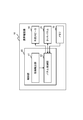
- FIG. 14 is a functional block diagram showing the configuration of the information processing apparatus in the present embodiment.
- the information processing apparatus in the present embodiment includes the above-described mobile phone, and an outline of the configuration will be described.
- the information processing apparatus 1 in the present embodiment is A touch panel 2 that displays predetermined information and receives a touch operation input, and a control unit 3 that controls the operation of the information processing apparatus 1 itself equipped with the touch panel 2 are provided. And when the said control part 3 detects generation
- a touch operation input receivable area in which the touch panel 2 can accept a touch operation input for the above process is set in the touch panel 2; The structure is taken.
- the information processing apparatus is configured with a plurality of housings,
- the panel control means changes the area of the contact operation input receivable region according to the attitude of the information processing apparatus itself accompanying the mutual operation between the housings, and sets the area on the touch panel. The structure is taken.
- the process occurrence detection means detects a call incoming process that occurs when the information processing apparatus receives transmission information transmitted from an external transmitter as the predetermined process
- the panel control means cancels the invalidity of the touch operation input to the touch panel after a preset time has elapsed from the occurrence of the incoming call processing, and is arranged on one end side in the longitudinal direction of the touch panel that is substantially rectangular. , Set the contact operation input receivable area that can accept the contact operation input that is an instruction to start the call, The structure is taken.
- the panel control means cancels the invalidity of the touch operation input to the touch panel after a preset time has elapsed since the occurrence of the call incoming process, and makes a contact operation input for instructing the call incoming process to start a call Is displayed on one end side in the longitudinal direction of the touch panel, which is substantially rectangular, The structure is taken.
- One end side in the longitudinal direction of the touch panel is an end side of the touch panel on a side where a speaker that outputs a reception sound during a call is provided, which is equipped in the information processing apparatus.
- the structure is taken.
- the information processing apparatus detects this and invalidates the touch operation input on the touch panel for a certain period of time. Then, even if the operator performs an input operation on the touch panel before the predetermined process occurs and the operation button display on the touch panel changes due to the occurrence of the predetermined process, the input to the touch panel is invalid. It will not be accepted. Therefore, it is possible to suppress erroneous operations from the touch panel on the information processing apparatus. Then, after a certain period of time, input to the touch panel becomes possible, and the convenience for the operator is enhanced.
- the convenience of the operator is further improved by changing the area of each region according to the attitude of the information processing apparatus.
- the operator can easily start the call.
- the panel control unit invalidates the touch operation input to the touch panel over the entire touch panel when the process occurrence detection unit detects the occurrence of the predetermined process. It may be. In this way, by disabling input on the entire touch panel when a predetermined process occurs, input cannot be accepted regardless of where the operator touches the touch panel. it can.
- the panel control means detects the touch operation input displayed on the touch panel before the occurrence of the predetermined process when the process occurrence detection means detects the occurrence of the predetermined process.
- the configuration may be such that the display of the operation button that can accept is deleted.
- the panel control means may be configured to output notification information for notifying the occurrence of the predetermined process when the process occurrence detecting means detects the occurrence of the predetermined process. .
- the panel control means may display notification information for notifying the occurrence of the predetermined process on the touch panel when the occurrence of the predetermined process is detected by the process occurrence detecting means.
- the process occurrence detection unit may detect an interrupt process executed by the control unit even when another process is being executed as the predetermined process.
- the information processing apparatus deletes the operation button display that has been operated so far from the touch panel, or outputs information for notifying the occurrence of the predetermined process on the touch panel. Therefore, the operator can recognize the occurrence of the predetermined process, and thereafter, the operator will stop unnecessary touch operation input to the touch panel. As a result, erroneous operation of the information processing apparatus can be suppressed.
- the panel control means detects a touch operation state on the touch panel when the predetermined process occurs to determine whether or not the touch panel is in operation, and if the touch panel is not in operation, the touch panel The touch operation input for The structure is taken.
- Out of information representing a plurality of senders that are expected to be notified of incoming calls it is provided with a sender storage means for storing, as an emergency response sender, information on a sender that is set in advance to require an emergency response
- the process occurrence detection means detects a call incoming process that occurs when the information processing apparatus receives transmission information transmitted from an external transmitter as the predetermined process
- the panel control means detects the occurrence of the incoming call processing, it determines whether or not the sender included in the received transmission information is stored as the emergency response sender in the sender storage means.
- the touch operation input to the touch panel remains valid. The structure is taken.
- the touch panel if the touch panel is not being operated, or if the caller is set in advance as an opponent requiring an emergency response, the touch operation input to the touch panel is not invalidated as described above. Leave. That is, even immediately after a predetermined process occurs, the touch panel operates so as to accept a touch operation input. Accordingly, it is possible to input information to the information processing apparatus quickly according to the situation, and it is possible to further improve the convenience for the operator.
- the information processing apparatus described above can be realized by incorporating a program into the information processing apparatus.
- the program which is another embodiment of the present invention is: A touch panel that displays predetermined information and receives a touch operation input, and a control unit that controls the operation of the information processing apparatus itself equipped with the touch panel, Process generation detecting means for detecting occurrence of a predetermined process executed by the control unit, and panel control for invalidating a touch operation input to the touch panel when the occurrence of the predetermined process is detected by the process occurrence detecting means Means for realizing the means.
- the panel control means cancels the invalidation of the touch operation input to the touch panel after a predetermined time has elapsed from the occurrence of the predetermined process, and the predetermined process corresponding to the generated predetermined process.
- a touch operation input receivable area in which the touch panel can accept a touch operation input to the touch panel is set in the touch panel, The structure is taken.
- the panel control means changes the area of the contact operation input receivable region according to the attitude of the information processing apparatus itself accompanying the mutual operation between the housings, and sets the area on the touch panel. The structure is taken.
- An information processing apparatus comprising: a touch panel that displays predetermined information and receives a touch operation input; and a control unit that controls the operation of the information processing apparatus itself equipped with the touch panel.
- the occurrence of a predetermined process executed by the control unit is detected.
- the touch operation input to the touch panel is invalidated, and a preset time has elapsed since the occurrence of the predetermined process.
- the touch operation input receivable area in which the touch panel can accept the touch operation input for the predetermined process corresponding to the generated predetermined process is set in the touch panel. Set, The structure is taken.
- the information processing method is When the information processing device is configured with multiple housings, When the contact operation input receivable area is set on the touch panel, the area of the contact operation input receivable area is changed according to the posture of the information processing apparatus itself accompanying the mutual operation between the housings. Set to touch panel, The structure is taken.
- the information processing method is as follows: As the predetermined process, when the information processing apparatus detects a call incoming process generated by receiving transmission information transmitted from an external transmitter, a preset time elapses from the occurrence of the call incoming process. After that, the invalidation of the touch operation input to the touch panel is canceled, and the touch operation input that can accept the touch operation input as an instruction to start a call can be received on one end side of the substantially rectangular touch panel in the longitudinal direction. Set the area, The structure is taken.
- the information processing method is as follows: When the predetermined processing occurs, the touch operation status on the touch panel is detected to determine whether the touch panel is being operated. If the touch panel is not being operated, the touch operation input to the touch panel is valid. Leave The structure is taken.
- the information processing method is as follows: As the predetermined process, when the information processing apparatus detects a call incoming process generated by receiving transmission information transmitted from an external transmitter, and detects the occurrence of the call incoming process, the received transmission
- the sender included in the information is stored in the information processing apparatus as an emergency response sender set in advance to require an emergency response, and the sender is the emergency response sender Leave the touch operation input on the touch panel valid, The structure is taken.
- the program is provided to an information processing apparatus connected to the computer via a predetermined computer in a state stored in a storage medium such as a CD-ROM, for example.
- the said program may be memorize
- the present invention enjoys the benefit of the priority claim based on the patent application of Japanese Patent Application No. 2008-275068 filed on October 27, 2008 in Japan, and is described in the patent application. The contents are all included in this specification. Furthermore, the present invention enjoys the benefit of the priority claim based on the patent application of Japanese Patent Application No. 2008-275705 filed on October 27, 2008 in Japan, and is described in the patent application. The contents are all included in this specification.
- the present invention can be used for any information processing apparatus equipped with a touch panel such as a mobile phone, a PDA, a portable game machine, and a fixed mobile phone terminal installed in a vehicle or the like.
- a touch panel such as a mobile phone, a PDA, a portable game machine, and a fixed mobile phone terminal installed in a vehicle or the like.
Landscapes
- Engineering & Computer Science (AREA)
- General Engineering & Computer Science (AREA)
- Theoretical Computer Science (AREA)
- Human Computer Interaction (AREA)
- Physics & Mathematics (AREA)
- General Physics & Mathematics (AREA)
- Signal Processing (AREA)
- Computer Security & Cryptography (AREA)
- Computer Networks & Wireless Communication (AREA)
- Telephone Function (AREA)
- Position Input By Displaying (AREA)
Abstract
Description
所定の情報を表示すると共に接触操作入力を受け付けるタッチパネルと、当該タッチパネルが装備された情報処理装置自体の動作を制御する制御部と、を備える。
そして上記制御部が、当該制御部が実行する所定の処理の発生を検出する処理発生検出手段と、この処理発生検出手段にて上記所定の処理の発生を検出したときに上記タッチパネルに対する接触操作入力を無効とするパネル制御手段と、を備える。
さらに、上記パネル制御手段は、上記所定の処理の発生から予め設定された時間が経過した後に上記タッチパネルに対する接触操作入力の無効を解除し、上記発生した所定の処理に対応して当該所定の処理に対する接触操作入力を上記タッチパネルが受け付け可能な接触操作入力受付可能領域を当該タッチパネルに設定する、
という構成をとる。
所定の情報を表示すると共に接触操作入力を受け付けるタッチパネルと、当該タッチパネルが装備された情報処理装置自体の動作を制御する制御部と、を備えた情報処理装置の上記制御部に、
上記制御部が実行する所定の処理の発生を検出する処理発生検出手段と、この処理発生検出手段にて上記所定の処理の発生を検出したときに上記タッチパネルに対する接触操作入力を無効とするパネル制御手段と、を実現させるためのプログラムである。
そして、上記プログラムにて情報処理端末内に装備されているパネル制御手段は、上記所定の処理の発生から予め設定された時間が経過した後に上記タッチパネルに対する接触操作入力の無効を解除し、上記発生した所定の処理に対応して当該所定の処理に対する接触操作入力を上記タッチパネルが受け付け可能な接触操作入力受付可能領域を当該タッチパネルに設定する、という構成をとる。
所定の情報を表示すると共に接触操作入力を受け付けるタッチパネルと、当該タッチパネルが装備された情報処理装置自体の動作を制御する制御部と、を備えた情報処理装置にて、
上記制御部が実行する所定の処理の発生を検出し、当該所定の処理の発生を検出したときに上記タッチパネルに対する接触操作入力を無効とし、上記所定の処理の発生から予め設定された時間が経過した後に上記タッチパネルに対する接触操作入力の無効を解除して、上記発生した所定の処理に対応して当該所定の処理に対する接触操作入力を上記タッチパネルが受け付け可能な接触操作入力受付可能領域を当該タッチパネルに設定する、
という構成をとる。
本発明の第1の実施形態を、図1乃至図8を参照して説明する。図1は、携帯電話機の外観構成を示す図である。図2は、携帯電話機の内部構成を示す機能ブロック図である。図3乃至図6は、携帯電話機の表示例を示す図である。図7は、携帯電話機の使用例を示す図である。図8は、携帯電話機の動作を示すフローチャートである。
図1に示すように、本実施形態における携帯電話機10は、所定の厚みを有する略長方形の筐体を有しており、その表面にタッチパネル20を備えている。このタッチパネル20は、所定の情報を表示する表示装置として機能すると共に、パネル表面に対する接触操作入力を受け付ける入力装置としても機能している。例えば、タッチパネル20は、図1に示すように、操作ボタン表示としての種々のアイコン21を表示する。そして、タッチパネル20は、上記アイコン21の表示箇所を操作者にてスタイラスペンや指で押圧されることで、かかるアイコン21を選択する旨の接触操作入力を検出する。
次に、上記携帯電話機10の着信時の動作を、図8のフローチャートを参照して説明する。
次に、本発明の第2の実施形態を、図9を参照して説明する。図9は、携帯電話機の姿勢及び表示の一例を示す図である。
姿勢の検出は上記方法に限定されず、種々の他の公知の技術で実現してもよい。
次に、本発明の第3の実施形態を、図10乃至図13を参照して説明する。図10は、携帯電話機の構成を示す機能ブロック図である。図11は、携帯電話機の表示の一例を示す図である。図12乃至図13は、携帯電話機の動作を示すフローチャートである。
本実施形態における携帯電話機10は、上述した実施形態1,2の携帯電話機10とほぼ同様の構成をとっている。そして、本実施形態における携帯電話機10は、通話着信などの所定の処理の発生を検出した場合でも、特定の条件を満たす場合には、上述したように一定時間タッチパネル20に対する操作を無効とすることなく、当該タッチパネル20に対する接触操作入力を有効としたままとする機能を有する。以下、かかる構成について詳述する。
次に、本実施形態における携帯電話機10の着信時の動作を、図12又は図13のフローチャート、及び、図11の携帯電話機の表示例を参照して説明する。なお、上述した実施形態1と同様の動作については説明を省略する。
次に、本発明の第4の実施形態を、図14を参照して説明する。図14は、本実施形態における情報処理装置の構成を示す機能ブロック図である。なお、本実施形態における情報処理装置は、上述した携帯電話機を含むものであり、その構成の概略を説明する。
所定の情報を表示すると共に接触操作入力を受け付けるタッチパネル2と、当該タッチパネル2が装備された情報処理装置1自体の動作を制御する制御部3と、を備えている。
そして、上記制御部3が、当該制御部3が実行する所定の処理の発生を検出する処理発生検出手段4と、この処理発生検出手段4にて上記所定の処理の発生を検出したときに上記タッチパネルに対する接触操作入力を無効とするパネル制御手段5と、を備える。
さらに、上記パネル制御手段5は、上記所定の処理の発生から予め設定された時間が経過した後に上記タッチパネル2に対する接触操作入力の無効を解除し、上記発生した所定の処理に対応して当該所定の処理に対する接触操作入力を上記タッチパネル2が受け付け可能な接触操作入力受付可能領域を当該タッチパネル2に設定する、
という構成を採る。
情報処理装置が複数の筐体を備えて構成されており、
上記パネル制御手段は、上記接触操作入力受付可能領域の面積を、上記筐体間の相互の動作に伴う情報処理装置自体の姿勢に応じて変化させて上記タッチパネルに設定する、
という構成を採る。
上記処理発生検出手段は、上記所定の処理として、情報処理装置が外部の送信機から送信された送信情報を受信することによって発生する通話着信処理を検出し、
上記パネル制御手段は、上記通話着信処理の発生から予め設定された時間が経過した後に上記タッチパネルに対する接触操作入力の無効を解除し、略長方形である上記タッチパネルの長手方向の一方の端部側に、通話開始の指示となる接触操作入力を受け付け可能な上記接触操作入力受付可能領域を設定する、
という構成を採る。
上記パネル制御手段は、上記通話着信処理の発生から予め設定された時間が経過した後に、上記タッチパネルに対する接触操作入力の無効を解除し、上記通話着信処理に対して通話開始を指示する接触操作入力を受け付け可能な通話開始操作ボタン表示を、略長方形である上記タッチパネルの長手方向の一方の端部側に表示する、
という構成を採る。
上記タッチパネルの長手方向の一方の端部側は、情報処理装置に装備された、通話時に受話音を出力するスピーカが位置する側の上記タッチパネルの端部側である、
という構成を採る。
上記パネル制御手段は、上記所定の処理の発生時に、上記タッチパネルに対する接触操作状況を検出して当該タッチパネルが操作中であるか否かを判定し、当該タッチパネルが操作中でない場合には、当該タッチパネルに対する接触操作入力を有効のままとする、
という構成を採る。
通話着信通知が予想される複数の発信元を表す情報のうち、予め緊急応答が必要であると設定された発信元の情報を緊急応答発信元として記憶する発信元記憶手段を備え、
上記処理発生検出手段は、上記所定の処理として、情報処理装置が外部の送信機から送信された送信情報を受信することによって発生する通話着信処理を検出し、
上記パネル制御手段は、上記通話着信処理の発生を検出したときに、上記受信した送信情報に含まれる発信元が上記発信元記憶手段に上記緊急応答発信元として記憶されているか否かを判定し、上記発信元が上記緊急応答発信元である場合には上記タッチパネルに対する接触操作入力を有効のままとする、
という構成を採る。
所定の情報を表示すると共に接触操作入力を受け付けるタッチパネルと、当該タッチパネルが装備された情報処理装置自体の動作を制御する制御部と、を備えた情報処理装置の上記制御部に、
上記制御部が実行する所定の処理の発生を検出する処理発生検出手段と、この処理発生検出手段にて上記所定の処理の発生を検出したときに上記タッチパネルに対する接触操作入力を無効とするパネル制御手段と、を実現させるプログラムである。
そして、上記パネル制御手段は、上記所定の処理の発生から予め設定された時間が経過した後に上記タッチパネルに対する接触操作入力の無効を解除し、上記発生した所定の処理に対応して当該所定の処理に対する接触操作入力を上記タッチパネルが受け付け可能な接触操作入力受付可能領域を当該タッチパネルに設定する、
という構成を採る。
情報処理装置が複数の筐体を備えて構成されている場合に、
上記パネル制御手段は、上記接触操作入力受付可能領域の面積を、上記筐体間の相互の動作に伴う情報処理装置自体の姿勢に応じて変化させて上記タッチパネルに設定する、
という構成を採る。
所定の情報を表示すると共に接触操作入力を受け付けるタッチパネルと、当該タッチパネルが装備された情報処理装置自体の動作を制御する制御部と、を備えた情報処理装置にて、
上記制御部が実行する所定の処理の発生を検出し、当該所定の処理の発生を検出したときに上記タッチパネルに対する接触操作入力を無効とし、上記所定の処理の発生から予め設定された時間が経過した後に上記タッチパネルに対する接触操作入力の無効を解除して、上記発生した所定の処理に対応して当該所定の処理に対する接触操作入力を上記タッチパネルが受け付け可能な接触操作入力受付可能領域を当該タッチパネルに設定する、
という構成を採る。
情報処理装置が複数の筐体を備えて構成されている場合に、
上記接触操作入力受付可能領域を上記タッチパネルに設定するときに、当該接触操作入力受付可能領域の面積を、上記筐体間の相互の動作に伴う情報処理装置自体の姿勢に応じて変化させて上記タッチパネルに設定する、
という構成を採る。
上記所定の処理として、情報処理装置が外部の送信機から送信された送信情報を受信することによって発生する通話着信処理を検出したときに、当該通話着信処理の発生から予め設定された時間が経過した後に上記タッチパネルに対する接触操作入力の無効を解除し、略長方形である上記タッチパネルの長手方向の一方の端部側に、通話開始の指示となる接触操作入力を受け付け可能な上記接触操作入力受付可能領域を設定する、
という構成を採る。
上記所定の処理の発生時に、上記タッチパネルに対する接触操作状況を検出して当該タッチパネルが操作中であるか否かを判定し、当該タッチパネルが操作中でない場合には、当該タッチパネルに対する接触操作入力を有効のままとする、
という構成を採る。
上記所定の処理として、情報処理装置が外部の送信機から送信された送信情報を受信することによって発生する通話着信処理を検出し、当該通話着信処理の発生を検出したときに、上記受信した送信情報に含まれる発信元が、予め緊急応答が必要であると設定された緊急応答発信元として情報処理装置に記憶されているか否かを判定し、上記発信元が上記緊急応答発信元である場合には上記タッチパネルに対する接触操作入力を有効のままとする、
という構成を採る。
さらに、本発明は、日本国にて2008年10月27日に特許出願された特願2008-275705の特許出願に基づく優先権主張の利益を享受するものであり、当該特許出願に記載された内容は、全て本明細書に含まれるものとする。
2 タッチパネル
3 制御部
4 処理発生検出手段
5 パネル制御手段
10 携帯電話機
20 タッチパネル
21 アイコン
22 通話ボタン表示
23 終了ボタン表示
24,25 接触操作入力受付可能領域
30 スピーカ
40 制御部
41 処理検出部
42 パネル制御部
50 外部スピーカ
60 操作者
61 耳
70 メモリ
100,200 筐体
Claims (14)
- 所定の情報を表示すると共に接触操作入力を受け付けるタッチパネルと、当該タッチパネルが装備された情報処理装置自体の動作を制御する制御部と、を備え、
前記制御部が、当該制御部が実行する所定の処理の発生を検出する処理発生検出手段と、この処理発生検出手段にて前記所定の処理の発生を検出したときに前記タッチパネルに対する接触操作入力を無効とするパネル制御手段と、を備え、
前記パネル制御手段は、前記所定の処理の発生から予め設定された時間が経過した後に前記タッチパネルに対する接触操作入力の無効を解除し、前記発生した所定の処理に対応して当該所定の処理に対する接触操作入力を前記タッチパネルが受け付け可能な接触操作入力受付可能領域を当該タッチパネルに設定する、
情報処理装置。 - 請求項1に記載の情報処理装置であって、
情報処理装置が複数の筐体を備えて構成されており、
前記パネル制御手段は、前記接触操作入力受付可能領域の面積を、前記筐体間の相互の動作に伴う情報処理装置自体の姿勢に応じて変化させて前記タッチパネルに設定する、
情報処理装置。 - 請求項1又は2に記載の情報処理装置であって、
前記処理発生検出手段は、前記所定の処理として、情報処理装置が外部の送信機から送信された送信情報を受信することによって発生する通話着信処理を検出し、
前記パネル制御手段は、前記通話着信処理の発生から予め設定された時間が経過した後に前記タッチパネルに対する接触操作入力の無効を解除し、略長方形である前記タッチパネルの長手方向の一方の端部側に、通話開始の指示となる接触操作入力を受け付け可能な前記接触操作入力受付可能領域を設定する、
情報処理装置。 - 請求項3に記載の情報処理装置であって、
前記パネル制御手段は、前記通話着信処理の発生から予め設定された時間が経過した後に、前記タッチパネルに対する接触操作入力の無効を解除し、前記通話着信処理に対して通話開始を指示する接触操作入力を受け付け可能な通話開始操作ボタン表示を、略長方形である前記タッチパネルの長手方向の一方の端部側に表示する、
情報処理装置。 - 請求項3又は4に記載の情報処理装置であって、
前記タッチパネルの長手方向の一方の端部側は、情報処理装置に装備された、通話時に受話音を出力するスピーカが位置する側の前記タッチパネルの端部側である、
情報処理装置。 - 請求項1乃至5のいずれか一項に記載の情報処理装置であって、
前記パネル制御手段は、前記所定の処理の発生時に、前記タッチパネルに対する接触操作状況を検出して当該タッチパネルが操作中であるか否かを判定し、当該タッチパネルが操作中でない場合には、当該タッチパネルに対する接触操作入力を有効のままとする、
情報処理装置。 - 請求項1乃至6のいずれか一項に記載の情報処理装置であって、
通話着信通知が予想される複数の発信元を表す情報のうち、予め緊急応答が必要であると設定された発信元の情報を緊急応答発信元として記憶する発信元記憶手段を備え、
前記処理発生検出手段は、前記所定の処理として、情報処理装置が外部の送信機から送信された送信情報を受信することによって発生する通話着信処理を検出し、
前記パネル制御手段は、前記通話着信処理の発生を検出したときに、前記受信した送信情報に含まれる発信元が前記発信元記憶手段に前記緊急応答発信元として記憶されているか否かを判定し、前記発信元が前記緊急応答発信元である場合には前記タッチパネルに対する接触操作入力を有効のままとする、
情報処理装置。 - 所定の情報を表示すると共に接触操作入力を受け付けるタッチパネルと、当該タッチパネルが装備された情報処理装置自体の動作を制御する制御部と、を備えた情報処理装置の前記制御部に、
前記制御部が実行する所定の処理の発生を検出する処理発生検出手段と、この処理発生検出手段にて前記所定の処理の発生を検出したときに前記タッチパネルに対する接触操作入力を無効とするパネル制御手段と、を実現させると共に、
前記パネル制御手段は、前記所定の処理の発生から予め設定された時間が経過した後に前記タッチパネルに対する接触操作入力の無効を解除し、前記発生した所定の処理に対応して当該所定の処理に対する接触操作入力を前記タッチパネルが受け付け可能な接触操作入力受付可能領域を当該タッチパネルに設定する、
プログラム。 - 請求項8に記載のプログラムであって、
情報処理装置が複数の筐体を備えて構成されている場合に、
前記パネル制御手段は、前記接触操作入力受付可能領域の面積を、前記筐体間の相互の動作に伴う情報処理装置自体の姿勢に応じて変化させて前記タッチパネルに設定する、
プログラム。 - 所定の情報を表示すると共に接触操作入力を受け付けるタッチパネルと、当該タッチパネルが装備された情報処理装置自体の動作を制御する制御部と、を備えた情報処理装置にて、
前記制御部が実行する所定の処理の発生を検出し、当該所定の処理の発生を検出したときに前記タッチパネルに対する接触操作入力を無効とし、前記所定の処理の発生から予め設定された時間が経過した後に前記タッチパネルに対する接触操作入力の無効を解除して、前記発生した所定の処理に対応して当該所定の処理に対する接触操作入力を前記タッチパネルが受け付け可能な接触操作入力受付可能領域を当該タッチパネルに設定する、
情報処理方法。 - 請求項10に記載の情報処理方法であって、
情報処理装置が複数の筐体を備えて構成されている場合に、
前記接触操作入力受付可能領域を前記タッチパネルに設定するときに、当該接触操作入力受付可能領域の面積を、前記筐体間の相互の動作に伴う情報処理装置自体の姿勢に応じて変化させて前記タッチパネルに設定する、
情報処理方法。 - 請求項10又は11に記載の情報処理方法であって、
前記所定の処理として、情報処理装置が外部の送信機から送信された送信情報を受信することによって発生する通話着信処理を検出したときに、当該通話着信処理の発生から予め設定された時間が経過した後に前記タッチパネルに対する接触操作入力の無効を解除し、略長方形である前記タッチパネルの長手方向の一方の端部側に、通話開始の指示となる接触操作入力を受け付け可能な前記接触操作入力受付可能領域を設定する、
情報処理方法。 - 請求項10乃至12のいずれか一項に記載の情報処理方法であって、
前記所定の処理の発生時に、前記タッチパネルに対する接触操作状況を検出して当該タッチパネルが操作中であるか否かを判定し、当該タッチパネルが操作中でない場合には、当該タッチパネルに対する接触操作入力を有効のままとする、
情報処理方法。 - 請求項10乃至13のいずれか一項に記載の情報処理方法であって、
前記所定の処理として、情報処理装置が外部の送信機から送信された送信情報を受信することによって発生する通話着信処理を検出し、当該通話着信処理の発生を検出したときに、前記受信した送信情報に含まれる発信元が、予め緊急応答が必要であると設定された緊急応答発信元として情報処理装置に記憶されているか否かを判定し、前記発信元が前記緊急応答発信元である場合には前記タッチパネルに対する接触操作入力を有効のままとする、
情報処理方法。
Priority Applications (4)
| Application Number | Priority Date | Filing Date | Title |
|---|---|---|---|
| JP2010535645A JP5488471B2 (ja) | 2008-10-27 | 2009-10-22 | 情報処理装置 |
| US13/123,943 US8872775B2 (en) | 2008-10-27 | 2009-10-22 | Information processing apparatus |
| CN200980142977.4A CN102204224B (zh) | 2008-10-27 | 2009-10-22 | 信息处理装置 |
| EP09823268.9A EP2341694B1 (en) | 2008-10-27 | 2009-10-22 | Information processing device |
Applications Claiming Priority (4)
| Application Number | Priority Date | Filing Date | Title |
|---|---|---|---|
| JP2008-275068 | 2008-10-27 | ||
| JP2008275705 | 2008-10-27 | ||
| JP2008275068 | 2008-10-27 | ||
| JP2008-275705 | 2008-10-27 |
Publications (1)
| Publication Number | Publication Date |
|---|---|
| WO2010050154A1 true WO2010050154A1 (ja) | 2010-05-06 |
Family
ID=42128526
Family Applications (1)
| Application Number | Title | Priority Date | Filing Date |
|---|---|---|---|
| PCT/JP2009/005532 Ceased WO2010050154A1 (ja) | 2008-10-27 | 2009-10-22 | 情報処理装置 |
Country Status (5)
| Country | Link |
|---|---|
| US (1) | US8872775B2 (ja) |
| EP (1) | EP2341694B1 (ja) |
| JP (1) | JP5488471B2 (ja) |
| CN (1) | CN102204224B (ja) |
| WO (1) | WO2010050154A1 (ja) |
Cited By (32)
| Publication number | Priority date | Publication date | Assignee | Title |
|---|---|---|---|---|
| JP2012049952A (ja) * | 2010-08-30 | 2012-03-08 | Fujitsu Toshiba Mobile Communications Ltd | 携帯端末 |
| CN102937920A (zh) * | 2011-08-15 | 2013-02-20 | 联想(北京)有限公司 | 一种防误操作的方法、装置及电子设备 |
| WO2013034063A1 (zh) * | 2011-09-09 | 2013-03-14 | 联想(北京)有限公司 | 电子终端及其控制方法 |
| JP2013128242A (ja) * | 2011-12-19 | 2013-06-27 | Sharp Corp | 携帯端末及び携帯端末用プログラム |
| JP2013164867A (ja) * | 2013-05-13 | 2013-08-22 | Nec Casio Mobile Communications Ltd | 携帯端末装置及びプログラム |
| JP2013201670A (ja) * | 2012-03-26 | 2013-10-03 | Kyocera Corp | 携帯電話機、着信時制御方法及びプログラム |
| JP2013541791A (ja) * | 2010-11-03 | 2013-11-14 | サムスン エレクトロニクス カンパニー リミテッド | タッチ制御方法及びこれを支援する携帯端末機 |
| JP2013255106A (ja) * | 2012-06-07 | 2013-12-19 | Sharp Corp | 携帯端末、携帯端末の制御方法、および携帯端末の制御プログラム |
| JP2014011681A (ja) * | 2012-06-29 | 2014-01-20 | Yuji Hosoi | 携帯電話 |
| JP2014016662A (ja) * | 2012-07-05 | 2014-01-30 | Nippon Syst Wear Kk | 高齢者安否確認システム |
| WO2014070068A1 (en) | 2012-11-02 | 2014-05-08 | Telefonaktiebolaget L M Ericsson (Publ) | Methods and apparatuses for boosting channel transmission in a network |
| JPWO2012060166A1 (ja) * | 2010-11-05 | 2014-05-12 | Necカシオモバイルコミュニケーションズ株式会社 | 携帯電話機及びその表示制御方法 |
| US20140187226A1 (en) * | 2011-08-05 | 2014-07-03 | Yulong Computer Telecommunication Scientific (Shenzhen) Co., Ltd. | Mobile terminal and method of displaying according to environmental data |
| WO2014129286A1 (ja) * | 2013-02-19 | 2014-08-28 | Necカシオモバイルコミュニケーションズ株式会社 | 情報処理端末、画面制御方法、及び画面制御プログラム |
| WO2014192583A1 (ja) * | 2013-05-29 | 2014-12-04 | シャープ株式会社 | 端末装置 |
| JP2015527652A (ja) * | 2012-07-12 | 2015-09-17 | ゼットティーイー コーポレーションZte Corporation | タッチスクリーン端末の操作制御方法及び移動端末 |
| WO2016017418A1 (ja) * | 2014-07-31 | 2016-02-04 | シャープ株式会社 | 情報処理装置およびその制御方法、制御プログラム、ならびに記録媒体 |
| WO2016038676A1 (ja) * | 2014-09-09 | 2016-03-17 | 三菱電機株式会社 | 触感制御システムおよび触感制御方法 |
| US9705548B2 (en) | 2013-10-24 | 2017-07-11 | Rohm Co., Ltd. | Wristband-type handset and wristband-type alerting device |
| US9716782B2 (en) | 2010-12-27 | 2017-07-25 | Rohm Co., Ltd. | Mobile telephone |
| US9729971B2 (en) | 2012-06-29 | 2017-08-08 | Rohm Co., Ltd. | Stereo earphone |
| US9742887B2 (en) | 2013-08-23 | 2017-08-22 | Rohm Co., Ltd. | Mobile telephone |
| US9894430B2 (en) | 2010-12-27 | 2018-02-13 | Rohm Co., Ltd. | Incoming/outgoing-talk unit and incoming-talk unit |
| US9980024B2 (en) | 2011-02-25 | 2018-05-22 | Rohm Co., Ltd. | Hearing system and finger ring for the hearing system |
| CN108132751A (zh) * | 2017-11-22 | 2018-06-08 | 深圳市万普拉斯科技有限公司 | 防误触模式解除方法、装置、存储介质和移动终端 |
| US10013862B2 (en) | 2014-08-20 | 2018-07-03 | Rohm Co., Ltd. | Watching system, watching detection device, and watching notification device |
| US10079925B2 (en) | 2012-01-20 | 2018-09-18 | Rohm Co., Ltd. | Mobile telephone |
| US10356231B2 (en) | 2014-12-18 | 2019-07-16 | Finewell Co., Ltd. | Cartilage conduction hearing device using an electromagnetic vibration unit, and electromagnetic vibration unit |
| US10778824B2 (en) | 2016-01-19 | 2020-09-15 | Finewell Co., Ltd. | Pen-type handset |
| US10795321B2 (en) | 2015-09-16 | 2020-10-06 | Finewell Co., Ltd. | Wrist watch with hearing function |
| US10967521B2 (en) | 2015-07-15 | 2021-04-06 | Finewell Co., Ltd. | Robot and robot system |
| US11526033B2 (en) | 2018-09-28 | 2022-12-13 | Finewell Co., Ltd. | Hearing device |
Families Citing this family (23)
| Publication number | Priority date | Publication date | Assignee | Title |
|---|---|---|---|---|
| JP4697551B2 (ja) * | 2007-12-21 | 2011-06-08 | ソニー株式会社 | 通信装置、入力制御方法及び入力制御プログラム |
| US9116567B2 (en) * | 2012-04-25 | 2015-08-25 | Google Technology Holdings LLC | Systems and methods for managing the display of content on an electronic device |
| US20130314330A1 (en) * | 2012-05-24 | 2013-11-28 | Lenovo (Singapore) Pte. Ltd. | Touch input settings management |
| CN103488960A (zh) * | 2012-06-14 | 2014-01-01 | 华为终端有限公司 | 一种防止误操作的方法及触摸屏终端设备 |
| JP6048224B2 (ja) * | 2013-03-05 | 2016-12-21 | ブラザー工業株式会社 | 通信装置、通信システム |
| JP2014178990A (ja) * | 2013-03-15 | 2014-09-25 | Kyocera Corp | 携帯機器、制御方法、および制御プログラム |
| US8929875B2 (en) * | 2013-05-13 | 2015-01-06 | Lawrence R Youst | Wireless communications device having contact specific silent mode disabling capabilities |
| CN104166512A (zh) * | 2013-05-16 | 2014-11-26 | 百度在线网络技术(北京)有限公司 | 触摸屏终端的对象切换处理方法及装置 |
| JP5985462B2 (ja) * | 2013-12-24 | 2016-09-06 | シャープ株式会社 | 画像処理装置及び画像処理装置の遠隔操作システム |
| JP6266450B2 (ja) * | 2014-06-26 | 2018-01-24 | 京セラ株式会社 | 携帯通信端末、着呼制御プログラムおよび着呼制御方法 |
| US9444942B2 (en) * | 2014-10-23 | 2016-09-13 | Vivint, Inc. | Managing telephonic communications |
| CN104635990B (zh) * | 2015-02-27 | 2017-11-14 | 上海卓易科技股份有限公司 | 一种识别用户触屏的方法及装置 |
| CN104765557B (zh) * | 2015-03-18 | 2017-12-22 | 北京畅游天下网络技术有限公司 | 一种减少触摸屏误操作的方法及装置 |
| CN105867793A (zh) * | 2015-11-06 | 2016-08-17 | 乐视移动智能信息技术(北京)有限公司 | 一种基于触摸屏无响应的使用方法和设备 |
| CN105828205A (zh) * | 2016-03-22 | 2016-08-03 | 乐视网信息技术(北京)股份有限公司 | 一种播放页面中的按钮控制方法和装置 |
| JP6727036B2 (ja) * | 2016-06-01 | 2020-07-22 | キヤノン株式会社 | 電子機器、その制御方法、プログラム及び記録媒体 |
| CN108027697A (zh) * | 2016-08-24 | 2018-05-11 | 北京小米移动软件有限公司 | 控制显示界面的方法及装置 |
| JP6794200B2 (ja) * | 2016-09-15 | 2020-12-02 | 東芝テック株式会社 | 情報提供装置及びプログラム |
| CN106453933A (zh) * | 2016-11-03 | 2017-02-22 | 深圳市金立通信设备有限公司 | 一种来电处理的方法及终端 |
| JP6983004B2 (ja) * | 2017-08-16 | 2021-12-17 | 株式会社ディスコ | 加工装置 |
| JP6961451B2 (ja) * | 2017-10-12 | 2021-11-05 | キヤノン株式会社 | 電子機器、その制御方法およびプログラム |
| US10878683B2 (en) * | 2018-11-01 | 2020-12-29 | Apple Inc. | Fall detection-audio looping |
| US11605274B2 (en) | 2018-11-01 | 2023-03-14 | Apple Inc. | Fall detection—audio looping |
Citations (9)
| Publication number | Priority date | Publication date | Assignee | Title |
|---|---|---|---|---|
| JPH03102950A (ja) * | 1989-09-18 | 1991-04-30 | Ricoh Co Ltd | ローカルエリアネットワークシステム |
| JP2000349886A (ja) | 1999-06-03 | 2000-12-15 | Sharp Corp | 通信用端末装置 |
| JP2003179678A (ja) * | 2001-10-03 | 2003-06-27 | Nec Corp | 携帯電話機 |
| JP2004159028A (ja) * | 2002-11-06 | 2004-06-03 | Hitachi Ltd | カメラ内蔵携帯電話機能付き情報処理端末 |
| JP2005130278A (ja) * | 2003-10-24 | 2005-05-19 | Toshiba Corp | 情報処理機器およびプログラム |
| JP2005203930A (ja) | 2004-01-14 | 2005-07-28 | Alpine Electronics Inc | ハンズフリーシステム及びその着信受付け方法 |
| JP2007235676A (ja) | 2006-03-02 | 2007-09-13 | Oki Electric Ind Co Ltd | 着信通知方法 |
| JP2008275068A (ja) | 2007-04-27 | 2008-11-13 | Nsk Ltd | 軸受ユニット |
| JP2008275705A (ja) | 2007-04-25 | 2008-11-13 | Murata Mach Ltd | 画像形成装置 |
Family Cites Families (6)
| Publication number | Priority date | Publication date | Assignee | Title |
|---|---|---|---|---|
| JPH09321830A (ja) * | 1996-05-27 | 1997-12-12 | Sharp Corp | 通信装置 |
| JP4442385B2 (ja) | 2004-10-13 | 2010-03-31 | 株式会社カシオ日立モバイルコミュニケーションズ | 携帯端末装置およびプログラム |
| US7480870B2 (en) * | 2005-12-23 | 2009-01-20 | Apple Inc. | Indication of progress towards satisfaction of a user input condition |
| CN101237636A (zh) | 2007-01-30 | 2008-08-06 | 海尔集团公司 | 一种手机用触摸屏 |
| KR20080073872A (ko) | 2007-02-07 | 2008-08-12 | 엘지전자 주식회사 | 터치 스크린을 구비한 이동통신 단말기 및 이를 이용한정보 입력 방법 |
| JP4697551B2 (ja) * | 2007-12-21 | 2011-06-08 | ソニー株式会社 | 通信装置、入力制御方法及び入力制御プログラム |
-
2009
- 2009-10-22 CN CN200980142977.4A patent/CN102204224B/zh not_active Expired - Fee Related
- 2009-10-22 JP JP2010535645A patent/JP5488471B2/ja not_active Expired - Fee Related
- 2009-10-22 EP EP09823268.9A patent/EP2341694B1/en not_active Not-in-force
- 2009-10-22 WO PCT/JP2009/005532 patent/WO2010050154A1/ja not_active Ceased
- 2009-10-22 US US13/123,943 patent/US8872775B2/en not_active Expired - Fee Related
Patent Citations (9)
| Publication number | Priority date | Publication date | Assignee | Title |
|---|---|---|---|---|
| JPH03102950A (ja) * | 1989-09-18 | 1991-04-30 | Ricoh Co Ltd | ローカルエリアネットワークシステム |
| JP2000349886A (ja) | 1999-06-03 | 2000-12-15 | Sharp Corp | 通信用端末装置 |
| JP2003179678A (ja) * | 2001-10-03 | 2003-06-27 | Nec Corp | 携帯電話機 |
| JP2004159028A (ja) * | 2002-11-06 | 2004-06-03 | Hitachi Ltd | カメラ内蔵携帯電話機能付き情報処理端末 |
| JP2005130278A (ja) * | 2003-10-24 | 2005-05-19 | Toshiba Corp | 情報処理機器およびプログラム |
| JP2005203930A (ja) | 2004-01-14 | 2005-07-28 | Alpine Electronics Inc | ハンズフリーシステム及びその着信受付け方法 |
| JP2007235676A (ja) | 2006-03-02 | 2007-09-13 | Oki Electric Ind Co Ltd | 着信通知方法 |
| JP2008275705A (ja) | 2007-04-25 | 2008-11-13 | Murata Mach Ltd | 画像形成装置 |
| JP2008275068A (ja) | 2007-04-27 | 2008-11-13 | Nsk Ltd | 軸受ユニット |
Non-Patent Citations (1)
| Title |
|---|
| See also references of EP2341694A4 |
Cited By (52)
| Publication number | Priority date | Publication date | Assignee | Title |
|---|---|---|---|---|
| JP2012049952A (ja) * | 2010-08-30 | 2012-03-08 | Fujitsu Toshiba Mobile Communications Ltd | 携帯端末 |
| JP2013541791A (ja) * | 2010-11-03 | 2013-11-14 | サムスン エレクトロニクス カンパニー リミテッド | タッチ制御方法及びこれを支援する携帯端末機 |
| JPWO2012060166A1 (ja) * | 2010-11-05 | 2014-05-12 | Necカシオモバイルコミュニケーションズ株式会社 | 携帯電話機及びその表示制御方法 |
| US10779075B2 (en) | 2010-12-27 | 2020-09-15 | Finewell Co., Ltd. | Incoming/outgoing-talk unit and incoming-talk unit |
| US9716782B2 (en) | 2010-12-27 | 2017-07-25 | Rohm Co., Ltd. | Mobile telephone |
| US9894430B2 (en) | 2010-12-27 | 2018-02-13 | Rohm Co., Ltd. | Incoming/outgoing-talk unit and incoming-talk unit |
| US9980024B2 (en) | 2011-02-25 | 2018-05-22 | Rohm Co., Ltd. | Hearing system and finger ring for the hearing system |
| US9544784B2 (en) * | 2011-08-05 | 2017-01-10 | Yulong Computer Telecommunication Scientific (Shenzhen) Co., Ltd. | Mobile terminal and method of displaying according to environmental data |
| US20140187226A1 (en) * | 2011-08-05 | 2014-07-03 | Yulong Computer Telecommunication Scientific (Shenzhen) Co., Ltd. | Mobile terminal and method of displaying according to environmental data |
| CN102937920A (zh) * | 2011-08-15 | 2013-02-20 | 联想(北京)有限公司 | 一种防误操作的方法、装置及电子设备 |
| US9204304B2 (en) | 2011-09-09 | 2015-12-01 | Lenovo (Beijing) Limited | Electronic terminals and control methods thereof |
| CN102999155A (zh) * | 2011-09-09 | 2013-03-27 | 联想(北京)有限公司 | 电子终端、触摸控制方法和显示屏背光控制方法 |
| WO2013034063A1 (zh) * | 2011-09-09 | 2013-03-14 | 联想(北京)有限公司 | 电子终端及其控制方法 |
| JP2013128242A (ja) * | 2011-12-19 | 2013-06-27 | Sharp Corp | 携帯端末及び携帯端末用プログラム |
| US10079925B2 (en) | 2012-01-20 | 2018-09-18 | Rohm Co., Ltd. | Mobile telephone |
| US10158947B2 (en) | 2012-01-20 | 2018-12-18 | Rohm Co., Ltd. | Mobile telephone utilizing cartilage conduction |
| US10778823B2 (en) | 2012-01-20 | 2020-09-15 | Finewell Co., Ltd. | Mobile telephone and cartilage-conduction vibration source device |
| JP2013201670A (ja) * | 2012-03-26 | 2013-10-03 | Kyocera Corp | 携帯電話機、着信時制御方法及びプログラム |
| JP2013255106A (ja) * | 2012-06-07 | 2013-12-19 | Sharp Corp | 携帯端末、携帯端末の制御方法、および携帯端末の制御プログラム |
| US9729971B2 (en) | 2012-06-29 | 2017-08-08 | Rohm Co., Ltd. | Stereo earphone |
| US10506343B2 (en) | 2012-06-29 | 2019-12-10 | Finewell Co., Ltd. | Earphone having vibration conductor which conducts vibration, and stereo earphone including the same |
| US10834506B2 (en) | 2012-06-29 | 2020-11-10 | Finewell Co., Ltd. | Stereo earphone |
| JP2014011681A (ja) * | 2012-06-29 | 2014-01-20 | Yuji Hosoi | 携帯電話 |
| JP2014016662A (ja) * | 2012-07-05 | 2014-01-30 | Nippon Syst Wear Kk | 高齢者安否確認システム |
| JP2015527652A (ja) * | 2012-07-12 | 2015-09-17 | ゼットティーイー コーポレーションZte Corporation | タッチスクリーン端末の操作制御方法及び移動端末 |
| US9760201B2 (en) | 2012-07-12 | 2017-09-12 | Zte Corporation | Operation control method for touchscreen terminal, and mobile terminal |
| WO2014070068A1 (en) | 2012-11-02 | 2014-05-08 | Telefonaktiebolaget L M Ericsson (Publ) | Methods and apparatuses for boosting channel transmission in a network |
| WO2014129286A1 (ja) * | 2013-02-19 | 2014-08-28 | Necカシオモバイルコミュニケーションズ株式会社 | 情報処理端末、画面制御方法、及び画面制御プログラム |
| JP2013164867A (ja) * | 2013-05-13 | 2013-08-22 | Nec Casio Mobile Communications Ltd | 携帯端末装置及びプログラム |
| JP2014232985A (ja) * | 2013-05-29 | 2014-12-11 | シャープ株式会社 | 端末装置 |
| WO2014192583A1 (ja) * | 2013-05-29 | 2014-12-04 | シャープ株式会社 | 端末装置 |
| US10237382B2 (en) | 2013-08-23 | 2019-03-19 | Finewell Co., Ltd. | Mobile telephone |
| US10075574B2 (en) | 2013-08-23 | 2018-09-11 | Rohm Co., Ltd. | Mobile telephone |
| US9742887B2 (en) | 2013-08-23 | 2017-08-22 | Rohm Co., Ltd. | Mobile telephone |
| US10103766B2 (en) | 2013-10-24 | 2018-10-16 | Rohm Co., Ltd. | Wristband-type handset and wristband-type alerting device |
| US9705548B2 (en) | 2013-10-24 | 2017-07-11 | Rohm Co., Ltd. | Wristband-type handset and wristband-type alerting device |
| WO2016017418A1 (ja) * | 2014-07-31 | 2016-02-04 | シャープ株式会社 | 情報処理装置およびその制御方法、制御プログラム、ならびに記録媒体 |
| JPWO2016017418A1 (ja) * | 2014-07-31 | 2017-04-27 | シャープ株式会社 | 情報処理装置およびその制御方法、制御プログラム、ならびに記録媒体 |
| US10380864B2 (en) | 2014-08-20 | 2019-08-13 | Finewell Co., Ltd. | Watching system, watching detection device, and watching notification device |
| US10013862B2 (en) | 2014-08-20 | 2018-07-03 | Rohm Co., Ltd. | Watching system, watching detection device, and watching notification device |
| JPWO2016038676A1 (ja) * | 2014-09-09 | 2017-04-27 | 三菱電機株式会社 | 触感制御システムおよび触感制御方法 |
| CN106687906A (zh) * | 2014-09-09 | 2017-05-17 | 三菱电机株式会社 | 触感控制系统及触感控制方法 |
| CN106687906B (zh) * | 2014-09-09 | 2020-02-28 | 三菱电机株式会社 | 触感控制系统及触感控制方法 |
| WO2016038676A1 (ja) * | 2014-09-09 | 2016-03-17 | 三菱電機株式会社 | 触感制御システムおよび触感制御方法 |
| US10356231B2 (en) | 2014-12-18 | 2019-07-16 | Finewell Co., Ltd. | Cartilage conduction hearing device using an electromagnetic vibration unit, and electromagnetic vibration unit |
| US10848607B2 (en) | 2014-12-18 | 2020-11-24 | Finewell Co., Ltd. | Cycling hearing device and bicycle system |
| US11601538B2 (en) | 2014-12-18 | 2023-03-07 | Finewell Co., Ltd. | Headset having right- and left-ear sound output units with through-holes formed therein |
| US10967521B2 (en) | 2015-07-15 | 2021-04-06 | Finewell Co., Ltd. | Robot and robot system |
| US10795321B2 (en) | 2015-09-16 | 2020-10-06 | Finewell Co., Ltd. | Wrist watch with hearing function |
| US10778824B2 (en) | 2016-01-19 | 2020-09-15 | Finewell Co., Ltd. | Pen-type handset |
| CN108132751A (zh) * | 2017-11-22 | 2018-06-08 | 深圳市万普拉斯科技有限公司 | 防误触模式解除方法、装置、存储介质和移动终端 |
| US11526033B2 (en) | 2018-09-28 | 2022-12-13 | Finewell Co., Ltd. | Hearing device |
Also Published As
| Publication number | Publication date |
|---|---|
| CN102204224A (zh) | 2011-09-28 |
| US8872775B2 (en) | 2014-10-28 |
| JPWO2010050154A1 (ja) | 2012-03-29 |
| CN102204224B (zh) | 2014-07-09 |
| US20110201301A1 (en) | 2011-08-18 |
| JP5488471B2 (ja) | 2014-05-14 |
| EP2341694B1 (en) | 2017-01-25 |
| EP2341694A4 (en) | 2014-09-17 |
| EP2341694A1 (en) | 2011-07-06 |
Similar Documents
| Publication | Publication Date | Title |
|---|---|---|
| JP5488471B2 (ja) | 情報処理装置 | |
| JP4919531B2 (ja) | タッチ・センス・スクリーンを備える通信デバイス | |
| JP6257893B2 (ja) | 携帯端末装置、プログラムおよび携帯端末装置の制御方法 | |
| JP5567914B2 (ja) | 携帯端末装置 | |
| JP4697551B2 (ja) | 通信装置、入力制御方法及び入力制御プログラム | |
| JP5611550B2 (ja) | 携帯電話機、携帯電話機の制御方法、およびプログラム | |
| WO2014104040A1 (ja) | 携帯端末装置 | |
| JP5972827B2 (ja) | 携帯電子機器、制御方法及び制御プログラム | |
| JP3961397B2 (ja) | 携帯端末装置 | |
| WO2013121631A1 (ja) | 携帯電話機 | |
| JP2009218671A (ja) | ヘッドセット装着傘、携帯電話装置及びその制御方法、ヘッドセットのためのプログラム | |
| CN104035670B (zh) | 一种切换方法、切换装置和电子设备 | |
| JP2012093897A (ja) | 携帯端末、画面方向制御プログラムおよび画面方向制御方法 | |
| JP2001197195A (ja) | 情報処理装置、情報処理方法およびその方法をコンピュータに実行させるプログラムを記録したコンピュータ読み取り可能な記録媒体 | |
| CN101500037A (zh) | 便携式无线机 | |
| JP2012169912A (ja) | 携帯端末及びその制御方法 | |
| CN101600020A (zh) | 通信终端装置、信息处理装置 | |
| JP3957693B2 (ja) | マルチウィンドウ表示型携帯端末装置 | |
| JP2014048520A (ja) | 表示制御装置、通信端末及び表示制御方法 | |
| CN105025172A (zh) | 手机通话应答装置及其通话应答方法 | |
| JP2012186628A (ja) | 携帯電話機及びその状態制御方法 | |
| JP6496632B2 (ja) | 電子機器 | |
| JP2004297648A (ja) | 携帯電話機並びにそのメニュー表示をコンピュータに実行させるプログラム | |
| JP2000069129A (ja) | 携帯電話機及びその着信制御方法 | |
| TWI450567B (zh) | 可避免竊聽的電話 |
Legal Events
| Date | Code | Title | Description |
|---|---|---|---|
| WWE | Wipo information: entry into national phase |
Ref document number: 200980142977.4 Country of ref document: CN |
|
| 121 | Ep: the epo has been informed by wipo that ep was designated in this application |
Ref document number: 09823268 Country of ref document: EP Kind code of ref document: A1 |
|
| WWE | Wipo information: entry into national phase |
Ref document number: 13123943 Country of ref document: US |
|
| REEP | Request for entry into the european phase |
Ref document number: 2009823268 Country of ref document: EP |
|
| WWE | Wipo information: entry into national phase |
Ref document number: 2009823268 Country of ref document: EP |
|
| ENP | Entry into the national phase |
Ref document number: 2010535645 Country of ref document: JP Kind code of ref document: A |
|
| NENP | Non-entry into the national phase |
Ref country code: DE |