WO2010113487A1 - 情報入力装置および情報入力方法 - Google Patents
情報入力装置および情報入力方法 Download PDFInfo
- Publication number
- WO2010113487A1 WO2010113487A1 PCT/JP2010/002333 JP2010002333W WO2010113487A1 WO 2010113487 A1 WO2010113487 A1 WO 2010113487A1 JP 2010002333 W JP2010002333 W JP 2010002333W WO 2010113487 A1 WO2010113487 A1 WO 2010113487A1
- Authority
- WO
- WIPO (PCT)
- Prior art keywords
- input
- content
- user
- information
- user interface
- Prior art date
- Legal status (The legal status is an assumption and is not a legal conclusion. Google has not performed a legal analysis and makes no representation as to the accuracy of the status listed.)
- Ceased
Links
Images






Classifications
-
- G—PHYSICS
- G06—COMPUTING OR CALCULATING; COUNTING
- G06F—ELECTRIC DIGITAL DATA PROCESSING
- G06F3/00—Input arrangements for transferring data to be processed into a form capable of being handled by the computer; Output arrangements for transferring data from processing unit to output unit, e.g. interface arrangements
- G06F3/01—Input arrangements or combined input and output arrangements for interaction between user and computer
- G06F3/048—Interaction techniques based on graphical user interfaces [GUI]
- G06F3/0487—Interaction techniques based on graphical user interfaces [GUI] using specific features provided by the input device, e.g. functions controlled by the rotation of a mouse with dual sensing arrangements, or of the nature of the input device, e.g. tap gestures based on pressure sensed by a digitiser
- G06F3/0488—Interaction techniques based on graphical user interfaces [GUI] using specific features provided by the input device, e.g. functions controlled by the rotation of a mouse with dual sensing arrangements, or of the nature of the input device, e.g. tap gestures based on pressure sensed by a digitiser using a touch-screen or digitiser, e.g. input of commands through traced gestures
-
- G—PHYSICS
- G06—COMPUTING OR CALCULATING; COUNTING
- G06F—ELECTRIC DIGITAL DATA PROCESSING
- G06F3/00—Input arrangements for transferring data to be processed into a form capable of being handled by the computer; Output arrangements for transferring data from processing unit to output unit, e.g. interface arrangements
- G06F3/01—Input arrangements or combined input and output arrangements for interaction between user and computer
- G06F3/02—Input arrangements using manually operated switches, e.g. using keyboards or dials
- G06F3/023—Arrangements for converting discrete items of information into a coded form, e.g. arrangements for interpreting keyboard generated codes as alphanumeric codes, operand codes or instruction codes
- G06F3/0233—Character input methods
- G06F3/0237—Character input methods using prediction or retrieval techniques
-
- G—PHYSICS
- G06—COMPUTING OR CALCULATING; COUNTING
- G06F—ELECTRIC DIGITAL DATA PROCESSING
- G06F3/00—Input arrangements for transferring data to be processed into a form capable of being handled by the computer; Output arrangements for transferring data from processing unit to output unit, e.g. interface arrangements
- G06F3/01—Input arrangements or combined input and output arrangements for interaction between user and computer
- G06F3/048—Interaction techniques based on graphical user interfaces [GUI]
- G06F3/0481—Interaction techniques based on graphical user interfaces [GUI] based on specific properties of the displayed interaction object or a metaphor-based environment, e.g. interaction with desktop elements like windows or icons, or assisted by a cursor's changing behaviour or appearance
-
- G—PHYSICS
- G06—COMPUTING OR CALCULATING; COUNTING
- G06F—ELECTRIC DIGITAL DATA PROCESSING
- G06F3/00—Input arrangements for transferring data to be processed into a form capable of being handled by the computer; Output arrangements for transferring data from processing unit to output unit, e.g. interface arrangements
- G06F3/01—Input arrangements or combined input and output arrangements for interaction between user and computer
- G06F3/048—Interaction techniques based on graphical user interfaces [GUI]
- G06F3/0487—Interaction techniques based on graphical user interfaces [GUI] using specific features provided by the input device, e.g. functions controlled by the rotation of a mouse with dual sensing arrangements, or of the nature of the input device, e.g. tap gestures based on pressure sensed by a digitiser
- G06F3/0488—Interaction techniques based on graphical user interfaces [GUI] using specific features provided by the input device, e.g. functions controlled by the rotation of a mouse with dual sensing arrangements, or of the nature of the input device, e.g. tap gestures based on pressure sensed by a digitiser using a touch-screen or digitiser, e.g. input of commands through traced gestures
- G06F3/04883—Interaction techniques based on graphical user interfaces [GUI] using specific features provided by the input device, e.g. functions controlled by the rotation of a mouse with dual sensing arrangements, or of the nature of the input device, e.g. tap gestures based on pressure sensed by a digitiser using a touch-screen or digitiser, e.g. input of commands through traced gestures for inputting data by handwriting, e.g. gesture or text
-
- G—PHYSICS
- G06—COMPUTING OR CALCULATING; COUNTING
- G06F—ELECTRIC DIGITAL DATA PROCESSING
- G06F3/00—Input arrangements for transferring data to be processed into a form capable of being handled by the computer; Output arrangements for transferring data from processing unit to output unit, e.g. interface arrangements
- G06F3/01—Input arrangements or combined input and output arrangements for interaction between user and computer
- G06F3/048—Interaction techniques based on graphical user interfaces [GUI]
- G06F3/0487—Interaction techniques based on graphical user interfaces [GUI] using specific features provided by the input device, e.g. functions controlled by the rotation of a mouse with dual sensing arrangements, or of the nature of the input device, e.g. tap gestures based on pressure sensed by a digitiser
- G06F3/0488—Interaction techniques based on graphical user interfaces [GUI] using specific features provided by the input device, e.g. functions controlled by the rotation of a mouse with dual sensing arrangements, or of the nature of the input device, e.g. tap gestures based on pressure sensed by a digitiser using a touch-screen or digitiser, e.g. input of commands through traced gestures
- G06F3/04886—Interaction techniques based on graphical user interfaces [GUI] using specific features provided by the input device, e.g. functions controlled by the rotation of a mouse with dual sensing arrangements, or of the nature of the input device, e.g. tap gestures based on pressure sensed by a digitiser using a touch-screen or digitiser, e.g. input of commands through traced gestures by partitioning the display area of the touch-screen or the surface of the digitising tablet into independently controllable areas, e.g. virtual keyboards or menus
-
- G—PHYSICS
- G06—COMPUTING OR CALCULATING; COUNTING
- G06F—ELECTRIC DIGITAL DATA PROCESSING
- G06F3/00—Input arrangements for transferring data to be processed into a form capable of being handled by the computer; Output arrangements for transferring data from processing unit to output unit, e.g. interface arrangements
- G06F3/14—Digital output to display device ; Cooperation and interconnection of the display device with other functional units
-
- G—PHYSICS
- G06—COMPUTING OR CALCULATING; COUNTING
- G06F—ELECTRIC DIGITAL DATA PROCESSING
- G06F2203/00—Indexing scheme relating to G06F3/00 - G06F3/048
- G06F2203/048—Indexing scheme relating to G06F3/048
- G06F2203/04804—Transparency, e.g. transparent or translucent windows
Definitions
- the present invention relates to data processing technology, and more particularly to technology for causing a user to input data in an information processing apparatus such as a game machine.
- mobile information terminals such as portable game devices have become widespread due to realization of downsizing and weight reduction of information terminals.
- contents such as web pages and e-mail software are displayed on the display.
- Some of the contents displayed on the mobile information terminal include an input field for the user to enter information, such as a web page of a search site. Since the screen of the mobile information terminal is generally small, the user's convenience may be reduced when inputting information into the input field.
- the present invention has been made in view of these problems, and its main object is to provide a technique for improving the convenience of the user in inputting information to the content displayed in the information processing apparatus.
- an information input device when a user inputs information to a content including an input field displayed on a screen, input information from the user by an operation on the screen And a transcribing unit for setting input information accepted in the user interface in an input field of the content.
- Another aspect of the present invention is an information input method.
- a user interface that receives the input information from the user by operation on the screen is transparently superimposed on the front of the content. And displaying the input information accepted in the user interface in an input field of the content.
- any combination of the above-described constituent elements, one obtained by converting the expression of the present invention between an apparatus, a method, a system, a program, a recording medium storing a program, etc. is also effective as an embodiment of the present invention.
- FIG. 16 are diagrams showing pixel images of contents serving as a background.
- FIG. 17 are diagrams showing pixel images of content serving as a background.
- the first method is to allow the user to directly input a character string into an input field of content.
- the second method allows the user to input a character string to be set in the input field of the content in a dedicated input area for temporarily accepting the user's input character string. Then, the character string accepted in the dedicated input area is reflected in the input field of the content.
- the screen of the mobile information terminal is small, the user's convenience may be reduced when inputting a character string into the input field.
- the content is displayed small according to the restriction of the screen size, and the character string input to the input field is also displayed small. Therefore, not only is it difficult to enter a string, but it is also difficult to check and correct the entered string.
- the dedicated input area occupies a part of the screen, the display area of the content becomes smaller accordingly, and the amount of information of the content visible to the user becomes smaller.
- the present embodiment proposes a mobile information terminal capable of improving the convenience of the user in character input to the content input field.
- a user interface hereinafter referred to as an "alternative input screen" as appropriate
- Overlap and display As a result, even if the mobile information terminal has a restriction on the screen size, its display area is used to the fullest extent, and the above problem is solved. Specifically, it is possible to maintain the amount of information of content while maintaining the visibility of the user for the input character string.
- FIG. 1 shows the configuration of a communication system 100 according to an embodiment of the present invention.
- the communication system 100 includes a web server 10 providing a web page of a search site, an access point 30 connected to the web server 10 via the communication network 20, and a movement connected to the access point 30 via a wireless LAN (Local Area Network) And an information terminal 40.
- the web server 10 is a web server that provides a search service, and provides a search request page including an input field into which a search string is to be input by a user as a web page of a search site.
- the mobile information terminal 40 is an information processing apparatus configured to have a wireless communication function, and in the present embodiment, has a communication function by a wireless LAN method.
- the mobile information terminal 40 may have a communication function by another wireless communication method, and may have a communication function of connecting to an external device such as a router by a wired cable such as a LAN cable.
- the mobile information terminal 40 may be a portable game machine, a mobile phone, or a PDA (Personal Digital Assistant).
- the access point 30 functions as a relay device for connecting the mobile information terminal 40 to a communication network 20 such as the Internet or a wired LAN, that is, a so-called wireless LAN router.
- the access point 30 may be a stationary game machine provided with a wireless LAN router function.
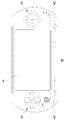
- FIG. 2 shows an appearance configuration of the mobile information terminal 40 of FIG.
- the mobile information terminal 40 includes a display 46 for displaying a game image, a graphical user interface, and the like, a speaker 42 for outputting audio data, and a controller 44 for receiving an operation input from a user.
- the display 46 in the present embodiment displays content such as a web page and an alternative input screen for data input to the content.
- the display 46 doubles as a touch panel, and notifies the instruction acquiring unit 52 described later of positional information on a touch portion on the display 46 based on a touch by a user's finger or a stylus pen (not shown).
- the controller 44 includes a direction key and four types of buttons ( ⁇ button, ⁇ button, ⁇ button, ⁇ button) provided on the surface of the case, a START button, a SELECT button, a HOME button, an input switching button, etc. It also includes a button on the side of the body. This input switching button is pressed when the user selects character input via the alternative input screen, instead of direct character input to the content input field.
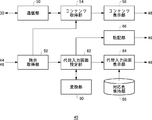
- FIG. 3 is a block diagram showing a functional configuration of the mobile information terminal 40 of FIG.
- Each block shown in the block diagram of the present specification can be realized by hardware as an element such as a CPU of a computer or a mechanical device, and as software as a computer program or the like. It depicts the functional blocks realized by the coordination of them. Therefore, it is understood by those skilled in the art that these functional blocks can be realized in various forms by a combination of hardware and software.
- the mobile information terminal 40 includes a communication unit 50, an instruction acquisition unit 52, a content acquisition unit 54, a content display unit 56, a corresponding color holding unit 58, a conversion unit 60, an alternative input screen setting unit 62, and an alternative.
- An input screen display unit 64 and a transfer unit 66 are provided.
- the communication unit 50 transmits and receives various communication data to and from the access point 30 by the wireless LAN method.
- the instruction acquisition unit 52 receives the user's instruction to the mobile information terminal 40 by detecting the operation content of the user on the controller 44 and the display 46. Then, data indicating an instruction of the user is notified to a predetermined functional block to which the process according to the instruction should be performed.
- the instruction acquiring unit 52 when receiving an instruction to acquire a web page, notifies the content acquiring unit 54 of an instruction to acquire the web page. Also, when pressing of the input switching button is detected, the alternative input screen setting unit 62 is notified of an instruction to set an alternative input screen. In addition, when the position information indicating the touch portion of the user on the alternative input screen is received, an instruction to draw the image data of the character on the touch portion (hereinafter referred to as “character drawing instruction” as appropriate) is substituted. The input screen setting unit 62 is notified.
- the content acquisition unit 54 When the content acquisition unit 54 receives a web page acquisition instruction from the instruction acquisition unit 52, the content acquisition unit 54 accesses the web server 10 via the communication unit 50, and acquires data of the web page.
- the content display unit 56 causes the display 46 to display the web page acquired by the content acquisition unit 54.
- the corresponding color holding unit 58 stores the correspondence between each of the plurality of colors that can be used in content display on the content display unit 56 and the complementary color of each color.
- the complementary color is a color that is located on the opposite side of the original color in color correlation, in other words, a color that is assumed to be the strongest in contrast to the original color.
- the conversion unit 60 maps the input character set in the alternative input screen setting unit 62 described later to a specific character, for example, a specific alphabet or hiragana (hereinafter, appropriately referred to as a “specific character”).
- the converter 60 may be mapped using known character recognition techniques.
- the input character may be mapped to the specific character by referring to a storage unit (not shown) storing the writing order and the shape of the specific character, and comparing the actual writing order and the shape of the input character.
- the conversion unit 60 converts the character string specified by the character conversion request from the alternative input screen setting unit 62.
- the conversion unit 60 may use a known character conversion technique employed in general word processing software. For example, a conversion request in which a romanized character input is specified is received and converted to a Japanese character string, and a conversion request in which a hiragana character string is specified is converted to a kanji character string and converted The result is notified to the alternative input screen setting unit 62. When a conversion request is received, a plurality of conversion candidates may be notified to the alternative input screen setting unit 62.
- the alternative input screen setting unit 62 sets image data of the alternative input screen, sends the image data to an alternative input screen display unit 64 described later, and causes the display 46 to display the image data.
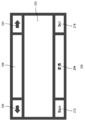
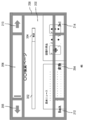
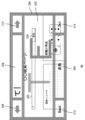
- FIG. 4 shows the configuration of the alternative input screen.
- the user input area 202 is an area where the user inputs characters with his / her finger or a stylus pen.
- a conversion instruction unit 204 is an area for instructing conversion of an input character, and the user touches the conversion instruction unit 204 to convert the input character.
- the confirmation field 206 is an area for displaying input characters to the user input area 202.
- the display size of the input character in the user input area 202 and the confirmation field 206 is typically larger than the display size of the input character in the content input field.
- the left movement instruction unit 208 and the right movement instruction unit 210 are instruction areas for moving a cursor indicating a character input position in the confirmation field 206.
- the reverse instruction unit 212 is an instruction area for deleting the character set in the confirmation field 206 while moving the cursor of the confirmation field 206 backward.
- the deletion instruction unit 214 is an instruction area for deleting characters after the cursor position in the confirmation field 206.
- the alternative input screen setting unit 62 receives the character drawing instruction notified from the instruction acquiring unit 52, sets the image data of the character to be displayed on the touch portion of the user in the user input area 202, and the image data It is sent to the alternative input screen display unit 64.
- the alternative input screen setting unit 62 sends the image data of the mapped specific character to the alternative input screen display unit 64, whereby the cursor position of the confirmation field 206 is obtained. Display the specific character on. Further, it instructs the alternative input screen display unit 64 to delete the input character mapped to the specific character from the user input area 202. At the same time, by transmitting image data of a specific character to the transfer unit 66, the specific field is displayed in the input field 302.
- alternative input screen setting unit 62 notifies conversion unit 60 of a conversion request for the character string set in confirmation field 206 and converts it. Get a candidate. Then, the conversion candidate is displayed on the alternative input screen 200 by transmitting the image data of the conversion candidate to the alternative input screen display unit 64.
- the instruction acquisition unit 52 detects a touch of the user specifying a specific conversion destination character string from among conversion candidates, the image data of the conversion destination character string is sent to the alternative input screen display unit 64, thereby confirming The input string in the field 206 is changed to the conversion destination string.
- the transfer unit 66 transmitting the image data of the conversion destination character string to the transfer unit 66, the input character string set in the input field 302 is changed to the conversion destination character string.
- the alternative input screen setting unit 62 displays the moving destination of the cursor in the confirmation field 206 on the alternative input screen. It notifies the unit 64 and moves the cursor of the confirmation field 206 to the left and right as appropriate. Typically, it is used when referring to a forward character string that is hidden when a long character string is set in the confirmation field 206, or when changing a character string in the middle of the confirmation field 206.
- the alternative input screen displays an instruction to appropriately delete the character string set in the confirmation field 206 and the input field 302. It notifies the unit 64 and the transfer unit 66 respectively. In this way, the synchronization between the confirmation field 206 and the input field 302 is maintained.
- the alternative input screen display unit 64 transparently displays the alternative input screen 200 on the front surface of the content such as the web page displayed on the display 46.
- the alternative input screen 200 is typically displayed over the entire display 46, the alternative input screen 200 may be superimposed on the entire surface of the content displayed on the display 46.
- the alternative input screen display unit 64 is a pixel (hereinafter, appropriately referred to as a "corresponding pixel") displaying a background content at the position of each pixel on which the alternative input screen 200 is to be displayed. Identify the color. Then, with reference to the corresponding color holding unit 58, for each pixel on which the alternative input screen 200 is to be displayed, a pixel value is determined so as to be drawn in a complementary color to the color set in the corresponding pixel on the content side.
- the alternative input screen display unit 64 adjusts each pixel value of the alternative input screen 200 using a known transmission setting technology such as ⁇ (alpha) blending, and causes the alternative input screen 200 to be superimposed and displayed on the content. .
- the pixel values of the input characters in the user input area 202 and the specific characters in the confirmation field 206 are also determined as described above and are set to be transparent.
- the degree of transparency the degree of transparency assumed to be appropriate may be determined based on the knowledge of a company, an experiment using the communication system 100, and the like on the basis of the content and the visibility of the alternative input screen 200.
- the transfer unit 66 acquires various data based on the user's input to the alternative input screen 200 from the alternative input screen setting unit 62, and reflects the input content on the alternative input screen 200 in the input field 302. For example, the specific character determined based on the user's input character and the data of the conversion destination character string determined by the user are acquired, and the specific character and the conversion destination character string are set in the input field 302. Further, data on the change contents of the confirmation field 206 is acquired, and the setting character string of the input field 302 is changed in accordance with the change.
- the alternative input screen setting unit 62 sends various data based on the user's input to the transfer unit 66 without waiting for the user's instruction to set in the input field 302.
- the transfer unit 66 also reflects various data received from the alternative input screen setting unit 62 in the input field 302 without waiting for the user's instruction. That is, the confirmation field 206 and the input field 302 are synchronized without being aware of the user.
- FIGS. 8 to 15 showing screen images displayed on the display 46 will also be referred to as appropriate.
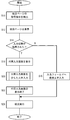
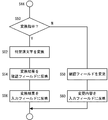
- FIG. 5 is a flowchart showing the operation of the mobile information terminal 40.
- the instruction acquisition unit 52 detects an acquisition instruction of a search request page from the user via the controller 44 (S10).
- the content acquisition unit 54 acquires a search request page from the web server 10 via the communication unit 50, and the content display unit 56 causes the display 46 to display the search request page (S12).
- FIG. 8 shows the search request page 300 displayed on the entire display 46 in S12.
- the search request page 300 includes an input field 302 for setting a search character string, a search button 304 as a trigger for search execution, and various information such as “latest news” and “topic item”.
- an input cursor indicating the input position of the search string is displayed.
- FIG. 9 shows a state in which the alternative input screen 200 is transparently displayed on the entire display 46 on the front surface of the search request page 300 at S18.
- search character string input to the search request page 300 via the alternative input screen 200 is executed (S20). Details of S20 will be described later.
- the instruction acquisition unit 52 detects the operation.
- the alternative input screen setting unit 62 notifies the alternative input screen display unit 64 of the end of display of the alternative input screen 200, and the alternative input screen display unit 64 ends the display of the alternative input screen 200 on the display 46 (S22).
- FIG. 10 shows the screen on which the display of the alternative input screen 200 has ended in S22.
- the input character "hand" of the user via the alternative input screen 200 is set. Thereafter, the user presses the search button 304 to execute the search (S24).
- FIG. 6 is a flowchart showing the details of S20 of FIG.
- the instruction acquisition unit 52 detects character input by the user on the user input area 202 (S30).
- the alternative input screen setting unit 62 sets an image of the input character, and the alternative input screen display unit 64 causes the user input area 202 to display the input character image (S32). If the input character does not match the specific character (N in S34), that is, since the character input is in the middle, the process returns to S30.
- the alternative input screen setting unit 62 sets the image of the specific character to be set in the confirmation field 206, and the alternative input screen display unit 64 sets the specific character in the confirmation field 206 Is displayed (S36).
- the transcription unit 66 displays the specific character in the input field 302 (S38).
- the alternative input screen display unit 64 deletes the character mapped to the specific character, that is, the character set in the confirmation field 206 from the user input area 202 (S40).
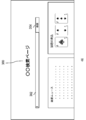
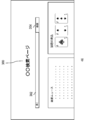
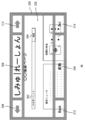
- FIG. 11 shows a state in which the user inputs “T” in the user input area 202, and the input character is reflected in the confirmation field 206 and the input field 302.
- FIG. 12 shows a state in which the user further inputs “E” from the state of FIG. 11 and is converted into “te” in the conversion unit 60 and the input character is reflected in the confirmation field 206 and the input field 302. .
- the alternative input screen display unit 64 sets the specific character and the character "T" which has already been mapped, so that the degree of transparency gradually increases, and is eventually erased Do. By deleting the input character mapped to the specific character from the user input area 202 as needed, the user can input a long character string into the user input area 202 without being limited to the size of the user input area 202.
- an input character editing process described later is executed (S44).
- the instruction acquisition unit 52 detects it as an end trigger (Y in S46), and the process in S20 of FIG. finish. If the end trigger is not detected (N in S46), the process returns to S30.
- FIG. 7 is a flowchart showing the details of S44 of FIG.
- the alternative input screen setting unit 62 notifies the conversion unit 60 of a conversion request for a specific character to acquire conversion candidates (S52), and the alternative input screen display unit Reference numeral 64 displays conversion candidates on the alternative input screen 200.
- the alternative input screen setting unit 62 acquires the selected conversion candidate as a conversion destination character, and the alternative input screen display unit 64 changes the input character of the confirmation field 206 to the conversion destination character
- the conversion result is reflected in the confirmation field 206 (S54).
- the alternative input screen display unit 64 reflects the conversion result in the input field 302 by changing the input character of the input field 302 to the conversion destination character (S56).
- FIG. 13 shows a state in which the change candidate area 216 is displayed on the alternative input screen 200.
- the change candidate area 216 may be displayed transparently as in the alternative input screen 200.
- “hand” is selected as a conversion destination character from conversion candidates in the change candidate area 216, and the conversion destination character is reflected in the confirmation field 206 and the input field 302.
- the alternative input screen setting unit 62 confirms field 206 according to the operation content. Change the state of as appropriate.
- the alternative input screen display unit 64 displays the state of the changed confirmation field 206 (S58).
- the transfer section 66 reflects the contents of the change in the confirmation field 206 in the input field 302 (S60).
- FIG. 14 shows a state in which the check field 206 and the input field 302 have been set with the typographical error "Suppression”.
- FIG. 15 shows a state in which the user touches the left movement instruction unit 208 and the deletion instruction unit 214 from the state of FIG. 14 to change the input character string.
- the editing content of the confirmation field 206 by the user is also reflected in the input field 302 by the transfer unit 66 as needed.
- a character string of part or all of the confirmation field 206 may be selected by the user's touch and slide on the confirmation field 206.
- the selected character string may be reconverted by touching the conversion instruction unit 204 after selecting the character string in the confirmation field 206.
- the mobile information terminal 40 of the present embodiment even in the mobile information terminal with screen size restrictions, information with high convenience for the user while maintaining the content display that effectively utilizes the screen area to the maximum extent. It can provide an input interface. Specifically, while providing an information input interface capable of inputting and editing characters in a display size easy for the user to visually recognize, the user can visually recognize the information input interface by transparently superimposing on the front of the content. The amount of information of sensitive content is also maintained.
- the user's input information on the alternative input screen 200 and the edited content of the input information are reflected in the input field 302 without requiring the user's instruction, and the synchronization is maintained. .
- the user does not need to be particularly aware of information reflection from the alternative input screen 200 to the input field 302, and information input to the alternative input screen 200 can be performed as if it were directly input to the input field 302.
- the alternative input screen 200 includes a confirmation field 206 in which input information similar to the input information set in the input field 302 is set, and the information in the confirmation field 206 and the information in the input field 302 are kept in synchronization. Be done.
- the user edits the input information set in the input field 302
- the user only has to edit the input information of the confirmation field 206 having high visibility of the input character, and the convenience of the user is improved.
- the complementary color to the color of the content serving as the background is determined as the color of the alternative input screen 200, and the transparency setting is further made.
- the foreground alternative input screen 200 is made to be transparent, it may be difficult for the user to distinguish the content from the background.
- the complementary color of the background as the drawing color of the alternative input screen 200 as in the present embodiment, it is possible to maintain a strong contrast between the foreground and the background even though the alternative input screen 200 is transmitted. In other words, it becomes easy for the user to distinguish between the foreground alternative input screen 200 and the background content, and the convenience of the user can be improved.
- the movement information terminal 40 has an input switching button, and the user can display the alternative input screen 200 by pressing the input switching button as needed when inputting information to the content. If the content is displayed large and the user can easily input characters into the content input field, the user can directly input characters into the input field. That is, according to the difficulty of the information input for each user and each content, the user can select the direct input to the input field or the input via the alternative input screen 200.
- the alternative input screen 200 has been described as a user interface that accepts character input, but an input other than characters may be accepted.
- the mobile information terminal 40 may receive the content drawn by the user on the alternative input screen 200, for example, a picture or the like as an image as it is, and set it in the image setting area of the content. The same effects as those of the embodiment can be obtained also in this modification.
- Both the alternative input screen 200 for receiving character input described in the embodiment and another alternative input screen for receiving input data other than characters such as an image may be simultaneously superimposed and displayed on the front of the content. Further, each of the plurality of alternative input screens may be displayed in a superimposed manner. This is a particularly preferable mode when the content receives various types of input data.
- the alternative input screen display unit 64 determines the complementary color to the color set to the corresponding pixel on the content side serving as the background as the color of each pixel displaying the alternative input screen 200.
- peripheral pixels existing around the corresponding pixel in the content are also specified, and a complementary color to a color obtained by smoothing the colors of the corresponding pixel and the peripheral pixel (hereinafter referred to as "average color" as appropriate) It may be determined as the color of each pixel displaying the screen 200.
- a color having a strong contrast on average for the corresponding pixels and the surrounding pixels can be displayed on the alternative input screen 200. It can be set to each pixel.
- FIG. 16 shows a pixel image of content serving as a background.
- the drawing position pixel 400 in the figure indicates the corresponding pixel on the content side which is present at the display position of the pixel of the alternative input screen 200 for which the color is to be determined (hereinafter appropriately referred to as “drawing target pixel”).
- the calculation range 402 indicates the range of peripheral pixels in which the color on the content is specified in order to specify the average color.
- six pixels out of nine pixels in the calculation range 402 are drawn with the first color 404, and the other three pixels are drawn with the second color 406.
- the moving average of the first color 404 for six pixels and the second color 406 for three pixels is specified as the average color.
- R ((255 ⁇ 6) + (51 ⁇ 3))
- ⁇ 9 187
- ⁇ 9 34
- ⁇ 9 85
- the color having the RGB component of is identified as the average color.
- a complementary color to the average color is determined as the color of the pixel to be drawn. Thereafter, as described in the embodiment, the transparency setting may be made as appropriate.
- peripheral pixels existing above, below, to the left, and to the right of the drawing position pixel 400 are set as the calculation range 402.
- the calculation range 402 may be specified not by a block but by a line.
- a fourth modification will be described.
- peripheral pixels existing above, below, to the left, or to the right of the drawing position pixel 400 are set as the calculation range 402.
- a range of peripheral pixels which has already been scanned in other words, a color is specified, may be set as the calculation range 402.
- the color of a specific pixel in an image is often a color that approximates the colors of peripheral pixels, so even if only some of the peripheral pixels are considered, it is appropriate to set as the rendering target pixel It is easy to decide the color. According to this modification, it is possible to reduce system resources and computational complexity required for color determination.
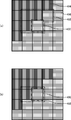
- FIG. 17 shows a pixel image of content as a background.
- the calculation range 402 in the same figure is composed of four peripheral pixels present above and to the left. Note that, as shown in FIG. 17B, in addition to the drawing position pixel 400, one surrounding pixel present on the left of the drawing position pixel 400 may be set as the calculation range 402.
- a fifth modification will be described.
- the pixel value of each pixel is drawn so as to be drawn in a complementary color to the color of the corresponding pixel serving as the background (hereinafter appropriately referred to as "background color"). It has been determined.
- the pixel value of each pixel is drawn so that the luminance of the background color is changed by a predetermined amount so that the contrast with the background is clear. May be determined. Since the human eye is more sensitive to the change in brightness than the change in color, it is possible for the user to set a complementary color by setting a color obtained by changing the brightness of the background color in the alternative input screen 200. This makes it easy to identify background content.
- the luminance of the background color is a value within the range of “0 to 255”, the reference value is “128” which is the middle value of the luminance range, and the specific values are “0” and “255”.
- the luminance of the background color is “5”, the luminance of the color of the alternative input screen 200 rendered on the background color is “255”.
- the luminance of the background color is "200”
- the luminance of the color of the alternative input screen 200 rendered on the background color is "0". Since the adjustment by the offset value is unnecessary, the amount of calculation for specifying the luminance is reduced.
- a hue obtained by appropriately adjusting the hue of the background color may be set or the same hue as the background color may be set as the hue of the drawing position pixel 400 which is not particularly referred to in the present modification.
- the consideration of the peripheral pixels described in the third and fourth modifications may be adopted in the determination of the luminance in this modification.
- the average luminance in peripheral pixels may be specified, and the color obtained by changing the average luminance by a predetermined amount as described above may be used as the color of the pixel to be drawn.
- the transmission setting is performed on the entire alternative input screen 200
- the transmission setting may not be performed on at least a part of the transmission.
- a frame of the alternative input screen 200, an arrow, a character, an input character set in the user input area 202, a specific character set in the confirmation field 206, and the like may be opaque.
- the visibility of the part where the transmission setting is not set is improved.
- the area to be transparently set is based on the knowledge of a company or an experiment using the mobile information terminal 40 based on the visibility of the alternative input screen 200, the visibility of the content serving as the background, the amount of calculation for setting the transparency, and the like. May be determined.
- the alternative input screen 200 is displayed in accordance with the input switching operation by the user.
- the alternative input screen 200 may be displayed according to the size of the input field of the content.
- the size of the content input field is equal to or less than a predetermined value, for example, a predetermined ratio with respect to the size of the user input area 202
- the alternative input screen 200 is selected when the user selects the input field. Should be displayed automatically. It is possible to save the trouble of the user pressing the input switching button and to improve the convenience of information input.
- the display of the automatically displayed alternative input screen 200 may be ended by pressing the input switching button.
- the present invention can be used for an information processing apparatus that allows a user to input data.
Landscapes
- Engineering & Computer Science (AREA)
- Theoretical Computer Science (AREA)
- General Engineering & Computer Science (AREA)
- Human Computer Interaction (AREA)
- Physics & Mathematics (AREA)
- General Physics & Mathematics (AREA)
- User Interface Of Digital Computer (AREA)
- Document Processing Apparatus (AREA)
- Telephone Function (AREA)
Abstract
Description
移動情報端末の画面に表示させたコンテンツの入力フィールドに対して、ユーザに文字列を設定させる典型的な方法として、以下の2つが考えられる。
R:((255×6)+(51×3))÷9=187
G:((0×6)+(102×3))÷9=34
B:((0×6)+(255×3))÷9=85
のRGB成分を有する色彩が平均色彩として特定される。次に、平均色彩に対する補色が描画対象画素の色彩として決定される。以降、実施の形態に既述したように、適宜透過設定がなされてよい。
Claims (12)
- 画面に表示させた入力フィールドを含むコンテンツに対してユーザが情報を入力する際、その画面に対する操作によってユーザからの入力情報を受け付けるユーザインタフェースを、前記コンテンツの前面に透過的に重ねて表示させる表示部と、
前記ユーザインタフェースにおいて受け付けられた入力情報を前記コンテンツの入力フィールドに設定する転記部と、
を備えることを特徴とする情報入力装置。 - 前記表示部は、前記画面に対する操作によってユーザからの入力情報を受け付けて、前記コンテンツの入力フィールドにおける表示サイズよりも大きく当該入力情報を表示するユーザインタフェースを表示させることを特徴とする請求項1に記載の情報入力装置。
- 前記表示部は、前記ユーザインタフェースを、前記コンテンツの前面であって前記画面の全体に透過的に重ねて表示させることを特徴とする請求項1または2に記載の情報入力装置。
- 前記転記部は、前記ユーザインタフェースにおいて入力情報が受け付けられた際、その入力情報を入力フィールドへ設定する旨のユーザによる指示を待つことなく、受け付けられた入力情報を前記コンテンツの入力フィールドに随時設定することを特徴とする請求項1から3のいずれかに記載の情報入力装置。
- 前記ユーザインタフェースには、前記コンテンツの入力フィールドに設定された入力情報をユーザに確認させるための確認フィールドが含まれ、
前記表示部は、前記ユーザインタフェースにおいて受け付けられた入力情報を前記確認フィールドに設定し、
前記転記部は、前記確認フィールドに設定された情報がユーザによって変更されたとき、その変更を前記コンテンツの入力フィールドに反映させることを特徴とする請求項1から4のいずれかに記載の情報入力装置。 - 前記表示部は、前記ユーザインタフェースとその背景となる前記コンテンツとをユーザが容易に区別できるように、前記コンテンツに設定された色彩に対する補色を用いて前記ユーザインタフェースを描画することを特徴とする請求項1から5のいずれかに記載の情報入力装置。
- 前記表示部は、前記ユーザインタフェースの少なくとも一部を表示させる特定画素の色彩を決定すべきとき、前記コンテンツにおいて前記特定画素に対応する対応画素を特定し、その対応画素に設定された色彩に対する補色を前記特定画素の色彩として決定することを特徴とする請求項6に記載の情報入力装置。
- 前記表示部は、前記コンテンツにおける対応画素を特定する際にその周辺に存在する周辺画素も特定し、前記対応画素および周辺画素の色彩を平滑化した色彩に対する補色を前記特定画素の色彩として決定することを特徴とする請求項7に記載の情報入力装置。
- 前記表示部は、前記ユーザインタフェースとその背景となる前記コンテンツとをユーザが容易に区別できるように、前記コンテンツに設定された色彩の輝度を特定し、その輝度を所定量変化させた色彩を用いて前記ユーザインタフェースを描画することを特徴とする請求項1から5のいずれかに記載の情報入力装置。
- 前記コンテンツの入力フィールドへの直接の情報入力に代えて、前記ユーザインタフェースを介した情報入力を、ユーザが選択するための指示部をさらに備えることを特徴とする請求項1から9のいずれかに記載の情報入力装置。
- 画面に表示させた入力フィールドを含むコンテンツに対してユーザが情報を入力する際、その画面に対する操作によってユーザからの入力情報を受け付けるユーザインタフェースを、前記コンテンツの前面に透過的に重ねて表示させるステップと、
前記ユーザインタフェースにおいて受け付けられた入力情報を前記コンテンツの入力フィールドに設定するステップと、
を備えることを特徴とする情報入力方法。 - 画面に表示させた入力フィールドを含むコンテンツに対してユーザが情報を入力する際、その画面に対する操作によってユーザからの入力情報を受け付けるユーザインタフェースを、前記コンテンツの前面に透過的に重ねて表示させるモジュールと、
前記ユーザインタフェースにおいて受け付けられた入力情報を前記コンテンツの入力フィールドに設定するモジュールと、
を備えることを特徴とするプログラム製品。
Priority Applications (4)
| Application Number | Priority Date | Filing Date | Title |
|---|---|---|---|
| CN201080014514.2A CN102378958B (zh) | 2009-04-03 | 2010-03-30 | 信息输入装置及信息输入方法 |
| KR1020117026115A KR101372369B1 (ko) | 2009-04-03 | 2010-03-30 | 정보입력장치 및 정보입력방법 |
| EP10758267.8A EP2418569A4 (en) | 2009-04-03 | 2010-03-30 | INPUT INFORMATION DEVICE AND INPUT INFORMATION METHOD |
| US13/262,053 US9703392B2 (en) | 2009-04-03 | 2010-03-30 | Methods and apparatus for receiving, converting into text, and verifying user gesture input from an information input device |
Applications Claiming Priority (2)
| Application Number | Priority Date | Filing Date | Title |
|---|---|---|---|
| JP2009090696A JP5350862B2 (ja) | 2009-04-03 | 2009-04-03 | 携帯型情報端末および情報入力方法 |
| JP2009-090696 | 2009-04-03 |
Publications (1)
| Publication Number | Publication Date |
|---|---|
| WO2010113487A1 true WO2010113487A1 (ja) | 2010-10-07 |
Family
ID=42827797
Family Applications (1)
| Application Number | Title | Priority Date | Filing Date |
|---|---|---|---|
| PCT/JP2010/002333 Ceased WO2010113487A1 (ja) | 2009-04-03 | 2010-03-30 | 情報入力装置および情報入力方法 |
Country Status (6)
| Country | Link |
|---|---|
| US (1) | US9703392B2 (ja) |
| EP (1) | EP2418569A4 (ja) |
| JP (1) | JP5350862B2 (ja) |
| KR (1) | KR101372369B1 (ja) |
| CN (1) | CN102378958B (ja) |
| WO (1) | WO2010113487A1 (ja) |
Cited By (2)
| Publication number | Priority date | Publication date | Assignee | Title |
|---|---|---|---|---|
| US10175871B2 (en) | 2013-03-15 | 2019-01-08 | Apple Inc. | Device, method, and graphical user interface for adjusting the appearance of a control |
| WO2019100895A1 (zh) * | 2017-11-24 | 2019-05-31 | 南昌黑鲨科技有限公司 | 一种用于智能终端的输入设备 |
Families Citing this family (13)
| Publication number | Priority date | Publication date | Assignee | Title |
|---|---|---|---|---|
| JP5198548B2 (ja) * | 2010-12-14 | 2013-05-15 | 株式会社東芝 | 電子機器、表示制御方法及びプログラム |
| JP2013048318A (ja) * | 2011-08-29 | 2013-03-07 | Nintendo Co Ltd | 情報処理装置、情報処理プログラム、情報処理方法および情報処理システム |
| CN103345465A (zh) * | 2013-06-28 | 2013-10-09 | 宇龙计算机通信科技(深圳)有限公司 | 一种多媒体文件标注、显示方法及装置 |
| EP3167445B1 (en) | 2014-07-10 | 2021-05-26 | Intelligent Platforms, LLC | Apparatus and method for electronic labeling of electronic equipment |
| US10152804B2 (en) * | 2015-02-13 | 2018-12-11 | Smugmug, Inc. | System and method for dynamic color scheme application |
| US10845987B2 (en) * | 2016-05-03 | 2020-11-24 | Intelligent Platforms, Llc | System and method of using touch interaction based on location of touch on a touch screen |
| US11079915B2 (en) | 2016-05-03 | 2021-08-03 | Intelligent Platforms, Llc | System and method of using multiple touch inputs for controller interaction in industrial control systems |
| US11294530B2 (en) * | 2017-08-07 | 2022-04-05 | Microsoft Technology Licensing, Llc | Displaying a translucent version of a user interface element |
| US10964288B2 (en) * | 2019-06-26 | 2021-03-30 | Western Digital Technologies, Inc. | Automatically adapt user interface color scheme for digital images and video |
| CN110263301B (zh) * | 2019-06-27 | 2023-12-05 | 北京百度网讯科技有限公司 | 用于确定文字的颜色的方法和装置 |
| JP7420535B2 (ja) * | 2019-11-22 | 2024-01-23 | フクダ電子株式会社 | 生体情報処理装置およびその制御方法 |
| CN112558785B (zh) * | 2020-12-24 | 2024-06-18 | 上海二三四五网络科技有限公司 | 一种调整文字显示颜色的控制方法及装置 |
| JP7351948B2 (ja) * | 2022-02-07 | 2023-09-27 | 三菱電機Itソリューションズ株式会社 | 画面制御装置、画面制御方法及び画面制御プログラム |
Citations (3)
| Publication number | Priority date | Publication date | Assignee | Title |
|---|---|---|---|---|
| JPH11202997A (ja) * | 1998-01-20 | 1999-07-30 | Hitachi Ltd | ペン入力機能付き情報処理装置 |
| JP2002208994A (ja) * | 2001-01-04 | 2002-07-26 | Matsushita Electric Ind Co Ltd | 携帯情報端末、携帯情報端末における画面表示方法および記録媒体 |
| JP2005258882A (ja) * | 2004-03-12 | 2005-09-22 | Sanyo Electric Co Ltd | 文字入力支援方法及び文字入力支援プログラム |
Family Cites Families (20)
| Publication number | Priority date | Publication date | Assignee | Title |
|---|---|---|---|---|
| JPH0296887A (ja) * | 1988-10-03 | 1990-04-09 | Sharp Corp | 文字認識装置 |
| JP2550300B2 (ja) * | 1994-09-19 | 1996-11-06 | 株式会社日立製作所 | 実時間手書き文字認識の文字入力方法及び装置 |
| US5768607A (en) * | 1994-09-30 | 1998-06-16 | Intel Corporation | Method and apparatus for freehand annotation and drawings incorporating sound and for compressing and synchronizing sound |
| JP2944439B2 (ja) * | 1994-12-27 | 1999-09-06 | シャープ株式会社 | 手書き文字入力装置および方法 |
| JPH1116139A (ja) * | 1997-06-20 | 1999-01-22 | Toshiba Corp | キャリッジアッセンブリの組立方法、および組立方法に用いるヘッドユニット |
| GB2341952B (en) * | 1998-09-24 | 2003-05-14 | Ibm | Multi-layer entry fields |
| US20030001899A1 (en) * | 2001-06-29 | 2003-01-02 | Nokia Corporation | Semi-transparent handwriting recognition UI |
| US20030071850A1 (en) * | 2001-10-12 | 2003-04-17 | Microsoft Corporation | In-place adaptive handwriting input method and system |
| US7343566B1 (en) * | 2002-07-10 | 2008-03-11 | Apple Inc. | Method and apparatus for displaying a window for a user interface |
| DE60302875T2 (de) * | 2003-05-08 | 2006-07-06 | Orange S.A. | Datenverarbeitungsgerät und -verfahren |
| WO2005003944A1 (en) * | 2003-07-01 | 2005-01-13 | Nokia Corporation | Method and device for operating a user-input area on an electronic display device |
| CN101292217B (zh) * | 2005-10-15 | 2012-02-22 | 诺基亚公司 | 到电子设备的改进的文本录入的方法和设备 |
| JP2008090625A (ja) * | 2006-10-02 | 2008-04-17 | Sharp Corp | 文字入力装置、文字入力方法、制御プログラム、および、記録媒体 |
| KR20080078291A (ko) | 2007-02-23 | 2008-08-27 | 엘지전자 주식회사 | 브라우저 디스플레이 방법 및 이를 구현할 수 있는 단말기 |
| KR100881952B1 (ko) * | 2007-01-20 | 2009-02-06 | 엘지전자 주식회사 | 터치스크린을 구비하는 이동통신 단말기 및 그 동작제어방법 |
| KR100874044B1 (ko) * | 2007-02-28 | 2008-12-12 | 이화여자대학교 산학협력단 | 펜입력 디스플레이용 필기체 사용자 인터페이스 시스템 및방법 |
| JP2009053919A (ja) * | 2007-08-27 | 2009-03-12 | Avantec Co Ltd | 拡大表示装置、拡大表示方法、および拡大表示プログラム |
| US8116569B2 (en) * | 2007-12-21 | 2012-02-14 | Microsoft Corporation | Inline handwriting recognition and correction |
| US9690474B2 (en) * | 2007-12-21 | 2017-06-27 | Nokia Technologies Oy | User interface, device and method for providing an improved text input |
| US8908973B2 (en) * | 2008-03-04 | 2014-12-09 | Apple Inc. | Handwritten character recognition interface |
-
2009
- 2009-04-03 JP JP2009090696A patent/JP5350862B2/ja active Active
-
2010
- 2010-03-30 KR KR1020117026115A patent/KR101372369B1/ko active Active
- 2010-03-30 CN CN201080014514.2A patent/CN102378958B/zh active Active
- 2010-03-30 WO PCT/JP2010/002333 patent/WO2010113487A1/ja not_active Ceased
- 2010-03-30 EP EP10758267.8A patent/EP2418569A4/en not_active Withdrawn
- 2010-03-30 US US13/262,053 patent/US9703392B2/en active Active
Patent Citations (3)
| Publication number | Priority date | Publication date | Assignee | Title |
|---|---|---|---|---|
| JPH11202997A (ja) * | 1998-01-20 | 1999-07-30 | Hitachi Ltd | ペン入力機能付き情報処理装置 |
| JP2002208994A (ja) * | 2001-01-04 | 2002-07-26 | Matsushita Electric Ind Co Ltd | 携帯情報端末、携帯情報端末における画面表示方法および記録媒体 |
| JP2005258882A (ja) * | 2004-03-12 | 2005-09-22 | Sanyo Electric Co Ltd | 文字入力支援方法及び文字入力支援プログラム |
Cited By (4)
| Publication number | Priority date | Publication date | Assignee | Title |
|---|---|---|---|---|
| US10175871B2 (en) | 2013-03-15 | 2019-01-08 | Apple Inc. | Device, method, and graphical user interface for adjusting the appearance of a control |
| US10599316B2 (en) | 2013-03-15 | 2020-03-24 | Apple Inc. | Systems and methods for adjusting appearance of a control based on detected changes in underlying content |
| WO2019100895A1 (zh) * | 2017-11-24 | 2019-05-31 | 南昌黑鲨科技有限公司 | 一种用于智能终端的输入设备 |
| US11148044B2 (en) | 2017-11-24 | 2021-10-19 | Shanghai Zhonglian Technologies Ltd., Co | Input device for intelligent terminal |
Also Published As
| Publication number | Publication date |
|---|---|
| CN102378958B (zh) | 2015-09-16 |
| JP5350862B2 (ja) | 2013-11-27 |
| EP2418569A4 (en) | 2015-07-29 |
| JP2010244223A (ja) | 2010-10-28 |
| CN102378958A (zh) | 2012-03-14 |
| KR20110135416A (ko) | 2011-12-16 |
| KR101372369B1 (ko) | 2014-03-11 |
| EP2418569A1 (en) | 2012-02-15 |
| US9703392B2 (en) | 2017-07-11 |
| US20120174008A1 (en) | 2012-07-05 |
Similar Documents
| Publication | Publication Date | Title |
|---|---|---|
| WO2010113487A1 (ja) | 情報入力装置および情報入力方法 | |
| US9754559B2 (en) | Image processing apparatus | |
| JP7255728B2 (ja) | 通信端末、通信システム、送信方法、及びプログラム | |
| US5309555A (en) | Realtime communication of hand drawn images in a multiprogramming window environment | |
| KR20100028344A (ko) | 휴대단말의 영상 편집 방법 및 장치 | |
| US20180082663A1 (en) | Information processing apparatus, image displaying method, and non-transitory computer readable medium | |
| US20120042265A1 (en) | Information Processing Device, Information Processing Method, Computer Program, and Content Display System | |
| JP2013229672A (ja) | 通信端末、通信方法、通信プログラム及び通信システム | |
| JP2010055207A (ja) | 文字入力装置、文字入力方法、プログラム、記憶媒体 | |
| US10297058B2 (en) | Apparatus, system, and method of controlling display of image, and recording medium for changing an order or image layers based on detected user activity | |
| JP2019096367A (ja) | 電子黒板、電子黒板の画像処理方法、及び電子黒板のプログラムを記録した記録媒体 | |
| CA2929906A1 (en) | System and method of digital ink input | |
| JP2016200860A (ja) | 情報処理装置、情報処理装置の制御方法、およびプログラム | |
| US10735607B2 (en) | Device for generating display data, information device, and display system for displaying scroll region and operation region | |
| JP7732283B2 (ja) | 表示装置、表示システム、表示制御方法、及びプログラム | |
| JP2003316490A (ja) | 遠隔操作システム及び遠隔操作方法 | |
| US20100257488A1 (en) | Method for moving a cursor and display apparatus using the same | |
| CN102970453B (zh) | 能够显示实际尺寸预览的图像形成设备及其控制方法 | |
| JP2011192008A (ja) | 画像処理システムおよび画像処理方法 | |
| JP7148172B2 (ja) | 字幕表示処理プログラム、字幕表示処理装置、サーバ。 | |
| JP7151490B2 (ja) | 情報処理端末、情報処理システム、操作画面表示方法及びプログラム | |
| JP2016095620A (ja) | 表示装置、サーバ装置、表示システム及びその制御方法、並びに制御プログラム、記憶媒体 | |
| JP2015176523A (ja) | 表示処理装置、画面表示方法およびコンピュータープログラム | |
| US20260075279A1 (en) | Method, display system, and information processing apparatus | |
| JP2025107015A (ja) | 情報処理装置、制御方法、およびプログラム |
Legal Events
| Date | Code | Title | Description |
|---|---|---|---|
| WWE | Wipo information: entry into national phase |
Ref document number: 201080014514.2 Country of ref document: CN |
|
| 121 | Ep: the epo has been informed by wipo that ep was designated in this application |
Ref document number: 10758267 Country of ref document: EP Kind code of ref document: A1 |
|
| NENP | Non-entry into the national phase |
Ref country code: DE |
|
| REEP | Request for entry into the european phase |
Ref document number: 2010758267 Country of ref document: EP |
|
| WWE | Wipo information: entry into national phase |
Ref document number: 2010758267 Country of ref document: EP |
|
| WWE | Wipo information: entry into national phase |
Ref document number: 7547/CHENP/2011 Country of ref document: IN |
|
| ENP | Entry into the national phase |
Ref document number: 20117026115 Country of ref document: KR Kind code of ref document: A |
|
| WWE | Wipo information: entry into national phase |
Ref document number: 13262053 Country of ref document: US |