WO2010116835A1 - ファームウェア更新システム、ファームウェア配信サーバ、及びファームウェア組み込み機器、並びにプログラム - Google Patents
ファームウェア更新システム、ファームウェア配信サーバ、及びファームウェア組み込み機器、並びにプログラム Download PDFInfo
- Publication number
- WO2010116835A1 WO2010116835A1 PCT/JP2010/053773 JP2010053773W WO2010116835A1 WO 2010116835 A1 WO2010116835 A1 WO 2010116835A1 JP 2010053773 W JP2010053773 W JP 2010053773W WO 2010116835 A1 WO2010116835 A1 WO 2010116835A1
- Authority
- WO
- WIPO (PCT)
- Prior art keywords
- firmware
- image
- update
- divided
- unit
- Prior art date
- Legal status (The legal status is an assumption and is not a legal conclusion. Google has not performed a legal analysis and makes no representation as to the accuracy of the status listed.)
- Ceased
Links
Images






Classifications
-
- G—PHYSICS
- G06—COMPUTING OR CALCULATING; COUNTING
- G06F—ELECTRIC DIGITAL DATA PROCESSING
- G06F8/00—Arrangements for software engineering
- G06F8/60—Software deployment
- G06F8/61—Installation
- G06F8/63—Image based installation; Cloning; Build to order
-
- G—PHYSICS
- G06—COMPUTING OR CALCULATING; COUNTING
- G06F—ELECTRIC DIGITAL DATA PROCESSING
- G06F8/00—Arrangements for software engineering
- G06F8/60—Software deployment
- G06F8/65—Updates
- G06F8/654—Updates using techniques specially adapted for alterable solid state memories, e.g. for EEPROM or flash memories
-
- G—PHYSICS
- G06—COMPUTING OR CALCULATING; COUNTING
- G06F—ELECTRIC DIGITAL DATA PROCESSING
- G06F8/00—Arrangements for software engineering
- G06F8/60—Software deployment
- G06F8/65—Updates
- G06F8/658—Incremental updates; Differential updates
Definitions
- the present invention relates to a firmware update technique that is executed between a server that distributes firmware and a firmware embedded device.
- firmware refers to all data stored in advance in the nonvolatile storage area of the embedded device.
- Such firmware update is disclosed in, for example, Patent Document 1, Non-Patent Document 1, Non-Patent Document 2, and the like.
- Patent Document 1 discloses a firmware update method for exchanging all firmware. In order to replace all the firmware and update via the network, it is necessary to distribute all of the new versions of the firmware image, which increases the data size to be distributed.
- Non-Patent Document 1 discloses a technique for extracting a difference between old version data and new version data.
- the distribution data size can be reduced by using this and distributing only the firmware update difference.
- Non-Patent Document 2 discloses a software update program often used in Linux. According to the program, software is managed in units of packages, and updated software packages are distributed.
- Patent Document 1 has a problem that since the data size to be distributed is large, it takes time to download and the area for downloading on the device side also becomes large. Furthermore, there is a problem that the work time for rewriting all the firmware becomes long.
- Non-Patent Document 1 Although the size of data to be distributed is small, there is a problem that time and work area are consumed in order to apply the update to the firmware image. That is, for example, when updating data is applied to an older version of a firmware image, if an attempt is made to sequentially apply the updated data to an older version of the image, the firmware image will be damaged if there is an interruption due to a power failure or the like. Therefore, the output after applying the update data needs to be performed in an area different from the image of the old version, which requires a work area. It also takes time because it requires access to the entire old version of the image.
- Non-Patent Document 2 if the firmware update of Non-Patent Document 2 is used, the work area and time are not required, but the file system that does not support writing cannot be handled.
- the package contains files to be updated in the file system. In order to write this file, file system writing support is required.
- file system writing support is required.
- a file system that supports only a read I / O request is used in order to reduce processing (so as not to affect the startup time). Therefore, a method that can update firmware such as an OS while maintaining the advantages of a file system that supports only reading is desirable.
- the present invention has been made in view of such a situation.
- the work area is small, the work time is short, the update can be resumed even when the power is cut off, and the firmware is updated even in a file system that does not support writing.
- the technology that can be provided.
- the firmware distribution server has a plurality of old version divided firmware images generated by dividing the firmware image of the old version into a predetermined number.
- a new version firmware image is divided under the same conditions, and a plurality of new version divided firmware images are generated.
- the difference information between the new version firmware image and the old version firmware image is extracted for each division unit of the firmware image, and an update image having the difference information for each division unit is generated.
- the update image is distributed to the embedded device.
- the firmware is updated by applying the update image to the existing firmware image being used.
- a plurality of old version divided firmware images are generated by dividing old firmware versions together into files with common directory names. Therefore, based on the directory name under the same conditions as when a plurality of old version divided firmware images are generated, a new version of firmware is divided to generate a plurality of new version divided firmware images.
- the firmware distribution server further includes an image division table that is used when dividing a firmware image and manages a directory name serving as a reference for distributing the firmware image in association with a divided image number.
- the image division table the area size of the table corresponding to each division image number is set equal. In this case, when executing the firmware division process, if the total size of the files allocated to the first table area in the division table is larger than the area size, the total size of the allocated files is the area. A part of the file distributed to the first table area is moved to the second table area smaller than the size. And the link information which shows a movement destination is provided to the 1st table area
- the normal OS that normally uses the boot OS is switched to the emergency OS that is used in an emergency.
- This emergency OS operates a function for specifying an update image that is being updated when a built-in device is powered off during firmware update, a function that allows direct access to the memory, and an update application process. And has a function.
- the embedded device has an existing divided firmware image generated by dividing an existing firmware image based on the directory name.
- the conditions for this division are the same as those used in the above-described old and new firmware image division processing.
- the firmware update process the update image having the difference information for each division unit based on the directory name is applied to the existing divided firmware image having the corresponding directory name.
- the work area required for firmware update is small, the work time is short, the update can be resumed even when the power is cut off, and the firmware can be updated even in a file system that does not support writing. Will be able to.
- the present invention divides old and new firmware images, and transmits difference data for each divided area from the server to the embedded device as an update image, and the embedded device updates the firmware by the OS without using the file system. It is something to execute.
- FIG. 1 is a diagram showing a schematic configuration of a system (firmware update system).
- the system includes an update creation / distribution server 130 that distributes the update image 140 and an embedded device 160 that receives the update image 140 via the network 150 and updates the internal firmware.
- the developer 110 transfers the created new firmware image 120 to the update creation / distribution server 130.
- the firmware image 120 is an archive of software and configuration files developed by the developer 110 as one file.
- the archive format is a file system image that does not support write I / O requests.
- Linux is a file system image like cramfs.
- the update creation / distribution server 130 is, for example, a server of an embedded device manufacturer disposed on the Internet, and includes hardware as a computer having a network function. That is, the update creation / distribution server 130 includes a CPU 131, a RAM 132, a network interface 133, and an HDD 134. A divided firmware image obtained by dividing the firmware image is stored in the HDD 134. Specifically, it is an old version divided firmware image 135 created based on a firmware image of a version older than the new firmware image 120.
- the software configuration of the update creation / distribution server 130 will be described later with reference to FIG.
- the configuration of the old divided firmware image 135 will be described later with reference to FIG.
- the update creation / distribution server 130 creates an update image 140 based on the firmware image 120 and the old version divided firmware image 135 and transmits the update image 140 to the embedded device 160 via the network 150.
- the detailed configuration of the update image 140 will be described later with reference to FIG.
- the embedded device 160 includes hardware as a computer having a network function. That is, the embedded device 160 includes a CPU 161, a RAM 162, a network interface 163, and a flash memory 164. The device 160 transmits a software update request to the update creation / distribution server 130, receives the update image 160, and updates the divided firmware image 165 stored in the flash memory 164.
- the software configuration of the embedded device 160 will be described later with reference to FIG.
- the configuration of the divided firmware image 165 currently used by the embedded device 160 will be described later with reference to FIG.
- FIG. 2 is a diagram illustrating a software configuration of the update creation / distribution server 130.
- the software includes an image division function 210, an update creation function 220, an update distribution function 230, an image division table 240, an old version divided firmware image (storage unit) 135, a new divided firmware image (storage unit) 260, It is constituted by. These functions and data are stored in the HDD 134.
- the image division function 210 is a function that the update creation function 220 calls and uses (see FIG. 11).
- the image division function 210 divides the firmware image 120 and creates a new firmware image 260. Details of processing contents of the image division function will be described later with reference to FIG.
- the update creation function 220 is a function for creating the update image 140. Detailed processing contents will be described later with reference to FIG.
- the update distribution function 230 is a function for distributing the update package 140 to the embedded device 160. Detailed processing of the update distribution function 230 will be described later with reference to FIG.
- the image division table 240 is data used by the image division function 210. Details will be described later with reference to FIG.
- the divided firmware image 260 is an output of the image dividing function 220. The detailed configuration will be described later with reference to FIG.
- FIG. 3 is a diagram illustrating a software configuration of the embedded device 160.
- the software includes an OS group 300, an update application program 330, a mount table 350, an update status 360, and a divided firmware image 165.
- the OS group 300 is normally used and has a read-only file system, the normal OS 310, the emergency OS 321 having a recovery program 322, and the partition table 340. , Including.
- the divided firmware image 165 is a divided firmware image currently installed in the embedded device 160, and has the same contents as the old version divided firmware image 135 before the update, and the same as the new version divided firmware image 260 after the update. It is a content.
- the normal OS (operating system) 310 supports a read-only file system 311 as a file system.
- This read-only file system 311 mounts the file system image on the flash memory 164 and makes it possible to access the file with a directory tree such as Linux. However, even if the file is opened via the directory tree, only the read operation is supported for the file, and the write operation is not supported. In order to write to the flash memory, it is necessary to directly access the flash memory like the MTD interface of Linux OS.
- the emergency OS 321 is an OS used when the processing of the update application program 330 is interrupted due to a power failure or the like, and includes a recovery program 322.
- the processing of the recovery program 322 will be described with reference to FIG. 14, but in brief, it has a function of writing update firmware into the flash memory 164.
- writing must be performed by designating an address (LBA) of a flash memory to be written.
- LBA address
- the partition table 340 is a table describing the partitioning of the flash memory 164, and is stored in the OS group 300 having the normal OS 310 and the emergency OS 321. The detailed configuration of the partition table 340 will be described later with reference to FIG.
- the update application program 330 is a program for updating the divided firmware image 165 based on the update image 140. Detailed processing contents of the update application program 330 will be described later with reference to FIG.
- the mount table 350 describes in what file tree the divided firmware image 165 in the embedded device 160 is mounted.
- the mount table 350 is recorded in an area different from the divided firmware image 165 in the flash memory 164. The detailed configuration of the mount table 350 will be described later with reference to FIG.
- the update status 360 is an area for storing an update state, and is recorded in an area different from the divided firmware image 165 in the flash memory 164.
- the detailed configuration of the update status 360 will be described later with reference to FIG.
- FIG. 4 is a diagram showing the configuration of the image division table 240.
- the image division table 240 is used to divide a newly created firmware image 120 and generate a new version divided firmware image 260.
- an image size 410 is a division size.
- the division size size of each divided image does not exceed 8 Mbytes, but is not limited to this size.
- an image number 420 is assigned to the divided image.
- the directory name 430 describes a subtree of directories stored in the divided images.
- the row indicated by reference numeral 442 has the meaning that “the directory tree below / lib is stored in the image of image number 2”.
- “/” in the row of reference numeral 441 means “all directory trees not stored in the rows of reference numerals 442, 443, and 444 are stored”.
- FIG. 5 is a diagram showing the configuration of the divided firmware image 260 and the old version divided firmware image 135.
- the divided firmware images 260 and 135 are generated by dividing the firmware image 120 in units of an image size (divided size) 410, and are configured by image numbers 510 and 530 and divided image data 520 and 540. .
- FIG. 6 is a diagram showing the configuration of the update image 140.
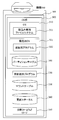
- the update image 140 includes an image number 610 and update data 620 corresponding to the image number. As shown in FIG. 6, for example, the image data of image number 2 is not included in the update image 140 because there is no difference between old and new.
- FIG. 7 is a diagram showing the configuration of the partition table 340.
- the partition table 340 is a table that is referred to when determining where to physically write the image data, and is configured to partition the flash memory 164.
- the partition table 340 includes a partition number 710 and a flash memory address range 720 corresponding to the partition number 710. In this example, five 8 Mbyte partitions and one 2 Mbyte partition are defined.
- FIG. 8 is a diagram showing a detailed configuration of the mount table 350.
- the mount table 350 is used to store correct data at a correct position in the file tree, and includes a partition number 810 storing an image, an image number 820, a mount point 830 mounted by the OS, It is constituted by. If the mount point 830 is not known, the OS cannot determine what data should be mounted.
- a line 832 means that “the partition corresponding to the partition number 2 stores an image corresponding to the image number 2, and the OS mounts this image on / lib”.
- FIG. 9 is a diagram showing the configuration of the update status 360.
- the update status 360 an update status number is recorded. That is, the update status 360 is information indicating which update number corresponding to which image number is currently being updated. When the update process for all update images is completed, the last updated image number is recorded, so that all the update images have been processed.
- FIG. 10 is a flowchart for explaining the processing contents executed by the image division function used in the update creation function 220.
- the image division table 240 will be described using the table example shown in FIG.
- the image division function 210 provides a work area having the same number of lines as the number of lines of the image division table 240 on the RAM 132 (step 1010). With the image division table 240 of FIG. 4, four work areas are provided.
- the image division function 210 repeatedly executes the processing of the following steps 1021 and 1022 for each file included in the firmware image 120 (step 1020).
- the image division function 210 searches which image number 420 in the image division table 240 the file corresponds to (step 1021). For example, if the file name is / lib / libc. If so, the image number is “2”, and if the file name is / sbin / insmod, it does not correspond to any directory on the lines 442, 443, 444, and therefore matches the directory “/” on the line 441. The image number is “1”.
- the image division function 210 stores the file in the work area corresponding to the image number matched in step 1021 (step 1022). For example, / lib / libc. If so, the same file name is saved in the work area 2, and if / sbin / insmod, the same file name is saved in the work area 1.
- the image division function 210 repeatedly executes the following steps 1031 to 1034 for each work area (step 1030). That is, the image division function 210 estimates the size when the file stored in each work area is archived as a file system image (step 1031). Specifically, an archive is actually created, and the file size of the created archive is measured.
- the image division function 210 determines whether the image size is larger than the image size 410 (8 Mbytes in the example of FIG. 4) (step 1032). If it is determined that the image size is larger than the image size 410, the process proceeds to step 1033, and if it is determined that the image size is smaller, the process proceeds to step 1034.
- step 1032 the image division function 210 moves the file stored in the work area to the work area whose image size is smaller than the image size 410, leaves the original file as a symbolic link, and moves the link destination.
- First step 1033). For example, / lib / libc. so to work area 3, / bin / overflow3 / lib / libc. When moved as so, / lib / libc. so is / bin / overflow3 / lib / libc. It becomes a symbolic link to so. By doing this, you can access the file with the same name even if you move the contents of the file.
- the image division function 210 archives the file saved in the work area as a file system image and saves it in the divided firmware image 260 (Step 1034).
- the storage location is the row 532.
- the firmware image 120 is divided into a file system image having a maximum size of 8 Mbytes and stored as a divided firmware image 260.
- FIG. 11 is a flowchart for explaining the contents of update image creation processing executed by the update creation function 220.
- the firmware image 120 created by the developer 110 is input to the update creation / distribution server 130, and the update creation function 220 acquires the firmware image 120 (step 1110).
- the update creation function 220 calls the image division function 210, performs firmware image division processing (FIG. 10) using the image division function 210, and acquires the divided firmware image 260 (step 1120).
- the update creation function 220 repeatedly executes the processing of the following steps 1131 to 1134 for each image number 510 (referred to as a loop variable m) of the divided firmware image 260 (step 1130).
- the update creation function 220 compares the image data 520 of the divided firmware image 260 with the image number 510 of m and the image data 540 of the old version divided firmware image 135 with the image number 530 of m (step 1131), and the image data is It is determined whether or not they are the same (step 1132). If they are the same, the process ends. If they are not the same, the process proceeds to step 1133.
- the update creation function 220 extracts the difference data between the image data 520 of the divided firmware image 260 in step 1131 and the image data 530 of the old version firmware image 135 in binary units (step 1133).
- the extraction method for example, a technique such as xdelta can be used.
- the update creation function 220 stores m in the image number 610 of the update image 140 and the difference data extracted in step 1133 in the update data 620 (step 1134).
- the update image is created as described above. As described above, the update image has a configuration as shown in FIG.
- FIG. 12 is a flowchart for explaining the processing contents of the update distribution function 230.
- the update distribution function 230 uses the update image created by the update creation function 220 as the request source embedded device. It is delivered to 160 (step 1220).
- the update request is transmitted by, for example, the user specifying the update, the automatic transmission of the embedded device 160 periodically, or the communication with the update creation / distribution server 130 when the embedded device 160 is activated. It is only necessary to check whether it has been updated and automatically send an update request if it has been updated.
- FIG. 13 is a flowchart for explaining the processing contents executed by the update application program 330 in the embedded device 160.
- the update application program 330 functions as an update application processing unit in cooperation with the CPU 161.
- the embedded device 160 receives the update image 140 from the update creation / distribution server 130, the activated update application program 330 notifies the storage location to the normal OS (those expanded on the RAM), and the normal OS stores it in the memory. Save (step 1310).
- the storage location of the update image 140 is the partition corresponding to the partition number 810 in the row where the image number 820 of the mount table 350 is “WORK2”. In the case of the mount table illustrated in FIG. 8, the partition (WORK2) corresponds to the partition number 6.
- functions other than the file system 311 of the normal OS directly write to the flash memory 164 without going through the file system 311.
- the update status 921 is “0” (indicating that nothing has been updated yet).
- the update application program 330 switches the OS at the next startup from the normal OS 310 to the emergency OS 321 (step 1320).
- This is a process for making it possible to use the emergency OS 321 when the power is turned off in the event of an emergency or the like. If the power is not turned off, the normal OS 310 (normally developed on the RAM 162) is used. OS) is used. The switching can be realized by switching the setting of the boot loader. Further, the emergency OS 321 only has to have at least an update status reference function, a function of reading and writing data to the flash memory 164 by designating an address, and a function of executing the recovery program 322. .
- the update application program 330 repeatedly executes the processing of steps 1331 to 1334 for each image number 610 of the update image 140 (step 1330).
- the repetition variable is n below.
- the update application program 330 updates the update status 921 (step 1331). Specifically, “n” is input to the update status 921.
- the update data 620 is applied to the update application target data. When applying, a function such as an xdelta difference application function is used.
- the applied data is output to the partition (partition number is “m”) whose image number corresponds to WORK (work area) 1. In the example of FIG. 8, since the partition number corresponding to WORK 1 is 5, it is output to partition 5.
- the update data is stored not in the area of partition number 1 but in WORK1 unless the old version of data remains. If the power is turned off halfway, the firmware update process cannot be resumed. Because.
- the update application program 330 replaces m and n of the partition number 810 of the mount table (step 1333).
- the partition number of row 831 is 5, and the partition number of row 835 is 1.
- the update application program 330 performs the mount process again.
- the mount point “/” is mounted on the partition 5.
- the data mounted at the mount point “/” is the data of the updated image number 1.
- the update application program 330 After all the transmitted update images have been applied (after the processing of steps 1332 to 1334 has been completed for all image numbers), the update application program 330 returns the boot OS to the original normal OS 310, and the processing ends. (Step 1340).
- FIG. 14 is a flowchart for explaining processing of the recovery program 322 activated from the emergency OS 321.
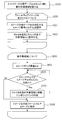
- the emergency OS 321 is activated when the process of FIG.
- the recovery program 322 refers to the update status 921 and the image of the update data that was being updated (processing at the end) A number is acquired (step 1410). In the case of FIG.
- an N version firmware image i of the same size M (bytes) is stored in the old version firmware image and the new version firmware image of the update target device (embedded device).
- (1 ⁇ i ⁇ N) (hereinafter new firmware image i) and N old version firmware images i (hereinafter old firmware images).
- the difference i (1 ⁇ i ⁇ N) between the old firmware image i and the new firmware image i is extracted, and the differences i are collected into an update package and distributed to the target device.
- the update process on the embedded device only needs to update the divided firmware image i that had a difference, so it is easy to identify the file to be updated, and the firmware update process can be executed very efficiently. become able to.
- the flash memory of the update target device is divided into N or more partitions, the partition size is at least the size M or more, and the old firmware image i is stored in each partition. Further, the update target device receives the update package, applies the difference i included in the package to the old firmware image i stored in the partition, and generates a new firmware image i.
- the target device is provided with a work partition W used for updating the old firmware image i.
- the new firmware image i which is the output of the update operation for the old firmware image i, is output to the partition W.
- the data of W is handled as the new firmware image i, and the partition storing the old firmware image i is handled as W.
- an emergency OS and update status data will be provided for the target device.
- the update status the status of which firmware image i is currently updated is recorded. If the power is cut off during the update, the emergency OS will start up the next time the power is turned on, refer to the update status data, and restart the update process.
- the size of the work area is only the work partition W.
- the time required for the update is shorter than the update of all the firmware images because only the update for the divided firmware image i having the difference is required. Furthermore, even when the power is cut off during the process of generating the new firmware image i from the old firmware image i, the old firmware image i remains, so that the update can be resumed at the next power-on.
- the size of the work area is 10 Mbytes in total for the work partitions WORK1 and WORK2.
- the size of the firmware image is 32 Mbytes because it is four 8M images.
- a work area having the same size (32 Mbytes) as the firmware image is required, so that the work area can be made small.
- the time required for the update is shorter than the update of all the firmware images because only the update for the divided firmware image having the difference is required.
- the update can be resumed at the next power-on by the processing of FIG.
- the present invention can also be realized by a program code of software that realizes the functions of the embodiment.
- a storage medium in which the program code is recorded is provided to the system or apparatus, and the computer (or CPU or MPU) of the system or apparatus reads the program code stored in the storage medium.
- the program code itself read from the storage medium realizes the functions of the above-described embodiments, and the program code itself and the storage medium storing the program code constitute the present invention.
- a storage medium for supplying such program code for example, a flexible disk, CD-ROM, DVD-ROM, hard disk, optical disk, magneto-optical disk, CD-R, magnetic tape, nonvolatile memory card, ROM Etc. are used.
- an OS operating system
- the computer CPU or the like performs part or all of the actual processing based on the instruction of the program code.
- the program code is stored in a storage means such as a hard disk or memory of a system or apparatus, or a storage medium such as a CD-RW or CD-R
- the computer of the system or apparatus or CPU or MPU may read and execute the program code stored in the storage means or the storage medium when used.
Landscapes
- Engineering & Computer Science (AREA)
- Software Systems (AREA)
- General Engineering & Computer Science (AREA)
- Theoretical Computer Science (AREA)
- Physics & Mathematics (AREA)
- General Physics & Mathematics (AREA)
- Computer Security & Cryptography (AREA)
- Stored Programmes (AREA)
Abstract
Description
図1は、システム(ファームウェア更新システム)の概略構成を示す図である。当該システムは、更新イメージ140を配信する更新作成・配布サーバ130と、ネットワーク150を介して更新イメージ140を受信し、内部のファームウェアを更新する組み込み機器160と、を備えている。
図2は、更新作成・配布サーバ130のソフトウェアの構成を示す図である。当該ソフトウェアは、イメージ分割機能210と、更新作成機能220と、更新配布機能230と、イメージ分割テーブル240と、旧版分割ファームウェアイメージ(格納部)135と、新しい分割ファームウェアイメージ(格納部)260と、によって構成されている。これらの各機能及びデータは、HDD134に格納されている。
図3は、組み込み機器160のソフトウェア構成を示す図である。当該ソフトウェアは、OS群300と、更新適用プログラム330と、マウントテーブル350と、更新ステータス360と、分割ファームウェアイメージ165と、によって構成されている。OS群300は、通常時に使用され、読込み専用ファイルシステムを有する通常OS310と、急に電源切断がなされた時等の緊急時に使用され、復旧用プログラム322を有する緊急用OS321と、パーティションテーブル340と、を含んでいる。また、分割ファームウェアイメージ165は、組み込み機器160に現時点で搭載されている分割ファームウェアイメージであり、更新前は旧版分割ファームウェアイメージ135と同じ内容となっており、更新後は新版分割ファームウェアイメージ260と同じ内容となっている。
図4は、イメージ分割テーブル240の構成を示す図である。このイメージ分割テーブル240は、新しく作成されたファームウェアイメージ120を分割し、新版分割ファームウェアイメージ260を生成するために使用される。
図5は、分割ファームウェアイメージ260と旧版分割ファームウェアイメージ135の構成を示す図である。分割ファームウェアイメージ260及び135は、ファームウェアイメージ120がイメージサイズ(分割サイズ)410の単位で分割されて生成され、イメージ番号510及び530と、分割されたイメージデータ520及び540と、によって構成されている。
図6は、更新イメージ140の構成を示す図である。更新イメージ140は、イメージ番号610と、イメージ番号に対応する更新データ620と、によって構成されている。図6に示されるように、例えば、イメージ番号2のイメージデータは、新旧において差がないので、更新イメージ140には含まれていない。
図7は、パーティションテーブル340の構成を示す図である。このパーティションテーブル340は、イメージデータを物理的にどこに書き込むかを決めるときに参照されるテーブルであり、フラッシュメモリ164のパーティション分け設定をしている。
図8は、マウントテーブル350の詳細な構成を示す図である。マウントテーブル350は、ファイルツリー内の正しい位置に正しいデータを格納するために用いられるものであり、イメージが格納されているパーティション番号810と、イメージ番号820と、OSがマウントするマウントポイント830と、によって構成されている。マウントポイント830が分からないと、OSは何のデータとしてマウントすべきなのか判断することができない。
図9は、更新ステータス360の構成を示す図である。更新ステータス360には、更新ステータス番号が記録される。つまり、更新ステータス360は、どのイメージ番号に対応する更新イメージを、今更新しているかを示す情報である。全ての更新イメージの更新処理が終了すると、最後に更新したイメージ番号が記録されるので、全ての更新イメージが処理済であることが分かるようになっている。
図10は、更新作成機能220で用いられるイメージ分割機能が実行する処理内容を説明するためのフローチャートである。なお、イメージ分割テーブル240としては図4に示されたテーブル例を用いて説明する。
つまり、イメージ分割機能210は、各作業領域に保存されたファイルを、ファイルシステムイメージとしてアーカイブした場合のサイズを見積もる(ステップ1031)。具体的には、実際にアーカイブを作成し、作成されたアーカイブのファイルサイズを測定する。
図11は、更新作成機能220が実行する更新イメージ作成処理の内容を説明するためのフローチャートである。
図12は、更新配布機能230の処理内容を説明するためのフローチャートである。
図13は、組み込み機器160における更新適用プログラム330が実行する処理内容を説明するためのフローチャートである。なお、更新適用プログラム330は、CPU161と協働して更新適用処理部として機能する。
図14は、緊急用OS321から起動する復旧用プログラム322の処理を説明するためのフローチャートである。なお、緊急用OS321は、図13の処理が途中で終了した場合に起動するようになっている。
本実施形態では、更新作成・配布サーバにおいて、更新対象機器(組み込み機器)の旧バージョンのファームウェアイメージと新バージョンのファームウェアイメージのそれぞれを、等サイズM(バイト)のN個の新バージョンファームウェアイメージi(1<i<N)(以下新ファームウェアイメージi)とN個の旧バージョンファームウェアイメージi(以下旧ファームウェアイメージ)に分割する。そして、旧ファームウェアイメージiと新ファームウェアイメージiの差分i(1<i<N)を抽出し、差分iをまとめて更新パッケージにし、対象機器に配信する。これにより、組み込み機器側での更新処理が差分があった分割されたファームウェアイメージiに対する更新だけですむため、更新対象のファイルも特定しやすく、非常に効率よくファームウェアの更新処理を実行することができるようになる。
Claims (9)
- ファームウェアが組み込まれた組み込み機器と、当該組み込み機器とネットワークを介して接続され、ソフトウェアとその構成データとを含むファームウェアイメージを配信するファームウェア配信サーバと、を備え、
前記ファームウェア配信サーバは、
旧バージョンのファームウェアイメージが所定個数に分割されて生成された、複数の旧バージョン分割ファームウェアイメージを格納する格納部と、
前記旧バージョンのファームウェアイメージと同じ条件で新バージョンのファームウェアイメージを分割し、複数の新バージョン分割ファームウェアイメージを生成する分割イメージ作成部と、
ファームウェアイメージの分割単位ごとに、前記新バージョンファームウェアイメージと前記旧バージョンファームウェアイメージの差分情報を抽出し、前記分割単位ごとの差分情報を有する更新イメージを生成する更新イメージ作成部と、
前記更新イメージを前記組み込み機器に配信する配信部と、を有し、
前記組み込み機器は、
前記更新イメージを受信する受信部と、
使用中の既存ファームウェアイメージに前記更新イメージを適用し、ファームウェアを更新する更新適用部と、を有する
ことを特徴とするファームウェア更新システム。 - 前記複数の旧バージョン分割ファームウェアイメージは、前記旧バージョンのファームウェアをディレクトリ名が共通するファイルでまとめて分割することにより生成されており、
前記分割イメージ作成部は、前記複数の旧バージョン分割ファームウェアイメージを生成したときと同じ条件で前記ディレクトリ名に基づいて、前記新バージョンのファームウェアを分割して前記複数の新バージョン分割ファームウェアイメージを生成することを特徴とする請求項1に記載のファームウェア更新システム。 - 前記ファームウェア配信サーバは、さらに、ファームウェアイメージを分割する際に用いられ、前記ファームウェアイメージを振り分ける基準となるディレクトリ名を分割イメージ番号と対応付けて管理するイメージ分割テーブルを有し、
前記イメージ分割テーブルでは、各分割イメージ番号に対応するテーブルの領域サイズは等しく設定されており、
前記分割イメージ作成部は、第1のテーブル領域に振り分けられたファイルの合計サイズが前記領域サイズよりも大きい場合には、振り分けられたファイルの合計サイズが前記領域サイズよりも小さい第2のテーブル領域に、前記第1のテーブル領域に振り分けられたファイルの一部を移動させ、移動処理後の前記第1のテーブル領域に移動先を示すリンク情報を付与することにより、前記ファームウェアイメージを分割することを特徴とする請求項2に記載のファームウェア更新システム。 - 前記更新適用部は、前記更新イメージを前記既存ファームウェアイメージに適用して前記ファームウェアを更新する際に、起動OSを通常使用する通常OSから緊急時に使用する緊急用OSに切り替えることを特徴とする請求項1に記載のファームウェア更新システム。
- 前記緊急用OSは、前記ファームウェア更新中に前記組み込み機器の電源がOFFとなった場合に更新適用中であった更新イメージを特定する機能と、メモリに対して直接アクセスできる機能と、前記更新適用部を動作させる機能と、を有することを特徴とする請求項4に記載のファームウェア更新システム。
- 前記組み込み機器は、前記既存ファームウェアイメージを前記ディレクトリ名に基づいて分割して生成された既存分割ファームウェアイメージとして有しており、
前記更新適用部は、前記ディレクトリ名に基づいた前記分割単位ごとの前記差分情報を有する前記更新イメージを、対応するディレクトリ名を有する前記既存分割ファームウェアイメージに適用して、前記ファームウェアを更新することを特徴とする請求項2に記載のファームウェア更新システム。 - ファームウェアが組み込まれた組み込み機器とネットワークを介して接続され、ソフトウェアとその構成データとを含むファームウェアイメージを配信するファームウェア配信サーバであって、
旧バージョンのファームウェアイメージが所定個数に分割されて生成された、複数の旧バージョン分割ファームウェアイメージを格納する格納部と、
前記旧バージョンのファームウェアイメージと同じ条件で新バージョンのファームウェアイメージを分割し、複数の新バージョン分割ファームウェアイメージを生成する分割イメージ作成部と、
ファームウェアイメージの分割単位ごとに、前記新バージョンファームウェアイメージと前記旧バージョンファームウェアイメージの差分情報を抽出し、前記分割単位ごとの差分情報を有する更新イメージを生成する更新イメージ作成部と、
前記更新イメージを前記組み込み機器に配信する配信部と、
を備えることを特徴とするファームウェア配信サーバ。 - ソフトウェアとその構成データとを含むファームウェアイメージを配信するファームウェア配信サーバとネットワークを介して接続された、ファームウェア組み込み機器であって、
前記ファームウェア配信サーバから送信されてきた更新イメージを受信する受信部と、
使用中の既存ファームウェアイメージに前記更新イメージを適用し、ファームウェアを更新する更新適用部と、を備え、
前記更新イメージは、旧バージョンのファームウェアイメージが所定個数に分割されて生成された複数の旧バージョン分割ファームウェアイメージと、前記旧バージョンのファームウェアイメージと同じ条件で新バージョンのファームウェアイメージを分割して生成された複数の新バージョン分割ファームウェアイメージとの差分で構成されており、前記新旧バージョンのファームウェアイメージの分割単位ごとに、前記新バージョンファームウェアイメージと前記旧バージョンファームウェアイメージの差分情報を抽出し、前記分割単位ごとの差分情報を有し、
前記使用中の既存ファームエアイメージは、前記新旧バージョンのファームウェアイメージと同じ条件で分割されており、
前記更新適用部は、前記分割された使用中の既存のファームウェアイメージの該当する分割単位に前記更新イメージを適用する
ことを特徴とするファームウェア組み込み機器。 - コンピュータを請求項7に記載のファームウェア配信サーバとして機能させるためのプログラム。
Priority Applications (3)
| Application Number | Priority Date | Filing Date | Title |
|---|---|---|---|
| US13/120,175 US8522233B2 (en) | 2009-03-30 | 2010-03-08 | Firmware updating system, firmware delivering server, firmware embedded device, and program |
| EP10761536A EP2333667A4 (en) | 2009-03-30 | 2010-03-08 | FIRMWARE UPDATE SYSTEM, FIRMWARE OUTPUT SERVER, FIRMWARE INSTALLATION DEVICE AND PROGRAM |
| CN2010800024400A CN102132259B (zh) | 2009-03-30 | 2010-03-08 | 固件更新系统,固件传输服务器、固件整合设备以及程序 |
Applications Claiming Priority (2)
| Application Number | Priority Date | Filing Date | Title |
|---|---|---|---|
| JP2009083315A JP5342302B2 (ja) | 2009-03-30 | 2009-03-30 | ファームウェア更新システム、ファームウェア配信サーバ、及びプログラム |
| JP2009-083315 | 2009-03-30 |
Publications (1)
| Publication Number | Publication Date |
|---|---|
| WO2010116835A1 true WO2010116835A1 (ja) | 2010-10-14 |
Family
ID=42936122
Family Applications (1)
| Application Number | Title | Priority Date | Filing Date |
|---|---|---|---|
| PCT/JP2010/053773 Ceased WO2010116835A1 (ja) | 2009-03-30 | 2010-03-08 | ファームウェア更新システム、ファームウェア配信サーバ、及びファームウェア組み込み機器、並びにプログラム |
Country Status (5)
| Country | Link |
|---|---|
| US (1) | US8522233B2 (ja) |
| EP (1) | EP2333667A4 (ja) |
| JP (1) | JP5342302B2 (ja) |
| CN (1) | CN102132259B (ja) |
| WO (1) | WO2010116835A1 (ja) |
Cited By (1)
| Publication number | Priority date | Publication date | Assignee | Title |
|---|---|---|---|---|
| CN113721966A (zh) * | 2021-08-27 | 2021-11-30 | 杭州华橙软件技术有限公司 | 节点升级方法、装置、存储介质及电子装置 |
Families Citing this family (38)
| Publication number | Priority date | Publication date | Assignee | Title |
|---|---|---|---|---|
| KR100801014B1 (ko) * | 2006-08-21 | 2008-02-04 | 삼성전자주식회사 | Dos 부트 프로그램을 내장한 디스크를 구비하는 하드 디스크 드라이브와 그를 포함하는 컴퓨터 시스템, 상기 하드 디스크 드라이브의 펌웨어 다운로드 방법 및 그를 포함하는 기록 매체 |
| JP5478986B2 (ja) * | 2009-08-21 | 2014-04-23 | 株式会社日立ソリューションズ | 情報機器及びプログラム |
| KR101254875B1 (ko) * | 2011-05-18 | 2013-04-15 | 삼성에스디아이 주식회사 | 배터리 팩 관리시스템 |
| US9563410B2 (en) * | 2011-05-25 | 2017-02-07 | Amx Llc | Data-driven menuing system for providing a flexible user interface on an electronic device |
| KR101466560B1 (ko) * | 2011-06-07 | 2014-11-28 | 엘에스아이 코포레이션 | 호스트가 볼 때 디바이스 펌웨어 업데이트 효과들의 관리 |
| TW201301133A (zh) * | 2011-06-29 | 2013-01-01 | Universal Scient Ind Shanghai | 可修復韌體的用戶端設備及其韌體修復方法 |
| JP2013077085A (ja) | 2011-09-29 | 2013-04-25 | Fujitsu Ltd | 生成装置、生成方法、生成プログラム、及び実行プログラム |
| US8978024B2 (en) | 2012-08-02 | 2015-03-10 | Lenovo Enterprise Solutions (Singapore) Pte. Ltd. | Federated system automatic update communication to enable selective update of critical firmware elements |
| US9152552B2 (en) * | 2012-09-11 | 2015-10-06 | International Business Machines Corporation | Securing sensitive information in a network cloud |
| US9851980B1 (en) * | 2012-10-22 | 2017-12-26 | Amazon Technologies, Inc. | Distributed update service enabling update requests |
| CN103605552B (zh) * | 2013-11-29 | 2017-12-29 | Tcl通力电子(惠州)有限公司 | Mcu的升级方法和装置 |
| US9575741B2 (en) * | 2014-03-20 | 2017-02-21 | Google Technology Holdings LLC | Methods and devices for wireless device-to-device software upgrades |
| KR102261815B1 (ko) * | 2014-10-30 | 2021-06-07 | 삼성전자주식회사 | 펌웨어 업데이트 시간을 줄일 수 있는 데이터 저장 장치, 및 이를 포함하는 데이터 처리 시스템 |
| JP6501595B2 (ja) * | 2015-04-06 | 2019-04-17 | キヤノン株式会社 | 画像形成装置およびその制御方法、並びにプログラム |
| JP5996074B1 (ja) * | 2015-10-15 | 2016-09-21 | 三菱電機株式会社 | プログラム書き換えシステム及びプログラム書き換え方法 |
| JP6609199B2 (ja) * | 2016-03-01 | 2019-11-20 | ルネサスエレクトロニクス株式会社 | 組込み機器 |
| JP6609508B2 (ja) * | 2016-04-27 | 2019-11-20 | 日立オートモティブシステムズ株式会社 | 車両用電子制御装置、プログラム更新方法 |
| US10445081B2 (en) * | 2016-07-28 | 2019-10-15 | American Megatrends International, Llc | Techniques of automatically generating dependencies for applications in embedded systems |
| CN106250195A (zh) * | 2016-08-10 | 2016-12-21 | 青岛海信电器股份有限公司 | 更新系统文件的方法、设备及系统 |
| JP6710136B2 (ja) * | 2016-09-28 | 2020-06-17 | 理想科学工業株式会社 | 画像形成装置 |
| CN107066303B (zh) * | 2017-05-04 | 2020-11-27 | 深圳市欧瑞博科技股份有限公司 | 固件比对方法和装置 |
| CN109284123A (zh) * | 2017-07-21 | 2019-01-29 | 深圳市中兴微电子技术有限公司 | 一种采用版本分割实现压缩版本升级的方法及系统 |
| US10956143B2 (en) | 2017-12-06 | 2021-03-23 | Hewlett Packard Enterprise Development Lp | Server updates |
| TWI722269B (zh) * | 2018-01-26 | 2021-03-21 | 和碩聯合科技股份有限公司 | 韌體更新方法及使用此方法的電子裝置 |
| US10503489B1 (en) * | 2018-05-22 | 2019-12-10 | Quanta Computer Inc. | Updating firmware via a remote utility |
| US10963239B2 (en) | 2018-10-18 | 2021-03-30 | International Business Machines Corporation | Operational file management and storage |
| CN111104149A (zh) * | 2018-10-25 | 2020-05-05 | 华为技术有限公司 | 一种固件升级方法、装置及终端 |
| EP3889783B1 (en) | 2018-11-30 | 2025-08-13 | Panasonic Intellectual Property Corporation of America | Vehicle log transmission device, vehicle log analysis system, and vehicle log transmission/reception method |
| US10719310B1 (en) * | 2019-03-18 | 2020-07-21 | Dell Products, L.P. | Systems and methods for reducing keyboard, video, and mouse (KVM) downtime during firmware update or failover events in a chassis with redundant enclosure controllers (ECs) |
| KR102088164B1 (ko) * | 2019-08-27 | 2020-03-12 | 루나 주식회사 | 소프트웨어 업데이트를 위한 신구 데이터간의 차분 생성 방법 및 그 장치 |
| WO2021117939A1 (ko) * | 2019-12-12 | 2021-06-17 | 엘지전자 주식회사 | 펌웨어 제공 장치 및 그 제공 방법 |
| CN111045714B (zh) * | 2019-12-19 | 2022-03-01 | 歌尔股份有限公司 | 一种固件更新方法、装置、耳机及计算机可读存储介质 |
| WO2021131754A1 (ja) * | 2019-12-24 | 2021-07-01 | 京セラ株式会社 | 通信機器及びプログラム |
| DE102021002079B3 (de) | 2021-04-20 | 2022-05-12 | Daimler Ag | Verfahren zum effizienten Ablegen von Daten |
| US12450179B2 (en) | 2021-11-30 | 2025-10-21 | Honeywell International Inc. | LZO decompression in external storage |
| US12112199B2 (en) | 2021-11-30 | 2024-10-08 | Honeywell International Inc. | Interruptible LZO decompression |
| US12124839B2 (en) | 2021-12-27 | 2024-10-22 | Honeywell International Inc. | BSIDIFF delta upgrade in external storage |
| US12079622B2 (en) | 2022-01-05 | 2024-09-03 | Honeywell International Inc. | Interruptable BSDIFF delta decompression |
Citations (4)
| Publication number | Priority date | Publication date | Assignee | Title |
|---|---|---|---|---|
| JPH11110218A (ja) | 1997-10-03 | 1999-04-23 | Hitachi Ltd | ファームウェア書き換え装置 |
| JP2004355304A (ja) * | 2003-05-29 | 2004-12-16 | Hitachi Ltd | 情報端末アップデートシステム |
| JP2007052519A (ja) * | 2005-08-16 | 2007-03-01 | Sony Corp | 情報処理装置および方法、並びにプログラム |
| JP2007213434A (ja) * | 2006-02-10 | 2007-08-23 | Ricoh Co Ltd | ダウンロードシステム、拠点サーバ及びプログラム |
Family Cites Families (17)
| Publication number | Priority date | Publication date | Assignee | Title |
|---|---|---|---|---|
| US6266809B1 (en) * | 1997-08-15 | 2001-07-24 | International Business Machines Corporation | Methods, systems and computer program products for secure firmware updates |
| JP2001273122A (ja) * | 2000-03-23 | 2001-10-05 | Hitachi Ltd | 並列計算システムのプログラムインストール方法及び装置 |
| US6907602B2 (en) * | 2000-08-10 | 2005-06-14 | Mustek Systems Inc. | Method for updating firmware of computer device |
| US8233893B2 (en) * | 2002-08-22 | 2012-07-31 | Hewlett-Packard Development Company, L.P. | Mobile handset update package generator that employs nodes technique |
| US7661102B2 (en) * | 2004-08-20 | 2010-02-09 | Smith Micro Software, Inc. | Method for reducing binary image update package sizes |
| US7318151B1 (en) * | 2004-11-04 | 2008-01-08 | Network Appliance, Inc. | Method and system for firmware management |
| JP2006202086A (ja) * | 2005-01-21 | 2006-08-03 | Digion Inc | ファームウェア更新方法 |
| US7716414B2 (en) * | 2006-03-31 | 2010-05-11 | Hewlett-Packard Development Company, L.P. | Method for updating a mobile device using an update package obtained from a remote server |
| KR20090082349A (ko) * | 2006-08-24 | 2009-07-30 | 첨비 인더스트리즈, 인코포레이티드 | 네트워크화된 어플리케이션 공유 시스템에서 사용하기 위한설정가능한 개인용 시청각 장치 |
| US8024724B2 (en) * | 2006-08-31 | 2011-09-20 | Itron, Inc. | Firmware download |
| US7640367B2 (en) * | 2006-09-06 | 2009-12-29 | Seiko Epson Corporation | Method for executing a software updating process and computer for implementing the method |
| US8776037B2 (en) * | 2007-01-04 | 2014-07-08 | International Business Machines Corporation | Apparatus and method to update multiple devices disposed in a computing system |
| US20090083475A1 (en) * | 2007-09-24 | 2009-03-26 | Mediatek Inc. | Apparatus and method for updating firmware stored in a memory |
| US7861119B1 (en) * | 2007-12-07 | 2010-12-28 | American Megatrends, Inc. | Updating a firmware image using a firmware debugger application |
| JP5346253B2 (ja) * | 2009-08-24 | 2013-11-20 | 株式会社日立ソリューションズ | ファームウェア更新システム、及び情報機器、並びにプログラム |
| JP5541666B2 (ja) * | 2009-10-15 | 2014-07-09 | キヤノン株式会社 | 画像形成装置、画像形成装置の制御方法及びプログラム |
| US20120198434A1 (en) * | 2011-01-31 | 2012-08-02 | Digi International Inc. | Virtual bundling of remote device firmware upgrade |
-
2009
- 2009-03-30 JP JP2009083315A patent/JP5342302B2/ja not_active Expired - Fee Related
-
2010
- 2010-03-08 US US13/120,175 patent/US8522233B2/en not_active Expired - Fee Related
- 2010-03-08 WO PCT/JP2010/053773 patent/WO2010116835A1/ja not_active Ceased
- 2010-03-08 CN CN2010800024400A patent/CN102132259B/zh not_active Expired - Fee Related
- 2010-03-08 EP EP10761536A patent/EP2333667A4/en not_active Withdrawn
Patent Citations (4)
| Publication number | Priority date | Publication date | Assignee | Title |
|---|---|---|---|---|
| JPH11110218A (ja) | 1997-10-03 | 1999-04-23 | Hitachi Ltd | ファームウェア書き換え装置 |
| JP2004355304A (ja) * | 2003-05-29 | 2004-12-16 | Hitachi Ltd | 情報端末アップデートシステム |
| JP2007052519A (ja) * | 2005-08-16 | 2007-03-01 | Sony Corp | 情報処理装置および方法、並びにプログラム |
| JP2007213434A (ja) * | 2006-02-10 | 2007-08-23 | Ricoh Co Ltd | ダウンロードシステム、拠点サーバ及びプログラム |
Non-Patent Citations (1)
| Title |
|---|
| See also references of EP2333667A4 * |
Cited By (2)
| Publication number | Priority date | Publication date | Assignee | Title |
|---|---|---|---|---|
| CN113721966A (zh) * | 2021-08-27 | 2021-11-30 | 杭州华橙软件技术有限公司 | 节点升级方法、装置、存储介质及电子装置 |
| CN113721966B (zh) * | 2021-08-27 | 2024-03-29 | 杭州华橙软件技术有限公司 | 节点升级方法、装置、存储介质及电子装置 |
Also Published As
| Publication number | Publication date |
|---|---|
| CN102132259A (zh) | 2011-07-20 |
| CN102132259B (zh) | 2013-10-23 |
| JP2010237852A (ja) | 2010-10-21 |
| JP5342302B2 (ja) | 2013-11-13 |
| US20110173604A1 (en) | 2011-07-14 |
| US8522233B2 (en) | 2013-08-27 |
| EP2333667A4 (en) | 2013-03-06 |
| EP2333667A1 (en) | 2011-06-15 |
Similar Documents
| Publication | Publication Date | Title |
|---|---|---|
| JP5342302B2 (ja) | ファームウェア更新システム、ファームウェア配信サーバ、及びプログラム | |
| US12182582B2 (en) | Operating system upgrade method, device, storage medium, and computer program product | |
| JP5346253B2 (ja) | ファームウェア更新システム、及び情報機器、並びにプログラム | |
| JP5113700B2 (ja) | ファームウェア更新装置及び方法 | |
| US8996667B2 (en) | Deploying an operating system | |
| CN104918114B (zh) | 一种操作系统升级方法及装置 | |
| CN101188516B (zh) | 一种网络设备软件系统高可靠性自适应远程更新的方法 | |
| JP2010079438A (ja) | ファームウェア更新システム、及び更新イメージ生成・配布サーバ装置 | |
| JP6072352B2 (ja) | ディスク配信システム | |
| WO2011105023A1 (ja) | 処理装置および書込方法 | |
| CN109634638B (zh) | 一种集群软件升级方法、装置、设备及介质 | |
| US12380063B2 (en) | Apparatus and method for managing in-memory container storage | |
| US20070226436A1 (en) | File system based offline disk management | |
| US20170052779A1 (en) | Method and Device for Running Version File | |
| CN102122248B (zh) | 通信设备的线卡软件管理方法 | |
| US8806477B2 (en) | Space efficient software package management | |
| US20080320062A1 (en) | Method of transferring file system, file system transference program, and file system transference device | |
| CN101710373A (zh) | 嵌入式系统的文件操作方法 | |
| CN109213504B (zh) | 一种堆叠式文件系统及其加载方法和升级方法 | |
| US20140019809A1 (en) | Reproduction support apparatus, reproduction support method, and computer product | |
| KR102019799B1 (ko) | 읽기 및 쓰기가 가능한 가상 디스크의 병합 마운팅을 통한 가상 클러스터 구축 방법 및 장치 | |
| WO2020107469A1 (zh) | 程序处理方法、设备及存储介质 | |
| JP5725546B2 (ja) | ストレージシステム | |
| JP7164176B2 (ja) | 仮想ファイル処理システム及び仮想ファイル処理プログラム | |
| CN119512586A (zh) | 操作系统更新方法、装置及相关设备 |
Legal Events
| Date | Code | Title | Description |
|---|---|---|---|
| WWE | Wipo information: entry into national phase |
Ref document number: 201080002440.0 Country of ref document: CN |
|
| 121 | Ep: the epo has been informed by wipo that ep was designated in this application |
Ref document number: 10761536 Country of ref document: EP Kind code of ref document: A1 |
|
| WWE | Wipo information: entry into national phase |
Ref document number: 13120175 Country of ref document: US |
|
| REEP | Request for entry into the european phase |
Ref document number: 2010761536 Country of ref document: EP |
|
| WWE | Wipo information: entry into national phase |
Ref document number: 2010761536 Country of ref document: EP |
|
| NENP | Non-entry into the national phase |
Ref country code: DE |