WO2011027665A1 - 表示装置 - Google Patents
表示装置 Download PDFInfo
- Publication number
- WO2011027665A1 WO2011027665A1 PCT/JP2010/063820 JP2010063820W WO2011027665A1 WO 2011027665 A1 WO2011027665 A1 WO 2011027665A1 JP 2010063820 W JP2010063820 W JP 2010063820W WO 2011027665 A1 WO2011027665 A1 WO 2011027665A1
- Authority
- WO
- WIPO (PCT)
- Prior art keywords
- display unit
- display
- finger
- capacitance
- coordinates
- Prior art date
- Legal status (The legal status is an assumption and is not a legal conclusion. Google has not performed a legal analysis and makes no representation as to the accuracy of the status listed.)
- Ceased
Links
Images


Classifications
-
- G—PHYSICS
- G06—COMPUTING OR CALCULATING; COUNTING
- G06F—ELECTRIC DIGITAL DATA PROCESSING
- G06F3/00—Input arrangements for transferring data to be processed into a form capable of being handled by the computer; Output arrangements for transferring data from processing unit to output unit, e.g. interface arrangements
- G06F3/01—Input arrangements or combined input and output arrangements for interaction between user and computer
- G06F3/03—Arrangements for converting the position or the displacement of a member into a coded form
- G06F3/041—Digitisers, e.g. for touch screens or touch pads, characterised by the transducing means
- G06F3/044—Digitisers, e.g. for touch screens or touch pads, characterised by the transducing means by capacitive means
-
- G—PHYSICS
- G06—COMPUTING OR CALCULATING; COUNTING
- G06F—ELECTRIC DIGITAL DATA PROCESSING
- G06F3/00—Input arrangements for transferring data to be processed into a form capable of being handled by the computer; Output arrangements for transferring data from processing unit to output unit, e.g. interface arrangements
- G06F3/01—Input arrangements or combined input and output arrangements for interaction between user and computer
- G06F3/048—Interaction techniques based on graphical user interfaces [GUI]
- G06F3/0487—Interaction techniques based on graphical user interfaces [GUI] using specific features provided by the input device, e.g. functions controlled by the rotation of a mouse with dual sensing arrangements, or of the nature of the input device, e.g. tap gestures based on pressure sensed by a digitiser
- G06F3/0488—Interaction techniques based on graphical user interfaces [GUI] using specific features provided by the input device, e.g. functions controlled by the rotation of a mouse with dual sensing arrangements, or of the nature of the input device, e.g. tap gestures based on pressure sensed by a digitiser using a touch-screen or digitiser, e.g. input of commands through traced gestures
- G06F3/04886—Interaction techniques based on graphical user interfaces [GUI] using specific features provided by the input device, e.g. functions controlled by the rotation of a mouse with dual sensing arrangements, or of the nature of the input device, e.g. tap gestures based on pressure sensed by a digitiser using a touch-screen or digitiser, e.g. input of commands through traced gestures by partitioning the display area of the touch-screen or the surface of the digitising tablet into independently controllable areas, e.g. virtual keyboards or menus
-
- G—PHYSICS
- G06—COMPUTING OR CALCULATING; COUNTING
- G06F—ELECTRIC DIGITAL DATA PROCESSING
- G06F2203/00—Indexing scheme relating to G06F3/00 - G06F3/048
- G06F2203/041—Indexing scheme relating to G06F3/041 - G06F3/045
- G06F2203/04101—2.5D-digitiser, i.e. digitiser detecting the X/Y position of the input means, finger or stylus, also when it does not touch, but is proximate to the digitiser's interaction surface and also measures the distance of the input means within a short range in the Z direction, possibly with a separate measurement setup
-
- G—PHYSICS
- G06—COMPUTING OR CALCULATING; COUNTING
- G06F—ELECTRIC DIGITAL DATA PROCESSING
- G06F2203/00—Indexing scheme relating to G06F3/00 - G06F3/048
- G06F2203/048—Indexing scheme relating to G06F3/048
- G06F2203/04806—Zoom, i.e. interaction techniques or interactors for controlling the zooming operation
Definitions
- the present invention relates to a display device for displaying information, a display method, and a program.
- a desired area is selected using a finger from the screen displayed on the display. Therefore, when the area is small (narrow), it is difficult to select a desired area accurately as compared with selection in a display device equipped with a resistive touch panel device that performs selection using a stylus pen. There may be.
- the amount of information that can be displayed on one screen is reduced. Therefore, an operation for scrolling the screen frequently occurs. For example, when a browser or mailer is operated, the size of the link or the like is enlarged when displayed in an enlarged manner, and the selection operation becomes easy with a finger. However, since the amount of information that can be displayed on one screen is reduced, there is a problem that usability is deteriorated because it is difficult to grasp the entire image (layout) of the page or the scroll operation must be frequently used. End up.
- Patent Document 1 a technique for enlarging and displaying a part of the approaching partial area when an object such as a finger approaches the display has been considered (see, for example, Patent Document 1).
- the display screen is divided into a plurality of partial areas in advance, and the position of the detected finger or the like is included when the finger or the like is brought close to the area to be operated.
- the partial area is enlarged and displayed. For this reason, the position of a finger or the like for enlarging and displaying a screen by bringing a finger or the like closer to the screen is often different from the position of a finger or the like that touches the area to be operated after the enlarged display. There is a problem that the position must be changed.
- An object of the present invention is to provide a display device, a display method, and a program that solve the above-described problems.
- the display device of the present invention includes: A display device having a capacitive touch panel function, A display for displaying information; A sensor that measures the amount of change in capacitance on the display unit and outputs the measured amount of change in capacitance and position information indicating a position where the capacitance has changed; Based on the amount of change in capacitance output from the sensor, it is determined whether or not a finger has approached the display unit, and when it is determined that a finger has approached the display unit, the position information indicates a position indicated by the position information.
- the coordinates on the display unit are determined, and the screen displayed on the display unit is enlarged and displayed at a predetermined magnification around the determined coordinates on the display unit. And a controller that fixes the coordinates until it is determined that the finger is not approaching.
- the display method of the present invention includes: A display method for displaying information on a display unit provided in a display device having a capacitive touch panel function, A process of measuring the amount of change in capacitance on the display unit; A process of determining whether a finger has approached the display unit based on the measured change in capacitance; A process of determining coordinates on the display unit according to a position where the capacitance has changed; A process for causing the display unit to display the screen displayed on the display unit at a predetermined magnification centered on the determined coordinates; The process of fixing the coordinates is performed until it is determined that the finger is not approaching the display unit.
- the program of the present invention is A program for causing a display device having a capacitive touch panel function to be executed, A procedure for displaying information on a display unit provided in the display device; A procedure for measuring the amount of change in capacitance on the display unit; A procedure for determining whether a finger has approached the display unit based on the measured amount of change in capacitance; A procedure for determining coordinates on the display unit according to a position where the capacitance has changed; A procedure for causing the display unit to display the screen displayed by the display unit at a predetermined magnification centered on the determined coordinates; The procedure of fixing the coordinates is executed until it is determined that the finger is not approaching the display unit.
- FIG. 3 is a flowchart for explaining a display method in the display device shown in FIG. 1. It is a figure which shows an example of the screen displayed on the display part shown in FIG. It is a figure which shows a mode that a finger
- FIG. FIG. 5 is a diagram illustrating a state in which a range surrounded by a broken line illustrated in FIG. 4 is enlarged and displayed by the process of step 5. It is a figure which shows an example of the enlarged display area enlargedly displayed by the display part, and the non-enlarged display area which is not enlargedly displayed.
- FIG. 1 is a diagram showing an embodiment of a display device of the present invention.
- the display device 100 in this embodiment is a device having a capacitive touch panel function in which a display unit 110, a sensor 120, and a control unit 130 that controls them are provided.
- FIG. 1 shows only the components related to the present invention among the components of the display device 100 of the present invention.
- the display unit 110 is a display that displays information in accordance with an instruction from the control unit 130.
- the display unit 110 may be an LCD (Liquid Crystal Display).
- the sensor 120 is a capacitance type touch panel device, and measures the amount of change in capacitance on the display unit 110. Further, the sensor 120 outputs the measured amount of change in capacitance to the control unit 130. In addition, the sensor 120 outputs position information indicating the position where the capacitance has changed, that is, the position of the finger, to the control unit 130. In addition, when an input operation with a finger is performed using the display unit 110, the sensor 120 notifies the control unit 130 of the input operation.
- control unit 130 is provided with an approach determination unit 140, a coordinate determination unit 150, and an enlargement processing unit 160.
- the approach determining unit 140 determines whether the finger has approached the display unit 110 and whether the finger has touched the display unit 110 based on the amount of change in capacitance output from the sensor 120. At this time, the approach determination unit 140 has a capacitance change amount output from the sensor 120 equal to or greater than a preset first threshold value and is smaller than a preset second threshold value. In this case, it is determined that the finger has approached the display unit 110. Further, the approach determination unit 140 determines that the finger has touched the display unit 110 when the amount of change in capacitance output from the sensor 120 is a value equal to or greater than the second threshold.
- the coordinate determination unit 150 determines the coordinates on the display unit 110 according to the position indicated by the position information output from the sensor 120. At this time, the coordinate determination unit 150 determines the position obtained by projecting the position indicated by the position information output from the sensor 120 onto the display unit 110 as coordinates. In addition, the coordinate determination unit 150 fixes the determined coordinates until the approach determination unit 140 determines that the finger is not approaching the display unit 110.
- the enlargement processing unit 160 centers the screen displayed on the display unit 110 on the display unit 110 and the coordinates determined by the coordinate determination unit 150. Is enlarged and displayed at a predetermined magnification. Further, the enlargement processing unit 160 causes the display unit 110 to enlarge and display a predetermined range centered on the coordinates determined by the coordinate determination unit 150 among the screens displayed on the display unit 110.
- control unit 130 causes the display unit 110 to display a screen corresponding to each process of the running application.
- control unit 130 performs a predetermined process in the application based on an input operation when the approach determination unit 140 determines that the finger touches the display unit 110. For example, event processing is performed based on an input operation of a touch panel event (single tap event, double tap event, etc.) and coordinates on the display unit 110 where the event has occurred, and the screen information displayed on the display unit 110 is updated.
- a touch panel event single tap event, double tap event, etc.
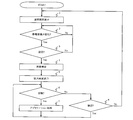
- FIG. 2 is a flowchart for explaining a display method in the display device 100 shown in FIG.
- a normal screen is displayed on the display unit 110 in step 1 in accordance with the activated application.
- the normal screen is a screen that is not enlarged.
- the capacitance on the display unit 110 is measured by the sensor 120 in Step 2.
- the amount of change is output from the sensor 120 to the approach determination unit 140.
- position information indicating the changed position is output from the sensor 120 to the coordinate determination unit 150.
- step 3 based on the amount of change in capacitance output from the sensor 120, whether the finger has approached the display unit 110 is determined by the approach determination unit 140 in step 3. Specifically, when the amount of change in capacitance output from the sensor 120 is equal to or greater than a preset first threshold value and smaller than a preset second threshold value, It is determined that the finger has approached display unit 110.
- step 2 If it is determined that the finger is not approaching the display unit 110, the process of step 2 is performed.
- the coordinates on the display unit 110 corresponding to the position indicated by the position information output from the sensor 120 are determined by the coordinate determination unit 150 in step 4. At this time, the position where the position indicated by the position information output from the sensor 120 is projected onto the display unit 110 is determined as coordinates by the coordinate determination unit 150. Further, until the approach determination unit 140 determines that the finger is not approaching the display unit 110, the coordinate determined by the coordinate determination unit 150 is fixed. The position information output from the sensor 120 may be determined as coordinates as it is.
- the approach determination unit 140 notifies the enlargement processing unit 160 that the finger has approached the display unit 110, and the determined coordinates are notified from the coordinate determination unit 150 to the enlargement processing unit 160.
- the enlargement processing unit 160 causes the display unit 110 to display the screen displayed on the display unit 110 at an enlargement rate set in advance with the coordinates determined by the coordinate determination unit 150 as the center. Processing is performed. Note that the enlargement processing unit 160 causes the display unit 110 to enlarge and display a preset range centered on the coordinates determined by the coordinate determination unit 150 in the screen displayed by the display unit 110. It may be performed.
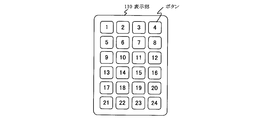
- FIG. 3 is a diagram showing an example of a screen displayed on the display unit 110 shown in FIG.
- buttons 1 to 24 are displayed on the display unit 110. This is displayed on the display unit 110 by a running application.
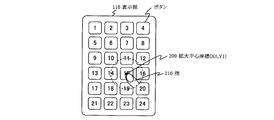
- FIG. 4 is a diagram illustrating a state in which the finger approaches the screen displayed on the display unit 110 illustrated in FIG. 1 and the center coordinates are determined by the process of step S4.
- the enlargement center coordinates (X1, Y1) 200 to be enlarged by the coordinate determination unit 150 correspond to the position of the finger 210. To be confirmed.
- the preset range described in step 5 is shown surrounded by a broken line. The range surrounded by the broken line is enlarged and displayed.
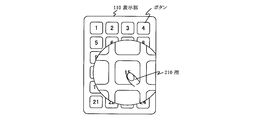
- FIG. 5 is a diagram showing a state in which the range surrounded by the broken line shown in FIG.
- the image may be enlarged and displayed in a circular shape around the enlarged central coordinates (X1, Y1) 200, or may be enlarged and displayed in a square shape.
- the shape of the enlarged range is not specified.
- the approach determination unit 140 determines whether or not the finger touches the display unit 110 based on the change amount. Specifically, when the amount of change in capacitance output from the sensor 120 is equal to or greater than a preset second threshold value, it is determined that the finger has touched the display unit 110.
- step 7 the activated application is processed using the touch panel function. For example, event processing is performed based on an input operation of a touch panel event (single tap event, double tap event, etc.) and coordinates on the display unit 110 where the event has occurred, and screen information to be displayed on the display unit 110 is displayed. Updated.
- a touch panel event single tap event, double tap event, etc.
- the enlargement processing unit 160 generates an image for enlargement display on the screen information notified to the control unit 130 by the application, and the display unit 110 displays the same information as in the approaching state. May be.
- the screen display at this time may be one in which an enlarged display centered on the coordinates determined in step 4 is maintained.
- the position (coordinates) notified from the sensor 120 based on the input operation using this touch panel function is the enlarged display of the image being enlarged. Whether the coordinates are included in the area or the non-enlarged display area is determined.
- FIG. 6 is a diagram illustrating an example of an enlarged display area that is enlarged and displayed on the display unit 110 and a non-enlarged display area that is not enlarged.
- the coordinate conversion is performed according to the coordinates of the original display image before the enlarged display by the control unit 130, and the converted coordinates are notified to the application as the touch panel coordinates. Is done.
- control unit 130 when a user who uses the display device 100 performs a specific input operation (gesture operation) on the touch panel device, for example, an operation of flipping the touch panel device once with a finger (single tap operation) ) Or an operation of flipping with a finger twice at a short interval (double tap operation) or the like, the control unit 130 determines which gesture operation has been performed, and a touch panel event (single tap event, double tap event, etc.) ) Is notified to the application.
- a specific input operation for example, an operation of flipping the touch panel device once with a finger (single tap operation) ) Or an operation of flipping with a finger twice at a short interval (double tap operation) or the like
- the control unit 130 determines which gesture operation has been performed, and a touch panel event (single tap event, double tap event, etc.) ) Is notified to the application.
- a UI focus display change process is performed by coordinate information notified from the control unit 130 by the running application.
- a touch panel event is notified, an item selection process or the like is performed in combination with the notified coordinate information, screen information reflecting the processing result is created, and the screen information is transferred to the control unit 130.
- the operation of the application is the same as the processing content realized by a general application, detailed description is omitted.
- the approach determination unit 140 determines in step 6 that the finger is not in contact with the display unit 110, whether or not the finger is approaching the display unit 110 based on the amount of change. In Step 8, the determination is made by the approach determination unit 140.
- step 6 When the approach determining unit 140 determines that the finger is approaching the display unit 110, the process of step 6 is performed.
- step 8 If the approach determination unit 140 determines that the finger is not approaching the display unit 110 in step 8, the process of step 1 is performed. At this time, the coordinates fixed by the coordinate determination unit 150 are released.
- the first threshold value described above is defined as Z1
- the second threshold value is defined as Z2
- the maximum value of the change amount of the capacitance notified from the sensor 120 is defined as Zmax, 0 ⁇ Z1 ⁇ Z2 ⁇ Zmax It becomes.
- the amount of change in capacitance notified from the sensor 120 is defined as Z.
- the change amount Z of the capacitance notified by the sensor 120 Z ⁇ Z1 If it is, it is determined that the finger is far away from the display unit 110. Therefore, the approach determination unit 140 determines that the state is “non-approaching”. In the process of Step 3 described with reference to the flowchart shown in FIG. Further, in the process of step 8 described using the flowchart shown in FIG.
- the change amount Z of the capacitance notified by the sensor 120 is Z1 ⁇ Z ⁇ Z2 If it is, it is determined that the finger is approaching the display unit 110. Therefore, the approach determination unit 140 determines that the state is “approach state”. In the process of Step 3 described with reference to the flowchart shown in FIG. In addition, in the process of Step 8 described using the flowchart shown in FIG.
- the change amount Z of the capacitance notified by the sensor 120 is Z ⁇ Z2 If it is, it is determined that the finger is in contact with the display unit 110. Therefore, the approach determination unit 140 determines that the state is “contact state”. In the process of step 6 described using the flowchart shown in FIG. 2, “Yes” is determined.
- the display image is enlarged when the user's finger approaches the touch sensor, the area of the selection item near the finger is enlarged, and the user's selection operation error can be reduced.
- the center point of the enlarged display is not shifted until the finger moves away from the touch sensor (not approaching). It is possible to reduce errors in the selection operation when the user moves his / her finger to select (contact) after display.
- the processing performed by each component provided in the above-described display device 100 may be performed by a logic circuit manufactured according to the purpose. Further, a program describing the processing contents may be recorded on a recording medium readable by the display device 100, and the program recorded on the recording medium may be read by the display device 100 and executed.
- the recording medium readable by the display device 100 includes a transferable recording medium such as a floppy (registered trademark) disk, a magneto-optical disk, a DVD, and a CD, as well as a ROM, a RAM, and the like built in the display device 100. Refers to memory, HDD, etc.
- the program recorded on the recording medium is read by the control unit 130 in the display device 100, and the same processing as described above is performed under the control of the CPU.
- the CPU operates as a computer that executes a program read from a recording medium on which the program is recorded.
Landscapes
- Engineering & Computer Science (AREA)
- General Engineering & Computer Science (AREA)
- Theoretical Computer Science (AREA)
- Human Computer Interaction (AREA)
- Physics & Mathematics (AREA)
- General Physics & Mathematics (AREA)
- User Interface Of Digital Computer (AREA)
- Position Input By Displaying (AREA)
Abstract
Description
静電容量方式のタッチパネル機能を具備する表示装置であって、
情報を表示する表示部と、
前記表示部上の静電容量の変化量を計測し、該計測した静電容量の変化量と、前記静電容量に変化があった位置を示す位置情報とを出力するセンサと、
前記センサから出力された静電容量の変化量に基づいて、前記表示部に指が接近したかどうかを判断し、前記表示部に指が接近したと判断した場合、前記位置情報が示す位置に応じた前記表示部上の座標を確定し、前記表示部に、該表示部が表示している画面を、前記確定した座標を中心に所定の倍率で拡大して表示させ、前記表示部に前記指が接近していないと判断するまで、前記座標を固定する制御部とを有する。
静電容量方式のタッチパネル機能を具備する表示装置に設けられた表示部に情報を表示させる表示方法であって、
前記表示部上の静電容量の変化量を計測する処理と、
前記計測した静電容量の変化量に基づいて、前記表示部に指が接近したかどうかを判断する処理と、
前記静電容量に変化があった位置に応じた前記表示部上の座標を確定する処理と、
前記表示部に、該表示部が表示している画面を、前記確定した座標を中心に所定の倍率で拡大して表示させる処理と、
前記表示部に前記指が接近していないと判断するまで、前記座標を固定する処理とを行う。
静電容量方式のタッチパネル機能を具備する表示装置に実行させるためのプログラムであって、
当該表示装置に設けられた表示部に情報を表示させる手順と、
前記表示部上の静電容量の変化量を計測する手順と、
前記計測した静電容量の変化量に基づいて、前記表示部に指が接近したかどうかを判断する手順と、
前記静電容量に変化があった位置に応じた前記表示部上の座標を確定する手順と、
前記表示部に、該表示部が表示している画面を、前記確定した座標を中心に所定の倍率で拡大して表示させる手順と、
前記表示部に前記指が接近していないと判断するまで、前記座標を固定する手順とを実行させる。
0<Z1<Z2<Zmax
となる。また、センサ120から通知される静電容量の変化量をZと定義する。
Z<Z1
である場合、指が表示部110から遠く離れていると判断される。そのため、接近判断部140では、「非接近状態」であると判断される。図2に示したフローチャートを用いて説明したステップ3の処理において、「No」の判断となる。また、図2に示したフローチャートを用いて説明したステップ8の処理において、「No」の判断となる。
Z1≦Z<Z2
である場合は、指が表示部110に接近していると判断される。そのため、接近判断部140では、「接近状態」であると判断される。図2に示したフローチャートを用いて説明したステップ3の処理において、「Yes」の判断となる。また、図2に示したフローチャートを用いて説明したステップ8の処理において、「Yes」の判断となる。
Z≧Z2
である場合は、指が表示部110に接触していると判断される。そのため、接近判断部140では、「接触状態」であると判断される。図2に示したフローチャートを用いて説明したステップ6の処理において、「Yes」の判断となる。
Claims (13)
- 静電容量方式のタッチパネル機能を具備する表示装置であって、
情報を表示する表示部と、
前記表示部上の静電容量の変化量を計測し、該計測した静電容量の変化量と、前記静電容量に変化があった位置を示す位置情報とを出力するセンサと、
前記センサから出力された静電容量の変化量に基づいて、前記表示部に指が接近したかどうかを判断し、前記表示部に指が接近したと判断した場合、前記位置情報が示す位置に応じた前記表示部上の座標を確定し、前記表示部に、該表示部が表示している画面を、前記確定した座標を中心に所定の倍率で拡大して表示させ、前記表示部に前記指が接近していないと判断するまで、前記座標を固定する制御部とを有する表示装置。 - 請求項1に記載の表示装置において、
前記制御部は、
前記センサから出力された静電容量の変化量に基づいて、前記表示部に前記指が接近したかどうかを判断する接近判断部と、
前記接近判断部が前記表示部に前記指が接近したと判断した場合、前記位置情報が示す位置に応じた前記表示部上の座標を確定し、前記接近判断部が前記表示部に前記指が接近していないと判断するまで、前記座標を固定する座標確定部と、
前記接近判断部が前記表示部に前記指が接近したと判断した場合、前記表示部に、該表示部が表示している画面を、前記座標確定部が確定した座標を中心に所定の倍率で拡大して表示させる拡大処理部とを有することを特徴とする表示装置。 - 請求項2に記載の表示装置において、
前記接近判断部は、前記センサが計測した静電容量の変化量があらかじめ設定された第1の閾値以上であり、かつあらかじめ設定された第2の閾値よりも小さな値である場合、前記表示部に前記指が接近したと判断し、前記センサが計測した静電容量の変化量が、前記第2の閾値以上の値である場合、前記表示部に前記指が接触したと判断することを特徴とする表示装置。 - 請求項2に記載の表示装置において、
前記拡大処理部は、前記表示部に、該表示部が表示している画面のうち、前記座標確定部が確定した座標を中心とした所定の範囲を拡大して表示させることを特徴とする表示装置。 - 請求項2に記載の表示装置において、
前記座標確定部は、前記位置情報が示す位置を前記表示部上へ投影した位置を前記座標として確定することを特徴とする表示装置。 - 静電容量方式のタッチパネル機能を具備する表示装置に設けられた表示部に情報を表示させる表示方法であって、
前記表示部上の静電容量の変化量を計測する処理と、
前記計測した静電容量の変化量に基づいて、前記表示部に指が接近したかどうかを判断する処理と、
前記静電容量に変化があった位置に応じた前記表示部上の座標を確定する処理と、
前記表示部に、該表示部が表示している画面を、前記確定した座標を中心に所定の倍率で拡大して表示させる処理と、
前記表示部に前記指が接近していないと判断するまで、前記座標を固定する処理とを行う表示方法。 - 請求項6に記載の表示方法において、
前記計測した静電容量の変化量があらかじめ設定された第1の閾値以上であり、かつあらかじめ設定された第2の閾値よりも小さな値である場合、前記表示部に前記指が接近したと判断する処理と、
前記計測した静電容量の変化量が、前記第2の閾値以上の値である場合、前記表示部に前記指が接触したと判断する処理とを行うことを特徴とする表示方法。 - 請求項6に記載の表示方法において、
前記表示部に、該表示部が表示している画面のうち、前記確定した座標を中心とした所定の範囲を拡大して表示させる処理を行うことを特徴とする表示方法。 - 請求項6に記載の表示方法において、
前記静電容量に変化があった位置を前記表示部上へ投影した位置を前記座標として確定する処理を行うことを特徴とする表示方法。 - 静電容量方式のタッチパネル機能を具備する表示装置に、
当該表示装置に設けられた表示部に情報を表示させる手順と、
前記表示部上の静電容量の変化量を計測する手順と、
前記計測した静電容量の変化量に基づいて、前記表示部に指が接近したかどうかを判断する手順と、
前記静電容量に変化があった位置に応じた前記表示部上の座標を確定する手順と、
前記表示部に、該表示部が表示している画面を、前記確定した座標を中心に所定の倍率で拡大して表示させる手順と、
前記表示部に前記指が接近していないと判断するまで、前記座標を固定する手順とを実行させるためのプログラム。 - 請求項10に記載のプログラムにおいて、
前記計測した静電容量の変化量があらかじめ設定された第1の閾値以上であり、かつあらかじめ設定された第2の閾値よりも小さな値である場合、前記表示部に前記指が接近したと判断する手順と、
前記計測した静電容量の変化量が、前記第2の閾値以上の値である場合、前記表示部に前記指が接触したと判断する手順とを実行させるためのプログラム。 - 請求項10に記載のプログラムにおいて、
前記表示部に、該表示部が表示している画面のうち、前記確定した座標を中心とした所定の範囲を拡大して表示させる手順を実行させるためのプログラム。 - 請求項10に記載のプログラムにおいて、
前記静電容量に変化があった位置を前記表示部上へ投影した位置を前記座標として確定する手順を実行させるためのプログラム。
Priority Applications (5)
| Application Number | Priority Date | Filing Date | Title |
|---|---|---|---|
| KR1020127008274A KR101442931B1 (ko) | 2009-09-02 | 2010-08-16 | 표시장치 |
| EP10813616A EP2474885A1 (en) | 2009-09-02 | 2010-08-16 | Display device |
| US13/393,727 US20120154331A1 (en) | 2009-09-02 | 2010-08-16 | Display device |
| CN2010800393208A CN102483668A (zh) | 2009-09-02 | 2010-08-16 | 显示装置 |
| JP2011529865A JP5675622B2 (ja) | 2009-09-02 | 2010-08-16 | 表示装置 |
Applications Claiming Priority (2)
| Application Number | Priority Date | Filing Date | Title |
|---|---|---|---|
| JP2009-202513 | 2009-09-02 | ||
| JP2009202513 | 2009-09-02 |
Publications (1)
| Publication Number | Publication Date |
|---|---|
| WO2011027665A1 true WO2011027665A1 (ja) | 2011-03-10 |
Family
ID=43649206
Family Applications (1)
| Application Number | Title | Priority Date | Filing Date |
|---|---|---|---|
| PCT/JP2010/063820 Ceased WO2011027665A1 (ja) | 2009-09-02 | 2010-08-16 | 表示装置 |
Country Status (6)
| Country | Link |
|---|---|
| US (1) | US20120154331A1 (ja) |
| EP (1) | EP2474885A1 (ja) |
| JP (1) | JP5675622B2 (ja) |
| KR (1) | KR101442931B1 (ja) |
| CN (1) | CN102483668A (ja) |
| WO (1) | WO2011027665A1 (ja) |
Cited By (14)
| Publication number | Priority date | Publication date | Assignee | Title |
|---|---|---|---|---|
| JP2012238177A (ja) * | 2011-05-11 | 2012-12-06 | Kyocera Corp | 電子機器 |
| CN103093750A (zh) * | 2011-11-04 | 2013-05-08 | 雅马哈株式会社 | 音乐数据显示控制设备及方法 |
| JP2013130979A (ja) * | 2011-12-20 | 2013-07-04 | Sharp Corp | 情報処理装置、情報処理装置の制御方法、情報処理装置制御プログラムおよび該プログラムを記録したコンピュータ読み取り可能な記録媒体 |
| JP2013206186A (ja) * | 2012-03-28 | 2013-10-07 | Ntt Comware Corp | 操作ログ収集方法、操作ログ収集装置、操作ログ収集プログラム |
| WO2013161169A1 (ja) * | 2012-04-23 | 2013-10-31 | パナソニック株式会社 | 表示装置、表示制御方法及びプログラム |
| CN103477316A (zh) * | 2011-03-28 | 2013-12-25 | 富士胶片株式会社 | 触摸面板装置、其显示方法和显示程序 |
| JP2014035695A (ja) * | 2012-08-09 | 2014-02-24 | Panasonic Corp | 表示制御装置、表示制御方法及びプログラム |
| CN103902088A (zh) * | 2012-12-29 | 2014-07-02 | 上海天马微电子有限公司 | 一种触控显示装置及触控方法 |
| JP2014199497A (ja) * | 2013-03-29 | 2014-10-23 | 株式会社ジャパンディスプレイ | 電子機器および電子機器の制御方法 |
| JP2016045519A (ja) * | 2014-08-19 | 2016-04-04 | 京セラドキュメントソリューションズ株式会社 | 表示制御装置及び電子機器 |
| JP2016206749A (ja) * | 2015-04-16 | 2016-12-08 | シャープ株式会社 | タッチ入力装置、前記タッチ入力装置を備えた画像形成装置およびタッチ入力方法 |
| DE102016115479A1 (de) | 2015-08-27 | 2017-03-02 | Lenovo (Singapore) Pte. Ltd. | Nutzerschnittstelle für Elektronikgerät, Eingabeverarbeitungsverfahren und Elektronikgerät |
| JP2017204082A (ja) * | 2016-05-10 | 2017-11-16 | 株式会社デンソー | 車両用操作装置 |
| JP2023133825A (ja) * | 2022-03-14 | 2023-09-27 | 株式会社日立製作所 | 表示制御装置、表示制御システム、表示制御プログラム |
Families Citing this family (14)
| Publication number | Priority date | Publication date | Assignee | Title |
|---|---|---|---|---|
| US8654076B2 (en) * | 2012-03-15 | 2014-02-18 | Nokia Corporation | Touch screen hover input handling |
| US9904416B2 (en) | 2012-07-17 | 2018-02-27 | Nókia Technologies Oy | Apparatus, method and computer program for enabling user input |
| CN102999238A (zh) * | 2012-11-07 | 2013-03-27 | 江苏美琪威电子科技有限公司 | 一种投射式电容触摸屏感应系统及感应方法 |
| DE102013022254B4 (de) * | 2013-02-06 | 2016-10-27 | Nvidia Corporation | Flachpanel-Elektronikgerät |
| CN104035699A (zh) * | 2013-03-05 | 2014-09-10 | 中兴通讯股份有限公司 | 电容式触摸屏终端及其输入方法 |
| US20140267082A1 (en) * | 2013-03-15 | 2014-09-18 | Lenovo (Singapore) Pte, Ltd. | Enlarging touch screen portions |
| US9311860B2 (en) | 2013-09-06 | 2016-04-12 | Lenovo Enterprise Solutions (Singapore) Pte. Ltd. | Liquid crystal display using backlight intensity to compensate for pixel damage |
| KR20150092962A (ko) * | 2014-02-06 | 2015-08-17 | 삼성전자주식회사 | 입력 처리 방법 및 그 전자 장치 |
| KR102251541B1 (ko) * | 2014-06-23 | 2021-05-14 | 엘지전자 주식회사 | 이동단말기 및 그것의 제어방법 |
| CN106020712B (zh) * | 2016-07-29 | 2020-03-27 | 青岛海信移动通信技术股份有限公司 | 一种触控手势识别方法及装置 |
| JP2018025916A (ja) * | 2016-08-09 | 2018-02-15 | 本田技研工業株式会社 | 車載用操作装置 |
| JP6991754B2 (ja) * | 2017-07-03 | 2022-01-13 | 株式会社ミツトヨ | 端末装置およびプログラム |
| US10969910B2 (en) * | 2018-12-18 | 2021-04-06 | Ford Global Technologies, Llc | Variable size user input device for vehicle |
| FR3124872B1 (fr) | 2021-07-02 | 2024-11-29 | Faurecia Interieur Ind | Dispositif électronique et procédé d'affichage de données sur un écran d’affichage, système d’affichage, véhicule et programme d’ordinateur associés |
Citations (4)
| Publication number | Priority date | Publication date | Assignee | Title |
|---|---|---|---|---|
| JPH10269022A (ja) * | 1997-03-25 | 1998-10-09 | Hitachi Ltd | 通信機能付き携帯型情報処理装置 |
| JP2008009759A (ja) | 2006-06-29 | 2008-01-17 | Toyota Motor Corp | タッチパネル装置 |
| JP2008040966A (ja) * | 2006-08-09 | 2008-02-21 | Alpine Electronics Inc | 車載表示システム |
| JP2008287323A (ja) * | 2007-05-15 | 2008-11-27 | Mitsubishi Electric Corp | 情報入力表示装置 |
Family Cites Families (7)
| Publication number | Priority date | Publication date | Assignee | Title |
|---|---|---|---|---|
| JP2648558B2 (ja) * | 1993-06-29 | 1997-09-03 | インターナショナル・ビジネス・マシーンズ・コーポレイション | 情報選択装置及び情報選択方法 |
| US20060244733A1 (en) * | 2005-04-28 | 2006-11-02 | Geaghan Bernard O | Touch sensitive device and method using pre-touch information |
| US7966573B2 (en) * | 2006-02-17 | 2011-06-21 | Microsoft Corporation | Method and system for improving interaction with a user interface |
| JP4766340B2 (ja) * | 2006-10-13 | 2011-09-07 | ソニー株式会社 | 近接検知型情報表示装置およびこれを使用した情報表示方法 |
| CN101382853A (zh) * | 2007-09-07 | 2009-03-11 | 鸿富锦精密工业(深圳)有限公司 | 触摸屏装置及其图像显示方法 |
| CN101414231B (zh) * | 2007-10-17 | 2011-09-21 | 鸿富锦精密工业(深圳)有限公司 | 触摸屏装置及其图像显示方法 |
| JP2009183592A (ja) * | 2008-02-08 | 2009-08-20 | Ge Medical Systems Global Technology Co Llc | 操作情報入力装置および超音波撮像装置 |
-
2010
- 2010-08-16 EP EP10813616A patent/EP2474885A1/en not_active Withdrawn
- 2010-08-16 US US13/393,727 patent/US20120154331A1/en not_active Abandoned
- 2010-08-16 KR KR1020127008274A patent/KR101442931B1/ko not_active Expired - Fee Related
- 2010-08-16 CN CN2010800393208A patent/CN102483668A/zh active Pending
- 2010-08-16 JP JP2011529865A patent/JP5675622B2/ja not_active Expired - Fee Related
- 2010-08-16 WO PCT/JP2010/063820 patent/WO2011027665A1/ja not_active Ceased
Patent Citations (4)
| Publication number | Priority date | Publication date | Assignee | Title |
|---|---|---|---|---|
| JPH10269022A (ja) * | 1997-03-25 | 1998-10-09 | Hitachi Ltd | 通信機能付き携帯型情報処理装置 |
| JP2008009759A (ja) | 2006-06-29 | 2008-01-17 | Toyota Motor Corp | タッチパネル装置 |
| JP2008040966A (ja) * | 2006-08-09 | 2008-02-21 | Alpine Electronics Inc | 車載表示システム |
| JP2008287323A (ja) * | 2007-05-15 | 2008-11-27 | Mitsubishi Electric Corp | 情報入力表示装置 |
Cited By (22)
| Publication number | Priority date | Publication date | Assignee | Title |
|---|---|---|---|---|
| CN103477316B (zh) * | 2011-03-28 | 2017-03-15 | 富士胶片株式会社 | 触摸面板装置和其显示方法 |
| CN103477316A (zh) * | 2011-03-28 | 2013-12-25 | 富士胶片株式会社 | 触摸面板装置、其显示方法和显示程序 |
| JP2012238177A (ja) * | 2011-05-11 | 2012-12-06 | Kyocera Corp | 電子機器 |
| CN103093750A (zh) * | 2011-11-04 | 2013-05-08 | 雅马哈株式会社 | 音乐数据显示控制设备及方法 |
| JP2013130979A (ja) * | 2011-12-20 | 2013-07-04 | Sharp Corp | 情報処理装置、情報処理装置の制御方法、情報処理装置制御プログラムおよび該プログラムを記録したコンピュータ読み取り可能な記録媒体 |
| JP2013206186A (ja) * | 2012-03-28 | 2013-10-07 | Ntt Comware Corp | 操作ログ収集方法、操作ログ収集装置、操作ログ収集プログラム |
| WO2013161169A1 (ja) * | 2012-04-23 | 2013-10-31 | パナソニック株式会社 | 表示装置、表示制御方法及びプログラム |
| JP2013225261A (ja) * | 2012-04-23 | 2013-10-31 | Panasonic Corp | 表示装置、表示制御方法及びプログラム |
| US9772757B2 (en) | 2012-04-23 | 2017-09-26 | Panasonic Intellectual Property Corporation Of America | Enlarging image based on proximity of a pointing object to a display screen |
| US9665216B2 (en) | 2012-08-09 | 2017-05-30 | Panasonic Intellectual Property Corporation Of America | Display control device, display control method and program |
| JP2014035695A (ja) * | 2012-08-09 | 2014-02-24 | Panasonic Corp | 表示制御装置、表示制御方法及びプログラム |
| CN103902088B (zh) * | 2012-12-29 | 2017-03-08 | 上海天马微电子有限公司 | 一种触控显示装置及触控方法 |
| CN103902088A (zh) * | 2012-12-29 | 2014-07-02 | 上海天马微电子有限公司 | 一种触控显示装置及触控方法 |
| JP2014199497A (ja) * | 2013-03-29 | 2014-10-23 | 株式会社ジャパンディスプレイ | 電子機器および電子機器の制御方法 |
| US9746949B2 (en) | 2013-03-29 | 2017-08-29 | Japan Display Inc. | Electronic device for efficiently performing data transmission and method for controlling the same |
| JP2016045519A (ja) * | 2014-08-19 | 2016-04-04 | 京セラドキュメントソリューションズ株式会社 | 表示制御装置及び電子機器 |
| JP2016206749A (ja) * | 2015-04-16 | 2016-12-08 | シャープ株式会社 | タッチ入力装置、前記タッチ入力装置を備えた画像形成装置およびタッチ入力方法 |
| DE102016115479A1 (de) | 2015-08-27 | 2017-03-02 | Lenovo (Singapore) Pte. Ltd. | Nutzerschnittstelle für Elektronikgerät, Eingabeverarbeitungsverfahren und Elektronikgerät |
| US10318047B2 (en) | 2015-08-27 | 2019-06-11 | Lenovo (Singapore) Pte. Ltd. | User interface for electronic device, input processing method, and electronic device |
| JP2017204082A (ja) * | 2016-05-10 | 2017-11-16 | 株式会社デンソー | 車両用操作装置 |
| JP2023133825A (ja) * | 2022-03-14 | 2023-09-27 | 株式会社日立製作所 | 表示制御装置、表示制御システム、表示制御プログラム |
| JP7637650B2 (ja) | 2022-03-14 | 2025-02-28 | 株式会社日立製作所 | 表示制御装置、表示制御システム、表示制御プログラム |
Also Published As
| Publication number | Publication date |
|---|---|
| KR101442931B1 (ko) | 2014-09-23 |
| US20120154331A1 (en) | 2012-06-21 |
| KR20120062852A (ko) | 2012-06-14 |
| JPWO2011027665A1 (ja) | 2013-02-04 |
| CN102483668A (zh) | 2012-05-30 |
| EP2474885A1 (en) | 2012-07-11 |
| JP5675622B2 (ja) | 2015-02-25 |
Similar Documents
| Publication | Publication Date | Title |
|---|---|---|
| JP5675622B2 (ja) | 表示装置 | |
| US8614682B2 (en) | Touchscreen panel unit, scrolling control method, and recording medium | |
| US9262040B2 (en) | Information processing apparatus, information processing method, and program | |
| JP3998376B2 (ja) | 入力処理方法及びそれを実施する入力処理装置 | |
| US20140380209A1 (en) | Method for operating portable devices having a touch screen | |
| US20100095234A1 (en) | Multi-touch motion simulation using a non-touch screen computer input device | |
| JP2009110286A (ja) | 情報処理装置、ランチャー起動制御プログラムおよびランチャー起動制御方法 | |
| CN104423836B (zh) | 信息处理装置 | |
| US20140181737A1 (en) | Method for processing contents and electronic device thereof | |
| CN103140826B (zh) | 信息终端装置以及触控面板的显示方法 | |
| JP5991320B2 (ja) | 入力装置、画像表示方法およびプログラム | |
| TW201411426A (zh) | 電子裝置以及相關之控制方法 | |
| KR101451534B1 (ko) | 휴대용 전자 장치 및 그 제어 방법 | |
| JP5165624B2 (ja) | 情報入力装置、オブジェクト表示方法、およびコンピュータが実行可能なプログラム | |
| JP5996079B1 (ja) | 情報処理装置、ソフトウェアキーボード表示方法、及びプログラム | |
| JP4171509B2 (ja) | 入力処理方法及びそれを実施する入力処理装置 | |
| JP5963663B2 (ja) | オブジェクト選択装置、方法およびプログラム | |
| JP2010093516A (ja) | 携帯情報端末及びその動作制御方法並びにプログラム | |
| JP4904239B2 (ja) | 入力処理方法及び入力制御装置 | |
| JP6220374B2 (ja) | 情報処理装置、出力文字コード判定方法、及びプログラム | |
| JP5815259B2 (ja) | 情報処理装置及び情報処理方法 | |
| CN114217727B (zh) | 电子装置及其触控方法 | |
| JP6513607B2 (ja) | 情報処理装置 | |
| JP4904240B2 (ja) | 入力処理方法及び入力制御装置 | |
| WO2014041595A1 (ja) | 表示装置、表示方法およびプログラム |
Legal Events
| Date | Code | Title | Description |
|---|---|---|---|
| WWE | Wipo information: entry into national phase |
Ref document number: 201080039320.8 Country of ref document: CN |
|
| 121 | Ep: the epo has been informed by wipo that ep was designated in this application |
Ref document number: 10813616 Country of ref document: EP Kind code of ref document: A1 |
|
| WWE | Wipo information: entry into national phase |
Ref document number: 2011529865 Country of ref document: JP |
|
| WWE | Wipo information: entry into national phase |
Ref document number: 13393727 Country of ref document: US |
|
| NENP | Non-entry into the national phase |
Ref country code: DE |
|
| WWE | Wipo information: entry into national phase |
Ref document number: 2010813616 Country of ref document: EP |
|
| WWE | Wipo information: entry into national phase |
Ref document number: 2815/CHENP/2012 Country of ref document: IN |
|
| ENP | Entry into the national phase |
Ref document number: 20127008274 Country of ref document: KR Kind code of ref document: A |