WO2012091384A2 - 휴대 단말기의 동작방법 - Google Patents
휴대 단말기의 동작방법 Download PDFInfo
- Publication number
- WO2012091384A2 WO2012091384A2 PCT/KR2011/010098 KR2011010098W WO2012091384A2 WO 2012091384 A2 WO2012091384 A2 WO 2012091384A2 KR 2011010098 W KR2011010098 W KR 2011010098W WO 2012091384 A2 WO2012091384 A2 WO 2012091384A2
- Authority
- WO
- WIPO (PCT)
- Prior art keywords
- diagnosis
- recording
- displaying
- home appliance
- sound
- Prior art date
- Legal status (The legal status is an assumption and is not a legal conclusion. Google has not performed a legal analysis and makes no representation as to the accuracy of the status listed.)
- Ceased
Links
Images


Classifications
-
- G—PHYSICS
- G06—COMPUTING OR CALCULATING; COUNTING
- G06F—ELECTRIC DIGITAL DATA PROCESSING
- G06F3/00—Input arrangements for transferring data to be processed into a form capable of being handled by the computer; Output arrangements for transferring data from processing unit to output unit, e.g. interface arrangements
- G06F3/16—Sound input; Sound output
- G06F3/167—Audio in a user interface, e.g. using voice commands for navigating, audio feedback
-
- G—PHYSICS
- G01—MEASURING; TESTING
- G01R—MEASURING ELECTRIC VARIABLES; MEASURING MAGNETIC VARIABLES
- G01R31/00—Arrangements for testing electric properties; Arrangements for locating electric faults; Arrangements for electrical testing characterised by what is being tested not provided for elsewhere
-
- H—ELECTRICITY
- H04—ELECTRIC COMMUNICATION TECHNIQUE
- H04B—TRANSMISSION
- H04B1/00—Details of transmission systems, not covered by a single one of groups H04B3/00 - H04B13/00; Details of transmission systems not characterised by the medium used for transmission
- H04B1/38—Transceivers, i.e. devices in which transmitter and receiver form a structural unit and in which at least one part is used for functions of transmitting and receiving
- H04B1/40—Circuits
-
- H—ELECTRICITY
- H04—ELECTRIC COMMUNICATION TECHNIQUE
- H04L—TRANSMISSION OF DIGITAL INFORMATION, e.g. TELEGRAPHIC COMMUNICATION
- H04L12/00—Data switching networks
- H04L12/02—Details
- H04L12/16—Arrangements for providing special services to substations
-
- H—ELECTRICITY
- H04—ELECTRIC COMMUNICATION TECHNIQUE
- H04L—TRANSMISSION OF DIGITAL INFORMATION, e.g. TELEGRAPHIC COMMUNICATION
- H04L12/00—Data switching networks
- H04L12/28—Data switching networks characterised by path configuration, e.g. LAN [Local Area Networks] or WAN [Wide Area Networks]
- H04L12/2803—Home automation networks
- H04L12/2816—Controlling appliance services of a home automation network by calling their functionalities
- H04L12/282—Controlling appliance services of a home automation network by calling their functionalities based on user interaction within the home
-
- H—ELECTRICITY
- H04—ELECTRIC COMMUNICATION TECHNIQUE
- H04L—TRANSMISSION OF DIGITAL INFORMATION, e.g. TELEGRAPHIC COMMUNICATION
- H04L12/00—Data switching networks
- H04L12/28—Data switching networks characterised by path configuration, e.g. LAN [Local Area Networks] or WAN [Wide Area Networks]
- H04L12/2803—Home automation networks
- H04L12/2823—Reporting information sensed by appliance or service execution status of appliance services in a home automation network
- H04L12/2827—Reporting to a device within the home network; wherein the reception of the information reported automatically triggers the execution of a home appliance functionality
-
- H—ELECTRICITY
- H04—ELECTRIC COMMUNICATION TECHNIQUE
- H04M—TELEPHONIC COMMUNICATION
- H04M1/00—Substation equipment, e.g. for use by subscribers
- H04M1/72—Mobile telephones; Cordless telephones, i.e. devices for establishing wireless links to base stations without route selection
- H04M1/724—User interfaces specially adapted for cordless or mobile telephones
- H04M1/72403—User interfaces specially adapted for cordless or mobile telephones with means for local support of applications that increase the functionality
- H04M1/72409—User interfaces specially adapted for cordless or mobile telephones with means for local support of applications that increase the functionality by interfacing with external accessories
- H04M1/72415—User interfaces specially adapted for cordless or mobile telephones with means for local support of applications that increase the functionality by interfacing with external accessories for remote control of appliances
-
- H—ELECTRICITY
- H04—ELECTRIC COMMUNICATION TECHNIQUE
- H04L—TRANSMISSION OF DIGITAL INFORMATION, e.g. TELEGRAPHIC COMMUNICATION
- H04L12/00—Data switching networks
- H04L12/28—Data switching networks characterised by path configuration, e.g. LAN [Local Area Networks] or WAN [Wide Area Networks]
- H04L12/2803—Home automation networks
- H04L2012/284—Home automation networks characterised by the type of medium used
- H04L2012/2841—Wireless
-
- H—ELECTRICITY
- H04—ELECTRIC COMMUNICATION TECHNIQUE
- H04L—TRANSMISSION OF DIGITAL INFORMATION, e.g. TELEGRAPHIC COMMUNICATION
- H04L12/00—Data switching networks
- H04L12/28—Data switching networks characterised by path configuration, e.g. LAN [Local Area Networks] or WAN [Wide Area Networks]
- H04L12/2803—Home automation networks
- H04L2012/2847—Home automation networks characterised by the type of home appliance used
- H04L2012/285—Generic home appliances, e.g. refrigerators
-
- H—ELECTRICITY
- H04—ELECTRIC COMMUNICATION TECHNIQUE
- H04M—TELEPHONIC COMMUNICATION
- H04M2250/00—Details of telephonic subscriber devices
- H04M2250/74—Details of telephonic subscriber devices with voice recognition means
Definitions
- the present invention relates to a method of operating a portable terminal, which enables a home appliance to be diagnosed using the portable terminal.
- the problem to be solved by the present invention is, firstly, to provide a method of operating a portable terminal to accurately diagnose the abnormal symptoms of the home appliance using the portable terminal.
- the present invention provides a method of operating a mobile terminal in which a diagnosis result of a home appliance is displayed through a display unit.
- An operation method of a portable terminal of the present invention includes a recording menu display step of displaying a recording menu through a display unit; A recording step of recording a signal sound received through a microphone according to the selection of the recording menu; A signal processing step of extracting product information from the recorded tone; A diagnostic step of performing a diagnosis based on the extracted product information; And a diagnosis result displaying step of displaying the diagnosis performing result through the display unit.
- the operating method of the portable terminal of the present invention enables the user to directly diagnose the home appliance through his or her own mobile terminal without inquiring a service center, thereby quickly identifying an abnormal symptom of the home appliance.
- the operation method of the portable terminal of the present invention allows the user to take appropriate measures on his / her own basis based on the diagnosis result of the home appliance, thereby making it easier and faster to repair and manage the home appliance.
- the operating method of the portable terminal of the present invention has the effect that it is possible to prevent the operator from visiting the user unnecessarily.
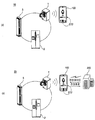
- FIG. 1 illustrates embodiments of a home appliance diagnostic system.
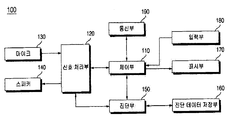
- FIG. 2 is a block diagram illustrating a main configuration of the portable terminal of FIG. 1.
- FIG. 3 is a block diagram of an application driven for diagnosing home appliances in the portable terminal of FIG. 2.
- FIG. 4 is a flowchart illustrating a method of operating a portable terminal according to a first embodiment of the present invention.
- FIG. 5 is a flowchart illustrating a method of operating a portable terminal according to a second embodiment of the present invention.
- 6 to 11 illustrate screens displayed through the display unit of FIG. 2 during a home appliance diagnosis process.
- FIG. 1A illustrates a first embodiment of a home appliance diagnostic system in which a home appliance is diagnosed according to a method of operating a portable terminal of the present invention.
- the home appliance diagnostic system 10 may include home appliances such as a laundry treatment machine 1, a refrigerator 2, or an air conditioner 3. And a portable terminal 100 for receiving a signal sound including the product information outputted from the device and diagnosing a state or failure of the home appliance based on the signal sound.
- home appliances such as a laundry treatment machine 1, a refrigerator 2, or an air conditioner 3.
- a portable terminal 100 for receiving a signal sound including the product information outputted from the device and diagnosing a state or failure of the home appliance based on the signal sound.
- Examples of the mobile terminal 100 include a mobile phone, a smart phone, a notebook computer, a personal digital assistant (PDA), a tablet computer, and an e-book. Can be mentioned. Recently, smart phones that combine the functions of mobile phones and PDAs are in the spotlight, and these smart phones are equipped with a large memory and a high performance CPU compared to existing mobile phones, and execute various applications, voice / data communication, and PC interworking. By providing an operating system (OS) for supporting such devices, it is possible to smoothly drive an application for diagnosing home appliances.
- OS operating system
- the portable terminal 100 will be described as an example of a smart phone, but is not limited thereto.
- the home appliance includes a sound output unit for outputting a sound such as a speaker or a buzzer, and reproduces information on an operation, a state, a failure, and the like of the home appliance, and outputs the predetermined sound.
- a sound output unit for outputting a sound such as a speaker or a buzzer, and reproduces information on an operation, a state, a failure, and the like of the home appliance, and outputs the predetermined sound.
- product information is stored at each stage of a predetermined operation.
- the product information may include operation information reflecting the current operating state, failure information when a failure occurs, setting information set by the user, and the like.
- the home appliance stores product information including driving information, fault information, and setting information. Accordingly, even if the home appliance is suddenly shut down due to a power failure, product information on the step already performed is already stored among the steps in which the operation is being performed. Whether or not can be determined.
- the user places the portable terminal 100 near the sound source of the home appliance, that is, the sound output unit, and manipulates the selection unit of the home appliance so that a signal sound including product information is output through the sound output unit. Therefore, the signal sound including the product information thus output may be input to the mobile terminal 100.
- the mobile terminal 100 extracts the product information from the received beep and vice versa, and diagnoses the state of the home appliance and whether there is a failure. This home appliance diagnosis process performed in the mobile terminal 100 will be described in detail later.
- FIG. 1B illustrates a second embodiment of a home appliance diagnosis system in which a home appliance is diagnosed according to a method of operating a portable terminal of the present invention.
- the home appliance diagnostic system 20 according to the second embodiment is also similar to the home appliance diagnostic system 10 according to the first embodiment in terms of diagnosing home appliances through the mobile terminal 100. There is a difference in that communication is made between the 100 and the service center 200.
- the portable terminal 100 may further receive diagnostic data from the diagnostic server of the service center 200 or transmit the diagnostic result of the home appliance to the diagnostic server.
- the home appliance diagnosis system 20 may not only diagnose the home appliance more accurately by utilizing the rich diagnosis data provided from the service center 200, but also the home appliance diagnosis results of the user may be provided to the service center 200. There is an advantage in that it can accumulate and expand the database for home appliance diagnostics.
- the home appliance is a sound signal containing the product information through a modulation scheme such as frequency shift keying (FSK, Frequency Shift Keying), amplitude shift keying (ASK), or phase shift keying (PSK)
- FSK frequency shift keying
- ASK amplitude shift keying
- PSK phase shift keying
- the frequency value of the signal sound output from the home appliance is not necessarily limited thereto, and the value may vary depending on the available frequency band of the sound output unit of the home appliance.
- the household electrical appliance may output a sound having a frequency of 2.6 kHz in response to data 0 and a signal sound having a frequency of 2.8 kHz in response to data 1.
- the data '010' outputs sound of 2.6KHz frequency for unit time because the first bit value is 0, and outputs sound of frequency of 2.8KHz for unit time because the second bit value is 1, and outputs the third bit value. Is 0, so the frequency sound of 2.6KHz is output again during unit time.
- each bit is one symbol
- the symbol length is symbol time
- one frequency signal is output in correspondence with one symbol
- the frequency signal constituting the signal sound output in response to one symbol is taken as an example. Define the length of the basic unit in symbol time.
- one symbol eventually corresponds to the basic unit of one frequency signal.
- the basic unit of the frequency signal constituting the sound output through the home appliance is referred to as a symbol.
- the signal When the signal is unitized based on the symbol time in the portable terminal 100, a delay may occur when the portable terminal 100 processes a frequency signal by occupying resources of other applications running on the portable terminal 100. As a result, a problem of inaccurate extraction of product information may occur. Therefore, it is preferable to set the symbol time by determining the number of pulses included in one frequency signal outputted corresponding to the symbol, that is, one symbol, so that an accurate signal tone is output and transmitted. For example, it is also possible to count the number of pulses by tracking the maximum amplitude value of the pulses included in the frequency signal input to the mobile terminal 100, and to signal the number of pulses.
- the mobile terminal 100 includes a control unit 110, a signal processing unit 120, a microphone 130, a speaker 140, a diagnosis unit 150, a diagnostic data storage unit 160, and a display unit 170. ), The input unit 180 and the communication unit 190 may be included.
- the microphone 130 receives sound including product information output from the home appliance.
- a microphone typically provided in a portable terminal may be used for a call function.
- the speaker 140 outputs various messages to the user when the home appliance is diagnosed.
- a speaker that is typically provided in a portable terminal for a call function can be used.
- the signal processor 120 extracts product information from the sound received through the microphone 130.
- the signal conversion in the signal processing unit 120 is an inverse conversion of the signal conversion in the home appliance.
- the signal processor 120 may convert a signal sound, which is an analog signal of a predetermined frequency band, into digital data.
- the signal processor 120 may extract the control signal from the converted data in units of frames, and then decode the control signal to extract product information.
- the signal processor 120 detects a preamble indicating the start of data including product information, detects a control signal including product information based on the detected preamble, and transmits a control signal of a specified format to a product of a home appliance.
- the product information of the home appliance included in the control signal may be extracted by decoding by a decoding method corresponding to the information encoding method.
- the diagnosis unit 150 analyzes the product information extracted by the signal processing unit 120 to diagnose an operation state of the home appliance, a failure state, and the like.
- the diagnosis unit 150 performs a home appliance diagnosis that analyzes product information through a diagnostic application.
- the diagnostic data storage unit 160 stores information on an error code of a home appliance, diagnostic data for diagnosing a failure and a cause of a failure, and data on a solution according to the failure cause.
- the diagnostic data storage unit 160 may be configured with various types of recording media such as a hard disk, a flash memory, a read only memory (ROM), a solid state driver (SSD), and the like.
- the input unit 180 includes at least one input means for inputting a predetermined signal or data to the controller 110 by a user's operation, and the input means includes a touch screen and a button type which perform an image display function and a command input function together. / Dial operation key or keyboard. The user may drive the diagnostic application through a specific input means among various input means provided in the input unit 180.
- the input unit 180 may be implemented as a keypad, a dome switch, a capacitive touch pad, or a touch pad capable of receiving a command or information by a user's push or touch operation. Can be.
- the input unit 180 may be configured as a jog wheel for rotating a key, a jog method or a manipulation method such as a joystick, or a finger mouse.
- the touch pad has a mutual layer structure with the display unit 170 to be described later, this may be referred to as a touch screen.
- the display unit 170 displays a user interface screen for each execution step of the diagnostic application. Examples of various image display apparatuses using LCD (Liguid Crystal Display), LED (Light Emitting Diode), and the like.
- LCD Liguid Crystal Display
- LED Light Emitting Diode
- the touch screen will function as the display unit 170 and the input unit 180.
- the user interface screen displayed on the touch screen will be described.
- the selection area displayed for various menu selections on the screen will function as the input unit 180. Therefore, the display unit 170 and the input unit 180 to be described below will not necessarily mean physical devices that are distinguished from each other, and the other components shown in FIG. It is to be noted that each configuration does not have to be interpreted as meaning a separate physical device.
- the communication unit 190 may transmit data between the mobile terminal 100 and the service center 200.
- the communication unit 190 may include a mobile communication module for transmitting and receiving wireless signals to a base station, an external terminal, a server, and the like through a mobile communication network, and a wireless internet module for enabling wireless Internet access.
- Wireless Internet technologies may include Wireless Lan (WLAN), Local Area Network (Wi-Fi), Wireless Broadband (Wibro), World Interoperability for Microwave Access (Wimax), High Speed Downlink Packet Access (HSDPA), and the like.
- WLAN Wireless Lan
- Wi-Fi Local Area Network
- Wibro Wireless Broadband
- Wimax World Interoperability for Microwave Access
- HSDPA High Speed Downlink Packet Access
- the controller 110 controls the operation of each unit to control the overall operation of the mobile terminal 100.
- the description of the controller 110 will be described later in more detail along with the operation of the corresponding configuration controlled by the controller 110.
- FIG. 3 is a block diagram of an application driven for diagnosing home appliances in the portable terminal of FIG. 2.
- the smart diagnosis application mounted on the mobile terminal 100 is for diagnosing home appliances, and analyzing the operation state of the home appliance to inform the corresponding measures.
- the device When the smart diagnosis menu is selected, the device records the sound signal including the product information output from the home appliance, and extracts the product information from the recorded sound signal and analyzes the product information to analyze the home appliance and recognize the diagnosis result. It can be output so as to, or call the repairman of the service center 200 through a communication network.
- a guide screen including the manual of the smart diagnostic application and a description of the symbols displayed on each screen is displayed.
- a screen displaying demos, reviews, and links to related Internet sites of the smart diagnosis application may be displayed.
- FIG. 4 is a flowchart illustrating a method of operating a portable terminal according to a first embodiment of the present invention.
- the operation method of the portable terminal according to the first embodiment of the present invention the home appliance diagnostic start step (S310), product type selection step (S320), recording guide output step (S330), recording step (S340) ),
- the normal recording determination step (S350), the product diagnostic step (S360), the diagnostic error determination step (S370) and the diagnostic result output step (S380) can be included.
- the diagnosis of the home appliance is started by the user's selection. Diagnosis of the home appliance may be started by receiving a diagnostic application driving command from the user through the input unit 180 (S310).
- the controller 110 controls the display unit 170 to display a user interface screen for diagnosing home appliances.
- the type of product to be diagnosed is selected.
- the control unit 110 may display a selection menu for selecting the type of home appliance to be diagnosed through the display unit 170.
- a method of outputting product information as a signal tone from the home appliance selected in the product type selection step (S320), and a corresponding product to which the portable terminal 100 must be touched to accurately record the output signal tone Provides the user with information about the location of the sound output unit of the.
- the controller 110 controls the display unit 170 to display an operation method for outputting a signal sound including product information from the home appliance selected in the product type selection step S320.
- an image of a home appliance, etc., on which a position to be touched on the portable terminal 100 is displayed may be displayed together.
- the recording step (S340) is a step of recording a signal sound input through the microphone 130.
- the signal sound input through the microphone 130 is transmitted to the signal processor 120, and the signal sound is recorded by the signal processor 120.
- the controller 110 may control the recording progress to be displayed through the display unit 170.
- the normal recording determination step (S350) it is determined whether the signal sound input through the microphone 130 is recorded normally.
- the signal processor 120 may notify the controller 110 of whether recording is normally completed or an error occurs, and the controller 110 may control the display unit 170 to output a result according to the controller 110.
- the sound pressure of the signal sound being recorded in the normal recording determination step (S350) can be measured, if the measured sound pressure does not reach the preset value, stops recording, the display unit 170 You can control the recording failure message to be displayed. In this case, since the sound pressure is too low, the display unit 170 may display a message requesting to bring the portable terminal 100 closer to the home appliance, that is, near the sound output unit where the signal sound is output.
- the product diagnosis step S360 may include a signal processing step of extracting product information from the recorded signal sound, and a diagnostic step of receiving a diagnosis on the home appliance based on the product information extracted in the signal processing step.
- the signal processing unit 120 extracts the product information from the signal sound recording is completed in the recording step (S340).
- the diagnosis unit 150 diagnoses home appliances based on the product information extracted in the signal processing step.
- the diagnostic data is called from the diagnostic data storage unit 160, and the diagnostic unit 150 analyzes the product information by using the called diagnostic data.
- Diagnosis error determination step (S370) is a step of determining whether the diagnosis is made correctly in the diagnosis step (S360). Although recording is normally performed in the recording step S340, the product information extracted from the recorded beep may include error data. When it is determined that the correct diagnosis cannot be performed due to such error data, Return to the recording guide output step (S330) so that the user tries to re-record again.
- Diagnostic result output step (S380) is a step of outputting the diagnostic result of the home appliance.
- the controller 110 may control the diagnostic result of the home appliance made in the product diagnosis step S360 to be displayed through the display unit 170.
- FIG. 5 is a flowchart illustrating a method of operating a portable terminal according to a second embodiment of the present invention.
- the risk is that additional diagnostic data can be obtained from the diagnostic server.
- a diagnostic server storing additional diagnostic data is required, and such a diagnostic server may be provided in the service center 200.
- the result output step (S510, S550) is the home appliance diagnostic start step (S310), product type selection step (S320), recording guide output step (S330), recording step (S340), normal recording determination step ( S350), the diagnosis error determination step (S370) and the diagnosis result output step (S380) substantially the same bar, description thereof will be omitted.
- the simple diagnosis selection step (S460) whether the home appliance is diagnosed using only the diagnostic data stored in the mobile terminal 100 itself without receiving additional diagnostic data from the diagnostic server (hereinafter, If necessary, it is a step of selecting whether to diagnose the home appliance by receiving additional diagnostic data from the diagnosis server (hereinafter referred to as 'detailed diagnosis').
- the simple diagnosis in the simple diagnosis selection step (S460) When the user selects the simple diagnosis in the simple diagnosis selection step (S460), the product diagnosis step (S530), the diagnosis error determination step (S540) and the diagnosis result output step (S550) are performed.
- This process is to perform the diagnosis of the home appliance using the diagnostic data previously stored in the diagnostic data storage unit 160, which is substantially the same as the operation method of the portable terminal according to the first embodiment.
- the communication unit 190 of the mobile terminal 100 is connected to the diagnostic server of the service center 200.
- the diagnostic data is additionally transmitted from the diagnostic server to the mobile terminal 100, and the diagnostic data stored in the diagnostic data storage unit 160 is updated based on this. However, if only the diagnostic data previously stored in the portable terminal 100 is sufficient to diagnose the home appliance, the diagnostic data receiving step S480 may be omitted.
- the product diagnosis step S490 is substantially the same as the product diagnosis step S360 in the first embodiment except that the diagnosis is performed using the diagnosis data additionally received in the diagnosis data reception step S480.
- the diagnosis result transmitting step (S520) is a step of transmitting the result diagnosed in the product diagnosis step (S490) to the diagnosis server.
- the diagnosis results of the home appliances also vary according to various factors such as the operation environment, operation frequency, and operation setting of the home appliances, which are different for each user, and the diagnosis results are transferred from each user side to the diagnosis server side and accumulated.
- the diagnostic data is updated to reflect the factors, which enables more accurate diagnosis at the next detailed diagnosis.
- FIGS. 6 to 11 illustrate screens displayed through the display unit of FIG. 2 during a home appliance diagnosis process.
- a description will be given with reference to FIGS. 6 to 10.
- FIG. 6A is an intro screen displayed when the diagnostic application installed in the mobile terminal 100 is executed.
- the manufacturer (LG) and the logo (Smart Laundry) are displayed.
- the diagnostic application is loaded while the intro screen is displayed.
- the main screen is automatically activated when the diagnostic application has finished loading.
- FIG. 6B illustrates an example of a main screen, and a diagnosis mode selection menu 601 and an additional information display menu 602 may be displayed on the main screen.
- the selection of the diagnosis mode selection menu 601 corresponds to the home appliance diagnosis start step of FIG. 4 or 5.
- an application information display screen for providing information on the diagnostic application may be displayed.
- the application information display screen displays a diagnostic product information display area 605, a demo menu 603, and a diagnostic execution menu 604, which display a brief description of home appliances that can diagnose a failure through a diagnostic application. Can be.
- a screen (not shown) providing a process of demonstrating a home appliance diagnosis using a diagnostic application may be displayed.
- the diagnostic execution menu 604 When the diagnostic execution menu 604 is selected, the steps of S320 to S380 of FIG. 4 or S420 to S550 of FIG. 5 are performed, and the screens provided in each step are displayed on the display unit 170.
- predetermined menu areas 606, 607 and 608 may be displayed at the bottom of the screen displayed on the display unit 170.
- the menu areas may include a diagnosis menu 606 and a user guide menu ( 607) and a video link menu 608.
- the menu 606 corresponding to the current progress state is displayed to be distinguished from other menus 607 and 608, and a screen related to the menu is activated according to the menu selected by the user.
- FIG. 7A illustrates an example of a screen for selecting a diagnosis target home appliance that may be displayed when the diagnosis execution menu 604 is selected.
- a predetermined menu for selecting types of home appliances that can be diagnosed through a diagnostic application that is, a diagnosis target selection menu provided to allow a current user to select a type of home appliances to be diagnosed (701 to 703). ) Is displayed.
- the diagnosis target selection menu is generally called a drum washing machine, and a front load washing machine selection area 701 into which laundry is introduced through a laundry input hole formed at the front thereof; It may include a Top Loader Washer selection area 702 and a dryer selection area 703 through which laundry is introduced through a laundry input hole formed at an upper side thereof.
- operation description display areas 704, 706, 708 indicating an operation method for outputting a beep sound including product information from the home appliance to be diagnosed, and a microphone when selected.
- a recording menu 705 is displayed in which recording of a signal sound input through 130 is performed.
- a description of guiding an operation method for outputting a beep sound including product information in the selected home appliance displays an operation method. Area 704,706,708.
- FIG. 7B is a screen displayed when the frontload washing machine selection area 701 is selected, and describes an operation method for outputting a signal sound including product information in the frontload washing machine. Specifically, after turning on the washing machine, bringing the mobile terminal 100 near the washing / rinsing button of the washing machine, and holding the washing / rinsing button for a predetermined time for outputting a beep sound containing product information, It is instructed to select the recording menu 705 for recording the tones output from the washing machine.
- the above-described instruction is directed to a front load washing machine in which a signal sound including product information is output through a gap in which a washing / rinsing button is installed.
- FIG. 7C is a screen displayed when the top loader washing machine selection area 702 is selected, and describes an operation method for outputting a signal sound including product information in the top loader washing machine. Specifically, after turning on the washing machine, bringing the mobile terminal 100 near the washing / rinsing button of the washing machine, and holding the washing / rinsing button for a predetermined time for outputting a beep sound containing product information, It is instructed to select the recording menu 705 for recording the tones output from the washing machine. Such an instruction is directed to a top loader washing machine in which a tone including product information is output through a gap in which a washing / rinsing button is installed.
- FIG. 7D is a screen displayed when the dryer selection area 703 is selected, and describes an operation method for outputting a signal sound including product information from the dryer.
- the dryer is turned on, the portable terminal 100 is placed near the washing / rinsing button (for example, a dry washing machine), and the washing / rinsing button is pressed to output a beep sound containing product information. It is kept in the state for a predetermined time, and it is instructed to select the recording menu 705 for recording the tones output from the dryer.
- Such an indication is for a case in which a beep including product information is output through a gap in which a washing / rinsing button is installed.
- the position of a specific button for outputting a beep sound including product information is displayed as an image in the home appliance. In this way, the user can intuitively know how to operate.
- FIG. 8 illustrates an example of a screen that is activated when the recording menu 705 is selected, and a recording progress display area 801 configured in the form of a popup window is displayed on the screen.
- a bar-shaped icon 803 and a recording cancel menu 802 may be displayed as the length of the recording progresses.
- FIG. 9 illustrates screens displaying a result of successfully completing recording and performing a diagnosis on a home appliance.
- the product information output in the form of a beep from the home appliance includes an error code generated in the home appliance, operation information reflecting an operation state of the home appliance, setting information set by the user, and the like.
- the product information display screen classifies and displays the product information extracted from the signal sound by the signal processor 150. Specifically, error code display areas 901 and 902 for displaying an error code and operation information for displaying driving information are displayed. Regions 903, 904, 905 may be included.
- setting information display menu 906 may be displayed on the product information display screen, and setting information is displayed on the screen when the setting information display menu 906 is selected.
- FIG. 9B illustrates an example of a screen that is activated when the error code display areas 901 and 902 or the driving information display areas 903, 904 and 905 are selected.
- This screen may include a diagnosis result display area 907 and a setting information display menu 906.
- the diagnosis result display area 907 may display a detailed symptom of the home appliance, a cause and a solution, based on the diagnosis result made by the diagnosis unit 150.
- the same error code (IE) is displayed in the error code display area (901, 902) shown in Figure 9 (a), even if the same error code occurs in the home appliance may be a variety of causes, Detailed descriptions displayed through the diagnosis result display area 907 displayed when the error code display areas 901 and 902 are selected may be different.
- operation information having the same contents is displayed in the driving information display areas 903, 904, and 905 shown in FIG. 9A, but is activated when each of the driving information display areas 903, 904, and 905 is selected.
- Each diagnostic result display area 907 may display different detailed information about the operation information.
- the setting information display area 909 may be configured in the form of a popup window.
- the setting information display area 909 may display information about the stroke which was performed immediately before the diagnosis is performed, values detected by various sensors while the home appliance is operating, setting information set by the user, and the like.
- 10 is an example of a usage guide display screen displayed when the usage guide menu 607 is selected.
- various selection areas 1001 to 1007 may be displayed on the usage guide display screen.
- a screen (not shown) displaying a description of the diagnosis principle of home appliances is activated.
- a screen (not shown) displaying a description of the relationship between home appliance diagnosis and a mobile terminal (eg, a smartphone) is activated.
- a mobile terminal eg, a smartphone
- a screen (1009 in FIG. 10B) that displays how to use the diagnostic application is activated.
- a screen (not shown) displaying a description of the case where the diagnosis result is not a failure of the home appliance is activated.
- a screen (not shown) on which additional information related to sound recording including product information is displayed is activated.
- a screen (not shown) displaying a description of how to use the diagnostic demonstration (see 603) is displayed.
- a screen (not shown) displaying a description of a problem solving method that may occur during operation of the diagnosis system is activated.
- FIG. 11 illustrates screens displayed in a process of recording a signal sound including product information output from a home appliance in a portable terminal according to an embodiment of the present invention.
- embodiments of the operation method of the terminal of the present invention are the recording guide output step (S330, S430), recording step (S340, S440), normal recording determination step (S350, S450), diagnostic error Determination steps S370, S500, and S540 are included.
- FIG. 11 illustrates screens displayed on the display unit 170 as the steps are performed.
- the screens shown in FIG. 11 have substantially the same functions as the recording menu 705 shown in FIG.
- the recording menu 1101 is performed.
- recording steps S340 and S440 are performed.
- the recording progress status is displayed on the screen of the display unit 170, in particular, the sound pressure fluctuations of the signal sound including the product information received through the microphone 130 is displayed.
- the controller 110 controls the sound pressure of the signal sound currently being recorded on the screen of the display unit 170 to be displayed through the sound pressure display region 1102.
- a waveform showing a characteristic of vibrating up and down over time can be shown, and the larger the amplitude of the waveform, the higher the sound pressure of the signal sound.
- Two sound pressure reference lines L1 and L2 may be illustrated in the sound pressure display region 1102.
- the sound pressure reference lines L1 and L2 indicate sound pressures of an appropriate level for diagnosis, and the user compares the sound pressure reference line with the waveform displayed in the sound pressure display region 1102, and compares the sound pressure reference lines of the portable terminal 100 with the home appliance. By adjusting the distance between them, an appropriate level of sound pressure can be maintained.
- the recording success message may simply indicate that the recording of the tone signal received through the microphone 130 is completed, or further, may complete the decoding to indicate that the extraction and diagnosis of the product information is completed.
- the time from the recording to the completion of diagnosis is very short, and the important thing for the user is whether the diagnosis of the home appliance has been successfully performed, and it is not significant to notify the fact that the recording is successful by separating the recording and the diagnosis process. Therefore, it is preferable to display the diagnostic success message 1104 after the diagnosis is completed.
- 11 (c) is a screen displayed when the recording of the beep is successfully completed but the home appliance diagnosis is not made normally. That is, when a sound signal of a suitable sound pressure required for product information conversion is received through the microphone 130 and recording is completed normally, distortion occurs during the sound recording process, and an error occurs in the product information extracted from the signal sound. In this case, since the product information converted by the signal processor 120 deviates from the designated format, the diagnosis unit 150 may not perform a normal diagnosis. Accordingly, the controller 110 controls the display to display the diagnosis failure message 1105 through the display unit 170, so that the user operates the home appliance again to output a beep sound containing the product information and record the output beep sound. Induce to rerun.
- each screen illustrated in FIG. 11 does not display an operation method for outputting a beep sound including product information from the home appliance, but as described above with reference to FIGS.
- the guide may be displayed on the same screen as the recording menu 1101.
Landscapes
- Engineering & Computer Science (AREA)
- Computer Networks & Wireless Communication (AREA)
- Signal Processing (AREA)
- Human Computer Interaction (AREA)
- Automation & Control Theory (AREA)
- Theoretical Computer Science (AREA)
- General Physics & Mathematics (AREA)
- Physics & Mathematics (AREA)
- Multimedia (AREA)
- Health & Medical Sciences (AREA)
- Audiology, Speech & Language Pathology (AREA)
- General Health & Medical Sciences (AREA)
- General Engineering & Computer Science (AREA)
- Telephone Function (AREA)
- Selective Calling Equipment (AREA)
- Cookers (AREA)
Abstract
Description
Claims (15)
- 표시부를 통해 녹음메뉴를 표시하는 녹음메뉴표시단계;상기 녹음메뉴의 선택에 따라, 마이크를 통해 수신된 신호음을 녹음하는 녹음단계;상기 녹음된 신호음으로부터 제품정보를 추출하는 신호처리단계;상기 추출된 제품정보를 바탕으로 진단을 수행하는 진단단계; 및상기 표시부를 통해 상기 진단 수행 결과를 표시하는 진단결과표시단계를 포함하는 휴대 단말기의 동작방법.
- 제 1 항에 있어서,상기 표시부를 통해 진단 대상 가전기기로부터 제품정보를 포함하는 신호음을 출력하기 위한 조작방법을 표시하는 단계를 더 포함하는 휴대 단말기의 동작방법.
- 제 2 항에 있어서,상기 표시부를 통해 진단 대상이 되는 가전기기의 종류를 선택하는 선택메뉴를 표시하는 단계를 더 포함하고,상기 조작방법을 표시하는 단계는,상기 선택메뉴를 통해 선택된 가전기기에 대한 신호음 출력을 위한 조작방법을 표시하는 것을 특징으로 하는 휴대 단말기의 동작방법.
- 제 2 항에 있어서,상기 신호음을 출력하기 위한 조작방법과 상기 녹음메뉴는 동 화면에 표시되는 것을 특징으로 하는 휴대 단말기의 동작방법.
- 제 1 항에 있어서,상기 표시부를 통해, 상기 신호음의 녹음 진행상황을 표시하는 단계를 더 포함하는 휴대 단말기의 동작방법.
- 제 5 항에 있어서,상기 녹음 진행상황을 표시하는 단계에서는,상기 녹음이 이루어지고 있는 신호음의 음압 변화를 표시하는 것을 특징으로 하는 휴대 단말기의 동작방법.
- 제 6 항에 있어서,상기 신호음의 음압이 클수록 진폭이 크게 나타내어지는 파형으로 표시되는 것을 특징으로 하는 휴대 단말기의 동작방법.
- 제 7 항에 있어서,상기 표시부를 통해 상기 신호음 녹음이 정상적으로 완료되었는지 여부를 표시하는 단계를 더 포함하는 휴대 단말기의 동작방법.
- 제 8 항에 있어서,상기 신호음 녹음이 정상적으로 완료되었는지 여부를 표시하는 단계는,상기 신호음의 음압이 기 설정된 수준에 이르지 못한 경우 녹음 실패 메시지를 표시하는 것을 특징으로 하는 휴대 단말기의 동작방법.
- 제 1 항에 있어서,상기 진단단계에서의 진단이 실패한 경우, 상기 표시부를 통해 소정의 진단 실패 메시지를 표시하는 단계를 더 포함하는 휴대 단말기의 동작방법.
- 제 1 항에 있어서,상기 진단결과표시단계는,상기 제품정보에 포함된 운전정보가 항목별로 분류된 운전정보표시영역을 표시하는 단계를 포함하는 휴대 단말기의 동작방법.
- 제 11 항에 있어서,상기 진단결과표시단계는,상기 운전정보표시영역에서 어느 한 항목이 선택되는 단계; 및상기 선택된 항목에 대응하는 상세정보를 표시하는 단계를 더 포함하는 휴대 단말기의 동작방법.
- 제 12 항에 있어서,상기 상세정보를 표시하는 단계는,상기 진단단계에서의 진단결과를 바탕으로 가전기기의 이상증상, 상기 이상증상에 대한 원인 및 상기 이상증상의 해결책 중 적어도 하나를 표시하는 것을 특징으로 하는 휴대 단말기의 동작방법.
- 제 1 항에 있어서,상기 진단단계는,진단 데이터 저장부에 저장된 진단 데이터를 바탕으로 수행되는 것을 특징으로 하는 휴대 단말기의 동작방법.
- 제 14 항에 있어서,통신부를 통해 진단 데이터를 수신하는 단계; 및상기 수신된 진단 데이터를 바탕으로 상기 진단 데이터 저장부에 저장된 진단 데이터를 갱신하는 단계를 더 포함하는 휴대 단말기의 동작방법.
Priority Applications (6)
| Application Number | Priority Date | Filing Date | Title |
|---|---|---|---|
| CN2011800638375A CN103283183A (zh) | 2010-12-31 | 2011-12-26 | 操作便携式终端的方法 |
| BR112013016650A BR112013016650A2 (pt) | 2010-12-31 | 2011-12-26 | método de operar um terminal portátil |
| AU2011350230A AU2011350230B9 (en) | 2010-12-31 | 2011-12-26 | Method for operating a portable terminal |
| EP11852559.1A EP2661019B1 (en) | 2010-12-31 | 2011-12-26 | Method for operating a portable terminal |
| RU2013135713/08A RU2573203C2 (ru) | 2010-12-31 | 2011-12-26 | Способ оперирования портативным терминалом |
| US13/977,177 US20140006953A1 (en) | 2010-12-31 | 2011-12-26 | Method for operating a portable terminal |
Applications Claiming Priority (4)
| Application Number | Priority Date | Filing Date | Title |
|---|---|---|---|
| KR10-2010-0140013 | 2010-12-31 | ||
| KR20100140013 | 2010-12-31 | ||
| KR10-2011-0123832 | 2011-11-24 | ||
| KR1020110123832A KR101275582B1 (ko) | 2010-12-31 | 2011-11-24 | 휴대 단말기의 동작방법 |
Publications (2)
| Publication Number | Publication Date |
|---|---|
| WO2012091384A2 true WO2012091384A2 (ko) | 2012-07-05 |
| WO2012091384A3 WO2012091384A3 (ko) | 2012-12-06 |
Family
ID=46711898
Family Applications (1)
| Application Number | Title | Priority Date | Filing Date |
|---|---|---|---|
| PCT/KR2011/010098 Ceased WO2012091384A2 (ko) | 2010-12-31 | 2011-12-26 | 휴대 단말기의 동작방법 |
Country Status (7)
| Country | Link |
|---|---|
| US (1) | US20140006953A1 (ko) |
| EP (1) | EP2661019B1 (ko) |
| KR (1) | KR101275582B1 (ko) |
| CN (1) | CN103283183A (ko) |
| BR (1) | BR112013016650A2 (ko) |
| RU (1) | RU2573203C2 (ko) |
| WO (1) | WO2012091384A2 (ko) |
Cited By (2)
| Publication number | Priority date | Publication date | Assignee | Title |
|---|---|---|---|---|
| US20140350732A1 (en) * | 2013-05-22 | 2014-11-27 | Honeywell International Inc. | Device interface for a building appliance |
| EP2932340B1 (de) * | 2012-12-14 | 2019-12-04 | BSH Hausgeräte GmbH | Analyse eines geräusches eines haushaltsgerätes |
Families Citing this family (15)
| Publication number | Priority date | Publication date | Assignee | Title |
|---|---|---|---|---|
| US9417776B2 (en) * | 2012-11-27 | 2016-08-16 | Hanwha Techwin Co., Ltd. | Media reproducing apparatus and method |
| WO2015037333A1 (ja) * | 2013-09-10 | 2015-03-19 | 日立アプライアンス株式会社 | 空気調和機の診断システム、空気調和機及び移動通信端末 |
| CN105723635B (zh) * | 2013-09-16 | 2018-11-09 | Lg电子株式会社 | 家用电器及移动终端 |
| KR102198182B1 (ko) * | 2014-05-20 | 2021-01-04 | 엘지전자 주식회사 | 이동 단말기, 홈 어플라이언스 및 그 동작방법 |
| US11157960B2 (en) * | 2014-05-22 | 2021-10-26 | Opentv, Inc. | Targeted advertising based on user product information |
| CN104154440A (zh) * | 2014-07-29 | 2014-11-19 | 浙江生辉照明有限公司 | 智能led照明装置及智能led照明系统 |
| KR101735607B1 (ko) * | 2015-09-09 | 2017-05-15 | 엘지전자 주식회사 | 모터 구동장치, 이를 구비하는 홈 어플라이언스, 및 이동 단말기 |
| KR101709469B1 (ko) | 2015-09-11 | 2017-02-23 | 엘지전자 주식회사 | 이동 단말기, 및 홈 어플라이언스 |
| KR20170031558A (ko) * | 2015-09-11 | 2017-03-21 | 엘지전자 주식회사 | 이동 단말기, 및 홈 어플라이언스 |
| KR102509104B1 (ko) * | 2016-08-29 | 2023-03-13 | 엘지전자 주식회사 | 이동 단말기 및 이동 단말기의 동작 방법을 수행하는 프로그램이 기록된 기록 매체 |
| US10275651B2 (en) | 2017-05-16 | 2019-04-30 | Google Llc | Resolving automated assistant requests that are based on image(s) and/or other sensor data |
| FR3079643A1 (fr) * | 2018-03-30 | 2019-10-04 | Orange | Procede de gestion d'un dispositif electronique. |
| US20220179727A1 (en) * | 2019-08-28 | 2022-06-09 | Carrier Corporation | A method and system to enable an appliance to communicate |
| KR102860042B1 (ko) * | 2019-10-11 | 2025-09-16 | 엘지전자 주식회사 | 애플리캐이션을 이용한 제품 정보 제공 방법 및 장치 |
| US11410676B2 (en) * | 2020-11-18 | 2022-08-09 | Haier Us Appliance Solutions, Inc. | Sound monitoring and user assistance methods for a microwave oven |
Family Cites Families (35)
| Publication number | Priority date | Publication date | Assignee | Title |
|---|---|---|---|---|
| US7877291B2 (en) * | 1996-05-02 | 2011-01-25 | Technology Licensing Corporation | Diagnostic data interchange |
| US5987105A (en) * | 1997-06-25 | 1999-11-16 | Fisher & Paykel Limited | Appliance communication system |
| US6935335B1 (en) * | 2000-08-17 | 2005-08-30 | Ilife Systems, Inc. | System and method for treating obstructive sleep apnea |
| TW593950B (en) * | 2000-09-11 | 2004-06-21 | Toshiba Corp | Remote inspection system for refrigerator |
| JP2002253892A (ja) * | 2001-02-28 | 2002-09-10 | Hitachi Ltd | 洗濯機、表示操作パネル及びこの表示操作パネルを備えた家庭電化機器 |
| US6795799B2 (en) * | 2001-03-07 | 2004-09-21 | Qualtech Systems, Inc. | Remote diagnosis server |
| JP2002279091A (ja) * | 2001-03-16 | 2002-09-27 | Hitachi Ltd | 家電機器保守サービスシステム |
| US7010593B2 (en) * | 2001-04-30 | 2006-03-07 | Hewlett-Packard Development Company, L.P. | Dynamic generation of context-sensitive data and instructions for troubleshooting problem events in a computing environment |
| US7716058B2 (en) * | 2001-09-05 | 2010-05-11 | Voice Signal Technologies, Inc. | Speech recognition using automatic recognition turn off |
| JP2003242271A (ja) * | 2002-02-13 | 2003-08-29 | Toshiba Corp | プラント診断方法および診断システム |
| CN100409194C (zh) * | 2003-07-28 | 2008-08-06 | 高通股份有限公司 | 使用声音信道进行故障诊断、维修和升级的方法和装置 |
| US20050028034A1 (en) * | 2003-07-28 | 2005-02-03 | Alexander Gantman | Fault diagnosis, repair and upgrades using the acoustic channel |
| CN2731374Y (zh) * | 2004-03-09 | 2005-10-05 | 伊莱克斯(中国)电器有限公司 | 无线数据通讯冰箱 |
| US7828216B2 (en) * | 2005-03-11 | 2010-11-09 | Qualcomm Incorporated | Methods and apparatus for providing on-demand assistance for a wireless device |
| EP2228969B1 (en) * | 2005-06-09 | 2017-04-19 | Whirlpool Corporation | Software architecture system and method for communication with, and management of, at least one component within a household appliance |
| FI120716B (fi) * | 2005-12-20 | 2010-02-15 | Smart Valley Software Oy | Menetelmä ihmisen tai eläimen liikkeiden mittaamiseksi ja analysoimiseksi äänisignaalien avulla |
| US20070149886A1 (en) * | 2005-12-28 | 2007-06-28 | Kohls Mark R | ECG recording device and method of use |
| US8204189B2 (en) * | 2006-08-11 | 2012-06-19 | Fisher & Paykel Appliances Limited | Data download system and method |
| US9318108B2 (en) * | 2010-01-18 | 2016-04-19 | Apple Inc. | Intelligent automated assistant |
| KR101372266B1 (ko) * | 2007-05-16 | 2014-03-11 | 삼성전자주식회사 | 가전기기 원격 제어 시스템 및 그 제어 방법 |
| KR101404104B1 (ko) * | 2008-04-30 | 2014-06-10 | 엘지전자 주식회사 | 가전기기 진단시스템 및 그 동작방법 |
| US10827066B2 (en) * | 2008-08-28 | 2020-11-03 | The Directv Group, Inc. | Method and system for ordering content using a voice menu system |
| JP5453769B2 (ja) * | 2008-11-06 | 2014-03-26 | トヨタ自動車株式会社 | 車両用電池診断システムおよび車両用電池診断方法 |
| CA2644885C (en) * | 2008-11-25 | 2017-01-03 | Electrolux Home Products, Inc. | Enterprise wide system and methods for configuring, diagnosing, and updating appliances |
| KR101442115B1 (ko) * | 2009-04-10 | 2014-09-18 | 엘지전자 주식회사 | 가전기기 및 가전기기 시스템 |
| US8565079B2 (en) * | 2009-04-10 | 2013-10-22 | Lg Electronics Inc. | Home appliance and home appliance system |
| KR101421685B1 (ko) * | 2009-04-10 | 2014-08-13 | 엘지전자 주식회사 | 가전기기 진단시스템 및 그 진단방법 |
| KR101579481B1 (ko) * | 2009-04-10 | 2015-12-22 | 엘지전자 주식회사 | 가전기기 진단시스템 및 그 진단방법 |
| KR101615977B1 (ko) * | 2009-05-11 | 2016-04-28 | 엘지전자 주식회사 | 에어콘을 제어하는 휴대 단말기 및 그 동작 방법 |
| KR101556972B1 (ko) * | 2009-05-11 | 2015-10-02 | 엘지전자 주식회사 | 세탁기를 제어하는 휴대 단말기 및 그 동작 방법 |
| KR101622616B1 (ko) * | 2009-05-15 | 2016-05-20 | 엘지전자 주식회사 | 공기조화기 진단방법 및 이를 수행하는 휴대 단말 장치 |
| US8412531B2 (en) * | 2009-06-10 | 2013-04-02 | Microsoft Corporation | Touch anywhere to speak |
| KR20110010374A (ko) * | 2009-07-24 | 2011-02-01 | 엘지전자 주식회사 | 가전기기 진단시스템 및 그 방법 |
| KR101472402B1 (ko) * | 2009-07-31 | 2014-12-12 | 엘지전자 주식회사 | 가전기기 진단시스템 및 그 진단방법 |
| JP2014222865A (ja) * | 2013-05-14 | 2014-11-27 | キヤノン株式会社 | 通信装置及びその制御方法、並びにプログラム |
-
2011
- 2011-11-24 KR KR1020110123832A patent/KR101275582B1/ko not_active Expired - Fee Related
- 2011-12-26 EP EP11852559.1A patent/EP2661019B1/en active Active
- 2011-12-26 CN CN2011800638375A patent/CN103283183A/zh active Pending
- 2011-12-26 RU RU2013135713/08A patent/RU2573203C2/ru active
- 2011-12-26 US US13/977,177 patent/US20140006953A1/en not_active Abandoned
- 2011-12-26 BR BR112013016650A patent/BR112013016650A2/pt not_active Application Discontinuation
- 2011-12-26 WO PCT/KR2011/010098 patent/WO2012091384A2/ko not_active Ceased
Non-Patent Citations (2)
| Title |
|---|
| None |
| See also references of EP2661019A4 |
Cited By (3)
| Publication number | Priority date | Publication date | Assignee | Title |
|---|---|---|---|---|
| EP2932340B1 (de) * | 2012-12-14 | 2019-12-04 | BSH Hausgeräte GmbH | Analyse eines geräusches eines haushaltsgerätes |
| US20140350732A1 (en) * | 2013-05-22 | 2014-11-27 | Honeywell International Inc. | Device interface for a building appliance |
| US9273878B2 (en) * | 2013-05-22 | 2016-03-01 | Honeywell International Inc. | Device interface for a building appliance |
Also Published As
| Publication number | Publication date |
|---|---|
| WO2012091384A3 (ko) | 2012-12-06 |
| EP2661019A2 (en) | 2013-11-06 |
| KR101275582B1 (ko) | 2013-06-17 |
| RU2013135713A (ru) | 2015-02-10 |
| CN103283183A (zh) | 2013-09-04 |
| RU2573203C2 (ru) | 2016-01-20 |
| AU2011350230B2 (en) | 2015-10-01 |
| KR20120078585A (ko) | 2012-07-10 |
| US20140006953A1 (en) | 2014-01-02 |
| BR112013016650A2 (pt) | 2016-10-04 |
| EP2661019A4 (en) | 2014-07-30 |
| AU2011350230A1 (en) | 2013-08-01 |
| EP2661019B1 (en) | 2020-09-02 |
Similar Documents
| Publication | Publication Date | Title |
|---|---|---|
| WO2012091384A2 (ko) | 휴대 단말기의 동작방법 | |
| CN102915004B (zh) | 家用电器、家用电器诊断系统和方法 | |
| WO2009134090A2 (en) | Home appliance system and operation method thereof | |
| EP2417734A2 (en) | System and method for diagnosing home appliance | |
| KR101442107B1 (ko) | 가전기기 진단장치 | |
| KR20110010375A (ko) | 가전기기 진단 시스템 및 그 진단방법 | |
| US20110287763A1 (en) | Telephone receiving system and method, and telephone device | |
| US20040087303A1 (en) | System and method for collecting debugging and system crash information from a mobile phone | |
| JP5536832B2 (ja) | 故障診断装置、方法およびプログラム | |
| CN105389260A (zh) | Bios调试系统及方法 | |
| JP3404965B2 (ja) | 携帯端末装置及び携帯端末診断方法 | |
| CN107391293A (zh) | 一种触控面板异常修复方法、移动终端及存储装置 | |
| US8700960B2 (en) | Diagnostic code generation terminal, diagnostic method and program for diagnostic code generation terminal | |
| JP2003163950A (ja) | 故障診断システム、故障診断装置、コンピュータ及び故障診断方法 | |
| CN113810771A (zh) | 一种显示设备及网络连接诊断结果的显示方法 | |
| KR20060077402A (ko) | 이동통신 단말기의 원격진단 시스템 및 그 동작방법 | |
| JP2019179371A (ja) | 表示装置及びプログラム | |
| JP6975116B2 (ja) | 制御装置、切り替えシステム、切り替え制御方法、及びプログラム | |
| JP2008065436A (ja) | 携帯型情報端末機器の不具合改修システム、およびそれに用いる携帯型情報端末機器、方法、プログラム | |
| WO2022014847A1 (ko) | 불량 테스트 기능을 갖는 디스플레이 장치 및 이의 테스트 방법 | |
| JP2023058924A (ja) | 監視装置、通信監視方法、プログラム | |
| CN113179198A (zh) | 一种电子家居设备的通信检测方法、终端及电子家居设备 | |
| JP2002182946A (ja) | 障害装置自動発見システムおよび方法 | |
| KR20050086158A (ko) | 광대역 인터넷 접속 단말기의 접속장애를 자동복구하는방법 | |
| JP2000353107A (ja) | 交換機シミュレータ装置、その制御方法および記録媒体 |
Legal Events
| Date | Code | Title | Description |
|---|---|---|---|
| 121 | Ep: the epo has been informed by wipo that ep was designated in this application |
Ref document number: 11852559 Country of ref document: EP Kind code of ref document: A2 |
|
| NENP | Non-entry into the national phase |
Ref country code: DE |
|
| ENP | Entry into the national phase |
Ref document number: 2013135713 Country of ref document: RU Kind code of ref document: A |
|
| WWE | Wipo information: entry into national phase |
Ref document number: 2011852559 Country of ref document: EP |
|
| ENP | Entry into the national phase |
Ref document number: 2011350230 Country of ref document: AU Date of ref document: 20111226 Kind code of ref document: A |
|
| WWE | Wipo information: entry into national phase |
Ref document number: 13977177 Country of ref document: US |
|
| REG | Reference to national code |
Ref country code: BR Ref legal event code: B01A Ref document number: 112013016650 Country of ref document: BR |
|
| ENP | Entry into the national phase |
Ref document number: 112013016650 Country of ref document: BR Kind code of ref document: A2 Effective date: 20130627 |