WO2012111058A1 - 携帯端末装置およびその画面表示方法 - Google Patents
携帯端末装置およびその画面表示方法 Download PDFInfo
- Publication number
- WO2012111058A1 WO2012111058A1 PCT/JP2011/006723 JP2011006723W WO2012111058A1 WO 2012111058 A1 WO2012111058 A1 WO 2012111058A1 JP 2011006723 W JP2011006723 W JP 2011006723W WO 2012111058 A1 WO2012111058 A1 WO 2012111058A1
- Authority
- WO
- WIPO (PCT)
- Prior art keywords
- instant message
- display area
- display
- terminal device
- message
- Prior art date
- Legal status (The legal status is an assumption and is not a legal conclusion. Google has not performed a legal analysis and makes no representation as to the accuracy of the status listed.)
- Ceased
Links
Images

Classifications
-
- H—ELECTRICITY
- H04—ELECTRIC COMMUNICATION TECHNIQUE
- H04L—TRANSMISSION OF DIGITAL INFORMATION, e.g. TELEGRAPHIC COMMUNICATION
- H04L51/00—User-to-user messaging in packet-switching networks, transmitted according to store-and-forward or real-time protocols, e.g. e-mail
- H04L51/04—Real-time or near real-time messaging, e.g. instant messaging [IM]
-
- G—PHYSICS
- G06—COMPUTING OR CALCULATING; COUNTING
- G06F—ELECTRIC DIGITAL DATA PROCESSING
- G06F3/00—Input arrangements for transferring data to be processed into a form capable of being handled by the computer; Output arrangements for transferring data from processing unit to output unit, e.g. interface arrangements
- G06F3/01—Input arrangements or combined input and output arrangements for interaction between user and computer
- G06F3/048—Interaction techniques based on graphical user interfaces [GUI]
- G06F3/0481—Interaction techniques based on graphical user interfaces [GUI] based on specific properties of the displayed interaction object or a metaphor-based environment, e.g. interaction with desktop elements like windows or icons, or assisted by a cursor's changing behaviour or appearance
-
- H—ELECTRICITY
- H04—ELECTRIC COMMUNICATION TECHNIQUE
- H04M—TELEPHONIC COMMUNICATION
- H04M1/00—Substation equipment, e.g. for use by subscribers
- H04M1/72—Mobile telephones; Cordless telephones, i.e. devices for establishing wireless links to base stations without route selection
- H04M1/724—User interfaces specially adapted for cordless or mobile telephones
- H04M1/72403—User interfaces specially adapted for cordless or mobile telephones with means for local support of applications that increase the functionality
- H04M1/7243—User interfaces specially adapted for cordless or mobile telephones with means for local support of applications that increase the functionality with interactive means for internal management of messages
- H04M1/72436—User interfaces specially adapted for cordless or mobile telephones with means for local support of applications that increase the functionality with interactive means for internal management of messages for text messaging, e.g. short messaging services [SMS] or e-mails
-
- H—ELECTRICITY
- H04—ELECTRIC COMMUNICATION TECHNIQUE
- H04L—TRANSMISSION OF DIGITAL INFORMATION, e.g. TELEGRAPHIC COMMUNICATION
- H04L51/00—User-to-user messaging in packet-switching networks, transmitted according to store-and-forward or real-time protocols, e.g. e-mail
- H04L51/21—Monitoring or handling of messages
- H04L51/224—Monitoring or handling of messages providing notification on incoming messages, e.g. pushed notifications of received messages
Definitions
- the present invention relates to a mobile terminal device and a screen display method thereof.
- IMS instant message service
- Patent Document 1 discloses a technique that enables previewing of a new event on a small screen device.
- icons of the plurality of applications are displayed on the small screen.
- the corresponding icon is visually changed according to the event occurrence of the application, and when the visually changed application is selected, previewing of the message of the corresponding application is performed. To display.
- Patent Document 2 discloses a communication system in which a server and a client terminal perform data communication including an instant message via a mobile terminal.
- the purpose of the communication system is to promptly notify the client terminal that is working that data has been transmitted from the server to the mobile terminal.
- IMS is provided with various types of programs by many companies, and is not limited to the use of one specific IMS for the user of the mobile terminal device. Convenient.
- the display screen of the mobile terminal device is small, and the display contents and the display method are greatly restricted. For this reason, it becomes a problem how to display information on a plurality of IMSs in a limited display screen area.
- the mobile terminal device related to the present invention uses the user Selects one account that he / she wants to sign in and displays only the content displayed for the selected account on the display screen. Further, only the contents displayed for the selected account are displayed as large as possible in the display screen.
- the display method concerning the portable terminal device related to the present invention described above is used, the content displayed for a certain account can be displayed at all times while ensuring the largest possible display range. There was a problem that when there were other accounts to be used, the status of other accounts could not be known.
- the mobile terminal device related to the present invention first displays the content related to the account on the screen after signing in to the account. Above, it was necessary to confirm the presence of unread messages in the display screen. In this way, in order to confirm the existence of unread messages in other accounts, it is necessary to switch from the screen related to the account currently being viewed to the screen related to the corresponding account, and the user has trouble in the operation. It was expensive and inconvenient.
- Patent Document 1 since it is inconvenient to check service events via the activation icons of the applications regarding the services of the plurality of applications, a plurality of icons are displayed on the screen. By visually changing the corresponding icon according to the event occurrence of the application, the user is easily notified of a new event (paragraphs 0005, 0008, etc.). Further, in Patent Document 1, when a visually changed icon is selected, a part of a message of a corresponding application is displayed as previewing (paragraph 0008, FIGS. 6, 7 and the like). ).
- Patent Document 1 in order for the user to grasp events of a plurality of services at the same time, a plurality of icons are arranged and displayed on the screen and are visually changed according to the event change, and the icon is selected. It is only disclosed that a part of the message is previewed for the first time.
- Patent Document 1 and Patent Document 2 always display the content related to a single account while ensuring the largest possible display range even when signed in to multiple IMS accounts. At the same time, the existence of unread messages for other accounts cannot be confirmed.
- an object of the present invention is to solve these problems and to display the contents of one IMS as large as possible even when signed in to a plurality of IMS accounts regarding the display method of the contents of IMS. It is possible to provide a portable terminal device and a screen display method thereof that can always display the message while securing the message, and can simultaneously confirm the presence of an unread message for another IMS.
- a mobile terminal device is an application program for providing an instant message service to a user, a plurality of instant message services signed in to an account, a main display area, and the main display area
- a display unit including a sub display area provided separately from the display unit; and a display unit configured to control display of the display unit, and any one instant message service selected from the plurality of instant message services is provided.
- the content of the service to be provided is displayed in the main display area, and for other instant message services not selected, the corresponding instant message service icon is displayed in the sub display area, and the instant message is displayed in the terminal device.
- a message notification unit for notifying that an incoming instant message has occurred, and an instant message received by the terminal device in response to a notification from the message notification unit, which of the plurality of instant message services
- a messaging user interface that outputs a display screen update command to the display control unit so as to visually change the display of the corresponding instant message service icon in the sub display area.
- Esu linkage unit those comprising a.
- the screen display method of the portable terminal device controls the display of a display screen including a main display area and a sub display area provided separately from the main display area.
- the content of the service provided by any one of the instant message services selected from among the plurality of instant message services signed in is displayed in the main display area, and other instant message services not selected are displayed.
- Messaging user interface linkage that outputs a display screen update command so as to visually change the display of the corresponding instant message service icon in the sub display area to display that there is an unread message for the instant message service And a step.
- the IMS display method even when signed in to a plurality of IMS accounts, the contents of a certain IMS are always displayed while ensuring as large a display range as possible, It is possible to provide a mobile terminal device capable of confirming the presence of an unread message regarding another IMS and a screen display method thereof.
- FIG. 3 is a functional block diagram of a mobile terminal device according to the first exemplary embodiment;
- FIG. 3 is a screen display of the mobile terminal device according to the first exemplary embodiment;
- 3 is a screen display of the mobile terminal device according to the first exemplary embodiment;
- 3 is a flowchart showing a screen display procedure according to the first embodiment;
- FIG. 1 is a functional block diagram of the mobile terminal device according to the present embodiment.
- the mobile terminal device 100 includes a plurality of signed-in IMSs 1 to 3 (Instant Message Service A, Instant Message Service B, Instant Message Service C), a message notification unit 4, a Messaging UI cooperation unit 5, and a display control unit 6. And a display unit 7.
- the mobile terminal device 100 includes a control unit (CPU: Central Processing Unit) that controls each unit of the mobile terminal device 100 according to a program, a ROM (Read Only ⁇ ⁇ ⁇ ⁇ ⁇ Memory) that stores a program, and a program.
- RAM Random Access Memory
- an input operation unit for a user to input an operation an input control unit connected to the input operation unit to detect an input, and an external device via a base station
- a wireless communication unit that transmits and receives data to and from the apparatus and a wireless communication control unit that controls the wireless communication unit are provided.
- the input operation unit is a user interface provided in the mobile terminal device 100, and is realized using a known input device such as a keyboard and a touch panel provided in the mobile terminal device 100.
- the user can operate the mobile terminal device 100 by operating keys on the keyboard or touching the touch panel.
- the display unit 6 may be configured as, for example, hardware (circuit), or may be configured as software having the same function and installed in the mobile terminal device 100.
- IMS 1 to 3 are application programs that provide an instant message service.
- the IMSs 1 to 3 operate on the mobile terminal device 100 and have functions of receiving instant messages (hereinafter sometimes simply referred to as messages) from external devices and generating message display data. Yes.
- the IMSs 1 to 3 also have functions for inputting messages and generating transmission messages.
- the user can sign in to the IMS account by authenticating the user ID and password, for example. Accordingly, the user can use the instant message service using the mobile terminal device 100.
- the message notification unit 4 detects that the message has been received by the mobile terminal device 100, and notifies the Messaging UI cooperation unit 5 that a message has arrived.
- the messaging UI (messaging user interface) cooperation unit 5 determines which IMS the message received by the mobile terminal device 100 is in response to the notification from the message notification unit 4. Specifically, the Messaging UI cooperation unit 5 determines which IMS the message is for, based on the user ID included in the received message. The Messaging UI cooperation unit 5 notifies the corresponding IMS of the arrival of a new message.
- the messaging UI cooperation unit 5 displays a message indicating that there is an unread message for the corresponding IMS on the display screen 6.
- a display screen update command is output to
- the Messaging UI cooperation unit 5 can display the number of unread messages on the display screen in addition to the existence of unread messages about the IMS.
- the Messaging UI cooperation unit 5 can grasp the number of unread messages by, for example, counting the number of unread messages for IMS other than the IMS currently being viewed and recording the count value in a RAM or the like. it can.
- the Messaging UI cooperation unit 5 notifies the IMS that is the recipient of the message that the message has arrived.
- the IMS that receives the notification from the messaging UI cooperation unit 5 receives the message.
- the display control unit 6 is connected to the display unit 7 and controls the display on the display unit 7.
- the display unit 7 is realized by using a display device (not shown) disposed on the front surface of the main body of the mobile terminal device 100.
- a display device for example, a monochrome or color liquid crystal panel, organic EL (electrofluorescence), or the like is used.
- the display screen of the display unit 7 includes a main display area 10 and a sub display area 20 provided separately from the main display area 10.
- the display control unit 6 displays the contents of the service provided by any one IMS selected by the user among the plurality of IMSs in the main display area 10 and handles other IMSs that are not selected.
- An IMS icon is displayed in the sub display area 20.
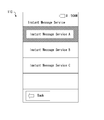
- the display screen 110 displays a plurality of IMSs 1 to 3 (Instant Message Service A, Instant Message Service B, and Instant Message Service C) that are installed in the mobile terminal device 100. That is, in FIG. 2, a list of IMS installed in the mobile terminal device 100 is displayed. In the example shown in FIG. 2, three IMSs 1 to 3 are displayed in the list. However, four or more IMSs may be installed and displayed, or one or two IMSs may be installed and displayed. Also good.
- IMSs 1 to 3 Instant Message Service A, Instant Message Service B, and Instant Message Service C
- FIG. 2 and 3 show display examples of screens according to the present embodiment.
- the display screen 110 displays a plurality of IMSs 1 to 3 (Instant Message Service A, Instant Message Service B, and Instant Message Service C) that are installed in the mobile terminal device 100. That is, in FIG. 2, a list of IMS installed in the mobile terminal device 100 is displayed. In the example shown in FIG. 2, three IMSs 1
- the screen when the user selects an IMS to be signed in from the list of installed IMSs, the screen is switched to a user information input screen for the IMS.
- the user inputs the user ID and password on the user information input screen, the user can sign in to the corresponding IMS account.
- the sign-in on the user information input screen is completed, the display screen returns to the display screen shown in FIG.
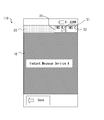
- the screen display is switched to FIG. 3, and the content of the IMS message selected by the user is displayed in the main display area 10.
- IMS1 Instant Message Service A
- the display screen 110 has a main display area 10 and a sub display area 20.
- a sub display area 20 is provided adjacent to the upper part of the main display area 10.
- the main display area 10 is used to display an IMS message selected by the user.
- the sub display area 20 is provided separately from the main display area 10 and is used to display the unread status of messages about IMS that have not been selected by the user. That is, the content of the IMS message selected by the user is displayed in the main display area 10, and the unread status of the message for the IMS that has not been selected is displayed in the sub display area 20.
- the range occupied by the main display area 10 on the display screen 110 occupies a relatively larger range compared to the range occupied by the sub display area 20. .
- IMS icons 21 and 22 indicating the IMSs are displayed in the sub display area 20 for the IMSs that are not selected by the user. Furthermore, an unread message presence icon 31 indicating the presence of an unread message is displayed on the IMS icon 21. That is, for the IMS that is not selected by the user, only the presence of the IMS and the presence of the unread message are displayed in the sub display area 20.
- the unread message presence icon 31 may be displayed in addition to the IMS icon 21 only when an unread message exists. Further, the number of unread messages may be displayed on the unread message presence icon 31.
- the layout and design of the IMS icons 21 and 22 and the unread message presence icon 31 are not particularly limited, and other layouts and designs may be adopted.
- the contents of IMS1 (Instant Message Service A) selected by the user are displayed in the main display area 10, and the contents of messages exchanged with other users are displayed.
- an IMS icon 21 indicating IMS2 (Instant Message Service B) not selected by the user and an IMS icon 22 indicating IMS 3 (Instant Message Service C) not selected by the user are displayed.
- an unread message presence icon 31 is displayed in the IMS icon 21 in the sub display area 20.
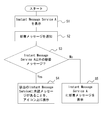
- FIG. 4 is a flowchart showing a screen display procedure according to the present embodiment.
- FIG. 4 illustrates an example in which the contents of IMS1 (Instant Message Service A) selected by the user are displayed in the main display area 10 (that is, the contents of IM1 are currently being viewed and viewed by the user). .)
- IMS1 Instant Message Service A
- the message notification unit 4 receives the new message. This is notified to the Messaging UI cooperation unit 5 (S2).
- the Messaging UI cooperation unit 5 determines whether or not the new message is a message for the IMS1 account that is currently being viewed (S3). As a result of the determination, if the message is not for IMS 1, the Messaging UI cooperation unit 5 updates the display screen to the display control unit 6 so as to visually change the display of the corresponding IMS icon in the sub display area 20. An instruction is output (S4). More specifically, the Messaging UI cooperation unit 5 updates the unread message presence icon on the IMS icon for the corresponding IMS in the sub display area 20. As a result, it is displayed in the sub display area 20 that there is an unread message for an IMS other than the IMS currently being viewed.
- the messaging UI cooperation unit 5 notifies the IMS 1 that the message has arrived.
- the IMS 1 receives the notification, the IMS 1 generates message display data from the received message, outputs a display screen update command to the display control unit 6, and displays a new message in the main display area 10 (S5). .
- the content of the new arrival message is displayed in the main display area 10 for the IMS currently being viewed.
- the user may perform a touch operation on the IMS icons 21 and 22 in the sub display area 20, for example.
- the IMS 2 displays the message in the main display area 10
- the Messaging UI cooperation unit 5 displays the IMS 1 in the sub display area 20. IMS icon is displayed.
- the Messaging UI cooperation unit 5 determines that a message for IMS 2 has arrived instead of a message for IMS 1 that is currently being viewed, and displays an unread message on the IMS icon 21 of IMS 2.
- a display screen update command is output to the display control unit 6 so that the presence icon 31 is displayed.
- the display control unit 6 that has received the display command from the messaging UI cooperation unit 5 outputs a display screen update command to the display unit 7. Further, an unread message presence icon 31 is displayed on the IMS icon 21 in the sub display area 20.
- the user always displays the contents of IMS1 in the main display area 10 while signed in to a plurality of IMS1 to 3 accounts, and at the same time, the presence of unread messages about other IMSs (IMS2 and IMS3). Can be confirmed. Further, the user can know the arrival of a new message of another IMS (IMS2 or IMS3) and the presence of an unread message without switching the screen.
- 100 mobile terminal device 1-3 IMS, 4 Message notification part, 5 Messaging UI Cooperation Department, 6 Display controller, 7 Display section, 110 display screen, 10 Main display area, 20 sub-display area, 21, 22 IMS icon, 31 Unread message presence icon
Landscapes
- Engineering & Computer Science (AREA)
- Computer Networks & Wireless Communication (AREA)
- General Engineering & Computer Science (AREA)
- Signal Processing (AREA)
- Theoretical Computer Science (AREA)
- Human Computer Interaction (AREA)
- Physics & Mathematics (AREA)
- General Physics & Mathematics (AREA)
- Business, Economics & Management (AREA)
- General Business, Economics & Management (AREA)
- Information Transfer Between Computers (AREA)
- Telephone Function (AREA)
- User Interface Of Digital Computer (AREA)
- Digital Computer Display Output (AREA)
Abstract
Description
以下、図面を参照して本発明の実施の形態について説明する。
図1は、本実施の形態に係る携帯端末装置の機能ブロック図である。携帯端末装置100は、サインイン済みの複数のIMS1~3(Instant Message Service A、Instant Message Service B、Instant Message Service C)と、メッセージ通知部4と、Messaging UI連携部5と、表示制御部6と、表示部7と、を備えている。
図2では、表示画面110には、携帯端末装置100にインストール済みの複数のIMS1~3(Instant Message Service A、Instant Message Service B、Instant Message Service C)が表示されている。すなわち、図2では、携帯端末装置100にインストールされているIMSの一覧が表示されている。なお、図2に示す例では、3つのIMS1~3を一覧に表示しているが、4以上のIMSがインストールされて表示されてもよいし、1又は2のIMSがインストールされて表示されてもよい。
1~3 IMS、
4 メッセージ通知部、
5 Messaging UI連携部、
6 表示制御部、
7 表示部、
110 表示画面、
10 主表示領域、
20 副表示領域、
21、22 IMSアイコン、
31 未読メッセージ存在アイコン
Claims (6)
- インスタントメッセージサービスをユーザに提供するアプリケーションプログラムであって、アカウントにサインイン済みの複数のインスタントメッセージサービスと、
主表示領域と、当該主表示領域とは別に設けられる副表示領域と、を含む表示画面を表示する表示手段と、
前記表示手段の表示を制御し、前記複数のインスタントメッセージサービスのうちで選択されたいずれか1のインスタントメッセージサービスが提供するサービスの内容を前記主表示領域に表示すると共に、選択されなかった他のインスタントメッセージサービスについては対応するインスタントメッセージサービスアイコンを前記副表示領域に表示する表示制御手段と、
インスタントメッセージを端末装置が受信したことを検出し、インスタントメッセージの着信が発生した旨を通知するメッセージ通知手段と、
前記メッセージ通知手段からの通知に応じて、前記端末装置が受信したインスタントメッセージが、前記複数のインスタントメッセージサービスのうちでいずれのインスタントメッセージサービスに対するメッセージであるかを判断し、前記主表示領域において現在表示閲覧中のインスタントメッセージサービスに対するメッセージでなかった場合に、該当するインスタントメッセージサービスについて未読メッセージが存在することを表示させるべく、前記副表示領域において、対応する前記インスタントメッセージサービスアイコンの表示を視覚的に変化させるように、前記表示制御手段に対して表示画面更新命令を出力するメッセージングユーザインタフェース連携手段と、
を備える、携帯端末装置。 - 前記メッセージングユーザインタフェース連携手段は、
前記端末装置が受信したインスタントメッセージに含まれるユーザIDから、前記複数のインスタントメッセージサービスのうちでいずれのインスタントメッセージサービスに対するメッセージであるかを判断する
ことを特徴とする請求項1に記載の携帯端末装置。 - 前記メッセージングユーザインタフェース連携手段は、
前記端末装置が受信したインスタントメッセージが、前記主表示領域において現在表示閲覧中のインスタントメッセージサービスに対するメッセージでなかった場合に、未読メッセージの個数をカウントしてメモリに記憶し、前記副表示領域において、対応する前記インスタントメッセージサービスアイコンの表示に加えて、前記メモリに記憶した未読メッセージの個数を表示させる
ことを特徴とする請求項1又は2に記載の携帯端末装置。 - 主表示領域と、当該主表示領域とは別に設けられる副表示領域と、を含む表示画面の表示を制御し、アカウントにサインイン済みの複数のインスタントメッセージサービスのうちで選択されたいずれか1のインスタントメッセージサービスが提供するサービスの内容を前記主表示領域に表示すると共に、選択されなかった他のインスタントメッセージサービスについては対応するインスタントメッセージサービスアイコンを前記副表示領域に表示する表示制御ステップと、
インスタントメッセージを端末装置が受信したことを検出し、インスタントメッセージの着信が発生した旨を通知するメッセージ通知ステップと、
前記通知に応じて、前記端末装置が受信したインスタントメッセージが、前記複数のインスタントメッセージサービスのうちでいずれのインスタントメッセージサービスに対するメッセージであるかを判断し、前記主表示領域において現在表示閲覧中のインスタントメッセージサービスに対するメッセージでなかった場合に、該当するインスタントメッセージサービスについて未読メッセージが存在することを表示させるべく、前記副表示領域において、対応する前記インスタントメッセージサービスアイコンの表示を視覚的に変化させるように、表示画面更新命令を出力するメッセージングユーザインタフェース連携ステップと、
を有する、携帯端末装置の画面表示方法。 - 前記メッセージングユーザインタフェース連携ステップでは、
前記端末装置が受信したインスタントメッセージに含まれるユーザIDから、前記複数のインスタントメッセージサービスのうちでいずれのインスタントメッセージサービスに対するメッセージであるかを判断する
ことを特徴とする請求項4に記載の携帯端末装置の画面表示方法。 - 前記メッセージングユーザインタフェース連携ステップでは、
前記端末装置が受信したインスタントメッセージが、前記主表示領域において現在表示閲覧中のインスタントメッセージサービスに対するメッセージでなかった場合に、未読メッセージの個数をカウントしてメモリに記憶し、前記副表示領域において、対応する前記インスタントメッセージサービスアイコンの表示に加えて、前記メモリに記憶した未読メッセージの個数を表示させる
ことを特徴とする請求項4又は5に記載の携帯端末装置の画面表示方法。
Priority Applications (4)
| Application Number | Priority Date | Filing Date | Title |
|---|---|---|---|
| CN2011800676165A CN103370683A (zh) | 2011-02-15 | 2011-11-30 | 便携式终端设备及其屏幕显示方法 |
| EP11858946.4A EP2677433B1 (en) | 2011-02-15 | 2011-11-30 | Portable terminal device and screen display method thereof |
| JP2012557671A JP5895852B2 (ja) | 2011-02-15 | 2011-11-30 | 携帯端末装置およびその画面表示方法 |
| US13/985,506 US9467402B2 (en) | 2011-02-15 | 2011-11-30 | Portable terminal device and screen display method thereof |
Applications Claiming Priority (2)
| Application Number | Priority Date | Filing Date | Title |
|---|---|---|---|
| JP2011029664 | 2011-02-15 | ||
| JP2011-029664 | 2011-02-15 |
Publications (1)
| Publication Number | Publication Date |
|---|---|
| WO2012111058A1 true WO2012111058A1 (ja) | 2012-08-23 |
Family
ID=46672024
Family Applications (1)
| Application Number | Title | Priority Date | Filing Date |
|---|---|---|---|
| PCT/JP2011/006723 Ceased WO2012111058A1 (ja) | 2011-02-15 | 2011-11-30 | 携帯端末装置およびその画面表示方法 |
Country Status (5)
| Country | Link |
|---|---|
| US (1) | US9467402B2 (ja) |
| EP (1) | EP2677433B1 (ja) |
| JP (1) | JP5895852B2 (ja) |
| CN (1) | CN103370683A (ja) |
| WO (1) | WO2012111058A1 (ja) |
Cited By (5)
| Publication number | Priority date | Publication date | Assignee | Title |
|---|---|---|---|---|
| JP2015176225A (ja) * | 2014-03-13 | 2015-10-05 | 株式会社リコー | 情報処理装置、伝送システム、通信方法、プログラム |
| JP2017510882A (ja) * | 2014-04-30 | 2017-04-13 | テンセント・テクノロジー・(シェンジェン)・カンパニー・リミテッド | チャット情報伝送方法および装置、ならびにチャット情報プッシュ方法およびサーバ |
| JP2018514829A (ja) * | 2015-02-05 | 2018-06-07 | アリババ・グループ・ホールディング・リミテッドAlibaba Group Holding Limited | マルチアカウントのログイン及び通信方法、装置、ならびにモバイル端末 |
| JP2019502184A (ja) * | 2015-10-14 | 2019-01-24 | キム、ウン ミKIM,Eun−Mi | 移動端末に表示される通知ツールによるメッセージ受信確認表示方法、及びその記録媒体と移動端末 |
| JP2024508367A (ja) * | 2021-01-29 | 2024-02-27 | 北京字跳▲網▼絡技▲術▼有限公司 | 情報表示方法、装置及び電子機器 |
Families Citing this family (23)
| Publication number | Priority date | Publication date | Assignee | Title |
|---|---|---|---|---|
| CN103677521A (zh) * | 2013-12-06 | 2014-03-26 | 宇龙计算机通信科技(深圳)有限公司 | 消息通知显示方法和终端 |
| EP3189395B1 (en) | 2014-09-02 | 2024-06-12 | Apple Inc. | Semantic framework for variable haptic output |
| CN104539791B (zh) * | 2014-12-04 | 2017-11-07 | 天津三星通信技术研究有限公司 | 在通信终端中进行即时通信的方法及装置 |
| US9877170B2 (en) * | 2014-12-22 | 2018-01-23 | Asustek Computer Inc. | Cross-account notification method and electronic device using the same |
| KR102252619B1 (ko) * | 2015-02-03 | 2021-05-17 | 삼성전자 주식회사 | 알림 제공 방법 및 이를 구현하는 전자 장치 |
| KR20160126354A (ko) * | 2015-04-23 | 2016-11-02 | 삼성전자주식회사 | 전자 장치 및 전자 장치에서 메시지 표시 방법 |
| US9940637B2 (en) | 2015-06-05 | 2018-04-10 | Apple Inc. | User interface for loyalty accounts and private label accounts |
| RU2685984C1 (ru) * | 2015-07-31 | 2019-04-23 | ЭЙЗО Корпорайшн | Устройство управления отображением, устройство отображения, система отображения и программа |
| CN105468236A (zh) * | 2015-11-23 | 2016-04-06 | 小米科技有限责任公司 | 消息提示方法、装置及终端 |
| CN106888150B (zh) * | 2015-12-15 | 2020-04-24 | 腾讯科技(深圳)有限公司 | 即时消息处理方法和装置 |
| CN105607883B (zh) * | 2015-12-30 | 2019-02-22 | 小米科技有限责任公司 | 即时消息的处理方法及装置 |
| US11580608B2 (en) * | 2016-06-12 | 2023-02-14 | Apple Inc. | Managing contact information for communication applications |
| DK179823B1 (en) | 2016-06-12 | 2019-07-12 | Apple Inc. | DEVICES, METHODS, AND GRAPHICAL USER INTERFACES FOR PROVIDING HAPTIC FEEDBACK |
| DK179489B1 (en) | 2016-06-12 | 2019-01-04 | Apple Inc. | Devices, methods and graphical user interfaces for providing haptic feedback |
| CN106231074A (zh) * | 2016-07-15 | 2016-12-14 | 宇龙计算机通信科技(深圳)有限公司 | 一种消息处理的方法及装置 |
| DK179278B1 (en) | 2016-09-06 | 2018-03-26 | Apple Inc | Devices, methods and graphical user interfaces for haptic mixing |
| DK201670720A1 (en) | 2016-09-06 | 2018-03-26 | Apple Inc | Devices, Methods, and Graphical User Interfaces for Generating Tactile Outputs |
| CN106325682A (zh) * | 2016-09-13 | 2017-01-11 | 宇龙计算机通信科技(深圳)有限公司 | 消息回复方法及系统 |
| DK201770372A1 (en) | 2017-05-16 | 2019-01-08 | Apple Inc. | TACTILE FEEDBACK FOR LOCKED DEVICE USER INTERFACES |
| DK201870378A1 (en) | 2018-05-07 | 2020-01-13 | Apple Inc. | DISPLAYING USER INTERFACES ASSOCIATED WITH PHYSICAL ACTIVITIES |
| CN108809815B (zh) * | 2018-06-29 | 2021-06-22 | 上海哔哩哔哩科技有限公司 | 会话未读条数更新方法、会话处理方法、装置和系统 |
| US10992633B1 (en) * | 2018-12-31 | 2021-04-27 | Whatsapp Inc. | Methods and systems for determining an unread message count |
| DK201970531A1 (en) | 2019-05-06 | 2021-07-09 | Apple Inc | Avatar integration with multiple applications |
Citations (4)
| Publication number | Priority date | Publication date | Assignee | Title |
|---|---|---|---|---|
| JPH10154117A (ja) * | 1996-09-30 | 1998-06-09 | Fujitsu Ltd | チャットシステムの端末装置、チャットシステム、チャットシステムの表示方法及び記録媒体 |
| JP2006351020A (ja) * | 2005-06-17 | 2006-12-28 | Research In Motion Ltd | 同時メッセージングセッション間のスイッチのための方法および装置 |
| JP2007512635A (ja) | 2003-12-01 | 2007-05-17 | リサーチ イン モーション リミテッド | 小型スクリーンデバイス上の新しいイベントのプレビューイング |
| JP2010086326A (ja) | 2008-09-30 | 2010-04-15 | Brother Ind Ltd | 携帯端末、クライアント端末、通信システム、及び携帯端末プログラム |
Family Cites Families (6)
| Publication number | Priority date | Publication date | Assignee | Title |
|---|---|---|---|---|
| US6370563B2 (en) | 1996-09-30 | 2002-04-09 | Fujitsu Limited | Chat system terminal device therefor display method of chat system and recording medium |
| US7278108B2 (en) | 2001-08-10 | 2007-10-02 | Danger, Inc. | System and method of displaying multiple pending notifications in a single window |
| US7343567B2 (en) | 2003-04-25 | 2008-03-11 | Microsoft Corporation | System and method for providing dynamic user information in an interactive display |
| US7529853B2 (en) * | 2003-06-25 | 2009-05-05 | Oracle International Corporation | Universal IM and presence aggregation on technology-specific client |
| ES2281757T3 (es) | 2004-11-09 | 2007-10-01 | Research In Motion Limited | Interfaz de usuario orientada a barras dinamicas. |
| KR101239197B1 (ko) * | 2006-06-30 | 2013-03-05 | 주식회사 케이티 | 이동 통신 시스템에서 다수의 인스턴트 메시지 서비스를통합하여 제공하는 장치 및 방법과 이를 위한 무선 통신단말기 |
-
2011
- 2011-11-30 JP JP2012557671A patent/JP5895852B2/ja not_active Expired - Fee Related
- 2011-11-30 EP EP11858946.4A patent/EP2677433B1/en not_active Not-in-force
- 2011-11-30 WO PCT/JP2011/006723 patent/WO2012111058A1/ja not_active Ceased
- 2011-11-30 US US13/985,506 patent/US9467402B2/en not_active Expired - Fee Related
- 2011-11-30 CN CN2011800676165A patent/CN103370683A/zh active Pending
Patent Citations (4)
| Publication number | Priority date | Publication date | Assignee | Title |
|---|---|---|---|---|
| JPH10154117A (ja) * | 1996-09-30 | 1998-06-09 | Fujitsu Ltd | チャットシステムの端末装置、チャットシステム、チャットシステムの表示方法及び記録媒体 |
| JP2007512635A (ja) | 2003-12-01 | 2007-05-17 | リサーチ イン モーション リミテッド | 小型スクリーンデバイス上の新しいイベントのプレビューイング |
| JP2006351020A (ja) * | 2005-06-17 | 2006-12-28 | Research In Motion Ltd | 同時メッセージングセッション間のスイッチのための方法および装置 |
| JP2010086326A (ja) | 2008-09-30 | 2010-04-15 | Brother Ind Ltd | 携帯端末、クライアント端末、通信システム、及び携帯端末プログラム |
Non-Patent Citations (1)
| Title |
|---|
| See also references of EP2677433A4 |
Cited By (6)
| Publication number | Priority date | Publication date | Assignee | Title |
|---|---|---|---|---|
| JP2015176225A (ja) * | 2014-03-13 | 2015-10-05 | 株式会社リコー | 情報処理装置、伝送システム、通信方法、プログラム |
| JP2017510882A (ja) * | 2014-04-30 | 2017-04-13 | テンセント・テクノロジー・(シェンジェン)・カンパニー・リミテッド | チャット情報伝送方法および装置、ならびにチャット情報プッシュ方法およびサーバ |
| JP2018514829A (ja) * | 2015-02-05 | 2018-06-07 | アリババ・グループ・ホールディング・リミテッドAlibaba Group Holding Limited | マルチアカウントのログイン及び通信方法、装置、ならびにモバイル端末 |
| JP2019502184A (ja) * | 2015-10-14 | 2019-01-24 | キム、ウン ミKIM,Eun−Mi | 移動端末に表示される通知ツールによるメッセージ受信確認表示方法、及びその記録媒体と移動端末 |
| JP2024508367A (ja) * | 2021-01-29 | 2024-02-27 | 北京字跳▲網▼絡技▲術▼有限公司 | 情報表示方法、装置及び電子機器 |
| JP7749675B2 (ja) | 2021-01-29 | 2025-10-06 | 北京字跳▲網▼絡技▲術▼有限公司 | 情報表示方法、装置及び電子機器 |
Also Published As
| Publication number | Publication date |
|---|---|
| JP5895852B2 (ja) | 2016-03-30 |
| US20130326367A1 (en) | 2013-12-05 |
| EP2677433A4 (en) | 2014-12-24 |
| EP2677433A1 (en) | 2013-12-25 |
| EP2677433B1 (en) | 2016-05-04 |
| US9467402B2 (en) | 2016-10-11 |
| CN103370683A (zh) | 2013-10-23 |
| JPWO2012111058A1 (ja) | 2014-07-03 |
Similar Documents
| Publication | Publication Date | Title |
|---|---|---|
| JP5895852B2 (ja) | 携帯端末装置およびその画面表示方法 | |
| KR102091235B1 (ko) | 휴대 단말기에서 메시지를 편집하는 장치 및 방법 | |
| JP5518173B2 (ja) | コンピュータによってタッチスクリーンタイプの移動通信端末を制御するに当たってのコンピュータ及び移動通信端末の画面状態の管理方法 | |
| WO2014129655A1 (ja) | 携帯端末装置、および携帯端末装置の制御方法 | |
| US20080207188A1 (en) | Method of displaying menu in a mobile communication terminal | |
| US20110087990A1 (en) | User interface for a touchscreen display | |
| US20100214218A1 (en) | Virtual mouse | |
| EP4246922B1 (en) | Sending method and apparatus, and electronic device | |
| KR20110066974A (ko) | 2차 문자 표현 및 입력의 휴대용 전자 디바이스 및 방법 | |
| US20110320939A1 (en) | Electronic Device for Providing a Visual Representation of a Resizable Widget Associated with a Contacts Database | |
| CN103543915A (zh) | 一种移动终端及其分屏的方法 | |
| US20080244452A1 (en) | Method and terminal for implementing preview function | |
| JP2012008827A (ja) | 情報処理装置 | |
| KR20120085456A (ko) | 터치스크린 기반 웹브라이저 환경에서 링크 개체 선택 방법 및 장치 | |
| JP5931627B2 (ja) | 携帯端末装置、プログラムおよび入力訂正方法 | |
| KR101434495B1 (ko) | 터치스크린을 구비한 단말기 및 그 문자 입력 방법 | |
| JP2014102575A (ja) | 情報処理装置、表示制御方法、及びプログラム | |
| CN106933438A (zh) | 一种应用显示方法、装置和移动终端 | |
| JP2010170161A (ja) | 情報端末装置、ウィンドウ制御方法、プログラム、およびプログラムを記録した記録媒体 | |
| JP2014035688A (ja) | 情報機器、表示制御方法及びプログラム | |
| JP2015011387A (ja) | 携帯機器、携帯機器の制御方法およびプログラム | |
| JP2010079862A (ja) | タッチパネルを搭載した小型デバイスのためのソフトウェアとその利用方法 | |
| JP6295284B2 (ja) | 情報処理システム、および情報処理方法 | |
| JP4435041B2 (ja) | 携帯電話およびその遠隔操作方法 | |
| JP2014182496A (ja) | 情報処理装置、制御方法、および制御プログラム |
Legal Events
| Date | Code | Title | Description |
|---|---|---|---|
| 121 | Ep: the epo has been informed by wipo that ep was designated in this application |
Ref document number: 11858946 Country of ref document: EP Kind code of ref document: A1 |
|
| ENP | Entry into the national phase |
Ref document number: 2012557671 Country of ref document: JP Kind code of ref document: A |
|
| WWE | Wipo information: entry into national phase |
Ref document number: 2011858946 Country of ref document: EP |
|
| WWE | Wipo information: entry into national phase |
Ref document number: 13985506 Country of ref document: US |
|
| NENP | Non-entry into the national phase |
Ref country code: DE |