WO2012144160A1 - Electronic apparatus, display method, and program - Google Patents
Electronic apparatus, display method, and program Download PDFInfo
- Publication number
- WO2012144160A1 WO2012144160A1 PCT/JP2012/002483 JP2012002483W WO2012144160A1 WO 2012144160 A1 WO2012144160 A1 WO 2012144160A1 JP 2012002483 W JP2012002483 W JP 2012002483W WO 2012144160 A1 WO2012144160 A1 WO 2012144160A1
- Authority
- WO
- WIPO (PCT)
- Prior art keywords
- page
- display
- web page
- drag operation
- tab
- Prior art date
- Legal status (The legal status is an assumption and is not a legal conclusion. Google has not performed a legal analysis and makes no representation as to the accuracy of the status listed.)
- Ceased
Links
Images




Classifications
-
- G—PHYSICS
- G06—COMPUTING OR CALCULATING; COUNTING
- G06F—ELECTRIC DIGITAL DATA PROCESSING
- G06F3/00—Input arrangements for transferring data to be processed into a form capable of being handled by the computer; Output arrangements for transferring data from processing unit to output unit, e.g. interface arrangements
- G06F3/01—Input arrangements or combined input and output arrangements for interaction between user and computer
- G06F3/048—Interaction techniques based on graphical user interfaces [GUI]
- G06F3/0484—Interaction techniques based on graphical user interfaces [GUI] for the control of specific functions or operations, e.g. selecting or manipulating an object, an image or a displayed text element, setting a parameter value or selecting a range
- G06F3/0485—Scrolling or panning
-
- G—PHYSICS
- G06—COMPUTING OR CALCULATING; COUNTING
- G06F—ELECTRIC DIGITAL DATA PROCESSING
- G06F3/00—Input arrangements for transferring data to be processed into a form capable of being handled by the computer; Output arrangements for transferring data from processing unit to output unit, e.g. interface arrangements
- G06F3/01—Input arrangements or combined input and output arrangements for interaction between user and computer
- G06F3/048—Interaction techniques based on graphical user interfaces [GUI]
- G06F3/0481—Interaction techniques based on graphical user interfaces [GUI] based on specific properties of the displayed interaction object or a metaphor-based environment, e.g. interaction with desktop elements like windows or icons, or assisted by a cursor's changing behaviour or appearance
- G06F3/0483—Interaction with page-structured environments, e.g. book metaphor
-
- G—PHYSICS
- G06—COMPUTING OR CALCULATING; COUNTING
- G06F—ELECTRIC DIGITAL DATA PROCESSING
- G06F3/00—Input arrangements for transferring data to be processed into a form capable of being handled by the computer; Output arrangements for transferring data from processing unit to output unit, e.g. interface arrangements
- G06F3/01—Input arrangements or combined input and output arrangements for interaction between user and computer
- G06F3/048—Interaction techniques based on graphical user interfaces [GUI]
- G06F3/0487—Interaction techniques based on graphical user interfaces [GUI] using specific features provided by the input device, e.g. functions controlled by the rotation of a mouse with dual sensing arrangements, or of the nature of the input device, e.g. tap gestures based on pressure sensed by a digitiser
- G06F3/0488—Interaction techniques based on graphical user interfaces [GUI] using specific features provided by the input device, e.g. functions controlled by the rotation of a mouse with dual sensing arrangements, or of the nature of the input device, e.g. tap gestures based on pressure sensed by a digitiser using a touch-screen or digitiser, e.g. input of commands through traced gestures
Definitions
- the present disclosure relates to an electronic apparatus, a display method, and a program.
- a portable terminal such as a smart phone including a touch screen
- a web page corresponding to the tab selected on the browser is displayed.
- Japanese Patent Application Laid-open No. 2004-030145 discloses a technique relating to this.
- an electronic apparatus includes a display and an input apparatus operable to detect a gesture on the display.
- the display When the display is displaying a first page and the input apparatus detects a drag operation, the display displays a second page in response to the drag operation.
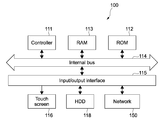
- FIG. 1 is a block diagram showing a configuration of an electronic apparatus of an embodiment according to the present disclosure.
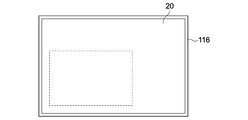
- FIG. 2 is a diagram showing a display example in a touch screen shown in FIG. 1.
- FIG. 3 is an image diagram of an arrangement of tabs and web pages associated with histories in the embodiment.
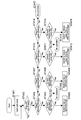
- FIG. 4 is a flow chart for illustrating a switching operation of web pages that is performed by a drag operation in the embodiment.
- FIG. 5A is a diagram showing a state of web pages gradually disappearing and gradually appearing in the embodiment.
- FIG. 5B is a diagram showing a state of the web pages gradually disappearing and gradually appearing in the embodiment.
- FIG. 5C is a diagram showing a state of the web pages gradually disappearing and gradually appearing in the embodiment.
- FIG. 5A is a diagram showing a state of web pages gradually disappearing and gradually appearing in the embodiment.
- FIG. 5B is a diagram showing a state of the web pages gradually disappearing and gradually appearing in the embodiment.
- FIG. 5C is a diagram
- FIG. 5D is a diagram showing a state of the web pages gradually disappearing and gradually appearing in the embodiment.
- FIG. 6A is a diagram for illustrating switching of web pages in tabs as a comparative example.
- FIG. 6B is a diagram for illustrating the switching of the web pages in the tabs as the comparative example.
- FIG. 6C is a diagram for illustrating the switching of the web pages in the tabs as the comparative example.
- FIG. 7 is a diagram for illustrating switching of web pages in tabs as another comparative example.
- FIG. 8 is a diagram showing a web page displayed on a browser in a touch screen according to another embodiment.
- FIG. 1 is a block diagram showing a configuration of an electronic apparatus of an embodiment according to the present disclosure.
- the electronic apparatus 100 includes a controller 111 including a central processing unit (CPU), a read only memory (ROM) 112, a random access memory (RAM) 113, an input/output interface 115, and a bus 114 that connects them to each other.
- a controller 111 including a central processing unit (CPU), a read only memory (ROM) 112, a random access memory (RAM) 113, an input/output interface 115, and a bus 114 that connects them to each other.
- CPU central processing unit
- ROM read only memory
- RAM random access memory
- bus 114 that connects them to each other.
- the controller 111 appropriately accesses the RAM 113 or the like depending on needs and performs overall control of entire blocks of the electronic apparatus 100 while executing various types of arithmetic processing.
- the ROM 112 is a non-volatile memory that fixedly stores firmware such as an operating system (OS), programs, and various parameters that are executed by the controller 111.
- the RAM 113 is used as a working area or the like for the controller 111 and temporarily stores an OS, various running application programs, and various types of data being processed.
- To the input/output interface 115 connected are a touch screen 116, a hard disk drive (HDD) 118 as a storage, a network 150, and the like.
- HDD hard disk drive
- the network 150 connects to another network in a wired or wireless manner.
- the touch screen 116 is constituted of, for example, a touch panel as an input apparatus and a liquid crystal panel as a display unit.
- the touch panel of the touch screen 116 refers to a transparent pressure-sensitive input apparatus superposed on a surface of the liquid crystal panel.
- the touch panel receives an input operation made by a user on an arbitrary point in a display screen.
- a gesture operation such as a touch operation or a drag operation performed on the touch panel with a finger or a touch pen
- the touch panel detects positional coordinates corresponding to this gesture operation and outputs them to the controller 111.
- an arbitrary position detection device may be used irrespective of being contact type or non-contact type.
- the liquid crystal panel of the touch screen 116 includes a display panel unit such as a liquid crystal display and a display driving unit that drives the display panel unit to perform display.
- the display driving unit is constituted of a pixel driving circuit for displaying on the display panel unit various types of display data input therein via the bus 114.
- the pixel driving circuit applies, for each of pixels arranged in a matrix form on the display panel unit, a driving signal based on an image signal at a predetermined horizontal/vertical driving timing in order to cause it to execute display.
- a tabbed browser 20 can be displayed on the touch screen 116.
- the tabbed browser 20 is displayed on almost the entire touch screen 116, the tabbed browser 20 reduced in size may be displayed on a partial area of the touch screen 116 as shown in a broken line in FIG. 2.
- a window within the tabbed browser 20 by switching tabs, a web page in a tab that is currently displayed in the single window can be switched to a web page of another tab.
- each of the web pages 31 to 35 the user feels that web pages associated with a history of each of the web pages 31 to 35 are arranged in upper and lower directions.
- four web pages 33a to 33d shown in broken lines refer to web pages associated with the history of the web page 33 in the tab.
- the web pages 33a and 33b above the web page 33 refer to web pages that the user has opened before finding the web page 33.
- the web pages 33c and 33d below the web page 33 refer to web pages that the user has opened after finding the web page 33.
- the same as in the history associated with the web page 33 applies to each of the web pages 31, 32, 34, and 35.
- FIG. 4 is a flow chart for illustrating a switching operation of web pages that is performed by a drag operation in this embodiment.
- the controller 111 When the controller 111 detects that a gesture operation being a double tap is performed on an icon displayed on the touch screen 116, the controller 111 displays a window of the tabbed browser 20 and opens a web page therein (Step 401).
- the first opened web page may be a preset homepage in a tab or may be the last web page closed in that tab.
- the controller 111 performs the following operations when a drag operation is performed with two fingers on the touch screen 116 with the web page being opened (Step 402).
- the controller 111 determines whether or not a web page in a usable tab is present on a right-hand side (Step 404). For example, if the displayed web page in the tab is the web page 35 located at a right end in FIG. 3, it is determined that the web page in the usable tab is not present on the right-hand side.
- Step 404 the controller 111 determines in Step 404 that the web page in the usable tab is present on the right-hand side
- the controller 111 performs switching so that the web page in the tab on the right-hand side is displayed in the window of the tabbed browser 20 (Step 405). For example, if the displayed web page in the tab is the web page 33 shown in FIG. 3, the controller 111 switches to the web page 34 on the right-hand side.
- the controller 111 performs control so as to switch from displaying the displayed web page in the tab to displaying a web page in another tab by performing display such that the web page 33 moves in the left-hand direction to gradually disappear from the tabbed browser 20 and the web page 34 is translated (moves) in the left-hand direction following the web page 33 to gradually appear in the tabbed browser 20. States of the web pages gradually disappearing and gradually appearing in this manner are shown in FIGS. 5A to 5D.
- FIG. 5A shows a state when a drag operation is performed on the displayed web page 33 in the tab.
- a solid-line circle expresses a drag operation with two fingers and a broken-line circle expresses a state when a drag operation in the left-hand direction is performed after that.
- this drag operation first, a remaining part of the web page 33 on the right-hand side appears and is displayed as shown in FIG. 5B.
- the web page 33 in the tab gradually disappears to a left-hand side and the web page 34 in another (adjacent) tab gradually appears on the right-hand side.
- FIG. 5C shows a state when a drag operation is performed on the displayed web page 33 in the tab.
- the web page 33 in the tab completely disappears and the web page 34 in the tab is displayed on the browser.
- the web pages may be switched in synchronous with movement of a touch position according to the drag operation from the solid-line circle to the broken-line circle.
- the web pages may be switched so that the user can feel an inertial force in the movement of the touch position according to the drag operation from the solid-line circle to the broken-line circle (i.e., the user can feel as if the movement of the touch position according to the drag operation is accelerated).
- Step 404 the controller 111 determines in Step 404 that the web page in the usable tab is not present on the right-hand side, the controller 111 does not perform the switching operation of the web pages in the tabs (Step 406). As described above, for example, if the displayed web page in the tab is the web page 35 located at the right end in FIG. 3, the controller 111 determines that the web page in the usable tab is not present on the right-hand side and does not perform the switching operation of the web pages in the tabs.
- Step 402 determines whether a web page in a usable tab is present on the left-hand side (Step 408). For example, if the displayed web page in the tab is the web page 31 located at a left end in FIG. 3, it is determined that the web page in the usable tab is not present on the left-hand side.
- Step 407 When the controller 111 determines in Step 407 that the web page in the usable tab is present on the left-hand side, the controller 111 performs switching so that the web page in the tab on the left-hand side is displayed in the window of the tabbed browser 20 (Step 409). For example, if the displayed web page in the tab is the web page 33 shown in FIG. 3, the controller 111 switches to the web page 32 on the left-hand side.
- the controller 111 performs control so as to switch from displaying the displayed web page in the tab to displaying a web page in another tab by performing display such that the web page 33 moves in the right-hand direction to gradually disappear from the tabbed browser 20 and the web page 32 is translated in the right-hand direction following the web page 33 to gradually appear in the tabbed browser 20.
- Step 408 the controller 111 determines in Step 408 that the web page in the usable tab is not present on the left-hand side
- the controller 111 does not perform the switching operation of the web pages in the tabs (Step 406).
- the controller 111 determines that the web page in the usable tab is not present on the left-hand side and does not perform the switching operation of the web pages in the tabs.
- the controller 111 determines whether or not a usable web page associated with a history is present on an upper side (Step 411). For example, if the displayed web page is the web page 33a located at an upper end in FIG. 3, it is determined that the usable web page associated with the history is not present on the upper side. That is, the web page 33a means the first web page opened in that tab.
- the controller 111 determines in Step 411 that the usable web page associated with the history is present on the upper side, the controller 111 switches to displaying a closed web page directly before the displayed web page (Step 412). For example, if the displayed web page in the tab is the web page 33 shown in FIG. 3, the controller 111 switches to the web page 33b in the upper side. In this case, the controller 111 performs control so as to switch from displaying the displayed web page to displaying the web page directly before the displayed web page by performing display such that the web page 33 moves in the lower direction to gradually disappear from the tabbed browser 20 and the web page 33b is translated in the lower direction following the web page 33 below it to gradually appear in the tabbed browser 20.
- Step 411 When the controller 111 determines in Step 411 that the usable web page associated with the history is not present on the upper side, the controller 111 does not perform the switching operation of the web pages associated with the history (Step 413). As described above, for example, if the displayed web page is the web page 33a located at the upper end in FIG. 3, the controller 111 determines that the usable web page associated with the history is not present on the upper side and does not perform the switching operation of the web pages associated with the history.
- the controller 111 determines whether or not a usable web page associated with the history is present on a lower side (Step 415). For example, if the displayed web page is the web page 33d located at a lower end in FIG. 3, it is determined that the usable web page associated with the history is not present on the lower side. That is, the web page 33d means the last web page opened in that tab.
- Step 415 the controller 111 switches to displaying a closed web page directly after the displayed web page (Step 416). For example, if the displayed web page in the tab is the web page 33 shown in FIG. 3, the controller 111 switches to the web page 33c in the lower side. In this case, the controller 111 performs control so as to switch from displaying the displayed web page to displaying the web page the web page directly after the displayed web page by performing display such that the web page 33 moves in the upper direction to gradually disappear from the tabbed browser 20 and the web page 33c is translated in the upper direction following the web page 33 above it to gradually appear in the tabbed browser 20.
- Step 415 the controller 111 determines in Step 415 that the usable web page associated with the history is not present on the lower side
- the controller 111 does not perform the switching operation of the web pages associated with the history (Step 413).
- the controller 111 determines that the usable web page associated with the history is not present on the lower side and does not perform the switching operation of the web pages associated with the history.
- Step 402 When the drag operation with the two fingers in Step 402 is an operation other than the operations in the upper and lower directions and the left- and right-hand directions, that is, an operation in an oblique direction, the controller 111 does not perform the switching operation of the web pages (Step 417).
- the directions do not need to be precisely set, and, for example, a drag operation having a certain angle may be considered as one of the drag operations in the upper and lower directions and the left- and right-hand directions.
- the switching of the tabs or the switching of the web pages associated with the history may be replaced by page skip, for example.
- the controller 111 may switch to a web page in a tab on the right-hand side.
- the controller 111 may switch to not the web page in the tab on the right-hand side, but a web page in the second tab on the right-hand side. (Advantages of Switching Operation of Web Pages) According to the electronic apparatus 100, only by performing a drag operation on the touch screen 116, the user can switch the web pages.
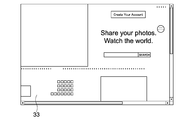
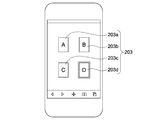
- FIG. 6A when the user selects (performs a double tap on) a predetermined icon 202 on the touch screen 201 including a browser in which a web page 200 is displayed, a tab list 203 is opened on the browser as shown in FIG. 6B.
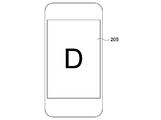
- a web page 205 in another tab is opened as shown in FIG. 6C. The switching of the web pages in the tabs in this manner is assumed.
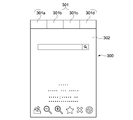
- a tab menu 301 is constantly displayed together with a web page 302.
- the user selects any one of tabs 301a to 301d from the tab menu 301.
- the switching of the web pages in the tabs in this manner is assumed.
- the electronic apparatus 100 only by performing a drag operation on the touch screen 116, the user can switch the tabs, and thus, the user only needs to perform a one-step selection operation for switching the web pages in the tabs.
- the area for displaying the tab menu does not need to be provided, and thus a web page as a substantial display area can be displayed on almost the entire area of the browser. That is, in the electronic apparatus 100 according to the embodiment of the present disclosure, the web page is displayed on almost the entire area of the browser and then, only by the one-step selection operation (single drag operation), the switching of the tabs can be performed.
- not only the switching of the tabs, but also switching of the web pages associated with the history can be performed only by the same one-step selection operation (single drag operation). That is, in the electronic apparatus 100 according to the embodiment of the present disclosure, by performing the drag operations in the left- and right-hand directions for switching the tabs and performing the drag operations in the upper and lower directions for switching the web pages associated with the history, different types of switching of web pages can be performed. Thus, the user can perform the switching of the tabs and the switching of the web pages associated with the web history based on the direction of a drag operation, and thus the user can find a particular web page by an easy operation.
- the above-mentioned directions of the drag operations for switching are merely one example and the web pages may be switched based on drag operations in directions different from the above-mentioned directions as a matter of course. For example, based on the drag operations in the upper and lower directions, the web pages in the tabs may be switched.
- the drag operation when the drag operation is, for example, oriented in the left-hand direction on the touch screen 116, the currently displayed web page in the tab moves to the left end and disappears from the browser.
- the web page in the tab to be displayed next is translated from the right end in the left-hand direction following the currently displayed web page in the tab almost continuously and appears in the browser.
- the switching of the web pages associated with the history is performed in a similar display manner.
- the user can switch the web pages while viewing the display of the next web page.
- the controller 111 displays the next web page in the tab on the browser.
- the controller 111 does not display the next web page in the tab but returns to the web page in the tab that is originally displayed.
- the controller 111 may switch to the next tab unless the drag operation is switched to the right-hand direction during a period of time when, for example, according to the drag operation in the left-hand direction, the next web page in the tab is translated in the left-hand direction following the currently displayed web page in the tab. For example, when the drag operation is terminated in the state in FIG. 5C, the controller 111 does not return to the original tab, but switches to the next tab. However, when the drag operation is reversed to the right-hand direction during a period of time when according to the drag operation in the left-hand direction, the web page in the next tab is translated in the left-hand direction following the currently displayed web page in the tab, the controller 111 returns to the original tab.
- the controller 111 does not switch to the next tab, but returns to the original tab.
- the user can switch the tabs or cancel the switching by a more intuitive operation.
- the switching by such an intuitive operation is also applicable to not only the switching of the tabs, but also the switching of the web pages associated with the history.
- FIG. 8 shows a web page 400 displayed on the browser in the touch screen 116 of the electronic apparatus 100. It is assumed that in this web page 400, for example, hyperlinks 401, 402, 403, 404, and 405 are embedded in the stated order from the above.
- the web pages are switched in order from the hyperlink 405 in the case of the drag operation in the lower direction and the web pages are switched in order from the hyperlink 401 in the case of the drag operation in the upper direction.
- the user can perform the switching of the tabs and the switching of the web pages associated with the hyperlinks according to the drag direction, and thus the user can find a particular web page by an easy operation.
- the hyperlink located on the left-hand side can be considered as an upper-level hyperlink, for example.
- the web pages are switched according to the drag operation with the two fingers
- the web page may be switched according to a drag operation with a single finger, three fingers, or the like.
- the tabs are switched according to the drag operations in the left- and right-hand directions
- the tabs may be switched according to the drag operations in the upper and lower directions.
- the switching of the tabs is performed such that the web page moves to gradually disappear from the browser and the next web page is translated following the web page to gradually appear in the browser.
- the tabs may be switched in other display manners.
- a web page in a next tab may instantly appear.
- the tabs may be switched in different display methods.
- An electronic apparatus including: a display; and an input apparatus operable to detect a gesture on the display, wherein when the display is displaying a first page and the input apparatus detects a drag operation, the display displays a second page in response to the drag operation.
- a page display method including: displaying a first page on a display; detecting a gesture on the display; and when the gesture is a drag operation, displaying a second page in response to the drag operation.
- An electronic apparatus including: a touch screen; and a controller configured to display a web page in a first tab on a browser in the touch screen and switch from displaying the web page in the first tab to displaying a web page in a second tab according to a drag operation performed on the touch screen.
- a display method including: displaying a web page in a first tab on a browser in a touch screen; and switching from displaying the web page in the first tab to displaying a web page in a second tab according to a drag operation performed on the touch screen.
- a program causing an electronic apparatus to execute the steps of: displaying a web page in a first tab on a browser in a touch screen; and switching from displaying the web page in the first tab to displaying a web page in a second tab according to a drag operation performed on the touch screen.
Landscapes
- Engineering & Computer Science (AREA)
- General Engineering & Computer Science (AREA)
- Theoretical Computer Science (AREA)
- Human Computer Interaction (AREA)
- Physics & Mathematics (AREA)
- General Physics & Mathematics (AREA)
- User Interface Of Digital Computer (AREA)
Abstract
According to an illustrative embodiment, an electronic apparatus is provided. The apparatus includes a display and an input apparatus operable to detect a gesture on the display. When the display is displaying a first page and the input apparatus detects a drag operation, the display displays a second page in response to the drag operation.
Description
The present disclosure relates to an electronic apparatus, a display method, and a program.
In a portable terminal such as a smart phone including a touch screen, by displaying a list of tabs on a browser and then selecting a tab from the list, a web page corresponding to the tab selected on the browser is displayed. Japanese Patent Application Laid-open No. 2004-030145 discloses a technique relating to this.
In the technique of selecting a tab from a list, for switching tabs, it is necessary to perform a touch operation performed on a touch screen in order to display the tabs in the list and then perform a further touch operation for selecting the tab.
In view of the above-mentioned circumstances, there is a need for providing an electronic apparatus, a display method, and a program, that are capable of tabs by switching tabs by an easy operation.
In view of the above-mentioned circumstances, there is a need for providing an electronic apparatus, a display method, and a program, that are capable of tabs by switching tabs by an easy operation.
Accordingly, the embodiments of the present disclosure are provided. According to an illustrative embodiment, an electronic apparatus is provided. The apparatus includes a display and an input apparatus operable to detect a gesture on the display. When the display is displaying a first page and the input apparatus detects a drag operation, the display displays a second page in response to the drag operation.
As mentioned above, according to the present disclosure, it is possible to switch an easy operation.
Hereinafter, embodiments according to the present disclosure will be described with reference to the drawings.
(Configuration of Electronic Apparatus)
FIG. 1 is a block diagram showing a configuration of an electronic apparatus of an embodiment according to the present disclosure.
(Configuration of Electronic Apparatus)
FIG. 1 is a block diagram showing a configuration of an electronic apparatus of an embodiment according to the present disclosure.
Although the description will be made, for example, referring to an information processing apparatus such as a personal computer (PC) or a smart phone as an example of the electronic apparatus, the present disclosure is applicable to other electronic apparatuses each including a touch screen.
As shown in FIG. 1, the electronic apparatus 100 includes a controller 111 including a central processing unit (CPU), a read only memory (ROM) 112, a random access memory (RAM) 113, an input/output interface 115, and a bus 114 that connects them to each other.
The controller 111 appropriately accesses the RAM 113 or the like depending on needs and performs overall control of entire blocks of the electronic apparatus 100 while executing various types of arithmetic processing. The ROM 112 is a non-volatile memory that fixedly stores firmware such as an operating system (OS), programs, and various parameters that are executed by the controller 111. The RAM 113 is used as a working area or the like for the controller 111 and temporarily stores an OS, various running application programs, and various types of data being processed.
To the input/output interface 115, connected are a touch screen 116, a hard disk drive (HDD) 118 as a storage, a network 150, and the like.
To the input/
In the HDD 118, the above-mentioned OS and various application programs and various types of data are stored. The network 150 connects to another network in a wired or wireless manner. The touch screen 116 is constituted of, for example, a touch panel as an input apparatus and a liquid crystal panel as a display unit.
The touch panel of the touch screen 116 refers to a transparent pressure-sensitive input apparatus superposed on a surface of the liquid crystal panel. The touch panel receives an input operation made by a user on an arbitrary point in a display screen. When the user performs a gesture operation such as a touch operation or a drag operation performed on the touch panel with a finger or a touch pen, the touch panel detects positional coordinates corresponding to this gesture operation and outputs them to the controller 111. It should be noted that as the input apparatus, as long as it is capable of detecting a gesture operation made by the user on the display unit, other than the touch panel, an arbitrary position detection device may be used irrespective of being contact type or non-contact type.
The liquid crystal panel of the touch screen 116 includes a display panel unit such as a liquid crystal display and a display driving unit that drives the display panel unit to perform display. The display driving unit is constituted of a pixel driving circuit for displaying on the display panel unit various types of display data input therein via the bus 114. The pixel driving circuit applies, for each of pixels arranged in a matrix form on the display panel unit, a driving signal based on an image signal at a predetermined horizontal/vertical driving timing in order to cause it to execute display.
In the electronic apparatus 100 configured as described above, as shown in FIG. 2, for example, a tabbed browser 20 can be displayed on the touch screen 116. Although the tabbed browser 20 is displayed on almost the entire touch screen 116, the tabbed browser 20 reduced in size may be displayed on a partial area of the touch screen 116 as shown in a broken line in FIG. 2.
In a window within thetabbed browser 20, by switching tabs, a web page in a tab that is currently displayed in the single window can be switched to a web page of another tab. In this embodiment, it is assumed that, for example, web pages in five tabs are set (registered) on the tabbed browser 20 so that the user feels that web pages 31 to 35 in the five tabs are arranged in left- and right-hand directions, for example, as shown in FIG. 3.
In a window within the
For each of the web pages 31 to 35, the user feels that web pages associated with a history of each of the web pages 31 to 35 are arranged in upper and lower directions. In FIG. 3, four web pages 33a to 33d shown in broken lines refer to web pages associated with the history of the web page 33 in the tab. The web pages 33a and 33b above the web page 33 refer to web pages that the user has opened before finding the web page 33. The web pages 33c and 33d below the web page 33 refer to web pages that the user has opened after finding the web page 33.
In FIG. 3, although not shown, the same as in the history associated with theweb page 33 applies to each of the web pages 31, 32, 34, and 35.
Switching between theweb pages 31 to 35 can be performed by a predetermined drag operation (drag gesture operation) made by the user on the touch screen 116.
(Switching Operation of Web Pages by Drag Operation)
FIG. 4 is a flow chart for illustrating a switching operation of web pages that is performed by a drag operation in this embodiment.
In FIG. 3, although not shown, the same as in the history associated with the
Switching between the
(Switching Operation of Web Pages by Drag Operation)
FIG. 4 is a flow chart for illustrating a switching operation of web pages that is performed by a drag operation in this embodiment.
When the controller 111 detects that a gesture operation being a double tap is performed on an icon displayed on the touch screen 116, the controller 111 displays a window of the tabbed browser 20 and opens a web page therein (Step 401). The first opened web page may be a preset homepage in a tab or may be the last web page closed in that tab.
Thecontroller 111 performs the following operations when a drag operation is performed with two fingers on the touch screen 116 with the web page being opened (Step 402).
The
When a drag operation in the left-hand direction is performed on the displayed web page in the tab (Step 403), the controller 111 determines whether or not a web page in a usable tab is present on a right-hand side (Step 404). For example, if the displayed web page in the tab is the web page 35 located at a right end in FIG. 3, it is determined that the web page in the usable tab is not present on the right-hand side.
When the controller 111 determines in Step 404 that the web page in the usable tab is present on the right-hand side, the controller 111 performs switching so that the web page in the tab on the right-hand side is displayed in the window of the tabbed browser 20 (Step 405). For example, if the displayed web page in the tab is the web page 33 shown in FIG. 3, the controller 111 switches to the web page 34 on the right-hand side. In this case, the controller 111 performs control so as to switch from displaying the displayed web page in the tab to displaying a web page in another tab by performing display such that the web page 33 moves in the left-hand direction to gradually disappear from the tabbed browser 20 and the web page 34 is translated (moves) in the left-hand direction following the web page 33 to gradually appear in the tabbed browser 20.
States of the web pages gradually disappearing and gradually appearing in this manner are shown in FIGS. 5A to 5D.
States of the web pages gradually disappearing and gradually appearing in this manner are shown in FIGS. 5A to 5D.
FIG. 5A shows a state when a drag operation is performed on the displayed web page 33 in the tab. In FIG. 5A, a solid-line circle expresses a drag operation with two fingers and a broken-line circle expresses a state when a drag operation in the left-hand direction is performed after that. According to this drag operation, first, a remaining part of the web page 33 on the right-hand side appears and is displayed as shown in FIG. 5B. Following this, as shown in FIG. 5C, the web page 33 in the tab gradually disappears to a left-hand side and the web page 34 in another (adjacent) tab gradually appears on the right-hand side.
Finally, as shown in FIG. 5D, theweb page 33 in the tab completely disappears and the web page 34 in the tab is displayed on the browser. In this case, the web pages may be switched in synchronous with movement of a touch position according to the drag operation from the solid-line circle to the broken-line circle. Alternatively, the web pages may be switched so that the user can feel an inertial force in the movement of the touch position according to the drag operation from the solid-line circle to the broken-line circle (i.e., the user can feel as if the movement of the touch position according to the drag operation is accelerated).
Finally, as shown in FIG. 5D, the
When the controller 111 determines in Step 404 that the web page in the usable tab is not present on the right-hand side, the controller 111 does not perform the switching operation of the web pages in the tabs (Step 406). As described above, for example, if the displayed web page in the tab is the web page 35 located at the right end in FIG. 3, the controller 111 determines that the web page in the usable tab is not present on the right-hand side and does not perform the switching operation of the web pages in the tabs.
When the drag operation with the two fingers in Step 402 is an operation in the right-hand direction on the displayed web page in the tab (Step 407), the controller 111 determines whether a web page in a usable tab is present on the left-hand side (Step 408). For example, if the displayed web page in the tab is the web page 31 located at a left end in FIG. 3, it is determined that the web page in the usable tab is not present on the left-hand side.
When the controller 111 determines in Step 407 that the web page in the usable tab is present on the left-hand side, the controller 111 performs switching so that the web page in the tab on the left-hand side is displayed in the window of the tabbed browser 20 (Step 409). For example, if the displayed web page in the tab is the web page 33 shown in FIG. 3, the controller 111 switches to the web page 32 on the left-hand side. In this case, the controller 111 performs control so as to switch from displaying the displayed web page in the tab to displaying a web page in another tab by performing display such that the web page 33 moves in the right-hand direction to gradually disappear from the tabbed browser 20 and the web page 32 is translated in the right-hand direction following the web page 33 to gradually appear in the tabbed browser 20.
When the controller 111 determines in Step 408 that the web page in the usable tab is not present on the left-hand side, the controller 111 does not perform the switching operation of the web pages in the tabs (Step 406). As described above, for example, if the displayed web page in the tab is the web page 31 located at the left end in FIG. 3, the controller 111 determines that the web page in the usable tab is not present on the left-hand side and does not perform the switching operation of the web pages in the tabs.
When the drag operation with the two fingers in Step 402 is an operation in the lower direction on the displayed web page in the tab (Step 410), the controller 111 determines whether or not a usable web page associated with a history is present on an upper side (Step 411). For example, if the displayed web page is the web page 33a located at an upper end in FIG. 3, it is determined that the usable web page associated with the history is not present on the upper side. That is, the web page 33a means the first web page opened in that tab.
The controller 111 determines in Step 411 that the usable web page associated with the history is present on the upper side, the controller 111 switches to displaying a closed web page directly before the displayed web page (Step 412). For example, if the displayed web page in the tab is the web page 33 shown in FIG. 3, the controller 111 switches to the web page 33b in the upper side. In this case, the controller 111 performs control so as to switch from displaying the displayed web page to displaying the web page directly before the displayed web page by performing display such that the web page 33 moves in the lower direction to gradually disappear from the tabbed browser 20 and the web page 33b is translated in the lower direction following the web page 33 below it to gradually appear in the tabbed browser 20.
When the controller 111 determines in Step 411 that the usable web page associated with the history is not present on the upper side, the controller 111 does not perform the switching operation of the web pages associated with the history (Step 413). As described above, for example, if the displayed web page is the web page 33a located at the upper end in FIG. 3, the controller 111 determines that the usable web page associated with the history is not present on the upper side and does not perform the switching operation of the web pages associated with the history.
When the drag operation with the two fingers in Step 402 is an operation in the upper direction on the displayed web page in the tab (Step 414), the controller 111 determines whether or not a usable web page associated with the history is present on a lower side (Step 415). For example, if the displayed web page is the web page 33d located at a lower end in FIG. 3, it is determined that the usable web page associated with the history is not present on the lower side. That is, the web page 33d means the last web page opened in that tab.
When the controller 111 determines in Step 415 that the usable web page associated with the history is present on the lower side, the controller 111 switches to displaying a closed web page directly after the displayed web page (Step 416). For example, if the displayed web page in the tab is the web page 33 shown in FIG. 3, the controller 111 switches to the web page 33c in the lower side. In this case, the controller 111 performs control so as to switch from displaying the displayed web page to displaying the web page the web page directly after the displayed web page by performing display such that the web page 33 moves in the upper direction to gradually disappear from the tabbed browser 20 and the web page 33c is translated in the upper direction following the web page 33 above it to gradually appear in the tabbed browser 20.
When the controller 111 determines in Step 415 that the usable web page associated with the history is not present on the lower side, the controller 111 does not perform the switching operation of the web pages associated with the history (Step 413). As described above, for example, if the displayed web page is the web page 33d located at the lower end in FIG. 3, the controller 111 determines that the usable web page associated with the history is not present on the lower side and does not perform the switching operation of the web pages associated with the history.
When the drag operation with the two fingers in Step 402 is an operation other than the operations in the upper and lower directions and the left- and right-hand directions, that is, an operation in an oblique direction, the controller 111 does not perform the switching operation of the web pages (Step 417).
It should be noted that regarding the drag operations in the upper and lower directions and the left- and right-hand directions, the directions do not need to be precisely set, and, for example, a drag operation having a certain angle may be considered as one of the drag operations in the upper and lower directions and the left- and right-hand directions. Alternatively, based on the angle of the drag operation, the switching of the tabs or the switching of the web pages associated with the history may be replaced by page skip, for example. For example, when the angle of the drag operation in the left-hand direction is equal to or smaller than a predetermined angle with respect to a horizontal direction, the controller 111 may switch to a web page in a tab on the right-hand side. However, when the angle of the drag operation in the left-hand direction is larger than the predetermined angle with respect to the horizontal direction, the controller 111 may switch to not the web page in the tab on the right-hand side, but a web page in the second tab on the right-hand side.
(Advantages of Switching Operation of Web Pages)
According to theelectronic apparatus 100, only by performing a drag operation on the touch screen 116, the user can switch the web pages.
(Advantages of Switching Operation of Web Pages)
According to the
As shown in FIG. 6A, when the user selects (performs a double tap on) a predetermined icon 202 on the touch screen 201 including a browser in which a web page 200 is displayed, a tab list 203 is opened on the browser as shown in FIG. 6B. When the user selects any one of tabs 203a to 203d therefrom, a web page 205 in another tab is opened as shown in FIG. 6C.
The switching of the web pages in the tabs in this manner is assumed.
The switching of the web pages in the tabs in this manner is assumed.
As shown in FIG. 7, on a predetermined area, here, in an upper area, of a browser 300, a tab menu 301 is constantly displayed together with a web page 302. The user selects any one of tabs 301a to 301d from the tab menu 301. The switching of the web pages in the tabs in this manner is assumed.
In the technique shown in FIGS. 6A to 6C, a two-step selection operation is necessary for switching the web pages in the tabs, which is cumbersome in operation. In the technique shown in FIG. 7, for the area in which the tab menu is displayed, the area for displaying the web page is narrowed. In particular, in the case where as in the smart phone, the area of the touch screen is small and the area of an operation unit is also small because the operation unit also serves as a display unit, the cumbersome operation and the narrowed substantial display area become very inconvenient for the user.
In view of this, in the electronic apparatus 100, only by performing a drag operation on the touch screen 116, the user can switch the tabs, and thus, the user only needs to perform a one-step selection operation for switching the web pages in the tabs. Further, in the electronic apparatus 100, the area for displaying the tab menu does not need to be provided, and thus a web page as a substantial display area can be displayed on almost the entire area of the browser. That is, in the electronic apparatus 100 according to the embodiment of the present disclosure, the web page is displayed on almost the entire area of the browser and then, only by the one-step selection operation (single drag operation), the switching of the tabs can be performed. In addition, in the electronic apparatus 100 according to the embodiment of the present disclosure, not only the switching of the tabs, but also switching of the web pages associated with the history can be performed only by the same one-step selection operation (single drag operation). That is, in the electronic apparatus 100 according to the embodiment of the present disclosure, by performing the drag operations in the left- and right-hand directions for switching the tabs and performing the drag operations in the upper and lower directions for switching the web pages associated with the history, different types of switching of web pages can be performed. Thus, the user can perform the switching of the tabs and the switching of the web pages associated with the web history based on the direction of a drag operation, and thus the user can find a particular web page by an easy operation.
It should be noted that the above-mentioned directions of the drag operations for switching are merely one example and the web pages may be switched based on drag operations in directions different from the above-mentioned directions as a matter of course. For example, based on the drag operations in the upper and lower directions, the web pages in the tabs may be switched.
In the electronic apparatus 100 according to the embodiment of the present disclosure, when the drag operation is, for example, oriented in the left-hand direction on the touch screen 116, the currently displayed web page in the tab moves to the left end and disappears from the browser. At the same time, the web page in the tab to be displayed next is translated from the right end in the left-hand direction following the currently displayed web page in the tab almost continuously and appears in the browser. Further, the switching of the web pages associated with the history is performed in a similar display manner. Thus, the user can switch the web pages while viewing the display of the next web page.
In this case, for example, when the currently displayed web page in the tab disappears from the browser during a period of time when the drag operation is oriented in the left-hand direction on the touch screen 116 (e.g., state in FIG. 5D), the controller 111 displays the next web page in the tab on the browser. On the other hand, when the drag operation is terminated before the currently displayed web page in the tab disappears from the browser (e.g., states in FIGS. 5B and 5C), the controller 111 does not display the next web page in the tab but returns to the web page in the tab that is originally displayed. With this configuration, the user can switch the tabs or cancel the switching by a more intuitive operation. The switching by such an intuitive operation is applicable to not only the switching of the tabs, but also the switching of the web pages associated with the history.
The controller 111 may switch to the next tab unless the drag operation is switched to the right-hand direction during a period of time when, for example, according to the drag operation in the left-hand direction, the next web page in the tab is translated in the left-hand direction following the currently displayed web page in the tab. For example, when the drag operation is terminated in the state in FIG. 5C, the controller 111 does not return to the original tab, but switches to the next tab. However, when the drag operation is reversed to the right-hand direction during a period of time when according to the drag operation in the left-hand direction, the web page in the next tab is translated in the left-hand direction following the currently displayed web page in the tab, the controller 111 returns to the original tab. For example, when the drag operation is reversed in the state in FIG. 5C, the controller 111 does not switch to the next tab, but returns to the original tab. With this configuration, the user can switch the tabs or cancel the switching by a more intuitive operation. The switching by such an intuitive operation is also applicable to not only the switching of the tabs, but also the switching of the web pages associated with the history.
Although in the above-mentioned embodiment, not only the switching of the tabs, but also the switching of the web pages associated with the history are performed by the drag operation, switching to a web page associated with a hyperlink may be performed by the drag operation instead of the switching of the web pages associated with the history. For example, the switching of the tabs is performed in the case of the drag operations in the left- and right directions and the switching to the web page associated with the hyperlink is performed in the case of the drag operations in the upper and lower directions. FIG. 8 shows a web page 400 displayed on the browser in the touch screen 116 of the electronic apparatus 100. It is assumed that in this web page 400, for example, hyperlinks 401, 402, 403, 404, and 405 are embedded in the stated order from the above. For example, the web pages are switched in order from the hyperlink 405 in the case of the drag operation in the lower direction and the web pages are switched in order from the hyperlink 401 in the case of the drag operation in the upper direction. Thus, the user can perform the switching of the tabs and the switching of the web pages associated with the hyperlinks according to the drag direction, and thus the user can find a particular web page by an easy operation. It should be noted that in the case where hyperlinks are embedded in the left- and right- hand directions in the above-mentioned example, the hyperlink located on the left-hand side can be considered as an upper-level hyperlink, for example.
Embodiments of the present disclosure are not limited to the above-mentioned embodiments and various modifications can be made without departing from the gist of the present disclosure.
Although in the above-mentioned embodiment, the web pages are switched according to the drag operation with the two fingers, the web page may be switched according to a drag operation with a single finger, three fingers, or the like.
Although in the above-mentioned embodiment, the tabs are switched according to the drag operations in the left- and right-hand directions, the tabs may be switched according to the drag operations in the upper and lower directions.
Although in the above-mentioned embodiment, the switching of the tabs is performed such that the web page moves to gradually disappear from the browser and the next web page is translated following the web page to gradually appear in the browser. However, the tabs may be switched in other display manners. For example, when a predetermined drag operation or a drag operation with three fingers may be performed, a web page in a next tab may instantly appear. Alternatively, based on a difference in drag operation, for example, based on whether a drag operation is performed with two fingers or three fingers, the tabs may be switched in different display methods.
Embodiments of the present disclosure are not limited to the above-mentioned embodiments and various modifications can be made without departing from the gist of the present disclosure.
Although in the above-mentioned embodiment, the web pages are switched according to the drag operation with the two fingers, the web page may be switched according to a drag operation with a single finger, three fingers, or the like.
Although in the above-mentioned embodiment, the tabs are switched according to the drag operations in the left- and right-hand directions, the tabs may be switched according to the drag operations in the upper and lower directions.
Although in the above-mentioned embodiment, the switching of the tabs is performed such that the web page moves to gradually disappear from the browser and the next web page is translated following the web page to gradually appear in the browser. However, the tabs may be switched in other display manners. For example, when a predetermined drag operation or a drag operation with three fingers may be performed, a web page in a next tab may instantly appear. Alternatively, based on a difference in drag operation, for example, based on whether a drag operation is performed with two fingers or three fingers, the tabs may be switched in different display methods.
The present disclosure can be also configured as follows.
(1) An electronic apparatus, including: a display; and an input apparatus operable
to detect a gesture on the display, wherein when the display is displaying a first page and the input apparatus detects a drag operation, the display displays a second page in response to the drag operation.
(1) An electronic apparatus, including: a display; and an input apparatus operable
to detect a gesture on the display, wherein when the display is displaying a first page and the input apparatus detects a drag operation, the display displays a second page in response to the drag operation.
(2) The apparatus according to (1), wherein the display and the input apparatus comprise a touch screen, and the input apparatus comprises a touch panel of the touch screen.
(3) The apparatus according to (1) or (2), wherein the first page is a web page and the second page is a web page.
(4) The apparatus according to (1), (2) or (3), wherein when the drag operation is a drag operation in a left-hand direction with respect to a user facing the display, the second page is a page to the right of the first page.
(5) The apparatus according to any one of (1) to (4), wherein when there is no usable page to the right of the first page, the display does not display a second page.
(6) The apparatus according to any one of (1) to (5), wherein when the drag operation is a drag operation in a right-hand direction with respect to a user facing the display, the second page is a page to the left of the first page.
(7) The apparatus according to any one of (1) to (6), wherein when there is no usable page to the left of the first page, the display does not display a second page.
(8) The apparatus according to any one of (1) to (7), wherein when the drag operation is a drag operation in a downward direction with respect to a user facing the display, the second page is a page above the first page.
(9) The apparatus according to any one of (1) to (8), wherein when there is no usable page above the first page, the display does not display a second page.
(10) The apparatus according to any one of (1) to (9), wherein when the drag operation is a drag operation in an upward direction with respect to a user facing the display, the second page is a page below the first page.
(11) The apparatus according to any one of (1) to (10), wherein when there is no usable page below the first page, the display does not display a second page.
(12) The apparatus according to any one of (1) to (11), wherein when the drag operation is a drag operation in any one of a left-hand direction, a right-hand direction, a downward direction, or an upward direction, with respect to a user facing the display, the second page is a page considered, relative to the first page, in a direction opposite to the direction of the drag operation.
(13) The apparatus according to any one of (1) to (12), wherein when there is no usable page in the direction opposite to the direction of the drag operation, the display does not display a second page.
(14) The apparatus according to any one of (1) to (13), wherein the drag operation is considered a drag operation in a respective one of the left-hand, right-hand, downward, and upward directions when an angle between a direction of the drag and the respective one of the left-hand, right-hand, downward, and upward directions is equal to or smaller than a predetermined angle.
(15)The apparatus according to any one of (1) to (14), wherein the first page includes one or more hyperlinks and the second page is a page associated with one of the hyperlinks.
(16) The apparatus according to any one of (1) to (15), wherein the first page disappears from the display during a period of time when the drag operation is performed.
(17) The apparatus according to any one of (1) to (16), wherein when the drag operation ends prior to disappearance of the first page from the display, the second page is not displayed.
(18) The apparatus according to any one of (1) to (17), wherein when a direction of the drag operation is reversed prior to ending the drag operation, the second page is not displayed.
(19) A page display method, including: displaying a first page on a display; detecting a gesture on the display; and when the gesture is a drag operation, displaying a second page in response to the drag operation.
(20) A non-transitory computer-readable medium having stored thereon a computer-readable program for implementing a page display method, the method including displaying a first page on a display; detecting a gesture on the display; and when the gesture is a drag operation, displaying a second page in response to the drag operation.
(21) An electronic apparatus, including:
a touch screen; and
a controller configured to display a web page in a first tab on a browser in the touch screen and switch from displaying the web page in the first tab to displaying a web page in a second tab according to a drag operation performed on the touch screen.
a touch screen; and
a controller configured to display a web page in a first tab on a browser in the touch screen and switch from displaying the web page in the first tab to displaying a web page in a second tab according to a drag operation performed on the touch screen.
(22) The electronic apparatus according to Item (21), in which the controller is configured to perform, when the drag operation is oriented in a first direction on the touch screen, display such that the web page in the first tab moves in the first direction to disappear from the browser and the web page in the second tab is translated in the first direction following the web page in the first tab to appear in the browser, to thereby switch from displaying the web page in the first tab to displaying the web page in the second tab.
(23) The electronic apparatus according to Item (22), in which the controller is configured to perform, when the drag operation is oriented in a second direction orthogonal to the first direction on the touch screen, display such that the web page in the first tab moves in the second direction to disappear from the browser and a different web page associated with a web history of the web page in the first tab is translated in the second direction following the web page in the first tab to appear in the browser, to thereby switch from displaying the web page in the first tab to displaying the different web page associated with the web history of the web page in the first tab.
(24) The electronic apparatus according to Item (22) or (23), in which the controller is configured to perform, when the drag operation is oriented in a second direction orthogonal to the first direction on the touch screen, display such that the web page in the first tab moves in the second direction to disappear from the browser and a different web page associated with a hyperlink of the web page in the first tab is translated in the second direction following the web page in the first tab to appear in the browser, to thereby switch from displaying the web page in the first tab to displaying the different web page associated with the hyperlink of the web page in the first tab.
(25) The electronic apparatus according to any one of Items (22) to (24), in which the controller is configured to switch, when the web page in the first tab disappears from the browser during a period of time when the drag operation is oriented in the first direction on the touch screen, from displaying the web page in the first tab to displaying the web page in the second tab without redisplaying the web page in the first tab.
(26) The electronic apparatus according to any one of Items (22) to (25), in which the controller is configured to display, when the drag operation is oriented in a second direction opposite to the first direction during a period of time when the web page in the second tab is translated in the first direction following the web page in the first tab, the web page in the first tab without switching from displaying the web page in the first tab to displaying the web page in the second tab.
(27) A display method, including:
displaying a web page in a first tab on a browser in a touch screen; and
switching from displaying the web page in the first tab to displaying a web page in a second tab according to a drag operation performed on the touch screen.
displaying a web page in a first tab on a browser in a touch screen; and
switching from displaying the web page in the first tab to displaying a web page in a second tab according to a drag operation performed on the touch screen.
(28) The display method according to Item (27), in which when the drag operation is oriented in a first direction on the touch screen, display is performed such that the web page in the first tab moves in the first direction to disappear from the browser and the web page in the second tab is translated in the first direction following the web page in the first tab to appear in the browser, to thereby switch from displaying the web page in the first tab to displaying the web page in the second tab.
(29) The display method according to Item (28), in which when the drag operation is oriented in a second direction orthogonal to the first direction on the touch screen, display is performed such that the web page in the first tab moves in the second direction to disappear from the browser and a different web page associated with a web history of the web page in the first tab is translated in the second direction following the web page in the first tab to appear in the browser, to thereby switch from displaying the web page in the first tab to displaying the different web page associated with the web history of the web page in the first tab.
(30) The display method according to Item (28) or (29), in which when the drag operation is oriented in a second direction orthogonal to the first direction on the touch screen, display is performed such that the web page in the first tab moves in the second direction to disappear from the browser and a different web page associated with a hyperlink of the web page in the first tab is translated in the second direction following the web page in the first tab to appear in the browser, to thereby switch from displaying the web page in the first tab to displaying the different web page associated with the hyperlink of the web page in the first tab.
(31) The display method according to any one of Items (28) to (30), in which when the web page in the first tab disappears from the browser during a period of time when the drag operation is oriented in the first direction on the touch screen, switching from displaying the web page in the first tab to displaying the web page in the second tab is performed without redisplaying the web page in the first tab.
(32) The display method according to any one of Items (28) to (31), in which when the drag operation is oriented in a second direction opposite to the first direction during a period of time when the web page in the second tab is translated in the first direction following the web page in the first tab, the web page in the first tab is displayed without switching from displaying the web page in the first tab to displaying the web page in the second tab.
(33) A program causing an electronic apparatus to execute the steps of:
displaying a web page in a first tab on a browser in a touch screen; and
switching from displaying the web page in the first tab to displaying a web page in a second tab according to a drag operation performed on the touch screen.
displaying a web page in a first tab on a browser in a touch screen; and
switching from displaying the web page in the first tab to displaying a web page in a second tab according to a drag operation performed on the touch screen.
(34) The program according to Item (33), in which when the drag operation is oriented in a first direction on the touch screen, display is performed such that the web page in the first tab moves in the first direction to disappear from the browser and the web page in the second tab is translated in the first direction following the web page in the first tab to appear in the browser, to thereby switch from displaying the web page in the first tab to displaying the web page in the second tab.
(35) The program according to Item (34), in which when the drag operation is oriented in a second direction orthogonal to the first direction on the touch screen, display is performed such that the web page in the first tab moves in the second direction to disappear from the browser and a different web page associated with a web history of the web page in the first tab is translated in the second direction following the web page in the first tab to appear in the browser, to thereby switch from displaying the web page in the first tab to displaying the different web page associated with the web history of the web page in the first tab.
(36) The program according to Item (34) or (35), in which when the drag operation is oriented in a second direction orthogonal to the first direction on the touch screen, display is performed such that the web page in the first tab moves in the second direction to disappear from the browser and a different web page associated with a hyperlink of the web page in the first tab is translated in the second direction following the web page in the first tab to appear in the browser, to thereby switch from displaying the web page in the first tab to displaying the different web page associated with the hyperlink of the web page in the first tab.
(37) The program according to any one of Items (34) to (36), in which when the web page in the first tab disappears from the browser during a period of time when the drag operation is oriented in the first direction on the touch screen, switching from displaying the web page in the first tab to displaying the web page in the second tab is performed without redisplaying the web page in the first tab.
(38) The program according to any one of Items (34) to (37), in which when the drag operation is oriented in a second direction opposite to the first direction during a period of time when the web page in the second tab is translated in the first direction following the web page in the first tab, the web page in the first tab is displayed without switching from displaying the web page in the first tab to displaying the web page in the second tab.
The present application contains subject matter related to that disclosed in Japanese Priority Patent Application JP 2011-092917 filed in the Japan Patent Office on April 19, 2011, the entire content of which is hereby incorporated by reference.
100 electronic apparatus
111 controller
116 touch screen
111 controller
116 touch screen
Claims (20)
- An electronic apparatus, comprising:
a display; and
an input apparatus operable to detect a gesture on the display,
wherein when the display is displaying a first page and the input apparatus detects a drag operation, the display displays a second page in response to the drag operation. - The apparatus as recited in claim 1, wherein the display and the input apparatus comprise a touch screen, and the input apparatus comprises a touch panel of the touch screen.
- The apparatus as recited in claim 1, wherein the first page is a web page and the second page is a web page.
- The apparatus as recited in claim 1, wherein when the drag operation is a drag operation in a left-hand direction with respect to a user facing the display, the second page is a page to the right of the first page.
- The apparatus as recited in claim 4, wherein when there is no usable page to the right of the first page, the display does not display a second page.
- The apparatus as recited in claim 1, wherein when the drag operation is a drag operation in a right-hand direction with respect to a user facing the display, the second page is a page to the left of the first page.
- The apparatus as recited in claim 6, wherein when there is no usable page to the left of the first page, the display does not display a second page.
- The apparatus as recited in claim 1, wherein when the drag operation is a drag operation in a downward direction with respect to a user facing the display, the second page is a page above the first page.
- The apparatus as recited in claim 8, wherein when there is no usable page above the first page, the display does not display a second page.
- The apparatus as recited in claim 1, wherein when the drag operation is a drag operation in an upward direction with respect to a user facing the display, the second page is a page below the first page.
- The apparatus as recited in claim 10, wherein when there is no usable page below the first page, the display does not display a second page.
- The apparatus as recited in claim 1, wherein when the drag operation is a drag operation in any one of a left-hand direction, a right-hand direction, a downward direction, or an upward direction, with respect to a user facing the display, the second page is a page considered, relative to the first page, in a direction opposite to the direction of the drag operation.
- The apparatus as recited in claim 12, wherein when there is no usable page in the direction opposite to the direction of the drag operation, the display does not display a second page.
- The apparatus as recited in claim 12, wherein the drag operation is considered a drag operation in a respective one of the left-hand, right-hand, downward, and upward directions when an angle between a direction of the drag and the respective one of the left-hand, right-hand, downward, and upward directions is equal to or smaller than a predetermined angle.
- The apparatus as recited in claim 1, wherein the first page includes one or more hyperlinks and the second page is a page associated with one of the hyperlinks.
- The apparatus as recited in claim 1, wherein the first page disappears from the display during a period of time when the drag operation is performed.
- The apparatus as recited in claim 1, wherein when the drag operation ends prior to disappearance of the first page from the display, the second page is not displayed.
- The apparatus as recited in claim 1, wherein when a direction of the drag operation is reversed prior to ending the drag operation, the second page is not displayed.
- A page display method, comprising:
displaying a first page on a display;
detecting a gesture on the display; and
when the gesture is a drag operation, displaying a second page in response to the drag operation. - A non-transitory computer-readable medium having stored thereon a computer-readable program for implementing a page display method, the method comprising:
displaying a first page on a display;
detecting a gesture on the display; and
when the gesture is a drag operation, displaying a second page in response to the drag operation.
Priority Applications (3)
| Application Number | Priority Date | Filing Date | Title |
|---|---|---|---|
| CN201280017964.6A CN103460169B (en) | 2011-04-19 | 2012-04-10 | Electronic apparatus, display method, and program |
| US14/009,652 US10140009B2 (en) | 2011-04-19 | 2012-04-10 | Gesture detection on a display device |
| EP12773683.3A EP2699996A4 (en) | 2011-04-19 | 2012-04-10 | ELECTRONIC APPARATUS, DISPLAY METHOD, AND PROGRAM |
Applications Claiming Priority (2)
| Application Number | Priority Date | Filing Date | Title |
|---|---|---|---|
| JP2011092917A JP5768457B2 (en) | 2011-04-19 | 2011-04-19 | Electronic device, display method and program |
| JP2011-092917 | 2011-04-19 |
Publications (1)
| Publication Number | Publication Date |
|---|---|
| WO2012144160A1 true WO2012144160A1 (en) | 2012-10-26 |
Family
ID=47041294
Family Applications (1)
| Application Number | Title | Priority Date | Filing Date |
|---|---|---|---|
| PCT/JP2012/002483 Ceased WO2012144160A1 (en) | 2011-04-19 | 2012-04-10 | Electronic apparatus, display method, and program |
Country Status (5)
| Country | Link |
|---|---|
| US (1) | US10140009B2 (en) |
| EP (1) | EP2699996A4 (en) |
| JP (1) | JP5768457B2 (en) |
| CN (1) | CN103460169B (en) |
| WO (1) | WO2012144160A1 (en) |
Cited By (2)
| Publication number | Priority date | Publication date | Assignee | Title |
|---|---|---|---|---|
| CN103135929A (en) * | 2013-01-31 | 2013-06-05 | 北京小米科技有限责任公司 | Method and device for controlling application interface to move and terminal device |
| CN103645855A (en) * | 2013-11-29 | 2014-03-19 | 东莞宇龙通信科技有限公司 | Touch reading method and device |
Families Citing this family (17)
| Publication number | Priority date | Publication date | Assignee | Title |
|---|---|---|---|---|
| CN103488411B (en) * | 2012-06-13 | 2016-06-01 | 腾讯科技(深圳)有限公司 | The method of the switching page and device |
| KR20230108345A (en) * | 2013-03-15 | 2023-07-18 | 애플 인크. | Device, method, and graphical user interface for managing concurrently open software applications |
| US9477404B2 (en) * | 2013-03-15 | 2016-10-25 | Apple Inc. | Device, method, and graphical user interface for managing concurrently open software applications |
| CN104062909A (en) * | 2013-03-19 | 2014-09-24 | 海尔集团公司 | Household appliance equipment and control device and method thereof |
| US20170205993A1 (en) * | 2014-07-18 | 2017-07-20 | Gionee Communication Equipment Co.,Ltd. Shenzhen | Touch screen response method and terminal |
| CN104182533B (en) * | 2014-08-28 | 2018-05-08 | 北京金山安全软件有限公司 | Browser label switching method and device and terminal |
| USD768146S1 (en) * | 2014-10-07 | 2016-10-04 | Microsoft Corporation | Display screen with animated graphical user interface |
| JP6424592B2 (en) * | 2014-11-28 | 2018-11-21 | 株式会社バッファロー | INFORMATION PROCESSING DEVICE, INFORMATION PROCESSING SYSTEM, DISPLAY CONTROL METHOD IN INFORMATION PROCESSING DEVICE, AND PROGRAM |
| KR102343361B1 (en) * | 2014-12-17 | 2021-12-27 | 삼성전자주식회사 | Electronic Device and Method of Displaying Web Page Using the same |
| CN105988701B (en) * | 2015-02-16 | 2019-06-21 | 阿里巴巴集团控股有限公司 | A kind of smart wearable device display control method and smart wearable device |
| US10601894B1 (en) | 2015-09-28 | 2020-03-24 | Amazon Technologies, Inc. | Vector-based encoding for content rendering |
| US10691750B1 (en) * | 2015-09-28 | 2020-06-23 | Amazon Technologies, Inc. | Browser configured to efficiently store browsing session state |
| CN105446603B (en) * | 2015-12-29 | 2019-04-30 | 北京金山安全软件有限公司 | Multi-label page switching method and device and electronic equipment |
| JP2017033573A (en) * | 2016-08-31 | 2017-02-09 | ヤフー株式会社 | Information display device, distribution device, information display method, and information display program |
| CN108108113B (en) * | 2017-12-19 | 2020-02-18 | 维沃移动通信有限公司 | Web page switching method and device |
| CN109002486A (en) * | 2018-06-25 | 2018-12-14 | 武汉斗鱼网络科技有限公司 | A kind of processing method that the page is shown, device, terminal and storage medium |
| CN111767487B (en) * | 2020-05-22 | 2025-01-21 | 阿里巴巴新加坡控股有限公司 | Page display method, device and electronic device |
Citations (3)
| Publication number | Priority date | Publication date | Assignee | Title |
|---|---|---|---|---|
| JP2004030145A (en) | 2002-06-25 | 2004-01-29 | Sony Corp | Electronic device, data display / selection method of electronic device, and web browser |
| JP2009525538A (en) * | 2006-01-30 | 2009-07-09 | アップル インコーポレイテッド | Gesture using multi-point sensing device |
| EP2284728A1 (en) | 2009-07-27 | 2011-02-16 | Samsung Electronics Co., Ltd. | Web browsing method and web browsing device |
Family Cites Families (14)
| Publication number | Priority date | Publication date | Assignee | Title |
|---|---|---|---|---|
| US7840912B2 (en) | 2006-01-30 | 2010-11-23 | Apple Inc. | Multi-touch gesture dictionary |
| US8479122B2 (en) * | 2004-07-30 | 2013-07-02 | Apple Inc. | Gestures for touch sensitive input devices |
| TW486657B (en) | 2000-10-26 | 2002-05-11 | Animeta Systems Inc | Browser interface operation device and its browsing method |
| CN100502491C (en) * | 2006-04-05 | 2009-06-17 | 中兴通讯股份有限公司 | Method for realizing page-turning function using direction key |
| KR100771626B1 (en) * | 2006-04-25 | 2007-10-31 | 엘지전자 주식회사 | Terminal and command input method for it |
| US8106856B2 (en) * | 2006-09-06 | 2012-01-31 | Apple Inc. | Portable electronic device for photo management |
| US9311528B2 (en) | 2007-01-03 | 2016-04-12 | Apple Inc. | Gesture learning |
| CN101276355B (en) * | 2007-03-30 | 2011-12-07 | 联想(北京)有限公司 | Electric views browsing method and equipment thereof |
| CN101303691A (en) * | 2007-05-08 | 2008-11-12 | 唐凯 | Organization and display method between multiple web pages |
| US8059101B2 (en) * | 2007-06-22 | 2011-11-15 | Apple Inc. | Swipe gestures for touch screen keyboards |
| US20090100380A1 (en) * | 2007-10-12 | 2009-04-16 | Microsoft Corporation | Navigating through content |
| US8294669B2 (en) * | 2007-11-19 | 2012-10-23 | Palo Alto Research Center Incorporated | Link target accuracy in touch-screen mobile devices by layout adjustment |
| EP2309369B1 (en) | 2008-07-25 | 2016-09-28 | NEC Corporation | Information processing device, information processing program, and display control method |
| US20120131519A1 (en) * | 2010-11-18 | 2012-05-24 | Google Inc. | Surfacing Off-Screen Visible Objects |
-
2011
- 2011-04-19 JP JP2011092917A patent/JP5768457B2/en not_active Expired - Fee Related
-
2012
- 2012-04-10 CN CN201280017964.6A patent/CN103460169B/en not_active Expired - Fee Related
- 2012-04-10 EP EP12773683.3A patent/EP2699996A4/en not_active Ceased
- 2012-04-10 US US14/009,652 patent/US10140009B2/en not_active Expired - Fee Related
- 2012-04-10 WO PCT/JP2012/002483 patent/WO2012144160A1/en not_active Ceased
Patent Citations (3)
| Publication number | Priority date | Publication date | Assignee | Title |
|---|---|---|---|---|
| JP2004030145A (en) | 2002-06-25 | 2004-01-29 | Sony Corp | Electronic device, data display / selection method of electronic device, and web browser |
| JP2009525538A (en) * | 2006-01-30 | 2009-07-09 | アップル インコーポレイテッド | Gesture using multi-point sensing device |
| EP2284728A1 (en) | 2009-07-27 | 2011-02-16 | Samsung Electronics Co., Ltd. | Web browsing method and web browsing device |
Non-Patent Citations (7)
| Title |
|---|
| "Donna Tsukaikata ga Best? Zenhouikensyo de Zubari Kiru MacBook AIR no 'Mi' to 'Waku'", MAC FAN, vol. 16, no. 4, 1 April 2008 (2008-04-01), pages 13, XP008172132 * |
| "Freesoft wo oitsuduketa Honshi ga Okuru Syugyoku no 150 hon! Dendoiri Freesoft 150+alfa", WINDOWS100%, vol. 14, no. 4, 12 March 2011 (2011-03-12), pages 20, XP008172134 * |
| "''Honshi Hatsutojyo! Kantan & Benri Kyotan no Koukinou Shinsedai Freesoft'',''Kinou Komikomi Browser Benrikinou Zenbumori kinou preset browser''", WINDOWS100%, vol. 14, no. 5, 13 April 2011 (2011-04-13), pages 42, XP008172372 * |
| "''Kokokara Hajimeruhito no Tameni Hajimete no iPHONE'',''Safari de Webpage wo Miru''", IPHONEPEOPLE SPRING-SUMMER, 26 April 2010 (2010-04-26), pages 148 - 149, XP008173869 * |
| "''Koresae Osaete Okeba Machigainai! Standard & Hidden tool collection'',''Pick up! Konegetsu no Teiban Tool Sleipnir Ver.2.8.5''", WINDOWS 100%, vol. 12, no. 8, 1 August 2009 (2009-08-01), pages 113, XP008172371 * |
| "Sleipnir Mobile 1.4 on iPad - Web Browser for iPHONE / iPad", YOUTUBE,LLC, 14 April 2011 (2011-04-14), Retrieved from the Internet <URL:http://www.youtube.com/watch?feature=play er embedded&v=gmNbZSo3Cy4#at=40> [retrieved on 20120606] * |
| See also references of EP2699996A4 |
Cited By (2)
| Publication number | Priority date | Publication date | Assignee | Title |
|---|---|---|---|---|
| CN103135929A (en) * | 2013-01-31 | 2013-06-05 | 北京小米科技有限责任公司 | Method and device for controlling application interface to move and terminal device |
| CN103645855A (en) * | 2013-11-29 | 2014-03-19 | 东莞宇龙通信科技有限公司 | Touch reading method and device |
Also Published As
| Publication number | Publication date |
|---|---|
| JP2012226520A (en) | 2012-11-15 |
| US10140009B2 (en) | 2018-11-27 |
| JP5768457B2 (en) | 2015-08-26 |
| EP2699996A4 (en) | 2014-09-03 |
| US20140026096A1 (en) | 2014-01-23 |
| EP2699996A1 (en) | 2014-02-26 |
| CN103460169A (en) | 2013-12-18 |
| CN103460169B (en) | 2017-05-24 |
Similar Documents
| Publication | Publication Date | Title |
|---|---|---|
| US10140009B2 (en) | Gesture detection on a display device | |
| US9395908B2 (en) | Information processing apparatus, information processing method, and information processing program utilizing gesture based copy and cut operations | |
| US10198163B2 (en) | Electronic device and controlling method and program therefor | |
| JP5664147B2 (en) | Information processing apparatus, information processing method, and program | |
| CN103186330B (en) | A kind of display interface changing method and electronic equipment | |
| KR20120135694A (en) | Apparatus and method for providing web browser interface using gesture in device | |
| WO2015037389A1 (en) | Map information display device, map information display method, and map information display program | |
| EP2416233A1 (en) | Information processing apparatus, information processing method, and computer program | |
| AU2016426314B2 (en) | Interface display method and terminal | |
| KR20140112296A (en) | Method for processing function correspond to multi touch and an electronic device thereof | |
| US9052767B2 (en) | Information terminal device and touch panel display method | |
| JP2015049773A (en) | Object operation system, object operation control program and object operation control method | |
| WO2014034369A1 (en) | Display control device, thin-client system, display control method, and recording medium | |
| JP5628991B2 (en) | Display device, display method, and display program | |
| JP2014106806A (en) | Information processing device | |
| JP2015153083A (en) | Display control program, apparatus, and method | |
| EP3454180A1 (en) | Electronic device and method for displaying contents | |
| JP2010049318A (en) | Movement control program | |
| JP2014203202A (en) | Information processing device, information processing device control method, and program | |
| JP7163755B2 (en) | display input device | |
| JP2014021945A (en) | Information processor and program | |
| US11599261B2 (en) | Display apparatus that displays marker on position of target character and displays next marker according to slide operation | |
| JP6844699B2 (en) | Display device and display method of display device | |
| CN114115687A (en) | Multitask switching method, display terminal and computer readable medium | |
| US20140337805A1 (en) | Information processor and computer program product |
Legal Events
| Date | Code | Title | Description |
|---|---|---|---|
| 121 | Ep: the epo has been informed by wipo that ep was designated in this application |
Ref document number: 12773683 Country of ref document: EP Kind code of ref document: A1 |
|
| WWE | Wipo information: entry into national phase |
Ref document number: 14009652 Country of ref document: US |
|
| WWE | Wipo information: entry into national phase |
Ref document number: 2012773683 Country of ref document: EP |
|
| NENP | Non-entry into the national phase |
Ref country code: DE |