WO2012157562A1 - 表示装置、ユーザインタフェース方法及びプログラム - Google Patents
表示装置、ユーザインタフェース方法及びプログラム Download PDFInfo
- Publication number
- WO2012157562A1 WO2012157562A1 PCT/JP2012/062148 JP2012062148W WO2012157562A1 WO 2012157562 A1 WO2012157562 A1 WO 2012157562A1 JP 2012062148 W JP2012062148 W JP 2012062148W WO 2012157562 A1 WO2012157562 A1 WO 2012157562A1
- Authority
- WO
- WIPO (PCT)
- Prior art keywords
- display
- unit
- category
- pinch
- icon
- Prior art date
- Legal status (The legal status is an assumption and is not a legal conclusion. Google has not performed a legal analysis and makes no representation as to the accuracy of the status listed.)
- Ceased
Links
Images

Classifications
-
- G—PHYSICS
- G06—COMPUTING OR CALCULATING; COUNTING
- G06F—ELECTRIC DIGITAL DATA PROCESSING
- G06F3/00—Input arrangements for transferring data to be processed into a form capable of being handled by the computer; Output arrangements for transferring data from processing unit to output unit, e.g. interface arrangements
- G06F3/01—Input arrangements or combined input and output arrangements for interaction between user and computer
- G06F3/048—Interaction techniques based on graphical user interfaces [GUI]
- G06F3/0481—Interaction techniques based on graphical user interfaces [GUI] based on specific properties of the displayed interaction object or a metaphor-based environment, e.g. interaction with desktop elements like windows or icons, or assisted by a cursor's changing behaviour or appearance
- G06F3/04817—Interaction techniques based on graphical user interfaces [GUI] based on specific properties of the displayed interaction object or a metaphor-based environment, e.g. interaction with desktop elements like windows or icons, or assisted by a cursor's changing behaviour or appearance using icons
-
- G—PHYSICS
- G06—COMPUTING OR CALCULATING; COUNTING
- G06F—ELECTRIC DIGITAL DATA PROCESSING
- G06F3/00—Input arrangements for transferring data to be processed into a form capable of being handled by the computer; Output arrangements for transferring data from processing unit to output unit, e.g. interface arrangements
- G06F3/01—Input arrangements or combined input and output arrangements for interaction between user and computer
- G06F3/048—Interaction techniques based on graphical user interfaces [GUI]
-
- G—PHYSICS
- G06—COMPUTING OR CALCULATING; COUNTING
- G06F—ELECTRIC DIGITAL DATA PROCESSING
- G06F3/00—Input arrangements for transferring data to be processed into a form capable of being handled by the computer; Output arrangements for transferring data from processing unit to output unit, e.g. interface arrangements
- G06F3/01—Input arrangements or combined input and output arrangements for interaction between user and computer
- G06F3/03—Arrangements for converting the position or the displacement of a member into a coded form
- G06F3/041—Digitisers, e.g. for touch screens or touch pads, characterised by the transducing means
-
- G—PHYSICS
- G06—COMPUTING OR CALCULATING; COUNTING
- G06F—ELECTRIC DIGITAL DATA PROCESSING
- G06F3/00—Input arrangements for transferring data to be processed into a form capable of being handled by the computer; Output arrangements for transferring data from processing unit to output unit, e.g. interface arrangements
- G06F3/01—Input arrangements or combined input and output arrangements for interaction between user and computer
- G06F3/048—Interaction techniques based on graphical user interfaces [GUI]
- G06F3/0481—Interaction techniques based on graphical user interfaces [GUI] based on specific properties of the displayed interaction object or a metaphor-based environment, e.g. interaction with desktop elements like windows or icons, or assisted by a cursor's changing behaviour or appearance
- G06F3/0482—Interaction with lists of selectable items, e.g. menus
-
- G—PHYSICS
- G06—COMPUTING OR CALCULATING; COUNTING
- G06F—ELECTRIC DIGITAL DATA PROCESSING
- G06F3/00—Input arrangements for transferring data to be processed into a form capable of being handled by the computer; Output arrangements for transferring data from processing unit to output unit, e.g. interface arrangements
- G06F3/01—Input arrangements or combined input and output arrangements for interaction between user and computer
- G06F3/048—Interaction techniques based on graphical user interfaces [GUI]
- G06F3/0484—Interaction techniques based on graphical user interfaces [GUI] for the control of specific functions or operations, e.g. selecting or manipulating an object, an image or a displayed text element, setting a parameter value or selecting a range
- G06F3/04842—Selection of displayed objects or displayed text elements
-
- G—PHYSICS
- G06—COMPUTING OR CALCULATING; COUNTING
- G06F—ELECTRIC DIGITAL DATA PROCESSING
- G06F3/00—Input arrangements for transferring data to be processed into a form capable of being handled by the computer; Output arrangements for transferring data from processing unit to output unit, e.g. interface arrangements
- G06F3/01—Input arrangements or combined input and output arrangements for interaction between user and computer
- G06F3/048—Interaction techniques based on graphical user interfaces [GUI]
- G06F3/0487—Interaction techniques based on graphical user interfaces [GUI] using specific features provided by the input device, e.g. functions controlled by the rotation of a mouse with dual sensing arrangements, or of the nature of the input device, e.g. tap gestures based on pressure sensed by a digitiser
- G06F3/0488—Interaction techniques based on graphical user interfaces [GUI] using specific features provided by the input device, e.g. functions controlled by the rotation of a mouse with dual sensing arrangements, or of the nature of the input device, e.g. tap gestures based on pressure sensed by a digitiser using a touch-screen or digitiser, e.g. input of commands through traced gestures
-
- G—PHYSICS
- G06—COMPUTING OR CALCULATING; COUNTING
- G06F—ELECTRIC DIGITAL DATA PROCESSING
- G06F3/00—Input arrangements for transferring data to be processed into a form capable of being handled by the computer; Output arrangements for transferring data from processing unit to output unit, e.g. interface arrangements
- G06F3/01—Input arrangements or combined input and output arrangements for interaction between user and computer
- G06F3/048—Interaction techniques based on graphical user interfaces [GUI]
- G06F3/0487—Interaction techniques based on graphical user interfaces [GUI] using specific features provided by the input device, e.g. functions controlled by the rotation of a mouse with dual sensing arrangements, or of the nature of the input device, e.g. tap gestures based on pressure sensed by a digitiser
- G06F3/0488—Interaction techniques based on graphical user interfaces [GUI] using specific features provided by the input device, e.g. functions controlled by the rotation of a mouse with dual sensing arrangements, or of the nature of the input device, e.g. tap gestures based on pressure sensed by a digitiser using a touch-screen or digitiser, e.g. input of commands through traced gestures
- G06F3/04883—Interaction techniques based on graphical user interfaces [GUI] using specific features provided by the input device, e.g. functions controlled by the rotation of a mouse with dual sensing arrangements, or of the nature of the input device, e.g. tap gestures based on pressure sensed by a digitiser using a touch-screen or digitiser, e.g. input of commands through traced gestures for inputting data by handwriting, e.g. gesture or text
-
- G—PHYSICS
- G06—COMPUTING OR CALCULATING; COUNTING
- G06F—ELECTRIC DIGITAL DATA PROCESSING
- G06F3/00—Input arrangements for transferring data to be processed into a form capable of being handled by the computer; Output arrangements for transferring data from processing unit to output unit, e.g. interface arrangements
- G06F3/01—Input arrangements or combined input and output arrangements for interaction between user and computer
- G06F3/048—Interaction techniques based on graphical user interfaces [GUI]
- G06F3/0487—Interaction techniques based on graphical user interfaces [GUI] using specific features provided by the input device, e.g. functions controlled by the rotation of a mouse with dual sensing arrangements, or of the nature of the input device, e.g. tap gestures based on pressure sensed by a digitiser
- G06F3/0488—Interaction techniques based on graphical user interfaces [GUI] using specific features provided by the input device, e.g. functions controlled by the rotation of a mouse with dual sensing arrangements, or of the nature of the input device, e.g. tap gestures based on pressure sensed by a digitiser using a touch-screen or digitiser, e.g. input of commands through traced gestures
- G06F3/04886—Interaction techniques based on graphical user interfaces [GUI] using specific features provided by the input device, e.g. functions controlled by the rotation of a mouse with dual sensing arrangements, or of the nature of the input device, e.g. tap gestures based on pressure sensed by a digitiser using a touch-screen or digitiser, e.g. input of commands through traced gestures by partitioning the display area of the touch-screen or the surface of the digitising tablet into independently controllable areas, e.g. virtual keyboards or menus
-
- G—PHYSICS
- G06—COMPUTING OR CALCULATING; COUNTING
- G06F—ELECTRIC DIGITAL DATA PROCESSING
- G06F3/00—Input arrangements for transferring data to be processed into a form capable of being handled by the computer; Output arrangements for transferring data from processing unit to output unit, e.g. interface arrangements
- G06F3/14—Digital output to display device ; Cooperation and interconnection of the display device with other functional units
-
- G—PHYSICS
- G09—EDUCATION; CRYPTOGRAPHY; DISPLAY; ADVERTISING; SEALS
- G09G—ARRANGEMENTS OR CIRCUITS FOR CONTROL OF INDICATING DEVICES USING STATIC MEANS TO PRESENT VARIABLE INFORMATION
- G09G5/00—Control arrangements or circuits for visual indicators common to cathode-ray tube indicators and other visual indicators
-
- G—PHYSICS
- G06—COMPUTING OR CALCULATING; COUNTING
- G06F—ELECTRIC DIGITAL DATA PROCESSING
- G06F2203/00—Indexing scheme relating to G06F3/00 - G06F3/048
- G06F2203/048—Indexing scheme relating to G06F3/048
- G06F2203/04808—Several contacts: gestures triggering a specific function, e.g. scrolling, zooming, right-click, when the user establishes several contacts with the surface simultaneously; e.g. using several fingers or a combination of fingers and pen
-
- G—PHYSICS
- G06—COMPUTING OR CALCULATING; COUNTING
- G06F—ELECTRIC DIGITAL DATA PROCESSING
- G06F9/00—Arrangements for program control, e.g. control units
- G06F9/06—Arrangements for program control, e.g. control units using stored programs, i.e. using an internal store of processing equipment to receive or retain programs
- G06F9/44—Arrangements for executing specific programs
- G06F9/451—Execution arrangements for user interfaces
Definitions
- the present invention relates to a GUI (Graphical User Interface).
- an electronic device having a touch screen there is a GUI that displays a plurality of icon images side by side and changes the display according to a user's touch operation.
- a tray 216 that holds icons of functions that are frequently used by a user and a tray 214 that holds icons of functions that are not frequently used by a user are displayed. Describes a portable electronic device that can be moved from a tray to a tray 214. In addition, such icon images can generally be added or deleted.
- an object of the present invention is to enable the display state of a plurality of related icon images to be switched by an intuitive operation different from the conventional one.
- a display device associates a display unit having a display surface for displaying an image, an operation unit having an operation surface for receiving an operation by an operator's contact, a plurality of icon images, and the icon image.
- a display control unit for displaying one or a plurality of category images respectively representing the one or a plurality of categories displayed on the display unit, and touching two points on the operation surface based on an operation received by the operation unit
- An operation recognizing unit that recognizes a pinch-out operation that increases the distance between the two points, and the display control unit is configured to detect at least one of the one or more categories when the operation recognizing unit recognizes the pinch-out operation.
- the state of the icon image associated with one icon is expanded from the storage state in which the icon image is hidden. It has a configuration for switching.
- the display control unit determines the number of the categories for displaying the icon image in the unfolded state according to the movement amount or movement speed of the two points in the pinch-out operation recognized by the operation recognition unit. Change.
- the display control unit changes the category in which the icon image is displayed in the unfolded state according to the positions of the two points of the pinch-out operation recognized by the operation recognition unit.
- the display control unit determines the category for displaying the icon image in the unfolded state as the movement amount of one of the two points of the pinch-out operation recognized by the operation recognition unit and the other movement amount. Change according to differences.
- the operation recognition unit recognizes a pinch-in operation that reduces the distance between the two points while touching the two points on the operation surface based on the operation received by the operation unit, and displays the display.
- the control unit switches the state of the icon image associated with at least one of the one or more categories from the expanded state to the stored state.
- the display control unit determines the number of the categories for which the icon image is not displayed in the storage state according to the movement amount or the movement speed of the two points in the pinch-in operation recognized by the operation recognition unit. May be changed.
- the display control unit may change the category for hiding the icon image in the storage state according to the positions of the two points of the pinch-in operation recognized by the operation recognition unit.
- the display control unit determines the category for hiding the icon image in the storage state according to a difference in movement amount between one of the two points of the pinch-in operation recognized by the operation recognition unit and the other. It may be changed.
- a user interface method includes a display unit that displays a plurality of icon images and one or a plurality of category images respectively representing one or a plurality of categories associated with the icon images on a display surface.
- a user interface method in a display device including an operation unit having an operation surface that receives an operation by a user's contact, wherein the category image is displayed on the display surface and A first step of accepting a pinch-out operation that increases the distance between the two points while touching a point; and the pinch-out operation is accepted, and the step is associated with at least one of the one or more categories.
- the icon image is displayed from the storage state in which the icon image is hidden. Having a second step of switching to the expanded state.
- a display unit having a display surface for displaying an image, an operation unit having an operation surface for receiving an operation by an operator's contact, a plurality of icon images, and the icon image are associated with each other.
- a display control unit for displaying one or a plurality of category images respectively representing the one or a plurality of categories displayed on the display unit, and touching two points on the operation surface based on an operation received by the operation unit
- An operation recognizing unit that recognizes an operation for changing the distance between the two points, and the display control unit is configured to display a state of the icon image associated with at least one of the one or more categories according to the operation. Is switched between a storage state in which the icon image is hidden and a developed state in which the icon image is displayed. .
- a program includes a display unit that displays a plurality of icon images and one or more category images each representing one or more categories associated with the icon image on a display surface, and a user And a computer of a display device including an operation unit that receives an operation surface that accepts an operation by touching the display unit while the category image is displayed on the display surface while contacting two points on the operation surface of the operation unit.
- a first step for recognizing that a pinch-out operation for increasing the distance between two points has been accepted; and the icon associated with at least one of the one or more categories when the pinch-out operation is recognized The image state is switched from a storage state in which the icon image is hidden to a developed state in which the icon image is displayed. It is intended to be a step execution.
- the display state of a plurality of related icon images can be switched by an intuitive operation different from the conventional one.
- the figure which shows the structure on the external appearance of a display apparatus Block diagram showing hardware configuration of display device Figure illustrating the icon display screen Functional block diagram showing the functional configuration of the control unit
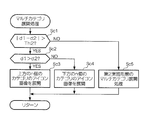
- the flowchart which shows the display control processing which a display apparatus performs The figure which illustrates screen transition of a 1st embodiment
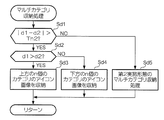
- the flowchart which shows the multi-category expansion process of 2nd Embodiment Flowchart showing multi-category storage processing of the second embodiment
- the flowchart which shows the multi-category expansion process of 3rd Embodiment Flowchart showing multi-category storage processing of the third embodiment
- DESCRIPTION OF SYMBOLS 100 ... Display apparatus, 101 ... Display surface, 110 ... Control part, 111 ... Operation information acquisition part, 112 ... Operation recognition part, 113 ... Display control part, 120 ... Memory
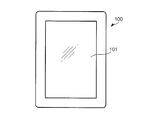
- FIG. 1 is a diagram showing an external configuration of a display device 100 according to an embodiment of the present invention.
- the display device 100 is an electronic device that includes the display surface 101.
- the display surface 101 is a surface that displays an image and that can accept an operation with a user's finger.
- the display surface 101 is assumed to be a vertically long rectangle.
- the display surface 101 may make an image perceive stereoscopically by a method such as autostereoscopic viewing.
- the display device 100 has a size that allows a user to operate the display surface 101 with a finger.
- a mobile phone including a smartphone
- a tablet PC Personal Computer
- a slate PC slate PC
- PDA Personal Digital Assistant
- the display device 100 may be sized so that the user can hold it in his / her hand, but may be operated by placing it on a desk or attaching it to a holder. Note that the display device 100 is not necessarily flat.
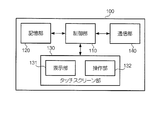
- FIG. 2 is a block diagram illustrating a hardware configuration of the display device 100.
- the display device 100 includes at least a control unit 110, a storage unit 120, a touch screen unit 130, and a communication unit 140.
- the display device 100 may include a speaker, a microphone (or an input / output unit thereof), a camera (including a video camera), a vibrator, and the like in addition to the configuration illustrated in FIG.
- the control unit 110 is a means for controlling the operation of each unit of the display device 100.
- the control unit 110 includes an arithmetic processing device such as a CPU (Central Processing Unit) and a storage device such as a ROM (Read Only Memory) and a RAM (Random Access Memory), and executes a program stored in the ROM or the storage unit 120. By doing so, the GUI according to the present invention is realized.
- the control unit 110 can execute a plurality of application software (hereinafter also simply referred to as “applications”) to realize functions according to the respective applications.
- the control unit 110 may be a multitask system that can simultaneously execute a plurality of tasks (processes), and may implement multitask processing by a multicore configuration.
- the storage unit 120 is a means for storing data.
- the storage unit 120 includes a recording medium such as a hard disk or a flash memory, and stores data used by the control unit 110.
- the storage unit 120 may include a so-called removable disk, that is, a removable recording medium.
- the storage unit 120 can store a program executed by the control unit 110 and image data displayed on the display surface 101.
- the storage unit 120 displays identification information for identifying each user. You may remember.
- the touch screen unit 130 is a means for displaying an image and a means for receiving a user operation. More specifically, the touch screen unit 130 includes a display unit 131 that displays an image on the display surface 101 and an operation unit 132 that receives a user operation on the display surface 101.
- the display unit 131 includes a display panel that displays an image using a liquid crystal element or an organic EL (electroluminescence) element, a drive circuit that drives the display panel, and the like, and displays an image according to display data supplied from the control unit 110. Display on the surface 101.
- the operation unit 132 is provided so as to cover the display surface 101, and includes a planar sensor that detects contact of the finger with the display surface 101, and a position where the finger contact is detected (hereinafter referred to as “contact point”). Is supplied to the control unit 110.
- the operation unit 132 supports so-called multi-touch, and can detect a plurality of contact points simultaneously.
- the communication unit 140 is a means for transmitting and receiving data.
- the communication unit 140 may be a network interface connected to a network such as a mobile communication network or the Internet. However, the communication unit 140 may be connected to other electronic devices via a network, such as wireless communication using NFC (Near Field Communication). You may do.
- the communication unit 140 may be used for exchanging information having a monetary value, such as electronic money or an electronic ticket (electronic coupon).
- the hardware configuration of the display device 100 is as described above. Based on this configuration, the display device 100 executes various applications.
- Applications executed by the display device 100 include, for example, notification of news and weather forecasts, playback of video (still images or moving images) and music, games, browsing of electronic books, and so-called mailers and Web browsers. May be included. These applications include those that can be executed simultaneously with other applications and those that can be executed in the background. These applications may be installed in the display device 100 in advance, or may be purchased by a user from a provider such as a content provider and acquired via the communication unit 140.
- the display device 100 executes an application for displaying icon images corresponding to these applications.
- this application is particularly referred to as an “icon display application”, and an application displayed as an icon by the list display application is referred to as a “target application”.
- the target application here may be a part or all of the application that can be executed by the display device 100 except the icon display application.
- the icon display application may use only a part of the application executable by the display device 100 as an icon display target.
- the icon display application is an application used for the user to manage and start the target application. Management here refers to classifying a target application in accordance with a predetermined category or newly defining a category for the target application.
- the target application category has attributes such as “game” and “music” assigned so that the user can easily recognize the type of the target application.
- the attribute assigned to the category may represent, for example, the frequency and results of use of the target application by the user, such as “target application frequently used recently”.
- the icon display application may classify the target application by determining the category of the target application based on the attribute (for example, usage frequency) of the target application, or may classify the target application according to the determination (instruction) of the user. .
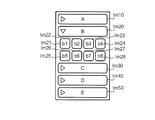
- FIG. 3 is a diagram illustrating a screen (hereinafter referred to as “icon display screen”) displayed by the icon display application.
- the icon display screen can include an icon image and a category image.
- Im10, Im20, Im30, Im40, Im50 are category images
- Im21, Im22,... Im27, Im28 are icon images.
- the icon images Im21 to Im28 are images belonging to the category “B” represented by the category image Im20.
- the categories “A” to “E” shown here are names given to the respective categories for convenience.
- the icon image is an image assigned to the related target application.
- the icon image may be an image determined in advance for each target application, or may be created by the user or selected by the user from predetermined options.
- the arrangement of icon images is determined so that icon images associated with the same category are collectively displayed near each other. In the example of FIG. 3, up to four icon images can be displayed per line, and the number of lines increases as the number of icon images in the same category increases.
- the category image is an image representing a category, and each category image is associated with one or a plurality of icon images. That is, an icon image associated with a certain category image means that the target application associated with the icon image belongs to the category represented by the category image.
- the category image of this embodiment is displayed on the upper part of the icon image when the associated icon image is displayed.
- the icon image can be controlled to be displayed / hidden for each category.
- only icon images of target applications belonging to the category “B” are displayed, and icon images of target applications belonging to other categories “A”, “C”, “D”, and “E” are not displayed. It shows the state which becomes.
- a state in which an icon image associated with a category image (or category) is displayed is referred to as an “expanded state”, and an icon image associated with the category image (or category) is not displayed.
- the state that is displayed is referred to as “storage state”.
- FIG. 3 is a state in which icon images associated with the category “B” are expanded, and icon images associated with other categories “A”, “C”, “D”, and “E”. The state where it is stored is shown.
- the entire icon display screen may not be displayed on the display surface 101 at the same time. That is, the entire icon display screen may be displayed by so-called scroll display. This is because the length of the icon display screen in the vertical direction can vary depending on the number of icon images to be developed.
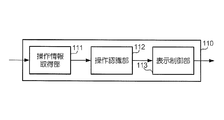
- FIG. 4 is a functional block diagram illustrating a functional configuration of the control unit 110, particularly related to icon display.
- the control part 110 implement achieves the function corresponded to each part of the operation information acquisition part 111 shown in the figure, the operation recognition part 112, and the display control part 113 by running a predetermined program.
- these functions may be realized by cooperation of a plurality of programs.
- the operation information acquisition unit 111 and the operation recognition unit 112 may be realized not by an application but by system software such as an OS (Operating System), and the display control unit 113 may be realized by an icon display application.
- OS Operating System
- the operation information acquisition unit 111 is a means for acquiring operation information. More specifically, the operation information acquisition unit 111 acquires operation information from the operation unit 132 of the touch screen unit 130.
- the operation information represents each position of one or a plurality of contact points on the display surface 101 by a two-dimensional orthogonal coordinate system with a predetermined position (for example, one of the center and four corners) of the display surface 101 as an origin. Shall.
- the operation information changes every moment when the user touches the display surface 101 while moving the contact point.
- the operation recognition unit 112 is a means for recognizing the type of user operation based on the operation information acquired by the operation information acquisition unit 111.
- the operation recognition unit 112 recognizes at least three types of operations of “tap operation”, “pinch-in operation”, and “pinch-out operation”. Further, although detailed description is omitted here, the operation recognizing unit 112 continuously performs “drag operation” or “flick operation” in which one finger is moved while being in contact with the display surface 101, and tap operation. Other known operations such as a “double tap operation” repeated twice may also be recognized.
- the tap operation is an operation of touching one point on the display surface 101.
- the pinch-in operation and the pinch-out operation are operations that simultaneously touch two points on the display surface 101.
- the pinch-in operation is an operation of moving the contact point so as to reduce the distance between the two points after touching the two points on the display surface 101, and is also referred to as a pinch close operation.
- the pinch-out operation is an operation of moving the contact point so as to increase the distance between the two points after touching the two points on the display surface 101, and is also called a pinch open operation.
- a series of operations from when the finger is brought into contact with the display surface 101 to when the finger is released corresponds to one operation.
- the pinch-in operation and the pinch-out operation may be operations for moving the finger in the vertical direction or the horizontal direction with respect to the display surface 101.
- the display control unit 113 is a means for controlling an image to be displayed on the display unit 131.
- the operation recognized by the operation recognition unit 112 is a tap operation, a pinch-in operation, or a pinch-out operation
- the display control unit 113 has at least a function of controlling expansion and storage of icon images according to the operation. Further, when the user touches a specific icon image by a tap operation, the display control unit 113 displays an image corresponding to the target application associated with the icon image.
- the display device 100 executes icon image display control by executing an icon display application.
- the icon display application When the icon display application is executed, at least the category image is always displayed on the display surface 101, but the icon image is not necessarily displayed. For example, if the icon display application has been executed in the past, the display device 100 may display the icon image in the display state at the previous end.
- the display device 100 provides the user with a GUI that allows the icon image to be developed and stored differently depending on whether the user operation is a tap operation or a pinch-in operation or a pinch-out operation. Specifically, when the tap operation is accepted, the display device 100 expands or stores only the icon image associated with the specific category image, and when the pinch-in operation or the pinch-out operation is accepted. All the icon images respectively associated with all the category images displayed on the icon display screen are developed or stored together.
- the display control process executed by the display device 100 at this time is as follows.
- FIG. 5 is a flowchart showing display control processing executed by the control unit 110 of the display device 100.
- the control unit 110 executes this display control process triggered by the acquisition of operation information (step S1). That is, in the state where the icon display screen is displayed, the control unit 110 executes the process shown in FIG. 5 every time operation information is acquired.
- step S1 the control unit 110 acquires operation information.
- the control unit 110 can recognize the coordinates of one or a plurality of contact points and the displacement thereof based on the acquired operation information. Subsequently, the control unit 110 recognizes a user operation based on the operation information (step S2). In step S2, the control unit 110 recognizes not only the type of user operation but also the position where the operation is performed. Further, as will be described later, the control unit 110 can also recognize the moving amount and moving speed of the contact point in each operation.
- the control unit 110 determines whether or not the user's operation is an operation of selecting a specific category image based on the recognition result of Step S2 (Step S3).
- the operation of selecting a specific category image refers to a tap operation performed on a portion of the display surface 101 where the specific category image is displayed. That is, in step S3, the control unit 110 determines whether the user operation is a tap operation and the contact point is on the category image.
- Such an operation corresponds to an example of a selection operation according to the present invention.
- the control unit 110 determines whether or not the icon image associated with the category image is stored (step S4). Then, when the icon image is stored, the control unit 110 expands the icon image (step S5), and when the icon image is not stored (that is, when the icon image is expanded). ) Stores the icon image (step S6). That is, the control unit 110 switches the state of the icon image associated with the category image from one of the expanded state and the stored state to the other in accordance with the selection operation for the specific category image.
- the control unit 110 determines whether the operation is a pinch-out operation or a pinch-in operation (steps S7 and S9). Then, when the pinch-out operation is accepted, the control unit 110 expands all the icon images associated with all the category images displayed on the icon display screen (step S8), and performs the pinch-in operation. Is received, all the icon images associated with all the category images displayed on the icon display screen are stored together (step S10). In the following, the processes of steps S8 and S10 are referred to as “multi-category development process” and “multi-category storage process”. Note that the processing order of steps S7 and S9 may be reversed.
- step S8 if there is a category in which the icon image has already been developed, the control unit 110 may maintain the display state of the icon image associated with the category image as it is. Similarly, in step S10, if there is a category in which an icon image is already stored, the control unit 110 may maintain the display state of the icon image associated with the category image as it is.
- step S11 when it is determined in step S7 or S9 that neither the pinch-out operation nor the pinch-in operation is performed, the control unit 110 executes other processing according to the user operation (step S11). For example, if a tap operation on an icon image is accepted, the control unit 110 activates a target application associated with the icon image and displays a screen corresponding to the target application. Further, the “other processing” referred to here may be that no special processing is performed, that is, the user does not respond to the operation.
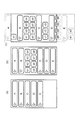
- FIG. 6 is a diagram illustrating a screen transition of the icon display screen by the display control process of the present embodiment.
- FIG. 6A shows a state in which all icon images are stored, and is a display example immediately after the execution of the process of step S10.
- FIG. 6B shows a state where only the icon image of the category “B” is expanded. For example, in a state where all the icon images are stored, the category image of the category “B” (FIG. 3). This is a display example when a selection operation is performed on Im20).
- FIG. 6C shows a state in which all icon images have been developed, and is a display example immediately after the execution of the process of step S8.
- FIG.6 (c) has shown the image outside the display area of the display surface 101.
- a1, b1 to b8, c1 to c3, d1 to d4, and e1 to e2 are objects associated with categories “A”, “B”, “C”, “D”, and “E”, respectively.
- An icon image of the application is shown.
- the user can properly use the expansion or storage of only the icon images of a specific category and the expansion or storage of the icon images of all categories in one operation. Is possible. Therefore, the user performs a pinch-out operation when the user wants to know the entire contents of the target application that can be executed, and performs a tap operation (selection operation) when the target application to be started has a certain degree of stars.
- the number of icon images displayed can be controlled by an operation according to the situation at that time.
- the pinch-in operation that is, the pinch-in operation, that is, 2 is performed by switching the display state of the icon image from the storage state to the unfolding state by a pinch-out operation, i. It is possible to switch the display state of the icon image from the expanded state to the stored state by closing the finger of the book (narrowing the interval).
- a pinch-out operation i. It is possible to switch the display state of the icon image from the expanded state to the stored state by closing the finger of the book (narrowing the interval).
- the process of making the unfolded state is to display an icon image that has not been displayed until then, there is a conceptual similarity with the operation of “opening a finger”.
- the storing state process also has a conceptual commonality with the operation of “closing a finger”. Therefore, according to such display control processing, the user can switch the display state of the icon image by an intuitive operation.
- the hardware configuration of the display device is the same as that of the first embodiment, and the display control process is different from that of the first embodiment.
- the display control processing of the present embodiment is performed by the number of categories in which icon images are expanded or stored (that is, the number of icon images displayed) in accordance with the amount of movement or position of the contact point in the pinch-in operation or pinch-out operation It is characterized by changing.
- the configuration of the display device according to the present embodiment is the same as that of the display device 100 according to the first embodiment. Therefore, the same reference numerals as those in the first embodiment will be used, and detailed description thereof will be omitted. .
- the display control process of the present embodiment is different from the first embodiment in particular in the multi-category development process (step S8) and the multi-category storage process (step S10). Note that the display control process of the present embodiment is the same as that of the first embodiment except for steps S8 and S10. That is, the multi-category development process and the multi-category storage process of the present embodiment are executed when the respective determinations are affirmative (YES) after the processes of steps S7 and S9 shown in FIG.
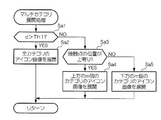
- FIG. 7 is a flowchart showing the multi-category development process of the present embodiment.
- the control unit 110 identifies the amount of movement d of the two contact points in the pinch-out operation, and determines whether this exceeds a predetermined threshold value Th1 (step Sa1).
- the movement amount d is, for example, the average value of the lengths of the trajectories of the two contact points, but may be the longer (or shorter) of these.
- the movement amount of each contact point may be the distance between the start point and the end point of the track of the contact point, instead of the length of the track.
- the threshold Th1 may be appropriately determined based on the size of the display surface 101 or the like.
- step Sa2 When the moving amount d exceeds the threshold value Th1, the control unit 110 collectively develops all icon images associated with all the category images displayed on the icon display screen (step Sa2).
- the process itself of step Sa2 is the same as the process of step S8 of 1st Embodiment.
- the control unit 110 limits the number of categories for developing icon images to m.
- the value of m is an integer that is 2 or more and less than the total number of expandable categories (“5” in the example of FIG. 6A).
- the control unit 110 changes the category in which the icon image is developed according to the positions of the two contact points in the pinch-out operation. Specifically, it is as follows.
- the control unit 110 identifies the positions of the two contact points in the pinch-out operation, and determines whether or not the positions are upward (Step Sa3).
- “upward” means a state in which the positions of the two contact points are on the upper side of the display surface 101 when viewed relative to each other. Whether or not the position of the contact point is upward can be determined, for example, by whether or not the midpoint of the line segment connecting the two contact points is located in the upper half of the display surface 101. It may be determined by the method. For example, this determination may be made based on the position of one of the two contact points, not the position of the midpoint described above.
- step Sa4 When the pinch-out operation is recognized at the upper position, the control unit 110 expands the icon image associated with the m category images on the upper side of the display surface 101 (step Sa4).
- the control unit 110 associates with the m category images on the lower side of the display surface 101.
- the obtained icon image is developed (step Sa5). For example, if the number of category images displayed on the icon display screen is “5” as in the example of FIG. 6A and the value of m described above is “3”, the control unit 110 In step Sa4, icon images of categories “A”, “B”, and “C” are developed, and in step Sa5, icon images of categories “C”, “D”, and “E” are developed.
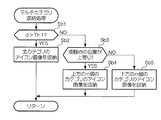
- FIG. 8 is a flowchart showing the multi-category storage process of the present embodiment. Since this process is the same as the multi-category development process of FIG. 7 except that “development” is replaced with “storage”, the description thereof is omitted. However, the value of m does not necessarily have to be the same in the multi-category development process and the multi-category storage process.
- the user can change the category to be expanded or stored according to the specific mode (movement amount or position) of the pinch-out operation or the pinch-in operation. It is. At this time, the user expands more categories in a lump by moving more fingers, or expands the upper category in a lump by performing an operation on the upper side of the display surface 101. Since a common feeling can be obtained between the category to be stored (or stored) and the user's own operation, the operation can be performed intuitively.
- the display device 100 may give stronger commonality between the category of expanding (or storing) the icon image and the user's own operation. For example, when the user performs a pinch-in operation in the vertical direction with respect to the display surface, when one or more category images are displayed between the start point of the upper contact point and the start point of the lower contact point, The display device 100 stores icon images associated with the one or more category images, and other category images (category images above the upper contact point and lower contact points). The icon image of the category image below) may not be stored. In this case, the number of categories in which icon images are developed (or stored) varies depending on the position of the user's finger, regardless of the value of m described above.
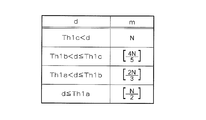
- FIG. 9 is a diagram illustrating a table describing the relationship between the movement amount d and the number m of categories for expanding (or storing) icon images.
- Th1a, Th1b, and Th1c are threshold values that satisfy Th1a ⁇ Th1b ⁇ Th1c, respectively.
- N is the total number of categories that can be displayed on the icon display screen.
- the symbol “[]” is a Gaussian symbol, and for example, “[N / 2]” means “the largest integer not exceeding N / 2”.
- the control part 110 will increase the value of m in steps as the moving amount d becomes large.
- the control unit 110 has two when the movement amount d satisfies d ⁇ Th1a, three when the movement amount d satisfies Th1a ⁇ d ⁇ Th1b, and three when Th1b ⁇ d ⁇ Th1c.
- Th1c When four satisfy Th1c ⁇ d, icon images associated with five categories are expanded (or stored) in a batch.
- the user may set the threshold and the value of m.
- the configuration of the display device is the same as that of the first embodiment and the second embodiment, and the multi-category development process and the multi-category storage process of the display control process are different from those of the first embodiment and the second embodiment.
- the display control process of the present embodiment is characterized in that the category in which the icon image is developed or stored is changed according to the difference in the movement amount of the two contact points in the pinch-in operation and the pinch-out operation.
- the configuration of the display device according to the present embodiment is the same as that of the display device 100 according to the first embodiment. Therefore, the same reference numerals as those in the first embodiment will be used, and detailed description thereof will be omitted. .
- the pinch-in operation and the pinch-out operation are performed in the vertical direction with respect to the display surface 101.
- the upper one is referred to as “first contact point”
- the lower one is referred to as “second contact point”.
- FIG. 10 is a flowchart showing the multi-category development process of the present embodiment.
- the control unit 110 specifies the movement amount d1 of the first contact point and the movement amount d2 of the second contact point in the pinch-out operation, and the difference (absolute value thereof). Is determined to exceed a predetermined threshold Th2 (step Sc1). Note that the threshold Th2 may be appropriately determined based on the size of the display surface 101 or the like.
- control unit 110 further determines the magnitudes of movement amounts d1 and d2 (step Sc2).
- the control unit 110 develops an icon image associated with the n category images on the upper side of the display surface 101 (step Sc3), and the movement amount d2 is larger.
- the icon image associated with the n category images on the lower side of the display surface 101 is developed (step Sc4).
- the value of n is an integer that is equal to or larger than 2 and less than the total number of expandable categories, similarly to the value of m described above.
- step Sc5 is a process corresponding to the process of steps Sa1 to Sa5 (see FIG. 7) described above.
- FIG. 11 is a flowchart showing the multi-category storage process of the present embodiment. Since this process is the same as the multi-category development process of FIG. 10 except that “development” is replaced with “storage”, the description thereof is omitted. However, the value of n does not necessarily have to be the same in the multi-category development process and the multi-category storage process.
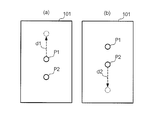
- FIG. 12 is a diagram showing a specific example of the movement amounts d1 and d2.
- P1 and P2 represent the first contact point and the start point of the second contact point, respectively, and the dashed arrows in the figure represent the locus of the contact point.
- the example of FIG. 12A illustrates a pinch-out operation when only the first contact point (forefinger) is moved upward and the position of the second contact point (thumb) is not moved.
- D1> d2 is exemplified.
- the example of FIG. 12B illustrates a pinch-out operation when only the second contact point (thumb) is moved downward without moving the position of the first contact point.
- d2> d1 is satisfied.
- the movement amounts d1 and d2 only need to have a significant difference exceeding the threshold Th2, and one of them does not need to be 0 (that is, do not move).
- the category image for developing the associated icon image may change according to the position of the contact point.
- the control unit 110 recognizes a pinch-out operation in which the position of the second contact point is fixed and only the first contact point is moved as in the example of FIG.
- the icon image of the category image located above the position of the first contact point may be developed without developing the icon image of the category image located below the position of the contact point.
- the user can suppress expansion or storage of the category image at the position of the finger by pressing the category image without moving one finger. You can get a sense of being.
- the present invention is not limited to the aspect of each embodiment described above, and can be implemented in other aspects.
- the present invention can also be implemented, for example, by the modes shown in the following modifications.
- Note that the present invention may be implemented in a mode in which a plurality of modifications are combined, or a mode in which the features of the above-described embodiments are selectively combined (for example, the second embodiment regarding the expansion of icon images).
- the storage of the icon image may be carried out in a manner adopting the third embodiment).
- the operation unit of the present invention does not necessarily include a sensor provided on the display surface.
- the operation unit may include a touch pad (also referred to as a track pad or a slide pad) as the operation surface. .
- the icon image of the present invention may not represent an application (that is, a function corresponding to the application).
- the icon image may be an image (thumbnail or the like) representing image data or music data
- the category image may be an image for classifying the icon image (an image imitating a so-called folder or the like).
- the icon images of the present invention may each represent the electronic ticket described above. These icon images are examples of images assigned to the data in order to identify the data.
- the category image of the present invention may be an image displayed overlapping the rear surface of the icon image, like the “tray” in Patent Document 1 described above. Further, the category image of the present invention may be one that is hidden after the associated icon image is expanded and is displayed again after the icon image is stored. In short, the category image of the present invention is not particularly limited as long as it can classify and display icon images.
- the number of categories or category images is not limited to a plurality, and may be one. Even in this case, by expanding and storing the icon image according to the pinch-out operation and the pinch-in operation, the user can switch the display state of the icon image by an intuitive operation.
- the icon display screen of the present invention may be configured such that the entire icon display screen is displayed on the display surface by changing the size of the icon image or category image.
- the user is not limited to his / her finger, but uses an instruction device (hereinafter referred to as “indicator”) such as a stylus that is moved by the user (or attached to the hand). May be operated.
- the operation unit in the case of using such an indicator may detect the position of the indicator by infrared rays or ultrasonic waves.
- the position of the indicator can be detected magnetically. That is, the display device of the present invention does not need to be provided with a touch screen.
- the pinch-in operation and the pinch-out operation are not limited to one-hand operation, and may be performed using the right hand (finger) and the left hand (finger).
- the user's operation does not necessarily need to be an operation of touching the display surface.
- the touch screen unit 130 of the display device 100 described above is configured by a capacitance method, the position of the finger can be detected even when the user is in close proximity before touching the display surface 101. Is possible.
- the selection operation of the present invention is an operation that can be distinguished from a pinch-out operation and a pinch-in operation, and may be an operation that can select a specific category image from a plurality of category images, and is not necessarily a tap. It does not have to be an operation.
- the selection operation of the present invention may be a double tap operation.
- the present invention can also be applied to various electronic devices such as game machines, music players, and electronic book readers. Further, the present invention is not based on a single display device, but by cooperation between a display device including at least a display unit and another device (device for controlling display of the display device) provided independently of the display device. It may be realized. In this case, it is sufficient for the other apparatus to have the functional configuration shown in FIG. 4, and the display unit and the operation unit may not be provided. In this case, the present invention can also be implemented in the form of a program for realizing the functional configuration shown in FIG. 4 and a recording medium on which the program is recorded. Further, such a program may be downloaded from a server device via a network and installed in an electronic device.
Landscapes
- Engineering & Computer Science (AREA)
- Theoretical Computer Science (AREA)
- General Engineering & Computer Science (AREA)
- Physics & Mathematics (AREA)
- General Physics & Mathematics (AREA)
- Human Computer Interaction (AREA)
- Computer Hardware Design (AREA)
- User Interface Of Digital Computer (AREA)
- Position Input By Displaying (AREA)
- Controls And Circuits For Display Device (AREA)
Abstract
Description
そこで、本発明は、関連を有する複数のアイコン画像の表示状態を従来と異なる直感的な操作で切り替えられるようにすることを目的とする。
別の好ましい態様において、前記表示制御部は、前記展開状態において前記アイコン画像を表示させる前記カテゴリを、前記操作認識部により認識されたピンチアウト操作の前記2点の位置に応じて変化させる。
さらに別の好ましい態様において、前記表示制御部は、前記展開状態において前記アイコン画像を表示させる前記カテゴリを、前記操作認識部により認識されたピンチアウト操作の前記2点の一方と他方の移動量の相違に応じて変化させる。
作を認識し、前記表示制御部は、前記操作認識部によりピンチイン操作が認識された場合に、前記1または複数のカテゴリの少なくとも一つに関連付けられた前記アイコン画像の状態を、前記展開状態から前記収納状態に切り替える。
この場合において、前記表示制御部は、前記収納状態において前記アイコン画像を非表示にさせる前記カテゴリの数を、前記操作認識部により認識されたピンチイン操作における前記2点の移動量又は移動速度に応じて変化させてもよい。
あるいは、前記表示制御部は、前記収納状態において前記アイコン画像を非表示にさせる前記カテゴリを、前記操作認識部により認識されたピンチイン操作の前記2点の位置に応じて変化させてもよい。
あるいは、前記表示制御部は、前記収納状態において前記アイコン画像を非表示にさせる前記カテゴリを、前記操作認識部により認識されたピンチイン操作の前記2点の一方と他方の移動量の相違に応じて変化させてもよい。
また、本発明の一態様に基づくと、画像を表示する表示面を有する表示部と、操作者の接触による操作を受け付ける操作面を有する操作部と、複数のアイコン画像と、前記アイコン画像が関連付けられた1または複数のカテゴリをそれぞれ表す1または複数のカテゴリ画像とを前記表示部に表示させる表示制御部と、前記操作部により受け付けられた操作に基づき、前記操作面の2点に接触しつつ当該2点間の距離を変える操作を認識する操作認識部とを備え、前記表示制御部は、前記操作に応じて、前記1または複数のカテゴリの少なくとも一つに関連付けられた前記アイコン画像の状態を、当該アイコン画像が非表示にされた収納状態と、当該アイコン画像が表示された展開状態との間で切り替えることを特徴とする表示装置が提供される。
図1は、本発明の一実施形態である表示装置100の外観上の構成を示す図である。表示装置100は、表示面101を備える電子機器である。表示面101は、画像を表示する面であり、かつ、ユーザの指による操作を受け付けることができる面である。表示面101は、ここでは縦長の長方形であるとする。なお、表示面101は、裸眼立体視などの方法により画像を立体的に知覚させるものであってもよい。
本実施形態は、表示装置のハードウェア構成を第1実施形態と共通にし、表示制御処理を第1実施形態と異にするものである。具体的には、本実施形態の表示制御処理は、ピンチイン操作やピンチアウト操作における接触点の移動量や位置に応じて、アイコン画像を展開又は収納させるカテゴリの数(すなわちアイコン画像の表示数)を変化させることを特徴とするものである。なお、本実施形態の表示装置の構成については、第1実施形態の表示装置100と同様であるため、第1実施形態と同一の符号を用いて説明することとし、その詳細な説明を省略する。
図9は、移動量dとアイコン画像を展開(又は収納)するカテゴリの数mとの関係を記述したテーブルを例示する図である。この例において、Th1a、Th1b、Th1cは、それぞれ、Th1a<Th1b<Th1cを満たす閾値である。また、Nは、アイコン表示画面に表示可能なカテゴリの総数である。ここにおいて、記号「[]」は、ガウス記号であり、例えば「[N/2]」は、「N/2を超えない最大の整数」を意味する。
なお、この例において、閾値やmの値は、ユーザが設定するようにしてもよい。
本実施形態は、表示装置の構成を第1実施形態及び第2実施形態と共通にし、表示制御処理のマルチカテゴリ展開処理及びマルチカテゴリ収納処理を第1実施形態及び第2実施形態と異にするものである。具体的には、本実施形態の表示制御処理は、ピンチイン操作やピンチアウト操作における2つの接触点の移動量の相違に応じて、アイコン画像を展開又は収納させるカテゴリを変化させることを特徴とするものである。なお、本実施形態の表示装置の構成については、第1実施形態の表示装置100と同様であるため、第1実施形態と同一の符号を用いて説明することとし、その詳細な説明を省略する。
本発明は、上述した各実施形態の態様に限らず、他の態様でも実施することができる。本発明は、例えば、以下の変形例に示す態様によっても実施可能である。なお、本発明は、これら複数の変形例を組み合わせた態様で実施されてもよいし、上述した各実施形態の特徴を選択的に組み合わせた態様(例えば、アイコン画像の展開に関しては第2実施形態を採用し、アイコン画像の収納に関しては第3実施形態を採用した態様)で実施されてもよい。
Claims (11)
- 画像を表示する表示面を有する表示部と、
操作者の接触による操作を受け付ける操作面を有する操作部と、
複数のアイコン画像と、前記アイコン画像が関連付けられた1または複数のカテゴリをそれぞれ表す1または複数のカテゴリ画像とを前記表示部に表示させる表示制御部と、
前記操作部により受け付けられた操作に基づき、前記操作面の2点に接触しつつ当該2点間の距離を広げるピンチアウト操作を認識する操作認識部とを備え、
前記表示制御部は、
前記操作認識部によりピンチアウト操作が認識された場合に、前記1または複数のカテゴリの少なくとも一つに関連付けられた前記アイコン画像の状態を、当該アイコン画像が非表示にされた収納状態から当該アイコン画像が表示された展開状態に切り替える
ことを特徴とする表示装置。 - 前記表示制御部は、
前記展開状態において前記アイコン画像を表示させる前記カテゴリの数を、前記操作認識部により認識されたピンチアウト操作における前記2点の移動量又は移動速度に応じて変化させる
ことを特徴とする請求項1に記載の表示装置。 - 前記表示制御部は、
前記展開状態において前記アイコン画像を表示させる前記カテゴリを、前記操作認識部により認識されたピンチアウト操作の前記2点の位置に応じて変化させる
ことを特徴とする請求項1又は2に記載の表示装置。 - 前記表示制御部は、
前記展開状態において前記アイコン画像を表示させる前記カテゴリを、前記操作認識部により認識されたピンチアウト操作の前記2点の一方と他方の移動量の相違に応じて変化させる
ことを特徴とする請求項1ないし3のいずれか1項に記載の表示装置。 - 前記操作認識部は、
前記操作部により受け付けられた操作に基づき、前記操作面の2点に接触しつつ当該2点間の距離を狭めるピンチイン操作を認識し、
前記表示制御部は、
前記操作認識部によりピンチイン操作が認識された場合に、前記1または複数のカテゴリの少なくとも一つに関連付けられた前記アイコン画像の状態を、前記展開状態から前記収納状態に切り替える
ことを特徴とする請求項1ないし4のいずれか1項に記載の表示装置。 - 前記表示制御部は、
前記収納状態において前記アイコン画像を非表示にさせる前記カテゴリの数を、前記操作認識部により認識されたピンチイン操作における前記2点の移動量又は移動速度に応じて変化させる
ことを特徴とする請求項5に記載の表示装置。 - 前記表示制御部は、
前記収納状態において前記アイコン画像を非表示にさせる前記カテゴリを、前記操作認識部により認識されたピンチイン操作の前記2点の位置に応じて変化させる
ことを特徴とする請求項5又は6に記載の表示装置。 - 前記表示制御部は、
前記収納状態において前記アイコン画像を非表示にさせる前記カテゴリを、前記操作認識部により認識されたピンチイン操作の前記2点の一方と他方の移動量の相違に応じて変化させる
ことを特徴とする請求項5ないし7のいずれか1項に記載の表示装置。 - 画像を表示する表示面を有する表示部と、
操作者の接触による操作を受け付ける操作面を有する操作部と、
複数のアイコン画像と、前記アイコン画像が関連付けられた1または複数のカテゴリをそれぞれ表す1または複数のカテゴリ画像とを前記表示部に表示させる表示制御部と、
前記操作部により受け付けられた操作に基づき、前記操作面の2点に接触しつつ当該2点間の距離を変える操作を認識する操作認識部とを備え、
前記表示制御部は、
前記操作に応じて、前記1または複数のカテゴリの少なくとも一つに関連付けられた前記アイコン画像の状態を、当該アイコン画像が非表示にされた収納状態と、当該アイコン画像が表示された展開状態との間で切り替える
ことを特徴とする表示装置。 - 複数のアイコン画像と、前記アイコン画像が関連付けられた1または複数のカテゴリをそれぞれ表す1または複数のカテゴリ画像とを表示面に表示する表示部と、ユーザの接触による操作を受け付ける操作面を有する操作部とを備える表示装置におけるユーザインタフェース方法であって、
前記カテゴリ画像が前記表示面に表示された状態で、前記操作部の前記操作面の2点に接触しつつ当該2点間の距離を広げるピンチアウト操作を受け付ける第1のステップと、
前記ピンチアウト操作が受け付けられた場合に、前記1または複数のカテゴリの少なくとも一つに関連付けられた前記アイコン画像の状態を、当該アイコン画像が非表示にされた収納状態から当該アイコン画像が表示された展開状態に切り替える第2のステップと
を有することを特徴とするユーザインタフェース方法。 - 複数のアイコン画像と、前記アイコン画像が関連付けられた1または複数のカテゴリをそれぞれ表す1または複数のカテゴリ画像とを表示面に表示する表示部と、ユーザの接触による操作を受け付ける操作面を有する操作部とを備える表示装置のコンピュータに、
前記カテゴリ画像が前記表示面に表示された状態で、前記操作部の前記操作面の2点に接触しつつ当該2点間の距離を広げるピンチアウト操作が受け付けられたことを認識する第1のステップと、
前記ピンチアウト操作を認識した場合に、前記1または複数のカテゴリの少なくとも一つに関連付けられた前記アイコン画像の状態を、当該アイコン画像が非表示にされた収納状態から当該アイコン画像が表示された展開状態に切り替える第2のステップと
を実行させるためのプログラム。
Priority Applications (6)
| Application Number | Priority Date | Filing Date | Title |
|---|---|---|---|
| EP12786353.8A EP2708996A4 (en) | 2011-05-13 | 2012-05-11 | DISPLAY DEVICE, USER INTERFACE PROCEDURE AND PROGRAM |
| BR112013018113A BR112013018113A2 (pt) | 2011-05-13 | 2012-05-11 | dispositivo de exibição, método para interface de usuário e programa |
| KR1020137016808A KR20130099186A (ko) | 2011-05-13 | 2012-05-11 | 표시 장치, 유저 인터페이스 방법, 및 프로그램 |
| CN2012800048476A CN103299263A (zh) | 2011-05-13 | 2012-05-11 | 显示装置、用户接口方法以及程序 |
| US13/946,403 US20140059492A1 (en) | 2011-05-13 | 2012-05-11 | Display device, user interface method, and program |
| RU2013127503/08A RU2013127503A (ru) | 2011-05-13 | 2012-05-11 | Устройство отображения, способ пользовательского интерфейса и программа |
Applications Claiming Priority (2)
| Application Number | Priority Date | Filing Date | Title |
|---|---|---|---|
| JP2011108669A JP5485220B2 (ja) | 2011-05-13 | 2011-05-13 | 表示装置、ユーザインタフェース方法及びプログラム |
| JP2011-108669 | 2011-05-13 |
Publications (1)
| Publication Number | Publication Date |
|---|---|
| WO2012157562A1 true WO2012157562A1 (ja) | 2012-11-22 |
Family
ID=47176882
Family Applications (1)
| Application Number | Title | Priority Date | Filing Date |
|---|---|---|---|
| PCT/JP2012/062148 Ceased WO2012157562A1 (ja) | 2011-05-13 | 2012-05-11 | 表示装置、ユーザインタフェース方法及びプログラム |
Country Status (8)
| Country | Link |
|---|---|
| US (1) | US20140059492A1 (ja) |
| EP (1) | EP2708996A4 (ja) |
| JP (1) | JP5485220B2 (ja) |
| KR (1) | KR20130099186A (ja) |
| CN (1) | CN103299263A (ja) |
| BR (1) | BR112013018113A2 (ja) |
| RU (1) | RU2013127503A (ja) |
| WO (1) | WO2012157562A1 (ja) |
Cited By (2)
| Publication number | Priority date | Publication date | Assignee | Title |
|---|---|---|---|---|
| WO2014083868A1 (en) * | 2012-11-30 | 2014-06-05 | Kabushiki Kaisha Toshiba | Electronic device and computer program |
| WO2014196639A1 (ja) * | 2013-06-07 | 2014-12-11 | シャープ株式会社 | 情報処理装置および制御プログラム |
Families Citing this family (26)
| Publication number | Priority date | Publication date | Assignee | Title |
|---|---|---|---|---|
| EP2395440A3 (en) * | 2010-06-14 | 2012-01-11 | Lg Electronics Inc. | Mobile terminal and conrolling method thereof |
| US9552376B2 (en) | 2011-06-09 | 2017-01-24 | MemoryWeb, LLC | Method and apparatus for managing digital files |
| JP5502943B2 (ja) * | 2012-06-29 | 2014-05-28 | 楽天株式会社 | 情報処理装置、認証装置、情報処理方法及び情報処理プログラム |
| TWI566134B (zh) * | 2013-02-05 | 2017-01-11 | 財團法人工業技術研究院 | 摺疊式顯示器、可撓式顯示器及電腦圖像之控制方法 |
| US9395837B2 (en) * | 2013-09-30 | 2016-07-19 | Your Voice S.P.A. | Management of data in an electronic device |
| JP2015087995A (ja) * | 2013-10-31 | 2015-05-07 | 株式会社ソリマチ技研 | 表示システム及び表示システムの表示方法 |
| EP3096214B1 (en) * | 2014-01-15 | 2019-03-20 | Yulong Computer Telecommunication Scientific (Shenzhen) Co., Ltd. | Terminal control method and terminal control device |
| CN106104449A (zh) * | 2014-03-20 | 2016-11-09 | 日本电气株式会社 | 信息处理装置、信息处理方法、以及信息处理程序 |
| WO2015159498A1 (en) * | 2014-04-14 | 2015-10-22 | Sony Corporation | Method and apparatus for displaying additional objects on a graphical user interface based on pinch gesture |
| KR102418119B1 (ko) | 2014-08-25 | 2022-07-07 | 삼성전자 주식회사 | 시계 화면 구성 방법 및 이를 구현한 웨어러블 전자장치 |
| CN105786352B (zh) * | 2014-12-26 | 2019-08-06 | 阿里巴巴集团控股有限公司 | 快速定位页面内容的方法、装置及移动终端 |
| CN104881224A (zh) * | 2015-05-18 | 2015-09-02 | 百度在线网络技术(北京)有限公司 | 一种卡片的添加方法及装置 |
| CN105426107A (zh) * | 2015-11-30 | 2016-03-23 | 北京拉酷网络科技有限公司 | 基于触控板的手势识别方法 |
| CN105446601B (zh) * | 2015-12-10 | 2019-02-12 | Oppo广东移动通信有限公司 | 一种播放列表管理方法及移动终端 |
| CN106648372A (zh) * | 2016-12-29 | 2017-05-10 | 北京小米移动软件有限公司 | 图像管理方法及装置 |
| USD852814S1 (en) * | 2017-03-23 | 2019-07-02 | Facebook, Inc. | Display screen with a graphical user interface for an advertisement management application |
| US10466889B2 (en) | 2017-05-16 | 2019-11-05 | Apple Inc. | Devices, methods, and graphical user interfaces for accessing notifications |
| CN109032734B (zh) * | 2018-07-13 | 2020-09-01 | 维沃移动通信有限公司 | 一种后台应用程序显示方法和移动终端 |
| US10936178B2 (en) | 2019-01-07 | 2021-03-02 | MemoryWeb, LLC | Systems and methods for analyzing and organizing digital photos and videos |
| US11455085B2 (en) | 2020-03-10 | 2022-09-27 | Apple Inc. | Devices, methods, and graphical user interfaces for interacting with user interface objects corresponding to applications |
| KR102332361B1 (ko) | 2020-11-03 | 2021-12-01 | 주식회사 해성 | 블록용 거푸집 |
| CN115079891B (zh) * | 2021-03-01 | 2024-03-15 | 北京字跳网络技术有限公司 | 文档内容展示方法、装置和电子设备 |
| EP4273677A1 (en) | 2022-05-06 | 2023-11-08 | Apple Inc. | Devices, methods, and graphical user interfaces for updating a session region |
| US12265687B2 (en) | 2022-05-06 | 2025-04-01 | Apple Inc. | Devices, methods, and graphical user interfaces for updating a session region |
| US11842028B2 (en) | 2022-05-06 | 2023-12-12 | Apple Inc. | Devices, methods, and graphical user interfaces for updating a session region |
| CN116048327A (zh) * | 2022-07-07 | 2023-05-02 | 荣耀终端有限公司 | 任务显示区的显示方法、窗口的显示方法及电子设备 |
Citations (3)
| Publication number | Priority date | Publication date | Assignee | Title |
|---|---|---|---|---|
| JP2009151821A (ja) | 2005-12-30 | 2009-07-09 | Apple Inc | インターフェース再構成モードを有する携帯用電子装置 |
| JP2010097473A (ja) * | 2008-10-17 | 2010-04-30 | Sony Corp | 表示装置、表示方法及びプログラム |
| WO2010144201A2 (en) * | 2009-06-07 | 2010-12-16 | Apple Inc. | Devices, methods, and graphical user interfaces for accessibility using a touch-sensitive surface |
Family Cites Families (13)
| Publication number | Priority date | Publication date | Assignee | Title |
|---|---|---|---|---|
| KR100595926B1 (ko) * | 1998-01-26 | 2006-07-05 | 웨인 웨스터만 | 수동 입력 통합 방법 및 장치 |
| US8564544B2 (en) * | 2006-09-06 | 2013-10-22 | Apple Inc. | Touch screen device, method, and graphical user interface for customizing display of content category icons |
| US8681104B2 (en) * | 2007-06-13 | 2014-03-25 | Apple Inc. | Pinch-throw and translation gestures |
| KR101586627B1 (ko) * | 2008-10-06 | 2016-01-19 | 삼성전자주식회사 | 멀티 터치를 이용한 리스트 관리 방법 및 장치 |
| US8669945B2 (en) * | 2009-05-07 | 2014-03-11 | Microsoft Corporation | Changing of list views on mobile device |
| EP2480957B1 (en) * | 2009-09-22 | 2017-08-09 | Apple Inc. | Device, method, and graphical user interface for manipulating user interface objects |
| US8766928B2 (en) * | 2009-09-25 | 2014-07-01 | Apple Inc. | Device, method, and graphical user interface for manipulating user interface objects |
| US8619100B2 (en) * | 2009-09-25 | 2013-12-31 | Apple Inc. | Device, method, and graphical user interface for touch-based gestural input on an electronic canvas |
| US8786559B2 (en) * | 2010-01-06 | 2014-07-22 | Apple Inc. | Device, method, and graphical user interface for manipulating tables using multi-contact gestures |
| US8698762B2 (en) * | 2010-01-06 | 2014-04-15 | Apple Inc. | Device, method, and graphical user interface for navigating and displaying content in context |
| CN101819500A (zh) * | 2010-03-08 | 2010-09-01 | 广东欧珀移动通信有限公司 | 一种手持设备列表行显浏览调整方法 |
| US9098182B2 (en) * | 2010-07-30 | 2015-08-04 | Apple Inc. | Device, method, and graphical user interface for copying user interface objects between content regions |
| US9081494B2 (en) * | 2010-07-30 | 2015-07-14 | Apple Inc. | Device, method, and graphical user interface for copying formatting attributes |
-
2011
- 2011-05-13 JP JP2011108669A patent/JP5485220B2/ja active Active
-
2012
- 2012-05-11 WO PCT/JP2012/062148 patent/WO2012157562A1/ja not_active Ceased
- 2012-05-11 CN CN2012800048476A patent/CN103299263A/zh active Pending
- 2012-05-11 BR BR112013018113A patent/BR112013018113A2/pt not_active IP Right Cessation
- 2012-05-11 EP EP12786353.8A patent/EP2708996A4/en not_active Ceased
- 2012-05-11 US US13/946,403 patent/US20140059492A1/en not_active Abandoned
- 2012-05-11 RU RU2013127503/08A patent/RU2013127503A/ru unknown
- 2012-05-11 KR KR1020137016808A patent/KR20130099186A/ko not_active Ceased
Patent Citations (3)
| Publication number | Priority date | Publication date | Assignee | Title |
|---|---|---|---|---|
| JP2009151821A (ja) | 2005-12-30 | 2009-07-09 | Apple Inc | インターフェース再構成モードを有する携帯用電子装置 |
| JP2010097473A (ja) * | 2008-10-17 | 2010-04-30 | Sony Corp | 表示装置、表示方法及びプログラム |
| WO2010144201A2 (en) * | 2009-06-07 | 2010-12-16 | Apple Inc. | Devices, methods, and graphical user interfaces for accessibility using a touch-sensitive surface |
Non-Patent Citations (1)
| Title |
|---|
| See also references of EP2708996A4 |
Cited By (3)
| Publication number | Priority date | Publication date | Assignee | Title |
|---|---|---|---|---|
| WO2014083868A1 (en) * | 2012-11-30 | 2014-06-05 | Kabushiki Kaisha Toshiba | Electronic device and computer program |
| WO2014196639A1 (ja) * | 2013-06-07 | 2014-12-11 | シャープ株式会社 | 情報処理装置および制御プログラム |
| JP2014238725A (ja) * | 2013-06-07 | 2014-12-18 | シャープ株式会社 | 情報処理装置および制御プログラム |
Also Published As
| Publication number | Publication date |
|---|---|
| US20140059492A1 (en) | 2014-02-27 |
| KR20130099186A (ko) | 2013-09-05 |
| CN103299263A (zh) | 2013-09-11 |
| JP2012242847A (ja) | 2012-12-10 |
| RU2013127503A (ru) | 2015-06-20 |
| EP2708996A4 (en) | 2014-12-24 |
| EP2708996A1 (en) | 2014-03-19 |
| BR112013018113A2 (pt) | 2016-11-08 |
| JP5485220B2 (ja) | 2014-05-07 |
Similar Documents
| Publication | Publication Date | Title |
|---|---|---|
| JP5485220B2 (ja) | 表示装置、ユーザインタフェース方法及びプログラム | |
| US11169698B2 (en) | Information processing device, operation input method and operation input program | |
| KR101224588B1 (ko) | 멀티포인트 스트록을 감지하기 위한 ui 제공방법 및 이를적용한 멀티미디어 기기 | |
| CA2841195C (en) | Method and apparatus for multitasking | |
| CN104205098B (zh) | 使用阵列模式在浏览器中的内容项之间进行导航 | |
| US8799806B2 (en) | Tabbed content view on a touch-screen device | |
| US20110283212A1 (en) | User Interface | |
| US20110202880A1 (en) | Information processing device, information processing method, and program | |
| JP2016115208A (ja) | 入力装置、ウェアラブル端末、携帯端末、入力装置の制御方法、および入力装置の動作を制御するための制御プログラム | |
| JP2013109668A (ja) | 情報処理装置および情報処理方法 | |
| CN103119546A (zh) | 便携式电子设备上的转换视图 | |
| KR20160004590A (ko) | 전자 장치의 화면 표시 방법 및 전자 장치 | |
| CN106293351A (zh) | 菜单布局方法及装置 | |
| JP2013218379A (ja) | 表示装置及びプログラム | |
| JP6271980B2 (ja) | 情報処理装置、情報処理方法、及びコンピュータプログラム | |
| KR20120105105A (ko) | 제스쳐를 이용한 터치스크린 구비 사용자 단말 제어방법, 장치, 이를 위한 기록매체 및 이를 포함하는 사용자 단말 |
Legal Events
| Date | Code | Title | Description |
|---|---|---|---|
| 121 | Ep: the epo has been informed by wipo that ep was designated in this application |
Ref document number: 12786353 Country of ref document: EP Kind code of ref document: A1 |
|
| REEP | Request for entry into the european phase |
Ref document number: 2012786353 Country of ref document: EP |
|
| WWE | Wipo information: entry into national phase |
Ref document number: 2012786353 Country of ref document: EP |
|
| ENP | Entry into the national phase |
Ref document number: 20137016808 Country of ref document: KR Kind code of ref document: A |
|
| WWE | Wipo information: entry into national phase |
Ref document number: 13946403 Country of ref document: US |
|
| NENP | Non-entry into the national phase |
Ref country code: DE |
|
| ENP | Entry into the national phase |
Ref document number: 2013127503 Country of ref document: RU Kind code of ref document: A |
|
| REG | Reference to national code |
Ref country code: BR Ref legal event code: B01A Ref document number: 112013018113 Country of ref document: BR |
|
| ENP | Entry into the national phase |
Ref document number: 112013018113 Country of ref document: BR Kind code of ref document: A2 Effective date: 20130716 |