WO2012169436A1 - 表示装置、表示方法及びプログラム - Google Patents
表示装置、表示方法及びプログラム Download PDFInfo
- Publication number
- WO2012169436A1 WO2012169436A1 PCT/JP2012/064236 JP2012064236W WO2012169436A1 WO 2012169436 A1 WO2012169436 A1 WO 2012169436A1 JP 2012064236 W JP2012064236 W JP 2012064236W WO 2012169436 A1 WO2012169436 A1 WO 2012169436A1
- Authority
- WO
- WIPO (PCT)
- Prior art keywords
- information
- icons
- icon
- display
- displayed
- Prior art date
- Legal status (The legal status is an assumption and is not a legal conclusion. Google has not performed a legal analysis and makes no representation as to the accuracy of the status listed.)
- Ceased
Links
Images



Classifications
-
- G—PHYSICS
- G06—COMPUTING OR CALCULATING; COUNTING
- G06F—ELECTRIC DIGITAL DATA PROCESSING
- G06F3/00—Input arrangements for transferring data to be processed into a form capable of being handled by the computer; Output arrangements for transferring data from processing unit to output unit, e.g. interface arrangements
- G06F3/01—Input arrangements or combined input and output arrangements for interaction between user and computer
- G06F3/048—Interaction techniques based on graphical user interfaces [GUI]
- G06F3/0481—Interaction techniques based on graphical user interfaces [GUI] based on specific properties of the displayed interaction object or a metaphor-based environment, e.g. interaction with desktop elements like windows or icons, or assisted by a cursor's changing behaviour or appearance
- G06F3/04817—Interaction techniques based on graphical user interfaces [GUI] based on specific properties of the displayed interaction object or a metaphor-based environment, e.g. interaction with desktop elements like windows or icons, or assisted by a cursor's changing behaviour or appearance using icons
-
- G—PHYSICS
- G06—COMPUTING OR CALCULATING; COUNTING
- G06F—ELECTRIC DIGITAL DATA PROCESSING
- G06F16/00—Information retrieval; Database structures therefor; File system structures therefor
- G06F16/90—Details of database functions independent of the retrieved data types
- G06F16/95—Retrieval from the web
- G06F16/957—Browsing optimisation, e.g. caching or content distillation
- G06F16/9577—Optimising the visualization of content, e.g. distillation of HTML documents
Definitions
- the present invention relates to a display device, a display method, and a program for displaying information.
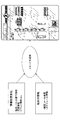
- FIG. 1 is a schematic diagram showing image generation processing in a conventional portable terminal.
- a conventional portable terminal periodically receives various types of information from a distribution server such as an information distribution company.
- distribution information typically includes weather information, news, stock price information, event information, transportation information, and the like.
- the mobile terminal executes a notification application in the mobile terminal corresponding to various information, and displays on the display device of the mobile terminal based on the received distribution information and the in-terminal information stored in the mobile terminal Is generated.
- the generated image is typically displayed on the screen of the display device for each notification application, as shown in FIG.
- an object of the present invention is to provide a technique for displaying various types of information in a format that can be easily recognized by a user.
- an aspect of the present invention is a display device that is communicatively connected to a distribution device, and includes one or more pieces of external information distributed from the distribution device and / or internal information in the display device.
- An information storage unit that stores information contents, an icon associated with each information content and an arrangement area in which the icon is arranged, and one or more templates having one or more arrangement areas for arranging the icons are stored.
- a template storage unit that determines the information content and icon to be displayed from the information storage unit, and selects a template that can display the determined information content and icon from the template storage unit; Embed the determined icon in the selected template layout area corresponding to the determined icon layout area Therefore, a display device having an image generating display unit for generating and displaying an image to be displayed.
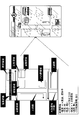
- FIG. 1 is a schematic diagram showing image generation processing in a conventional portable terminal.
- FIG. 2 is a schematic diagram showing image generation processing in the portable device of the present invention.
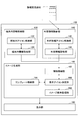
- FIG. 3 is a block diagram illustrating a portable terminal according to an embodiment of the present invention.
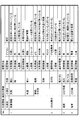
- FIG. 4 shows a management format as an example of various types of information managed in the information storage unit.
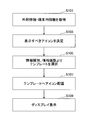
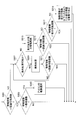
- FIG. 5 is a flowchart showing image generation processing according to an embodiment of the present invention.
- FIG. 6 is a flowchart showing a process for determining display target information according to an embodiment of the present invention.
- FIG. 7 is a schematic diagram of information embedding processing in a template according to an embodiment of the present invention.
- FIG. 8 is a schematic diagram of icon aggregation processing according to an embodiment of the present invention.
- FIG. 9 is a flowchart showing image generation processing according to another embodiment of the present invention.
- FIG. 10 is a schematic diagram of image selection processing according to an embodiment of the present invention.
- FIG. 2 is a schematic diagram showing image generation processing in the portable device of the present invention.
- the mobile terminal receives various types of information from a distribution server such as an information distribution company, and receives the received distribution information and user information and device information in the mobile terminal. Based on this, one image that visually integrates various types of information is generated and displayed. As a result, the user can not only check various information just by viewing one displayed image, but also intuitively recognize the various information by the image visualized by the icon display. It becomes possible.
- the mobile terminal according to the present embodiment is typically a mobile information terminal such as a mobile phone terminal or a smartphone, and uses an application installed in the terminal to deliver a distribution server of an information distribution company via a network (not shown).
- Various distribution information is received from an external distribution device such as.
- a portable terminal is typically composed of one or more of various hardware resources such as an auxiliary storage device, a memory device, a CPU, a communication device, a display device, and an input device.
- the auxiliary storage device is composed of a hard disk, a flash memory, and the like, and stores programs and data for realizing various processes described later.
- the memory device is composed of a RAM (Random Access Memory) or the like, and reads and stores the program from the auxiliary storage device when an instruction to start the program is given.
- the CPU functions as a processor for processing information, and realizes various functions described later according to a program stored in the memory device.
- the communication device is composed of various communication circuits for wired and / or wireless connection with other devices such as a server via a network.
- the display device is composed of a liquid crystal display or the like, and displays an image or the like generated based on distribution information received via a network.
- the input device typically includes an operation button, a keyboard, a mouse, and the like, and is used by a user of the mobile terminal to input various operation commands. Note that the mobile terminal according to the present invention is not limited to the hardware configuration described above, and may have any other appropriate hardware configuration such as a circuit capable of realizing various functions described below.
- the present invention will be described using a mobile terminal.
- the present invention is not limited to the mobile terminal, and may be any other suitable device capable of displaying distribution information.
- the present invention can be applied to any device capable of displaying received information, such as a personal computer or a television device.
- FIG. 3 shows a functional configuration as an example of a mobile terminal according to an embodiment of the present invention.
- the mobile terminal 100 is communicatively connected to a distribution server of an information distribution company, and includes an in-terminal information storage unit 120, an external information storage unit 140, an image generation unit 160, and a display unit 180.
- the in-terminal information storage unit 120 includes user information relating to the user such as schedule information and telephone / mail information of the user of the mobile terminal 100, device information such as the remaining power of the mobile terminal 100, position information, and time information. Is stored as in-terminal information.
- the in-terminal information storage unit 120 includes an in-terminal icon storage unit 122 and an in-terminal information acquisition unit 124.
- the in-terminal icon storage unit 122 stores icon image information of various icons for displaying the in-terminal information on the display device of the mobile terminal 100. This icon image information may be initially stored in the mobile terminal 100 or may be downloaded as appropriate via a network.
- the in-terminal information acquisition unit 124 acquires and stores various in-terminal information such as user information and device information.
- the user information may be directly input from the user of the mobile terminal 100 via an input device or may be acquired via a network.
- the device information is typically acquired by the operating system of the mobile terminal 100 or the like.
- the external information storage unit 140 stores various distribution information received from the distribution server of the information distribution company as external information.
- the external information typically includes weather information, news, stock price information, event information, transportation information, and the like.
- the external information storage unit 140 includes an external information icon storage unit 142 and an external information acquisition unit 144.
- the external information icon storage unit 142 stores icon image information of various icons for displaying external information on the display device of the mobile terminal 100. This icon image information may be initially stored in the mobile terminal 100, or may be downloaded as appropriate from a distribution server that is a distribution source of external information.
- the external information acquisition unit 144 holds various external information acquired from the distribution server.
- the in-terminal icon and the external information icon are images that represent the in-terminal information and the external information in a format that can be visually recognized by the user.
- an icon representing “sunshine” may be used to represent the information content of “sunny”.
- an icon representing “construction” may be used to represent information content related to the occurrence of “accident” with respect to transportation information that is one of external information.
- a plurality of icons may be prepared to represent each information content.
- icons representing “rain”, “umbrella”, “puddle”, and the like may be prepared in order to represent the information content of “rain”.
- icons representing “garbage collection vehicles”, “trash bags”, etc. are used to represent the information content of “garbage”. May be.
- the image generation unit 160 integrates various external information and / or various in-terminal information received from the distribution server of the information distribution company into one image, and displays these information as icons in the image.
- the image generation unit 160 includes an information storage unit 162, a template storage unit 164, a display icon determination unit 166, and an image display processing unit 168.
- the information storage unit 162 stores in-terminal information and in-terminal icons provided from the in-terminal information storage unit 120, and external information and external information icons provided from the external information storage unit 140.
- the information storage unit 162 manages various types of provided information and data in any appropriate management format for image generation processing in the image generation unit 160.
- the information storage unit 162 may manage various types of information provided from the in-terminal information storage unit 120 and the external information storage unit 140 using a management table as illustrated in FIG.
- external information and in-terminal information first correspond to information sources, information types, and the like, such as “meteorological information”, “garbage collection date”, “road”, “train” Classified into items.
- each large item classified in this way may be classified in detail by small items as necessary.
- “weather information” may be subdivided into sub-items such as “weather”, “temperature”, and “alarm / others”.
- various information contents corresponding to each large item or small item are set. For example, for “weather”, information contents such as “sunny” and “rain” are set.
- information contents such as “raw garbage” and “oversized garbage” are set.
- various icons are prepared to express these information contents.
- one or more icons are registered for each information content, and an arrangement area and an icon image are registered for each icon.
- an arrangement area For example, for the information content of “sunny”, a “sunshine” icon is set with the sun on the entire screen, and “weather area” is set as the arrangement area.
- the arrangement area represents an area in which the icon is arranged in the image.
- each icon is embedded in a prepared template, and various regions that define the type of icon to be arranged are set in the template. For example, an icon related to “weather area” is displayed in “weather area” of the template.
- an icon relating to “road area” is displayed in “road area” of the template
- an icon relating to “person area” is displayed in “person area” of the template.
- the present invention is not limited to the management table shown in FIG. 4, and any other appropriate data format that can store information contents, icons, and arrangement areas in association with each other may be used.
- the template storage unit 164 stores one or more templates that are information serving as a base when various icons are arranged.
- Each template has one or more placement areas for embedding icons.
- an attribute of an icon that can be embedded in the placement area is defined. For example, an icon related to a “person area” is embedded in the “person area” of the template, and the “weather area” of the template , An icon relating to “weather area” is embedded.
- the display icon determination unit 166 determines one or more information contents to be displayed and icons related thereto, and selects a template suitable for the determined icon. In one embodiment, the display icon determination unit 166 determines the number of information contents of in-terminal information and external information stored in the information storage unit 162, and the determined number can be recognized by the user on the display device. Information to be displayed is determined by an aggregation process, a deletion process, or the like, which will be described later, so as to be less than a predetermined number.
- the icon and template determination processing by the display icon determination unit 166 described above may be periodically executed at predetermined time intervals, or may be executed each time new information is distributed from the distribution server. .
- the display icon determination unit 166 determines the icon and template described above only when high-priority information to be displayed to the user is distributed or updated. Processing may be executed.
- the display icon determination unit 166 determines an appropriate template from various templates stored in the template storage unit 164 based on the determined type and number of information content. .
- the display icon determination unit 166 refers to the management table stored in the information storage unit 162 and can use icons that can be used for each information content determined as a display target and the icon arrangement area.
- the template having the smallest number of arrangement areas is selected from among the templates having at least the arrangement area where the determined one or more information contents and icons can be displayed.
- the template selected in this way is necessary and sufficient to display an icon to be displayed.
- the image display processing unit 168 generates one image to be displayed on the display device by superimposing each icon to be displayed determined by the display icon determining unit 166 on the corresponding arrangement area of the selected template. Further, as will be described later, the image display processing unit 168 evaluates the visibility of the generated image and generates a new image for an image with low visibility. The icon and the template may be selected again.
- the display unit 180 displays the image data generated by the image display processing unit 168 on the display device.
- the display unit 180 may display the generated image data on the entire screen of the display device, or appropriately size the image data for display in any appropriate display format such as a window format or a layer format, You may make it display on the predetermined area
- FIG. 5 is a flowchart showing image generation processing according to an embodiment of the present invention.
- step S ⁇ b> 101 the mobile terminal 100 acquires external information from the distribution server of the information distribution company, and also user information such as schedule information input by the user and / or the mobile terminal 100. Device information such as the remaining battery level is acquired and stored.
- step S103 the mobile terminal 100 expresses one or more information contents to be displayed from the stored external information and in-terminal information, as will be described in detail below with reference to FIG. Determine the icon.
- step S105 the mobile terminal 100 selects a template for embedding information content and an icon determined as a display target from one or more stored templates.
- the mobile terminal 100 refers to the management table as shown in FIG. 4 and confirms the icons that can be used for each determined information content and the arrangement area of the icons, and is determined.
- a template having an arrangement area capable of displaying one or more information contents and icons and having the smallest number of arrangement areas is selected. For example, when the information content determined as a display target and the arrangement area of the icon are two “person areas”, one “building area”, and two “road areas”, two “person areas”, Of the templates having at least one “building area” and two “road areas”, the template having the smallest number of arrangement areas is selected.
- a template that just includes two “person areas”, one “building area”, and two “road areas” is the most suitable. If there is no template that just includes two “person areas”, one “building area”, and two “road areas”, there will be an empty arrangement area. Further icons may be displayed in the area. For example, an icon corresponding to a vacant arrangement area is generated by executing an icon pluralization process in step S205 described later on any information content determined as a display target in step S105, and the arrangement The region may be filled.
- step S107 the mobile terminal 100 places an icon to be displayed on the selected template. That is, the mobile terminal 100 confirms the arrangement area of the icons to be displayed, and embeds each icon in the corresponding template arrangement area. Specifically, as illustrated in FIG. 7, the mobile terminal 100 embeds one or more icons determined in step S ⁇ b> 103 in the arrangement area of the selected template.
- the mobile terminal 100 evaluates the visibility of the generated image, and when the visibility is equal to or less than a predetermined threshold, selects another template in step S105, and the visibility exceeds the predetermined threshold.
- An image having the characteristics may be regenerated.
- This visibility is an index indicating how easy the generated image is to be seen by the user, and generally includes a large number of icons in one arrangement area or a plurality of icons superimposed. Thus, when an image that is difficult to see and is too complicated is generated, the visibility is set low.
- various existing techniques such as those using information entropy may be used. Further, the visibility may be indicated by the number of icons superimposed on each arrangement area.
- the visibility is set to be lower as the number of icons superimposed on each arrangement area is larger.
- the human area is further subdivided, and an icon is superimposed on each subarea.
- icons of “mask”, “clothing”, and “trash bag” are superimposed on the head, upper body, and hand, respectively.
- visibility may be indicated by the number of icons superimposed on each sub-region.
- the evaluation of the visibility of the generated image when a predetermined number or more of icons are superimposed on each arrangement area and sub-area, it may be determined that the generated image has insufficient visibility. Good.
- step S109 the mobile terminal 100 displays the template image in which the icon is embedded on the display device of the mobile terminal 100.
- FIG. 6 is a flowchart showing in detail the icon determination process in step S103 of FIG. 5 according to an embodiment of the present invention.
- step S ⁇ b> 201 the mobile terminal 100 confirms the number of information contents of external information and in-terminal information that are display candidates stored in the information storage unit 102, and confirms the number and use.
- a predetermined number of information that the person can recognize on the display device is compared.
- the predetermined number of information is large, the user can confirm a large number of information contents on the display device at the same time, but a large number of information contents are included in one image, and thus the information is generated. Since the image becomes complicated, it is difficult to recognize each information content.
- the predetermined number of information is small, the user can easily recognize the information content from the displayed image, but can check only a small amount of information content.
- the predetermined number of recognizable information is set to the number of information that can be recognized without stress by the user without generating a complicated image. Note that this predetermined number of recognizable information may be set to an appropriate value by default, or may be set by the user himself.
- step S203 If the number of information contents that are display candidates is less than or equal to the recognizable number (S201: YES), the flow proceeds to step S203. That is, in this case, even if all information contents that are display candidates are displayed, it is considered that the user can sufficiently recognize these information contents on the display device.
- step S207 when the number of information contents serving as display candidates is larger than the recognizable number (S201: NO), the flow proceeds to step S207. That is, in this case, when all the information contents that are display candidates are displayed, it becomes difficult for the user to recognize these information contents on the display device, and it is necessary to reduce the number of information contents to a predetermined number that can be recognized. is there.
- step S203 the mobile terminal 100 further determines whether the number of information contents that are display candidates is equal to or less than a predetermined minimum number to be displayed.
- This predetermined minimum number is the minimum number of icons that provide an image attractive to the user because the amount of information provided to the user is sufficient. That is, when the number of information contents that are display candidates is equal to or less than a predetermined minimum number to be displayed, the amount of information provided to the user via the display device is scarce, and the displayed image is also an icon. It becomes a little unattractive.
- the flow proceeds to step S205.
- the number of information contents that are display candidates is larger than the predetermined minimum number (S203: NO)
- all the information contents of the display candidates are determined as display targets, and a management table as shown in FIG.
- the icon representing each information content is determined by referring to it.
- any icon may be arbitrarily determined, and an appropriate icon may be determined in consideration of an icon arrangement area of other information contents. Also good.
- the icon of the other information content is “person area”
- the icon related to “person area” is selected from the plurality of icons, and all information contents are displayed in the template having only “person area”. You may do it.
- step S205 with reference to the management table as shown in FIG. 4, it is confirmed whether there are information contents in which a plurality of icons are registered among the information contents as display candidates, and information in which a plurality of icons are registered.
- a plurality of registered icons are displayed to express the information contents.
- three icons of “rain”, “umbrella”, and “puddle” are registered in order to display the information content of “rain”.
- the portable terminal 100 may generate an image using two or more of these icons in order to improve the attractiveness of the displayed image.
- any appropriate icon may be determined in consideration of an icon arrangement area of other information contents. In this way, the mobile terminal 100 repeats the icon pluralization process in step S205 until the number of icons exceeds the predetermined minimum number.
- step S207 the mobile terminal 100 determines whether or not the information contents as display candidates can be aggregated because the number of information contents as display candidates is reduced to a predetermined number.
- the mobile terminal 100 refers to the management table of FIG. 4 and confirms the registered icon of the information content that is a display candidate and its arrangement area. If there is information content in which icons having a common arrangement area are registered among the information contents that are display candidates, the mobile terminal 100 determines that these information contents can be consolidated (S207: YES). The flow moves to step S209. On the other hand, when there is no information content in which icons having a common arrangement area are registered among the information contents that are display candidates, the mobile terminal 100 determines that these information contents cannot be aggregated (S207: NO). ), The flow proceeds to step S213.
- step S209 the mobile terminal 100 superimposes icons having common arrangement areas and aggregates a plurality of information contents with one icon.
- This aggregation processing will be described using a specific example shown in FIG. As shown in FIG. 8, first, when there is information content that is three display candidates of “pollen flying information”, “high temperature”, and “garbage day”, the mobile terminal 100 displays the management table of FIG. The “cedar” icon and the “building area” arrangement area, the “mask” icon and the “person area” arrangement area for “pollen” are confirmed to be registered.
- the portable terminal 100 confirms the “clothing” icon and the “person area” arrangement area for “high temperature”, the “juice” icon and the “person area” arrangement area, and “ Regarding the “garbage”, the “trash collection vehicle” icon and the “road area” arrangement area, the “trash bag” icon and the “person area” arrangement area are confirmed.
- the mobile terminal 100 matches the “person area” related to “mask” for “pollen” and the “person area” related to “light clothing” for “high temperature”. Therefore, it is determined that these can be aggregated, and the “pollen arrival information” and the information content “high temperature” are aggregated into one icon as shown in FIG.
- the mobile terminal 100 matches the “human area” related to “juice” for “high temperature” and the “human area” related to “trash bag” for “garbage”. It is determined that these can be collected, and the information contents “high temperature” and “garbage” are collected into one icon as shown in FIG. The two icons aggregated in this way may be further aggregated into one icon as shown in the right end of FIG.
- step S211 the mobile terminal 100 determines whether the number of icons after aggregation is equal to or less than a predetermined number that can be recognized. If the number of icons after the aggregation is less than or equal to a recognizable predetermined number (S211: YES), the flow proceeds to step S105 in FIG. 5; otherwise (S211: NO), the flow proceeds to step S207. Return to.
- the mobile terminal 100 deletes information contents with low display priority from among information contents that are display candidates.
- This display priority indicates the priority of whether or not an icon of the information content should be displayed for each information content.
- the display priority may be defined according to the importance of the information content. For example, the display priority may be set by the user or may be set according to the urgency of the information content.
- the display priority may be dynamically set according to the display history so far. For example, information content that is continuously displayed for a certain period is set to a low priority, and information that is not displayed for a certain period. The content may be set to a high priority. This display priority may be stored in association with each information content in the management table shown in FIG.
- step S215 the mobile terminal 100 determines whether the number of icons after deletion has become a predetermined number or less that can be recognized. If the number of icons after deletion is less than or equal to a recognizable predetermined number (S215: YES), the flow proceeds to step S105 in FIG. 5; otherwise (S215: NO), the flow proceeds to step S217. Transition. Alternatively, in another embodiment, if NO in step S215, the process returns to step S213, and the information content with low priority is continuously deleted until the number of icons after deletion becomes a recognizable number or less. Also good.
- step S217 the mobile terminal 100 determines whether the number of icons after deletion is equal to or less than a predetermined number that can be displayed.
- the predetermined number that can be displayed indicates the number of icons that can be displayed on the display of the display device, and may be defined according to a stored template. In general, the number of icons that can be displayed on the display of the display device is defined by any factor such as setting or visibility by the operating system of the mobile terminal 100.
- step S219 the mobile terminal 100 selects an icon so that the number of icons is equal to or less than a predetermined number that can be displayed, and determines the selected icon as the first display target information group. Furthermore, the portable terminal 100 determines an icon that has not been selected as the second display target information group. Further, when there is an icon that has not been selected, the mobile terminal 100 determines the third and subsequent display target information groups. The portable terminal 100 determines each display target information group grouped in this way as display target information to be displayed sequentially, that is, in a rotating manner. It should be noted that the above-described wheel number process may be executed in the template selection process in step S105.
- the mobile terminal 100 generates one image.
- the mobile terminal 100 generates a plurality of images in advance, and provides the user with the image with the highest visibility.
- FIG. 9 is a flowchart showing image generation processing according to an embodiment of the present invention.
- the mobile terminal 100 obtains external information from the distribution server of the information distribution company, and user information such as schedule information input by the user and / or the mobile terminal 100.
- Device information such as the remaining battery level is acquired and stored.
- the mobile terminal 100 determines at least one information content to be displayed and an icon for expressing it from the stored external information and in-terminal information.
- the mobile terminal 100 determines the stored external information and in-terminal information as display targets, and determines the corresponding icons registered in the management table of FIG. 4 as display targets.
- the mobile terminal 100 determines the stored external information and in-terminal information as display targets, and determines a plurality of corresponding icons registered in the management table of FIG. 4 as display targets (multiple icons). .
- the portable terminal 100 determines the stored external information and in-terminal information as display targets, and aggregates a plurality of information contents into one icon (icon aggregation).
- the mobile terminal 100 randomly selects and executes the processes 1 to 3) described above, and determines information contents and icons to be displayed.
- step S305 as in step S105 described above, the mobile terminal 100 selects a template in which information content and an icon determined from the stored template can be embedded. Specifically, the mobile terminal 100 refers to the management table as shown in FIG. 4 and confirms the icons that can be used for each determined information content and the arrangement area of the icons, and is determined. A template having the smallest number of arrangement areas is selected from templates having arrangement areas capable of displaying one or more information contents and icons.
- step S307 the portable terminal 100 counts the number of times that the icon determination process in step S303 and the template selection process in step S305 are repeatedly executed, and determines whether the number of executions exceeds a predetermined number N.
- the number of executions is N or less (S307: YES)
- the flow returns to step S303, and the above-described processing is repeated.
- the number of executions exceeds N (S307: NO)
- the flow proceeds to step S309.
- step S309 the mobile terminal 100 embeds an icon in the template for each combination of the icon to be displayed and the template repeatedly determined in steps S303 and S305, and evaluates the visibility of the generated image.
- the visibility evaluation may be performed by any of the methods described above. After evaluating the visibility of the generated N images, the mobile terminal 100 determines the image with the highest visibility as the display target image.
- step S311 the mobile terminal 100 displays the determined image on the display device of the mobile terminal.
- FIG. 10 is a schematic diagram of image selection processing according to an embodiment of the present invention.
- the information contents are “rain” and “garbage collection date”, and the selected template includes only “person area” (left side in FIG. 10).
- the selected template includes only “person area” (left side in FIG. 10).
- the information content “rain” when the “rain” icon and the “trash bag” icon superimposed on the entire area are superimposed, there is a portion where “rain” and “trash bag” are mixed. End up.
- the information content “rain” is expressed by the “umbrella” icon, it is considered that the “umbrella” icon and the “trash bag” icon are not mixed, and the visibility is relatively high.
- the template is as shown on the right side of FIG.
- three types of images can be generated.
- the “Train” icon and “Trash bag” are displayed, the display size of “Trash bag” is too small. It is thought that the visibility is enhanced by expressing with "collection vehicle”. That is, the size of the icon in the template may be taken into consideration in the evaluation.
Landscapes
- Engineering & Computer Science (AREA)
- Theoretical Computer Science (AREA)
- General Engineering & Computer Science (AREA)
- Databases & Information Systems (AREA)
- Physics & Mathematics (AREA)
- General Physics & Mathematics (AREA)
- Data Mining & Analysis (AREA)
- Human Computer Interaction (AREA)
- User Interface Of Digital Computer (AREA)
Abstract
本発明の一態様は、配信装置に通信接続される表示装置であって、前記配信装置から配信される外部情報及び/又は前記表示装置内の内部情報の1以上の情報内容と、各情報内容に関連付けされるアイコン及び該アイコンが配置される配置領域とを格納する情報格納部と、前記アイコンを配置するための1以上の配置領域を有する1以上のテンプレートを格納するテンプレート格納部と、前記情報格納部から表示対象となる情報内容とアイコンとを決定し、前記テンプレート格納部から前記決定した情報内容とアイコンとを表示可能なテンプレートを選択する表示アイコン決定部と、前記決定されたアイコンの配置領域に対応する前記選択されたテンプレートの配置領域に前記決定されたアイコンを埋め込むことによって、表示対象となるイメージを生成及び表示するイメージ生成表示部とを有する表示装置に関する。
Description
本発明は、情報を表示するための表示装置、表示方法及びプログラムに関する。
現在、携帯電話やパソコンなどの表示端末において、インターネット経由により取得した各種情報や携帯端末内の各種データをデスクトップ上に表示することで、利用者に様々な情報を通知するサービスが行われている。例えば、ニュースリリースやブログなどのインターネット上の情報を表示するRSSリーダー、天気や株価情報などを表示するwidgetなど、デスクトップ画面に情報を表示することでユーザに各種情報を通知するサービス及び技術がある。
図1は、従来の携帯端末におけるイメージ生成処理を示す概略図である。図1に示されるように、従来の携帯端末は、情報配信会社などの配信サーバから定期的に各種情報を受信する。このような配信情報としては、典型的には、天気情報、ニュース、株価情報、イベント情報、交通機関情報などがある。携帯端末は、各種情報に対応する携帯端末内の通知アプリケーションを実行して、受信した配信情報と、携帯端末内に格納されている端末内情報とに基づき携帯端末の表示装置上に表示するイメージを生成する。この生成されたイメージは、図1に示されるように、典型的には通知アプリケーション毎に表示装置の画面上に表示される。
しかしながら、これらの情報は主にテキストにより表現され、表示領域や文字サイズの制約から多くの情報を表示することが困難であったり、あるいは文字数が多い場合には利用者が情報を読み取るのに時間がかかってしまうという問題があった。
上記問題点に鑑み、本発明の課題は、利用者が容易に認識可能な形式により各種情報を表示する技術を提供することである。
上記課題を解決するため、本発明の一態様は、配信装置に通信接続される表示装置であって、前記配信装置から配信される外部情報及び/又は前記表示装置内の内部情報の1以上の情報内容と、各情報内容に関連付けされるアイコン及び該アイコンが配置される配置領域とを格納する情報格納部と、前記アイコンを配置するための1以上の配置領域を有する1以上のテンプレートを格納するテンプレート格納部と、前記情報格納部から表示対象となる情報内容とアイコンとを決定し、前記テンプレート格納部から前記決定した情報内容とアイコンとを表示可能なテンプレートを選択する表示アイコン決定部と、前記決定されたアイコンの配置領域に対応する前記選択されたテンプレートの配置領域に前記決定されたアイコンを埋め込むことによって、表示対象となるイメージを生成及び表示するイメージ生成表示部とを有する表示装置に関する。
本発明によると、利用者が容易に認識可能な形式により各種情報を表示する技術を提供することができる。
以下、図面に基づいて本発明の各実施例を説明する。
図2は、本発明の携帯装置におけるイメージ生成処理を示す概略図である。図2に示されるように、本発明の各実施例では、携帯端末が情報配信会社などの配信サーバから各種情報を受信し、受信した配信情報と携帯端末内の利用者情報や機器情報とに基づき、各種情報を視覚的に統合した1つのイメージを生成及び表示する。これにより、利用者は、表示された1つのイメージを見るだけで各種情報を確認することが可能になるだけでなく、アイコン表示によりビジュアル化されたイメージによって各種情報を直感的に認識することが可能となる。
次に図3を参照して、本発明の一実施例による携帯端末の構成を説明する。本実施例による携帯端末は、典型的には、携帯電話端末やスマートフォンなどの携帯情報端末であり、端末内に搭載されたアプリケーションを利用してネットワーク(図示しない)を介し情報配信会社の配信サーバなどの外部の配信装置から各種配信情報を受信する。携帯端末は、典型的には、補助記憶装置、メモリ装置、CPU、通信装置、表示装置、入力装置などの各種ハードウェアリソースの1以上から構成される。補助記憶装置は、ハードディスクやフラッシュメモリなどから構成され、後述される各種処理を実現するプログラムやデータを格納する。メモリ装置は、RAM(Random Access Memory)などから構成され、プログラムの起動指示があった場合に、補助記憶装置からプログラムを読み出して格納する。CPUは、情報を処理するプロセッサとして機能し、メモリ装置に格納されたプログラムに従って後述される各種機能を実現する。通信装置は、ネットワークを介しサーバなどの他の装置と有線及び/又は無線接続するための各種通信回路から構成される。表示装置は、液晶ディスプレイなどから構成され、ネットワークを介し受信した配信情報に基づき生成されたイメージ等を表示する。入力装置は、典型的には、操作ボタン、キーボード、マウス等で構成され、移動端末のユーザが様々な操作命令を入力するのに用いられる。なお、本発明による携帯端末は、上述したハードウェア構成に限定されるものでなく、後述する各種機能を実現可能な回路等の他の何れか適切なハードウェア構成を有してもよい。
また、以下の実施例では本発明が携帯端末を用いて説明されるが、本発明は携帯端末に限定されるものでなく、配信情報を表示可能な他の何れか適切な装置であってもよい。例えば、本発明は、パーソナルコンピュータやテレビ装置などの受信情報を表示可能な任意の装置に適用可能である。
図3は、本発明の一実施例による携帯端末の一例となる機能構成を示す。図3において、携帯端末100は、情報配信会社の配信サーバに通信接続され、端末内情報格納部120と、外部情報格納部140と、イメージ生成部160と、表示部180とを有する。
端末内情報格納部120は、携帯端末100の利用者のスケジュール情報や電話/メール情報などの利用者に関する利用者情報と、携帯端末100の電源残量、位置情報や時刻情報などの機器情報とを端末内情報として格納する。
端末内情報格納部120は、端末内アイコン格納部122と、端末内情報取得部124とを有する。端末内アイコン格納部122は、端末内情報を携帯端末100の表示装置上に表示するための各種アイコンのアイコン画像情報を格納する。このアイコン画像情報は、携帯端末100に初期的に格納されてもよいし、又はネットワークを介し適宜ダウンロードされてもよい。端末内情報取得部124は、利用者情報や機器情報などの各種端末内情報を取得及び格納する。例えば、利用者情報は、携帯端末100の利用者から入力装置などを介し直接入力されたり、又はネットワークを介し取得されてもよい。機器情報は、典型的には携帯端末100のオペレーティングシステムなどにより取得される。
外部情報格納部140は、情報配信会社の配信サーバから受信した各種配信情報を外部情報として格納する。外部情報は、典型的には、天気情報、ニュース、株価情報、イベント情報、交通機関情報などを含む。
外部情報格納部140は、外部情報アイコン格納部142と、外部情報取得部144とを有する。外部情報アイコン格納部142は、外部情報を携帯端末100の表示装置上に表示するための各種アイコンのアイコン画像情報を格納する。このアイコン画像情報は、携帯端末100に初期的に格納されてもよいし、又は外部情報の配信元の配信サーバから適宜ダウンロードされてもよい。外部情報取得部144は、配信サーバから取得した各種外部情報を保持する。
上述したように、端末内アイコン及び外部情報アイコンはそれぞれ、利用者が端末内情報及び外部情報を視覚的に認識可能な形式により表現したイメージである。例えば、外部情報の1つである天気情報に関して、「晴れ」の情報内容を表すために「日差し」を表現するアイコンが使用されてもよい。また、外部情報の1つである交通機関情報に関して、「事故」の発生に関する情報内容を表すために「工事」を表現するアイコンが使用されてもよい。また、各情報内容を表すのに複数のアイコンが用意されてもよい。例えば、外部情報の1つである天気情報に関して、「雨」の情報内容を表すために「雨」、「傘」、「水溜り」などを表現するアイコンが用意されてもよい。また、端末内情報の1つである利用者のスケジュール情報のゴミ収集日に関して、「生ゴミ」の情報内容を表すために「ゴミ収集車」、「ゴミ袋」などを表現するアイコンが使用されてもよい。
イメージ生成部160は、情報配信会社の配信サーバから受信した各種外部情報及び/又は各種端末内情報を1つのイメージに統合し、これらの情報をイメージ内でアイコンにより表示する。イメージ生成部160は、情報格納部162と、テンプレート格納部164と、表示アイコン決定部166と、イメージ表示処理部168とを有する。
情報格納部162は、端末内情報格納部120から提供された端末内情報及び端末内アイコンと、外部情報格納部140から提供された外部情報及び外部情報アイコンとを格納する。情報格納部162は、イメージ生成部160内におけるイメージ生成処理のため、提供された各種情報及びデータを何れか適切な管理形式により管理する。例えば、情報格納部162は、図4に示されるような管理テーブルにより端末内情報格納部120及び外部情報格納部140から提供された各種情報を管理してもよい。図4に例示される管理テーブルでは、外部情報及び端末内情報は、まず情報ソースや情報タイプなどに対応して「気象情報」、「ゴミ収集日」、「道路」、「電車」などの大項目に分類される。さらに、このように分類された各大項目は、必要に応じて小項目により詳細に分類されてもよい。例えば、「気象情報」については、「天気」、「気温」、「警報・その他」などの小項目に細分化されてもよい。さらに、各大項目又は小項目に対応する各種情報内容が設定される。例えば、「天気」については、「晴れ」、「雨」などの情報内容が設定される。また、「ゴミ収集日」については、「生ゴミ」、「粗大ゴミ」などの情報内容が設定される。
上述したように、これらの情報内容を表現するために各種アイコンが用意される。図4に例示される管理形式では、各情報内容に対して1以上のアイコンが登録され、各アイコンに対して、その配置領域及びアイコンイメージが登録される。例えば、「晴れ」の情報内容については、画面全体に日が当たっている「日差し」のアイコンが設定され、その配置領域として「天気領域」が設定される。ここで、配置領域とは、当該アイコンがイメージ内で配置される領域を表す。後述されるように、各アイコンは、用意されたテンプレート内に埋め込まれるが、テンプレートには配置されるべきアイコンのタイプを規定した各種領域が設定されている。例えば、「天気領域」に係るアイコンはテンプレートの「天気領域」に表示される。同様に、「道路領域」に係るアイコンはテンプレートの「道路領域」に表示され、「人領域」に係るアイコンはテンプレートの「人領域」に表示される。なお、本発明は、図4に示される管理テーブルに限定されるものでなく、各情報内容、アイコン及び配置領域を関連付けて格納可能な他の何れか適切なデータ形式が利用されてもよい。
テンプレート格納部164は、各種アイコンを配置する際のベースとなる情報である1以上のテンプレートを格納する。各テンプレートは、アイコンを埋め込むための1以上の配置領域を有する。各配置領域には、当該配置領域に埋め込み可能なアイコンの属性が規定され、例えば、テンプレートの「人領域」には、「人領域」に係るアイコンが埋め込まれ、テンプレートの「天気領域」には、「天気領域」に係るアイコンが埋め込まれる。
表示アイコン決定部166は、表示対象となる1以上の情報内容及びこれに係るアイコンを決定すると共に、決定したアイコンに適したテンプレートを選択する。一実施例では、表示アイコン決定部166は、情報格納部162に格納されている端末内情報及び外部情報の情報内容の個数を決定し、決定した個数が利用者が表示装置上で認識可能である所定の個数以下となるように、後述する集約処理や削除処理などによって、表示対象となる情報を決定する。
なお、上述した表示アイコン決定部166によるアイコン及びテンプレートの決定処理は、所定の時間間隔により定期的に実行されてもよいし、配信サーバから新たな情報が配信される毎に実行されてもよい。また、頻繁な表示イメージの更新を回避するため、表示アイコン決定部166は、利用者に表示すべき優先度の高い情報が配信又は更新されたときなどに限って、上述したアイコン及びテンプレートの決定処理を実行するようにしてもよい。
このようにして表示対象となる情報内容を決定すると、表示アイコン決定部166は、決定された情報内容の種別及び個数に基づきテンプレート格納部164に格納されている各種テンプレートから適切なテンプレートを決定する。一実施例では、表示アイコン決定部166は、情報格納部162に格納されている管理テーブルを参照して、表示対象として決定された各情報内容に対して利用可能なアイコン及び当該アイコンの配置領域を確認し、決定された1以上の情報内容及びアイコンを表示可能な配置領域を少なくとも有するテンプレートのうちで最も配置領域の個数が少ないテンプレートを選択する。このように選択されたテンプレートは、表示対象となるアイコンを表示するのに必要十分なものとなる。
イメージ表示処理部168は、表示アイコン決定部166により決定された表示対象となる各アイコンを、選択されたテンプレートの対応する配置領域に重畳し、表示装置上に表示する1つのイメージを生成する。また、イメージ表示処理部168は、後述するように、生成したイメージの視認性を評価し、視認性の低いイメージに対しては新たなイメージを生成するため、表示アイコン決定部166に表示対象となるアイコン及びテンプレートを再選択させるようにしてもよい。
表示部180は、イメージ表示処理部168により生成されたイメージデータを表示装置上に表示する。表示部180は、生成されたイメージデータを表示装置の画面全体に表示してもよいし、ウィンドウ形式、レイヤ形式などの何れか適切な表示形式により表示するためイメージデータを適切にサイジングして、表示装置上の所定の領域に表示するようにしてもよい。
次に図5~8を参照して、本発明の一実施例による携帯端末によるイメージ生成処理を説明する。図5は、本発明の一実施例によるイメージ生成処理を示すフロー図である。
図5に示されるように、ステップS101において、携帯端末100は、情報配信会社の配信サーバから外部情報を取得すると共に、利用者により入力されたスケジュール情報などの利用者情報及び/又は携帯端末100の電池残量などの機器情報とを取得及び格納する。
ステップS103において、携帯端末100は、図6を参照して以下で詳述されるように、格納されている外部情報及び端末内情報から表示対象となる1以上の情報内容とこれを表現するためのアイコンとを決定する。
ステップS105において、携帯端末100は、格納されている1以上のテンプレートから、表示対象として決定された情報内容とアイコンとを埋め込むためのテンプレートを選択する。具体的には、携帯端末100は、図4に示されるような管理テーブルを参照して、決定された各情報内容に対して利用可能なアイコン及び当該アイコンの配置領域を確認し、決定された1以上の情報内容及びアイコンを表示可能な配置領域を有するテンプレートであって、最も配置領域の個数が少ないテンプレートを選択する。例えば、表示対象として決定された情報内容及び当該アイコンの配置領域が、2つの「人領域」、1つの「建物領域」、及び2つの「道路領域」である場合、2つの「人領域」、1つの「建物領域」、及び2つの「道路領域」を少なくとも有するテンプレートのうち配置領域の個数が最小となるテンプレートが選択される。すなわち、2つの「人領域」、1つの「建物領域」、及び2つの「道路領域」をちょうど含むテンプレートが最も適したものとなる。このような2つの「人領域」、1つの「建物領域」、及び2つの「道路領域」をちょうど含むテンプレートがない場合、空きとなる配置領域が存在することになるが、この空きとなる配置領域にさらなるアイコンを表示するようにしてもよい。例えば、ステップS105において表示対象として決定された何れかの情報内容に対して、後述するステップS205のアイコン複数化処理を実行することによって、空きとなる配置領域に対応するアイコンを生成し、当該配置領域を充填するようにしてもよい。
ステップS107において、携帯端末100は、選択したテンプレートに表示対象となるアイコンを配置する。すなわち、携帯端末100は、表示対象となるアイコンの配置領域を確認し、対応するテンプレートの配置領域に各アイコンを埋め込む。具体的には、携帯端末100は、図7に示されるように、選択されたテンプレートの配置領域にステップS103において決定された1以上のアイコンを埋め込む。
他の実施例では、携帯端末100は、生成したイメージの視認性を評価し、視認性が所定の閾値以下である場合には、ステップS105において他のテンプレートを選択し、所定の閾値を超える視認性を有するイメージを再生成するようにしてもよい。この視認性は、生成されたイメージが利用者にどの程度見易いものであるかを示す指標であり、一般に1つの配置領域に多数のアイコンを含むことによって、あるいは、複数のアイコンが重畳されることによって、見づらく複雑すぎるイメージが生成された場合に、視認性は低く設定される。この視認性の評価については、情報エントロピーを利用したものなど各種既存の技術が利用されてもよい。また、各配置領域に重畳されるアイコンの個数により視認性を示すようにしてもよい。すなわち、各配置領域に重畳されるアイコンの個数が多いほど、視認性が低くなるよう設定される。さらに、人領域に関するアイコンなどでは、人領域がさらに細分化され、細分化された各サブ領域にアイコンが重畳される。例えば、図7の右端に示されるアイコンでは、頭部、上半身及び手にそれぞれ「マスク」、「服装」及び「ゴミ袋」のアイコンが重畳されている。このような場合、細分化された各サブ領域に重畳されるアイコンの個数により視認性を示すようにしてもよい。さらに、生成したイメージの視認性の評価において、各配置領域及びサブ領域に所定数以上のアイコンが重畳された場合に、生成されたイメージは視認性が不十分であると判断するようにしてもよい。
ステップS109において、携帯端末100は、アイコンが埋め込まれたテンプレートのイメージを携帯端末100の表示装置上に表示する。
図6は、本発明の一実施例による図5のステップS103におけるアイコン決定処理を詳細に示すフロー図である。
図6に示されるように、ステップS201において、携帯端末100は、情報格納部102に格納されている表示候補となる外部情報及び端末内情報の情報内容の個数を確認し、確認した個数と利用者が表示装置上で認識可能な所定の情報数とを比較する。一般に、この所定の情報数が多い場合、利用者は表示装置上で同時に多数の情報内容を確認することができる反面、1つのイメージ内に多数の情報内容が含まれることになり、生成されたイメージは煩雑なものになるため、各情報内容を認識しづらくなる。他方、所定の情報数が少ない場合、利用者は表示されたイメージから容易に情報内容を認識することができる反面、少ない情報内容しか確認することができなくなる。このため、所定の認識可能な情報数は、生成されたイメージが煩雑にならず、利用者がストレスなく認識できる情報数に設定される。なお、この認識可能な所定の情報数は、適切な値にデフォルト設定されてもよいし、利用者が自ら設定してもよい。
表示候補となる情報内容の個数が認識可能な個数以下である場合(S201:YES)、当該フローはステップS203に移行する。すなわち、この場合には、表示候補となるすべての情報内容を表示しても、利用者はこれらの情報内容を表示装置上で十分認識できるとみなされる。他方、表示候補となる情報内容の個数が認識可能な個数より多い場合(S201:NO)、当該フローはステップS207に移行する。すなわち、この場合には、表示候補となるすべての情報内容を表示すると、利用者はこれらの情報内容を表示装置上で認識困難になり、認識可能な所定数まで情報内容の個数をしぼる必要がある。
ステップS203において、携帯端末100はさらに、表示候補となる情報内容の個数が表示されるべき所定の最低限の個数以下であるか判断する。この所定の最低限の個数は、利用者に提供される情報量が十分であり、利用者にとって魅力あるイメージとなる最低限のアイコンの個数である。すなわち、表示候補となる情報内容の個数が表示されるべき所定の最低限の個数以下である場合には、表示装置を介し利用者に提供される情報量は乏しく、表示されるイメージもアイコンの少ない魅力のないものになってしまう。表示候補となる情報内容の個数が所定の最低限の個数以下である場合(S203:YES)、当該フローはステップS205に移行する。他方、表示候補となる情報内容の個数が所定の最低限の個数より多い場合(S203:NO)、表示候補のすべての情報内容を表示対象として決定し、図4に示されるような管理テーブルを参照して各情報内容を表現するアイコンを決定する。複数のアイコンが登録されている情報内容については、任意に何れかのアイコンを決定してもよいし、他の情報内容のアイコンの配置領域などを考慮して適切なアイコンを決定するようにしてもよい。例えば、他の情報内容のアイコンが「人領域」である場合、複数のアイコンのうち「人領域」に係るアイコンを選択し、「人領域」のみを有するテンプレートにおいてすべての情報内容が表示されるようにしてもよい。他方、他の情報内容のアイコンの配置領域と重複しないアイコンを選択し、テンプレートにおいて異なる配置領域にアイコンを配置するようにしてもよい。その後、当該フローは図5のステップS105に移行する。
ステップS205において、図4に示されるような管理テーブルを参照して表示候補となる情報内容のうち複数のアイコンが登録されている情報内容があるか確認し、複数のアイコンが登録されている情報内容については登録されている複数のアイコンを表示して当該情報内容を表現する。例えば、図4の管理テーブルでは、「雨」の情報内容を表示するため、「雨」、「傘」及び「水溜り」の3つのアイコンが登録されている。ステップS205において、携帯端末100は、表示されるイメージの魅力を向上させるため、これらのうちの2以上のアイコンを用いてイメージを生成してもよい。複数のアイコンが登録されている情報内容については、他の情報内容のアイコンの配置領域などを考慮して何れか適切なアイコンを決定するようにしてもよい。このようにして、携帯端末100は、アイコンの個数が所定の最低限の個数より多くなるまで、ステップS205のアイコン複数化処理を繰り返す。
ステップS207において、携帯端末100は、表示候補となる情報内容の個数を認識可能な所定数までしぼるため、表示候補となる情報内容を集約可能であるか判断する。一実施例では、携帯端末100は、図4の管理テーブルを参照して、表示候補となる情報内容の登録されているアイコンとその配置領域とを確認する。表示候補となる情報内容のうち配置領域が共通しているアイコンが登録されている情報内容がある場合、携帯端末100は、これらの情報内容は集約化可能であると判断し(S207:YES)、当該フローはステップS209に移行する。他方、表示候補となる情報内容のうち配置領域が共通しているアイコンが登録されている情報内容がない場合、携帯端末100は、これらの情報内容は集約不可であると判断し(S207:NO)、当該フローはステップS213に移行する。
ステップS209において、携帯端末100は、配置領域が共通するアイコンを重畳して1つのアイコンで複数の情報内容を集約化する。この集約化処理を図8に示される具体例を用いて説明する。図8に示されるように、まず、「花粉飛来情報」、「気温が高い」及び「ごみの日」の3つの表示候補となる情報内容がある場合、携帯端末100は、図4の管理テーブルを参照して、「花粉」について「杉」のアイコン及び「建物領域」の配置領域と、「マスク」のアイコン及び「人領域」の配置領域とが登録されていることを確認する。同様に、携帯端末100は、「気温が高い」について薄着の「服装」のアイコン及び「人領域」の配置領域と、「ジュース」のアイコン及び「人領域」の配置領域とを確認し、「生ゴミ」について「ゴミ収集車」のアイコン及び「道路領域」の配置領域と、「ゴミ袋」のアイコン及び「人領域」の配置領域とを確認する。図8に示されるように、例えば、携帯端末100は、「花粉」についての「マスク」に係る「人領域」と、「気温が高い」についての「薄着」に係る「人領域」とが一致するため、これらを集約可能であると判断し、「花粉飛来情報」と「気温が高い」という情報内容とを図8の示すような1つのアイコンに集約する。また、同様に、携帯端末100は、「気温が高い」についての「ジュース」に係る「人領域」と、「生ゴミ」についての「ゴミ袋」に係る「人領域」とが一致するため、これらを集約可能であると判断し、「気温が高い」と「生ゴミ」という情報内容とを図8に示すような1つのアイコンに集約する。このように集約化された2つのアイコンはさらに、図8も右端に示すような1つのアイコンに集約してもよい。
このような集約処理が終了すると、ステップS211において、携帯端末100は、集約化後のアイコンの個数が認識可能な所定数以下になったか判断する。集約化後のアイコンの個数が認識可能な所定数以下になった場合(S211:YES)、当該フローは図5のステップS105に移行し、そうでない場合(S211:NO)、当該フローはステップS207に戻る。
ステップS213において、携帯端末100は、情報内容のさらなる集約化は不可能であるため、表示候補となる情報内容のうち表示優先度の低い情報内容を削除する。この表示優先度は、各情報内容に対して当該情報内容のアイコンを表示すべきか否かの優先度を示すものである。表示優先度は、情報内容の重要度に応じて規定されてもよく、例えば、利用者によって設定されてもよいし、情報内容の緊急性に応じて設定されてもよい。また、表示優先度は、これまでの表示履歴に応じて動的に設定されてもよく、例えば、一定期間表示され続けている情報内容は低い優先度に設定され、一定期間表示されていない情報内容は高い優先度に設定されてもよい。この表示優先度は、図4に示される管理テーブルにおいて各情報内容と関連付けて格納されてもよい。
このような削除処理が終了すると、ステップS215において、携帯端末100は、削除後のアイコンの個数が認識可能な所定数以下になったか判断する。削除後のアイコンの個数が認識可能な所定数以下になった場合(S215:YES)、当該フローは図5のステップS105に移行し、そうでない場合(S215:NO)、当該フローはステップS217に移行する。あるいは、他の実施例では、ステップS215でNOである場合、ステップS213に戻り、削除後のアイコンの個数が認識可能な所定数以下になるまで優先度の低い情報内容を削除し続けるようにしてもよい。
ステップS217において、携帯端末100は、削除後のアイコン数が表示可能な所定数以下であるか判断する。この表示可能な所定数は、表示装置のディスプレイ上に表示可能なアイコンの個数を示し、格納されているテンプレートに応じて規定されてもよい。一般に、表示装置のディスプレイ上に表示可能なアイコンの個数は、携帯端末100のオペレーティングシステムによる設定や視認性など何れかの要因により規定されている。削除後のアイコン数が表示可能な所定数以下である場合(S217:YES)、当該フローは図5のステップS105に移行し、そうでない場合(S217:NO)、当該フローはステップS219に移行する。
ステップS219において、携帯端末100は、アイコン数が表示可能な所定数以下になるようにアイコンを選択し、選択したアイコンを1番目の表示対象情報群として決定する。さらに、携帯端末100は、選択されなかったアイコンを2番目の表示対象情報群として決定する。さらに選択されなかったアイコンがある場合、携帯端末100は、3番目以降の表示対象情報群として決定する。携帯端末100は、このようにグループ化された各表示対象情報群を順次、すなわち輪番的に表示すべき表示対象情報として決定する。なお、上述した輪番処理は、ステップS105におけるテンプレート選択処理において実行されてもよい。
なお、上述した集約処理、削除処理及び輪番表示処理は、必ずしも上述した順序で実行される必要はなく、またこれら3つすべての処理が実行される必要もないことに留意されたい。
次に図9を参照して、本発明の他の実施例による携帯端末によるイメージ生成処理を説明する。上述した実施例では、携帯端末100は1つのイメージを生成したが、本実施例では、携帯端末100は複数のイメージを予め生成し、そのうち視認性が最も高いイメージを利用者に提供する。
図9は、本発明の一実施例によるイメージ生成処理を示すフロー図である。図9に示されるように、ステップS301において、携帯端末100は、情報配信会社の配信サーバから外部情報を取得すると共に、利用者により入力されたスケジュール情報などの利用者情報及び/又は携帯端末100の電池残量などの機器情報とを取得及び格納する。
ステップS303において、携帯端末100は、格納されている外部情報及び端末内情報から表示対象となる1以上の情報内容とこれを表現するためのアイコンとを決定する。本実施例では、1)携帯端末100は、格納されている外部情報及び端末内情報を表示対象として決定し、図4の管理テーブルに登録されている対応するアイコンを表示対象として決定する。2)携帯端末100は、格納されている外部情報及び端末内情報を表示対象として決定し、図4の管理テーブルに登録されている対応する複数のアイコンを表示対象として決定する(アイコン複数化)。3)携帯端末100は、格納されている外部情報及び端末内情報を表示対象として決定し、複数の情報内容を1つのアイコンに集約化する(アイコン集約化)。携帯端末100は、上述した1~3)の処理をランダムに選択して実行し、表示対象となる情報内容及びアイコンを決定する。
ステップS305において、上述したステップS105と同様に、携帯端末100は、格納されているテンプレートから決定された情報内容とアイコンとを埋め込み可能なテンプレートを選択する。具体的には、携帯端末100は、図4に示されるような管理テーブルを参照して、決定された各情報内容に対して利用可能なアイコン及び当該アイコンの配置領域を確認し、決定された1以上の情報内容及びアイコンを表示可能な配置領域を有するテンプレートのうちで最も配置領域の個数が少ないテンプレートを選択する。
ステップS307において、携帯端末100は、ステップS303のアイコン決定処理とステップS305のテンプレート選択処理とが繰り返し実行された回数をカウントし、実行回数が所定の回数Nを超えたか判断する。実行回数がN以下である場合(S307:YES)、当該フローはステップS303に戻り、上述した処理を繰り返す。他方、実行回数がNを超えた場合(S307:NO)、当該フローはステップS309に移行する。
ステップS309において、携帯端末100は、ステップS303及びS305において繰り返し決定された表示対象となるアイコンとテンプレートとの各組み合わせに対して、アイコンをテンプレートに埋め込み、生成されたイメージの視認性を評価する。視認性の評価については、上述した何れかの方法により実行されてもよい。生成されたN個のイメージの視認性を評価した後、携帯端末100は、視認性が最も高いイメージを表示対象イメージとして決定する。
ステップS311において、携帯端末100は、決定されたイメージを携帯端末の表示装置上に表示する。
上述した視認性について具体例を用いてさらに説明する。図10は、本発明の一実施例によるイメージ選択処理の概略図である。図10に示されるように、例えば、情報内容が「雨」と「ゴミ収集日」であり、選択されたテンプレートが「人領域」のみを含むものであるとする(図10の左側)。この場合、「雨」という情報内容を表現するため、領域全体に重畳される「雨」アイコンと「ゴミ袋」アイコンとを重畳した場合、「雨」と「ゴミ袋」が混在する部分が生じてしまう。他方、「傘」アイコンにより「雨」という情報内容を表現した場合、「傘」アイコンと「ゴミ袋」アイコンとは混在せず、相対的に視認性が高くなると考えられる。
また、情報内容が「雨」、「ゴミ収集日」及び「電車到着」であり、テンプレートが図10の右側に示されるようなものであるとする。この場合、3通りのイメージが生成可能であるが、「電車」アイコンと「ゴミ袋」とを表示した場合、「ゴミ袋」の表示サイズは小さくなりすぎるため、「ゴミ収集日」を「ゴミ収集車」により表現することによって視認性が高くなると考えられる。すなわち、テンプレートにおけるアイコンのサイズも視認性に評価に考慮するようにしてもよい。
本発明は上述した特定の実施形態に限定されるものではなく、特許請求の範囲に記載された本発明の要旨の範囲内において、種々の変形・変更が可能である。
本国際出願は、2011年6月9日に出願した日本国特許出願2011-129326号に基づく優先権を主張するものであり、2011-129326号の全内容を本国際出願に援用する。
100 携帯端末
120 端末内情報格納部
140 外部情報格納部
160 イメージ生成部
162 情報格納部
164 テンプレート格納部
166 表示アイコン決定部
168 イメージ表示処理部
180 表示部
120 端末内情報格納部
140 外部情報格納部
160 イメージ生成部
162 情報格納部
164 テンプレート格納部
166 表示アイコン決定部
168 イメージ表示処理部
180 表示部
Claims (10)
- 配信装置に通信接続される表示装置であって、
前記配信装置から配信される外部情報及び/又は前記表示装置内の内部情報の1以上の情報内容と、各情報内容に関連付けされるアイコン及び該アイコンが配置される配置領域とを格納する情報格納部と、
前記アイコンを配置するための1以上の配置領域を有する1以上のテンプレートを格納するテンプレート格納部と、
前記情報格納部から表示対象となる情報内容とアイコンとを決定し、前記テンプレート格納部から前記決定した情報内容とアイコンとを表示可能なテンプレートを選択する表示アイコン決定部と、
前記決定されたアイコンの配置領域に対応する前記選択されたテンプレートの配置領域に前記決定されたアイコンを埋め込むことによって、表示対象となるイメージを生成及び表示するイメージ生成表示部と、
を有する表示装置。 - 前記表示アイコン決定部は、前記表示対象となる異なる情報内容に関連付けされる複数のアイコンが共通する配置領域を有する場合、前記複数のアイコンを1つのアイコンに集約化し、
前記イメージ生成表示部は、前記集約化されたアイコンの配置領域に対応する前記選択されたテンプレートの配置領域に前記集約化されたアイコンを埋め込む、請求項1記載の表示装置。 - 前記表示アイコン決定部は、前記テンプレート格納部に格納されている1以上のテンプレートのうち、前記決定されたアイコンを表示するのに必要な配置領域を少なくとも含むテンプレートであって、最小数の配置領域を有するテンプレートを選択する、請求項1記載の表示装置。
- 前記表示アイコン決定部は、前記表示対象となるアイコンの個数と当該表示装置の画面上で利用者が認識可能な所定の情報数とを比較し、前記アイコンの個数が前記認識可能な所定の情報数以下になるまで、前記複数のアイコンを1つのアイコンに集約化する、請求項1記載の表示装置。
- 前記表示アイコン決定部は、前記表示対象となるアイコンの個数と所定の最低限のアイコン数とを比較し、前記アイコンの個数が前記所定の最低限のアイコン数より少ない場合、前記表示対象となる情報内容に関連付けされる複数のアイコンを前記表示対象となるアイコンとして決定する、請求項1記載の表示装置。
- 前記表示アイコン決定部は、前記表示対象となるアイコンの個数と当該表示装置の画面上で利用者が認識可能な所定の情報数とを比較し、前記アイコンの個数が前記認識可能な所定の情報数以下になるまで、前記表示対象となる情報内容のうち表示優先度の低い情報内容に係るアイコンを削除する、請求項1記載の表示装置。
- 前記イメージ生成表示部は、前記生成されたイメージの複雑さを示す視認性を評価し、前記評価した視認性が所定の閾値より低い場合、前記表示アイコン決定部にさらなる表示対象となる情報内容とアイコンとを決定するよう通知する、請求項1記載の表示装置。
- 前記イメージ生成表示部は、前記表示アイコン決定部から所定数の表示対象となるアイコンと選択されたテンプレートとの組み合わせを受信し、各組み合わせに対してイメージを生成し、前記生成した所定数のイメージのうち最も視認性が高いイメージを前記表示対象となるイメージとして選択する、請求項7記載の表示装置。
- 配信装置に通信接続される表示装置により実行される方法であって、
前記配信装置から配信される外部情報及び/又は前記表示装置内の内部情報の1以上の情報内容を取得し、各情報内容に関連付けされるアイコン及び該アイコンが配置される配置領域とを情報格納部に格納するステップと、
前記情報格納部から表示対象となる情報内容とアイコンとを決定し、前記アイコンを配置するための1以上の配置領域を有する1以上のテンプレートから前記決定した情報内容とアイコンとを表示可能なテンプレートを選択するステップと、
前記決定されたアイコンの配置領域に対応する前記選択されたテンプレートの配置領域に前記決定されたアイコンを埋め込むことによって、表示対象となるイメージを生成及び表示するステップと、
を有する方法。 - 配信装置に通信接続される表示装置のプロセッサにより実行されるプログラムを格納する記憶装置であって、
当該プログラムは前記プロセッサに、
前記配信装置から配信される外部情報及び/又は前記表示装置内の内部情報の1以上の情報内容を取得し、各情報内容に関連付けされるアイコン及び該アイコンが配置される配置領域とを情報格納部に格納するステップと、
前記情報格納部から表示対象となる情報内容とアイコンとを決定し、前記アイコンを配置するための1以上の配置領域を有する1以上のテンプレートから前記決定した情報内容とアイコンとを表示可能なテンプレートを選択するステップと、
前記決定されたアイコンの配置領域に対応する前記選択されたテンプレートの配置領域に前記決定されたアイコンを埋め込むことによって、表示対象となるイメージを生成及び表示するステップと、
を実行させる記憶装置。
Priority Applications (3)
| Application Number | Priority Date | Filing Date | Title |
|---|---|---|---|
| US13/879,531 US9223468B2 (en) | 2011-06-09 | 2012-05-31 | Display apparatus, display method and program |
| EP12796022.7A EP2605115A4 (en) | 2011-06-09 | 2012-05-31 | DISPLAY DEVICE, DISPLAY PROCEDURE AND PROGRAM |
| CN201280003934.XA CN103238131B (zh) | 2011-06-09 | 2012-05-31 | 显示装置、显示方法和程序 |
Applications Claiming Priority (2)
| Application Number | Priority Date | Filing Date | Title |
|---|---|---|---|
| JP2011-129326 | 2011-06-09 | ||
| JP2011129326A JP5546022B2 (ja) | 2011-06-09 | 2011-06-09 | 表示装置、表示方法及びプログラム |
Publications (1)
| Publication Number | Publication Date |
|---|---|
| WO2012169436A1 true WO2012169436A1 (ja) | 2012-12-13 |
Family
ID=47296002
Family Applications (1)
| Application Number | Title | Priority Date | Filing Date |
|---|---|---|---|
| PCT/JP2012/064236 Ceased WO2012169436A1 (ja) | 2011-06-09 | 2012-05-31 | 表示装置、表示方法及びプログラム |
Country Status (5)
| Country | Link |
|---|---|
| US (1) | US9223468B2 (ja) |
| EP (1) | EP2605115A4 (ja) |
| JP (1) | JP5546022B2 (ja) |
| CN (1) | CN103238131B (ja) |
| WO (1) | WO2012169436A1 (ja) |
Cited By (1)
| Publication number | Priority date | Publication date | Assignee | Title |
|---|---|---|---|---|
| WO2014180987A1 (en) * | 2013-05-10 | 2014-11-13 | Kerchmar Carl William | Methods and systems for rendering content for display |
Families Citing this family (7)
| Publication number | Priority date | Publication date | Assignee | Title |
|---|---|---|---|---|
| CN104346092A (zh) * | 2013-08-01 | 2015-02-11 | 腾讯科技(深圳)有限公司 | 一种在移动终端中呈现剪贴板内容的方法及装置 |
| US10620920B2 (en) * | 2016-05-17 | 2020-04-14 | Google Llc | Automatic graphical user interface generation from notification data |
| CN107797799A (zh) * | 2016-08-31 | 2018-03-13 | 中兴通讯股份有限公司 | 一种终端界面的图标显示方法及装置 |
| USD864999S1 (en) | 2017-10-17 | 2019-10-29 | Adobe Inc. | Display screen or portion thereof with icon |
| CN107748741B (zh) * | 2017-11-20 | 2021-04-23 | 维沃移动通信有限公司 | 一种文本编辑方法及移动终端 |
| CN111054068A (zh) * | 2019-12-25 | 2020-04-24 | 北京金山猎豹科技有限公司 | 一种虚拟物体加载方法、装置及电子设备 |
| CN115080814A (zh) * | 2021-03-15 | 2022-09-20 | 逸驾智能科技有限公司 | 用于信息显示的方法、设备、介质和程序产品 |
Citations (1)
| Publication number | Priority date | Publication date | Assignee | Title |
|---|---|---|---|---|
| JP2004021521A (ja) * | 2002-06-14 | 2004-01-22 | Sony Corp | 情報処理装置および方法、並びにプログラム |
Family Cites Families (5)
| Publication number | Priority date | Publication date | Assignee | Title |
|---|---|---|---|---|
| US6661438B1 (en) | 2000-01-18 | 2003-12-09 | Seiko Epson Corporation | Display apparatus and portable information processing apparatus |
| US7032188B2 (en) * | 2001-09-28 | 2006-04-18 | Nokia Corporation | Multilevel sorting and displaying of contextual objects |
| US6865480B2 (en) * | 2002-06-19 | 2005-03-08 | Alpine Electronics, Inc | Display method and apparatus for navigation system |
| EP2184736B1 (en) | 2007-07-31 | 2017-11-22 | Clarion Co., Ltd. | Map display |
| CN102081502A (zh) * | 2011-01-24 | 2011-06-01 | 中兴通讯股份有限公司 | 一种在移动终端待机界面上管理图标的方法及移动终端 |
-
2011
- 2011-06-09 JP JP2011129326A patent/JP5546022B2/ja active Active
-
2012
- 2012-05-31 EP EP12796022.7A patent/EP2605115A4/en not_active Withdrawn
- 2012-05-31 US US13/879,531 patent/US9223468B2/en not_active Expired - Fee Related
- 2012-05-31 WO PCT/JP2012/064236 patent/WO2012169436A1/ja not_active Ceased
- 2012-05-31 CN CN201280003934.XA patent/CN103238131B/zh not_active Expired - Fee Related
Patent Citations (1)
| Publication number | Priority date | Publication date | Assignee | Title |
|---|---|---|---|---|
| JP2004021521A (ja) * | 2002-06-14 | 2004-01-22 | Sony Corp | 情報処理装置および方法、並びにプログラム |
Non-Patent Citations (2)
| Title |
|---|
| "Aozora Slider -Me de Tanoshimu Shukan Tenki Yoho", IPADIPHONEWIRE, 14 December 2009 (2009-12-14), XP008169710, Retrieved from the Internet <URL:http://app.iwire.jp/apps/342126338/%E9%9D%92%E7%A9%BA%E3%82%B9%E3%83oA9oE3o82oA4oE3o83o80oE3o83oBCoE3o80o80oE3o80o9CoE7o9BoAEoE3o81oA7oE8oA6o8BoE3o81oA6oE6oASoBDoE3o81o97oE3o82o80oE9o80oB1oE9o96o93oE5oA4%A9%E6%BO%97%E4%BA%88%E5%AO%B1%E3%80%9C> [retrieved on 20120813] * |
| See also references of EP2605115A4 * |
Cited By (1)
| Publication number | Priority date | Publication date | Assignee | Title |
|---|---|---|---|---|
| WO2014180987A1 (en) * | 2013-05-10 | 2014-11-13 | Kerchmar Carl William | Methods and systems for rendering content for display |
Also Published As
| Publication number | Publication date |
|---|---|
| JP2012256232A (ja) | 2012-12-27 |
| EP2605115A1 (en) | 2013-06-19 |
| US20130239034A1 (en) | 2013-09-12 |
| JP5546022B2 (ja) | 2014-07-09 |
| US9223468B2 (en) | 2015-12-29 |
| CN103238131B (zh) | 2016-03-09 |
| EP2605115A4 (en) | 2015-02-11 |
| CN103238131A (zh) | 2013-08-07 |
Similar Documents
| Publication | Publication Date | Title |
|---|---|---|
| JP5546022B2 (ja) | 表示装置、表示方法及びプログラム | |
| CN105094557B (zh) | 一种显示控制方法及装置、电子设备 | |
| RU2658164C2 (ru) | Способ (варианты) и устройство (варианты) обработки информации, терминал и сервер | |
| KR20140105738A (ko) | 사용자 인터페이스 순서 및 구성 조절 기법 | |
| CN112148412A (zh) | 通知消息显示方法、装置及电子设备 | |
| CN107844319A (zh) | 应用程序推荐方法、非瞬时计算机可读介质和用户界面 | |
| CN107066426A (zh) | 在将数据变换成可消费内容时创建变型 | |
| WO2016064752A1 (en) | System and method for customizing a theme for modifying a look and feel of a graphical user interface | |
| CN104423803A (zh) | 用于基于内容提供信息的方法及其电子设备 | |
| EP4287015A2 (en) | Data processing method, and electronic terminal | |
| CN105103105A (zh) | 社交封面信息流界面 | |
| CN111865765A (zh) | 通知显示方法、装置和电子设备 | |
| CN113938551B (zh) | 缓存方法、装置、电子设备和存储介质 | |
| EP4645226A1 (en) | Special effect layer editing method and apparatus, electronic device, and storage medium | |
| JP6721200B1 (ja) | プログラム、方法及び情報処理装置 | |
| CN106649518B (zh) | 动态信息数据处理的方法和装置 | |
| CN113407168A (zh) | 页面元素的编辑方法、装置、存储介质及终端 | |
| EP4160439A1 (en) | Zoom-adaptive data granularity to achieve a flexible high-performance interface for a geospatial mapping system | |
| CN110334163B (zh) | 大数据的地图背景优化方法、装置、设备及存储介质 | |
| CN116467027A (zh) | 信息展示方法、设备及存储介质 | |
| CN113239212B (zh) | 信息处理方法、装置和电子设备 | |
| KR101569116B1 (ko) | 일정 알림 방법 및 그 장치 | |
| CN112667141A (zh) | 输入撤销方法、装置、电子设备及计算机可读存储介质 | |
| CN110223615A (zh) | 一种广告展示控制方法、装置、介质及广告推送服务器 | |
| KR102523006B1 (ko) | 컨텐츠 목록 제공 방법, 장치 및 컴퓨터 프로그램 |
Legal Events
| Date | Code | Title | Description |
|---|---|---|---|
| WWE | Wipo information: entry into national phase |
Ref document number: 201280003934.X Country of ref document: CN |
|
| 121 | Ep: the epo has been informed by wipo that ep was designated in this application |
Ref document number: 12796022 Country of ref document: EP Kind code of ref document: A1 |
|
| WWE | Wipo information: entry into national phase |
Ref document number: 2012796022 Country of ref document: EP |
|
| WWE | Wipo information: entry into national phase |
Ref document number: 13879531 Country of ref document: US |
|
| NENP | Non-entry into the national phase |
Ref country code: DE |