WO2013014880A1 - コンテンツ再生装置、コンテンツ再生方法、コンテンツ再生プログラム及びコンテンツ提供システム - Google Patents
コンテンツ再生装置、コンテンツ再生方法、コンテンツ再生プログラム及びコンテンツ提供システム Download PDFInfo
- Publication number
- WO2013014880A1 WO2013014880A1 PCT/JP2012/004563 JP2012004563W WO2013014880A1 WO 2013014880 A1 WO2013014880 A1 WO 2013014880A1 JP 2012004563 W JP2012004563 W JP 2012004563W WO 2013014880 A1 WO2013014880 A1 WO 2013014880A1
- Authority
- WO
- WIPO (PCT)
- Prior art keywords
- content
- viewing
- playback
- video
- user
- Prior art date
- Legal status (The legal status is an assumption and is not a legal conclusion. Google has not performed a legal analysis and makes no representation as to the accuracy of the status listed.)
- Ceased
Links
Images


Classifications
-
- H—ELECTRICITY
- H04—ELECTRIC COMMUNICATION TECHNIQUE
- H04N—PICTORIAL COMMUNICATION, e.g. TELEVISION
- H04N21/00—Selective content distribution, e.g. interactive television or video on demand [VOD]
- H04N21/40—Client devices specifically adapted for the reception of or interaction with content, e.g. set-top-box [STB]; Operations thereof
- H04N21/47—End-user applications
- H04N21/472—End-user interface for requesting content, additional data or services; End-user interface for interacting with content, e.g. for content reservation or setting reminders, for requesting event notification, for manipulating displayed content
- H04N21/47217—End-user interface for requesting content, additional data or services; End-user interface for interacting with content, e.g. for content reservation or setting reminders, for requesting event notification, for manipulating displayed content for controlling playback functions for recorded or on-demand content, e.g. using progress bars, mode or play-point indicators or bookmarks
-
- H—ELECTRICITY
- H04—ELECTRIC COMMUNICATION TECHNIQUE
- H04N—PICTORIAL COMMUNICATION, e.g. TELEVISION
- H04N21/00—Selective content distribution, e.g. interactive television or video on demand [VOD]
- H04N21/20—Servers specifically adapted for the distribution of content, e.g. VOD servers; Operations thereof
- H04N21/23—Processing of content or additional data; Elementary server operations; Server middleware
- H04N21/234—Processing of video elementary streams, e.g. splicing of video streams or manipulating encoded video stream scene graphs
- H04N21/2343—Processing of video elementary streams, e.g. splicing of video streams or manipulating encoded video stream scene graphs involving reformatting operations of video signals for distribution or compliance with end-user requests or end-user device requirements
-
- H—ELECTRICITY
- H04—ELECTRIC COMMUNICATION TECHNIQUE
- H04N—PICTORIAL COMMUNICATION, e.g. TELEVISION
- H04N21/00—Selective content distribution, e.g. interactive television or video on demand [VOD]
- H04N21/20—Servers specifically adapted for the distribution of content, e.g. VOD servers; Operations thereof
- H04N21/23—Processing of content or additional data; Elementary server operations; Server middleware
- H04N21/234—Processing of video elementary streams, e.g. splicing of video streams or manipulating encoded video stream scene graphs
- H04N21/2343—Processing of video elementary streams, e.g. splicing of video streams or manipulating encoded video stream scene graphs involving reformatting operations of video signals for distribution or compliance with end-user requests or end-user device requirements
- H04N21/23439—Processing of video elementary streams, e.g. splicing of video streams or manipulating encoded video stream scene graphs involving reformatting operations of video signals for distribution or compliance with end-user requests or end-user device requirements for generating different versions
-
- H—ELECTRICITY
- H04—ELECTRIC COMMUNICATION TECHNIQUE
- H04N—PICTORIAL COMMUNICATION, e.g. TELEVISION
- H04N21/00—Selective content distribution, e.g. interactive television or video on demand [VOD]
- H04N21/20—Servers specifically adapted for the distribution of content, e.g. VOD servers; Operations thereof
- H04N21/23—Processing of content or additional data; Elementary server operations; Server middleware
- H04N21/238—Interfacing the downstream path of the transmission network, e.g. adapting the transmission rate of a video stream to network bandwidth; Processing of multiplex streams
- H04N21/2387—Stream processing in response to a playback request from an end-user, e.g. for trick-play
-
- H—ELECTRICITY
- H04—ELECTRIC COMMUNICATION TECHNIQUE
- H04N—PICTORIAL COMMUNICATION, e.g. TELEVISION
- H04N21/00—Selective content distribution, e.g. interactive television or video on demand [VOD]
- H04N21/20—Servers specifically adapted for the distribution of content, e.g. VOD servers; Operations thereof
- H04N21/25—Management operations performed by the server for facilitating the content distribution or administrating data related to end-users or client devices, e.g. end-user or client device authentication, learning user preferences for recommending movies
- H04N21/262—Content or additional data distribution scheduling, e.g. sending additional data at off-peak times, updating software modules, calculating the carousel transmission frequency, delaying a video stream transmission, generating play-lists
- H04N21/26258—Content or additional data distribution scheduling, e.g. sending additional data at off-peak times, updating software modules, calculating the carousel transmission frequency, delaying a video stream transmission, generating play-lists for generating a list of items to be played back in a given order, e.g. playlist, or scheduling item distribution according to such list
-
- H—ELECTRICITY
- H04—ELECTRIC COMMUNICATION TECHNIQUE
- H04N—PICTORIAL COMMUNICATION, e.g. TELEVISION
- H04N21/00—Selective content distribution, e.g. interactive television or video on demand [VOD]
- H04N21/40—Client devices specifically adapted for the reception of or interaction with content, e.g. set-top-box [STB]; Operations thereof
- H04N21/47—End-user applications
- H04N21/472—End-user interface for requesting content, additional data or services; End-user interface for interacting with content, e.g. for content reservation or setting reminders, for requesting event notification, for manipulating displayed content
- H04N21/4722—End-user interface for requesting content, additional data or services; End-user interface for interacting with content, e.g. for content reservation or setting reminders, for requesting event notification, for manipulating displayed content for requesting additional data associated with the content
-
- H—ELECTRICITY
- H04—ELECTRIC COMMUNICATION TECHNIQUE
- H04N—PICTORIAL COMMUNICATION, e.g. TELEVISION
- H04N21/00—Selective content distribution, e.g. interactive television or video on demand [VOD]
- H04N21/60—Network structure or processes for video distribution between server and client or between remote clients; Control signalling between clients, server and network components; Transmission of management data between server and client, e.g. sending from server to client commands for recording incoming content stream; Communication details between server and client
- H04N21/61—Network physical structure; Signal processing
- H04N21/6106—Network physical structure; Signal processing specially adapted to the downstream path of the transmission network
- H04N21/6125—Network physical structure; Signal processing specially adapted to the downstream path of the transmission network involving transmission via Internet
-
- H—ELECTRICITY
- H04—ELECTRIC COMMUNICATION TECHNIQUE
- H04N—PICTORIAL COMMUNICATION, e.g. TELEVISION
- H04N21/00—Selective content distribution, e.g. interactive television or video on demand [VOD]
- H04N21/60—Network structure or processes for video distribution between server and client or between remote clients; Control signalling between clients, server and network components; Transmission of management data between server and client, e.g. sending from server to client commands for recording incoming content stream; Communication details between server and client
- H04N21/65—Transmission of management data between client and server
- H04N21/658—Transmission by the client directed to the server
- H04N21/6587—Control parameters, e.g. trick play commands, viewpoint selection
-
- H—ELECTRICITY
- H04—ELECTRIC COMMUNICATION TECHNIQUE
- H04N—PICTORIAL COMMUNICATION, e.g. TELEVISION
- H04N21/00—Selective content distribution, e.g. interactive television or video on demand [VOD]
- H04N21/80—Generation or processing of content or additional data by content creator independently of the distribution process; Content per se
- H04N21/81—Monomedia components thereof
- H04N21/816—Monomedia components thereof involving special video data, e.g 3D video
-
- H—ELECTRICITY
- H04—ELECTRIC COMMUNICATION TECHNIQUE
- H04N—PICTORIAL COMMUNICATION, e.g. TELEVISION
- H04N21/00—Selective content distribution, e.g. interactive television or video on demand [VOD]
- H04N21/80—Generation or processing of content or additional data by content creator independently of the distribution process; Content per se
- H04N21/83—Generation or processing of protective or descriptive data associated with content; Content structuring
- H04N21/84—Generation or processing of descriptive data, e.g. content descriptors
-
- H—ELECTRICITY
- H04—ELECTRIC COMMUNICATION TECHNIQUE
- H04N—PICTORIAL COMMUNICATION, e.g. TELEVISION
- H04N7/00—Television systems
- H04N7/18—Closed-circuit television [CCTV] systems, i.e. systems in which the video signal is not broadcast
- H04N7/181—Closed-circuit television [CCTV] systems, i.e. systems in which the video signal is not broadcast for receiving images from a plurality of remote sources
Definitions
- the present invention relates to technology for streaming reception and playback of content via a network, and more particularly to switching of a viewing mode during content playback.
- IPTV Internet Protocol Tele-Vision
- 3D content with the same content but different viewing style is often provided.
- IPTV IPTV
- a plurality of contents having different viewing forms as described above are not associated with each other, but are handled as separate independent contents. For example, there is no information on whether 2D and 3D) exist (see Non-Patent Document 1 and Non-Patent Document 2).
- IPTV Forum IPTV regulations, VOD specifications, IPTVFJ STD-0002 version 1.2, issued on April 16, 2012 Digital TV Information Society, Digital TV Network Functional Specification, Streaming Functional Specification, Codec, 1.2 Edition, issued on December 21, 2010
- a user who views content using a playback apparatus may desire to switch to another viewing mode when the content is played back in a certain viewing mode. For example, when the user is initially viewing the content in 3D using 3D glasses, the user may wish to switch to 2D to view the content in 2D together with other users who do not have 3D glasses, For example, when viewing in 2D, it is desired to view the powerful video in 3D.
- the playback device does not have information on whether or not there are a plurality of viewing modes for the content, and therefore presents the user that the viewing mode can be switched and provides an opportunity for switching the viewing mode. There is a problem that can not be given.
- the present invention has been made in view of such a problem, and it is possible for a user to switch a viewing mode when reproducing a content that is stream-distributed via a network and in which a plurality of viewing modes can be selected. It is an object of the present invention to provide a content reproduction apparatus that can improve user convenience by presenting an opportunity to switch viewing modes.
- a content playback apparatus is a content playback apparatus that receives and plays back video content from a content distribution system connected via a network, and a plurality of selectable video content.
- Receiving means for receiving control information indicating a viewing mode from the content distribution system via the network; presenting unit for presenting the plurality of viewing modes as options; and user input for selecting one of the options.
- Input receiving means for receiving, and request means for requesting stream distribution of video content by transmitting information indicating the selected viewing mode to the content distribution system.
- the content playback apparatus can provide the user with an opportunity to switch the viewing mode in advance and improve the convenience for the user.
- FIG. 1 The figure which shows the structure of the content provision system which concerns on one Embodiment of this invention.
- Block diagram showing the configuration of the portal server The figure which shows an example of a content management information table
- Block diagram showing the configuration of the playback control information server The figure which shows the structure of reproduction
- Block diagram showing the configuration of the video content server Block diagram showing the configuration of the playback device Flow chart showing the overall operation flow until content is played back Flow chart showing the flow of content list document creation processing Flow chart showing the flow of playback content selection processing from the content list Flow chart showing the flow of viewing mode determination processing Flow chart showing the flow of content viewing interruption processing
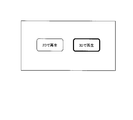
- the figure which shows an example of a viewing-and-listening form selection screen The figure which shows available_play_mode element which concerns on the modification of this invention. The figure which shows available_play_mode element which concerns on the modification of this invention.
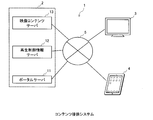
- FIG. 1 is a diagram showing a configuration of a content providing system 1 according to an embodiment of the present invention.
- the content providing system 1 includes a content distribution system 2 that distributes content and playback control information necessary for playback of the content, a playback device 3 that receives and plays back the content, and a playback device 4 that includes a network 5. Connected through.
- the content distribution system 2 is a portal server 11 that provides a list of contents to be distributed and a URL (Uniform Resource Locator) for acquiring reproduction control information, a reproduction control information server 12 that distributes reproduction control information, and distributes the contents
- the video content server 13 is configured to be included.
- only one portal server, one reproduction control information server, and one video content server are shown for convenience of explanation. However, it is assumed that there are actually one or more.
- the playback device 3 When receiving the content, the playback device 3 first requests the portal server 11 to transmit a list of content to be distributed by the content providing system 1. The portal server 11 transmits a content list to the playback device 3.
- the playback device 3 receives the content list and presents it to the user by displaying it on the display.
- the user inputs to the playback device 3 to select content that is desired to be played back (hereinafter referred to as “playback target content”).
- the playback device 3 reads the URL for accessing the playback control information server (in this embodiment, the playback control information server 12) corresponding to the playback target content from the content list, and accesses the URL to store the playback control information. Request transmission.
- the playback control information server in this embodiment, the playback control information server 12
- the playback control information describes a plurality of viewing modes that can be selected for the playback target content.
- the “viewing form” of content refers to “visual expression form” of content.
- the term “viewing” is generally a more restrictive term than “viewing”, but in this specification and the claims, the term “viewing” is included and general usage is also included. It is used in a broader sense.
- the playback device 3 refers to the playback control information, presents all viewing modes described in the playback control information as options, and prompts the user to select a viewing mode. Accordingly, the user of the playback device 3 can know that in addition to the viewing mode assumed for the content to be played back, another viewing mode different from this can be selected, which improves convenience for the user.
- the portal server 11 is a WEB server that provides a portal service that serves as an entrance when receiving distribution of content, and has a function of supplying an HTML (HyperText Markup Language) document, a BML (Broadcast Markup Language) document, and the like.
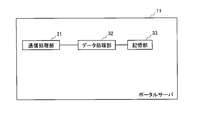
- FIG. 2 is a block diagram showing the configuration of the portal server 11.
- the portal server 11 includes a communication processing unit 31, a data processing unit 32, and a storage unit 33 as shown in FIG.
- the portal server 11 includes a processor and a memory, and the function of the data processing unit 32 is realized by the processor executing a program stored in the memory.
- the communication processing unit 31 is composed of a communication LSI and has a function of transmitting and receiving data via the network 5.
- the storage unit 33 is configured by a non-volatile memory, and stores content management information and user management information that are management information related to content distributed in the content distribution system 2.
- the data processing unit 32 has a content list document transmission function and a user management information recording function.
- the content list document transmission function is a function that accepts a content list transmission request and distributes the content list document as a response.
- the content list transmission request is generated using content management information and user management information.
- the user management information recording function is a function for recording and updating user management information, which is information relating to the user of the playback device 3 or the playback device 4, and the like.
- ⁇ Data structure> Hereinafter, the data structure of the content management information, the content list document, and the user management information will be described.
- Content management information is management information about the content distributed by the content distribution system 2 and is stored in the storage unit 33 in advance.
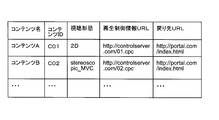
- FIG. 3 is a diagram showing an example of a content management information table that is a list of content management information.
- Each content management information corresponds to one content.
- the content management information includes a content name, content ID, viewing mode, reproduction control information URL, and return destination URL.
- the content name is the name of the content.
- Content ID is identification information for identifying content.
- the viewing mode indicates a default value as to which content is distributed so that the content can be viewed on the content receiving side (playback apparatus 3 or 4).
- the playback control information URL is a URL indicating a resource providing playback control information necessary for receiving and playing back content.
- the return URL is a parameter representing the URL of the HTML document displayed by the playback devices 3 and 4 after the content playback is completed.
- the user management information is information relating to users to whom the content distribution system 2 distributes content. The user management information is generated prior to content distribution, such as when a content distribution contract is concluded between the content distributor and the user. The user management information is updated to reflect information included in the content reproduction end notification when the data processing unit 32 receives the content reproduction end notification from the reproduction devices 3 and 4.
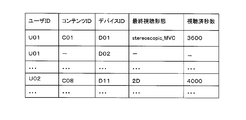
- FIG. 4 is a diagram showing an example of a user management information table that is a list of user management information.
- User management information includes a user ID, a content ID, a device ID, a final viewing mode, and the number of seconds that have been viewed.
- User ID is information for identifying a user who wants to distribute content.
- the user ID is uniquely assigned to each user by a content distributor when a content distribution contract is concluded.
- the user ID is a contractor number as an example. Note that there may be a plurality of user management information for the same user, such as when a single user has a plurality of devices.
- Content ID is identification information for identifying content.
- the device ID is identification information that uniquely identifies the playback device used by the user.
- the device ID is uniquely assigned to each device by the content distributor according to the user's application when a content distribution contract is concluded.
- the final viewing mode is information indicating in which viewing mode the content was viewed.
- the final viewing mode is either “2D” or “stereoscopic_MVC”. However, nothing is described when the content is not viewed at all.
- the viewed seconds are information indicating how many seconds the content has been viewed from the beginning before the viewing is interrupted. If no content is being viewed, the number of seconds already viewed is 0.
- the content list document is an HTML document in which one a tag (hereinafter referred to as “content tag”) having the following format is described for each content distributed in the content distribution system 2.
- NAME in the anchor text of the a tag describes the content name. Specifically, the content name in the content management information is described in NAME.
- MetaFile URL is a URL indicating a resource providing reproduction control information necessary for receiving content.
- the MetaFile URL describes the reproduction control information URL in the content management information.
- Return indicates a parameter indicating the URL of the HTML document to be displayed after the reproduction of the content is completed, and the parameter value is described in the ReturnURL.
- Return URL describes the return URL in the content management information.
- PlayPos indicates a parameter indicating the position where playback starts in the content, and the PlayPosition describes the number of seconds from the beginning of the content as the parameter value. For example, when content viewing is interrupted, PlayPosition describes the number of seconds already viewed in the user management information. Parameters enclosed in [] indicate that they can be omitted. In the content tag described above, PlayPos is omitted when the content is reproduced from the top.
- PlayMode is a parameter representing the viewing mode of content, and in 2D3D, the viewing mode in the content management information is described as a parameter value in principle. However, when the same content ID as the content ID in the content management information is recorded in the user management information and the final viewing mode corresponding to the content ID is recorded, the viewing mode in the content management information is set. Instead, the final viewing mode in the user management information is described in PlayMode.
- the LID is a parameter that represents the ID of a license used when playing back video content.
- the ID is described in LicenseID.
- the LID is an ID used for billing or the like. In this embodiment, charging will not be described.
- Playback Control Information Server 12 is a server that transmits the requested reproduction control metafile.
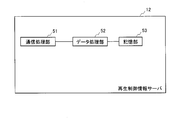
- FIG. 5 is a block diagram showing the configuration of the playback control information server 12.
- the reproduction control information server 12 includes a communication processing unit 51, a data processing unit 52, and a storage unit 53, as shown in FIG.
- the reproduction control information server 12 includes a processor and a memory, and the function of the data processing unit 52 is realized by the processor executing a program stored in the memory.
- the communication processing unit 51 is composed of a communication LSI and has a function of transmitting and receiving data via the network 5.
- the storage unit 53 is configured by a non-volatile memory, and stores reproduction control information for each content to be distributed in the content distribution system 2.
- the URL to be accessed in order to obtain each reproduction control information is described as a MetaFile URL in the content list document transmitted by the portal server 11 described above.
- the data processing unit 52 has a function of transmitting the reproduction control information requested to be transmitted using the MetaFile URL described in the above-described content list document to the apparatus that has made the transmission request.
- the data processing unit 52 transmits the reproduction control information, the LLI (License Link Information), and the NCI (Network content Control Information) in the form of a reproduction control metafile.
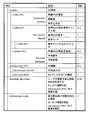
- ⁇ Data structure> 6 and 7 are diagrams showing the configuration of the reproduction control information.
- FIG. 7 is a continuation of FIG.
- the playback control information is the playback control meta data shown in “Digital TV Information Society, Digital TV Network Functional Specification, Streaming Functional Specification, Codec Edition, 1.2 Edition, December 21, 2010” (Non-Patent Document 2). It is an extension of ERI (Entry Resource Information) in the file. Therefore, the description of each item of the ERI is omitted except for the case of special description.
- ERI Entry Resource Information
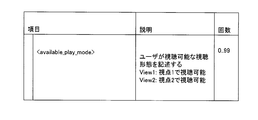
- an extension is made by adding an available_play_mode element and a default_play_mode element to the ERI.
- the available_play_mode element lists all viewing modes that can be selected for the content.
- One or both of “2D” and “stereoscopic_MVC” are described in the available_play_mode element.
- “2D” indicates that the content can be viewed as 2D video.
- “Stereoscopic_MVC” indicates that viewing is possible as 3D video in the MVC format.
- the playback device that has received the playback control information can present a selectable viewing mode to the user in advance by referring to this available_play_mode element.
- the above-described MVC (Multi View Coding) method is a method of encoding a multi-view video as one base view and one or more dependent views.
- the dependent view is encoded by referring to a frame included in the base view (inter-view prediction), and thus compression can be performed more efficiently than when each view is handled independently.
- the default_play_mode element is information that specifies which of the 2D video and the 3D video is selected as a default by the device that has received the playback control information. Whether or not to include this default_play_mode in the ERI is an option, and is not used in this embodiment. A modification will be described later.
- the reference destination of the content body is described in a character string of 1024 bytes or less including the request destination URL of the AV resource including the scheme in the ERI start element.
- the scheme is either rtsp: // or http: //. Specifically, http: // videoserver. com / AVData / 0001. It is described as m2ts. ⁇ 2-3.
- Video Content Server 13> The video content server 13 is a server that distributes video content in a stream.
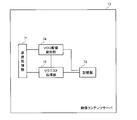
- FIG. 8 is a block diagram showing the configuration of the video content server 13.
- the video content server 13 includes a communication processing unit 71, a request processing unit 72, a storage unit 73, and a VOD (Video On Demand) distribution control unit 74.
- the video content server 13 includes a processor and a memory, and the functions of the request processing unit 72 and the VOD distribution control unit 74 are realized by the processor executing a program stored in the memory.
- the communication processing unit 71 is composed of a communication LSI, and has a function of transmitting and receiving data via the network 5.
- the storage unit 73 is composed of a non-volatile memory and stores a content body to be distributed.
- the request processing unit 72 has a function of receiving a content distribution request and instructing the VOD distribution control unit 74 to distribute the requested content (hereinafter referred to as “distribution instruction function”).
- the content distribution request is made by an HTTP-GET request.
- HTTP HyperText Transfer Protocol
- the HTTP-GET request is made in the following format. " GET http: // videoserver. com / AVData / 0001. m2ts HTTP / 1.1 Host: videoserver. com Date: Wed Jul 20 15: 00: 2011 GMT
- http // videoserver. com / AVData / 0001.
- m2ts corresponds to a URL for acquiring content.
- the host name of the server that provides the content (in this embodiment, the video content server 13) is described.
- Date contains the date and time when the HTTP-GET request was generated.
- User-Agent describes information for transmitting browser information to the server.
- the format is not particularly defined, and in this embodiment, “IP Broadcast Receiver” is used.
- X-TimeSeekRange the start position for requesting transmission in the content is designated. This is specified by the time from the beginning of the content. By specifying the viewed time from the beginning in the X-TimeSeekRange, it is possible to view from the point where the previous viewing was interrupted.
- the video content server 13 transmits the part after the position specified by the X-TimeSeekRange. Details are stipulated in “Digital TV Information Society, Digital TV Network Functional Specification, Streaming Functional Specification, Protocol Edition, 1.2 Edition, issued on December 21, 2010”.
- the video content server 13 returns the following response as an example.
- X-Available-Play-Mode 2D3D
- the distribution instruction function by the request processing unit 72 described above is realized by the following procedure.
- the request processing unit 72 When receiving the content distribution request, the request processing unit 72 extracts the content name, the viewing mode, and the viewed time from the content distribution request. Then, the request processing unit 72 instructs the VOD distribution control unit 74 to distribute the requested content by notifying the content name, the viewing mode, and the viewed time.
- VOD distribution control unit 74 Next, the VOD distribution control unit 74 will be described.
- the VOD distribution control unit 74 has a function of streaming distribution of content instructed to be distributed from the request processing unit 72.
- the VOD distribution control unit 74 distributes the part of the content having the notified content name that continues to the location corresponding to the notified viewing completion time to the device that has transmitted the content distribution request.
- the notified viewing mode is “2D”
- 2D video content is transmitted.
- the notified viewing mode is “stereoscopic_MVC”
- 3D video content is distributed.
- the content is encoded by the MVC method, if the notified viewing mode is “2D”, the content is distributed as 2D video including only the base view without including the dependent view. If the notified viewing mode is “stereoscopic_MVC”, it is transmitted as an MVC video (3D video) including both a base view and a dependent view.
- the playback device 3 is a device that receives and plays back a content stream.
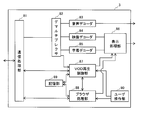
- FIG. 9 is a block diagram showing the configuration of the playback device 3.
- the playback device 3 includes a communication processing unit 81, a demultiplexer 82, an audio decoder 83, a video decoder 84, a caption decoder 85, a display processing unit 86, a VOD playback control unit 87, a browser processing unit 88, a storage
- the unit 89 and the user operation unit 90 are included.
- the playback device 3 includes a processor and a memory, and each function of the VOD playback control unit 87 and the browser processing unit 88 is realized by the processor executing a program stored in the memory.
- the communication processing unit 81 includes a communication LSI and has a function of transmitting and receiving data via the network 5.
- the demultiplexer 82 is composed of a demultiplexer LSI, and has a function of receiving multiplexed MPEG-2 TS and separating it into packets such as video, audio, subtitles, and PSI / SI.
- the demultiplexer 82 outputs the separated audio packet to the audio decoder 83, outputs the video packet to the video decoder 84, outputs the subtitle packet to the subtitle decoder 85, and outputs the PSI / SI packet to the VOD playback control unit 87. .
- the audio decoder 83 is realized by an AV signal processing LSI, and has a function of obtaining an audio signal by decoding an audio packet and outputting it to the outside.
- the video decoder 84 is realized by the AV signal processing LSI described above, receives a notification of a viewing mode used for content playback from the VOD playback control unit 87, and displays a video packet so that the video can be displayed in the notified viewing mode.
- a video signal is obtained by decoding and is output to the display processing unit 86.
- the video packet is encoded based on the MVC method and the notified viewing mode is “2D”, the dependent view is ignored, only the base view is decoded, and a video signal representing 2D video Is output to the display processing unit 86.
- the base view frame is decoded from the video packet, and then the dependent view frame is decoded to generate a video signal for alternately displaying each of the left and right videos. And output to the display processing unit 86.
- the caption decoder 85 is realized by the AV signal processing LSI described above, and has a function of obtaining a caption signal by decoding a caption packet and outputting the caption signal to the display processing unit 86.
- the display processing unit 86 is realized by the AV signal processing LSI described above, and superimposes the video signal obtained from the video decoder 84 and the subtitle signal obtained from the subtitle decoder 85 to form a display image, and displays an external display such as a display. It has the function to output to. Further, the browser processing unit 88 has a function of forming a display image by superimposing a page image or the like formed based on an HTML document or a BML document with video or subtitles, and outputting the display image to the outside such as a display. .
- the VOD playback control unit 87 has a function of controlling playback of content.
- the reproduction control mainly includes reproduction start control and reproduction interruption stop control.
- the VOD playback control unit 87 starts playback of the playback target content instructed to be played back by the user instruction to the browser processing unit 88. Specifically, the VOD playback control unit 87 instructs the audio decoder 83 to decode the audio packet in order to receive and play back the content to be played back transmitted from the video content server 13, and the video decoder 84 performs playback. The viewing mode to be used is notified, the decoding of the video packet is instructed, and the subtitle decoder 85 is instructed to decode the subtitle packet.
- the VOD playback control unit 87 When receiving the content playback interruption instruction from the user operation unit 90, the VOD playback control unit 87 instructs the audio decoder 83 to stop decoding the audio packet, instructs the video decoder 84 to stop decoding the video packet, and the subtitle decoder 85. Is instructed to stop decoding the subtitle packet. At this time, the VOD playback control unit 87 records the number of seconds watched for this content and notifies the browser processing unit 88 of it. Then, the VOD playback control unit 87 instructs the communication processing unit 81 to disconnect the TCP connection with the video content server 13.
- the browser processing unit 88 interprets the HTML document or BML document acquired from the server, executes the script described, and presents it.
- the browser processing unit 88 includes a content list display function (S202 in FIG. 12), a reproduction target content information storage control function (S204 in FIG. 12), a reproduction position selection screen display function (S206 in FIG. 12), and a reproduction control information transmission request function. (S17 in FIG. 10), a viewing mode determination function (FIG. 13), and a content reproduction end notification transmission function (FIG. 14).
- the content list display function acquires a content list document that is an HTML document or a BML document from the portal server 11 and displays it according to HTML or BML. In this case, the content name of each content tag included in the content list document is presented to the user.
- the playback target content information storage control function is a function for controlling storage and update of playback target content information.
- the browser processing unit 88 extracts MetaFileURL, ReturnURL, PlayMode, and content name from the content tag for the reproduction target content in the content list document, and stores them in the storage unit 89 as reproduction target content information.
- the meaning of each element such as MetaFile URL in the reproduction target content information is the same as that in the content tag of the content list document.
- the playback position selection screen display function is a function for instructing to display a playback position selection screen that is a screen for selecting whether playback content is to be played from the beginning or resume playback (playback from the viewing interruption position).
- the playback control information transmission request function is a function for reading a MetaFile URL in the playback target content information and making a playback control information transmission request in order to acquire playback control information of the playback target content.
- the viewing mode determination function is a function for determining the viewing mode by displaying a viewing mode that can be executed for the content to be played on the display and allowing the user to select the viewing mode.
- the content reproduction end notification transmission function is a content reproduction end notification when a video content reproduction is interrupted or stopped, and the content reproduction end notification is a return URL (in this embodiment, a resource on the portal server 11). ) Is included in the request to send.
- the content reproduction end notification is specifically performed by transmitting an HTTP request message in which a URL described as follows is described.
- Status represents the end state of the player that has played, with 0 indicating normal end, and -2 or lower indicating an error.
- the details are stipulated in “Digital TV Information Society, Digital TV Network Functional Specification, Streaming Functional Specification, Browser Edition, 1.2 Edition, issued on December 21, 2010”.
- StopPos is a parameter indicating the stop position when playback is interrupted, and the number of seconds that have been viewed from the VOD playback control unit 87 is described as the parameter value in StopPosition.
- PlayMode is a parameter that represents the viewing mode in which video content was played.
- 2D3D “2D” is described as the parameter value for 2D video, and “stereoscopic_MVC” is recorded for the 3D video.
- the content reproduction end notification includes a user ID and a device ID together with the above HTTP request message.
- the browser processing unit 88 transmits this content reproduction end notification to the portal server 11.
- the storage unit 89 is composed of a nonvolatile memory, and stores reproduction target content information.
- the user ID of the user of the playback apparatus 3 (U01 in the present embodiment) and the device ID assigned to the playback apparatus 3 (D01 in the present embodiment) are stored.
- the user operation unit 90 includes a keypad, a remote controller, and the like.
- An instruction (hereinafter referred to as “user instruction”) input by the user operating the keypad, the remote controller, or the like is used as a VOD playback control unit 87, a browser process.
- the unit 88 is notified.
- the configuration of the playback device 4 is the same as that of the playback device 3, and a description thereof is omitted.
- the user ID stored in the storage unit 89 of the playback apparatus 4 is U01, and the device ID is D02. ⁇ 3.
- Overall operation> In the content providing system 1 configured as described above, the overall operation until the content is played back by the playback device 3 will be described.
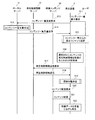
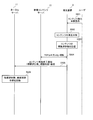
- FIG. 10 is a flowchart showing the flow of the entire operation until the content is reproduced.
- the user of the playback device 3 inputs a content list display request using the user operation unit 90 of the playback device 3 (S11).
- the user operation unit 90 receives the content list display request and notifies the browser processing unit 88 of the content list display request.
- the browser processing unit 88 transmits a content list transmission request to the portal server 11 (S12). Note that all communication with other devices in the playback device 3 is via the communication processing unit 81. Hereinafter, for simplification of description, description of “via communication processing unit 81” regarding communication may be omitted. The same applies to other devices.
- the communication processing unit 31 receives the content list transmission request and outputs it to the data processing unit 32.
- the data processing unit 32 performs content list document creation processing (S13). Details of this processing are shown in FIG.
- the data processing unit 32 transmits the generated content list document to the playback device 3 (S14).
- the playback device 3 receives the content list document and performs a process of selecting playback content from the content list (S15). Details of this processing are shown in FIG.
- the browser processing unit 88 reads the MetaFile URL in the playback target content information as the URL for acquiring the playback control information of the selected content (S16).
- the browser processing unit 88 uses the communication processing unit 81 to make a reproduction control information transmission request for the read URL (in this embodiment, indicates a resource on the reproduction control information server 12) (S17).
- the playback control information server 12 transmits the playback control information to the playback device 3 (S18).
- the playback device 3 that has received the playback control information performs a viewing mode determination process (S19).
- the browser processing unit 88 in the playback device 3 uses the communication processing unit 81 to transmit an HTTP-GET request to the video content server 13 to make a video data transmission request (S20).
- the video content server 13 transmits the content requested by the HTTP-GET request to the playback device 3 that is the transmission source of the HTTP-GET request (S21).
- the video content server 13 transmits the content in such a manner that the content can be viewed in the Play_mode of the HTTP-GET request. Further, when the HTTP-GET request includes an X-TimeSeekRange header, the HTTP-GET request is transmitted to the playback apparatus 3 from the viewing position specified by the X-TimeSeekRange header in the content.
- the VOD playback control unit 87 of the playback device 3 receives and plays back the content transmitted from the video content server 13, and instructs the audio decoder 83 to decode the audio packet as playback start control, and the video packet to the video decoder 84. And the subtitle decoder 85 is instructed to decode the subtitle packet.
- the audio decoder 83 decodes the audio packet
- the video decoder 84 decodes the video packet
- the subtitle decoder 85 receives the content transmitted from the video content server 13 by decoding the subtitle packet.
- Streaming playback is performed (S22). ⁇ 3-2.
- Content list document creation processing> A content list document creation process corresponding to S13 of FIG. 10 will be described.
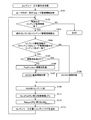
- FIG. 11 is a flowchart showing the flow of content list document creation processing.
- the data processing unit 32 of the portal server 11 has acquired a content list transmission request from the playback device 3.
- the content list transmission request includes the requesting user ID and device ID.
- the data processing unit 32 reads the user management information of the user ID that matches the user ID included in the content list transmission request from the storage unit 33 (S101).
- the data processing unit 32 determines whether there is content management information that has not been read (S102), and when there is no content management information that has not been read (NO in S102), the processing is terminated.
- S104 to S106 the device ID is not checked. Therefore, even if the device ID in the user management information is different from the device ID included in the content list transmission request, (a) the content ID of the read content management information has the same content ID, And (b) If the user ID included in the content list transmission request has the same user ID, the number of seconds watched in the user management information is set in the PlayPosition of the content tag.
- the data processing unit 32 sets the final viewing mode in the user management information in 2D3D of the content tag (S107), and proceeds to S109.
- the data processing unit 32 stores the content management information in the read content management information 2D3D. Is set (S108), and the process proceeds to S109.
- the content name in the read content management information is set in the NAME of the content tag (S109).
- the reproduction control information URL in the read content management information is set in the MetaFile URL of the content tag (S111).
- the return URL in the read content management information is set in the return URL of the content tag (S112).
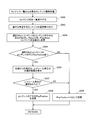
- FIG. 12 is a flowchart showing the flow of the playback content selection process from the content list.
- the communication processing unit 81 in the playback device 3 acquires the content list document from the portal server 11 and transfers it to the browser processing unit 88.
- the browser processing unit 88 outputs the content list document received from the portal server 11 to the display processing unit 86.
- the content list document is an HTML document, and the display processing unit 86 displays the received content list document on a display (not shown) (S202).
- the content is displayed using an icon or the like so that the user can recognize that viewing is interrupted.
- the user operation unit 90 accepts the selection of the content that the user desires to reproduce (content to be reproduced) by the user's input looking at the content list, and notifies the browser processing unit 88 (S203).
- the user selects the content by, for example, moving the cursor displayed on the display by remote control operation, selecting one of the content names displayed on the display in a list, and pressing the enter button. To do.
- the browser processing unit 88 extracts MetaFileURL, ReturnURL, PlayMode, and content name from the content tag for the playback target content in the content list document, and stores these as playback target content information (S204).
- the browser processing unit 88 determines whether or not PlayPosition exists in the content tag for the content to be reproduced (S205). If there is PlayPosition (YES in S205), the browser processing unit 88 instructs the display processing unit 86 to display a playback position selection screen that is a selection screen for performing playback from the beginning or resume playback (S206). ). The display processing unit 206 displays a playback position selection screen on the display and waits for user input.
- the browser processing unit 88 stores the PlayPosition in the content tag as the PlayPosition of the content information to be played back (S208), and ends the processing (S208). RETURN).
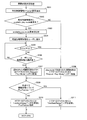
- FIG. 13 is a flowchart showing the flow of the viewing mode determination process by the playback device 3.
- the communication processing unit 81 in the playback device 3 receives the playback control information from the playback control information server 12 and outputs it to the browser processing unit 88.
- the browser processing unit 88 extracts the start element from the acquired reproduction control information and stores it in the storage unit 89 (S301).
- the available_play_mode element is stored in the storage unit 89 (S303).
- the browser processing unit 88 displays the executable viewing mode described in the available_play_mode element, and displays the screen for allowing the user to select the viewing mode (hereinafter referred to as “viewing mode selection screen”).
- the unit 86 is instructed.
- the display processing unit 86 displays a viewing style selection screen as shown in FIG. 15 on the display (S304).
- “Play in 3D” is highlighted by default, and is distinguished from “Play in 2D”.
- FIG. 15 which of the executable viewing modes is highlighted is described in the PlayMode of the content tag of the content to be played back in the content list document received by the playback device 3 from the portal server 11. It depends on the viewing format.
- the browser processing unit 88 waits until a certain time elapses (timeout) for the user to input a user to select a viewing mode (S305). When the time-out has occurred (YES in S305), the browser processing unit 88 sets the play_mode of the content tag of the content to be reproduced as the viewing mode requested to the video content server 13 in the X-Request-Play-Mode header of the HTTP-GET request. Store (S308) and proceed to S309.
- the selected viewing mode is set as the viewing mode requested to the video content server 13, and the X-Request-Play-Mode of the HTTP-GET request is used.
- the data is stored in the header (S307), and the process proceeds to S309.
- PlayPosition is 0 (YES in S309), it is determined that the X-TimeSeekRange header is not added to the HTTP-GET request (S311), and the process is terminated (RETURN).
- PlayPosition is not 0 (NO in S309), an X-TimeSeekRange header is added to the HTTP-GET request, PlayPosition is set as a value (S310), and the process ends (RETURN).
- pause Content viewing interruption
- FIG. 14 is a flowchart showing the flow of content viewing interruption processing.
- the user of the playback device 3 uses the user operation unit 90 to instruct to interrupt playback of the content (S501).
- the user operation unit 90 outputs a content reproduction interruption instruction to the VOD reproduction control unit 87.
- the VOD reproduction control unit 87 instructs the audio decoder 83 to stop decoding the audio packet, instructs the video decoder 84 to stop decoding the video packet, and instructs the subtitle decoder 85 to transmit the subtitle packet.
- An instruction to stop decoding is given (S502).
- the VOD playback control unit 87 stores the number of seconds that have been viewed regarding this content (S503).
- the audio decoder 83 Upon receiving the instruction to stop decoding, the audio decoder 83 stops decoding of the audio packet. In response to the instruction to stop decoding, the video decoder 84 stops decoding of the video packet. Also, the subtitle decoder 85 that has received the instruction to stop decoding stops decoding the subtitle packet.
- the VOD playback control unit 87 instructs the communication processing unit 81 to disconnect the TCP connection with the video content server 13.
- the communication processing unit 81 disconnects the TCP connection with the video content server 13 (S504).
- the browser processing unit 88 transmits a content reproduction end notification including the user ID and device ID to the portal server 11 via the communication processing unit 81 (S505).
- StopPosition of the content playback end notification the number of watched seconds stored in S503 is described.
- 2D3D of the content reproduction end notification the viewing mode used for content reproduction is described.
- the communication processing unit 31 receives the content reproduction end notification (S506) and outputs it to the data processing unit 32.
- the data processing unit 32 extracts StopPosition and PlayMode from the HTTP request message in the received content reproduction end notification. Then, the extracted PlayMode is described in the final viewing mode of the user management information having the user ID, device ID, and device ID included in the content reproduction end notification, and StopPosition is described in the viewed seconds. .
- the communication in S505 is performed by an HTTP-GET request to the resource indicated by the ReturnURL.
- a content list document is generally used as the resource indicated by the ReturnURL. Therefore, after the process of S506, the portal server 11 transmits the content list document to the playback device 3. ⁇ 3-6.
- Content viewing resume processing is processing for resuming content viewing from the state where the content viewing is interrupted as described with reference to FIG. The content viewing resume process is performed according to the flowcharts of FIGS.
- the content whose viewing is interrupted is content A whose content ID is C01.
- the content A is assumed to be viewable in any viewing mode of “2D” and “stereoscopic_MVC”. It is assumed that both “2D” and “stereoscopic_MVC” are described in the available_play_mode element in the playback control information transmitted by the playback control information server 12.
- the viewing mode is stereoscopic_MVC. It is assumed that the number of seconds that have been viewed when the viewing of the content A is interrupted is 3600 seconds.
- the resumption of viewing of the content A is performed not by the playback device 3 but by the playback device 4. It is assumed that the content A has not been viewed on the playback device 4 before the restart.
- the users of the playback device 3 and the playback device 4 are the same, and the user ID is U01.
- FIGS. 10 to 13 used in the description have already been described in detail. Therefore, all the steps will not be described in detail again, and the description will be simplified as appropriate according to the importance.
- the user of the playback device 4 inputs a content list display request using the user operation unit 90 of the playback device 4 (S11).
- the user operation unit 90 receives the content list display request and notifies the browser processing unit 88 of the content list display request.
- the browser processing unit 88 transmits a content list transmission request to the portal server 11 (S12).
- the communication processing unit 31 receives the content list transmission request and outputs it to the data processing unit 32.
- the data processing unit 32 performs content list document creation processing (S13).
- the number of seconds watched by the playback device 3 (3600) is set in the PlayPosition of the content tag of the content A whose viewing has been interrupted.
- the browser processing unit 88 of the playback device 4 displays a list of content names on the display based on the content list document (S15, S202 in FIG. 12). At this time, the content A is displayed using an icon to indicate that the viewing is interrupted.
- the user selects content A as the content to be played (S203).
- the browser processing unit 88 stores the reproduction target content information for the content A (S204).
- content A for which PlayPosition is set is selected as the content to be played back (YES in S205), so the browser processing unit 88 is a selection screen for performing playback from the beginning or resume playback.
- a reproduction position selection screen is displayed on the display processing unit 86 (S206).
- the browser processing unit 88 stores 3600 which is the PlayPosition in the content tag as the PlayPosition of the content information to be played back (S208).
- the browser processing unit 88 reads the MetaFile URL in the reproduction target content information (S16), and makes a reproduction control information transmission request for this URL (S17).
- the playback control information server 12 transmits the playback control information for the content A to the playback device 4 (S18).
- the browser processing unit 88 receives the reproduction control information from the reproduction control information server 12. Then, the start element is extracted (S301), and the available_play_mode element in the reproduction control information is extracted (S302 to 303).
- the browser processing unit 88 is a screen that allows the user to select one of the executable viewing modes (“2D” and “3D (stereoscopic_MVC)”) described in the available_play_mode element in the playback control information, as shown in FIG.
- a viewing mode selection screen as shown is displayed on the display (S304).
- the viewing mode for example, “3D (stereoscopic_MVC)” described in the PlayMode of the content tag of the content A in the content list document received by the playback device 4 from the portal server 11 is highlighted by default.
- the browser processing unit 88 stores “2D” in the X-Request-Play-Mode header of the HTTP-GET request (S307), adds the X-TimeSeekRange header, and sets 3600 as a value (S309, S310).
- the browser processing unit 88 sends a content distribution request to the video content server 13 by an HTTP-GET request (S20 in FIG. 10).
- the video content server 13 delivers the content A to the playback device 4 so that the portion after 3600 seconds from the beginning can be viewed in 2D.
- the playback device 4 receives the content A from the video content server 13 and plays back the portion after 3600 seconds from the beginning (S22).
- the content A has been viewed on the playback device 3 by changing from the viewing mode (3D (stereoscopic_MVC)) used in the playback device 3 to another viewing mode (2D). It will be possible to watch from the continuation.
- 3D stereooscopic_MVC
- the resumption of viewing of the content A has been described in the example performed by the playback device 4, but the case where the playback is performed by the playback device 3 is similar to the above description.
- Modification> As mentioned above, although the embodiment of the content providing system according to the present invention has been described, the exemplified content providing system can be modified as follows, and the content providing system according to the present invention as shown in the above-described embodiment. Of course, it is not limited to. (1) In the above embodiment, the HTML document is used to notify the playback mode 3 from the portal server 11 to the playback device 3, but it is sufficient if the previous viewing mode can be notified.
- a new function having a function of notifying the previous viewing mode such as launchIPTVContentEx () may be defined and used as a function for starting playback.
- This new function is embedded in a BML document generated as a content list document, and assigned to a button that starts playback of the content when the purchase button or playback button of the content is pressed.
- the previous viewing mode to be notified is used as a default viewing mode at the time of resuming viewing in the playback device, or which of the buttons for selecting the viewing mode to be displayed on the viewing mode selection screen is to be focused by default Used to determine.
- launchIPTVContentEx (input String content_uri, input String ret_uri, input Number start_npt, [input String license_id,] input String play_mode)
- content_uri indicates the URI of the reproduction control metafile corresponding to the content to be reproduced.
- ret_uri indicates the URI of the BML document to be displayed after the content reproduction ends.
- start_npt indicates the playback start time position of the content (seconds from the beginning of the content). The playback device specifies the time position delivered by the argument start_npt, and requests the video content server 101 to transmit content data.
- license_id indicates a license ID of a license used at the time of reproduction.
- “play_mode” indicates a content viewing mode. The value of “play_mode” is “2D” or “stereoscopic_MVC”. When “play_mode” is “2D”, the content is reproduced as 2D video, and when “stereoscopic_MVC”, the content is reproduced as 3D video.
- each button for selecting playback as 3D video is pressed. It may be described that the launchIPTVContentEx () function is executed.
- the launchIPTVContentEx () function whose argument play_mode value is “2D” is executed when a button for selecting playback as 2D video is selected. It is also described that the launchIPTVContentEx () function whose argument play_mode is “stereoscopic_MVC” is executed when a button for selecting playback as 3D video is selected.
- the BML document may be configured so that a button for viewing in the same viewing mode as the final viewing mode of the user management information stored in the portal server 11 is focused. That is, when the final viewing mode is “stereoscopic_MVC”, the BML document is configured so that the button on which the launchIPTVContentEx () function whose play_mode value is “3D” is executed is focused, and the final viewing mode is “2D”. In this case, the BML document is configured so as to focus on the button on which the launchIPTVContentEx () function whose play_mode value is “2D” is executed.
- the function launchIPTVContentEx () for notifying the previous viewing mode is defined and used, but it is sufficient if the previous viewing mode can be notified.
- the viewing mode may be specified by the playback control information.
- a default_play_mode element shown in FIG. 7 is added to the playback control information as an example.
- which of 2D video and 3D video is selected by default may be stored in the playback device in advance.
- the default_play_mode element may represent the default viewing mode of the content set by the service provider or the like instead of notifying the previous viewing mode.
- the default_play_mode element may be set by the content distribution system 2 according to the display capability of the playback device. That is, the content distribution system 2 sets 3D as the value of the default_play_mode element if the playback device has 3D display capability, and default_play_mode element if the playback device does not have 3D display capability. 2D may be set as the value of. (3)
- the executable viewing mode described in the available_play_mode is displayed on the display as the viewing mode selection screen, and the viewing mode is selected by user input. It is enough if possible. For example, the viewing mode may be selected by the user by a predetermined operation such as pressing a specific button.
- the X-Request-Play-Mode header is described in the HTTP-GET request in order to notify the video content server 13 of the viewing mode from the playback device 3, but the video content server It is sufficient if the viewing mode can be recognized in 13.
- the HTTP-GET request does not include an X-Request-Play-Mode header between the playback device 3 and the video content server 13, it is preliminarily defined that “2D” is assumed to be specified. Also good. Thereby, it is possible to ensure compatibility of the HTTP-GET request with a legacy device that can reproduce the content only in 2D and does not support the extension that adds the X-Request-Play-Mode.
- the video content server 13 causes the TS packet including the dependent view at the time of distribution. However, it is only necessary to be able to transmit video data that does not include a dependent view.
- video data that does not include a dependent view may be prepared in advance and transmitted. As a result, it is possible to avoid transmitting a dependent view that is not used on the playback device side, and to save a communication band to be used.
- the device ID is uniquely assigned by the content distributor according to the user's application when the content distribution contract is concluded. However, it is sufficient if the device can be uniquely identified. For example, an IP address or a MAC address may be used.
- the playback device 4 after the playback device 3 performs viewing / interruption of the content, when the playback device 4 with a different device ID resumes viewing of the content, the playback device 4 can perform the same content. Although one viewing mode is selected from all viewing modes, control of limiting viewing mode options using the device ID may be performed when viewing is resumed.
- the playback device 3 that is a stationary terminal has the ability to perform 3D display of content
- the playback device 4 that is a tablet terminal does not have the capability of 3D display of the content and has only the capability of 2D display
- the playback device 4 may be controlled so that the 3D viewing option is not displayed on the viewing mode selection screen displayed when viewing is resumed, or 3D viewing cannot be selected.
- “2D” and “3D (stereoscopic_MVC)” are described in the available_play_mode element in the playback control information as possible viewing modes for the content, and the playback devices 3 and 4 are notified.
- the viewing mode is not limited to “2D” and “3D (stereoscopic_MVC)”, but may be any as long as it shows a visual expression mode for content.
- the viewing mode may indicate each angle for content that is expressed in multi-angles.
- the viewing mode may indicate each of a plurality of programs distributed at the same time.
- the viewing mode may be resolution.
- the available_play_mode element in the playback control information includes “SD (Standard Definition)”, “HD (High Definition)”, “4K”, “QVGA (Quarter) as examples of possible viewing modes for the content. "Video Graphics Array)”.
- 4K indicates a resolution of around 4000 ⁇ 2000 dots.
- RTP Realtime Transport Protocol
- RTSP Real Time Streaming Protocol
- RTP is defined by RFC3550
- RTSP is defined by RFC2326.
- RTSP In RTSP, (a) SETUP, (b) PLAY, (c) PAUSE, and (d) TEARDOWN methods are used for streaming playback.
- SETUP is a method for instructing to secure a resource for sending a stream to the server and start a session.
- PLAY is a method for instructing the start of media data transmission using resources secured by SETUP. Used when content is played back.
- PAUSE is a method for instructing to temporarily stop sending a stream without releasing server resources. It is used both when the content is paused and stopped (reproduction is finished).
- TEARDOWN is a method for instructing resource release and session termination.
- PLAY is used instead of the HTTP-GET request in the above-described embodiment.
- PAUSE is used instead of the content reproduction end notification in the above-described embodiment.
- SETUP does not have a corresponding method or the like in the above embodiment, but is used prior to PLAY.
- TEARDOWN does not have a corresponding method in the above-described embodiment, but is used when the content reproduction is finished.
- extension is added by adding an extension header X-Available-Play-Mode in order to describe a viewing mode that can be used in the content.
- X-Available-Play-Mode describes “2D3D” indicating both 2D and 3D, “2D” indicating 2D, and “3D” indicating 3D.
- X-Request-Play-Mode is an extension header to be added, and describes a viewing mode for requesting distribution of content.
- 2D can be specified in addition to 3D in the above example. Further, from the viewpoint of ensuring compatibility, it may be determined that 2D is designated by omitting X-Request-Play-Mode.
- RTSP / 1.0 200 OK CSeq: 3 Date: Wed Jul 20 15:02:00 2011 GMT Range: ntp 00: 66: 00- X-Available-Play-Mode: 2D3D (C) PAUSE (request) PAUSE rtsp: // videoserver. com / AVData / 0001.
- the playback device 3 receives and analyzes the playback control information about the content, and generates and displays the viewing mode selection screen as shown in FIG. It is enough if the screen can be displayed.
- the portal server 11 may inquire the playback device 3 whether to play back as 2D video or 3D video. In this case, as an example, when the video content to be played back is selected by the playback device 3, the portal server 11 transmits to the playback device 3 a BML document or an HTML document for displaying a viewing mode selection screen as shown in FIG. To do.
- a button indicating the viewing mode selected at the time of the previous playback, which is notified to the portal server 11 about the content from the playback device side, is focused by default. It may be.
- the viewing mode selection screen is displayed for the content that was previously played back as 3D video in the playback device 3, it is displayed in a state where the button related to the 3D video is focused.
- the video content server 13 when the video content server 13 is requested to transmit 2D video from the playback device 3 for the MVC video, the video content server 13 transmits a stream that does not include the dependent view of the MVC video, and the playback device When the transmission of 3D video is requested from 3, the MVC video is transmitted as it is, but it is sufficient that the playback device 3 can play back the 2D video and 3D video in the requested viewing mode.
- the video content server 13 when the video content server 13 is requested to transmit the MVC video, the video content server 13 always transmits the MVC video as it is, and the playback device 3 controls whether the MVC video is played back as 2D video or 3D video. May be. In this case, even if it is necessary to switch the viewing mode in the playback apparatus 3, it is not necessary to end communication with the video content server 13 once. (12) In the above-described embodiment, all available viewing forms for the content are listed in the available_play_mode element. However, the viewing forms permitted for the content may be listed. This makes it possible to intentionally limit the available viewing modes when the content creator wants to view the content only as 3D video.
- the present invention has been described as an example in which the present invention is applied to a VOD service based on Internet distribution of content.
- the content distribution timing is not limited to real-time distribution such as VOD. It is enough if it is in time for reproduction.
- the present invention can be applied to a download service in which contents are downloaded and stored in advance and then played back.
- the playback device 3 does not make a content transmission request to the video content server 13 and plays back the content stored in the device itself. Further, the playback device 3 refers to the available_play_mode element in the playback control information when the playback target content is selected, and displays the viewing mode selection screen, thereby allowing the user to select a possible viewing mode for the content. it can. (14)
- the content list display processing, playback target content information storage control processing, playback position selection screen display processing, playback control information transmission request processing, viewing mode determination processing, and the like shown in the above-described embodiment are performed by the playback devices 3 and 4.
- a control program consisting of a program code of a machine language or high-level language to be executed by a processor and various circuits connected to the processor on a recording medium, or distributing and distributing the program via various communication paths You can also.
- a recording medium includes an IC card, a hard disk, an optical disk, a flexible disk, a ROM, a flash memory, and the like.
- the distributed and distributed control program is used by being stored in a memory or the like that can be read by the processor, and the processor executes the control program to realize each function as shown in each embodiment. Will come to be.
- the processor may be compiled and executed or executed by an interpreter.
- Each functional component may be realized as a circuit that executes the function, or may be realized by executing a program by one or a plurality of processors.
- Each functional component described above is typically realized as an LSI that is an integrated circuit. These may be individually made into one chip, or may be made into one chip so as to include a part or all of them.
- the name used here is LSI, but it may also be called IC, system LSI, super LSI, or ultra LSI depending on the degree of integration.
- the method of circuit integration is not limited to LSI's, and implementation using dedicated circuitry or general purpose processors is also possible.
- An FPGA Field Programmable Gate Array
- a reconfigurable processor that can reconfigure the connection and setting of circuit cells inside the LSI may be used.
- a content playback apparatus is a content playback apparatus that receives and plays back video content from a content distribution system connected via a network, and a plurality of selectable video content.
- Receiving means for receiving control information indicating a viewing mode from the content distribution system via the network; presenting unit for presenting the plurality of viewing modes as options; and user input for selecting one of the options.
- Input receiving means for receiving, and request means for requesting stream distribution of video content by transmitting information indicating the selected viewing mode to the content distribution system.
- the input accepting means further accepts a pause instruction for interrupting the reproduction during the reproduction of the video content
- the presenting means further receives a pause instruction when the pause instruction is accepted.
- the plurality of viewing modes may be presented to the user as options for selecting the viewing mode.
- the presentation unit displays an option for selecting the viewing mode at the time of resuming the playback, the presenting unit differentiates the viewing mode used immediately before receiving the pause instruction from other viewing modes. May be displayed.
- the content distribution system is configured to view a video content when the video content is viewed halfway by another user of the content reproduction device before being reproduced by the content reproduction device.
- a form is stored, and the receiving unit further receives information indicating a viewing mode on the other device from the content distribution system, and the presenting unit displays the option when the other option is displayed.
- the viewing mode on the device may be displayed differentiating from other viewing modes.
- the content playback device when content that the user has watched halfway using another device is taken over by the content playback device, the content playback device is likely to be selected and used by the other device immediately before playback is interrupted. It is possible to easily identify and select the viewing mode that has been viewed from other viewing modes, and to improve user convenience. (5) Moreover, when the said presentation means presents the said choice, it is good also as suppressing presentation about the viewing-and-listening form which the own apparatus does not have the capability to display.
- control information lists all viewing modes selectable for the video content, and the presenting means reads and displays all the viewing modes listed in the control information. Also good.
- control information is information added to the ERI
- the receiving unit receives the ERI from the content distribution system and extracts the control information from the ERI as reception of the control information. Also good.
- each of the plurality of viewing forms may have different resolutions.
- the plurality of viewing modes may be 2D and 3D.
- a content reproduction method is used in a content reproduction apparatus including a reception unit, a presentation unit, an input reception unit, and a request unit, and is a content distribution connected via a network.
- a receiving step a presenting step in which the presenting means presents the plurality of viewing forms as options to the user, an input accepting step in which the input accepting means accepts a user input for selecting one of the options, and the request Means for transmitting the information indicating the selected viewing mode to the content distribution system; And a request step of requesting streaming video content by transmitting.
- a content reproduction program is a content reproduction program for causing a computer to function as a content reproduction device that receives and reproduces video content from a content distribution system connected via a network.
- Receiving means for receiving control information indicating a plurality of viewing modes selectable for video content from the content distribution system via the network; and presenting means for presenting the plurality of viewing modes as options to the user.
- a content providing system is a content providing system in which a content distribution system that streams video content and a content playback device that receives and plays back the video content are connected via a network.
- the content distribution system is selected from the plurality of viewing modes from the content playback device and transmission means for transmitting control information indicating a plurality of viewing modes selectable for the video content to the content playback device.
- a request receiving unit that receives information indicating one viewing mode; and a distribution unit that distributes the video content according to the selected viewing mode.
- the content reproduction apparatus receives the control information from the content distribution system.
- a content playback apparatus is a device that presents to a user in advance that a plurality of viewing modes of content can be switched and gives a switching opportunity, and receives and plays back the content via a network. Etc. are useful.
Landscapes
- Engineering & Computer Science (AREA)
- Multimedia (AREA)
- Signal Processing (AREA)
- Databases & Information Systems (AREA)
- Human Computer Interaction (AREA)
- Information Transfer Between Computers (AREA)
- Two-Way Televisions, Distribution Of Moving Picture Or The Like (AREA)
- Testing, Inspecting, Measuring Of Stereoscopic Televisions And Televisions (AREA)
Abstract
Description
図1は、本発明の一実施形態に係るコンテンツ提供システム1の構成を示す図である。
<2.構成>
<2-1.ポータルサーバ11>
ポータルサーバ11は、コンテンツの配信を受ける際の入り口となるポータルサービスを提供するWEBサーバであり、HTML(HyperText Markup Language)文書、BML(Broadcast Markup Language)文書等を供給する機能を有する。
<データ構造>
以下、コンテンツ管理情報、コンテンツ一覧文書及びユーザ管理情報のデータ構造について説明する。
<コンテンツ管理情報>
コンテンツ管理情報は、コンテンツ配信システム2が配信するコンテンツについての管理情報であり、予め、記憶部33に記憶されている。
<ユーザ管理情報>
ユーザ管理情報は、コンテンツ配信システム2がコンテンツを配信するユーザに関する情報である。ユーザ管理情報は、コンテンツ配信業者とユーザとの間で、コンテンツの配信契約が締結された時など、コンテンツの配信に先立ち生成される。また、ユーザ管理情報は、データ処理部32が、再生装置3及び4からコンテンツ再生終了通知を受信したときに、コンテンツ再生終了通知に含まれる情報を反映するために更新される。
<コンテンツ一覧文書>
コンテンツ一覧文書は、HTML文書であり、コンテンツ配信システム2において配信されるコンテンツ1つにつき、下記フォーマットのaタグ(以下、「コンテンツタグ」という。)が1つ記載されたものである。
ここで、aタグのアンカーテキスト中のNAMEには、コンテンツ名が記載される。具体的には、NAMEには、コンテンツ管理情報中のコンテンツ名が記載される。
<2-2.再生制御情報サーバ12>
再生制御情報サーバ12は、要求された再生制御メタファイルを送信するサーバである。
<データ構造>
図6及び図7は、再生制御情報の構成を示す図である。図7は、図6の続きである。
<2-3.映像コンテンツサーバ13>
映像コンテンツサーバ13は、映像コンテンツをストリーム配信するサーバである。
「
GET http://videoserver.com/AVData/0001.m2ts HTTP/1.1
Host: videoserver.com
Date: Wed Jul 20 15:00:00 2011 GMT
User-Agent: IP Broadcast Receiver
Connection: Keep-Alive
X-Request-Play-Mode: 3D
X-TimeSeekRange:npt-time=00:60:00-
」
HTTP-GETリクエストのURLには、コンテンツを取得するためのURLが記載される。上述の例では、http://videoserver.com/AVData/0001.m2tsがコンテンツを取得するためのURLに該当する。
「
HTTP/1.1 200 OK
Date: Wed Jul 20 15:00:01 2011 GMT
Server: Video Streaming Server
Content-Type: video/mpeg
Content-Length: 5452000000byte
X-Available-Play-Mode: 2D3D
X-TimeSeekRange: npt-time=00:60:00- bytes=5452000000-1093999999/1094000000
」
ここで、上述のリクエスト処理部72による配信指示機能は、下記手順により実現される。
<2-4.再生装置3>
再生装置3は、コンテンツをストリーム受信し、再生する装置である。
ここで、ReturnURLには、再生対象コンテンツ情報のReturnURLを記載する。
<3.動作>
<3-1.全体動作>
以上のように構成されたコンテンツ提供システム1において、再生装置3によりコンテンツが再生されるまでの全体動作について説明する。
<3-2.コンテンツ一覧文書作成処理>
図10のS13に相当する、コンテンツ一覧文書作成処理について説明する。
<3-3.コンテンツ一覧からの再生コンテンツ選択処理>
図10のS15に相当する、コンテンツ一覧からの再生コンテンツ選択処理について説明する。
<3-4.視聴形態決定処理>
図10のS19に相当する、視聴形態決定処理について説明する。
<3-5.コンテンツ視聴中断(ポーズ)処理>
次に、再生装置3が図10で示した手順で、コンテンツをストリーミング再生している状態となった後、視聴を中断する場合の処理について説明する。この処理において、再生装置3は、視聴を中断した位置として、コンテンツについての視聴済秒数をポータルサーバ11に記憶させる。
次に、ブラウザ処理部88は、ポータルサーバ11に対し、通信処理部81を介して、ユーザID、デバイスIDを含めたコンテンツ再生終了通知を送信する(S505)。
<3-6.コンテンツ視聴再開処理>
コンテンツ視聴再開処理は、図14を用いて説明したような、コンテンツの視聴が中断された状態から、コンテンツの視聴を再開する処理である。コンテンツ視聴再開処理は、既に説明した図10~図13のフローチャートに従い行うことになる。
<4.変形例>
以上、本発明に係るコンテンツ提供システムの実施形態を説明したが、例示したコンテンツ提供システムを以下のように変形することも可能であり、本発明が上述の実施形態で示した通りのコンテンツ提供システムに限られないことは勿論である。
(1)上記実施形態では、ポータルサーバ11から再生装置3に対して前回の視聴形態を通知するため、HTML文書を使用していたが、前回の視聴形態を通知できれば足りる。
ここで、content_uriは、再生対象のコンテンツに対応する再生制御メタファイルのURIを示す。ret_uriは、コンテンツ再生終了後に表示するBML文書のURIを示す。start_nptは、コンテンツの再生開始時間位置(コンテンツの先頭からの秒数)を示す。再生装置は、引数start_nptによって引き渡された時間位置を指定して、映像コンテンツサーバ101にコンテンツのデータ送信をリクエストすることになる。license_idは、再生時に利用するライセンスのライセンスIDを示す。play_modeは、コンテンツの視聴形態を示す。play_modeは、値として「2D」、「stereoscopic_MVC」が記載される。play_modeが「2D」の場合、コンテンツを2D映像として再生することを表し、「stereoscopic_MVC」の場合、コンテンツを3D映像として再生することを表す。
(2)変形例(1)では、前回の視聴形態を通知する関数launchIPTVContentEx()を定義して用いることとしたが、前回の視聴形態を通知できれば足りる。例えば、視聴形態を再生制御情報にて指定することとしてもよい。この場合、再生制御情報に一例として図7に示すdefault_play_mode要素を追加する。
(3)上述の実施形態では、視聴形態選択画面として、available_play_modeに記載されている実行可能な視聴形態をディスプレイに表示し、ユーザ入力により視聴形態の選択をさせることとしたが、視聴形態が選択できれば足りる。例えば、特定ボタンの押下など予め決まった動作により、ユーザに視聴形態を選択させることとしてもよい。
(4)上述の実施形態では、再生装置3から映像コンテンツサーバ13に視聴形態を通知するために、HTTP-GETリクエストにX-Request-Play-Modeヘッダを記載することとしたが、映像コンテンツサーバ13において視聴形態を認識できれば足りる。
(5)上述の実施形態では、送信する映像がMVC映像である場合において、X-Request-Play-Modeが「2D」の場合、映像コンテンツサーバ13が、配信時にディペンデントビューを含むTSパケットを取り除く処理を行って配信するとしたが、ディペンデントビューを含まない映像データが送信できさえすれば足りる。例えば、ディペンデントビューを含まない映像データを予め用意しておき、これを送信することとしてもよい。これにより、再生装置側で使用しないディペンデントビューを送信するのを避け、使用する通信帯域を節約することができる。
(6)上述の実施形態では、デバイスIDは、コンテンツの配信契約締結時などにユーザの申請に応じてコンテンツ配信業者が一意に割り当てるとしたが、デバイスを一意に識別できれば足りる。例えば、IPアドレスや、MACアドレスなどを用いてもよい。
(7)上述の実施形態では、再生装置3がコンテンツの視聴、中断を行った後、デバイスIDの異なる再生装置4が同コンテンツの視聴を再開する場合に、再生装置4において同コンテンツについて可能な全視聴形態から1つの視聴形態を選択することとしていたが、視聴再開時に、デバイスIDを用いて視聴形態の選択肢を制限する制御を行ってもよい。
(8)上述の実施形態では、再生制御情報中のavailable_play_mode要素に、コンテンツについて可能な視聴形態として「2D」、「3D(stereoscopic_MVC)」を記載し、再生装置3及び4に通知していたが、視聴形態は「2D」「3D(stereoscopic_MVC)」に限らず、コンテンツについての視覚的な表現形態を示すものであれば足りる。
(9)上述の実施形態では、再生装置3及び4が、映像コンテンツサーバ13に対し、「コンテンツの再生、再開(配信開始)」、「コンテンツの再生中断、中止」を要求する場合に、HTTPを使用したが、「コンテンツの再生、再開」、「コンテンツの再生中断、中止」が要求できさえすれば足りる。
(a)SETUP
(リクエスト)
SETUP rtsp://videoserver.com/AVData/0001.m2ts RTSP/1.0
CSeq: 2
Trasnport: RTP/AVP;unicast;client_port=5000-5001
X-Request-Play-Mode: 3D
ここで、X-Request-Play-Modeは、追加する拡張ヘッダであり、コンテンツについて配信を要求する視聴形態を記載する。X-Request-Play-Modeについては、上記例の3Dの他、2Dを指定することもできる。また、互換性確保の観点からX-Request-Play-Modeを省略することをもって2Dを指定するものと取り決めておいてもよい。
RTSP/1.0 200 OK
CSeq: 2
Date: Wed Jul 20 15:00:00 2011 GMT
Session: 505
Transport: RTP/AVP;unicast;client_port=5000-5001;sever_port=6000-6001
X-Available-Play-Mode: 2D3D
(b)PLAY
(リクエスト)
PLAY rtsp://videoserver.com/AVData/0001.m2ts RTSP/1.0
CSeq: 3
Session: 505
Range: npt=00:60:00-
ここで、Rangeが、上述の実施形態における XTimeSeekRangeに相当し、意味内容も同様である。
RTSP/1.0 200 OK
CSeq: 3
Date: Wed Jul 20 15:02:00 2011 GMT
Range: ntp=00:60:00-
X-Available-Play-Mode: 2D3D
(c)PAUSE
(リクエスト)
PAUSE rtsp://videoserver.com/AVData/0001.m2ts RTSP/1.0
CSeq: 4
Session: 505
(レスポンス)
RTSP/1.0 200 OK
CSeq: 4
Date: Wed Jul 20 15:20:00 2011 GMT
X-Available-Play-Mode: 2D3D
(10)上述の実施形態では、再生装置3が、コンテンツについての再生制御情報を受信し、解析し、図15に示すような視聴形態選択画面を生成し表示することとしていたが、視聴形態選択画面を表示できれば足りる。
(11)上述の実施形態では、映像コンテンツサーバ13は、MVC映像について、再生装置3から2D映像の送信をリクエストされた場合、MVC映像のディペンデントビューを含まないストリームを送信し、再生装置3から3D映像の送信をリクエストされた場合、MVC映像をそのまま送信することとしたが、再生装置3において、リクエストした視聴形態で2D映像、3D映像が再生できれば足りる。
(12)上述の実施形態では、available_play_mode要素に、コンテンツについて可能な視聴形態を全て列挙していたが、コンテンツについて許可されている視聴形態を列挙することとしてもよい。これにより、コンテンツの制作者がそのコンテンツを3D映像としてのみ視聴させたい場合など、利用可能な視聴形態を意図的に制限できることとなる。
(13)上述の実施形態では、本発明をコンテンツのインターネット配信によるVODサービスに適用する例で説明していたが、コンテンツの配信タイミングは、VODのようなリアルタイム配信に限るものではなく、コンテンツの再生に間に合えば足りる。
(14)上述の実施形態で示したコンテンツ一覧表示処理、再生対象コンテンツ情報記憶制御処理、再生位置選択画面表示処理、再生制御情報送信要求処理、視聴形態決定処理などを再生装置3、及び4のプロセッサ、及びそのプロセッサに接続された各種回路に実行させるための機械語或いは高級言語のプログラムコードからなる制御プログラムを、記録媒体に記録すること、又は各種通信路等を介して流通させ頒布することもできる。このような記録媒体には、ICカード、ハードディスク、光ディスク、フレキシブルディスク、ROM、フラッシュメモリ等がある。流通、頒布された制御プログラムはプロセッサに読み出され得るメモリ等に格納されることにより利用に供され、そのプロセッサがその制御プログラムを実行することにより各実施形態で示したような各機能が実現されるようになる。なお、プロセッサは、制御プログラムを直接実行する他、コンパイルして実行或いはインタプリタにより実行してもよい。
(15)上述の実施形態で示した各機能構成要素(通信処理部31、データ処理部32、記憶部33、通信処理部51、データ処理部52、記憶部53、通信処理部71、リクエスト処理部72、記憶部73及びVOD配信制御部74、通信処理部81、デマルチプレクサ82、音声デコーダ83、映像デコーダ84、字幕デコーダ85、表示処理部86、VOD再生制御部87、ブラウザ処理部88、及びユーザ操作部90など)は、その機能を実行する回路として実現されてもよいし、1又は複数のプロセッサによりプログラムを実行することで実現されてもよい。
(16)上述の実施形態及び各変形例を、部分的に組み合せてもよい。
<5.補足>
以下、更に本発明の一実施形態としてのコンテンツ再生装置の構成及びその変形例と効果について説明する。
(1)本発明の一実施形態に係るコンテンツ再生装置は、ネットワークを介して接続するコンテンツ配信システムから、映像コンテンツをストリーム受信し再生するコンテンツ再生装置であって、映像コンテンツについて選択可能な複数の視聴形態を示す制御情報を前記コンテンツ配信システムから前記ネットワークを介して受信する受信手段と、前記複数の視聴形態を選択肢としてユーザに提示する提示手段と、前記選択肢から1つを選択するユーザ入力を受け付ける入力受付手段と、前記選択された視聴形態を示す情報を前記コンテンツ配信システムに送信することにより映像コンテンツのストリーム配信を要求する要求手段とを備える。
(2)また、前記入力受付手段は、更に、前記映像コンテンツの再生中に、再生を中断するポーズ指示を受け付け、前記提示手段は、更に、前記ポーズ指示が受け付けられたときに、再生再開時の視聴形態を選択するための選択肢として前記複数の視聴形態をユーザに提示することとしてもよい。
(3)また、前記提示手段は、前記再生再開時の視聴形態を選択するための選択肢を表示する場合に、前記ポーズ指示を受け付ける直前に用いられていた視聴形態を他の視聴形態と差別化して表示することとしてもよい。
(4)また、前記コンテンツ配信システムは、前記映像コンテンツが、前記コンテンツ再生装置によって再生される前に、前記コンテンツ再生装置のユーザによって他の装置を用いて途中まで視聴された場合に、その視聴形態を記憶しており、前記受信手段は、更に、前記コンテンツ配信システムから、前記他の装置での視聴形態を示す情報を受信し、前記提示手段は、前記選択肢を表示する場合に、前記他の装置での視聴形態を、他の視聴形態とは差別化して表示することとしてもよい。
(5)また、前記提示手段は、前記選択肢を提示する場合に、自装置が表示する能力を有さない視聴形態については提示を抑制することとしてもよい。
(6)また、前記制御情報は、前記映像コンテンツについて選択可能な視聴形態を全て列記したものであり、前記提示手段は、前記制御情報中に列記された視聴形態を全て読み出して表示することとしてもよい。
(7)また、前記複数の視聴形態それぞれは、相互に異なる解像度であることとしてもよい。
(8)また、前記複数の視聴形態は、2D及び3Dであることとしてもよい。
(9)本発明の一実施形態に係るコンテンツ再生方法は、受信手段と、提示手段と、入力受付手段と、要求手段とを備えたコンテンツ再生装置に用いられ、ネットワークを介して接続するコンテンツ配信システムから、映像コンテンツをストリーム受信し再生するコンテンツ再生方法であって、前記受信手段が、映像コンテンツについて選択可能な複数の視聴形態を示す制御情報を前記コンテンツ配信システムから前記ネットワークを介して受信する受信ステップと、前記提示手段が、前記複数の視聴形態を選択肢としてユーザに提示する提示ステップと、前記入力受付手段が、前記選択肢から1つを選択するユーザ入力を受け付ける入力受付ステップと、前記要求手段が、前記選択された視聴形態を示す情報を前記コンテンツ配信システムに送信することにより映像コンテンツのストリーム配信を要求する要求ステップとを含む。
2 コンテンツ配信システム
3 再生装置
4 再生装置
5 ネットワーク
11 ポータルサーバ
12 再生制御情報サーバ
13 映像コンテンツサーバ
81 通信処理部
82 デマルチプレクサ
83 音声デコーダ
84 映像デコーダ
85 字幕デコーダ
86 表示処理部
87 VOD再生制御部
88 ブラウザ処理部
89 記憶部
90 ユーザ操作部
Claims (12)
- ネットワークを介して接続するコンテンツ配信システムから、映像コンテンツをストリーム受信し再生するコンテンツ再生装置であって、
映像コンテンツについて選択可能な複数の視聴形態を示す制御情報を前記コンテンツ配信システムから前記ネットワークを介して受信する受信手段と、
前記複数の視聴形態を選択肢としてユーザに提示する提示手段と、
前記選択肢から1つを選択するユーザ入力を受け付ける入力受付手段と、
前記選択された視聴形態を示す情報を前記コンテンツ配信システムに送信することにより映像コンテンツのストリーム配信を要求する要求手段とを備える
ことを特徴とするコンテンツ再生装置。 - 前記入力受付手段は、更に、前記映像コンテンツの再生中に、再生を中断するポーズ指示を受け付け、
前記提示手段は、更に、前記ポーズ指示が受け付けられたときに、再生再開時の視聴形態を選択するための選択肢として前記複数の視聴形態をユーザに提示する
ことを特徴とする請求項1記載のコンテンツ再生装置。 - 前記提示手段は、前記再生再開時の視聴形態を選択するための選択肢を表示する場合に、前記ポーズ指示を受け付ける直前に用いられていた視聴形態を他の視聴形態と差別化して表示する
ことを特徴とする請求項2記載のコンテンツ再生装置。 - 前記コンテンツ配信システムは、前記映像コンテンツが、前記コンテンツ再生装置によって再生される前に、前記コンテンツ再生装置のユーザによって他の装置を用いて途中まで視聴された場合に、その視聴形態を記憶しており、
前記受信手段は、更に、前記コンテンツ配信システムから、前記他の装置での視聴形態を示す情報を受信し、
前記提示手段は、前記選択肢を表示する場合に、前記他の装置での視聴形態を、他の視聴形態とは差別化して表示する
ことを特徴とする請求項1記載のコンテンツ再生装置。 - 前記提示手段は、前記選択肢を提示する場合に、自装置が表示する能力を有さない視聴形態については提示を抑制する
ことを特徴とする請求項1記載のコンテンツ再生装置。 - 前記制御情報は、前記映像コンテンツについて選択可能な視聴形態を全て列記したものであり、
前記提示手段は、前記制御情報中に列記された視聴形態を全て読み出して表示する
ことを特徴とする請求項1記載のコンテンツ再生装置。 - 前記制御情報は、ERI(Entry Resource Information)に追記された情報であり、
前記受信手段は、前記制御情報の受信として、前記コンテンツ配信システムから前記ERIを受信して当該ERIから前記制御情報を抽出する
ことを特徴とする請求項6記載のコンテンツ再生装置。 - 前記複数の視聴形態それぞれは、相互に異なる解像度である
ことを特徴とする請求項1記載のコンテンツ再生装置。 - 前記複数の視聴形態は、2D及び3Dである
ことを特徴とする請求項1記載のコンテンツ再生装置。 - 受信手段と、提示手段と、入力受付手段と、要求手段とを備えたコンテンツ再生装置に用いられ、ネットワークを介して接続するコンテンツ配信システムから、映像コンテンツをストリーム受信し再生するコンテンツ再生方法であって、
前記受信手段が、映像コンテンツについて選択可能な複数の視聴形態を示す制御情報を前記コンテンツ配信システムから前記ネットワークを介して受信する受信ステップと、
前記提示手段が、前記複数の視聴形態を選択肢としてユーザに提示する提示ステップと、
前記入力受付手段が、前記選択肢から1つを選択するユーザ入力を受け付ける入力受付ステップと、
前記要求手段が、前記選択された視聴形態を示す情報を前記コンテンツ配信システムに送信することにより映像コンテンツのストリーム配信を要求する要求ステップとを含む
ことを特徴とするコンテンツ再生方法。 - コンピュータを、ネットワークを介して接続するコンテンツ配信システムから、映像コンテンツをストリーム受信し再生するコンテンツ再生装置として機能させるためのコンテンツ再生プログラムであって、
前記コンピュータを、
映像コンテンツについて選択可能な複数の視聴形態を示す制御情報を前記コンテンツ配信システムから前記ネットワークを介して受信する受信手段と、
前記複数の視聴形態を選択肢としてユーザに提示する提示手段と、
前記選択肢から1つを選択するユーザ入力を受け付ける入力受付手段と、
前記選択された視聴形態を示す情報を前記コンテンツ配信システムに送信することにより映像コンテンツのストリーム配信を要求する要求手段として機能させる
ことを特徴とするコンテンツ再生プログラム。 - 映像コンテンツをストリーム配信するコンテンツ配信システムと、前記映像コンテンツをストリーム受信し再生するコンテンツ再生装置とがネットワークを介して接続されたコンテンツ提供システムであって、
前記コンテンツ配信システムは、
前記映像コンテンツについて選択可能な複数の視聴形態を示す制御情報を前記コンテンツ再生装置に送信する送信手段と、
前記コンテンツ再生装置から、前記複数の視聴形態から選択された1つの視聴形態を示す情報を受け付ける要求受付手段と、
前記選択された視聴形態による前記映像コンテンツの配信を行う配信手段とを備え、
前記コンテンツ再生装置は、
前記コンテンツ配信システムから、前記制御情報を受信する受信手段と、
前記制御情報に示される複数の視聴形態を選択肢としてユーザに提示する提示手段と、
前記選択肢から1つを選択するユーザ入力を受け付ける入力受付手段と、
前記コンテンツ配信システムに対し、前記選択された視聴形態を示す情報を送信する要求手段とを備える
ことを特徴とするコンテンツ提供システム。
Priority Applications (6)
| Application Number | Priority Date | Filing Date | Title |
|---|---|---|---|
| CN201280004150.9A CN103262558B (zh) | 2011-07-22 | 2012-07-17 | 内容再现装置、内容再现方法、内容再现程序及内容提供系统 |
| CA2815106A CA2815106A1 (en) | 2011-07-22 | 2012-07-17 | Content playback device, content playback method, content playback program and content distribution system |
| KR1020137012088A KR101965806B1 (ko) | 2011-07-22 | 2012-07-17 | 콘텐츠 재생장치, 콘텐츠 재생방법, 콘텐츠 재생프로그램 및 콘텐츠 제공시스템 |
| JP2013525568A JP6048835B2 (ja) | 2011-07-22 | 2012-07-17 | コンテンツ再生装置、コンテンツ再生方法、コンテンツ再生プログラム及びコンテンツ提供システム |
| EP12817669.0A EP2736252B1 (en) | 2011-07-22 | 2012-07-17 | Content regeneration device, content regeneration method, content regeneration program and content providing program |
| MX2013005444A MX2013005444A (es) | 2011-07-22 | 2012-07-17 | Dispositivo de regeneracion de contenido, metodo de regeneracion de contenido, programa de regeneracion de contenido y programa que proporciona contenido. |
Applications Claiming Priority (2)
| Application Number | Priority Date | Filing Date | Title |
|---|---|---|---|
| US201161510642P | 2011-07-22 | 2011-07-22 | |
| US61/510,642 | 2011-07-22 |
Publications (2)
| Publication Number | Publication Date |
|---|---|
| WO2013014880A1 true WO2013014880A1 (ja) | 2013-01-31 |
| WO2013014880A8 WO2013014880A8 (ja) | 2013-05-02 |
Family
ID=47556764
Family Applications (1)
| Application Number | Title | Priority Date | Filing Date |
|---|---|---|---|
| PCT/JP2012/004563 Ceased WO2013014880A1 (ja) | 2011-07-22 | 2012-07-17 | コンテンツ再生装置、コンテンツ再生方法、コンテンツ再生プログラム及びコンテンツ提供システム |
Country Status (8)
| Country | Link |
|---|---|
| US (1) | US9106962B2 (ja) |
| EP (1) | EP2736252B1 (ja) |
| JP (1) | JP6048835B2 (ja) |
| KR (1) | KR101965806B1 (ja) |
| CN (1) | CN103262558B (ja) |
| CA (1) | CA2815106A1 (ja) |
| MX (1) | MX2013005444A (ja) |
| WO (1) | WO2013014880A1 (ja) |
Cited By (2)
| Publication number | Priority date | Publication date | Assignee | Title |
|---|---|---|---|---|
| JP2019179291A (ja) * | 2018-03-30 | 2019-10-17 | 株式会社Jストリーム | 管理サーバ、管理方法、及びそのプログラム |
| JP7737587B1 (ja) | 2022-11-08 | 2025-09-10 | シャープ株式会社 | 受信装置及び受信方法 |
Families Citing this family (12)
| Publication number | Priority date | Publication date | Assignee | Title |
|---|---|---|---|---|
| CN102316366A (zh) * | 2010-07-09 | 2012-01-11 | 中兴通讯股份有限公司 | 一种媒体服务器及音视频传输的方法 |
| US9467359B1 (en) | 2013-06-07 | 2016-10-11 | Google Inc. | Methods, systems, and media for resuming playback of media content across multiple devices |
| CN105208434A (zh) * | 2014-06-11 | 2015-12-30 | 阿里巴巴集团控股有限公司 | 媒体投影方法、媒体投影设备、控制终端以及云端服务器 |
| US10009129B2 (en) | 2014-10-21 | 2018-06-26 | Sharp Kabushiki Kaisha | System with a companion device and a primary device |
| GB2549549B (en) * | 2016-04-19 | 2020-12-23 | Cisco Tech Inc | A mapping database system for use with content chunks |
| KR102616853B1 (ko) * | 2016-07-15 | 2023-12-26 | 에스케이하이닉스 주식회사 | 3차원 반도체 집적 회로 장치 및 그 제조방법 |
| CN106454271B (zh) * | 2016-11-21 | 2019-06-11 | 环球大数据科技有限公司 | 视频处理系统及方法 |
| CN109154915A (zh) * | 2017-03-28 | 2019-01-04 | 松下知识产权经营株式会社 | 内容分发系统、再生装置以及内容分发方法 |
| US12212751B1 (en) | 2017-05-09 | 2025-01-28 | Cinova Media | Video quality improvements system and method for virtual reality |
| US10944971B1 (en) * | 2017-05-22 | 2021-03-09 | Cinova Media | Method and apparatus for frame accurate field of view switching for virtual reality |
| KR102504539B1 (ko) * | 2017-10-16 | 2023-02-28 | 주식회사 스마일 티비 | 콘텐츠 배신 시스템 및 콘텐츠 배신 방법 |
| JP6349454B1 (ja) * | 2017-12-06 | 2018-06-27 | 株式会社ドワンゴ | サーバおよびプログラム |
Citations (4)
| Publication number | Priority date | Publication date | Assignee | Title |
|---|---|---|---|---|
| JP2004234111A (ja) * | 2003-01-28 | 2004-08-19 | Sony Corp | 情報処理装置、および情報処理方法、並びにコンピュータ・プログラム |
| JP2006013847A (ja) * | 2004-06-25 | 2006-01-12 | Matsushita Electric Ind Co Ltd | マルチメディアコンテンツ提供システム、ホームコンテンツサーバ及び視聴デバイス |
| WO2011151959A1 (ja) * | 2010-06-02 | 2011-12-08 | 日立コンシューマエレクトロニクス株式会社 | 受信装置、表示制御方法、送信装置および送信方法 |
| JP2012080309A (ja) * | 2010-10-01 | 2012-04-19 | Hitachi Consumer Electronics Co Ltd | コンテンツ受信機 |
Family Cites Families (19)
| Publication number | Priority date | Publication date | Assignee | Title |
|---|---|---|---|---|
| KR19990080993A (ko) * | 1998-04-24 | 1999-11-15 | 전주범 | 위성방송 수신기에 있어서 사용자별 시청모드 설정 및 운영방법 |
| EP1269752B1 (en) * | 2000-03-31 | 2005-05-11 | United Video Properties, Inc. | Interactive media system and method for presenting pause-time content |
| EP1297634A1 (en) * | 2000-06-09 | 2003-04-02 | iMove Inc. | Streaming panoramic video |
| KR100556826B1 (ko) * | 2003-04-17 | 2006-03-10 | 한국전자통신연구원 | Mpeg-4 기반의 양안식 3차원 동영상을 서비스하기 위한 인터넷 방송 시스템 및 그 방법 |
| US20060061682A1 (en) * | 2004-09-22 | 2006-03-23 | Bradley Bruce R | User selectable content stream |
| US20070101370A1 (en) * | 2005-10-28 | 2007-05-03 | Stexar Corp. | Television program selection |
| US20070157240A1 (en) * | 2005-12-29 | 2007-07-05 | United Video Properties, Inc. | Interactive media guidance system having multiple devices |
| US8607287B2 (en) * | 2005-12-29 | 2013-12-10 | United Video Properties, Inc. | Interactive media guidance system having multiple devices |
| WO2008038758A1 (en) * | 2006-09-29 | 2008-04-03 | Sony Corporation | Information processing device and method, and program |
| CN101523905A (zh) * | 2006-09-29 | 2009-09-02 | 索尼株式会社 | 信息处理装置和方法、以及程序 |
| CA2672735A1 (en) * | 2006-12-13 | 2008-06-19 | Quickplay Media Inc. | Mobile media platform |
| US10778930B2 (en) * | 2007-05-30 | 2020-09-15 | Comcast Cable Communications, Llc | Selection of electronic content and services |
| US9282337B2 (en) * | 2009-02-27 | 2016-03-08 | Vixs Systems, Inc. | Media source device with digital format conversion and methods for use therewith |
| JP5347759B2 (ja) * | 2009-06-26 | 2013-11-20 | 富士通株式会社 | 継承通信管理装置 |
| KR101621528B1 (ko) * | 2009-09-28 | 2016-05-17 | 삼성전자 주식회사 | 디스플레이장치 및 그 3d 영상신호 표시방법 |
| JP5482254B2 (ja) | 2009-11-05 | 2014-05-07 | ソニー株式会社 | 受信装置、送信装置、通信システム、表示制御方法、プログラム、及びデータ構造 |
| US8977107B2 (en) * | 2009-12-31 | 2015-03-10 | Sandisk Technologies Inc. | Storage device and method for resuming playback of content |
| US20120079606A1 (en) * | 2010-09-24 | 2012-03-29 | Amazon Technologies, Inc. | Rights and capability-inclusive content selection and delivery |
| CN102447959A (zh) | 2010-10-01 | 2012-05-09 | 日立民用电子株式会社 | 接收机 |
-
2012
- 2012-07-17 EP EP12817669.0A patent/EP2736252B1/en not_active Not-in-force
- 2012-07-17 JP JP2013525568A patent/JP6048835B2/ja not_active Expired - Fee Related
- 2012-07-17 CA CA2815106A patent/CA2815106A1/en not_active Abandoned
- 2012-07-17 WO PCT/JP2012/004563 patent/WO2013014880A1/ja not_active Ceased
- 2012-07-17 KR KR1020137012088A patent/KR101965806B1/ko not_active Expired - Fee Related
- 2012-07-17 CN CN201280004150.9A patent/CN103262558B/zh not_active Expired - Fee Related
- 2012-07-17 MX MX2013005444A patent/MX2013005444A/es active IP Right Grant
- 2012-07-18 US US13/551,958 patent/US9106962B2/en not_active Expired - Fee Related
Patent Citations (4)
| Publication number | Priority date | Publication date | Assignee | Title |
|---|---|---|---|---|
| JP2004234111A (ja) * | 2003-01-28 | 2004-08-19 | Sony Corp | 情報処理装置、および情報処理方法、並びにコンピュータ・プログラム |
| JP2006013847A (ja) * | 2004-06-25 | 2006-01-12 | Matsushita Electric Ind Co Ltd | マルチメディアコンテンツ提供システム、ホームコンテンツサーバ及び視聴デバイス |
| WO2011151959A1 (ja) * | 2010-06-02 | 2011-12-08 | 日立コンシューマエレクトロニクス株式会社 | 受信装置、表示制御方法、送信装置および送信方法 |
| JP2012080309A (ja) * | 2010-10-01 | 2012-04-19 | Hitachi Consumer Electronics Co Ltd | コンテンツ受信機 |
Non-Patent Citations (5)
| Title |
|---|
| "Streaming Functional Specifications in Digital Television Network Functional Specifications, Browser Part, Revision 1.2", 21 December 2010, DIGITAL TELEVISION INFORMATION STUDY GROUP |
| "Streaming Functional Specifications in Digital Television Network Functional Specifications, Codec Part, Revision 1.2", 21 December 2010, DIGITAL TELEVISION INFORMATION STUDY GROUP |
| "Streaming Functional Specifications in Digital Television Network Functional Specifications, Protocol Part, Revision 1.2", 21 December 2010, DIGITAL TELEVISION INFORMATION STUDY GROUP |
| See also references of EP2736252A4 * |
| STREAMING FUNCTIONAL SPECIFICATIONS IN DIGITAL TELEVISION NETWORK FUNCTIONAL SPECIFICATIONS, CODEC PART, REVISION 1.2, 21 December 2010 (2010-12-21) |
Cited By (6)
| Publication number | Priority date | Publication date | Assignee | Title |
|---|---|---|---|---|
| JP2019179291A (ja) * | 2018-03-30 | 2019-10-17 | 株式会社Jストリーム | 管理サーバ、管理方法、及びそのプログラム |
| JP7029335B2 (ja) | 2018-03-30 | 2022-03-03 | 株式会社Jストリーム | 管理サーバ、管理方法、及びそのプログラム |
| JP7737587B1 (ja) | 2022-11-08 | 2025-09-10 | シャープ株式会社 | 受信装置及び受信方法 |
| JP7737586B1 (ja) | 2022-11-08 | 2025-09-10 | シャープ株式会社 | 受信装置及び受信方法 |
| JP2025142241A (ja) * | 2022-11-08 | 2025-09-30 | シャープ株式会社 | 受信装置及び受信方法 |
| JP2025142245A (ja) * | 2022-11-08 | 2025-09-30 | シャープ株式会社 | 受信装置及び受信方法 |
Also Published As
| Publication number | Publication date |
|---|---|
| CN103262558A (zh) | 2013-08-21 |
| KR101965806B1 (ko) | 2019-04-04 |
| JP6048835B2 (ja) | 2016-12-21 |
| CN103262558B (zh) | 2017-03-01 |
| WO2013014880A8 (ja) | 2013-05-02 |
| US20130024898A1 (en) | 2013-01-24 |
| KR20140037791A (ko) | 2014-03-27 |
| EP2736252A4 (en) | 2015-04-29 |
| EP2736252B1 (en) | 2016-12-21 |
| EP2736252A1 (en) | 2014-05-28 |
| MX2013005444A (es) | 2013-07-29 |
| US9106962B2 (en) | 2015-08-11 |
| CA2815106A1 (en) | 2013-01-31 |
| JPWO2013014880A1 (ja) | 2015-02-23 |
Similar Documents
| Publication | Publication Date | Title |
|---|---|---|
| JP6048835B2 (ja) | コンテンツ再生装置、コンテンツ再生方法、コンテンツ再生プログラム及びコンテンツ提供システム | |
| JP7280408B2 (ja) | 送信方法および受信方法 | |
| TWI574565B (zh) | A transmitting apparatus, a transmitting method, a receiving apparatus, a receiving method, a computer-readable medium, and a broadcasting system | |
| JP5757075B2 (ja) | 送信装置、送信方法、受信装置、受信方法、プログラム、および放送システム | |
| US9118950B2 (en) | Broadcast receiving apparatus, playback apparatus, broadcast communication system, broadcast receiving method, playback method, and program | |
| WO2012043354A1 (ja) | 受信装置、受信方法、及びプログラム | |
| JP2014511621A (ja) | 表示切換えのための方法および装置 | |
| KR102499231B1 (ko) | 수신 장치, 송신 장치 및 데이터 처리 방법 | |
| KR20120079019A (ko) | 신호 전송 방법, 신호 송신 장치 및 신호 수신 장치 | |
| KR20100039496A (ko) | Iptv 수신기 및 상기 iptv 수신기의 채널 변경 방법 | |
| CN102026008A (zh) | 接收设备、接收方法、传输设备和计算机程序 | |
| CN103339953A (zh) | 内容再现装置、内容再现方法及内容分发系统 | |
| CN102651745B (zh) | 一种业务内容的播放方法、系统和装置 | |
| KR102640835B1 (ko) | 송신 장치, 수신 장치, 및 데이터 처리 방법 | |
| KR102533674B1 (ko) | 수신 장치, 송신 장치 및 데이터 처리 방법 | |
| KR102628917B1 (ko) | 송신 장치, 수신 장치, 및 데이터 처리 방법 | |
| KR20040061254A (ko) | 디지털 방송수신기와 그 인터넷방송 서비스 제공방법 | |
| KR20090111973A (ko) | Ftp 방식을 이용한 iptv 서비스에 있어서i-프레임을 이용하여 콘텐츠의 재생 지점을 선택할 수있도록 하는 방법 및 시스템 |
Legal Events
| Date | Code | Title | Description |
|---|---|---|---|
| 121 | Ep: the epo has been informed by wipo that ep was designated in this application |
Ref document number: 12817669 Country of ref document: EP Kind code of ref document: A1 |
|
| REEP | Request for entry into the european phase |
Ref document number: 2012817669 Country of ref document: EP |
|
| WWE | Wipo information: entry into national phase |
Ref document number: 2012817669 Country of ref document: EP |
|
| ENP | Entry into the national phase |
Ref document number: 2815106 Country of ref document: CA |
|
| ENP | Entry into the national phase |
Ref document number: 20137012088 Country of ref document: KR Kind code of ref document: A |
|
| WWE | Wipo information: entry into national phase |
Ref document number: MX/A/2013/005444 Country of ref document: MX |
|
| ENP | Entry into the national phase |
Ref document number: 2013525568 Country of ref document: JP Kind code of ref document: A |
|
| NENP | Non-entry into the national phase |
Ref country code: DE |