WO2013114673A1 - 衣服画像処理システム、衣服画像処理システムの制御方法、衣服画像処理装置、衣服画像処理装置の制御方法、プログラム、及び情報記憶媒体 - Google Patents
衣服画像処理システム、衣服画像処理システムの制御方法、衣服画像処理装置、衣服画像処理装置の制御方法、プログラム、及び情報記憶媒体 Download PDFInfo
- Publication number
- WO2013114673A1 WO2013114673A1 PCT/JP2012/075429 JP2012075429W WO2013114673A1 WO 2013114673 A1 WO2013114673 A1 WO 2013114673A1 JP 2012075429 W JP2012075429 W JP 2012075429W WO 2013114673 A1 WO2013114673 A1 WO 2013114673A1
- Authority
- WO
- WIPO (PCT)
- Prior art keywords
- image
- clothing
- width
- clothes
- acquiring
- Prior art date
- Legal status (The legal status is an assumption and is not a legal conclusion. Google has not performed a legal analysis and makes no representation as to the accuracy of the status listed.)
- Ceased
Links
Images


Classifications
-
- G—PHYSICS
- G06—COMPUTING OR CALCULATING; COUNTING
- G06T—IMAGE DATA PROCESSING OR GENERATION, IN GENERAL
- G06T3/00—Geometric image transformations in the plane of the image
- G06T3/40—Scaling of whole images or parts thereof, e.g. expanding or contracting
-
- G—PHYSICS
- G06—COMPUTING OR CALCULATING; COUNTING
- G06Q—INFORMATION AND COMMUNICATION TECHNOLOGY [ICT] SPECIALLY ADAPTED FOR ADMINISTRATIVE, COMMERCIAL, FINANCIAL, MANAGERIAL OR SUPERVISORY PURPOSES; SYSTEMS OR METHODS SPECIALLY ADAPTED FOR ADMINISTRATIVE, COMMERCIAL, FINANCIAL, MANAGERIAL OR SUPERVISORY PURPOSES, NOT OTHERWISE PROVIDED FOR
- G06Q30/00—Commerce
- G06Q30/06—Buying, selling or leasing transactions
-
- G—PHYSICS
- G06—COMPUTING OR CALCULATING; COUNTING
- G06T—IMAGE DATA PROCESSING OR GENERATION, IN GENERAL
- G06T11/00—Two-dimensional [2D] image generation
- G06T11/60—Creating or editing images; Combining images with text
-
- G—PHYSICS
- G06—COMPUTING OR CALCULATING; COUNTING
- G06T—IMAGE DATA PROCESSING OR GENERATION, IN GENERAL
- G06T7/00—Image analysis
- G06T7/70—Determining position or orientation of objects or cameras
-
- G—PHYSICS
- G06—COMPUTING OR CALCULATING; COUNTING
- G06T—IMAGE DATA PROCESSING OR GENERATION, IN GENERAL
- G06T2207/00—Indexing scheme for image analysis or image enhancement
- G06T2207/30—Subject of image; Context of image processing
- G06T2207/30108—Industrial image inspection
- G06T2207/30124—Fabrics; Textile; Paper
Definitions
- the present invention relates to a clothing image processing system, a clothing image processing system control method, a clothing image processing device, a clothing image processing device control method, a program, and an information storage medium.
- tops refers to clothes worn on the upper body
- bottoms refers to clothes worn on the lower body.
- a tops image and a bottoms image are arranged in the vertical direction and displayed on the screen so that various combinations (coordinates) of the tops and bottoms are presented to the user. It is possible.
- the clothing image is often photographed so that the clothing as the subject appears as large as possible, the size of the clothing in the image varies depending on the clothing image and the like. Therefore, if the tops image and the bottoms image are simply arranged in the vertical direction and displayed on the screen, the balance of the size of the tops and bottoms displayed on the screen is greatly different from the actual balance of the size of the tops and bottoms. As a result, the user may feel uncomfortable.
- the present invention has been made in view of the above problems, and the object thereof is, for example, that the balance between the sizes of tops and bottoms on a screen displaying a combination of tops images and bottoms images is the actual size of tops and bottoms.
- a clothing image processing system includes a first clothing image acquisition unit that acquires a first clothing image that is an image of a first clothing worn on an upper body, and the first clothing image acquisition unit.
- a first width acquisition unit that acquires a width of a shoulder portion of the first clothing in the first clothing image, and a size of the first clothing image based on the width acquired by the first width acquisition unit.
- Second width acquisition means for acquiring the width of the waist portion of the clothes
- second size adjustment means for adjusting the size of the second clothes image based on the width acquired by the second width acquisition means.
- up and down the first garment and the second garment A screen to be displayed side by side based on the first clothing image after adjustment by the first size adjustment unit and the second clothing image after adjustment by the second size adjustment unit
- Display control means for displaying on the means.
- control method of the clothing image processing system includes a first clothing image acquisition step of acquiring a first clothing image that is an image of a first clothing worn on the upper body, and the first clothing image.
- a second clothing image acquisition step of acquiring a second clothing image that is an image of the second clothing worn on the lower body, and the waist of the second clothing in the second clothing image
- a second width obtaining step for obtaining a width of the part
- a second size adjusting step for adjusting a size of the second clothing image based on the width obtained by the second width obtaining step
- With first clothes The screen displaying the second clothes side by side in the vertical direction is displayed on the first clothes image after the adjustment by the first size adjustment step and the second image after the adjustment by the second size adjustment step.
- a display control step of displaying on the display unit based on the clothing image.
- the clothing image processing apparatus includes a first clothing image acquisition unit that acquires a first clothing image that is an image of a first clothing worn on an upper body, and the first clothing image in the first clothing image.
- a first width acquisition unit that acquires a width of a shoulder portion of one garment, and a first size that adjusts a size of the first garment image based on the width acquired by the first width acquisition unit; Adjustment means; second clothes image acquisition means for acquiring a second clothes image, which is an image of a second clothes worn on the lower body; and a width of a waist portion of the second clothes in the second clothes image
- the control method of the clothing image processing apparatus includes a first clothing image acquisition step of acquiring a first clothing image that is an image of a first clothing worn on an upper body, and the first clothing image.
- a second clothing image acquisition step of acquiring a second clothing image that is an image of the second clothing worn on the lower body, and the waist of the second clothing in the second clothing image
- a second width acquisition step of acquiring a width of the part and a second size adjustment step of adjusting the size of the second clothing image based on the width acquired by the second width acquisition step. It is characterized by including .
- the program according to the present invention includes a first clothing image acquisition unit that acquires a first clothing image that is an image of a first clothing worn on the upper body, and the first clothing image in the first clothing image.
- First width acquisition means for acquiring the width of the shoulder portion, first size adjustment means for adjusting the size of the first clothing image based on the width acquired by the first width acquisition means,
- Second clothes image acquisition means for acquiring a second clothes image that is an image of the second clothes to be worn; a second width for acquiring a width of a waist portion of the second clothes in the second clothes image;
- a program for causing a computer to function as an acquisition unit and a second size adjustment unit that adjusts the size of the second clothing image based on the width acquired by the second width acquisition unit.
- the information storage medium includes a first clothing image acquisition unit that acquires a first clothing image that is an image of a first clothing worn on the upper body, and the first clothing image in the first clothing image.
- First width acquisition means for acquiring the width of the shoulder portion of the clothes; first size adjustment means for adjusting the size of the first clothes image based on the width acquired by the first width acquisition means;
- Second clothing image acquisition means for acquiring a second clothing image, which is an image of a second clothing worn on the lower body, and second for acquiring the width of the waist portion of the second clothing in the second clothing image.
- a program for causing a computer to function as a width acquisition unit and a second size adjustment unit that adjusts the size of the second clothing image based on the width acquired by the second width acquisition unit Recorded computer readings Is an information storage medium capable Ri.
- the present invention further includes a background region detecting unit that detects a background region of a clothing image, and a background region removing unit that removes the background region from the clothing image, the background region detecting unit comprising: Means for initially setting a pixel line adjacent to each side of the clothing image as the background region, and whether or not the adjacent pixel adjacent to the pixel has the same or similar color as the pixel in the background region Means for extending the background region by adding the adjacent pixel to the background region when the adjacent pixel has the same or similar color as the pixels in the background region; The background region of each of the first clothing image and the second clothing image is removed by the background region detection means and the background region removal means.
- the plurality of pixels Means for detecting a pixel line corresponding to the shoulder portion out of the plurality of pixel lines based on the frequency distribution of the number of lines, wherein the first width acquisition means includes the shoulder portion.
- the width of the first garment in the pixel line corresponding to may be acquired.
- the first clothing image is enlarged based on a degree of difference between the width acquired by the first width acquisition unit and a predetermined first reference length.
- a first enlargement / reduction ratio determination means for determining a rate or a reduction ratio, wherein the first size adjustment means is based on the enlargement ratio or reduction ratio determined by the first enlargement / reduction ratio determination means. Then, the first clothing image may be enlarged or reduced.
- the plurality of pixels Means for detecting a pixel line corresponding to the waist portion from the plurality of pixel lines based on the frequency distribution of the number of lines, and the second width acquisition means includes the waist portion.
- the width of the second clothes in the pixel line corresponding to may be acquired.
- the second clothing image may be enlarged based on the degree of difference between the width acquired by the second width acquisition unit and the predetermined second reference length.
- a second enlargement / reduction ratio determining means for determining a rate or a reduction ratio, wherein the second size adjusting means is based on the enlargement ratio or the reduction ratio determined by the second enlargement / reduction ratio determination means. Then, the second clothing image may be enlarged or reduced.
- the display control means displays the screen for displaying the first clothes and the second clothes so as to have a positional relationship corresponding to the positional relationship between a person's shoulder and waist.
- the display means displays the first clothes image after the adjustment by the first size adjustment means and the second clothes image after the adjustment by the second size adjustment means. May be.
- a shoe image acquisition unit that acquires a shoe image and a unit that acquires the width of the shoe in the shoe image, wherein a predetermined coefficient is added to the height of the shoe from the top of the shoe.
- the third width acquisition means for acquiring the width of the shoe in the pixel line at a position separated downward by a distance obtained by multiplying by ⁇ (0 ⁇ ⁇ 1)
- a third size adjusting means for adjusting the size of the shoe image based on the measured width, wherein the display control means moves the first garment, the second garment, and the shoe up and down.
- a screen displayed side by side in the direction includes the first clothing image after adjustment by the first size adjustment unit, the second clothing image after adjustment by the second size adjustment unit, and the third The shoe image after adjustment by the size adjusting means; May be displayed on the display means.
- the shoe image is enlarged or reduced based on the degree of difference between the width acquired by the third width acquisition unit and the predetermined third reference length.
- the shoe image may be enlarged or reduced.
- the display control means has a positional relationship between the first garment, the second garment, and the shoe that corresponds to a positional relationship between a person's shoulder, waist, and feet.
- the first clothing image after the adjustment by the first size adjustment unit, the second clothing image after the adjustment by the second size adjustment unit, and the third size are displayed. You may make it display on the said display means based on the said shoe image after the adjustment by the adjustment means.
- the aspect of the invention may further include means for accepting designation of a category of clothes to be worn on the upper body and means for accepting designation of a category of clothes to be worn on the lower body, wherein the display control means is worn on the upper body.
- the screen displaying the first clothing belonging to the designated category is displayed based on the first clothing image after adjustment by the first size adjustment means.
- the second size adjusting means displays the screen for displaying the second clothes belonging to the designated category.
- the first clothing image acquisition unit includes a unit that acquires, as the first clothing image, an image of clothing worn on the upper body that is photographed or designated by a user.
- the second clothing image acquisition unit may include a unit that acquires, as the second clothing image, an image of clothing worn on the lower body taken or designated by the user.
- the balance of the size of the tops and the bottoms on the screen displaying the combination of the tops image and the bottoms image can be made to approach the balance of the actual size of the tops and the bottoms.
- FIG. 1 It is a figure which shows an example of the whole structure of the electronic commerce system (clothing image processing system) which concerns on embodiment of this invention. It is a figure which shows an example of a shop table. It is a figure which shows an example of a goods table. It is a figure which shows an example of a coordination screen. It is a figure for demonstrating a coordination screen. It is a flowchart which shows an example of the process for producing
- FIG. 1 shows an overall configuration of an electronic commerce system according to an embodiment of the present invention.
- the electronic commerce system 1 (clothing image processing system) according to the present embodiment includes a server 10, a database 16, a user terminal 20, and a store terminal 4.
- a plurality of user terminals 20 and a plurality of store terminals 4 are actually included in the electronic commerce system 1.
- the server 10, the user terminal 20, and the store terminal 4 are connected to a communication network 2 configured to include, for example, the Internet. Data communication between the server 10 and the user terminal 20 is possible. Data communication between the server 10 and the store terminal 4 is also possible.
- the server 10 is a virtual shopping mall server that functions as a portal of a virtual shopping mall, for example.
- the server 10 executes processing based on the processing request received from the user terminal 20 or the store terminal 4.
- the server 10 includes a control unit 11, a main storage unit 12, an auxiliary storage unit 13, a communication unit 14, and an optical disc drive unit 15.
- the control unit 11 includes, for example, one or a plurality of CPUs, and executes information processing according to an operation system or a program stored in the auxiliary storage unit 13.
- the main storage unit 12 is, for example, a RAM
- the auxiliary storage unit 13 is, for example, a hard disk or a solid state drive.
- the communication unit 14 is for performing data communication via the communication network 2.
- the optical disk drive unit 15 is for reading a program and data recorded on an optical disk (information storage medium).
- Program and data are supplied to the auxiliary storage unit 13 via an optical disk (information storage medium). That is, the program and data stored on the optical disc are read by the optical disc drive unit 15 and stored in the auxiliary storage unit 13.
- the server 10 may include a component for reading a program or data stored in an information storage medium (for example, a memory card) other than the optical disk. Then, a program or data may be supplied to the auxiliary storage unit 13 via an information storage medium (for example, a memory card) other than the optical disk. Further, the program and data may be supplied to the auxiliary storage unit 13 via the communication network 2.
- the server 10 can access the database 16.
- the database 16 may be constructed in the server 10 or may be constructed in a server different from the server 10.
- the database 16 includes, for example, information on users who use the virtual shopping street, information on stores in the virtual shopping street, information on products handled in the virtual shopping street, and information on transactions performed in the virtual shopping street. Information and the like are stored. 2 and 3 show an example of data stored in the database 16.
- FIG. 2 shows an example of the store table. Information on stores that open in the virtual shopping street is registered in the store table.
- the store table shown in FIG. 2 includes “Store ID”, “Name”, “Address”, and “URL” fields.
- the “store ID” field indicates identification information (store ID) for identifying a store opening in the virtual shopping mall.
- the “name” field indicates the name of the store.
- the “address” field indicates a store address.
- the “URL” field indicates link information (URL) to the web page of the store.
- FIG. 3 shows an example of the product table. Information on products handled in the virtual shopping mall is registered in the product table.
- the product table shown in FIG. 3 includes “product ID”, “store”, “name”, “category”, “price”, “inventory”, and “URL” fields.
- “Product ID” field indicates identification information (product ID) for uniquely identifying a product.
- the “store” field indicates a store ID of a store handling the product.
- the “name” field indicates the name of the product.
- the “category” field indicates the main category and subcategory of the product.
- the “price” field indicates the price of the product, and the “stock” field indicates the stock of the product.
- the “URL” field indicates link information (URL) to the web page of the product.
- the store terminal 4 is an information processing device provided on the store side that opens in the virtual shopping mall.
- the store terminal 4 is, for example, a personal computer.
- the store terminal 4 is used for registering information on products sold in the virtual shopping mall in the database 16 via the server 10.
- the store terminal 4 displays a dedicated screen provided from the server 10.
- the manager on the store side can input store information, product information, and the like on this dedicated screen.
- the user terminal 20 is an information processing device used by a user.
- the user terminal 20 is a mobile phone (including a smartphone), a portable information terminal, a personal computer, or the like.
- the user terminal 20 is a mobile phone (smart phone).
- the user terminal 20 includes a control unit 21, a main storage unit 22, an auxiliary storage unit 23, a communication unit 24, a display unit 25, a photographing unit 26, and an operation unit 27.
- the control unit 21, main storage unit 22, auxiliary storage unit 23, and communication unit 24 are the same as the control unit 11, main storage unit 12, auxiliary storage unit 13, and communication unit 14 of the server 10.
- the program and data are supplied to the auxiliary storage unit 23 via the communication network 2.
- the user terminal 20 may include an optical disk drive unit.
- the program and data may be supplied to the auxiliary storage unit 23 via an optical disk (information storage medium).
- the user terminal 20 may include a component for reading a program or data stored in an information storage medium (for example, a memory card) other than the optical disk. Then, a program and data may be supplied to the auxiliary storage unit 23 via an information storage medium (for example, a memory card) other than the optical disk.
- the display unit 25 is a liquid crystal display or an organic EL display, for example, and displays various screens.
- the photographing unit 26 is, for example, a digital camera.
- the photographing unit 26 can photograph a still image.
- the photographing unit 26 can also photograph a moving image.
- the photographing unit 26 performs photographing every predetermined time (for example, 1/60 seconds). That is, the imaging unit 26 captures a moving image in which the number of frames per second is a predetermined number (for example, 60).
- a still image or a moving image photographed by the photographing unit 26 is stored in the auxiliary storage unit 13.
- the operation unit 27 is used by the user for operation.
- a pointing device for the user to specify a position in the screen displayed on the display unit 25 is provided as the operation unit 27.
- the user terminal 20 includes a touch panel provided on the display unit 25 so as to overlap the display unit 25. Instead of the touch panel, the user terminal 20 may be provided with, for example, a mouse, a stick, or a touch pad.
- the user can purchase clothes and shoes while checking various coordinates (a combination of clothes and shoes).
- this function will be described.
- FIG. 4 shows an example of a coordinate screen displayed on the display unit 25 of the user terminal 20.
- the coordinate screen 30 shown in FIG. 4 is displayed based on data transmitted from the server 10 to the user terminal 20.
- the coordinate screen 30 displays a combination of a tops image 32A, a bottoms image 32B, and a shoe image 32C.
- the tops image 32A is a tops image selected from tops sold in the virtual shopping street.
- the bottoms image 32B is an image of bottoms selected from the bottoms sold in the virtual shopping street
- the shoe image 32C is a shoe selected from the shoes sold in the virtual shopping street. It is an image.
- buttons 34A, 34B, 34C and return buttons 36A, 36B, 36C are displayed.
- the user can change the combination of the tops image 32A, the bottoms image 32B, and the shoe image 32C displayed on the coordinate screen 30 by pressing these buttons.
- the coordinate screen 30 displays a plurality of types of tops images 32A in a predetermined order.
- the forward button 34A and the return button 36A are buttons for changing the tops image 32A displayed on the coordinate screen 30.
- the forward button 34 ⁇ / b> A is pressed, the next tops image 32 ⁇ / b> A is displayed on the coordinate screen 30.
- the return button 36 ⁇ / b> A is pressed, the previous tops image 32 ⁇ / b> A is displayed on the coordinate screen 30.
- a plurality of types of bottoms images 32B are displayed in a predetermined order.
- the forward button 34B and the return button 36B are buttons for changing the bottoms image 32B displayed on the coordinate screen 30.
- the forward button 34B is pressed, the next bottoms image 32B is displayed on the coordinate screen 30.
- the return button 36 ⁇ / b> B is pressed, the previous bottoms image 32 ⁇ / b> B is displayed on the coordinate screen 30.
- a plurality of types of shoe images 32C are displayed in a predetermined order.
- the forward button 34C and the return button 36C are buttons for changing the shoe image 32C displayed on the coordinate screen 30.
- the forward button 34C is pressed, the next shoe image 32C is displayed on the coordinate screen 30.
- the return button 36 ⁇ / b> C is pressed, the previous shoe image 32 ⁇ / b> C is displayed on the coordinate screen 30.
- a tops button 38A, a bottoms button 38B, and a shoe button 38C are displayed on the coordinate screen 30.
- the tops button 38A is a button for starting automatic change of the tops image 32A displayed on the coordinate screen 30.
- the tops button 38A is pressed, the tops image 32A displayed on the coordinate screen 30 is automatically changed according to a predetermined order every predetermined time (for example, 2 seconds).
- a predetermined order for example, 2 seconds.
- the bottoms button 38B is a button for starting automatic change of the bottoms image 32B displayed on the coordinate screen 30.
- the bottoms button 38B is pressed, the bottoms image 32B displayed on the coordinate screen 30 is automatically changed according to a predetermined order every predetermined time (for example, 2 seconds).
- a predetermined order for example, 2 seconds.
- the shoe button 38 ⁇ / b> C is a button for starting automatic change of the shoe image 32 ⁇ / b> C displayed on the coordinate screen 30.
- the shoe button 38C is pressed, the shoe image 32C displayed on the coordinate screen 30 is automatically changed according to a predetermined order every predetermined time (for example, 2 seconds).
- a predetermined order for example, 2 seconds.
- the shoe button 38C is pressed again, the automatic change of the shoe image 32C displayed on the coordinate screen 30 is stopped.
- a background column 40 is displayed on the coordinate screen 30.
- the background column 40 is for selecting the background of the coordinate screen 30.
- FIG. 5 is a diagram for explaining the coordinate screen 30 in more detail.
- the tops image 32A, the bottoms image 32B, and the shoe image 32C are displayed with a balance close to the balance of the actual tops, bottoms, and shoe size. That is, on the coordinate screen 30, each of the tops image 32A, the bottoms image 32B, and the shoe image 32C is adjusted in size (enlarged or reduced) (arrows A, B, and C shown in FIG. 5). As a result, the tops image 32A, the bottoms image 32B, and the shoe image 32C are displayed with a balance close to the balance of the actual tops, bottoms, and shoe size.
- a tops image 32A, a bottoms image 32B, and a shoe image 32C are displayed so as to have a positional relationship corresponding to the positional relationship of a person's shoulder, waist, and feet. That is, the tops image 32A is displayed in accordance with the position of the shoulder portion 50A of the virtual human body model 50. Further, the bottoms image 32B is displayed in accordance with the position of the waist portion 50B of the virtual human body model 50. Further, a shoe image 32C is displayed in accordance with the position of the sole part 50C of the virtual human body model 50.
- the top image 32A has the highest priority and the shoe image 32C has the lowest priority. For this reason, when a part of the tops image 32A overlaps with a part of the bottoms image 32B or the shoe image 32C, the tops image 32A is preferentially displayed. Further, when a part of the bottoms image 32B and a part of the shoe image 32C overlap, the bottoms image 32B is preferentially displayed.
- the tops image 32A, the bottoms image 32B, and the shoe image 32C are generated based on an image of tops, bottoms, or shoes.
- FIG. 6 is a flowchart showing an example of processing for generating the tops image 32A, the bottoms image 32B, and the shoe image 32C.
- the process shown in FIG. 6 is executed in the server 10, for example.
- the server 10 clothing image processing apparatus
- tops image 32A or the bottoms image 32B is generated based on an image obtained by photographing the tops or the bottoms.
- an image obtained by photographing tops or bottoms is referred to as a “clothing image”.
- the control unit 11 of the server 10 detects the background region of the clothing image (S101).
- the “background area” means an area other than an area (clothing area) where clothes are copied.
- FIG. 7A, 7B, and 7C are diagrams for explaining an example of a background region detection method.
- FIG. 7A illustrates an example of a clothing image that is a target of the background region detection process.
- a clothing image 60 shown in FIG. 7A is an image of tops worn by a mannequin. Assume that the clothing image 60 is an image photographed with a single color or a similar background. In the clothing image 60 shown in FIG. 7A, the color of the clothing region is not the same as or similar to the color of the other region.
- the control unit 11 When detecting the background region of the clothing image 60, first, the control unit 11 initially sets pixel lines (pixel rows and pixel columns) adjacent to the four sides of the clothing image 60 as the background region 62, as shown in FIG. 7B.
- control unit 11 determines whether or not the adjacent pixel of the pixel has the same or similar color as the color of the pixel in the background region 62.
- the “adjacent pixel” is a pixel that is adjacent to a pixel in the background area 62 and is not included in the background area 62.
- control unit 11 determines whether or not the similarity between the color of the pixel in the background area 62 and the color of the adjacent pixel is higher than the reference similarity. When the similarity is higher than the reference similarity, the control unit 11 determines that the adjacent pixel has the same or similar color as the color of the pixel in the background region 62.
- control unit 11 calculates the Euclidean distance between the color value (for example, RGB value) of the pixel in the background region 62 and the color value (for example, RGB value) of the adjacent pixel. Further, the control unit 11 determines whether or not the calculated Euclidean distance is smaller than a reference value. Then, when the Euclidean distance is smaller than the reference value, the control unit 11 determines that the adjacent pixel has the same or similar color as the color of the pixel in the background region 62.
- colors may be represented by color values other than RGB values.
- color values in the CIELAB color space or HSV color space may be used.
- the method for determining whether two colors are the same or similar is not limited to the method using the Euclidean distance. For example, it may be determined whether the two colors are the same or similar using a square error, Mahalanobis distance, or Earth movers distance.
- the control unit 11 When it is determined that the adjacent pixel has the same or similar color as the color of the pixel in the background area 62, the control unit 11 adds the adjacent pixel to the background area 62. In this way, the control unit 11 expands the background area 62.
- the above processing is repeatedly executed until an adjacent pixel having the same or similar color as that of the pixel in the background area 62 is not found. As a result, a background region 62 as shown in FIG. 7C is detected.
- control unit 11 removes the background area 62 of the clothing image 60 (S102).
- the control unit 11 sets the background area 62 of the clothing image 60 to be transparent.
- the control unit 11 acquires a size adjustment line and a position adjustment line (S103).
- the “size adjustment line” is used as a reference for adjusting the size of clothes images (tops image 32A and bottoms image 32B).
- the “position adjustment line” is used as a reference for adjusting the display position of the clothing image (the tops image 32A and the bottoms image 32B) on the coordinate screen 30. Details of the roles of the size adjustment line and the position adjustment line will be described later.
- FIG. 8 is a diagram for explaining an example of a method for obtaining a size adjustment line and a position adjustment line when the clothing image 60 is a tops image.
- the size adjustment line 80A is acquired by detecting the shoulder line 72A.
- control unit 11 binarizes the clothing image 60.
- FIG. 8 shows a binarized clothing image 60.
- control unit 11 counts the number (N) of pixels included in the clothing region 70 for each pixel row of the clothing image 60 (that is, each pixel line extending in the direction corresponding to the lateral direction of the clothing).
- the graph in FIG. 8 shows a histogram of the number (N) of each pixel row.
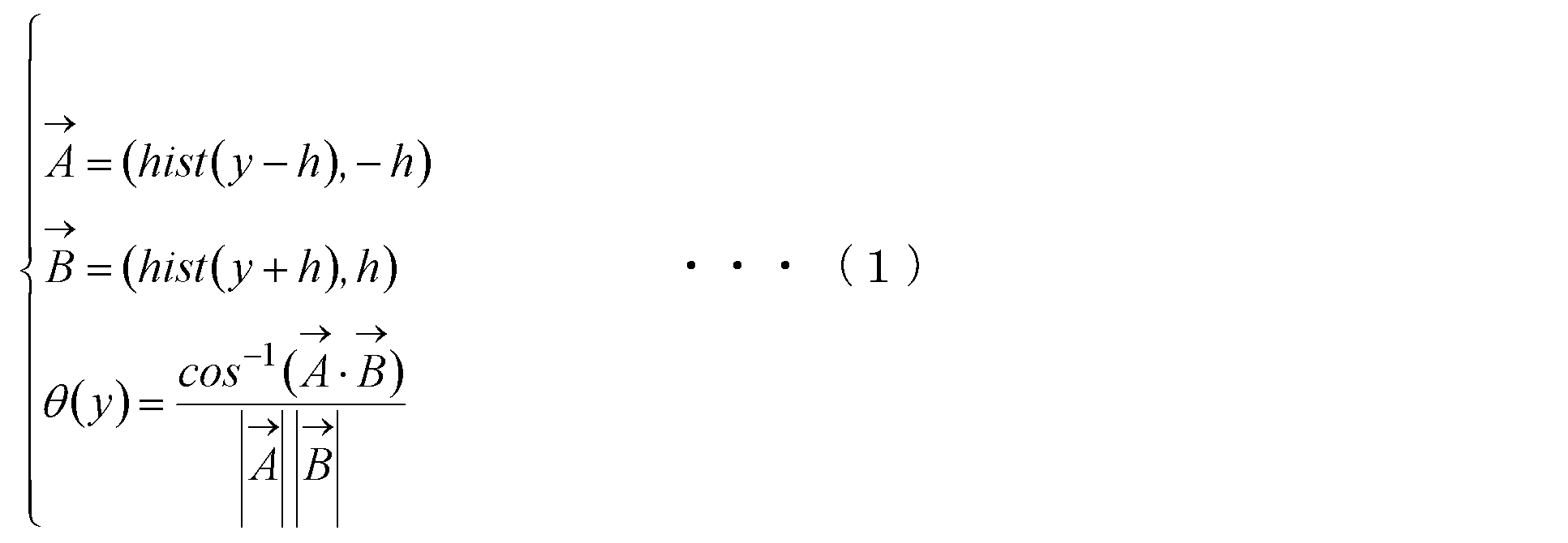
- the shoulder line 72A is detected by examining the gradient of the histogram. Specifically, the control unit 11 examines changes in the curvature ⁇ (y) of the histogram in order from the top of the clothing image 60.
- the change in curvature ⁇ (y) is calculated by calculating the inner product according to the following equation (1) based on the histogram hist (y). For example, when the size of both the vertical and horizontal sides of the clothing image 60 is 400 pixels, the height h when calculating the curvature ⁇ (y) is set to 5 pixels.
- the control unit 11 examines the curvature ⁇ (y) sequentially from the top of the clothing image 60, and first detects a position where the curvature ⁇ (y) is larger than a predetermined value (for example, 180 °) as a shoulder position. To do. That is, the control unit 11 first detects a pixel row having a change in curvature ⁇ (y) larger than a predetermined value (for example, 180 °) as the shoulder line 72A.
- a predetermined value for example, 180 °
- control part 11 acquires the part from the left end 74L of the clothing area
- the control unit 11 also sets the size adjustment line 80A as the position adjustment line 82A.
- FIG. 9 is a diagram for explaining an example of the size adjustment line and position adjustment line detection method when the clothing image 60 is a bottoms image.
- the size adjustment line 80B is acquired by detecting the waist line 72B.
- control unit 11 binarizes the clothing image 60. Similar to FIG. 8, FIG. 9 shows a binarized clothing image 60.
- control unit 11 counts the number (N) of pixels included in the clothing region 70 for each pixel row of the clothing image 60 (that is, each pixel line extending in the direction corresponding to the lateral direction of the clothing).
- the graph in FIG. 9 shows a histogram of the number (N) of each pixel row.
- the waist line 72B is detected by examining the gradient of the histogram. Specifically, the control unit 11 examines changes in the curvature ⁇ (y) of the histogram in order from the top of the clothing image 60. The change of the curvature ⁇ (y) is calculated by calculating the inner product by the above equation (1) based on the histogram hist (y).
- the control unit 11 examines the curvature ⁇ (y) sequentially from the top of the clothing image 60, and first detects a position where the curvature ⁇ (y) is larger than a predetermined value (for example, 180 °) as a waist position. To do. That is, the control unit 11 first detects a pixel row having a change in curvature ⁇ (y) larger than a predetermined value (for example, 180 °) as the waist line 72B.
- a predetermined value for example, 180 °
- control part 11 acquires the part from the left end 74L of the clothing area
- size adjustment lines 80A and 80B may be collectively referred to as “size adjustment line 80”.
- position adjustment lines 82A and 82B may be collectively referred to as “position adjustment line 82”.
- the control unit 11 executes a process for normalizing the clothing image 60. Since the size and position of the clothing (clothing region) in the clothing image 60 are different for each clothing image 60, here, the size and the center position of the clothing image 60 are adjusted based on the size adjustment line 80 detected in step S103. To do.
- control unit 11 acquires the length (s) of the size adjustment line 80 (S104).
- the length (s) of the size adjustment line 80A is the width of the clothing region 70 in the shoulder line 72A, that is, one end of the clothing region 70 in the shoulder line 72A ( This is the length from the left end 74L) to the other end (right end 74R).
- the length (s) of the size adjustment line 80B is the width of the clothing region 70 in the waist line 72B, that is, one end of the clothing region 70 in the waist line 72B. It is the length from the (left end 74L) to the other end (right end 74R).
- control unit 11 After the process of step S104 is executed, the control unit 11 enlarges or reduces the clothing image 60 so that the length (s) of the size adjustment line 80 becomes a predetermined length (S) (S105).
- the control unit 11 determines that the length (s) of the size adjustment line 80 is the predetermined length (S) based on the degree of difference between the length (s) of the size adjustment line 80 and the predetermined length (S).
- the enlargement ratio or reduction ratio is determined so that Specifically, the control unit 11 acquires the enlargement ratio or reduction ratio by dividing the predetermined length (S) by the length (s) of the size adjustment line 80. Then, the control unit 11 enlarges or reduces the clothing image 60 according to the determined enlargement rate or reduction rate.
- control unit 11 adjusts the horizontal position (position in the X-axis direction) of the clothing area 70 in the clothing image 60 (S106).
- control unit 11 places the clothing region 70 in the clothing image 60 so that the center point of the size adjustment line 80 is positioned on a line that passes through the center point of the clothing image 60 and extends in the vertical direction (Y-axis direction). In the horizontal direction (X-axis positive direction or negative direction).
- control unit 11 adjusts the vertical position (position in the Y-axis direction) of the clothing area 70 in the clothing image 60 (S107).
- control unit 11 moves the clothing region 70 in the vertical direction (the Y axis positive direction or the Y axis positive direction) in the clothing image 60 so that the size adjustment line 80 is located at a position away from the upper side of the clothing image 60 by a predetermined distance (d pixels). Move in the negative direction.
- control unit 11 trims the clothing image 60 so that the width of the clothing image 60 becomes a predetermined length (w) (S108). Then, the control unit 11 stores the clothing image 60 normalized as described above in the database 16 as the tops image 32A or the bottoms image 32B (S109).
- the case where the shoe image 32C is generated based on the image obtained by photographing the shoe is basically the same as the case where the tops image 32A or the bottoms image 32B is generated.
- the acquisition method of the size adjustment line 80 and the position adjustment line 82 is based on the image obtained by photographing the tops or the bottoms. This is different from the case of generating 32B.
- the appropriate size adjustment line 80 is obtained using the change in curvature as in the tops image (FIG. 8) and the bottoms image (FIG. 9). It is difficult. For this reason, in the case of a shoe image, the size adjustment line 80 and the position adjustment line 82 are acquired by a method different from the tops image and the bottoms image.
- FIG. 10 is a diagram for explaining an example of a method for obtaining the shoe image size adjustment line 80 and the position adjustment line 82.
- the control unit 11 acquires the height (H) of the shoe region 92. That is, the controller 11 determines the distance between the first pixel line 94A (pixel row) passing through the uppermost part of the shoe region 92 and the second pixel line 94B (pixel row) passing through the lowermost part of the shoe region 92. To get.
- control unit 11 performs the third operation such that the ratio of the distance between the first pixel line 94A and the distance between the second pixel line 94B is a predetermined ratio (for example, 1: 2).
- the pixel line 94C is obtained.
- the third pixel line 94C has a distance obtained from the first pixel line 94A by multiplying the height (H) by a predetermined coefficient ⁇ (0 ⁇ ⁇ 1: for example, 1/3). It is a pixel line at a position separated downward (Y-axis positive direction).
- control part 11 acquires the part from the left end 96L to the right end 96R of the shoe area
- the control unit 11 acquires the second pixel line 94B as the position adjustment line 82C.
- FIG. 11 shows an example of an image table.
- Various information of the clothing image 60 (tops image 32A or bottoms image 32B) and shoe image 90 (shoe image 32C) stored in the database 16 is registered in the image table. This image table is also stored in the database 16.
- the image table includes “image ID”, “product”, “URL”, “size adjustment line”, and “position adjustment line” fields.
- the “image ID” field indicates identification information (image ID) for uniquely identifying an image.
- the “product” field indicates which product the image is. For example, in the case of an image of a product whose product ID is “T001”, the product ID “T001” is registered in the “product” field.
- URL indicates link information to an image.
- size adjustment line indicates the position and length of the size adjustment line 80.
- position adjustment line indicates the position of the position adjustment line 82.
- FIG. 12 is a functional block diagram showing functional blocks for displaying the coordinate screen 30 among the functional blocks realized by the electronic commerce system 1.
- Each functional block shown in FIG. 12 is realized by the user terminal 20 or the server 10.
- FIG. 12 is diagrams for explaining each functional block.
- the electronic commerce system 1 includes a first clothing image acquisition unit 100A, a first width acquisition unit 102A, a first enlargement / reduction rate determination unit 104A, and a first size adjustment unit 106A. . These functional blocks are configured to display the tops image 32 ⁇ / b> A on the coordinate screen 30.
- the first clothing image acquisition unit 100A acquires a first clothing image that is an image of the first clothing worn on the upper body.
- the tops corresponds to “first clothes”
- the tops image 32A corresponds to “first clothes image”. That is, the first clothing image acquisition unit 100A acquires the tops image 32A.
- the first width acquisition unit 102A acquires the width of the shoulder portion of the tops in the tops image 32A. Specifically, the first width acquisition unit 102A acquires the length of the size adjustment line 80A in the tops image 32A.
- the first enlargement / reduction rate determination unit 104A enlarges the tops image 32A based on the degree of difference between the width acquired by the first width acquisition unit 102A and the predetermined first reference length. Determine the rate or reduction rate.
- the width (Ls) of the shoulder portion 50A of the virtual human body model 50 is set as the “first reference length”, and the first enlargement / reduction ratio determination unit 104A performs the size adjustment line in the tops image 32A.
- An enlargement ratio or reduction ratio is acquired such that the length of 80A becomes the first reference length (Ls).
- the first enlargement / reduction ratio determination unit 104A obtains the enlargement ratio or reduction ratio by dividing the first reference length (Ls) by the length of the size adjustment line 80A in the tops image 32A.
- the first size adjustment unit 106A adjusts the size of the tops image 32A based on the width acquired by the first width acquisition unit 102A. That is, the first size adjustment unit 106A adjusts the size of the tops image 32A based on the length of the size adjustment line 80A in the tops image 32A.
- the first size adjustment unit 106A enlarges or reduces the tops image 32A based on the enlargement rate or reduction rate determined by the first enlargement / reduction rate determination unit 104A (see FIG. 13). (See arrow A shown).
- the electronic commerce system 1 includes a second clothing image acquisition unit 100B, a second width acquisition unit 102B, a second enlargement / reduction rate determination unit 104B, and a second size adjustment unit 106B. Including. These functional blocks are configured to display the bottoms image 32 ⁇ / b> B on the coordinate screen 30.
- the second clothing image acquisition unit 100B acquires a second clothing image that is an image of the second clothing worn on the lower body.
- bottoms corresponds to “second clothes”
- bottoms image 32B corresponds to “second clothes image”. That is, the second clothing image acquisition unit 100B acquires the bottoms image 32B.
- the second width acquisition unit 102B acquires the width of the waist portion of the bottoms in the bottoms image 32B. That is, the second width acquisition unit 102B acquires the length of the size adjustment line 80B in the bottoms image 32B.
- the second enlargement / reduction ratio determination unit 104B enlarges the bottoms image 32B based on the degree of difference between the width acquired by the second width acquisition unit 102B and the predetermined second reference length. Determine the rate or reduction rate.
- the width (La) of the waist portion 50B of the virtual human body model 50 as shown in FIG. 13 is set as the “second reference length”, and the second enlargement / reduction ratio determination unit 104B An enlargement ratio or reduction ratio is acquired such that the length of the size adjustment line 80B in the image 32B becomes the second reference length (La). That is, the second enlargement / reduction ratio determination unit 104B obtains the enlargement ratio or reduction ratio by dividing the second reference length (La) by the length of the size adjustment line 80B in the bottoms image 32B.
- the second size adjustment unit 106B adjusts the size of the bottoms image 32B based on the width acquired by the second width acquisition unit 102B. That is, the second size adjustment unit 106B adjusts the size of the bottoms image 32B based on the length of the size adjustment line 80B in the bottoms image 32B.
- the second size adjustment unit 106B enlarges or reduces the bottoms image 32B based on the enlargement rate or reduction rate determined by the second enlargement / reduction rate determination unit 104B (see FIG. 13). (See arrow B).
- the electronic commerce system 1 includes a third clothing image acquisition unit 100C, a third width acquisition unit 102C, a third enlargement / reduction ratio determination unit 104C, and a third size adjustment unit 106C. Including. These functional blocks are configured to display the shoe image 32C on the coordinate screen 30.
- the third clothing image acquisition unit 100C acquires the shoe image 32C stored in the database 16.
- the third width acquisition unit 102C acquires the shoe width in the shoe image 32C. That is, the third width acquisition unit 102C acquires the length of the size adjustment line 80C in the shoe image 32C.
- the third enlargement / reduction rate determination unit 104C enlarges the shoe image 32C based on the degree of difference between the width acquired by the third width acquisition unit 102C and the predetermined third reference length. Determine the rate or reduction rate.
- An enlargement ratio or reduction ratio is acquired such that the length of the size adjustment line 80C at 32C becomes the third reference length (Ll). That is, the third enlargement / reduction rate determination unit 104C obtains the enlargement rate or reduction rate by dividing the third reference length (Ll) by the length of the size adjustment line 80C in the shoe image 32C.
- the third size adjustment unit 106C adjusts the size of the shoe image 32C based on the width acquired by the third width acquisition unit 102C. That is, the third size adjustment unit 106C adjusts the size of the shoe image 32C based on the length of the size adjustment line 80C in the shoe image 32C.
- the third size adjustment unit 106C enlarges or reduces the shoe image 32C based on the enlargement rate or reduction rate determined by the third enlargement / reduction rate determination unit 104C (see FIG. 13). (See arrow C shown).
- the electronic commerce system 1 includes a display control unit 108.
- the display control unit 108 causes the display unit 25 to display a coordinate screen 30 that displays tops, bottoms, and shoes side by side in the vertical direction.
- the display control unit 108 includes a tops image 32A after adjustment by the first size adjustment unit 106A, a bottoms image 32B after adjustment by the second size adjustment unit 106B, and a shoe after adjustment by the third size adjustment unit 106C.
- the coordinate screen 30 is displayed on the display unit 25 based on the image 32C.
- a position 110 ⁇ / b> A corresponding to the shoulder portion 50 ⁇ / b> A of the virtual human body model 50 is set in the coordinate screen 30.
- the display control unit 108 displays the tops image 32A adjusted by the first size adjustment unit 106A on the coordinate screen 30 so that the center point of the position adjustment line 82A coincides with the position 110A.
- a position 110B corresponding to the waist portion 50B of the virtual human body model 50 is set in the coordinate screen 30.
- the display control unit 108 displays the bottoms image 32B after the adjustment by the second size adjustment unit 106B on the coordinate screen 30 so that the center point of the position adjustment line 82B coincides with the position 110B.
- a position 110C corresponding to the sole portion 50C of the virtual human body model 50 (in other words, the ground surface portion) is set.
- the display control unit 108 displays the shoe image 32C adjusted by the third size adjustment unit 106C on the coordinate screen 30 so that the center point of the position adjustment line 82C coincides with the position 110C.
- FIGS. 15 and 16 are diagrams for explaining processing executed in the electronic commerce system 1 that starts displaying the coordinate screen 30.
- FIG. When the control unit 21 of the user terminal 20 (clothing image processing apparatus) executes the processing shown in FIGS. 15 and 16 according to the program, the control unit 21 functions as a functional block shown in FIG.
- the control unit 21 of the user terminal 20 requests the server 10 for a list of the tops image 32A, the bottoms image 32B, and the shoe image 32C (S201).
- the control unit 11 selects a predetermined number of tops images 32A, bottoms images 32B, and shoe images 32C to be displayed on the coordinate screen 30, and the tops images 32A. Then, a list of bottoms image 32B and shoe image 32C is returned to user terminal 20 (S202). In this case, various information registered in the image table is transmitted to the user terminal 20 for each of the tops image 32 ⁇ / b> A, bottoms image 32 ⁇ / b> B, and shoe image 32 ⁇ / b> C selected as a display target on the coordinate screen 30.
- the control unit 21 initializes variables i, j, and k to 1 (S203).
- the variable i plays a role of indicating which number of tops image 32A is displayed on the coordinate screen 30.
- the variable j plays the role of indicating what number bottoms image 32B is displayed on the coordinate screen 30, and the variable k indicates the number of shoe image 32C displayed on the coordinate screen 30. Fulfill.
- the control unit 21 requests the server 10 for the i-th tops image 32A (S204).
- the plurality of tops images 32A selected as display targets on the coordinate screen 30 are sorted in a certain order (for example, ascending order of image IDs).
- the control unit 21 requests the server 10 for the i-th top image 32 ⁇ / b> A among the plurality of top images 32 ⁇ / b> A selected as the display target on the coordinate screen 30.
- the control unit 11 transmits the tops image 32A to the user terminal 20 (S205).
- the control unit 21 determines the enlargement ratio or reduction ratio of the tops image 32A (S206).
- the control unit 21 acquires the enlargement ratio or reduction ratio by dividing the first reference length (Ls) by the length of the size adjustment line 80A of the tops image 32A.
- control unit 21 enlarges or reduces the tops image 32A in accordance with the enlargement rate or reduction rate determined in step S206 (S207), and displays the enlarged or reduced tops image 32A on the coordinate screen 30 (S208). .
- the display position of the tops image 32A is set so that the center point of the position adjustment line 82A of the tops image 32A matches the position 110A corresponding to the shoulder part 50A of the virtual human body model 50.
- control unit 21 requests the server 10 for the j-th bottoms image 32B among the plurality of bottoms images 32B selected as the display target on the coordinate screen 30 (S209).
- the control unit 11 transmits the requested bottoms image 32B to the user terminal 20 (S210).
- the control unit 21 determines an enlargement rate or a reduction rate of the bottoms image 32B (S211).
- the control unit 21 acquires the enlargement ratio or reduction ratio by dividing the second reference length (La) by the length of the size adjustment line 80B of the bottoms image 32B.
- control unit 21 enlarges or reduces the bottoms image 32B according to the enlargement rate or reduction rate determined in step S211 (S212), and displays the enlarged or reduced bottoms image 32B on the coordinate screen 30 (S213). .
- the display position of the bottoms image 32B is set so that the center point of the position adjustment line 82B of the bottoms image 32B matches the position 110B corresponding to the waist part 50B of the virtual human body model 50.
- control unit 21 requests the server 10 for the k-th shoe image 32C among the plurality of shoe images 32C selected as the display target on the coordinate screen 30 (S214).
- the control unit 11 transmits the requested shoe image 32C to the user terminal 20 (S215).
- the control unit 21 determines an enlargement rate or a reduction rate of the shoe image 32C (S216).
- the control unit 21 acquires the enlargement ratio or reduction ratio by dividing the third reference length (Ll) by the length of the size adjustment line 80C of the shoe image 32C.
- control unit 21 enlarges or reduces the shoe image 32C according to the enlargement rate or reduction rate determined in step S216 (S217), and displays the enlarged or reduced shoe image 32C on the coordinate screen 30 (S218). .
- the display position of the shoe image 32C is set so that the center point of the position adjustment line 82C of the shoe image 32C coincides with the position 110C corresponding to the sole part 50C (ground surface part) of the virtual human body model 50.
- the value of the variable i is incremented every predetermined time (for example, 2 seconds). Then, every time the value of the variable i is incremented, the same processing as steps S204 to S208 is repeatedly executed.
- the value of the variable j is incremented every predetermined time (for example, 2 seconds). Each time the value of variable j is incremented, the same processing as steps S209 to S213 is repeatedly executed.
- the value of the variable k is incremented every predetermined time (for example, 2 seconds). Then, every time the value of the variable k is incremented, the same processing as in steps S214 to S218 is repeatedly executed.
- the sizes of the tops image 32A, the bottoms image 32B, and the shoe image 32C are automatically matched to the virtual human body model 50.
- the tops image 32A, the bottoms image 32B, and the shoe image 32C indicate the actual tops, bottoms, and shoe sizes.
- the balance is displayed close to the balance.
- the size of the virtual human body model 50 can be changed according to the sex, age, or body shape of the user. In the case of the electronic commerce system 1 according to the present embodiment, even if the size of the virtual human body model 50 is changed, the sizes of the tops image 32A, the bottoms image 32B, and the shoe image 32C are adjusted to the virtual human body model 50 after the change. Can be easily adjusted.
- FIG. 17 shows another example of the coordinate screen 30.
- the coordinate screen 30 shown in FIG. 17 is different from the coordinate screen 30 shown in FIG. 4 in that it includes read buttons 120A, 120B, and 120C.
- the read button 120A is a button for displaying, for example, a tops image taken by the user or a tops image obtained by the user on a web page or the like on the coordinate screen 30.
- a selection screen (not shown) for selecting a tops image is displayed on the display unit 25.
- the user shoots the tops that he / she owns in advance, and selects the captured image on the selection screen.
- the image is transmitted to the server 10.
- the server 10 executes the process shown in FIG. 6 for the received image.
- the process shown in FIG. 6 is completed, the image is returned to the user terminal 20.
- the user terminal 20 executes processing similar to steps S206 to S208 shown in FIG. As a result, the tops owned by the user are displayed on the coordinate screen 30.
- a shooting screen for shooting may be displayed. Then, an image photographed on this photographing screen may be transmitted to the server 10.
- the read button 120B is a button for displaying the bottoms image taken by the user or the bottoms image obtained by the user on the web page or the like on the coordinate screen 30.
- the read button 120 ⁇ / b> C is a button for displaying a shoe image taken by the user or a shoe image obtained by the user on a web page or the like on the coordinate screen 30.
- the user can check the coordination with his / her clothes.
- FIG. 18 shows another example of the coordinate screen 30.
- the coordinate screen 30 shown in FIG. 18 is different from the coordinate screen 30 shown in FIGS.
- the condition designation button 130 is a button for designating conditions regarding tops, bottoms, and shoes to be displayed on the coordinate screen 30.
- FIG. 19 shows an example of the condition designation screen.
- the condition designation screen 140 is a screen for accepting designation of conditions regarding tops, bottoms, and shoe images to be displayed on the coordinate screen 30.
- the condition designation screen 140 includes selection columns 142A, 142B, and 142C.
- the selection column 142A is for accepting designation of a tops subcategory to be displayed on the coordinate screen 30.
- the tops image 32A displayed on the coordinate screen 30 is limited to tops images belonging to the selected subcategory.
- the selection column 142B is for accepting designation of a bottoms subcategory to be displayed on the coordinate screen 30.
- the bottoms image 32B displayed on the coordinate screen 30 is limited to bottoms images belonging to the selected subcategory.
- the selection column 142C is for accepting designation of a sub-category of shoes to be displayed on the coordinate screen 30.
- the shoe image 32C displayed on the coordinate screen 30 is limited to images of shoes belonging to the selected subcategory.
- condition designation screen 140 includes budget fields 144A and 144B.
- the budget column 144A is for accepting designation of the lower limit of the budget
- the budget column 144B is for accepting designation of the upper limit of the budget.
- the condition designation screen 140 includes a setting button 146 and a cancel button 148.
- the cancel button 148 When the cancel button 148 is pressed, the screen returns to the coordinate screen 30.
- the server 10 searches for clothes or shoes that satisfy the conditions, and a list of the tops image 32A, the bottoms image 32B, and the shoe image 32C is transmitted from the server 10 to the user terminal 20. And in the user terminal 20, the coordinate screen 30 is displayed based on the list.
- the coordination screen 30 only the coordination between the tops and the bottoms may be presented. That is.
- the shoe image 32C and the object related to the shoe image 32C may not be displayed on the coordinate screen 30.
- the third clothing image acquisition unit 100C, the third width acquisition unit 102C, the third enlargement / reduction ratio determination unit 104C, and the third size adjustment unit 106C can be omitted.
Landscapes
- Engineering & Computer Science (AREA)
- Physics & Mathematics (AREA)
- Theoretical Computer Science (AREA)
- General Physics & Mathematics (AREA)
- Business, Economics & Management (AREA)
- Accounting & Taxation (AREA)
- Finance (AREA)
- General Business, Economics & Management (AREA)
- Strategic Management (AREA)
- Marketing (AREA)
- Economics (AREA)
- Development Economics (AREA)
- Computer Vision & Pattern Recognition (AREA)
- Processing Or Creating Images (AREA)
- Image Processing (AREA)
- Management, Administration, Business Operations System, And Electronic Commerce (AREA)
- Treatment Of Fiber Materials (AREA)
Abstract
Description
Claims (17)
- 上半身に着用する第1の衣服の画像である第1の衣服画像を取得する第1の衣服画像取得手段と、
前記第1の衣服画像における前記第1の衣服の肩部分の幅を取得する第1の幅取得手段と、
前記第1の幅取得手段によって取得された幅に基づいて、前記第1の衣服画像のサイズを調整する第1のサイズ調整手段と、
下半身に着用する第2の衣服の画像である第2の衣服画像を取得する第2の衣服画像取得手段と、
前記第2の衣服画像における前記第2の衣服の腰部分の幅を取得する第2の幅取得手段と、
前記第2の幅取得手段によって取得された幅に基づいて、前記第2の衣服画像のサイズを調整する第2のサイズ調整手段と、
前記第1の衣服と前記第2の衣服とを上下方向に並べて表示する画面を、前記第1のサイズ調整手段による調整後の前記第1の衣服画像と、前記第2のサイズ調整手段による調整後の前記第2の衣服画像と、に基づいて表示手段に表示させる表示制御手段と、
を含むことを特徴とする衣服画像処理システム。 - 請求項1に記載の衣服画像処理システムにおいて、
衣服画像の背景領域を検出する背景領域検出手段と、
前記衣服画像から前記背景領域を除去する背景領域除去手段と、をさらに含み、
前記背景領域検出手段は、
前記衣服画像の各辺に隣接する画素ラインを前記背景領域として初期設定する手段と、
前記背景領域内の画素と同一又は類似の色を、該画素に隣接する隣接画素が有しているか否かを判定する手段と、
前記背景領域内の画素と同一又は類似の色を前記隣接画素が有している場合に、該隣接画素を前記背景領域に加えることによって前記背景領域を拡張する手段と、を含み、
前記第1の衣服画像及び前記第2の衣服画像の各々の前記背景領域は前記背景領域検出手段及び前記背景領域除去手段によって除去される、
ことを特徴とする衣服画像処理システム - 請求項1又は2に記載の衣服画像処理システムにおいて、
前記第1の衣服画像の複数の画素ラインの各々について、前記第1の衣服が表された領域に含まれる画素の個数を取得する手段と、
前記複数の画素ラインの前記個数の度数分布に基づいて、前記複数の画素ラインのうちから、前記肩部分に対応する画素ラインを検出する手段と、をさらに含み、
前記第1の幅取得手段は、前記肩部分に対応する前記画素ラインにおける前記第1の衣服の幅を取得する、
ことを特徴とする衣服画像処理システム。 - 請求項1乃至3のいずれかに記載の衣服画像処理システムにおいて、
前記第1の幅取得手段によって取得された幅と、所定の第1の基準長と、の間の相違の程度に基づいて、前記第1の衣服画像の拡大率又は縮小率を決定する第1の拡大/縮小率決定手段をさらに含み、
前記第1のサイズ調整手段は、前記第1の拡大/縮小率決定手段によって決定された拡大率又は縮小率に基づいて、前記第1の衣服画像を拡大又は縮小する、
ことを特徴とする衣服画像処理システム。 - 請求項1乃至4のいずれかに記載の衣服画像処理システムにおいて、
前記第2の衣服画像の複数の画素ラインの各々について、前記第2の衣服が表された領域に含まれる画素の個数を取得する手段と、
前記複数の画素ラインの前記個数の度数分布に基づいて、前記複数の画素ラインのうちから、前記腰部分に対応する画素ラインを検出する手段と、をさらに含み、
前記第2の幅取得手段は、前記腰部分に対応する前記画素ラインにおける前記第2の衣服の幅を取得する、
をさらに含むことを特徴とする衣服画像処理システム。 - 請求項1乃至5のいずれかに記載の衣服画像処理システムにおいて、
前記第2の幅取得手段によって取得された幅と、所定の第2の基準長と、の間の相違の程度に基づいて、前記第2の衣服画像の拡大率又は縮小率を決定する第2の拡大/縮小率決定手段をさらに含み、
前記第2のサイズ調整手段は、前記第2の拡大/縮小率決定手段によって決定された拡大率又は縮小率に基づいて、前記第2の衣服画像を拡大又は縮小する、
ことを特徴とする衣服画像処理システム。 - 請求項1乃至6のいずれかに記載の衣服画像処理システムにおいて、
前記表示制御手段は、前記第1の衣服と前記第2の衣服とを人の肩及び腰の位置関係に対応する位置関係を有するようにして表示する前記画面を、前記第1のサイズ調整手段による調整後の前記第1の衣服画像と、前記第2のサイズ調整手段による調整後の前記第2の衣服画像と、に基づいて前記表示手段に表示させることを特徴とする衣服画像処理システム。 - 請求項1乃至7のいずれかに記載の衣服画像処理システムにおいて、
靴画像を取得する靴画像取得手段と、
前記靴画像における靴の幅を取得する手段であって、前記靴の最上部から、前記靴の高さに所定係数α(0<α<1)を乗じることによって得られる距離だけ下方に離れた位置にある画素ラインにおける前記靴の幅を取得する第3の幅取得手段と、
前記第3の幅取得手段によって取得された幅に基づいて、前記靴画像のサイズを調整する第3のサイズ調整手段と、をさらに含み、
前記表示制御手段は、前記第1の衣服と前記第2の衣服と前記靴とを上下方向に並べて表示する画面を、前記第1のサイズ調整手段による調整後の前記第1の衣服画像と、前記第2のサイズ調整手段による調整後の前記第2の衣服画像と、前記第3のサイズ調整手段による調整後の前記靴画像と、に基づいて前記表示手段に表示させる、
ことを特徴とする衣服画像処理システム。 - 請求項8に記載の衣服画像処理システムにおいて、
前記第3の幅取得手段によって取得された幅と、所定の第3の基準長と、の間の相違の程度に基づいて、前記靴画像の拡大率又は縮小率を決定する第3の拡大/縮小率決定手段をさらに含み、
前記第3のサイズ調整手段は、前記第3の拡大/縮小率決定手段によって決定された拡大率又は縮小率に基づいて、前記靴画像を拡大又は縮小する、
ことを特徴とする衣服画像処理システム。 - 請求項8又は9に記載の衣服画像処理システムにおいて、
前記表示制御手段は、前記第1の衣服と前記第2の衣服と前記靴とを人の肩、腰、及び足の位置関係に対応する位置関係を有するようにして表示する画面を、前記第1のサイズ調整手段による調整後の前記第1の衣服画像と、前記第2のサイズ調整手段による調整後の前記第2の衣服画像と、前記第3のサイズ調整手段による調整後の前記靴画像と、に基づいて前記表示手段に表示させることを特徴とする衣服画像処理システム。 - 請求項1乃至10のいずれかに記載の衣服画像処理システムにおいて、
上半身に着用する衣服のカテゴリの指定を受け付ける手段と、
下半身に着用する衣服のカテゴリの指定を受け付ける手段と、をさらに含み、
前記表示制御手段は、
上半身に着用する衣服のカテゴリの指定が受け付けられた場合、指定されたカテゴリに属する前記第1の衣服を表示する前記画面を、前記第1のサイズ調整手段による調整後の前記第1の衣服画像に基づいて前記表示手段に表示させる手段と、
下半身に着用する衣服のカテゴリの指定が受け付けられた場合、指定されたカテゴリに属する前記第2の衣服を表示する前記画面を、前記第2のサイズ調整手段による調整後の前記第2の衣服画像に基づいて前記表示手段に表示させる手段と、を含む、
ことを特徴とする衣服画像処理システム。 - 請求項1乃至11のいずれかに記載の衣服画像処理システムにおいて、
前記第1の衣服画像取得手段は、ユーザによって撮影又は指定された、上半身に着用する衣服の画像を前記第1の衣服画像として取得する手段を含み、
前記第2の衣服画像取得手段は、前記ユーザによって撮影又は指定された、下半身に着用する衣服の画像を前記第2の衣服画像として取得する手段を含む、
ことを特徴とする衣服画像処理システム。 - 上半身に着用する第1の衣服の画像である第1の衣服画像を取得する第1の衣服画像取得ステップと、
前記第1の衣服画像における前記第1の衣服の肩部分の幅を取得する第1の幅取得ステップと、
前記第1の幅取得ステップによって取得された幅に基づいて、前記第1の衣服画像のサイズを調整する第1のサイズ調整ステップと、
下半身に着用する第2の衣服の画像である第2の衣服画像を取得する第2の衣服画像取得ステップと、
前記第2の衣服画像における前記第2の衣服の腰部分の幅を取得する第2の幅取得ステップと、
前記第2の幅取得ステップによって取得された幅に基づいて、前記第2の衣服画像のサイズを調整する第2のサイズ調整ステップと、
前記第1の衣服と前記第2の衣服とを上下方向に並べて表示する画面を、前記第1のサイズ調整ステップによる調整後の前記第1の衣服画像と、前記第2のサイズ調整ステップによる調整後の前記第2の衣服画像と、に基づいて表示手段に表示させる表示制御ステップと、
を含むことを特徴とする衣服画像処理システムの制御方法。 - 上半身に着用する第1の衣服の画像である第1の衣服画像を取得する第1の衣服画像取得手段と、
前記第1の衣服画像における前記第1の衣服の肩部分の幅を取得する第1の幅取得手段と、
前記第1の幅取得手段によって取得された幅に基づいて、前記第1の衣服画像のサイズを調整する第1のサイズ調整手段と、
下半身に着用する第2の衣服の画像である第2の衣服画像を取得する第2の衣服画像取得手段と、
前記第2の衣服画像における前記第2の衣服の腰部分の幅を取得する第2の幅取得手段と、
前記第2の幅取得手段によって取得された幅に基づいて、前記第2の衣服画像のサイズを調整する第2のサイズ調整手段と、
を含むことを特徴とする衣服画像処理装置。 - 上半身に着用する第1の衣服の画像である第1の衣服画像を取得する第1の衣服画像取得ステップと、
前記第1の衣服画像における前記第1の衣服の肩部分の幅を取得する第1の幅取得ステップと、
前記第1の幅取得ステップによって取得された幅に基づいて、前記第1の衣服画像のサイズを調整する第1のサイズ調整ステップと、
下半身に着用する第2の衣服の画像である第2の衣服画像を取得する第2の衣服画像取得ステップと、
前記第2の衣服画像における前記第2の衣服の腰部分の幅を取得する第2の幅取得ステップと、
前記第2の幅取得ステップによって取得された幅に基づいて、前記第2の衣服画像のサイズを調整する第2のサイズ調整ステップと、
を含むことを特徴とする衣服画像処理装置の制御方法。 - 上半身に着用する第1の衣服の画像である第1の衣服画像を取得する第1の衣服画像取得手段、
前記第1の衣服画像における前記第1の衣服の肩部分の幅を取得する第1の幅取得手段、
前記第1の幅取得手段によって取得された幅に基づいて、前記第1の衣服画像のサイズを調整する第1のサイズ調整手段、
下半身に着用する第2の衣服の画像である第2の衣服画像を取得する第2の衣服画像取得手段、
前記第2の衣服画像における前記第2の衣服の腰部分の幅を取得する第2の幅取得手段、及び、
前記第2の幅取得手段によって取得された幅に基づいて、前記第2の衣服画像のサイズを調整する第2のサイズ調整手段、
としてコンピュータを機能させるためのプログラム。 - 上半身に着用する第1の衣服の画像である第1の衣服画像を取得する第1の衣服画像取得手段、
前記第1の衣服画像における前記第1の衣服の肩部分の幅を取得する第1の幅取得手段、
前記第1の幅取得手段によって取得された幅に基づいて、前記第1の衣服画像のサイズを調整する第1のサイズ調整手段、
下半身に着用する第2の衣服の画像である第2の衣服画像を取得する第2の衣服画像取得手段、
前記第2の衣服画像における前記第2の衣服の腰部分の幅を取得する第2の幅取得手段、及び、
前記第2の幅取得手段によって取得された幅に基づいて、前記第2の衣服画像のサイズを調整する第2のサイズ調整手段、
としてコンピュータを機能させるためのプログラムを記録したコンピュータ読み取り可能な情報記憶媒体。
Priority Applications (4)
| Application Number | Priority Date | Filing Date | Title |
|---|---|---|---|
| US14/375,428 US9401023B2 (en) | 2012-01-30 | 2012-10-01 | Clothing image processing system, control method for clothing image processing system, clothing image processing device, control method for clothing image processing device, program, and information recording medium |
| CN201280072068.XA CN104246813B (zh) | 2012-01-30 | 2012-10-01 | 衣服图像处理系统以及衣服图像处理方法 |
| BR112014018562-0A BR112014018562B1 (pt) | 2012-01-30 | 2012-10-01 | Sistema e método de processamento de imagem de vestuário, e meio legível por computador |
| EP12867581.6A EP2811446A4 (en) | 2012-01-30 | 2012-10-01 | CLOTHING APPLICATION PROCESSING SYSTEM, APPARATUS FOR PROCESSING APPARATUS, APPARATUS FOR PROCESSING CLOTHING APPEARANCE, APPARATUS FOR APPARATUS FOR PROCESSING CLOTHING APPLICATIONS, PROGRAM AND INFORMATION RECORDING MEDIUM |
Applications Claiming Priority (2)
| Application Number | Priority Date | Filing Date | Title |
|---|---|---|---|
| JP2012016614A JP5728406B2 (ja) | 2012-01-30 | 2012-01-30 | 衣服画像処理システム、衣服画像処理方法、プログラム |
| JP2012-016614 | 2012-01-30 |
Publications (1)
| Publication Number | Publication Date |
|---|---|
| WO2013114673A1 true WO2013114673A1 (ja) | 2013-08-08 |
Family
ID=48904741
Family Applications (1)
| Application Number | Title | Priority Date | Filing Date |
|---|---|---|---|
| PCT/JP2012/075429 Ceased WO2013114673A1 (ja) | 2012-01-30 | 2012-10-01 | 衣服画像処理システム、衣服画像処理システムの制御方法、衣服画像処理装置、衣服画像処理装置の制御方法、プログラム、及び情報記憶媒体 |
Country Status (7)
| Country | Link |
|---|---|
| US (1) | US9401023B2 (ja) |
| EP (1) | EP2811446A4 (ja) |
| JP (1) | JP5728406B2 (ja) |
| CN (1) | CN104246813B (ja) |
| BR (1) | BR112014018562B1 (ja) |
| TW (1) | TWI525569B (ja) |
| WO (1) | WO2013114673A1 (ja) |
Cited By (3)
| Publication number | Priority date | Publication date | Assignee | Title |
|---|---|---|---|---|
| JP2015125519A (ja) * | 2013-12-26 | 2015-07-06 | カシオ計算機株式会社 | 画像処理装置、画像処理方法及びプログラム |
| CN110992447A (zh) * | 2019-12-05 | 2020-04-10 | 北京中网易企秀科技有限公司 | 一种图文适配方法、装置、存储介质及设备 |
| GB2534747B (en) * | 2013-10-30 | 2020-10-14 | Xcircular Ltd | Automatic image composer |
Families Citing this family (16)
| Publication number | Priority date | Publication date | Assignee | Title |
|---|---|---|---|---|
| JP5791577B2 (ja) * | 2012-09-28 | 2015-10-07 | 楽天株式会社 | 画像処理装置、画像表示方法、およびプログラム |
| US10089680B2 (en) * | 2013-03-12 | 2018-10-02 | Exalibur Ip, Llc | Automatically fitting a wearable object |
| US9696130B1 (en) | 2013-12-06 | 2017-07-04 | Amazon Technologies, Inc. | Garment property determination using robotic mannequin |
| GB201420090D0 (en) * | 2014-11-12 | 2014-12-24 | Knyttan Ltd | Image to item mapping |
| KR101648964B1 (ko) * | 2015-04-02 | 2016-08-30 | 네이버 주식회사 | 자동 여백 생성을 이용하여 컨텐츠를 제공하는 시스템 및 방법 |
| EP3115971B1 (en) * | 2015-06-02 | 2020-06-03 | Samsung Electronics Co., Ltd. | Method and apparatus for providing three-dimensional data of cloth |
| JP6427511B2 (ja) * | 2016-02-01 | 2018-11-21 | ユニ・チャーム株式会社 | 使い捨ておむつの着用状態の評価方法、使い捨ておむつの着用状態の評価システム、及び、使い捨ておむつの着用状態を評価するためのプログラム |
| CN107464269A (zh) | 2016-06-02 | 2017-12-12 | 阿里巴巴集团控股有限公司 | 搭配效果图的生成方法、装置及系统 |
| CN107252194A (zh) * | 2017-04-28 | 2017-10-17 | 轩脉家居科技(上海)有限公司 | 一种搭配助手智能衣柜装置 |
| JP2019199663A (ja) * | 2018-05-16 | 2019-11-21 | Juki株式会社 | 検査装置 |
| JP6659901B2 (ja) * | 2019-08-01 | 2020-03-04 | 株式会社メルカリ | プログラム、情報処理方法、及び情報処理装置 |
| KR102396323B1 (ko) * | 2021-03-05 | 2022-05-10 | 쿠팡 주식회사 | 전자 장치 및 그의 정보 제공 방법 |
| CN114494091A (zh) * | 2021-12-30 | 2022-05-13 | 阿里巴巴(中国)有限公司 | 一种图像处理方法、装置及电子设备 |
| US11978174B1 (en) * | 2022-03-28 | 2024-05-07 | Amazon Technologies, Inc. | Virtual shoe try-on |
| US11804023B1 (en) * | 2022-07-11 | 2023-10-31 | Stylitics, Inc. | Systems and methods for providing a virtual dressing room and a virtual stylist |
| US20250054257A1 (en) * | 2023-08-10 | 2025-02-13 | Roblox Corporation | Automatic fitting and tailoring for stylized avatars |
Citations (5)
| Publication number | Priority date | Publication date | Assignee | Title |
|---|---|---|---|---|
| JP2005266865A (ja) * | 2004-03-16 | 2005-09-29 | Kanda Tsushinki Co Ltd | 画像調整システム及びその方法 |
| JP2006135846A (ja) * | 2004-11-09 | 2006-05-25 | Matsushita Electric Ind Co Ltd | コンテンツ配信システム |
| JP2008217320A (ja) | 2007-03-02 | 2008-09-18 | Scigineer Inc | 情報処理装置、情報処理方法、およびプログラム |
| JP2009020897A (ja) * | 2002-09-26 | 2009-01-29 | Toshiba Corp | 画像解析方法、画像解析装置、画像解析プログラム |
| JP2010074217A (ja) * | 2008-09-16 | 2010-04-02 | Kawai Musical Instr Mfg Co Ltd | 塗り絵画像生成方法、塗り絵画像生成用コンピュータプログラムおよび記録媒体 |
Family Cites Families (14)
| Publication number | Priority date | Publication date | Assignee | Title |
|---|---|---|---|---|
| US5850222A (en) * | 1995-09-13 | 1998-12-15 | Pixel Dust, Inc. | Method and system for displaying a graphic image of a person modeling a garment |
| US6307568B1 (en) * | 1998-10-28 | 2001-10-23 | Imaginarix Ltd. | Virtual dressing over the internet |
| JP2005027951A (ja) | 2003-07-08 | 2005-02-03 | Gen Tec:Kk | 靴底データベース及びその作成方法 |
| US20050234782A1 (en) * | 2004-04-14 | 2005-10-20 | Schackne Raney J | Clothing and model image generation, combination, display, and selection |
| JP2006135876A (ja) * | 2004-11-09 | 2006-05-25 | Matsushita Electric Ind Co Ltd | 試着画像表示装置 |
| JP2006155148A (ja) * | 2004-11-29 | 2006-06-15 | Namco Bandai Games Inc | 画像処理システム、プログラム、情報記憶媒体および画像処理方法 |
| WO2008087960A1 (ja) | 2007-01-17 | 2008-07-24 | Scigineer, Inc. | サーバ装置、情報処理装置、および情報処理方法 |
| CN101017575B (zh) * | 2007-02-15 | 2013-01-16 | 东华大学 | 基于人体部件模板和体形轮廓的三维虚拟人体自动生成方法 |
| JP5042787B2 (ja) * | 2007-11-20 | 2012-10-03 | 富士フイルム株式会社 | 商品検索システム、商品検索方法及び商品検索プログラム |
| US8805004B2 (en) * | 2009-01-09 | 2014-08-12 | Thomson Licensing | Method and apparatus for detecting and separating objects of interest in soccer video by color segmentation and shape analysis |
| US20110142335A1 (en) * | 2009-12-11 | 2011-06-16 | Bernard Ghanem | Image Comparison System and Method |
| US8525828B1 (en) * | 2010-05-05 | 2013-09-03 | Amazon Technologies, Inc. | Visualization of fit, flow, and texture of clothing items by online consumers |
| US8976230B1 (en) * | 2010-06-28 | 2015-03-10 | Vlad Vendrow | User interface and methods to adapt images for approximating torso dimensions to simulate the appearance of various states of dress |
| US8321301B2 (en) * | 2010-07-20 | 2012-11-27 | Sony Corporation | Method and system for clothing shopping using an image of a shopper |
-
2012
- 2012-01-30 JP JP2012016614A patent/JP5728406B2/ja active Active
- 2012-10-01 WO PCT/JP2012/075429 patent/WO2013114673A1/ja not_active Ceased
- 2012-10-01 CN CN201280072068.XA patent/CN104246813B/zh active Active
- 2012-10-01 US US14/375,428 patent/US9401023B2/en active Active
- 2012-10-01 BR BR112014018562-0A patent/BR112014018562B1/pt active IP Right Grant
- 2012-10-01 EP EP12867581.6A patent/EP2811446A4/en not_active Ceased
-
2013
- 2013-01-30 TW TW102103490A patent/TWI525569B/zh active
Patent Citations (5)
| Publication number | Priority date | Publication date | Assignee | Title |
|---|---|---|---|---|
| JP2009020897A (ja) * | 2002-09-26 | 2009-01-29 | Toshiba Corp | 画像解析方法、画像解析装置、画像解析プログラム |
| JP2005266865A (ja) * | 2004-03-16 | 2005-09-29 | Kanda Tsushinki Co Ltd | 画像調整システム及びその方法 |
| JP2006135846A (ja) * | 2004-11-09 | 2006-05-25 | Matsushita Electric Ind Co Ltd | コンテンツ配信システム |
| JP2008217320A (ja) | 2007-03-02 | 2008-09-18 | Scigineer Inc | 情報処理装置、情報処理方法、およびプログラム |
| JP2010074217A (ja) * | 2008-09-16 | 2010-04-02 | Kawai Musical Instr Mfg Co Ltd | 塗り絵画像生成方法、塗り絵画像生成用コンピュータプログラムおよび記録媒体 |
Non-Patent Citations (1)
| Title |
|---|
| See also references of EP2811446A4 |
Cited By (4)
| Publication number | Priority date | Publication date | Assignee | Title |
|---|---|---|---|---|
| GB2534747B (en) * | 2013-10-30 | 2020-10-14 | Xcircular Ltd | Automatic image composer |
| JP2015125519A (ja) * | 2013-12-26 | 2015-07-06 | カシオ計算機株式会社 | 画像処理装置、画像処理方法及びプログラム |
| CN104754211B (zh) * | 2013-12-26 | 2018-09-04 | 卡西欧计算机株式会社 | 图像处理装置以及图像处理方法 |
| CN110992447A (zh) * | 2019-12-05 | 2020-04-10 | 北京中网易企秀科技有限公司 | 一种图文适配方法、装置、存储介质及设备 |
Also Published As
| Publication number | Publication date |
|---|---|
| BR112014018562A8 (pt) | 2021-05-25 |
| TWI525569B (zh) | 2016-03-11 |
| US9401023B2 (en) | 2016-07-26 |
| EP2811446A1 (en) | 2014-12-10 |
| US20150003690A1 (en) | 2015-01-01 |
| BR112014018562A2 (pt) | 2017-06-20 |
| BR112014018562B1 (pt) | 2021-11-03 |
| CN104246813A (zh) | 2014-12-24 |
| JP2013156829A (ja) | 2013-08-15 |
| TW201344616A (zh) | 2013-11-01 |
| JP5728406B2 (ja) | 2015-06-03 |
| CN104246813B (zh) | 2017-05-24 |
| EP2811446A4 (en) | 2015-07-01 |
Similar Documents
| Publication | Publication Date | Title |
|---|---|---|
| JP5728406B2 (ja) | 衣服画像処理システム、衣服画像処理方法、プログラム | |
| JP7268089B2 (ja) | 自動ショッピングアシスタントを使用したパーソナライズショッピングのためのシステム、プラットフォームおよび方法 | |
| JP7617155B2 (ja) | 自動買い物アシスタントを用いて個人の嗜好に合った買い物を行うためのシステム、プラットフォーム、および方法 | |
| US10043068B1 (en) | Body modeling and garment fitting using an electronic device | |
| US20200387763A1 (en) | Item recommendations based on image feature data | |
| JP5439787B2 (ja) | カメラ装置 | |
| JP5010937B2 (ja) | 画像処理装置、プログラム及び画像処理方法 | |
| US8908927B2 (en) | Automatic method and system for identifying healthiness of a plant | |
| KR20190000397A (ko) | 패션 선호도 분석 기법 | |
| JP2018112777A (ja) | 推奨アイテム出力プログラム、出力制御プログラム、推奨アイテム出力装置、出力制御装置、推奨アイテム出力方法および出力制御方法 | |
| US10007860B1 (en) | Identifying items in images using regions-of-interest | |
| CN107527604A (zh) | 一种照片显示方法及用户终端 | |
| CN114219578A (zh) | 无人服装售卖方法、装置、终端及存储介质 | |
| JP5706995B2 (ja) | 靴画像処理システム、靴画像処理方法、プログラム | |
| US9953242B1 (en) | Identifying items in images using regions-of-interest | |
| US10701999B1 (en) | Accurate size selection | |
| JP7690976B2 (ja) | 表示装置、表示方法、及び表示プログラム | |
| JP7356665B2 (ja) | 靴データ生成装置、靴データ生成方法、靴データ生成プログラム | |
| KR20250095386A (ko) | 온라인 쇼핑몰에서의 의류 및 신발 매칭 시스템 및 방법 | |
| HK1218585A1 (zh) | 提供拍照推荐信息的方法及装置 |
Legal Events
| Date | Code | Title | Description |
|---|---|---|---|
| 121 | Ep: the epo has been informed by wipo that ep was designated in this application |
Ref document number: 12867581 Country of ref document: EP Kind code of ref document: A1 |
|
| WWE | Wipo information: entry into national phase |
Ref document number: 14375428 Country of ref document: US |
|
| NENP | Non-entry into the national phase |
Ref country code: DE |
|
| WWE | Wipo information: entry into national phase |
Ref document number: 2012867581 Country of ref document: EP |
|
| REG | Reference to national code |
Ref country code: BR Ref legal event code: B01A Ref document number: 112014018562 Country of ref document: BR |
|
| ENP | Entry into the national phase |
Ref document number: 112014018562 Country of ref document: BR Kind code of ref document: A2 Effective date: 20140728 |