WO2014073346A1 - 情報処理装置、情報処理方法およびコンピュータ読み取り可能な記録媒体 - Google Patents
情報処理装置、情報処理方法およびコンピュータ読み取り可能な記録媒体 Download PDFInfo
- Publication number
- WO2014073346A1 WO2014073346A1 PCT/JP2013/078102 JP2013078102W WO2014073346A1 WO 2014073346 A1 WO2014073346 A1 WO 2014073346A1 JP 2013078102 W JP2013078102 W JP 2013078102W WO 2014073346 A1 WO2014073346 A1 WO 2014073346A1
- Authority
- WO
- WIPO (PCT)
- Prior art keywords
- information
- input
- work space
- extended
- digital
- Prior art date
- Legal status (The legal status is an assumption and is not a legal conclusion. Google has not performed a legal analysis and makes no representation as to the accuracy of the status listed.)
- Ceased
Links
Images




Classifications
-
- G—PHYSICS
- G06—COMPUTING OR CALCULATING; COUNTING
- G06F—ELECTRIC DIGITAL DATA PROCESSING
- G06F3/00—Input arrangements for transferring data to be processed into a form capable of being handled by the computer; Output arrangements for transferring data from processing unit to output unit, e.g. interface arrangements
- G06F3/01—Input arrangements or combined input and output arrangements for interaction between user and computer
- G06F3/048—Interaction techniques based on graphical user interfaces [GUI]
- G06F3/0487—Interaction techniques based on graphical user interfaces [GUI] using specific features provided by the input device, e.g. functions controlled by the rotation of a mouse with dual sensing arrangements, or of the nature of the input device, e.g. tap gestures based on pressure sensed by a digitiser
- G06F3/0488—Interaction techniques based on graphical user interfaces [GUI] using specific features provided by the input device, e.g. functions controlled by the rotation of a mouse with dual sensing arrangements, or of the nature of the input device, e.g. tap gestures based on pressure sensed by a digitiser using a touch-screen or digitiser, e.g. input of commands through traced gestures
-
- G—PHYSICS
- G02—OPTICS
- G02B—OPTICAL ELEMENTS, SYSTEMS OR APPARATUS
- G02B27/00—Optical systems or apparatus not provided for by any of the groups G02B1/00 - G02B26/00, G02B30/00
-
- G—PHYSICS
- G06—COMPUTING OR CALCULATING; COUNTING
- G06F—ELECTRIC DIGITAL DATA PROCESSING
- G06F3/00—Input arrangements for transferring data to be processed into a form capable of being handled by the computer; Output arrangements for transferring data from processing unit to output unit, e.g. interface arrangements
- G06F3/01—Input arrangements or combined input and output arrangements for interaction between user and computer
- G06F3/011—Arrangements for interaction with the human body, e.g. for user immersion in virtual reality
-
- G—PHYSICS
- G06—COMPUTING OR CALCULATING; COUNTING
- G06F—ELECTRIC DIGITAL DATA PROCESSING
- G06F3/00—Input arrangements for transferring data to be processed into a form capable of being handled by the computer; Output arrangements for transferring data from processing unit to output unit, e.g. interface arrangements
- G06F3/01—Input arrangements or combined input and output arrangements for interaction between user and computer
- G06F3/017—Gesture based interaction, e.g. based on a set of recognized hand gestures
-
- G—PHYSICS
- G06—COMPUTING OR CALCULATING; COUNTING
- G06F—ELECTRIC DIGITAL DATA PROCESSING
- G06F3/00—Input arrangements for transferring data to be processed into a form capable of being handled by the computer; Output arrangements for transferring data from processing unit to output unit, e.g. interface arrangements
- G06F3/01—Input arrangements or combined input and output arrangements for interaction between user and computer
- G06F3/03—Arrangements for converting the position or the displacement of a member into a coded form
- G06F3/0304—Detection arrangements using opto-electronic means
-
- G—PHYSICS
- G06—COMPUTING OR CALCULATING; COUNTING
- G06F—ELECTRIC DIGITAL DATA PROCESSING
- G06F3/00—Input arrangements for transferring data to be processed into a form capable of being handled by the computer; Output arrangements for transferring data from processing unit to output unit, e.g. interface arrangements
- G06F3/01—Input arrangements or combined input and output arrangements for interaction between user and computer
- G06F3/03—Arrangements for converting the position or the displacement of a member into a coded form
- G06F3/0304—Detection arrangements using opto-electronic means
- G06F3/0325—Detection arrangements using opto-electronic means using a plurality of light emitters or reflectors or a plurality of detectors forming a reference frame from which to derive the orientation of the object, e.g. by triangulation or on the basis of reference deformation in the picked up image
-
- G—PHYSICS
- G06—COMPUTING OR CALCULATING; COUNTING
- G06F—ELECTRIC DIGITAL DATA PROCESSING
- G06F3/00—Input arrangements for transferring data to be processed into a form capable of being handled by the computer; Output arrangements for transferring data from processing unit to output unit, e.g. interface arrangements
- G06F3/01—Input arrangements or combined input and output arrangements for interaction between user and computer
- G06F3/03—Arrangements for converting the position or the displacement of a member into a coded form
- G06F3/033—Pointing devices displaced or positioned by the user, e.g. mice, trackballs, pens or joysticks; Accessories therefor
-
- G—PHYSICS
- G06—COMPUTING OR CALCULATING; COUNTING
- G06F—ELECTRIC DIGITAL DATA PROCESSING
- G06F3/00—Input arrangements for transferring data to be processed into a form capable of being handled by the computer; Output arrangements for transferring data from processing unit to output unit, e.g. interface arrangements
- G06F3/01—Input arrangements or combined input and output arrangements for interaction between user and computer
- G06F3/03—Arrangements for converting the position or the displacement of a member into a coded form
- G06F3/033—Pointing devices displaced or positioned by the user, e.g. mice, trackballs, pens or joysticks; Accessories therefor
- G06F3/0346—Pointing devices displaced or positioned by the user, e.g. mice, trackballs, pens or joysticks; Accessories therefor with detection of the device orientation or free movement in a three-dimensional [3D] space, e.g. 3D mice, 6-DOF [six degrees of freedom] pointers using gyroscopes, accelerometers or tilt-sensors
-
- G—PHYSICS
- G06—COMPUTING OR CALCULATING; COUNTING
- G06F—ELECTRIC DIGITAL DATA PROCESSING
- G06F3/00—Input arrangements for transferring data to be processed into a form capable of being handled by the computer; Output arrangements for transferring data from processing unit to output unit, e.g. interface arrangements
- G06F3/01—Input arrangements or combined input and output arrangements for interaction between user and computer
- G06F3/03—Arrangements for converting the position or the displacement of a member into a coded form
- G06F3/033—Pointing devices displaced or positioned by the user, e.g. mice, trackballs, pens or joysticks; Accessories therefor
- G06F3/0354—Pointing devices displaced or positioned by the user, e.g. mice, trackballs, pens or joysticks; Accessories therefor with detection of two-dimensional [2D] relative movements between the device, or an operating part thereof, and a plane or surface, e.g. 2D mice, trackballs, pens or pucks
- G06F3/03545—Pens or stylus
-
- G—PHYSICS
- G06—COMPUTING OR CALCULATING; COUNTING
- G06F—ELECTRIC DIGITAL DATA PROCESSING
- G06F3/00—Input arrangements for transferring data to be processed into a form capable of being handled by the computer; Output arrangements for transferring data from processing unit to output unit, e.g. interface arrangements
- G06F3/01—Input arrangements or combined input and output arrangements for interaction between user and computer
- G06F3/03—Arrangements for converting the position or the displacement of a member into a coded form
- G06F3/033—Pointing devices displaced or positioned by the user, e.g. mice, trackballs, pens or joysticks; Accessories therefor
- G06F3/038—Control and interface arrangements therefor, e.g. drivers or device-embedded control circuitry
- G06F3/0383—Signal control means within the pointing device
-
- G—PHYSICS
- G06—COMPUTING OR CALCULATING; COUNTING
- G06F—ELECTRIC DIGITAL DATA PROCESSING
- G06F3/00—Input arrangements for transferring data to be processed into a form capable of being handled by the computer; Output arrangements for transferring data from processing unit to output unit, e.g. interface arrangements
- G06F3/01—Input arrangements or combined input and output arrangements for interaction between user and computer
- G06F3/03—Arrangements for converting the position or the displacement of a member into a coded form
- G06F3/041—Digitisers, e.g. for touch screens or touch pads, characterised by the transducing means
- G06F3/042—Digitisers, e.g. for touch screens or touch pads, characterised by the transducing means by opto-electronic means
- G06F3/0425—Digitisers, e.g. for touch screens or touch pads, characterised by the transducing means by opto-electronic means using a single imaging device like a video camera for tracking the absolute position of a single or a plurality of objects with respect to an imaged reference surface, e.g. video camera imaging a display or a projection screen, a table or a wall surface, on which a computer generated image is displayed or projected
-
- G—PHYSICS
- G06—COMPUTING OR CALCULATING; COUNTING
- G06F—ELECTRIC DIGITAL DATA PROCESSING
- G06F3/00—Input arrangements for transferring data to be processed into a form capable of being handled by the computer; Output arrangements for transferring data from processing unit to output unit, e.g. interface arrangements
- G06F3/01—Input arrangements or combined input and output arrangements for interaction between user and computer
- G06F3/03—Arrangements for converting the position or the displacement of a member into a coded form
- G06F3/041—Digitisers, e.g. for touch screens or touch pads, characterised by the transducing means
- G06F3/042—Digitisers, e.g. for touch screens or touch pads, characterised by the transducing means by opto-electronic means
- G06F3/0425—Digitisers, e.g. for touch screens or touch pads, characterised by the transducing means by opto-electronic means using a single imaging device like a video camera for tracking the absolute position of a single or a plurality of objects with respect to an imaged reference surface, e.g. video camera imaging a display or a projection screen, a table or a wall surface, on which a computer generated image is displayed or projected
- G06F3/0426—Digitisers, e.g. for touch screens or touch pads, characterised by the transducing means by opto-electronic means using a single imaging device like a video camera for tracking the absolute position of a single or a plurality of objects with respect to an imaged reference surface, e.g. video camera imaging a display or a projection screen, a table or a wall surface, on which a computer generated image is displayed or projected tracking fingers with respect to a virtual keyboard projected or printed on the surface
-
- G—PHYSICS
- G06—COMPUTING OR CALCULATING; COUNTING
- G06F—ELECTRIC DIGITAL DATA PROCESSING
- G06F3/00—Input arrangements for transferring data to be processed into a form capable of being handled by the computer; Output arrangements for transferring data from processing unit to output unit, e.g. interface arrangements
- G06F3/01—Input arrangements or combined input and output arrangements for interaction between user and computer
- G06F3/048—Interaction techniques based on graphical user interfaces [GUI]
- G06F3/0484—Interaction techniques based on graphical user interfaces [GUI] for the control of specific functions or operations, e.g. selecting or manipulating an object, an image or a displayed text element, setting a parameter value or selecting a range
- G06F3/04845—Interaction techniques based on graphical user interfaces [GUI] for the control of specific functions or operations, e.g. selecting or manipulating an object, an image or a displayed text element, setting a parameter value or selecting a range for image manipulation, e.g. dragging, rotation, expansion or change of colour
-
- H—ELECTRICITY
- H04—ELECTRIC COMMUNICATION TECHNIQUE
- H04L—TRANSMISSION OF DIGITAL INFORMATION, e.g. TELEGRAPHIC COMMUNICATION
- H04L65/00—Network arrangements, protocols or services for supporting real-time applications in data packet communication
- H04L65/40—Support for services or applications
- H04L65/401—Support for services or applications wherein the services involve a main real-time session and one or more additional parallel real-time or time sensitive sessions, e.g. white board sharing or spawning of a subconference
- H04L65/4015—Support for services or applications wherein the services involve a main real-time session and one or more additional parallel real-time or time sensitive sessions, e.g. white board sharing or spawning of a subconference where at least one of the additional parallel sessions is real time or time sensitive, e.g. white board sharing, collaboration or spawning of a subconference
-
- G—PHYSICS
- G06—COMPUTING OR CALCULATING; COUNTING
- G06T—IMAGE DATA PROCESSING OR GENERATION, IN GENERAL
- G06T11/00—Two-dimensional [2D] image generation
Definitions
- the present disclosure relates to an information processing apparatus, an information processing method, and a computer-readable recording medium.
- Acts involving entities that can actually be touched such as writing letters with a pen on paper, cutting ingredients on the kitchen, playing card games, and acts using digital information like a personal computer or smartphone Cannot be done in the same space.
- entities that can actually be touched such as writing letters with a pen on paper, cutting ingredients on the kitchen, playing card games, and acts using digital information like a personal computer or smartphone
- a graph is automatically generated by describing a mathematical formula on paper, and a cut line is projected so that ingredients can be appropriately cut according to cooking.
- Patent Document 1 there is a technique disclosed in Patent Document 1 or the like.
- a technique using a built-in camera display such as a projector, a sheath type HMD (Head Mount Display), or a smartphone.
- a work space in which the real world and digital information are fused is hereinafter referred to as an extended work space.
- One of the input systems that can directly acquire input information in the real world as digital information is a handwritten handwriting input system that recognizes handwritten handwriting and uses it as digital information.
- this input system each signal transmitted from an electronic pen that transmits an infrared signal or an ultrasonic signal is received by a receiving unit, and the position coordinate of the electronic pen is calculated from the reception result of each signal. It represents handwriting with digital information.
- the present disclosure proposes a new and improved information processing apparatus, information processing method, and computer-readable recording medium capable of interactively performing work according to handwritten input contents performed in the extended work space. To do.
- an analysis unit that determines additional information corresponding to input information based on input information that is input in an extended workspace where the entity and the virtual object can be operated, and a new operation on the input information
- An information processing apparatus includes a display control unit that receives input and performs display control of a virtual object displayed on the extended work space using additional information.
- the additional information corresponding to the input information recognized in the extended work space is reflected in the extended work space, and the display of the virtual object is controlled according to the operation input for the reflected additional information.
- the display of the virtual object is controlled according to the operation input for the reflected additional information.
- an information processing method including receiving input and performing display control of a virtual object displayed on the extended work space using additional information is provided.
- a computer-readable storage medium that stores a program for causing a computer to function as the information processing apparatus is provided.
- an information processing apparatus capable of interactively performing work according to handwritten input contents performed in an extended work space. be able to.
- Embodiment of the present disclosure 1.1. Configuration example of extended workspace system 1.2. Functional configuration of information recognition display device 1.3. Information feedback processing corresponding to input information 1.4. Application to calibration 1.5. Digital information tracking display 1.6. Remote function 1.7. 1. Physical manipulation of digital information Hardware configuration example
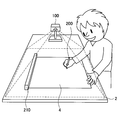
- FIG. 1 is an explanatory diagram showing a configuration example of the extended work space system according to the present embodiment.
- the extended work space system is a system that can recognize an actual object existing in the real world, superimposes digital information on the real world, and constructs an extended work space in which the real world and the digital information are fused. is there.
- the extended work space system includes, for example, a projector that projects digital information onto the extended work space, a camera that captures the extended work space, a sensing device that performs gesture recognition such as touch, pinch in, and pinch out performed in the extended work space, It consists of a wireless communication device.
- the work surface 2 is a table, and an information recognition display device 100 including a projector, a camera, a wireless communication device, and a sensing device is installed on the table, and digital information is projected onto the work surface 2.
- the information recognition display apparatus 100 captures a space including the work surface 2 with a camera, and recognizes a user gesture performed on the work surface 2 by a sensing device.
- digital information is projected onto the work surface 2 by a projector, and the digital information is superimposed on an object existing in the real world.
- the information recognition display device 100 including a projector is installed on the desktop and the digital information is projected onto the work surface 2, but the projector is a desk light stand installed on the desktop, You may install in ceiling lighting or a wall.
- a glasses-type device such as an HMD (Head Mount Display) with a built-in camera or a sheath type HMD may be used.
- the digital information superimposed on the extended work space is superimposed on a glasses-type display worn by the user.
- a device such as a smartphone with a camera and display built in as an alternative to a projector, digital information may be superimposed on a through image captured by the camera and displayed on the display. .
- the sensing device for example, an IR camera that detects infrared rays irradiated in parallel to the work surface 2, a stereo camera, a special sensor that can acquire depth information, or the like may be used.
- the sensing device includes a touch sensor that detects contact with the work surface 2 such as a finger, and a pen that can acquire the coordinates of the handwriting by the digital pen 200 using ultrasonic waves and infrared rays as shown in FIG.
- An input detection device 210 may be used. Note that the handwriting coordinates may be detected by another sensor such as a camera without using the digital pen 200.
- wireless communication apparatus an apparatus capable of communicating with an external device such as Bluetooth (registered trademark), Wi-fi (registered trademark), NFC (Near Field Communication), or the like is used.
- Bluetooth registered trademark
- Wi-fi registered trademark
- NFC Near Field Communication
- FIG. 2 is a block diagram showing functional configurations of the information recognition display device 100 and the pen input detection device 210 according to the present embodiment.
- the information recognition display device 100 according to the present embodiment includes a projection unit 110, a detection unit 120, an imaging unit 130, an information processing unit 140, and a communication unit 150.
- the projection unit 110 is a functional unit that projects digital information onto the extended work space, and is realized by the projector or the like described in FIG. In response to a display instruction from the information processing unit 140 described later, the projection unit 110 displays digital information in the extended work space in which the projection unit 110 is installed.
- the detection unit 120 detects motion information in the extended work space.
- the detection unit 120 is realized by, for example, the sensing device described with reference to FIG.
- the detection unit 120 outputs the detection result to the information processing unit 140 described later.
- the imaging unit 130 is a functional unit that captures an extended work space, and is realized by the camera described in FIG.
- the imaging unit 130 outputs the captured image to the information processing unit 140 described later.
- the information processing unit 140 analyzes the position and movement of an object in the extended workspace, and performs digital information display processing in the extended workspace corresponding to the analysis result. As illustrated in FIG. 2, the information processing unit 140 includes an analysis unit 142, a coordinate processing unit 144, a display control unit 146, and a setting storage unit 148.
- the analysis unit 142 analyzes the position and movement of the object in the extended work space based on at least one of the detection result of the detection unit 120 and the image captured by the imaging unit 130. For example, the analysis unit 142 calculates a change in the movement of the user's hand from the detection result by the detection unit 120. Then, the analysis unit 142 refers to the setting storage unit 148, and identifies gestures such as touch, pinch-in, and pinch-out performed by the user in the extended work space from the change in movement of the identified user's hand.
- the analysis result by the analysis unit 142 is operation input information performed by the user in the extended work space, and digital information is displayed on the virtual work space based on the analysis result.
- input information from a pen input detection device 210 that detects input of the digital pen 200 described later is input to the analysis unit 142 via the communication unit 150.
- the content drawn by the pen input detection device 210 is recognized, and the recognized content is output to the information recognition display device 100 as input information.
- the analysis unit 142 analyzes the positional relationship between the digital information projected in the expanded work space and the actual object in the space based on the input information from the digital pen 200, and associates the input information from the digital pen 200 with these.
- the analysis unit 142 outputs the analysis result to the coordinate processing unit 144 and the display control unit 146.
- the input information may be acquired by performing object recognition on information previously described in the entity.
- the coordinate processing unit 144 converts the position in the space into the same coordinate system for the digital information in the extended work space, the actual object, and the input information from the digital pen 200. By grasping the display position of each information in the same coordinate system by the coordinate processing unit 144, display processing such as simultaneously moving the display positions of different information in the same direction can be facilitated.
- the coordinate processing unit 144 outputs the coordinate processing result to the display control unit 146.
- the display control unit 146 performs digital information display processing of the extended workspace based on the analysis result of the analysis unit 142. For example, when the user performs an operation on input information from the digital pen 200, the display control unit 146 performs feedback according to the operation. The feedback content of the display control unit 146 is displayed in the extended work space via the projection unit 110.
- the setting storage unit 148 stores information necessary for unifying the analysis performed by the information processing unit 140 and the coordinate system of various types of information.
- the analysis unit 142 identifies operation input information performed by the user in the extended work space, and the coordinate processing unit 144 performs coordinate conversion processing of each information in the extended work space. Do.
- the communication unit 150 transmits / receives information to / from the pen input detection device 210. Thereby, handwritten input information by the digital pen 200 can also be recognized as one piece of information in the extended work space.
- the communication unit 150 also transmits / receives information to / from the information recognition display device 100 in another extended work space. By enabling the communication unit 150 to exchange information with the information recognition and display device 100 in another extended work space, it is possible to reflect the state of the extended work space in each space.
- the digital pen 200 is a writing device used by a user to write characters and the like, and can write characters and the like by pressing a pen tip that actually ejects ink onto paper or the like.
- the digital pen 200 transmits an infrared signal and an ultrasonic signal from the pen tip during writing and is received by the pen input detection device 210.
- the digital pen 200 may be configured to be switchable between an on state in which ink is ejected from the pen tip and an off state in which ink is not ejected from the pen tip.
- the digital pen 200 is turned on when characters are written on paper or the like, and the digital pen 200 is turned off when a tap or drag operation is performed, thereby expanding information that can be input by the digital pen 200.
- the on / off switching mechanism of the digital pen 200 for example, a knock type in which a switch mechanism is provided on the side opposite to the pen tip, a button type in which a button is provided in the vicinity of the gripping part, or the like can be used.
- the pen input detection device 210 is a device that receives a signal output from the digital pen 200 and determines the movement of the pen tip of the digital pen 200.
- the pen input detection device 210 includes a signal reception unit 212, a signal processing unit 214, and an input information transmission unit 216.
- the signal receiving unit 212 receives the infrared signal and the ultrasonic signal output from the digital pen 200 and outputs them to the signal processing unit 214.
- the signal processing unit 214 calculates the pen tip movement based on the reception time difference between the infrared signal and the ultrasonic signal at predetermined time intervals.
- the signal processing unit 214 specifies the position of the pen tip each time by this calculation. By displaying the specified position continuously as a point, a smooth line can be expressed.
- the nib position information specified by the signal processing unit 214 is output to the input information transmission unit 216, and is transmitted from the input information transmission unit 216 to the analysis unit 142 via the communication unit 150 of the information recognition display device 100.
- the additional information corresponding to the input information recognized in the extended workspace is reflected in the extended workspace, and the virtual object is displayed according to the operation input for the reflected additional information.
- Control By feedback by such information display control, interactive operation can be realized, and information that is intuitively understandable and interesting to the user can be provided.
- FIG. 3 is a flowchart showing information feedback processing according to the present embodiment.
- FIG. 4 is an explanatory diagram illustrating an information display example to which the information feedback processing according to the present embodiment is applied.
- digital information that is set by recognizing input information is referred to as additional information
- digital information that is displayed using the additional information in response to an operation input to the input information is referred to as a virtual object.
- step S100 characters or figures actually written on paper are recognized as input information by the digital pen 200 or the like. For example, it is assumed that a picture 300 is drawn on the paper 4 with the digital pen 200 as shown in FIG. At this time, each signal transmitted from the digital pen 200 is received by the pen input detection device 210, and handwriting is output to the information recognition display device 100 as input information.
- the information recognition display device 100 Upon receiving the input information, the information recognition display device 100 reflects the additional information corresponding to the recognized input information on the extended work space by the analysis unit 142 (S110). That is, when the information recognition display device 100 recognizes the input information, the information recognition display device 100 gives additional information to the extended work space in order to perform feedback for the operation input to the input information.
- the additional information may be information that can be visually recognized by the user or information that cannot be visually recognized.
- the analysis unit 142 sets an area surrounded by the outline of the picture 300 drawn on the paper 4 as the recognition area 310 and adds information.
- the information recognition display device 100 may color the inside or outline of the recognition area 310 in order to clearly indicate to the user that it has been set as the recognition area 310, and the recognition area 310 may not be shown explicitly.
- the information recognition display device 100 periodically determines whether or not an operation input has been performed on the input information (S120), and determines that there has been an operation input, and responds to the operation input using the additional information.
- the received information is fed back by display control (S130).
- the information to be fed back is determined based on the content of the input information and additional information for the input information, and is stored in advance in the setting storage unit 148.
- FIG. 4 shows two feedback examples. For example, when the user touches the inside of the picture 300 described on the paper 4, that is, the recognition area 310 with a finger, the feedback displayed by the balloon 320 may be provided (pattern 1). Alternatively, similarly, when the user touches the inside of the picture 300 described on the paper 4, a feedback for changing the color of the picture 300 may be performed (pattern 2).
- the information feedback process according to the present embodiment has been described above.
- the input information recognized by the information recognition display device 100 and the operation input input to the input information after the additional information is added have a direct relationship that is independent of the content. It may not be.
- the input information of a drawn picture and the operation input of touching the picture to display a balloon are not continuous contents.
- this makes it possible to provide new information with respect to the first input information, and to further expand the development of information in the extended work space.
- auxiliary information is displayed as digital information (information indicated by thin lines, 401a, 401b) for the content (301a, 301b) actually written on paper 4 with ink, and the user's work Is assisting.
- digital information information indicated by thin lines, 401a, 401b
- an answer is displayed on a mathematical expression written on an answer sheet, or an auxiliary line is shown on a figure to provide information for conveying a correct answer or deriving a correct answer.
- the user is assisted by displaying the correct spelling on the paper 4 with digital information 402 and allowing the user to trace the digital information with a pen (line indicated by reference numeral 302).
- a draft of a picture is displayed as digital information 403, and the user can trace the digital information with a pen (a line indicated by reference numeral 303), or to draw a picture close to completion. These lines are displayed as digital information to assist the user.
- the information feedback processing according to the present embodiment can be applied to processing for feeding back an area touched by the user in a handwritten input device as shown in FIG.
- FIG. 6 shows a calculator 304 written on paper 4 by hand.
- each key is recognized by the information recognition display device 100 in the extended work space, and a recognition area is set as additional information for each key. Thereafter, when the user touches a key on the paper 4, there is feedback that the color of the key corresponding to the recognized recognition area changes.
- the user's own operation input can be easily communicated to the user by the information feedback processing according to the present embodiment.
- the projection area of the projector and the area for tracking the movement of the digital pen 200 exist in the same space, and these relationships are acquired in advance by calibration. Keep it.
- a calibration method for example, as shown in FIG. 7, there is a method in which four points P1 to P4 designated at the four corners of the paper 4 placed in the extended work space are designated with a digital pen.
- the above-described information feedback processing can be applied to perform calibration by graphic trace.
- a calibration method for example, when the paper 4 is placed in the extended work space, an arbitrary figure 405 is projected and displayed on the paper 4 by the projector. Then, calibration is performed by tracing the displayed figure with the digital pen 200 or a finger.
- the calibration by the graphic trace can be easily performed by the user, and can also be used as a gesture input for releasing the unlocked state of the input in the extended work space, for example.
- the user can execute two processes of calibration and input unlock state cancellation by performing one gesture input, and the input load of the user can be reduced.
- the digital pen 200 can control ink ejection by the on / off switching mechanism.
- the user can actually write characters or the like on the paper 4 by ejecting ink, and can perform input operations such as touch without ejecting ink, or can be displayed as digital information instead of actual ink. It is also possible to write.
- the information recognition display device 100 may display confirmation information for confirming the use of the digital pen 200 with the user in the extended work space.
- the confirmation information may be such that, for example, the use can be selected with YES / NO in response to the question “Do you want to perform handwritten input?”. If YES is selected, the information recognition display device 100 displays the information input by handwriting as information digital information in the extended work space as a result of analyzing the movement of the digital pen 200. On the other hand, if NO is selected, the information recognition display device 100 recognizes that the movement of the digital pen 200 is an operation input, and executes a process according to the operation input.
- the information recognition display device 100 recognizes an object in the extended work space, and tracks an object for which handwriting input by the digital pen 200 is performed.
- the information recognition display device 100 recognizes the digital information as information written on the object by performing a process of moving the digital information input by hand on the object in accordance with the movement of the object being tracked. Let Hereinafter, this process will be described in detail with reference to FIGS.
- FIG. 8 is a flowchart showing digital information tracking display processing by the information recognition display device 100 according to the present embodiment.
- FIG. 9 is an explanatory diagram illustrating an example of tracking display of digital information by the information recognition display device 100 according to the present embodiment.
- the information recognition display device 100 recognizes an object in the extended work space (S200).
- object recognition such as, for example, paper, text, or a book in the extended work space can be performed by image recognition or the like.
- the position and orientation of the object in the extended work space are recognized in the projection coordinate system of the projector that is the projection unit 110.
- the pen input detection device 210 transmits the input coordinates of the digital information input by handwriting with the digital pen 200 from the position information of the pen tip of the digital pen 200 to the information recognition display device 100 (S210).
- the input coordinates of the digital information input by the digital pen 200 are represented by a digital pen input coordinate system defined by a pen input detection device 210 that detects the movement of the digital pen 200.
- the information recognition display device 100 that has received the input coordinates of the digital information input by the digital pen 200 from the pen input detection device 210 converts the input coordinates from the digital pen input coordinate system to the projector projection coordinate system (S220).
- step S220 a process of matching the coordinate system of the input coordinates of the digital information and the position and orientation information of the object is performed.
- the information recognition display device 100 converts the input coordinates of the digital information converted into the projector projection coordinate system into the coordinate system of the object center based on the position and orientation information of the object recognized in step S200 (S230).
- the information recognition display device 100 can grasp the positional relationship between the object and the digital information by the process of step S220. Then, by representing the input position of the digital information in the coordinate system based on the object in step S230, even if the object moves in the extended work space, the digital information is displayed in the coordinate system of the object, The digital information is displayed as if it moved with the object.
- the information recognition display device 100 For example, as shown in FIG. 9, there is an extended work space constructed by the information recognition display device 100, and the pen input detection device 210 that receives the output signal of the digital pen 200 and the paper 4 are placed on the work surface 2. It has been. On the paper 4, characters 406 handwritten as digital information by the digital pen 200 are displayed. That is, the characters 406 are not actually written on the paper 4 and are independent of the paper 4. At this time, the information recognition display device 100 acquires the position and orientation information of the paper 4 in the projector coordinate system, converts the input coordinates of the characters 406 from the digital pen input coordinate system to the projector coordinate system, and then further centers the paper 4 Convert to the coordinate system.
- the information recognition display device 100 is tracking the paper 4. 9, when the paper 4 is rotated, the information recognition display device 100 detects the rotation of the paper 4 and acquires new position and orientation information of the paper 4 in the projector coordinate system. Then, the information recognition display device 100 changes the display position of the character 406 based on the central coordinate system of the paper 4 by the change amount as the position and orientation of the paper 4 change. As a result, the characters 406 displayed on the paper 4 are also moved and displayed together with the paper 4, so that it is possible to provide the user with a display without a sense of incongruity.
- characters and the like handwritten as digital information by the digital pen 200 can be erased by combining the input by the digital pen 200 and the shape of the user's hand or arm recognized by the information recognition display device 100. You may do it.
- a graphic 407 of digital information input by handwriting with the digital pen 200 is displayed by the projection unit 110 on the work surface 2 of the extended work space.
- the information recognition display device 100 displays the graphic 407 of the portion where the finger is moved. Is hidden. Thereby, it can be expressed as if the digital information input by the digital pen 200 has been erased.
- the extended work space system may include a remote function for displaying information on a plurality of extended work spaces.
- the remote function enables collaborative work and work assistance by remote users.
- FIG. 11 shows an example in which a learning assistant for a student who is actually studying using a text book is performed.
- the text book 5 is placed on the work surface 2 of the extended work space constructed by the information recognition display device 100.
- the state of learning of the student can be viewed by a remote teacher by the imaging unit 120 of the information recognition display device 100.
- an information recognition display device is also installed on the teacher side to construct an extended work space, and the information recognition display device 100 on the student side and the information recognition display device on the teacher side are connected so that information can be communicated. Yes.
- the teacher When the teacher sees the student's learning not progressing, the teacher writes information that provides hints for solving the problem using a digital pen or the like in the teacher's extended work space.
- the teacher's input information is transmitted from the teacher-side information recognition display device to the student-side information recognition display device 100, and is taught to the student-side extended workspace as shown in the center of FIG. At this time, the teacher input information is displayed at a position corresponding to the contents of the text book 5 by matching the projector coordinate system of the extended work space on the teacher side and the student side.
- a calculator 304 as shown in FIG. 6 can be displayed and used in the extended work space as necessary.
- the student performs a predetermined gesture such as a double tap or displays an operation menu or the like to select a calculator display item to display the calculator 304 on the work surface of the extended work space.
- a predetermined gesture such as a double tap or displays an operation menu or the like to select a calculator display item to display the calculator 304 on the work surface of the extended work space.
- the digital information displayed in the extended work space may be operated by an operation according to a physical law using an actual object such as paper existing in the extended work space.
- the information recognition display device 100 performs display processing of the digital information displayed in the extended work space based on the actual object recognized in the extended work space and the operation performed on the object.
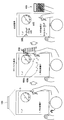
- the digital information 410 may be erased when the paper 4 is tilted from a state where the paper surface is orthogonal to the direction of gravity. Assuming that the digital information 410 is an object, the digital information 410 on the paper 4 falls along the inclination due to gravity when the paper 4 is inclined. Therefore, the digital information 410, which is virtual information, is also digitally displayed with intuitive and easy-to-understand operations by allowing the digital information to spill and disappear from the paper 4 due to the inclination of the paper 4, as shown in the right of FIG. Information can be erased.
- the digital information displayed in the extended work space may be moved by an object in the space.
- digital information 412 is projected on the work surface 2 of the extended work space.
- an actual object for example, paper 4 is brought into the extended work space and digital information 412 projected on the work surface 2 is placed on the paper 4 so as to be displayed.
- the information recognition display device 100 handles the digital information 412 so as to move together with the paper 4.
- the digital information 412 displayed on the paper 4 also moves as the paper 4 moves.
- an intuitive operation such as carrying the digital information 412 on the paper 4 can be realized, and the user can move the digital information 412 with an intuitive and easy-to-understand operation.
- the process of placing and moving the digital information 412 on the paper 4 has been described, but the process of copying the digital information 412 onto the paper 4 in the state shown in the center of FIG. 12 may be performed.
- the digital information 412 moving together with the paper 4 is displayed on the paper 4, and the digital information 412 is also displayed at the original display position of the work surface 2. Is displayed.
- the object for manipulating the digital information may be other than the paper 4, for example, a tablet terminal, a smartphone, electronic paper, or the like.
- the processing by the information processing unit 140 of the information recognition display device 100 according to the above-described embodiment can be executed by hardware or can be executed by software.
- the information processing unit 140 can be configured as shown in FIG.
- a hardware configuration example of the information processing unit 140 will be described with reference to FIG.
- the information processing unit 140 can be realized by a processing device such as a computer as described above. As shown in FIG. 15, the information processing unit 140 includes a CPU (Central Processing Unit) 901, a ROM (Read Only Memory) 902, a RAM (Random Access Memory) 903, and a host bus 904a. The information processing unit 140 includes a bridge 904, an external bus 904b, an interface 905, an input device 906, an output device 907, a storage device (HDD) 908, a drive 909, a connection port 911, and a communication device. 913.
- a processing device such as a computer as described above.
- the information processing unit 140 includes a CPU (Central Processing Unit) 901, a ROM (Read Only Memory) 902, a RAM (Random Access Memory) 903, and a host bus 904a.
- the information processing unit 140 includes a bridge 904, an external bus 904b, an interface 905, an input device 906, an output device 907, a storage device (HDD) 908, a drive 9
- the CPU 901 functions as an arithmetic processing unit and a control unit, and controls the overall operation in the information processing unit 140 according to various programs. Further, the CPU 901 may be a microprocessor.
- the ROM 902 stores programs used by the CPU 901, calculation parameters, and the like.
- the RAM 903 temporarily stores programs used in the execution of the CPU 901, parameters that change as appropriate during the execution, and the like. These are connected to each other by a host bus 904a including a CPU bus.
- the host bus 904a is connected to an external bus 904b such as a PCI (Peripheral Component Interconnect / Interface) bus via a bridge 904.
- an external bus 904b such as a PCI (Peripheral Component Interconnect / Interface) bus
- PCI Peripheral Component Interconnect / Interface
- the host bus 904a, the bridge 904, and the external bus 904b are not necessarily separated from each other, and these functions may be mounted on one bus.
- the input device 906 includes an input means for inputting information by the user such as a mouse, keyboard, touch panel, button, microphone, switch, and lever, and an input control circuit that generates an input signal based on the input by the user and outputs the input signal to the CPU 901. Etc.
- the output device 907 includes, for example, a liquid crystal display (LCD) device, an OLED (Organic Light Emitting Diode) device and a display device such as a lamp, and an audio output device such as a speaker.
- LCD liquid crystal display
- OLED Organic Light Emitting Diode
- the storage device 908 is an example of a storage unit of the information processing unit 140, and is a device for storing data.
- the storage device 908 may include a storage medium, a recording device that records data on the storage medium, a reading device that reads data from the storage medium, a deletion device that deletes data recorded on the storage medium, and the like.
- the storage device 908 is composed of, for example, an HDD (Hard Disk Drive).
- the storage device 908 drives a hard disk and stores programs executed by the CPU 901 and various data.
- the drive 909 is a storage medium reader / writer, and is built in or externally attached to the information processing unit 140.
- the drive 909 reads information recorded on a mounted removable recording medium such as a magnetic disk, an optical disk, a magneto-optical disk, or a semiconductor memory, and outputs the information to the RAM 903.
- the connection port 911 is an interface connected to an external device, and is a connection port with an external device capable of transmitting data by USB (Universal Serial Bus), for example.
- the communication device 913 is a communication interface configured by a communication device or the like for connecting to the communication network 10, for example.
- the communication device 913 may be a wireless LAN (Local Area Network) compatible communication device, a wireless USB compatible communication device, or a wire communication device that performs wired communication.
- the information processing unit 140 is provided in the information recognition display device 100.
- the present technology is not limited to this example, and may be provided on a server connected to a network, for example.
- an analysis unit that determines additional information corresponding to the input information based on input information input in an extended workspace where the entity and the virtual object can be operated;
- a display control unit that receives a new operation input to the input information and performs display control of a virtual object displayed on the extended workspace using the additional information;
- An information processing apparatus comprising: (2) The information processing apparatus according to (1), wherein the analysis unit recognizes a handwriting input by a user in the extended work space and determines the additional information corresponding to the input information.
- the analysis unit receives the handwriting input by a user by handwriting from an input detection device that performs signal processing transmitted from a writing device that performs handwriting input.
- the writing device is capable of virtual writing input, The information processing apparatus according to (3), wherein the analysis unit recognizes a handwriting of the virtual writing input and uses the handwriting as the additional information. (5) The analysis unit recognizes information included in an entity existing in the extended work space as input information, and determines the additional information corresponding to the input information. (1) to (4) The information processing apparatus according to any one of claims. (6) The information processing apparatus according to any one of (1) to (5), wherein the additional information is information for determining whether to display the virtual object. (7) The information processing apparatus according to any one of (1) to (6), wherein the virtual object is information related to the input information recognized by the analysis unit.
- a coordinate processing unit that converts the position information of the virtual object displayed for the entity in the extended work space into an object coordinate system specific to the entity in the extended work space related to the virtual object.
- the display control unit moves the display position of the virtual object according to the movement of the object.
Landscapes
- Engineering & Computer Science (AREA)
- General Engineering & Computer Science (AREA)
- Theoretical Computer Science (AREA)
- Physics & Mathematics (AREA)
- General Physics & Mathematics (AREA)
- Human Computer Interaction (AREA)
- Multimedia (AREA)
- Computer Networks & Wireless Communication (AREA)
- Signal Processing (AREA)
- Optics & Photonics (AREA)
- User Interface Of Digital Computer (AREA)
Abstract
Description
1.本開示の実施形態
1.1.拡張作業空間システムの構成例
1.2.情報認識表示装置の機能構成
1.3.入力情報に対応した情報フィードバック処理
1.4.キャリブレーションへの適用
1.5.デジタル情報のトラッキング表示
1.6.リモート機能
1.7.デジタル情報の物理的操作
2.ハードウェア構成例
[1.1.拡張作業空間システムの構成例]
まず、図1を参照して、本開示の実施形態に係る拡張作業空間システムの構成例について説明する。なお、図1は、本実施形態に係る拡張作業空間システムの一構成例を示す説明図である。
次に、図2に基づいて、情報認識表示装置100およびペン入力検出デバイス210の機能構成について説明する。なお、図2は、本実施形態に係る情報認識表示装置100およびペン入力検出デバイス210の機能構成を示すブロック図である。まず、本実施形態に係る情報認識表示装置100は、投影部110と、検出部120と、撮像部130と、情報処理部140と、通信部150とから構成される。
本実施形態に係る拡張作業空間システムでは、拡張作業空間において認識された入力情報に対応する付加情報を拡張作業空間に反映するとともに、反映された付加情報に対する操作入力に応じて仮想オブジェクトの表示を制御する。このような情報の表示制御によるフィードバックにより、インタラクティブな操作を実現し、ユーザに対して直観的にわかりやい、興味を引くような情報を提供することができる。
上述したように、本実施形態に係る拡張作業空間システムにおいては、プロジェクタの投影領域と、デジタルペン200の動きをトラッキングする領域とが同一空間に存在し、これらの関係を、キャリブレーションにより予め取得しておく。キャリブレーションの方法としては、例えば、図7上に示すように、拡張作業空間に置かれた紙4の四隅に指定されている4つのポイントP1~P4をデジタルペンで指定する方法がある。
本実施形態に係る拡張作業空間システムでは、デジタルペン200を用いた情報の入力が可能である。上述したように、本実施形態に係るデジタルペン200は、オンオフの切り替え機構によりインクの吐出を制御することができる。ユーザは、インクを吐出させて紙4に実際に文字等を書くことも可能であり、インクを吐出させずにタッチ等の入力操作を行ったり実際のインクではなくデジタル情報として表示される文字等を書いたりすることも可能である。
本実施形態に係る拡張作業空間システムは、複数の拡張作業空間の情報を互いに表示するリモート機能を備えてもよい。リモート機能により、遠隔あるユーザによる協調作業や作業アシスタントが可能となる。リモート機能を用いた作業アシスタントの一例として、図11に実際にテキストブックを用いて勉強している生徒の学習アシスタントを行う例を示す。
拡張作業空間に表示されるデジタル情報は、拡張作業空間内に存在する紙等の実際の物体を用いる物理法則に従った操作により操作できるようにしてもよい。この場合、情報認識表示装置100は、拡張作業空間において認識された実際の物体と、当該物体に対して行われた操作とに基づいて、拡張作業空間に表示されているデジタル情報の表示処理を行う。
例えば、図12左に示すように、拡張作業空間にある紙4の上に、デジタル情報410が投影されているとする。なお、図12左および右の図では、上側に拡張作業空間の作業面2を上から見た状態を示しており、下側に拡張作業空間を側面から見た状態を示している。また、図12では、説明のため、紙4の上に表示されているデジタル情報410に厚みを持たせて示しているが、実際はデジタル情報410の厚みはなくてもよい。
また、拡張作業空間に存在する実際の物体に対してデジタル情報を表示する際に、物体自体にデジタル情報が記載されているような表示方法を提示することもできる。例えば図13に示すように、拡張作業空間の作業面2に、表面4aに問題311が印字された紙4が置かれているとする。ユーザが紙4をめくり裏面4bをみると、裏面4bに問題311の解答がデジタル情報411により表示される。このように、実際には印字されていない紙4の裏面4bにデジタル情報411を表示させることで、ユーザに直観的に情報を提示することができる。
さらに、拡張作業空間に表示されたデジタル情報を、当該空間内にある物体によって移動させるようにしてもよい。例えば図14上に示すように、拡張作業空間の作業面2にデジタル情報412が投影されているとする。次いで、実際の物体、例えば紙4が拡張作業空間に持ち込まれ、作業面2に投影されているデジタル情報412が当該紙4の上に表示されるように置かれたとする。図12中央に示すように、デジタル情報412は紙4上に表示されると、情報認識表示装置100は、デジタル情報412を紙4と一体に移動させるように取り扱う。
上述の実施形態に係る情報認識表示装置100の情報処理部140による処理は、ハードウェアにより実行させることもでき、ソフトウェアによって実行させることもできる。この場合、情報処理部140は、図15に示すように構成することもできる。以下、図15に基づいて、情報処理部140の一ハードウェア構成例について説明する。
(1) 実体と仮想オブジェクトとを操作可能な拡張作業空間内において入力された入力情報に基づいて、前記入力情報に対応する付加情報を決定する解析部と、
前記入力情報への新たな操作入力を受けて、前記付加情報を用いて当該拡張作業空間に対して表示される仮想オブジェクトの表示制御を行う表示制御部と、
を備える、情報処理装置。
(2) 前記解析部は、前記拡張作業空間内においてユーザが手書き入力した筆跡を認識し、当該入力情報に対応する前記付加情報を決定する、前記(1)に記載の情報処理装置。
(3) 前記解析部は、ユーザが手書き入力した前記筆跡を、手書き入力を行う筆記用機器から発信される信号処理を行う入力検出デバイスから受信する、前記(2)に記載の情報処理装置。
(4) 前記筆記用機器は、仮想的な筆記入力が可能であり、
前記解析部は、前記仮想的な筆記入力の筆跡を認識し、当該筆跡を前記付加情報とする、前記(3)に記載の情報処理装置。
(5) 前記解析部は、前記拡張作業空間内に存在する実体に含まれる情報を入力情報として認識し、当該入力情報に対応する前記付加情報を決定する、前記(1)~(4)のいずれか1項に記載の情報処理装置。
(6) 前記付加情報は、前記仮想オブジェクトを表示するか否かを判定するための情報である、前記(1)~(5)のいずれか1項に記載の情報処理装置。
(7) 前記仮想オブジェクトは、前記解析部により認識された前記入力情報に関連する情報である、前記(1)~(6)のいずれか1項に記載の情報処理装置。
(8) 前記拡張作業空間内において実体に対して表示されている仮想オブジェクトの位置情報を、当該仮想オブジェクトに関連する前記拡張作業空間内の実体に固有の物体座標系に変換する座標処理部をさらに備え、
前記拡張作業空間において前記実体を移動する操作入力があったとき、前記表示制御部は、当該物体の移動に応じて前記仮想オブジェクトの表示位置を移動させる、前記(1)に記載の情報処理装置。
100 情報認識表示装置
110 投影部
120 検出部
130 撮像部
140 情報処理部
142 解析部
144 座標処理部
146 表示制御部
148 設定記憶部
150 通信部
200 デジタルペン
210 ペン入力検出デバイス
212 信号受信部
214 信号処理部
216 入力情報送信部
Claims (10)
- 実体と仮想オブジェクトとを操作可能な拡張作業空間内において入力された入力情報に基づいて、前記入力情報に対応する付加情報を決定する解析部と、
前記入力情報への新たな操作入力を受けて、前記付加情報を用いて当該拡張作業空間に対して表示される仮想オブジェクトの表示制御を行う表示制御部と、
を備える、情報処理装置。 - 前記解析部は、前記拡張作業空間内においてユーザが手書き入力した筆跡を認識し、当該入力情報に対応する前記付加情報を決定する、請求項1に記載の情報処理装置。
- 前記解析部は、ユーザが手書き入力した前記筆跡を、手書き入力を行う筆記用機器から発信される信号処理を行う入力検出デバイスから受信する、請求項2に記載の情報処理装置。
- 前記筆記用機器は、仮想的な筆記入力が可能であり、
前記解析部は、前記仮想的な筆記入力の筆跡を認識し、当該筆跡を前記付加情報とする、請求項3に記載の情報処理装置。 - 前記解析部は、前記拡張作業空間内に存在する実体に含まれる情報を入力情報として認識し、当該入力情報に対応する前記付加情報を決定する、請求項1に記載の情報処理装置。
- 前記付加情報は、前記仮想オブジェクトを表示するか否かを判定するための情報である、請求項1に記載の情報処理装置。
- 前記仮想オブジェクトは、前記解析部により認識された前記入力情報に関連する情報である、請求項1に記載の情報処理装置。
- 前記拡張作業空間内において実体に対して表示されている仮想オブジェクトの位置情報を、当該仮想オブジェクトに関連する前記拡張作業空間内の実体に固有の物体座標系に変換する座標処理部をさらに備え、
前記拡張作業空間において前記実体を移動する操作入力があったとき、前記表示制御部は、当該物体の移動に応じて前記仮想オブジェクトの表示位置を移動させる、請求項1に記載の情報処理装置。 - 実体と仮想オブジェクトとを操作可能な拡張作業空間内において入力された入力情報に基づいて、前記入力情報に対応する付加情報を決定すること、
前記入力情報への新たな操作入力を受けて、前記付加情報を用いて当該拡張作業空間に対して表示される仮想オブジェクトの表示制御を行うこと、
を含む、情報処理方法。 - コンピュータに、
実体と仮想オブジェクトとを操作可能な拡張作業空間内において入力された入力情報に基づいて、前記入力情報に対応する付加情報を決定する解析部と、
前記入力情報への新たな操作入力を受けて、前記付加情報を用いて当該拡張作業空間に対して表示される仮想オブジェクトの表示制御を行う表示制御部と、
を備える、情報処理装置として機能させるためのプログラムを記憶したコンピュータ読み取り可能な記憶媒体。
Priority Applications (4)
| Application Number | Priority Date | Filing Date | Title |
|---|---|---|---|
| JP2014545628A JP6233314B2 (ja) | 2012-11-09 | 2013-10-16 | 情報処理装置、情報処理方法およびコンピュータ読み取り可能な記録媒体 |
| EP13854118.0A EP2919104B1 (en) | 2012-11-09 | 2013-10-16 | Information processing device, information processing method, and computer-readable recording medium |
| US14/440,394 US9632593B2 (en) | 2012-11-09 | 2013-10-16 | Information processing apparatus, information processing method, and computer-readable recording medium |
| US15/478,307 US11132063B2 (en) | 2012-11-09 | 2017-04-04 | Information processing apparatus for interactively performing work based on input content in extended work space |
Applications Claiming Priority (2)
| Application Number | Priority Date | Filing Date | Title |
|---|---|---|---|
| JP2012247842 | 2012-11-09 | ||
| JP2012-247842 | 2012-11-09 |
Related Child Applications (2)
| Application Number | Title | Priority Date | Filing Date |
|---|---|---|---|
| US14/440,394 A-371-Of-International US9632593B2 (en) | 2012-11-09 | 2013-10-16 | Information processing apparatus, information processing method, and computer-readable recording medium |
| US15/478,307 Continuation US11132063B2 (en) | 2012-11-09 | 2017-04-04 | Information processing apparatus for interactively performing work based on input content in extended work space |
Publications (1)
| Publication Number | Publication Date |
|---|---|
| WO2014073346A1 true WO2014073346A1 (ja) | 2014-05-15 |
Family
ID=50684458
Family Applications (1)
| Application Number | Title | Priority Date | Filing Date |
|---|---|---|---|
| PCT/JP2013/078102 Ceased WO2014073346A1 (ja) | 2012-11-09 | 2013-10-16 | 情報処理装置、情報処理方法およびコンピュータ読み取り可能な記録媒体 |
Country Status (4)
| Country | Link |
|---|---|
| US (2) | US9632593B2 (ja) |
| EP (1) | EP2919104B1 (ja) |
| JP (1) | JP6233314B2 (ja) |
| WO (1) | WO2014073346A1 (ja) |
Cited By (8)
| Publication number | Priority date | Publication date | Assignee | Title |
|---|---|---|---|---|
| WO2015005242A1 (ja) * | 2013-07-11 | 2015-01-15 | シャープ株式会社 | 表示装置 |
| JP2015056179A (ja) * | 2013-09-13 | 2015-03-23 | 現代自動車株式会社 | 注文型インターフェースシステムおよびその操作方法 |
| CN105389041A (zh) * | 2014-09-03 | 2016-03-09 | 柯尼卡美能达株式会社 | 手写输入装置以及手写信息取得方法 |
| KR101797682B1 (ko) * | 2015-12-08 | 2017-11-15 | (주)뮤테이션 | 사용자와의 상호 작용을 기반으로 한 학습 방법 및 장치 |
| KR20180076372A (ko) * | 2016-12-23 | 2018-07-06 | (주)뮤테이션 | 이러닝 서버, 이를 포함하는 이러닝 시스템 및 그 서비스 방법 |
| CN109582123A (zh) * | 2017-09-28 | 2019-04-05 | 富士施乐株式会社 | 信息处理设备、信息处理系统和信息处理方法 |
| JP2019082572A (ja) * | 2017-10-30 | 2019-05-30 | 株式会社リコー | 情報処理システム、情報処理装置、情報処理方法及びプログラム |
| JP2020528626A (ja) * | 2017-07-27 | 2020-09-24 | ベステル エレクトロニク サナイー ベ ティカレト エー.エス. | ウェブページを三次元オブジェクト上に重ね合わせる方法、装置およびコンピュータプログラム |
Families Citing this family (19)
| Publication number | Priority date | Publication date | Assignee | Title |
|---|---|---|---|---|
| KR101714050B1 (ko) * | 2010-11-01 | 2017-03-08 | 삼성전자주식회사 | 휴대단말기의 데이터 표시장치 및 방법 |
| FR2976681B1 (fr) * | 2011-06-17 | 2013-07-12 | Inst Nat Rech Inf Automat | Systeme de colocalisation d'un ecran tactile et d'un objet virtuel et dispostif pour la manipulation d'objets virtuels mettant en oeuvre un tel systeme |
| US10152136B2 (en) * | 2013-10-16 | 2018-12-11 | Leap Motion, Inc. | Velocity field interaction for free space gesture interface and control |
| US10168873B1 (en) | 2013-10-29 | 2019-01-01 | Leap Motion, Inc. | Virtual interactions for machine control |
| US9996797B1 (en) | 2013-10-31 | 2018-06-12 | Leap Motion, Inc. | Interactions with virtual objects for machine control |
| US10416834B1 (en) | 2013-11-15 | 2019-09-17 | Leap Motion, Inc. | Interaction strength using virtual objects for machine control |
| US9891712B2 (en) | 2013-12-16 | 2018-02-13 | Leap Motion, Inc. | User-defined virtual interaction space and manipulation of virtual cameras with vectors |
| CN103729096A (zh) * | 2013-12-25 | 2014-04-16 | 京东方科技集团股份有限公司 | 交互识别系统以及显示装置 |
| KR101648446B1 (ko) * | 2014-10-07 | 2016-09-01 | 삼성전자주식회사 | 전자 회의 시스템 및 이의 제어 방법, 그리고 디지털 펜 |
| US9696795B2 (en) | 2015-02-13 | 2017-07-04 | Leap Motion, Inc. | Systems and methods of creating a realistic grab experience in virtual reality/augmented reality environments |
| US10429923B1 (en) | 2015-02-13 | 2019-10-01 | Ultrahaptics IP Two Limited | Interaction engine for creating a realistic experience in virtual reality/augmented reality environments |
| JP2018028804A (ja) * | 2016-08-18 | 2018-02-22 | 株式会社デンソーテン | 入力制御装置、入力制御方法、入力制御プログラムおよび入力制御システム |
| WO2018110003A1 (ja) * | 2016-12-12 | 2018-06-21 | ソニー株式会社 | 情報処理装置、情報処理方法、およびプログラム |
| JP7087364B2 (ja) * | 2017-12-04 | 2022-06-21 | 富士フイルムビジネスイノベーション株式会社 | 情報処理装置、情報処理システムおよびプログラム |
| US11875012B2 (en) | 2018-05-25 | 2024-01-16 | Ultrahaptics IP Two Limited | Throwable interface for augmented reality and virtual reality environments |
| US11538205B2 (en) * | 2018-09-19 | 2022-12-27 | Chegg, Inc. | Augmented reality mathematics in learning platforms |
| WO2022034807A1 (ja) * | 2020-08-13 | 2022-02-17 | 株式会社ワコム | インク量算出方法、情報処理装置、及びプログラム |
| US11175791B1 (en) * | 2020-09-29 | 2021-11-16 | International Business Machines Corporation | Augmented reality system for control boundary modification |
| US11487400B1 (en) * | 2021-08-13 | 2022-11-01 | International Business Machines Corporation | Aggregated multidimensional user interface display with electronic pen for holographic projection |
Citations (3)
| Publication number | Priority date | Publication date | Assignee | Title |
|---|---|---|---|---|
| JPH1145149A (ja) * | 1997-07-28 | 1999-02-16 | Sony Corp | データ表示装置及び方法並びに記録媒体、データ送信装置及び方法 |
| JP2001154781A (ja) * | 1999-11-29 | 2001-06-08 | Nec Corp | デスクトップ情報装置 |
| JP2010238098A (ja) | 2009-03-31 | 2010-10-21 | Ntt Docomo Inc | 端末装置、情報提示システム及び端末画面表示方法 |
Family Cites Families (15)
| Publication number | Priority date | Publication date | Assignee | Title |
|---|---|---|---|---|
| JPH075978A (ja) * | 1993-06-18 | 1995-01-10 | Sony Corp | 入力装置 |
| JPH11144024A (ja) * | 1996-11-01 | 1999-05-28 | Matsushita Electric Ind Co Ltd | 画像合成装置、画像合成方法及び媒体 |
| EP1315120A1 (de) * | 2001-11-26 | 2003-05-28 | Siemens Aktiengesellschaft | Stifteingabesystem |
| JP4769942B2 (ja) * | 2006-03-14 | 2011-09-07 | 国立大学法人電気通信大学 | 3dデザイン支援システム及び3dデザイン支援方法 |
| US20100045705A1 (en) * | 2006-03-30 | 2010-02-25 | Roel Vertegaal | Interaction techniques for flexible displays |
| US20080186255A1 (en) * | 2006-12-07 | 2008-08-07 | Cohen Philip R | Systems and methods for data annotation, recordation, and communication |
| US8427424B2 (en) * | 2008-09-30 | 2013-04-23 | Microsoft Corporation | Using physical objects in conjunction with an interactive surface |
| KR101559178B1 (ko) * | 2009-04-08 | 2015-10-12 | 엘지전자 주식회사 | 명령어 입력 방법 및 이를 적용한 이동 통신 단말기 |
| JP2011028629A (ja) * | 2009-07-28 | 2011-02-10 | Sanyo Electric Co Ltd | プレゼンテーションシステム |
| US20120042288A1 (en) * | 2010-08-16 | 2012-02-16 | Fuji Xerox Co., Ltd. | Systems and methods for interactions with documents across paper and computers |
| GB2486445B (en) * | 2010-12-14 | 2013-08-14 | Epson Norway Res And Dev As | Camera-based multi-touch interaction apparatus system and method |
| JP5741079B2 (ja) * | 2011-03-09 | 2015-07-01 | セイコーエプソン株式会社 | 画像生成装置およびプロジェクター |
| US8806352B2 (en) * | 2011-05-06 | 2014-08-12 | David H. Sitrick | System for collaboration of a specific image and utilizing selected annotations while viewing and relative to providing a display presentation |
| US9164603B2 (en) * | 2011-10-28 | 2015-10-20 | Atmel Corporation | Executing gestures with active stylus |
| JP5533837B2 (ja) * | 2011-11-02 | 2014-06-25 | コニカミノルタ株式会社 | 手書き入力装置及び手書き入力制御プログラム |
-
2013
- 2013-10-16 EP EP13854118.0A patent/EP2919104B1/en active Active
- 2013-10-16 WO PCT/JP2013/078102 patent/WO2014073346A1/ja not_active Ceased
- 2013-10-16 US US14/440,394 patent/US9632593B2/en active Active
- 2013-10-16 JP JP2014545628A patent/JP6233314B2/ja active Active
-
2017
- 2017-04-04 US US15/478,307 patent/US11132063B2/en not_active Expired - Fee Related
Patent Citations (3)
| Publication number | Priority date | Publication date | Assignee | Title |
|---|---|---|---|---|
| JPH1145149A (ja) * | 1997-07-28 | 1999-02-16 | Sony Corp | データ表示装置及び方法並びに記録媒体、データ送信装置及び方法 |
| JP2001154781A (ja) * | 1999-11-29 | 2001-06-08 | Nec Corp | デスクトップ情報装置 |
| JP2010238098A (ja) | 2009-03-31 | 2010-10-21 | Ntt Docomo Inc | 端末装置、情報提示システム及び端末画面表示方法 |
Non-Patent Citations (2)
| Title |
|---|
| JUN REKIMOTO ET AL.: "Augmented Surfaces: A Spatially Continuous Work Space for Hybrid Computing Environments", CHI '99 PROCEEDINGS OF THE SIGCHI CONFERENCE ON HUMAN FACTORS IN COMPUTING SYSTEMS, 1999, pages 378 - 385, XP002426681 * |
| See also references of EP2919104A4 |
Cited By (14)
| Publication number | Priority date | Publication date | Assignee | Title |
|---|---|---|---|---|
| WO2015005242A1 (ja) * | 2013-07-11 | 2015-01-15 | シャープ株式会社 | 表示装置 |
| JP2015056179A (ja) * | 2013-09-13 | 2015-03-23 | 現代自動車株式会社 | 注文型インターフェースシステムおよびその操作方法 |
| CN105389041A (zh) * | 2014-09-03 | 2016-03-09 | 柯尼卡美能达株式会社 | 手写输入装置以及手写信息取得方法 |
| EP2993559A1 (en) * | 2014-09-03 | 2016-03-09 | Konica Minolta, Inc. | Handwriting input device, method for obtaining handwriting information, and non-transitory computer-readable storage medium |
| US9594442B2 (en) | 2014-09-03 | 2017-03-14 | Konica Minolta, Inc. | Handwriting input device, method for obtaining handwriting information, and non-transitory computer-readable storage medium |
| KR101797682B1 (ko) * | 2015-12-08 | 2017-11-15 | (주)뮤테이션 | 사용자와의 상호 작용을 기반으로 한 학습 방법 및 장치 |
| KR20180076372A (ko) * | 2016-12-23 | 2018-07-06 | (주)뮤테이션 | 이러닝 서버, 이를 포함하는 이러닝 시스템 및 그 서비스 방법 |
| KR101963867B1 (ko) | 2016-12-23 | 2019-07-31 | (주)뮤테이션 | 이러닝 서버, 이를 포함하는 이러닝 시스템 및 그 서비스 방법 |
| JP2020528626A (ja) * | 2017-07-27 | 2020-09-24 | ベステル エレクトロニク サナイー ベ ティカレト エー.エス. | ウェブページを三次元オブジェクト上に重ね合わせる方法、装置およびコンピュータプログラム |
| CN109582123A (zh) * | 2017-09-28 | 2019-04-05 | 富士施乐株式会社 | 信息处理设备、信息处理系统和信息处理方法 |
| JP2019061590A (ja) * | 2017-09-28 | 2019-04-18 | 富士ゼロックス株式会社 | 情報処理装置、情報処理システム及びプログラム |
| US11397320B2 (en) | 2017-09-28 | 2022-07-26 | Fujifilm Business Innovation Corp. | Information processing apparatus, information processing system, and non-transitory computer readable medium |
| JP2019082572A (ja) * | 2017-10-30 | 2019-05-30 | 株式会社リコー | 情報処理システム、情報処理装置、情報処理方法及びプログラム |
| JP7119338B2 (ja) | 2017-10-30 | 2022-08-17 | 株式会社リコー | 情報処理システム、情報処理装置、情報処理方法及びプログラム |
Also Published As
| Publication number | Publication date |
|---|---|
| US20170205895A1 (en) | 2017-07-20 |
| US20150277583A1 (en) | 2015-10-01 |
| US9632593B2 (en) | 2017-04-25 |
| EP2919104A1 (en) | 2015-09-16 |
| EP2919104A4 (en) | 2016-07-13 |
| JPWO2014073346A1 (ja) | 2016-09-08 |
| EP2919104B1 (en) | 2019-12-04 |
| JP6233314B2 (ja) | 2017-11-22 |
| US11132063B2 (en) | 2021-09-28 |
Similar Documents
| Publication | Publication Date | Title |
|---|---|---|
| JP6233314B2 (ja) | 情報処理装置、情報処理方法およびコンピュータ読み取り可能な記録媒体 | |
| JP5451599B2 (ja) | マルチモーダルスマートペンのコンピューティングシステム | |
| CN102880360B (zh) | 红外式多点交互电子白板系统及白板投影标定方法 | |
| US9304599B2 (en) | Gesture controlled adaptive projected information handling system input and output devices | |
| US9348420B2 (en) | Adaptive projected information handling system output devices | |
| US9736137B2 (en) | System and method for managing multiuser tools | |
| CN104756065B (zh) | 信息处理装置、信息处理方法以及计算机可读记录介质 | |
| JP6902234B2 (ja) | 文字列に文字を挿入するための方法および対応するデジタルデバイス | |
| JP6991486B2 (ja) | 文字列に文字を挿入するための方法およびシステム | |
| JP2014062962A (ja) | 情報処理装置、筆記具、情報処理方法およびプログラム | |
| EP2965181B1 (en) | Enhanced canvas environments | |
| JP6595896B2 (ja) | 電子機器及び表示制御方法 | |
| CN114578956A (zh) | 设备控制方法、装置、虚拟穿戴设备以及存储介质 | |
| JP6056263B2 (ja) | 端末装置、電子ペンシステム及びプログラム | |
| JP2021197024A (ja) | 表示装置、表示方法及びプログラム | |
| US11782594B2 (en) | Display apparatus, display system, and display method | |
| JP5165661B2 (ja) | 制御装置、制御方法、制御プログラム、及び記録媒体 | |
| Liu et al. | Towards Bare-Hand Interaction for Whiteboard Collaboration in Virtual Reality | |
| JP2014215334A (ja) | コンピュータ装置及びプログラム | |
| EP4462224A1 (en) | Portable computer with virtualized human-machine interface | |
| JP2014215352A (ja) | コンピュータ装置及びプログラム | |
| Kern | Using Controller Styluses for Virtual Keyboards and Handwriting Text Input in XR | |
| JP2023137822A (ja) | 表示装置、清書方法、プログラム、情報共有システム | |
| JP7030529B2 (ja) | 電子機器、情報処理方法、プログラム及び記憶媒体 | |
| CA2929900C (en) | System and method for managing multiuser tools |
Legal Events
| Date | Code | Title | Description |
|---|---|---|---|
| 121 | Ep: the epo has been informed by wipo that ep was designated in this application |
Ref document number: 13854118 Country of ref document: EP Kind code of ref document: A1 |
|
| WWE | Wipo information: entry into national phase |
Ref document number: 2013854118 Country of ref document: EP |
|
| ENP | Entry into the national phase |
Ref document number: 2014545628 Country of ref document: JP Kind code of ref document: A |
|
| WWE | Wipo information: entry into national phase |
Ref document number: 14440394 Country of ref document: US |
|
| NENP | Non-entry into the national phase |
Ref country code: DE |