WO2014106883A1 - デバイス制御システム、及び、デバイス制御システムの制御方法 - Google Patents
デバイス制御システム、及び、デバイス制御システムの制御方法 Download PDFInfo
- Publication number
- WO2014106883A1 WO2014106883A1 PCT/JP2013/007633 JP2013007633W WO2014106883A1 WO 2014106883 A1 WO2014106883 A1 WO 2014106883A1 JP 2013007633 W JP2013007633 W JP 2013007633W WO 2014106883 A1 WO2014106883 A1 WO 2014106883A1
- Authority
- WO
- WIPO (PCT)
- Prior art keywords
- device control
- message
- control apparatus
- response
- application
- Prior art date
- Legal status (The legal status is an assumption and is not a legal conclusion. Google has not performed a legal analysis and makes no representation as to the accuracy of the status listed.)
- Ceased
Links
Images



































































































Classifications
-
- G—PHYSICS
- G06—COMPUTING OR CALCULATING; COUNTING
- G06Q—INFORMATION AND COMMUNICATION TECHNOLOGY [ICT] SPECIALLY ADAPTED FOR ADMINISTRATIVE, COMMERCIAL, FINANCIAL, MANAGERIAL OR SUPERVISORY PURPOSES; SYSTEMS OR METHODS SPECIALLY ADAPTED FOR ADMINISTRATIVE, COMMERCIAL, FINANCIAL, MANAGERIAL OR SUPERVISORY PURPOSES, NOT OTHERWISE PROVIDED FOR
- G06Q20/00—Payment architectures, schemes or protocols
- G06Q20/08—Payment architectures
- G06Q20/20—Point-of-sale [POS] network systems
- G06Q20/209—Specified transaction journal output feature, e.g. printed receipt or voice output
-
- G—PHYSICS
- G06—COMPUTING OR CALCULATING; COUNTING
- G06F—ELECTRIC DIGITAL DATA PROCESSING
- G06F3/00—Input arrangements for transferring data to be processed into a form capable of being handled by the computer; Output arrangements for transferring data from processing unit to output unit, e.g. interface arrangements
- G06F3/12—Digital output to print unit, e.g. line printer, chain printer
- G06F3/1201—Dedicated interfaces to print systems
- G06F3/1202—Dedicated interfaces to print systems specifically adapted to achieve a particular effect
- G06F3/1203—Improving or facilitating administration, e.g. print management
- G06F3/1204—Improving or facilitating administration, e.g. print management resulting in reduced user or operator actions, e.g. presetting, automatic actions, using hardware token storing data
-
- G—PHYSICS
- G06—COMPUTING OR CALCULATING; COUNTING
- G06F—ELECTRIC DIGITAL DATA PROCESSING
- G06F3/00—Input arrangements for transferring data to be processed into a form capable of being handled by the computer; Output arrangements for transferring data from processing unit to output unit, e.g. interface arrangements
- G06F3/12—Digital output to print unit, e.g. line printer, chain printer
- G06F3/1201—Dedicated interfaces to print systems
- G06F3/1202—Dedicated interfaces to print systems specifically adapted to achieve a particular effect
- G06F3/1203—Improving or facilitating administration, e.g. print management
- G06F3/1205—Improving or facilitating administration, e.g. print management resulting in increased flexibility in print job configuration, e.g. job settings, print requirements, job tickets
-
- G—PHYSICS
- G06—COMPUTING OR CALCULATING; COUNTING
- G06F—ELECTRIC DIGITAL DATA PROCESSING
- G06F3/00—Input arrangements for transferring data to be processed into a form capable of being handled by the computer; Output arrangements for transferring data from processing unit to output unit, e.g. interface arrangements
- G06F3/12—Digital output to print unit, e.g. line printer, chain printer
- G06F3/1201—Dedicated interfaces to print systems
- G06F3/1202—Dedicated interfaces to print systems specifically adapted to achieve a particular effect
- G06F3/1203—Improving or facilitating administration, e.g. print management
- G06F3/1207—Improving or facilitating administration, e.g. print management resulting in the user being informed about print result after a job submission
-
- G—PHYSICS
- G06—COMPUTING OR CALCULATING; COUNTING
- G06F—ELECTRIC DIGITAL DATA PROCESSING
- G06F3/00—Input arrangements for transferring data to be processed into a form capable of being handled by the computer; Output arrangements for transferring data from processing unit to output unit, e.g. interface arrangements
- G06F3/12—Digital output to print unit, e.g. line printer, chain printer
- G06F3/1201—Dedicated interfaces to print systems
- G06F3/1202—Dedicated interfaces to print systems specifically adapted to achieve a particular effect
- G06F3/1203—Improving or facilitating administration, e.g. print management
- G06F3/1209—Improving or facilitating administration, e.g. print management resulting in adapted or bridged legacy communication protocols, e.g. emulation, protocol extension
-
- G—PHYSICS
- G06—COMPUTING OR CALCULATING; COUNTING
- G06F—ELECTRIC DIGITAL DATA PROCESSING
- G06F3/00—Input arrangements for transferring data to be processed into a form capable of being handled by the computer; Output arrangements for transferring data from processing unit to output unit, e.g. interface arrangements
- G06F3/12—Digital output to print unit, e.g. line printer, chain printer
- G06F3/1201—Dedicated interfaces to print systems
- G06F3/1223—Dedicated interfaces to print systems specifically adapted to use a particular technique
- G06F3/1236—Connection management
-
- G—PHYSICS
- G06—COMPUTING OR CALCULATING; COUNTING
- G06F—ELECTRIC DIGITAL DATA PROCESSING
- G06F3/00—Input arrangements for transferring data to be processed into a form capable of being handled by the computer; Output arrangements for transferring data from processing unit to output unit, e.g. interface arrangements
- G06F3/12—Digital output to print unit, e.g. line printer, chain printer
- G06F3/1201—Dedicated interfaces to print systems
- G06F3/1223—Dedicated interfaces to print systems specifically adapted to use a particular technique
- G06F3/1237—Print job management
- G06F3/1244—Job translation or job parsing, e.g. page banding
- G06F3/1246—Job translation or job parsing, e.g. page banding by handling markup languages, e.g. XSL, XML, HTML
-
- G—PHYSICS
- G06—COMPUTING OR CALCULATING; COUNTING
- G06F—ELECTRIC DIGITAL DATA PROCESSING
- G06F3/00—Input arrangements for transferring data to be processed into a form capable of being handled by the computer; Output arrangements for transferring data from processing unit to output unit, e.g. interface arrangements
- G06F3/12—Digital output to print unit, e.g. line printer, chain printer
- G06F3/1201—Dedicated interfaces to print systems
- G06F3/1223—Dedicated interfaces to print systems specifically adapted to use a particular technique
- G06F3/1237—Print job management
- G06F3/1253—Configuration of print job parameters, e.g. using UI at the client
-
- G—PHYSICS
- G06—COMPUTING OR CALCULATING; COUNTING
- G06F—ELECTRIC DIGITAL DATA PROCESSING
- G06F3/00—Input arrangements for transferring data to be processed into a form capable of being handled by the computer; Output arrangements for transferring data from processing unit to output unit, e.g. interface arrangements
- G06F3/12—Digital output to print unit, e.g. line printer, chain printer
- G06F3/1201—Dedicated interfaces to print systems
- G06F3/1278—Dedicated interfaces to print systems specifically adapted to adopt a particular infrastructure
- G06F3/1279—Controller construction, e.g. aspects of the interface hardware
-
- G—PHYSICS
- G06—COMPUTING OR CALCULATING; COUNTING
- G06F—ELECTRIC DIGITAL DATA PROCESSING
- G06F3/00—Input arrangements for transferring data to be processed into a form capable of being handled by the computer; Output arrangements for transferring data from processing unit to output unit, e.g. interface arrangements
- G06F3/12—Digital output to print unit, e.g. line printer, chain printer
- G06F3/1201—Dedicated interfaces to print systems
- G06F3/1278—Dedicated interfaces to print systems specifically adapted to adopt a particular infrastructure
- G06F3/1284—Local printer device
-
- G—PHYSICS
- G06—COMPUTING OR CALCULATING; COUNTING
- G06F—ELECTRIC DIGITAL DATA PROCESSING
- G06F3/00—Input arrangements for transferring data to be processed into a form capable of being handled by the computer; Output arrangements for transferring data from processing unit to output unit, e.g. interface arrangements
- G06F3/12—Digital output to print unit, e.g. line printer, chain printer
- G06F3/1201—Dedicated interfaces to print systems
- G06F3/1278—Dedicated interfaces to print systems specifically adapted to adopt a particular infrastructure
- G06F3/1285—Remote printer device, e.g. being remote from client or server
- G06F3/1286—Remote printer device, e.g. being remote from client or server via local network
-
- G—PHYSICS
- G06—COMPUTING OR CALCULATING; COUNTING
- G06F—ELECTRIC DIGITAL DATA PROCESSING
- G06F3/00—Input arrangements for transferring data to be processed into a form capable of being handled by the computer; Output arrangements for transferring data from processing unit to output unit, e.g. interface arrangements
- G06F3/12—Digital output to print unit, e.g. line printer, chain printer
- G06F3/1201—Dedicated interfaces to print systems
- G06F3/1278—Dedicated interfaces to print systems specifically adapted to adopt a particular infrastructure
- G06F3/1291—Pool of printer devices: self-managing printing devices in a network, e.g. without a server
-
- G—PHYSICS
- G06—COMPUTING OR CALCULATING; COUNTING
- G06F—ELECTRIC DIGITAL DATA PROCESSING
- G06F3/00—Input arrangements for transferring data to be processed into a form capable of being handled by the computer; Output arrangements for transferring data from processing unit to output unit, e.g. interface arrangements
- G06F3/12—Digital output to print unit, e.g. line printer, chain printer
- G06F3/1201—Dedicated interfaces to print systems
- G06F3/1278—Dedicated interfaces to print systems specifically adapted to adopt a particular infrastructure
- G06F3/1292—Mobile client, e.g. wireless printing
-
- G—PHYSICS
- G06—COMPUTING OR CALCULATING; COUNTING
- G06F—ELECTRIC DIGITAL DATA PROCESSING
- G06F3/00—Input arrangements for transferring data to be processed into a form capable of being handled by the computer; Output arrangements for transferring data from processing unit to output unit, e.g. interface arrangements
- G06F3/12—Digital output to print unit, e.g. line printer, chain printer
- G06F3/1293—Printer information exchange with computer
- G06F3/1294—Status or feedback related to information exchange
-
- G—PHYSICS
- G06—COMPUTING OR CALCULATING; COUNTING
- G06F—ELECTRIC DIGITAL DATA PROCESSING
- G06F3/00—Input arrangements for transferring data to be processed into a form capable of being handled by the computer; Output arrangements for transferring data from processing unit to output unit, e.g. interface arrangements
- G06F3/12—Digital output to print unit, e.g. line printer, chain printer
- G06F3/1297—Printer code translation, conversion, emulation, compression; Configuration of printer parameters
-
- G—PHYSICS
- G06—COMPUTING OR CALCULATING; COUNTING
- G06F—ELECTRIC DIGITAL DATA PROCESSING
- G06F3/00—Input arrangements for transferring data to be processed into a form capable of being handled by the computer; Output arrangements for transferring data from processing unit to output unit, e.g. interface arrangements
- G06F3/12—Digital output to print unit, e.g. line printer, chain printer
- G06F3/1297—Printer code translation, conversion, emulation, compression; Configuration of printer parameters
- G06F3/1298—Printer language recognition, e.g. program control language, page description language
-
- G—PHYSICS
- G06—COMPUTING OR CALCULATING; COUNTING
- G06K—GRAPHICAL DATA READING; PRESENTATION OF DATA; RECORD CARRIERS; HANDLING RECORD CARRIERS
- G06K15/00—Arrangements for producing a permanent visual presentation of the output data, e.g. computer output printers
- G06K15/02—Arrangements for producing a permanent visual presentation of the output data, e.g. computer output printers using printers
-
- G—PHYSICS
- G06—COMPUTING OR CALCULATING; COUNTING
- G06Q—INFORMATION AND COMMUNICATION TECHNOLOGY [ICT] SPECIALLY ADAPTED FOR ADMINISTRATIVE, COMMERCIAL, FINANCIAL, MANAGERIAL OR SUPERVISORY PURPOSES; SYSTEMS OR METHODS SPECIALLY ADAPTED FOR ADMINISTRATIVE, COMMERCIAL, FINANCIAL, MANAGERIAL OR SUPERVISORY PURPOSES, NOT OTHERWISE PROVIDED FOR
- G06Q20/00—Payment architectures, schemes or protocols
- G06Q20/08—Payment architectures
- G06Q20/20—Point-of-sale [POS] network systems
- G06Q20/202—Interconnection or interaction of plural electronic cash registers [ECR] or to host computer, e.g. network details, transfer of information from host to ECR or from ECR to ECR
-
- G—PHYSICS
- G06—COMPUTING OR CALCULATING; COUNTING
- G06Q—INFORMATION AND COMMUNICATION TECHNOLOGY [ICT] SPECIALLY ADAPTED FOR ADMINISTRATIVE, COMMERCIAL, FINANCIAL, MANAGERIAL OR SUPERVISORY PURPOSES; SYSTEMS OR METHODS SPECIALLY ADAPTED FOR ADMINISTRATIVE, COMMERCIAL, FINANCIAL, MANAGERIAL OR SUPERVISORY PURPOSES, NOT OTHERWISE PROVIDED FOR
- G06Q20/00—Payment architectures, schemes or protocols
- G06Q20/08—Payment architectures
- G06Q20/20—Point-of-sale [POS] network systems
- G06Q20/208—Input by product or record sensing, e.g. weighing or scanner processing
-
- G—PHYSICS
- G07—CHECKING-DEVICES
- G07G—REGISTERING THE RECEIPT OF CASH, VALUABLES, OR TOKENS
- G07G1/00—Cash registers
- G07G1/12—Cash registers electronically operated
- G07G1/14—Systems including one or more distant stations co-operating with a central processing unit
-
- H—ELECTRICITY
- H04—ELECTRIC COMMUNICATION TECHNIQUE
- H04N—PICTORIAL COMMUNICATION, e.g. TELEVISION
- H04N1/00—Scanning, transmission or reproduction of documents or the like, e.g. facsimile transmission; Details thereof
- H04N1/00127—Connection or combination of a still picture apparatus with another apparatus, e.g. for storage, processing or transmission of still picture signals or of information associated with a still picture
- H04N1/00326—Connection or combination of a still picture apparatus with another apparatus, e.g. for storage, processing or transmission of still picture signals or of information associated with a still picture with a data reading, recognizing or recording apparatus, e.g. with a bar-code apparatus
- H04N1/00328—Connection or combination of a still picture apparatus with another apparatus, e.g. for storage, processing or transmission of still picture signals or of information associated with a still picture with a data reading, recognizing or recording apparatus, e.g. with a bar-code apparatus with an apparatus processing optically-read information
- H04N1/00334—Connection or combination of a still picture apparatus with another apparatus, e.g. for storage, processing or transmission of still picture signals or of information associated with a still picture with a data reading, recognizing or recording apparatus, e.g. with a bar-code apparatus with an apparatus processing optically-read information with an apparatus processing barcodes or the like
-
- H—ELECTRICITY
- H04—ELECTRIC COMMUNICATION TECHNIQUE
- H04N—PICTORIAL COMMUNICATION, e.g. TELEVISION
- H04N1/00—Scanning, transmission or reproduction of documents or the like, e.g. facsimile transmission; Details thereof
- H04N1/32—Circuits or arrangements for control or supervision between transmitter and receiver or between image input and image output device, e.g. between a still-image camera and its memory or between a still-image camera and a printer device
Definitions
- the present invention relates to a device control system for controlling a device and a control method for the device control system.
- a device serving as a controller has been prepared for controlling the device.
- the present invention has been made in view of the above-described circumstances, and an object of the present invention is to provide a device control system, a terminal, and a device control system control method capable of controlling a device by a network-connected terminal.
- a device control system of the present invention includes a device that inputs or outputs data, a terminal that executes an application that transmits a markup language request and receives a markup language response, And a device control device that is connected to a device and controls the device based on the markup language request and transmits a response in the markup language.
- a device connected to a device control apparatus can be controlled by a terminal connected to a network.
- the terminal is not limited as long as the terminal can execute an application that generates data described in XML. Since XML is highly versatile, various devices can be used as terminals. Also, development of terminal applications is easy.
- the response includes data indicating the result of control of the device.
- the application transmits the request including a communication establishment message requesting the device control apparatus to establish a communication path to the device control apparatus, and the device control apparatus receives the request including the communication establishment message. Then, the response including the response message for the communication establishment message included in the request is transmitted to the application.
- the application establishes the communication path with the device control apparatus based on a response message to the communication establishment message included in the response transmitted by the device control apparatus.
- the application transmits the request including an open message for opening communication with the device connected to the device control apparatus to the device control apparatus.
- the device control apparatus when the device control apparatus receives the request including the open message, the device control apparatus transmits the response including a response message to the open message included in the request to the application.
- the application receives the response including a response message to the open message transmitted by the device control apparatus, and can communicate with the device based on the response message to the open message.
- the application transmits the request including a close message for closing communication with the device to the device control apparatus after communication with the device is enabled.
- the device control apparatus receives the request including the close message, and transmits the response including a response message corresponding to the close message to the application.
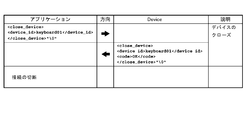
- the application receives the response including a response message to the close message transmitted by the device control apparatus, and closes communication with the device based on the response message to the close message.
- the device control system control method of the present invention includes a device for inputting or outputting data, a terminal for executing an application, and a device control apparatus connected to the device, and a markup language generated by the application.
- a request is transmitted to the device control apparatus, the request is received by the device control apparatus, a response in the markup language is generated, and the generated response is transmitted to the terminal.
- the device control apparatus transmits information included in the request to the device, and the device performs processing based on the information included in the request, and results of processing based on the information included in the request. Is transmitted to the device control apparatus, and the response including the result of processing based on the information included in the request transmitted by the device is transmitted to the terminal.
- the application transmits the request including a communication establishment message requesting the device control apparatus to establish a communication path to the device control apparatus, and the device control apparatus receives the request including the communication establishment message. Then, the response including the response message for the communication establishment message included in the request is transmitted to the application. The application establishes the communication path with the device control apparatus based on a response message to the communication establishment message included in the response transmitted by the device control apparatus.
- the application transmits to the device control apparatus the request including an open message for opening communication with the device connected to the device control apparatus.
- the device control apparatus receives the request including the open message
- the device control apparatus transmits the response including a response message to the open message included in the request to the application.
- the response including the response message to the open message transmitted by the device control apparatus by the application is received, and communication with the device is enabled based on the response message to the open message.
- the application is stopped after communication between the application and the device is enabled, the request including a close message for closing communication with the device by the application is transmitted to the device control apparatus.
- the device control apparatus receives the request including the close message, and transmits the response including a response message corresponding to the close message to the application. Further, the response including the response message to the close message transmitted from the device control apparatus by the application is received, and the communication with the device is closed based on the response message to the close message.
- FIG. 1 is an external perspective view of an intelligent printer. It is a figure which shows a connector panel. It is a figure which shows the example of a connection of a wireless LAN unit. It is a figure which shows the workflow of environment construction. It is a figure which shows the procedure of registration of a device control script.
- FIG. 6 is an explanatory diagram of a printer control XML document.
- FIG. 6 is an explanatory diagram of a printer control XML document.
- FIG. 6 is an explanatory diagram of a printer control XML document.
- FIG. 6 is an explanatory diagram of a printer control XML document.
- FIG. 6 is an explanatory diagram of a printer control XML document.
- FIG. 6 is an explanatory diagram of a printer control XML document.
- FIG. 6 is an explanatory diagram of a printer control XML document.
- FIG. 6 is an explanatory diagram of a printer control XML document.
- FIG. 6 is an explanatory diagram of a printer control XML document.
- FIG. 6 is an explanatory diagram of a printer control XML document.
- FIG. 6 is an explanatory diagram of a printer control XML document.
- FIG. 6 is an explanatory diagram of a printer control XML document.
- FIG. 6 is an explanatory diagram of a printer control XML document.
- FIG. 6 is an explanatory diagram of a printer control XML document.
- FIG. 6 is an explanatory diagram of a printer control XML document.
- FIG. 6 is an explanatory diagram of a printer control XML document.
- FIG. 6 is an explanatory diagram of a printer control XML document.
- FIG. 6 is an explanatory diagram of a printer control XML document.
- FIG. 6 is an explanatory diagram of a printer control XML document.
- FIG. 6 is an explanatory diagram of a printer control XML document.
- FIG. 6 is an explanatory diagram of a printer control XML document.
- FIG. 6 is an explanatory diagram of a printer control XML document.
- FIG. 6 is an explanatory diagram of a printer control XML document.
- FIG. 6 is an explanatory diagram of a printer control XML document.
- FIG. 6 is an explanatory diagram of a printer control XML document.
- FIG. 6 is an explanatory diagram of a printer control XML document.
- FIG. 6 is an explanatory diagram of a printer control XML document.
- FIG. 6 is an explanatory diagram of a printer control XML document.
- FIG. 6 is an explanatory diagram of a printer control XML document.
- FIG. 6 is an explanatory diagram of a printer control XML document.
- FIG. 6 is an explanatory diagram of a printer control XML document.
- FIG. 6 is an explanatory diagram of a printer control XML document.
- FIG. 6 is an explanatory diagram of a printer control XML document.
- FIG. 6 is an explanatory diagram of a printer control XML document.
- FIG. 6 is an explanatory diagram of a printer control XML document.
- FIG. 6 is an explanatory diagram of a printer control XML document.
- FIG. 6 is an explanatory diagram of a printer control XML document.
- FIG. 6 is an explanatory diagram of a printer control XML document.
- FIG. 6 is an explanatory diagram of a printer control XML document.
- FIG. 6 is an explanatory diagram of a printer control XML document.
- FIG. 6 is an explanatory diagram of a printer control XML document.
- FIG. 6 is an explanatory diagram of a printer control XML document.
- FIG. 6 is an explanatory diagram of a printer control XML document.
- FIG. 6 is an explanatory diagram of a printer control XML document.
- FIG. 6 is an explanatory diagram of a printer control XML document.
- FIG. 6 is an explanatory diagram of a printer control XML document.
- FIG. 6 is an explanatory diagram of a printer control XML document.
- FIG. 6 is an explanatory diagram of a printer control XML document.
- FIG. 6 is an explanatory diagram of a printer control XML document.
- FIG. 6 is an explanatory diagram of a printer control XML document.
- FIG. 6 is an explanatory diagram of a printer control XML document.
- FIG. 6 is an explanatory diagram of a printer control XML document.
- FIG. 6 is an explanatory diagram of a printer control XML document.
- FIG. 6 is an explanatory diagram of a printer control XML document.
- FIG. 6 is an explanatory diagram of a printer control XML document.
- FIG. 6 is an explanatory diagram of a printer control XML document.
- FIG. 6 is an explanatory diagram of a printer control XML document.
- FIG. 6 is an explanatory diagram of a printer control XML document.
- FIG. 6 is an explanatory diagram of a printer control XML document.
- FIG. 6 is an explanatory diagram of a printer control XML document.
- FIG. 6 is an explanatory diagram of a printer control XML document.
- FIG. 6 is an explanatory diagram of a printer control XML document.
- FIG. 6 is an explanatory diagram of a printer control XML document.
- FIG. 6 is an explanatory diagram of a printer control XML document.
- FIG. 6 is an explanatory diagram of a printer control XML document.
- FIG. 6 is an explanatory diagram of a printer control XML document.
- FIG. 6 is an explanatory diagram of a printer control XML document.
- FIG. 6 is an explanatory diagram of a printer control XML document.
- FIG. 6 is an explanatory diagram of a printer control XML document.
- FIG. 6 is an explanatory diagram of a printer control XML document.
- FIG. 6 is an explanatory diagram of a printer control XML document.
- FIG. 6 is an explanatory diagram of a printer control XML document.
- FIG. 6 is an explanatory diagram of a printer control XML document.
- FIG. 6 is an explanatory diagram of a printer control XML document.
- FIG. 6 is an explanatory diagram of a printer control XML document.
- FIG. 6 is an explanatory diagram of a printer control XML document.
- FIG. 6 is an explanatory diagram of a printer control XML document.
- FIG. 6 is an explanatory diagram of a printer control XML document.
- FIG. 6 is an explanatory diagram of a printer control XML document.
- FIG. 6 is an explanatory diagram of a printer control XML document.
- FIG. 6 is an explanatory diagram of a printer control XML document.
- FIG. 6 is an explanatory diagram of a printer control XML document.
- FIG. 6 is an explanatory diagram of a printer control XML document.
- FIG. 6 is an explanatory diagram of a printer control XML document.
- FIG. 6 is an explanatory diagram of a printer control XML document.
- FIG. 6 is an explanatory diagram of a printer control XML document.
- FIG. 6 is an explanatory diagram of a printer control XML document.
- FIG. 6 is an explanatory diagram of a printer control XML document. It is explanatory drawing of the message for customer displays. It is explanatory drawing of the message for customer displays. It is explanatory drawing of the message for customer displays. It is explanatory drawing of the message for customer displays. It is explanatory drawing of a customer display control XML document. It is explanatory drawing of a customer display control XML document. It is explanatory drawing of a customer display control XML document.
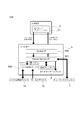
- FIG. 1 is a diagram showing a configuration of a device control system 100 according to an embodiment to which the present invention is applied.
- the device control system 100 includes a terminal 3 and a printer (intelligent printer) 5.
- the terminal 3 may be any device that can connect to a network and perform socket communication, and a personal computer, a smartphone, a tablet computer, or the like can be used.
- the terminal 3 has an environment in which socket communication is possible and an XML document that is a markup language can be handled.
- an OS operating system
- iOS registered trademark
- Android registered trademark
- Windows registered trademark
- Linux registered trademark
- Mac registered trademark
- the terminal 3 and the printer 5 are connected via a communication network.
- the device control system 100 has a wireless LAN access point 11, and the wireless LAN access point 11 is cable-connected to the printer 5.
- the terminal 3 and the printer 5 communicate with each other by wirelessly connecting the terminal 3 and the wireless LAN access point 11.
- the printer 5 is connected to a network printer 7, a customer display 8, and a barcode scanner 9 as devices to be controlled.
- the network printer 7 is connected to the printer 5 via a network.
- the network printer 7 is a printer different from the local printer 55 (FIG. 2) provided in the printer 5, and includes a wired LAN or wireless LAN interface.
- the customer display 8 is connected to a USB interface described later.
- the barcode scanner 9 is connected via a USB interface described later.
- These devices are generally referred to as peripherals, but are referred to as devices in the following description.
- Devices that can be connected to the printer 5 are not limited to the devices shown in FIG. For example, a display and a key input device such as a keyboard are included.
- a device that can be controlled by an OS standard HID (Human interface device) driver, a serial communication device that can be operated by an OS standard serial communication driver, and a USB device that can be controlled similarly to the serial communication device are included.
- OS standard HID Human interface device
- the operation of the device control system 100 is as follows. (1) An application is arranged on the terminal 3 and displayed. (2) A request message is transmitted from the application to the printer 5. (3) Data is transmitted from the printer 5 to a controllable device. (4) Control devices and network printers connected to the printer 5. (5) The printer 5 returns a response to the terminal 3.
- FIG. 2 is a diagram illustrating a functional configuration of the device control system 100.
- the device control system 100 includes a device XML, which is a command system of XML, which is a markup language, for controlling a device (peripheral device) connected to the printer 5.
- the terminal 3 has an application 31.
- the application 31 is a native application program installed in the terminal 3.
- the device application program interface (API) 33 transmits a request message in XML format to the printer 5 by socket communication (Request).
- a device service interface 501 and a device control script 502 are incorporated in the printer 5.
- the device service interface 501 and the device control script 502 interpret the request message and output the request to the device control script 502.
- the device control script 502 controls the key input device 18 and the serial communication device 19.
- the device control script 502 outputs events of the key input device 18 and the serial communication device 19 and responses of control results to the device service interface 501.
- the key input device 18 includes the keyboard 14 of FIG. 1
- the serial communication device 19 includes the barcode scanner 9 and the cash drawer 13 of FIG.
- the device service interface 501 transmits and receives data to and from the local printer 55.
- the local printer 55 is a printer provided in the printer 5.
- the device service interface 501 transmits and receives data to and from the network printer 7 and the customer display 8.
- the device service interface 501 outputs an XML format response (Response) to the application 31 based on the control results of the network printer 7, the customer display 8 and the local printer 55 and the response of the device control script 502.
- the printer 5 controls the device by the device service interface 501 and the device control script 502.
- the devices controlled in the example of FIG. 2 are the network printer 7, customer display 8, key input device 18, serial communication device 19, and local printer 55.
- the device connected to the printer 5 can be controlled by the terminal 3 using the device XML included in the device control system 100.
- the device XML has the following features. ⁇ There is no need to prepare a separate device (computer, etc.) to control the device. A device that operates with a standard driver provided in the OS of the printer 5 can be used in the device control script 502 without installing the driver. • When a device is accessed, the device is locked exclusively. Even if accessed simultaneously from a plurality of terminals 3, control is not mixed. When the terminal 3 controlling the device releases the device, the released device can be controlled from the other terminal 3.
- the device API 33 has the following features.
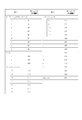
- the command for printing ruled lines can be used when the local printer 55 of the printer 5 or the network printer 7 supports the “ruled line command”. -When the buzzer is connected to the printer 5 or the network printer 7, the buzzer function can be used. -The key code that can be acquired from the keyboard 14 is limited. The key codes that can be acquired from the keyboard 14 are as shown in FIGS. 3A and 3B.
- the printer 5 includes a CPU, a RAM, a flash ROM, an NV (nonvolatile memory), a video controller, an auxiliary storage device (SSD: solidstate drive), an interface, and a local printer (printing unit).
- the printer 5 may include a speaker.
- the local printer is a thermal printer that prints on roll paper of 80 mm width or 58 mm width.
- a POS (point of sales) system can be installed in the printer 5.
- the OS (operating system) of the printer 5 is based on, for example, Windows (registered trademark) and is stored in the auxiliary storage device.
- the printer 5 includes a device control program that is software for the terminal 3 to control a device connected to the printer 5. For this reason, the terminal 3 does not require a driver program.
- the printer 5 includes a local printer included in the printer 5 and a Windows (registered trademark) standard device driver program (APD), a UPOS driver, an OPOS driver, and the like that are software for controlling the device.
- a web application can be installed in the printer 5. Thereby, as shown in FIG. 3, the printer 5 can be used as an application server.
- the web application can use PHP and Perl server-side scripts and SQL Lite database access (server-side scripts).
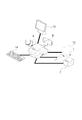
- FIG. 4 is a diagram illustrating a connection example of devices connected to the printer 5.
- the printer 5 can be connected to the network printer 7, customer display 8, and barcode scanner 9 described above.
- a display 12, a cash drawer 13, and a keyboard 14 can be connected to the printer 5.
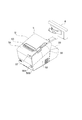
- FIG. 5 is an external perspective view of the printer 5.
- a roll paper cover 51 is provided on the top of the printer 5. The roll paper cover is opened by pressing the cover open button 52, and the roll paper can be taken in and out.
- a discharge port for discharging the roll paper after printing has a manual cutter 53 for manually cutting the roll paper and a cutter cover 54.
- the cutter cover 54 is opened when a paper jam occurs in the local printer of the printer 5 and when the roll paper cover 51 is not opened.
- the printer 5 includes a power switch 56B, a reset button 56A, an LED display unit 57, and a control panel 58.
- the LED display unit 57 includes a disk access LED indicating access to the auxiliary storage device and a status LED.
- the status LED notifies a high temperature warning of the CPU during the operating state of the OS, the standby mode of the OS, the power off state, and the OS startup sequence.
- the control panel 58 includes a power LED, an error LED, a roll paper LED, and a feed button.
- the power LED lights up when power is supplied.
- the error LED is turned off during normal operation, and is turned on when resetting, and when the end of the roll paper is detected and printing is stopped.
- the paper LED is turned off when the remaining amount of roll paper is sufficient, is turned on when the remaining amount is low, and blinks when the self-diagnosis function is executed.
- the feed button is pressed, the roll paper is conveyed line by line or continuously.
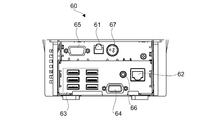
- FIG. 6 is a view showing the connector panel 60.
- the connector panel 60 includes a drawer kick connector 61, an Ethernet connector 62, a USB connector 63, a VGA connector 64, a COM connector 65, a line output 66, and a DC input 67.
- the connector panel 60 corresponds to the connection portion of the present invention.
- the device of the printer 5 includes a local printer 55 provided in the main body of the printer 5. Therefore, the connection unit includes the connector panel 60 and the interface inside the printer 5.
- the cash drawer 13 or an optional buzzer is connected to the drawer kick connector 61.
- the Ethernet connector 62 is connected to the network.
- the USB connector 63 has six USB ports.
- a customer display 8, a barcode scanner 9, a keyboard 14 and other devices are connected to the USB connector 63.
- the display 12 is connected to the VGA connector 64.
- a serial interface of a device that performs serial communication is connected to the COM connector 65.
- the line output 66 is connected to an external speaker.
- FIG. 7 is a diagram illustrating a connection example of the wireless LAN unit 17.
- the wireless LAN unit 17 is inserted into the USB extension cable 15, and the USB extension cable 15 is inserted into the USB connector 63. Thereby, the printer 5 can be connected to the wireless LAN.
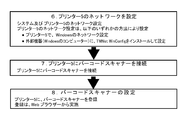
- FIG. 8 shows an environment construction workflow.
- the network setting of the printer 5 can be set by any of the following methods. -Configure Windows (registered trademark) network settings on the printer 5. ⁇ Install TMNet WinConfig which is the setting application of the printer 5 and set it in the external device (Windows computer). 2. Connect the device to the printer 5 Connect the device to the printer 5.
- the connectable devices are the customer display 8, the barcode scanner 9, the display 12, the cash drawer 13, the keyboard 14, and the like.
- a device that can be controlled by an OS standard HID driver, a serial communication device that can be operated by an OS standard serial communication driver, and a USB device that can be controlled in the same manner as the serial communication device are included.
- the connector panel 60 of FIG. 6 has only one COM connector 65, a serial-USB conversion cable and a driver program corresponding to serial-USB conversion can connect a plurality of serial communication devices. 3.
- Registration of Device Control Script When a device other than a product supported by the printer 5 is controlled by the printer 5, a device control script prepared by the user is registered. Registration is done from a web browser. 4). Registration of Device A device connected to the printer 5 is registered in the software of the printer 5. Registration is done from a web browser. Procedure 1.
- the web browsers used in ⁇ 5 include a web browser that operates on the terminal 3.
- a method for registering a device control script prepared in advance by the user will be described with reference to FIG.
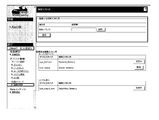
- the registration procedure is as follows. (1) Prepare a customized device control script. (2) Turn on the printer 5. (3) Start a web browser and enter the URL (http: /// IP address of printer 5 / WebConfig /). (4) TMNetWebConfig starts. Click [Web Service Settings]-[Register / Delete] on the screen in FIG. (5) The “control script” screen is displayed. Click [Browse] in [Control script to be registered], and select the device control script to be registered. (6) Click [Register]. Device control scripts are registered and listed in [Registered Control Scripts] at the bottom of the screen.
- TMNetWebConfig is displayed with a web browser to register the device.
- the registration procedure is as follows. (1) Start a web browser and enter the URL (http: /// IP address of printer 5 / WebConfig /). (2) TMNetWebConfig starts. Click [Web Service Settings]-[Device Registration] on the screen in FIG. 10 according to the type of device to be registered. In FIG. 10, the device is displayed in [Device Registration]. Click the type of device to register.
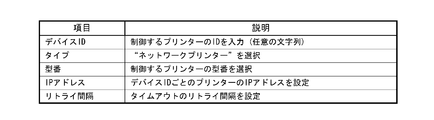
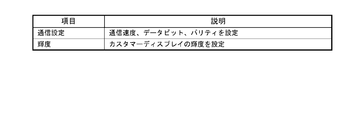
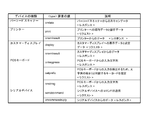
- the device type is selected from five types including a printer, a display, a key input device, a serial communication device, and others. The details of the device type are as shown in FIG.
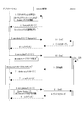
- FIG. 17 The basic programming sequence of Device XML is as shown in FIG. “Applications” in FIG. 17 corresponds to the application 31, “DeviceControl” corresponds to a device control function (device service interface 501), and “Device” indicates a device to be controlled.
- the device returns the execution result.
- the device service interface 501 returns device_data_message or error message.
- the application 31 transmits close_device_nmessage. The connection with the device service interface 501 and the socket I / F communication are disconnected.
- the device service interface 501 transmits a “Cmd ()” command to the device.
- 9 Device closes. 9.1: The device service interface 501 returns a response to the application 31.
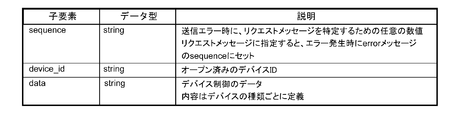
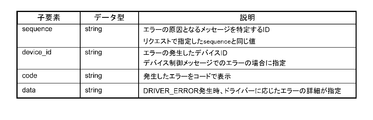
- each data item is as shown in FIG. 19A, and the contents of each data are shown in FIG. 19B.
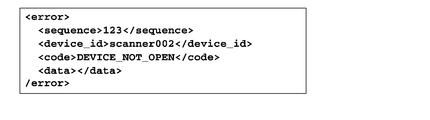
- FIGS. 20A and 20B Examples of communication data between the application 31 and the device service interface 501 are shown in FIGS. 20A and 20B.
- a NULL character is represented by “ ⁇ 0”.
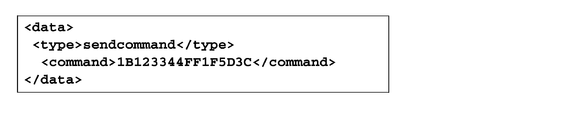
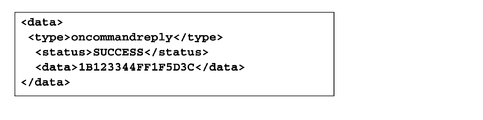
- 20A and 20B show examples of data for establishing a connection, obtaining administrator information, opening a device, controlling a device, and closing a device.
- the arrangement method of ⁇ data> element of ⁇ device_data> message is explained.
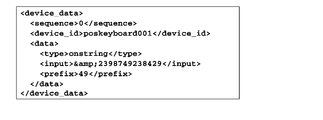
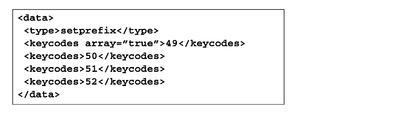
- An example of expressing keycodes [49,50,51,52]; is shown in FIG.
- the ePOS-Device XML provides the following: • Message ( Figure 22)
- the message is an XML of a message requested from the application 31 to the printer 5 and a response message from the printer 5 to the application 31.
- -Message data for each device Fig. 23
- XML for storing request and response data for each device to be controlled. This format is a child element of the ⁇ data> element of the ⁇ device_data> message.
- the message data for each device will be described.
- the message data for each device is a child element of the ⁇ data> element of the ⁇ device_data> message, and specifies data for controlling the device.
- the components of message data differ depending on the type of device. Before specifying the data, specify the message data type in the ⁇ type> element, and then specify the child element data.
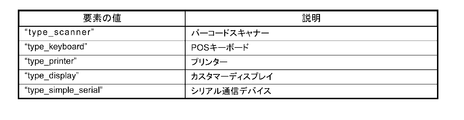
- ⁇ Type> elements that can be used for each device type are as shown in FIG.
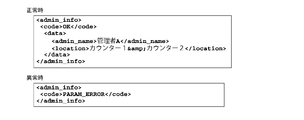
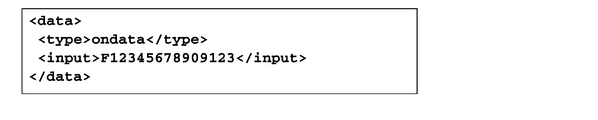
- ⁇ admin_info> The administrator information set in the printer 5 is returned. Information set by TMNet WebConfig. This message is included in [Request]. Request administrator information to the printer 5. [Example] ⁇ admin_info> ⁇ /admin_info> This message is included in [Response]. The administrator information is returned to the application 31. Child elements, data types, and descriptions are shown in FIG. 24A. ⁇ Code The code element is shown in FIG. 24B. ⁇ Data The data element is shown in FIG. 24C. The character string of received data will be described. The character string shown in FIG. 24D is escaped. [Example] FIG. 24E shows an example of a response at normal time and abnormal time.
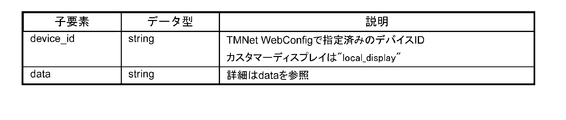
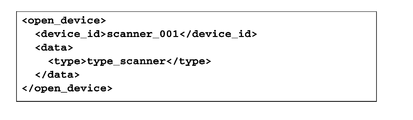
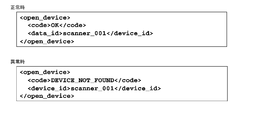
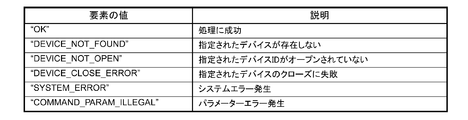
- ⁇ open_device> Enable the device associated with the device ID. The exclusive use right of the specified device is given to the requested application 31. This message is included in [Request]. Specify the device to open. Child elements, data types, and descriptions are shown in FIG. 25A. ⁇ Data The data element is shown in FIG. 25B. [Example] FIG. 25C shows an example of a request. This message is included in [Response]. The device open result is returned to the application 31. Child elements, data types and descriptions are shown in FIG. 25D. ⁇ Code The code element is shown in FIG. 25E. [Example] FIG. 25F shows an example of the response at the normal time and at the abnormal time.
- FIG. 26A shows an example of a request. This message is included in [Response].
- the device closing result is returned to the application 31.
- Child elements, data types and descriptions are shown in FIG. 26C.
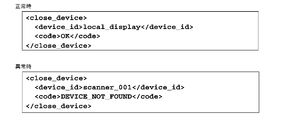
- FIG. 26E shows an example of a response at normal time and abnormal time.
- FIG. 27A shows an example of a request. This message is included in [Response]. Returns data from the device. As a result of device control, events that occurred in the device and input data from the device are included. Child elements, data types and descriptions are shown in FIG. 27C. [Example] FIG. 27D shows an example of a response.
- FIG. 28A shows Child elements, data types, and descriptions.
- FIG. 28B shows an example of a response.
- FIG. 29A The character string of received data will be described.
- the character string in FIG. 29B is escaped.
- FIG. 29C shows an example of a response.
- the printer message data will be described.
- the print data will be described in “Printer control XML” described later.
- ⁇ type> print ⁇ / type> This message is included in [Request].
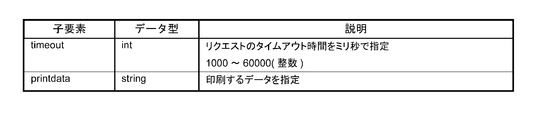
- Child elements, data types, and descriptions are shown in FIG. 30A.
- FIG. 30B shows an example of a request.
- FIG. 31A shows an example of a response.
- the printer control XML which is an XML document for controlling the printer, will be described.
- the printer message data will be described in “Printer Message Data” described later.
- ⁇ epos-print> This is an XML document transmitted from the application to the printer. Request the printer to execute the specified function.
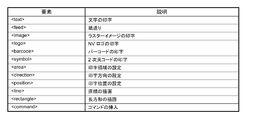
- ⁇ epos-print> has an element. [attribute] ⁇ Xmlns Declare the name of epos-print. [Child Element] Child elements are shown in FIG. 32A. [Example] FIG. 32B shows an example of an XML document.
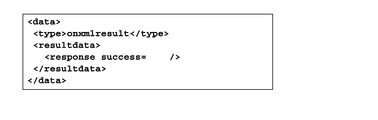
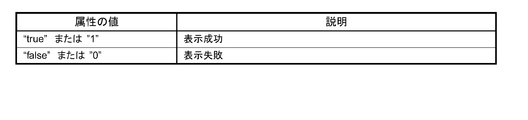
- FIG. 33A An XML document returned from the printer to the application.
- [attribute] ⁇ Success Get the display result.
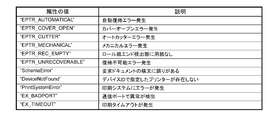
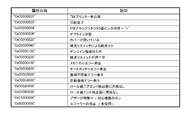
- the attribute values are shown in FIG. 33A.
- the attribute values are shown in FIG. 32B.
- the attribute values are shown in FIG. 32C.
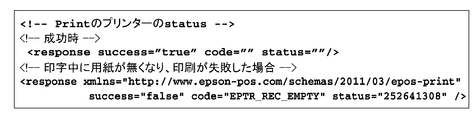
- FIG. 33D shows an example of an XML document.
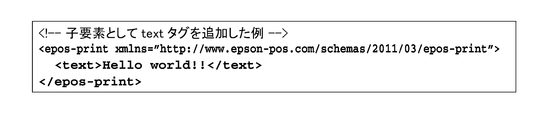
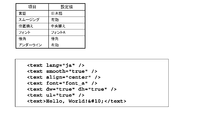
- ⁇ text> Specify the character string to be printed.
- settings for character strings such as character decoration, print position, and line feed amount are also made.
- the character is developed at the current print position with reference to the baseline dot of the character (“Printer specifications” on page 151).
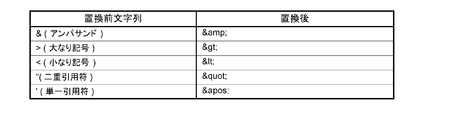
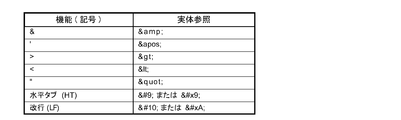
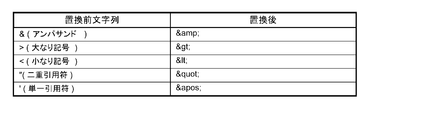
- the horizontal tab, line feed, and the following symbols necessary for printer control are described using the entity reference in FIG. 34A.
- attribute value ⁇ Lang Specify the target language. The attribute value is shown in FIG. 34B. Character codes that can be printed depend on the specifications of each printer. ⁇ Font Specifies the character font. The attribute value is shown in FIG. 34C.
- FIG. 34M shows an example of setting for printing a character string.
- the “align” attribute is specified in the “line head state”.
- the align attribute set in this element is also applied to the align attribute of the image, logo, barcode, and symbol elements.
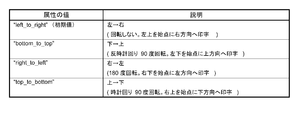
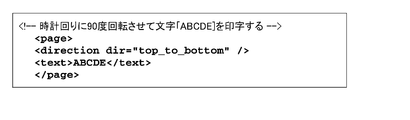
- FIG. 34N shows the rotation specification.
- the rotation specification is invalid.
- the print direction is set from right to left (right_to_left) in direction, and 180 ° rotation printing is performed.
- the rotate attribute set in this element is also applied to the rotate attribute of the barcode and symbol elements.
- Linespc (Initial value: “30”) Specify the paper feed amount per line in dots.
- FIG. 34P shows an example of setting for printing a character string.
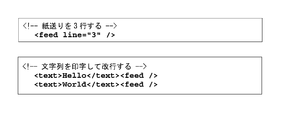
- ⁇ feed> Specify the paper feed amount. Specify the paper feed amount in dots or lines. If no paper feed amount is specified, one line of paper is fed (line feed). Also, set the amount of line breaks per line. [attribute] ⁇ Unit Specify the paper feed amount in dots. ⁇ Line Specify the paper feed amount in lines. ⁇ Linespc (Initial value: “30”) Specify the paper feed amount per line in dots. If the paper feed amount per line is 30 dots, up to 240 lines can be specified. In standard mode and page mode, the line feed amount is kept separately. If the linespc attribute is specified, it affects the linespc attribute of the following ⁇ text> and ⁇ feed>. [Example] FIG. 35 shows an example of an XML document.
- ⁇ image> Specifies raster format bit image data.
- Data type xs: base64Binary The raster format is data obtained by scanning pixels in the horizontal direction with the upper left corner of the image as the origin. The data is 1 bit per pixel in the case of 2 gradations, and 4 bits per pixel in the case of 16 gradations. Also, padding with 0 so that one line of scan data is in bytes.
- the raster image is developed at the current print position based on the lower left dot of the raster image. The print position does not move.
- the print position is set so that the raster image does not protrude from the print area. Because it has an influence on the reading quality of barcodes and 2D codes printed with multi-tone raster images, it prints in 2 gray levels.
- the raster format bit image is created by the ePOS-Print XML generation tool or by the user's application. Consider the following points when creating a user application. -For 2 gradations: Set the image width to a multiple of 8 or set the missing bit to 0. -For 16 gradations: Set the image width to a multiple of 2 or set the missing bits to 0. [attribute] ⁇ Width Specifies the width of the image in dots. ⁇ Height Specifies the height of the image in dots.
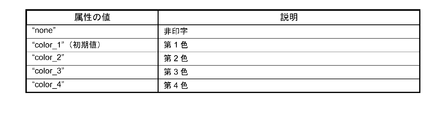
- FIG. 36A Color Specify the text color.
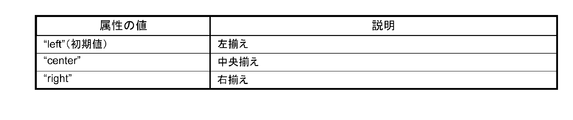
- FIG. 36B Align Specify the print position.
- the attribute values are shown in FIG. 36B.
- the align attribute set in this element is also applied to the align attribute of the text, logo, barcode, and symbol elements.
- ⁇ Mode (Optional (optional)) Specify the color mode.
- the attribute values are shown in FIG. 36C. [Example] FIG. 36D shows an example of an XML document.
- ⁇ logo> Specify the logo registered in the printer's NV memory. Register the logo in advance on the printer using a model-specific utility or logo registration utility (TMFLogo). In the page mode, the logo is developed at the current print position based on the lower left dot of the logo.
- TMFLogo model-specific utility or logo registration utility
- the logo is developed at the current print position based on the lower left dot of the logo.
- ⁇ Key1 Specify the value of key code 1 set when registering the NV logo.
- ⁇ Key2 Specify the value of key code 2 set when registering the NV logo. Must be specified.
- ⁇ Align Specify the print position.
- the attribute values are shown in FIG. 37A.
- the align attribute set in this element is also applied to the align attribute of the text, image, barcode, and symbol elements.
- FIG. 37B shows an example of an XML document.
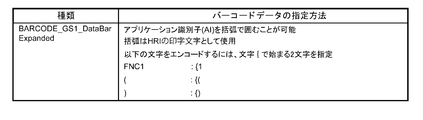
- ⁇ barcode> Specify the barcode data as a character string. If the setting that does not conform to the barcode standard is made, or if the barcode is larger than the print area of the printer, the barcode is not printed. In the page mode, the barcode is developed at the current print position based on the lower left dot (except HRI) of the barcode.
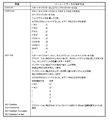
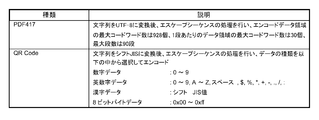
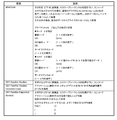
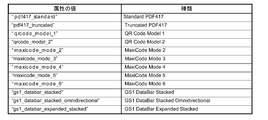
- Barcode type The barcodes shown in FIGS. 38A, 38B, and 38C can be designated. When specifying binary data that cannot be expressed by a character string, it is specified by an escape sequence shown in FIG. 38D.
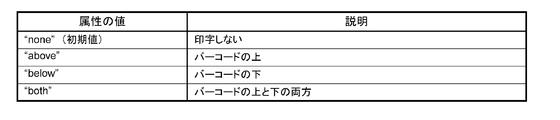
- attribute value ⁇ Type Specify the barcode type. The attribute values are shown in FIG. 38E. ⁇ Hri Specify the location of the HRI.
- the attribute values are shown in FIG. 38F.
- Font Specify the HRI font.
- the attribute values are shown in FIG. 38G.
- Width (Initial value: “3”) Specifies the module width in dots. Specify an integer value between 2 and 6.
- Height (Initial value: “162”) Specifies the height of the module in dots.
- Align Specify the print position.
- the attribute values are shown in FIG. 38H.
- the align attribute set in this element is also applied to the align attribute of the text, image, logo, and symbol elements.
- Rotate Specify inverted printing.
- the attribute values are shown in FIG.
- the rotate attribute set in this element is also applied to the rotate attribute of the text and symbol elements.
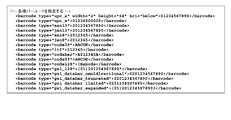
- FIG. 38J shows an example of an XML document.
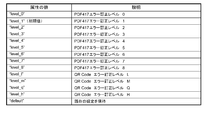
- FIG. 39E ⁇ Level Specify the error correction level.
- the attribute values are shown in FIG. 39E.
- the level is selected according to the type of 2D code. For MaxiCode, 2D GS1DataBar, select default.
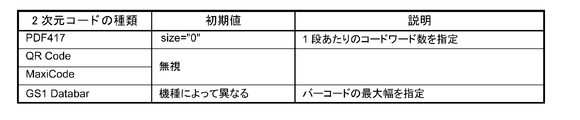
- ⁇ Width Specify the width of one module in dots. Details are shown in FIG. 39F.
- ⁇ Height Specify the height of one module in dots. Details are shown in FIG. 39G.
- Size Details are shown in FIG. 39H.
- Align Specify the print position.
- the attribute values are shown in FIG. 39I.
- the align attribute set in this element is also applied to the align attribute of the text, image, logo, and barcode elements.
- ⁇ Rotate Specify inverted printing The attribute values are shown in FIG. 39J.
- the rotate attribute set in this element is also applied to the rotate attribute of the text and barcode elements.
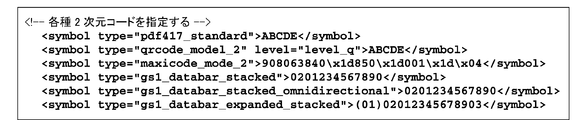
- FIG. 39K shows an example of an XML document.
- ⁇ hline> Specify a horizontal ruled line.
- ⁇ X1 Specifies the drawing start position (in dots) of the horizontal ruled line.
- ⁇ X2 Specifies the drawing end position (in dots) of the horizontal ruled line.
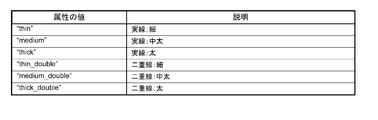
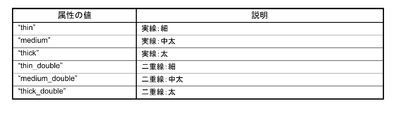
- Style (option) Specifies the type of ruled line.
- the attribute values are shown in FIG. 40A.
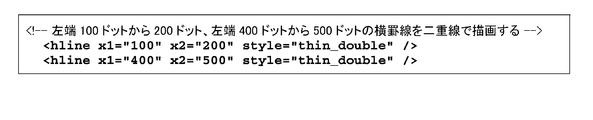
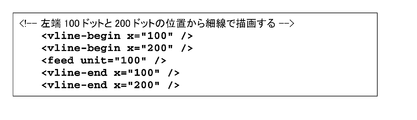
- FIG. 40B shows an example of an XML document.
- FIG. 41A shows an example of an XML document.
- FIG. 42A An example of the attribute value is shown in FIG. 42A.
- FIG. 42B shows an example of an XML document.
- FIG. 43A shows an example of an XML document.
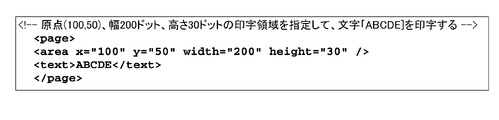
- ⁇ area> Specifies the page mode print area. Set the print area by specifying the origin, width, and height based on the absolute origin. As shown in FIG. 44A, the absolute origin is the upper left dot of the printable area. Specify the print area according to the print contents. When the print data exceeds the print area, the print data is cut off halfway. This element is used in the page element. [attribute] ⁇ X (Initial value: “0”) Specifies the horizontal origin in dots. ⁇ Y (Initial value: “0”) Specify the vertical origin in dots. ⁇ Width (Initial value: Depends on model) Specifies the width of the print area in dots.
- FIG. 44B shows an example of an XML document.
- FIG. 45A shows an example of an XML document.
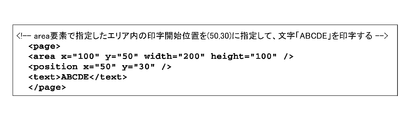
- ⁇ position> Specify the print position in page mode. Specify the print position based on the start point of the print area. The starting point of the print area moves in accordance with the rotation of the print area. This element is used in the page element. [attribute] ⁇ X (Initial value: “0”) Specify the horizontal position in dots. ⁇ Y (Initial value: “21”) Specify the vertical position in dots.
- the print start position (coordinates) is specified according to the print contents. Refer to the following. -When printing a character string Specify the left end of the baseline of the first character. It is an optional feature when printing with the standard size and left justification. When printing a character whose height is twice, specify y to be “42” or more.
- FIG. 46 shows an example of an XML document.
- FIG. 47A ⁇ X1 Specifies the drawing start position (in dots) of the horizontal ruled line.
- ⁇ Y1 Specifies the drawing start position (in dots) of the vertical ruled line.
- ⁇ X2 Specifies the drawing end position (in dots) of the horizontal ruled line.
- ⁇ Y2 Specifies the drawing end position (in dots) of the vertical ruled line.
- ⁇ Style Specifies the type of ruled line.
- the attribute values are shown in FIG. 47A.
- FIG. 47B shows an example of an XML document.
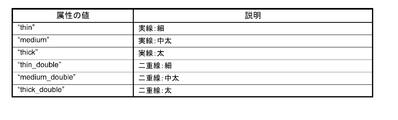
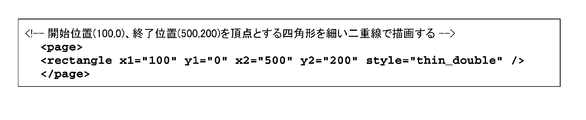
- ⁇ rectangle> Draw a rectangle in page mode. This element is used in the page element. In standard mode, hline element, vline-begin element, and vline-end element are used. [attribute] ⁇ X1 Specifies the drawing start position (in dots) of the horizontal ruled line. ⁇ Y1 Specifies the drawing start position (in dots) of the vertical ruled line. ⁇ X2 Specifies the drawing end position (in dots) of the horizontal ruled line. ⁇ Y2 Specifies the drawing end position (in dots) of the vertical ruled line. ⁇ Style (option) Specifies the type of ruled line. An example of the attribute value is shown in FIG. 48A. [Example] FIG. 48B shows an example of an XML document.
- FIG. 49A An example of the attribute value is shown in FIG. 49A.
- FIG. 49B shows an example of an XML document.
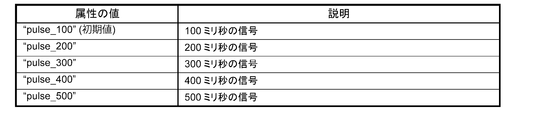
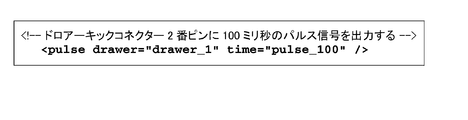
- ⁇ pulse> Specify the signal output for the drawer kick connector. A buzzer can be sounded depending on the model.
- [attribute] ⁇ Drawer (option) Specify the drawer kick connector. The attribute values are shown in FIG. 50A.
- ⁇ Time (option) Specify the on time of the drawer kick signal.
- the attribute values are shown in FIG. 50B.
- An example of an XML document is shown in the figure.
- the customer display message data will be described.
- the display data will be described in “Customer Display Control XML” described later.
- FIG. 52A shows an example of a request.
- FIG. 53A shows an example of a response.
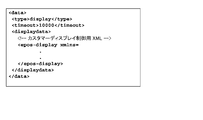
- XML for customer display control which is an XML document for controlling customer display, will be described.
- the message data of the customer display is as described above in the “customer display message data”.
- ⁇ epos-display> An XML document sent from the application to the customer display. Request the customer display to execute the specified function.
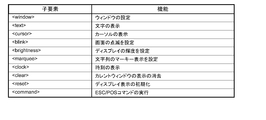
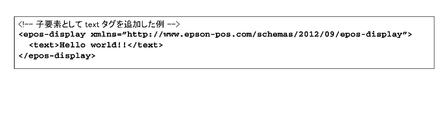
- ⁇ epos-display> has child elements necessary for controlling the customer display. [attribute] ⁇ Xmlns Declare the name of epos-display. The child elements are shown in FIG. 54A. [Example] FIG. 54B shows an example of an XML document.
- FIG. 55C shows an example of an XML document.
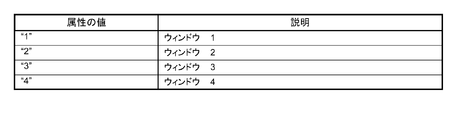
- FIG. 57A ⁇ Destroy Specifies whether to delete the window specified by number.
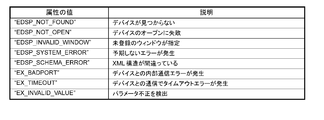
- FIG. 57B The attribute values are shown in FIG. 57B. [Error condition] In the case of an error, the value of FIG. 57C is returned. [Example] FIG. 57D shows an example of an XML document.
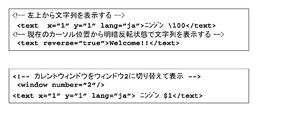
- ⁇ text> Controls the display of character strings. -When attributes x and y are specified, display is performed from the specified cursor position. -If the attributes x and y are not specified, the display starts from the current cursor position. [attribute] ⁇ X Specify the x coordinate (1 to 20) of the text display with an integer value. ⁇ Y Specify the y coordinate (1-2) of the text display as an integer value. ⁇ Reverse Specifies light / dark reversal of display characters. The attribute values are shown in FIG. 58A. ⁇ Lang Specify the language for text display. If omitted, the current setting is maintained. The attribute values are shown in FIG. 58B. [Example] FIG. 58C shows an example of an XML document.
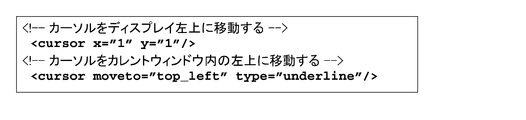
- ⁇ cursor> Control cursor position and display settings. ⁇ Specify the cursor coordinates in the display by specifying x and y. ⁇ Specify the cursor position in the current window by specifying moveto. -If x, y, moveto are specified at the same time, neither is performed. [attribute] ⁇ X Specify an integer value for the x coordinate (1 to 20) of the cursor. ⁇ Y Specifies the y coordinate (1-2) of the cursor as an integer value. ⁇ Moveto Specifies the cursor position in the current window. The attribute values are shown in FIG. 59A. ⁇ Type Specify how to display the cursor. If omitted, the current setting is maintained. The attribute values are shown in FIG. 59B. [Example] FIG. 59C shows an example of an XML document.
- ⁇ blink> Controls the blinking of the screen. Repeats blinking at the interval specified in interval.
- the actual blinking interval is rounded up by 50ms. For example, when the interval is 1 to 50, 50 ms, and when 51 to 100, 100 ms.
- [attribute] ⁇ Interval Specify the blinking interval as an integer value. The attribute values are shown in FIG. 60A.
- FIG. 60B shows an example of an XML document.
- FIG. 61A shows an example of an XML document.
- ⁇ marquee> Controls the marquee display of strings. Displays the specified string one character at a time specified in uwait. After displaying to the end, wait for the time specified by rwait and display again from the beginning.
- [attribute] ⁇ Format Specifies the marquee display pattern. The attribute values are shown in FIG. 62A. ⁇ Repeat Specify the number of display repetitions. The attribute values are shown in FIG. 62B. ⁇ Uwait Specifies the waiting interval for displaying one character in milliseconds. The attribute value is shown in FIG. 62C. ⁇ Rwait Specifies the wait interval in milliseconds after displaying the end of the string. The attribute values are shown in FIG. 62D. ⁇ Lang Specify the display language. If omitted, the current setting is maintained. The attribute value is shown in FIG. 62E. [Example] FIG. 62F shows an example of an XML document.
- FIG. 63 shows an example of an XML document.
- FIG. 64 shows an example of an XML document.
- FIG. 65 shows an example of an XML document.
- FIG. 66 shows an example of an XML document.
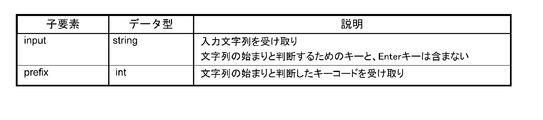
- a key code for determining the start of a character string is designated.
- the key code specified by this message is input, the character string from that point until the Enter key is pressed is notified as an onstring message. For example, it is used when an alternative input of a barcode is performed from a POS keyboard.
- To stop the onstring message send a setprefix message without a keycode.
- a key code for determining the start of a character string for detecting input from the POS keyboard is designated.
- the child elements are shown in FIG. 68A.
- FIG. 68B shows an example of a request.
- FIG. 70A The message data of the serial device will be described.
- FIG. 70B shows an example of a request.
- FIG. 71A The child elements are shown in FIG. 71A.
- ⁇ Status The attribute values are shown in FIG. 71B.
- FIG. 71C shows an example of a response.
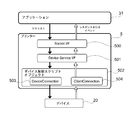
- FIG. 72 is an explanatory diagram regarding the use of a device control script.
- the device control script 502 includes a device connection 503 and a client connection 504.
- the devices of the high-function printer 5 are collectively shown as the device 20.
- the Socket I / F 500 on the printer 5 receives the XML data.
- the Socket I / F 500 passes the received data to the device service interface 501.
- the device service interface 501 generates an object so that a device control script corresponding to the device requested by the open_device message can be used.
- the device 20 can be controlled by the generated object.
- [Device control script object] 73 is passed from the device service interface 501 to the device control script 502.
- the device control script 502 can communicate with the application 31 and the device 20.
- the function using the object of the device control script will be described.
- the following functions can be used using the device control script API.
- An arbitrary event of the device object on the application 31 side can be called.
- -Data can be sent to the device.
- -Data generated from the device can be received.
- the configuration of the device control script will be described.
- the device control script has the properties shown in FIGS. Appropriate names are set in the constructor.
- DEVICE_TYPE property object type: String
- DEVICE_GROUP property object type: String
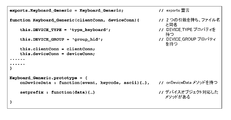
- a configuration example of the device control script 502 is shown in FIG.
- a list of device control script APIs is shown. The following objects are prepared in the device control script API.
- ClientConnection object A list of APIs is shown in FIG. 77
- DeviceConnection object FIG. 78 shows a list of APIs
- Device control script name object FIG. 79 shows a list of APIs
- the ClientConnection object will be described.
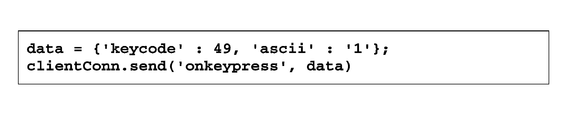
- This object is an object passed to the first parameter of the constructor of the device control script 502. ⁇ Send Send data to the device object running in the browser.
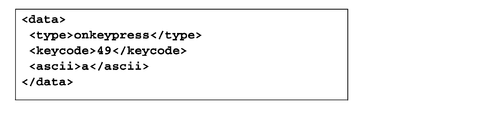
- FIG. In this example, the onkeypress event of the device object is called, and the data parameter of the onkeypress event is used to obtain 49 from data.keycode and '1' from data.ascii.
- the DeviceConnection object will be described. This object is an object passed to the second parameter of the constructor of the device control script 502. ⁇ Send Send data to the serial communication device. [syntax] send (data); [parameter] -Data: Object type: (Buffer) Specify the data to send to the device.
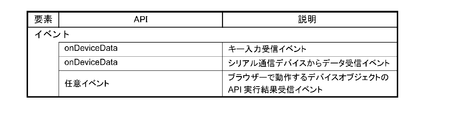
- OnDeviceData event (input device that can be operated by HID driver) This event is an event for receiving data detected from the key input device.
- the event is described in this format.
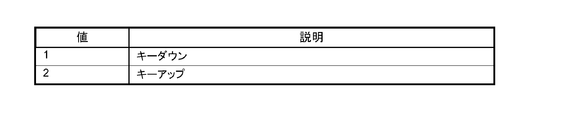
- [parameter] -Event: Object type: (Number) Receives the direction of key operation. A list of values is shown in FIG. -Keycode: Object type: (Number) Receive key code. Examples of key codes are shown in the key code list of FIGS. 3A and 3B.
- -Ascii Object type: (String) Receives the character corresponding to the operated key. If there is no character corresponding to the key code (eg F1 key), it will be undefined.
- -OnDeviceData event (serial communication device) This event is an event for receiving data from the serial communication device.
- events are described in this format. [syntax] onDeviceData (data); [parameter] -Data: Object type: (Buffer) Receives data received from a serial communication device.
- FIG. 83A shows a program environment construction flow.
- 1. Set the network of printer 5. Configure network settings for the system and printer 5.
- the network setting of the printer 5 can be set by any of the following methods. -Set the Windows network on the printer 5. -Install and configure TMNet WinConfig on an external device (Windows computer). 2.
- a barcode scanner 9 is connected to the printer 5.
- a barcode scanner 9 is connected to the printer 5.
- Barcode scanner settings. The barcode scanner 9 is registered in the printer 5. Registration is done from a web browser.
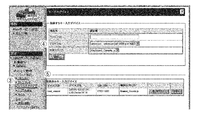
- TMNet WebConfig An example of the TMNet WebConfig screen is shown in FIG. 94A.
- 1. Check whether the barcode scanner 9 is connected to the printer 5, and turn on the printer 5. 2. Start a web browser on the setting computer and enter the URL (http: // IP address of printer 5 / webconfig /). 3. TMNet WebConfig is started. 94A, [Web service setting]-[Device management]-[Key input device] shown in (3) is selected. 4). The “Key input device” screen is displayed. Set the items shown in FIG. 94B in the input field shown in (4) of FIG. 94A and click [Register]. 5. The registered barcode scanner is displayed in [Registered Key Input Device] in (5) of FIG. 94A.
- the device control system 100 connects the terminal 3 that executes the application 31 and the printer 5 including the connector panel 60 to which the device is connected via a network. To do.
- the terminal 3 transmits data described in XML generated by the application 31 to the printer 5.
- the printer 5 receives the XML data transmitted from the terminal 3 via the Socket I / F 500.
- the printer 5 transmits the administrator information held by the printer 5 to the terminal 3 when the terminal 3 requests administrator information with data by the functions of the device service interface 501 and the device control script 502.
- the printer 5 controls the device when the terminal 3 requests control of the device with data. Therefore, the device connected to the printer 5 can be controlled by the terminal 3 connected to the network.
- the terminal 3 is not limited as long as it is a device that can execute an application that generates data described in XML. Since XML is highly versatile, various devices can be used as the terminal 3. In addition, the application of the terminal 3 can be easily developed.
- the printer 5 when the terminal 3 requests administrator information with data including an ⁇ admin_info> message, the printer 5 returns XML data including the administrator name and / or location of the printer 5 to the terminal 3. Further, the printer 5 makes the device controllable when the terminal 3 requests opening of the device with data, and cannot control the controllable device when the terminal 3 requests closing of the device with data. Transition to the state. Further, the data generated by the application 31 includes different message data for each device connected to the printer 5 or message data common to the devices. Further, when controlling the device requested by data, the printer 5 generates a DeviceConnection object that transmits data to the device and a ClientConnection object that transmits data to the terminal 3.
- the present invention is useful for a device control system for controlling a device, and can be applied to device control and a printing apparatus used in a POS system.
- Ethernet connector 63 ... USB connector, 64 ... VGA connector, 65 ... COM connector, 100 ... Device control system, 500 ... Socket I / F, 501 ... Device service interface, 502 ... Device control script, 503 ... Device Connection, 504... Client connection.
Landscapes
- Engineering & Computer Science (AREA)
- Theoretical Computer Science (AREA)
- Physics & Mathematics (AREA)
- General Physics & Mathematics (AREA)
- General Engineering & Computer Science (AREA)
- Human Computer Interaction (AREA)
- Business, Economics & Management (AREA)
- Accounting & Taxation (AREA)
- Computer Networks & Wireless Communication (AREA)
- Finance (AREA)
- Strategic Management (AREA)
- General Business, Economics & Management (AREA)
- Signal Processing (AREA)
- Multimedia (AREA)
- Accessory Devices And Overall Control Thereof (AREA)
- Computer And Data Communications (AREA)
- Information Transfer Between Computers (AREA)
- User Interface Of Digital Computer (AREA)
- Telephonic Communication Services (AREA)
- Facsimiles In General (AREA)
- Selective Calling Equipment (AREA)
Abstract
Description
本発明は、上述した事情に鑑みてなされたものであり、ネットワーク接続された端末によりデバイスを制御できるデバイス制御システム、端末、及び、デバイス制御システムの制御方法を提供することを目的とする。
本発明によれば、ネットワーク接続された端末により、デバイス制御装置に接続されたデバイスを制御できる。また、端末は、XMLで記述されたデータを生成するアプリケーションを実行できる装置であれば、制限されない。XMLは汎用性が高いので、様々な装置を端末として使用できる。また、端末のアプリケーションの開発が容易である。
また、前記アプリケーションは、前記デバイス制御装置に通信経路の確立を要求する通信確立メッセージを含む前記リクエストを前記デバイス制御装置に送信し、前記デバイス制御装置は、前記通信確立メッセージを含む前記リクエストを受信した時、前記リクエストに含まれる前記通信確立メッセージに対する応答メッセージを含む前記レスポンスを前記アプリケーションに送信する。
また、前記アプリケーションは、前記デバイス制御装置で送信した前記オープンメッセージに対する応答メッセージを含む前記レスポンスを受信し、前記オープンメッセージに対する応答メッセージに基づいて前記デバイスとの通信が可能な状態となる。
また、前記デバイス制御装置は、前記クローズメッセージを含む前記リクエストを受信し、前記クローズメッセージに対応する応答メッセージを含む前記レスポンスを前記アプリケーションに送信する。
また、前記アプリケーションで、前記デバイス制御装置で送信された前記レスポンスに含まれる前記通信確立メッセージに対する応答メッセージに基づいて前記デバイス制御装置との前記通信経路を確立する。
また、前記デバイス制御装置で前記オープンメッセージを含む前記リクエストを受信した時、前記リクエストに含まれる前記オープンメッセージに対する応答メッセージを含む前記レスポンスを前記アプリケーションに送信する。
また、前記アプリケーションで前記デバイス制御装置が送信した前記オープンメッセージに対する応答メッセージを含む前記レスポンスを受信し、前記オープンメッセージに対する応答メッセージに基づいて前記デバイスとの通信が可能となる。
また、前記アプリケーションと前記デバイスとの通信が可能になった後に前記アプリケーションを停止させるとき、前記アプリケーションで前記デバイスとの通信をクローズするクローズメッセージを含む前記リクエストを前記デバイス制御装置に送信する。
また、前記デバイス制御装置で前記クローズメッセージを含む前記リクエストを受信し、前記クローズメッセージに対応する応答メッセージを含む前記レスポンスを前記アプリケーションに送信する。
また、前記アプリケーションで前記デバイス制御装置が送信した前記クローズメッセージに対する応答メッセージを含む前記レスポンスを受信し、前記クローズメッセージに対する応答メッセージに基づいて前記デバイスとの通信をクローズする。
図1は、本発明を適用した実施形態のデバイス制御システム100の構成を示す図である。デバイス制御システム100は、端末3、及び、プリンター(インテリジェントプリンター)5を備えている。
端末3は、ネットワークに接続して、Socket通信ができるデバイスであればよく、パーソナルコンピューター、スマートフォン、あるいはタブレットコンピューターなどが使用できる。端末3は、Socket通信ができ、マークアップ言語であるXML文書をハンドリングできる環境を有し、OS(オペレーティングシステム)として、例えば、iOS(登録商標)、Android(登録商標)、Windows(登録商標)、Linux(登録商標)、Mac(登録商標)OS等を備える。
(1)端末3にアプリケーションを配置し、表示する。
(2)アプリケーションからプリンター5にリクエストメッセージを送信する。
(3)プリンター5から制御可能なデバイスにデータを送信する。
(4)プリンター5に接続されているデバイスやネットワークプリンターを制御する。
(5)プリンター5が端末3にレスポンスを返す。
デバイス制御システム100は、プリンター5に接続されたデバイス(周辺機器)を制御する機能をマークアップ言語であるXMLのコマンド体系であるデバイスXMLを備える。
端末3は、アプリケーション31を有する。アプリケーション31は、端末3にインストールされたネイティブアプリケーションプログラムである。アプリケーション31は、デバイスアプリケーションプログラムインターフェース(API)33は、プリンター5に対して、XMLフォーマットのリクエストメッセージをSocket通信で送信する(Request)。
また、デバイスサービスインターフェイス501は、ローカルプリンター55とデータを送受信する。ローカルプリンター55は、プリンター5が備えるプリンターである。また、デバイスサービスインターフェイス501は、ネットワークプリンター7及びカスタマーディスプレイ8とデータを送受信する。
デバイスサービスインターフェイス501は、ネットワークプリンター7、カスタマーディスプレイ8及びローカルプリンター55の制御の結果やデバイス制御スクリプト502のレスポンスをもとに、XMLフォーマットのレスポンス(Response)をアプリケーション31に出力する。
このように、プリンター5は、デバイスサービスインターフェイス501及びデバイス制御スクリプト502によってデバイスを制御する。図2の例で制御されるデバイスはネットワークプリンター7、カスタマーディスプレイ8、キー入力デバイス18、シリアル通信デバイス19、及び、ローカルプリンター55である。
デバイスXMLは、以下の特徴を有する。
・デバイスの制御用に別途、コントローラーとなる機器(コンピューターなど)を用意する必要がない。
・プリンター5のOSが備える標準のドライバーで動作するデバイスは、ドライバーをインストールせずに、デバイス制御スクリプト502で使用できる。
・デバイスにアクセスすると、デバイスは、排他ロックされる。複数の端末3から同時アクセスしても、制御が混在しない。デバイスを制御していた端末3がデバイスを解放すると、解放されたデバイスは他の端末3から制御可能となる。
・罫線を印刷するコマンドは、プリンター5のローカルプリンター55またはネットワークプリンター7が「罫線コマンド」をサポートしている場合に使用できる。
・プリンター5またはネットワークプリンター7にブザーが接続されている場合にブザーの機能を使用できる。
・キーボード14から取得できるキーコードに制限がある。キーボード14から取得可能なキーコードは、図3A、図3Bの通りである。
プリンター5は、CPU、RAM、フラッシュROM、NV(不揮発性メモリー)、ビデオコントローラー、補助記憶装置(SSD:solidstatedrive)、インターフェイス、及び、ローカルプリンター(印刷部)を備えている。プリンター5は、スピーカーを備えていてもよい。ローカルプリンターは、80mm幅または58mm幅のロール紙に印刷するサーマルプリンターである。
プリンター5にはPOS(point of sales)システムをインストールできる。プリンター5のOS(operating system)は、例えばWindows(登録商標)ベースであり、補助記憶装置に記憶される。
プリンター5は、プリンター5が備えるローカルプリンター、及び、デバイスを制御するソフトウェアである、Windows(登録商標)標準のデバイスドライバープログラム(APD)、UPOSドライバー、OPOSドライバー等を備えている。
プリンター5には、ウェブアプリケーションをインストールできる。これにより、図3に示すようにプリンター5をアプリケーションサーバーとして利用できる。ウェブアプリケーションは、例えば、PHP及びPerlのサーバーサイドスクリプト、SQLiteデータベースアクセス(サーバーサイドスクリプト)が可能である。
プリンター5には、上述したネットワークプリンター7、カスタマーディスプレイ8及びバーコードスキャナー9を接続できる。プリンター5にディスプレイ12、キャッシュドロワー13、及びキーボード14を接続できる。
図5は、プリンター5の外観斜視図である。
プリンター5の上部には、ロール紙カバー51が設けられる。ロール紙カバーはカバーオープンボタン52を押すと開き、ロール紙を出し入れできる。印刷後のロール紙を排出する排出口には、手動でロール紙をカットするマニュアルカッター53、及び、カッターカバー54を有する。カッターカバー54はプリンター5のローカルプリンターで紙ジャムが発生した場合及びロール紙カバー51が開かない場合に開かれる。カッターカバー54を開くとマニュアルカッター53のブレードが基準位置に戻る。プリンター5は、電源スイッチ56B、リセットボタン56A、LED表示部57、及び、コントロールパネル58を備える。LED表示部57は、補助記憶装置のアクセスを示すディスクアクセスLED、及び、ステータスLEDを備える。ステータスLEDは、OSの動作状態、OSのスタンバイモード、電源オフ状態、OSの起動シーケンス中、CPUの高温警告を通知する。
コントロールパネル58はパワーLED、エラーLED、ロール紙LED、及び送りボタンを備える。パワーLEDは電源が供給されている場合に点灯する。エラーLEDは通常動作時は消灯し、リセットされたとき、及び、ロール紙の末端が検出されて印刷が停止したときに点灯する。ペーパーLEDはロール紙の残量が十分なときは消灯し、残量がすくなくなると点灯し、自己診断機能の実行時に点滅する。送りボタンを押すと1行ずつ、または連続してロール紙が搬送される。
図6はコネクターパネル60を示す図である。コネクターパネル60は、ドロワーキックコネクター61、イーサネットコネクター62、USBコネクター63、VGAコネクター64、COMコネクター65、ライン出力66、及びDC入力67を有する。コネクターパネル60は、本発明の接続部に相当する。但し、プリンター5のデバイスには、プリンター5本体が備えるローカルプリンター55が含まれる。従って、接続部は、コネクターパネル60、及び、プリンター5内部のインターフェイスを含む。
ドロワーキックコネクター61には、キャッシュドロワー13またはオプションのブザーが接続される。イーサネットコネクター62はネットワークに接続される。USBコネクター63は6個のUSBポートを有する。USBコネクター63にはカスタマーディスプレイ8、バーコードスキャナー9、キーボード14及びその他のデバイスが接続される。VGAコネクター64にはディスプレイ12が接続される。COMコネクター65にはシリアル通信を行うデバイスのシリアルインターフェイスが接続される。ライン出力66は外部のスピーカーに接続される。
図7は、無線LANユニット17の接続例を示す図である。無線LANユニット17は、USB延長ケーブル15に差し込まれ、USB延長ケーブル15はUSBコネクター63に差し込まれる。これにより、プリンター5を無線LAN接続することができる。
図8は、環境構築のワークフローを示す。
1.ネットワーク設定
システム及びプリンター5のネットワーク設定をする。プリンター5のネットワーク設定は、以下のいずれかの方法により設定できる。
・プリンター5で、Windows(登録商標)のネットワーク設定を行う。
・外部機器(Windowsのコンピューター)に、プリンター5の設定アプリケーションであるTMNet WinConfigをインストールして設定する。
2.プリンター5にデバイスを接続
プリンター5にデバイスを接続する。接続可能なデバイスは、上述したように、カスタマーディスプレイ8、バーコードスキャナー9、ディスプレイ12、キャッシュドロワー13、キーボード14等である。さらに、OS標準のHIDドライバーで制御可能なデバイス、OS標準のシリアル通信ドライバーで動作可能なシリアル通信デバイス、及び、シリアル通信デバイスと同様に制御可能なUSBデバイスを含む。図6のコネクターパネル60には、COMコネクター65が1つしかないが、シリアル-USB変換ケーブル、及び、シリアル-USB変換に対応したドライバープログラムがあれば、複数のシリアル通信デバイスを接続できる。
3.デバイス制御スクリプトの登録
プリンター5が対応した製品以外のデバイスをプリンター5で制御する場合、ユーザーが用意したデバイス制御スクリプトを登録する。登録は、ウェブブラウザーから行う。
4.デバイスの登録
プリンター5に接続するデバイスをプリンター5のソフトウェアに登録する。登録は、ウェブブラウザーから行う。
手順1.~5で使用するウェブブラウザーは、端末3で動作するウェブブラウザーを含む。
登録の手順は以下の通りである。
(1)カスタマイズしたデバイス制御スクリプトを用意する。
(2)プリンター5の電源をオンにする。
(3)ウェブブラウザーを起動し、URL(http://プリンター5のIPアドレス/WebConfig/)を入力する。
(4)TMNetWebConfigが起動する。図9の画面の[Webサービス設定]-[登録と削除]をクリックする。
(5)“制御スクリプト”画面が表示される。
[登録する制御スクリプト]の[参照]をクリックし、登録するデバイス制御スクリプトを選択する。
(6)[登録]をクリックする。
デバイス制御スクリプトが登録され、画面下の[登録済み制御スクリプト]に一覧表示される。
登録の手順は以下の通りである。
(1)ウェブブラウザーを起動し、URL(http://プリンター5のIPアドレス/WebConfig/)を入力する。
(2)TMNetWebConfigが起動する。図10の画面の[Webサービス設定]-[デバイス登録]より登録するデバイスの種類にしたがってクリックする。図10で[デバイス登録]にはデバイスが表示される。登録するデバイスの種類をクリックする。本実施形態ではデバイスの種類は、図11に示すように、プリンター、ディスプレイ、キー入力デバイス、シリアル通信デバイス、その他、の5種類から選択される。デバイスの種類の詳細は図11に示す通りである。
(3-1)プリンターを登録する場合
プリンター5の本体が備えるローカルプリンターが登録されていることを、以下の手順で確認する。
(3-1-1)図10の画面で[登録済みプリンター]のデバイスID”local_printer”に、”プリンター5”が登録されていることを確認する。
(3-1-2)[テスト印字]をクリックする。ローカルプリンター55により「TEST_PRINT」が印字されることを確認する。
(3-1-3)接続しているネットワークプリンター7を登録する。
以下の手順で登録する。
(3-1-3-1)図12に示す項目(デバイスID、タイプ、型番、IPアドレス、リトライ間隔)を設定し、[登録]をクリックする。
(3-1-3-2)[登録済みプリンター]に追加されたことを確認したら、[テスト印字]をクリックする。登録したネットワークプリンター7により「TEST_PRINT」が印字されることを確認する。
(3-2)ディスプレイ(カスタマーディスプレイ8)を登録する場合。
カスタマーディスプレイ8のデバイスIDは、"local_display"固定である。接続しているカスタマーディスプレイ8を、以下の手順で登録する。
(3-2-1)図10の画面で[使用する]を選択する。
(3-2-2)図13の項目(通信設定、輝度設定)を設定し、[登録]をクリックする。
(3-2-3)[テスト表示]をクリックする。カスタマーディスプレイ8に文字が表示されることを確認する。
(3-3)キー入力デバイス18を登録する場合
接続しているキー入力デバイス18を、以下の手順で登録する。
(3-3-1)図14の項目(デバイスID、デバイス名、制御スクリプト)を設定し、[登録]をクリックする。
(3-3-2)[登録済みキー入力デバイス]に追加されたことを確認したら、[動作テスト]をクリックする。
(3-3-3)ウェブブラウザーにより画面が表示される。キー入力デバイス18を操作し、操作したとおりの結果が表示されることを確認する。
(3-4)シリアル通信デバイス19を登録する場合
接続しているシリアル通信デバイス19を、以下の手順で登録する。
(3-4-1)接続しているシリアル通信デバイス19について、図15の項目(デバイスID、デバイス名、制御スクリプト、通信速度、データビット、パリティ、ストップビット、フリー制御)を設定し、[登録]をクリックする。
(3-4-2)[登録済みシリアル通信デバイス]に追加されたことを確認する。
(3-5)その他のデバイスを登録する場合
接続しているデバイスを、以下の手順で登録する。
(3-5-1)接続しているデバイスについて、図16の項目(デバイスID、制御スクリプト)を設定し、[登録]をクリックする。
(3-5-2)[登録済みその他デバイス]に追加されたことを確認する。
Device XMLの基本的なプログラミングのシーケンスは、図17のとおりである。
図17の”Applications”はアプリケーション31に相当し、”DeviceControl”はデバイス制御機能(デバイスサービスインターフェイス501)に相当し、”Device”は制御されるデバイスを示す。
2:Connectメッセージ。デバイスサービスインターフェイス501との通信経路を確立する。
3:アプリケーション31がopen_deviceメッセージ(type_printer)を送信する。
3.1:デバイスサービスインターフェイス501によりデバイスに”Cmd()”コマンドが送信される。
4:デバイスは”Deviceopen”を返す。
4.1:デバイスサービスインターフェイス501がレスポンスを返す。
6:アプリケーション31がdevice_data_messageを送信する。device_data_messageを使ってデバイスを制御する。
6.1:デバイスに”Cmd()”コマンドが送信される。
6.1.1:デバイスが実行する。
ここで、Device_data_messageにレスポンスする。
7.:デバイスが実行結果を返す。
7.1:デバイスサービスインターフェイス501がdevice_data_message、または、error messageを返す。
8:アプリケーション31がclose_device_nmessageを送信する。デバイスサービスインターフェイス501との接続およびSocket I/F通信を切断する。
8.1:デバイスサービスインターフェイス501によりデバイスに”Cmd()”コマンドが送信される。
9:デバイスがcloseする。
9.1:デバイスサービスインターフェイス501がアプリケーション31にレスポンスを返す。
各データアイテムのフォーマットは図19Aの通りであり、各データの内容は図19Bに示す。
<data>タグ内で配列を記述する際のプログラミング方法は以下のとおりである。
・配列にする要素の先頭に属性array="true"を指定する。
・以降は同名の要素名で値を指定する。
keycodes=[49,50,51,52];を表現する場合の例を図21に示す。
ePOS-Device XMLには、以下が用意されている
・メッセージ(図22)
メッセージは、アプリケーション31からプリンター5にリクエストするメッセージ、及び、プリンター5からアプリケーション31へのレスポンスメッセージのXMLである。
・デバイスごとのメッセージデータ(図23)
制御するデバイスごとの、リクエスト、及びレスポンスのデータを格納するXMLである。この形式は、<device_data>メッセージの<data>要素の子要素になる。
デバイスごとのメッセージデータは、<device_data>メッセージの<data>要素の子要素で、デバイスを制御するデータを指定する。
メッセージデータの構成要素はデバイスの種類に応じて異なる。
データを指定する前に、<type>要素でメッセージデータの種類を指定してから、子要素のデータを指定する。デバイスの種類ごとに使用可能な<type>要素は図23の通りである。
<connect>
[レスポンス]に含まれるメッセージである。
コネクションが確立されたことを、アプリケーションに返す。
アプリケーション31は、本メッセージの受信をトリガーとして、以降に説明するメッセージ送信を行う。
[例]
<connect></connect>
プリンター5に設定された、管理者情報を返す。TMNet WebConfigで設定した情報である。
[リクエスト]に含まれるメッセージである。
管理者情報を、プリンター5へ要求する。
[例]
<admin_info></admin_info>
[レスポンス]に含まれるメッセージである。
管理者情報を、アプリケーション31に返す。子要素、データ型及び説明を図24Aに示す。
・code
code要素を図24Bに示す。
・data
data要素を図24Cに示す。
受信データの文字列について述べる。図24Dに示す文字列はエスケープ処理される。
[例]正常時および異常時のレスポンスの例を、図24Eに示す。
デバイスIDに紐付いたデバイスを使用可能にする。リクエストしたアプリケーション31に対し、指定されたデバイスの排他的使用権を与える。
[リクエスト]に含まれるメッセージである。
オープンするデバイスを指定する。子要素、データ型及び説明を図25Aに示す。
・data
data要素を図25Bに示す。
[例]リクエストの例を図25Cに示す。
[レスポンス]に含まれるメッセージである。
デバイスのオープン結果を、アプリケーション31に返す。子要素、データ型及び説明を図25Dに示す。
・code
code要素を図25Eに示す。
[例]正常時および異常時のレスポンスの例を、図25Fに示す。
オープンしたデバイスをクローズする。
[リクエスト]に含まれるメッセージである。
クローズするデバイスを指定する。子要素、データ型及び説明を図26Aに示す。
[例]リクエストの例を図26Bに示す。
[レスポンス]に含まれるメッセージである。
デバイスのクローズ結果を、アプリケーション31に返す。子要素、データ型及び説明を図26Cに示す。
・code
code要素を図26Dに示す。
[例]正常時および異常時のレスポンスの例を、図26Eに示す。
[リクエスト]に含まれるメッセージである。
デバイスへのデータを送信する。デバイス制御の命令や印刷・表示データが含まれる。子要素、データ型及び説明を図27Aに示す。
[例]リクエストの例を図27Bに示す。
[レスポンス]に含まれるメッセージである。
デバイスからのデータを返す。デバイス制御の結果、デバイスで発生したイベントや、デバイスからの入力データが含まれる。子要素、データ型及び説明を図27Cに示す。
[例]レスポンスの例を図27Dに示す。
[レスポンス]に含まれるメッセージである。
デバイス制御命令、サービス制御命令でのエラー、その他共通エラーを返す。子要素、データ型及び説明を図28Aに示す。
・code
code要素を図28Bに示す。
[例]レスポンスの例を図28Cに示す。
<type>ondata</type>
[レスポンス]に含まれるメッセージである。
バーコードスキャナーからのスキャンデータを、アプリケーションへ返す。子要素、データ型及び説明を図29Aに示す。
受信データの文字列について述べる。図29Bの文字列はエスケープ処理される。
[例]レスポンスの例を図29Cに示す。
印刷データについては、後述の「プリンター制御用XML」で説明する。
<type>print</type>
[リクエスト]に含まれるメッセージである。
プリンターへ印刷データと設定データを送信する。子要素、データ型及び説明を図30Aに示す。
[例]リクエストの例を図30Bに示す。
[レスポンス]に含まれるメッセージである。
印刷結果を、アプリケーションへ返す。子要素、データ型及び説明を図31Aに示す。
[例]レスポンスの例を図31Bに示す。
プリンターのメッセージデータについては、後述する「プリンターのメッセージデータ」で説明する。
<epos-print>
アプリケーションからプリンターへ送信するXML文書である。指定した機能の実行をプリンターにリクエストする。<epos-print>は要素を持っている。
[属性]
・xmlns
epos-printの名前を宣言する。
[子要素]子要素を図32Aに示す。
[例]XML文書の例を図32Bに示す。
プリンターからアプリケーションへ返すXML文書である。
[属性]
・success
表示結果を取得する。属性値を図33Aに示す。
・code
エラーコードを取得する。属性値を図32Bに示す。
・status
プリンターの状態に応じて、以下の値の論理和を10進表現で取得する。属性値を図32Cに示す。
[例]XML文書の例を図33Dに示す。
印字する文字列を指定する。また、文字の装飾や印字位置、改行量など文字列に関する設定もする。
テキストの印字後、テキスト以外を印字する場合、改行または紙送りを実行する。
ページモードでは、文字のベースラインドット(151ページ「プリンターの仕様」)を基準として、現在の印字位置に文字を展開する。
[実体参照]
プリンター制御に必要な水平タブ、改行、および以下の記号は、図34Aの実体参照を用いて記述する。
[属性]
・lang
対象言語を指定する。属性値を図34Bに示す。
印字できる文字コードは、各プリンターの仕様による。
・font
文字フォントを指定する。属性値を図34Cに示す。
日本語を指定すると、シフトJISコード体系の文字を印字できる。
・smooth
スムージングを設定する。スムージングを有効にすると、文字の印字品質が向上する。属性値を図34Dに示す。
・dw
横倍角を設定する。属性値を図34Eに示す。
ひとつの要素の中にdw属性とwidth属性を同時に指定した場合、width属性の倍率指定を優先される。
・dh
縦倍角を設定する。属性値を図34Fに示す。
ひとつの要素の中にdh属性とheight属性を同時に指定した場合、height属性の倍率指定を優先される。
・width
横方向倍率を指定する。属性値を図34Gに示す。
ひとつの要素の中にdw属性とwidth属性を同時に指定した場合、width属性の倍率指定を優先される。
・height
縦方向倍率を指定する。属性値を図34Hに示す。
ひとつの要素の中にdh属性とheight属性を同時に指定した場合、height属性の倍率指定を優先される。
・reverse
白黒反転文字を設定する。属性値を図34Iに示す。
・ul
アンダーラインを設定する。属性値を図34Jに示す。
・em
強調印字を設定する。属性値を図34Kに示す。
・color
文字色を指定する。属性値を図34Lに示す。
・x
(初期値:“0”)
文字の印字開始位置をドット単位で指定する。
ページモードでは、position要素による横方向の印字位置指定と同じであるが、横方向の印字位置が移動する。
・align
位置揃えを指定する。属性値を図34Mに示す。
スタンダードモードの場合、align属性の指定は「行の先頭の状態」で行う。
本要素で設定するalign属性は、image,logo,barcode,symbol要素のalign属性にも適用される。
・rotate
倒立印字を設定する。属性値を図34Nに示す。
ページモードでは、rotateの指定は無効である。
ページモードではdirectionで印字方向を右→左(right_to_left)に設定して180度回転印字を行う。
本要素で設定するrotate属性は、barcode,symbol要素のrotate属性にも適用される。
・linespc
(初期値:“30”)
1行あたりの紙送り量をドット単位で指定する。
[例]文字列を印字する設定の例を図34Pに示す。
紙送り量を指定する。ドット単位または、行単位で紙送り量を指定する。紙送り量の指定がない場合、1行の紙送り(改行)する。また、1行あたりの改行量を設定する。
[属性]
・unit
紙送り量をドット単位で指定する。
・line
紙送り量を行単位で指定する。
・linespc
(初期値:“30”)
1行あたりの紙送り量をドット単位で指定する。
1行あたりの紙送り量が30ドットの場合、最大240行まで指定可能である。
スタンダードモードとページモードでは、改行量を別々に保持する。linespc属性を指定すると、後に続く<text>、<feed>のlinespc属性に影響する。
[例]XML文書の例を図35に示す。
ラスター形式のビットイメージデータを指定する。(データ型xs:base64Binary)
ラスター形式とは、画像の左上を原点に画素を水平方向に走査したデータである。
データは2階調の場合は1画素あたり1ビット、16階調の場合は1画素あたり4ビットで、バイトデータの上位ビットから詰めていく。また、1ラインの走査データがバイト単位になるように、0でパディングする。
ラスターイメージを高速に印字する場合、align属性をleftに指定し、width属性の値をプリンターの用紙幅を超えない8の倍数に指定する。
ページモードでは、ラスターイメージの左下ドットを基準として、現在の印字位置にラスターイメージを展開する。印字位置は移動しない。
ページモードでは、ラスターイメージが印字領域をはみ出さないように、印字位置を設定する。
多階調ラスターイメージで印刷したバーコード・2次元コードの読み取り品質の影響があるので、2階調で印刷する。
ラスター形式のビットイメージは、ePOS-Print XML生成ツールで作成するか、ユーザーのアプリケーションで作成する。ユーザーのアプリケーションで作成する場合次の点を考慮する。
・2階調の場合:画像の幅を8の倍数にするか、足りないbitを0にする。
・16階調の場合:画像の幅を2の倍数にするか、足りないbitを0にする。
[属性]
・width
画像の幅をドット単位で指定する。
・height
画像の高さをドット単位で指定する。
・color
文字色を指定する。属性値を図36Aに示す。
・align
印刷位置を指定する。属性値を図36Bに示す。
本要素で設定するalign属性は、text,logo,barcode,symbol要素のalign属性にも適用される。
・mode
(オプション(オプション))
カラーモードを指定する。属性値を図36Cに示す。
[例]XML文書の例を図36Dに示す。
プリンターのNVメモリーに登録されているロゴを指定する。
ロゴは、機種専用ユーティリティーやロゴ登録ユーティリティー(TMFLogo)を使って、あらかじめプリンターにロゴの登録をする。
ページモードでは、ロゴの左下ドットを基準として、現在の印字位置にロゴを展開する。
[属性]
・key1
NVロゴ登録時に設定したキーコード1の値を指定する。
・key2
NVロゴ登録時に設定したキーコード2の値を指定する。必ず指定する。
・align
印刷位置を指定する。属性値を図37Aに示す。
本要素で設定するalign属性は、text,image,barcode,symbol要素のalign属性にも適用される。
[例]XML文書の例を図37Bに示す。
バーコードデータを文字列で指定する。
バーコードの規格に準拠しない設定を行った場合、あるいは、バーコードがプリンターの印字領域よりも大きくなる場合、バーコードを印字しない。
ページモードでは、バーコードの左下ドット(HRIを除く)を基準として、現在の印字位置にバーコードを展開する。
[バーコードの種類]
図38A、図38B、図38Cに示すバーコードを指定することができる。
文字列で表現できないバイナリーデータを指定する場合、図38Dに示すエスケープシーケンスで指定する。
[属性]
・type
バーコードの種類を指定する。属性値を図38Eに示す。
・hri
HRIの位置を指定する。属性値を図38Fに示す。
・font
HRIフォントを指定する。属性値を図38Gに示す。
・width
(初期値:“3”)
モジュールの幅をドット単位で指定する。2~6の整数値で指定する。
・height
(初期値:“162”)
モジュールの高さをドット単位で指定する。
・align
印刷位置を指定する。属性値を図38Hに示す。
本要素で設定するalign属性は、text,image,logo,symbol要素のalign属性にも適用される。
・rotate
倒立印字を指定する。属性値を図38Iに示す。
本要素で設定するrotate属性は、text,symbol要素のrotate属性にも適用される。
[例]XML文書の例を図38Jに示す。
2次元コードを印刷する。
2次元コードを文字列で指定する。
2次元コードの規格に準拠しない設定を行った場合、あるいは、2次元コードがプリンターの印字領域よりも大きくなる場合、2次元コードを印字しない。
ページモードでは、2次元コードの左上ドットを基準として、現在の印字位置に2次元コードを展開する。
[2次元コードの種類]
図39A、図39Bに示す2次元コードを指定することができる。
文字列で表現できないバイナリーデータを指定する場合、図39Cに示すエスケープシーケンスで指定する。
[属性]
・type
2次元コードの種類を指定する。属性値を図39Dに示す。
・level
エラー訂正レベルを指定する。属性値を図39Eに示す。
レベルは2次元コードの種類に合わせて選択する。
MaxiCode,2次元GS1DataBarの場合、defaultを選択する。
・width
1モジュールの幅をドット単位で指定する。詳細を図39Fに示す。
・height
1モジュールの高さをドット単位で指定する。詳細を図39Gに示す。
・size
図39Hに詳細を示す。
・align
印刷位置を指定する。属性値を図39Iに示す。
本要素で設定するalign属性は、text,image,logo,barcode要素のalign属性にも適用される。
・rotate
倒立印字を指定する。属性値を図39Jに示す。
本要素で設定するrotate属性は、text,barcode要素のrotate属性にも適用される。
[例]XML文書の例を図39Kに示す。
横罫線を指定する。
[属性]
・x1
横罫線の描画開始位置(ドット単位)を指定する。
・x2
横罫線の描画終了位置(ドット単位)を指定する。
・style
(オプション)
罫線の種類を指定する。属性値を図40Aに示す。
[例]XML文書の例を図40Bに示す。
縦罫線の描画を開始する。
ページモードでは使用できない。
縦罫線は、後述する<vline-end>で終了を指定するまで描画する。本要素はvline-endと一緒に使用する。
[属性]
・x
縦罫線の描画開始位置(ドット単位)を指定する。
・style
(オプション)
罫線の種類を指定する。属性値の例を図41Aに示す。
[例]XML文書の例を図41Bに示す。
縦罫線の描画を終了する。
本要素は上記のvline-beginと一緒に使用する。
[属性]
・x
縦罫線の描画終了位置(ドット単位)を指定する。
・style
(オプション)
罫線の種類を指定する。属性値の例を図42Aに示す。
[例]XML文書の例を図42Bに示す。
スタンダードモードからページモードへ切り替える。
[<page>の要素]
<page>には図43Aに示す要素を使用できる。
[例]XML文書の例を図43Bに示す。
ページモードの印刷領域を指定する。
絶対原点を基準に、原点、幅、高さを指定して、印字領域を設定する。図44Aに示すように、絶対原点は、印字可能領域の左上のドットである。
印字内容に合わせて印字領域を指定する。印字データが印字領域をはみ出た場合、印字データが途中で切れた印字結果になる。
本要素はpage要素内で使用する。
[属性]
・x
(初期値:“0”)
横方向の原点をドット単位で指定する。
・y
(初期値:“0”)
縦方向の原点をドット単位で指定する。
・width
(初期値:機種によって異なる)
印字領域の幅をドット単位で指定する。
・height
(初期値:機種によって異なる)
印字領域の高さをドット単位で指定する。
印字領域の幅と高さは、印字方向の設定に合わせて確定する。印字データが切れてしまう場合がある。
[例]XML文書の例を図44Bに示す。
ページモードの印字方向を指定する。
印字方向を指定して、印字領域の回転を行う。印字領域の回転に合わせて、印字領域の始点が移動する。
本要素はpage要素内で使用する。
[属性]
・dir
回転方向を指定する。属性値を図45Aに示す。
[例]XML文書の例を図45Bに示す。
ページモードの印字位置を指定する。
印字領域の始点を基準に、印字位置を指定する。印字領域の始点は、印字領域の回転に合わせて移動する。
本要素はpage要素内で使用する。
[属性]
・x
(初期値:“0”)
横方向位置をドット単位で指定する。
・y
(初期値:“21”)
縦方向位置をドット単位で指定する。
印字開始位置(座標)は、印字内容に合わせて指定する。以下を参考にする。
・文字列を印字する場合
最初の文字のベースライン左端を指定する。
標準の大きさで、左詰めで印字する場合はオプション能である。高さが2倍の文字を印刷する場合は、yを”42”以上に指定する。
・バーコードを印字する場合
シンボルの左下を指定する。yにバーコードの高さを指定する。
・グラフィック/ロゴを印字する場合
グラフィックデータの左下を指定する。yにグラフィックデータの高さを指定する。
・2次元コードを印字する場合
シンボルの左上を指定する。
[例]XML文書の例を図46に示す。
ページモードで直線を描画する。
斜線は描画できない。
本要素はpage要素内で使用する。
[属性]
・x1
横罫線の描画開始位置(ドット単位)を指定する。
・y1
縦罫線の描画開始位置(ドット単位)を指定する。
・x2
横罫線の描画終了位置(ドット単位)を指定する。
・y2
縦罫線の描画終了位置(ドット単位)を指定する。罫線の種類を指定する。
・style
(オプション)
罫線の種類を指定する。属性値を図47Aに示す。
[例]XML文書の例を図47Bに示す。
ページモードで長方形を描画する。
本要素はpage要素内で使用する。
スタンダードモードではhline要素、vline-begin要素、vline-end要素を使用する。
[属性]
・x1
横罫線の描画開始位置(ドット単位)を指定する。
・y1
縦罫線の描画開始位置(ドット単位)を指定する。
・x2
横罫線の描画終了位置(ドット単位)を指定する。
・y2
縦罫線の描画終了位置(ドット単位)を指定する。
・style
(オプション)
罫線の種類を指定する。属性値の例を図48Aに示す。
[例]XML文書の例を図48Bに示す。
用紙カットを指定する。
スタンダードモードで使用する。
「行の先頭の状態」で実行する。用紙をカットすると「行の先頭の状態」になる。
[属性]
・type
(オプション)
カットの種類を指定する。属性値の例を図49Aに示す。
[例]XML文書の例を図49Bに示す。
ドロアーキックコネクターに信号出力を指定する。機種によりブザーを鳴らすことができる。
[属性]
・drawer
(オプション)
ドロアーキックコネクターを指定する。属性値を図50Aに示す。
・time
(オプション)
ドロアーキック信号のオン時間を指定する。属性値を図50Bに示す。
[例]XML文書の例を図に示す。
ブザーを鳴らす。
[属性]
・pattern
(オプション)
ブザーの音色を指定する。属性値を図51Aに示す。
・repeat
(オプション,初期値:”1”)
繰り返し回数を指定する。属性値を図51Bに示す。
[例]XML文書の例を図に示す。
表示データについては、後述の「カスタマーディスプレイ制御用XML」で説明する。
[リクエスト]
カスタマーディスプレイへ表示データと設定データを送信する。子要素を図52Aに示す。
[例]リクエストの例を図52Bに示す。
[レスポンス]
カスタマーディスプレイへ送信した結果を、アプリケーションへ返す。子要素を図53Aに示す。
[例]レスポンスの例を図53Bに示す。
カスタマーディスプレイのメッセージデータについては、上述の「カスタマーディスプレイのメッセージデータ」で説明した通りである。
アプリケーションからカスタマーディスプレイへ送信するXML文書である。指定した機能の実行をカスタマーディスプレイにリクエストする。<epos-display>はカスタマーディスプレイの制御に必要な子要素を持つ。
[属性]
・xmlns
epos-displayの名前を宣言する。子要素を図54Aに示す。
[例]XML文書の例を図54Bに示す。
カスタマーディスプレイからアプリケーションへ返すXML文書である。
[属性]
・success
表示結果を取得する。属性値を図55Aに示す。
・code
エラーコードを取得する。属性値を図55Bに示す。
・status
常に"0"がセットされる。
[例]XML文書の例を図55Cに示す。
ウィンドウの作成、削除、カレントウィンドウの移動を制御する。
・属性number,x,y,width,heightが指定されている場合、指定のウィンドウの作成を行う。ウィンドウを定義する場合は定義済ウィンドウと重ならないように定義する。また、ディスプレイのサイズ(20桁×2行)に収まる大きさを指定する。
・属性number destroy="true"が指定されている場合、指定のウィンドウを削除する。
・ウィンドウの作成、削除に合致する属性が指定されておらず、numberが指定されている場合、カレントウィンドウを指定のウィンドウに移動する。
[属性]
・number
対象のウィンドウ番号を指定する。属性値を図56に示す。
・x
ウィンドウ作成時のx座標(1~20)を整数値で指定する。
・y
ウィンドウ作成時のy座標(1~2)を整数値で指定する。
・width
ウィンドウ作成時の幅(1~20)を整数値で指定する。
・height
ウィンドウ作成時の高さ(1~2)を整数値で指定する。
・scrollmode
ウィンドウ作成時、作成ウィンドウのスクロール方法を指定する。属性値を図57Aに示す。
・destroy
numberで指定されたウィンドウを削除するか指定する。属性値を図57Bに示す。
[エラー条件]
エラーの場合、図57Cの値が返る。
[例]XML文書の例を図57Dに示す。
文字列の表示を制御する。
・属性x及びyが指定されている場合、指定されたカーソル位置から表示を行う。
・属性x及びyが指定されていない場合、現在のカーソル位置から表示を行う。
[属性]
・x
テキスト表示のx座標(1~20)を整数値で指定する。
・y
テキスト表示のy座標(1~2)を整数値で指定する。
・reverse
表示文字の明暗反転を指定する。属性値を図58Aに示す。
・lang
テキスト表示の言語を指定する。省略時は、現在の設定が維持される。属性値を図58Bに示す。
[例]XML文書の例を図58Cに示す。
カーソル位置および表示設定を制御する。
・x,yの指定によりディスプレイ内でのカーソル座標を指定する。
・movetoの指定によりカレントウィンドウ内でのカーソル位置を指定する。
・x,y,movetoが同時に指定されている場合、どちらも実施しない。
[属性]
・x
カーソルのx座標(1~20)を整数値で指定する。
・y
カーソルのy座標(1~2)を整数値で指定する。
・moveto
カレントウィンドウ内のカーソル位置を指定する。属性値を図59Aに示す。
・type
カーソルの表示方法を指定する。省略時は現在の設定が維持される。属性値を図59Bに示す。
[例]XML文書の例を図59Cに示す。
画面の点滅を制御する。intervalに指定した間隔で明滅を繰り返す。
実際の明滅間隔は、50ms単位で切り上げられる。
例えばintervalが1~50の場合50ms、51~100の場合100msとなる。
[属性]
・interval
点滅の間隔を整数値で指定する。属性値を図60Aに示す。
[例]XML文書の例を図60Bに示す。
ディスプレイの輝度を制御する。
[属性]
・value
輝度をパーセントで指定する。属性値を図61Aに示す。
[例]XML文書の例を図61Bに示す。
文字列のマーキー表示を制御する。
指定された文字列をuwaitに指定された間隔で1文字ずつ表示する。終端まで表示完了後、rwaitで指定された時間待機し、再度先頭から表示する。
[属性]
・format
マーキーの表示パターンを指定する。属性値を図62Aに示す。
・repeat
表示の繰り返し回数を指定する。属性値を図62Bに示す。
・uwait
1文字表示の待機間隔をミリ秒で指定する。属性値を図62Cに示す。
・rwait
文字列の終端を表示後の待機間隔をミリ秒で指定する。属性値を図62Dに示す。
・lang
表示言語を指定する。省略時は現在の設定が維持される。属性値を図62Eに示す。
[例]XML文書の例を図62Fに示す。
ディスプレイ画面の最下段右端に時刻を表示する。
表示時刻はプリンター5のOSが管理しているローカルタイムである。
[例]XML文書の例を図63に示す。
カレントウィンドウの表示を消去する。
ウィンドウが存在しない場合、ディスプレイ全体の表示を消去する。
[例]XML文書の例を図64に示す。
ディスプレイの表示を初期化する。初期化により、以下の状態となる。
・表示文字はすべて消去され、登録されたすべてのウィンドウが破棄される。
・カーソルはデフォルト状態に戻り、ディスプレイ原点に移動する。
・表示点滅、表示輝度がデフォルト状態に戻る。
[例]XML文書の例を図65に示す。
任意のESC/POSコマンドを実行する。
指定するコマンドは16進文字列で指定する。
[例]XML文書の例を図66に示す。
<type>onkeypress</type>
[レスポンス]
POSキーボードからの入力データを、アプリケーションへ返す。子要素を図67Aに示す。
(受信データの文字列について)
図67Bに示す文字列はエスケープ処理される。
[例]レスポンスの例を図67Cに示す。
POSキーボードからの入力を検出するため、文字列の始まりと判断するキーコードを指定する。本メッセージにより指定されたキーコードが入力された場合、そこからEnterキーが押されるまでの文字列がonstringメッセージとして通知される。例えば、POSキーボードから、バーコードの代替入力を行う場合に使用する。onstringメッセージを止める場合、keycodeのないsetprefixメッセージを送信する。
[リクエスト]
POSキーボードからの入力を検出するための、文字列の始まりを判断するキーコードを指定する。子要素を図68Aに示す。
[例]リクエストの例を図68Bに示す。
[レスポンス]
POSキーボードからの入力データを、アプリケーションへ返す。
setprefixで指定したキーコードのいずれかからEnterまでの入力が検出されたことを通知する。引数には入力された一連の文字列のほか、検出されたキーコードの情報が取得する。子要素を図69Aに示す。
(受信データの文字列について)
図69Bの文字列はエスケープ処理される。
[例]レスポンスの例を図69Cに示す。
<type>sendcommand</type>
[リクエスト]
コマンドを、シリアルデバイスに送信する。子要素を図70Aに示す。
[例]リクエストの例を図70Bに示す。
[レスポンス]
シリアルデバイスからのデータを、アプリケーションへ返す。子要素を図71Aに示す。
・status
属性値を図71Bに示す。
[例]レスポンスの例を図71Cに示す。
まず、プログラミングについて説明する。
図72は、デバイス制御スクリプトの使用に関する説明図である。
本発明のデバイス制御機能で提供するデバイス制御スクリプト用APIを使うことにより、デバイスのデータ処理のカスタマイズをしたり、新たなデバイスをアプリケーション31から使用したりすることができる。
図72に示すように、デバイス制御スクリプト502は、デバイスコネクション503と、クライアントコネクション504とを有する。この図72では高機能プリンター5のデバイスを総称してデバイス20として示す。
[デバイス制御スクリプトのオブジェクト]
デバイス制御スクリプト502には、デバイスサービスインターフェイス501から図73に示すオブジェクトが渡される。これらクライアント接続(ClientConnection)オブジェクト、及び、デバイス接続(DeviceConnection)オブジェクトを使うことで、デバイス制御スクリプト502はアプリケーション31、およびデバイス20と通信することができる。
デバイス制御スクリプトAPIを使って以下の機能を使用できる。
・アプリケーション31側のデバイスオブジェクトの任意のイベントを呼び出し可能である。
・デバイスにデータを送信可能である。
・デバイスから発生したデータを受信可能である。
デバイス制御スクリプトは以下の条件を含むようにコーディングされる。
・デバイス制御に必要なコードは、1つのファイルにまとめて記述される。
(TMNetWebConfigを使ってデバイスの設定をする際、1つのファイルしか登録できない。)
・ファイル名の最初のドット"."までの名称と、コンストラクター名称を同じにする。
[例]ファイル名:Keyboard_Generic.ver1.0.js→コンストラクターの名称:Keyboard_Generic
・コンストラクターの外部参照のために、exports宣言する。
[例]exports.Keyboard_Generic=Keyboard_Generic
・デバイス制御スクリプトには、図74及び図75に示すプロパティを持たせる。コンストラクターで適切な名称を設定される。
DEVICE_TYPEプロパティ(オブジェクト種類:String)
設定値の一覧を図74に示す。
DEVICE_GROUPプロパティ(オブジェクト種類:String)
設定値の一覧を図75に示す。
・デバイスで発生したデータを受け取るためonDeviceDataメソッドを用意する。詳細は、後述する「デバイス制御スクリプト名オブジェクト」で説明する。
・アプリケーション31側で動作するデバイスオブジェクトのメソッドに対応するメソッドを用意する。詳細は、後述する「任意イベント」で説明する。
デバイス制御スクリプト502の構成例を、図76に示す。
デバイス制御スクリプトAPIには、次のオブジェクトが用意されている。
・ClientConnectionオブジェクト(図77にAPIの一覧を示す。)
・DeviceConnectionオブジェクト(図78にAPIの一覧を示す。)
・デバイス制御スクリプト名オブジェクト(図79にAPIの一覧を示す。)
このオブジェクトは、デバイス制御スクリプト502のコンストラクターの第1パラメーターに渡されるオブジェクトである。
・send
ブラウザーで動作するデバイスオブジェクトにデータを送信する。
[構文]
send(event,data);
[パラメーター]
・event:オブジェクト種類:(String)
デバイスオブジェクトのイベント名を設定する。
・data:オブジェクト種類:(Object)
デバイスオブジェクトのイベントに渡すデータを指定する。
例を図80に示す。この例では、デバイスオブジェクトのonkeypressイベントが呼び出され、onkeypressイベントのdataパラメーターを使い、data.keycodeから49、data.asciiから'1'を取得する。
このオブジェクトは、デバイス制御スクリプト502のコンストラクターの第2パラメーターに渡されるオブジェクトである。
・send
シリアル通信デバイスにデータを送信する。
[構文]
send(data);
[パラメーター]
・data:オブジェクト種類:(Buffer)
デバイスに送信するデータを指定する。
・onDeviceDataイベント(HIDドライバーで動作可能な入力デバイス)
このイベントは、キー入力デバイスから検出されたデータを受信するイベントである。
キー入力デバイス用のデバイス制御スクリプト502の場合、この形式でイベントが記述される。
[構文]
onDeviceData(event,keycode,ascii);
[パラメーター]
・event:オブジェクト種類:(Number)
キー操作の方向を受け取る。値の一覧を図81に示す。
・keycode:オブジェクト種類:(Number)
キーコードを受け取る。キーコードの例は図3A、図3Bのキーコード一覧に示した。
・ascii:オブジェクト種類:(String)
操作されたキーに対応する文字を受け取る。
キーコードに対応する文字がない場合(F1キーなど)、undefinedになる。
このイベントはシリアル通信デバイスからデータを受信するイベントである。
シリアル通信用のデバイス制御スクリプト502の場合、この形式でイベントが記述される。
[構文]
onDeviceData(data);
[パラメーター]
・data:オブジェクト種類:(Buffer)
シリアル通信デバイスから受信したデータを受け取る。
ブラウザーで動作するデバイスオブジェクトのAPI実行結果を受信するイベントである。
[構文]
callEventで指定した名称(data);
[パラメーター]
・data:オブジェクト種類:(Object)
デバイスオブジェクトのcallEventでパラメーター指定したオブジェクトを受け取る。
[概要]
プログラムは、図82に示すように、バーコードスキャナーでデータを読み取り、印刷する機能を提供する。
[環境]
デバイス
・プリンター5
・バーコードスキャナー9
実行環境
ここでは次の環境で解説する。
1.プリンター5のネットワークを設定する。
システム及びプリンター5のネットワーク設定をする。プリンター5のネットワーク設定は、以下のいずれかの方法により設定できる。
・プリンター5で、Windowsのネットワークを設定する。
・外部機器(Windowsのコンピューター)に、TMNet WinConfigをインストールして設定する。
2.プリンター5にバーコードスキャナー9を接続。
プリンター5にバーコードスキャナー9を接続する。
3.バーコードスキャナーの設定。
プリンター5に、バーコードスキャナー9を登録する。登録は、ウェブブラウザーから行う。
デバイスXMLにより制御されるバーコードスキャナー9を、プリンター5に登録する。登録及び設定を、TMNet WebConfigを使って行う。
TMNet WebConfigの画面の例を図94Aに示す。
1.プリンター5にバーコードスキャナー9が接続されているか確認し、プリンター5の電源をオンにする。
2.設定用のコンピューターでウェブブラウザーを起動し、URL(http://プリンター5のIPアドレス/webconfig/)を入力する。
3.TMNet WebConfigが起動される。図94Aに(3)で示す[Webサービス設定]-[デバイス管理]-[キー入力デバイス]を選択する。
4.“キー入力デバイス”画面が表示される。図94Aの(4)で示す入力欄に、図94Bに示す項目を設定し、[登録]をクリックする。
5.登録したバーコードスキャナーが、図94Aの(5)の[登録済みキー入力デバイス]に表示される。
また、プリンター5は、端末3がデータでデバイスのオープンを要求した場合に、デバイスを制御可能な状態にし、端末3がデータでデバイスのクローズを要求した場合に、制御可能なデバイスを制御不能な状態に移行する。
また、アプリケーション31が生成するデータは、プリンター5に接続されたデバイスごとに異なるメッセージデータ、または、デバイスに共通のメッセージデータを含む。
また、プリンター5は、データで要求されたデバイスを制御する場合に、デバイスにデータを送信するDeviceConnectionオブジェクトと、端末3にデータを送信するClientConnectionオブジェクトとを生成する。
Claims (20)
- データの入力もしくは出力を行うデバイスと、
マークアップ言語のリクエストの送信及びマークアップ言語のレスポンスを受信するアプリケーションを実行する端末と、
前記デバイスと接続し、前記マークアップ言語のリクエストに基づく前記デバイスの制御及び前記マークアップ言語のレスポンスの送信を行うデバイス制御装置と、
を備えることを特徴とするデバイス制御システム。 - 前記レスポンスは、前記デバイスの制御の結果を示すデータを含む請求項1に記載のデバイス制御システム。
- 前記アプリケーションは、前記デバイス制御装置に通信経路の確立を要求する通信確立メッセージを含む前記リクエストを前記デバイス制御装置に送信し、
前記デバイス制御装置は、前記通信確立メッセージを含む前記リクエストを受信した時、前記リクエストに含まれる前記通信確立メッセージに対する応答メッセージを含む前記レスポンスを前記アプリケーションに送信する請求項1に記載のデバイス制御システム。 - 前記アプリケーションは、前記デバイス制御装置で送信された前記レスポンスに含まれる前記通信確立メッセージに対する応答メッセージに基づいて前記デバイス制御装置との前記通信経路を確立する請求項3に記載のデバイス制御装置。
- 前記アプリケーションは、前記通信経路が確立した後、前記デバイス制御装置に前記デバイス制御装置に接続された前記デバイスとの通信をオープンするオープンメッセージを含む前記リクエストを前記デバイス制御装置に送信する請求項4に記載のデバイス制御装置。
- 前記デバイス制御装置は、前記オープンメッセージを含む前記リクエストを受信した時、前記リクエストに含まれる前記オープンメッセージに対する応答メッセージを含む前記レスポンスを前記アプリケーションに送信する請求項5に記載のデバイス制御システム。
- 前記アプリケーションは、前記デバイス制御装置で送信した前記オープンメッセージに対する応答メッセージを含む前記レスポンスを受信し、前記オープンメッセージに対する応答メッセージに基づいて前記デバイスとの通信が可能な状態となる請求項6に記載のデバイス制御システム。
- 前記アプリケーションは、前記デバイスとの通信が可能な状態となった後、前記デバイスとの通信をクローズするクローズメッセージを含む前記リクエストを前記デバイス制御装置に送信する請求項7に記載のデバイス制御システム。
- 前記デバイス制御装置は、前記クローズメッセージを含む前記リクエストを受信し、
前記クローズメッセージに対応する応答メッセージを含む前記レスポンスを前記アプリケーションに送信する請求項8に記載のデバイス制御システム。 - 前記アプリケーションは、前記デバイス制御装置で送信した前記クローズメッセージに対する応答メッセージを含む前記レスポンスを受信し、前記クローズメッセージに対する応答メッセージに基づいて前記デバイスとの通信をクローズする請求項9に記載のデバイス制御システム。
- データの入力もしくは出力を行うデバイス、アプリケーションを実行する端末、及び前記デバイスと接続するデバイス制御装置を有し、
前記アプリケーションで生成したマークアップ言語のリクエストを前記デバイス制御装置に送信し、
前記デバイス制御装置で前記リクエストを受信し、
前記マークアップ言語のレスポンスを生成し、
生成した前記レスポンスを前記端末へ送信することを特徴とするデバイス制御システムの制御方法。 - 前記デバイス制御装置で、前記リクエストに含まれる情報を前記デバイスに送信し、
前記デバイスは、前記リクエストに含まれる情報に基づいて処理を行い、
前記リクエストに含まれる情報に基づいて処理した結果を前記デバイス制御装置に送信し、
前記デバイスで送信した前記リクエストに含まれる情報に基づいて処理した結果を含む前記レスポンスを前記端末に送信する請求項11に記載のデバイス制御システムの制御方法。 - 前記アプリケーションで、前記デバイス制御装置に通信経路の確立を要求する通信確立メッセージを含む前記リクエストを前記デバイス制御装置に送信し、
前記デバイス制御装置で、前記通信確立メッセージを含む前記リクエストを受信した時、前記リクエストに含まれる前記通信確立メッセージに対する応答メッセージを含む前記レスポンスを前記アプリケーションに送信する請求項1に記載のデバイス制御システムの制御方法。 - 前記アプリケーションで、前記デバイス制御装置で送信された前記レスポンスに含まれる前記通信確立メッセージに対する応答メッセージに基づいて前記デバイス制御装置との前記通信経路を確立する請求項13に記載のデバイス制御装置の制御方法。
- 前記通信経路が確立した後、前記アプリケーションで前記デバイス制御装置に前記デバイス制御装置に接続された前記デバイスとの通信をオープンするオープンメッセージを含む前記リクエストを前記デバイス制御装置に送信する請求項14に記載のデバイス制御システムの制御方法。
- 前記デバイス制御装置で前記オープンメッセージを含む前記リクエストを受信した時、前記リクエストに含まれる前記オープンメッセージに対する応答メッセージを含む前記レスポンスを前記アプリケーションに送信する請求項15に記載のデバイス制御システムの制御方法。
- 前記アプリケーションで前記デバイス制御装置が送信した前記オープンメッセージに対する応答メッセージを含む前記レスポンスを受信し、
前記オープンメッセージに対する応答メッセージに基づいて前記デバイスとの通信が可能となる請求項16に記載のデバイス制御システムの制御方法。 - 前記アプリケーションと前記デバイスとの通信が可能になった後に前記アプリケーションを停止させるとき、前記アプリケーションで前記デバイスとの通信をクローズするクローズメッセージを含む前記リクエストを前記デバイス制御装置に送信する請求項17に記載のデバイス制御システムの制御方法。
- 前記デバイス制御装置で前記クローズメッセージを含む前記リクエストを受信し、
前記クローズメッセージに対応する応答メッセージを含む前記レスポンスを前記アプリケーションに送信する請求項18に記載のデバイス制御システムの制御方法。 - 前記アプリケーションで前記デバイス制御装置が送信した前記クローズメッセージに対する応答メッセージを含む前記レスポンスを受信し、
前記クローズメッセージに対する応答メッセージに基づいて前記デバイスとの通信をクローズする請求項19に記載のデバイス制御システムの制御方法。
Priority Applications (5)
| Application Number | Priority Date | Filing Date | Title |
|---|---|---|---|
| KR1020157019455A KR101645148B1 (ko) | 2013-01-02 | 2013-12-26 | 디바이스 제어 시스템, 및, 디바이스 제어 시스템의 제어 방법 |
| EP13870266.7A EP2800000B1 (en) | 2013-01-02 | 2013-12-26 | Device control system and method for controlling device control system |
| CN201380035523.3A CN104412244B (zh) | 2013-01-02 | 2013-12-26 | 设备控制系统以及设备控制系统的控制方法 |
| JP2014555400A JP6206417B2 (ja) | 2013-01-02 | 2013-12-26 | プリンター、プリンターの制御方法、及び、デバイス制御システム |
| IN6744DEN2014 IN2014DN06744A (ja) | 2013-01-02 | 2013-12-26 |
Applications Claiming Priority (2)
| Application Number | Priority Date | Filing Date | Title |
|---|---|---|---|
| US201361748232P | 2013-01-02 | 2013-01-02 | |
| US61/748,232 | 2013-01-02 |
Publications (1)
| Publication Number | Publication Date |
|---|---|
| WO2014106883A1 true WO2014106883A1 (ja) | 2014-07-10 |
Family
ID=51016898
Family Applications (2)
| Application Number | Title | Priority Date | Filing Date |
|---|---|---|---|
| PCT/JP2013/007625 Ceased WO2014106882A1 (ja) | 2013-01-02 | 2013-12-26 | デバイス制御システム、印刷装置、及び、デバイス制御システムの制御方法 |
| PCT/JP2013/007633 Ceased WO2014106883A1 (ja) | 2013-01-02 | 2013-12-26 | デバイス制御システム、及び、デバイス制御システムの制御方法 |
Family Applications Before (1)
| Application Number | Title | Priority Date | Filing Date |
|---|---|---|---|
| PCT/JP2013/007625 Ceased WO2014106882A1 (ja) | 2013-01-02 | 2013-12-26 | デバイス制御システム、印刷装置、及び、デバイス制御システムの制御方法 |
Country Status (7)
| Country | Link |
|---|---|
| US (7) | US9052853B2 (ja) |
| EP (2) | EP2800000B1 (ja) |
| JP (2) | JP6277961B2 (ja) |
| KR (3) | KR101645148B1 (ja) |
| CN (2) | CN104583984B (ja) |
| IN (2) | IN2014DN06744A (ja) |
| WO (2) | WO2014106882A1 (ja) |
Cited By (4)
| Publication number | Priority date | Publication date | Assignee | Title |
|---|---|---|---|---|
| JP2019506652A (ja) * | 2015-11-20 | 2019-03-07 | ヒューレット−パッカード デベロップメント カンパニー エル.ピー.Hewlett‐Packard Development Company, L.P. | Xmlファイルの凝縮 |
| JP2021093068A (ja) * | 2019-12-12 | 2021-06-17 | シチズン時計株式会社 | 機器制御方法、機器制御プログラム、および機器制御装置 |
| US11621838B2 (en) | 2021-03-10 | 2023-04-04 | Seiko Epson Corporation | Information processing device and system |
| US11943327B2 (en) | 2021-03-10 | 2024-03-26 | Seiko Epson Corporation | System, server device, and terminal device |
Families Citing this family (22)
| Publication number | Priority date | Publication date | Assignee | Title |
|---|---|---|---|---|
| KR101579467B1 (ko) * | 2014-02-27 | 2016-01-04 | 엘지전자 주식회사 | 디지털 디바이스 및 그의 서비스 처리 방법 |
| JP5958490B2 (ja) * | 2014-03-31 | 2016-08-02 | コニカミノルタ株式会社 | ウェブシステム、ウェブサーバ、データ配信方法、およびコンピュータプログラム |
| CN104618622B (zh) * | 2014-12-30 | 2018-10-26 | 珠海赛纳打印科技股份有限公司 | 一种通过移动终端将用户帐号与图像形成设备绑定的方法及系统 |
| US9509942B1 (en) | 2016-02-08 | 2016-11-29 | Picaboo Corporation | Automatic content categorizing system and method |
| CN106970767A (zh) * | 2017-03-03 | 2017-07-21 | 华中科技大学 | 一种实现本地打印机接入云打印平台的方法和系统 |
| US11752779B2 (en) | 2017-12-12 | 2023-09-12 | Gpcp Ip Holdings Llc | Food service cup dispensers, systems, and methods |
| US20190174933A1 (en) | 2017-12-12 | 2019-06-13 | Gpcp Ip Holdings Llc | Food service cup dispensers, systems, and methods |
| US11472579B2 (en) | 2018-12-04 | 2022-10-18 | Gpcp Ip Holdings Llc | Film securing apparatus and method |
| CN108773205B (zh) * | 2018-06-13 | 2024-04-05 | 马方立 | 智能打印装置及智能打印控制方法 |
| CN108898002B (zh) * | 2018-07-06 | 2021-10-08 | 青岛山景虚拟现实研究院 | 一种可与计算机无线连接的扫描枪装置 |
| JP7320822B2 (ja) * | 2018-08-22 | 2023-08-04 | 株式会社アスタリスク | システム及び周辺装置 |
| JP7135685B2 (ja) * | 2018-09-28 | 2022-09-13 | 株式会社リコー | 電子機器、情報処理システム及び終了操作抑制方法 |
| CN110969032B (zh) * | 2018-09-28 | 2023-09-05 | 捷普电子(广州)有限公司 | 用于扫描物体的扫描设备 |
| US12077337B2 (en) | 2018-12-04 | 2024-09-03 | Yum Connect, LLC | Systems and methods for sealing a container |
| JP7278805B2 (ja) * | 2019-03-04 | 2023-05-22 | キヤノン株式会社 | 情報処理装置、情報処理装置の制御方法及びプログラム |
| EP3934824A4 (en) | 2019-03-07 | 2023-05-10 | CarboFix Spine Inc. | DEVICES, ARRANGEMENTS, KITS, SYSTEMS AND METHODS FOR FORMING ELONGATED MEMBERS CONTAINING THERMOPLASTIC POLYMERS |
| JP2020204950A (ja) * | 2019-06-18 | 2020-12-24 | コニカミノルタ株式会社 | 情報処理システム、情報処理システムの制御方法、装置、及び制御プログラム |
| JP7234849B2 (ja) * | 2019-08-05 | 2023-03-08 | 富士通株式会社 | 情報処理装置、アクセス制御システム及びアクセス制御プログラム |
| RU2758816C1 (ru) * | 2020-06-29 | 2021-11-02 | Георгий Ревазович Хвистани | Система и способ фотофиксации заказов предприятия общественного питания |
| JP7792073B2 (ja) * | 2021-09-30 | 2025-12-25 | ブラザー工業株式会社 | 情報処理装置及びデバイス管理方法 |
| JP2024031249A (ja) * | 2022-08-26 | 2024-03-07 | ブラザー工業株式会社 | 情報処理装置及びデバイス管理方法 |
| JP2024047168A (ja) * | 2022-09-26 | 2024-04-05 | キヤノン株式会社 | 情報処理装置、記録装置、ネットワーク設定方法、およびプログラム |
Citations (3)
| Publication number | Priority date | Publication date | Assignee | Title |
|---|---|---|---|---|
| JP2000500376A (ja) * | 1995-11-20 | 2000-01-18 | クリエーター リミテッド | アイ▲上*▼ドール |
| JP2006135982A (ja) * | 2003-04-24 | 2006-05-25 | Mitsubishi Electric Corp | ネットワーク接続装置、映像情報機器、情報送受信機器、及びネットワーク接続プログラム |
| JP2010134906A (ja) * | 2008-10-20 | 2010-06-17 | Seiko Epson Corp | 情報配信システム、情報配信システムのサービス実現方法およびそのプログラム |
Family Cites Families (40)
| Publication number | Priority date | Publication date | Assignee | Title |
|---|---|---|---|---|
| US5707162A (en) | 1993-11-24 | 1998-01-13 | Seiko Epson Corporation | Modular information processing apparatus |
| JP3399051B2 (ja) | 1993-11-24 | 2003-04-21 | セイコーエプソン株式会社 | Posターミナル及びその印刷装置 |
| US6368177B1 (en) | 1995-11-20 | 2002-04-09 | Creator, Ltd. | Method for using a toy to conduct sales over a network |
| US20010021669A1 (en) | 1995-11-20 | 2001-09-13 | Creator Ltd. | I*doll |
| US6128415A (en) * | 1996-09-06 | 2000-10-03 | Polaroid Corporation | Device profiles for use in a digital image processing system |
| US6519048B1 (en) | 1998-04-28 | 2003-02-11 | Canon Kabushiki Kaisha | Image forming apparatus, image forming method, and storage medium storing computer readable program therein |
| US6289371B1 (en) * | 1998-09-30 | 2001-09-11 | Hewlett-Packard Company | Network scan server support method using a web browser |
| US7349112B2 (en) * | 2000-10-26 | 2008-03-25 | Matsushita Electric Industrial Co., Ltd. | Printing-object image designation device |
| JP2002176675A (ja) * | 2000-12-06 | 2002-06-21 | Seiko Epson Corp | データ伝送システム及びその方法 |
| US20020097419A1 (en) | 2001-01-19 | 2002-07-25 | Chang William Ho | Information apparatus for universal data output |
| JP3802829B2 (ja) * | 2002-03-14 | 2006-07-26 | 株式会社リコー | 画像情報処理装置、リモート画像情報処理方法およびその方法をコンピュータに実行させるプログラム |
| JP2003288336A (ja) | 2002-03-28 | 2003-10-10 | Brother Ind Ltd | 特定機能代行システム、及び、電子機器、記憶媒体 |
| CN1287334C (zh) | 2002-09-05 | 2006-11-29 | 精工爱普生株式会社 | 打印方法、程序及装置、商品销售数据处理装置、pos系统 |
| JP4341326B2 (ja) | 2002-09-05 | 2009-10-07 | セイコーエプソン株式会社 | 印刷方法、印刷装置、プリンタドライバ、商品販売データ処理装置およびposシステム |
| US20060164550A1 (en) | 2003-04-24 | 2006-07-27 | Kyosuke Yoshimoto | Video device, video module unit, and video device operation method |
| CN101136836A (zh) * | 2003-04-24 | 2008-03-05 | 三菱电机株式会社 | 影像设备,影像模块单元以及影像设备操作方法 |
| KR100538903B1 (ko) * | 2003-06-24 | 2005-12-27 | 삼성전자주식회사 | 네트워크 인터페이스 장치 |
| JP2005045437A (ja) * | 2003-07-25 | 2005-02-17 | Fuji Xerox Co Ltd | スキャナシステムおよびその方法 |
| US8937731B2 (en) * | 2003-09-01 | 2015-01-20 | Konica Minolta Business Technologies, Inc. | Image processing apparatus for receiving a request relating to image processing from an external source and executing the received request |
| JP2006344173A (ja) * | 2005-06-10 | 2006-12-21 | Canon Inc | 情報処理装置及びその制御方法 |
| JP4742766B2 (ja) | 2005-09-14 | 2011-08-10 | 富士ゼロックス株式会社 | ネットワークデバイス、デバイスリンクシステムおよびデバイスリンク方法 |
| JP5013742B2 (ja) | 2005-12-15 | 2012-08-29 | 株式会社リコー | 通信装置、情報処理システム、アプリケーション実行方法、アプリケーション実行プログラム及び記録媒体 |
| US20100153225A1 (en) * | 2006-03-26 | 2010-06-17 | Jay Ferro | Printing Dynamic Image Content on Receipts |
| US7658323B2 (en) | 2006-05-24 | 2010-02-09 | Sun Microsystems, Inc. | Point-of-service (POS) and POS application compatability |
| JP2007328558A (ja) | 2006-06-08 | 2007-12-20 | Ricoh Co Ltd | データ処理装置、データ処理システム、データ処理装置の制御方法、データ変換機能付加方法、プログラム及び記録媒体 |
| JP4066383B2 (ja) * | 2006-07-06 | 2008-03-26 | シチズンホールディングス株式会社 | 通信装置および通信制御方法、並びに当該通信装置を備えたプリンタ |
| JP4269182B2 (ja) * | 2006-10-18 | 2009-05-27 | セイコーエプソン株式会社 | 印刷測色制御装置、印刷測色制御方法、印刷測色制御プログラムおよび印刷装置 |
| EP2083404A3 (en) * | 2008-01-24 | 2010-01-06 | Seiko Epson Corporation | Receipt printing processing method, printer and receipt printing processing system |
| JP4473325B2 (ja) * | 2008-05-23 | 2010-06-02 | 富士通株式会社 | 管理装置、ストレージシステム、記憶装置管理方法 |
| JP4777387B2 (ja) * | 2008-06-05 | 2011-09-21 | 株式会社東芝 | スクリプト秘匿実行プログラム及びサーバ装置 |
| JP5272897B2 (ja) * | 2008-07-29 | 2013-08-28 | セイコーエプソン株式会社 | 印刷装置、印刷装置の制御方法及び制御プログラム |
| JP4645723B2 (ja) * | 2008-10-08 | 2011-03-09 | ブラザー工業株式会社 | 通信装置 |
| JP5124779B2 (ja) * | 2008-11-07 | 2013-01-23 | キヤノンイメージングシステムズ株式会社 | デバイス共有システム、デバイス共有クライアント、及びデバイス共有方法 |
| US8643875B2 (en) | 2009-01-09 | 2014-02-04 | Transaction Tree, Inc. | Receipt handling systems, print drivers and methods thereof |
| JP5305999B2 (ja) * | 2009-03-16 | 2013-10-02 | キヤノン株式会社 | 情報処理装置、その制御方法、及びプログラム |
| JP5451355B2 (ja) * | 2009-12-14 | 2014-03-26 | シャープ株式会社 | 情報機器、画像処理装置、情報機器と通信可能な情報処理装置およびそれらを含む情報処理システム |
| US20110194124A1 (en) * | 2010-02-09 | 2011-08-11 | Apple Inc. | Data formats to support driverless printing |
| US20110231272A1 (en) * | 2010-03-16 | 2011-09-22 | App Masters Llc | Retail mobile point-of-sale (POS) software application and retail middleware software application |
| JP5732896B2 (ja) | 2011-02-21 | 2015-06-10 | セイコーエプソン株式会社 | ネットワークシステムおよびネットワークシステムの制御方法 |
| US8700474B2 (en) * | 2012-08-27 | 2014-04-15 | Wal-Mart Stores, Inc. | Deliverying customer specified receipt types at checkout |
-
2013
- 2013-12-24 US US14/140,268 patent/US9052853B2/en active Active
- 2013-12-24 US US14/140,301 patent/US9280305B2/en active Active
- 2013-12-26 CN CN201380035049.4A patent/CN104583984B/zh active Active
- 2013-12-26 KR KR1020157019455A patent/KR101645148B1/ko active Active
- 2013-12-26 WO PCT/JP2013/007625 patent/WO2014106882A1/ja not_active Ceased
- 2013-12-26 KR KR1020157019487A patent/KR101652655B1/ko active Active
- 2013-12-26 CN CN201380035523.3A patent/CN104412244B/zh active Active
- 2013-12-26 JP JP2014555399A patent/JP6277961B2/ja active Active
- 2013-12-26 WO PCT/JP2013/007633 patent/WO2014106883A1/ja not_active Ceased
- 2013-12-26 IN IN6744DEN2014 patent/IN2014DN06744A/en unknown
- 2013-12-26 JP JP2014555400A patent/JP6206417B2/ja active Active
- 2013-12-26 EP EP13870266.7A patent/EP2800000B1/en active Active
- 2013-12-26 EP EP13870202.2A patent/EP2799999B1/en active Active
- 2013-12-26 KR KR1020167022773A patent/KR101736017B1/ko active Active
- 2013-12-26 IN IN6745DEN2014 patent/IN2014DN06745A/en unknown
-
2015
- 2015-05-01 US US14/702,362 patent/US9274730B2/en active Active
- 2015-12-22 US US14/979,291 patent/US10108949B2/en active Active
- 2015-12-30 US US14/984,029 patent/US9495121B2/en active Active
-
2016
- 2016-09-19 US US15/269,172 patent/US10043169B2/en active Active
-
2018
- 2018-06-27 US US16/020,450 patent/US10402809B2/en active Active
Patent Citations (3)
| Publication number | Priority date | Publication date | Assignee | Title |
|---|---|---|---|---|
| JP2000500376A (ja) * | 1995-11-20 | 2000-01-18 | クリエーター リミテッド | アイ▲上*▼ドール |
| JP2006135982A (ja) * | 2003-04-24 | 2006-05-25 | Mitsubishi Electric Corp | ネットワーク接続装置、映像情報機器、情報送受信機器、及びネットワーク接続プログラム |
| JP2010134906A (ja) * | 2008-10-20 | 2010-06-17 | Seiko Epson Corp | 情報配信システム、情報配信システムのサービス実現方法およびそのプログラム |
Cited By (5)
| Publication number | Priority date | Publication date | Assignee | Title |
|---|---|---|---|---|
| JP2019506652A (ja) * | 2015-11-20 | 2019-03-07 | ヒューレット−パッカード デベロップメント カンパニー エル.ピー.Hewlett‐Packard Development Company, L.P. | Xmlファイルの凝縮 |
| US10817473B2 (en) | 2015-11-20 | 2020-10-27 | Hewlett-Packard Development Company, L.P. | XML file condensing |
| JP2021093068A (ja) * | 2019-12-12 | 2021-06-17 | シチズン時計株式会社 | 機器制御方法、機器制御プログラム、および機器制御装置 |
| US11621838B2 (en) | 2021-03-10 | 2023-04-04 | Seiko Epson Corporation | Information processing device and system |
| US11943327B2 (en) | 2021-03-10 | 2024-03-26 | Seiko Epson Corporation | System, server device, and terminal device |
Also Published As
Similar Documents
| Publication | Publication Date | Title |
|---|---|---|
| JP6206417B2 (ja) | プリンター、プリンターの制御方法、及び、デバイス制御システム | |
| KR101600248B1 (ko) | Epos 프린팅 | |
| JP2011135136A (ja) | 画像形成システムおよび画像形成装置 |
Legal Events
| Date | Code | Title | Description |
|---|---|---|---|
| WWE | Wipo information: entry into national phase |
Ref document number: 2013870266 Country of ref document: EP |
|
| 121 | Ep: the epo has been informed by wipo that ep was designated in this application |
Ref document number: 13870266 Country of ref document: EP Kind code of ref document: A1 |
|
| ENP | Entry into the national phase |
Ref document number: 2014555400 Country of ref document: JP Kind code of ref document: A |
|
| NENP | Non-entry into the national phase |
Ref country code: DE |
|
| ENP | Entry into the national phase |
Ref document number: 20157019455 Country of ref document: KR Kind code of ref document: A |