WO2014192536A1 - 情報処理装置、その処理方法、およびプログラム - Google Patents
情報処理装置、その処理方法、およびプログラム Download PDFInfo
- Publication number
- WO2014192536A1 WO2014192536A1 PCT/JP2014/062709 JP2014062709W WO2014192536A1 WO 2014192536 A1 WO2014192536 A1 WO 2014192536A1 JP 2014062709 W JP2014062709 W JP 2014062709W WO 2014192536 A1 WO2014192536 A1 WO 2014192536A1
- Authority
- WO
- WIPO (PCT)
- Prior art keywords
- display
- range
- predetermined
- display unit
- information processing
- Prior art date
- Legal status (The legal status is an assumption and is not a legal conclusion. Google has not performed a legal analysis and makes no representation as to the accuracy of the status listed.)
- Ceased
Links
Images






Classifications
-
- G—PHYSICS
- G06—COMPUTING OR CALCULATING; COUNTING
- G06F—ELECTRIC DIGITAL DATA PROCESSING
- G06F3/00—Input arrangements for transferring data to be processed into a form capable of being handled by the computer; Output arrangements for transferring data from processing unit to output unit, e.g. interface arrangements
- G06F3/01—Input arrangements or combined input and output arrangements for interaction between user and computer
- G06F3/048—Interaction techniques based on graphical user interfaces [GUI]
- G06F3/0484—Interaction techniques based on graphical user interfaces [GUI] for the control of specific functions or operations, e.g. selecting or manipulating an object, an image or a displayed text element, setting a parameter value or selecting a range
- G06F3/0485—Scrolling or panning
-
- G—PHYSICS
- G06—COMPUTING OR CALCULATING; COUNTING
- G06F—ELECTRIC DIGITAL DATA PROCESSING
- G06F3/00—Input arrangements for transferring data to be processed into a form capable of being handled by the computer; Output arrangements for transferring data from processing unit to output unit, e.g. interface arrangements
- G06F3/01—Input arrangements or combined input and output arrangements for interaction between user and computer
- G06F3/048—Interaction techniques based on graphical user interfaces [GUI]
- G06F3/0487—Interaction techniques based on graphical user interfaces [GUI] using specific features provided by the input device, e.g. functions controlled by the rotation of a mouse with dual sensing arrangements, or of the nature of the input device, e.g. tap gestures based on pressure sensed by a digitiser
- G06F3/0488—Interaction techniques based on graphical user interfaces [GUI] using specific features provided by the input device, e.g. functions controlled by the rotation of a mouse with dual sensing arrangements, or of the nature of the input device, e.g. tap gestures based on pressure sensed by a digitiser using a touch-screen or digitiser, e.g. input of commands through traced gestures
-
- G—PHYSICS
- G06—COMPUTING OR CALCULATING; COUNTING
- G06F—ELECTRIC DIGITAL DATA PROCESSING
- G06F3/00—Input arrangements for transferring data to be processed into a form capable of being handled by the computer; Output arrangements for transferring data from processing unit to output unit, e.g. interface arrangements
- G06F3/01—Input arrangements or combined input and output arrangements for interaction between user and computer
- G06F3/048—Interaction techniques based on graphical user interfaces [GUI]
- G06F3/0487—Interaction techniques based on graphical user interfaces [GUI] using specific features provided by the input device, e.g. functions controlled by the rotation of a mouse with dual sensing arrangements, or of the nature of the input device, e.g. tap gestures based on pressure sensed by a digitiser
- G06F3/0488—Interaction techniques based on graphical user interfaces [GUI] using specific features provided by the input device, e.g. functions controlled by the rotation of a mouse with dual sensing arrangements, or of the nature of the input device, e.g. tap gestures based on pressure sensed by a digitiser using a touch-screen or digitiser, e.g. input of commands through traced gestures
- G06F3/04883—Interaction techniques based on graphical user interfaces [GUI] using specific features provided by the input device, e.g. functions controlled by the rotation of a mouse with dual sensing arrangements, or of the nature of the input device, e.g. tap gestures based on pressure sensed by a digitiser using a touch-screen or digitiser, e.g. input of commands through traced gestures for inputting data by handwriting, e.g. gesture or text
-
- G—PHYSICS
- G06—COMPUTING OR CALCULATING; COUNTING
- G06F—ELECTRIC DIGITAL DATA PROCESSING
- G06F3/00—Input arrangements for transferring data to be processed into a form capable of being handled by the computer; Output arrangements for transferring data from processing unit to output unit, e.g. interface arrangements
- G06F3/01—Input arrangements or combined input and output arrangements for interaction between user and computer
- G06F3/048—Interaction techniques based on graphical user interfaces [GUI]
- G06F3/0487—Interaction techniques based on graphical user interfaces [GUI] using specific features provided by the input device, e.g. functions controlled by the rotation of a mouse with dual sensing arrangements, or of the nature of the input device, e.g. tap gestures based on pressure sensed by a digitiser
- G06F3/0488—Interaction techniques based on graphical user interfaces [GUI] using specific features provided by the input device, e.g. functions controlled by the rotation of a mouse with dual sensing arrangements, or of the nature of the input device, e.g. tap gestures based on pressure sensed by a digitiser using a touch-screen or digitiser, e.g. input of commands through traced gestures
- G06F3/04886—Interaction techniques based on graphical user interfaces [GUI] using specific features provided by the input device, e.g. functions controlled by the rotation of a mouse with dual sensing arrangements, or of the nature of the input device, e.g. tap gestures based on pressure sensed by a digitiser using a touch-screen or digitiser, e.g. input of commands through traced gestures by partitioning the display area of the touch-screen or the surface of the digitising tablet into independently controllable areas, e.g. virtual keyboards or menus
Definitions
- the present invention relates to an information processing apparatus, a processing method thereof, and a program, and particularly relates to an information processing apparatus that controls scroll display according to an operation, a processing method thereof, and a program.
- a touch panel type display unit that can detect an operation position such as contact or approach is widely used for information processing terminals.
- the display target displayed on the display unit can be sequentially moved in the scroll direction by a scroll operation on the touch panel type display unit (hereinafter referred to as “display unit”) capable of detecting an operation position such as contact or approach.
- display unit capable of detecting an operation position such as contact or approach.
- Patent Document 1 An example of a scrolling method of a list or a document on such a touch screen display is described in Patent Document 1.
- the list or document is moved to move the area beyond the edge of the list or document. Once displayed and the object is no longer detected on the display, the area beyond the list or document edge will not be displayed.
- an area beyond the edge of the list or document is displayed while an object such as a finger is detected on the display, and if the finger or the like is removed from the display, the list or document is displayed.
- the area beyond the edge of is not displayed.
- the gripping hand when scroll display is performed according to the touch operation with the thumb of the hand holding the terminal (hereinafter referred to as the gripping hand), the range that can be operated with the thumb on the display is limited.
- an operation display object for example, an icon or the like
- the present invention has been made in view of the above circumstances, and an object thereof is to provide an information processing apparatus, a processing method thereof, and a program for improving operability with respect to a display target.
- the information processing apparatus of the present invention An operation detecting means for detecting an operation on the operation surface of the display unit that displays a part of the display target including a scrollable area that scrolls according to the operation; Display control means for performing a scroll display in which the scrollable area of the display target is partially output to a scroll display range of the display unit with a movement amount corresponding to an operation detected by the operation detection means; With When the operation detecting unit detects an operation indicating the amount of movement in which the outer edge of the scroll display range of the display unit exceeds the scrollable area, the display control unit determines whether the operation is a predetermined operation. , Stop scrolling of the scrollable area so that the outer edge of the scroll display range of the display unit does not exceed the scrollable area, or in addition to the scrollable area within the scroll display range of the display unit, Switches whether to display other than the display target.
- the processing method of the information processing apparatus of the present invention includes: Information processing device Detect an operation on the operation surface of the display unit that displays a part of the display target including a scrollable area that scrolls according to the operation, Controlling the display of the display unit so as to perform a scroll display for outputting the scrollable area of the display target part by part to a scroll display range of the display unit with a movement amount corresponding to the detected operation; When an operation indicating the amount of movement in which the outer edge of the scroll display range of the display unit exceeds the scrollable region is detected, the outer edge of the scroll display range of the display unit is determined according to whether the operation is a predetermined operation. Switching is made between stopping scrolling of the scrollable area so as not to exceed the scrollable area, or displaying other than the display target in addition to the scrollable area within the scroll display range of the display unit.
- the computer program of the present invention is: A procedure for detecting an operation on an operation surface of a display unit that displays a part of a display target including a scrollable area that scrolls according to an operation; Control the display of the display unit so as to perform a scroll display in which the scrollable area of the display target is output in part to the scroll display range of the display unit with a movement amount corresponding to the operation detected by the procedure of detecting the operation.
- the steps to To the computer In the controlling procedure, When an operation indicating the amount of movement in which the outer edge of the scroll display range of the display unit exceeds the scrollable region is detected in the procedure of detecting the operation, the display unit is determined depending on whether the operation is a predetermined operation or not.
- a plurality of components are formed as a single member, and a single component is formed of a plurality of members. It may be that a certain component is a part of another component, a part of a certain component overlaps with a part of another component, or the like.
- processing method and the plurality of procedures of the computer program of the present invention are not limited to being executed at different timings. For this reason, another procedure may occur during the execution of a certain procedure, or some or all of the execution timing of a certain procedure and the execution timing of another procedure may overlap.
- an information processing apparatus that improves the operability for a display target, a processing method thereof, and a program are provided.
- FIG. 1 is a functional block diagram showing the configuration of the information processing apparatus 100 according to the embodiment of the present invention.
- Information processing apparatus 100 includes an operation detection unit that detects an operation on an operation surface of a display unit (not shown) that displays a part of a display target including a scrollable region that scrolls according to an operation. 102, and a display control unit 104 that performs a scroll display in which a scrollable area to be displayed is output to a scroll display range of the display unit part by part with a movement amount corresponding to an operation detected by the operation detection unit 102.
- the display control unit 104 displays the display unit according to whether the operation is a predetermined operation or not.
- the scrollable area is scrolled so that the outer edge of the scrollable display area does not exceed the scrollable area, or whether to display other than the display target in addition to the scrollable area within the scroll display range of the display unit is switched.
- the movement amount according to the operation can be expressed by a vector indicating the direction and distance of the movement by the operation. It is also possible to change the amount of movement according to the operation speed and the pressure on the operation surface. Considering the operation speed, operation pressure, etc. in the distance from the start point to the end point of the operation on the actual operation surface ( For example, the faster the speed or the stronger the operating pressure, the longer the moving distance than the operating distance, etc.).
- the method for obtaining the amount of movement according to the operation is not related to the essence of the present invention, and a detailed description thereof will be omitted.
- each component of the information processing apparatus 100 includes a CPU (Central Processing Unit), a memory, a program that realizes the components illustrated in the figure loaded in the memory, and a storage such as a hard disk that stores the program. It is realized by any combination of hardware and software of any computer provided with a unit and a network connection interface. It will be understood by those skilled in the art that there are various modifications to the implementation method and apparatus.
- FIG. 1 shows a block of logical functional units, not a configuration of hardware units.
- an information processing apparatus includes a smartphone, a mobile phone, a PDA (Personal Digital Assistants), a tablet terminal, a personal computer, a game machine, an acoustic electronic device, a digital camera, an image display device, and other electronic devices including the above computer. Can be applied to.
- the information processing apparatus and the display unit may not be integrated, and may be a display apparatus connected to the information processing apparatus and controlled by the information processing apparatus.
- the information processing apparatus of the present invention may be realized as a single chip or apparatus, or may be realized in a form that is mounted on another apparatus.
- the computer program according to the present embodiment is a procedure for detecting an operation on an operation surface of a display unit that displays a part of a display target including a scrollable area that scrolls according to an operation on a computer for realizing the information processing apparatus 100.
- a procedure for controlling the display of the display unit to perform a scroll display in which a scrollable area to be displayed is output in part to the scroll display range of the display unit with a movement amount corresponding to the operation detected by the procedure for detecting the operation.
- the computer program of the present invention may be recorded on a computer-readable recording medium.
- the recording medium is not particularly limited, and various forms can be considered.
- the program may be loaded from a recording medium into a computer memory, or downloaded to a computer through a network and loaded into the memory.
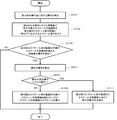
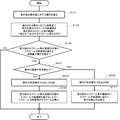
- FIG. 2 is a flowchart showing an example of the operation of the information processing apparatus 100 according to the embodiment of the present invention.
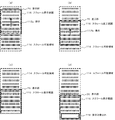
- FIG. 3 is a diagram for explaining the operation of the information processing apparatus 100 according to the embodiment of the present invention.
- the information processing apparatus 100 detects an operation on the operation surface of the display unit that displays a part of the display target including the scrollable area that scrolls according to the operation. (Step S101), and controls the display of the display unit to perform a scroll display in which the scrollable area to be displayed is output in part to the scroll display range of the display unit with a movement amount corresponding to the detected operation (Step S103).
- Step S105 When an operation indicating the amount of movement in which the outer edge of the scroll display range of the display unit exceeds the scrollable region is detected (YES in step S105), the display unit is determined depending on whether the operation is a predetermined operation (step S107).
- step S ⁇ b> 101 the operation detection unit 102 detects an operation on the operation surface of the display unit that displays a part of the display target including a scrollable area that scrolls according to the operation.
- step S105 to step S111 is to perform determination (step S105, step S107) when performing step S103, and to control scroll display with a movement amount corresponding to the operation.
- the processing procedure of this figure is started when an operation on the operation surface by the operation detection unit 102 is detected. After the series of processing procedures is completed or during the series of processing procedures, the operation can be started in parallel by detecting the operation independently of the series of processing procedures. Regarding the processing when a plurality of operations are detected, it is preferable to appropriately set priorities and conditions according to the application to be applied.
- step S103 for example, as shown in FIG. 3A, the display control unit 104 scrolls the display unit 26 to display the scrollable area 114 to be displayed with a movement amount corresponding to the operation 112a detected in step S101.
- the display of the display unit 26 is controlled so as to perform a scroll display in which a part is output in the range 116.
- the scroll display range 116 of the display unit 26 moves downward.
- step S105 the display control unit 104 determines whether or not the movement amount of the operation detected in step S101 is an amount in which the outer edge of the scroll display range 116 of the display unit 26 exceeds the scrollable area 114. it can.
- step S107 the display control unit 104 can determine whether the operation detected in step S101 is a predetermined operation.
- the display control unit 104 determines whether or not the operation is a predetermined operation.
- the display control unit 104 moves the movement amount according to the operation as shown in FIG. Scrolling is performed halfway, and scrolling of the scrollable area 114 is stopped so that the outer edge of the scroll display range 116 of the display unit 26 does not exceed the scrollable area 114 (step S109).
- the display control unit 104 moves the movement amount according to the operation.
- step S111 the non-display object 118 is displayed in the scroll display range 116 of the display unit 26 (step S111).
- step S105 when the outer edge of the scroll display range 116 of the display unit 26 is within the scrollable area 114 (NO in step S105), the information processing apparatus 100 scrolls the moving amount according to the operation and ends the process. To do.
- the operation detection unit 102 detects an operation in which the outer edge of the scroll display range of the display unit indicates a movement amount exceeding the scrollable region.
- the scrolling of the scrollable area is stopped so that the outer edge of the scrolling display range of the display unit does not exceed the scrollable range or the scrolling range of the display unit can be scrolled Since whether to display other than the display target in addition to the area is switched, the operability for the display target can be improved.
- a predetermined operation operation by a gripped hand (hereinafter referred to as a gripping hand)
- a gripping hand operation by a gripped hand
- other than the display target can be displayed. Therefore, even if the operation target area included in the scrollable area is not within the range that can be operated by a predetermined operation (operation by a gripping hand, etc.) And can be moved by a predetermined operation (such as a gripping hand), and as a result, a predetermined operation (operation by a gripping hand or the like) becomes possible.
- the operation on the scrollable area to be displayed is performed other than the predetermined operation (operation by a person other than the gripping hand), etc.
- the operation of the movement amount that the outer edge of the scroll display range of the display unit exceeds the scrollable area Since the scroll of the scrollable area can be stopped so that the outer edge of the scroll display range of the display unit does not exceed the scrollable area even if the display is made, for example, the user needs to display from the display unit by scrolling.
- the content portion is not erased from the screen and the operability is good.
- the information processing apparatus according to the embodiment of the present invention is different from the information processing apparatus 100 of the above embodiment in that the display is switched according to the type of operation.
- the information processing apparatus according to the embodiment of the present invention includes an operation detection unit 102 and a display control unit 104 that are the same as those of the information processing apparatus 100 of the above-described embodiment of FIG.
- a description will be given with reference to FIG.
- the information processing apparatus 100 has the same configuration as that of the above embodiment, the operation detection unit 102 detects the type of operation, and the display control unit 104 displays the operation detection unit 102. Based on the type of operation detected by the above, it is determined whether or not the operation is a predetermined operation, and the outer edge of the scroll display range of the display unit is stopped in the scrollable region, or the scroll display range of the display unit is In addition to the scrollable area, whether to display 118 other than the display target is switched.
- FIG. 4 is a block diagram showing a configuration of the smartphone 10 that implements the information processing apparatus 100 according to the embodiment of the present invention.
- this embodiment demonstrates the example in which the information processing apparatus 100 is implement
- the information processing apparatus 100 can be applied to, for example, a mobile phone, a PDA, a tablet terminal, a personal computer, a game machine, an acoustic electronic device, a digital camera, an image display device, or other electronic devices in addition to a smartphone.
- the smartphone 10 includes a CPU 12, a memory 14, an I / O (Input / Output) 16, a communication control unit 18, an operation unit 22, an operation reception unit 24, A display unit 26, a display control unit 28, a speaker 32, a microphone 34, and an audio control unit 36 are provided.
- the CPU 12 is connected to each element of the smartphone 10 via the bus 40 and controls the entire smartphone 10 together with each element.
- the memory 14 stores user data including a program for operating the smartphone 10 and various setting data and application data used when the program operates, and a temporary work area such as a work area for the program to operate. Has an area for storing data.
- the I / O 16 controls input / output between the CPU 12 of the smartphone 10 and each element via the bus 40.
- the smartphone 10 can use other communication capable of wireless LAN (Local Area Network) communication (so-called Wi-Fi (Wireless Fidelity)) conforming to the IEEE802.11 series via the antenna 19 as a communication unit.
- a communication control unit 18 that performs wireless LAN communication with the apparatus is provided.
- the smart phone 10 may communicate with another communication apparatus via a relay station (not shown).
- the smartphone 10 may include other communication means.
- the operation unit 22 includes operation keys, operation buttons, switches, jog dials, touch pads, touch panels, and the like.
- the operation reception unit 24 receives an operation of the operation unit 22 by the user and notifies the CPU 12 of the operation.
- the display unit 26 includes an LED (Light Emitting Diode) display, a liquid crystal display, an organic EL (ElectroLuminescence) display, and the like.
- the display control unit 28 displays various screens on the display unit 26 in accordance with instructions from the CPU 12.
- the operation unit 22 is configured by the touch panel unit 30 integrally with the display unit 26.
- the voice control unit 36 controls voice input / output with the speaker 32 or the microphone 34 or an external acoustic device in accordance with an instruction from the CPU 12.
- Each component of the information processing apparatus 100 described above is an arbitrary computer (smart phone) including a CPU 12, a memory 14, a program 42 that implements the components of FIG. 1 loaded in the memory 14, and a network connection interface (I / O 16). This is realized by any combination of hardware and software of 10). It will be understood by those skilled in the art that there are various modifications to the implementation method and apparatus. 1 and the functional block diagrams described below show logical functional unit blocks, not hardware unit configurations.
- Each component of the information processing apparatus 100 in FIG. 1 configures at least one software or apparatus such as an operating system, a driver, and an application executed by the smartphone 10 that controls the apparatus such as the smartphone 10 according to the present embodiment. This can be realized by cooperation between hardware and software.
- the CPU 12 of the smartphone 10 executes various processing operations corresponding to the computer program 42 according to the embodiment of the present invention, so that the various units as described above have various functions. Realized.
- the computer program 42 in addition to the procedure of the computer program of the above embodiment, further detects whether the operation is a predetermined operation based on the procedure for detecting the type of operation and the type of operation detected.
- the operation of the display unit 26 of the touch panel unit 30 is performed by an operation on the touch panel type display unit (in the figure, the display unit 26 of the touch panel unit 30) that can detect an operation such as contact with an operating body (hand, finger, touch pen, etc.).
- the display range within the scrollable area to be displayed displayed in the scroll display range can be moved.
- the user traces the operation surface with his / her finger while browsing the display target displayed on the display unit 26 of the touch panel unit 30, so that the scroll display range of the display unit 26 can be adjusted according to the movement (operation) of the finger.
- the content displayed on the screen can be scrolled.
- the display control unit 104 displays the scrollable area to be displayed in the scroll display range of the display unit while sequentially scrolling the display target scrollable area with a movement amount corresponding to the detected operation. However, even if a movement operation in the same direction is detected after the display range has moved to the end of the scrollable area, display control by this operation cannot be performed.
- an operation display object for example, an image, an icon, or a link
- an operation display object may be displayed outside the operable range.
- the movement of the scrollable area displayed in the scroll display range of the display unit 26 of the touch panel unit 30 is controlled according to the operation mode (type) of the gripping hand.
- the operation mode type
- other than the display target 118 can be displayed, so that the position of the operation display object in the scrollable area can be moved to a range that can be operated with the thumb of the user's gripping hand.
- the type of operation is, for example, a type such as flick or drag.
- the predetermined operation is a drag operation, and an operation other than the predetermined operation is a flick or swipe operation.
- These operation types can be detected by an OS (Operating System). That is, the operation detection unit 102 can acquire operation type information from the OS.
- each operation is defined as follows in this specification.
- the flick is an operation of quickly moving the touching point toward the end point after touching the start point with a finger (operation object) on the operation surface of the touch panel unit 30. This is an operation in which the end point of the operation is not specified.
- the drag is an operation of moving on the operation surface of the touch panel unit 30 while dragging with a finger (operation object) from the start point to the end point. This is the operation in which the start point and end point of the operation are specified.
- Swipe is an operation of moving on the operation surface of the touch panel unit 30 with a finger (operation object) from the start point to the end point. This includes an operation in which the start point and end point of the operation are not specified.
- the amount of movement of the display object is determined according to the movement speed or distance instructed to move by the operating body, and moves so as to slide longer than the distance instructed to move by the operating body.
- the display object is moved little by little by the distance designated by the operation tool.
- the non-display object 118 is displayed in addition to the scrollable area in the scroll display range, and the scroll display range is displayed in a case other than the drag operation, for example, a flick operation. Stop so that the outer edge does not exceed the scrollable area.
- the operation includes a hover operation that does not touch the screen. This includes operations using an operation object other than a hand or a finger, for example, a touch pen.
- the scrollable area does not necessarily have to be fixed in the scroll display range of the display unit 26, and a certain amount of movement may be allowed.
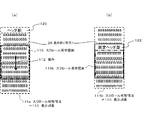
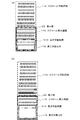
- FIG. 5A when the whole including the header part 120 is scrolled (FIG. 5A) and when a fixed menu (fixed header part 122) is included and other than the fixed menu is scrolled (FIG. 5B). There is.
- examples of the display object 110 include web pages, document files, image files, text files, and the like, and are not particularly limited. Further, an application for displaying the display object 110 is not particularly limited.
- Other than the display target 118 can include, for example, a mode in which nothing is displayed or a mode in which the top of the display target 110 is continuously scrolled at the end.
- the scrollable area 114 When the entire display target is scrolled (see FIG. 3A), the entire display target is the scrollable area 114, and the scrollable area 114 is displayed within the scroll display range 116 of the display unit 26 of the touch panel unit 30.
- the operation 112 a is performed on the operation surface of the touch panel unit 30, the scrollable area 114 scrolls within the scroll display range 116.
- the scrollable area 114a includes a non-fixed menu (header portion 120), and the entire scrollable area 114a including the menu (that is, the entire display object 110) You may scroll by operation.
- FIG. 5B is a diagram illustrating a case where the display target 110 includes a fixed menu (fixed header portion 122) and scrolls other than the fixed menu.
- a part of the display object 110 is a fixed menu (fixed header part 122), and the rest is a scrollable area 114b.
- a fixed menu (fixed header part 122) is always provided in a part other than the scroll display range 116b in the display part 26 of the touch panel unit 30. ) Is displayed, and only the scrollable region 114b is displayed within the scroll display range 116b of the display unit 26 of the touch panel unit 30.
- the fixed menu fixed header portion 122
- the shape when the display object 110 is displayed on the display unit 26 is a rectangle, and has four ends, upper, lower, left, and right.
- the display shape of the display object 110 is not limited to a rectangle, and the position and number of edges are not limited to these.
- the shape of the end is not limited to a straight line, and may be a curved line.
- the shape of the display frame of the display unit 26 is a rectangle, and has four edges, top, bottom, left, and right.
- the shape of the display frame of the display unit 26 is not limited to a rectangle, and the position and number of edges are not limited to these.
- the shape of the edge is not limited to a straight line, and may be a curved line.
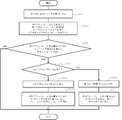
- FIG. 6 is a flowchart illustrating an example of the operation of the information processing apparatus 100 according to the present embodiment.
- the processing method of the information processing apparatus of this embodiment differs from the above-described embodiment of FIG. 2 in the predetermined operation determination processing method in step S107 as follows.
- the operation detection unit 102 further detects the type of operation (step S201).
- the display control unit 104 determines whether the operation is a predetermined operation based on the type of operation detected by the operation detection unit 102 (step S203), and scrolls the outer edge of the scroll display range of the display unit 26. Switching is made between stopping within the possible area (step S109) or displaying non-display object 118 in addition to the scrollable area within the scroll display range of the display unit 26 (step S111).
- the operation detection unit 102 detects the type of operation.
- the operation detection unit 102 detects any type of drag, flick, swipe, and the like for the operation 112b performed in the state of FIG.
- step S203 the display control unit 104 determines whether or not the operation 112b detected in step S201 is a predetermined operation.
- the predetermined operation is a drag operation.
- the display control unit 104 is halfway with the movement amount corresponding to the operation, as shown in FIG.
- the scrolling of the scrollable area 114 is stopped so that the outer edge of the scroll display range 116 of the display unit 26 does not exceed the scrollable area 114 (step S109).
- step S203 when the type of detected operation is a predetermined operation (drag operation) (YES in step S203), the display control unit 104 scrolls by a movement amount corresponding to the operation, as shown in FIG. Then, in addition to the scrollable area 114, the non-display object 118 is displayed within the scroll display range 116 of the display unit 26 (step S111). Thereafter, the information processing apparatus 100 scrolls the movement amount according to the operation, and ends the process.
- a predetermined operation drag operation
- the same effects as those of the above embodiment can be obtained, and particularly in the case of a drag operation that is a general operation method in the case of a gripping hand.
- the non-display target 118 is displayed, so that the display content of the scrollable area 114 in the scroll display range 116 of the display unit 26 is displayed according to the drag operation.
- the display content is intentionally moved little by little, so that the outer edge of the scroll display range 116 of the display unit 26 displays the scrollable area 114. It is more likely that the display content is scrolled by displaying the non-display object 118 without stopping the scrolling of the scrollable area 114 so as not to exceed the user's intention, and the usability is good.
- the scroll display of the display unit 26 is performed. Since the scrolling of the scrollable area 114 is stopped so that the outer edge of the range 116 does not exceed the scrollable area 114, for example, the content portion required by the user disappears from the screen from the display unit 26 by scrolling. The operability is good.
- FIG. 7 is a functional block diagram showing the configuration of the information processing apparatus 200 according to the embodiment of the present invention.
- the information processing apparatus according to the embodiment of the present invention is different from the above embodiment in that the operation is determined based on whether or not the operation position (start point) is within a predetermined range.
- the information processing apparatus 200 according to the embodiment of the present invention includes an operation detection unit 102 and a display control unit 104 similar to those of the information processing apparatus 100 of the above embodiment of FIG. 1, and further includes an operation position determination unit 202. Prepare.
- the information processing apparatus 200 of this embodiment can also combine the configurations of the information processing apparatuses of other embodiments.
- the information processing apparatus 200 further includes an operation position determination unit 202 that determines whether at least the start point of the operation detected by the operation detection unit 102 is within a predetermined range. Based on the determination result by the operation position determination unit 202, the display control unit 104 determines that the operation is not a predetermined operation when at least the start point of the operation is not within the predetermined range, and at least the start point of the operation is within the predetermined range. If it is determined that the operation is a predetermined operation, and it is determined that the operation is not a predetermined operation, the scrollable area is scrolled so that the outer edge of the scroll display range of the display unit 26 does not exceed the scrollable area. When the operation is determined to be a predetermined operation, in addition to the scrollable area, the non-display object 118 is displayed within the scroll display range of the display unit 26.
- the time point when the operating pressure on the operating surface becomes equal to or higher than a threshold value can be set as the starting point.
- the relationship between the hand holding the terminal and the operating hand may be a plurality of cases as shown below.
- A Grasp the terminal with one hand and operate with the gripping hand
- b Grab the terminal with one hand and operate with a hand other than the gripping hand
- c Grab the terminal with both hands and At least one of them
- case (a) and the case (c) correspond to a predetermined operation.
- the display control unit 104 displays the non-display target 118 in addition to the scrollable area within the scroll display range of the display unit 26.
- Case (b) corresponds to an operation other than the predetermined operation.
- scrolling of the scrollable area is stopped so that the outer edge of the scroll display range of the display unit 26 does not exceed the scrollable area.
- the predetermined operation within the predetermined range to be detected in the present invention is the operation of the case (a) and the case (c).
- the predetermined range may be, for example, an end region having a predetermined width from the left and right ends in the direction when the terminal is operated on the operation surface of the display unit 26 of the terminal.
- the predetermined range can be set within a range in which any finger of the gripping hand reaches the operation surface of the display unit 26 when the terminal is gripped.
- the predetermined range may be a general operation range according to the shape and size of the display unit 26, the type of terminal, the shape, size, weight, the type of operation body, and the like, and the user's operation position is learned. May be set.
- the operation detection unit 102 can accept an operation on the operation surface of the display unit 26 from an operation on a touch panel (touch panel unit 30) of the terminal, and can detect a position of the accepted operation.
- the predetermined range also changes depending on the orientation of the terminal when the user holds the terminal.
- the operation detection unit 102 is one or a combination of an acceleration sensor (not shown), a gyro sensor (not shown), a contact sensor (not shown), and the like included in the terminal. 26 direction, gripping hand (right hand, left hand or both hands), gripping position, etc. can be detected.
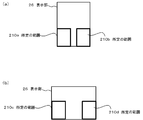
- the ranges of the left and right lower ends of the display unit 26 in the front view of the terminal are set as predetermined ranges 210a and 210b, respectively. be able to.
- the ranges shown in FIG. 9B can be set to the predetermined ranges 210c and 210d, respectively.
- the range of the specified gripping hand side can be set as the predetermined range.
- neither of the gripping hand and the gripping position can be specified, or when gripping with both hands, both can be within a predetermined range.
- 9 exemplifies a case where the predetermined range 210 is a region below the display unit 26.
- the region 210 may be a region below, in the middle, or above, or a combination thereof. Also good.
- FIG. 8 is a flowchart illustrating an example of the operation of the information processing apparatus 200 according to the present embodiment.
- the processing method of the information processing apparatus 200 of the present embodiment differs from the above-described embodiment of FIG. 2 in the predetermined operation determination processing method in step S107 as follows.
- the operation position determination unit 202 further determines whether at least the start point of the operation detected by the operation detection unit 102 is within a predetermined range (step S301). ).
- the display control unit 104 determines that the operation is not the predetermined operation when at least the start point of the operation is not within the predetermined range based on the determination result by the operation position determination unit 202 (step S303), and at least the start point of the operation. Is within the predetermined range, it is determined that the operation is the predetermined operation (step S305).
- the display control unit 104 stops scrolling of the scrollable region so that the outer edge of the scroll display range of the display unit 26 does not exceed the scrollable region (step S109). Is determined to be a predetermined operation, the display control unit 104 displays 118 other than the display target in addition to the scrollable region within the scroll display range of the display unit 26 (step S111).
- FIG. 10 is a diagram for explaining the relationship between the operation 112 on the operation surface of the display unit 26 and the predetermined range 210 in the information processing apparatus 200 according to the embodiment of the present invention.
- the operation position determination unit 202 determines that the start point 220a of the operation 112c is an operation within the predetermined range 210 (YES in step S301).
- the display control unit 104 determines that the operation 112c is a predetermined operation (step S305).
- the non-display object 118 is displayed in the scroll display range 116 of the display unit 26 (step S111).
- the operation 112d is determined by the operation position determination unit 202 to be an operation whose start point 220b is within the predetermined range 210 (YES in step S301).
- the display control unit 104 determines that the operation 112d is also a predetermined operation (step S305). Then, as shown in FIG. 3D, in addition to the scrollable area 114, the non-display object 118 is displayed in the scroll display range 116 of the display unit 26 (step S111).
- the operation 112e is determined by the operation position determination unit 202 to be an operation in which the start point 220c is outside the predetermined range 210 (NO in step S301).
- the display control unit 104 determines that the operation 112e is not a predetermined operation (step S303). Then, as shown in FIG. 3C, the scrolling of the scrollable area 114 is stopped so that the outer edge of the scroll display range 116 of the display unit 26 does not exceed the scrollable area 114 (step S109).
- 10A illustrates the case where the lower left area in the display unit 26 is the predetermined range 210. However, as described above, areas other than the lower left, for example, upper left, lower right, upper right, and center. Or the like. 10A illustrates the case where one region in the display unit 26 is within the predetermined range 210 on the assumption that the operation is performed with one-handed gripping. Assuming that the two areas in the display unit 26 may be the predetermined range 210.
- the information processing apparatus 200 may switch the display depending on whether or not the operation position (start point and end point) is completed within a predetermined range 210.
- the operation position determination unit 202 further determines whether or not the operation start point and end point are within a predetermined range 210. Based on the determination result by the operation position determination unit 202, the display control unit 104 determines that the operation is not a predetermined operation when the operation start point and end point are not within the predetermined range 210, and the operation start point and end point are predetermined. If it is within the range 210, it is determined that the operation is a predetermined operation.
- the display control unit 104 stops scrolling of the scrollable region so that the outer edge of the scroll display range of the display unit 26 does not exceed the scrollable region, and the operation is performed in a predetermined manner.
- the display control unit 104 may display other than the display target 118 in addition to the scrollable region within the scroll display range of the display unit 26.
- step S301 the operation position determination unit 202 determines whether or not the start point and end point of the operation detected by the operation detection unit 102 are within the predetermined range 210.
- the display control unit 104 determines that the operation is not the predetermined operation when the operation start point and the end point are not within the predetermined range 210 based on the determination result by the operation position determination unit 202 (step S303), and the operation start point. If the end point is within the predetermined range 210, it is determined that the operation is a predetermined operation (step S305).
- the operation 112c is determined by the operation position determination unit 202 to be an operation in which the start point 220a and the end point 222a are within the predetermined range 210 (YES in step S301).
- the display control unit 104 determines that the operation 112c is a predetermined operation (step S305).
- the non-display object 118 is displayed in the scroll display range 116 of the display unit 26 (step S111).
- the operation 112d is determined by the operation position determination unit 202 to be an operation in which the start point 220b is within the predetermined range 210 but the end point 222b is outside the predetermined range (NO in step S301).
- the display control unit 104 determines that the operation 112d is not a predetermined operation (step S303). Then, as shown in FIG. 3C, the scrolling of the scrollable area 114 is stopped so that the outer edge of the scroll display range 116 of the display unit 26 does not exceed the scrollable area 114 (step S109).
- the operation 112e is determined by the operation position determination unit 202 to be an operation in which the start point 220c and the end point 222c are outside a predetermined range (NO in step S301).
- the display control unit 104 determines that the operation 112e is not a predetermined operation (step S303). Then, as shown in FIG. 3C, the scrolling of the scrollable area 114 is stopped so that the outer edge of the scroll display range 116 of the display unit 26 does not exceed the scrollable area 114 (step S109).
- the operation 112d determined as the predetermined operation in the above example is determined not to be the predetermined operation.
- Which determination method is adopted depends on the specifications of the terminal, for example, the shape and size of the display unit 26, the type of the terminal, the shape, size, weight, the type of the operation tool, the operation method, the operation detection method, and the like. And may be selected as appropriate.
- the start point or end point of the operation 112 cannot be specified clearly is assumed, for example, the time point when the operation pressure on the operation surface becomes equal to or higher than the threshold value can be set as the start point. Then, after the start point is specified, the end point may be a time point when the operation pressure on the slave operation surface becomes less than the threshold value, or the end point may be predicted according to the operation speed.
- the same effects as those of the above embodiment can be obtained, and in particular, whether the start point (or start point and end point) of the operation is within a predetermined range. Therefore, when the operation range is within a predetermined range assumed to be operable when the operation is performed by the gripping hand, it is determined that the operation is the predetermined operation (gripping hand operation).
- the non-display object 118 is displayed in the scroll display range 116 of the display unit 26. Therefore, the display content of the scrollable area 114 in the scroll display range 116 of the display unit 26 is displayed in accordance with the gripping hand operation. Can be scrolled to a desired position. That is, even when the operation target area included in the scrollable area is not within the range that can be operated by the gripping hand, it can be moved to the operable range by the gripping hand operation, and the operation by the gripping hand becomes possible.
- the outer edge of the scroll display range 116 of the display unit 26 is It is more likely that the display content is scrolled by displaying the non-display object 118 without stopping the scrolling of the scrollable area 114 so as not to exceed the scrollable area 114, so that it matches the user's intention. Easy to use.
- the display unit 26 scrolls. Since the scrolling of the scrollable area 114 is stopped so that the outer edge of the display range 116 does not exceed the scrollable area 114, for example, a content portion required by the user from the display target is displayed on the screen from the display unit 26 by scrolling. There is no disappearance, and operability is good.
- FIG. 11 is a functional block diagram showing the configuration of the information processing apparatus 300 according to the embodiment of the present invention.
- the information processing apparatus 300 according to the embodiment of the present invention is different from the above embodiment in that the display is switched depending on the operation distance.
- the information processing apparatus 300 according to the embodiment of the present invention includes an operation detection unit 102 and a display control unit 104 similar to those of the information processing apparatus 100 of the above embodiment of FIG. Is provided.
- the information processing apparatus 300 of this embodiment can also combine the configurations of the information processing apparatuses of other embodiments.
- the information processing apparatus 300 further includes an operation distance determination unit 302 that determines whether the operation distance detected by the operation detection unit 102 is equal to or less than a predetermined value. Based on the determination result by the operation distance determination unit 302, the display control unit 104 determines that the operation is not a predetermined operation when the operation distance is not less than the predetermined value, and if the operation distance is less than the predetermined value, It is determined that the operation is a predetermined operation. When it is determined that the operation is not a predetermined operation, the display control unit 104 stops scrolling of the scrollable region so that the outer edge of the scroll display range of the display unit 26 does not exceed the scrollable region, and the operation is performed by the predetermined operation. If it is determined that there is, the display control unit 104 causes the display unit 26 to display the non-display target 118 in addition to the scrollable region within the scroll display range of the display unit 26.
- the operation detection unit 102 receives an operation on the operation surface of the display unit 26 from an operation on the touch panel (touch panel unit 30) of the terminal, and detects a distance from the start point to the end point of the received operation. Can do.
- the start point or end point of the operation cannot be clearly specified, for example, a time point when the operation pressure on the operation surface becomes equal to or higher than a threshold value can be set as the start point. Then, after the start point is specified, the end point may be the time point when the operation pressure on the operation surface becomes less than the threshold value, or the end point may be predicted according to the operation speed. Further, in the case of non-contact operation, the distance from the time point (start point) when the distance between the operation surface and the operation body becomes a certain value or less (end point) may be used. In the case where the operation is not a straight line, the trajectory of the operation may be the distance, or a straight line connecting the start point and the end point of the operation may be the distance.
- FIG. 12 is a diagram for explaining the distance of the operation 112 with respect to the operation surface of the display unit 26 in the information processing apparatus 300 according to the embodiment of the present invention.
- the movable range is restricted, and the distance is shortened compared to the operation other than the gripping hand. Since there is no restriction on the movable range for operations other than the gripping hand, the distance can be increased compared to the gripping hand operation.
- the operability is impaired even if the non-display target 118 is displayed by the operation. I can't.
- the predetermined value may be a general operation range according to the shape and size of the display unit 26, the type of terminal, the shape, size, weight, the type of operation body, and the like. May be set.
- FIG. 13 is a flowchart illustrating an example of the operation of the information processing apparatus 300 according to the present embodiment.
- the processing method of the information processing apparatus 300 of this embodiment differs from the above-described embodiment of FIG. 2 in the predetermined operation determination processing method in step S107 as follows.
- the operation distance determination unit 302 further determines whether or not the operation distance detected by the operation detection unit 102 is equal to or less than a predetermined value (step S401). Then, based on the determination result by the operation distance determination unit 302, the display control unit 104 determines that the operation is not the predetermined operation when the operation distance is not less than the predetermined value (NO in step S401) (step S403). If the operation distance is equal to or less than the predetermined value (YES in step S401), it is determined that the operation is a predetermined operation (step S405).
- the display control unit 104 stops scrolling of the scrollable region so that the outer edge of the scroll display range of the display unit 26 does not exceed the scrollable region (step S109). Is determined to be a predetermined operation, the display control unit 104 displays 118 other than the display target in addition to the scrollable region within the scroll display range of the display unit 26 (step S111).
- the operation detection unit 102 detects an operation 112 (operation 112f or operation 112g) on the display unit 26. Then, the operation distance determination unit 302 determines whether or not the detected distance L of the operation 112 is equal to or less than a predetermined value.
- the distance L can be a distance from the start point to the end point of the operation 112, for example.
- the operation distance determination unit 302 determines that the operation distance L1 is equal to or less than a predetermined value (YES in step S401). In this case, the display control unit 104 determines that the operation 112f is a predetermined operation (step S405). Then, as shown in FIG. 3D, in addition to the scrollable area 114, the non-display object 118 is displayed in the scroll display range 116 of the display unit 26 (step S111). In the operation 112g, the operation distance determination unit 302 determines that the operation distance L2 is not less than a predetermined value (NO in step S401). In this case, the display control unit 104 determines that the operation 112g is not a predetermined operation (step S403). Then, as shown in FIG. 3C, the scrolling of the scrollable area 114 is stopped so that the outer edge of the scroll display range 116 of the display unit 26 does not exceed the scrollable area 114 (step S109).
- the same effect as the above embodiment can be obtained, and in particular, whether or not the operation is a predetermined operation depending on whether or not the operation distance is a predetermined value or less. Therefore, when the operation distance is equal to or less than a predetermined value assumed to be operable when the operation is performed by the gripping hand, it is determined that the operation is a predetermined operation (gripping hand operation), and the scroll display range 116 of the display unit 26 is In addition to the scrollable area 114, the non-display object 118 is displayed, so that the display content of the scrollable area 114 in the scroll display range 116 of the display unit 26 is scrolled to a desired position according to the gripping hand operation. Can do. That is, even when the operation target area included in the scrollable area is not within the range that can be operated by the gripping hand, it can be moved to the operable range by the gripping hand operation, and the operation by the gripping hand becomes possible.
- the display content is intentionally moved little by little, so the outer edge of the scroll display range 116 of the display unit 26 is It is more likely that the display content is scrolled by displaying the non-display object 118 without stopping the scrolling of the scrollable area 114 so as not to exceed the scrollable area 114, so that it matches the user's intention. Easy to use.
- the display unit 26 is operated even when the outer edge of the scroll display range of the display unit 26 exceeds the scrollable region. Since the scrolling of the scrollable area 114 is stopped so that the outer edge of the scroll display range 116 does not exceed the scrollable area 114, the content portion required by the user, for example, is displayed on the screen from the display unit 26 by scrolling. There is no disappearance from the top, and operability is good.
- the information processing apparatus according to the embodiment of the present invention is different from the above embodiment in that the scroll range is controlled in consideration of the operable area.
- the information processing apparatus according to the embodiment of the present invention includes an operation detection unit 102 and a display control unit 104 that are the same as those of the information processing apparatus 100 of the above-described embodiment of FIG.
- the information processing apparatus of this embodiment can also combine the configurations of the information processing apparatuses of other embodiments.
- FIG. 14 is a diagram for explaining scroll control in the information processing apparatus according to the embodiment of the present invention.
- the display control unit 104 sets other than the display target 118 displayed in addition to the scrollable area 114 in the scroll display range 116 to a predetermined value on the operation surface of the display unit 26.
- the scrollable area 114 is displayed within the operable range 510 (two-dot chain line).
- the operable range 510 is a range in which an operation by a grasping hand is possible.
- the non-display target 118 is displayed so that the scrollable area 114 does not remain in the operable range 510
- the user's finger is displayed on the operation target included in the scrollable area 114. May not arrive. Therefore, in the present embodiment, as shown in FIG. 14A, the display of the non-display object 118 is controlled so that the scrollable area 114 remains in the operable range 510.
- the operable range 510 may be specified by learning from the position of the actual movement operation. For example, a range that is determined in advance by assuming a gripping position according to the type or shape of the terminal may be set. Good. Furthermore, the display control unit 104 may control the operation range 510 to scroll to the range including the operation target in the scrollable region 114 in consideration of the arrangement of the operation target included in the display target. .
- the same effect as that of the above embodiment can be obtained. Further, in the scroll display range 116 of the display unit 26 according to the operation by the gripping hand. When the display content of the scrollable area 114 is scrolled to a desired position, the scrollable area 114 is not moved too much and the scrollable area 114 cannot be operated.
- the display control unit 104 may display supplemental display information different from the display target in an area 118 other than the display target.
- display information is a background image set as a background.
- the area other than the display object 118 can be provided at the upper end, the lower end, the left end, and the right end, for example, but different display information can be displayed in each area. According to this configuration, the same effects as those of the above-described embodiment can be obtained, and further, a visual effect and visual entertainment can be provided.
- the display control unit 104 stops displaying the non-display target 118 when the operation detected by the operation detection unit 102 is a predetermined operation after displaying the non-display target 118.
- the display in the scrollable area 114 may be returned by at least one operation.
- the predetermined operation in this case is a specific operation such as flick or tap, or an operation at a predetermined operation position.
- Examples of the predetermined operation position include a region other than the display target 118 on the display unit 26.
- the predetermined operation for stopping the display of other than the display object 118 is not limited to a single operation, and may be returned in stages by a plurality of operations. According to this configuration, the same effects as in the above embodiment can be obtained, and even when the non-display target 118 is displayed by a predetermined operation, the display of the non-display target 118 is stopped by a simple operation and the original display is performed. Therefore, it is possible to provide a lubricated operability.
- Information processing device Detect an operation on the operation surface of the display unit that displays a part of the display target including a scrollable area that scrolls according to the operation, Controlling the display of the display unit so as to perform a scroll display for outputting the scrollable area of the display target part by part to a scroll display range of the display unit with a movement amount corresponding to the detected operation;
- the outer edge of the scroll display range of the display unit is determined according to whether the operation is a predetermined operation.
- Processing method of information processing apparatus Whether to stop scrolling of the scrollable area so as not to exceed the scrollable area, or to switch whether to display other than the display target in addition to the scrollable area within the scroll display range of the display unit, Processing method of information processing apparatus. 2. 1. In the processing method of the information processing apparatus described in The information processing apparatus is Detecting the type of operation, Based on the type of the detected operation, it is determined whether or not the operation is the predetermined operation, and the outer edge of the scroll display range of the display unit is stopped in the scrollable area, or the display unit Switch whether to display other than the display target in addition to the scrollable area within the scroll display range, Processing method of information processing apparatus. 3. 1. Or 2.
- the information processing apparatus determines whether at least the starting point of the detected operation is within a predetermined range, Based on the determination result, when at least the starting point of the operation is not within the predetermined range, it is determined that the operation is not the predetermined operation, and when at least the starting point of the operation is within the predetermined range, Is the predetermined operation, If it is determined that the operation is not the predetermined operation, the scrolling of the scrollable area is stopped so that the outer edge of the scroll display range of the display unit does not exceed the scrollable area; When it is determined that the operation is the predetermined operation, in addition to the scrollable area, the display unit other than the display target is displayed in the scroll display range of the display unit.
- the information processing apparatus is Determining whether the detected distance of the operation is a predetermined value or less; Based on the determination result, when the distance of the operation is not less than or equal to the predetermined value, it is determined that the operation is not the predetermined operation, and when the distance of the operation is less than or equal to the predetermined value, It is determined that it is a predetermined operation, If it is determined that the operation is not the predetermined operation, the scrolling of the scrollable area is stopped so that the outer edge of the scroll display range of the display unit does not exceed the scrollable area; When it is determined that the operation is the predetermined operation, in addition to the scrollable area in the scroll display range of the display unit, display other than the display target, Processing method of information processing apparatus.
- the information processing apparatus is In addition to displaying the scrollable area in the scroll display range, the display target other than the display target is displayed in a range where the scrollable area remains in a predetermined operable range for the operation surface of the display unit. Processing method of information processing apparatus. 7). 1. To 6. In the processing method of the information processing apparatus according to any one of the above, The information processing apparatus is In addition to the display object, display information different from the display object is displayed. Processing method of information processing apparatus. 8). 1. To 7.
- the information processing apparatus is When the operation detected after the display other than the display target is a predetermined operation, the display other than the display target is stopped, and the display in the scrollable area is returned by at least one operation. Processing method of information processing apparatus. 9. A procedure for detecting an operation on an operation surface of a display unit that displays a part of a display target including a scrollable area that scrolls according to an operation; Control the display of the display unit so as to perform a scroll display in which the scrollable area of the display target is output in part to the scroll display range of the display unit with a movement amount corresponding to the operation detected by the procedure of detecting the operation.
- the steps to To the computer In the controlling procedure, When an operation indicating the amount of movement in which the outer edge of the scroll display range of the display unit exceeds the scrollable region is detected in the procedure of detecting the operation, the display unit is determined depending on whether the operation is a predetermined operation or not. Stop scrolling of the scrollable region so that the outer edge of the scroll display range does not exceed the scrollable region, or in addition to the scrollable region within the scroll display range of the display unit, The procedure to switch the display, A program that causes a computer to execute. 10. 9.
- a procedure for determining an operation distance for determining whether or not a distance of the operation detected in the procedure for detecting the operation is a predetermined value or less; Is further executed on the computer,
- the procedure for controlling the display is as follows: Based on the determination result in the procedure for determining the operation distance, when the distance of the operation is not less than the predetermined value, it is determined that the operation is not the predetermined operation, and the distance of the operation is less than the predetermined value.
- any program In the procedure for controlling the display, A procedure for displaying the display target other than the display target displayed in addition to the scrollable area in the scroll display range in a range in which the scrollable area remains in a predetermined operable range for the operation surface of the display unit; A program that causes a computer to execute. 15. 9. To 14. In any program, In the procedure for controlling the display, In addition to the display object, a procedure for displaying display information different from the display object, A program that causes a computer to execute. 16. 9. To 15. In any program, In the procedure for controlling the display, If the operation detected in the procedure of detecting the operation after displaying the non-display object is a predetermined operation, the display other than the display object is stopped, and the display in the scrollable area is performed at least once. Procedure to return by operation, A program that causes a computer to execute.
Landscapes
- Engineering & Computer Science (AREA)
- General Engineering & Computer Science (AREA)
- Theoretical Computer Science (AREA)
- Human Computer Interaction (AREA)
- Physics & Mathematics (AREA)
- General Physics & Mathematics (AREA)
- User Interface Of Digital Computer (AREA)
- Telephone Function (AREA)
- Air Conditioning Control Device (AREA)
Abstract
Description
ここで、接触または接近等の操作位置を検出可能なタッチパネル型表示部(以降、「表示部」と称する)に対するスクロール操作により、表示部に表示される表示対象を順にスクロール方向に移動させることが可能である。このスクロール操作によって、表示部に表示されずに隠れている部分の表示対象の外縁が表示範囲の外縁に至るまで移動させることができる。
操作に応じてスクロールするスクロール可能領域を含む表示対象の一部を表示する表示部の操作面に対する操作を検出する操作検出手段と、
前記操作検出手段により検出される操作に応じた移動量で前記表示対象の前記スクロール可能領域を前記表示部のスクロール表示範囲に一部分ずつ出力するスクロール表示を行う表示制御手段と、
を備え、
前記表示制御手段は、前記表示部のスクロール表示範囲の外縁が前記スクロール可能領域を超える前記移動量を示す操作が前記操作検出手段で検出された場合、該操作が所定操作か否かに応じて、前記表示部のスクロール表示範囲の外縁が前記スクロール可能領域を超えないように前記スクロール可能領域のスクロールを停止させるか、または、前記表示部のスクロール表示範囲内に前記スクロール可能領域に加えて前記表示対象以外を表示させるかを切り替える。
情報処理装置が、
操作に応じてスクロールするスクロール可能領域を含む表示対象の一部を表示する表示部の操作面に対する操作を検出し、
検出される操作に応じた移動量で前記表示対象の前記スクロール可能領域を前記表示部のスクロール表示範囲に一部分ずつ出力するスクロール表示を行うよう前記表示部の表示を制御し、
前記表示部のスクロール表示範囲の外縁が前記スクロール可能領域を超える前記移動量を示す操作が検出された場合、該操作が所定操作か否かに応じて、前記表示部のスクロール表示範囲の外縁が前記スクロール可能領域を超えないように前記スクロール可能領域のスクロールを停止させるか、または、前記表示部のスクロール表示範囲内に前記スクロール可能領域に加えて前記表示対象以外を表示させるかを切り替える。
操作に応じてスクロールするスクロール可能領域を含む表示対象の一部を表示する表示部の操作面に対する操作を検出する手順、
前記操作を検出する手順により検出される操作に応じた移動量で前記表示対象の前記スクロール可能領域を前記表示部のスクロール表示範囲に一部分ずつ出力するスクロール表示を行うよう前記表示部の表示を制御する手順、
をコンピュータに実行させ、
前記制御する手順において、
前記表示部のスクロール表示範囲の外縁が前記スクロール可能領域を超える前記移動量を示す操作が前記操作を検出する手順で検出された場合、該操作が所定操作か否かに応じて、前記表示部のスクロール表示範囲の外縁が前記スクロール可能領域を超えないように前記スクロール可能領域のスクロールを停止させるか、または、前記表示部のスクロール表示範囲内に前記スクロール可能領域に加えて前記表示対象以外を表示させるかを切り替える手順、
をコンピュータに実行させるためのプログラムである。
図1は、本発明の実施の形態に係る情報処理装置100の構成を示す機能ブロック図である。
本発明の実施の形態に係る情報処理装置100は、操作に応じてスクロールするスクロール可能領域を含む表示対象の一部を表示する表示部(不図示)の操作面に対する操作を検出する操作検出部102と、操作検出部102により検出される操作に応じた移動量で表示対象のスクロール可能領域を表示部のスクロール表示範囲に一部分ずつ出力するスクロール表示を行う表示制御部104と、を備える。表示制御部104は、表示部のスクロール表示範囲の外縁がスクロール可能領域を超える移動量を示す操作が操作検出部102で検出された場合、該操作が所定操作か否かに応じて、表示部のスクロール表示範囲の外縁がスクロール可能領域を超えないようにスクロール可能領域のスクロールを停止させるか、表示部のスクロール表示範囲内にスクロール可能領域に加えて表示対象以外を表示させるかを切り替える。
本発明の情報処理装置は、上記コンピュータを備えるスマートフォン、携帯電話機、PDA(Personal Digital Assistants)、タブレット端末、パーソナルコンピュータ、ゲーム機、音響電子機器、デジタルカメラ、画像表示装置、またはその他の電子機器等に適用することができる。なお、情報処理装置と、表示部は一体となっていなくてもよく、情報処理装置に接続され、情報処理装置により制御される表示装置であってもよい。
また、本発明の情報処理装置は、1つのチップや装置として実現されてもよく、さらに、他の装置に装着するような形態で実現されてもよい。
本図の処理手順は、操作検出部102による操作面に対する操作が検出されたときに開始される。一連の処理手順が終了した後、または一連の処理手順が行われている間も、一連の処理手順とは独立して操作の検出により並列して動作開始することができる。複数の操作が検出された場合の処理については、適用されるアプリケーションに応じて、適宜優先順位や条件を定めることが好ましい。
そして、表示部26のスクロール表示範囲116の外縁がスクロール可能領域114を超える移動量を示す操作である場合(ステップS105のYES)、表示制御部104が、該操作が所定操作か否かを判定する(ステップS107)。
ステップS105において、表示部26のスクロール表示範囲116の外縁がスクロール可能領域114内である場合(ステップS105のNO)、情報処理装置100は、操作に応じた移動量でスクロールさせて、処理を終了する。
以下、本発明の情報処理装置を、スマートフォン10により実現する実施形態について説明する。
本発明の実施の形態に係る情報処理装置は、上記実施形態の情報処理装置100とは、操作の種別で表示を切り替える点で相違する。本発明の実施の形態に係る情報処理装置は、図1の上記実施形態の情報処理装置100と同様な操作検出部102と、表示制御部104と、を備える。以下、図1を用いて説明する。
なお、本実施形態では、スマートフォン10により情報処理装置100が実現される例について説明するが、これに限定されない。情報処理装置100は、たとえば、スマートフォン以外に、携帯電話機、PDA、タブレット端末、パーソナルコンピュータ、ゲーム機、音響電子機器、デジタルカメラ、画像表示装置、またはその他の電子機器等にも適用できる。
音声制御部36は、CPU12からの指示に従い、スピーカ32またはマイク34、あるいは、外部の音響デバイスとの音声入出力を制御する。
このように、把持手ではない他方の手指で操作することにより、表示内容を確認しその都度、操作する手指を切り替える必要があり、操作が煩雑になることがあった。
すなわち、操作検出部102は、OSから操作種別の情報を取得することができる。
フリックとは、タッチパネルユニット30の操作面上で、始点を指(操作物)で触れた後、終点方向に向けてはじくようにさっと動かす操作である。操作の終点が特定されない動作がこれにあたる。
ドラッグとは、タッチパネルユニット30の操作面上を、始点から終点に向かって指(操作物)で引きずりながら移動する操作である。操作の始点と終点が特定される動作がこれにあたる。
スワイプとは、タッチパネルユニット30の操作面上を、始点から終点に向かって指(操作物)でなでるように移動する操作である。操作の始点と終点が特定されない動作もこれに含まれる。
なお、本発明において、操作は、画面に接触しないホバー操作も含む。手や指以外の操作物、たとえば、タッチペンによる操作も含む。
表示対象110において、ヘッダ部120を含む全体がスクロールする場合(図5(a))と、固定メニュー(固定ヘッダ部122)が含まれ、固定メニュー以外がスクロールする場合(図5(b))がある。
さらに、本実施形態では、表示部26の表示枠の形状は、矩形であり、上下左右の4つの縁を有する。しかし、表示部26の表示枠の形状は、矩形に限定されず、縁の位置および数もこれらに限定されるものではない。縁の形状も直線に限定されず、曲線であってもよい。
本発明の実施の形態に係る情報処理装置において、さらに、操作検出部102が、操作の種別を検出する(ステップS201)。
そして、表示制御部104が、操作検出部102により検出される操作の種別に基づいて、該操作が所定操作か否かを判定し(ステップS203)、表示部26のスクロール表示範囲の外縁をスクロール可能領域内で停止させる(ステップS109)か、または、表示部26のスクロール表示範囲内にスクロール可能領域に加えて表示対象以外118を表示させる(ステップS111)かを切り替える。
ステップS105で検出された操作について、ステップS201において、操作検出部102が、操作の種別を検出する。たとえば、操作検出部102は、図3(b)の状態でなされた操作112bについて、ドラッグ、フリック、スワイプ等のいずれかの種別を検出する。
たとえば、検出された操作の種別が所定操作(ドラッグ操作)に該当しない場合(ステップS203のNO)、表示制御部104は、図3(c)に示すように、操作に応じた移動量で途中までスクロールさせ、表示部26のスクロール表示範囲116の外縁がスクロール可能領域114を超えないようにスクロール可能領域114のスクロールを停止させる(ステップS109)。一方、検出された操作の種別が所定操作(ドラッグ操作)である場合(ステップS203のYES)、表示制御部104は、図3(d)に示すように、操作に応じた移動量でスクロールさせて、表示部26のスクロール表示範囲116内にスクロール可能領域114に加えて表示対象以外118を表示させる(ステップS111)。
その後、情報処理装置100は、操作に応じた移動量でスクロールさせて、処理を終了する。
図7は、本発明の実施の形態に係る情報処理装置200の構成を示す機能ブロック図である。
本発明の実施の形態に係る情報処理装置は、上記実施の形態とは、操作位置(始点)が所定の範囲内に収まっているか否かで操作を判別する点で相違する。本発明の実施の形態に係る情報処理装置200は、図1の上記実施形態の情報処理装置100と同様な操作検出部102と、表示制御部104とを備えるとともに、さらに操作位置判定部202を備える。以下、図7を用いて説明する。本実施形態の情報処理装置200は、他の実施形態の情報処理装置の構成を組み合わせることもできる。
(a)片手で端末を把持して、把持手で操作する
(b)片手で端末を把持して、把持手以外の手で操作する
(c)両手で端末を把持して、その両手(のうち少なくとも一方)で操作する
本発明において、ケース(a)とケース(c)が所定操作に相当する。これらのケースでは、表示制御部104は、表示部26のスクロール表示範囲内にスクロール可能領域に加えて表示対象以外118を表示させる。把持手で操作している場合、表示部26のスクロール表示範囲の外縁がスクロール可能領域を超えないようにスクロール可能領域のスクロールを停止させてしまうと、ユーザが把持手から遠い位置にある操作対象の操作を行うことが困難であるからである。
また、ケース(b)は、所定操作以外の操作に相当する。このケースでは、表示部26のスクロール表示範囲の外縁がスクロール可能領域を超えないようにスクロール可能領域のスクロールを停止させる。把持手以外の手で操作している場合、表示部26のスクロール表示範囲の外縁がスクロール可能領域を超えないようにスクロール可能領域のスクロールを停止させてもユーザは何も不自由ではない。
所定の範囲は、端末を把持した場合に、表示部26の操作面に把持手のいずれかの指が届く範囲で設定することができる。所定の範囲は、表示部26の形状やサイズ、端末の種類、形状、サイズ、重さ、操作体の種類等に応じて、一般的な操作範囲としてもよいし、ユーザの操作位置を学習して設定してもよい。
所定の範囲は、端末をユーザが把持した時の端末の向きに応じても変わる。たとえば、情報処理装置200において、操作検出部102は、端末が有する加速度センサ(不図示)、ジャイロセンサ(不図示)、および接触センサ(不図示)等のいずれか、または組み合わせ、端末の表示部26の向き、把持手(右手か左手か両手か)、または把持位置等を検出することができる。
把持手または把持位置のいずれかが特定できる場合は、特定された方の把持手側の範囲を所定の範囲とすることができる。また、把持手と把持位置のどちらも特定できない場合、または、両手把持の場合は、両方を所定の範囲とすることができる。
なお、図9では、所定の範囲210が、表示部26の下方の領域である場合を例示したが、たとえば、下方、中程、および上方等のいずれか、またはこれらの組み合わせの領域であってもよい。
本実施形態の情報処理装置200の処理方法は、図2の上記実施形態とは、ステップS107の所定操作の判別処理方法が下記の通り異なる。
そして、表示制御部104が、操作位置判定部202による判定結果に基づき、操作の少なくとも始点が所定の範囲内ではない場合、操作が所定操作ではないと判定し(ステップS303)、操作の少なくとも始点が所定の範囲内である場合、操作が所定操作であると判定する(ステップS305)。
図10は、本発明の実施の形態に係る情報処理装置200における、表示部26の操作面に対する操作112と所定の範囲210の関係を説明するための図である。
たとえば、図10(a)に示す通り、操作位置判定部202によって、操作112cの始点220aが、所定の範囲210内にある操作であると判定される(ステップS301のYES)。この場合、表示制御部104は、操作112cが所定の操作であると判定する(ステップS305)。そして、図3(d)に示すように、表示部26のスクロール表示範囲116内にスクロール可能領域114に加えて表示対象以外118を表示させる(ステップS111)。
具体的には、本実施形態の情報処理装置200において、操作位置判定部202は、さらに、操作の始点および終点が、所定の範囲210内か否かを判定する。表示制御部104は、操作位置判定部202による判定結果に基づき、操作の始点および終点が所定の範囲210内ではない場合、該操作が所定操作ではないと判定し、操作の始点および終点が所定の範囲210内である場合、該操作が所定操作であると判定する。そして、操作が所定操作ではないと判定された場合、表示制御部104は、表示部26のスクロール表示範囲の外縁がスクロール可能領域を超えないようにスクロール可能領域のスクロールを停止させ、操作が所定操作であると判定された場合、表示制御部104は、表示部26のスクロール表示範囲内にスクロール可能領域に加えて表示対象以外118を表示させてもよい。
図11は、本発明の実施の形態に係る情報処理装置300の構成を示す機能ブロック図である。
本発明の実施の形態に係る情報処理装置300は、上記実施の形態とは、操作の距離で表示を切り替える点で相違する。本発明の実施の形態に係る情報処理装置300は、図1の上記実施形態の情報処理装置100と同様な操作検出部102と、表示制御部104とを備えるとともに、さらに、操作距離判定部302を備える。以下、図11を用いて説明する。本実施形態の情報処理装置300は、他の実施形態の情報処理装置の構成を組み合わせることもできる。
なお、操作が直線でない場合、操作の軌跡を距離としてもよいし、操作の始点と終点を結んだ直線を距離としてもよい。
一般的に、把持手による操作は、操作する指の付け根が固定されるため、可動範囲が制約され、把持手以外の操作に比べて、距離が短くなる。把持手以外の操作は、可動範囲に制約がないため、把持手操作に比べて、距離を長くすることができる。また、把持手以外の操作であっても、ユーザが表示対象を閲覧しながら少しずつ移動させる操作を行っているような場合、その操作によって、表示対象以外118が表示されても操作性は損なわれない。
したがって、本実施形態では、把持手による操作の場合の可動範囲を考慮して、操作の距離の所定値を設定することができる。所定値は、表示部26の形状やサイズ、端末の種類、形状、サイズ、重さ、操作体の種類等に応じて、一般的な操作範囲としてもよいし、ユーザの操作の癖を学習して設定してもよい。
本発明の実施の形態に係る情報処理装置300において、さらに、操作距離判定部302は、操作検出部102により検出される操作の距離が所定値以下か否かを判定する(ステップS401)。
そして、表示制御部104が、操作距離判定部302による判定結果に基づき、操作の距離が所定値以下ではない場合(ステップS401のNO)、操作が所定操作ではないと判定し(ステップS403)、操作の距離が所定値以下である場合(ステップS401のYES)、操作が所定操作であると判定する(ステップS405)。
たとえば、図12に示す通り、操作検出部102により、表示部26に対する操作112(操作112fまたは操作112g)が検出されるとする。そして、操作距離判定部302は、検出された操作112の距離Lが所定値以下か否かを判定する。距離Lは、たとえば、操作112の始点から終点までの距離とすることができる。
操作112gは、操作距離判定部302によって、操作の距離L2が所定値以下ではないと判定される(ステップS401のNO)。この場合、表示制御部104は、操作112gが所定の操作ではないと判定する(ステップS403)。そして、図3(c)に示すように、表示部26のスクロール表示範囲116の外縁がスクロール可能領域114を超えないようにスクロール可能領域114のスクロールを停止させる(ステップS109)。
本発明の実施の形態に係る情報処理装置は、上記実施の形態とは、スクロール範囲を、操作可能領域を考慮して制御する点で相違する。本発明の実施の形態に係る情報処理装置は、図1の上記実施形態の情報処理装置100と同様な操作検出部102と、表示制御部104と、を備える。以下、図1を用いて説明する。本実施形態の情報処理装置は、他の実施形態の情報処理装置の構成を組み合わせることもできる。
本発明の実施の形態に係る情報処理装置において、表示制御部104は、スクロール表示範囲116内にスクロール可能領域114に加えて表示される表示対象以外118を、表示部26の操作面に対する所定の操作可能範囲510(2点鎖線)に、スクロール可能領域114が残る範囲で、表示させる。
図14(b)に示すように、操作可能範囲510内にスクロール可能領域114が残らないように、表示対象以外118が表示されてしまうと、スクロール可能領域114に含まれる操作対象にユーザの手指が届かない可能性がある。したがって、本実施形態では、図14(a)に示すように、操作可能範囲510内にスクロール可能領域114が残るように、表示対象以外118の表示を制御する。
さらに、表示制御部104は、表示対象に含まれる操作対象の配置を考慮して、操作可能範囲510に、スクロール可能領域114内の操作対象が含まれる範囲までスクロールさせるように制御してもよい。
たとえば、他の実施形態の情報処理装置において、表示制御部104は、表示対象以外118の領域に、表示対象とは別の補足的な表示情報を表示してもよい。
別の表示情報の例としては、たとえば、背景として設定されている背景画像等が挙げられる。
さらに、表示対象以外118の領域は、表示部26が矩形の場合、たとえば、上端、下端、左端、右端に設けることができるが、それぞれの領域において、異なる表示情報を表示させることもできる。
この構成によれば、上記実施形態と同様な効果を奏するとともに、さらに、視覚的効果、視覚的な娯楽性をもたらすこともできる。
この表示対象以外118の表示をやめるための所定操作は、一回の操作に限られず、複数回の操作によって段階的に戻してもよい。
この構成によれば、上記実施形態と同様な効果を奏するとともに、さらに、所定操作により表示対象以外118を表示させていた場合にも、簡単な操作で表示対象以外118の表示をやめて元の表示に戻すことができるので、潤滑な操作性をもたらすことが可能になる。
1.情報処理装置が、
操作に応じてスクロールするスクロール可能領域を含む表示対象の一部を表示する表示部の操作面に対する操作を検出し、
検出される操作に応じた移動量で前記表示対象の前記スクロール可能領域を前記表示部のスクロール表示範囲に一部分ずつ出力するスクロール表示を行うよう前記表示部の表示を制御し、
前記表示部のスクロール表示範囲の外縁が前記スクロール可能領域を超える前記移動量を示す操作が検出された場合、該操作が所定操作か否かに応じて、前記表示部のスクロール表示範囲の外縁が前記スクロール可能領域を超えないように前記スクロール可能領域のスクロールを停止させるか、または、前記表示部のスクロール表示範囲内に前記スクロール可能領域に加えて前記表示対象以外を表示させるかを切り替える、
情報処理装置の処理方法。
2. 1.に記載の情報処理装置の処理方法において、
前記情報処理装置が、
前記操作の種別を検出し、
検出される前記操作の種別に基づいて、該操作が前記所定操作か否かを判定し、前記表示部のスクロール表示範囲の外縁を前記スクロール可能領域内で停止させるか、または、前記表示部のスクロール表示範囲内に前記スクロール可能領域に加えて前記表示対象以外を表示させるかを切り替える、
情報処理装置の処理方法。
3. 1.または2.に記載の情報処理装置の処理方法において、
前記情報処理装置が、
さらに、検出される前記操作の少なくとも始点が、所定の範囲内か否かを判定し、
その判定結果に基づき、前記操作の少なくとも始点が前記所定の範囲内ではない場合、該操作が前記所定操作ではないと判定し、前記操作の少なくとも始点が前記所定の範囲内である場合、該操作が前記所定操作であると判定し、
前記操作が前記所定操作ではないと判定された場合、前記表示部のスクロール表示範囲の外縁が前記スクロール可能領域を超えないように前記スクロール可能領域のスクロールを停止させ、
前記操作が前記所定操作であると判定された場合、前記表示部の前記スクロール表示範囲内に前記スクロール可能領域に加えて前記表示対象以外を表示させる、
情報処理装置の処理方法。
4. 3.に記載の情報処理装置の処理方法において、
前記情報処理装置が、
さらに、前記操作の始点および終点が、所定の範囲内か否かを判定し、
その判定結果に基づき、前記操作の前記始点および終点が前記所定の範囲内ではない場合、該操作が前記所定操作ではないと判定し、前記操作の前記始点および終点が前記所定の範囲内である場合、該操作が前記所定操作であると判定し、
前記操作が前記所定操作ではないと判定された場合、前記表示部のスクロール表示範囲の外縁が前記スクロール可能領域を超えないように前記スクロール可能領域のスクロールを停止させ、
前記操作が前記所定操作であると判定された場合、前記表示部のスクロール表示範囲内に前記スクロール可能領域に加えて前記表示対象以外を表示させる、
情報処理装置の処理方法。
5. 1.乃至4.いずれかに記載の情報処理装置の処理方法において、
前記情報処理装置が、
検出される前記操作の距離が、所定値以下か否かを判定し、
その判定結果に基づき、前記操作の前記距離が前記所定値以下ではない場合、該操作が前記所定操作ではないと判定し、前記操作の前記距離が前記所定値以下である場合、該操作が前記所定操作であると判定し、
前記操作が前記所定操作ではないと判定された場合、前記表示部のスクロール表示範囲の外縁が前記スクロール可能領域を超えないように前記スクロール可能領域のスクロールを停止させ、
前記操作が前記所定操作であると判定された場合、前記表示部のスクロール表示範囲内に前記スクロール可能領域に加えて前記表示対象以外を表示させる、
情報処理装置の処理方法。
6. 1.乃至5.いずれかに記載の情報処理装置の処理方法において、
前記情報処理装置が、
前記スクロール表示範囲内に前記スクロール可能領域に加えて表示される前記表示対象以外を、前記表示部の前記操作面に対する所定の操作可能範囲に、前記スクロール可能領域が残る範囲で、表示させる、
情報処理装置の処理方法。
7. 1.乃至6.いずれかに記載の情報処理装置の処理方法において、
前記情報処理装置が、
前記表示対象以外に、前記表示対象とは別の表示情報を表示する、
情報処理装置の処理方法。
8. 1.乃至7.いずれかに記載の情報処理装置の処理方法において、
前記情報処理装置が、
前記表示対象以外を表示した後、検出される前記操作が所定操作の場合、前記表示対象以外の表示をやめ、前記スクロール可能領域内の表示に、少なくとも一回の前記操作で戻す、
情報処理装置の処理方法。
9.操作に応じてスクロールするスクロール可能領域を含む表示対象の一部を表示する表示部の操作面に対する操作を検出する手順、
前記操作を検出する手順により検出される操作に応じた移動量で前記表示対象の前記スクロール可能領域を前記表示部のスクロール表示範囲に一部分ずつ出力するスクロール表示を行うよう前記表示部の表示を制御する手順、
をコンピュータに実行させ、
前記制御する手順において、
前記表示部のスクロール表示範囲の外縁が前記スクロール可能領域を超える前記移動量を示す操作が前記操作を検出する手順で検出された場合、該操作が所定操作か否かに応じて、前記表示部のスクロール表示範囲の外縁が前記スクロール可能領域を超えないように前記スクロール可能領域のスクロールを停止させるか、または、前記表示部のスクロール表示範囲内に前記スクロール可能領域に加えて前記表示対象以外を表示させるかを切り替える手順、
をコンピュータに実行させるためのプログラム。
10. 9.に記載のプログラムにおいて、
前記操作を検出する手順において、
前記操作の種別を検出する手順、
をコンピュータに実行させ、
前記表示を制御する手順において、
前記操作を検出する手順において検出される前記操作の種別に基づいて、該操作が前記所定操作か否かを判定し、前記表示部のスクロール表示範囲の外縁を前記スクロール可能領域内で停止させるか、または、前記表示部のスクロール表示範囲内に前記スクロール可能領域に加えて前記表示対象以外を表示させるかを切り替える手順、
をコンピュータに実行させるためのプログラム。
11. 9.または10.に記載のプログラムにおいて、
前記操作を検出する手順において検出される前記操作の少なくとも始点が、所定の範囲内か否かを判定する操作位置を判定する手順、
をさらにコンピュータに実行させ、
前記表示を制御する手順において、
前記操作位置を判定する手順における判定結果に基づき、前記操作の少なくとも始点が前記所定の範囲内ではない場合、該操作が前記所定操作ではないと判定し、前記操作の少なくとも始点が前記所定の範囲内である場合、該操作が前記所定操作であると判定し、
前記操作が前記所定操作ではないと判定された場合、前記表示部のスクロール表示範囲の外縁が前記スクロール可能領域を超えないように前記スクロール可能領域のスクロールを停止させ、
前記操作が前記所定操作であると判定された場合、前記表示部の前記スクロール表示範囲内に前記スクロール可能領域に加えて前記表示対象以外を表示する手順、
をコンピュータに実行させるためのプログラム。
12. 11.に記載のプログラムにおいて、
前記操作位置を判定する手順において、
さらに、前記操作の始点および終点が、所定の範囲内か否かを判定し、
前記表示を制御する手順において、
前記操作位置を判定する手順における判定結果に基づき、前記操作の前記始点および終点が前記所定の範囲内ではない場合、該操作が前記所定操作ではないと判定し、前記操作の前記始点および終点が前記所定の範囲内である場合、該操作が前記所定操作であると判定し、
前記操作が前記所定操作ではないと判定された場合、前記表示部のスクロール表示範囲の外縁が前記スクロール可能領域を超えないように前記スクロール可能領域のスクロールを停止させ、
前記操作が前記所定操作であると判定された場合、前記表示部のスクロール表示範囲内に前記スクロール可能領域に加えて前記表示対象以外を表示させる手順、
をコンピュータに実行させるためのプログラム。
13. 9.乃至12.いずれかに記載のプログラムにおいて、
前記操作を検出する手順において検出される前記操作の距離が、所定値以下か否かを判定する操作距離を判定する手順、
をさらにコンピュータに実行させ、
前記表示を制御する手順は、
前記操作距離を判定する手順における判定結果に基づき、前記操作の前記距離が前記所定値以下ではない場合、該操作が前記所定操作ではないと判定し、前記操作の前記距離が前記所定値以下である場合、該操作が前記所定操作であると判定し、
前記操作が前記所定操作ではないと判定された場合、前記表示部のスクロール表示範囲の外縁が前記スクロール可能領域を超えないように前記スクロール可能領域のスクロールを停止させ、
前記操作が前記所定操作であると判定された場合、前記表示部のスクロール表示範囲内に前記スクロール可能領域に加えて前記表示対象以外を表示させる手順、
をコンピュータに実行させるためのプログラム。
14. 9.乃至13.いずれかに記載のプログラムにおいて、
前記表示を制御する手順において、
前記スクロール表示範囲内に前記スクロール可能領域に加えて表示される前記表示対象以外を、前記表示部の前記操作面に対する所定の操作可能範囲に、前記スクロール可能領域が残る範囲で、表示させる手順、
をコンピュータに実行させるためのプログラム。
15. 9.乃至14.いずれかに記載のプログラムにおいて、
前記表示を制御する手順において、
前記表示対象以外に、前記表示対象とは別の表示情報を表示する手順、
をコンピュータに実行させるためのプログラム。
16. 9.乃至15.いずれかに記載のプログラムにおいて、
前記表示を制御する手順において、
前記表示対象以外を表示した後、前記操作を検出する手順において検出される前記操作が所定操作の場合、前記表示対象以外の表示をやめ、前記スクロール可能領域内の表示に、少なくとも一回の前記操作で戻す手順、
をコンピュータに実行させるためのプログラム。
Claims (10)
- 操作に応じてスクロールするスクロール可能領域を含む表示対象の一部を表示する表示部の操作面に対する操作を検出する操作検出手段と、
前記操作検出手段により検出される操作に応じた移動量で前記表示対象の前記スクロール可能領域を前記表示部のスクロール表示範囲に一部分ずつ出力するスクロール表示を行う表示制御手段と、
を備え、
前記表示制御手段は、前記表示部のスクロール表示範囲の外縁が前記スクロール可能領域を超える前記移動量を示す操作が前記操作検出手段で検出された場合、該操作が所定操作か否かに応じて、前記表示部のスクロール表示範囲の外縁が前記スクロール可能領域を超えないように前記スクロール可能領域のスクロールを停止させるか、または、前記表示部のスクロール表示範囲内に前記スクロール可能領域に加えて前記表示対象以外を表示させるかを切り替える情報処理装置。 - 請求項1に記載の情報処理装置において、
前記操作検出手段は、前記操作の種別を検出し、
前記表示制御手段は、前記操作検出手段により検出される前記操作の種別に基づいて、該操作が前記所定操作か否かを判定し、前記表示部のスクロール表示範囲の外縁を前記スクロール可能領域内で停止させるか、または、前記表示部のスクロール表示範囲内に前記スクロール可能領域に加えて前記表示対象以外を表示させるかを切り替える情報処理装置。 - 請求項1または2に記載の情報処理装置において、
前記操作検出手段により検出される前記操作の少なくとも始点が、所定の範囲内か否かを判定する操作位置判定手段をさらに備え、
前記表示制御手段は、
前記操作位置判定手段による判定結果に基づき、前記操作の少なくとも始点が前記所定の範囲内ではない場合、該操作が前記所定操作ではないと判定し、前記操作の少なくとも始点が前記所定の範囲内である場合、該操作が前記所定操作であると判定し、
前記操作が前記所定操作ではないと判定された場合、前記表示部のスクロール表示範囲の外縁が前記スクロール可能領域を超えないように前記スクロール可能領域のスクロールを停止させ、
前記操作が前記所定操作であると判定された場合、前記表示部の前記スクロール表示範囲内に前記スクロール可能領域に加えて前記表示対象以外を表示させる情報処理装置。 - 請求項3に記載の情報処理装置において、
前記操作位置判定手段は、さらに、前記操作の始点および終点が、所定の範囲内か否かを判定し、
前記表示制御手段は、
前記操作位置判定手段による判定結果に基づき、前記操作の前記始点および終点が前記所定の範囲内ではない場合、該操作が前記所定操作ではないと判定し、前記操作の前記始点および終点が前記所定の範囲内である場合、該操作が前記所定操作であると判定し、
前記操作が前記所定操作ではないと判定された場合、前記表示部のスクロール表示範囲の外縁が前記スクロール可能領域を超えないように前記スクロール可能領域のスクロールを停止させ、
前記操作が前記所定操作であると判定された場合、前記表示部のスクロール表示範囲内に前記スクロール可能領域に加えて前記表示対象以外を表示させる情報処理装置。 - 請求項1乃至4いずれかに記載の情報処理装置において、
前記操作検出手段により検出される前記操作の距離が、所定値以下か否かを判定する操作距離判定手段をさらに備え、
前記表示制御手段は、
前記操作距離判定手段による判定結果に基づき、前記操作の前記距離が前記所定値以下ではない場合、該操作が前記所定操作ではないと判定し、前記操作の前記距離が前記所定値以下である場合、該操作が前記所定操作であると判定し、
前記操作が前記所定操作ではないと判定された場合、前記表示部のスクロール表示範囲の外縁が前記スクロール可能領域を超えないように前記スクロール可能領域のスクロールを停止させ、
前記操作が前記所定操作であると判定された場合、前記表示部のスクロール表示範囲内に前記スクロール可能領域に加えて前記表示対象以外を表示させる情報処理装置。 - 請求項1乃至5いずれかに記載の情報処理装置において、
前記表示制御手段は、
前記スクロール表示範囲内に前記スクロール可能領域に加えて表示される前記表示対象以外を、前記表示部の前記操作面に対する所定の操作可能範囲に、前記スクロール可能領域が残る範囲で、表示させる情報処理装置。 - 請求項1乃至6いずれかに記載の情報処理装置において、
前記表示制御手段は、前記表示対象以外に、前記表示対象とは別の表示情報を表示する情報処理装置。 - 請求項1乃至7いずれかに記載の情報処理装置において、
前記表示制御手段は、
前記表示対象以外を表示した後、前記操作検出手段により検出される前記操作が所定操作の場合、前記表示対象以外の表示をやめ、前記スクロール可能領域内の表示に、少なくとも一回の前記操作で戻す情報処理装置。 - 情報処理装置が、
操作に応じてスクロールするスクロール可能領域を含む表示対象の一部を表示する表示部の操作面に対する操作を検出し、
検出される操作に応じた移動量で前記表示対象の前記スクロール可能領域を前記表示部のスクロール表示範囲に一部分ずつ出力するスクロール表示を行うよう前記表示部の表示を制御し、
前記表示部のスクロール表示範囲の外縁が前記スクロール可能領域を超える前記移動量を示す操作が検出された場合、該操作が所定操作か否かに応じて、前記表示部のスクロール表示範囲の外縁が前記スクロール可能領域を超えないように前記スクロール可能領域のスクロールを停止させるか、または、前記表示部のスクロール表示範囲内に前記スクロール可能領域に加えて前記表示対象以外を表示させるかを切り替える、
情報処理装置の処理方法。 - 操作に応じてスクロールするスクロール可能領域を含む表示対象の一部を表示する表示部の操作面に対する操作を検出する手順、
前記操作を検出する手順により検出される操作に応じた移動量で前記表示対象の前記スクロール可能領域を前記表示部のスクロール表示範囲に一部分ずつ出力するスクロール表示を行うよう前記表示部の表示を制御する手順、
をコンピュータに実行させ、
前記制御する手順において、
前記表示部のスクロール表示範囲の外縁が前記スクロール可能領域を超える前記移動量を示す操作が前記操作を検出する手順で検出された場合、該操作が所定操作か否かに応じて、前記表示部のスクロール表示範囲の外縁が前記スクロール可能領域を超えないように前記スクロール可能領域のスクロールを停止させるか、または、前記表示部のスクロール表示範囲内に前記スクロール可能領域に加えて前記表示対象以外を表示させるかを切り替える手順、
をコンピュータに実行させるためのプログラム。
Priority Applications (4)
| Application Number | Priority Date | Filing Date | Title |
|---|---|---|---|
| JP2015519774A JP6252584B2 (ja) | 2013-05-27 | 2014-05-13 | 情報処理装置、その処理方法、およびプログラム |
| CN201480030637.3A CN105247467A (zh) | 2013-05-27 | 2014-05-13 | 信息处理装置、其处理方法以及程序 |
| EP14803601.5A EP3007053B1 (en) | 2013-05-27 | 2014-05-13 | Information processing apparatus, processing method therefof, and program |
| US14/894,106 US20160132204A1 (en) | 2013-05-27 | 2014-05-13 | Information processing apparatus, processing method thereof, and program |
Applications Claiming Priority (2)
| Application Number | Priority Date | Filing Date | Title |
|---|---|---|---|
| JP2013111386 | 2013-05-27 | ||
| JP2013-111386 | 2013-05-27 |
Publications (1)
| Publication Number | Publication Date |
|---|---|
| WO2014192536A1 true WO2014192536A1 (ja) | 2014-12-04 |
Family
ID=51988573
Family Applications (1)
| Application Number | Title | Priority Date | Filing Date |
|---|---|---|---|
| PCT/JP2014/062709 Ceased WO2014192536A1 (ja) | 2013-05-27 | 2014-05-13 | 情報処理装置、その処理方法、およびプログラム |
Country Status (5)
| Country | Link |
|---|---|
| US (1) | US20160132204A1 (ja) |
| EP (1) | EP3007053B1 (ja) |
| JP (1) | JP6252584B2 (ja) |
| CN (1) | CN105247467A (ja) |
| WO (1) | WO2014192536A1 (ja) |
Cited By (3)
| Publication number | Priority date | Publication date | Assignee | Title |
|---|---|---|---|---|
| CN105988703A (zh) * | 2015-03-03 | 2016-10-05 | 阿里巴巴集团控股有限公司 | 一种业务对象的展示方法和装置 |
| JP2016201029A (ja) * | 2015-04-13 | 2016-12-01 | ブラザー工業株式会社 | 携帯端末、表示制御方法および表示制御プログラム |
| JP2018031950A (ja) * | 2016-08-26 | 2018-03-01 | 富士ゼロックス株式会社 | 情報処理装置およびプログラム |
Families Citing this family (2)
| Publication number | Priority date | Publication date | Assignee | Title |
|---|---|---|---|---|
| US9898547B1 (en) | 2014-05-02 | 2018-02-20 | Tribune Publishing Company, Llc | Online information system with backward continuous scrolling |
| JP6420799B2 (ja) * | 2016-08-29 | 2018-11-07 | キヤノン株式会社 | 情報処理装置、その制御方法およびプログラム |
Citations (4)
| Publication number | Priority date | Publication date | Assignee | Title |
|---|---|---|---|---|
| JP2010515978A (ja) | 2007-01-07 | 2010-05-13 | アップル インコーポレイテッド | タッチスクリーンディスプレイにおけるリストのスクローリング、ドキュメントの並進移動、スケーリング及び回転 |
| JP2012008625A (ja) * | 2010-06-22 | 2012-01-12 | Konica Minolta Business Technologies Inc | 画像処理装置、スクロール表示方法およびコンピュータプログラム |
| JP2012014524A (ja) * | 2010-07-01 | 2012-01-19 | Panasonic Corp | 電子機器、表示制御方法、及びプログラム |
| JP2013047945A (ja) * | 2011-07-27 | 2013-03-07 | Kyocera Corp | 電子機器、制御方法および制御プログラム |
Family Cites Families (5)
| Publication number | Priority date | Publication date | Assignee | Title |
|---|---|---|---|---|
| JP5045559B2 (ja) * | 2008-06-02 | 2012-10-10 | 富士通モバイルコミュニケーションズ株式会社 | 携帯端末 |
| JP4632102B2 (ja) * | 2008-07-17 | 2011-02-16 | ソニー株式会社 | 情報処理装置、情報処理方法及び情報処理プログラム |
| TWI412963B (zh) * | 2009-07-01 | 2013-10-21 | Htc Corp | 資料顯示與移動方法及系統,及其電腦程式產品 |
| US8624925B2 (en) * | 2009-10-16 | 2014-01-07 | Qualcomm Incorporated | Content boundary signaling techniques |
| JP2012058856A (ja) * | 2010-09-06 | 2012-03-22 | Sony Corp | 情報処理装置、情報処理方法及び情報処理プログラム |
-
2014
- 2014-05-13 WO PCT/JP2014/062709 patent/WO2014192536A1/ja not_active Ceased
- 2014-05-13 EP EP14803601.5A patent/EP3007053B1/en not_active Not-in-force
- 2014-05-13 JP JP2015519774A patent/JP6252584B2/ja not_active Expired - Fee Related
- 2014-05-13 CN CN201480030637.3A patent/CN105247467A/zh active Pending
- 2014-05-13 US US14/894,106 patent/US20160132204A1/en not_active Abandoned
Patent Citations (4)
| Publication number | Priority date | Publication date | Assignee | Title |
|---|---|---|---|---|
| JP2010515978A (ja) | 2007-01-07 | 2010-05-13 | アップル インコーポレイテッド | タッチスクリーンディスプレイにおけるリストのスクローリング、ドキュメントの並進移動、スケーリング及び回転 |
| JP2012008625A (ja) * | 2010-06-22 | 2012-01-12 | Konica Minolta Business Technologies Inc | 画像処理装置、スクロール表示方法およびコンピュータプログラム |
| JP2012014524A (ja) * | 2010-07-01 | 2012-01-19 | Panasonic Corp | 電子機器、表示制御方法、及びプログラム |
| JP2013047945A (ja) * | 2011-07-27 | 2013-03-07 | Kyocera Corp | 電子機器、制御方法および制御プログラム |
Non-Patent Citations (1)
| Title |
|---|
| See also references of EP3007053A4 * |
Cited By (3)
| Publication number | Priority date | Publication date | Assignee | Title |
|---|---|---|---|---|
| CN105988703A (zh) * | 2015-03-03 | 2016-10-05 | 阿里巴巴集团控股有限公司 | 一种业务对象的展示方法和装置 |
| JP2016201029A (ja) * | 2015-04-13 | 2016-12-01 | ブラザー工業株式会社 | 携帯端末、表示制御方法および表示制御プログラム |
| JP2018031950A (ja) * | 2016-08-26 | 2018-03-01 | 富士ゼロックス株式会社 | 情報処理装置およびプログラム |
Also Published As
| Publication number | Publication date |
|---|---|
| US20160132204A1 (en) | 2016-05-12 |
| JPWO2014192536A1 (ja) | 2017-02-23 |
| EP3007053A4 (en) | 2016-11-30 |
| EP3007053B1 (en) | 2019-05-01 |
| JP6252584B2 (ja) | 2017-12-27 |
| CN105247467A (zh) | 2016-01-13 |
| EP3007053A1 (en) | 2016-04-13 |
Similar Documents
| Publication | Publication Date | Title |
|---|---|---|
| US12487723B2 (en) | Information processing apparatus | |
| CN104620215B (zh) | 电子设备、文档显示方法和记录有程序的计算机可读记录介质 | |
| JP6157885B2 (ja) | 携帯端末装置の表示制御方法 | |
| KR20120087601A (ko) | 터치스크린 단말기에서 화면 디스플레이 제어 방법 및 장치 | |
| JP6252584B2 (ja) | 情報処理装置、その処理方法、およびプログラム | |
| WO2012043111A1 (ja) | 情報処理端末およびその制御方法 | |
| CN102937873A (zh) | 在便携式终端中进行键盘输入的方法和设备 | |
| US10095277B2 (en) | Electronic apparatus and display control method thereof | |
| US20150301635A1 (en) | Information processing device, information processing method, and program | |
| CN104133621A (zh) | 显示装置、输入控制方法以及输入控制程序 | |
| JP6241071B2 (ja) | 情報処理装置、その処理方法、およびプログラム | |
| JP2019053196A (ja) | 情報処理装置、画面制御方法 | |
| JP2017211876A (ja) | 表示装置及び表示制御プログラム | |
| EP3007049A1 (en) | Display control device, control method thereof, and program | |
| JP6528726B2 (ja) | 表示装置及び表示制御プログラム | |
| JP5514922B1 (ja) | ユーザ操作制御プログラム、携帯装置及びユーザ操作制御方法 | |
| WO2012157667A1 (ja) | 携帯端末装置、その表示制御方法、および、プログラム | |
| JP5640165B2 (ja) | ユーザ操作制御プログラム、携帯装置及びユーザ操作制御方法 | |
| JP6940172B2 (ja) | 情報端末、表示制御方法、及びプログラム | |
| JP2014044592A (ja) | 情報処理装置、情報処理方法、プログラム及び情報記憶媒体 | |
| JP5639295B2 (ja) | ユーザ操作制御プログラム、携帯装置及びユーザ操作制御方法 | |
| JP5738465B2 (ja) | ユーザ操作制御プログラム、携帯装置及びユーザ操作制御方法 | |
| JP5873945B2 (ja) | ユーザ操作制御プログラム、携帯装置及びユーザ操作制御方法 | |
| JP6579088B2 (ja) | 表示装置、情報処理装置 | |
| WO2013128512A1 (ja) | 入力装置、入力制御方法及びプログラム |
Legal Events
| Date | Code | Title | Description |
|---|---|---|---|
| 121 | Ep: the epo has been informed by wipo that ep was designated in this application |
Ref document number: 14803601 Country of ref document: EP Kind code of ref document: A1 |
|
| ENP | Entry into the national phase |
Ref document number: 2015519774 Country of ref document: JP Kind code of ref document: A |
|
| WWE | Wipo information: entry into national phase |
Ref document number: 2014803601 Country of ref document: EP |
|
| WWE | Wipo information: entry into national phase |
Ref document number: 14894106 Country of ref document: US |
|
| NENP | Non-entry into the national phase |
Ref country code: DE |