WO2018079332A1 - 情報処理装置及び情報処理方法 - Google Patents
情報処理装置及び情報処理方法 Download PDFInfo
- Publication number
- WO2018079332A1 WO2018079332A1 PCT/JP2017/037477 JP2017037477W WO2018079332A1 WO 2018079332 A1 WO2018079332 A1 WO 2018079332A1 JP 2017037477 W JP2017037477 W JP 2017037477W WO 2018079332 A1 WO2018079332 A1 WO 2018079332A1
- Authority
- WO
- WIPO (PCT)
- Prior art keywords
- emotion
- sentence
- input
- unit
- information processing
- Prior art date
- Legal status (The legal status is an assumption and is not a legal conclusion. Google has not performed a legal analysis and makes no representation as to the accuracy of the status listed.)
- Ceased
Links
Images








Classifications
-
- G—PHYSICS
- G10—MUSICAL INSTRUMENTS; ACOUSTICS
- G10L—SPEECH ANALYSIS TECHNIQUES OR SPEECH SYNTHESIS; SPEECH RECOGNITION; SPEECH OR VOICE PROCESSING TECHNIQUES; SPEECH OR AUDIO CODING OR DECODING
- G10L25/00—Speech or voice analysis techniques not restricted to a single one of groups G10L15/00 - G10L21/00
- G10L25/48—Speech or voice analysis techniques not restricted to a single one of groups G10L15/00 - G10L21/00 specially adapted for particular use
- G10L25/51—Speech or voice analysis techniques not restricted to a single one of groups G10L15/00 - G10L21/00 specially adapted for particular use for comparison or discrimination
- G10L25/63—Speech or voice analysis techniques not restricted to a single one of groups G10L15/00 - G10L21/00 specially adapted for particular use for comparison or discrimination for estimating an emotional state
-
- G—PHYSICS
- G06—COMPUTING OR CALCULATING; COUNTING
- G06F—ELECTRIC DIGITAL DATA PROCESSING
- G06F3/00—Input arrangements for transferring data to be processed into a form capable of being handled by the computer; Output arrangements for transferring data from processing unit to output unit, e.g. interface arrangements
- G06F3/01—Input arrangements or combined input and output arrangements for interaction between user and computer
- G06F3/017—Gesture based interaction, e.g. based on a set of recognized hand gestures
-
- G—PHYSICS
- G06—COMPUTING OR CALCULATING; COUNTING
- G06F—ELECTRIC DIGITAL DATA PROCESSING
- G06F3/00—Input arrangements for transferring data to be processed into a form capable of being handled by the computer; Output arrangements for transferring data from processing unit to output unit, e.g. interface arrangements
- G06F3/01—Input arrangements or combined input and output arrangements for interaction between user and computer
- G06F3/048—Interaction techniques based on graphical user interfaces [GUI]
- G06F3/0487—Interaction techniques based on graphical user interfaces [GUI] using specific features provided by the input device, e.g. functions controlled by the rotation of a mouse with dual sensing arrangements, or of the nature of the input device, e.g. tap gestures based on pressure sensed by a digitiser
- G06F3/0488—Interaction techniques based on graphical user interfaces [GUI] using specific features provided by the input device, e.g. functions controlled by the rotation of a mouse with dual sensing arrangements, or of the nature of the input device, e.g. tap gestures based on pressure sensed by a digitiser using a touch-screen or digitiser, e.g. input of commands through traced gestures
-
- G—PHYSICS
- G06—COMPUTING OR CALCULATING; COUNTING
- G06F—ELECTRIC DIGITAL DATA PROCESSING
- G06F3/00—Input arrangements for transferring data to be processed into a form capable of being handled by the computer; Output arrangements for transferring data from processing unit to output unit, e.g. interface arrangements
- G06F3/16—Sound input; Sound output
-
- G—PHYSICS
- G06—COMPUTING OR CALCULATING; COUNTING
- G06F—ELECTRIC DIGITAL DATA PROCESSING
- G06F3/00—Input arrangements for transferring data to be processed into a form capable of being handled by the computer; Output arrangements for transferring data from processing unit to output unit, e.g. interface arrangements
- G06F3/16—Sound input; Sound output
- G06F3/167—Audio in a user interface, e.g. using voice commands for navigating, audio feedback
-
- G—PHYSICS
- G06—COMPUTING OR CALCULATING; COUNTING
- G06F—ELECTRIC DIGITAL DATA PROCESSING
- G06F40/00—Handling natural language data
- G06F40/10—Text processing
- G06F40/166—Editing, e.g. inserting or deleting
-
- G—PHYSICS
- G10—MUSICAL INSTRUMENTS; ACOUSTICS
- G10L—SPEECH ANALYSIS TECHNIQUES OR SPEECH SYNTHESIS; SPEECH RECOGNITION; SPEECH OR VOICE PROCESSING TECHNIQUES; SPEECH OR AUDIO CODING OR DECODING
- G10L15/00—Speech recognition
- G10L15/26—Speech to text systems
Definitions
- the present technology relates to an information processing apparatus and an information processing method, and more particularly, to an information processing apparatus and an information processing method capable of obtaining a sentence that appropriately expresses emotions.
- An information processing apparatus includes an emotion recognition unit that recognizes an emotion input by a user operation, and a processing unit that processes the first sentence based on the recognized emotion.
- a speech recognition unit that converts input speech into the first sentence can be further provided, and the processing unit can process the first sentence converted by the speech recognition unit.
- the processing unit can process the portion of the first sentence corresponding to the voice input during the user operation.
- the emotion recognition unit can further recognize an emotion based on the input voice.
- the emotion recognition unit can recognize at least one of emotion types and levels.
- the emotion recognition unit can recognize the level of emotion based on the amount of user operation.
- the emotion recognition unit can recognize the emotion level from the combination of the swipe amount and the pressing amount or the pressing time for the operation unit operated by the user.
- the emotion recognition unit can recognize the type of emotion based on the direction of user operation.
- the processing unit can add a character string to at least one of the beginning, middle, and end of the first sentence.
- the processing unit can adjust the amount of character string to be added based on the recognized emotion level.
- the processing unit can change the character string to be added based on the recognized emotion type.
- the processing unit can change the expression while maintaining the meaning of the first sentence.
- the processing unit can adjust the degree of expression change based on the recognized emotion level.
- the processing unit can select an expression change method based on the recognized emotion type.
- the emotion recognition unit can further recognize an emotion based on the first sentence.
- the emotion recognition unit can further recognize an emotion based on the second sentence before the first sentence.
- the emotion recognition unit can further recognize an emotion based on the third sentence.
- the processing unit can add an expression corresponding to the recognized emotion to the first sentence.
- the information processing method includes an emotion recognition step for recognizing an emotion input by a user operation, and a processing step for processing a sentence based on the recognized emotion.
- emotions input by user operations are recognized, and sentences are processed based on the recognized emotions.
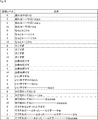
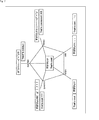
- FIG. 1 is a block diagram illustrating an embodiment of an information processing system to which the present technology is applied. It is an external view which shows the structural example of a controller. It is a flowchart for demonstrating 1st Embodiment of the process of a client. It is a flowchart for demonstrating 1st Embodiment of the process of a server. It is a figure for demonstrating the 1st example of the processing method of a text. It is a figure for demonstrating the 2nd example of the processing method of a text. It is a figure for demonstrating the 3rd example of the processing method of a text. It is a figure for demonstrating the 4th example of the processing method of a text.
- Embodiment >> ⁇ 1-1.
- Configuration example of information processing system> First, a configuration example of an information processing system 10 to which the present technology is applied will be described with reference to FIG.
- the information processing system 10 recognizes an emotion to be given to a sentence (hereinafter referred to as an input sentence) input by a user by voice, and processes a sentence (hereinafter referred to as a processed sentence) obtained by processing the input sentence based on the recognized emotion. Process to generate.
- the information processing system 10 includes a client 11, a server 12, and a network 13. The client 11 and the server 12 are connected to each other via the network 13.
- client 11 Although only one client 11 is illustrated, in practice, a plurality of clients 11 are connected to the network 13 and a plurality of users can use the information processing system 10 via the clients 11.
- the client 11 transmits, to the server 12, voice data indicating the input sentence input by the user by voice, and the voice recognition information including the input sentence obtained as a result of the voice recognition and the processed sentence obtained by processing the input sentence.
- the processed text information including the received text is received from the server 12 and the input text and the processed text are presented.
- the client 11 includes a mobile information terminal such as a smart phone, a tablet, a mobile phone, and a laptop personal computer, a wearable device, a desktop personal computer, a game machine, a video playback device, a music playback device, and the like.
- a wearable device for example, various types such as a glasses type, a watch type, a bracelet type, a necklace type, a neckband type, an earphone type, a headset type, and a head mount type can be adopted.
- the client 11 includes a voice input unit 21, an operation unit 22, a display unit 23, a presentation unit 24, a communication unit 26, a control unit 27, and a storage unit 28.
- the control unit 27 includes an input / output control unit 41, a presentation control unit 42, and an execution unit 43.
- the voice input unit 21, the operation unit 22, the display unit 23, the presentation unit 24, the communication unit 26, the control unit 27, and the storage unit 28 are connected to each other via a bus 29.
- the voice input unit 21 is constituted by a microphone, for example.
- the number of microphones can be set arbitrarily.
- the voice input unit 21 collects surrounding voices and supplies voice data indicating the collected voices to the control unit 27 or stores the voice data in the storage unit 28.
- the operation unit 22 includes various operation members and is used for the operation of the client 11.
- the operation unit 22 includes a controller, a remote controller, a touch panel, hardware buttons, and the like.
- the operation unit 22 supplies operation data indicating the content of the operation on the operation unit 22 to the control unit 27.
- the display unit 23 is constituted by a display, for example.
- the display unit 23 displays various images, GUI (Graphical User Interface), various application programs, service screens, and the like under the control of the presentation control unit 42.
- GUI Graphic User Interface
- the presentation unit 24 is constituted by, for example, a speaker, a vibration device, another cooperation device, and the like.
- the presentation unit 24 presents various types of information under the control of the presentation control unit 42.
- the sensor unit 25 includes various sensors such as a camera, a distance sensor, a GPS (Global Positioning System) receiver, an acceleration sensor, and a gyro sensor.
- the sensor unit 25 supplies sensor data indicating the detection result of each sensor to the control unit 27 or stores it in the storage unit 28.
- the communication unit 26 includes various communication devices.
- the communication method of the communication unit 26 is not particularly limited, and may be either wireless communication or wired communication. Further, the communication unit 26 may support a plurality of communication methods.
- the communication unit 26 communicates with the server 12 via the network 13 and transmits and receives various data.
- the communication unit 26 supplies the data received from the server 12 to the control unit 27 or stores it in the storage unit 28.
- the control unit 27 includes, for example, various processors.
- the input / output control unit 41 controls input / output of various data.
- the input / output control unit 41 extracts data necessary for processing of the server 12 from the audio data from the audio input unit 21, the operation data from the operation unit 22, and the sensor data from the sensor unit 25, The extracted data is transmitted to the server 12 via the communication unit 26 and the network 13. Further, the input / output control unit 41 receives voice recognition information, processed sentence information, and the like from the server 12 via the communication unit 26 and the network 13.
- the presentation control unit 42 controls the presentation of various information by the display unit 23 and the presentation unit 24.
- the execution unit 43 executes various processes by executing various application programs (hereinafter referred to as APP).
- APP application programs
- the storage unit 28 stores programs, data, and the like necessary for the processing of the client 11.
- the server 12 performs voice recognition based on the voice data, operation data, and sensor data received from the client 11, and generates a processed sentence obtained by processing the input sentence obtained as a result of the voice recognition. Then, the server 12 transmits the voice recognition information including the input sentence and the processed sentence information including the processed sentence to the client 11 via the network 13.
- the server 12 includes a communication unit 61, a control unit 62, and a storage unit 63.
- the control unit 62 includes a sound processing unit 71, an image processing unit 72, a natural language processing unit 73, a speech recognition unit 74, a gesture recognition unit 75, an operation recognition unit 76, an emotion recognition unit 77, and a processing unit 78.
- the communication unit 61, the control unit 62, and the storage unit 63 are connected to each other via a bus 64.
- the communication unit 61 includes various communication devices.
- the communication method of the communication unit 61 is not particularly limited, and may be either wireless communication or wired communication. Further, the communication unit 61 may support a plurality of communication methods.
- the communication unit 61 communicates with the client 11 via the network 13 and transmits / receives various data.
- the communication unit 61 supplies data received from the client 11 to the control unit 62 or stores the data in the storage unit 63.
- the control unit 62 includes, for example, various processors.
- the sound processing unit 71 extracts various feature amounts from the sound data.
- the feature amount extracted by the sound processing unit 71 is not particularly limited, and includes, for example, phonemes, volume, inflection, length, speed, and the like.
- the image processing unit 72 extracts various feature amounts from the image data.
- the feature amount extracted by the image processing unit 72 is not particularly limited, but includes, for example, a feature amount suitable for recognition of a human gesture.
- the natural language processing unit 73 performs natural language processing such as morphological analysis, syntax analysis, and modality analysis.
- the voice recognition unit 74 converts voice into a character string by voice recognition.
- the voice recognition unit 74 transmits the voice recognition information including the input sentence obtained as a result of the voice recognition to the client 11 via the communication unit 61 and the network 13.
- the gesture recognition unit 75 recognizes a gesture of a person shown in the image data based on the feature amount extracted by the image processing unit 72.
- the operation recognition unit 76 recognizes an operation performed on the client 11 based on the operation data acquired from the client 11.
- the emotion recognition unit 77 recognizes emotions based on the processing results of the sound processing unit 71, the image processing unit 72, the natural language processing unit 73, the voice recognition unit 74, the gesture recognition unit 75, and the operation recognition unit 76. Process. For example, the emotion recognition unit 77 recognizes the type of emotion (hereinafter referred to as emotion type) and the level of emotion (hereinafter referred to as emotion level).
- emotion type the type of emotion
- emotion level of emotion hereinafter referred to as emotion level
- the processing unit 78 generates a processed sentence by processing the input sentence recognized by the voice recognition unit 74 based on the emotion recognized by the emotion recognition unit 77.
- the processing unit 78 transmits processed text information including the generated processed text to the client 11 via the communication unit 61 and the network 13.
- the storage unit 63 stores programs, data, and the like necessary for the processing of the server 12.
- FIG. 2 shows a configuration example of the controller 100 which is an example of the operation unit 22.
- the controller 100 includes a touch pad 101, a stick 102, a stick 103, direction keys 104U to 104R, and buttons 105A to 105D.
- the touch pad 101 can detect the moving direction and moving distance of the finger by tracing the surface with a finger (by swiping).
- the touch pad 101 can detect tapping by tapping with a finger.
- the stick 102 can be moved in the designated direction by tilting it up, down, left and right (or front, back, left and right).
- the stick 102 also functions as a button when pressed.
- the stick 103 can be moved in the designated direction by tilting it up, down, left, right (or front, back, left, right).
- the stick 103 also functions as a button when pressed.
- the direction key 104U to the direction key 104R are keys for instructing the up / down / left / right (or front / rear / left / right) directions.
- buttons 105A to 105D are buttons for selecting a predetermined number or symbol, for example.
- step S1 the input / output control unit 41 requests execution of speech recognition. Specifically, the input / output control unit 41 generates a voice recognition start command that is a command for instructing the start of voice recognition. The input / output control unit 41 transmits a voice recognition start command to the server 12 via the communication unit 26.
- step S2 the client 11 receives a voice input.
- the presentation control unit 42 controls the display unit 23 or the presentation unit 24 to prompt the user to input a sentence (input sentence) to be recognized by voice.
- the user inputs an input sentence by voice.
- the input / output control unit 41 acquires voice data indicating the voice of the input sentence from the voice input unit 21 and transmits the voice data to the server 12 via the communication unit 26.
- the server 12 performs voice recognition on the voice data from the client 11 in step S52 of FIG. 4 to be described later, and transmits voice recognition information including an input sentence recognized by the voice recognition in step S53.
- step S3 the client 11 presents the result of voice recognition.
- the input / output control unit 41 receives voice recognition information from the server 12 via the communication unit 26.
- the presentation control unit 42 causes the display unit 23 to display an input sentence included in the voice recognition information.
- step S4 the client 11 accepts an emotion input to be given to the sentence.
- the presentation control unit 42 controls the display unit 23 or the presentation unit 24 to prompt input of an emotion to be given to the sentence.
- the presentation control unit 42 causes the display unit 23 to display an input screen for inputting emotions.
- the input / output control unit 41 acquires operation data corresponding to the user operation from the operation unit 22 and transmits the operation data to the server 12 via the communication unit 26.
- the server 12 recognizes the emotion to be given to the sentence based on the operation data in step S54 of FIG. 4 to be described later.
- the server 12 transmits to the client 11 processed text information including the processed text generated by processing the input text based on the recognized emotion.
- step S5 the client 11 presents the processed text.
- the input / output control unit 41 receives the processed text information from the server 12 via the communication unit 26.
- the presentation control unit 42 causes the display unit 23 to display the processed text included in the processed text information.
- step S51 the voice recognition unit 74 determines whether or not execution of voice recognition has been requested.
- the voice recognition unit 74 repeatedly executes the process of step S51 at a predetermined timing until it is determined that execution of voice recognition has been requested.
- the voice recognition start command transmitted from the client 11 in step S1 of FIG. 3 is received via the communication unit 61, the voice recognition unit 74 determines that execution of voice recognition has been requested, and the process is Proceed to S52.
- the voice recognition unit 74 performs voice recognition. Specifically, the voice recognition unit 74 receives the voice data transmitted from the client 11 in step S ⁇ b> 2 of FIG. 3 via the communication unit 61. The voice recognition unit 74 performs voice recognition processing on the received voice data. That is, the voice recognition unit 74 acquires the input sentence by converting the voice indicated by the voice data into a character string.
- step S53 the voice recognition unit 74 transmits the result of voice recognition. Specifically, the speech recognition unit 74 generates speech recognition information including an input sentence obtained as a result of speech recognition. The voice recognition unit 74 transmits the generated voice recognition information to the client 11 via the communication unit 61.
- step S54 the server 12 recognizes the emotion given to the sentence.
- the operation recognition unit 76 receives the operation data transmitted from the client 11 in step S ⁇ b> 4 of FIG. 3 via the communication unit 61.
- the operation recognition unit 76 recognizes an operation performed on the client 11 based on the operation data.
- the emotion recognition unit 77 recognizes at least one of the type of emotion (emotion type) and level (emotion level) to be given to the sentence based on the recognition result (contents of user operation) of the operation recognition unit 76.
- step S55 the processing unit 78 processes the sentence based on the recognized emotion. For example, the processing unit 78 generates a processed sentence by adding an emotion expression representing the recognized emotion to the input sentence.
- FIG. 5 shows an example of processing a sentence based on the emotion level.
- a sentence is processed by adding a character string to the end of the sentence.
- the character string is a sequence of one or more characters, symbols, etc., and may be a single character.
- the sentence of emotion level 0 is the basic sentence before processing.
- an English sentence “That's so crazy” corresponding to “That's so crazy” an emotion level 2 processed sentence is “That's so crazy! ! "
- the processed sentence of emotion level 5 is “That's so crazzzzy !!!”.
- the processed text of emotion level 10 is “THAT'S SO CRAZZZZYYYY !!!”. In this processed sentence of emotion level 10, all the letters are capital letters, and the emotion is expressed more strongly.
- FIG. 6 shows an example of processing a sentence based on the emotion level as in FIG.
- the sentence is processed by adding a character string not only to the end of the sentence but also to the middle of the sentence.
- the sentence of emotion level 0 is the basic sentence before processing.
- the higher the emotion level the greater the amount of character string added.
- a processed sentence at emotion level 2 is “That is good!
- the processed sentence of emotion level 5 will be “That ’s a good guy”. That is, the processing level (processing level) of the sentence is the same between emotion level 2 and emotion level 5, and the same processed sentence is used between different emotion levels.
- the processed sentence of emotion level 10 is “That is awesome!”. That is, the processed text at emotion level 10 has a smaller amount of character string added than the processed text at emotion level 2 and emotion level 5.
- the sentence is not processed at all emotional levels with respect to the basic sentence “too much”. In this way, a certain degree of randomness is brought about in the processing level with respect to the emotion level.
- the processed sentence of emotion level 2 for the input sentence “That's so crazy” in English corresponding to “That's so crazy” is “That's sooo crazy”.
- the processed sentence of emotion level 5 is “That's soooooo crazzzzy !!!”.
- the processed sentence of emotion level 10 is “THAT'S SOOOOOO CRAZZZZYYYY !!!”. In this processed sentence of emotion level 10, all the letters are capital letters, and the emotion is expressed more strongly.
- FIG. 7 shows an example of processing a sentence based on the emotion type.
- the sentence is processed using five types of emotions: surprise, happiness, sadness, angry, and question.
- a processed sentence representing a surprised feeling with respect to an input sentence “Excellent” is converted into a half-width katakana character, and a symbol and an emoticon are added to the end of the sentence, as shown in FIG. become.
- the processed sentence representing the feeling of joy is as shown in FIG. 7 by adding a symbol and an emoticon to the end of the sentence.
- the processed sentence representing the feeling of sadness is shown in FIG. 7 by adding a symbol to the end of the sentence.
- the processed text representing the feeling of anger does not change as shown in FIG. This is because it is difficult to combine the word “great” with the emotion of anger.
- the processed sentence representing the emotion of doubt is shown in FIG. 7 by changing the sentence into a question form and adding an emoticon to the end of the sentence.
- a processed sentence that expresses a surprised feeling against an input sentence “That's cool” in English that corresponds to “great” should have all characters converted to upper case and a symbol added to the end of the sentence.
- the processed sentence representing the emotion of pleasure is shown in FIG. 7 by increasing the number of vowels o of the word “cool” at the end of the sentence and adding a symbol and an emoticon to the end of the sentence.
- the processed sentence representing the feeling of sadness is shown in FIG. 7 by adding a symbol and an emoticon to the end of the sentence.
- the processed text representing the feeling of anger does not change as shown in FIG. This is because it is difficult to combine the sentence “That's cool” with the feeling of anger.
- the processed sentence representing the questioned emotion is shown in FIG. 7 by adding a symbol to the end of the sentence.
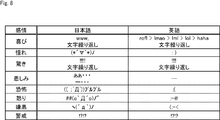
- FIG. 8 shows an example of processing a sentence based on the emotion type shown in the emotional circle of Plutchik.
- a sentence is processed using eight types of emotions: joy, longing, surprise, sadness, fear, anger, disgust, and vigilance.
- FIG. 8 shows an example of a character string added to the end of the input sentence when the sentence is processed so as to give each emotion.
- sentences may be processed based on both emotion level and emotion type. For example, when expressing the same emotion, the higher the emotion level, the higher the processing level by increasing the amount of character strings to be added, and the lower the emotion level, the lower the processing level by reducing the amount of character strings to be added. You may make it low.
- the character string added to the input sentence may be changed to some extent at random. For example, when the user repeatedly swipes left and right on the touch pad 101 of the controller 100 and repeatedly increases or decreases the emotion level, different processed sentences may be presented for the same emotion level.
- step S ⁇ b> 56 the processing unit 78 transmits the processed text. Specifically, the processing unit 78 generates processed text information including the processed text, and transmits the processed text information to the client 11 via the communication unit 61.
- step S51 Thereafter, the process returns to step S51, and the processes after step S51 are executed.
- FIG. 9 shows an example of an emotion level input method.
- FIG. 9A to 9C show examples of screens displayed on the display unit 23 of the client 11.
- the slider 203 is disposed at the right end in the window 202.
- the icon 201 indicates whether or not voice input is accepted.
- the icon 201 is displayed in a dark color when the voice input is accepted, and is displayed in a light color when the voice input is not accepted.
- an input sentence obtained by voice recognition or a processed sentence obtained by processing the input sentence is displayed.
- Slider 203 indicates the emotion level setting value. The closer the scale of the slider 203 representing the operation amount of the user operation is to the left end, the lower the emotion level is. When the scale is at the left end, the emotion level is minimum 0. On the other hand, the closer the scale of the slider 203 is to the right end, the higher the emotion level is. When the scale is at the right end, the emotion level is maximum.
- the emotion level is set to 0, and the input sentence before processing, “that is fast” is displayed. Then, the user operates the operation unit 22 of the client 11 to adjust the emotion level. For example, the user directly operates the scale of the slider 203 with a pointer (not shown) on the screen via the operation unit 22 to adjust the emotion level. Alternatively, for example, the user adjusts the emotion level by swiping the touch pad 101 of the controller 100 left and right.
- the emotion level is set to the median value. Then, “ ⁇ ⁇ ”, which is the lower case of the vowel of “yo” at the end of the input sentence, is added to the end of the input sentence, and the processed sentence “that is fast” is displayed. In the example of FIG. 9C, the emotion level is set to the maximum value. Then, “ ⁇ ⁇ ” and “!!!” are further added to the end of the processed text in B of FIG. 9, and the processed text “That is so bad!” Is displayed.
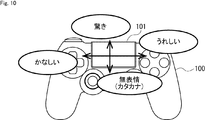
- FIG. 10 and 11 show an example of a method of inputting an emotion type using the controller 100.
- FIG. 10 and 11 show an example of a method of inputting an emotion type using the controller 100.
- the user selects an emotion type by swiping the touch pad 101 up, down, left, and right (depending on the direction of the user operation). For example, if you swipe up, “surprise” is selected. Swipe down to select “no emotion”. In this case, for example, all sentences are converted into katakana in order to express feelinglessness. If you swipe left, “Fair” is selected. Swipe right to select “I'm happy”.
- the emotion level may be set together with the emotion type based on the distance (the amount of user operation) of swiping the touch pad 101.
- the emotion level is set to be lower as the distance for swiping the touch pad 101 is shorter, and the emotion level is set to be higher as the distance for swiping the touch pad 101 is longer.
- the touchpad 101 can only detect swipes in two vertical directions (up and down and left and right), the touchpad 101 can input only four types of emotions. In this case, in order to be able to input five or more emotion types, for example, another operation unit of the controller 100 may be used.
- the emotion type may be selected by tilting the stick 102 up and down and left and right (depending on the direction of the user operation).
- the “adoration” is selected by depressing the stick 102 in the upward direction.
- “Sadness” is selected by depressing the stick 102 downward.
- “amazing” is selected by depressing the stick 102 in the right direction and pressing it.
- “joy” is selected.
- the emotion level may be set together with the emotion type in accordance with the amount of depressing the stick 102 (the amount of user operation). For example, the emotion level is set lower as the amount of depressing the stick 102 is smaller, and the emotion level is set higher as the amount of defeating the stick 102 is larger.
- FIG. 12 to 17 show examples of emotion type input methods when the client 11 is configured by the smartphone 300.
- FIG. 12 to 17 show examples of emotion type input methods when the client 11 is configured by the smartphone 300.
- areas A1 to A4 for selecting an emotion type are displayed on the lower part of the touch panel display 301 as shown in FIGS. .
- the areas A1 to A4 are triangular areas obtained by dividing a rectangular area by two diagonal lines.
- the region A1 and the region A2 are aligned vertically, and the region A3 and the region A4 are aligned horizontally.
- Region A1 corresponds to happiness
- region A2 corresponds to sadness (Sad)
- region A3 corresponds to anger (Angry)
- region A4 corresponds to surprise.
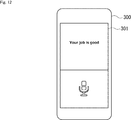
- joy is selected when the user touches the area A1 with a finger. Then, the good sentence at the end of the input sentence is converted to a capital letter, and “Your job is GOOD: D”, which is a processed sentence with the: D emoticon added at the end of the sentence, is displayed on the upper part of the touch panel display 301.
- anger is selected when the user touches the area A3 with a finger. Then, “I don't understand: @ !”, which is a processed sentence in which the emoticon “@ !!” is added to the end of the input sentence, is displayed on the upper part of the touch panel display 301.
- the emotion type and the emotion level are input by swiping in the input area A ⁇ b> 11 at the bottom of the touch panel display 301.
- the emotion type is selected according to the swipe direction.
- the emotion level is set by a swipe distance (hereinafter referred to as a swipe amount) which is an operation amount of a user operation.
- the emotion type and the emotion level are set when the user touches the position P1 in the input area A11 of the touch panel display 301, swipes to the position P2, and then releases the finger from the touch panel display 301. That is, the emotion type is selected according to the swipe direction from the position P1 to the position P2. Further, the emotion level is set based on the swipe amount between the position P1 and the position P2. For example, the emotion level is set lower as the swipe amount becomes shorter, and the emotion level is set higher as the swipe amount becomes longer.
- the touch panel display 301 of the smartphone 300 is small in size and has a limited amount of swipe. For this reason, when the number of emotion levels increases, the difference in swipe amount for each level decreases, making it difficult to set the desired emotion level. Therefore, for example, when the touch panel display 301 is pressure sensitive, that is, when a force for pressing the touch panel display 301 (hereinafter referred to as a pressing amount) can be detected, the emotion level is set by a combination of the swipe amount and the pressing amount. You may make it do.
- the emotion level is set by the swipe amount that is the distance between the position P11 and the position P12 and the pressing amount at the position P12. For example, when the swipe amount is 1 cm and the pressed amount is a weak level, the emotion level is set to 1. When the swipe amount is 5 cm and the pressed amount is a weak level, the emotion level is set to 10. When the swipe amount is 1 cm and the pressed amount is a strong level, the emotion level is set to 2. If the swipe amount is 5 cm and the pressed amount is a strong level, the emotion level is set to 20.
- the emotion level may be set using the pressing time at the position P12 instead of the pressing amount.
- step S101 the server 12 is requested to execute speech recognition in the same manner as in step S1 of FIG.
- step S102 the client 11 receives an emotion level input.
- the presentation control unit 42 controls the display unit 23 or the presentation unit 24 to prompt an emotion level input.
- the presentation control unit 42 causes the display unit 23 to display an input screen for inputting an emotion level.
- the user inputs an emotion level via the operation unit 22.
- the emotion level input method for example, the method described above is used.
- the input / output control unit 41 acquires operation data corresponding to the user operation from the operation unit 22 and transmits the operation data to the server 12 via the communication unit 26.
- step S103 the client 11 starts accepting voice input.
- the presentation control unit 42 controls the display unit 23 or the presentation unit 24 to prompt the user to input a sentence (input sentence) to be recognized by voice.
- the user starts inputting the input sentence by voice.
- the input / output control unit 41 starts processing for acquiring voice data indicating the voice of the input sentence from the voice input unit 21 and transmitting the voice data to the server 12 via the communication unit 26.
- the server 12 performs voice recognition on the voice data from the client 11 in step S153 of FIG. 22 described later, and transmits processed sentence information including a processed sentence obtained by processing the input sentence obtained by the voice recognition in step S157. .
- step S104 the presentation control unit 42 determines whether or not an emotion type input is accepted. If it is determined that an emotion type input is accepted, the process proceeds to step S105.
- step S105 the client 11 starts accepting an emotion type input.
- the presentation control unit 42 controls the display unit 23 or the presentation unit 24 to notify that an emotion type can be input.
- the input / output control unit 41 acquires operation data from the operation unit 22 and transmits the operation data to the server 12 through the communication unit 26.
- the above-described method is used as the emotion type input method.
- step S104 determines whether the emotion type input is accepted. If it is determined in step S104 that the emotion type input is not accepted, the process of step S105 is skipped, and the process proceeds to step S106. This is a case where only an emotion level can be input, as in the example described above with reference to FIG.
- step S106 the input / output control unit 41 determines whether or not the processed sentence has been received.
- the input / output control unit 41 receives the processed text information from the server 12 via the communication unit 26, the input / output control unit 41 determines that the processed text has been received, and the process proceeds to step S107.
- step S107 the processed sentence is presented in the same manner as in step S5 of FIG.
- step S106 determines whether the processed sentence has been received. If it is determined in step S106 that the processed sentence has not been received, the process of step S107 is skipped, and the process proceeds to step S108.
- step S108 the input / output control unit 41 determines whether or not the voice input has been completed. If it is determined that the voice input has not ended, the process returns to step S106.
- step S106 Thereafter, the processing from step S106 to step S108 is repeatedly executed until it is determined in step S108 that the voice input has been completed.
- step S108 the input / output control unit 41, for example, determines that the voice input has ended when no voice is input for a predetermined time or more, and the process proceeds to step S109.
- the input / output control unit 41 detects that the operation for ending the voice input has been performed based on the operation data from the operation unit 22, the input / output control unit 41 determines that the voice input has ended, and the processing is performed in steps. The process proceeds to S109.
- step S109 the input / output control unit 41 notifies the end of voice input. Specifically, the input / output control unit 41 generates voice input end information for notifying the end of voice input, and transmits the voice input end information to the server 12 via the communication unit 26.
- step S110 the final sentence (processed sentence) is presented by the same processing as step S5 in FIG.
- step S151 as in the process of step S51 of FIG. 4, it is determined whether or not execution of speech recognition has been requested. This determination process is repeatedly executed at a predetermined timing, and when it is determined that execution of voice recognition is requested, the process proceeds to step S152.
- step S152 the server 12 performs emotion level recognition.
- the operation recognition unit 76 receives the operation data transmitted from the client 11 in step S ⁇ b> 102 of FIG. 21 via the communication unit 61.
- the operation recognition unit 76 recognizes an operation performed on the client 11 based on the operation data.
- the emotion recognition unit 77 recognizes the emotion level input by the user based on the recognition result of the operation recognition unit 76.
- step S153 speech recognition is performed in the same manner as in step S52 of FIG.
- step S154 the operation recognition unit 76 determines whether or not an emotion type has been input.
- the operation recognition unit 76 recognizes the operation performed on the client 11 based on the operation data. If the operation recognition unit 76 determines that an emotion type has been input based on the recognition result, the process proceeds to step S155.
- step S155 the emotion recognition unit 77 recognizes the emotion type. That is, the emotion recognition unit 77 recognizes the emotion type input by the user based on the recognition result of the operation recognition unit 76 in step S154.
- step S154 determines whether the emotion type has been input. If it is determined in step S154 that the emotion type has not been input, the process of step S155 is skipped, and the process proceeds to step S156.
- step S156 the sentence is processed based on the recognized emotion in the same manner as in step S55 of FIG. It should be noted that here, even in the middle of voice input or voice recognition, all input sentences are not yet obtained, and the input sentences up to the middle are processed.
- step S157 the processed sentence is transmitted in the same manner as in step S56 of FIG. At this time, the processed sentence obtained by processing the input sentence up to the middle may be transmitted. Therefore, for example, during the voice input, the user can check the processing status of the sentence by the voice input so far.
- step S158 the processing unit 78 determines whether or not the processing of the sentence has been completed. If it is determined that the text has not been processed yet, the process returns to step S153.
- step S153 to step S158 is repeatedly executed until it is determined in step S158 that the text processing has been completed.
- step S158 the processing unit 78 receives the voice input end signal transmitted from the client 11 in step S109 of FIG. 21, processes all recognized input sentences, and transmits the processed sentences to the client 11. If it has been completed, it is determined that the text processing has been completed, and the process returns to step S151.
- step S151 is executed.
- the sentence is input by voice, and the sentence obtained by voice recognition is processed based on the set emotion level. Therefore, for example, the user can automatically obtain a sentence processed based on the emotion level by only inputting voice after inputting the emotion level.
- the user can process each part of one sentence based on different emotion types by inputting the emotion type while inputting the sentence by voice.
- the user may be able to input both the emotion level and the emotion type while inputting the sentence by voice.
- the specified portion may be processed by the user specifying the portion to be processed while inputting voice. This example will be described with reference to FIG.
- the user utters “ma”. At this time, the user does not operate the controller 100. As a result, the speech recognition result “ma” is presented without being processed.
- the user utters “ji”. At this time, the user does not operate the controller 100. As a result, the speech recognition result “Maji” is presented without being processed.
- the user utters “ka”.
- the portion of “ka” input during the operation becomes the processing target.
- a right swipe corresponds to the repetition of a character or symbol.
- “Ah” is added after “Ma” of “Majika”, which is the voice recognition result, and “Majika Ah” after processing is presented.
- the amount of repeating characters or symbols is adjusted based on the amount of swipe in the right direction.
- an upward swipe corresponds to the addition of “!”.
- "!” is added to the end of the sentence, and the processed "Majikaah !” is presented.
- the amount of “!” To be added is adjusted based on the amount of swipe in the upward direction.
- the user utters “It”. At this time, the user does not operate the controller 100. As a result, the speech recognition result “It” is presented without being processed.
- the user utters “is”. At this time, the user does not operate the controller 100. As a result, the speech recognition result “It is” is presented without being processed.
- the user says “cool”.
- the “cool” portion input during the operation becomes the processing target. Specifically, “o”, which is a vowel, is added to “cool” of “It is ⁇ cool”, which is a speech recognition result, and processed “It is coooooool” is presented.
- the processing unit 78 of the server 12 may control the text processing to some extent. For example, when processing “Majika”, it is not very likely to process the “Ji” portion. Therefore, for example, the processing unit 78 does not process the touch pad 101 even if the touch pad 101 is operated at the timing of uttering “ji”. Alternatively, the processing unit 78 may process the next “ka” portion instead of “ji”.
- the assignment of the operation direction and the type of characters to be added can be arbitrarily set. Further, for example, an emotion type may be assigned to each operation direction, and a portion corresponding to the voice input when the user operates may be processed based on the emotion type selected by the user.
- an example of processing a sentence by adding a character string such as a character, symbol, or emoticon is shown.
- the expression is changed while maintaining the meaning of the original sentence.
- the change in the expression of the sentence includes a change in the word.
- the phrase “fun” may be changed to a more enjoyable expression such as “happy” or “Haaaaappy!”.
- the degree of changing the expression of the sentence is adjusted based on the emotion level. Further, for example, a method for changing the expression is selected based on the emotion type.
- sentence processing function may be turned on or off.
- step S101 the server 12 extracts at least one feature amount from the sentence and the voice data.
- the natural language processing unit 73 extracts feature quantities by performing natural language processing such as morphological analysis and syntax analysis on a sentence to be processed (input sentence).
- input sentence may be a result of voice recognition of voice data, or may be given as text data.
- the sound processing unit 71 extracts a feature amount of voice data indicating an input sentence input by the user.
- the emotion recognition unit 77 recognizes the emotion based on the feature amount. Specifically, the emotion recognition unit 77 recognizes an emotion that the user wants to give based on at least one of the feature amount of the input sentence and the feature amount of the voice data. Note that the emotion recognition unit 77 may recognize both the emotion type and the emotion level, or may recognize either one.
- any method can be adopted as a method for the emotion recognition unit 77 to recognize the emotion.
- machine learning or rule-based recognition processing can be employed.
- the emotion recognizing unit 77 may automatically process a sentence that is not so much related to emotion, such as conversion to a question form or a command form, using machine learning or the like. .
- the emotion recognition unit 77 may be used for recognition processing based on the result of natural language processing analysis or emotion recognition of one or more previous sentences. For example, if the emotion recognition result given to the previous sentence is “fun”, the emotion recognition unit 77 has a high possibility that the emotion given to the next sentence is also “fun”. You may make it raise the priority of ".”
- the emotion recognition unit 77 may perform automatic recognition of emotion based on the emotion of the other party's sentence when inputting a sentence to be returned to the other party in chat or email. For example, the emotion recognizing unit 77 may increase the priority of “fun” in the recognition process when the other person's text includes a smiley face representing “fun”.
- the user's facial expression or the like may be used for emotion recognition processing.
- one or more recommended emotion types may be presented first. And when a user cannot find a desired emotion type, you may make it show so that all the emotion types can be selected.
- the controller 100 may be vibrated to input an emotion level or an emotion type.
- the user may be able to input an emotion type and an emotion level using a gesture or the like.
- a different gesture may be assigned to each emotion type, and the emotion level may be set based on the size of the gesture.
- a part of the function of the client 11 can be provided in the server 12, or a part of the function of the server 12 can be provided in the client 11.
- the client 11 may recognize emotions, and the server 12 may process a sentence based on the recognized emotions.
- the server 12 may recognize emotions, and the client 11 may process a sentence based on the recognized emotions.
- the present technology can also be applied when input information is given by a method other than voice.
- the present technology can also be applied to processing input information given by text information so as to give emotion.
- the series of processes described above can be executed by hardware or can be executed by software.
- a program constituting the software is installed in the computer.
- the computer includes, for example, a general-purpose personal computer capable of executing various functions by installing various programs by installing a computer incorporated in dedicated hardware.
- FIG. 25 is a block diagram illustrating an example of a hardware configuration of a computer that executes the above-described series of processes using a program.
- a CPU Central Processing Unit
- ROM Read Only Memory
- RAM Random Access Memory
- An input / output interface 505 is further connected to the bus 504.
- An input unit 506, an output unit 507, a storage unit 508, a communication unit 509, and a drive 510 are connected to the input / output interface 505.
- the input unit 506 includes a keyboard, a mouse, a microphone, and the like.
- the output unit 507 includes a display, a speaker, and the like.
- the storage unit 508 includes a hard disk, a nonvolatile memory, and the like.
- the communication unit 509 includes a network interface or the like.
- the drive 510 drives a removable medium 511 such as a magnetic disk, an optical disk, a magneto-optical disk, or a semiconductor memory.
- the CPU 501 loads the program stored in the storage unit 508 to the RAM 503 via the input / output interface 505 and the bus 504 and executes the program, for example. Is performed.
- the program executed by the computer (CPU 501) can be provided by being recorded in, for example, a removable medium 511 as a package medium or the like.
- the program can be provided via a wired or wireless transmission medium such as a local area network, the Internet, or digital satellite broadcasting.
- the program can be installed in the storage unit 508 via the input / output interface 505 by attaching the removable medium 511 to the drive 510. Further, the program can be received by the communication unit 509 via a wired or wireless transmission medium and installed in the storage unit 508. In addition, the program can be installed in the ROM 502 or the storage unit 508 in advance.
- the program executed by the computer may be a program that is processed in time series in the order described in this specification, or in parallel or at a necessary timing such as when a call is made. It may be a program for processing.
- a plurality of computers may perform the above-described processing in cooperation.
- a computer system is configured by one or a plurality of computers that perform the above-described processing.
- the system means a set of a plurality of components (devices, modules (parts), etc.), and it does not matter whether all the components are in the same housing. Accordingly, a plurality of devices housed in separate housings and connected via a network and a single device housing a plurality of modules in one housing are all systems. .
- the present technology can take a cloud computing configuration in which one function is shared by a plurality of devices via a network and is jointly processed.
- each step described in the above flowchart can be executed by one device or can be shared by a plurality of devices.
- the plurality of processes included in the one step can be executed by being shared by a plurality of apparatuses in addition to being executed by one apparatus.
- the present technology can take the following configurations.
- An emotion recognition unit for recognizing emotions input by user operations;
- An information processing apparatus comprising: a processing unit that processes the first sentence based on the recognized emotion.
- a speech recognition unit that converts input speech into the first sentence;
- the information processing apparatus according to (1) wherein the processing unit processes the first sentence converted by the voice recognition unit.
- the information processing unit according to (2) wherein when the user operation is performed during input of the input voice, the processing unit processes the portion of the first sentence corresponding to the voice input during the user operation. Processing equipment.
- the information processing apparatus (6) The information processing apparatus according to (5), wherein the emotion recognition unit recognizes an emotion level based on an operation amount of a user operation. (7) The information processing apparatus according to (6), wherein the emotion recognition unit recognizes an emotion level based on a combination of a swipe amount and a press amount or a press time with respect to an operation unit operated by a user. (8) The information processing apparatus according to any one of (5) to (7), wherein the emotion recognition unit recognizes a type of emotion based on a direction of a user operation. (9) The information processing apparatus according to any one of (1) to (8), wherein the processing unit adds a character string to at least one of a first sentence, a middle, and a tail of the first sentence.
Landscapes
- Engineering & Computer Science (AREA)
- Theoretical Computer Science (AREA)
- Physics & Mathematics (AREA)
- General Engineering & Computer Science (AREA)
- Health & Medical Sciences (AREA)
- Human Computer Interaction (AREA)
- Audiology, Speech & Language Pathology (AREA)
- General Physics & Mathematics (AREA)
- General Health & Medical Sciences (AREA)
- Computational Linguistics (AREA)
- Multimedia (AREA)
- Acoustics & Sound (AREA)
- Child & Adolescent Psychology (AREA)
- Hospice & Palliative Care (AREA)
- Psychiatry (AREA)
- Signal Processing (AREA)
- Artificial Intelligence (AREA)
- User Interface Of Digital Computer (AREA)
Abstract
本技術は、感情を適切に表現した文章を容易に得ることができるようにする情報処理装置及び情報処理方法に関する。 情報処理装置は、ユーザ操作により入力された感情を認識する感情認識部と、認識された感情に基づいて文章を加工する加工部とを備える。本技術は、例えば、音声認識を行う装置、サーバ、クライアント、アプリケーションプログラムや、音声認識の結果に基づいて各種の処理を行う装置、サーバ、クライアント、アプリケーションプログラム等に適用できる。
Description
本技術は、情報処理装置及び情報処理方法に関し、特に、感情を適切に表現した文章を得ることができるようにした情報処理装置及び情報処理方法に関する。
従来、顔文字、記号、特殊文字等を文章に付加して、感情を表現することが行われている。このような感情表現は、音声認識を用いて入力することが困難であり、例えば、ユーザは、音声認識により得られた文章を手動で加工し、感情表現を付与する必要がある。
これに対して、従来、入力音声の韻律情報に基づいてユーザの感情を推定し、入力音声を音声認識することにより得られた文章に、推定した感情を表す強調表現、顔文字等の追加情報を付加して出力することが提案されている(例えば、特許文献1参照)。
しかしながら、例えば、過去の出来事に関する文章を入力する場合など、入力時のユーザの感情と文章に付与したい感情とが必ずしも一致するとは限らない。また、例えば、周囲に人がいる場合など、感情を込めて音声を入力することが困難な場合がある。そのため、特許文献1に記載の発明では、感情表現を適切に付与できない場合がある。
そこで、本技術は、感情を適切に表現した文章を容易に得ることができるようにするものである。
本技術の一側面の情報処理装置は、ユーザ操作により入力された感情を認識する感情認識部と、認識された感情に基づいて第1の文章を加工する加工部とを備える。
入力音声を前記第1の文章に変換する音声認識部をさらに設け、前記加工部には、前記音声認識部により変換された前記第1の文章を加工させることができる。
前記加工部には、前記入力音声の入力中にユーザ操作が行われた場合、ユーザ操作中に入力された音声に対応する前記第1の文章の部分の加工を行わせることができる。
前記感情認識部には、さらに前記入力音声に基づいて、感情を認識させることができる。
前記感情認識部には、感情の種類及びレベルのうち少なくとも1つを認識させることができる。
前記感情認識部には、ユーザ操作の操作量に基づいて、感情のレベルを認識させることができる。
前記感情認識部には、ユーザが操作する操作部に対するスワイプ量と押下量又は押下時間との組み合わせより、感情のレベルを認識させることができる。
前記感情認識部には、ユーザ操作の方向に基づいて、感情の種類を認識させることができる。
前記加工部には、前記第1の文章の先頭、中間、及び、末尾のうち少なくとも1カ所に文字列を付加させることができる。
前記加工部には、認識された感情のレベルに基づいて、付加する文字列の量を調整させることができる。
前記加工部には、認識された感情の種類に基づいて、付加する文字列を変更させることができる。
前記加工部には、前記第1の文章の意味を維持しながら表現を変更させることができる。
前記加工部には、認識された感情のレベルに基づいて、表現を変更する度合いを調整させることができる。
前記加工部には、認識された感情の種類に基づいて、表現の変更方法を選択させることができる。
前記感情認識部には、さらに前記第1の文章に基づいて、感情を認識させることができる。
前記感情認識部には、さらに前記第1の文章より前の第2の文章に基づいて、感情を認識させることができる。
前記感情認識部には、前記第1の文章が第3の文章に対する返信である場合、さらに前記第3の文章に基づいて、感情を認識させることができる。
前記加工部には、認識された感情に対応する表現を前記第1の文章に付与させることができる。
本技術の一側面の情報処理方法は、ユーザ操作により入力された感情を認識する感情認識ステップと、認識された感情に基づいて文章を加工する加工ステップとを含む。
本技術の一側面においては、ユーザ操作により入力された感情が認識され、認識された感情に基づいて文章が加工される。
本技術の一側面によれば、感情を適切に表現した文章を容易に得ることができる。
なお、ここに記載された効果は必ずしも限定されるものではなく、本開示中に記載されたいずれかの効果であってもよい。
以下、発明を実施するための形態(以下、「実施形態」と記述する)について図面を用いて詳細に説明する。なお、説明は以下の順序で行う。
1.実施の形態
2.変形例
3.応用例
1.実施の形態
2.変形例
3.応用例
<<1.実施の形態>>
<1-1.情報処理システムの構成例>
まず、図1を参照して、本技術を適用した情報処理システム10の構成例について説明する。
<1-1.情報処理システムの構成例>
まず、図1を参照して、本技術を適用した情報処理システム10の構成例について説明する。
情報処理システム10は、ユーザが音声により入力した文章(以下、入力文章と称する)に付与したい感情の認識を行い、認識した感情に基づいて入力文章を加工した文章(以下、加工文章と称する)を生成する処理を行う。情報処理システム10は、クライアント11、サーバ12、及び、ネットワーク13により構成される。クライアント11とサーバ12は、ネットワーク13を介して相互に接続されている。
なお、クライアント11が1つのみ図示されているが、実際には複数のクライアント11がネットワーク13に接続され、複数のユーザがクライアント11を介して情報処理システム10を利用することが可能である。
クライアント11は、ユーザが音声により入力した入力文章を示す音声データ等をサーバ12に送信し、音声認識の結果として得られた入力文章を含む音声認識情報、及び、入力文章を加工した加工文章を含む加工文章情報をサーバ12から受信し、入力文章及び加工文章を提示する処理を行う。
例えば、クライアント11は、スマートフォン、タブレット、携帯電話機、ノート型のパーソナルコンピュータ等の携帯情報端末、ウエアラブルデバイス、デスクトップ型のパーソナルコンピュータ、ゲーム機、動画再生装置、音楽再生装置等により構成される。また、ウエアラブルデバイスには、例えば、眼鏡型、腕時計型、ブレスレット型、ネックレス型、ネックバンド型、イヤフォン型、ヘッドセット型、ヘッドマウント型等の各種の方式を採用することができる。
クライアント11は、音声入力部21、操作部22、表示部23、提示部24、通信部26、制御部27、及び、記憶部28を備える。制御部27は、入出力制御部41、提示制御部42、及び、実行部43を備える。音声入力部21、操作部22、表示部23、提示部24、通信部26、制御部27、及び、記憶部28は、バス29を介して相互に接続されている。
音声入力部21は、例えばマイクロフォンにより構成される。マイクロフォンの数は、任意に設定することができる。音声入力部21は、周囲の音声を収集し、収集した音声を示す音声データを制御部27に供給したり、記憶部28に記憶させたりする。
操作部22は、各種の操作部材により構成され、クライアント11の操作に用いられる。例えば、操作部22は、コントローラ、リモートコントローラ、タッチパネル、ハードウエアボタン等により構成される。操作部22は、操作部22に対する操作の内容等を示す操作データを制御部27に供給する。
表示部23は、例えばディスプレイにより構成される。表示部23は、提示制御部42の制御の下に、各種の画像、GUI(Graphical User Interface)、各種のアプリケーションプログラムやサービスの画面等を表示する。
提示部24は、例えば、スピーカ、振動デバイス、他の連携デバイス等により構成される。提示部24は、提示制御部42の制御の下に、各種の情報の提示を行う。
センサ部25は、カメラ、距離センサ、GPS(Global Positioning System)受信機、加速度センサ、ジャイロセンサ等の各種のセンサを備える。センサ部25は、各センサの検出結果を示すセンサデータを制御部27に供給したり、記憶部28に記憶させたりする。
通信部26は、各種の通信デバイスにより構成される。通信部26の通信方式は特に限定されるものではなく、無線通信又は有線通信のいずれでもよい。また、通信部26が、複数の通信方式に対応していてもよい。通信部26は、ネットワーク13を介してサーバ12と通信を行い、各種のデータの送受信を行う。通信部26は、サーバ12から受信したデータを制御部27に供給したり、記憶部28に記憶させたりする。
制御部27は、例えば、各種のプロセッサ等により構成される。
入出力制御部41は、各種のデータの入出力を制御する。例えば、入出力制御部41は、音声入力部21からの音声データ、操作部22からの操作データ、及び、センサ部25からのセンサデータの中からサーバ12の処理に必要なデータを抽出し、抽出したデータを、通信部26及びネットワーク13を介して、サーバ12に送信する。また、入出力制御部41は、通信部26及びネットワーク13を介して、音声認識情報及び加工文章情報等をサーバ12から受信する。
提示制御部42は、表示部23及び提示部24による各種の情報等の提示を制御する。
実行部43は、各種のアプリケーションプログラム(以下、APPと称する)を実行することにより、各種の処理を実行する。
記憶部28は、クライアント11の処理に必要なプログラム、データ等を記憶する。
サーバ12は、クライアント11から受信した音声データ、操作データ、及び、センサデータに基づいて、音声認識を行うとともに、音声認識の結果得られた入力文章を加工した加工文章を生成する。そして、サーバ12は、入力文章を含む音声認識情報、及び、加工文章を含む加工文章情報を、ネットワーク13を介してクライアント11に送信する。サーバ12は、通信部61、制御部62、及び、記憶部63を備える。制御部62は、音処理部71、画像処理部72、自然言語処理部73、音声認識部74、ジェスチャ認識部75、操作認識部76、感情認識部77、及び、加工部78を備える。通信部61、制御部62、及び、記憶部63は、バス64を介して相互に接続されている。
通信部61は、各種の通信デバイスにより構成される。通信部61の通信方式は特に限定されるものではなく、無線通信又は有線通信のいずれでもよい。また、通信部61が、複数の通信方式に対応していてもよい。通信部61は、ネットワーク13を介してクライアント11と通信を行い、各種のデータの送受信を行う。通信部61は、クライアント11から受信したデータを制御部62に供給したり、記憶部63に記憶させたりする。
制御部62は、例えば、各種のプロセッサ等により構成される。
音処理部71は、音声データから各種の特徴量を抽出する。音処理部71が抽出する特徴量は、特に限定されるものではないが、例えば、音素、音量、抑揚、長さ、スピード等が含まれる。
画像処理部72は、画像データから各種の特徴量を抽出する。画像処理部72が抽出する特徴量は、特に限定されるものではないが、例えば、人のジェスチャの認識に適した特徴量が含まれる。
自然言語処理部73は、形態素解析、構文解析、モダリティ解析等の自然言語処理を行う。
音声認識部74は、音声認識により音声を文字列に変換する。音声認識部74は、音声認識の結果得られた入力文章を含む音声認識情報を、通信部61及びネットワーク13を介して、クライアント11に送信する。
ジェスチャ認識部75は、画像処理部72により抽出された特徴量等に基づいて、画像データに写っている人のジェスチャを認識する。
操作認識部76は、クライアント11から取得した操作データに基づいて、クライアント11で行われた操作を認識する。
感情認識部77は、音処理部71、画像処理部72、自然言語処理部73、音声認識部74、ジェスチャ認識部75、及び、操作認識部76の処理の結果等に基づいて、感情の認識処理を行う。例えば、感情認識部77は、感情の種類(以下、感情タイプと称する)、及び、感情のレベル(以下、感情レベルと称する)を認識する。
加工部78は、感情認識部77により認識された感情に基づいて、音声認識部74により認識された入力文章を加工することにより加工文章を生成する。加工部78は、生成した加工文章を含む加工文章情報を、通信部61及びネットワーク13を介して、クライアント11に送信する。
記憶部63は、サーバ12の処理に必要なプログラム、データ等を記憶する。
なお、以下、クライアント11(通信部26)とサーバ12(通信部61)がネットワーク13を介して通信を行う場合の”ネットワーク13を介して”の記載は省略する。以下、クライアント11の各部がバス29を介してデータの授受を行う場合の”バス29を介して”の記載は省略する。以下、サーバ12の各部がバス64を介してデータの授受を行う場合の”バス64を介して”の記載は省略する。
<1-2.操作部22の具体例>
図2は、操作部22の一例であるコントローラ100の構成例を示している。
図2は、操作部22の一例であるコントローラ100の構成例を示している。
コントローラ100は、タッチパッド101、スティック102、スティック103、方向キー104U乃至方向キー104R、及び、ボタン105A乃至ボタン105Dを備える。
タッチパッド101は、指で表面をなぞることにより(スワイプすることにより)、指の移動方向及び移動距離を検出することができる。また、タッチパッド101は、指で軽くたたくことにより、タッピングを検出することができる。
スティック102は、上下左右(或いは、前後左右)に倒すことにより、操作対象を指示した方向に移動させることができる。また、スティック102は、押下することにより、ボタンとしても機能する。
スティック103は、スティック102と同様に、上下左右(或いは、前後左右)に倒すことにより、操作対象を指示した方向に移動させることができる。また、スティック103は、押下することにより、ボタンとしても機能する。
方向キー104U乃至方向キー104Rは、それぞれ上下左右(或いは、前後左右)の方向を指示するためのキーである。
ボタン105A乃至ボタン105Dは、例えば、所定の番号や記号等を選択するためのボタンである。
<1-3.情報処理システム10の処理の第1の実施の形態>
次に、図3及び図4を参照して、情報処理システム10の処理の第1の実施の形態について説明する。
次に、図3及び図4を参照して、情報処理システム10の処理の第1の実施の形態について説明する。
まず、図3のフローチャートを参照して、クライアント11の処理について説明する。この処理は、例えば、ユーザが操作部22を介して音声認識の実行の指示を入力したとき開始される。
ステップS1において、入出力制御部41は、音声認識の実行を依頼する。具体的には、入出力制御部41は、音声認識の開始を指示するコマンドである音声認識開始命令を生成する。入出力制御部41は、通信部26を介して、音声認識開始命令をサーバ12に送信する。
ステップS2において、クライアント11は、音声入力を受け付ける。具体的には、例えば、提示制御部42は、表示部23又は提示部24を制御して、認識させたい文章(入力文章)を音声で入力するようにユーザを促す。これに対して、ユーザは、入力文章を音声により入力する。入出力制御部41は、入力文章の音声を示す音声データを音声入力部21から取得し、通信部26を介してサーバ12に送信する。
サーバ12は、後述する図4のステップS52において、クライアント11からの音声データに対する音声認識を行い、ステップS53において、音声認識により認識された入力文章を含む音声認識情報を送信する。
ステップS3において、クライアント11は、音声認識の結果を提示する。具体的には、入出力制御部41は、通信部26を介して、サーバ12から音声認識情報を受信する。提示制御部42は、音声認識情報に含まれる入力文章を表示部23に表示させる。
ステップS4において、クライアント11は、文章に付与する感情の入力を受け付ける。例えば、提示制御部42は、表示部23又は提示部24を制御して、文章に付与する感情の入力を促す。また、例えば、提示制御部42は、感情を入力するための入力画面を表示部23に表示させる。
これに対して、ユーザは、操作部22を用いて感情を入力するための操作を行う。入出力制御部41は、このユーザ操作に対応する操作データを操作部22から取得し、通信部26を介してサーバ12に送信する。
サーバ12は、後述する図4のステップS54において、操作データに基づいて、文章に付与する感情の認識を行う。また、サーバ12は、ステップS56において、認識した感情に基づいて入力文章を加工することにより生成した加工文章を含む加工文章情報をクライアント11に送信する。
ステップS5において、クライアント11は、加工された文章を提示する。具体的には、入出力制御部41は、通信部26を介して、サーバ12から加工文章情報を受信する。提示制御部42は、加工文章情報に含まれる加工文章を表示部23に表示させる。
その後、クライアント11の処理は終了する。
次に、図4のフローチャートを参照して、図3のクライアント11の処理に対応してサーバ12により実行される処理について説明する。
ステップS51において、音声認識部74は、音声認識の実行が依頼されたか否かを判定する。音声認識部74は、音声認識の実行が依頼されたと判定されるまで、ステップS51の処理を所定のタイミングで繰り返し実行する。そして、音声認識部74は、図3のステップS1においてクライアント11から送信された音声認識開始命令を、通信部61を介して受信した場合、音声認識の実行が依頼されたと判定し、処理はステップS52に進む。
ステップS52において、音声認識部74は、音声認識を行う。具体的には、音声認識部74は、図3のステップS2においてクライアント11から送信された音声データを、通信部61を介して受信する。音声認識部74は、受信した音声データに対して音声認識処理を行う。すなわち、音声認識部74は、音声データにより示される音声を文字列に変換することにより、入力文章を取得する。
ステップS53において、音声認識部74は、音声認識の結果を送信する。具体的には、音声認識部74は、音声認識の結果得られた入力文章を含む音声認識情報を生成する。音声認識部74は、生成した音声認識情報を、通信部61を介してクライアント11に送信する。
ステップS54において、サーバ12は、文章に付与する感情の認識を行う。具体的には、操作認識部76は、図3のステップS4においてクライアント11から送信された操作データを、通信部61を介して受信する。操作認識部76は、操作データに基づいて、クライアント11で行われた操作を認識する。感情認識部77は、操作認識部76の認識結果(ユーザ操作の内容)に基づいて、文章に付与する感情の種類(感情タイプ)及びレベル(感情レベル)のうち少なくとも1つを認識する。
ステップS55において、加工部78は、認識した感情に基づいて文章を加工する。例えば、加工部78は、認識した感情を表す感情表現を入力文章に付与することにより、加工文章を生成する。
ここで、図5乃至図8を参照して、文章の加工方法の例について説明する。
図5は、感情レベルに基づいて文章を加工する例を示している。この例では、文章の末尾に文字列を付加することにより、文章が加工される。ここで、文字列とは1以上の文字、記号等を並べたものであり、1文字の場合もある。なお、感情レベル0の文章が、加工前の基本文章となる。
この例では、基本的に感情レベルが高くなるほど、付加される文字列の量が多くなる。例えば、”あれはやばいよ”という基本文章に対して、感情レベル2の加工文章は、”あれはやばいよぉぉ”となる。感情レベル5の加工文章は、”あれはやばいよぉぉぉぉぉーー”となる。感情レベル10の加工文章は、”あれはやばいよぉぉぉぉぉぉぉぉぉぉーーーーー!!!!!”となる。
また、図5には図示していないが、例えば、”あれはやばいよ”に対応する英文の"That's so crazy"という入力文章に対して、感情レベル2の加工文章は、"That's so crazy!!"となる。感情レベル5の加工文章は、"That's so crazzzzy!!!"となる。感情レベル10の加工文章は、"THAT'S SO CRAZZZZYYYY!!!"となる。この感情レベル10の加工文章では、文字が全て大文字になっており、より感情が強く表現されている。
図6は、図5と同様に、感情レベルに基づいて文章を加工する例を示している。この例では、文章の末尾だけでなく、文章の中間にも文字列を付加することにより、文章が加工される。なお、感情レベル0の文章が、加工前の基本文章となる。
この例では、図5の例と同様に、基本的に感情レベルが高くなるほど、付加される文字列の量が多くなる。ただし、例外も存在する。例えば、”あれはやばいよ”という基本文章に対して、感情レベル2の加工文章は、”あれはーーやばいよぉぉ”となる。感情レベル5の加工文章は、”あれはーーやばいよぉぉ”となる。すなわち、感情レベル2と感情レベル5で、文章の加工の程度(加工レベル)が同じになっており、異なる感情レベル間で同じ加工文章が用いられる。感情レベル10の加工文章は、”あれはーやばいよぉ”となる。すなわち、感情レベル10の加工文章は、感情レベル2及び感情レベル5の加工文章と比較して、付加される文字列の量が少なくなっている。また、例えば、”すごすぎ”という基本文章に対して、全ての感情レベルで文章が加工されていない。このようにして、感情レベルに対する加工レベルにある程度のランダム性がもたらされる。
また、図6には図示していないが、例えば、”あれはやばいよ”に対応する英文の"That's so crazy"という入力文章に対する感情レベル2の加工文章は、"That's sooo crazy"となる。感情レベル5の加工文章は、"That's soooooo crazzzzy!!!"となる。感情レベル10の加工文章は、"THAT'S SOOOOOO CRAZZZZYYYY!!!"となる。この感情レベル10の加工文章では、文字が全て大文字になっており、より感情が強く表現されている。
図7は、感情タイプに基づいて文章を加工する例を示している。この例では、驚き(surprise)、喜び(happy)、悲しみ(sad)、怒り(angry)、及び、疑問(question)の5種類の感情を用いて文章が加工される。
例えば、”すばらしい”という入力文章に対して、驚きの感情を表す加工文章は、文字が半角カタカナに変換され、文章の末尾に記号及び顔文字が付加されることにより、図7に示されるようになる。喜びの感情を表す加工文章は、文章の末尾に記号及び顔文字が付加されることにより、図7に示されるようになる。悲しみの感情を表す加工文章は、文章の末尾に記号が付加されることにより、図7に示されるようになる。怒りの感情を表す加工文章は、図7に示されるように変化しない。これは、”すばらしい”という文章と怒りという感情を組み合わせることが困難だからである。疑問の感情を表す加工文章は、文章が疑問形に変えられるとともに、文章の末尾に顔文字が付加されることにより、図7に示されるようになる。
また、例えば、”すばらしい”に対応する英文の"That's cool"という入力文章に対して、驚きの感情を表す加工文章は、文字が全て大文字に変換され、文章の末尾に記号が付加されることにより、図7に示されるようになる。喜びの感情を表す加工文章は、文章の末尾の単語"cool"の母音oの数が増やされるとともに、文章の末尾に記号及び顔文字が付加されることにより、図7に示されるようになる。悲しみの感情を表す加工文章は、文章の末尾に記号及び顔文字が付加されることにより、図7に示されるようになる。怒りの感情を表す加工文章は、図7に示されるように変化しない。これは、"That's cool"という文章と怒りという感情を組み合わせることが困難だからである。疑問の感情を表す加工文章は、文章の末尾に記号が付加されることにより、図7に示されるようになる。
図8は、Plutchikの感情の輪に示される感情タイプに基づいて文章を加工する例を示している。この例では、喜び、憧れ、驚き、悲しみ、恐怖、怒り、嫌悪、警戒の8種類の感情を用いて文章が加工される。なお、図8には、各感情を付与するように文章を加工する場合に、入力文章の末尾に付加する文字列の例が示されている。
例えば、入力文章が日本語の場合、喜びの感情を表すために、文末に"www"が付加されたり、文末の文字が繰り返されたりする。憧れの感情を表すために、文末に図8に示される顔文字が付加される。驚きの感情を表すために、文末に”!!!!!”が付加されたり、文末の文字が繰り返されたりする。悲しみの感情を表すために、文末に”ぁぁ・・・”が付加されたり、”ー・・・”が付加されたりする。恐怖の感情を表すために、文末に図8に示される顔文字が付加される。怒りの感情を表すために、文末に図8に示される顔文字が付加される。嫌悪の感情を表すために、文末に図8に示される顔文字が付加される。警戒の感情を表すために、文末に”!?!?”が付加される。
また、例えば、入力文章が英語の場合、喜びの感情を表すために、文末に"rofl"、"lmao"、"lml"、"lol"、又は、"haha"が付加されたり、文末の文字が繰り返されたりする。なお、"rofl"、"lmao"、"lml"、"lol"、"haha"の順に、感情レベルが低くなる。憧れの感情を表すために、文末に図8に示される顔文字が付加される。驚きの感情を表すために、文末に"!!!!!"が付加されたり、文末の文字が繰り返されたりする。悲しみの感情を表すために、文末に"・・・"が付加される。恐怖の感情を表すために、文末に図8に示される顔文字が付加される。怒りの感情を表すために、文末に図8に示される顔文字が付加される。嫌悪の感情を表すために、文末に図8に示される顔文字が付加される。警戒の感情を表すために、文末に"!?!?"が付加される。
なお、感情タイプの数や種類は、任意に設定することが可能である。
また、感情レベルと感情タイプの両方に基づいて、文章を加工するようにしてもよい。例えば、同じ感情を表す場合に、感情レベルが高いほど、付加する文字列の量を増やす等により加工レベルを高くし、感情レベルが低いほど、付加する文字列の量を減らす等により加工レベルを低くするようにしてもよい。
さらに、ユーザの入力の自由度を上げるために、同じ感情レベルが設定されても、入力文章に付加する文字列を、ある程度ランダムに変更するようにしてもよい。例えば、ユーザがコントローラ100のタッチパッド101上を左右にスワイプする操作を繰り返し、感情レベルの増減を繰り返したとき、同じ感情レベルに対して、異なる加工文章を提示するようにしてもよい。
図4に戻り、ステップS56において、加工部78は、加工した文章を送信する。具体的には、加工部78は、加工文章を含む加工文章情報を生成し、通信部61を介してクライアント11に送信する。
その後、処理はステップS51に戻り、ステップS51以降の処理が実行される。
<1-4.感情の入力方法の具体例>
次に、図9乃至図19を参照して、感情の入力方法の具体例について説明する。
次に、図9乃至図19を参照して、感情の入力方法の具体例について説明する。
図9は、感情レベルの入力方法の例を示している。
図9のA乃至図9のCは、クライアント11の表示部23に表示される画面の例を示している。各画面には、アイコン201、ウインドウ202、及び、スライダ203が表示されている。スライダ203は、ウインドウ202内の右端に配置されている。
アイコン201は、音声入力を受け付けているか否かを示す。アイコン201は、音声入力を受け付けているとき、濃い色で表示され、音声入力を受け付けていないとき、薄い色で表示される。
ウインドウ202には、音声認識により得られた入力文章、又は、入力文章を加工した加工文章が表示される。
スライダ203は、感情レベルの設定値を示す。ユーザ操作の操作量を表すスライダ203の目盛りが左端に近づくほど、感情レベルが低くなり、目盛りが左端のとき、感情レベルは最小の0となる。一方、スライダ203の目盛りが右端に近づくほど、感情レベルが高くなり、目盛りが右端のとき、感情レベルは最大となる。
図9のAでは、感情レベルが0に設定され、加工前の入力文章である”あれはやばいよ”が表示されている。そして、ユーザは、クライアント11の操作部22を操作して、感情レベルを調整する。例えば、ユーザは、操作部22を介して、画面上のポインタ(不図示)によりスライダ203の目盛りを直接操作して、感情レベルを調整する。或いは、例えば、ユーザは、コントローラ100のタッチパッド101を左右にスワイプすることにより、感情レベルを調整する。
なお、図9のBの例では、感情レベルが中央値に設定されている。そして、入力文章の末尾の”よ”の母音を小文字にした”ぉぉ”が入力文章の末尾に付加され、”あれはやばいよぉぉ”という加工文章が表示されている。図9のCの例では、感情レベルが最大値に設定されている。そして、図9のBの加工文章の末尾にさらに”ぉぉ”及び”!!”が付加され、”あれはやばいよぉぉぉぉぉぉ!!”という加工文章が表示されている。
また、例えば、図示は省略しているが、入力文章が英文の"That's crazy"である場合、例えば、図9のBの例のように、感情レベルが中央値に設定された場合、入力文章の末尾の単語"crazy"の子音zが繰り返され、"That's crazzzzzy"という加工文章が表示される。また、図9のCの例のように、感情レベルが最大値に設定された場合、感情レベルが中央値の場合と比較して、単語"crazy"の子音zの数が増えるとともに、"!!!!!"が末尾に付加され、"That's crazzzzzzzzzzy!!!!!"という加工文章が表示される。
図10及び図11は、コントローラ100を用いて感情タイプを入力する方法の例を示している。
例えば、図10に示されるように、ユーザは、タッチパッド101を上下左右にスワイプすることにより(ユーザ操作の方向により)、感情タイプを選択する。例えば、上方向にスワイプすると、”驚き”が選択される。下方向にスワイプすると、”無感情”が選択される。この場合、例えば、無感情であることを表現するために、文章が全てカタカナに変換される。左方向にスワイプすると、”かなしい”が選択される。右方向にスワイプすると、”うれしい”が選択される。
なお、例えば、タッチパッド101をスワイプする距離(ユーザ操作の操作量)に基づいて、感情タイプとともに感情レベルを設定できるようにしてもよい。例えば、タッチパッド101をスワイプする距離が短いほど、感情レベルが低く設定され、タッチパッド101をスワイプする距離が長いほど、感情レベルが高く設定される。
また、例えば、タッチパッド101が上下及び左右の2軸方向のスワイプしか検出できない場合、タッチパッド101では4種類の感情タイプしか入力することができない。この場合、5種類以上の感情タイプを入力可能にするためには、例えば、コントローラ100の他の操作部を用いるようにすればよい。
例えば、図11に示されるように、スティック102を上下左右に倒すことにより(ユーザ操作の方向により)、感情タイプを選択できるようにすればよい。例えば、スティック102を上方向に倒して押下することにより、”憧れ”が選択される。スティック102を下方向に倒して押下することにより、”悲痛”が選択される。スティック102を左方向に倒して押下することにより、”驚嘆”が選択される。スティック102を右方向に倒して押下することにより、”喜び”が選択される。
なお、例えば、スティック102を倒す量(ユーザ操作の操作量)に応じて、感情タイプとともに感情レベルを設定できるようにしてもよい。例えば、スティック102を倒す量が小さいほど、感情レベルが低く設定され、スティック102を倒す量が大きいほど、感情レベルが高く設定される。
図12乃至図17は、クライアント11がスマートフォン300により構成される場合の感情タイプの入力方法の例を示している。
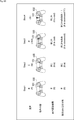
図12の例では、スマートフォン300のタッチパネルディスプレイ301に、音声認識により得られた入力文章である"Your job is good"が表示されている。そして、例えば、タッチパネルディスプレイ301の下部がタッチされることにより、図13及び図14に示されるように、タッチパネルディスプレイ301の下部に、感情タイプを選択するための領域A1乃至領域A4が表示される。領域A1乃至領域A4は、矩形の領域を2本の対角線により区切ったそれぞれ三角形の領域である。領域A1と領域A2は上下に並び、領域A3と領域A4は左右に並んでいる。領域A1は喜び(Happy)に対応し、領域A2は悲しみ(Sad)に対応し、領域A3は怒り(Angry)に対応し、領域A4は驚き(Surprise)に対応している。
そして、例えば、図13に示されるように、ユーザが領域A1内を指でタッチすることにより、喜びが選択される。そして、入力文章の末尾のgoodが大文字に変換され、文末に:Dという顔文字が付加された加工文章である"Your job is GOOD :D"が、タッチパネルディスプレイ301の上部に表示される。
また、例えば、図14に示されるように、ユーザが領域A4内を指でタッチすることにより、驚きが選択される。そして、入力文章の末尾のgoodが大文字に変換され、母音Oが繰り返されるとともに、文末に!!!が付加された加工文章である"Your job is GOOOOD !!!"が、タッチパネルディスプレイ301の上部に表示される。
図15の例では、スマートフォン300のタッチパネルディスプレイ301に、音声認識により得られた入力文章である"I don't understand"が表示されている。
そして、例えば、図16に示されるように、ユーザが領域A2内を指でタッチすることにより、悲しみが選択される。そして、入力文章の末尾に:'(という顔文字が付加された加工文章である"I don't understand :'("が、タッチパネルディスプレイ301の上部に表示される。
また、例えば、図17に示されるように、ユーザが領域A3内を指でタッチすることにより、怒りが選択される。そして、入力文章の末尾に:@!!という顔文字が付加された加工文章である"I don't understand :@!!"が、タッチパネルディスプレイ301の上部に表示される。
次に、図18及び図20を参照して、スマートフォン300において感情レベルを入力する方法について説明する。
例えば、図18に示されるように、タッチパネルディスプレイ301の下部の入力領域A11内をスワイプすることにより、感情タイプ及び感情レベルが入力される。具体的には、スワイプする方向により、感情タイプが選択される。また、ユーザ操作の操作量であるスワイプする距離(以下、スワイプ量と称する)により、感情レベルが設定される。
例えば、ユーザがタッチパネルディスプレイ301の入力領域A11内の位置P1をタッチし、位置P2までスワイプした後、指をタッチパネルディスプレイ301から離した時点で、感情タイプ及び感情レベルが設定される。すなわち、位置P1から位置P2へのスワイプ方向により、感情タイプが選択される。また、位置P1と位置P2の間のスワイプ量に基づいて、感情レベルが設定される。例えば、スワイプ量が短くなるほど、感情レベルは低く設定され、スワイプ量が長くなるほど、感情レベルは高く設定される。
なお、例えば、図19に示されるように、ユーザが、指を位置P1から位置P2までスワイプした後、指をタッチパネルディスプレイ301から離さずに位置P1に戻してから、タッチパネルディスプレイ301から離すことにより、感情の入力がキャンセルされる。この場合、ユーザが最初にタッチした位置を容易に認識できるように、位置P1を囲むマークM1等をタッチパネルディスプレイ301に表示するようにすることが望ましい。
なお、スマートフォン300のタッチパネルディスプレイ301はサイズが小さく、スワイプ量が限られる。そのため、感情レベルのレベル数が多くなると、各レベルに対するスワイプ量の差が小さくなり、所望の感情レベルに設定することが困難になる。そこで、例えば、タッチパネルディスプレイ301が感圧式である場合、すなわち、タッチパネルディスプレイ301を押下する力(以下、押下量と称する)を検出できる場合、スワイプ量と押下量の組み合わせにより、感情レベルが設定されるようにしてもよい。
例えば、図20に示されるように、ユーザがタッチパネルディスプレイ301の入力領域A11内の位置P11をタッチし、位置P12までスワイプした後、指をタッチパネルディスプレイ301から離した場合、位置P11から位置P12へのスワイプ方向により、感情タイプが選択される。また、位置P11と位置P12の間の距離であるスワイプ量と、位置P12における押下量により、感情レベルが設定される。例えば、スワイプ量が1cmで、押下量が弱レベルである場合、感情レベルは1に設定される。スワイプ量が5cmで、押下量が弱レベルである場合、感情レベルは10に設定される。スワイプ量が1cmで、押下量が強レベルである場合、感情レベルは2に設定される。スワイプ量が5cmで、押下量が強レベルである場合、感情レベルは20に設定される。
なお、例えば、押下量の代わりに、位置P12における押下時間を用いて、感情レベルを設定するようにしてもよい。
<1-5.情報処理システム10の処理の第2の実施の形態>
次に、図21及び図22を参照して、情報処理システム10の処理の第2の実施の形態について説明する。第2の実施の形態は、第1の実施の形態と比較して、音声認識の実行前に感情レベルを設定する点が大きく異なる。
次に、図21及び図22を参照して、情報処理システム10の処理の第2の実施の形態について説明する。第2の実施の形態は、第1の実施の形態と比較して、音声認識の実行前に感情レベルを設定する点が大きく異なる。
まず、図21のフローチャートを参照して、クライアント11の処理について説明する。この処理は、例えば、ユーザが操作部22を介して音声認識の実行の指示を入力したとき開始される。
ステップS101において、図3のステップS1の処理と同様に、音声認識の実行がサーバ12に依頼される。
ステップS102において、クライアント11は、感情レベルの入力を受け付ける。例えば、提示制御部42は、表示部23又は提示部24を制御して、感情レベルの入力を促す。また、例えば、提示制御部42は、感情レベルを入力するための入力画面を表示部23に表示させる。
これに対して、ユーザは、操作部22を介して、感情レベルを入力する。感情レベルの入力方法には、例えば上述した方法が用いられる。
入出力制御部41は、このユーザ操作に対応する操作データを操作部22から取得し、通信部26を介してサーバ12に送信する。
ステップS103において、クライアント11は、音声入力の受付を開始する。具体的には、例えば、提示制御部42は、表示部23又は提示部24を制御して、認識させたい文章(入力文章)を音声で入力するようにユーザを促す。これに対して、ユーザは、音声による入力文章の入力を開始する。入出力制御部41は、入力文章の音声を示す音声データを音声入力部21から取得し、通信部26を介してサーバ12に送信する処理を開始する。
サーバ12は、後述する図22のステップS153において、クライアント11からの音声データに対する音声認識を行い、ステップS157において、音声認識により得られた入力文章を加工した加工文章を含む加工文章情報を送信する。
ステップS104において、提示制御部42は、感情タイプの入力を受け付けるか否かを判定する。感情タイプの入力を受け付けると判定された場合、処理はステップS105に進む。
ステップS105において、クライアント11は、感情タイプの入力の受付を開始する。具体的には、例えば、提示制御部42は、表示部23又は提示部24を制御して、感情タイプの入力が可能であることを通知する。そして、ユーザが、操作部22を介して、感情タイプの入力を行う度に、入出力制御部41は、操作部22から操作データを取得し、通信部26を介してサーバ12に送信する。なお、感情タイプの入力方法には、例えば上述した方法が用いられる。
その後、処理はステップS106に進む。
一方、ステップS104において、感情タイプの入力を受け付けないと判定された場合、ステップS105の処理はスキップされ、処理はステップS106に進む。これは、例えば、図9を参照して上述した例のように、感情レベルの入力のみが可能な場合である。
ステップS106において、入出力制御部41は、加工された文章を受信したか否かを判定する。入出力制御部41は、通信部26を介して、加工文章情報をサーバ12から受信した場合、加工された文章を受信したと判定し、処理はステップS107に進む。
ステップS107において、図3のステップS5の処理と同様に、加工された文章が提示される。
その後、処理はステップS108に進む。
一方、ステップS106において、加工された文章を受信していないと判定された場合、ステップS107の処理はスキップされ、処理はステップS108に進む。
ステップS108において、入出力制御部41は、音声入力が終了したか否かを判定する。音声入力が終了していないと判定された場合、処理はステップS106に戻る。
その後、ステップS108において、音声入力が終了したと判定されるまで、ステップS106乃至ステップS108の処理が繰り返し実行される。
一方、ステップS108において、入出力制御部41は、例えば、所定の時間以上音声が入力されなかった場合、音声入力が終了したと判定し、処理はステップS109に進む。或いは、入出力制御部41は、例えば、操作部22からの操作データに基づいて、音声入力を終了する操作が行われたことを検出した場合、音声入力が終了したと判定し、処理はステップS109に進む。
ステップS109において、入出力制御部41は、音声入力の終了を通知する。具体的には、入出力制御部41は、音声入力の終了を通知するための音声入力終了情報を生成し、通信部26を介してサーバ12に送信する。
ステップS110において、図3のステップS5と同様の処理により、最終的な文章(加工文章)が提示される。
その後、クライアント11の処理は終了する。
次に、図22のフローチャートを参照して、図21のクライアント11の処理に対応してサーバ12により実行される処理について説明する。
ステップS151において、図4のステップS51の処理と同様に、音声認識の実行が依頼されたか否かが判定される。この判定処理は所定のタイミングで繰り返し実行され、音声認識の実行が依頼されたと判定された場合、処理はステップS152に進む。
ステップS152において、サーバ12は、感情レベルの認識を行う。具体的には、操作認識部76は、図21のステップS102においてクライアント11から送信された操作データを、通信部61を介して受信する。操作認識部76は、操作データに基づいて、クライアント11で行われた操作を認識する。感情認識部77は、操作認識部76の認識結果に基づいて、ユーザにより入力された感情レベルを認識する。
ステップS153において、図4のステップS52の処理と同様に、音声認識が行われる。
ステップS154において、操作認識部76は、感情タイプが入力されたか否かを判定する。操作認識部76は、図21のステップS105においてクライアント11から送信された操作データを、通信部61を介して受信した場合、操作データに基づいて、クライアント11で行われた操作を認識する。そして、操作認識部76が、認識結果に基づいて、感情タイプが入力されたと判定した場合、処理はステップS155に進む。
ステップS155において、感情認識部77は、感情タイプの認識を行う。すなわち、感情認識部77は、ステップS154における操作認識部76の認識結果に基づいて、ユーザにより入力された感情タイプを認識する。
その後、処理はステップS156に進む。
一方、ステップS154において、感情タイプが入力されていないと判定された場合、ステップS155の処理はスキップされ、処理はステップS156に進む。
ステップS156において、図4のステップS55の処理と同様に、認識した感情に基づいて、文章が加工される。なお、ここでは、まだ音声入力の途中、或いは、音声認識の途中であり、全ての入力文章が得られていない段階であっても、途中までの入力文章に対して加工が行われる。
ステップS157において、図4のステップS56の処理と同様に、加工した文章が送信される。このとき、途中までの入力文章に対して加工を行うことにより得られた加工文章が送信される場合がある。従って、ユーザは、例えば、音声入力中に、それまで入力した音声による文章の加工状況を確認することができる。
ステップS158において、加工部78は、文章の加工が完了したか否かを判定する。まだ文章の加工が完了していないと判定された場合、処理はステップS153に戻る。
その後、ステップS158において、文章の加工が完了したと判定されるまで、ステップS153乃至ステップS158の処理が繰り返し実行される。
一方、ステップS158において、加工部78は、図21のステップS109においてクライアント11から送信された音声入力終了信号を受信し、かつ、認識した入力文章を全て加工し、加工した文章をクライアント11に送信済みの場合、文章の加工が完了したと判定し、処理はステップS151に戻る。
その後、ステップS151以降の処理が実行される。
以上のようにして、先に感情レベルを設定した後、音声により文章を入力し、設定された感情レベルに基づいて、音声認識により得られた文章が加工される。従って、例えば、ユーザは、感情レベルを入力した後、音声を入力するだけで、自動的に感情レベルに基づいて加工された文章を得ることができる。
また、例えば、ユーザは、文章を音声で入力しながら、感情タイプを入力することにより、1つの文章の各部を異なる感情タイプに基づいて加工することができる。なお、例えば、ユーザが、文章を音声で入力しながら、感情レベル及び感情タイプの両方を入力できるようにしてもよい。
<<2.変形例>>
以下、上述した本技術の実施の形態の変形例について説明する。
以下、上述した本技術の実施の形態の変形例について説明する。
<2-1.文章の加工方法に関する変形例>
例えば、ユーザが音声を入力しながら加工したい部分を指定することにより、指定した部分が加工されるようにしてもよい。この例について、図23を参照して説明する。
例えば、ユーザが音声を入力しながら加工したい部分を指定することにより、指定した部分が加工されるようにしてもよい。この例について、図23を参照して説明する。
図23に示される例では、ユーザが、音声の入力中にコントローラ100を操作した場合、操作したときに入力された音声に対応する部分の加工が行われる。
まず、ユーザが”まじか”という入力文章を音声により入力して加工する例について説明する。
まず、ユーザは、”ま”と発声する。このとき、ユーザは、コントローラ100の操作を行わない。その結果、音声認識結果である”ま”が、そのまま加工されずに提示される。
次に、ユーザは、”じ”と発声する。このとき、ユーザは、コントローラ100の操作を行わない。その結果、音声認識結果である”まじ”が、そのまま加工されずに提示される。
次に、ユーザは、”か”と発声する。このとき、ユーザは、コントローラ100のタッチパッド101を右方向にスワイプする。これにより、操作中に入力された”か”の部分が加工対象となる。また、例えば、右方向のスワイプは、文字又は記号の繰り返しに対応する。その結果、音声認識結果である”まじか”の”か”の後に”ぁああ”が付加され、加工後の”まじかぁああ”が提示される。なお、例えば、右方向のスワイプ量に基づいて、文字又は記号を繰り返す量が調整される。
続いて、ユーザは、発声せずに、コントローラ100のタッチパッド101を上方向にスワイプする。例えば、上方向のスワイプは、”!”の付加に対応する。その結果、さらに文章の末尾に”!!”が付加され、加工後の”まじかぁああ!!”が提示される。なお、例えば、上方向のスワイプ量に基づいて、付加する”!”の老が調整される。
次に、ユーザが、"It is cool"という入力文章を音声により入力して加工する例について説明する。
まず、ユーザは、"It"と発声する。このとき、ユーザは、コントローラ100の操作を行わない。その結果、音声認識結果である"It"が、そのまま加工されずに提示される。
次に、ユーザは、"is"と発声する。このとき、ユーザは、コントローラ100の操作を行わない。その結果、音声認識結果である"It is"が、そのまま加工されずに提示される。
次に、ユーザは、"cool"と発声する。このとき、ユーザは、コントローラ100のタッチパッド101を右方向にスワイプする。これにより、操作中に入力された"cool"の部分が加工対象となる。具体的には、音声認識結果である"It is cool"の"cool"に、母音である"o"が付加され、加工後の"It is coooooool"が提示される。
続いて、ユーザは、発声せずに、コントローラ100のタッチパッド101を上方向にスワイプする。その結果、さらに文章の末尾に"!!!!!"が付加され、加工後の"It is coooooool!!!!!"が提示される。
このようにして、ユーザは、文章の所望の部分を容易に加工することができる。
なお、タッチパッド101の操作と発声タイミングとを合わせることが困難な場合が想定される。そこで、例えば、サーバ12の加工部78が、文章の加工をある程度制御するようにしてもよい。例えば、”まじか”を加工する場合、”じ”の部分を加工することは、あまり想定されない。そこで、例えば、加工部78は、”じ”を発声するタイミングでタッチパッド101の操作が行われても、加工しないようにする。或いは、加工部78は、”じ”の代わりに、次の”か”の部分を加工するようにしてもよい。
また、操作方向と付加する文字の種類等の割り当ては、任意に設定することができる。また、例えば、各操作方向に感情タイプを割り当てて、ユーザが操作したときに入力された音声に対応する部分が、ユーザが選択した感情タイプに基づいて加工されるようにしてもよい。
さらに、以上の説明では、入力文章の中間又は末尾に文字列を付加することにより文章を加工する例を示したが、文章の先頭に文字列を付加することにより文章を加工することも可能である。
また、以上の説明では、文字、記号、顔文字等の文字列を付加することにより文章を加工する例を示したが、例えば、元の文章の意味を維持しながら表現を変更するようにしてもよい。この文章の表現の変更には、単語の変更も含まれる。例えば、”楽しい”という文章を、”ハッピー”や"Haaaaappy!"等のより楽しそうな表現に変更することが考えられる。
この場合、例えば、感情レベルに基づいて、文章の表現を変更する度合いが調整される。また、例えば、感情タイプに基づいて、表現の変更方法が選択される。
さらに、チャットやメール等の相手とコミュニケーションを行うツールの文章を入力する場合、例えば、文章を加工する際に、相手が使用した記号や顔文字と重複しない記号や顔文字を優先的に付加するようにしてもよい。
また、文章を加工する機能をオン又はオフできるようにしてもよい。
さらに、ユーザが入力する文章の癖やユーザが好む加工文章の傾向を、過去のログ等に基づいて学習し、ユーザの癖や嗜好に合わせて文章を加工するようにしてもよい。
<2-2.感情の認識方法及び入力方法に関する変形例>
以上の説明では、ユーザが手動で感情を入力する例を示したが、例えば、サーバ12が自動的に感情を認識するようにしてもよい。
以上の説明では、ユーザが手動で感情を入力する例を示したが、例えば、サーバ12が自動的に感情を認識するようにしてもよい。
ここで、図23のフローチャートを参照して、サーバ12により実行される感情認識処理の例について説明する。
ステップS101において、サーバ12は、文章及び音声データのうち少なくとも1つの特徴量を抽出する。
例えば、自然言語処理部73は、加工対象となる文章(入力文章)に対して、形態素解析、構文解析等の自然言語処理を行うことにより、特徴量を抽出する。なお、入力文章は、音声データを音声認識した結果であってもよいし、テキストデータとして与えられたものであってもよい。
また、例えば、音処理部71は、ユーザにより入力された入力文章を示す音声データの特徴量を抽出する。
ステップS102において、感情認識部77は、特徴量に基づいて、感情を認識する。具体的には、感情認識部77は、入力文章の特徴量及び音声データの特徴量のうち少なくとも1つに基づいて、ユーザが付与したい感情を認識する。なお、感情認識部77は、感情タイプ及び感情レベルの両方を認識してもよいし、いずれか一方を認識するようにしてもよい。
なお、感情認識部77が感情を認識する方法には、任意の方法を採用することができる。例えば、機械学習、又は、ルールベースの認識処理等を採用することができる。
その後、感情認識処理は終了する。
なお、感情認識部77は、例えば、この処理により、疑問形、命令形への変換など、感情とはあまり関係ない文章の加工を、機械学習等を用いて自動的に行うようにしてもよい。
また、感情認識部77は、感情の自動認識を行う場合、1つ以上前の1以上の文章の自然言語処理の解析結果や感情の認識結果に基づいて、認識処理に用いるようにしてもよい。例えば、感情認識部77は、前の文章に付与する感情の認識結果が”楽しい”である場合、次の文章に付与する感情も”楽しい”である可能性が高いため、認識処理において”楽しい”の優先度を上げるようにしてもよい。
また、感情認識部77は、チャットやメール等において相手に返信する文章を入力する場合、相手の文章の感情に基づいて、感情の自動認識を行うようにしてもよい。例えば、感情認識部77は、相手の文章に”楽しさ”を表す顔文字が含まれる場合、認識処理において”楽しい”の優先度を上げるようにしてもよい。
さらに、例えば、ユーザを撮影した画像において、ユーザの表情等を感情の認識処理に用いるようにしてもよい。
また、例えば、感情タイプを選択する場合、まずお勧めの感情タイプを1つ又は複数提示するようにしてもよい。そして、ユーザが、所望の感情タイプを見つけられなかった場合、全ての感情タイプを選択できるように提示するようにしてもよい。
さらに、例えば、コントローラ100が加速度センサやジャイロセンサを内蔵している場合、コントローラ100を振動させることにより、感情レベルや感情タイプを入力できるようにしてもよい。
また、ユーザがジェスチャ等により感情タイプや感情レベルを入力することができるようにしてもよい。例えば、各感情タイプにそれぞれ異なるジェスチャを割り当て、ジェスチャの大きさに基づいて、感情レベルを設定できるようにしてもよい。
<2-3.システムの構成に関する変形例>
図1の情報処理システム10の構成例は、その一例であり、必要に応じて変更することが可能である。
図1の情報処理システム10の構成例は、その一例であり、必要に応じて変更することが可能である。
例えば、クライアント11の機能の一部をサーバ12に設けたり、サーバ12の機能の一部をクライアント11に設けたりすることが可能である。
例えば、クライアント11が、感情の認識を行い、サーバ12が、認識された感情に基づいて文章を加工するようにしてもよい。
また、例えば、サーバ12が、感情の認識を行い、クライアント11が、認識された感情に基づいて文章を加工するようにしてもよい。
さらに、例えば、クライアント11とサーバ12を一体化し、1台の装置で上記の処理を行うことも可能である。
さらに、音声以外の方法により入力情報を与える場合にも、本技術を適用することができる。例えば、テキスト情報により与えられた入力情報を、感情を付与するように加工する場合にも、本技術を適用することができる。
<<3.応用例>>
上述した一連の処理は、ハードウエアにより実行することもできるし、ソフトウエアにより実行することもできる。一連の処理をソフトウエアにより実行する場合には、そのソフトウエアを構成するプログラムが、コンピュータにインストールされる。ここで、コンピュータには、専用のハードウエアに組み込まれているコンピュータや、各種のプログラムをインストールすることで、各種の機能を実行することが可能な、例えば汎用のパーソナルコンピュータなどが含まれる。
上述した一連の処理は、ハードウエアにより実行することもできるし、ソフトウエアにより実行することもできる。一連の処理をソフトウエアにより実行する場合には、そのソフトウエアを構成するプログラムが、コンピュータにインストールされる。ここで、コンピュータには、専用のハードウエアに組み込まれているコンピュータや、各種のプログラムをインストールすることで、各種の機能を実行することが可能な、例えば汎用のパーソナルコンピュータなどが含まれる。
図25は、上述した一連の処理をプログラムにより実行するコンピュータのハードウエアの構成例を示すブロック図である。
コンピュータにおいて、CPU(Central Processing Unit)501,ROM(Read Only Memory)502,RAM(Random Access Memory)503は、バス504により相互に接続されている。
バス504には、さらに、入出力インタフェース505が接続されている。入出力インタフェース505には、入力部506、出力部507、記憶部508、通信部509、及びドライブ510が接続されている。
入力部506は、キーボード、マウス、マイクロフォンなどよりなる。出力部507は、ディスプレイ、スピーカなどよりなる。記憶部508は、ハードディスクや不揮発性のメモリなどよりなる。通信部509は、ネットワークインタフェースなどよりなる。ドライブ510は、磁気ディスク、光ディスク、光磁気ディスク、又は半導体メモリなどのリムーバブルメディア511を駆動する。
以上のように構成されるコンピュータでは、CPU501が、例えば、記憶部508に記憶されているプログラムを、入出力インタフェース505及びバス504を介して、RAM503にロードして実行することにより、上述した一連の処理が行われる。
コンピュータ(CPU501)が実行するプログラムは、例えば、パッケージメディア等としてのリムーバブルメディア511に記録して提供することができる。また、プログラムは、ローカルエリアネットワーク、インターネット、デジタル衛星放送といった、有線または無線の伝送媒体を介して提供することができる。
コンピュータでは、プログラムは、リムーバブルメディア511をドライブ510に装着することにより、入出力インタフェース505を介して、記憶部508にインストールすることができる。また、プログラムは、有線または無線の伝送媒体を介して、通信部509で受信し、記憶部508にインストールすることができる。その他、プログラムは、ROM502や記憶部508に、あらかじめインストールしておくことができる。
なお、コンピュータが実行するプログラムは、本明細書で説明する順序に沿って時系列に処理が行われるプログラムであっても良いし、並列に、あるいは呼び出しが行われたとき等の必要なタイミングで処理が行われるプログラムであっても良い。
また、複数のコンピュータが連携して上述した処理を行うようにしてもよい。そして、上述した処理を行う単数又は複数のコンピュータにより、コンピュータシステムが構成される。
また、本明細書において、システムとは、複数の構成要素(装置、モジュール(部品)等)の集合を意味し、すべての構成要素が同一筐体中にあるか否かは問わない。したがって、別個の筐体に収納され、ネットワークを介して接続されている複数の装置、及び、1つの筐体の中に複数のモジュールが収納されている1つの装置は、いずれも、システムである。
さらに、本技術の実施の形態は、上述した実施の形態に限定されるものではなく、本技術の要旨を逸脱しない範囲において種々の変更が可能である。
例えば、本技術は、1つの機能をネットワークを介して複数の装置で分担、共同して処理するクラウドコンピューティングの構成をとることができる。
また、上述のフローチャートで説明した各ステップは、1つの装置で実行する他、複数の装置で分担して実行することができる。
さらに、1つのステップに複数の処理が含まれる場合には、その1つのステップに含まれる複数の処理は、1つの装置で実行する他、複数の装置で分担して実行することができる。
また、本明細書に記載された効果はあくまで例示であって限定されるものではなく、他の効果があってもよい。
また、例えば、本技術は以下のような構成も取ることができる。
(1)
ユーザ操作により入力された感情を認識する感情認識部と、
認識された感情に基づいて第1の文章を加工する加工部と
を備える情報処理装置。
(2)
入力音声を前記第1の文章に変換する音声認識部を
さらに備え、
前記加工部は、前記音声認識部により変換された前記第1の文章を加工する
前記(1)に記載の情報処理装置。
(3)
前記加工部は、前記入力音声の入力中にユーザ操作が行われた場合、ユーザ操作中に入力された音声に対応する前記第1の文章の部分の加工を行う
前記(2)に記載の情報処理装置。
(4)
前記感情認識部は、さらに前記入力音声に基づいて、感情を認識する
前記(2)又は(3)に記載の情報処理装置。
(5)
前記感情認識部は、感情の種類及びレベルのうち少なくとも1つを認識する
前記(1)乃至(4)のいずれかに記載の情報処理装置。
(6)
前記感情認識部は、ユーザ操作の操作量に基づいて、感情のレベルを認識する
前記(5)に記載の情報処理装置。
(7)
前記感情認識部は、ユーザが操作する操作部に対するスワイプ量と押下量又は押下時間との組み合わせより、感情のレベルを認識する
前記(6)に記載の情報処理装置。
(8)
前記感情認識部は、ユーザ操作の方向に基づいて、感情の種類を認識する
前記(5)乃至(7)のいずれかに記載の情報処理装置。
(9)
前記加工部は、前記第1の文章の先頭、中間、及び、末尾のうち少なくとも1カ所に文字列を付加する
前記(1)乃至(8)のいずれかに記載の情報処理装置。
(10)
前記加工部は、認識された感情のレベルに基づいて、付加する文字列の量を調整する
前記(9)に記載の情報処理装置。
(11)
前記加工部は、認識された感情の種類に基づいて、付加する文字列を変更する
前記(9)又は(10)に記載の情報処理装置。
(12)
前記加工部は、前記第1の文章の意味を維持しながら表現を変更する
前記(1)乃至(11)のいずれかに記載の情報処理装置。
(13)
前記加工部は、認識された感情のレベルに基づいて、表現を変更する度合いを調整する
前記(12)に記載の情報処理装置。
(14)
前記加工部は、認識された感情の種類に基づいて、表現の変更方法を選択する
前記(12)又は(13)に記載の情報処理装置。
(15)
前記感情認識部は、さらに前記第1の文章に基づいて、感情を認識する
前記(1)乃至(14)のいずれかに記載の情報処理装置。
(16)
前記感情認識部は、さらに前記第1の文章より前の第2の文章に基づいて、感情を認識する
前記(1)乃至(15)のいずれかに記載の情報処理装置。
(17)
前記感情認識部は、前記第1の文章が第3の文章に対する返信である場合、さらに前記第3の文章に基づいて、感情を認識する
前記(1)乃至(16)のいずれかに記載の情報処理装置。
(18)
前記加工部は、認識された感情に対応する表現を前記第1の文章に付与する
前記(1)乃至(17)のいずれかに記載の情報処理装置。
(19)
ユーザ操作により入力された感情を認識する感情認識ステップと、
認識された感情に基づいて第1の文章を加工する加工ステップと
を含む情報処理方法。
ユーザ操作により入力された感情を認識する感情認識部と、
認識された感情に基づいて第1の文章を加工する加工部と
を備える情報処理装置。
(2)
入力音声を前記第1の文章に変換する音声認識部を
さらに備え、
前記加工部は、前記音声認識部により変換された前記第1の文章を加工する
前記(1)に記載の情報処理装置。
(3)
前記加工部は、前記入力音声の入力中にユーザ操作が行われた場合、ユーザ操作中に入力された音声に対応する前記第1の文章の部分の加工を行う
前記(2)に記載の情報処理装置。
(4)
前記感情認識部は、さらに前記入力音声に基づいて、感情を認識する
前記(2)又は(3)に記載の情報処理装置。
(5)
前記感情認識部は、感情の種類及びレベルのうち少なくとも1つを認識する
前記(1)乃至(4)のいずれかに記載の情報処理装置。
(6)
前記感情認識部は、ユーザ操作の操作量に基づいて、感情のレベルを認識する
前記(5)に記載の情報処理装置。
(7)
前記感情認識部は、ユーザが操作する操作部に対するスワイプ量と押下量又は押下時間との組み合わせより、感情のレベルを認識する
前記(6)に記載の情報処理装置。
(8)
前記感情認識部は、ユーザ操作の方向に基づいて、感情の種類を認識する
前記(5)乃至(7)のいずれかに記載の情報処理装置。
(9)
前記加工部は、前記第1の文章の先頭、中間、及び、末尾のうち少なくとも1カ所に文字列を付加する
前記(1)乃至(8)のいずれかに記載の情報処理装置。
(10)
前記加工部は、認識された感情のレベルに基づいて、付加する文字列の量を調整する
前記(9)に記載の情報処理装置。
(11)
前記加工部は、認識された感情の種類に基づいて、付加する文字列を変更する
前記(9)又は(10)に記載の情報処理装置。
(12)
前記加工部は、前記第1の文章の意味を維持しながら表現を変更する
前記(1)乃至(11)のいずれかに記載の情報処理装置。
(13)
前記加工部は、認識された感情のレベルに基づいて、表現を変更する度合いを調整する
前記(12)に記載の情報処理装置。
(14)
前記加工部は、認識された感情の種類に基づいて、表現の変更方法を選択する
前記(12)又は(13)に記載の情報処理装置。
(15)
前記感情認識部は、さらに前記第1の文章に基づいて、感情を認識する
前記(1)乃至(14)のいずれかに記載の情報処理装置。
(16)
前記感情認識部は、さらに前記第1の文章より前の第2の文章に基づいて、感情を認識する
前記(1)乃至(15)のいずれかに記載の情報処理装置。
(17)
前記感情認識部は、前記第1の文章が第3の文章に対する返信である場合、さらに前記第3の文章に基づいて、感情を認識する
前記(1)乃至(16)のいずれかに記載の情報処理装置。
(18)
前記加工部は、認識された感情に対応する表現を前記第1の文章に付与する
前記(1)乃至(17)のいずれかに記載の情報処理装置。
(19)
ユーザ操作により入力された感情を認識する感情認識ステップと、
認識された感情に基づいて第1の文章を加工する加工ステップと
を含む情報処理方法。
10 情報処理システム, 11 クライアント, 12 サーバ, 21 音声入力部, 22 操作部, 23 表示部, 25 センサ部, 27 制御部, 41 入出力制御部, 42 提示制御部, 43 実行部, 62 制御部, 71 音処理部, 72 画像処理部, 73 自然言語処理部, 74 音声認識部, 75 ジェスチャ認識部, 76 操作認識部, 77 感情認識部, 78 加工部
Claims (19)
- ユーザ操作により入力された感情を認識する感情認識部と、
認識された感情に基づいて第1の文章を加工する加工部と
を備える情報処理装置。 - 入力音声を前記第1の文章に変換する音声認識部を
さらに備え、
前記加工部は、前記音声認識部により変換された前記第1の文章を加工する
請求項1に記載の情報処理装置。 - 前記加工部は、前記入力音声の入力中にユーザ操作が行われた場合、ユーザ操作中に入力された音声に対応する前記第1の文章の部分の加工を行う
請求項2に記載の情報処理装置。 - 前記感情認識部は、さらに前記入力音声に基づいて、感情を認識する
請求項2に記載の情報処理装置。 - 前記感情認識部は、感情の種類及びレベルのうち少なくとも1つを認識する
請求項1に記載の情報処理装置。 - 前記感情認識部は、ユーザ操作の操作量に基づいて、感情のレベルを認識する
請求項5に記載の情報処理装置。 - 前記感情認識部は、ユーザが操作する操作部に対するスワイプ量と押下量又は押下時間との組み合わせより、感情のレベルを認識する
請求項6に記載の情報処理装置。 - 前記感情認識部は、ユーザ操作の方向に基づいて、感情の種類を認識する
請求項5に記載の情報処理装置。 - 前記加工部は、前記第1の文章の先頭、中間、及び、末尾のうち少なくとも1カ所に文字列を付加する
請求項1に記載の情報処理装置。 - 前記加工部は、認識された感情のレベルに基づいて、付加する文字列の量を調整する
請求項9に記載の情報処理装置。 - 前記加工部は、認識された感情の種類に基づいて、付加する文字列を変更する
請求項9に記載の情報処理装置。 - 前記加工部は、前記第1の文章の意味を維持しながら表現を変更する
請求項1に記載の情報処理装置。 - 前記加工部は、認識された感情のレベルに基づいて、表現を変更する度合いを調整する
請求項12に記載の情報処理装置。 - 前記加工部は、認識された感情の種類に基づいて、表現の変更方法を選択する
請求項12に記載の情報処理装置。 - 前記感情認識部は、さらに前記第1の文章に基づいて、感情を認識する
請求項1に記載の情報処理装置。 - 前記感情認識部は、さらに前記第1の文章より前の第2の文章に基づいて、感情を認識する
請求項1に記載の情報処理装置。 - 前記感情認識部は、前記第1の文章が第3の文章に対する返信である場合、さらに前記第3の文章に基づいて、感情を認識する
請求項1に記載の情報処理装置。 - 前記加工部は、認識された感情に対応する表現を前記第1の文章に付与する
請求項1に記載の情報処理装置。 - ユーザ操作により入力された感情を認識する感情認識ステップと、
認識された感情に基づいて第1の文章を加工する加工ステップと
を含む情報処理方法。
Priority Applications (2)
| Application Number | Priority Date | Filing Date | Title |
|---|---|---|---|
| US16/330,849 US20190251990A1 (en) | 2016-10-31 | 2017-10-17 | Information processing apparatus and information processing method |
| EP17863661.9A EP3534274A4 (en) | 2016-10-31 | 2017-10-17 | INFORMATION PROCESSING DEVICE AND INFORMATION PROCESSING METHOD |
Applications Claiming Priority (2)
| Application Number | Priority Date | Filing Date | Title |
|---|---|---|---|
| JP2016212897 | 2016-10-31 | ||
| JP2016-212897 | 2016-10-31 |
Publications (1)
| Publication Number | Publication Date |
|---|---|
| WO2018079332A1 true WO2018079332A1 (ja) | 2018-05-03 |
Family
ID=62023458
Family Applications (1)
| Application Number | Title | Priority Date | Filing Date |
|---|---|---|---|
| PCT/JP2017/037477 Ceased WO2018079332A1 (ja) | 2016-10-31 | 2017-10-17 | 情報処理装置及び情報処理方法 |
Country Status (3)
| Country | Link |
|---|---|
| US (1) | US20190251990A1 (ja) |
| EP (1) | EP3534274A4 (ja) |
| WO (1) | WO2018079332A1 (ja) |
Cited By (5)
| Publication number | Priority date | Publication date | Assignee | Title |
|---|---|---|---|---|
| CN109448728A (zh) * | 2018-10-29 | 2019-03-08 | 苏州工业职业技术学院 | 融合情感识别的多方会话可视化方法和系统 |
| JP2019212302A (ja) * | 2018-05-31 | 2019-12-12 | ネイバー コーポレーションNAVER Corporation | コード自動生成方法、それを用いる端末装置およびサーバ |
| JP2020071676A (ja) * | 2018-10-31 | 2020-05-07 | 株式会社eVOICE | 対話要約生成装置、対話要約生成方法およびプログラム |
| WO2020217373A1 (ja) * | 2019-04-25 | 2020-10-29 | 日本電信電話株式会社 | 心理状態可視化装置、その方法、およびプログラム |
| JP2025044158A (ja) * | 2023-09-19 | 2025-04-01 | ソフトバンクグループ株式会社 | システム |
Families Citing this family (4)
| Publication number | Priority date | Publication date | Assignee | Title |
|---|---|---|---|---|
| US20220121817A1 (en) * | 2019-02-14 | 2022-04-21 | Sony Group Corporation | Information processing device, information processing method, and information processing program |
| US11238865B2 (en) * | 2019-11-18 | 2022-02-01 | Lenovo (Singapore) Pte. Ltd. | Function performance based on input intonation |
| WO2023074129A1 (ja) * | 2021-11-01 | 2023-05-04 | ソニーグループ株式会社 | 情報処理装置、コミュニケーション支援装置、およびコミュニケーション支援システム |
| US20240006034A1 (en) * | 2022-06-30 | 2024-01-04 | University Of North Carolina At Wilmington | Systems and methods of utilizing emotion dyads to determine an individuals emotion state |
Citations (3)
| Publication number | Priority date | Publication date | Assignee | Title |
|---|---|---|---|---|
| JP2006259641A (ja) | 2005-03-18 | 2006-09-28 | Univ Waseda | 音声認識装置及び音声認識用プログラム |
| JP2007271655A (ja) * | 2006-03-30 | 2007-10-18 | Brother Ind Ltd | 感情付加装置、感情付加方法及び感情付加プログラム |
| WO2012147274A1 (ja) * | 2011-04-26 | 2012-11-01 | Necカシオモバイルコミュニケーションズ株式会社 | 入力補助装置、入力補助方法及びプログラム |
Family Cites Families (1)
| Publication number | Priority date | Publication date | Assignee | Title |
|---|---|---|---|---|
| US9569424B2 (en) * | 2013-02-21 | 2017-02-14 | Nuance Communications, Inc. | Emotion detection in voicemail |
-
2017
- 2017-10-17 US US16/330,849 patent/US20190251990A1/en not_active Abandoned
- 2017-10-17 EP EP17863661.9A patent/EP3534274A4/en not_active Withdrawn
- 2017-10-17 WO PCT/JP2017/037477 patent/WO2018079332A1/ja not_active Ceased
Patent Citations (3)
| Publication number | Priority date | Publication date | Assignee | Title |
|---|---|---|---|---|
| JP2006259641A (ja) | 2005-03-18 | 2006-09-28 | Univ Waseda | 音声認識装置及び音声認識用プログラム |
| JP2007271655A (ja) * | 2006-03-30 | 2007-10-18 | Brother Ind Ltd | 感情付加装置、感情付加方法及び感情付加プログラム |
| WO2012147274A1 (ja) * | 2011-04-26 | 2012-11-01 | Necカシオモバイルコミュニケーションズ株式会社 | 入力補助装置、入力補助方法及びプログラム |
Non-Patent Citations (1)
| Title |
|---|
| See also references of EP3534274A4 * |
Cited By (7)
| Publication number | Priority date | Publication date | Assignee | Title |
|---|---|---|---|---|
| JP2019212302A (ja) * | 2018-05-31 | 2019-12-12 | ネイバー コーポレーションNAVER Corporation | コード自動生成方法、それを用いる端末装置およびサーバ |
| CN109448728A (zh) * | 2018-10-29 | 2019-03-08 | 苏州工业职业技术学院 | 融合情感识别的多方会话可视化方法和系统 |
| JP2020071676A (ja) * | 2018-10-31 | 2020-05-07 | 株式会社eVOICE | 対話要約生成装置、対話要約生成方法およびプログラム |
| WO2020217373A1 (ja) * | 2019-04-25 | 2020-10-29 | 日本電信電話株式会社 | 心理状態可視化装置、その方法、およびプログラム |
| JPWO2020217373A1 (ja) * | 2019-04-25 | 2021-10-14 | 日本電信電話株式会社 | 心理状態可視化装置、その方法、およびプログラム |
| JP7014333B2 (ja) | 2019-04-25 | 2022-02-01 | 日本電信電話株式会社 | 心理状態可視化装置、その方法、およびプログラム |
| JP2025044158A (ja) * | 2023-09-19 | 2025-04-01 | ソフトバンクグループ株式会社 | システム |
Also Published As
| Publication number | Publication date |
|---|---|
| EP3534274A4 (en) | 2019-10-30 |
| EP3534274A1 (en) | 2019-09-04 |
| US20190251990A1 (en) | 2019-08-15 |
Similar Documents
| Publication | Publication Date | Title |
|---|---|---|
| WO2018079332A1 (ja) | 情報処理装置及び情報処理方法 | |
| US20220230374A1 (en) | User interface for generating expressive content | |
| KR102193029B1 (ko) | 디스플레이 장치 및 그의 화상 통화 수행 방법 | |
| JP7405093B2 (ja) | 情報処理装置および情報処理方法 | |
| US20180182376A1 (en) | Rank-reduced token representation for automatic speech recognition | |
| JP6841239B2 (ja) | 情報処理装置、情報処理方法、およびプログラム | |
| KR102628211B1 (ko) | 전자 장치 및 그 제어 방법 | |
| CN110808034A (zh) | 语音转换方法、装置、存储介质及电子设备 | |
| JP2019102063A (ja) | ページ制御方法および装置 | |
| KR20200048701A (ko) | 사용자 특화 음성 명령어를 공유하기 위한 전자 장치 및 그 제어 방법 | |
| KR102935957B1 (ko) | 인공지능 가상 비서 서비스에서의 텍스트 출력 방법 및 이를 지원하는 전자 장치 | |
| CN110908631A (zh) | 情感交互方法、装置、设备及计算机可读存储介质 | |
| US20190267028A1 (en) | Information processing apparatus and information processing method | |
| WO2017221501A1 (ja) | 情報処理装置及び情報処理方法 | |
| CN118251878A (zh) | 使用多模态合成进行通信的方法和设备 | |
| CN106873798B (zh) | 用于输出信息的方法和装置 | |
| US11163378B2 (en) | Electronic device and operating method therefor | |
| JP2016082355A (ja) | 入力情報支援装置、入力情報支援方法および入力情報支援プログラム | |
| CN115066908A (zh) | 用户终端及其控制方法 | |
| KR20210109722A (ko) | 사용자의 발화 상태에 기초하여 제어 정보를 생성하는 디바이스 및 그 제어 방법 | |
| JP6112239B2 (ja) | 入力情報支援装置、入力情報支援方法および入力情報支援プログラム | |
| JP7632925B1 (ja) | 情報処理システム、情報処理方法及びプログラム | |
| US11048356B2 (en) | Microphone on controller with touchpad to take in audio swipe feature data | |
| KR20220053863A (ko) | 사용자 데이터텍스트에 기반하여 영상을 생성하는 방법 및 그를 위한 전자 장치 및 텍스트에 기반하여 영상을 생성하는 방법 | |
| KR20130053690A (ko) | 한글을 이용한 음성 인식 시스템 |
Legal Events
| Date | Code | Title | Description |
|---|---|---|---|
| 121 | Ep: the epo has been informed by wipo that ep was designated in this application |
Ref document number: 17863661 Country of ref document: EP Kind code of ref document: A1 |
|
| NENP | Non-entry into the national phase |
Ref country code: DE |
|
| ENP | Entry into the national phase |
Ref document number: 2017863661 Country of ref document: EP Effective date: 20190531 |
|
| NENP | Non-entry into the national phase |
Ref country code: JP |