WO2018098912A1 - 屏幕录像的录制、播放方法、录屏终端及播放终端 - Google Patents
屏幕录像的录制、播放方法、录屏终端及播放终端 Download PDFInfo
- Publication number
- WO2018098912A1 WO2018098912A1 PCT/CN2017/074751 CN2017074751W WO2018098912A1 WO 2018098912 A1 WO2018098912 A1 WO 2018098912A1 CN 2017074751 W CN2017074751 W CN 2017074751W WO 2018098912 A1 WO2018098912 A1 WO 2018098912A1
- Authority
- WO
- WIPO (PCT)
- Prior art keywords
- screen
- terminal
- screen recording
- playback
- content
- Prior art date
- Legal status (The legal status is an assumption and is not a legal conclusion. Google has not performed a legal analysis and makes no representation as to the accuracy of the status listed.)
- Ceased
Links
Images




Classifications
-
- G—PHYSICS
- G11—INFORMATION STORAGE
- G11B—INFORMATION STORAGE BASED ON RELATIVE MOVEMENT BETWEEN RECORD CARRIER AND TRANSDUCER
- G11B27/00—Editing; Indexing; Addressing; Timing or synchronising; Monitoring; Measuring tape travel
- G11B27/02—Editing, e.g. varying the order of information signals recorded on, or reproduced from, record carriers
- G11B27/031—Electronic editing of digitised analogue information signals, e.g. audio or video signals
-
- H—ELECTRICITY
- H04—ELECTRIC COMMUNICATION TECHNIQUE
- H04N—PICTORIAL COMMUNICATION, e.g. TELEVISION
- H04N5/00—Details of television systems
- H04N5/76—Television signal recording
-
- H—ELECTRICITY
- H04—ELECTRIC COMMUNICATION TECHNIQUE
- H04N—PICTORIAL COMMUNICATION, e.g. TELEVISION
- H04N21/00—Selective content distribution, e.g. interactive television or video on demand [VOD]
- H04N21/40—Client devices specifically adapted for the reception of or interaction with content, e.g. set-top-box [STB]; Operations thereof
- H04N21/47—End-user applications
- H04N21/472—End-user interface for requesting content, additional data or services; End-user interface for interacting with content, e.g. for content reservation or setting reminders, for requesting event notification, for manipulating displayed content
- H04N21/47217—End-user interface for requesting content, additional data or services; End-user interface for interacting with content, e.g. for content reservation or setting reminders, for requesting event notification, for manipulating displayed content for controlling playback functions for recorded or on-demand content, e.g. using progress bars, mode or play-point indicators or bookmarks
-
- G—PHYSICS
- G06—COMPUTING OR CALCULATING; COUNTING
- G06F—ELECTRIC DIGITAL DATA PROCESSING
- G06F21/00—Security arrangements for protecting computers, components thereof, programs or data against unauthorised activity
- G06F21/10—Protecting distributed programs or content, e.g. vending or licensing of copyrighted material ; Digital rights management [DRM]
- G06F21/12—Protecting executable software
- G06F21/121—Restricting unauthorised execution of programs
-
- G—PHYSICS
- G06—COMPUTING OR CALCULATING; COUNTING
- G06F—ELECTRIC DIGITAL DATA PROCESSING
- G06F3/00—Input arrangements for transferring data to be processed into a form capable of being handled by the computer; Output arrangements for transferring data from processing unit to output unit, e.g. interface arrangements
- G06F3/01—Input arrangements or combined input and output arrangements for interaction between user and computer
- G06F3/048—Interaction techniques based on graphical user interfaces [GUI]
- G06F3/0481—Interaction techniques based on graphical user interfaces [GUI] based on specific properties of the displayed interaction object or a metaphor-based environment, e.g. interaction with desktop elements like windows or icons, or assisted by a cursor's changing behaviour or appearance
- G06F3/04812—Interaction techniques based on cursor appearance or behaviour, e.g. being affected by the presence of displayed objects
-
- G—PHYSICS
- G06—COMPUTING OR CALCULATING; COUNTING
- G06F—ELECTRIC DIGITAL DATA PROCESSING
- G06F3/00—Input arrangements for transferring data to be processed into a form capable of being handled by the computer; Output arrangements for transferring data from processing unit to output unit, e.g. interface arrangements
- G06F3/01—Input arrangements or combined input and output arrangements for interaction between user and computer
- G06F3/048—Interaction techniques based on graphical user interfaces [GUI]
- G06F3/0484—Interaction techniques based on graphical user interfaces [GUI] for the control of specific functions or operations, e.g. selecting or manipulating an object, an image or a displayed text element, setting a parameter value or selecting a range
-
- G—PHYSICS
- G06—COMPUTING OR CALCULATING; COUNTING
- G06F—ELECTRIC DIGITAL DATA PROCESSING
- G06F3/00—Input arrangements for transferring data to be processed into a form capable of being handled by the computer; Output arrangements for transferring data from processing unit to output unit, e.g. interface arrangements
- G06F3/01—Input arrangements or combined input and output arrangements for interaction between user and computer
- G06F3/048—Interaction techniques based on graphical user interfaces [GUI]
- G06F3/0484—Interaction techniques based on graphical user interfaces [GUI] for the control of specific functions or operations, e.g. selecting or manipulating an object, an image or a displayed text element, setting a parameter value or selecting a range
- G06F3/04842—Selection of displayed objects or displayed text elements
Definitions
- the present invention relates to the field of communications technologies, and in particular, to a method for recording and playing a screen recording, a screen recording terminal, and a playing terminal.
- the traditional screen recording technology is that during the screen recording process, the mobile terminal records the content displayed on the screen into a video to record the user's operation steps on the screen, and then uses the completed video to guide other users to complete some unfamiliar or It is a more complicated operation.
- the time interval between the various operation steps is mainly controlled by the user who recorded the video, and therefore, the user operation may be proficient so that the time interval between the two operation steps in the video being completed is shorter. situation.
- the other users may not understand the operation steps and the overall consistency of the operation steps is high, so that other users cannot grasp the entire operation process.
- a large number of operation steps may be involved in the completion of the recorded video, and other users with poor learning ability may not be able to master the entire operation process. It can be seen that although the screen recording technology can present the complete operation steps of the user to other users, it is likely that other users cannot grasp the whole operation process and cause other users to operate incorrectly during the actual operation.
- the embodiment of the invention provides a method for recording and playing a screen recording, a screen recording terminal and a playing terminal, which can solve the problem of causing other users to misuse during the actual use of the screen recording technology.
- the embodiment of the present invention adopts the following technical solutions:
- an embodiment of the present invention provides a method for recording a screen recording.
- the method is applied to a recording screen terminal, and the recording method includes: obtaining an operation performed by a screen recording user on the screen recording terminal, and determining a screen content and an event content corresponding to the operation, wherein the event content at least includes the operation for indicating a method of generating; then generating a video data and a screen recording operation intelligent playback portion according to the screen content and the event content, wherein the screen recording operation intelligent playback portion includes at least a number of videos According to the screen content and event content corresponding to all the operations in the middle; finally, the screen recording file including the video data and the intelligent playback portion of the screen recording operation is generated.
- the intelligent playback portion of the screen recording operation in the screen file may further include a voice assist bit identifier. If the operation corresponding to the voice assist bit identifier has audio during the generation process, the voice assist bit identifier can be set to be valid.
- the embodiment of the present invention provides a screen recording terminal, which can implement the functions performed in the foregoing method embodiments, and the functions can be implemented by hardware or by executing corresponding software through hardware.
- the software includes one or more modules corresponding to the above functions.
- the structure of the screen recording terminal includes a processor and a transceiver configured to support the screen recording terminal to perform a corresponding function in the above method.
- the transceiver is used to support communication between the device and other devices, such as a playback terminal.
- the screen recording terminal can also include a memory for coupling with the processor that holds the program instructions and data necessary for the device.
- an embodiment of the present invention provides a computer storage medium for storing computer software instructions for use in the above-mentioned screen recording terminal, which includes a program designed to execute the above aspects.
- an embodiment of the present invention provides a method for playing a screen recording.
- the method is applied to a playback terminal.
- the playback method includes: acquiring a screen recording file, where the screen recording file includes at least a video data and a screen recording operation intelligent playback portion, wherein the screen recording operation intelligent playback portion includes at least a video for indicating At least one operation corresponding to the screen content and the event content, the event content includes at least a manner for indicating that at least one operation is generated; after receiving the smart playback instruction, performing at least one operation according to the intelligent playback instruction, wherein the intelligent playback instruction It is used to trigger the playback of the intelligent playback portion of the screen recording operation, and performs at least one operation on the playback terminal.
- the coordinate point of the video data generated on the recording terminal is converted into The specified coordinate point on the playback terminal, the above-mentioned screen recording terminal is a terminal for generating a screen recording file; and then at the playback terminal, at least one operation is performed according to the specified coordinate point. It can be seen that in the above possible design, the operation difference caused by the difference in resolution between the screen recording terminal and the playback terminal can be effectively avoided.
- the event content of the at least one input event can be directly executed without the screen adaptation; for the playback terminal and the screen recording terminal with different resolutions, After the screen adaptation is completed, as long as the playback terminal has the same resolution as the screen recording terminal, intelligent playback of the screen recording file can be performed.
- the process of performing the at least one operation may be implemented as if the resolution of the playback terminal is the same as the resolution of the recording terminal, At least one of each of the operations. It can be seen that the input events are sequentially executed in a certain order, without the user having to perform the operations corresponding to the multiple steps in sequence according to the event content of each input event involved in the screen recording file. In this way, not only can the user's operation steps be reduced, but also each input event can be triggered in sequence, thereby completing the entire screen playback process.
- the process of performing at least one operation may also take different implementation processes depending on whether the screen content is the same. If the current screen content and the screen that produced the specified operation If the content is the same, the specified operation is performed; if the current screen content is different from the screen content that generates the specified operation, the interface is matched until the current screen content is the same as the screen content that generates the specified operation, and the specified operation is performed.
- the interface is matched until the current screen content is the same as the content of the screen for generating the specified operation, and may be implemented as: acquiring the display content of the specified area in the interface that generates the specified operation; and then detecting the current according to the specified period. Whether there is an area in the screen content that is the same as the display content, and when there is an area identical to the display content, it is determined that the current screen content is the screen content that produces the specified operation. In this way, if the playback terminal still uses the time interval for performing the corresponding operation on the screen recording terminal, once the performance of the playback terminal is poor, the process of the interface terminal performing interface jump or other instruction processing is higher than that on the recording terminal.
- the playing method may further include: obtaining a package name and a class name of the application corresponding to the specified operation in the screen recording file; The name determines the application corresponding to the specified operation, and accesses the application; if the screen file has the right to access the application, then the specified interface corresponding to the specified operation is determined according to the class name, and jumps to the specified interface. It can be seen that whether the screen recording file has the right to access the application also affects the success rate of the screen recording intelligent playback process. Therefore, in the above possible design, two types of access rights and no access rights are provided. Situation, different implementation processes taken.
- the playing method may further include: if the recording file does not have the right to access the application, generating a prompt message, prompting The information is used to prompt the user to open the permission to access the application; and after the screen recording file has the permission to access the application, the specified interface corresponding to the specified operation is determined according to the class name, and the specified interface is jumped to the specified interface. It can be seen that before starting the entire intelligent playback process, jump to the interface corresponding to the specified input event, so that after the smart playback is started, the playback terminal can directly complete at least one input according to the content recorded in the intelligent playback portion of the recording screen operation. The action corresponding to the event.
- the screen recording operation intelligent playback portion may further include a voice auxiliary bit identifier, and when the specified operation is performed, if the voice auxiliary bit identifier is valid, the audio corresponding to the specified operation is played.
- the screen recording file also includes a voice auxiliary bit identifier, and the playback terminal is During the execution of the intelligent playback, it is possible to select whether to play the audio corresponding to the operation being performed according to the information recorded by the voice auxiliary bit, and play the audio when the audio needs to be played.
- the current interface after performing at least one operation, may also be jumped to a display interface prior to performing at least one operation. In this way, after performing at least one operation After the operation, according to the user's needs, the current interface can also be jumped to the display interface before at least one operation.
- an embodiment of the present invention provides a playback terminal, where the playback terminal can implement the functions performed in the foregoing method embodiments, and the functions can be implemented by using hardware or by executing corresponding software by hardware, the hardware or software. Includes one or more modules corresponding to the above functions.
- the structure of the play terminal includes a processor and a transceiver, and the processor is configured to support the play terminal to perform a corresponding function in the above method.
- the transceiver is used to support communication between the device and other devices such as a screen recorder terminal.
- the playback terminal can also include a memory for coupling with the processor that holds the program instructions and data necessary for the device.
- an embodiment of the present invention provides a computer storage medium for storing computer software instructions used by the playback terminal, including a program designed to perform the above aspects.
- the embodiment of the present invention may execute the acquired screen recording file after receiving the smart playback instruction, compared to the case where the other user cannot grasp the entire operation process and the other user may have an erroneous operation during the actual operation.
- FIG. 1 is a schematic diagram of a display interface of a playback terminal according to an embodiment of the present invention
- FIG. 2 is a flowchart of a method for recording a screen recording according to an embodiment of the present invention
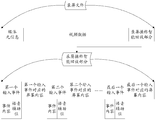
- FIG. 3 is a schematic structural diagram of a screen recording file according to an embodiment of the present disclosure.
- FIG. 4 is a schematic diagram of a display interface of a screen recording terminal according to an embodiment of the present invention.
- FIG. 5 is a flowchart of a method for playing a screen recording according to an embodiment of the present invention.
- FIG. 6 is a schematic diagram of another display interface of a playback terminal according to an embodiment of the present disclosure.
- FIG. 7 is a flowchart of another method for playing a screen recording according to an embodiment of the present invention.
- FIG. 8 is a schematic diagram of another display interface of a playback terminal according to an embodiment of the present disclosure.
- FIG. 9 , FIG. 10 and FIG. 11 are flowcharts of another method for playing a screen recording according to an embodiment of the present invention.
- FIG. 12 is a schematic diagram of a WeChat display interface according to an embodiment of the present invention.
- FIG. 13 and FIG. 14 are flowcharts of another method for playing a screen recording according to an embodiment of the present invention.
- FIG. 15 is a schematic diagram of another WeChat display interface according to an embodiment of the present invention.
- FIG. 16 is a schematic structural diagram of a screen recording terminal according to an embodiment of the present invention.
- FIG. 17 is a schematic structural diagram of a playback terminal according to an embodiment of the present disclosure.
- FIG. 18 is a schematic structural diagram of another screen recording terminal according to an embodiment of the present invention.
- FIG. 19 and FIG. 21 are schematic diagrams showing the structure of another playing terminal according to an embodiment of the present invention.
- the embodiment of the present invention can be used for a terminal, and the terminal or the playback terminal can be a mobile terminal such as a smart phone or a tablet computer, or another terminal capable of performing operations similar to clicking, sliding, and the like.
- the screen recording terminal is a terminal for generating a screen recording file
- the playing terminal is a terminal for playing a screen recording file.
- the screen recording terminal and the playback terminal are two different terminals, but it may also be the same terminal. For example, different users complete the function of generating and playing a screen recording file on the same terminal, or the same user uses the same terminal to demonstrate the same operation for different users.
- a variation of a possible display interface of a playback terminal when performing different operations On the display interface, the user can obtain the recording screen file sent by other users, or the recording screen file stored locally by the playing terminal, or the recording terminal obtains the record from the database or the network side device through the network or the like.
- Screen file The click operation may be a click, a double click, or a certain frequency and/or a certain number of click operations, and/or a click operation with a certain pressing force, which is not limited herein.
- the manner of obtaining the screen recording file is not limited to the above-mentioned manner of the click operation, and may be other implementation manners such as dragging and sliding, which are not limited herein.
- the user can be asked whether to start the smart playback function by pop-up dialog box and/or play prompt tone, etc., wherein only the pop-up dialog box is shown in FIG.
- the playing terminal receives an instruction that the user attempts to perform intelligent playback, for example, as shown in FIG. 1 , in the pop-up dialog box, the user triggers the smart playback function by clicking, and the playing terminal can be in the actual resolution of the recording file.
- the resolution of the playback terminal is the same, at least one event event of the input event, that is, at least one operation recorded in the screen recording file is executed, thereby completing the intelligent playback process of the entire screen recording file or part of the screen recording file.
- An embodiment of the present invention provides a method for recording a screen recording.
- the method is applied to a screen recording terminal. As shown in FIG. 2, the method specifically includes:
- Step 101 Acquire an operation performed by the screen recording user on the screen recording terminal, and determine the screen content and the event content corresponding to the operation.
- the event content includes at least a way to indicate that the operation is generated.
- the screen recording terminal acquires the execution action of the user when the triggering operation is performed, that is, the event content, and at the same time, obtains the display condition of the current interface, that is, the screen content.
- the event content and screen content will be described in more detail later, and will not be described here.
- Step 102 Generate video data and record screen operation intelligent playback according to screen content and event content section.
- the intelligent playback portion of the screen recording operation includes at least screen content and event content corresponding to all operations in the video data.
- Step 103 Generate a screen recording file including video data and a smart playback portion of the screen recording operation.
- FIG. 3 it is a schematic diagram of the composition of the screen recording file, and a schematic diagram of the composition of the intelligent playback portion of the screen recording operation in the screen recording file.
- the content shown in FIG. 3 is only one possible implementation manner, and the components involved in composing the screen recording file or the intelligent playback portion of the screen recording operation may be arranged in the manner shown in FIG. 3, or It is arranged in other combinations, and the position of each part of the content is not limited in the embodiment of the present invention.
- the screen recording file includes not only the video data and the screen recording operation intelligent playback portion but also the media meta information.
- the media meta information is used to record the information received by the device for collecting audio information, such as a microphone (MIC) when recording the screen recording, and the video data is used to record the screen of the recording terminal when recording the screen recording.
- the content of the presentation; the screen recording operation intelligent playback portion is used to record each input event and the screen content corresponding to each input event, wherein the input event includes at least the event content.
- FIG. 4 it is a schematic diagram of a display interface of a screen recording terminal when a user performs a screen recording on a screen recording terminal.
- the operation flow shown in FIG. 4 is that the interface initially displayed by the screen recording terminal is a WeChat display interface, and the user clicks “+” in the upper right corner of the display interface, and then the menu bar pops up, and the user clicks “Add a friend”.
- a total of two user operations are involved, namely clicking "+" and clicking "Add friend”.
- the screen recording operation can only include two input events, that is, a first input event and a second input event.
- the first input event is generated before the second input event, and the event content of the first input event and the second input event are both click operations.
- the screen content corresponding to the first input event is the main interface of the WeChat display, as shown in the left side of FIG. 4; the screen content corresponding to the second input event is the display interface of the pop-up menu bar, as shown in the right side of FIG. The display interface shown.
- the input event may further include a voice auxiliary bit
- the current terminal may determine, according to the voice auxiliary bit identifier, whether the audio corresponding to the event content needs to be played.
- the screen recording file generated by the above implementation manner When the screen recording file generated by the above implementation manner is played on the playing terminal, not only the playing mode for the user to view in the background art but also some or all of the inputs recorded in the screen recording file may be directly replaced by the user. event.
- the screen recording file generated by the solution provided by the embodiment of the present invention can separately record the event content of the input event and generate the screen content corresponding to the input event for each input event, so that it can be effective in subsequent intelligent playback. Restore the various operations performed while recording the screen.
- the screen recording operation is as shown in FIG. 3, in which the user who uses the visual playback may be a user with visual impairment, in order to facilitate the user to understand the operation steps involved in the entire intelligent playback.
- the smart playback portion also includes a voice assist bit identification. If the operation corresponding to the voice assist bit identifier has audio during the generation process, the voice assist bit identifier is set to be valid. For example, if the first input event has corresponding audio, the user describes the first input event. The description, explanation, or the operation itself triggers the recording terminal to generate a piece of audio, so in order to effectively restore the audio during the intelligent playback, the voice auxiliary bit of the first input event can be set to be valid.
- the default voice auxiliary bit is invalid, and if the voice auxiliary position is needed. Then set when the corresponding operation is generated.
- An embodiment of the present invention provides a method for playing a screen recording.
- the method is applied to a playback terminal. As shown in FIG. 5, the method specifically includes:
- Step 201 Acquire a screen recording file.
- the screen recording file includes at least a video data and a screen recording operation intelligent playback portion, and the screen recording operation intelligent playback portion includes at least a screen content and event content corresponding to at least one operation in the video data, and the event content includes at least The way at least one operation is generated.
- Step 202 Receive a smart playback instruction.
- the smart playback instruction is used to trigger playback of the intelligent playback portion of the screen recording operation, and perform at least one operation on the playback terminal.
- the smart playback portion is executed according to the screen recording operation.
- the timing of performing intelligent playback may start from the first input event or from any of the second to last input events, depending on which input event is started, depending on the receipt of the smart playback command. time.
- the user or the staff member can set the first input event after receiving the intelligent playback instruction to realize intelligent playback in advance, and the timing of implementing the intelligent playback is not limited herein.
- the playing terminal can be in the form of a floating window button, or an assembly, or other screen recording file that can be used to select the screen recording file transmitted from the screen recording terminal. Form, prompting the user to enter a smart playback command.
- the playing terminal may also not provide any prompt to the user, and the smart playback command is completely input by the user to trigger the playback process of the screen recording file.
- an implementation of an option to play a screen recording file in the form of a floating window button is presented for the playback terminal.
- a dialog box for the user to select the playback type pops up on the display interface of the playing terminal.
- the user can select an ordinary playback of the screen recording file in a conventional manner by clicking an operation, or adopt an implementation manner mentioned in the embodiment of the present invention, that is, smart playback. If the user attempts to select normal playback, the pop-up dialog box can also provide the user with a variety of options for playing software for the user to select.
- the user can switch the play mode in the middle of normal playback, that is, convert the normal playback into smart playback. For example, the user can still complete the above switching function through the option in the floating button.
- Step 203 Perform at least one operation according to the smart playback instruction.
- the embodiment of the present invention may execute the acquired screen recording text after receiving the smart playback instruction.
- the event content of at least one of the input events is performed by the playback terminal according to the screen recording file, without the user manually completing the various operation steps presented in the video after viewing the completed video.
- the manual operation process of the user can be simplified, thereby solving the problem that the user may malfunction due to manual operation.
- the screen can be adapted to the case where the resolution of the playback terminal is different from the resolution of the screen recording terminal, in order to improve the success rate of the operation process of the playback terminal by the smart playback. . Therefore, on the basis of the implementation shown in FIG. 5, an implementation as shown in FIG. 7 can also be implemented.
- the step of receiving the smart playback command in the step 202 is performed, and the step 204 and the step 205 are performed.
- the step 203 is performed according to the smart playback command to perform at least one operation.
- Step 204 If the resolution of the playback terminal is different from the resolution of the recording terminal, convert the coordinate point of the video data generated on the recording terminal to the designated coordinate point on the playback terminal.
- the screen recording terminal is a terminal that generates a screen recording file.
- the playback terminal can directly obtain the resolution of the screen recording terminal from the screen recording file, or the playback terminal can determine the recording according to the resolution of the video data in the screen recording file.
- the resolution of the screen terminal, and then the resolution of the playback terminal is obtained locally.
- the method for obtaining the resolution is not limited to the foregoing implementation manner, and may be other means for extracting the resolution information, which is not limited herein.
- the above resolution may specifically refer to a screen resolution of the playback terminal and a screen resolution of the screen recording terminal.
- the display interface of the play terminal and the display interface of the screen recording terminal may be respectively used as coordinate planes, and respective coordinate systems are respectively established in the two coordinate planes.
- the playback terminal may map the relationship between the coordinate point generating the touch screen operation and the coordinate system corresponding to the screen recording terminal to a coordinate point that needs to generate a touch screen operation on the display interface of the playback terminal.
- the coordinate system can be established on different terminals in the same manner.
- the x-axis is established along the bottom edge of the display screen with the lower left corner of the display screen as the origin, and the left-to-right direction of the bottom edge is taken as the positive x-axis.
- the y-axis is established on the left side of the display of the edge, and the direction from the bottom to the top of the left side is taken as the positive direction of the y-week.
- the left side is divided into 10 parts, and the bottom side is equally divided into 5 parts, thereby completing the establishment of the Cartesian coordinate system based on the screen recording terminal.
- a Cartesian coordinate system based on the display screen of the playback terminal is established on the playback terminal.
- the effective area corresponding to the position of the touch operation performed by the user on the screen recording terminal is a quadrilateral area formed by the intersection of four broken lines.
- the touch operation does not enrich the entire quadrilateral region, considering the sensitivity of the display screen, as long as the touch operation is generated in the elliptical region in the quadrilateral region, the corresponding operation can be triggered, and as long as it is ensured
- the position of the click operation falls completely within the quadrilateral area, and the production is guaranteed.
- Most of the area of the click operation falls within the elliptical area, thereby triggering the corresponding operation. Therefore, although the unit distances of the respective rectangular coordinate systems of the screen recording terminal and the playback terminal are different, as long as they are in the same relative position of the entire display screen, The corresponding action can be triggered accurately.
- the quadrilateral region is an area composed of coordinate points (1, 9), (1, 7), (3, 7), and (3, 9) as vertices;
- the corresponding quadrilateral region is also an area composed of coordinate points (1, 9), (1, 7), (3, 7), and (3, 9) as vertices, as shown in FIG. It can be seen that if the location where the operation is generated in FIG. 8 is located at the position where the click operation is generated by the playback terminal, the functions such as interface jump and menu pop-up cannot be successfully triggered at the playback terminal.
- the manner of establishing the coordinate system is not limited to the implementation manner shown in FIG. 8.
- the position of the origin can be set at any position of the screen recording terminal, as long as the origin of the screen recording terminal and the origin of the playback terminal are in their respective
- the relative positional relationship on the display can be changed.
- the relative positional relationship can be measured by the distance from the origin to each side, or by other means that can indicate the relative positional relationship, which is not limited herein.
- the unit lengths in the coordinate system on the screen recording terminal and the playback terminal may be the same or different.
- the relative relationship between the two coordinate systems can be determined by combining the ratio between the edges of the two display screens at the same position, thereby determining corresponding to a certain point on the screen recording terminal. Playing a certain point on the terminal; for the case of different unit lengths, there may be a case where the number of unit lengths of the two x-axis and y-axis divided as shown in FIG. 8 is the same, and two may also occur.
- the number of unit lengths in which the x-axis and the y-axis are divided is different or partially the same, that is, only the number of segments in which the x-axis is divided is the same or the number of segments in which only the y-axis is divided, but the manner in which the relative positional relationship is expressed It is consistent with the same unit length and will not be described here.
- the coordinate system is not limited to the Cartesian coordinate system, and may be other types of coordinate systems, which will not be repeated here.
- it can also be represented by a vector or other form.
- conversion mode is not limited to the foregoing implementation manner, and may be other implementation manners capable of performing coordinate point conversion, which is not limited herein.
- Step 205 Perform at least one operation on the playing terminal according to the specified coordinate point.
- Step 2031 If the resolution of the playback terminal is the same as the resolution of the screen recording terminal, at least one operation is performed according to the smart playback instruction.
- the event content of each input event involved in the screen recording file can be completed at the corresponding position of the playback terminal, that is, the elliptical area in the display interface of the playback terminal as shown in FIG.
- the playing terminal can complete the event content of the at least one input event on the display interface of the playing terminal according to the specified coordinate point.
- the embodiment of the present invention can avoid the problem that the corresponding functions cannot be triggered due to different resolutions between the terminals through the screen adaptation manner.
- the event content of the at least one input event can be directly executed without performing screen adaptation; for the playback terminal and the screen recording terminal with different resolutions.
- the screen adaptation is completed, as long as the equal ratio mapping can be successfully performed between the resolution of the playback terminal and the screen recording terminal, intelligent playback of the screen recording file can be performed. It can be seen that the foregoing implementation manner can effectively avoid the problem of inaccurate operation or misoperation caused by different resolutions of the screen recording terminal and the playback terminal.
- the number of input events may be one or more. If the number of input events is multiple, then each input event corresponding operation in at least one input event needs to be sequentially performed. Therefore, on the basis of the implementation shown in FIG. 5 or FIG. 7 , FIG. 5 can also be implemented as an implementation as shown in FIG. 9 .
- the step 203 performs at least one operation according to the smart playback instruction, which may be specifically implemented as step 2032:
- Step 2032 If the resolution of the playback terminal is the same as the resolution of the recording terminal, each of the at least one operation is sequentially performed.
- the event content of the at least one input event is sequentially executed: executing the event content of the first input event on the playing terminal, and executing the second after the event content is executed.
- the content of the event of the input event is the same, until the event content of the last input event is executed, or after the playback terminal receives the instruction to terminate the smart playback, the stop is stopped after the currently executed operation or after the current operation is performed.
- the performance of the screen recording terminal and the playback terminal may be different, it means that the response time of the screen recording terminal and the playback terminal in processes such as interface jump, menu popping, etc. is different, and such time delay It may also cause misuse. Therefore, in the process of performing at least one operation, it is also necessary to consider the matching relationship between the interfaces, and only when the two interfaces are the same, the corresponding operations can be continued, and therefore, as shown in FIG. 5, FIG. 7, FIG. Based on the implementation, taking FIG. 5 as an example, it can also be implemented as shown in FIG.
- the step 203 performs at least one operation according to the function playback instruction, and may be specifically implemented as step 301 and step 302:
- Step 301 If the current screen content is the same as the screen content that generates the specified operation, perform the specified operation.
- Step 302 If the current screen content is different from the screen content that generates the specified operation, perform interface matching until the current screen content is the same as the screen content that generates the specified operation, and then perform the specified operation.
- the specified operation may be an operation to be performed currently, that is, any one of at least one operation.
- step 302 in the process of determining whether the current interface is the same as the interface for generating the specified input event, whether the two interfaces are the same may be determined according to whether the display content of the designated area in the two interfaces is the same. Therefore, on the basis of the implementation shown in FIG. 10, an implementation as shown in FIG. 11 can also be implemented.
- the step 302 can be specifically implemented as step 3021 to step 3023:
- Step 3021 If the current screen content is different from the screen content that generates the specified operation, the display content of the designated area in the interface that generates the specified operation is acquired.
- Step 3022 Detect whether there is an area in the current screen content that is the same as the display content according to the specified period, and when there is an area that is the same as the display content, determine that the current screen content is the screen content that generates the specified operation.
- the specified period may be a preset fixed time interval, or a real-time detection, or an irregular preset time interval.
- the specified period can be set to a longer or shorter time according to user requirements, and can be preset by the user according to historical data or empirical values, for example, set in a specified period.
- the above detection process can be regarded as real-time monitoring, thereby reducing the time waste of the matching process, but this will cause excessive resource waste, so the user can choose to set the specified period to a length. The appropriate length of time.
- Step 3023 Perform a specified operation.
- the portion circled by the dotted line frame can be regarded as the display content of the specified area in the display interface, if the current interface and the interface for generating the specified input event are in a dotted circle. If the parts are the same, the current interface is considered to be the interface that generates the specified input event.
- the content of the fixed user interface in the display interface is generally used as a basis for comparison. Thus, even if there is a difference in the type and model of the playback terminal and the screen recording terminal, the determination process of whether the above interfaces are the same can be completed.
- the portion circled by the dotted line frame is the content of the fixed user interface in the display interface of the WeChat, that is, the content that is presented when displayed on any terminal.
- the time interval between performing two adjacent input events on the designated terminal is different from the time interval at which the two adjacent input events are performed on the current terminal.
- a matching operation is required, and after the interface is successfully matched, the corresponding event content is executed, thereby increasing the success rate of the intelligent playback in the implementation process, effectively avoiding the relationship between the two terminals.
- the playback terminal may be based on the application, in an implementation manner of the embodiment of the present invention, in the implementation of the smart playback, the current display interface of the playback terminal may be different from the interface of the specified input event.
- Step 401 If the current screen content is different from the screen content that generates the specified operation, obtain the package name and the class name of the application corresponding to the specified operation in the screen recording file.
- Step 402 Determine an application corresponding to the specified operation according to the package name of the application, and access the application.
- Step 403 If the screen recording file has the right to access the application, determine the specified interface corresponding to the specified operation according to the class name, and jump to the specified interface.
- Step 404 Generate a prompt information if the screen recording file does not have the right to access the application.
- the prompt information is used to prompt the user to open the right to access the application.
- Step 405 After the screen recording file has the right to access the application, determine the specified interface corresponding to the specified operation according to the class name, and jump to the specified interface.
- the embodiment of the present invention may jump to the interface corresponding to the specified input event before starting the entire intelligent playback process, that is, jump to the interface generated by the specified operation of the specified input event, that is, the specified interface, so that after the smart playback is started
- the playback terminal can directly operate according to the screen recording intelligence
- the content recorded in the playback section completes the event content of at least one input event.
- the screen recording intelligent operation playback part further includes voice assistance, in which the user who uses the visual playback may be a visually impaired user, in order to facilitate the user to understand the operation steps involved in the entire intelligent playback.
- voice assistance in which the user who uses the visual playback may be a visually impaired user, in order to facilitate the user to understand the operation steps involved in the entire intelligent playback.
- the bit identifier during the execution of the intelligent playback process, the playback terminal can select whether to play the audio corresponding to the specified operation being performed according to the information recorded by the voice auxiliary bit, and play the audio when the audio needs to be played. Therefore, based on the implementations shown in FIGS. 10, 11, and 13, the implementation shown in FIG. 14 can also be implemented by taking FIG. 10 as an example.
- step 303 may also be performed:
- Step 303 If the voice assist bit identifier is valid, the audio corresponding to the specified operation is played when the specified operation is performed.
- the voice assisting bit identifier is 1, the voice assisting bit identifier is considered to be valid, and when the specified event content of the specified input event is executed, the audio corresponding to the specified event content is played to notify the user of the currently performing operation; If the bit identifier is 0, the voice auxiliary bit identifier is invalid. Only the specified event content of the specified input event is executed, that is, the specified operation is performed, and the audio corresponding to the specified operation is not played.
- the recording process can be triggered by long pressing the power button or by pressing the volume button. After the recording process begins, the user can perform the corresponding functions by performing a series of operations on the playback terminal.
- the current interface may also be jumped to the display interface before at least one operation.
- the payment interface is directly jumped to the WeChat main interface.
- the screen recording terminal, the playback terminal, and the like in order to implement the above functions, include hardware structures and/or software modules corresponding to each function.
- the embodiments of the present invention can be implemented in a combination of hardware or hardware and computer software in combination with the elements and algorithm steps of the various examples described in the embodiments disclosed herein. Whether a function is implemented in hardware or computer software to drive hardware depends on the specific application and design constraints of the solution. A person skilled in the art can use different methods to implement the described functions for each particular application, but such implementation should not be considered to be beyond the scope of the embodiments of the invention.
- the embodiment of the present invention may divide a function module for a screen recording terminal, a playback terminal, and the like according to the foregoing method example.
- each function module may be divided according to each function, or two or more functions may be integrated into one processing module.
- the above integrated modules can be implemented in the form of hardware or in the form of software functional modules. It should be noted that the division of the module in the embodiment of the present invention is schematic, and is only a logical function division, and may be implemented in actual implementation. In a different way.
- FIG. 16 is a schematic diagram showing a possible structure of the screen recording terminal involved in the foregoing embodiment.
- the screen recording terminal 50 includes: an obtaining module 51, a determining module 52, The module 53 and the setting module 54 are generated.
- the obtaining module 51 is configured to support the recording terminal 50 to perform the obtaining operation of step 101 in FIG. 2;
- the determining module 52 is configured to support the recording terminal 50 to perform the determining operation of step 101 in FIG. 2;
- the generating module 53 is configured to support the recording terminal 50.
- Step 102 and step 103 in FIG. 2 are performed;
- the setting module 54 is configured to support the process of the screen recording terminal 50 gradually generating the intelligent playback portion and the screen recording file of the screen recording operation. All the related content of the steps involved in the foregoing method embodiments may be referred to the functional descriptions of the corresponding functional modules, and details are not described herein again.
- FIG. 17 is a schematic diagram of a possible structure of the playback terminal involved in the foregoing embodiment.
- the playback terminal 60 includes: an acquisition module 61, a receiving module 62, an execution module 63, a conversion module 64, an access module 65, and a generation module 66. , the playing module 67 and the recovery module 68.
- the obtaining module 61 is configured to support the playing terminal 60 to perform step 201 in FIG. 5, FIG. 7, FIG. 9, FIG. 10, FIG. 11, FIG. 13, FIG. 14 , step 3021 in FIG. 11 , step 401 in FIG. 13 , and receive
- the module 62 is configured to support the playing terminal 60 to perform step 202 in FIG. 5, FIG. 7, FIG. 9, FIG. 10, FIG. 11, FIG. 13, FIG.
- the executing module 63 is configured to support the playing terminal 60 to perform step 203 in FIG. Steps 2031 and 205 in FIG. 7, step 2032 in FIG. 9, step 301 and step 302 in FIG. 10, step 301, step 3021 to step 3023 in FIG. 11, step 301, step 403 in FIG. Step 405, step 3022, and step 3033, step 301 and step 302 in FIG. 14;
- the conversion module 64 is configured to support the playback terminal 60 to perform step 204 in FIG. 7; and the access module 65 is configured to support the playback terminal 60 to perform the operation in FIG. Step 402;
- the generating module 66 is configured to support the playing terminal 60 to perform step 404 in FIG.
- the playing module 67 is configured to support the playing terminal 60 to perform step 303 in FIG. 14; and the restoring module 68 is configured to support the playing terminal 60 in executing After at least one operation, jump to the interface before execution. All the related content of the steps involved in the foregoing method embodiments may be referred to the functional descriptions of the corresponding functional modules, and details are not described herein again.
- FIG. 18 shows a possible structural diagram of the screen recording terminal 70 involved in the above embodiment.
- the screen recording terminal 70 includes a communication unit 71 and a processing unit 72.
- the communication unit 71 is configured to support the recording terminal 70 to perform the obtaining operation of step 101 in FIG. 2, and is also used to support communication between the screen recording terminal 70 and other devices such as a playing terminal, or to collect corresponding commands triggered by the user.
- the processing unit 72 is configured to support the screen recording terminal 70 to perform the determining operation of step 101 in FIG. 2, step 102 and step 103, and to gradually generate the screen playing operation of the intelligent playback portion, the screen recording file, and/or for the purpose of this document. Other processes of the described techniques.
- the screen recording terminal 70 may further include a storage unit 73 for storing program codes and data of the base station.
- FIG. 19 shows a possible structural diagram of the playback terminal 80 involved in the above embodiment.
- the playback terminal 80 includes a communication unit 81 and a processing unit 82.
- the communication unit 81 is configured to support the playing terminal 80 to perform step 201 and step 202 in FIG. 5, FIG. 6, FIG. 9, FIG. 10, FIG. 11, FIG. 13, FIG. 14, step 3021 in FIG. 11, step 401 in FIG.
- the processing unit 82 is configured to support the playback terminal 80 to perform step 203 in FIG. 5, in FIG. Step 2031 Step 203 and step 205, step 2032 in FIG. 9, step 301 in FIG. 10, FIG. 11, FIG.
- the playback terminal 80 may further include a storage unit 83 for storing program codes and data of the base station.
- the processing unit in the screen recording terminal and the playback terminal can be implemented as a processor or a controller, for example, a central processing unit (CPU), a general-purpose processor, and a digital signal processor (DSP). , Application-Specific Integrated Circuit (ASIC), Field Programmable Gate Array (FPGA) or other programmable logic device, transistor logic device, hardware component, or any combination thereof. It is possible to implement or carry out various exemplary logical blocks, units and circuits described in connection with the disclosure of the embodiments of the invention.
- the processor may also be a combination of computing functions, for example, including one or more microprocessor combinations, a combination of a DSP and a microprocessor, and the like.
- the communication unit in the screen recording terminal and the playback terminal can be implemented as a transceiver, a transceiver circuit or a communication interface.
- the memory unit in the screen recording terminal and the playback terminal can be implemented as a memory.
- the screen recording terminal 100 For the screen recording terminal, if the function of the communication unit 71 is implemented by the transceiver, the function of the processing unit 72 is implemented by the processor, and the function of the storage unit 73 is implemented by the memory, then the screen recording terminal 100 according to the embodiment of the present invention is used. Can be as shown in Figure 20. Referring to FIG. 20, the screen recording terminal 100 includes a processor 11, a transceiver 12, a memory 13, and a bus 14. The processor 11, the transceiver 12 and the memory 13 are connected to one another via a bus 14.
- the playback terminal 200 For the playback terminal, if the function of the communication unit 81 is implemented by the transceiver, the function of the processing unit 82 is implemented by the processor, and the function of the storage unit 83 is implemented by the memory, the playback terminal 200 according to the embodiment of the present invention may be Figure 21 shows.
- the playback terminal 200 includes a processor 21, a transceiver 22, a memory 23, and a bus 24.
- the processor 21, the transceiver 22 and the memory 23 are connected to one another via a bus 24.
- the bus 14 and the bus 24 may be a Peripheral Component Interconnect (PCI) bus or an Extended Industry Standard Architecture (EISA) bus.
- PCI Peripheral Component Interconnect
- EISA Extended Industry Standard Architecture
- the bus can be divided into an address bus, a data bus, a control bus, and the like. For convenience of representation, only one thick line is shown in FIGS. 20 and 21, but it does not mean that there is only one bus or one type of bus.
- the steps of the method or algorithm described in connection with the disclosure of the embodiments of the present invention may be implemented in a hardware manner, or may be implemented by a processor executing software instructions.
- the software instructions may be composed of corresponding software modules, which may be stored in a random access memory (RAM), a flash memory, a read only memory (ROM), an erasable programmable read only memory ( Erasable Programmable ROM (EPROM), electrically erasable programmable read only memory (EEPROM), registers, hard disk, removable hard disk, compact disk read only (CD-ROM) or any other form of storage medium known in the art.
- An exemplary storage medium is coupled to the processor to enable the processor to read information from, and write information to, the storage medium.
- the storage medium can also be part of the processor, or The processor and the storage medium may also exist as discrete components in the core network interface device.
- the functions described in the embodiments of the present invention may be implemented in hardware, software, firmware, or any combination thereof.
- the functions may be stored in a computer readable medium or transmitted as one or more instructions or code on a computer readable medium.
- Computer readable media includes both computer storage media and communication media including any medium that facilitates transfer of a computer program from one location to another.
- a storage medium may be any available media that can be accessed by a general purpose or special purpose computer.
Landscapes
- Engineering & Computer Science (AREA)
- Theoretical Computer Science (AREA)
- General Engineering & Computer Science (AREA)
- Human Computer Interaction (AREA)
- Physics & Mathematics (AREA)
- General Physics & Mathematics (AREA)
- Multimedia (AREA)
- Software Systems (AREA)
- Computer Security & Cryptography (AREA)
- Signal Processing (AREA)
- Databases & Information Systems (AREA)
- Technology Law (AREA)
- Computer Hardware Design (AREA)
- User Interface Of Digital Computer (AREA)
- Television Signal Processing For Recording (AREA)
- Two-Way Televisions, Distribution Of Moving Picture Or The Like (AREA)
Abstract
一种屏幕录像的录制、播放方法、录屏终端及播放终端,涉及通信技术领域,能够解决在录屏技术的实际使用过程中使其他用户产生误操作的问题。该录制方法包括:获取录屏用户在录屏终端上执行的操作,确定操作对应的屏幕内容和事件内容;根据屏幕内容和事件内容,生成视频数据和录屏操作智能回放部分;生成包括视频数据和录屏操作智能回放部分的录屏文件。该播放方法包括:获取录屏文件;接收智能回放指令;根据智能回放指令,执行至少一个操作。适用于录屏终端、播放终端。
Description
本申请要求于2016年11月29日提交中国专利局、申请号为201611073867.5、发明名称为“一种移动终端的录屏的方法和设备”的中国专利申请的优先权,其全部内容通过引用结合在本申请中。
本发明涉及通信技术领域,尤其涉及一种屏幕录像的录制、播放方法、录屏终端及播放终端。
随着通信技术的飞速发展,用户需要不断学习、掌握新技术,才能使获得更加优质的服务。随着移动终端的普及,使用移动终端的用户在年龄、学习能力等方面往往会存在较大的差距。为了给用户提供更加全面的学习教程以及更加便捷的学习途径,录屏(即录制屏幕录像)技术应运而生。
传统的录屏技术是在录屏过程中,移动终端将屏幕所显示的内容录制成视频,以记录用户在该屏幕上的操作步骤,之后用完成录制的视频指导其他用户完成某些不熟悉或是较为复杂的操作。
考虑到视频的录制过程中,各个操作步骤之间的时间间隔主要由录制视频的用户控制,因此,可能出现用户操作熟练而使完成录制的视频中两个操作步骤之间的时间间隔较短的情形。这样一来,在其他用户观看该视频时,可能因其他用户对各个操作步骤并不了解且操作步骤的整体连贯性较高,而导致其他用户无法掌握整个操作过程。另外,对于繁琐的操作过程而言,完成录制的视频中可能会涉及大量操作步骤,学习能力较差的其他用户很可能也无法熟练掌握整个操作过程。由此可见,虽然录屏技术能够将用户完整的操作步骤呈现给其他用户,但很可能由于其他用户无法掌握整个操作过程而导致其他用户在实际操作过程中出现误操作的情况。
发明内容
本发明实施例提供一种屏幕录像的录制、播放方法、录屏终端及播放终端,能够解决在录屏技术的实际使用过程中使其他用户产生误操作的问题。
为达到上述目的,本发明实施例采用如下技术方案:
第一方面,本发明实施例提供一种屏幕录像的录制方法。该方法应用于一种录屏终端,该录制方法包括:获取录屏用户在录屏终端上执行的操作,并确定操作对应的屏幕内容和事件内容,其中,该事件内容至少包括用于表示操作产生的方式;之后根据屏幕内容和事件内容,生成视频数据和录屏操作智能回放部分,其中,该录屏操作智能回放部分至少包括用于表示视频数
据中所有操作对应的屏幕内容和事件内容;最后,生成包括视频数据和录屏操作智能回放部分的录屏文件。
在一种可能的设计中,录屏文件中的录屏操作智能回放部分还可以包括语音辅助位标识。若语音辅助位标识对应的操作在产生过程中存在音频,则可以将语音辅助位标识设置为有效。
第二方面,本发明实施例提供一种录屏终端,该录屏终端可以实现上述方法实施例中所执行的功能,该功能可以通过硬件实现,也可以通过硬件执行相应的软件实现,该硬件或软件包括一个或多个上述功能相应的模块。
在一种可能的设计中,该录屏终端的结构中包括处理器和收发器,该处理器被配置为支持该录屏终端执行上述方法中相应的功能。该收发器用于支持该装置与诸如播放终端的其他设备之间的通信。该录屏终端还可以包括存储器,该存储器用于与处理器耦合,其保存该装置必要的程序指令和数据。
第三方面,本发明实施例提供了一种计算机存储介质,用于储存为上述录屏终端所用的计算机软件指令,其包含用于执行上述方面所设计的程序。
第四方面,本发明实施例提供一种屏幕录像的播放方法。该方法应用于一种播放终端,该播放方法包括:获取录屏文件,该录屏文件中至少包括视频数据和录屏操作智能回放部分,其中,录屏操作智能回放部分至少包括用于表示视频数据中至少一个操作对应的屏幕内容和事件内容,上述事件内容至少包括用于表示至少一个操作产生的方式;在接收智能回放指令后,根据智能回放指令,执行至少一个操作,其中,智能回放指令用于触发录屏操作智能回放部分的播放,并在播放终端上执行至少一个操作。
在一种可能的设计中,在接收智能回放指令之后,若播放终端的分辨率与录屏终端的分辨率不同,则将视频数据中在录屏终端上产生触屏操作的坐标点转化为在播放终端上的指定坐标点,上述录屏终端为生成录屏文件的终端;之后在播放终端上,按照指定坐标点,执行至少一个操作。由此可见,在上述可能的设计中,可以有效规避因录屏终端与播放终端的分辨率不同而引发的操作不一或是误操作问题。也就意味着,对于分辨率相同的播放终端和录屏终端而言,无需进行屏幕适配就可以直接执行至少一个输入事件的事件内容;对于分辨率不同的播放终端和录屏终端而言,在完成屏幕适配之后,只要播放终端与录屏终端的分辨率相同,就可以进行录屏文件的智能回放。
在一种可能的设计中,若上述至少一个操作中包括至少两个操作,那么执行至少一个操作的过程,则可以实现为若播放终端的分辨率与录屏终端的分辨率相同,则依次执行至少一个操作中的每个操作。由此可见,输入事件是按照一定顺序依次执行的,而无需用户仿照录屏文件中涉及的各个输入事件的事件内容依次完成多个步骤所对应的操作。这样一来,不仅能够降低用户的操作步骤,还能确保各个输入事件依次触发,从而完成整个录屏回放过程。
在一种可能的设计中,执行至少一个操作的过程,还可以依据屏幕内容是否相同,采取不同的实现过程。若当前屏幕内容与产生指定操作的屏幕内
容相同,则执行指定操作;若当前屏幕内容与产生指定操作的屏幕内容不同,则进行界面匹配,直至当前屏幕内容与产生指定操作的屏幕内容相同后,执行指定操作。
在一种可能的设计中,上述进行界面匹配,直至当前屏幕内容与产生指定操作的屏幕内容相同,具体可以实现为:获取产生指定操作的界面中指定区域的显示内容;之后按照指定周期检测当前屏幕内容中是否存在与显示内容相同的区域,并在存在与显示内容相同的区域时,确定当前屏幕内容为产生指定操作的屏幕内容。这样一来,若播放终端仍然沿用在录屏终端上执行相应操作的时间间隔,一旦播放终端的性能较差,则播放终端进行界面跳转或是其他指令处理的过程会比在录屏终端上进行相应操作所消耗的时间更长,那么就可能出现在播放终端上还未发生相应的界面跳转、或是当前还不存在下一步可执行的操作。因此,为了避免上述情况的出现,在执行每个输入事件的事件内容时,都需要通过确定当前界面是否为产生指定输入事件的界面来完成界面的匹配操作,并在界面匹配成功后,再执行相应操作,从而增加智能回放在实现过程中的成功率,有效规避因两个终端之间存在的性能差异所引发的智能回放失败、或是智能回放终止等问题。
在一种可能的设计中,在获取产生指定操作的界面中指定区域的显示内容之前,该播放方法还可以包括:获取录屏文件中指定操作对应应用的包名和类名;之后根据应用的包名确定指定操作对应的应用,并访问应用;若录屏文件具有访问应用的权限,则再根据类名确定指定操作对应的指定界面,并跳转至指定界面。由此可见,录屏文件是否具有访问该应用的权限,也会影响录屏智能回放过程的成功率,因此,在上述可能的设计中,提供了针对具有访问权限及不具有访问权限这两种情况,所采取的不同实现流程。
在一种可能的设计中,在根据应用的包名确定指定操作对应的应用,并访问应用之后,该播放方法还可以包括:若录屏文件不具有访问应用的权限,则生成提示信息,提示信息用于提示用户开启访问应用的权限;并在录屏文件具有访问应用的权限之后,根据类名确定指定操作对应的指定界面,并跳转至指定界面。由此可见,在开始整个智能回放过程之前,先跳转至指定输入事件对应的界面,这样在启动智能回放之后,播放终端可以直接根据录屏操作智能回放部分所记载的内容,完成至少一个输入事件对应的操作。
在一种可能的设计中,录屏操作智能回放部分还可以包括语音辅助位标识,执行指定操作时,若语音辅助位标识有效,则播放与指定操作对应的音频。考虑到使用智能回放的用户可能为存在视力障碍的用户,为了方便该用户了解整个智能回放所涉及的操作步骤,在上述可能的设计中,录屏文件中还包括语音辅助位标识,播放终端在执行智能回放过程中,能够依据语音辅助位所记载的信息,选择是否播放与正在执行的操作对应的音频,并在需要播放该音频时播放该音频。
在一种可能的设计中,在执行完至少一个操作之后,还可以将当前界面跳转至执行至少一个操作之前的显示界面。这样一来,在执行完至少一个操
作之后,根据用户的需求,还可以将当前界面跳转至至少一个操作之前的显示界面。
第五方面,本发明实施例提供一种播放终端,该播放终端可以实现上述方法实施例中所执行的功能,该功能可以通过硬件实现,也可以通过硬件执行相应的软件实现,该硬件或软件包括一个或多个上述功能相应的模块。
在一种可能的设计中,该播放终端的结构中包括处理器和收发器,该处理器被配置为支持该播放终端执行上述方法中相应的功能。该收发器用于支持该装置与诸如录屏终端的其他设备之间的通信。该播放终端还可以包括存储器,该存储器用于与处理器耦合,其保存该装置必要的程序指令和数据。
第六方面,本发明实施例提供了一种计算机存储介质,用于储存为上述播放终端所用的计算机软件指令,其包含用于执行上述方面所设计的程序。
相比较于现有技术中由于其他用户无法掌握整个操作过程而导致其他用户在实际操作过程中出现误操作的情况,本发明实施例可以在接收到智能回放指令之后,执行已经获取的录屏文件中的至少一个输入事件的事件内容。由此可见,上述实现过程是由播放终端根据录屏文件执行的,而不需要用户在观看完成录制的视频之后手动完成视屏中所呈现的各个操作步骤。这样一来,就可以简化用户的手动操作过程,从而解决用户因手动操作而产生误操作的问题。
图1为本发明实施例提供的一种播放终端显示界面的示意图;
图2为本发明实施例提供的一种屏幕录像的录制方法流程图;
图3为本发明实施例提供的一种录屏文件的结构示意图;
图4为本发明实施例提供的一种录屏终端显示界面的示意图;
图5为本发明实施例提供的一种屏幕录像的播放方法流程图;
图6为本发明实施例提供的另一种播放终端显示界面的示意图;
图7为本发明实施例提供的另一种屏幕录像的播放方法流程图;
图8为本发明实施例提供的另一种播放终端显示界面的示意图;
图9、图10、图11为本发明实施例提供的另一种屏幕录像的播放方法流程图;
图12为本发明实施例提供的一种微信显示界面的示意图;
图13、图14为本发明实施例提供的另一种屏幕录像的播放方法流程图;
图15为本发明实施例提供的另一种微信显示界面的示意图;
图16为本发明实施例提供的一种录屏终端的结构示意图;
图17为本发明实施例提供的一种播放终端的结构示意图;
图18、图20为本发明实施例提供的另一种录屏终端的结构示意图;
图19、图21为本发明实施例提供的另一种播放终端的结构示意图。
下面将结合本发明实施例中的附图,对本发明实施例中的技术方案进行
清楚、完整地描述,显然,所描述的实施例仅仅是本发明一部分实施例,而不是全部的实施例。基于本发明中的实施例,本领域普通技术人员在没有做出创造性劳动前提下所获得的所有其它实施例,都属于本发明实施例保护的范围。
本发明实施例可以用于一种终端,该终端录屏终端或是播放终端,具体可以为诸如智能手机、平板电脑等移动终端,或是其他能够执行类似于点击、滑动等操作的终端。其中,录屏终端为生成录屏文件的终端,播放终端则为播放录屏文件的终端。通常情况下,录屏终端与播放终端是两个不同的终端,但也有可能是同一终端。比如,不同用户在同一终端上分别完成录屏文件的生成及播放功能,或是,同一用户使用同一终端为不同用户演示相同操作的过程。
例如,如图1所示,为播放终端一种可能的显示界面在执行不同操作时的变化情况。在该显示界面上,用户可以通过点击操作来获取其他用户发送的录屏文件、或是播放终端本地存储的录屏文件、或是播放终端通过网络等途径从数据库、网络侧设备上获取的录屏文件。其中,点击操作具体可以为单击、双击、或是一定频率和/或一定次数的点击操作、和/或是一定按压力度的点击操作,在此不做限定。另外,对于获取录屏文件的方式也不仅限于上述点击操作的方式,还可以为诸如拖动、滑动等其他实现方式,在此不做限定。之后,在该显示界面上可以通过弹出对话框和/或播放提示音等方式询问用户是否需要启动智能回放功能,其中,在图1中仅示出了弹出对话框的情况。若播放终端接收到用户试图进行智能回放的指令,比如,如图1所示,在弹出的对话框中,用户通过点击操作触发智能回放功能,则播放终端可以在录屏文件的实际分辨率与播放终端的分辨率相同的情况下,执行至少一个输入事件的事件内容,即录屏文件中记载的至少一个操作,从而完成整个录屏文件或是部分录屏文件的智能回放过程。
需要说明的是,上述实现方式仅为一种可能的实现方式,播放终端的显示界面的呈现情况也同样是作为示例性的情况之一。在后文中,还会呈现播放终端的其他可能的显示方式,但不仅限于本发明实施例所提及的这几种显示方式。
本发明实施例提供一种屏幕录像的录制方法,该方法应用于一种录屏终端,如图2所示,该方法具体包括:
步骤101、获取录屏用户在录屏终端上执行的操作,确定操作对应的屏幕内容和事件内容。
其中,事件内容至少包括用于表示操作产生的方式。
用户在录屏终端上执行操作的过程中,每当用户执行一次操作,则录屏终端获取本次触发操作时用户的执行动作,即事件内容,同时,获取当前界面的显示情况,即屏幕内容。在后文中会对事件内容和屏幕内容进行更加详细的说明,在此不做赘述。
步骤102、根据屏幕内容和事件内容,生成视频数据和录屏操作智能回放
部分。
其中,录屏操作智能回放部分至少包括用于表示视频数据中所有操作对应的屏幕内容和事件内容。
步骤103、生成包括视频数据和录屏操作智能回放部分的录屏文件。
如图3所示,为录屏文件的组成示意图,以及录屏文件中录屏操作智能回放部分的组成示意图。需要说明的是,图3所示的内容仅为一种可能的实现方式,组成录屏文件或是录屏操作智能回放部分所涉及的各部分内容可以按照如图3所示的方式排列,或是按照其他组合方式进行排列,对于各部分内容所处位置,在本发明实施例中不做限定。
在图3中,录屏文件中不仅包括视频数据和录屏操作智能回放部分,还包括媒体元信息。其中,媒体元信息用于记载录屏终端在录制屏幕录像时,诸如麦克风(microphone,MIC)等采集音频信息的设备接收到的信息;视频数据用于记载录制屏幕录像时录屏终端的屏幕上呈现的内容;录屏操作智能回放部分用于记载每个输入事件以及每个输入事件对应的屏幕内容,其中,输入事件至少包括事件内容。
比如,如图4所示为用户在录屏终端上进行录屏时录屏终端的显示界面示意图。图4所表示的操作流程为录屏终端最初显示的界面为微信的显示界面,用户单击显示界面中右上角的“+”,之后弹出菜单栏,用户点击“添加朋友”。在上述过程中,共涉及两个用户操作,即点击“+”和点击“添加朋友”。以图3所示的录屏文件组成为例,录屏操作只能回放部分中包括两个输入事件,即第一输入事件和第二输入事件。其中,第一输入事件在第二输入事件之前产生,第一输入事件和第二输入事件的事件内容都为单击操作。第一输入事件对应的屏幕内容则为微信的显示主界面,如图4中左边所示的显示界面;第二输入事件对应的屏幕内容则为弹出菜单栏的显示界面,如图4中右边所示的显示界面。
另外,在本发明实施例中,输入事件还可以包括语音辅助位,当前终端可以根据语音辅助位标识确定是否需要播放该事件内容对应的音频,具体实现方式请参见后文,在此不做赘述。
采用上述实现方式生成的录屏文件在播放终端上进行播放时,不仅可以沿用背景技术中描述的供用户观看的播放模式,还可以直接代替用户完成录屏文件中所记载的部分或是全部输入事件。采用本发明实施例所提供的方案生成的录屏文件,能够针对每一个输入事件分别记录该输入事件的事件内容及产生该输入事件对应的屏幕内容,这样在后续进行智能回放时,就能够有效还原录屏时执行的各个操作。
考虑到使用智能回放的用户可能为存在视力障碍的用户,为了方便该用户了解整个智能回放所涉及的操作步骤,在本发明实施例的一种实现方式中,正如图3所示,录屏操作智能回放部分还包括语音辅助位标识。若语音辅助位标识对应的操作在产生过程中存在音频,则将语音辅助位标识设置为有效。比如,若第一个输入事件存在对应的音频,即用户对第一个输入事件进行描
述、解释、或是该操作本身会触发录屏终端产生一段音频,那么为了在智能回放过程中有效还原该音频,则可以将第一个输入事件的语音辅助位设置为有效。需要说明的是,考虑到一般情况下录屏操作智能回放部分中仅有一小部分输入事件会涉及到对应的音频,因此,在本发明实施例中,默认语音辅助位无效,如果需要语音辅助位则在产生相应操作时进行设置。
在录屏终端上生成录屏文件之后,一旦用户需要,则可以通过网络等途径获取录屏文件,之后在播放终端上根据自身需求运行。本发明实施例提供一种屏幕录像的播放方法,该方法应用于一种播放终端,如图5所示,该方法具体包括:
步骤201、获取录屏文件。
其中,录屏文件中至少包括视频数据和录屏操作智能回放部分,录屏操作智能回放部分至少包括用于表示视频数据中至少一个操作对应的屏幕内容和事件内容,事件内容至少包括用于表示至少一个操作产生的方式。
步骤202、接收智能回放指令。
其中,智能回放指令用于触发录屏操作智能回放部分的播放,并在播放终端上执行至少一个操作。
一旦接收到智能回放指令,那么无论当前已经播放了一段视频数据,还是当前还未播放录屏文件中的任何内容,从即将产生的输入事件开始,则按照录屏操作智能回放部分执行。也就意味着,执行智能回放的时机可以是从第一个输入事件开始,或是从第二至最后一个中的任意一个输入事件开始,具体从哪个输入事件开始主要取决于接收到智能回放指令的时间。或者,用户或是工作人员可以提前设置在接收到智能回放指令后的第几个输入事件开始实现智能回放,具体实现智能回放的时机在此不做限定。
若录屏文件为录屏终端向播放终端发送的文件,那么播放终端能够以悬浮窗按钮的形式、或是组合件的方式、或是其他可用于选取从录屏终端传送过来的录屏文件的形式,提示用户输入智能回放指令。当然,播放终端也可以不为用户提供任何提示,完全由用户自主输入智能回放指令,以触发录屏文件的回放过程。
例如,如图6所示,为播放终端以悬浮窗按钮的形式呈现播放录屏文件的选项的实现方式。在用户触碰悬浮窗按钮中用于表示播放录屏文件的区域时,播放终端的显示界面上会弹出一个供用户选择播放类型的对话框。用户可以通过点击操作,以选择按照传统方式进行录屏文件的普通回放,或是采取本发明实施例中提到的实现方式,即智能回放。若用户试图选择普通回放,那么弹出的对话框还可以为用户提供多种播放软件的选项供用户选择。若最初用户选择了普通回放,且用户已经完成了最初的几个输入事件对应的操作,那么用户可以在普通回放中途切换播放方式,即将普通回放转换为智能回放。比如,用户依旧可以通过该悬浮穿按钮中的选项完成上述切换功能。
步骤203、根据智能回放指令,执行至少一个操作。
本发明实施例可以在接收到智能回放指令之后,执行已经获取的录屏文
件中的至少一个输入事件的事件内容。由此可见,上述执行至少一个输入事件的事件内容的过程是由播放终端根据录屏文件执行的,而不需要用户在观看完成录制的视频之后手动完成视频中所呈现的各个操作步骤。这样一来,就可以简化用户的手动操作过程,从而解决用户因手动操作而产生误操作的问题。
为了提高播放终端通过智能回放执行一套操作流程的成功率,在本发明实施例的一个实现方式中,对于播放终端的分辨率与录屏终端的分辨率不同的情况,还可以进行屏幕适配。因此,在如图5所示的实现方式的基础上,还可以实现为如图7所示的实现方式。其中,在执行完步骤202接收智能回放指令,还可以执行步骤204和步骤205;步骤203根据智能回放指令,执行至少一个操作,则可以具体实现为步骤2031:
步骤204、若播放终端的分辨率与录屏终端的分辨率不同,则将视频数据中在录屏终端上产生触屏操作的坐标点转化为在播放终端上的指定坐标点。
其中,录屏终端为生成录屏文件的终端。
若录屏文件中包括了录屏终端的分辨率,那么播放终端可以直接从录屏文件中获取录屏终端的分辨率,或者,播放终端可以根据录屏文件中视频数据的分辨率情况确定录屏终端的分辨率,之后从本地获取播放终端的分辨率。需要说明的是,获取分辨率的方式不仅限于上述实现方式,还可以为其他能够提取到分辨率信息的手段,在此不做限定。另外,上述分辨率具体可以指播放终端的屏幕分辨率以及录屏终端的屏幕分辨率。
在本发明实施例中,可以将播放终端的显示界面、录屏终端的显示界面分别作为坐标平面,并分别在这两个坐标平面中建立各自的坐标系。在两个坐标系建立完之后,播放终端可以将产生触屏操作的坐标点与录屏终端对应的坐标系之间的关系,映射为需要在播放终端的显示界面上产生触屏操作的坐标点与播放终端对应的坐标系之间的关系,并依据该关系以及播放终端对应的坐标系,确定需要在播放终端的显示界面上产生触屏操作的坐标点,从而完成上述坐标点转化过程,即得到指定坐标点。
录屏终端和播放终端的分辨率虽然不同,但是为了提高录屏回放时的准确率,可以采取同样的方式在不同终端上建立坐标系。比如,如图8所示,对于录屏终端而言,以显示屏的左下角为原点,沿着显示屏的底边建立x轴,并将底边从左至右的方向作为x轴的正方向;同理,以沿者显示屏的左边建立y轴,并将左边从下至上的方向作为y周的正方向。之后,将左边等分为10份,并将底边等分为5份,从而完成基于录屏终端,完成显示屏的直角坐标系的建立。采用相同的方式,在播放终端上建立基于播放终端显示屏的直角坐标系。如图8所示,录屏时,用户在录屏终端上所执行的触摸操作的位置所对应的有效区域为4条虚线经交叉后所构成的四边形区域。需要说明的是,虽然触摸操作并未充实整个四边形区域,但考虑到显示屏的敏感度,只要触摸操作产生在该四边形区域中的椭圆形区域内,即可触发相应操作,并且,只要确保产生点击操作的位置完全落在该四边形区域内,即可保证产生
点击操作的位置中大部分区域落在该椭圆形区域内,从而触发相应操作,因此,虽然录屏终端与播放终端各自直角坐标系的单位距离不同,但只要处于整个显示屏的同一相对位置,即可准确触发相应操作。比如,在录屏终端中,该四边形区域为以坐标点(1,9)、(1,7)、(3,7)和(3,9)作为顶点所构成的区域;那么,在播放终端中,对应的四边形区域同样也是为以坐标点(1,9)、(1,7)、(3,7)和(3,9)作为顶点所构成的区域,如图8所示。由此可见,图8中若产生操作的位置位于播放终端所示的产生点击操作的位置,则无法成功在播放终端触发诸如界面跳转、菜单弹出等功能。
需要说明的是,建立坐标系的方式不仅限于如图8所示的实现方式,比如,原点的位置可以设置在录屏终端的任意位置,只要保证录屏终端的原点与播放终端的原点在各自显示屏上的相对位置关系不变即可。其中,相对位置关系,可以用原点到各个边的距离来衡量,或是采用其他能够表明相对位置关系的方式来衡量,在此不做限定。再比如,位于录屏终端和播放终端上的坐标系中的单位长度可以相同或不同。其中,对于单位长度相同的情况而言,可以结合两个显示屏处于同一位置的边之间的比例,确定两个坐标系之间的相对关系,从而根据录屏终端上的某一点确定对应于播放终端上的某一点;对于单位长度不同的情况而言,则可能出现类似于如图8所示的两个x轴和y轴被划分的单位长度数量相同的情况,同样也可能出现两个x轴、y轴被划分的单位长度数量都不同或是部分相同的情况,即仅有x轴被划分的段数一样或是仅有y轴被划分的段数一样,但是,体现相对位置关系的方式与单位长度相同的情况一致,在此不做赘述。另外,坐标系也不仅限于直角坐标系,还可以为其他类型的坐标系,在此不一一赘述。并且,除了可以用点坐标表示所处位置,还可以用向量或是其他形式进行表示。
需要说明的是,转化方式不仅限于上述实现方式,还可以为其他能够完成坐标点转化的实现方式,在此不做限定。
步骤205、在播放终端上,按照指定坐标点,执行至少一个操作。
步骤2031、若播放终端的分辨率与录屏终端的分辨率相同,则根据智能回放指令,执行至少一个操作。
在完成坐标点的转化过程之后,录屏文件中所涉及的每个输入事件的事件内容也就可以在播放终端对应的位置上完成,即如图8所示播放终端显示界面中的椭圆形区域内,这样一来,播放终端就可以按照指定坐标点,在播放终端的显示界面上完成至少一个输入事件的事件内容。
本发明实施例通过屏幕适配的方式,可以避免终端之间因分辨率不同而引发的无法触发相应功能的问题。在本发明实施例中,对于分辨率相同的播放终端和录屏终端而言,无需进行屏幕适配就可以直接执行至少一个输入事件的事件内容;对于分辨率不同的播放终端和录屏终端而言,在完成屏幕适配之后,只要播放终端与录屏终端的分辨率之间能够成功进行等比映射,那么就可以进行录屏文件的智能回放。由此可见,上述实现方式可以有效规避因录屏终端与播放终端的分辨率不同而引发的操作不一或是误操作问题。
在本发明实施例的一个实现方式中,输入事件的数量可以为一个或是多个,若输入事件的数量为多个,那么需要依次执行至少一个输入事件中每个输入事件对应操作。因此,在如图5或图7所示的实现方式的基础上,以图5为例,还可以实现为如图9所示的实现方式。其中,步骤203根据智能回放指令,执行至少一个操作,可以具体实现为步骤2032:
步骤2032、若播放终端的分辨率与录屏终端的分辨率相同,则依次执行至少一个操作中的每个操作。
以图3所示的录屏文件为例,依次执行至少一个输入事件的事件内容具体为:在播放终端上执行第一个输入事件的事件内容,并在该事件内容执行完之后,执行第二个输入事件的事件内容,同理,直至执行完最后一个输入事件的事件内容,或是在播放终端接收到终止智能回放的指令后,停止在当前执行的操作或是执行完当前操作后停止。
考虑到录屏终端与播放终端在性能上可能有所不同,也就意味着,录屏终端与播放终端在诸如界面跳转、菜单弹出等过程中的反应时间不同,而这种时间上的延迟也可能会造成误操作。因此,在执行至少一个操作的过程中,还需要考虑界面之间的匹配关系,并仅当两个界面相同时才能继续执行相应操作,因此,在如图5、图7、图9所示的实现方式的基础上,以图5为例,还可以实现为如图10所示的实现方式。其中,步骤203根据职能回放指令,执行至少一个操作,可以具体实现为步骤301和步骤302:
步骤301、若当前屏幕内容与产生指定操作的屏幕内容相同,则执行指定操作。
步骤302、若当前屏幕内容与产生指定操作的屏幕内容不同,则进行界面匹配,直至当前屏幕内容与产生指定操作的屏幕内容相同后,执行指定操作。
在本发明实施例中,指定操作可以为当前要执行的操作,即至少一个操作中的任意一个操作。也就意味着,在执行每个输入事件之前,都需要对录屏时的屏幕内容与当前的屏幕内容是否相同进行判断,并仅当内容相同时再执行相应操作。
在本发明实施例中,判断当前界面与产生指定输入事件的界面是否相同的过程中,可以根据在两个界面中指定区域的显示内容是否相同确定这两个界面是否相同。因此,在如图10所示的实现方式的基础上,还可以实现为如图11所示的实现方式。其中,步骤302可以具体实现为步骤3021至步骤3023:
步骤3021、若当前屏幕内容与产生指定操作的屏幕内容不同,则获取产生指定操作的界面中指定区域的显示内容。
步骤3022、按照指定周期检测当前屏幕内容中是否存在与显示内容相同的区域,并在存在与所述显示内容相同的区域时,确定当前屏幕内容为产生指定操作的屏幕内容。
其中,指定周期可以为预设的固定时间间隔,或是实时检测,或是不规则的预设时间间隔。指定周期可以依据用户需求设置为较长或是较短的时间,具体可以由用户根据历史数据或是经验值预先设定,比如,在指定周期被设
置为较短的时间时,上述检测过程可以被视为实时监测,从而减少匹配过程的时间浪费,但这样一来则会造成过度的资源浪费,因此,用户可以选择将指定周期设置为一个长度适宜的时长。
步骤3023、执行指定操作。
例如,如图12所示,以微信的显示界面为例,虚线框圈出的部分可以被视为该显示界面中指定区域的显示内容,若当前界面与产生指定输入事件的界面中虚线框圈出的部分相同,则认为当前界面为产生指定输入事件的界面。需要说明的是,在本发明实施例中,通常将显示界面中固定用户界面的内容作为比对的依据。这样即便播放终端与录屏终端的种类、型号等存在差别,也可以完成上述界面是否相同的判断过程。其中,在图12中,被虚线框圈出的部分为微信的显示界面中固定用户界面的内容,也就是在任何终端上显示时都会呈现的内容。
由此可见,为了避免终端性能上存在差异而引发的在指定终端上执行两个相邻的输入事件的时间间隔与在当前终端上执行该两个相邻的输入事件的时间间隔不同的问题,在执行每个输入事件的事件内容时,都需要进行匹配操作,并在界面匹配成功后,再执行相应事件内容,从而增加智能回放在实现过程中的成功率,有效规避因两个终端之间存在的性能差异所引发的智能回放失败、或是智能回放终止等问题。
考虑到在选择智能回放时,播放终端的当前显示界面可能与指定输入事件的界面不同,为了快速确定产生指定输入事件的界面,在本发明实施例的一个实现方式中,播放终端可以根据应用的包名、类名,找到正在运行的该应用,或是找到未启动的该应用,在启动该应用后,依据该类名找到该应用中的某一特定显示界面,从而实现跳转至该指定输入事件的界面。因此,在如图11所示的实现方式的基础上,还可以实现为如图13所示的实现方式。其中,在执行步骤3021中获取产生指定操作的界面中指定区域的显示内容之前,还需要先跳转到指定界面,因此,步骤3021可以具体实现为步骤401至步骤405:
步骤401、若当前屏幕内容与产生指定操作的屏幕内容不同,则获取录屏文件中指定操作对应应用的包名和类名。
步骤402、根据应用的包名确定指定操作对应的应用,并访问应用。
步骤403、若录屏文件具有访问应用的权限,则根据类名确定指定操作对应的指定界面,并跳转至指定界面。
步骤404、若录屏文件不具有访问应用的权限,则生成提示信息。
其中,提示信息用于提示用户开启访问应用的权限。
步骤405、在录屏文件具有访问应用的权限之后,则根据类名确定指定操作对应的指定界面,并跳转至指定界面。
本发明实施例可以在开始整个智能回放过程之前,先跳转至指定输入事件对应的界面,即跳转至指定输入事件的指定操作产生的界面,也就是上述指定界面,这样在启动智能回放之后,播放终端可以直接根据录屏操作智能
回放部分所记载的内容,完成至少一个输入事件的事件内容。
考虑到使用智能回放的用户可能为存在视力障碍的用户,为了方便该用户了解整个智能回放所涉及的操作步骤,在本发明实施例的一个实现方式中,录屏智能操作回放部分还包括语音辅助位标识,播放终端在执行智能回放过程中,能够依据语音辅助位所记载的信息,选择是否播放与正在执行的指定操作对应的音频,并在需要播放该音频时播放该音频。因此,在如图10、图11、图13所示的实现方式的基础上,以图10为例,还可以实现为如图14所示的实现方式。其中,在执行完步骤202接收智能回放指令之后,还可以执行步骤303:
步骤303、若语音辅助位标识有效,则在执行指定操作时播放与指定操作对应的音频。
例如,若语音辅助位标识为1,则认为语音辅助位标识有效,则在执行指定输入事件的指定事件内容时,播放指定事件内容对应的音频,以告知用户当前正在执行的操作;若语音辅助位标识为0,则认为语音辅助位标识无效,则仅执行指定输入事件的指定事件内容,即执行指定操作,并不播放指定操作对应的音频。
需要说明的是,在录屏终端录制屏幕录像的过程中,可以通过长按电源键、或长按音量键等方式触发录屏过程。在录屏过程开始之后,用户可以通过在播放终端上完成一系列操作以实现相应功能。
以微信中的付款过程为例,如图15所示,为完整的付款流程。在当前界面为微信的显示界面时,用户点击显示界面右上角的“+”按钮,并选择“收付款”选项,在跳转至收付款界面之后,触碰用于表示付款操作的区域,之后跳转至输入付款密码的界面。在当前终端获取录屏文件,并执行完智能回放过程之后,当前显示界面同样为输入付款密码的界面。
需要说明的是,在执行完至少一个操作之后,根据用户的需求,还可以将当前界面跳转至至少一个操作之前的显示界面。以图15为例,则在完成付款操作后,将支付界面直接跳转至微信主界面。
可以理解的是,录屏终端、播放终端等为了实现上述功能,其包含了执行各个功能相应的硬件结构和/或软件模块。本领域技术人员应该很容易意识到,结合本文中所公开的实施例描述的各示例的单元及算法步骤,本发明实施例能够以硬件或硬件和计算机软件的结合形式来实现。某个功能究竟以硬件还是计算机软件驱动硬件的方式来执行,取决于技术方案的特定应用和设计约束条件。专业技术人员可以对每个特定的应用来使用不同方法来实现所描述的功能,但是这种实现不应认为超出本发明实施例的范围。
本发明实施例可以根据上述方法示例对录屏终端、播放终端等进行功能模块的划分,例如,可以对应各个功能划分各个功能模块,也可以将两个或两个以上的功能集成在一个处理模块中。上述集成的模块既可以采用硬件的形式实现,也可以采用软件功能模块的形式实现。需要说明的是,本发明实施例中对模块的划分是示意性的,仅仅为一种逻辑功能划分,实际实现时可
以有另外的划分方式。
在采用对应各个功能划分各个功能模块的情况下,图16示出了上述实施例中所涉及的录屏终端的一种可能的结构示意图,录屏终端50包括:获取模块51、确定模块52、生成模块53和设置模块54。获取模块51用于支持录屏终端50执行图2中步骤101的获取操作;确定模块52用于支持录屏终端50执行图2中步骤101的确定操作;生成模块53用于支持录屏终端50执行图2中的步骤102和步骤103;设置模块54用于支持录屏终端50逐步生成录屏操作智能回放部分、录屏文件的过程。其中,上述方法实施例涉及的各步骤的所有相关内容均可以援引到对应功能模块的功能描述,在此不再赘述。
图17示出了上述实施例中所涉及的播放终端的一种可能的结构示意图,播放终端60包括:获取模块61、接收模块62、执行模块63、转化模块64、访问模块65、生成模块66、播放模块67和恢复模块68。获取模块61用于支持播放终端60执行图5、图7、图9、图10、图11、图13、图14中的步骤201,图11中的步骤3021,图13中的步骤401;接收模块62用于支持播放终端60执行图5、图7、图9、图10、图11、图13、图14中的步骤202;执行模块63用于支持播放终端60执行图5中的步骤203,图7中的步骤2031和步骤205,图9中的步骤2032,图10中的步骤301和步骤302,图11中的步骤301、步骤3021至步骤3023,图13中的步骤301、步骤403、步骤405、步骤3022和步骤3033,图14中的步骤301和步骤302;转化模块64用于支持播放终端60执行图7中的步骤204;访问模块65用于支持播放终端60执行图13中的步骤402;生成模块66用于支持播放终端60执行图13中的步骤404;播放模块67用于支持播放终端60执行图14中的步骤303;恢复模块68用于支持播放终端60在执行完至少一个操作之后跳转至执行前的界面。其中,上述方法实施例涉及的各步骤的所有相关内容均可以援引到对应功能模块的功能描述,在此不再赘述。
在采用集成的单元的情况下,图18示出了上述实施例中所涉及的录屏终端70的一种可能的结构示意图。录屏终端70包括:通信单元71和处理单元72。通信单元71用于支持录屏终端70执行图2中步骤101的获取操作,还用于支持录屏终端70与诸如播放终端等其他设备之间的通信,或是用于采集用户触发的相应指令等;处理单元72用于支持录屏终端70执行图2中步骤101的确定操作、步骤102和步骤103,及逐步生成录屏操作智能回放部分、录屏文件的过程,和/或用于本文所描述的技术的其它过程。另外,录屏终端70还可以包括存储单元73,用于存储基站的程序代码和数据。
图19示出了上述实施例中所涉及的播放终端80的一种可能的结构示意图。播放终端80包括:通信单元81和处理单元82。通信单元81用于支持播放终端80执行图5、图6、图9、图10、图11、图13、图14中步骤201和步骤202,图11中步骤3021,图13中步骤401,还用于支持播放终端80与诸如录屏终端等其他设备之间的通信,或是用于采集用户触发的相应指令等;处理单元82用于支持播放终端80执行图5中步骤203,图7中步骤2031、
步骤203和步骤205,图9中步骤2032,图10、图11、图13中步骤301,图10、图14中步骤302,图11、图13中步骤3022和步骤3023,图13中步骤402至步骤405,图14中步骤303,及逐步生成录屏操作智能回放部分、录屏文件的过程,和/或用于本文所描述的技术的其它过程。另外,播放终端80还可以包括存储单元83,用于存储基站的程序代码和数据。
其中,录屏终端和播放终端中的处理单元可以实现为处理器或控制器,例如可以是中央处理器(Central Processing Unit,CPU),通用处理器,数字信号处理器(Digital Signal Processor,DSP),专用集成电路(Application-Specific Integrated Circuit,ASIC),现场可编程门阵列(Field Programmable Gate Array,FPGA)或者其他可编程逻辑器件、晶体管逻辑器件、硬件部件或者其任意组合。其可以实现或执行结合本发明实施例公开内容所描述的各种示例性的逻辑方框,单元和电路。所述处理器也可以是实现计算功能的组合,例如包含一个或多个微处理器组合,DSP和微处理器的组合等等。录屏终端和播放终端中的通信单元可以实现为收发器、收发电路或通信接口等。录屏终端和播放终端中的存储单元可以实现为存储器。
对于录屏终端而言,若通信单元71的功能由收发器实现,处理单元72的功能由处理器实现,存储单元73的功能由存储器实现,那么,本发明实施例所涉及的录屏终端100可以如图20所示。参阅图20所示,该录屏终端100包括:处理器11、收发器12、存储器13以及总线14。其中,处理器11、收发器12及存储器13通过总线14相互连接。
对于播放终端而言,若通信单元81的功能由收发器实现,处理单元82的功能由处理器实现,存储单元83的功能由存储器实现,那么,本发明实施例所涉及的播放终端200可以如图21所示。参阅图21所示,该播放终端200包括:处理器21、收发器22、存储器23以及总线24。其中,处理器21、收发器22及存储器23通过总线24相互连接。
上述总线14、总线24可以是外设部件互连标准(Peripheral Component Interconnect,PCI)总线或扩展工业标准结构(Extended Industry Standard Architecture,EISA)总线等。所述总线可以分为地址总线、数据总线、控制总线等。为便于表示,图20、图21中仅用一条粗线表示,但并不表示仅有一根总线或一种类型的总线。
结合本发明实施例公开内容所描述的方法或者算法的步骤可以硬件的方式来实现,也可以是由处理器执行软件指令的方式来实现。软件指令可以由相应的软件模块组成,软件模块可以被存放于随机存取存储器(Random Access Memory,RAM)、闪存、只读存储器(Read Only Memory,ROM)、可擦除可编程只读存储器(Erasable Programmable ROM,EPROM)、电可擦可编程只读存储器(Electrically EPROM,EEPROM)、寄存器、硬盘、移动硬盘、只读光盘(CD-ROM)或者本领域熟知的任何其它形式的存储介质中。一种示例性的存储介质耦合至处理器,从而使处理器能够从该存储介质读取信息,且可向该存储介质写入信息。当然,存储介质也可以是处理器的组成部分,或
者,处理器和存储介质也可以作为分立组件存在于核心网接口设备中。
本领域技术人员应该可以意识到,在上述一个或多个示例中,本发明实施例所描述的功能可以用硬件、软件、固件或它们的任意组合来实现。当使用软件实现时,可以将这些功能存储在计算机可读介质中或者作为计算机可读介质上的一个或多个指令或代码进行传输。计算机可读介质包括计算机存储介质和通信介质,其中通信介质包括便于从一个地方向另一个地方传送计算机程序的任何介质。存储介质可以是通用或专用计算机能够存取的任何可用介质。
以上所述的具体实施方式,对本发明实施例的目的、技术方案和有益效果进行了进一步详细说明,所应理解的是,以上所述仅为本发明的具体实施方式而已,并不用于限定本发明的保护范围,凡在本发明实施例的技术方案的基础之上,所做的任何修改、等同替换、改进等,均应包括在本发明实施例的保护范围之内。
Claims (22)
- 一种屏幕录像的录制方法,其特征在于,所述方法应用于一种录屏终端,所述方法包括:获取录屏用户在所述录屏终端上执行的操作,确定所述操作对应的屏幕内容和事件内容,所述事件内容至少包括用于表示所述操作产生的方式;根据所述屏幕内容和所述事件内容,生成视频数据和录屏操作智能回放部分,所述录屏操作智能回放部分至少包括用于表示所述视频数据中所有操作对应的屏幕内容和事件内容;生成包括所述视频数据和所述录屏操作智能回放部分的录屏文件。
- 根据权利要求1所述的方法,其特征在于,所述录屏操作智能回放部分还包括语音辅助位标识,所述方法还包括:若所述语音辅助位标识对应的操作在产生过程中存在音频,则将所述语音辅助位标识设置为有效。
- 一种屏幕录像的播放方法,其特征在于,所述方法应用于一种播放终端,所述方法包括:获取录屏文件,所述录屏文件中至少包括视频数据和录屏操作智能回放部分,所述录屏操作智能回放部分至少包括用于表示所述视频数据中至少一个操作对应的屏幕内容和事件内容,所述事件内容至少包括用于表示所述至少一个操作产生的方式;接收智能回放指令,所述智能回放指令用于触发所述录屏操作智能回放部分的播放,并在所述播放终端上执行所述至少一个操作;根据所述智能回放指令,执行所述至少一个操作。
- 根据权利要求3所述的方法,其特征在于,在所述接收智能回放指令之后,所述方法还包括:若所述播放终端的分辨率与录屏终端的分辨率不同,则将所述视频数据中在所述录屏终端上产生触屏操作的坐标点转化为在所述播放终端上的指定坐标点,所述录屏终端为生成所述录屏文件的终端;在所述播放终端上,按照所述指定坐标点,执行所述至少一个操作。
- 根据权利要求3或4所述的方法,其特征在于,所述执行所述至少一个操作,具体包括:若所述播放终端的分辨率与录屏终端的分辨率相同,则依次执行所述至少一个操作中的每个操作。
- 根据权利要求3至5中任意一项所述的方法,其特征在于,所述执行所述至少一个操作,具体包括:若当前屏幕内容与产生指定操作的屏幕内容相同,则执行所述指定操作;若所述当前屏幕内容与产生所述指定操作的屏幕内容不同,则进行界面匹配,直至当前屏幕内容与产生所述指定操作的屏幕内容相同后,执行所述指定操作。
- 根据权利要求6所述的方法,其特征在于,所述进行界面匹配,直至 当前屏幕内容与产生所述指定操作的屏幕内容相同,具体包括:获取产生所述指定操作的界面中指定区域的显示内容;按照指定周期检测当前屏幕内容中是否存在与所述显示内容相同的区域,并在存在与所述显示内容相同的区域时,确定当前屏幕内容为产生所述指定操作的屏幕内容。
- 根据权利要求7所述的方法,其特征在于,在所述获取产生所述指定操作的界面中指定区域的显示内容之前,所述方法还包括:获取所述录屏文件中所述指定操作对应应用的包名和类名;根据所述应用的包名确定所述指定操作对应的应用,并访问所述应用;若所述录屏文件具有访问所述应用的权限,则根据所述类名确定所述指定操作对应的指定界面,并跳转至所述指定界面。
- 根据权利要求8所述的方法,其特征在于,在所述根据所述应用的包名确定所述指定操作对应的应用,并访问所述应用之后,所述方法还包括:若所述录屏文件不具有访问所述应用的权限,则生成提示信息,所述提示信息用于提示用户开启访问所述应用的权限;在所述录屏文件具有访问所述应用的权限之后,则根据所述类名确定所述指定操作对应的指定界面,并跳转至所述指定界面。
- 根据权利要求6至9中任意一项所述的方法,其特征在于,所述录屏操作智能回放部分还包括语音辅助位标识,执行所述指定操作时,所述方法还包括:若所述语音辅助位标识有效,则播放与所述指定操作对应的音频。
- 根据权利要求3至9中任意一项所述的方法,其特征在于,在执行完所述至少一个操作之后,所述方法还包括:将当前界面跳转至执行所述至少一个操作之前的显示界面。
- 一种录屏终端,其特征在于,所述录屏终端包括:获取模块,用于获取录屏用户在所述录屏终端上执行的操作,并通过确定模块确定所述获取模块获取的所述操作对应的屏幕内容和事件内容,所述事件内容至少包括用于表示所述操作产生的方式;生成模块,用于根据所述确定模块确定的所述屏幕内容和所述事件内容,生成视频数据和录屏操作智能回放部分,所述录屏操作智能回放部分至少包括用于表示所述视频数据中所有操作对应的屏幕内容和事件内容;所述生成模块,还用于生成包括所述视频数据和所述录屏操作智能回放部分的录屏文件。
- 根据权利要求12所述的录屏终端,其特征在于,所述录屏操作智能回放部分还包括语音辅助位标识,所述录屏终端还包括:设置模块,用于若所述语音辅助位标识对应的操作在产生过程中存在音频,则将所述语音辅助位标识设置为有效。
- 一种播放终端,其特征在于,所述播放终端包括:获取模块,用于获取录屏文件,所述录屏文件中至少包括视频数据和录屏 操作智能回放部分,所述录屏操作智能回放部分至少包括用于表示所述视频数据中至少一个操作对应的屏幕内容和事件内容,所述事件内容至少包括用于表示所述至少一个操作产生的方式;接收模块,用于接收智能回放指令,所述智能回放指令用于触发所述获取模块获取的所述录屏操作智能回放部分的播放,并在所述播放终端上执行所述至少一个操作;执行模块,用于根据所述接收模块接收的所述智能回放指令,执行所述至少一个操作。
- 根据权利要求14所述的播放终端,其特征在于,所述播放终端还包括:转化模块,用于若所述播放终端的分辨率与录屏终端的分辨率不同,则将所述视频数据中在所述录屏终端上产生触屏操作的坐标点转化为在所述播放终端上的指定坐标点,所述录屏终端为生成所述录屏文件的终端;所述执行模块,还用于在所述播放终端上,按照所述指定坐标点,执行所述至少一个操作。
- 根据权利要求14或15所述的播放终端,其特征在于,所述执行模块,具体用于若所述播放终端的分辨率与录屏终端的分辨率相同,则依次执行所述至少一个操作中的每个操作。
- 根据权利要求14至16中任意一项所述的播放终端,其特征在于,所述执行模块,具体用于:若当前屏幕内容与产生指定操作的屏幕内容相同,则执行所述指定操作;若所述当前屏幕内容与产生所述指定操作的屏幕内容不同,则进行界面匹配,直至当前屏幕内容与产生所述指定操作的屏幕内容相同后,执行所述指定操作。
- 根据权利要求17所述的播放终端,其特征在于,所述执行模块,具体用于:获取产生所述指定操作的界面中指定区域的显示内容;按照指定周期检测当前屏幕内容中是否存在与所述显示内容相同的区域,并在存在与所述显示内容相同的区域时,确定当前屏幕内容为产生所述指定操作的屏幕内容。
- 根据权利要求18所述的播放终端,其特征在于,所述获取模块,还用于获取所述录屏文件中所述指定操作对应应用的包名和类名;访问模块,用于根据所述获取模块获取的所述应用的包名确定所述指定操作对应的应用,并访问所述应用;所述执行模块,还用于若所述录屏文件具有访问所述应用的权限,则根据所述类名确定所述指定操作对应的指定界面,并跳转至所述指定界面。
- 根据权利要求19所述的播放终端,其特征在于,所述播放终端还包括:生成模块,用于若所述录屏文件不具有访问所述应用的权限,则生成提示 信息,所述提示信息用于提示用户开启访问所述应用的权限;所述执行模块,还用于在所述录屏文件具有访问所述应用的权限之后,则根据所述类名确定所述指定操作对应的指定界面,并跳转至所述指定界面。
- 根据权利要求17至20中任意一项所述的播放终端,其特征在于,所述录屏操作智能回放部分还包括语音辅助位标识,所述播放终端还包括:播放模块,用于若所述语音辅助位标识有效,则播放与所述指定操作对应的音频。
- 根据权利要求14至20中任意一项所述的播放终端,其特征在于,所述播放终端还包括:恢复模块,用于将当前界面跳转至执行所述至少一个操作之前的显示界面。
Priority Applications (5)
| Application Number | Priority Date | Filing Date | Title |
|---|---|---|---|
| US16/464,852 US10785541B2 (en) | 2016-11-29 | 2017-02-24 | Screencast recording method, screencast playing method, screen recording terminal, and playing terminal |
| CN202010266543.3A CN111526312B (zh) | 2016-11-29 | 2017-02-24 | 屏幕录像的录制、播放方法、录屏终端及播放终端 |
| EP17875173.1A EP3537278A4 (en) | 2016-11-29 | 2017-02-24 | RECORDING AND REPRODUCTION METHOD FOR SCREEN VIDEO AND SCREEN RECORDING DEVICE AND PLAYBACK TRANSMITTER |
| EP25157976.9A EP4579660A3 (en) | 2016-11-29 | 2017-02-24 | Screencast recording method, screencast playing method, screen recording terminal, and playing terminal |
| CN201780003381.0A CN108323239B (zh) | 2016-11-29 | 2017-02-24 | 屏幕录像的录制、播放方法、录屏终端及播放终端 |
Applications Claiming Priority (2)
| Application Number | Priority Date | Filing Date | Title |
|---|---|---|---|
| CN201611073867 | 2016-11-29 | ||
| CN201611073867.5 | 2016-11-29 |
Publications (1)
| Publication Number | Publication Date |
|---|---|
| WO2018098912A1 true WO2018098912A1 (zh) | 2018-06-07 |
Family
ID=62241197
Family Applications (1)
| Application Number | Title | Priority Date | Filing Date |
|---|---|---|---|
| PCT/CN2017/074751 Ceased WO2018098912A1 (zh) | 2016-11-29 | 2017-02-24 | 屏幕录像的录制、播放方法、录屏终端及播放终端 |
Country Status (4)
| Country | Link |
|---|---|
| US (1) | US10785541B2 (zh) |
| EP (2) | EP3537278A4 (zh) |
| CN (2) | CN108323239B (zh) |
| WO (1) | WO2018098912A1 (zh) |
Cited By (4)
| Publication number | Priority date | Publication date | Assignee | Title |
|---|---|---|---|---|
| CN108924582A (zh) * | 2018-09-03 | 2018-11-30 | 深圳市东微智能科技股份有限公司 | 视频录制方法、计算机可读存储介质及录播系统 |
| WO2021134237A1 (zh) * | 2019-12-30 | 2021-07-08 | 深圳市欢太科技有限公司 | 一种视频录制方法、装置及计算机可读存储介质 |
| CN114168878A (zh) * | 2021-11-23 | 2022-03-11 | 上海鸿米信息科技有限责任公司 | 动效播放方法、装置、设备、存储介质和程序产品 |
| CN115243098A (zh) * | 2022-07-19 | 2022-10-25 | 上海联影医疗科技股份有限公司 | 屏幕录制方法、装置、计算机设备和存储介质 |
Families Citing this family (19)
| Publication number | Priority date | Publication date | Assignee | Title |
|---|---|---|---|---|
| CN108323239B (zh) * | 2016-11-29 | 2020-04-28 | 华为技术有限公司 | 屏幕录像的录制、播放方法、录屏终端及播放终端 |
| CN109521935A (zh) * | 2018-10-24 | 2019-03-26 | 维沃移动通信有限公司 | 一种录屏、基于录屏的复现方法、终端 |
| CN109819311B (zh) * | 2019-01-29 | 2022-03-18 | 法信公证云(厦门)科技有限公司 | 一种终端视频取证方法和装置 |
| CN110769305B (zh) * | 2019-09-12 | 2021-05-18 | 腾讯科技(深圳)有限公司 | 视频展示方法及装置、区块链系统、存储介质 |
| CN110830651B (zh) * | 2019-11-04 | 2024-02-13 | 深圳传音控股股份有限公司 | 终端控制方法、终端设备以及存储介质 |
| CN113031838B (zh) * | 2019-12-25 | 2023-03-24 | 花瓣云科技有限公司 | 屏幕录制方法、装置及电子设备 |
| CN111599386B (zh) * | 2020-04-28 | 2022-05-31 | 维沃移动通信有限公司 | 录屏方法及录屏装置 |
| CN111666024B (zh) * | 2020-05-28 | 2022-04-12 | 维沃移动通信(杭州)有限公司 | 屏幕录制方法、装置及电子设备 |
| CN113946257A (zh) * | 2020-06-30 | 2022-01-18 | 中兴通讯股份有限公司 | 操作集合的获取、执行方法及装置、存储介质和终端设备 |
| CN112286617B (zh) * | 2020-10-30 | 2023-07-21 | 维沃移动通信有限公司 | 操作指导方法、装置及电子设备 |
| CN114979744B (zh) * | 2021-02-25 | 2024-03-19 | 腾讯科技(深圳)有限公司 | 界面处理方法、装置、服务器及存储介质 |
| CN113079332B (zh) * | 2021-03-16 | 2023-04-07 | 青岛海信移动通信技术股份有限公司 | 移动终端及其录屏方法 |
| US20220374585A1 (en) * | 2021-05-19 | 2022-11-24 | Google Llc | User interfaces and tools for facilitating interactions with video content |
| CN113992878B (zh) * | 2021-09-30 | 2023-07-07 | 阿里巴巴(中国)有限公司 | 远程桌面操作审计方法、装置及设备 |
| CN114205447B (zh) * | 2021-12-16 | 2023-09-12 | Oppo广东移动通信有限公司 | 电子设备的快捷设置方法、装置、存储介质及电子设备 |
| CN114666668B (zh) * | 2022-03-18 | 2024-03-15 | 上海艺赛旗软件股份有限公司 | 一种视频回放方法、系统、设备及存储介质 |
| CN114979115B (zh) * | 2022-05-05 | 2024-03-26 | 北京精一强远科技有限公司 | 一种基于Guacamole的远程操作屏幕录制与回放系统和方法 |
| CN115586941A (zh) * | 2022-11-08 | 2023-01-10 | 平安壹钱包电子商务有限公司 | 一种移动端rn页面录屏回放的方法及装置 |
| CN116048363B (zh) * | 2023-04-03 | 2023-08-25 | 数孪模型科技(北京)有限责任公司 | 基于人工智能的软件界面的显示方法、系统、设备和介质 |
Citations (5)
| Publication number | Priority date | Publication date | Assignee | Title |
|---|---|---|---|---|
| US20020012526A1 (en) * | 2000-04-07 | 2002-01-31 | Kairi Sai | Digital video reproduction method, digital video reproducing apparatus and digital video recording and reproducing apparatus |
| CN101511071A (zh) * | 2008-02-15 | 2009-08-19 | 三星电子株式会社 | 录制终端的按键操作的方法及采用该方法的终端 |
| CN102279739A (zh) * | 2011-06-10 | 2011-12-14 | 吴东辉 | 屏幕操作的记录方法和应用 |
| CN103678106A (zh) * | 2012-09-19 | 2014-03-26 | 腾讯科技(深圳)有限公司 | 一种内容录制方法和装置 |
| CN103870141A (zh) * | 2012-12-13 | 2014-06-18 | 联想(北京)有限公司 | 一种信息处理方法及电子设备 |
Family Cites Families (18)
| Publication number | Priority date | Publication date | Assignee | Title |
|---|---|---|---|---|
| US5816820A (en) * | 1996-09-18 | 1998-10-06 | Kelly Properties, Inc. | Simulation generation system |
| US20050198353A1 (en) * | 2004-03-05 | 2005-09-08 | Robert Zmrzli | Method and apparatus for providing dynamic network content to target devices |
| US7870487B2 (en) * | 2004-07-29 | 2011-01-11 | International Business Machines Corporation | Inserting into a document a screen image of a computer software application |
| US8429612B2 (en) * | 2005-11-11 | 2013-04-23 | Intel Corporation | Graphical user interface (GUI) noise reduction in a cognitive control framework |
| WO2009057161A2 (en) | 2007-11-04 | 2009-05-07 | Rajendra Kumar Khare | Methods for short range id based delivery of data/content within a short range communication network |
| US20120131456A1 (en) * | 2010-11-22 | 2012-05-24 | Microsoft Corporation | Capture and Playback for GUI-Based Tasks |
| CN102012818B (zh) * | 2010-12-01 | 2014-03-26 | 广东威创视讯科技股份有限公司 | 屏幕录制方法与装置 |
| KR102007749B1 (ko) | 2012-08-29 | 2019-08-06 | 삼성전자주식회사 | 단말에서의 화면 녹화 방법 및 장치와 그 방법에 대한 프로그램 소스를 저장한 기록 매체 |
| CN103970533B (zh) | 2014-04-14 | 2018-01-30 | 深信服科技股份有限公司 | 屏幕录制的信息记录方法及装置 |
| CN105302424A (zh) * | 2014-05-26 | 2016-02-03 | 周莹 | 一种多维动态标记的录制并回放的方法与系统 |
| US20150378561A1 (en) * | 2014-06-30 | 2015-12-31 | Genesys Telecommunications Laboratories, Inc. | System and method for recording agent interactions |
| CN105763926A (zh) * | 2014-12-18 | 2016-07-13 | 中兴通讯股份有限公司 | 屏幕录制的方法及装置 |
| CN105791951A (zh) | 2014-12-26 | 2016-07-20 | Tcl海外电子(惠州)有限公司 | 音视频码流的录制方法和装置 |
| US20170017700A1 (en) * | 2015-07-17 | 2017-01-19 | International Business Machines Corporation | Creating a dynamic visual display of social network activity |
| CN105828166A (zh) * | 2015-09-10 | 2016-08-03 | 维沃移动通信有限公司 | 一种终端屏幕显示内容的录制方法及终端 |
| CN106024009B (zh) * | 2016-04-29 | 2021-03-30 | 北京小米移动软件有限公司 | 音频处理方法及装置 |
| CN106055205B (zh) | 2016-05-30 | 2019-10-29 | 北京金山安全软件有限公司 | 录屏方法及装置 |
| CN108323239B (zh) * | 2016-11-29 | 2020-04-28 | 华为技术有限公司 | 屏幕录像的录制、播放方法、录屏终端及播放终端 |
-
2017
- 2017-02-24 CN CN201780003381.0A patent/CN108323239B/zh active Active
- 2017-02-24 WO PCT/CN2017/074751 patent/WO2018098912A1/zh not_active Ceased
- 2017-02-24 CN CN202010266543.3A patent/CN111526312B/zh active Active
- 2017-02-24 US US16/464,852 patent/US10785541B2/en active Active
- 2017-02-24 EP EP17875173.1A patent/EP3537278A4/en not_active Withdrawn
- 2017-02-24 EP EP25157976.9A patent/EP4579660A3/en active Pending
Patent Citations (5)
| Publication number | Priority date | Publication date | Assignee | Title |
|---|---|---|---|---|
| US20020012526A1 (en) * | 2000-04-07 | 2002-01-31 | Kairi Sai | Digital video reproduction method, digital video reproducing apparatus and digital video recording and reproducing apparatus |
| CN101511071A (zh) * | 2008-02-15 | 2009-08-19 | 三星电子株式会社 | 录制终端的按键操作的方法及采用该方法的终端 |
| CN102279739A (zh) * | 2011-06-10 | 2011-12-14 | 吴东辉 | 屏幕操作的记录方法和应用 |
| CN103678106A (zh) * | 2012-09-19 | 2014-03-26 | 腾讯科技(深圳)有限公司 | 一种内容录制方法和装置 |
| CN103870141A (zh) * | 2012-12-13 | 2014-06-18 | 联想(北京)有限公司 | 一种信息处理方法及电子设备 |
Non-Patent Citations (1)
| Title |
|---|
| See also references of EP3537278A4 |
Cited By (6)
| Publication number | Priority date | Publication date | Assignee | Title |
|---|---|---|---|---|
| CN108924582A (zh) * | 2018-09-03 | 2018-11-30 | 深圳市东微智能科技股份有限公司 | 视频录制方法、计算机可读存储介质及录播系统 |
| CN108924582B (zh) * | 2018-09-03 | 2021-07-06 | 深圳市东微智能科技股份有限公司 | 视频录制方法、计算机可读存储介质及录播系统 |
| WO2021134237A1 (zh) * | 2019-12-30 | 2021-07-08 | 深圳市欢太科技有限公司 | 一种视频录制方法、装置及计算机可读存储介质 |
| CN114168878A (zh) * | 2021-11-23 | 2022-03-11 | 上海鸿米信息科技有限责任公司 | 动效播放方法、装置、设备、存储介质和程序产品 |
| CN115243098A (zh) * | 2022-07-19 | 2022-10-25 | 上海联影医疗科技股份有限公司 | 屏幕录制方法、装置、计算机设备和存储介质 |
| CN115243098B (zh) * | 2022-07-19 | 2024-05-24 | 上海联影医疗科技股份有限公司 | 屏幕录制方法、装置、计算机设备和存储介质 |
Also Published As
| Publication number | Publication date |
|---|---|
| US20190327533A1 (en) | 2019-10-24 |
| EP4579660A3 (en) | 2025-08-27 |
| EP4579660A2 (en) | 2025-07-02 |
| CN111526312A (zh) | 2020-08-11 |
| CN111526312B (zh) | 2024-07-09 |
| EP3537278A4 (en) | 2019-11-27 |
| US10785541B2 (en) | 2020-09-22 |
| CN108323239B (zh) | 2020-04-28 |
| CN108323239A (zh) | 2018-07-24 |
| EP3537278A1 (en) | 2019-09-11 |
Similar Documents
| Publication | Publication Date | Title |
|---|---|---|
| WO2018098912A1 (zh) | 屏幕录像的录制、播放方法、录屏终端及播放终端 | |
| EP2680110B1 (en) | Method and apparatus for processing multiple inputs | |
| CN104536666B (zh) | 一种快速切换应用程序及其界面的方法及装置 | |
| CN105895093A (zh) | 语音信息处理方法及装置 | |
| CN112597066B (zh) | 页面测试方法和装置 | |
| CN107831993A (zh) | 播放控制方法、装置、终端以及计算机可读存储介质 | |
| CN109656639B (zh) | 一种界面滚动方法、装置、设备及介质 | |
| CN108182270A (zh) | 搜索内容发送及搜索方法、智能笔、搜索终端及存储介质 | |
| CN107025393A (zh) | 一种资源调用的方法及装置 | |
| WO2016152200A1 (ja) | 情報処理システムおよび情報処理方法 | |
| WO2015131590A1 (zh) | 一种控制黑屏手势处理的方法及终端 | |
| CN105072335B (zh) | 一种拍照方法及用户终端 | |
| CN112073301B (zh) | 删除聊天群组成员的方法、设备及计算机可读介质 | |
| CN115390740B (zh) | 设备控制方法、装置、存储介质及电子设备 | |
| WO2016112791A1 (zh) | 移动终端应用程序页面的展现方法和装置 | |
| CN107005609B (zh) | 基于吹气动作操作移动终端的方法和移动终端 | |
| CN107704126A (zh) | 一种触摸数据的分离方法、装置、设备和存储介质 | |
| WO2017124956A1 (zh) | 信息输入方法、装置及终端设备 | |
| CN111506183A (zh) | 一种智能终端及用户交互方法 | |
| WO2016131181A1 (zh) | 一种指纹事件的处理方法、装置及终端 | |
| CN111968686B (zh) | 录音方法、装置和电子设备 | |
| CN112035271B (zh) | 用户操作信息的处理方法、装置、电子设备及存储介质 | |
| WO2022170731A1 (zh) | 行车记录仪的视频显示方法、系统和计算机存储介质 | |
| EP2806364A2 (en) | Method and apparatus for managing audio data in electronic device | |
| CN110502300A (zh) | 语音播放方法、设备以及计算机可读介质 |
Legal Events
| Date | Code | Title | Description |
|---|---|---|---|
| 121 | Ep: the epo has been informed by wipo that ep was designated in this application |
Ref document number: 17875173 Country of ref document: EP Kind code of ref document: A1 |
|
| NENP | Non-entry into the national phase |
Ref country code: DE |
|
| ENP | Entry into the national phase |
Ref document number: 2017875173 Country of ref document: EP Effective date: 20190607 |
|
| WWW | Wipo information: withdrawn in national office |
Ref document number: 2017875173 Country of ref document: EP |