WO2019131143A1 - 情報処理装置、情報処理方法、及びプログラム - Google Patents
情報処理装置、情報処理方法、及びプログラム Download PDFInfo
- Publication number
- WO2019131143A1 WO2019131143A1 PCT/JP2018/045731 JP2018045731W WO2019131143A1 WO 2019131143 A1 WO2019131143 A1 WO 2019131143A1 JP 2018045731 W JP2018045731 W JP 2018045731W WO 2019131143 A1 WO2019131143 A1 WO 2019131143A1
- Authority
- WO
- WIPO (PCT)
- Prior art keywords
- display
- user
- information processing
- processing apparatus
- restricted area
- Prior art date
- Legal status (The legal status is an assumption and is not a legal conclusion. Google has not performed a legal analysis and makes no representation as to the accuracy of the status listed.)
- Ceased
Links
Images










Classifications
-
- G—PHYSICS
- G06—COMPUTING OR CALCULATING; COUNTING
- G06F—ELECTRIC DIGITAL DATA PROCESSING
- G06F3/00—Input arrangements for transferring data to be processed into a form capable of being handled by the computer; Output arrangements for transferring data from processing unit to output unit, e.g. interface arrangements
- G06F3/01—Input arrangements or combined input and output arrangements for interaction between user and computer
- G06F3/011—Arrangements for interaction with the human body, e.g. for user immersion in virtual reality
-
- G—PHYSICS
- G02—OPTICS
- G02B—OPTICAL ELEMENTS, SYSTEMS OR APPARATUS
- G02B27/00—Optical systems or apparatus not provided for by any of the groups G02B1/00 - G02B26/00, G02B30/00
- G02B27/01—Head-up displays
- G02B27/0179—Display position adjusting means not related to the information to be displayed
-
- G—PHYSICS
- G02—OPTICS
- G02B—OPTICAL ELEMENTS, SYSTEMS OR APPARATUS
- G02B27/00—Optical systems or apparatus not provided for by any of the groups G02B1/00 - G02B26/00, G02B30/00
- G02B27/01—Head-up displays
- G02B27/017—Head mounted
-
- G—PHYSICS
- G02—OPTICS
- G02B—OPTICAL ELEMENTS, SYSTEMS OR APPARATUS
- G02B27/00—Optical systems or apparatus not provided for by any of the groups G02B1/00 - G02B26/00, G02B30/00
- G02B27/01—Head-up displays
- G02B27/017—Head mounted
- G02B27/0172—Head mounted characterised by optical features
-
- G—PHYSICS
- G06—COMPUTING OR CALCULATING; COUNTING
- G06F—ELECTRIC DIGITAL DATA PROCESSING
- G06F1/00—Details not covered by groups G06F3/00 - G06F13/00 and G06F21/00
- G06F1/16—Constructional details or arrangements
- G06F1/1613—Constructional details or arrangements for portable computers
- G06F1/163—Wearable computers, e.g. on a belt
-
- G—PHYSICS
- G06—COMPUTING OR CALCULATING; COUNTING
- G06F—ELECTRIC DIGITAL DATA PROCESSING
- G06F3/00—Input arrangements for transferring data to be processed into a form capable of being handled by the computer; Output arrangements for transferring data from processing unit to output unit, e.g. interface arrangements
- G06F3/01—Input arrangements or combined input and output arrangements for interaction between user and computer
- G06F3/011—Arrangements for interaction with the human body, e.g. for user immersion in virtual reality
- G06F3/012—Head tracking input arrangements
-
- G—PHYSICS
- G06—COMPUTING OR CALCULATING; COUNTING
- G06F—ELECTRIC DIGITAL DATA PROCESSING
- G06F3/00—Input arrangements for transferring data to be processed into a form capable of being handled by the computer; Output arrangements for transferring data from processing unit to output unit, e.g. interface arrangements
- G06F3/01—Input arrangements or combined input and output arrangements for interaction between user and computer
- G06F3/011—Arrangements for interaction with the human body, e.g. for user immersion in virtual reality
- G06F3/013—Eye tracking input arrangements
-
- G—PHYSICS
- G06—COMPUTING OR CALCULATING; COUNTING
- G06F—ELECTRIC DIGITAL DATA PROCESSING
- G06F3/00—Input arrangements for transferring data to be processed into a form capable of being handled by the computer; Output arrangements for transferring data from processing unit to output unit, e.g. interface arrangements
- G06F3/01—Input arrangements or combined input and output arrangements for interaction between user and computer
- G06F3/03—Arrangements for converting the position or the displacement of a member into a coded form
- G06F3/0304—Detection arrangements using opto-electronic means
-
- G—PHYSICS
- G06—COMPUTING OR CALCULATING; COUNTING
- G06F—ELECTRIC DIGITAL DATA PROCESSING
- G06F3/00—Input arrangements for transferring data to be processed into a form capable of being handled by the computer; Output arrangements for transferring data from processing unit to output unit, e.g. interface arrangements
- G06F3/01—Input arrangements or combined input and output arrangements for interaction between user and computer
- G06F3/048—Interaction techniques based on graphical user interfaces [GUI]
- G06F3/0481—Interaction techniques based on graphical user interfaces [GUI] based on specific properties of the displayed interaction object or a metaphor-based environment, e.g. interaction with desktop elements like windows or icons, or assisted by a cursor's changing behaviour or appearance
- G06F3/04815—Interaction with a metaphor-based environment or interaction object displayed as three-dimensional [3D], e.g. changing the user viewpoint with respect to the environment or object
-
- G—PHYSICS
- G06—COMPUTING OR CALCULATING; COUNTING
- G06T—IMAGE DATA PROCESSING OR GENERATION, IN GENERAL
- G06T19/00—Manipulating three-dimensional [3D] models or images for computer graphics
- G06T19/006—Mixed reality
-
- G—PHYSICS
- G09—EDUCATION; CRYPTOGRAPHY; DISPLAY; ADVERTISING; SEALS
- G09G—ARRANGEMENTS OR CIRCUITS FOR CONTROL OF INDICATING DEVICES USING STATIC MEANS TO PRESENT VARIABLE INFORMATION
- G09G5/00—Control arrangements or circuits for visual indicators common to cathode-ray tube indicators and other visual indicators
-
- G—PHYSICS
- G09—EDUCATION; CRYPTOGRAPHY; DISPLAY; ADVERTISING; SEALS
- G09G—ARRANGEMENTS OR CIRCUITS FOR CONTROL OF INDICATING DEVICES USING STATIC MEANS TO PRESENT VARIABLE INFORMATION
- G09G5/00—Control arrangements or circuits for visual indicators common to cathode-ray tube indicators and other visual indicators
- G09G5/36—Control arrangements or circuits for visual indicators common to cathode-ray tube indicators and other visual indicators characterised by the display of a graphic pattern, e.g. using an all-points-addressable [APA] memory
-
- G—PHYSICS
- G02—OPTICS
- G02B—OPTICAL ELEMENTS, SYSTEMS OR APPARATUS
- G02B27/00—Optical systems or apparatus not provided for by any of the groups G02B1/00 - G02B26/00, G02B30/00
- G02B27/01—Head-up displays
- G02B27/0101—Head-up displays characterised by optical features
- G02B2027/0138—Head-up displays characterised by optical features comprising image capture systems, e.g. camera
-
- G—PHYSICS
- G02—OPTICS
- G02B—OPTICAL ELEMENTS, SYSTEMS OR APPARATUS
- G02B27/00—Optical systems or apparatus not provided for by any of the groups G02B1/00 - G02B26/00, G02B30/00
- G02B27/01—Head-up displays
- G02B27/0101—Head-up displays characterised by optical features
- G02B2027/0141—Head-up displays characterised by optical features characterised by the informative content of the display
-
- G—PHYSICS
- G02—OPTICS
- G02B—OPTICAL ELEMENTS, SYSTEMS OR APPARATUS
- G02B27/00—Optical systems or apparatus not provided for by any of the groups G02B1/00 - G02B26/00, G02B30/00
- G02B27/01—Head-up displays
- G02B27/0149—Head-up displays characterised by mechanical features
- G02B2027/0167—Emergency system, e.g. to prevent injuries
-
- G—PHYSICS
- G02—OPTICS
- G02B—OPTICAL ELEMENTS, SYSTEMS OR APPARATUS
- G02B27/00—Optical systems or apparatus not provided for by any of the groups G02B1/00 - G02B26/00, G02B30/00
- G02B27/01—Head-up displays
- G02B27/0179—Display position adjusting means not related to the information to be displayed
- G02B2027/0185—Displaying image at variable distance
-
- G—PHYSICS
- G02—OPTICS
- G02B—OPTICAL ELEMENTS, SYSTEMS OR APPARATUS
- G02B27/00—Optical systems or apparatus not provided for by any of the groups G02B1/00 - G02B26/00, G02B30/00
- G02B27/01—Head-up displays
- G02B27/0179—Display position adjusting means not related to the information to be displayed
- G02B2027/0187—Display position adjusting means not related to the information to be displayed slaved to motion of at least a part of the body of the user, e.g. head, eye
Definitions
- the present technology relates to an information processing apparatus that provides a virtual experience, an information processing method, and a program.
- the user can experience augmented reality (AR) by displaying a virtual image superimposed on a real space around the user. Further, for example, by displaying a three-dimensional virtual space, the user can experience virtual reality (VR: Virtual Reality).
- AR augmented reality
- VR virtual reality
- Patent Document 1 describes a display control apparatus that controls display of a virtual object in an AR space.
- the display control device recognizes the position and orientation of the real object from the image obtained by capturing the real space.
- the position and orientation of the virtual object are specified according to the recognition result, and the virtual object is placed in the AR space.
- the virtual objects arranged in the AR space are displayed on a display unit such as a transmissive HMD (Head Mount Display) or a smartphone.
- a transmissive HMD Head Mount Display
- the user can view the virtual object displayed superimposed on the real space through the display unit (see paragraph [0017] [0020] [0031] [0032] of the specification of Patent Document 1). Figure 1 etc.).
- Virtual experiences using technologies such as AR and VR are expected to be applied to various scenes such as amusement, education, and production sites, for example, and technologies capable of providing natural virtual experiences are required. There is.
- an object of the present technology is to provide an information processing apparatus, an information processing method, and a program capable of providing a natural virtual experience.
- an information processing apparatus includes a setting unit and a display control unit.
- the setting unit sets a restricted area in which entry is restricted.
- the display control unit controls display of a disturbing object which is the virtual object that blocks entry into the restricted area based on a display range in which the virtual object can be displayed.
- a restricted area in which entry is restricted is set, and display of a disturbing object, which is a virtual object that prevents entry into the restricted area, is controlled.
- the display control of the obstructive object is performed based on the display range in which the virtual object can be displayed. This makes it possible to properly display the disturbing object, and to provide a natural virtual experience.
- the display control unit may control display of the obstructive object such that the obstructive object falls within the display range. This makes it possible to properly display the disturbing object within the display range, and to provide a natural virtual experience.
- the information processing apparatus may further include an acquisition unit configured to acquire information of a predetermined target related to the restricted area.
- the display control unit may control display of the disturbing object based on the predetermined object.
- the display control unit may adjust at least one of the display position and the display size of the obstructing object with respect to the predetermined object based on the display range. This makes it possible to adjust, for example, the position, posture, and the like of the disturbing object in detail, and allows the disturbed object to be displayed naturally.
- the display control unit may generate the obstacle object candidate on the basis of the predetermined target, and determine whether to display the obstacle object candidate based on the display range. This makes it possible to easily avoid, for example, a state in which an obstructive object is displayed unnaturally, and it is possible to provide a natural virtual experience.
- the display control unit may determine whether or not to display the obstruction object candidate by determining whether or not the interference object candidate falls within the display range. This makes it possible, for example, to display the obstructing object so as to fall within the display range, and to provide a natural virtual experience.
- the acquisition unit may be capable of acquiring information on each of a first object and a second object separated from each other as the information on the predetermined object.
- the display control unit may display the obstructing object between the first and second objects. For example, it is possible to use a disturbing object to block the passage between two objects. As a result, it is possible to naturally prevent the user from intruding.
- the display control unit may display the disturbing object superimposed on the predetermined target. As described above, by displaying the obstructing object superimposed on a predetermined target, it is emphasized that the approach is limited, and it is possible to sufficiently prevent the approach to the limited area and the like.
- the information processing apparatus may further include a calculation unit that calculates an angle of view of a display unit in which the virtual object is displayed as the display range. This makes it possible to display a disturbing object or the like with high accuracy, for example, in accordance with the angle of view of the display unit. As a result, it is possible to realize a natural virtual experience using the display unit.
- the display unit may be provided on an HMD (Head Mount Display) mounted on the head of the user.
- the calculation unit may calculate the angle of view of the display unit based on at least one of the position and the posture of the head of the user. As a result, the angle of view of the display unit can be calculated with high accuracy, and it is possible to accurately display the disturbing object or the like.
- the display unit may be a transmissive display. By using a transmissive display, it is possible to easily provide an AR experience and the like.
- the display control unit may display the obstacle object in accordance with at least one of the position and the traveling direction of the user. This makes it possible to dynamically display the obstructive object in accordance with the user's behavior, and to provide a natural virtual experience while maintaining the freedom of the user's behavior.
- the display control unit may display the obstructing object that restricts the entry into the restricted area around the user. This makes it possible, for example, to easily guide the user.
- the setting unit may set the restricted area based on at least one of a position of a user and a destination. As a result, for example, it becomes possible to guide the user to the destination, and it is possible to realize natural navigation and the like while maintaining the freedom of the user's action.
- the setting unit may be capable of setting a degree of restriction representing a degree of restriction on entry into the restricted area.
- the display control unit may control the display of the disturbing object according to the degree of restriction. For example, by appropriately setting the degree of entry restriction, it is possible to provide a virtual experience with a high degree of freedom of action without inhibiting the user's spontaneous action or the like.
- the information processing apparatus may further include a notification unit that generates notification information that notifies at least one of entry and approach to the restricted area.
- a notification unit that generates notification information that notifies at least one of entry and approach to the restricted area.
- the notification information may include at least one of sound information, display information, and vibration information. This makes it possible to easily indicate entry or approach to the restricted area.
- An information processing method is an information processing method executed by a computer system, and includes setting a restricted area in which entry is restricted. Based on a display range in which a virtual object can be displayed, display of a disturbing object which is the virtual object that blocks entry to the restricted area is controlled.
- a program causes a computer system to perform the following steps. Setting a restricted area where entrance is restricted. Controlling display of the disturbing object which is the virtual object that blocks entry into the restricted area based on a display range in which the virtual object can be displayed.
- the effect described here is not necessarily limited, and may be any effect described in the present disclosure.
- HMD It is a perspective view showing the appearance of HMD concerning one embodiment of this art. It is a block diagram which shows the functional structural example of HMD shown in FIG. It is a schematic diagram which shows an example of the visual field range of the user who mounted
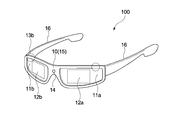
- FIG. 1 is a perspective view showing the appearance of an HMD according to an embodiment of the present technology.
- the HMD 100 is a glasses-type device provided with a transmissive display, and is used by being attached to the head of the user.
- the HMD 100 includes a frame 10, a left-eye lens 11a and a right-eye lens 11b, a left-eye display 12a and a right-eye display 12b, a left-eye camera 13a and a right-eye camera 13b, and an outward camera 14.
- the frame 10 is in the shape of a glasses and has a rim 15 and a temple 16.
- the rim portion 15 is a portion disposed in front of the left and right eyes of the user, and supports the left eye lens 11a and the right eye lens 11b, respectively.
- the temple portions 16 extend rearward from both ends of the rim portion 15 toward the user's ears, and the tips thereof are attached to the ears.
- the rim portion 15 and the temple portion 16 are formed of, for example, materials such as synthetic resin and metal.
- the left-eye lens 11 a and the right-eye lens 11 b are respectively disposed in front of the left and right eyes of the user so as to cover at least a part of the user's field of view.
- each lens is designed to correct the user's vision.
- the present invention is not limited to this, and a so-called zero power lens may be used.
- the left-eye display 12a and the right-eye display 12b are transmissive displays, and are disposed so as to cover a partial area of the left-eye and right-eye lenses 11a and 11b. That is, the left eye and right eye lenses 11a and 11b are respectively disposed in front of the left and right eyes of the user.
- Images and the like for the left eye and the right eye are displayed on the left eye and right eye displays 12a and 12b, respectively.
- the user wearing the HMD 100 can view the real scenery and at the same time view the images displayed on the displays 12a and 12b. This enables the user to experience augmented reality (AR) and the like.
- AR augmented reality
- virtual displays are displayed on the displays 12a and 12b.
- CG Computer Graphics
- characters such as characters, pictures, characters, etc.
- any virtual object may be displayed.
- the left-eye and right-eye displays 12a and 12b correspond to display units on which virtual objects are displayed.
- left-eye and right-eye displays 12a and 12b for example, a transmissive organic EL display, an LCD (Liquid Crystal Display) display, or the like is used.
- the specific configuration of the left-eye and right-eye displays 12a and 12b is not limited. For example, a method of projecting an image on a transparent screen for display, a method of displaying an image using a prism, etc. Any type of transmissive display may be used as appropriate.
- the left-eye camera 13a and the right-eye camera 13b are appropriately installed on the frame 10 so as to be able to capture an image of the left eye and the right eye of the user. For example, based on the images of the left eye and the right eye captured by the left-eye and right-eye cameras 13a and 13b, line-of-sight information and the like regarding the line of sight of the user are acquired.
- CMOS complementary metal-oxide semiconductor
- CCD charge coupled device
- an infrared camera mounted with infrared illumination such as an infrared LED may be used.
- the left eye lens 11a and the right eye lens 11b may be described as the lens 11, and the left eye display 12a and the right eye display 12b may be described as the transmissive display 12.
- the left-eye camera 13a and the right-eye camera 13b may be described as an inward camera 13.
- the transmissive display 12 corresponds to a display unit.
- the outward facing camera 14 is disposed at the center of the frame 10 (rim portion 15) toward the outside (opposite to the user).
- the outward camera 14 captures an image of real space included in the field of view of the user.
- a digital camera provided with an image sensor such as a CMOS sensor or a CCD sensor is used.
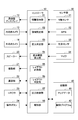
- FIG. 2 is a block diagram showing an example of a functional configuration of the HMD 100 shown in FIG. As shown in FIG. 2, the HMD 100 further includes a speaker 20, a vibration unit 21, a communication unit 22, a connector 23, an operation button 24, a sensor unit 30, a storage unit 40, and a controller 50.
- the speaker 20 is provided at a predetermined position of the frame 10.
- the configuration of the speaker 20 is not limited, and for example, the speaker 20 capable of outputting stereo sound or monaural sound may be used as appropriate.
- the vibration unit 21 is provided inside the frame 10 and generates vibration.
- any vibration motor or the like capable of generating a vibration for notification or the like is used as the vibration unit 21.
- the communication unit 22 is a module for executing network communication, short distance wireless communication, and the like with other devices.
- a wireless LAN module such as WiFi or a communication module such as Bluetooth (registered trademark) is provided.
- the connector 23 is a terminal for connection to another device.
- terminals such as Universal Serial Bus (USB) and High-Definition Multimedia Interface (HDMI (registered trademark)) are provided.
- USB Universal Serial Bus
- HDMI High-Definition Multimedia Interface
- the charging terminal of the charging dog (cradle) and the connector 23 are connected to perform charging.
- the operation button 24 is provided, for example, at a predetermined position of the frame 10.
- the operation button 24 can perform operations related to various functions of the HMD 100, such as power ON / OFF operations, functions related to image display and audio output, and network communication functions.
- the sensor unit 30 has a nine-axis sensor 31, a GPS 32, a living body sensor 33, and a microphone 34.
- the nine-axis sensor 31 includes a three-axis acceleration sensor, a three-axis gyro sensor, and a three-axis compass sensor.
- the nine-axis sensor 31 can detect the acceleration, angular velocity, and azimuth of the HMD 100 in three axes.
- the GPS 32 acquires information on the current position of the HMD 100.
- the detection results of the 9-axis sensor 31 and the GPS 32 are used, for example, to calculate the posture, position, and the like of the user. These sensors are provided, for example, at predetermined positions of the frame 10.
- the biometric sensor 33 acquires biometric information of the user.
- an electroencephalogram sensor for example, an electroencephalogram sensor, an myoelectric sensor, a pulse sensor, a sweat sensor, a temperature sensor, a blood flow sensor, a body movement sensor, and the like are provided. These sensors are provided at a predetermined position of the HMD 100, for example, such that the detection terminal unit contacts a predetermined position of the body. Alternatively, the detection terminal unit may be provided separately from the HMD 100.
- an electroencephalogram sensor is provided so as to be touchable at a predetermined position on the head.
- the pulse sensor is provided at a position where it can contact blood vessels in the neck.
- the microphone 34 detects sound information around the user. For example, a voice uttered by the user is appropriately detected. Thus, for example, the user can perform an AR experience while making a voice call, and can perform an operation input of the HMD 100 using a voice input.
- the type of sensor provided as the sensor unit 30 is not limited, and any sensor may be provided.
- a temperature sensor or a humidity sensor that can measure the temperature, humidity, and the like of the environment in which the HMD 100 is used may be provided.
- the storage unit 40 is a non-volatile storage device, and for example, a hard disk drive (HDD) or a solid state drive (SSD) is used.
- HDD hard disk drive
- SSD solid state drive
- the storage unit 40 stores map data 41.
- the map data 41 is data that functions as a map related to the real space.
- an environment model is used as the map data 41.
- the environment model includes mesh data of real space topography and objects, structures, etc. existing in the real space generated by measuring the real space. This makes it possible to treat, for example, the topography of the space where the user acts, and the shapes of objects and buildings present in the space as a three-dimensional model.
- the specific configuration of the map data 41 is not limited, and the map data 41 including depth information using point cloud data or the like, texture information using an image of real space, and the like may be used as appropriate.
- the storage unit 40 also stores a control program 42 for controlling the overall operation of the HMD 100.
- the method of installing the map data 41 and the control program 42 in the HMD 100 is not limited.
- the controller 50 controls the operation of each block of the HMD 100.
- the controller 50 has a hardware configuration necessary for a computer such as a CPU and a memory (RAM, ROM).
- the CPU loads the control program 42 stored in the storage unit 40 into the RAM and executes the program to execute various processes.
- a device such as a programmable logic device (PLD) such as a field programmable gate array (FPGA), or another application specific integrated circuit (ASIC) may be used as the controller 50.
- PLD programmable logic device
- FPGA field programmable gate array
- ASIC application specific integrated circuit
- the CPU of the controller 50 executes the program according to the present embodiment to obtain the information acquisition unit 51, the area setting unit 52, the entry determination unit 53, the display range calculation unit 54, and the layout planning unit 55 as functional blocks.
- the layout determination unit 56, the output control unit 57, and the notification unit 58 are realized.
- the information processing method according to the present embodiment is executed by these functional blocks. Note that dedicated hardware such as an IC (integrated circuit) may be used as appropriate to realize each functional block.
- the information acquisition unit 51 reads information required for the operation of each functional block of the controller 50 from each unit of the HMD 100.
- the information acquisition unit 51 reads image information captured by the inward camera 13 and the outward camera 14, detection results of the respective sensors of the sensor unit 30, and the like.
- the information acquisition unit 51 can appropriately read the map data 41 stored in the storage unit 40.
- the map data 41 includes information of a three-dimensional model of an object (real object) existing in the real space. Therefore, it can be said that the information acquisition unit 51 acquires information of a real object.
- the information acquisition unit 51 corresponds to an acquisition unit.
- the display range calculation unit 54 calculates a display range in which the virtual object can be displayed. As described above, the user wearing the HMD 100 views the real space through the transmissive display 12. At this time, a virtual object or the like is displayed on a real object (a real space object, a structure, or the like) included in a scene viewed through the transmissive display 12. Thus, when a virtual experience by AR is provided, it can be said that the range of the real space where the virtual object can be displayed is the display range.
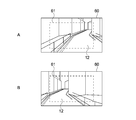
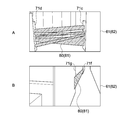
- FIG. 3 is a schematic view showing an example of the visual field range 60 of the user wearing the HMD 100. As shown in FIG. FIGS. 3A and 3B schematically show the landscape (field of view range 60) viewed from different positions. In FIGS. 3A and 3B, the illustration of the frame 10 and the lens 11 of the HMD 100 is omitted.
- the transmissive display 12 is disposed so as to overlap with a partial area of the user's visual field range 60.
- An area in which an image or the like is displayed by the transmissive display 12 is a display range 61 in which a virtual object can be displayed.
- the display range 61 by the transmissive display 12 is schematically illustrated by a dotted line.
- the display range 61 changes in accordance with the position and orientation of the user (the transmissive display 12).
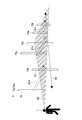
- FIG. 4 is a schematic view for explaining the angle of view of the transmissive display 12.
- the eyeball 2 of the user 1 wearing the HMD 100 and the transmissive display 12 disposed in front of the eyeball 2 are schematically illustrated.
- the angle of view 62 of the transmissive display 12 represents the range of the scene reflected in the eye 2 (retina) of the user 1 through the transmissive display 12 using angles (field angle values).
- the angle of view 62 of the transmissive display 12 can be represented, for example, by a viewing frustum.
- the viewing frustum has a shape obtained by cutting a quadrangular pyramid in parallel to the bottom and removing a portion including the apex.
- the surface corresponding to the cut surface is the display surface of the transmissive display 12.
- a real object included in the angle of view 62 of the transmissive display 12 is included in the display range 61.
- the display range 61 in which the virtual object can be displayed by the angle of view 62 of the transmissive display 12.
- the orientation of the angle of view 62 (view frustum) of the transmissive display 12 changes, the real object contained therein changes, and the scenery of the display range 61 also changes.
- the display range calculation unit 54 calculates the angle of view 62 based on, for example, the position and orientation of the transmissive display 12 in the real space, and the angle of view value ⁇ .
- the angle of view for example, the angle of view in the horizontal direction (horizontal angle of view) of the transmissive display 12 (HMD 100), the angle of view in the vertical direction (vertical angle of view), and the angle of view in the diagonal direction ( A diagonal angle of view or the like is used. This makes it possible to identify the position, direction, range, and the like of the scene that the user 1 visually recognizes through the transmissive display 12.
- the display range calculation unit 54 corresponds to a calculation unit.
- the area setting unit 52 sets a restricted area in which entry is restricted.
- the restricted area is set to the real space in which the user 1 actually moves, based on, for example, map information (map data 41 etc.) of the real space.
- map information map data 41 etc.
- a restricted area is set for an area (passage, stairs, road, square, etc.) where the user 1 can physically move.
- the area, shape, number, and the like of the restricted area are not limited, and can be appropriately set according to the purpose of the service provided to the user 1, for example.
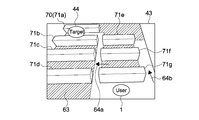
- FIG. 5 is a schematic view showing an example of the restricted area.
- an area (map 43) partitioned by a real object 70 (obstacles 71a to 71g such as a desk and a partition) existing in the real space is schematically illustrated.
- a restricted area 63 (hatched area) is set for a passage or the like between these obstacles 71a to 71g.
- the arrangement, shape, and the like of each obstacle 71 are stored in the storage unit 40 as map data 41.
- the restricted area 63 is set based on the position of the user 1 and the destination 44. For example, based on the current value of the user 1 and the latitude and longitude information of each of the destinations 44, a route on the map data 41 is calculated. The restriction area 63 is appropriately set so that the user 1 can move according to this route. In the example shown in FIG. 5, the restricted area 63 is set around the route for the user 1 to the destination 44.
- the method of setting the restricted area 63 is not limited.
- the restricted area may be appropriately set based on one of the position of the user 1 and the destination 44. It is also possible to set the restricted area 63 regardless of the position of the user 1 and the destination 44. For example, processing may be performed such as designating in advance an area that the user 1 does not want to enter and setting the designated area as the restricted area.
- the area setting unit 52 can set a restriction degree that indicates the degree of restriction on entry into the restriction area 63.
- the degree of restriction is set low for the restriction area 63 set for such a space.
- the degree of restriction is set high for an area where the entry of the user 1 is prohibited (danger area, restricted area, etc.).
- the method of setting the degree of restriction is not limited.
- the entry determination unit 53 determines whether or not the user 1 has entered the restricted area 63.
- the entry determination unit 53 refers to information on the current location of the user 1 (output of the GPS 32 of the HMD 100, etc.) as appropriate, and determines whether the current location of the user 1 is included in the restricted area 63 set by the area setting unit 52 Determine The determination result is output to a notification unit 58 or the like described later.
- the layout planning unit 55 generates a layout plan for displaying the obstacle object on the transmissive display 12.
- the obstructing object is a virtual object that prevents entry into the restricted area 63.
- the layout plan for example, display parameters such as a display position and a display size when displaying the obstructive object on the transmissive display 12 are calculated.
- the layout planning unit 55 selects the restricted area 63 in which the obstructive object is displayed based on the position and the traveling direction of the user 1 and generates a layout plan for displaying the obstructive object in the restricted area 63.
- the method of selecting the restricted area 63 will be described in detail later with reference to FIG.
- a layout plan is generated such that a disturbing object is displayed with reference to the real object 70.
- the real object 70 associated with the restricted area 63 is used as a reference (display reference) for displaying the disturbing object. That is, the display of the disturbing object is controlled based on the real object 70 associated with the restricted area 63.
- FIG. 6 is a schematic view showing an example of a disturbing object displayed based on the real object 70.
- a disturbing object 81 which is a virtual object 80 that blocks entry into the restricted area 63.
- the obstruction object 81 shown in FIGS. 6A and 6B is the obstruction object 81 displayed in the angle of view 62 (display range 61) of the transmissive display 12 directed in the direction represented by the arrows 64a and 64b shown in FIG. is there.
- a restricted area 63 exists in front of the user 1. Also, obstacles 71c and 71d are present on both sides of the restricted area 63.
- coordinates (display positions) of both ends of the tape-like obstacle object 81 are calculated with the obstacles 71c and 71d on both sides as display references. In this case, the obstacles 71 c and 71 d on both sides become real objects related to the restricted area 63.
- region 63 exists in the left side of the channel
- the obstacles 71f and 71g on both sides of the left restricted area 63 become the real object 70 related to the restricted area 63, and the display position of the obstructing object 81 is calculated using these obstacles 71f and 71g as a display reference Be done.
- the method of setting the real object 70 (the real object as the display reference) related to the restricted area 63 is not limited.
- a real object 70 which exists around or inside the restricted area 63 and has a size and arrangement suitable for displaying the obstructing object 81 is appropriately set as a display reference of the obstructing object 81.
- a real object 70 etc. serving as a reference for displaying the disturbing object 81 may be designated in advance.
- the real objects 70 existing around or inside the restricted area 63 included in the angle of view 62 are set as the display reference.
- the real object associated with the restricted area 63 corresponds to the predetermined object associated with the restricted area.
- the layout determination unit 56 determines whether the disturbing object 81 whose display is planned by the layout plan is actually displayed. Therefore, it can be said that the layout planning unit 55 generates candidates for the obstruction object 81 based on the real object 70 associated with the restricted area 63.
- the layout determination unit 56 determines, based on the angle of view 62 of the transmissive display 12, whether or not to display the obstructive object 81 planned as the layout plan. That is, based on the display range 61, the layout determination unit 56 determines whether or not to display a candidate for the obstructive object 81. The method of determining whether or not to display a candidate of the obstructing object 81 will be described in detail later.
- the output control unit 57 generates an image of the virtual object 80 or the like displayed on the transmissive display 12. For example, based on information (layout plan) of the candidate of the disturbing object 81 determined to be displayed by the layout determining unit 56, an image of the candidate of the disturbing object 81 is generated. Of course, it is also possible to generate an image or the like of another virtual object 80 different from the obstructing object 81. Image information constituting these images is appropriately output to the transmissive display 12.
- the layout planning unit 55, the layout determination unit 56, and the output control unit 57 control the display of the obstructing object 81 that prevents the entry into the restricted area 63.
- the layout control unit 55, the layout determination unit 56, and the output control unit 57 cooperate to realize a display control unit.
- the notification unit 58 generates notification information for notifying entry and approach to the restricted area 63.
- the notification unit 58 notifies the user 1 that the user 1 is entering or approaching the restricted area 63 based on the determination result of the entry determination unit 53, the distance between the restricted area 63 and the user 1, etc. Generate broadcast information.
- the generated notification information is appropriately output to the transmissive display 12, the speaker 20, the vibration unit 21, and the like.
- FIG. 7 is a schematic diagram for explaining an example of the basic operation of the HMD 100.
- FIG. 7 schematically shows a restricted area 63 in which the obstructing object 81 is displayed when the user 1 moves in the map 43 shown in FIG. Further, in FIG. 7, directions in which the user 1 can move are schematically illustrated using arrows.
- the user 1 moves from the initial position at the lower right of the map 43 to the destination 44 at the upper left of the map 43.
- the user 1 is at the initial position.
- the maps 43 b and 43 c the user 1 moves to the destination 44 through the central passage 72 a of the map 43.
- the map 43 d and the map 43 e the user 1 moves to the destination 44 through the right path 72 b of the map 43.
- the central passage 72a and the right passage 72b are schematically illustrated by dotted lines.
- the obstructing object 81 is displayed according to the position and the traveling direction of the user 1. That is, the obstructing object 81 is dynamically displayed according to the movement of the user 1.
- the layout planning unit 55 generates candidates for the obstructing object 81 according to the position and the traveling direction of the user 1.
- the obstructive object 81 determined to be displayed by the layout determination unit 56 is displayed on the transmissive display 12.
- the obstructing object 81 is displayed in the limited area 63 before entering the central passage 72a.
- the obstruction object 81 is displayed in the restricted area 63 set in front of the user 1. This makes it possible to notify the user 1 that the frontal area is restricted for the entry of the user 1. As a result, it is possible to guide the user 1 to the central passage 72a.
- the obstructing objects 81 are displayed respectively in the restricted areas 63 located on both sides of the central passage 72a and close to the user 1.
- the restricted area 63 close to the user 1 is, for example, the restricted area 63 existing within a predetermined distance from the position of the user 1.
- the obstacle object 81 is displayed in the restricted areas 63 present on both sides of the direction of travel of the user 1.
- the traveling direction of the user 1 is detected based on, for example, a change in the position of the user 1 or the like.
- the restricted area 63 is newly set based on the position of the user 1. For example, a path passing the right path 72b to the destination 44 is generated, and a restricted area 63 is set around the generated path.
- the obstructing object 81 is displayed in the restricted area 63 set on one side of the right passage 72b.
- a wall opposite to the restricted area 63 is a wall across the passage 72b on the right side, and the restricted area 63 and the like are not set.
- the degree of restriction (degree of restriction) of entry is set low. For example, in the case where the traveling direction or the line of sight of the user 1 is directed to the space between the obstacles 71 f and 71 g, the obstruction object 81 is not displayed, and the passage of the user 1 is permitted.
- the display of the obstructing object 81 is controlled in accordance with the degree of restriction. For example, in the restricted area 63 where the degree of restriction is set low, processing is performed such that the obstructive object 81 is not displayed in accordance with the action (the traveling direction, the line of sight, etc.) of the user 1. Conversely, in the restricted area 63 (danger area etc.) where the degree of restriction is set high, the obstructing object 81 is displayed regardless of the action of the user 1. Such processing may be performed.
- the obstructing object 81 is displayed in the restricted area 63 set in the upper right of the map 43. As a result, it is possible to prevent the user 1 from entering the upper right restricted area 63 along the right path 72b.
- the space between the obstacles 71e and 71f is a part of the path.
- a restricted area 63 is set on the opposite side to the user 1 across the space between the obstacles 71e and 71f, and the obstacle object 81 is displayed. This makes it possible to notify the user 1 that the space between the obstacles 71e and 71f is passable, and guides the user 1 to pass through the space between the obstacles 71e and 71f. It is possible.
- the obstructing object 81 that restricts the entry of the user 1 into the restricted area 63 is displayed. This makes it possible to easily guide the user 1. Further, visualizing the restricted area 63 using the obstructing object 81 can also be said to visualize the area in which the user 1 can act. Therefore, the user 1 can freely move within the actionable range, and can naturally guide the user 1 toward the destination 44 while maintaining the user 1's freedom of action.
- the display of the transmissive display 12 becomes simple, and it is possible to reduce the discomfort etc. with respect to the display of the obstructive object 81 (virtual object 80), and it is possible to provide a natural virtual experience.
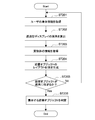
- FIG. 8 is a flowchart showing an example of the operation of the HMD 100.
- the process of the flowchart shown in FIG. 8 is a process repeatedly executed during the operation of the HMD 100.
- the information acquisition unit 51 acquires the self position of the user 1 wearing the HMD 100 (step 101). For example, the latitude and longitude of the HMD 100 detected by the GPS 32 are read as the self position of the user 1. In addition, when the user 1 is acting indoors etc., the information of the self position of the user 1 (HMD 100) detected by using the self localization technique such as SLAM (Simultaneous Localization and Mapping) is read. May be
- SLAM Simultaneous Localization and Mapping
- Position information of the destination 44 is acquired (step 102). For example, when a service such as navigation is provided using the HMD 100, the latitude and longitude of the destination input by the user 1 or the like are read. When a game service or the like in which the real space is the play area is provided, the destination 44 may be changed according to the progress of the game. In this case, the latitude and longitude of the latest destination 44 are read.
- the area setting unit 52 sets a restricted area in which the entry of the user 1 is restricted (step 103). For example, a route from the user 1's own position to the destination is calculated, and a restricted area 63 is set around the route (see FIG. 5). At this time, a dangerous area, a no-entry area, etc. designated in advance by the map data 41 etc. are added to the restricted area 63. By setting the restricted area 63 in this manner, it is possible to safely guide the user 1 to the destination.
- the entry determination unit 53 determines whether the user 1 has entered the restricted area 63 (step 104). The entry determination unit 53 determines whether the user 1's own position is included in the restricted area 63. If it is determined that the user 1's own position is not included in the restricted area 63 (No in step 104), that is, if the user 1 has not entered the restricted area 63, display control of the obstructing object 81 is executed. (Step 105).
- FIG. 9 is a flowchart showing an example of display control of the obstructing object 81.
- the flowchart shown in FIG. 9 is an example of the process performed in step 105 shown in FIG.
- FIG. 10 is a schematic diagram for explaining an example of display control of the disturbing object 81. As shown in FIG. The display control of the obstructing object 81 will be described below with reference to FIGS. 9 and 10.
- the physical information of the user 1 is acquired (step 201).
- the physical information of the user 1 includes information of the position and posture of the head of the user 1.
- the position of the head of the user 1 is, for example, three-dimensional coordinates (latitude, longitude, height) of the head of the user 1 in real space.
- the posture of the head of the user 1 is represented, for example, by the direction in which the user 1 is facing in real space.
- information on the position and orientation of the head of the user information on the position and orientation of the HMD 100 mounted on the head of the user 1 in real space is typically used.
- three-dimensional coordinates of the HMD 100 detected by the GPS 32 or SLAM are used as the position of the head of the user 1.
- the orientation of the HMD 100 detected using the 9-axis sensor 31 or the like, that is, the direction in which the transmissive display 12 is directed, etc. is used as the posture of the head of the user 1.
- the traveling direction of the user 1 is calculated based on the change of the user 1's own position, the output of the 9-axis sensor 31, etc., and the calculation result is read as appropriate.
- the line of sight of the user 1 is detected based on the image of the eyeball 2 of the user 1 captured using the inward camera 13, and the detection result is read as appropriate.
- the specific configuration of the physical information of the user 1 is not limited. Further, the method of detecting the physical information of the user 1 is not limited to the case where each sensor mounted on the HMD 100 is used, and the physical information of the user 1 is detected based on an image etc. It may be done. In this case, the physical information transmitted from the outside of the HMD 100 is received via the communication unit 22 and the like. Such processing may be performed.
- the angle of view 62 of the transmissive display 12 is calculated by the display range calculation unit 54 (step 202). Specifically, based on the position and orientation of the head (HMD 100) of the user 1 acquired in step 201 by the display range calculation unit 54, and the angle of view value of the transmissive display 12 (HMD 100), the transmissive display A range of the real space (display range 61 of the virtual object 80) visually recognized through 12 is calculated.
- the viewing frustum is calculated based on the horizontal angle of view and the vertical angle of view set in the HMD 100 (see FIG. 4). Further, based on the position and orientation (direction) of the transmissive display 12, the position of the viewing frustum in the real space, the direction in which the viewing frustum is directed, and the like are calculated.
- a viewing frustum it is possible to appropriately set the distance from the transmissive display 12 to the bottom surface of the viewing frustum, that is, the depth at the angle of view 62.
- the view angle 62 is represented using a view frustum, for example, any method capable of calculating the view angle 62 may be used.
- Information of the real object 70 which is a reference for displaying the disturbing object 81 is acquired (step 203).
- the restricted area 63 present in the angle of view 62 of the transmissive display 12 is detected, and the information of the real object 70 related to the detected restricted area 63 is read from the map data 41 as appropriate.
- FIG. 10 In the example shown in FIG. 10, six poles 73a to 73f are illustrated as an example of the real object 70 related to the restricted area 63. Information on the position and shape (three-dimensional model) of the poles 73a to 73f is recorded in the map data 41.
- the information acquiring unit 51 acquires information of each of the first real object 70 and the second real object 70 which are separated from each other as the real object 70 related to the restricted area 63. For example, in FIG. 10, information of a three-dimensional model of one pair of poles 73 is acquired among the six poles 73a to 73f. In this case, the acquired pairs of poles 73 become the first and second real objects 70, respectively.
- the first real object 70 and the second real object 70 correspond to a first object and a second object.
- the method of setting the pair of real objects 70 is not limited.
- a pair of real objects 70 as a reference for displaying the obstructing object 81 may be designated in advance. This makes it possible to easily read the information on the pair of real objects 70, and to reduce the processing load. For example, processing of setting a pair of real objects 70 in order of closeness to the user 1 or processing of setting pairs based on the positional relationship of real objects 70 may be executed.
- the first pair (pole 73a and pole 73b), the second pair (pole 73c and pole 73d), and the third pair (pole 73e and pole 73f) are recorded in the map data 41. It shall be. Further, in step 203, it is assumed that the information of the three-dimensional model of the pair of poles 73 is read from the map data 41 in order of proximity to the user 1. Therefore, in the first loop, the first pair of information is read.
- the layout planning unit 55 generates a layout plan of the obstructive object 81 based on the real object 70 associated with the restricted area 63 (step 204). That is, with reference to the real object 70 acquired in step 203, candidates for the obstruction object 81 are generated. In the following, the candidate of the obstacle object 81 generated as a layout plan may be simply described as the obstacle object 81.
- a layout plan is generated such that a disturbing object 81 is displayed between each real object. That is, display parameters of the obstructing object 81 are calculated such that the obstructing object 81 is displayed between the first and second real objects 70.
- a layout plan is generated to display the tape-like obstacle object 81a between the pole 73a and the pole 73b.
- the display position and the display size on the transmissive display 12 are calculated to display the tape-like obstacle object 81a in accordance with the predetermined positions of the pole 73a and the pole 73b.
- the position at which the obstructing object 81a is displayed may be designated in advance in the three-dimensional model of the pole 73a and the pole 73b. This makes it possible to easily generate a layout plan.
- the layout determination unit 56 determines whether the size of the obstructing object 81 falls within the angle of view 62 of the transmissive display 12 (step 205). In the present embodiment, by determining whether the candidate of the obstructing object 81 falls within the angle of view 62 of the transmissive display 12, it is determined whether the candidate of the obstructing object 81 is to be displayed.
- the obstructing object 81 generated as the layout plan are included in the space represented by the angle of view 62. Further, it may be determined whether the proportion of the obstructing object 81 included in the angle of view 62 is larger than a predetermined proportion. For example, when the display area of the obstructing object 81 is included in the angle of view 62 at a predetermined ratio (for example, 90% or more), it is determined that the obstructing object 81 falls within the angle of view. Such processing may be performed. In addition to this, the method of determining whether or not the obstructing object 81 falls within the angle of view 62 is not limited.
- the obstructing object 81a between the pole 73a and the pole 73b does not fit within the angle of view 62.
- the obstructing object 81 a is displayed based on the first pair, only a part of the obstructing object 81 a is displayed on the transmissive display 12.
- a disturbing object 81a interrupted at the end of the transmissive display 12 is displayed (see FIG. 3). In this case, it is determined that the obstructive object 81a is not displayed.
- step 205 If it is determined that the obstructing object 81 does not fit within the angle of view 62 (No in step 205), the process returns to step 201, the information of the next real object 70 is acquired, and the obstruction object 81 is acquired based on the acquired real object 70. Layout plans are generated.
- the second loop information of the second pair of the pole 73c and the pole 73d is read from the map data, and a layout plan is generated to display the tape-like obstacle object 81b between the pole 73c and the pole 73d. Then, it is determined whether or not the obstructing object 81 b fits within the angle of view 62 of the transmissive display 12.
- the obstructing object 81b between the pole 73c and the pole 73d fits in the angle of view 62. Therefore, for example, when the obstacle object 81 b is displayed based on the second pair, the whole obstacle object 81 b is displayed on the transmissive display 12. In this case, the obstructing object 81 b is determined to be displayed.
- the output control unit 57 When it is determined that the disturbing object 81 falls within the angle of view 62 (Yes in step 205), the output control unit 57 generates image information for displaying on the transmissive display 12 the disturbing object 81 determined to be displayed. (Step 106 of FIG. 8). For example, based on the layout plan, the design, light and shade etc. of the surface of the obstructing object 81 are appropriately set, and the image information constituting the image of the obstructing object 81 is generated. The generated image information is output to the transmissive display 12 through the output process of step 108, and the obstructive object 81 is displayed.
- the display of the obstructing object 81 is controlled so as to be within the angle of view 62 of the transmissive display 12.
- a situation in which an unnaturally interrupted disturbing object 81 or the like is displayed can be avoided, and a sufficiently natural virtual experience can be provided.
- the obstructing object 81c based on the third pair (pole 73e and pole 73f) also fits within the angle of view 62 of the transmissive display 12.
- the obstructing object 81c and the user 1 it is possible to display the obstructing object 81b already. For this reason, display of the obstruction object 81c is not performed.
- FIG. 11 is a schematic view showing a display example of the disturbing object 81 based on the real object 70. As shown in FIG. 11A to 11D schematically show examples of the obstructing object 81 displayed based on the real object 70.
- the display position of the obstructing object 81 is controlled in accordance with the angle of view 62.
- the layout planning unit 55 executes a process of lowering the display position of the obstructive object 81 with respect to the real object 70 in accordance with the angle of view 62 of the transmissive display 12.
- the layout planning unit 55 adjusts the display position and display size of the obstructive object 81 with respect to the real object 70 related to the restricted area 63 based on the angle of view 62 of the transmissive display 12.
- the obstructing object 81 is displayed in a static state with respect to the traveling direction of the user 1.
- the tape (interference object 81) displayed between the poles 73 is appropriately enlarged and displayed as the user 1 approaches.
- the obstructing object 81 it is possible to display the obstructing object 81 as in the case where the tape is actually installed in the real space.
- the obstructing object 81 is displayed so as to cover the real object 70. That is, the obstructive object 81 is displayed superimposed on the real object 70.
- an obstacle 71 located between the pair of poles 73 is used as a reference for displaying the obstructing object 81.
- a dark disturbing object 81d is displayed so as to cover the obstacle 71.
- a tape-like obstacle object 81 e is displayed so as to be interrupted by the dark obstacle object 81.
- the obstructing object 81 is displayed for the step in the real space. For example, based on a three-dimensional model of the terrain in the map data 41, a step or the like is detected as the real object 70. For example, an area in which the height of the walking plane changes is set as the restriction area 63 because there is a possibility that a fall, a fall, or the like may occur.
- the restriction area 63 may be provided in accordance with the topography of the real space and the like.
- the method of setting the restriction area 63 in accordance with the topography is not limited, and, for example, the restriction area 63 may be set to an area having a significantly deep depth (a large depth difference). This makes it possible to display the obstructing object 81 in accordance with the terrain on which the user 1 moves, and to provide a safe virtual experience.
- the notification unit 58 when it is determined that the user 1 has entered the restricted area 63 (Yes in Step 104), the notification unit 58 generates notification information notifying that the user 1 has entered the restricted area 63 (Step 107). ).
- FIG. 12 is a schematic view for explaining an operation example of the notification unit 58.
- sound information is generated as notification information.
- sound information or the like for reproducing a buzzer sound or an alarm sound as a 2D sound is generated.
- the 2D sound is, for example, a sound reproduced at a constant volume. Therefore, while the user 1 enters the restricted area 63, a buzzer sound or the like is output at a constant volume.
- processing such as reducing the volume of BGM may be executed.
- sound information for reproducing BGM whose volume is lower than that immediately before entering the restricted area 63 is generated.
- the entry into the restricted area 63 may be notified using the transmissive display 12.
- display information or the like that blinks the display on the transmissive display 12 is generated as the leaving information.
- display information or the like may be generated which causes an area or the like of a predetermined color to be displayed on the periphery (the outer periphery of the display surface) of the transmissive display 12.
- the unnatural display on the transmissive display 12 makes it possible to easily notify the user 1 of the entry into the restricted area 63.
- vibration information or the like for vibrating the vibration unit 21 in a predetermined pattern is generated as the notification information.
- reporting information is not limited, For example, sound information, display information, and vibration information may each be produced
- the notification unit 58 can generate notification information notifying that the restricted area 63 is approaching.
- the notification information notifying the approach may be generated regardless of whether the user 1 has entered the restricted area 63 or not.
- a virtual sound source 82 is installed in the restricted area 63 set by the map 43 shown in FIG.
- the notification unit 58 generates sound information capable of reproducing 3D sound whose volume is controlled according to the distance between the virtual sound source 82 and the user 1.
- 3D sound is set so that the volume increases as the user 1 approaches the virtual sound source 82.
- 3D sound is set so that the volume increases as the user 1 approaches the virtual sound source 82.
- the generated notification information is appropriately output to each part of the HMD 100 through the output processing of step 108 in FIG. 8. For example, sound information is output to the speaker 20, and a buzzer sound or the like is reproduced. Further, display information is output to the transmissive display 12 and display such as blinking is performed. The vibration information is output to the vibration unit 21 to perform an operation of generating vibration such as vibration.
- feedback processing for the user 1 is performed according to the position of the user 1. That is, when the user 1 is in the play area in which the user 1 can act, the obstruction object 81 notifying the restricted area 63 is appropriately displayed as feedback processing. Also, when the user 1 gets out of the play area and enters the restricted area 63, various unpleasant expressions are presented as feedback processing. As a result, it is possible to naturally guide the user 1 so that the user 1 moves in the play area while maintaining the freedom of the user 1's behavior.
- FIGS. 13 to 20 are schematic views showing display examples of the obstructing object 81.
- the obstructing object 81 displayed on the transmissive display 12 when the user 1 moves in the real space will be described with reference to FIGS. 13 to 20.
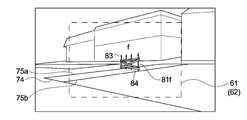
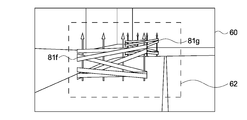
- FIG. 13 a disturbing object 81 f including four fences 83 and tapes 84 installed on the four fences 83 is displayed.
- the obstructing object 81 is displayed so as to block the sidewalk 74 based on the boundaries 75 a and 75 b of the sidewalk 74. Therefore, in the example shown in FIG. 13, the boundaries 75 a and 75 b of the sidewalk 74 become the real object 70 (the real object 70 related to the restricted area 63) which is the display reference of the obstructing object 81.
- the obstructing object 81 is displayed substantially at the center of the display range 61 (the angle of view 62 of the transmissive display 12). This makes it possible to prevent the user 1 from moving forward. At this point in time, it is undetermined whether the user 1 moves in the left or right direction.
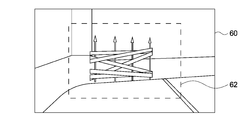
- FIG. 14 when the user 1 moves his / her gaze from the viewing range 60 in FIG. 13 to the right, another obstruction object 81 g is displayed behind the obstruction object 81 f. This prevents the user 1 from advancing to the far right of the obstructing object 81 f and guides the user 1 to the left side of the screen. In addition, the display of the disturbing object 81 f displayed in FIG. 13 is continued.
- the user 1 approaches the sidewalk 74 on which the obstructing objects 81f and 81g are displayed. At this time, obstructive objects 81 f and 81 g are arranged to block the sidewalk 74. Therefore, it is possible to notify the user 1 that the forward movement along the sidewalk 74 is strongly restricted.
- the user 1 moves to the front of the obstructing object 81f.
- the obstructing object 81 f and the obstructing object 81 g are displayed in an overlapping manner. In this manner, even when the obstacle objects 81 overlap, processing may be performed such that the already displayed obstacle objects 81 are continuously displayed.
- processing may be performed to display the obstructing object 81 f in the front and not display the obstructing object 81 g in the rear. Conversely, such processing may be performed to display the rear obstacle object 81g and not to display the front obstacle object 81f. This makes it possible to realize a simple AR display.
- the user 1 advances beyond the front obstacle object 81f.
- the rear disturbing object 81 g is displayed on the transmissive display 12.
- an unpleasant expression such as a buzzer sound is presented.
- the obstruction objects 81h and 81i are displayed on the basis of the entrance and the exit of the tunnel-like passage. This makes it possible to create a scene where the tunnel-like passage is closed, and it is possible to signal that the entry into the tunnel-like passage is strongly restricted. As a result, it is possible to sufficiently prevent the user 1 from advancing forward through the tunnel-like passage.
- processing such as displaying one of the obstructing objects 81h and 81i may be executed.
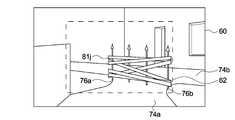
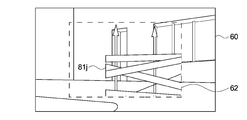
- the obstruction object 81 j is displayed at a position (triple path) where the sidewalk 74 a through which the user 1 passes merges with the other sidewalk 74 b.
- the display position of the obstructing object 81 j is calculated, for example, on the basis of the boundaries 76 a and 76 b of the sidewalk 74 at the side of a street. Thereby, it is possible to create a scene in which the sidewalk 74a through which the user 1 passes is shielded halfway. As a result, it is possible to naturally limit the user 1 from entering the other sidewalk 74b.
- the user 1 approaches the alley shown in FIG. That is, the user 1 approaches the position where the obstructive object 81 j was displayed in FIG.
- the obstructing object 81 j may not fit within the angle of view 62 of the transmissive display 12 (see FIG. 21).
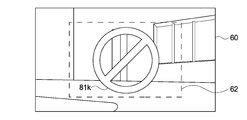
- an obstructing object 81k that fits within the angle of view 62 is displayed.
- the obstructing object 81k is displayed on the screen, for example, in response to the approach of the user 1 to the choreographed path. At this time, the obstructing object 81 j shown in FIG. 19 is not displayed in response to the approach of the user 1 to the Ding. In this manner, processing may be performed such as switching to display of another obstructing object 81k when the obstructing object 81j is no longer within the angle of view 62. As a result, a situation in which an unnaturally interrupted obstructive object 81 is displayed can be avoided, and appropriate display can be continued.
- the restricted area 63 in which the entrance is restricted is set, and the display of the obstructing object 81 which is the virtual object 80 that blocks the entrance to the restricted area 63 is controlled.
- the display control of the obstructing object 81 is executed based on the display range 61 in which the virtual object 80 can be displayed. As a result, the obstructing object 81 can be displayed properly, and a natural virtual experience can be provided.
- the size of the field of view of the user may be different from the size of the display surface on which the virtual image or the like is displayed.
- the display surface is smaller than the field of view of the user, there is a possibility that the virtual image may be unnaturally interrupted at the edge of the display surface.
- FIG. 21 is a schematic view showing a display example of the disturbing object 81 given as a comparative example.
- the user 1 approaches the choreographed path while the display of the obstructing object 81j shown in FIG. 19 is continued.
- the display size of the obstructing object 81 j increases.
- the obstructing object 81 j does not fit within the angle of view 62 (display range 61) of the transmissive display 12 and is unnaturally interrupted at the periphery of the transmissive display 12. For this reason, it may be difficult to grasp the displayed content or there may be a problem that the view is interrupted.
- a method of displaying a virtual image such as an arrow or a character and directly displaying a route to a destination can be considered.
- the user moves along the arrow (or moves according to the instruction of the character).
- various information such as the distance to the destination, the direction, the arrival time and the like are displayed.
- FIG. 22 is a schematic view showing a display example of an arrow image given as a comparative example.
- FIG. 23 is a schematic view showing a display example of a guidance screen given as a comparative example.
- FIG. 22A when an arrow image indicating a right turn is displayed, it is considered that the user concentrates on moving (right turn) along the arrow image 90. Further, as shown in FIG. 22B, when an arrow image 90 indicating a left turn is displayed, it is considered that the user concentrates on turning to the left.
- the user's route is directly displayed using the arrow image 90 etc., the user's actions can be concentrated (worked) on the work that follows the arrow, making it difficult to simultaneously perform tasks other than movement Sex occurs.
- a virtual image showing the guidance start point 92, the user's route 93, the distance 94 or direction 95 to the destination, the shop information 96 in the vicinity and the like is displayed.
- the field of view of the real world may be narrowed and the user's action may be impeded.
- it is difficult to prevent assumed harm or the like in advance which may increase the risk of an accident or the like.
- the obstructing object 81 that blocks entry into the restricted area 63 is displayed. Specifically, the obstructing object 81 is appropriately displayed so as to fall within the display range 61. As a result, the entire disturbing object 81 can be properly displayed, and a situation in which the display is unnaturally interrupted can be sufficiently avoided. Further, since the entire disturbing object 81 is displayed, it is possible to correctly notify the presence or the like of the restricted area 63.
- the obstructing object 81 is displayed on the basis of the real object 70.
- the disturbing object 81 and the like are displayed at natural positions and sizes so as to be compatible with the environment of the real space. As a result, it is possible to provide the user 1 with a natural virtual experience.
- the obstructing object 81 it is possible to notify the user 1 of the existence of the restricted area 63 in which the entrance is restricted. That is, it is possible to naturally perceive the boundary of the range (play area) in which the user 1 can act. As a result, for example, the user 1 can select an action such as moving freely in the play area, and it is possible to provide a virtual experience with a high degree of freedom without inhibiting the user 1's spontaneous action. Become.
- the display of the obstructing object 81 is controlled in accordance with the position and the traveling direction of the user 1. Thus, for example, it is possible to naturally guide the user 1 to the destination 44. Further, by displaying the obstructing object 81 in the restricted area 63 around the user 1, it is possible to reduce the number of displayed obstructing objects 81. As a result, it is possible to safely guide the user 1 to the destination without covering the view of the user 1.
- information on the real object related to the restricted area is acquired by reading a three-dimensional model or the like of the real object recorded in the map data.
- the present invention is not limited to this, and for example, information of a real object may be acquired based on an image or the like of a real space photographed using an outward facing camera or the like. In this case, it is possible to detect a real object included in the angle of view by using a technique or the like capable of object detection such as pattern matching.
- a distance sensor or the like for measuring the distance to the real object existing in the real space may be used.
- the distance sensor any sensor such as a stereo camera, a TOF (Time of Flight) sensor, a LiDAR (Laser Imaging Detection and Ranging) sensor, and a laser range finder may be used. Based on the information of these distance sensors, the user's self-position estimation and peripheral map creation (SLAM) can be performed to read map information while reading map information.
- SLAM peripheral map creation
- the obstacle object is displayed based on the real object existing in the real space.
- processing such as displaying a disturbing object at any position in the real space may be performed without being limited to this.
- a process may be performed in which the disturbance object is displayed at a designated point (latitude, longitude, height) or the like of an arbitrary point in the real space included in the display range of the transmissive display etc. .
- a designated point latitude, longitude, height
- a virtual experience using augmented reality (AR) was provided by an HMD (AR glass) with a transmissive display.
- the present technology can be applied to an immersive HMD or the like that realizes AR display by displaying an image of a real space photographed using an outward facing camera or the like.
- the angle of view (the angle of view of the outward camera) of the image displayed on the display device mounted on the immersive HMD is the display range in which the virtual object can be displayed.
- HMD head-worn device
- a smart phone a tablet terminal, PC (Personal Computer) etc.
- AR display may be implement
- processing of controlling display of the disturbing object is performed so as to be within the angle of view of a camera mounted on a smartphone or the like.
- VR Virtual Reality
- VR Mixed Reality
- HMD which is an image display device
- the information processing apparatus according to the present technology may be realized by any computer that is configured separately from the HMD and connected to the HMD via a wired or wireless connection.
- an information processing method according to the present technology may be executed by a cloud server.
- the information processing method according to the present technology may be executed in conjunction with the HMD and another computer.
- a system means a set of a plurality of components (apparatus, modules (parts), etc.), and it does not matter whether all the components are in the same housing. Therefore, a plurality of devices housed in separate housings and connected via a network and one device in which a plurality of modules are housed in one housing are all systems.
- the information processing method according to the present technology by the computer system and the execution of the program may be performed, for example, when setting of the restricted area, control of display of the disturbing object based on the display range, etc. Including both when run by different computers. Also, execution of each process by a predetermined computer includes performing a part or all of the process on another computer and acquiring the result.
- the information processing method and program according to the present technology can be applied to the configuration of cloud computing in which one function is shared and processed by a plurality of devices via a network.
- the present technology can also adopt the following configuration.
- An information processing apparatus comprising: a display control unit configured to control display of a disturbing object which is the virtual object that blocks entry into the restricted area based on a display range in which a virtual object can be displayed.
- the information processing apparatus according to (1) wherein The display control unit controls display of the disturbing object such that the disturbing object falls within the display range.
- the display control unit adjusts at least one of a display position and a display size of the disturbing object with respect to the predetermined target based on the display range.
- the display control unit generates a candidate of the obstructive object based on the predetermined object, and determines whether to display the candidate of the obstructive object based on the display range.
- the display control unit determines whether or not to display the candidate for the obstructive object by determining whether or not the candidate for the obstructive object falls within the display range.
- the information processing apparatus according to any one of (3) to (6), wherein The acquisition unit is capable of acquiring information of each of a first object and a second object separated from each other as the information of the predetermined object, An information processing apparatus, wherein the display control unit displays the disturbing object between the first and second objects.
- the information processing apparatus according to any one of (3) to (7), wherein The display control unit displays the disturbing object superimposed on the predetermined target.
- An information processing apparatus comprising: a calculation unit that calculates an angle of view of a display unit in which the virtual object is displayed as the display range.
- the information processing apparatus (10) The information processing apparatus according to (9), wherein The display unit is provided on an HMD (Head Mount Display) mounted on the head of the user, An information processing apparatus, wherein the calculation unit calculates an angle of view of the display unit based on at least one of the position and the posture of the head of the user. (11) The information processing apparatus according to (9) or (10), wherein The display unit is a transmissive display. (12) The information processing apparatus according to any one of (1) to (11), wherein The display control unit displays the obstructing object according to at least one of the position and the traveling direction of the user. (13) The information processing apparatus according to (12), The display control unit displays the disturbing object for restricting the entry into the restricted area around the user.
- HMD Head Mount Display
- the information processing apparatus according to any one of (1) to (13), wherein An information processing apparatus, wherein the setting unit sets the restricted area based on at least one of a position of a user and a destination.
- the information processing apparatus according to any one of (1) to (14), wherein The setting unit can set a degree of restriction representing a degree of restriction on entry into the restricted area, The display control unit controls the display of the disturbing object in accordance with the degree of restriction.
- An information processing apparatus comprising: a notification unit configured to generate notification information for notifying at least one of entry and approach to the restricted area.
- An information processing apparatus wherein An information processing apparatus, wherein the notification information includes at least one of sound information, display information, and vibration information.
- An information processing method comprising: controlling display of a disturbing object, which is the virtual object that prevents entry into the restricted area, based on a display range in which a virtual object can be displayed. (19) setting a restricted area where entrance is restricted; Controlling the display of the disturbing object which is the virtual object that prevents the entry into the restricted area based on a display range in which the virtual object can be displayed.
Landscapes
- Engineering & Computer Science (AREA)
- Physics & Mathematics (AREA)
- Theoretical Computer Science (AREA)
- General Physics & Mathematics (AREA)
- General Engineering & Computer Science (AREA)
- Computer Hardware Design (AREA)
- Human Computer Interaction (AREA)
- Optics & Photonics (AREA)
- Computer Graphics (AREA)
- Software Systems (AREA)
- User Interface Of Digital Computer (AREA)
- Processing Or Creating Images (AREA)
- Controls And Circuits For Display Device (AREA)
Abstract
Description
前記設定部は、進入が制限される制限領域を設定する。
前記表示制御部は、仮想オブジェクトを表示可能な表示範囲に基づいて、前記制限領域への進入を妨げる前記仮想オブジェクトである妨害オブジェクトの表示を制御する。
これにより、妨害オブジェクトを表示範囲内に適正に表示することが可能となり、自然な仮想体験を提供することが可能となる。
これにより、例えばユーザが行動する空間に存在する物等を利用して、妨害オブジェクトを表示することが可能となり、制限領域への進入等を自然に防止することが可能となる。
これにより、例えば妨害オブジェクトの位置や姿勢等を詳細に調整することが可能となり、妨害オブジェクトを自然に表示することが可能となる。
これにより、例えば妨害オブジェクトが不自然に表示されるといった状態を容易に回避することが可能となり、自然な仮想体験を提供することが可能となる。
これにより、例えば表示範囲に収まるように妨害オブジェクトを表示することが可能となり、自然な仮想体験を提供することが可能となる。
例えば妨害オブジェクトを使って二つの対象物の間の通路をふさぐといったことが可能となる。この結果、ユーザの侵入を自然に防止することが可能となる。
このように、所定の対象物に重ねて妨害オブジェクトを表示させることで、進入が制限されていることが強調され、制限領域への進入等を十分に防止することが可能となる。
これにより、例えば表示部の画角に合わせて妨害オブジェクト等を高精度に表示することが可能となる。この結果、表示部を用いた自然な仮想体験を実現することが可能となる。
これにより、表示部の画角を高精度に算出することが可能となり、妨害オブジェクト等を精度よく表示させることが可能となる。
透過型ディスプレイを用いることで、容易にAR体験等を提供することが可能となる。
これにより、ユーザの行動に合わせて動的に妨害オブジェクトを表示することが可能となり、ユーザの行動の自由度を維持しつつ自然な仮想体験を提供することが可能となる。
これにより、例えばユーザを容易に誘導することが可能となる。
これにより、例えばユーザを目的地に誘導するといったことが可能となり、ユーザの行動の自由度を維持しつつ自然なナビゲーション等を実現することが可能となる。
例えば、進入制限の度合いを適宜設定することで、ユーザの自発的な行動等を阻害することなく、行動の自由度の高い仮想体験を提供することが可能となる。
これにより、ユーザが制限領域に進入あるいは接近した場合に、制限領域の存在を適正に知らせることが可能となり、例えば安全な仮想体験を実現することが可能となる。
これにより、制限領域への進入あるいは接近を容易に知らせることが可能となる。
進入が制限される制限領域を設定するステップ。
仮想オブジェクトを表示可能な表示範囲に基づいて、前記制限領域への進入を妨げる前記仮想オブジェクトである妨害オブジェクトの表示を制御するステップ。
図1は、本技術の一実施形態に係るHMDの外観を示す斜視図である。HMD100は、透過型のディスプレイを備えたメガネ型の装置であり、ユーザの頭部に装着されて使用される。HMD100は、フレーム10、左眼用レンズ11a及び右眼用レンズ11b、左眼用ディスプレイ12a及び右眼用ディスプレイ12b、左眼用カメラ13a及び右眼用カメラ13b、及び外向きカメラ14を有する。
本技術は、以上説明した実施形態に限定されず、他の種々の実施形態を実現することができる。
(1)進入が制限される制限領域を設定する設定部と、
仮想オブジェクトを表示可能な表示範囲に基づいて、前記制限領域への進入を妨げる前記仮想オブジェクトである妨害オブジェクトの表示を制御する表示制御部と
を具備する情報処理装置。
(2)(1)に記載の情報処理装置であって、
前記表示制御部は、前記妨害オブジェクトが前記表示範囲に収まるように、前記妨害オブジェクトの表示を制御する
情報処理装置。
(3)(1)又は(2)に記載の情報処理装置であって、さらに、
前記制限領域に関連する所定の対象物の情報を取得する取得部を具備し、
前記表示制御部は、前記所定の対象物を基準として前記妨害オブジェクトの表示を制御する
情報処理装置。
(4)(3)に記載の情報処理装置であって、
前記表示制御部は、前記表示範囲に基づいて、前記所定の対象物に対する前記妨害オブジェクトの表示位置及び表示サイズの少なくとも一方を調整する
情報処理装置。
(5)(3)又は(4)に記載の情報処理装置であって、
前記表示制御部は、前記所定の対象物を基準として前記妨害オブジェクトの候補を生成し、前記表示範囲に基づいて、前記妨害オブジェクトの候補を表示するか否かを判定する
情報処理装置。
(6)(5)に記載の情報処理装置であって、
前記表示制御部は、前記妨害オブジェクトの候補が前記表示範囲に収まるか否かを判定することで、前記妨害オブジェクトの候補を表示するか否かを判定する
情報処理装置。
(7)(3)から(6)のうちいずれか1つに記載の情報処理装置であって、
前記取得部は、前記所定の対象物の情報として、互いに離間した第1の対象物及び第2の対象物の各々の情報を取得可能であり、
前記表示制御部は、前記第1及び前記第2の対象物の間に前記妨害オブジェクトを表示する
情報処理装置。
(8)(3)から(7)のうちいずれか1つに記載の情報処理装置であって、
前記表示制御部は、前記所定の対象物に重畳して前記妨害オブジェクトを表示する
情報処理装置。
(9)(1)から(8)のうちいずれか1つに記載の情報処理装置であって、さらに、
前記表示範囲として前記仮想オブジェクトが表示される表示部の画角を算出する算出部を具備する
情報処理装置。
(10)(9)に記載の情報処理装置であって、
前記表示部は、ユーザの頭部に装着されるHMD(Head Mount Display)に設けられ、
前記算出部は、前記ユーザの頭部の位置及び姿勢の少なくとも一方に基づいて、前記表示部の画角を算出する
情報処理装置。
(11)(9)又は(10)に記載の情報処理装置であって、
前記表示部は、透過型ディスプレイである
情報処理装置。
(12)(1)から(11)のうちいずれか1つに記載の情報処理装置であって、
前記表示制御部は、ユーザの位置及び進行方向の少なくとも一方に応じて前記妨害オブジェクトを表示する
情報処理装置。
(13)(12)に記載の情報処理装置であって、
前記表示制御部は、前記ユーザの周辺の前記制限領域への進入を制限する前記妨害オブジェクトを表示する
情報処理装置。
(14)(1)から(13)のうちいずれか1つに記載の情報処理装置であって、
前記設定部は、ユーザの位置及び目的地の少なくとも一方に基づいて前記制限領域を設定する
情報処理装置。
(15)(1)から(14)のうちいずれか1つに記載の情報処理装置であって、
前記設定部は、前記制限領域への進入の制限の度合いを表す制限度を設定可能であり、
前記表示制御部は、前記制限度に応じて、前記妨害オブジェクトの表示を制御する
情報処理装置。
(16)(1)から(15)のうちいずれか1つに記載の情報処理装置であって、さらに、
前記制限領域への進入及び接近の少なくとも一方を報知する報知情報を生成する報知部を具備する
情報処理装置。
(17)(16)に記載の情報処理装置であって、
前記報知情報は、音情報、表示情報、及び振動情報の少なくとも1つを含む
情報処理装置。
(18)進入が制限される制限領域を設定し、
仮想オブジェクトを表示可能な表示範囲に基づいて、前記制限領域への進入を妨げる前記仮想オブジェクトである妨害オブジェクトの表示を制御する
ことをコンピュータシステムが実行する情報処理方法。
(19)進入が制限される制限領域を設定するステップと、
仮想オブジェクトを表示可能な表示範囲に基づいて、前記制限領域への進入を妨げる前記仮想オブジェクトである妨害オブジェクトの表示を制御するステップと
をコンピュータシステムに実行させるプログラム。
12…透過型ディスプレイ
41…マップデータ
42…制御プログラム
50…コントローラ
51…情報取得部
52…領域設定部
53…進入判定部
54…表示範囲算出部
55…レイアウト計画部
56…レイアウト判定部
57…出力制御部
58…報知部
60…視野範囲
61…表示範囲
62…画角
63…制限領域
70…実物体
80…仮想オブジェクト
81、81a~81k…妨害オブジェクト
100…HMD
Claims (19)
- 進入が制限される制限領域を設定する設定部と、
仮想オブジェクトを表示可能な表示範囲に基づいて、前記制限領域への進入を妨げる前記仮想オブジェクトである妨害オブジェクトの表示を制御する表示制御部と
を具備する情報処理装置。 - 請求項1に記載の情報処理装置であって、
前記表示制御部は、前記妨害オブジェクトが前記表示範囲に収まるように、前記妨害オブジェクトの表示を制御する
情報処理装置。 - 請求項1に記載の情報処理装置であって、さらに、
前記制限領域に関連する所定の対象物の情報を取得する取得部を具備し、
前記表示制御部は、前記所定の対象物を基準として前記妨害オブジェクトの表示を制御する
情報処理装置。 - 請求項3に記載の情報処理装置であって、
前記表示制御部は、前記表示範囲に基づいて、前記所定の対象物に対する前記妨害オブジェクトの表示位置及び表示サイズの少なくとも一方を調整する
情報処理装置。 - 請求項3に記載の情報処理装置であって、
前記表示制御部は、前記所定の対象物を基準として前記妨害オブジェクトの候補を生成し、前記表示範囲に基づいて、前記妨害オブジェクトの候補を表示するか否かを判定する
情報処理装置。 - 請求項5に記載の情報処理装置であって、
前記表示制御部は、前記妨害オブジェクトの候補が前記表示範囲に収まるか否かを判定することで、前記妨害オブジェクトの候補を表示するか否かを判定する
情報処理装置。 - 請求項3に記載の情報処理装置であって、
前記取得部は、前記所定の対象物の情報として、互いに離間した第1の対象物及び第2の対象物の各々の情報を取得可能であり、
前記表示制御部は、前記第1及び前記第2の対象物の間に前記妨害オブジェクトを表示する
情報処理装置。 - 請求項3に記載の情報処理装置であって、
前記表示制御部は、前記所定の対象物に重畳して前記妨害オブジェクトを表示する
情報処理装置。 - 請求項1に記載の情報処理装置であって、さらに、
前記表示範囲として前記仮想オブジェクトが表示される表示部の画角を算出する算出部を具備する
情報処理装置。 - 請求項9に記載の情報処理装置であって、
前記表示部は、ユーザの頭部に装着されるHMD(Head Mount Display)に設けられ、
前記算出部は、前記ユーザの頭部の位置及び姿勢の少なくとも一方に基づいて、前記表示部の画角を算出する
情報処理装置。 - 請求項9に記載の情報処理装置であって、
前記表示部は、透過型ディスプレイである
情報処理装置。 - 請求項1に記載の情報処理装置であって、
前記表示制御部は、ユーザの位置及び進行方向の少なくとも一方に応じて前記妨害オブジェクトを表示する
情報処理装置。 - 請求項12に記載の情報処理装置であって、
前記表示制御部は、前記ユーザの周辺の前記制限領域への進入を制限する前記妨害オブジェクトを表示する
情報処理装置。 - 請求項1に記載の情報処理装置であって、
前記設定部は、ユーザの位置及び目的地の少なくとも一方に基づいて前記制限領域を設定する
情報処理装置。 - 請求項1に記載の情報処理装置であって、
前記設定部は、前記制限領域への進入の制限の度合いを表す制限度を設定可能であり、
前記表示制御部は、前記制限度に応じて、前記妨害オブジェクトの表示を制御する
情報処理装置。 - 請求項1に記載の情報処理装置であって、さらに、
前記制限領域への進入及び接近の少なくとも一方を報知する報知情報を生成する報知部を具備する
情報処理装置。 - 請求項16に記載の情報処理装置であって、
前記報知情報は、音情報、表示情報、及び振動情報の少なくとも1つを含む
情報処理装置。 - 進入が制限される制限領域を設定し、
仮想オブジェクトを表示可能な表示範囲に基づいて、前記制限領域への進入を妨げる前記仮想オブジェクトである妨害オブジェクトの表示を制御する
ことをコンピュータシステムが実行する情報処理方法。 - 進入が制限される制限領域を設定するステップと、
仮想オブジェクトを表示可能な表示範囲に基づいて、前記制限領域への進入を妨げる前記仮想オブジェクトである妨害オブジェクトの表示を制御するステップと
をコンピュータシステムに実行させるプログラム。
Priority Applications (5)
| Application Number | Priority Date | Filing Date | Title |
|---|---|---|---|
| CN201880082481.1A CN111512277B (zh) | 2017-12-27 | 2018-12-12 | 信息处理装置、信息处理方法及程序 |
| EP18897816.7A EP3734428A4 (en) | 2017-12-27 | 2018-12-12 | INFORMATION PROCESSING DEVICE, INFORMATION PROCESSING METHOD AND PROGRAM |
| KR1020207016917A KR102642775B1 (ko) | 2017-12-27 | 2018-12-12 | 정보 처리 장치, 정보 처리 방법, 및 프로그램 |
| US16/956,017 US11156844B2 (en) | 2017-12-27 | 2018-12-12 | Information processing apparatus, information processing method, and program |
| JP2019562959A JP7322713B2 (ja) | 2017-12-27 | 2018-12-12 | 情報処理装置、情報処理方法、及びプログラム |
Applications Claiming Priority (2)
| Application Number | Priority Date | Filing Date | Title |
|---|---|---|---|
| JP2017-251435 | 2017-12-27 | ||
| JP2017251435 | 2017-12-27 |
Publications (1)
| Publication Number | Publication Date |
|---|---|
| WO2019131143A1 true WO2019131143A1 (ja) | 2019-07-04 |
Family
ID=67067162
Family Applications (1)
| Application Number | Title | Priority Date | Filing Date |
|---|---|---|---|
| PCT/JP2018/045731 Ceased WO2019131143A1 (ja) | 2017-12-27 | 2018-12-12 | 情報処理装置、情報処理方法、及びプログラム |
Country Status (6)
| Country | Link |
|---|---|
| US (1) | US11156844B2 (ja) |
| EP (1) | EP3734428A4 (ja) |
| JP (1) | JP7322713B2 (ja) |
| KR (1) | KR102642775B1 (ja) |
| CN (1) | CN111512277B (ja) |
| WO (1) | WO2019131143A1 (ja) |
Cited By (5)
| Publication number | Priority date | Publication date | Assignee | Title |
|---|---|---|---|---|
| WO2021020068A1 (ja) * | 2019-07-26 | 2021-02-04 | ソニー株式会社 | 情報処理装置、情報処理方法、およびプログラム |
| JP2021060856A (ja) * | 2019-10-08 | 2021-04-15 | キヤノン株式会社 | 画像合成装置、画像合成装置の制御方法およびプログラム |
| CN113304480A (zh) * | 2021-05-25 | 2021-08-27 | 网易(杭州)网络有限公司 | 游戏的显示方法、装置和终端 |
| WO2021177186A1 (ja) * | 2020-03-06 | 2021-09-10 | ソニーグループ株式会社 | 情報処理装置、情報処理方法および情報処理プログラム |
| JP2025015685A (ja) * | 2022-06-30 | 2025-01-30 | キヤノン株式会社 | 頭部装着型表示装置、状態判断装置、頭部装着型表示装置の制御方法、状態判断装置の制御方法、およびプログラム |
Families Citing this family (9)
| Publication number | Priority date | Publication date | Assignee | Title |
|---|---|---|---|---|
| US11740742B2 (en) * | 2019-09-23 | 2023-08-29 | Apple Inc. | Electronic devices with finger sensors |
| DE112022001516T5 (de) * | 2021-03-16 | 2024-01-11 | Sony Group Corporation | Informationsverarbeitungsvorrichtung, informationensverarbeitungsverfahren und programm |
| EP4396648B1 (en) | 2021-09-02 | 2026-05-20 | Snap Inc. | SCANNING-BASED MESSAGING FOR ELECTRONIC EYEGLASSES |
| KR20240051260A (ko) | 2021-09-02 | 2024-04-19 | 스냅 인코포레이티드 | 사용자 상태를 나타내기 위한 스냅샷 메시지들 |
| EP4396650A1 (en) * | 2021-09-02 | 2024-07-10 | Snap Inc. | Social connection through distributed and connected real-world objects |
| JP2023114237A (ja) * | 2022-02-04 | 2023-08-17 | 株式会社ソニー・インタラクティブエンタテインメント | 情報処理装置および情報処理方法 |
| US20260104752A1 (en) * | 2022-09-29 | 2026-04-16 | Maxell, Ltd. | Information processing apparatus |
| US12051149B2 (en) * | 2022-10-03 | 2024-07-30 | d3Labs Inc. | Display of three-dimensional scenes with changing perspectives |
| US12619299B2 (en) | 2023-08-31 | 2026-05-05 | d3Labs Inc. | Systems and methods for interactive viewing of three-dimensional content using anatomical tracking |
Citations (4)
| Publication number | Priority date | Publication date | Assignee | Title |
|---|---|---|---|---|
| JP2013235367A (ja) * | 2012-05-08 | 2013-11-21 | Nec Corp | フライトパス表示システム、方法及びプログラム |
| JP2014191718A (ja) | 2013-03-28 | 2014-10-06 | Sony Corp | 表示制御装置、表示制御方法および記録媒体 |
| JP2015224981A (ja) * | 2014-05-28 | 2015-12-14 | 株式会社Screenホールディングス | 経路案内装置、経路案内方法、および経路案内プログラム |
| JP2016138852A (ja) * | 2015-01-29 | 2016-08-04 | 株式会社ゼンリンデータコム | ナビゲーションシステム、ナビゲーション装置、グラス型デバイス及び装置間連携方法 |
Family Cites Families (8)
| Publication number | Priority date | Publication date | Assignee | Title |
|---|---|---|---|---|
| JP2016509767A (ja) * | 2012-12-21 | 2016-03-31 | ハーマン ベッカー オートモーティブ システムズ ゲーエムベーハー | 車両用システム及び通信方法 |
| JPWO2014147858A1 (ja) * | 2013-03-19 | 2017-02-16 | Necソリューションイノベータ株式会社 | 3次元ロック解除装置、3次元ロック解除方法及びプログラム |
| US9630105B2 (en) * | 2013-09-30 | 2017-04-25 | Sony Interactive Entertainment Inc. | Camera based safety mechanisms for users of head mounted displays |
| JP6390277B2 (ja) * | 2014-09-02 | 2018-09-19 | ソニー株式会社 | 情報処理装置、制御方法、およびプログラム |
| US9791919B2 (en) * | 2014-10-19 | 2017-10-17 | Philip Lyren | Electronic device displays an image of an obstructed target |
| US9889860B2 (en) * | 2015-12-15 | 2018-02-13 | Universal City Studios Llc | Multi-passenger ride vehicle |
| JP6727807B2 (ja) * | 2015-12-29 | 2020-07-22 | 株式会社バンダイナムコアミューズメント | ゲーム装置及びプログラム |
| WO2017180990A1 (en) * | 2016-04-14 | 2017-10-19 | The Research Foundation For The State University Of New York | System and method for generating a progressive representation associated with surjectively mapped virtual and physical reality image data |
-
2018
- 2018-12-12 CN CN201880082481.1A patent/CN111512277B/zh active Active
- 2018-12-12 US US16/956,017 patent/US11156844B2/en active Active
- 2018-12-12 JP JP2019562959A patent/JP7322713B2/ja active Active
- 2018-12-12 KR KR1020207016917A patent/KR102642775B1/ko active Active
- 2018-12-12 EP EP18897816.7A patent/EP3734428A4/en active Pending
- 2018-12-12 WO PCT/JP2018/045731 patent/WO2019131143A1/ja not_active Ceased
Patent Citations (4)
| Publication number | Priority date | Publication date | Assignee | Title |
|---|---|---|---|---|
| JP2013235367A (ja) * | 2012-05-08 | 2013-11-21 | Nec Corp | フライトパス表示システム、方法及びプログラム |
| JP2014191718A (ja) | 2013-03-28 | 2014-10-06 | Sony Corp | 表示制御装置、表示制御方法および記録媒体 |
| JP2015224981A (ja) * | 2014-05-28 | 2015-12-14 | 株式会社Screenホールディングス | 経路案内装置、経路案内方法、および経路案内プログラム |
| JP2016138852A (ja) * | 2015-01-29 | 2016-08-04 | 株式会社ゼンリンデータコム | ナビゲーションシステム、ナビゲーション装置、グラス型デバイス及び装置間連携方法 |
Non-Patent Citations (1)
| Title |
|---|
| See also references of EP3734428A4 |
Cited By (7)
| Publication number | Priority date | Publication date | Assignee | Title |
|---|---|---|---|---|
| WO2021020068A1 (ja) * | 2019-07-26 | 2021-02-04 | ソニー株式会社 | 情報処理装置、情報処理方法、およびプログラム |
| JP2021060856A (ja) * | 2019-10-08 | 2021-04-15 | キヤノン株式会社 | 画像合成装置、画像合成装置の制御方法およびプログラム |
| JP7401245B2 (ja) | 2019-10-08 | 2023-12-19 | キヤノン株式会社 | 画像合成装置、画像合成装置の制御方法およびプログラム |
| WO2021177186A1 (ja) * | 2020-03-06 | 2021-09-10 | ソニーグループ株式会社 | 情報処理装置、情報処理方法および情報処理プログラム |
| JPWO2021177186A1 (ja) * | 2020-03-06 | 2021-09-10 | ||
| CN113304480A (zh) * | 2021-05-25 | 2021-08-27 | 网易(杭州)网络有限公司 | 游戏的显示方法、装置和终端 |
| JP2025015685A (ja) * | 2022-06-30 | 2025-01-30 | キヤノン株式会社 | 頭部装着型表示装置、状態判断装置、頭部装着型表示装置の制御方法、状態判断装置の制御方法、およびプログラム |
Also Published As
| Publication number | Publication date |
|---|---|
| US11156844B2 (en) | 2021-10-26 |
| KR20200100059A (ko) | 2020-08-25 |
| CN111512277B (zh) | 2024-06-18 |
| EP3734428A4 (en) | 2021-03-03 |
| US20200319472A1 (en) | 2020-10-08 |
| KR102642775B1 (ko) | 2024-03-05 |
| JPWO2019131143A1 (ja) | 2021-02-04 |
| JP7322713B2 (ja) | 2023-08-08 |
| CN111512277A (zh) | 2020-08-07 |
| EP3734428A1 (en) | 2020-11-04 |
Similar Documents
| Publication | Publication Date | Title |
|---|---|---|
| KR102642775B1 (ko) | 정보 처리 장치, 정보 처리 방법, 및 프로그램 | |
| JP7283506B2 (ja) | 情報処理装置、情報処理方法、及び情報処理プログラム | |
| US10701509B2 (en) | Emulating spatial perception using virtual echolocation | |
| US11865448B2 (en) | Information processing apparatus and user guide presentation method | |
| US10650600B2 (en) | Virtual path display | |
| US10818088B2 (en) | Virtual barrier objects | |
| JP6363587B2 (ja) | 情報処理装置および警告提示方法 | |
| JP2022530012A (ja) | パススルー画像処理によるヘッドマウントディスプレイ | |
| EP3410264B1 (en) | Image display device and image display method | |
| JP7792030B2 (ja) | 情報処理装置、ユーザガイド提示方法、およびヘッドマウントディスプレイ | |
| JP6634654B2 (ja) | 情報処理装置および警告提示方法 | |
| JP7768221B2 (ja) | 情報処理装置、情報処理方法、及びプログラム | |
| JP7080373B2 (ja) | 情報処理装置および警告提示方法 |
Legal Events
| Date | Code | Title | Description |
|---|---|---|---|
| 121 | Ep: the epo has been informed by wipo that ep was designated in this application |
Ref document number: 18897816 Country of ref document: EP Kind code of ref document: A1 |
|
| ENP | Entry into the national phase |
Ref document number: 20207016917 Country of ref document: KR Kind code of ref document: A |
|
| ENP | Entry into the national phase |
Ref document number: 2019562959 Country of ref document: JP Kind code of ref document: A |
|
| NENP | Non-entry into the national phase |
Ref country code: DE |
|
| ENP | Entry into the national phase |
Ref document number: 2018897816 Country of ref document: EP Effective date: 20200727 |