WO2021117545A1 - 情報処理装置、プログラム及び情報提供システム - Google Patents
情報処理装置、プログラム及び情報提供システム Download PDFInfo
- Publication number
- WO2021117545A1 WO2021117545A1 PCT/JP2020/044639 JP2020044639W WO2021117545A1 WO 2021117545 A1 WO2021117545 A1 WO 2021117545A1 JP 2020044639 W JP2020044639 W JP 2020044639W WO 2021117545 A1 WO2021117545 A1 WO 2021117545A1
- Authority
- WO
- WIPO (PCT)
- Prior art keywords
- expression
- display mode
- sample
- displayed
- user
- Prior art date
- Legal status (The legal status is an assumption and is not a legal conclusion. Google has not performed a legal analysis and makes no representation as to the accuracy of the status listed.)
- Ceased
Links
Images





Classifications
-
- G—PHYSICS
- G06—COMPUTING OR CALCULATING; COUNTING
- G06F—ELECTRIC DIGITAL DATA PROCESSING
- G06F16/00—Information retrieval; Database structures therefor; File system structures therefor
- G06F16/30—Information retrieval; Database structures therefor; File system structures therefor of unstructured textual data
- G06F16/34—Browsing; Visualisation therefor
-
- G—PHYSICS
- G06—COMPUTING OR CALCULATING; COUNTING
- G06F—ELECTRIC DIGITAL DATA PROCESSING
- G06F3/00—Input arrangements for transferring data to be processed into a form capable of being handled by the computer; Output arrangements for transferring data from processing unit to output unit, e.g. interface arrangements
- G06F3/01—Input arrangements or combined input and output arrangements for interaction between user and computer
- G06F3/048—Interaction techniques based on graphical user interfaces [GUI]
- G06F3/0484—Interaction techniques based on graphical user interfaces [GUI] for the control of specific functions or operations, e.g. selecting or manipulating an object, an image or a displayed text element, setting a parameter value or selecting a range
- G06F3/04842—Selection of displayed objects or displayed text elements
-
- G—PHYSICS
- G06—COMPUTING OR CALCULATING; COUNTING
- G06F—ELECTRIC DIGITAL DATA PROCESSING
- G06F16/00—Information retrieval; Database structures therefor; File system structures therefor
- G06F16/30—Information retrieval; Database structures therefor; File system structures therefor of unstructured textual data
- G06F16/38—Retrieval characterised by using metadata, e.g. metadata not derived from the content or metadata generated manually
- G06F16/381—Retrieval characterised by using metadata, e.g. metadata not derived from the content or metadata generated manually using identifiers, e.g. barcodes, RFIDs
-
- G—PHYSICS
- G06—COMPUTING OR CALCULATING; COUNTING
- G06F—ELECTRIC DIGITAL DATA PROCESSING
- G06F3/00—Input arrangements for transferring data to be processed into a form capable of being handled by the computer; Output arrangements for transferring data from processing unit to output unit, e.g. interface arrangements
- G06F3/01—Input arrangements or combined input and output arrangements for interaction between user and computer
- G06F3/011—Arrangements for interaction with the human body, e.g. for user immersion in virtual reality
Definitions
- the present invention relates to a technique for providing information on the scent or taste of an object.
- Patent Document 1 describes that a subject who smells a scent is presented with a question about a mental event recalled by smelling the scent, and the answer is obtained as a numerical value.
- the present invention makes it possible to grasp the relationship between the scent or taste of an object and the expression of the scent or taste, and it is possible to grasp what kind of scent or taste the user himself likes.
- the purpose is to provide.
- the present invention presents a specific part that identifies an object selected by the user among a plurality of objects that stimulate the user's sense of smell or taste, and the sense of smell or taste that is stimulated by the specified object.
- the display control unit includes a display control unit for displaying an expression group relating to the above, and a switching unit for switching between a first display mode and a second display mode, and the display control unit is specified by the specific unit in the first display mode.
- the expression group is displayed for one object, the expression group is displayed for each of the plurality of objects specified by the specific unit in the second display mode, and the plurality of objects in the expression group are displayed.
- an information processing apparatus characterized in that a common expression is displayed so as to be distinguishable from an expression that is not common in the plurality of objects.
- the display control unit displays the expression group for one object specified by the specific unit in the first display mode, and selects when any one of the displayed expression groups is selected by the user.
- a relationship image which is an image showing the relationship between the expressed expression and another object corresponding to the sense of smell or taste related to the expression, may be displayed.
- a plurality of objects corresponding to the sense of smell or taste are placed on the user interface device, and the specific unit sets the object when any one of the plurality of objects is placed at a predetermined position on the user interface device.
- the display control unit displays and displays the expression group for one object specified by the specific unit around the predetermined position where the object is placed.
- any of the expression groups is selected by the user, it is an image showing the relationship between the selected expression and another object corresponding to the sense of smell or taste related to the expression, and the other object.
- the related image which is an image corresponding to the position where the is placed, may be displayed on the user interface device.
- the present invention relates to a specific part that identifies an object selected by the user among a plurality of objects that stimulate the user's sense of smell or taste, and an expression relating to the sense of smell or taste that is stimulated by the specified object.
- the display control unit is a program that realizes a switching unit that switches between a first display mode and a second display mode.
- the expression group is displayed for one specified object, and in the second display mode, the expression group is displayed for each of the plurality of objects specified by the specific unit, and the plurality of the expression groups are displayed.
- a program for displaying a common expression in a plurality of objects so as to be distinguishable from an expression not common in the plurality of objects.
- the present invention includes a user interface device, a specific part that identifies an object selected by the user among a plurality of objects that stimulate the user's sense of smell or taste, and a sense of smell or taste that is stimulated by the specified object.
- the display control unit includes a display control unit for displaying an expression group relating to the above, and a switching unit for switching between a first display mode and a second display mode, and the display control unit is specified by the specific unit in the first display mode.
- the expression group is displayed for one object, the expression group is displayed for each of the plurality of objects specified by the specific unit in the second display mode, and the plurality of objects in the expression group are displayed.
- an information providing system characterized by having an information processing device that displays a common expression in an identifiable manner with an expression that is not common in the plurality of objects.
- the present invention also includes an object tag that is provided on each of the objects and is a tag that stores identification information, and a tray tag that is provided on a tray on which the object is placed and is a tag that stores identification information.
- the specific unit reads the object tag provided on the object to identify the object, and the switching unit uses the switching unit.
- the tray tag provided on the tray may be read to switch between the first display mode and the second display mode. ..
- the present invention it is possible to grasp the relationship between the scent or taste of an object and the expression of the scent or taste, and it is possible to grasp what kind of scent or taste the user himself likes. ..
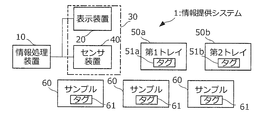
- the information providing system 1 enables the user to visually grasp the relationship between the scent of an object and the expression of the scent, and provides information for grasping what kind of scent the user himself likes. It is a system. As shown in FIG. 1, the information providing system 1 includes an information processing device 10, a display device 20, a sensor device 40, a first tray 50a, a second tray 50b, and a plurality of samples 60. .. The information processing device 10, the display device 20, and the sensor device 40 are communicably connected.
- the information processing device 10 is an example of the information processing device according to the present invention, and is a device that controls central control in the information providing system 1.
- the display device 20 is an example of a display device that displays information to the user.
- the sensor device 40 is an example of an operation device that accepts a user's operation.
- the display device 20 and the sensor device 40 constitute a user interface device 30 that provides information to the user and receives instructions from the user.
- Each of the plurality of samples 60 is an object that emits a scent that stimulates the user's sense of smell.
- the sample 60 may be a natural substance that emits a scent (for example, the plant itself called lavender), or an artificial product containing the scent (for example, a volatile liquid from which the scent of lavender is extracted or a liquid thereof is impregnated). It may be a sheet, etc.).
- a cylindrical vial with a lid containing a liquid called aroma oil containing a scent extracted from a natural substance that emits a scent is used as the sample 60.
- Each sample 60 is attached with a sticker or a tag on which the name and ID of the sample (for example, the name of the plant "lavender" or the number "1”) are written. By referring to this name and ID, the user can visually identify each sample.
- the first tray 50a and the second tray 50b function as operating tools for switching the display mode of the display device 20. Both the first tray 50a and the second tray 50b are sized and shaped so that the sample 60 can be placed on the first tray 50a and the second tray 50b. Further, the first tray 50a and the second tray 50b are sized and shaped so that they can be stacked one above the other.
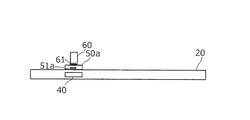
- FIG. 2 is a side view illustrating the structure of the information providing system 1, and more specifically, illustrates the positional relationship when the display device 20, the sensor device 40, the first tray 50a, and the sample 60 are viewed from the horizontal direction. It is a figure.
- the display device 20 has, for example, a thin rectangular plate shape, and its upper surface is a horizontal display surface.
- the sensor device 40 is built in a part of the display device 20.
- the first tray 50a and the second tray 50b are provided with tags 51a (first tray tag) and 51b (second tray tag), which are storage media for storing identification information (referred to as tray ID) for identifying each tray. ..
- tags 51a first tray tag
- 51b second tray tag
- the sensor device 40 is a display surface of the display device 20 in a region where it can sense itself (that is, a user interface surface corresponding to a predetermined position of the user interface device 30, and hereinafter, the sensing surface.
- the first tray 50a is placed on the first tray 50a, for example, by reading the tray ID stored in the tag 51a of the first tray 50a using a short-range wireless communication standard called NFC (Near Field Communication), the first tray 50a is placed. It is specified that 1 tray 50a is placed.
- the display mode of the display device 20 is switched to a first display mode called a "single sample display mode".
- the single sample display mode is a display mode on the premise that only one sample 60 is placed on the sensing surface.
- the second tray 50b is also possible to stack the second tray 50b on the first tray 50a.
- the sensor device 40 reads the two tray IDs stored in the tag 51a of the first tray 50a and the tag 51b of the second tray 50b. It is specified that the first tray 50a and the second tray 50b are placed.
- the display mode of the display device 20 is switched to a second display mode called a “plural sample display mode”.
- the multiple sample display mode is a display mode on the premise that a plurality of samples 60 are placed on the sensing surface.
- the sample 60 is provided with a tag 61 (object tag) which is a storage medium that stores identification information (referred to as a sample ID) that identifies each sample.
- a tag 61 object tag
- the sensor device 40 identifies the placed sample 60 by reading the sample ID stored in the tag 61 of the sample 60.
- the display device 20 also functions as a so-called touch screen. For example, when the display surface is touched by a user's finger or a predetermined operator, the touched position on the display surface is detected. The position touched by the user is expressed as X and Y coordinates in the two-dimensional coordinate plane with a certain position on the display surface as the origin.
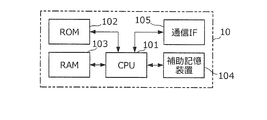
- FIG. 3 is a diagram illustrating a hardware configuration of the information processing device 10.
- the information processing device 10 is a computer having a CPU 101 (Central Processing Unit), a ROM (Read Only Memory) 102, a RAM (Random Access Memory) 103, an auxiliary storage device 104, and a communication IF (Interface) 105.
- CPU 101 Central Processing Unit
- ROM Read Only Memory
- RAM Random Access Memory
- auxiliary storage device 104 a communication IF (Interface) 105.
- the CPU 101 is a processor that performs various calculations.
- the ROM 102 is, for example, a non-volatile memory that stores programs and data used for starting the information processing apparatus 10.
- the RAM 103 is a volatile memory that functions as a work area when the CPU 101 executes a program.
- the auxiliary storage device 104 is a non-volatile storage device such as an HDD (Hard Disk Drive) or an SSD (Solid State Drive), and stores programs and data used in the information processing device 10. By executing this program, the CPU 101 realizes a function described later and also executes an operation described later.
- the communication IF 105 is an interface for performing communication according to a predetermined communication standard. This communication standard may be a wire communication standard or a wireless communication standard.
- the information processing device 10 may include other configurations such as a display device such as a liquid crystal display and an operation device such as a keyboard.
- the auxiliary storage device 104 stores an expression database as shown in FIG. 4 (hereinafter, the database is referred to as a DB).
- a DB an expression database as shown in FIG. 4
- each sample ID is associated with one or more expressions related to the sense of smell stimulated by the sample 60 corresponding to the sample ID (that is, one or more expressions expressing the scent of the sample 60 in characters). ing. That is, this expression is used as a means for transmitting the scent of the sample 60 to others when the user smells the scent of the sample 60.
- This expression may be an expression using any part of speech such as a noun or an adjective, and also covers from a direct expression to an indirect expression of the scent.
- the direct expression here is an expression commonly used when pronounced of the image of a scent, such as “sweet” or “fruity”, and the indirect expression is, for example, "spring". Compared to the above direct expressions such as “morning” and “walking”, it is an expression that is not commonly used as an expression of fragrance.
- the indirect expression is a secondary expression that is recalled from the direct expression based on the direct expression, and can be said to be an expression that abstractly expresses the scent as compared with the direct expression.
- this expression DB includes a display mode when displaying each expression.
- this display mode for example, the position where the expression is displayed, the color when the expression is displayed, the size when the expression is displayed, the font when the expression is displayed, the modification when displaying the expression, and the expression are displayed. Includes time, when to display an expression, movement of the expression (including spatial or temporal changes in the expression), or the language used for the expression.
- This display mode changes according to the relationship between the sample 60 and the expression.
- the relationship between the sample 60 and the expression is the intensity or amount of the scent (more precisely, the component contained in the scent of the sample) represented by the expression in the sample 60, or the abstraction of the expression with respect to the scent. Degree etc.
- the expression “sweet” is displayed near the sample 60 having a strong scent of "sweet”, or the expression “sweet” is displayed in a large or conspicuous color for the sample 60 having a strong scent of "sweet”.
- sample 60 which has a strong scent of "sweet”
- an example of displaying the expression "sweet” so that it stands out by moving in a vibrating manner depends on the relationship between the sample 60 and the expression. This is an example of a changing display mode.
- the expression “sweet” is displayed near the sample and the expression “fruity” is displayed far away from the sample.
- a display mode that changes according to the relationship between the sample 60 and the expression.
- the direct expression is displayed near the sample and the indirect expression is displayed far away from the sample.
- the example of changing the distance between the sample 60 and the expression according to the degree of abstraction of the expression is also an example of the display mode that changes according to the relationship between the sample 60 and the expression.
- the expression is displayed in a display mode in which the content of the relationship between the sample 60 and the expression (specifically, the strength of the relationship and the way of the relationship) can be visually recognized.
- the display mode of the expression 1 "sweet” is that the position (X, Y coordinates) at which the expression is displayed is “X1, Y1", the color of the character is “red”, and the character The font is "Gothic”, the character size is “25 points”, and the movement is "blinking".
- the expression mode shown in FIG. 4 is merely an example, and this expression mode is arbitrarily determined by the system designer.
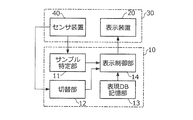
- FIG. 5 is a block diagram showing an example of the functional configuration of the information processing device 10.
- the information processing device 10 realizes the functions of the sample identification unit 11, the switching unit 12, the expression DB storage unit 13, and the display control unit 14.
- the sample identification unit 11 senses which sample 60 is based on the reading result of the sample ID stored in the tag 61 of the sample 60. Identify if it was placed on a surface.
- the switching unit 12 When the first tray 50a or the second tray 50b is placed on the sensing surface of the sensor device 40, the switching unit 12 reads the tray ID stored in the tag 51a of the first tray 50a or the tag 51b of the second tray 50b. Depending on the result, the single sample display mode or the multiple sample display mode is switched between each other.
- the display control unit 14 controls the display device 20 in the single sample display mode and the plurality of sample display modes, and the display area corresponding to the periphery of the position (that is, the sensing surface) on which the sample 60 is placed in the user interface device 30. Displays a group of expressions related to the sense of smell stimulated by the sample 60 identified by the sample identification unit 11. At this time, the display control unit 14 displays in the expression DB (FIG. 4) stored in the expression DB storage unit 13 in a display mode corresponding to the sample 60 specified by the sample identification unit 11.
- the display area corresponding to the periphery of the position where the sample 60 is placed is, for example, a circular area within a radius of 30 cm centered on the sensing surface on which the sample 60 is placed.
- the display control unit 14 corresponds to the selected expression and the sense of smell associated with the expression.
- a relationship image which is an image showing the relationship with the sample 60, is displayed.
- the display control unit 14 displays a group of expressions related to the sense of smell stimulated by each sample 60 for each of the plurality of samples 60 specified by the sample identification unit 11 in the plurality of sample display modes, and the expression thereof.
- the expressions common to these plurality of samples 60 in the group are displayed so as to be distinguishable from the expressions not common to these plurality of samples 60.
- Such display control by the display control unit 14 will be described in detail later with reference to FIGS. 7 to 13.
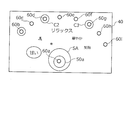
- FIG. 7 is a plan view showing a state when the user interface surface of the user interface device 30 is viewed from above.
- One sample 60 (nine samples 30a to 60i in FIG. 7) is placed at each of a plurality of predetermined positions on the user interface surface. Which sample 60 is placed in which position is predetermined, and an image showing the position where each sample 60 should be placed (for example, an image showing the same ID as the ID of the sample 60) is displayed on the user interface surface (that is, the display surface). It is displayed.
- the user places each sample 60a-60i at the position indicated by those images. It is assumed that the correspondence between each sample 60 and the position where the sample 60 is placed is stored in advance in the expression DB storage unit 13.
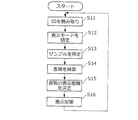
- the switching unit 12 of the information processing device 10 determines the first tray 50a based on the reading result of the tray ID by the sensor device 40 (step S11). Is determined to have been placed, and the display mode is switched to the single sample display mode (step S12).
- the position, shape, and size of the sensing surface of the sensor device 40 can be arbitrarily determined, but the user knows in advance where the sensing surface is in the user interface device 30, or displays, voice guidance, or the like. Inform the user in a way.
- the user selects some of the samples 60a to 60i, sniffs the scent, and places the sample 60 of the scent he / she likes on the first tray 50a on the sensing surface SA.
- the sample identification unit 11 of the information processing device 10 identifies which sample 60 is placed on the sensing surface based on the reading result of the sample ID by the sensor device 40 (step S11) (step S13).
- the display control unit 14 uses the specified sample ID as a key to search the expression DB for the expression corresponding to the sample ID (step S14). Then, the display control unit 14 determines whether the display mode is a single sample display mode or a plurality of sample display modes, and a display mode corresponding to each of the searched expressions by referring to the expression DB. (Step S15). Then, the display control unit 14 controls the display device 20 to display the expression searched in step S14 in the display area around the sensing surface SA in the display mode determined in step S15 (step S16).
- the expression regarding the scent of the sample 60a is arbitrary, for example, centered on the sensing surface (that is, the position where the sample 60a is placed). It is displayed inside the fan figure of the size.
- the display mode of each expression at this time is a display mode according to the relationship between the expression and the sample 60 g.
- the user can know how to express the scent of the sample 60a while looking at these expressions.
- the user can also know the relationship between the scent of the sample 60 g and each expression by referring to the display mode of each expression. For example, in the example of FIG.
- the user indicates that the scent of sample 60a is typically expressed as “sweet” and “relaxed”, but also “gorgeous”, “flower”, and “fruit”. It also contains scent components that can be expressed, and it can be recognized that these scents are associated with abstract events such as "spring.”
- the user selects the expression by touching the expression.
- the display control unit 14 identifies the expression selected by the user based on the position where the touch operation is performed and the display position of each expression. At this time, the expression is surrounded by some kind of graphic image, the background of the expression is displayed in a specific color, or the expression is highlighted so that the user can know which expression selection has been accepted.
- the display control unit 14 searches the expression DB for the sample ID associated with the selected expression. As a result of this search, if there is a sample ID associated with the selected expression, the display device 20 is controlled to display the related image (step S16).
- This relationship image is, for example, an image showing the relationship between the expression selected by the user on the user interface side and another sample 60 corresponding to the searched sample ID, and is at the position where the sample 60 is placed. It is the corresponding image.
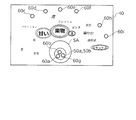
- a ring image surrounding the expression “sweet” is displayed and represented by the expression “sweet”.
- a ring image surrounding the positions of the other samples here, samples 60b, 60d and 60g
- the user can know that there are samples 60b, 60d and 60g in addition to the sample 60a as the scent expressed as "sweet”. ..
- the display mode of the color, thickness, size, movement, etc. of the related image may correspond to the relationship between the expression selected by the user and other samples represented by the expression. For example, when there is a strong relationship between the expression selected by the user and other samples represented by the expression, the display mode such as color, thickness, size, and movement is such that the related image becomes more conspicuous. If the relationship is weak, the display mode is the opposite.
- the user removes the sample 60a from the top of the first tray 50a, sniffs the scent of another sample related to "sweet", and as a sample of the scent he likes, for example, sample 60b. It is assumed that the tray is placed on the first tray 50a on the sensing surface SA.
- the sample identification unit 11 identifies that the sample 60b is placed on the sensing surface based on the reading result of the sample ID by the sensor device 40 (step S11) (step S13).
- the expression regarding the scent of the sample 60b is displayed inside the fan figure centered on the sensing surface (step S16).
- the user can know how to express the scent of the sample 60b while looking at these expressions.
- the expression "fruit” is surrounded as shown in FIG.
- a ring image surrounding the positions of the other samples (here, samples 60g and 60i) represented by the expression "fruit” is displayed. The user can know that there are samples 60g and 60i in addition to the sample 60b as the scent expressed as "fruit”.
- the display control unit 14 stores the sample 60 placed on the sensing surface in the past in a series of operations, and displays a ring image for the sample 60 placed in the past as illustrated in FIG. It may not be performed, or the ring image may be displayed for the sample 60 placed in the past.
- the user removes the sample 60b from the top of the first tray, sniffs the scent of another sample related to "fruit", and senses, for example, 60 g of the sample as a sample of the scent that he / she likes. It is assumed that the product is placed on the first tray 50a of the SA.
- the sample identification unit 11 of the information processing device 10 identifies that the sample 60 g is placed on the sensing surface based on the reading result of the sample ID by the sensor device 40 (step S11) (step S13).
- the expression regarding the scent of the sample 60 g is displayed inside the fan figure centered on the sensing surface (step S16).
- the user can know how to express the scent of the sample 60 g while looking at these expressions.
- the user can know that there are samples 60a, 60b, and 60g as the scent samples that he / she prefers.
- the switching unit 12 of the information processing device 10 determines that the first tray 50a and the second tray 50b have been placed based on the reading result of the tray ID by the sensor device 40 (step S11), and displays a plurality of sample display modes. Switch to the mode (step S12).
- the user places the samples 60a, 60b, 60g selected as the scent sample of his / her preference in the single sample display mode on the first tray 50a and the second tray 50b on the sensing surface SA.
- the sample identification unit 11 of the information processing device 10 identifies that the samples 60a, 60b, and 60g are placed on the sensing surface based on the reading result of the sample ID by the sensor device 40 (step S11) (step S13).
- the display control unit 14 uses the sample IDs of the specified samples 60a, 60b, and 60g as keys to search the expression DB for the expression corresponding to the sample ID (step S14). Further, the display control unit 14 determines whether the display mode is a single sample display mode or a plurality of sample display modes, and determines a display mode corresponding to each of the searched expressions by referring to the expression DB. (Step S15). Then, the display control unit 14 controls the display device 20 to display the expressions searched in step S14 for each of the samples 60a, 60b, and 60g in the display area around the sensing surface SA in the display mode determined in step S15. Is displayed (step S16).
- the display control unit 14 controls the display device 20 to display the expressions common to the samples 60a, 60b, 60g so as to be distinguishable from the expressions not common to the samples 60a, 60b, 60g.
- the display control unit 14 controls the display device 20 to display the expressions common to the samples 60a, 60b, 60g so as to be distinguishable from the expressions not common to the samples 60a, 60b, 60g.
- the expression “fruit” is a common expression in the samples 60a, 60b, 60g
- a triple ring image surrounding the expression “fruit” is displayed.
- the expressions “sweet”, “flower”, and “relax” are all common expressions in the samples 60a and 60b, a double circle image surrounding the expressions "sweet”, “flower”, and “relax” is displayed. Will be done.
- the user can visually grasp the relationship between the scent of an object and the expression of the scent. Furthermore, it becomes possible to visually grasp what kind of scent the user himself likes.
- the present invention is not limited to those intended for the sense of smell, but can also be applied to those intended for the sense of taste (for example, wine, sake, spices, seasonings, etc.). That is, the present invention may be carried out by substituting "aroma" in the embodiment with "taste”.
- the display mode when displaying each expression may be in accordance with the relationship between the expression and the user who sees the display of the expression.
- the relationship between the expression and the user includes, for example, the degree of agreement between the scent of the scent expressed by the expression and the user's preference for the scent, the history of the user using the expression as the expression of the scent, and the like.
- the expression “sweet” may be displayed near the sample 60 placed on the sensing surface of the sensor device 40, or the expression “sweet” may be displayed in a large or conspicuous color.
- An example is conceivable, such as displaying or displaying the expression "sweet” so that it stands out by moving in a vibrating manner.
- the user's preference regarding the scent is collected and stored in a database in advance and stored in the auxiliary storage device 104 or the like, and the display control unit 14 shall refer to it.
- the expression “sweet” may be displayed near the sample 60 placed on the sensing surface of the sensor device 40, or may be large or large. Examples include displaying the expression “sweet” in a conspicuous color, or displaying the expression “sweet” in a conspicuous manner by moving in a vibrating manner.
- the history of expressions used by the user for the scent is collected and stored in a database in advance and stored in the auxiliary storage device 104 or the like, and the display control unit 14 shall refer to it.
- the display mode when displaying each expression may correspond to the attribute of the scent represented by the expression.
- the attributes of the scent include, for example, the distinction between the top note, the middle note, and the last note, the strength / weakness of the scent stimulus, and the curiosity, peculiarity, and rarity of the scent.
- the top note, middle note, and last note are the scents that are first recognized in time, the scents that are recognized next, and the scents that are recognized next when the scent changes. ..
- An example of switching the display of the expression to be performed in chronological order can be considered.
- expressions related to strong scents and rare scents can be displayed in specific colors, fonts, and movements.
- the display mode when displaying each expression may be one according to the attribute of the expression.
- the attributes of the expression include, for example, the image received from the expression, the distinction of the part of speech of the expression, the type of characters used in the expression (hiragana, katakana, kanji, alphabet, etc.), the number of characters / words constituting the expression, and the like.
- the expression "sweet" may be displayed in warm colors.
- the display control unit 14 displays the above-mentioned related image (see FIG. 9), the display control unit 14 displays the related image in a display mode according to the user's preference regarding the scent represented by the expression selected by the user. May be good. For example, in a relational image that emphasizes the expression "sweet” selected by the user and other samples represented by the expression, the display mode such as color, thickness, size, and movement is “sweet”. Change according to the user's preference for scent. Specifically, when the user prefers a "sweet" scent, an example may be considered in which the related image is displayed in a more conspicuous display mode such as color, thickness, size, and movement.
- the user's preference regarding the scent is collected and stored in a database in advance and stored in the auxiliary storage device 104 or the like, and the display control unit 14 shall refer to it.
- the related image is not limited to the image illustrated in FIG. 9, and may be an image that shows that the expression selected by the user and the sample represented by the expression are related.
- the display control unit 14 may display the expressions that are compatible with each other in a display mode that can be identified by color, movement, or the like.
- the sample 60 corresponding to the expression “sweet” and the sample 60 corresponding to the expression “mellow” are referred to as “sweet” and “mellow” on the premise that "sweet” and “mellow” are compatible with each other.
- An example is conceivable in which expressions are displayed in the same color, and expressions that do not have such a good relationship are displayed in different colors.
- the display control unit 14 may display even expressions that are incompatible with each other in a display mode that can be identified by color or movement.
- the sample 60 corresponding to the expression “sweet” and the sample 60 corresponding to the expression “bitter” are referred to as “sweet” and “bitter” on the premise that "sweet” and “bitter” are incompatible.
- An example is conceivable in which expressions are displayed with similar violent movements, and expressions that do not have such an incompatible relationship are displayed without movement.
- the display control unit 14 displays the expressions related to the first object and the expressions related to the second object that have a predetermined relationship in a display mode that can be distinguished from the expressions that do not have the predetermined relationship. You may do so.
- the expression in which a plurality of expressions have a predetermined relationship is similar to the above-mentioned relationship of good / bad compatibility, that the plurality of expressions all match / do not match the user's taste, or similar. Examples of belonging to / not belonging to the scent expression group are also conceivable. In this case, the user's preference regarding the scent and the expression group of the similar scent are collected and stored in a database in advance and stored in the auxiliary storage device 104 or the like, and the display control unit 14 refers to the scent.
- the switching unit 12 switches to the "single sample display mode" when the first tray 50a is placed on the sensing surface, and when the first tray 50a and the second tray 50b are placed on the sensing surface. I was switching to "Multiple sample display mode".
- the method of using the tray as an operation tool for switching the display mode in this way is not limited to the example of the above embodiment. For example, only one tray provided with a tag storing the tray ID is prepared, and the switching unit 12 switches to the "single sample display mode" when the tray is not placed on the sensing surface. When the tray is placed on the sensing surface, it may be switched to the "multiple sample display mode".
- the switching unit 12 switches to the “single sample display mode" when the tray is placed on the sensing surface, and “multiple sample display mode” when the tray is not placed on the sensing surface. You may switch to.
- the switching unit 12 reads the tag provided on the tray and reads the tag provided in the tray to obtain the first display mode called the single sample display mode and the first display mode.
- the second display mode called the multiple sample display mode may be switched between each other.
- the display device and the operation device are not limited to the display device 20 and the sensor device 40 illustrated in FIG.
- the display device may be one that projects an image onto a certain display surface.
- the display device may display an image on the wall surface (including the case where the image is projected on the wall surface and the case where the wall surface itself is a display device).
- the display device may be a display device that realizes so-called augmented reality. Specifically, when the sample 60 is imaged by an image pickup device of a smartphone, a tablet, or a glass-type wearable device, the corresponding expression group may be displayed around the sample 60 in the captured image.
- the operation device may be a device that detects the user's operation by the image recognition technology.
- the display form of the expression may be a two-dimensional display or a three-dimensional display. Further, the displayed "expression" is not limited to characters, and may be an image such as a color, an abstract picture, or a person / landscape.
- the present invention may be provided as an information processing method including steps of processing performed in the information processing apparatus 10. Further, the present invention may be provided as a program executed by the information processing apparatus 10. Such a program may be provided in the form of being recorded on a recording medium such as an optical disk, or may be provided in the form of being downloaded to a computer via a network such as the Internet and installed and made available. It is possible.
- 1 Information providing system, 20 ... Display device, 30 ... User interface device, 40 ... Sensor device, 50a ... 1st tray, 51a ... Tag, 50b ... 2nd tray, 51b ... Tag, 60, 60a-60i ... Sample, 61 ... Tag, 101 ... CPU, 102 ... ROM, 103 ... RAM, 104 ... Auxiliary storage device, 105 ... Communication IF, 11 ... Sample identification unit, 12 ... Switching unit, 13 ... Expression DB storage unit, 14 ... Display Control unit.
Landscapes
- Engineering & Computer Science (AREA)
- Theoretical Computer Science (AREA)
- General Engineering & Computer Science (AREA)
- Physics & Mathematics (AREA)
- General Physics & Mathematics (AREA)
- Human Computer Interaction (AREA)
- Data Mining & Analysis (AREA)
- Databases & Information Systems (AREA)
- Library & Information Science (AREA)
- User Interface Of Digital Computer (AREA)
Abstract
物体の香り又は味とその香り又は味の表現との関係を把握できるようにするとともに、ユーザ自身がどのような香り又は味を好んでいるかを把握できるようにする。 【解決手段】表示制御部14は、単一サンプル表示モードにおいて、サンプル特定部11によって特定されたサンプル60によって刺激される嗅覚に関する表現群を表示させ、表示されている表現群のうちいずれかの表現がユーザにより選択されると、選択された表現と、その表現に関連する嗅覚に対応する他のサンプル60との関係を示す画像である関係画像を表示させる。また、表示制御部14は、複数サンプル表示モードにおいて、サンプル特定部11によって特定された複数のサンプル60のそれぞれについて、各々のサンプル60によって刺激される嗅覚に関する表現群を表示させ、且つ、その表現群のうちこれら複数のサンプル60において共通する表現を、これら複数のサンプル60に共通しない表現と識別可能に表示させる。
Description
本発明は、物体の香り又は味に関する情報提供の技術に関する。
香りは、人間の感情や行動、記憶を司る大脳辺縁系に働きかけることで様々な効用を人間に与えることが知られている。例えば特許文献1には、香りを嗅いだ被験者に対し、その香りを嗅いだことによって想起された心的事象について質問を提示し、その回答を数値として取得することが記載されている。
ところで、或る香りがどのようなものであるかとか、ユーザ自身がどのような香りを好んでいるかといったことを的確に表現して他人に伝えることは、それほど簡単ではない。これは、大半の人間にとっては香りに関して表現する機会が少ないために、香りを表現する語彙に乏しかったり、また、香りとその香りの表現との対応関係を正確に認識できていなかったり、という事情があるためだと考えられる。このような事情は、物体の香りに限らず、物体の味についても同様である。
そこで、本発明は、物体の香り又は味とその香り又は味の表現との関係を把握できるようにするとともに、ユーザ自身がどのような香り又は味を好んでいるかを把握することが可能な仕組みを提供することを目的とする。
上記課題を解決するため、本発明は、ユーザの嗅覚又は味覚を刺激する複数の物体のうち、ユーザによって選択された物体を特定する特定部と、特定された前記物体によって刺激される嗅覚又は味覚に関する表現群を表示させる表示制御部と、第1表示モード及び第2表示モードを相互に切り替える切替部とを備え、前記表示制御部は、前記第1表示モードにおいて、前記特定部によって特定された1の物体について前記表現群を表示させ、前記第2表示モードにおいて、前記特定部によって特定された複数の物体のそれぞれについて前記表現群を表示させ、且つ、当該表現群のうち当該複数の物体において共通する表現を、当該複数の物体において共通しない表現と識別可能に表示させることを特徴とする情報処理装置を提供する。
前記表示制御部は、前記第1表示モードにおいて、前記特定部によって特定された1の物体について前記表現群を表示させ、表示されている表現群のうちいずれかがユーザにより選択されると、選択された当該表現と、当該表現に関連する嗅覚又は味覚に対応する他の物体との関係を示す画像である関係画像を表示させるようにしてもよい。
嗅覚又は味覚に対応する複数の物体がユーザインタフェース装置に置かれており、前記特定部は、前記複数の物体のうちいずれかが前記ユーザインタフェース装置の所定の位置に置かれたときに当該物体を特定し、前記表示制御部は、前記第1表示モードにおいて、前記特定部によって特定された1の物体について前記表現群を、当該物体が置かれた前記所定の位置の周囲に表示させ、表示されている表現群のうちいずれかがユーザにより選択されると、選択された当該表現と当該表現に関連する嗅覚又は味覚に対応する他の物体との関係を示す画像であって、当該他の物体が置かれた位置に応じた画像である前記関係画像を、前記ユーザインタフェース装置に表示するようにしてもよい。
また、本発明は、コンピュータに、ユーザの嗅覚又は味覚を刺激する複数の物体のうち、ユーザによって選択された物体を特定する特定部と、特定された前記物体によって刺激される嗅覚又は味覚に関する表現群を表示させる表示制御部と、第1表示モード及び第2表示モードを相互に切り替える切替部とを実現させるプログラムであって、前記表示制御部は、前記第1表示モードにおいて、前記特定部によって特定された1の物体について前記表現群を表示させ、前記第2表示モードにおいて、前記特定部によって特定された複数の物体のそれぞれについて前記表現群を表示させ、且つ、当該表現群のうち当該複数の物体において共通する表現を、当該複数の物体において共通しない表現と識別可能に表示させるプログラムを提供する。
また、本発明は、ユーザインタフェース装置と、ユーザの嗅覚又は味覚を刺激する複数の物体のうち、ユーザによって選択された物体を特定する特定部と、特定された前記物体によって刺激される嗅覚又は味覚に関する表現群を表示させる表示制御部と、第1表示モード及び第2表示モードを相互に切り替える切替部とを備え、前記表示制御部は、前記第1表示モードにおいて、前記特定部によって特定された1の物体について前記表現群を表示させ、前記第2表示モードにおいて、前記特定部によって特定された複数の物体のそれぞれについて前記表現群を表示させ、且つ、当該表現群のうち当該複数の物体において共通する表現を、当該複数の物体において共通しない表現と識別可能に表示させる情報処理装置とを有することを特徴とする情報提供システムを提供する。
また、本発明は、各々の前記物体に設けられ、識別情報を格納したタグである物体タグと、前記物体が置かれるトレイに設けられ、識別情報を格納したタグであるトレイタグとを備え、前記特定部は、前記複数の物体のうちいずれかが前記ユーザインタフェース装置の所定の位置に置かれたときに、当該物体に設けられた前記物体タグを読み取って当該物体を特定し、前記切替部は、前記トレイが前記ユーザインタフェース装置の所定の位置に置かれたときに、当該トレイに設けられた前記トレイタグを読み取って前記第1表示モード及び前記第2表示モードを相互に切り替えるようにしてもよい。
本発明によれば、物体の香り又は味とその香り又は味の表現との関係を把握できるようにするとともに、ユーザ自身がどのような香り又は味を好んでいるかを把握することが可能となる。
[構成]
まず、本発明の一実施形態に係る情報提供システム1の全体構成について説明する。情報提供システム1は、物体の香りとその香りの表現との関係をユーザが視覚的に把握できるようにするとともに、ユーザ自身がどのような香りを好んでいるかを把握するための情報提供を行うシステムである。図1に示すように、情報提供システム1は、情報処理装置10と、表示装置20と、センサ装置40と、第1トレイ50aと、第2トレイ50bと、複数のサンプル60とを備えている。情報処理装置10、表示装置20及びセンサ装置40は、通信可能に接続されている。情報処理装置10は、本発明に係る情報処理装置の一例であり、情報提供システム1において中枢的な制御を司る装置である。表示装置20は、ユーザに対して情報を表示する表示装置の一例である。センサ装置40は、ユーザの操作を受け付ける操作装置の一例である。表示装置20及びセンサ装置40は、ユーザに対する情報提供及びユーザによる指示を受け付けるユーザインタフェース装置30を構成している。
まず、本発明の一実施形態に係る情報提供システム1の全体構成について説明する。情報提供システム1は、物体の香りとその香りの表現との関係をユーザが視覚的に把握できるようにするとともに、ユーザ自身がどのような香りを好んでいるかを把握するための情報提供を行うシステムである。図1に示すように、情報提供システム1は、情報処理装置10と、表示装置20と、センサ装置40と、第1トレイ50aと、第2トレイ50bと、複数のサンプル60とを備えている。情報処理装置10、表示装置20及びセンサ装置40は、通信可能に接続されている。情報処理装置10は、本発明に係る情報処理装置の一例であり、情報提供システム1において中枢的な制御を司る装置である。表示装置20は、ユーザに対して情報を表示する表示装置の一例である。センサ装置40は、ユーザの操作を受け付ける操作装置の一例である。表示装置20及びセンサ装置40は、ユーザに対する情報提供及びユーザによる指示を受け付けるユーザインタフェース装置30を構成している。
複数のサンプル60はいずれも、ユーザの嗅覚を刺激する香りを発する物体である。例えば、サンプル60は、香りを発する自然物(例えばラベンダーという植物そのもの)であってもよいし、その香りを含む人工生成物(例えばラベンダーの香りが抽出された揮発性の液体や、その液体をしみこませたシートなど)であってもよい。本実施形態では、サンプル60として、香りを発する自然物から抽出された香りを含むアロマオイルと呼ばれる液体を収容した円筒状の蓋付き小瓶を用いる。各サンプル60には、そのサンプルの名称やID(例えば「ラベンダー」という植物の名称や「1」という数字)が記されたシールや札が付されている。ユーザはこの名称やIDを参照することによって、各サンプルを視覚的に識別することが可能となる。
第1トレイ50a及び第2トレイ50bは、表示装置20の表示モードを切り替えるための操作具として機能する。第1トレイ50a及び第2トレイ50bはいずれも、その上にサンプル60を置くことができるような大きさ及び形状になっている。また、第1トレイ50a及び第2トレイ50bは上下に重ねることができるような大きさ及び形状になっている。
図2は、情報提供システム1の構造を例示する側面図、より具体的には、表示装置20、センサ装置40、第1トレイ50a及びサンプル60を水平方向から見たときの位置関係を例示する図である。表示装置20は、例えば薄い矩形の板状であり、その上面が水平な表示面となっている。センサ装置40は、表示装置20の一部に内蔵されている。第1トレイ50a及び第2トレイ50bには、各トレイを識別する識別情報(トレイIDという)を記憶した記憶媒体であるタグ51a(第1トレイタグ),51b(第2トレイタグ)が設けられている。図2に例示したように、センサ装置40は、自身がセンシング可能な領域の表示装置20の表示面(つまり、ユーザインタフェース装置30の所定の位置に相当するユーザインタフェース面であり、以下、センシング面という)に第1トレイ50aが置かれると、例えばNFC(Near Field Communication)と呼ばれる近距離無線通信規格を用いて、その第1トレイ50aのタグ51aに記憶されたトレイIDを読み取ることで、第1トレイ50aが置かれたことを特定する。この場合、表示装置20の表示モードは、「単一サンプル表示モード」と呼ばれる第1表示モードに切り替えられる。単一サンプル表示モードとは、センシング面にサンプル60が1つのみ置かれることを前提とした表示モードである。また、第1トレイ50aの上に第2トレイ50bを重ねておくことも可能である。センサ装置40はセンシング面に第1トレイ50a及び第2トレイ50bが置かれると、これら第1トレイ50aのタグ51a及び第2トレイ50bのタグ51bに記憶された2つのトレイIDを読み取ることで、第1トレイ50a及び第2トレイ50bが置かれたことを特定する。この場合、表示装置20の表示モードは、「複数サンプル表示モード」と呼ばれる第2表示モードに切り替えられる。複数サンプル表示モードとは、センシング面にサンプル60が複数置かれることを前提とした表示モードである。
サンプル60には、各サンプルを識別する識別情報(サンプルIDという)を記憶した記憶媒体であるタグ61(物体タグ)が設けられている。センサ装置40は、センシング面にサンプル60が置かれると、そのサンプル60のタグ61に記憶されたサンプルIDを読み取ることで、置かれたサンプル60を特定する。
また、表示装置20は、いわゆるタッチスクリーンとしても機能し、例えばユーザの指や所定の操作子で表示面がタッチされると、表示面においてタッチされた位置を検出する。ユーザによりタッチされた位置は、表示面の或る位置を原点とした2次元座標平面におけるX,Y座標として表現される。
図3は、情報処理装置10のハードウェア構成を例示する図である。情報処理装置10は、CPU101(Central Processing Unit)、ROM(Read Only Memory)102、RAM(Random Access Memory)103、補助記憶装置104及び通信IF(Interface)105を有するコンピュータである。
CPU101は、各種の演算を行うプロセッサである。ROM102は、例えば情報処理装置10の起動に用いられるプログラム及びデータを記憶した不揮発性メモリである。RAM103は、CPU101がプログラムを実行する際のワークエリアとして機能する揮発性メモリである。補助記憶装置104は、例えばHDD(Hard Disk Drive)又はSSD(Solid State Drive)などの不揮発性の記憶装置であり、情報処理装置10において用いられるプログラム及びデータを記憶する。CPU101はこのプログラムを実行することにより、後述する機能を実現し、また、後述する動作を実行する。通信IF105は、所定の通信規格に従って通信を行うためのインターフェースである。この通信規格は、有線通信の規格であってもよいし、無線通信の規格であってもよい。なお、情報処理装置10は、図3に例示した構成以外に、例えば液晶ディスプレイ等の表示装置やキーボード等の操作装置などの、他の構成を含んでいてもよい。
補助記憶装置104は、図4に示すような表現データベース(以下、データベースをDBと表現する)を記憶している。この表現DBにおいては、各々のサンプルIDと、そのサンプルIDに対応するサンプル60によって刺激される嗅覚に関する1以上の表現(つまりサンプル60の香りを文字で表した1以上の表現)が対応付けられている。つまり、この表現は、ユーザがサンプル60の香りを嗅いだときに、その香りを他人に伝えるための手段として用いられる。この表現は、例えば名詞や形容詞等のあらゆる品詞を用いた表現であってもよいし、また、その香りの直接的表現から間接的表現までをも網羅している。ここでいう直接的な表現とは、例えば「甘い」とか「フルーティ」というように、香りのイメージを想起させるときに慣用される表現のことであり、間接的な表現とは、例えば「春」とか「朝」とか「散歩」といったように、上記の直接的な表現に比べると、香りの表現としては慣用されていない表現のことである。間接的表現とは、直接的表現を基準としてその直接的表現から想起される二次的な表現であり、直接的表現と比べて香りを抽象的に表す表現と言ってもよい。
さらに、この表現DBには、各表現を表示するときの表示態様が含まれている。この表示態様は、例えば、表現を表示する位置、表現を表示するときの色、表現を表示するときの大きさ、表現を表示するときのフォント、表現を表示するときの修飾、表現を表示する時間、表現を表示する時期、表現の動き(表現の空間的な変化又は時間的な変化を含む)、又は、表現に用いられる言語等を含む。
この表示態様は、サンプル60と表現との関係に応じて変わる。サンプル60と表現との関係とは、そのサンプル60においてその表現によって表される香り(より厳密にいうとそのサンプルの香りに含まれる成分)の強度や量、或いは、その香りに対するその表現の抽象度等である。例えば「甘い」という香りが強いサンプル60の近くには、「甘い」という表現を表示するとか、「甘い」という香りが強いサンプル60に対しては、大きく又は目立つ色で「甘い」という表現を表示するとか、「甘い」という香りが強いサンプル60に対しては、振動するように動くことで目立つように「甘い」という表現を表示するといった例が、サンプル60と表現との関係に応じて変わる表示態様の一例である。また、例えば「甘い」という香りが強く、且つ、「フルーティ」という香りが弱いサンプルに対しては、そのサンプルの近くに「甘い」という表現を表示し、そのサンプルの遠くに「フルーティ」という表現を表示するという例も、サンプル60と表現との関係に応じて変わる表示態様の一例である。また、或るサンプルに対して直接的表現と間接的表現とが対応付けられている場合には、そのサンプルの近くに直接的表現を表示し、そのサンプルの遠くに間接的表現を表示するというように、表現の抽象度に応じてサンプル60と表現との距離を変えるという例も、サンプル60と表現との関係に応じて変わる表示態様の一例である。要するに、サンプル60と表現との関係の内容(具体的には関係の強弱や関係の仕方)が視覚的に認識し得るような表示態様で表現を表示する、ということである。
図4の例では、サンプルID「ID001」のサンプル60については、表現1として「甘い」、表現2として「フレッシュ」、表現3として「花」…が設定されている。これらの表現のうち、「甘い」という表現1の表示態様は、表現を表示する位置(X,Y座標)が「X1、Y1」であり、その文字の色は「赤」であり、文字のフォントは「ゴシック体」であり、文字のサイズ(大きさ)は「25ポイント」であり、動きは「点滅」である。なお、図4に示した表現態様はあくまで例示であり、この表現態様はシステム設計者により任意に決められる。
次に、図5は、情報処理装置10の機能構成の一例を示すブロック図である。情報処理装置10は、サンプル特定部11、切替部12、表現DB記憶部13及び表示制御部14という機能を実現する。
サンプル特定部11は、センサ装置40のセンシング面に、ユーザによって選択されたサンプル60が置かれると、そのサンプル60のタグ61に記憶されたサンプルIDの読み取り結果に基づいて、どのサンプル60がセンシング面に置かれたかを特定する。
切替部12は、センサ装置40のセンシング面に第1トレイ50a又は第2トレイ50bが置かれると、その第1トレイ50aのタグ51a又は第2トレイ50bのタグ51bに記憶されたトレイIDの読み取り結果に基づいて、単一サンプル表示モード又は複数サンプル表示モードを相互に切り替える。
表示制御部14は、単一サンプル表示モード及び複数サンプル表示モードにおいて、表示装置20を制御して、ユーザインタフェース装置30においてサンプル60が置かれた位置(つまりセンシング面)の周囲に対応する表示領域に、サンプル特定部11により特定されたサンプル60によって刺激される嗅覚に関する表現群を表示する。このとき、表示制御部14は、表現DB記憶部13に記憶された表現DB(図4)において、サンプル特定部11により特定されたサンプル60に対応する表示態様で表示する。サンプル60が置かれた位置の周囲に対応する表示領域とは、例えばサンプル60が置かれたセンシング面を中心とした半径30センチ以内の円形の領域である。
表示制御部14は、単一サンプル表示モードにおいて、表示されている表現群のうちいずれかの表現がユーザにより選択されると、選択された表現と、その表現に関連する嗅覚に対応する他のサンプル60との関係を示す画像である関係画像を表示する。また、表示制御部14は、複数サンプル表示モードにおいて、サンプル特定部11によって特定された複数のサンプル60のそれぞれについて、各々のサンプル60によって刺激される嗅覚に関する表現群を表示させ、且つ、その表現群のうちこれら複数のサンプル60において共通する表現を、これら複数のサンプル60に共通しない表現と識別可能に表示させる。このような表示制御部14による表示制御については、図7~13を参照しながら後で詳述する。
[動作]
次に、図6のフローチャートに沿って、本実施形態の動作を説明する。図7はユーザインタフェース装置30のユーザインタフェース面を上方から見たときの様子を示す平面図である。ユーザインタフェース面の所定の複数の位置にはそれぞれ、サンプル60(図7では9個のサンプル30a~60i)が1つずつ置かれている。どのサンプル60をどの位置に置くかは予め決まっており、ユーザインタフェース面(つまり表示面)に、各々のサンプル60を置くべき位置を示す画像(例えばサンプル60のIDと同じIDを示す画像)が表示されている。ユーザはそれらの画像が示す位置に各サンプル60a~60iを置く。このような各サンプル60とそのサンプル60が置かれる位置との対応関係は、予め表現DB記憶部13に記憶されているものとする。
次に、図6のフローチャートに沿って、本実施形態の動作を説明する。図7はユーザインタフェース装置30のユーザインタフェース面を上方から見たときの様子を示す平面図である。ユーザインタフェース面の所定の複数の位置にはそれぞれ、サンプル60(図7では9個のサンプル30a~60i)が1つずつ置かれている。どのサンプル60をどの位置に置くかは予め決まっており、ユーザインタフェース面(つまり表示面)に、各々のサンプル60を置くべき位置を示す画像(例えばサンプル60のIDと同じIDを示す画像)が表示されている。ユーザはそれらの画像が示す位置に各サンプル60a~60iを置く。このような各サンプル60とそのサンプル60が置かれる位置との対応関係は、予め表現DB記憶部13に記憶されているものとする。
図7に示すようにセンシング面SAに第1トレイ50aが置かれると、情報処理装置10の切替部12は、センサ装置40によるトレイIDの読み取り結果に基づいて(ステップS11)、第1トレイ50aが置かれたと判断して、表示モードを単一サンプル表示モードに切り替える(ステップS12)。なお、センサ装置40によるセンシング面の位置、形状、大きさは任意に決められるが、センシング面がユーザインタフェース装置30のどこであるかをユーザが予め知っておくか、又は、表示や音声案内等の方法でユーザに知らせるようにする。
ユーザは、サンプル60a~60iのうち任意のものをいくつか選んでその香りを嗅ぎ、自身が好む香りのサンプル60をセンシング面SAにある第1トレイ50aの上に置く。情報処理装置10のサンプル特定部11は、センサ装置40によるサンプルIDの読み取り結果に基づいて(ステップS11)、どのサンプル60がセンシング面に置かれたかを特定する(ステップS13)。
表示制御部14は、特定されたサンプルIDをキーにして、表現DBにおいてそのサンプルIDに対応する表現を検索する(ステップS14)。そして、表示制御部14は、単一サンプル表示モードであるか又は複数サンプル表示モードであるかという表示モードの別と、表現DBを参照して、検索した表現の各々に対応する表示態様を決定する(ステップS15)。そして、表示制御部14は、表示装置20を制御して、センシング面SAの周囲の表示領域に、ステップS14で検索した表現を、ステップS15で決定した表示態様で表示する(ステップS16)。
例えばサンプル60aが第1トレイ50aの上に置かれたとすると、図8に示すように、サンプル60aの香りに関する表現が、例えばセンシング面(つまりサンプル60aが置かれた位置)を中心とした任意の大きさの扇図形の内部に表示される。このときの各表現の表示態様は、その表現とサンプル60gとの関係に応じた表示態様である。ユーザは、これらの表現を見ながらサンプル60aの香りに対する表現のしかたを知ることができる。このとき同時に、ユーザは各表現の表示態様を参考にして、サンプル60gの香りと各表現の関係についても知ることができる。例えば図8の例では、ユーザは、サンプル60aの香りは、代表的には「甘い」「リラックス」と表現される香りであるが、そのほかにも「華やか」、「花」、「果物」と表現されるような香りの成分も含んでおり、さらには、それらの香りから「春」といった抽象的な事象が連想されるものだということを認識することができる。
さらに、ユーザは、表示されている表現群のうち、自身が気になる香りの表現があれば、その表現をタッチする操作を行うことで選択する。表示制御部14は、このようなタッチ操作がなされると、そのタッチ操作がなされた位置と各表現の表示位置とに基づいて、ユーザにより選択された表現を特定する。このとき、どの表現の選択が受け付けられたかをユーザが分かるように、その表現を何らかの図形画像で囲んだり、その表現の背景を特定の色で表示したり、その表現を反転表示したりする。
そして、表示制御部14は、表現DBにおいて、選択された表現に対応付けられているサンプルIDを検索する。この検索の結果、選択された表現に対応付けられたサンプルIDがあれば、表示装置20を制御して関係画像を表示する(ステップS16)。この関係画像は、例えば、ユーザインタフェース面においてユーザにより選択された表現と、検索されたサンプルIDに対応する他のサンプル60との関係を示す画像であって、そのサンプル60が置かれた位置に応じた画像である。
例えば、図9に例示するように、ユーザにより「甘い」という表現が選択された場合、その「甘い」という表現を囲む円環画像が表示されるとともに、その「甘い」という表現によって表される他のサンプル(ここでは、サンプル60b、60d及び60gとする)の位置を囲む円環画像が表示される。このような円環画像(関係画像)が表示されることにより、ユーザは、「甘い」と表現される香りとして、サンプル60aの他に、サンプル60b,60d及び60gがあることを知ることができる。
この関係画像の色、太さ、大きさ、動き等の表示態様は、ユーザにより選択された表現と、その表現によって表される他のサンプルとの関係に応じたものであってもよい。例えば、ユーザにより選択された表現とその表現によって表される他のサンプルとの関係が強い場合には、関係画像がより目立つような色、太さ、大きさ、動き等の表示態様となるし、関係が弱い場合にはその逆の表示態様となる。
なお、ユーザがさらに別の表現について知りたい場合には、その表現をタッチする操作を行うことで、今度は、別の表現について上記の処理が行われる。
ここで、図9の状態から、ユーザがサンプル60aを第1トレイ50aの上から外して、「甘い」に関連する他のサンプルの香りを嗅ぎ、自身が好む香りのサンプルとして、例えばサンプル60bをセンシング面SAにある第1トレイ50aの上に置いたとする。サンプル特定部11は、センサ装置40によるサンプルIDの読み取り結果に基づいて(ステップS11)、サンプル60bがセンシング面に置かれたことを特定する(ステップS13)。
これにより、図10に示すように、サンプル60bの香りに関する表現が、センシング面を中心とした扇図形の内部に表示される(ステップS16)。ユーザは、これらの表現を見ながらサンプル60bの香りに対する表現のしかたを知ることができる。さらに、ユーザが、表示されている表現群のうち、自身が気になる香りの表現として「果物」をタッチする操作を行った場合、図11に示すように、その「果物」という表現を囲む円環画像が表示されるとともに、その「果物」という表現によって表される他のサンプル(ここでは、サンプル60g及び60iとする)の位置を囲む円環画像が表示される。ユーザは、「果物」と表現される香りとして、サンプル60bの他に、サンプル60g及び60iがあることを知ることができる。なお、図11においては、「果物」という表現によって表されるサンプルであるサンプル60aの位置を囲む円環画像が表示されていない。これについては、一連の動作において過去にセンシング面に置かれたサンプル60を表示制御部14が記憶しておき、過去に置かれたサンプル60については図11に例示したように円環画像を表示しないようにしてもよいし、過去に置かれたサンプル60についても円環画像を表示するようにしてもよい。
さらに、図11の状態から、ユーザがサンプル60bを第1トレイの上から外して、「果物」に関連する他のサンプルの香りを嗅ぎ、自身が好む香りのサンプルとして、例えばサンプル60gをセンシング面SAの第1トレイ50aの上に置いたとする。情報処理装置10のサンプル特定部11は、センサ装置40によるサンプルIDの読み取り結果に基づいて(ステップS11)、サンプル60gがセンシング面に置かれたことを特定する(ステップS13)。
これにより、図12に示すように、サンプル60gの香りに関する表現が、センシング面を中心とした扇図形の内部に表示される(ステップS16)。ユーザは、これらの表現を見ながらサンプル60gの香りに対する表現のしかたを知ることができる。以上のような単一サンプル表示モードにおける表示処理を複数回経ることで、ユーザは自身が好む香りのサンプルとして、サンプル60a,60b,60gがあることを知ることができる。
次に、ユーザは、センシング面SAにある第1トレイ50aの上に、さらに第2トレイ50bを重ねて置く。情報処理装置10の切替部12は、センサ装置40によるトレイIDの読み取り結果に基づいて(ステップS11)、第1トレイ50a及び第2トレイ50bが置かれたと判断して、表示モードを複数サンプル表示モードに切り替える(ステップS12)。
次に、ユーザは、単一サンプル表示モードにおいて自身が好む香りのサンプルとして選んだサンプル60a,60b,60gをセンシング面SA上の第1トレイ50a及び第2トレイ50bの上に置く。情報処理装置10のサンプル特定部11は、センサ装置40によるサンプルIDの読み取り結果に基づいて(ステップS11)、サンプル60a,60b,60gがセンシング面に置かれたことを特定する(ステップS13)。
表示制御部14は、特定されたサンプル60a,60b,60gのサンプルIDをキーにして、表現DBにおいてそのサンプルIDに対応する表現を検索する(ステップS14)。さらに、表示制御部14は、単一サンプル表示モードであるか又は複数サンプル表示モードであるかという表示モードの別と、表現DBを参照して、検索した表現の各々に対応する表示態様を決定する(ステップS15)。そして、表示制御部14は、表示装置20を制御して、センシング面SAの周囲の表示領域に、サンプル60a,60b,60gの各々についてステップS14で検索した表現を、ステップS15で決定した表示態様で表示する(ステップS16)。さらにこのとき、表示制御部14は、表示装置20を制御して、サンプル60a,60b,60gにおいて共通する表現を、サンプル60a,60b,60gにおいて共通しない表現と識別可能に表示させる。例えば、図13に例示するように、「果物」という表現がサンプル60a,60b,60gにおいて共通する表現である場合、その「果物」という表現を囲む三重の円環画像が表示される。また、「甘い」「花」「リラックス」という表現がいずれもサンプル60a,60bにおいて共通する表現である場合、その「甘い」「花」「リラックス」という表現を囲む二重の円環画像が表示される。そして、それ以外の表現である「フレッシュ」「海」「ピンク」「爽快」「華やか」「透明感」「海」「バケーション」「春」「夏」「草原」という表現は、サンプル60a,60b,60gのうちいずれか2以上のサンプルにおいて共通する表現ではないので、上記のような円環画像は表示されない。このようなユーザが選んだ複数のサンプル60に共通する表現を確認することによって、ユーザ自身がどのような香りを好んでいるかをより明確に把握することが可能となる。
以上説明した実施形態によれば、ユーザは物体の香りとその香りの表現との関係を視覚的に把握することが可能となる。さらに、ユーザ自身がどのような香りを好んでいるかを視覚的に把握できるようになる。
[変形例]
本発明は、上述した実施形態に限定されない。上述した実施形態を以下のように変形してもよい。また、以下の2つ以上の変形例を組み合わせて実施してもよい。
本発明は、上述した実施形態に限定されない。上述した実施形態を以下のように変形してもよい。また、以下の2つ以上の変形例を組み合わせて実施してもよい。
[変形例1]
本発明は、嗅覚を対象としたものに限らず、味覚を対象としたもの(例えばワイン、日本酒、スパイス、調味料等)にも適用可能である。つまり、実施形態における「香り」を「味」に置き換えて本発明を実施してもよい。
本発明は、嗅覚を対象としたものに限らず、味覚を対象としたもの(例えばワイン、日本酒、スパイス、調味料等)にも適用可能である。つまり、実施形態における「香り」を「味」に置き換えて本発明を実施してもよい。
[変形例2]
各表現を表示するときの表示態様は、表現とその表現の表示を見るユーザとの関係に応じたものであってもよい。表現とユーザとの関係とは、例えば、その表現によって表される香りの香りと香りに関するユーザの嗜好との一致度や、ユーザがその表現を香りの表現として用いた履歴等を含む。例えば「甘い」という香りを好むユーザに対しては、センサ装置40のセンシング面に置かれたサンプル60の近くに「甘い」という表現を表示するとか、大きく又は目立つ色で「甘い」という表現を表示するとか、振動するように動くことで目立つように「甘い」という表現を表示するといった例が考えられる。この場合、香りに関するユーザの嗜好は予め収集及びデータベース化されて補助記憶装置104等に記憶されており、表示制御部14はそれを参照するものとする。
各表現を表示するときの表示態様は、表現とその表現の表示を見るユーザとの関係に応じたものであってもよい。表現とユーザとの関係とは、例えば、その表現によって表される香りの香りと香りに関するユーザの嗜好との一致度や、ユーザがその表現を香りの表現として用いた履歴等を含む。例えば「甘い」という香りを好むユーザに対しては、センサ装置40のセンシング面に置かれたサンプル60の近くに「甘い」という表現を表示するとか、大きく又は目立つ色で「甘い」という表現を表示するとか、振動するように動くことで目立つように「甘い」という表現を表示するといった例が考えられる。この場合、香りに関するユーザの嗜好は予め収集及びデータベース化されて補助記憶装置104等に記憶されており、表示制御部14はそれを参照するものとする。
また、例えば「甘い」という表現を過去に多く用いたことがあるユーザに対しては、センサ装置40のセンシング面に置かれたサンプル60の近くに「甘い」という表現を表示するとか、大きく又は目立つ色で「甘い」という表現を表示するとか、振動するように動くことで目立つように「甘い」という表現を表示するといった例が考えられる。この場合、ユーザが香りに対して用いた表現の履歴は予め収集及びデータベース化されて補助記憶装置104等に記憶されており、表示制御部14はそれを参照するものとする。
[変形例3]
各表現を表示するときの表示態様は、その表現によって表される香りの属性に応じたものであってもよい。香りの属性とは、例えばトップノート・ミドルノート・ラストノートの別であるとか、香りの刺激の強さ/弱さとか、香りの魅惑度や特殊性、希少性といったものを含む。トップノート・ミドルノート・ラストノートとは、香りが変化していくときに、時間的に最初に認知される香り、その次に認知される香り、さらにその次に認知される香りのことである。例えば、センサ装置40のセンシング面に置かれたサンプル60の近くから遠くへと順に、トップノート・ミドルノート・ラストノートに相当する表現を表示する例や、トップノート・ミドルノート・ラストノートに相当する表現の表示を時系列に切り替えていく例が考えられる。また、刺激が強い香りとか希少な香りに関する表現は、特定の色やフォント、動きで表示する例が考えられる。
各表現を表示するときの表示態様は、その表現によって表される香りの属性に応じたものであってもよい。香りの属性とは、例えばトップノート・ミドルノート・ラストノートの別であるとか、香りの刺激の強さ/弱さとか、香りの魅惑度や特殊性、希少性といったものを含む。トップノート・ミドルノート・ラストノートとは、香りが変化していくときに、時間的に最初に認知される香り、その次に認知される香り、さらにその次に認知される香りのことである。例えば、センサ装置40のセンシング面に置かれたサンプル60の近くから遠くへと順に、トップノート・ミドルノート・ラストノートに相当する表現を表示する例や、トップノート・ミドルノート・ラストノートに相当する表現の表示を時系列に切り替えていく例が考えられる。また、刺激が強い香りとか希少な香りに関する表現は、特定の色やフォント、動きで表示する例が考えられる。
[変形例4]
各表現を表示するときの表示態様は、その表現の属性に応じたものであってもよい。表現の属性とは、例えば、表現から受けるイメージ、表現の品詞の別、表現に用いる文字の種別(ひらがな、カタカナ、漢字、アルファベット等)、表現を構成する文字数/単語数等を含む。例えば「甘い」という表現は暖色で表示する例が考えられる。
各表現を表示するときの表示態様は、その表現の属性に応じたものであってもよい。表現の属性とは、例えば、表現から受けるイメージ、表現の品詞の別、表現に用いる文字の種別(ひらがな、カタカナ、漢字、アルファベット等)、表現を構成する文字数/単語数等を含む。例えば「甘い」という表現は暖色で表示する例が考えられる。
[変形例5]
表示制御部14は前述した関係画像を表示する場合に(図9参照)、ユーザにより選択された表現によって表される香りに関するユーザの嗜好に応じた表示態様でその関係画像を表示するようにしてもよい。例えば、ユーザにより選択された「甘い」という表現と、その表現によって表される他のサンプルとを強調する関係画像において、その色、太さ、大きさ、動き等の表示態様を、「甘い」香りに対するユーザの嗜好に応じて変える。具体的には、ユーザが「甘い」香りを好む場合は、関係画像がより目立つような色、太さ、大きさ、動き等の表示態様とする例が考えられる。この場合、香りに関するユーザの嗜好は予め収集及びデータベース化されて補助記憶装置104等に記憶されており、表示制御部14はそれを参照するものとする。なお、関係画像は、図9に例示した画像に限らず、ユーザにより選択された表現とその表現によって表されるサンプルとが関係していることが分かるような画像であればよい。
表示制御部14は前述した関係画像を表示する場合に(図9参照)、ユーザにより選択された表現によって表される香りに関するユーザの嗜好に応じた表示態様でその関係画像を表示するようにしてもよい。例えば、ユーザにより選択された「甘い」という表現と、その表現によって表される他のサンプルとを強調する関係画像において、その色、太さ、大きさ、動き等の表示態様を、「甘い」香りに対するユーザの嗜好に応じて変える。具体的には、ユーザが「甘い」香りを好む場合は、関係画像がより目立つような色、太さ、大きさ、動き等の表示態様とする例が考えられる。この場合、香りに関するユーザの嗜好は予め収集及びデータベース化されて補助記憶装置104等に記憶されており、表示制御部14はそれを参照するものとする。なお、関係画像は、図9に例示した画像に限らず、ユーザにより選択された表現とその表現によって表されるサンプルとが関係していることが分かるような画像であればよい。
[変形例6]
表示制御部14は、複数のサンプル60の各々について表現を表示するときに、相性が良い表現どうしを色や動き等で識別し得るような表示態様で表示するようにしてもよい。例えば「甘い」という表現に対応するサンプル60と「まろやか」という表現に対応するサンプル60とについては、「甘い」と「まろやか」は相性がいいという前提で、これら「甘い」と「まろやか」という表現を同じ色で表示し、そのような相性の良い関係に無い表現はそれぞれ別の色で表示する例が考えられる。同様に、表示制御部14は、相性が悪い表現どうしについても色や動きで識別し得る表示態様で表示するようにしてもよい。例えば「甘い」という表現に対応するサンプル60と「苦い」という表現に対応するサンプル60とについては、「甘い」と「苦い」は相性が悪いという前提で、これら「甘い」と「苦い」という表現を同じような激しい動きで表示し、そのような相性の悪い関係に無い表現は動きのない表示を行う例が考えられる。このように、表示制御部14は、第1物体に関する表現と第2物体に関する表現とのうち、所定の関係にある表現については、当該所定の関係ではない表現と識別可能な表示態様で表示するようにしてもよい。ここでいう、複数の表現が所定の関係にある表現とは、上述したような相性の良い/悪いという関係のほか、複数の表現がいずれもユーザの嗜好に合致する/合致しないとか、類似の香りの表現群に属する/属しないといった例も考えられる。この場合、香りに関するユーザの嗜好や類似の香りの表現群は予め収集及びデータベース化されて補助記憶装置104等に記憶されており、表示制御部14はそれを参照するものとする。
表示制御部14は、複数のサンプル60の各々について表現を表示するときに、相性が良い表現どうしを色や動き等で識別し得るような表示態様で表示するようにしてもよい。例えば「甘い」という表現に対応するサンプル60と「まろやか」という表現に対応するサンプル60とについては、「甘い」と「まろやか」は相性がいいという前提で、これら「甘い」と「まろやか」という表現を同じ色で表示し、そのような相性の良い関係に無い表現はそれぞれ別の色で表示する例が考えられる。同様に、表示制御部14は、相性が悪い表現どうしについても色や動きで識別し得る表示態様で表示するようにしてもよい。例えば「甘い」という表現に対応するサンプル60と「苦い」という表現に対応するサンプル60とについては、「甘い」と「苦い」は相性が悪いという前提で、これら「甘い」と「苦い」という表現を同じような激しい動きで表示し、そのような相性の悪い関係に無い表現は動きのない表示を行う例が考えられる。このように、表示制御部14は、第1物体に関する表現と第2物体に関する表現とのうち、所定の関係にある表現については、当該所定の関係ではない表現と識別可能な表示態様で表示するようにしてもよい。ここでいう、複数の表現が所定の関係にある表現とは、上述したような相性の良い/悪いという関係のほか、複数の表現がいずれもユーザの嗜好に合致する/合致しないとか、類似の香りの表現群に属する/属しないといった例も考えられる。この場合、香りに関するユーザの嗜好や類似の香りの表現群は予め収集及びデータベース化されて補助記憶装置104等に記憶されており、表示制御部14はそれを参照するものとする。
[変形例7]
上記実施形態において、切替部12は、センシング面に第1トレイ50aが置かれた場合に「単一サンプル表示モード」に切り替え、センシング面に第1トレイ50a及び第2トレイ50bが置かれた場合に「複数サンプル表示モード」に切り替えていた。このように表示モードを切り替える操作具としてトレイを利用する方法は上記実施形態の例に限定されない。例えば、トレイIDを格納したタグが設けられたトレイを1つのみ用意しておき、切替部12は、センシング面にそのトレイが置かれてない場合には「単一サンプル表示モード」に切り替え、センシング面にそのトレイが置かれた場合に「複数サンプル表示モード」に切り替えるようにしてもよい。またこれとは逆に、切替部12は、センシング面にトレイが置かれた場合には「単一サンプル表示モード」に切り替え、センシング面にそのトレイが置かれていない場合に「複数サンプル表示モード」に切り替えるようにしてもよい。以上のように、切替部12は、トレイがユーザインタフェース装置30の所定の位置に置かれたときに、当該トレイに設けられたタグを読み取って、単一サンプル表示モードと呼ばれる第1表示モード及び複数サンプル表示モードと呼ばれる第2表示モードを相互に切り替えるようにすればよい。
上記実施形態において、切替部12は、センシング面に第1トレイ50aが置かれた場合に「単一サンプル表示モード」に切り替え、センシング面に第1トレイ50a及び第2トレイ50bが置かれた場合に「複数サンプル表示モード」に切り替えていた。このように表示モードを切り替える操作具としてトレイを利用する方法は上記実施形態の例に限定されない。例えば、トレイIDを格納したタグが設けられたトレイを1つのみ用意しておき、切替部12は、センシング面にそのトレイが置かれてない場合には「単一サンプル表示モード」に切り替え、センシング面にそのトレイが置かれた場合に「複数サンプル表示モード」に切り替えるようにしてもよい。またこれとは逆に、切替部12は、センシング面にトレイが置かれた場合には「単一サンプル表示モード」に切り替え、センシング面にそのトレイが置かれていない場合に「複数サンプル表示モード」に切り替えるようにしてもよい。以上のように、切替部12は、トレイがユーザインタフェース装置30の所定の位置に置かれたときに、当該トレイに設けられたタグを読み取って、単一サンプル表示モードと呼ばれる第1表示モード及び複数サンプル表示モードと呼ばれる第2表示モードを相互に切り替えるようにすればよい。
[変形例8]
表示装置や操作装置は、図1で例示した表示装置20やセンサ装置40に限定されない。例えば表示装置は、或る表示面に画像を投影するものであってもよい。また、表示装置は壁面に画像を表示するものであってもよい(壁面に画像を投影する場合や壁面自体が表示装置である場合を含む)。また、表示装置はいわゆる拡張現実を実現する表示装置であってもよい。具体的には、スマートホンやタブレット或いはグラス型ウェアラブル装置の撮像装置でサンプル60を撮像すると、その撮像画像中のサンプル60の周囲に、対応する表現群を表示するものであってもよい。また、操作装置は、ユーザの操作を画像認識技術によって検知する装置であってもよい。
表示装置や操作装置は、図1で例示した表示装置20やセンサ装置40に限定されない。例えば表示装置は、或る表示面に画像を投影するものであってもよい。また、表示装置は壁面に画像を表示するものであってもよい(壁面に画像を投影する場合や壁面自体が表示装置である場合を含む)。また、表示装置はいわゆる拡張現実を実現する表示装置であってもよい。具体的には、スマートホンやタブレット或いはグラス型ウェアラブル装置の撮像装置でサンプル60を撮像すると、その撮像画像中のサンプル60の周囲に、対応する表現群を表示するものであってもよい。また、操作装置は、ユーザの操作を画像認識技術によって検知する装置であってもよい。
[変形例9]
実施形態においては、サンプル60をセンサ装置40のセンシング面に置くとそのサンプル60に関する表現を表示していたが、ユーザが例えばサンプル60に相当するアロマオイルを収容した蓋付き小瓶の蓋を開けたときに、そのサンプル60に関する表現を表示するようにしてもよい。同様に、例えば自然物そのものを皿に置いた状態で透明カバーを被せておき、ユーザがその透明カバーを外したときに、その自然物の香りに関する表現を表示するようにしてもよい。このようなユーザの行為は例えば周知の画像認識技術を用いて検出することができる。
実施形態においては、サンプル60をセンサ装置40のセンシング面に置くとそのサンプル60に関する表現を表示していたが、ユーザが例えばサンプル60に相当するアロマオイルを収容した蓋付き小瓶の蓋を開けたときに、そのサンプル60に関する表現を表示するようにしてもよい。同様に、例えば自然物そのものを皿に置いた状態で透明カバーを被せておき、ユーザがその透明カバーを外したときに、その自然物の香りに関する表現を表示するようにしてもよい。このようなユーザの行為は例えば周知の画像認識技術を用いて検出することができる。
[変形例10]
表現の表示形態は、2次元表示でもよいし、3次元表示であってもよい。また、表示される「表現」は、文字に限らず、色、抽象画、或いは人物/景色等の画像であってもよい。
表現の表示形態は、2次元表示でもよいし、3次元表示であってもよい。また、表示される「表現」は、文字に限らず、色、抽象画、或いは人物/景色等の画像であってもよい。
本発明は、情報処理装置10において行われる処理のステップを備える情報処理方法として提供されてもよい。また、本発明は、情報処理装置10において実行されるプログラムとして提供されてもよい。かかるプログラムは、光ディスク等の記録媒体に記録した形態で提供されたり、インターネット等のネットワークを介して、コンピュータにダウンロードさせ、これをインストールして利用可能にするなどの形態で提供されたりすることが可能である。
以上、本発明について詳細に説明したが、当業者にとっては、本発明が本明細書中に説明した実施形態に限定されるものではないということは明らかである。本発明は、特許請求の範囲の記載により定まる本発明の趣旨及び範囲を逸脱することなく修正及び変更態様として実施することができる。したがって、本明細書の記載は、例示説明を目的とするものであり、本発明に対して何ら制限的な意味を有するものではない。
1…情報提供システム、20…表示装置、30…ユーザインタフェース装置、40…センサ装置、50a…第1トレイ、51a…タグ、50b…第2トレイ、51b…タグ、60,60a~60i…サンプル、61…タグ、101…CPU、102…ROM、103…RAM、104…補助記憶装置、105…通信IF、11…サンプル特定部、12…切替部、13・・・表現DB記憶部、14…表示制御部。
Claims (6)
- ユーザの嗅覚又は味覚を刺激する複数の物体のうち、ユーザによって選択された物体を特定する特定部と、
特定された前記物体によって刺激される嗅覚又は味覚に関する表現群を表示させる表示制御部と、
第1表示モード及び第2表示モードを相互に切り替える切替部とを備え、
前記表示制御部は、
前記第1表示モードにおいて、前記特定部によって特定された1の物体について前記表現群を表示させ、
前記第2表示モードにおいて、前記特定部によって特定された複数の物体のそれぞれについて前記表現群を表示させ、且つ、当該表現群のうち当該複数の物体において共通する表現を、当該複数の物体において共通しない表現と識別可能に表示させる
ことを特徴とする情報処理装置。 - 前記表示制御部は、
前記第1表示モードにおいて、前記特定部によって特定された1の物体について前記表現群を表示させ、
表示されている表現群のうちいずれかがユーザにより選択されると、選択された当該表現と、当該表現に関連する嗅覚又は味覚に対応する他の物体との関係を示す画像である関係画像を表示させる
ことを特徴とする請求項1に記載の情報処理装置。 - 嗅覚又は味覚に対応する複数の物体がユーザインタフェース装置に置かれており、
前記特定部は、前記複数の物体のうちいずれかが前記ユーザインタフェース装置の所定の位置に置かれたときに当該物体を特定し、
前記表示制御部は、
前記第1表示モードにおいて、前記特定部によって特定された1の物体について前記表現群を、当該物体が置かれた前記所定の位置の周囲に表示させ、
表示されている表現群のうちいずれかがユーザにより選択されると、選択された当該表現と当該表現に関連する嗅覚又は味覚に対応する他の物体との関係を示す画像であって、当該他の物体が置かれた位置に応じた画像である前記関係画像を、前記ユーザインタフェース装置に表示する
ことを特徴とする請求項2に記載の情報処理装置。 - コンピュータに、
ユーザの嗅覚又は味覚を刺激する複数の物体のうち、ユーザによって選択された物体を特定する特定部と、
特定された前記物体によって刺激される嗅覚又は味覚に関する表現群を表示させる表示制御部と、
第1表示モード及び第2表示モードを相互に切り替える切替部とを実現させるプログラムであって、
前記表示制御部は、
前記第1表示モードにおいて、前記特定部によって特定された1の物体について前記表現群を表示させ、
前記第2表示モードにおいて、前記特定部によって特定された複数の物体のそれぞれについて前記表現群を表示させ、且つ、当該表現群のうち当該複数の物体において共通する表現を、当該複数の物体において共通しない表現と識別可能に表示させるプログラム。 - ユーザインタフェース装置と、
ユーザの嗅覚又は味覚を刺激する複数の物体のうち、ユーザによって選択された物体を特定する特定部と、特定された前記物体によって刺激される嗅覚又は味覚に関する表現群を表示させる表示制御部と、第1表示モード及び第2表示モードを相互に切り替える切替部とを備え、前記表示制御部は、前記第1表示モードにおいて、前記特定部によって特定された1の物体について前記表現群を表示させ、前記第2表示モードにおいて、前記特定部によって特定された複数の物体のそれぞれについて前記表現群を表示させ、且つ、当該表現群のうち当該複数の物体において共通する表現を、当該複数の物体において共通しない表現と識別可能に表示させる情報処理装置と
を有することを特徴とする情報提供システム。 - 各々の前記物体に設けられ、識別情報を格納したタグである物体タグと、
前記物体が置かれるトレイに設けられ、識別情報を格納したタグであるトレイタグとを備え、
前記特定部は、前記複数の物体のうちいずれかが前記ユーザインタフェース装置の所定の位置に置かれたときに、当該物体に設けられた前記物体タグを読み取って当該物体を特定し、
前記切替部は、前記トレイが前記ユーザインタフェース装置の所定の位置に置かれたときに、当該トレイに設けられた前記トレイタグを読み取って前記第1表示モード及び前記第2表示モードを相互に切り替える
ことを特徴とする請求項5記載の情報提供システム。
Priority Applications (4)
| Application Number | Priority Date | Filing Date | Title |
|---|---|---|---|
| JP2021563870A JP7657007B2 (ja) | 2019-12-13 | 2020-12-01 | 情報処理装置、プログラム及び情報提供システム |
| US17/783,100 US11861151B2 (en) | 2019-12-13 | 2020-12-01 | Information processing device, program, and information providing system |
| CN202080085623.7A CN114829931B (zh) | 2019-12-13 | 2020-12-01 | 信息处理装置、程序和信息提供方法 |
| EP20899437.6A EP4075413A4 (en) | 2019-12-13 | 2020-12-01 | Information processing device, program, and information provision method |
Applications Claiming Priority (2)
| Application Number | Priority Date | Filing Date | Title |
|---|---|---|---|
| JP2019-225720 | 2019-12-13 | ||
| JP2019225720 | 2019-12-13 |
Publications (1)
| Publication Number | Publication Date |
|---|---|
| WO2021117545A1 true WO2021117545A1 (ja) | 2021-06-17 |
Family
ID=76330244
Family Applications (1)
| Application Number | Title | Priority Date | Filing Date |
|---|---|---|---|
| PCT/JP2020/044639 Ceased WO2021117545A1 (ja) | 2019-12-13 | 2020-12-01 | 情報処理装置、プログラム及び情報提供システム |
Country Status (5)
| Country | Link |
|---|---|
| US (1) | US11861151B2 (ja) |
| EP (1) | EP4075413A4 (ja) |
| JP (1) | JP7657007B2 (ja) |
| CN (1) | CN114829931B (ja) |
| WO (1) | WO2021117545A1 (ja) |
Families Citing this family (3)
| Publication number | Priority date | Publication date | Assignee | Title |
|---|---|---|---|---|
| JP7483685B2 (ja) * | 2019-03-27 | 2024-05-15 | 日本たばこ産業株式会社 | 情報処理装置、プログラム及び情報提供システム |
| US20240027394A1 (en) * | 2022-07-19 | 2024-01-25 | Sven Kratz | Smart device including olfactory sensing |
| US20250258684A1 (en) * | 2024-02-12 | 2025-08-14 | Motorola Mobility Llc | Electronic Devices, Systems, and Corresponding Methods for Utilizing User Sensory Preference Reaction Scores to Enhance User Interface Interactions |
Citations (3)
| Publication number | Priority date | Publication date | Assignee | Title |
|---|---|---|---|---|
| WO2008139568A1 (ja) * | 2007-05-08 | 2008-11-20 | Fujitsu Limited | キーワード出力プログラム、キーワード出力装置およびキーワード出力方法 |
| WO2015114785A1 (ja) * | 2014-01-30 | 2015-08-06 | 楽天株式会社 | 属性表示システム、属性表示方法及び属性表示プログラム |
| JP2019028943A (ja) * | 2017-08-03 | 2019-02-21 | 富士通株式会社 | 表示制御プログラム、表示制御方法、および情報処理装置 |
Family Cites Families (12)
| Publication number | Priority date | Publication date | Assignee | Title |
|---|---|---|---|---|
| WO2006064993A1 (en) * | 2004-11-17 | 2006-06-22 | Jeong-Do Kim | Method of representing taste/smell information or feeling of taste/smell transferred from video image, encoding method thereof, and decoding method thereof |
| JP4789952B2 (ja) * | 2006-12-27 | 2011-10-12 | 株式会社インテリジェントセンサーテクノロジー | 味認識装置及びそれを用いる味認識システム |
| US20080160147A1 (en) * | 2007-01-03 | 2008-07-03 | Tormey Peter J | Method for marketing food and beverages |
| CN104165968B (zh) * | 2014-06-06 | 2016-01-20 | 重庆大学 | 产品创新设计表达用户嗅觉体验测试方法及其测试仪 |
| JP2016180830A (ja) | 2015-03-24 | 2016-10-13 | 富士ゼロックス株式会社 | 画像形成装置 |
| US10198722B2 (en) * | 2015-07-15 | 2019-02-05 | Toshiba Tec Kabushiki Kaisha | Commodity-sales-data processing apparatus, commodity-sales-data processing method, and computer-readable storage medium |
| US20170131689A1 (en) * | 2015-11-06 | 2017-05-11 | International Business Machines Corporation | Communication of physical scents and scent representations |
| US20170206276A1 (en) * | 2016-01-14 | 2017-07-20 | Iddo Gill | Large Scale Recommendation Engine Based on User Tastes |
| US10204176B2 (en) * | 2016-06-21 | 2019-02-12 | Yeda Research And Development Co. Ltd. | Method and system for determining olfactory perception signature |
| JP6467615B1 (ja) * | 2017-08-07 | 2019-02-13 | 株式会社Tree Field | 飲料製造装置及び制御方法 |
| EP3788605A1 (en) * | 2018-05-04 | 2021-03-10 | Givaudan SA | Interactive aroma dispensing system |
| CN109325383B (zh) * | 2018-10-31 | 2022-06-07 | 惠州高盛达科技有限公司 | 产品包装标签的识别方法及识别系统 |
-
2020
- 2020-12-01 CN CN202080085623.7A patent/CN114829931B/zh active Active
- 2020-12-01 EP EP20899437.6A patent/EP4075413A4/en active Pending
- 2020-12-01 WO PCT/JP2020/044639 patent/WO2021117545A1/ja not_active Ceased
- 2020-12-01 JP JP2021563870A patent/JP7657007B2/ja active Active
- 2020-12-01 US US17/783,100 patent/US11861151B2/en active Active
Patent Citations (3)
| Publication number | Priority date | Publication date | Assignee | Title |
|---|---|---|---|---|
| WO2008139568A1 (ja) * | 2007-05-08 | 2008-11-20 | Fujitsu Limited | キーワード出力プログラム、キーワード出力装置およびキーワード出力方法 |
| WO2015114785A1 (ja) * | 2014-01-30 | 2015-08-06 | 楽天株式会社 | 属性表示システム、属性表示方法及び属性表示プログラム |
| JP2019028943A (ja) * | 2017-08-03 | 2019-02-21 | 富士通株式会社 | 表示制御プログラム、表示制御方法、および情報処理装置 |
Non-Patent Citations (1)
| Title |
|---|
| See also references of EP4075413A4 * |
Also Published As
| Publication number | Publication date |
|---|---|
| CN114829931A (zh) | 2022-07-29 |
| US11861151B2 (en) | 2024-01-02 |
| JP7657007B2 (ja) | 2025-04-04 |
| JPWO2021117545A1 (ja) | 2021-06-17 |
| EP4075413A4 (en) | 2023-11-22 |
| EP4075413A1 (en) | 2022-10-19 |
| US20230004279A1 (en) | 2023-01-05 |
| CN114829931B (zh) | 2024-06-11 |
Similar Documents
| Publication | Publication Date | Title |
|---|---|---|
| US9870633B2 (en) | Automated highlighting of identified text | |
| WO2021117545A1 (ja) | 情報処理装置、プログラム及び情報提供システム | |
| KR101713258B1 (ko) | 글에 반영된 사용자의 심리 상태 정보 제공 장치 및 그 방법 | |
| JP2021073590A (ja) | 検索用資料情報記憶装置 | |
| JP7483685B2 (ja) | 情報処理装置、プログラム及び情報提供システム | |
| JP7489375B2 (ja) | 情報処理装置、プログラム及び情報提供システム | |
| JP7319888B2 (ja) | 情報処理装置、プログラム及び情報処理システム | |
| JP2007172523A (ja) | 情報処理装置、情報処理方法、およびプログラム | |
| CN114895831A (zh) | 虚拟资源的展示方法、装置、电子设备及存储介质 | |
| JP7285106B2 (ja) | 情報処理装置、プログラム及び情報提供システム | |
| JP7329410B2 (ja) | 情報処理装置 | |
| KR102543264B1 (ko) | 해마 재생의 디지털 향상을 위한 시스템 및 방법 | |
| Knigge | Virtual Reality in Manual Order Picking | |
| Jones et al. | The empirical investigation of factors affecting graphical visualization | |
| US12436978B2 (en) | Information processing system and information processing program | |
| Horváth et al. | Preference Points and Interaction Patterns in Virtual Reality | |
| Weede et al. | Diagnostic and Interactive e-Learning Application for Children with Reading Weakness Based on Eye Tracking | |
| JP5043258B2 (ja) | 記事評価情報収集方法、記事評価情報収集システム、および、プログラム | |
| Ottley | Cognitive traits that matter | |
| Keppo | The endpoint tree: Designing an explorative data visualization tool for genetic research | |
| Wlekły | Aesthetics and usability of statistics data visualisation through charts: an eyetracking study as a tool for chart analysis | |
| CN121657869A (zh) | 一种基于多智能体协作的数字大屏交互方法、设备及介质 | |
| CN120821761A (zh) | 课件调整方法、系统、电子设备和计算机可读存储介质 | |
| Oramas et al. | Technology for Hearing Impaired People: A Novel Use of Xstroke Pointer Gesture Recognition Algorithm for Teaching/Learning Ecuadorian Sign Language | |
| JP2005115863A (ja) | サービス推薦システム |
Legal Events
| Date | Code | Title | Description |
|---|---|---|---|
| 121 | Ep: the epo has been informed by wipo that ep was designated in this application |
Ref document number: 20899437 Country of ref document: EP Kind code of ref document: A1 |
|
| ENP | Entry into the national phase |
Ref document number: 2021563870 Country of ref document: JP Kind code of ref document: A |
|
| NENP | Non-entry into the national phase |
Ref country code: DE |
|
| ENP | Entry into the national phase |
Ref document number: 2020899437 Country of ref document: EP Effective date: 20220713 |