WO2021145071A1 - 情報処理装置、情報処理方法、プログラム - Google Patents
情報処理装置、情報処理方法、プログラム Download PDFInfo
- Publication number
- WO2021145071A1 WO2021145071A1 PCT/JP2020/043647 JP2020043647W WO2021145071A1 WO 2021145071 A1 WO2021145071 A1 WO 2021145071A1 JP 2020043647 W JP2020043647 W JP 2020043647W WO 2021145071 A1 WO2021145071 A1 WO 2021145071A1
- Authority
- WO
- WIPO (PCT)
- Prior art keywords
- range
- tracking
- list
- candidate list
- processing unit
- Prior art date
- Legal status (The legal status is an assumption and is not a legal conclusion. Google has not performed a legal analysis and makes no representation as to the accuracy of the status listed.)
- Ceased
Links
Images










Classifications
-
- H—ELECTRICITY
- H04—ELECTRIC COMMUNICATION TECHNIQUE
- H04N—PICTORIAL COMMUNICATION, e.g. TELEVISION
- H04N23/00—Cameras or camera modules comprising electronic image sensors; Control thereof
- H04N23/60—Control of cameras or camera modules
- H04N23/63—Control of cameras or camera modules by using electronic viewfinders
- H04N23/631—Graphical user interfaces [GUI] specially adapted for controlling image capture or setting capture parameters
-
- H—ELECTRICITY
- H04—ELECTRIC COMMUNICATION TECHNIQUE
- H04N—PICTORIAL COMMUNICATION, e.g. TELEVISION
- H04N7/00—Television systems
- H04N7/18—Closed-circuit television [CCTV] systems, i.e. systems in which the video signal is not broadcast
- H04N7/183—Closed-circuit television [CCTV] systems, i.e. systems in which the video signal is not broadcast for receiving images from a single remote source
-
- G—PHYSICS
- G06—COMPUTING OR CALCULATING; COUNTING
- G06T—IMAGE DATA PROCESSING OR GENERATION, IN GENERAL
- G06T7/00—Image analysis
- G06T7/20—Analysis of motion
- G06T7/246—Analysis of motion using feature-based methods, e.g. the tracking of corners or segments
-
- H—ELECTRICITY
- H04—ELECTRIC COMMUNICATION TECHNIQUE
- H04N—PICTORIAL COMMUNICATION, e.g. TELEVISION
- H04N23/00—Cameras or camera modules comprising electronic image sensors; Control thereof
- H04N23/60—Control of cameras or camera modules
- H04N23/61—Control of cameras or camera modules based on recognised objects
-
- H—ELECTRICITY
- H04—ELECTRIC COMMUNICATION TECHNIQUE
- H04N—PICTORIAL COMMUNICATION, e.g. TELEVISION
- H04N23/00—Cameras or camera modules comprising electronic image sensors; Control thereof
- H04N23/60—Control of cameras or camera modules
- H04N23/695—Control of camera direction for changing a field of view, e.g. pan, tilt or based on tracking of objects
-
- H—ELECTRICITY
- H04—ELECTRIC COMMUNICATION TECHNIQUE
- H04N—PICTORIAL COMMUNICATION, e.g. TELEVISION
- H04N23/00—Cameras or camera modules comprising electronic image sensors; Control thereof
- H04N23/60—Control of cameras or camera modules
- H04N23/698—Control of cameras or camera modules for achieving an enlarged field of view, e.g. panoramic image capture
-
- G—PHYSICS
- G06—COMPUTING OR CALCULATING; COUNTING
- G06F—ELECTRIC DIGITAL DATA PROCESSING
- G06F3/00—Input arrangements for transferring data to be processed into a form capable of being handled by the computer; Output arrangements for transferring data from processing unit to output unit, e.g. interface arrangements
- G06F3/01—Input arrangements or combined input and output arrangements for interaction between user and computer
- G06F3/048—Interaction techniques based on graphical user interfaces [GUI]
- G06F3/0481—Interaction techniques based on graphical user interfaces [GUI] based on specific properties of the displayed interaction object or a metaphor-based environment, e.g. interaction with desktop elements like windows or icons, or assisted by a cursor's changing behaviour or appearance
- G06F3/0482—Interaction with lists of selectable items, e.g. menus
Definitions
- This technology relates to information processing devices, information processing methods, and programs, and in particular, to technical fields related to setting the tracking range of a subject.
- the PTZ camera is a camera having a zoom function for changing the imaging angle of view by a zoom lens and a pan / tilt function for changing the imaging direction in the pan direction and the tilt direction.
- the zoom function can be used to capture a specific subject in a specific size within the image frame
- the pan / tilt function can be used to identify the subject as so-called subject tracking. It is possible to perform imaging so that the subject is continuously positioned at a specific position such as the center position in the image frame.
- Patent Document 1 discloses a technique for setting a preset shooting position in a surveillance camera to a position corresponding to a region where a surveillance target is frequently detected.
- the range in which the subject can be tracked is determined by the movable range in the pan and tilt directions and the focal length of the lens, but the tracking of the subject is not always performed for the entire trackable range. ..
- a range for tracking (hereinafter referred to as "tracking range") is set while avoiding the area where the object is placed, and the set tracking is performed. In some cases, the subject is tracked only within the range.
- the tracking range is generally set manually by the user.
- the user adjusts the pan and tilt while visually observing the captured image to set the tracking range, which is the upper left edge, upper right edge, lower left edge, and lower right edge of the search range, respectively. This is done by instructing the pan and tilt angles corresponding to the above, which imposes a heavy burden on the user.
- This technology was made in view of the above circumstances, and aims to reduce the workload of the user related to the setting of the tracking range of the subject.
- the information processing device is selected by the user from a presentation processing unit that performs a process of presenting a list of objects recognized by the object recognition process for the captured image to the user and the list presented by the presentation processing unit. It is provided with a tracking processing unit that sets a tracking range of a subject corresponding to the object and performs tracking processing of the subject based on the set tracking range. As a result, the operation required for setting the tracking range of the subject can be at least the operation of selecting an object from the list.
- the presentation processing unit performs a process of presenting a candidate list for the tracking range and a candidate list for the tracking start range of the subject as a list of the objects.
- the tracking processing unit can be configured to set the tracking start range corresponding to the selected object. By setting the tracking start range, it is possible to start the tracking process of the subject from the range where the subject will exist at the start of imaging.
- the presentation processing unit serves as a list of the objects, a candidate list for the tracking range and a search range for the search range of the subject when the subject is lost.
- the tracking processing unit sets the search range corresponding to the selected object. It is possible. By setting the search range, when the subject being tracked is lost, it is possible to search for the subject in a range where the subject is likely to exist.
- the presentation processing unit includes a candidate list for the tracking range and a candidate for the search exclusion range, which is a range to be excluded from the search target of the subject, as a list of the objects.
- the tracking processing unit sets the search exclusion range corresponding to the selected object. It is possible. By setting the search exclusion range, a range that is not desirable to be included in the subject search range is excluded in order to properly track the target subject, such as a range in which a subject other than the tracking target is expected to exist. Then, it becomes possible to search for a subject.
- the presentation processing unit as a list of the objects, has a candidate list for the tracking range and another range which is a range related to the tracking process different from the tracking range.
- a process of presenting a list in which at least a part of the objects to be posted is different as the candidate list for the tracking range and the candidate list for the other range is configured. It is possible. This makes it possible to present an object suitable as a candidate for each tracking range and another range.
- the presentation processing unit is used for the tracking range based on the correspondence information indicating the correspondence of the objects to be listed in the candidate list for each of the tracking range and the different range. It is possible to configure the process of presenting the candidate list and the candidate list for another range. As a result, it is possible to present only objects suitable as candidates for each range by a simple process of generating a candidate list by referring to the correspondence information.
- the presentation processing unit as a list of the objects, has a candidate list for the tracking range and another range which is a range related to the tracking process different from the tracking range.
- the process of presenting the candidate list for the tracking range and the candidate list for another range based on the selection history of objects from the respective candidate lists is performed. It is possible to do. As a result, it is possible to present only suitable objects for each range as candidates based on the selection history of the objects.
- the presentation processing unit selects an object as a candidate list for the tracking range and a candidate list for the other range based on the number of selections in the selection history. It is possible to configure the process to present the publication list. This makes it possible to present only objects that are presumed to be suitable for each range based on the number of selections in the past as candidates.
- the presentation processing unit when an object is selected from the list, the presentation processing unit performs a process of presenting information indicating a range corresponding to the selected object on the captured image. It is possible to configure it to be performed. As a result, the user can confirm the range of the object selected by himself / herself on the captured image.
- the presentation processing unit performs processing for changing the size or shape of the range in response to an operation on the information indicating the range presented on the captured image. It is possible to As a result, the user can select an object from the list to present information indicating the corresponding range, and then perform an operation on the information indicating the range to instruct to change the size or shape of the range. It will be possible.
- the presentation processing unit when a plurality of objects are selected from the list, the presentation processing unit presents information indicating a range including each selected object on the captured image. It is possible to configure the processing. As a result, if it is desired to set a tracking range that spans a plurality of objects, the user may at least perform an operation of selecting those objects from the list.
- the object selected in one of the candidate list for the tracking range and the candidate list for the search exclusion range is the other. It is possible to configure the candidate list presentation process so that the candidate list is not presented in a selectable state. As a result, the object selected for the tracking range is also selected as the object for the search exclusion range, and conversely, the object selected as the object for the search exclusion range is also selected as the object for the tracking range. It is possible to prevent inconsistent selections such as squeezing.
- the object selected in one of the candidate list for the tracking range and the candidate list for the search exclusion range is the other.
- the process is configured to present error information.
- an error notification is sent to the user in response to the case where an inconsistent selection is made.
- the presentation processing unit generates the list including information indicating a position history reliance range, which is a range set based on the history information of the position of the subject, as one of the options.
- a position history reliance range which is a range set based on the history information of the position of the subject, as one of the options.
- the subject is a teacher
- the presentation processing unit is based on the history information of the teacher to be tracked among the history information of the positions stored for each teacher. Therefore, it is possible to set the position history reliance range. For example, one teacher moves frequently during a lecture and another teacher does not move much during a lecture, and the movement characteristics during a lecture may differ depending on the teacher.
- the presentation processing unit recognizes the object in the object recognition process. It is possible to perform a process of presenting the list including at least one of the lecturer, the teacher's desk, and the typeface to be boarded to the user. This makes it possible to set the tracking range based on the arrangement of the classroom where the lecture is given.
- the information processing apparatus performs a process of presenting a list of objects recognized by the object recognition process for the captured image to the user, and is selected by the user from the presented list.
- This is an information processing method in which a tracking range of a subject corresponding to an object is set, and tracking processing of the subject is performed based on the set tracking range. Even with such an information processing method, the same operation as that of the information processing apparatus according to the present technology can be obtained.
- the program according to the present technology performs a process of presenting a list of objects recognized by the object recognition process for the captured image to the user, and tracks a subject corresponding to the object selected by the user from the presented list.
- This is a program that allows an information processing apparatus to realize a function of setting a range and performing tracking processing of the subject based on the set tracking range.
- FIG. 1 is a block diagram showing a configuration example of a tracking imaging system 100 including an information processing device 1 as an embodiment according to the present technology. As shown in the figure, the tracking imaging system 100 includes at least an information processing device 1, an imaging device 2, and a recording device 3.
- the image pickup apparatus 2 is configured as a PTZ camera having a function of mechanically panning and tilting, and capable of adjusting a focal length (that is, adjusting an angle of view) with a zoom lens.
- the image pickup apparatus 2 adjusts the focal length and adjusts the imaging direction by panning and tilting based on the control signal output by the information processing apparatus 1.
- the image pickup device 2 is configured to include an image pickup element using, for example, a CMOS (Complementary metal-oxide-semiconductor) image sensor or a CCD (Charge Coupled Device) image sensor, and is capable of generating captured image data based on a moving image.
- the captured image data obtained by the imaging device 2 is output to the information processing device 1 and the recording device 3. Further, the image pickup apparatus 2 outputs camera information such as angle information in the pan direction and tilt direction and focal length information to the information processing apparatus 1.
- the information processing device 1 is configured as, for example, a computer device, and has an image analysis function for performing image analysis on an image captured from the image pickup device 2 and an operation control function (pan, tilt, zoom) of the image pickup device 2 based on the above-mentioned control signal. It has a control function).
- the information processing device 1 of this example has a subject detection function for detecting a specific subject as one of the image analysis functions. Then, when the information processing device 1 detects a specific subject by this subject detection function, the information processing device 1 performs tracking processing for the subject.
- the subject tracking process means a process of keeping the target subject at a specific position in the output image frame of the captured image.
- tracking of the subject is realized by controlling the imaging direction by panning and tilting. That is, as the tracking process in this case, the information processing device 1 controls the pan and tilt of the image pickup device 2 by the above-mentioned control signal so that the subject continues to be positioned at a specific position in the output image frame.
- the information processing device 1 of this example also performs setting processing of various ranges related to subject tracking processing, including a tracking range as a range for tracking the subject.
- the setting process of such various ranges will be described later.
- the recording device 3 has a function of recording the captured image data input from the imaging device 2.
- FIG. 2 is a block diagram showing a hardware configuration example of the information processing device 1.
- the information processing unit 1 includes a CPU (Central Processing Unit) 11, a ROM (Read Only Memory) 12, a RAM (Random Access Memory) 13, a bus 14, an input / output interface 15, an input unit 16, and a display unit 17. It includes an audio output unit 18, a storage unit 19, a communication unit 20, and a drive 22.
- the CPU 11 executes various processes according to the program stored in the ROM 12 or the program loaded from the storage unit 19 into the RAM 13.
- the RAM 13 also appropriately stores data and the like necessary for the CPU 11 to execute various processes.
- the CPU 11, ROM 12, and RAM 13 are connected to each other via the bus 14.
- An input / output interface 15 is also connected to the bus 14.
- An input unit 16 including an operator and an operation device is connected to the input / output interface 15.
- various controls and operation devices such as a keyboard, mouse, keys, dial, touch panel, touch pad, and remote controller are assumed.
- the user's operation is detected by the input unit 16, and the signal corresponding to the input operation is interpreted by the CPU 11.
- a display unit 17 made of an LCD (Liquid Crystal Display) or an organic EL (Electro-luminescence) panel and an audio output unit 18 made of a speaker or the like are connected to the input / output interface 15 as an integral part or as a separate body.
- the display unit 17 is a display unit that performs various displays, and is composed of, for example, a display device provided in the housing of the information processing device 1, a separate display device connected to the information processing device 1, and the like.
- the display unit 17 executes various information displays on the display screen based on the instruction of the CPU 11. For example, the display unit 17 displays various operation menus, icons, messages, and the like, that is, as a GUI (Graphical User Interface), based on the instructions of the CPU 11.
- the display unit 17 can also display the captured image input from the imaging device 2.
- a storage unit 19 composed of a hard disk, a solid-state memory, or the like, or a communication unit 20 composed of a modem or the like is connected to the input / output interface 15.
- the communication unit 20 performs communication processing via a transmission line such as the Internet, and performs communication with various devices by wire / wireless communication, bus communication, or the like. In this example, communication between the image pickup apparatus 2 and the information processing apparatus 1 is performed via the communication unit 20.
- a drive 22 is also connected to the input / output interface 15 as needed, and a removable recording medium 21 such as a magnetic disk, an optical disk, a magneto-optical disk, or a semiconductor memory is appropriately mounted.
- the drive 22 can read data files such as image files and various computer programs from the removable recording medium 21.
- the read data file is stored in the storage unit 19, and the image and sound included in the data file are output by the display unit 17 and the sound output unit 18. Further, the computer program or the like read from the removable recording medium 21 is installed in the storage unit 19 as needed.
- the imaging device 2 is arranged at a position where an image is taken in a room where a lecture is given, such as a classroom, and an captured image of a teacher giving a lecture is obtained.
- the target of tracking is a teacher, and when a subject as a teacher is detected in the captured image, the tracking process for the teacher is started.
- Tracking start range (home position) It is the range to start tracking, and when the target subject appears within this tracking start range, tracking is started.
- ⁇ Tracking range The range to track the target subject. For example, it is defined by an angle range in the pan direction and an angle range in the tilt direction. In other words, when the entire movable range in the pan direction and the tilt direction is set as the maximum range, it is defined as a range equal to or less than the maximum range.
- Search range recovery position
- the range in which the subject to be tracked is searched when the subject is lost.
- ⁇ Search exclusion range The range where the subject search for tracking is not performed. For example, by setting a range in which a subject that is not the target of tracking exists, such as a place where the audience is, it is possible to prevent the subject that is not the target of tracking from being erroneously tracked.
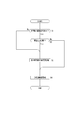
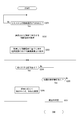
- step S1 it is determined whether or not various ranges have been set, and if not, the process proceeds to step S3 to perform setting processing of various ranges. That is, processing for setting various ranges of the above-mentioned tracking start range, tracking range, search range, and search exclusion range is performed. Then, in response to the setting processing of various ranges being performed in step S3, tracking imaging is started in step S4. In this tracking imaging, tracking processing is performed based on information in various ranges set in step S3.
- step S2 determines whether or not the setting needs to be changed. That is, it is determined whether or not it is necessary to change the information in various ranges that have already been set. For example, even in the same classroom, when different lectures are given, it is believed to change the tracking range, search range, etc., for example, because the arrangement of things that are not desired to be projected in the captured image (tracking captured image) is different. Is assumed. In step S2, for example, it is determined whether or not it is necessary to change various ranges that have already been set due to such circumstances.
- step S2 If it is determined in step S2 that the setting needs to be changed, the setting process in step S3 is performed, and then tracking imaging is started in step S4. On the other hand, if it is determined in step S2 that the setting does not need to be changed, the setting process in step S3 is passed, and tracking imaging is started in step S4.
- the setting process of various ranges performed in step S3 has been performed as a process of setting various ranges based on the user operation. Specifically, in order to define the range by having the user perform pan and tilt adjustment operations while visually observing the captured image for each of the above-mentioned tracking start range, tracking range, search range, and search exclusion range. The pan and tilt angles are specified. For this reason, conventionally, the user is forced to carry out a great work load.
- FIG. 4 is a functional block diagram showing various functions of the CPU 11 of the information processing device 1 in blocks. Note that FIG. 4 shows only some of the various functions of the CPU 11 related to tracking imaging in blocks. As shown in the figure, the CPU 11 has functions as an object recognition unit F1, a presentation processing unit F2, and a tracking processing unit F3.
- the object recognition unit F1 performs object recognition processing on the captured image from the image pickup device 2. That is, it is a process of recognizing an object projected in an image. This object recognition process can be rephrased as a process of analyzing the structure of the real space displayed on the captured image.
- the specific method of object recognition is not particularly limited, and a conventional technique such as an image recognition technique using AI (artificial intelligence) can be used.
- AI artificial intelligence
- the position of the object projected in the image and the name (category) of the object are specified.
- the position and name of the object can be specified by using semantic segmentation as shown in FIG.
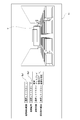
- FIG. 7 shows an example of a classroom in which a teacher's desk o1, a typeface on board o2, a teacher's platform o3, a display o4, and a seat portion o5 are arranged.
- the typeface o2 on the board means a medium on which the teacher writes on the board, and corresponds to, for example, a blackboard or a whiteboard.
- the display o4 is, for example, a display device that displays and outputs an image referred to during a lecture
- the seat portion o5 means a portion on which a seat or desk on which a student such as a student sits is arranged.
- the classroom shown in FIG. 8 is the classroom in which the teaching platform o3 is omitted from the classroom shown in FIG.
- the object recognition unit F1 has information indicating the range of the recognized object (for example, the coordinates and size of the circumscribing frame of the object) and name information for each recognized object as information indicating the result of the object recognition process. And output.
- the presentation processing unit F2 performs a process of presenting a list of objects recognized by the above object recognition process to the user.
- the list of objects is presented to the user via the display unit 17 shown in FIG.
- the tracking processing unit F3 sets the tracking range of the subject corresponding to the object selected by the user from the list presented by the presentation processing unit F2, and performs the tracking processing of the subject based on the set tracking range.
- the presentation processing unit F2 is supposed to present a list of objects not only for the tracking range but also for each range of the tracking start range, the search range, and the search exclusion range described above.
- the tracking processing unit F3 sets the tracking start range, the tracking range, the search range, and the search exclusion range, respectively, based on the result of the object selection by the user from the list of each of these ranges. Then, based on the set information in each of these ranges, the subject tracking process is executed.
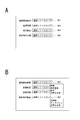
- FIG. 9 is a diagram for explaining a presentation example of a list of objects.
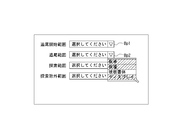
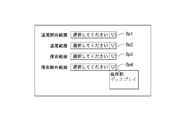
- FIG. 9A shows an example of an image (GUI) for receiving an operation to be displayed on the display unit 17 by the presentation processing unit F2 when setting various ranges.
- the pull-down button Bp is displayed for each of the tracking start range, the tracking range, the search range, and the search exclusion range.
- the sign of the pull-down button Bp of the tracking start range, the tracking range, the search range, and the search exclusion range is described as "Bp1", "Bp2", “Bp3", and "Bp4" as shown in the figure. ..
- FIG. 9B shows a transition example when the pull-down button Bp1 (tracking start range) and the pull-down button Bp4 (search exclusion range) are operated as an example of the display transition from FIG. 9A.
- a list of objects for the range corresponding to the operated pull-down button Bp is displayed in a pull-down manner.
- a list containing "teaching platform”, "typeface on board”, and "teaching table” is displayed as a list of objects corresponding to the tracking start range, and the pull-down button Bp4 is operated.
- a list of "seats" and "displays” is displayed as a list of objects corresponding to the search exclusion range.
- the tracking processing unit F3 sets the range corresponding to the position of the teacher table o1 as the tracking start range.
- the object selection operation for example, an operation such as a click operation or a tap operation can be considered.
- the tracking processing unit F3 sets the range corresponding to the position of the seat portion o5 as the search exclusion range.
- the tracking processing unit F3 responds to the position of the selected object when an object is selected from the pull-down display list by operating the pull-down buttons Bp2 and Bp3. Set the range as the tracking range and search range, respectively.
- the item "Specify coordinates" is also included in the list of objects. Although the description by illustration is omitted, when the item of "specify coordinates" is selected, the user can specify the coordinates for specifying the range from the captured image displayed on the display unit 17. .. That is, it is possible to set an arbitrary range without being influenced by the range of the recognized object.
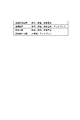
- the presentation processing unit F2 in this example uses the correspondence information I1 as shown in FIG. 10 when generating a list of objects in various ranges.
- the correspondence information I1 corresponds to the identification information (for example, name information) of the object to be posted on the list for each of the various ranges of the tracking start range, the tracking range, the search range, and the search exclusion range. It is considered to be attached information.
- "teacher”, “teacher”, and “typeface” are defined as objects to be posted on the list of tracking start range, and “objects to be posted on the list of tracking range” are defined.
- “Teaching table”, “teaching platform”, “typeface on board”, and “display” are defined.
- teacher", “teacher”, and “typeface” are defined as objects to be listed in the search range list
- "seat” and "display” are defined as objects to be listed in the search exclusion range list. ..
- the presentation processing unit F2 generates a list for each range according to such correspondence information I1 according to the object recognition result obtained by the object recognition unit F1. Specifically, for each of the various ranges of the tracking start range, the tracking range, the search range, and the search exclusion range, a list including all the objects actually recognized among the objects defined in the correspondence information I1 is generated. ..
- this example presents a list in which at least a part of the objects to be posted is different between the tracking range and the search exclusion range. It is supposed to be. Specifically, the "seat section" is listed in the search exclusion range list, but the “seat section” is not listed in the tracking range list. As described above, since the seat portion o5 is a place where a subject that is not a tracking target exists, if it is included in the tracking range, it may be difficult to realize stable subject tracking. Therefore, in this example, the "seat section” is listed in the search exclusion range list, but the "seat section” is not listed in the tracking range list. Since the same thing can be said about the tracking start range and search range for the "seat section", in this example, the "seat section” is not included in the list of the tracking start range and search range. ..
- an image of a person may be displayed on the "display" (that is, it may cause erroneous tracking), so in this example, it is included in the candidates for listing in the search exclusion range list. ..
- examples of different objects to be listed are given between the search exclusion range and the other ranges. For example, between the tracking start range and the tracking range, or between the tracking range and the search range. It is also possible to make the objects to be listed different between the ranges of different combinations, such as between. For example, in the example of FIG. 10, the objects to be listed are different between the tracking start range and the tracking range (presence or absence of "display"). Further, in the example of FIG. 10, the objects to be listed are different between the tracking range and the search range (similarly, the presence or absence of the "display").
- the presentation processing unit F2 in this example displays the list for each of the various ranges generated as described above according to the operation of the pull-down button Bp (see FIG. 9), but the user displays the list as described above.
- the user By selecting an arbitrary object from the list, it is possible to specify the range corresponding to the selected object for each of the tracking start range, the tracking range, the search range, and the search exclusion range.
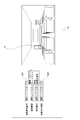
- the presentation processing unit F2 of this example presents information indicating a range corresponding to the selected object on the captured image as illustrated in FIGS. 11 and 12.
- the presentation processing unit F2 of this example serves as the object selection screen Gs, together with the pull-down buttons Bp (Bp1 to Bp4) for each of the various ranges described above, and the captured image acquired from the imaging device 2. Is displayed on the display unit 17.
- the captured image in this example, the captured image targeted by the object recognition unit F1 for the object recognition process is used.
- FIG. 11 shows an example of presenting range information when the “teacher” listed in the list is selected.
- FIG. 12 shows an example of presenting the frame information W when the “teaching platform” is selected.
- the object selection operation that triggers the presentation of the frame information W may be a mouseover operation in addition to the click operation and the tap operation. That is, it is also possible to make the captured image present information indicating the range corresponding to the mouse-over object in response to the mouse-over of the object in the list.
- the frame information W when the frame information W is presented, the brightness of the image area other than the range indicated by the frame information W is lowered so that the range corresponding to the selected object in the captured image is emphasized. It is also possible to perform display control such as.
- the shape and size of the frame are changed according to the drag operation on the frame presented as the frame information W. That is, the range corresponding to the selected object is changed (adjusted).
- the shape referred to here is only a shape in the category of a rectangle, and does not mean a change to a shape other than a rectangle.
- the tracking processing unit F3 waits for an operation of determining the range after the object is selected from the list for various ranges.
- the operation of determining the range is, for example, that the pull-down button Bp for the target range is re-operated (that is, the operation of closing the pull-down displayed list).
- the tracking processing unit F3 stores the information indicating the range.
- the tracking processing unit F3 waits for a selection completion operation, which is an operation indicating that selection has been completed for all of the various ranges, and when the selection completion operation is performed, performs setting processing for the various ranges. That is, for various ranges of the tracking start range, the tracking range, the search range, and the search exclusion range, a process of setting various ranges to be used at the time of tracking imaging is performed based on the range information stored according to the operation for determining the above range. .. At this time, the range information to be set is at least the coordinate information in the captured image.
- the image used for object recognition is taken at a wide angle with the zoom lens on the wide-angle side as much as possible (that is, at the wide end), while when tracking the subject, the angle of view is narrower than at the time of wide-angle imaging.
- the range information for various ranges information on the focal length at the time of wide-angle imaging is set in addition to the information on the coordinates described above.
- the range change operation is an operation for the frame
- the range change operation is, for example, an operation of dragging a part of the edge of the range that is inside the frame. It is also possible to use the operation of.
- the operation for changing the range may be at least an operation for information indicating the range.
- FIG. 14 is a flowchart showing a process related to the presentation of the selection screen Gs.
- the CPU 11 executes the wide-angle imaging process in step S101. That is, the imaging device 2 is controlled so that the wide-angle imaging described above is performed.
- step S102 following step S101 the CPU 11 acquires an captured image. That is, the image captured by the wide-angle image captured in step S101 is acquired from the image pickup device 2.
- step S103 the CPU 11 executes an object recognition process for the captured image. That is, by the above-mentioned processing as the object recognition unit F1, a recognition process is performed on a predetermined object such as the teacher's desk o1, the typeface on the board o2, the teacher's platform o3, the display o4, and the seat part o5.
- a recognition process is performed on a predetermined object such as the teacher's desk o1, the typeface on the board o2, the teacher's platform o3, the display o4, and the seat part o5.
- the CPU 11 executes a candidate list generation process based on the object recognition result in step S104. That is, in this example, a candidate list is generated based on the object recognition result for various ranges of the tracking start range, the tracking range, the search range, and the search exclusion range based on the correspondence information I1 shown in FIG. Specifically, for each of these various ranges, a list including all the actually recognized objects among the objects defined in the correspondence information I1 is generated.
- step S105 the CPU 11 performs a process of displaying the selection screen Gs as shown in FIG. 11 on the display unit 17 as a presentation process of the selection screen Gs, and ends a series of processes shown in FIG.
- the captured image obtained by wide-angle imaging is displayed on the selection screen Gs.
- the list corresponding to the range in which the pull-down button Bp is operated is displayed in a pull-down manner.
- FIG. 15 is a flowchart of processing corresponding to the process from the selection of the object to the determination of the range.
- the process shown in FIG. 15 is started in response to the presentation of the list of objects in response to the operation of the pull-down button Bp on the selection screen Gs.
- the CPU 11 executes the process shown in FIG. 15 for various ranges of the tracking start range, the tracking range, the search range, and the search exclusion range according to the operation of the user.
- step S201 the CPU 11 waits until the object is selected from the list, and when the object is selected from the list, the CPU 11 proceeds to step S202 to acquire the range information corresponding to the selected object. That is, for the selected object, information indicating the range of the object recognized by the object recognition process is acquired, and the range corresponding to the object is calculated and acquired based on the information.
- the range corresponding to the object is a range expanded from the range of the recognized object (at least a range expanded in the vertical direction). Therefore, in step S202, a range expanded beyond the recognized range is calculated and acquired.
- step S203 following step S202 the CPU 11 executes a process for presenting a frame based on the acquired range information on the captured image on the selection screen Gs. That is, as the frame information W described above, control is performed on the display unit 17 for displaying the frame information W indicating the range acquired in step S202 on the captured image on the selection screen Gs.
- step S204 the CPU 11 determines whether or not an operation on the frame has been performed, and if it determines that no operation on the frame has been performed, the range determination operation in step S205 (as described above, as described above). In this example, it is determined whether or not the pull-down button Bp has been re-operated. If it is determined that the range determination operation has not been performed, the CPU 11 returns to step S204. From the processes of steps S204 and S205, a loop process is formed that waits for either an operation on the frame or an operation for determining the range.
- step S204 If it is determined in step S204 that the operation for the frame has been performed, the CPU 11 proceeds to step S206, performs a process of changing the size and shape of the frame according to the operation, and returns to step S204.
- step S205 if it is determined in step S205 that the range determination operation has been performed, the CPU 11 proceeds to step S207 to execute the range storage process, and ends the series of processes shown in FIG.
- step S207 if the operation for the frame is not performed, the process of storing the information in the range acquired in step S202 is performed, and the operation for the frame is performed to change at least one of the size and the shape. In the case, the information indicating the range of the frame at the time when the range determination operation is performed is stored.
- FIG. 16 is a flowchart of processing related to the setting of various ranges.
- the CPU 11 waits until the selection completion operation of various ranges is performed.
- the selection completion operation of various ranges is, for example, the operation of the selection completion button (not shown) provided on the selection screen Gs. Therefore, in the process of step S301, the operation of the selection completion button is awaited.
- the CPU 11 acquires the coordinate information on the wide-angle captured image of the various ranges in step S302, and obtains the coordinate information of the various ranges and the focal length information of the wide-angle imaging in the following step S303.
- the process of storing is performed, and the series of processes shown in FIG. 16 is completed.
- the focal length information at the time of wide-angle imaging may be acquired from the imaging device 2, or the focal length information instructed to the imaging device 2 at the time of the wide-angle imaging process in step S101 may be used.
- the range information includes the pan and tilt angles when the coordinate information at the time of wide-angle imaging is set to the predetermined focal length. It may be converted into information and set.
- all the recognized objects are listed in the list of all ranges as described above, but the objects to be listed for each range are listed according to the selection history of the objects from the list of each range after that. You can also choose. For example, for each range, it is conceivable to adopt a method such as posting the objects up to the upper predetermined position, which were frequently selected from the list, in the list of the range.
- the CPU 11 sequentially stores information indicating which object has been selected as the selection history according to the object selection from the list for each range. Then, for example, after performing tracking imaging more than a predetermined number of times (that is, after collecting a predetermined number or more of history samples), when presenting the selection screen Gs, the selection history is referred to and selected for each of various ranges. Select the objects up to the upper predetermined position with the highest number of times as candidate objects to be listed. Then, at the time of presenting the list, the presenting process of the list on which the candidate object is posted is performed.
- FIG. 17 shows an example of the selection screen GsA in which a plurality of objects can be selected from the list.
- the selection screen GsA in the list of objects for the target range (the example of the tracking range is shown in the figure) among the tracking start range, the tracking range, the search range, and the search exclusion range, each object is displayed.
- a check box Cb is prepared in the box, and an object can be selected by checking the check box Cb.
- the CPU 11 indicates the target range (tracking range in the example in the figure) when the operation of determining the range indicated by the frame information W presented as described above is performed. Set to range.
- the tracking range is taken as an example, but similarly, for other ranges such as the tracking start range and the search range, the range including each object selected when a plurality of objects are selected from the list is included.
- the frame information W to be shown can be presented on the captured image.
- the tracking start range can be rephrased as a range in which the subject to be tracked is searched for at the start of tracking imaging.
- the tracking range can be rephrased as the range in which the subject to be tracked is searched during the tracking imaging.
- the search range is a range in which the subject is searched when the subject to be tracked is lost as described above. From these points, it can be said that the tracking start range, the tracking range, and the search range are all ranges in which the subject is searched.
- the search exclusion range is a range in which the subject search is not performed to prevent erroneous tracking of a subject other than the tracking target as described above, the object selected for the search exclusion range is other than the search exclusion range. If any of the tracking start range, the tracking range, and the search range of is selected, the range setting will be inconsistent.
- the following method is proposed in this example. That is, with respect to the candidate list for the range other than the search exclusion range and the candidate list for the search exclusion range, the object selected in one of the candidate lists is not presented in the other candidate list in a selectable state. Is what you do.
- FIG. 19 shows an example in which each object of the “teacher”, “teacher”, and “display” is selected from the candidate list for the tracking range.
- the CPU 11 is already selected on the tracking range side as shown in FIG. 20 when presenting the candidate list for the search exclusion range after the object is selected for the tracking range as described above.
- the list is presented so that the "display" is not displayed in a state in which the user can select it, for example, by displaying it in grayout.
- the corresponding object can be hidden instead of being grayed out.
- position history dependent range As candidates for various ranges related to tracking imaging, in addition to the range corresponding to the object, a range set based on the history information of the position of the subject (hereinafter referred to as "position history dependent range") can also be presented. ..
- position history reliance range a range through which the subject to be tracked often passes (a range through which the subject frequently passes) can be mentioned.
- the range through which the subject often passes can be rephrased as the range in which the subject is frequently detected, and therefore can be obtained based on the historical information of the position of the subject.
- the CPU 11 in this case generates information that accumulates the detection positions of the subject for each unit time (for example, every few seconds) when the subject is tracked and imaged in the past as the position history information. Then, based on the generated history information, the CPU 11 sets a range in which the detection frequency of the subject is above a certain level as a "well-passed range".
- the CPU 11 generates a list including the information indicating the "well-passed range" set as described above as one of the options.
- the list is generated for at least the tracking range of the tracking start range, the tracking range, the search range, and the search exclusion range. Then, the CPU 11 performs a process for presenting the generated list to the user.
- FIG. 23 is a diagram for explaining a presentation example of the list.
- the item of "well-passed range” is posted together with the information indicating the name of the object recognized from the captured image.
- the frame information W indicating the range is presented on the captured image.
- the position history reliance range is not limited to the "well-passed range".
- a place where the subject often stays a place where the subject frequently stops
- the range corresponding to the place where the subject often stays can be listed as the position history-based range.
- the range corresponding to the place where the detection frequency is low may be listed in the search exclusion range as the position history-based range. Conceivable.
- the position history reliance range can be set and divided for each subject to be tracked (that is, for each teacher in this example).
- the CPU 11 generates and stores the history information for each teacher as the position history information. Then, among the history information stored for each teacher, the position history reliance range is set based on the history information of the teacher to be tracked. At this time, it is conceivable that the teacher to be tracked is selected by the user operation. Alternatively, the CPU 11 may select which teacher is the teacher to be tracked based on the timetable information (including at least the start time of each lecture and the information indicating the teacher in charge) about the lecture given in the classroom. Conceivable.
- the position history reliance range can also be used as information for adjusting the range corresponding to the recognized object. For example, it is conceivable to make adjustments to widen or narrow the range corresponding to the "teacher” or “teacher” in consideration of the "well-passed range”.
- the embodiment is not limited to the specific examples described above, and various modifications can be considered.
- the information of the board writing area which is the area where the board writing is performed in the board typeface o2.
- the typeface is relatively long and the teacher is in a part of the area such as the corner of the typeface.
- it is conceivable to adjust the tracking range so as to narrow the tracking range from the range corresponding to the entire typeface to be boarded to a part of the range including the board writing area.
- the tracking range in a situation where a range including the "teacher” and the "typeface to be printed" is specified as the tracking range, at the start of the lecture (at the start of tracking imaging), only the range corresponding to the "teacher” is set as the tracking range to track the subject. It is also conceivable to expand the tracking range to include the "lecture table” and the "board typeface” in response to the detection of the board writing for the typeface to be boarded. It should be noted that the detection of writing on the board can be performed by using a character recognition technique such as OCR (Optical Character Recognition / Reader).
- OCR Optical Character Recognition / Reader
- control related to tracking may be performed according to a predetermined setting (initial setting). For example, when the tracking range is not selected, it is conceivable to set the pan / tilt driveable range as the tracking range. If the tracking start range or search range is not selected, it is conceivable to start tracking from the center position of the captured image. If the search exclusion range is not selected, it is conceivable to search the subject in the entire range.
- imaging for object recognition can also be performed by panoramic imaging.
- the CPU 11 in that case obtains a plurality of captured images by executing a plurality of imagings while panning and tilting the imaging device 2. Then, the captured images are panoramicly combined to generate a panoramic image, and the object recognition process is performed on the panoramic image. This makes it possible to appropriately set various ranges related to tracking even when the image pickup device 2 having no zoom function is used.
- this technology is a cutting position (cropping position) from the captured image.
- this technology is a cutting position (cropping position) from the captured image.
- the tracking process of the subject is a process of controlling the cutting position so that the subject continues to be positioned at a specific position in the output image frame of the captured image.
- the information processing device 1 can also be a device in which the image pickup device 2 is integrated. Further, the information processing device 1 may be a device in which the recording device 3 is integrated.
- this technology when performing tracking imaging for a teacher giving a lecture in a classroom has been given, but the example of a subject to be tracked in this technology is not limited to this. ..
- this technology can be suitably applied to a lecturer in an in-house training, a singer or a performer in a live music, etc. as a tracking target.
- the information processing apparatus (1) as the embodiment includes a presentation processing unit (F2) that performs a process of presenting a list of objects recognized by the object recognition process for the captured image to the user, and a presentation process. It is provided with a tracking processing unit (F3) that sets a tracking range of a subject corresponding to an object selected by a user from a list presented by the unit and performs tracking processing of the subject based on the set tracking range. ..
- the operation required for setting the tracking range of the subject can be at least the operation of selecting an object from the list. Therefore, it is possible to reduce the work load of the user related to the setting of the tracking range of the subject.
- the presentation processing unit performs a process of presenting a candidate list for the tracking range and a candidate list for the tracking start range of the subject as a list of objects, and the tracking processing unit.
- the presentation processing unit provides a list of candidates for the tracking range and a list of candidates for the search range, which is the search range of the subject when the subject is lost, as a list of objects.
- the tracking processing unit sets the search range corresponding to the selected object.
- the presentation processing unit provides a list of candidates for the tracking range and a list of candidates for the search exclusion range, which is a range to be excluded from the search target of the subject, as a list of objects.
- the tracking processing unit sets the search exclusion range corresponding to the selected object.
- the presentation processing unit includes a candidate list for the tracking range and a candidate list for another range, which is a range related to the tracking process different from the tracking range, as a list of objects. Is performed, and at least a part of the objects to be posted is presented as a candidate list for the tracking range and a candidate list for another range. This makes it possible to present an object suitable as a candidate for each tracking range and another range. Therefore, it is possible to prevent unnecessary candidates from being posted on the list, and it is possible to reduce the burden when the user selects an object from the candidate list.
- the presentation processing unit sets the tracking range, the candidate list for the tracking range, based on the correspondence information indicating the correspondence relationship of the objects to be posted on the candidate list for each tracking range.
- the process of presenting the candidate list for another range is being performed.
- the presentation processing unit uses a candidate list for the tracking range and a candidate list for another range, which is a range related to the tracking process different from the tracking range, as a list of objects.
- the process of presenting the candidate list for the tracking range and the candidate list for another range based on the selection history of the object from each candidate list is performed.
- the presentation processing unit presents a listing list of objects selected based on the number of selections in the selection history as a candidate list for the tracking range and a candidate list for another range. Processing is being performed. This makes it possible to present only objects that are presumed to be suitable for each range based on the number of selections in the past as candidates. Therefore, it is possible to reduce the burden when the user selects an object from the candidate list.
- the presentation processing unit when an object is selected from the list, performs a process of presenting information indicating a range corresponding to the selected object on the captured image. There is. As a result, the user can confirm the range of the object selected by himself / herself on the captured image. Therefore, the user can intuitively understand which range of the object is selected. Further, since the range can be confirmed not only on the character information indicating the range of the object but also on the captured image, it is possible to prevent an error in selecting the range.
- the presentation processing unit performs a process of changing the size or shape of the range according to the operation on the information indicating the range presented on the captured image.
- the user can select an object from the list to present information indicating the corresponding range, and then perform an operation on the information indicating the range to instruct to change the size or shape of the range. It will be possible. Therefore, it is possible to reduce the work load related to the setting of the range and to improve the degree of freedom in setting the range.
- the presentation processing unit when a plurality of objects are selected from the list, the presentation processing unit performs a process of presenting information indicating a range including each selected object on the captured image. Is going.
- the user may at least perform an operation of selecting those objects from the list. Therefore, it is possible to reduce the operational burden on the user related to the setting of the tracking range straddling a plurality of objects.
- the object selected in one of the candidate lists is the other candidate list.
- the candidate list is presented so that it is not presented in a selectable state.
- the object selected for the tracking range is also selected as the object for the search exclusion range
- the object selected as the object for the search exclusion range is also selected as the object for the tracking range. It is possible to prevent inconsistent selections such as squeezing. Therefore, it is possible to realize an appropriate range setting without any contradiction between the tracking range and the search exclusion range.
- the object selected in one of the candidate lists for the tracking range and the candidate list for the search exclusion range is the other candidate.
- the process of presenting the error information is being performed.
- an error notification is sent to the user in response to an inconsistent selection. Therefore, it is possible to prevent a setting contradiction between the tracking range and the search exclusion range.
- the presentation processing unit generates a list including information indicating the position history reliance range, which is a range set based on the history information of the position of the subject, as one of the options, and the user.
- the processing to be presented to is being performed. This makes it possible to present a range considered to be appropriate for tracking from the position history of the subject, such as a range through which the subject frequently passes, as a candidate for the tracking range. Therefore, as a candidate list for selecting the tracking range, an appropriate list considering the position history of the subject can be presented.
- the subject is a teacher
- the presentation processing unit relies on the position history based on the history information of the teacher to be tracked among the position history information stored for each teacher.
- the range is set. For example, one teacher moves frequently during a lecture and another teacher does not move much during a lecture, and the movement characteristics during a lecture may differ depending on the teacher.
- the range that is a candidate for the tracking range based on the position history information of the target teacher as described above, it is possible to present an appropriate candidate list that takes into consideration the movement characteristics of the target teacher during the lecture. can.
- the object recognition process at least one of the object of the teaching platform, the teacher's desk, and the typeface on the board is recognized, and the presentation processing unit is recognized by the object recognition process.
- the process of presenting a list including at least one of the teaching platform, the teaching table, and the typeface on the board to the user is performed. This makes it possible to set the tracking range based on the arrangement of the classroom where the lecture is given. Therefore, it is possible to set an appropriate range as the tracking range when tracking the teacher during the lecture.
- the information processing apparatus performs a process of presenting a list of objects recognized by the object recognition process for the captured image to the user, and the object selected by the user from the presented list is selected.
- This is an information processing method in which a tracking range of a corresponding subject is set, and tracking processing of the subject is performed based on the set tracking range.
- the information processing method as such an embodiment can also obtain the same operations and effects as the information processing apparatus as the above-described embodiment.
- the program of the embodiment performs a process of presenting a list of objects recognized by the object recognition process for the captured image to the user, sets a tracking range of the subject corresponding to the object selected by the user from the presented list, and sets the tracking range of the subject.
- This is a program that enables an information processing apparatus to realize a function of tracking a subject based on the set tracking range. That is, the program of the embodiment is a program that causes the information processing apparatus to execute the processes described in FIGS. 14 to 16 and the like.
- Such a program facilitates the realization of an information processing apparatus as an embodiment.
- a program can be stored in advance in a recording medium built in a device such as a computer device, a ROM in a microcomputer having a CPU, or the like.
- a removable recording medium such as a semiconductor memory, a memory card, an optical disk, a magneto-optical disk, or a magnetic disk.
- a removable recording medium can be provided as so-called package software.
- it can also be downloaded from a download site via a network such as a LAN (Local Area Network) or the Internet.
- LAN Local Area Network
- a presentation processing unit that performs a process of presenting a list of objects recognized by the object recognition process for the captured image to the user, and a presentation processing unit.
- the present processing unit includes a tracking processing unit that sets a tracking range of a subject corresponding to an object selected by the user from the list presented by the presentation processing unit, and performs tracking processing of the subject based on the set tracking range.
- Information processing device (2) The presentation processing unit As the list of the objects, a process of presenting the candidate list for the tracking range and the candidate list for the tracking start range of the subject is performed.
- the tracking processing unit The information processing apparatus according to (1) above, wherein when an object is selected from the candidate list for the tracking start range, the tracking start range corresponding to the selected object is set. (3) The presentation processing unit As the list of the objects, a process of presenting the candidate list for the tracking range and the candidate list for the search range which is the search range of the subject when the subject is lost is performed. The tracking processing unit The information processing apparatus according to (1) or (2), wherein when an object is selected from the candidate list for the search range, the search range corresponding to the selected object is set. (4) The presentation processing unit As the list of the objects, a process of presenting the candidate list for the tracking range and the candidate list for the search exclusion range, which is the range to be excluded from the search target of the subject, is performed.
- the tracking processing unit The information processing apparatus according to any one of (1) to (3) above, wherein when an object is selected from the candidate list for the search exclusion range, the search exclusion range corresponding to the selected object is set. (5) The presentation processing unit As the list of the objects, a process of presenting a candidate list for the tracking range and a candidate list for another range which is a range related to the tracking process different from the tracking range is performed, and a process is performed. The information processing according to any one of (1) to (4) above, wherein at least a part of the objects to be posted is presented as a candidate list for the tracking range and a candidate list for another range. Device.
- the presentation processing unit The process of presenting the candidate list for the tracking range and the candidate list for the different range is performed based on the correspondence information indicating the correspondence relationship of the objects to be posted on the candidate list for each of the tracking range and the different range.
- the information processing apparatus according to 5).
- the presentation processing unit As the list of the objects, a process of presenting a candidate list for the tracking range and a candidate list for another range which is a range related to the tracking process different from the tracking range is performed, and a process is performed.
- the presentation processing unit The information processing apparatus according to (7) above, which performs a process of presenting a listing list of objects selected based on the number of selections in the selection history as a candidate list for the tracking range and a candidate list for another range. .. (9)
- the presentation processing unit The information processing apparatus according to any one of (1) to (8) above, which performs a process of presenting information indicating a range corresponding to the selected object on a captured image when an object is selected from the list. .. (10)
- the presentation processing unit The information processing apparatus according to (9) above, which performs a process of changing the size or shape of the range in response to an operation on the information indicating the range presented on the captured image.
- the presentation processing unit The information processing apparatus according to (9) or (10) above, wherein when a plurality of objects are selected from the list, a process of presenting information indicating a range including each selected object on an captured image is performed. (12) The presentation processing unit Regarding the candidate list for the tracking range and the candidate list for the search exclusion range, the candidate list presentation process is performed so that the object selected in one of the candidate lists is not presented in the other candidate list in a selectable state. The information processing apparatus according to any one of (4) to (11) above. (13) The presentation processing unit Regarding the candidate list for the tracking range and the candidate list for the search exclusion range, when an object selected in one of the candidate lists is selected in the other candidate list, a process of presenting error information is performed.
- the information processing apparatus according to any one of (4) to (11).
- the presentation processing unit The list including the information indicating the position history reliance range, which is the range set based on the history information of the position of the subject, is generated as one of the options, and the process of presenting the list to the user is performed (1) to (13).
- the information processing device according to any one of.
- the subject is a teacher
- the presentation processing unit The information processing device according to (14), wherein the position history reliance range is set based on the history information of the teacher to be tracked among the history information of the positions stored for each teacher.
- In the object recognition process at least one of the objects of the teaching platform, the teacher's desk, and the typeface on the board is recognized.
- the presentation processing unit The information processing apparatus according to any one of (1) to (15) above, which performs a process of presenting the list including at least one of a teaching platform, a teaching table, and a typeface to be board recognized by the object recognition process to a user.
- Information processing device A process of presenting a list of objects recognized by the object recognition process for the captured image to the user is performed, a tracking range of the subject corresponding to the object selected by the user is set from the presented list, and the set tracking is performed. An information processing method that performs tracking processing for the subject based on a range.
- a process of presenting a list of objects recognized by the object recognition process for the captured image to the user is performed, a tracking range of the subject corresponding to the object selected by the user is set from the presented list, and the set tracking is performed.
- Tracking imaging system 1 Information processing device 2 Imaging device 11 CPU 16 Input unit 17 Display unit F1 Object recognition unit F2 Presentation processing unit F3 Tracking processing unit o1 Teacher o2 Board typeface o3 Teacher's platform o4 Display o5 Seat part Bp1, Bp2, Bp3, Bp4 Pull-down button Gs, GsA Selection screen W Frame information Cb check box
Landscapes
- Engineering & Computer Science (AREA)
- Multimedia (AREA)
- Signal Processing (AREA)
- Human Computer Interaction (AREA)
- Computer Vision & Pattern Recognition (AREA)
- Physics & Mathematics (AREA)
- General Physics & Mathematics (AREA)
- Theoretical Computer Science (AREA)
- Image Analysis (AREA)
- Studio Devices (AREA)
- Closed-Circuit Television Systems (AREA)
Abstract
Description
PTZカメラでは、ズーム機能を用いることで特定の被写体が画枠内で特定の大きさで捉えられるようにすることができ、また、パン・チルト機能を用いることで、いわゆる被写体の追尾として、特定の被写体が画枠内の中央位置等の特定位置に位置され続けるように撮像を行うことが可能とされている。
これにより、被写体の追尾範囲の設定にあたって必要な操作を、少なくともリストから物体を選択する操作のみとすることが可能とされる。
追尾開始範囲を設定することで、撮像開始時に被写体が存在するであろう範囲から被写体の追尾処理を開始することが可能となる。
探索範囲の設定により、追尾中の被写体をロストした際に、被写体が存在している可能性の高い範囲を対象として被写体の探索を行うことが可能となる。
探索除外範囲を設定することで、追尾対象外の被写体が存在することが想定される範囲等、対象とする被写体の追尾を適切に行う上で被写体探索範囲に含まれることが望ましくない範囲を除外して、被写体探索を行うことが可能となる。
これにより、追尾範囲、別範囲ごとにその候補として相応しい物体を提示することが可能となる。
これにより、対応関係情報を参照して候補リストを生成するという簡易な処理により、範囲ごとにその候補として相応しい物体のみを提示することが可能となる。
これにより、物体の選択履歴に基づいて、範囲ごとに相応しい物体のみを候補として提示することが可能となる。
これにより、過去における選択回数の多さから範囲ごとに相応しいと推定される物体のみを候補として提示することが可能となる。
これにより、ユーザは自らが選択した物体の範囲を撮像画像上において確認することが可能となる。
これにより、ユーザはリストからの物体の選択により対応する範囲を示す情報を提示させた上で、該範囲を示す情報に対する操作を行うことで、該範囲のサイズや形状の変更を指示することが可能となる。
これにより、複数の物体に跨がる追尾範囲の設定を希望する場合、ユーザは少なくともリストからそれら物体を選択する操作を行えばよい。
これにより、追尾範囲用に選択された物体が探索除外範囲用の物体としても選択されてしまったり、逆に探索除外範囲用の物体として選択された物体が追尾範囲用の物体としても選択されてしまったりする等、矛盾した選択が行われてしまうことの防止が図られる。
これにより、矛盾した選択が行われた場合に対応してユーザにエラー報知が行われる。
これにより、例えば被写体が頻繁に通る範囲等、被写体の位置履歴から追尾を行うのに適切と考えられる範囲を追尾範囲の候補として提示することが可能となる。
例えば、或る教師は講義中に頻繁に移動し、別の教師は講義中にあまり移動しない等、教師によって講義中における移動特性が異なる場合がある。
これにより、講義が行われる教室の配置物に基づいた追尾範囲の設定を行うことが可能とされる。
このような情報処理方法によっても、上記した本技術に係る情報処理装置と同様の作用が得られる。
このようなプログラムにより、上記した本技術に係る情報処理装置が実現される。
<1.追尾撮像システム>
[1-1.システムの構成]
[1-2.追尾撮像について]
<2.実施形態としての範囲設定手法>
<3.処理手順>
<4.各種変形例>
[4-1.第一変形例]
[4-2.第二変形例]
[4-3.第三変形例]
[4-4.第四変形例]
<5.その他変形例>
<6.実施形態のまとめ>
<7.本技術>
[1-1.システムの構成]
図1は、本技術に係る実施形態としての情報処理装置1を含んで構成される追尾撮像システム100の構成例を示したブロック図である。
図示のように追尾撮像システム100は、情報処理装置1、撮像装置2、及び記録装置3を少なくとも備える。
撮像装置2は、例えばCMOS(Complementary metal-oxide-semiconductor)イメージセンサやCCD(Charge Coupled Device)イメージセンサ等による撮像素子を備えて構成され、動画像による撮像画像データを生成可能とされている。撮像装置2で得られた撮像画像データは、情報処理装置1、及び記録装置3に出力される。
また、撮像装置2は、パン方向、チルト方向の角度情報や焦点距離の情報等のカメラ情報を情報処理装置1に出力する。
特に、本例の情報処理装置1は、画像解析機能の一つとして、特定の被写体を検出する被写体検出機能を有する。そして、情報処理装置1は、この被写体検出機能により特定の被写体を検出した場合は、該被写体を対象とした追尾処理を行う。ここで、被写体の追尾処理とは、対象とする被写体が、撮像画像の出力画枠内の特定位置に位置され続けるようにする処理を意味する。本例では、被写体の追尾は、パン、チルトによる撮像方向の制御により実現する。すなわち、この場合の追尾処理として情報処理装置1は、出力画枠内の特定位置に被写体が位置され続けるように、上述した制御信号により、撮像装置2のパン、チルトの制御を行う。
図示のように情報処理装置1は、CPU(Central Processing Unit)11、ROM(Read Only Memory)12、RAM(Random Access Memory)13、バス14、入出力インタフェース15、入力部16、表示部17、音声出力部18、記憶部19、通信部20、及びドライブ22を備えている。
CPU11、ROM12、及びRAM13は、バス14を介して相互に接続されている。このバス14にはまた、入出力インタフェース15も接続されている。
例えば入力部16としては、キーボード、マウス、キー、ダイヤル、タッチパネル、タッチパッド、リモートコントローラ等の各種の操作子や操作デバイスが想定される。
入力部16によりユーザの操作が検知され、入力された操作に応じた信号はCPU11によって解釈される。
表示部17は各種表示を行う表示部であり、例えば情報処理装置1の筐体に設けられるディスプレイデバイスであったり、情報処理装置1に接続される別体のディスプレイデバイス等により構成される。
表示部17は、CPU11の指示に基づいて表示画面上に各種の情報表示を実行する。例えば、表示部17はCPU11の指示に基づき、各種操作メニュー、アイコン、メッセージ等、即ちGUI(Graphical User Interface)としての表示を行う。また、表示部17は、撮像装置2から入力された撮像画像の表示を行うこともできる。
通信部20は、インターネット等の伝送路を介しての通信処理を行ったり、各種機器との有線/無線通信、バス通信などによる通信を行う。本例では、撮像装置2と情報処理装置1との間の通信はこの通信部20を介して行われる。
ドライブ22により、リムーバブル記録媒体21から画像ファイル等のデータファイルや、各種のコンピュータプログラムなどを読み出すことができる。読み出されたデータファイルは記憶部19に記憶されたり、データファイルに含まれる画像や音声が表示部17や音声出力部18で出力されたりする。またリムーバブル記録媒体21から読み出されたコンピュータプログラム等は必要に応じて記憶部19にインストールされる。
ここで、以下の説明では、追尾撮像システム100がレクチャ(講義)のキャプチャに用いられる例を挙げる。具体的には、教室等の講義が行われる室内を撮像する位置に撮像装置2が配置され、教師が講義を行う様子を撮像した撮像画像を得る。このとき、追尾の対象は教師とされ、撮像画像内に教師としての被写体が検出されると、該教師を対象とした追尾処理が開始される。
●追尾開始範囲(ホームポジション)
追尾を開始する範囲であり、この追尾開始範囲内に対象の被写体が現れたら追尾を開始する。
●追尾範囲
対象の被写体を追尾する範囲。例えば、パン方向の角度範囲とチルト方向の角度範囲とで定められる。換言すれば、パン方向、及びチルト方向の可動範囲全体を最大範囲としたとき、該最大範囲以下の範囲として定められる。
●探索範囲(リカバリーポジション)
追尾対象の被写体をロストした際に該被写体の探索を行う範囲。一般的には、追尾対象の被写体がよく通る領域を含む範囲として設定すべきものとなる。
●探索除外範囲(マスクエリア)
追尾のための被写体探索を行わない範囲。例えば、オーディエンスが居る場所など、追尾対象でない被写体が存在する範囲を設定することで、追尾対象でない被写体が誤追尾されてしまうことの防止が図られる。
先ず、図中のステップS1と示すように、各種範囲を設定済みか否かを判定し、設定済みでなければ、ステップS3に進んで各種範囲の設定処理を行う。すなわち、上記した追尾開始範囲、追尾範囲、探索範囲、及び探索除外範囲の各種範囲を設定するための処理を行う。
そして、ステップS3で各種範囲の設定処理を行ったことに応じ、ステップS4で追尾撮像を開始する。この追尾撮像では、ステップS3で設定した各種範囲の情報に基づいた追尾処理が行われる。
ステップS2で要設定変更であると判定した場合には、ステップS3の設定処理が行われた上で、ステップS4で追尾撮像開始となる。一方、ステップS2で要設定変更でないと判定した場合は、ステップS3の設定処理がパスされ、ステップS4で追尾撮像開始となる。
このため従来では、ユーザに多大な作業負担を強いるものとなっている。
図4は、情報処理装置1のCPU11が有する各種機能をブロック化して示した機能ブロック図である。なお、図4ではCPU11が有する各種機能のうち追尾撮像に係る一部機能のみをブロック化して示している。
図示のようにCPU11は、物体認識部F1、提示処理部F2、及び追尾処理部F3としての機能を有している。
例えば、図5に示すような一般物体認識技術を用いて、画像内に映し出される物体の位置や物体の名称(カテゴリ)を特定する。或いは、図6に示すようなセマンティックセグメンテーションを用いて、物体の位置や名称を特定することもできる。
前述のように本実施形態では撮像対象とする環境が講義の行われる教室とされるため、物体認識処理での認識の対象とされる物体は、教室内に配置される各種の物体となる。
図7では、教卓o1、被板書体o2、教壇o3、ディスプレイo4、及び座席部o5が配置された教室の例を示している。ここで、被板書体o2とは、教師による板書が行われる媒体を意味し、例えば黒板やホワイトボード等が該当する。ディスプレイo4は、例えば講義時に参照される画像を表示出力する表示装置であり、座席部o5は、生徒等の受講者が着座する座席や机が配置された部分を意味する。
以下で説明するように、本例では、提示処理部F2は、追尾範囲のみでなく、前述した追尾開始範囲、探索範囲、及び探索除外範囲の各範囲について物体のリストを提示するものとされ、これに対応して追尾処理部F3は、これら各範囲のリストからのユーザによる物体選択の結果に基づき、追尾開始範囲、追尾範囲、探索範囲、及び探索除外範囲をそれぞれ設定する。そして、設定したこれらの各範囲の情報に基づいて、被写体の追尾処理を実行する。
図9Aは、各種範囲の設定にあたって提示処理部F2が表示部17に表示させる操作受付用の画像(GUI)の例を示している。
この操作受付用の画像においては、追尾開始範囲、追尾範囲、探索範囲、探索除外範囲の各種範囲ごとに、プルダウンボタンBpが表示される。ここでは各プルダウンボタンBpを区別するため、追尾開始範囲、追尾範囲、探索範囲、探索除外範囲のプルダウンボタンBpの符号を図示のように「Bp1」「Bp2」「Bp3」「Bp4」と表記する。
プルダウンボタンBpの操作に応じて、操作されたプルダウンボタンBpに対応する範囲についての物体のリストがプルダウン表示される。図示の例では、プルダウンボタンBp1の操作に応じ、追尾開始範囲に対応する物体のリストとして「教壇」「被板書体」「教卓」を掲載したリストが表示され、また、プルダウンボタンBp4の操作に応じ、探索除外範囲に対応する物体のリストとして「座席部」「ディスプレイ」を掲載したリストが表示されている。
また、追尾処理部F3は、探索除外範囲のリストから「座席部」が選択された場合には、座席部o5の位置に対応した範囲を探索除外範囲として設定する。追尾範囲、探索範囲についても同様に、追尾処理部F3は、プルダウンボタンBp2、Bp3の操作によりプルダウン表示されたリストからの物体の選択があった場合に、該選択された物体の位置に応じた範囲をそれぞれ追尾範囲、探索範囲として設定する。
本例では、少なくとも一部の範囲間で異なる物体が掲載されるようにしている。
図10に示すように対応関係情報I1は、追尾開始範囲、追尾範囲、探索範囲、探索除外範囲の各種範囲ごとに、リストへの掲載対象とする物体の識別情報(例えば、名称情報)が対応づけられた情報とされる。具体的に、本例の対応関係情報I1では、追尾開始範囲のリストへの掲載対象物体として「教卓」「教壇」「被板書体」が定められ、追尾範囲のリストへの掲載対象物体として「教卓」「教壇」「被板書体」「ディスプレイ」が定められている。また、探索範囲のリストへの掲載対象物体として「教卓」「教壇」「被板書体」が定められ、探索除外範囲のリストへの掲載対象物体として「座席部」「ディスプレイ」が定められている。
前述のように座席部o5は追尾対象でない被写体が存在する場所となるため、追尾範囲に含まれてしまうと安定した被写体追尾を実現することが困難となる虞がある。このため本例では、探索除外範囲のリストには「座席部」を掲載するが、追尾範囲のリストには「座席部」を掲載しないようにしている。
追尾開始範囲や探索範囲についても、「座席部」について追尾範囲と同様のことが言えるため、本例では、これら追尾開始範囲、探索範囲のリストについても、「座席部」は掲載しないものとしている。
図11、図12に示すように、本例の提示処理部F2は、物体の選択画面Gsとして、前述した各種範囲ごとのプルダウンボタンBp(Bp1からBp4)と共に、撮像装置2より取得した撮像画像を配置した画面を表示部17に表示させる。この撮像画像として、本例では物体認識部F1が物体認識処理の対象とした撮像画像を用いる。
図11では、リストに掲載された「教卓」が選択された場合における範囲情報の提示例を示している。本例では、選択された物体に対応する範囲として、矩形の範囲を設定するものとされ、これに対応し範囲情報としては、選択された物体に対応する範囲の外縁を示す枠情報Wを提示する。
図12は、「教壇」が選択された場合における枠情報Wの提示例を示している。
本例では、枠情報Wとして提示された枠に対するドラッグ操作に応じて、該枠の形状、サイズの変更を行う。すなわち、選択された物体に対応する範囲についての変更(調整)を行うものである。なお、ここで言う形状とは、あくまで矩形の範疇における形状であって、矩形以外の形状への変更は意味していない。
範囲を確定する操作が行われた場合、追尾処理部F3は、範囲を示す情報を記憶する。
このとき、設定する範囲情報としては、少なくとも撮像画像における座標の情報とする。
図14から図16のフローチャートを参照し、上記した実施形態としての範囲設定手法を実現するために実行すべき具体的な処理の手順を説明する。
なお、ここでは実施形態としての範囲設定手法を実現するための処理がCPU11のソフトウェア処理で実現される場合を例示するが、以下で説明する処理をハードウェアにより実現することもできる。
先ず、CPU11はステップS101で、広角撮像処理を実行する。すなわち、前述した広角撮像が行われるように撮像装置2を制御する。
前述のように、本例では、選択画面Gsには広角撮像で得られた撮像画像を表示させる。また、選択画面Gsにおいては、プルダウンボタンBpの操作に応じて、ステップS104で生成したリストのうち、プルダウンボタンBpが操作された範囲に対応するリストをプルダウン表示させる。
なお、図15に示す処理は、選択画面GsにおけるプルダウンボタンBpの操作に応じて物体のリストが提示されたことに応じて開始される。CPU11は、ユーザの操作に応じて図15に示す処理を追尾開始範囲、追尾範囲、探索範囲、探索除外範囲の各種範囲について実行する。
先ず、CPU11はステップS301で、各種範囲の選択完了操作が行われるまで待機する。本例において、各種範囲の選択完了操作は、例えば選択画面Gsに設けられた不図示の選択完了ボタンの操作とされ、従ってステップS301の処理では、該選択完了ボタンの操作を待機する。
ここで、広角撮像時の焦点距離情報は、撮像装置2から取得してもよいし、先のステップS101の広角撮像処理時に撮像装置2に指示した焦点距離の情報を用いてもよい。
また、追尾撮像時における焦点距離が予め所定の焦点距離に定められている場合には、範囲の情報としては、広角撮像時の座標情報を該所定の焦点距離としたときのパン、チルトの角度情報に換算して設定してもよい。
[4-1.第一変形例]
ここで、上記では、リストに掲載する物体を対応関係情報I1で予め定めておく例を挙げたが、対応関係情報I1を用いることは必須ではない。
例えば、追尾開始範囲、追尾範囲、探索範囲、探索除外範囲の全てについて、物体認識処理で認識された全ての物体をリストに掲載するという手法を採ることもできる。
従って、ユーザが候補リストから物体を選択する際の負担軽減を図るにあたり、対応関係情報I1を人手により予め作成しておく必要がなくなり、情報処理装置1の開発に係る作業負担軽減を図ることができる。
これまでの説明では、範囲の設定にあたり、リストから一つの物体のみを選択させる例を挙げたが、複数の物体を選択可能とすることもできる。
図17は、リストから複数の物体を選択可能とした選択画面GsAの例を示している。
図示のように選択画面GsAでは、追尾開始範囲、追尾範囲、探索範囲、探索除外範囲のうち対象とする範囲(図中では追尾範囲の例を示している)についての物体のリストにおいて、物体ごとにチェックボックスCbが用意されており、このチェックボックスCbにチェックを入れる操作により、物体の選択が可能とされている。
従って、複数の物体に跨がる追尾範囲の設定に係るユーザの操作負担の軽減を図ることができる。
ここで、追尾開始範囲は、追尾撮像の開始時において追尾対象とする被写体の探索が行われる範囲と換言することができる。また、追尾範囲は、追尾撮像中において追尾対象とする被写体の探索が行われる範囲と換言することができる。探索範囲は、前述のように追尾対象とする被写体をロストした際に該被写体の探索を行う範囲である。これらの点より、追尾開始範囲、追尾範囲、及び探索範囲は、何れも、被写体の探索が行われる範囲であると換言できるものである。
一方で、探索除外範囲は、前述のように追尾対象以外の被写体に対する誤追尾防止のために被写体探索を行わない範囲であるため、仮に、探索除外範囲について選択された物体が、探索除外範囲以外の追尾開始範囲、追尾範囲、探索範囲の何れかにおいても選択された場合には、範囲設定の矛盾が生じてしまう。
図19では、追尾範囲用の候補リストから「教卓」「教壇」「ディスプレイ」の各物体が選択された例を示している。
この場合におけるCPU11は、上記のような追尾範囲についての物体選択が行われた後、探索除外範囲についての候補リストを提示する際に、図20に示すように、追尾範囲側で既に選択されている「ディスプレイ」について、例えばグレーアウト表示させる等、ユーザによる選択が可能な状態での表示が行われないようにリストの提示処理を行う。
図21及び図22は、具体例の説明図であり、例えば図21に示すように追尾範囲用の候補リストから「教卓」「教壇」「ディスプレイ」の各物体が選択された後、探索除外範囲についての候補リストから「ディスプレイ」が選択された場合は、該「ディスプレイ」が選択できない旨のエラー情報の提示処理を行う。
追尾撮像に係る各種範囲の候補としては、物体に対応した範囲以外にも、被写体の位置の履歴情報に基づいて設定した範囲(以下「位置履歴依拠範囲」と表記する)を提示することもできる。
位置履歴依拠範囲の一例としては、追尾対象とする被写体がよく通る範囲(頻繁に通る範囲)を挙げることができる。被写体がよく通る範囲とは、被写体の検出頻度が高い範囲と換言することができるものであり、従って、被写体の位置の履歴情報に基づき求めることができる。
そして、CPU11は、生成したリストを、ユーザに対して提示するための処理を行う。
図示のようにこの場合のリストでは、撮像画像から認識された物体の名称を示す情報と共に、「よく通る範囲」の項目が掲載される。本例では、この「よく通る範囲」についても、選択操作が行われた場合にはその範囲を示す枠情報Wを撮像画像上に提示するものとしている。
その場合、CPU11は、位置の履歴情報として教師ごとの履歴情報を生成・記憶しておく。そして、教師ごとに記憶された履歴情報のうち、追尾対象とする教師の履歴情報に基づいて、位置履歴依拠範囲の設定を行う。このとき、追尾対象とする教師が何れの教師であるかは、ユーザ操作により選択させることが考えられる。或いは、教室で行われる講義についての時間割情報(少なくとも講義ごとの開始時刻、及び担当教師を示す情報を含む)に基づき、CPU11が追尾対象とする教師が何れの教師であるかを選択することも考えられる。
実施形態としては、上記により説明した具体例に限定されるものでなく、多様な変形例が考えられる。
例えば、追尾に係る各種範囲の設定や調整を行う際には、被板書体o2において板書が行われた領域である板書領域の情報を参照することもできる。
例えば、追尾範囲として「被板書体」に対応する範囲が設定されて被写体の追尾が行われている状況において、被板書体が比較的横長で、教師が被板書体の隅などの一部領域にしか板書を行っていない状況においては、追尾範囲を、被板書体全体に対応した範囲から、板書領域を含む一部の範囲に狭めるように調整するといったことが考えられる。
或いは、追尾範囲として「教卓」と「被板書体」とを含む範囲が指示された状況において、講義開始時(追尾撮像開始時)は「教卓」に対応した範囲のみを追尾範囲として被写体の追尾を行い、被板書体に対する板書が検出されたことに応じ、追尾範囲を「教卓」と「被板書体」とを含む範囲に拡大して追尾を行うということも考えられる。
なお、板書の検出は、OCR(Optical Character Recognition/Reader:光学的文字認識)などによる文字認識技術を用いて行うことができる。
例えば、追尾範囲を選択しない場合には、パン・チルトの駆動可能範囲を追尾範囲として設定することが考えられる。また、追尾開始範囲や探索範囲を選択しない場合には、撮像画像の中心位置から追尾を開始することが考えられる。また、探索除外範囲を選択しない場合には全範囲で被写体を探索することが考えられる。
これにより、ズーム機能のない撮像装置2が用いられる場合にも追尾に係る各種範囲を適切に設定することが可能となる。
このような切り出し位置の制御により被写体の追尾画像を得る場合において、被写体の追尾処理とは、撮像画像の出力画枠内の特定位置に被写体が位置され続けるように切り出し位置を制御する処理であると定義できる。
上記のように実施形態としての情報処理装置(同1)は、撮像画像についての物体認識処理で認識された物体のリストをユーザに提示する処理を行う提示処理部(同F2)と、提示処理部が提示したリストからユーザにより選択された物体に対応する被写体の追尾範囲を設定し、該設定した追尾範囲に基づいて被写体の追尾処理を行う追尾処理部(同F3)と、を備えている。
これにより、被写体の追尾範囲の設定にあたって必要な操作を、少なくともリストから物体を選択する操作のみとすることが可能とされる。
従って、被写体の追尾範囲の設定に係るユーザの作業負担の軽減を図ることができる。
追尾開始範囲を設定することで、撮像開始時に被写体が存在するであろう範囲から被写体の追尾処理を開始することが可能となる。
従って、被写体の追尾がスムーズに開始されるように図ることができる。
探索範囲の設定により、追尾中の被写体をロストした際に、被写体が存在している可能性の高い範囲を対象として被写体の探索を行うことが可能となる。
従って、被写体のロスト後における追尾の再開がスムーズに行われるように図ることができる。
探索除外範囲を設定することで、追尾対象外の被写体が存在することが想定される範囲等、対象とする被写体の追尾を適切に行う上で被写体探索範囲に含まれることが望ましくない範囲を除外して、被写体探索を行うことが可能となる。
従って、被写体の追尾性能の向上を図ることができる。
これにより、追尾範囲、別範囲ごとにその候補として相応しい物体を提示することが可能となる。
従って、リスト上に不要な候補が掲載されることの防止を図ることができ、ユーザが候補リストから物体を選択する際の負担軽減を図ることができる。
これにより、対応関係情報を参照して候補リストを生成するという簡易な処理により、範囲ごとにその候補として相応しい物体のみを提示することが可能となる。
従って、ユーザが候補リストから物体を選択する際の負担軽減を簡易な処理で実現することができる。
これにより、物体の選択履歴に基づいて、範囲ごとに相応しい物体のみを候補として提示することが可能となる。
従って、ユーザが候補リストから物体を選択する際の負担軽減を図ることができる。また、そのような負担軽減を図るにあたり、各範囲と物体との対応関係を示す対応関係情報を人手により予め作成しておく必要がなくなり、情報処理装置の開発に係る作業負担軽減を図ることができる。
これにより、過去における選択回数の多さから範囲ごとに相応しいと推定される物体のみを候補として提示することが可能となる。
従って、ユーザが候補リストから物体を選択する際の負担軽減を図ることができる。
これにより、ユーザは自らが選択した物体の範囲を撮像画像上において確認することが可能となる。
従って、何れの物体の範囲を選択したかをユーザに直感的に理解させることができる。
また、物体の範囲を示す文字情報だけでなく撮像画像上で範囲を確認できるため、範囲の選択ミスを生じ難くすることができる。
これにより、ユーザはリストからの物体の選択により対応する範囲を示す情報を提示させた上で、該範囲を示す情報に対する操作を行うことで、該範囲のサイズや形状の変更を指示することが可能となる。
従って、範囲の設定に係る作業負担の軽減と、範囲の設定自由度向上との両立を図ることができる。
これにより、複数の物体に跨がる追尾範囲の設定を希望する場合、ユーザは少なくともリストからそれら物体を選択する操作を行えばよい。
従って、複数の物体に跨がる追尾範囲の設定に係るユーザの操作負担の軽減を図ることができる。
これにより、追尾範囲用に選択された物体が探索除外範囲用の物体としても選択されてしまったり、逆に探索除外範囲用の物体として選択された物体が追尾範囲用の物体としても選択されてしまったりする等、矛盾した選択が行われてしまうことの防止が図られる。
従って、追尾範囲と探索除外範囲とについて矛盾のない適切な範囲設定を実現することができる。
これにより、矛盾した選択が行われた場合に対応してユーザにエラー報知が行われる。
従って、追尾範囲と探索除外範囲とについて設定矛盾が生じてしまうことの防止を図ることができる。
これにより、例えば被写体が頻繁に通る範囲等、被写体の位置履歴から追尾を行うのに適切と考えられる範囲を追尾範囲の候補として提示することが可能となる。
従って、追尾範囲を選択するための候補リストとして、被写体の位置履歴を考慮した適切なリストを提示することができる。
例えば、或る教師は講義中に頻繁に移動し、別の教師は講義中にあまり移動しない等、教師によって講義中における移動特性が異なる場合がある。
上記のように対象とする教師の位置履歴情報に基づいて追尾範囲の候補となる範囲を設定することで、対象とする教師の講義中における移動特性を考慮した適切な候補リストを提示することができる。
これにより、講義が行われる教室の配置物に基づいた追尾範囲の設定を行うことが可能とされる。
従って、講義中の教師を対象として追尾を行う際の追尾範囲として適切な範囲の設定を行うことができる。
このような実施形態としての情報処理方法によっても、上記した実施形態としての情報処理装置と同様の作用及び効果を得ることができる。
すなわち、実施形態のプログラムは、図14から図16等で説明した処理を情報処理装置に実行させるプログラムである。
そしてこのようなプログラムは、コンピュータ装置等の機器に内蔵されている記録媒体や、CPUを有するマイクロコンピュータ内のROM等に予め記憶しておくことができる。或いは、半導体メモリ、メモリカード、光ディスク、光磁気ディスク、磁気ディスク等のリムーバブル記録媒体に、一時的あるいは永続的に格納(記憶)しておくことができる。またこのようなリムーバブル記録媒体は、いわゆるパッケージソフトウェアとして提供することができる。
また、このようなプログラムは、リムーバブル記録媒体からパーソナルコンピュータ等にインストールする他、ダウンロードサイトから、LAN(Local Area Network)、インターネットなどのネットワークを介してダウンロードすることもできる。
なお本技術は以下のような構成も採ることができる。
(1)
撮像画像についての物体認識処理で認識された物体のリストをユーザに提示する処理を行う提示処理部と、
前記提示処理部が提示した前記リストから前記ユーザにより選択された物体に対応する被写体の追尾範囲を設定し、該設定した追尾範囲に基づいて前記被写体の追尾処理を行う追尾処理部と、を備える
情報処理装置。
(2)
前記提示処理部は、
前記物体のリストとして、前記追尾範囲用の候補リストと、前記被写体の追尾開始範囲用の候補リストとを提示する処理を行い、
前記追尾処理部は、
前記追尾開始範囲用の候補リストから物体が選択された場合は、該選択された物体に対応する前記追尾開始範囲を設定する
前記(1)に記載の情報処理装置。
(3)
前記提示処理部は、
前記物体のリストとして、前記追尾範囲用の候補リストと、前記被写体をロストした際の前記被写体の探索範囲である探索範囲用の候補リストとを提示する処理を行い、
前記追尾処理部は、
前記探索範囲用の候補リストから物体が選択された場合は、該選択された物体に対応する前記探索範囲を設定する
前記(1)又は(2)に記載の情報処理装置。
(4)
前記提示処理部は、
前記物体のリストとして、前記追尾範囲用の候補リストと、前記被写体の探索対象から除外する範囲である探索除外範囲用の候補リストとを提示する処理を行い、
前記追尾処理部は、
前記探索除外範囲用の候補リストから物体が選択された場合は、該選択された物体に対応する前記探索除外範囲を設定する
前記(1)から(3)の何れかに記載の情報処理装置。
(5)
前記提示処理部は、
前記物体のリストとして、前記追尾範囲用の候補リストと、前記追尾範囲とは別の前記追尾処理に係る範囲である別範囲用の候補リストとを提示する処理を行うと共に、
前記追尾範囲用の候補リスト及び前記別範囲用の候補リストとして、掲載される物体の少なくとも一部が異なるリストを提示する処理を行う
前記(1)から(4)の何れかに記載の情報処理装置。
(6)
前記提示処理部は、
前記追尾範囲、前記別範囲ごとに候補リストに掲載する物体の対応関係を示した対応関係情報に基づき、前記追尾範囲用の候補リスト、前記別範囲用の候補リストを提示する処理を行う
前記(5)に記載の情報処理装置。
(7)
前記提示処理部は、
前記物体のリストとして、前記追尾範囲用の候補リストと、前記追尾範囲とは別の前記追尾処理に係る範囲である別範囲用の候補リストとを提示する処理を行うと共に、
前記追尾範囲用の候補リスト、前記別範囲用の候補リストを、それぞれの候補リストからの物体の選択履歴に基づいて提示する処理を行う
前記(1)から(6)の何れかに記載の情報処理装置。
(8)
前記提示処理部は、
前記追尾範囲用の候補リスト及び前記別範囲用の候補リストとして、前記選択履歴における選択回数の多さに基づき選出した物体の掲載リストを提示する処理を行う
前記(7)に記載の情報処理装置。
(9)
前記提示処理部は、
前記リストから物体が選択された場合に、該選択された物体に対応する範囲を示す情報を撮像画像上に提示する処理を行う
前記(1)から(8)の何れかに記載の情報処理装置。
(10)
前記提示処理部は、
前記撮像画像上に提示された前記範囲を示す情報に対する操作に応じて、前記範囲のサイズ又は形状を変化させる処理を行う
前記(9)に記載の情報処理装置。
(11)
前記提示処理部は、
前記リストから複数の物体が選択された場合は、選択された各物体を内包する範囲を示す情報を撮像画像上に提示する処理を行う
前記(9)又は(10)に記載の情報処理装置。
(12)
前記提示処理部は、
前記追尾範囲用の候補リストと前記探索除外範囲用の候補リストとについて、何れか一方の候補リストで選択された物体が他方の候補リストに選択可能な状態で提示されないように候補リストの提示処理を行う
前記(4)から(11)の何れかに記載の情報処理装置。
(13)
前記提示処理部は、
前記追尾範囲用の候補リストと前記探索除外範囲用の候補リストとについて、何れか一方の候補リストで選択された物体が他方の候補リストで選択された場合は、エラー情報を提示する処理を行う
前記(4)から(11)の何れかに記載の情報処理装置。
(14)
前記提示処理部は、
前記被写体の位置の履歴情報に基づき設定した範囲である位置履歴依拠範囲を示す情報を選択肢の一つとして含む前記リストを生成し、前記ユーザに提示する処理を行う
前記(1)から(13)の何れかに記載の情報処理装置。
(15)
前記被写体は教師であり、
前記提示処理部は、
教師ごとに記憶された前記位置の履歴情報のうち、追尾対象とする教師の前記履歴情報に基づいて前記位置履歴依拠範囲の設定を行う
前記(14)に記載の情報処理装置。
(16)
前記物体認識処理では、教壇、教卓、被板書体の少なくとも何れかの物体の認識処理が行われ、
前記提示処理部は、
前記物体認識処理で認識された教壇、教卓、被板書体の少なくとも何れかを含む前記リストをユーザに提示する処理を行う
前記(1)から(15)の何れかに記載の情報処理装置。
(17)
情報処理装置が、
撮像画像についての物体認識処理で認識された物体のリストをユーザに提示する処理を行い、提示した前記リストから前記ユーザにより選択された物体に対応する被写体の追尾範囲を設定し、該設定した追尾範囲に基づいて前記被写体の追尾処理を行う
情報処理方法。
(18)
撮像画像についての物体認識処理で認識された物体のリストをユーザに提示する処理を行い、提示した前記リストから前記ユーザにより選択された物体に対応する被写体の追尾範囲を設定し、該設定した追尾範囲に基づいて前記被写体の追尾処理を行う機能を、情報処理装置に実現させる
プログラム。
1 情報処理装置
2 撮像装置
11 CPU
16 入力部
17 表示部
F1 物体認識部
F2 提示処理部
F3 追尾処理部
o1 教卓
o2 被板書体
o3 教壇
o4 ディスプレイ
o5 座席部
Bp1,Bp2,Bp3,Bp4 プルダウンボタン
Gs,GsA 選択画面
W 枠情報
Cb チェックボックス
Claims (18)
- 撮像画像についての物体認識処理で認識された物体のリストをユーザに提示する処理を行う提示処理部と、
前記提示処理部が提示した前記リストから前記ユーザにより選択された物体に対応する被写体の追尾範囲を設定し、該設定した追尾範囲に基づいて前記被写体の追尾処理を行う追尾処理部と、を備える
情報処理装置。 - 前記提示処理部は、
前記物体のリストとして、前記追尾範囲用の候補リストと、前記被写体の追尾開始範囲用の候補リストとを提示する処理を行い、
前記追尾処理部は、
前記追尾開始範囲用の候補リストから物体が選択された場合は、該選択された物体に対応する前記追尾開始範囲を設定する
請求項1に記載の情報処理装置。 - 前記提示処理部は、
前記物体のリストとして、前記追尾範囲用の候補リストと、前記被写体をロストした際の前記被写体の探索範囲である探索範囲用の候補リストとを提示する処理を行い、
前記追尾処理部は、
前記探索範囲用の候補リストから物体が選択された場合は、該選択された物体に対応する前記探索範囲を設定する
請求項1に記載の情報処理装置。 - 前記提示処理部は、
前記物体のリストとして、前記追尾範囲用の候補リストと、前記被写体の探索対象から除外する範囲である探索除外範囲用の候補リストとを提示する処理を行い、
前記追尾処理部は、
前記探索除外範囲用の候補リストから物体が選択された場合は、該選択された物体に対応する前記探索除外範囲を設定する
請求項1に記載の情報処理装置。 - 前記提示処理部は、
前記物体のリストとして、前記追尾範囲用の候補リストと、前記追尾範囲とは別の前記追尾処理に係る範囲である別範囲用の候補リストとを提示する処理を行うと共に、
前記追尾範囲用の候補リスト及び前記別範囲用の候補リストとして、掲載される物体の少なくとも一部が異なるリストを提示する処理を行う
請求項1に記載の情報処理装置。 - 前記提示処理部は、
前記追尾範囲、前記別範囲ごとに候補リストに掲載する物体の対応関係を示した対応関係情報に基づき、前記追尾範囲用の候補リスト、前記別範囲用の候補リストを提示する処理を行う
請求項5に記載の情報処理装置。 - 前記提示処理部は、
前記物体のリストとして、前記追尾範囲用の候補リストと、前記追尾範囲とは別の前記追尾処理に係る範囲である別範囲用の候補リストとを提示する処理を行うと共に、
前記追尾範囲用の候補リスト、前記別範囲用の候補リストを、それぞれの候補リストからの物体の選択履歴に基づいて提示する処理を行う
請求項1に記載の情報処理装置。 - 前記提示処理部は、
前記追尾範囲用の候補リスト及び前記別範囲用の候補リストとして、前記選択履歴における選択回数の多さに基づき選出した物体の掲載リストを提示する処理を行う
請求項7に記載の情報処理装置。 - 前記提示処理部は、
前記リストから物体が選択された場合に、該選択された物体に対応する範囲を示す情報を撮像画像上に提示する処理を行う
請求項1に記載の情報処理装置。 - 前記提示処理部は、
前記撮像画像上に提示された前記範囲を示す情報に対する操作に応じて、前記範囲のサイズ又は形状を変化させる処理を行う
請求項9に記載の情報処理装置。 - 前記提示処理部は、
前記リストから複数の物体が選択された場合は、選択された各物体を内包する範囲を示す情報を撮像画像上に提示する処理を行う
請求項9に記載の情報処理装置。 - 前記提示処理部は、
前記追尾範囲用の候補リストと前記探索除外範囲用の候補リストとについて、何れか一方の候補リストで選択された物体が他方の候補リストに選択可能な状態で提示されないように候補リストの提示処理を行う
請求項4に記載の情報処理装置。 - 前記提示処理部は、
前記追尾範囲用の候補リストと前記探索除外範囲用の候補リストとについて、何れか一方の候補リストで選択された物体が他方の候補リストで選択された場合は、エラー情報を提示する処理を行う
請求項4に記載の情報処理装置。 - 前記提示処理部は、
前記被写体の位置の履歴情報に基づき設定した範囲である位置履歴依拠範囲を示す情報を選択肢の一つとして含む前記リストを生成し、前記ユーザに提示する処理を行う
請求項1に記載の情報処理装置。 - 前記被写体は教師であり、
前記提示処理部は、
教師ごとに記憶された前記位置の履歴情報のうち、追尾対象とする教師の前記履歴情報に基づいて前記位置履歴依拠範囲の設定を行う
請求項14に記載の情報処理装置。 - 前記物体認識処理では、教壇、教卓、被板書体の少なくとも何れかの物体の認識処理が行われ、
前記提示処理部は、
前記物体認識処理で認識された教壇、教卓、被板書体の少なくとも何れかを含む前記リストをユーザに提示する処理を行う
請求項1に記載の情報処理装置。 - 情報処理装置が、
撮像画像についての物体認識処理で認識された物体のリストをユーザに提示する処理を行い、提示した前記リストから前記ユーザにより選択された物体に対応する被写体の追尾範囲を設定し、該設定した追尾範囲に基づいて前記被写体の追尾処理を行う
情報処理方法。 - 撮像画像についての物体認識処理で認識された物体のリストをユーザに提示する処理を行い、提示した前記リストから前記ユーザにより選択された物体に対応する被写体の追尾範囲を設定し、該設定した追尾範囲に基づいて前記被写体の追尾処理を行う機能を、情報処理装置に実現させる
プログラム。
Priority Applications (4)
| Application Number | Priority Date | Filing Date | Title |
|---|---|---|---|
| CN202080092396.0A CN114930802B (zh) | 2020-01-14 | 2020-11-24 | 信息处理器、信息处理方法和程序产品 |
| US17/791,421 US12231762B2 (en) | 2020-01-14 | 2020-11-24 | Information processor, information processing method, and program |
| EP20913534.2A EP4075787A4 (en) | 2020-01-14 | 2020-11-24 | INFORMATION PROCESSING DEVICE, INFORMATION PROCESSING METHOD AND PROGRAM |
| JP2021570665A JP7533488B2 (ja) | 2020-01-14 | 2020-11-24 | 情報処理装置、情報処理方法、プログラム |
Applications Claiming Priority (2)
| Application Number | Priority Date | Filing Date | Title |
|---|---|---|---|
| JP2020-003506 | 2020-01-14 | ||
| JP2020003506 | 2020-01-14 |
Publications (1)
| Publication Number | Publication Date |
|---|---|
| WO2021145071A1 true WO2021145071A1 (ja) | 2021-07-22 |
Family
ID=76864185
Family Applications (1)
| Application Number | Title | Priority Date | Filing Date |
|---|---|---|---|
| PCT/JP2020/043647 Ceased WO2021145071A1 (ja) | 2020-01-14 | 2020-11-24 | 情報処理装置、情報処理方法、プログラム |
Country Status (5)
| Country | Link |
|---|---|
| US (1) | US12231762B2 (ja) |
| EP (1) | EP4075787A4 (ja) |
| JP (1) | JP7533488B2 (ja) |
| CN (1) | CN114930802B (ja) |
| WO (1) | WO2021145071A1 (ja) |
Cited By (2)
| Publication number | Priority date | Publication date | Assignee | Title |
|---|---|---|---|---|
| JP2023035676A (ja) * | 2021-09-01 | 2023-03-13 | キヤノン株式会社 | 画像処理装置およびその制御方法、撮像装置 |
| EP4187912A1 (en) * | 2021-11-30 | 2023-05-31 | Canon Kabushiki Kaisha | Camera control apparatus, camera control method, and non-transitory storage medium |
Families Citing this family (1)
| Publication number | Priority date | Publication date | Assignee | Title |
|---|---|---|---|---|
| JP2023010645A (ja) * | 2021-07-08 | 2023-01-20 | エンゼルグループ株式会社 | カードゲーム対戦システム |
Citations (4)
| Publication number | Priority date | Publication date | Assignee | Title |
|---|---|---|---|---|
| US20020008758A1 (en) * | 2000-03-10 | 2002-01-24 | Broemmelsiek Raymond M. | Method and apparatus for video surveillance with defined zones |
| JP2016100696A (ja) | 2014-11-19 | 2016-05-30 | キヤノン株式会社 | 画像処理装置、画像処理方法、及び画像処理システム |
| US20190174070A1 (en) * | 2016-07-25 | 2019-06-06 | Hanwha Techwin Co., Ltd. | Monitoring apparatus and system |
| JP2020141288A (ja) * | 2019-02-28 | 2020-09-03 | キヤノン株式会社 | 情報処理装置、情報処理方法、及びプログラム |
Family Cites Families (7)
| Publication number | Priority date | Publication date | Assignee | Title |
|---|---|---|---|---|
| DE69921237T2 (de) * | 1998-04-30 | 2006-02-02 | Texas Instruments Inc., Dallas | Automatische Videoüberwachungsanlage |
| JP2008187591A (ja) * | 2007-01-31 | 2008-08-14 | Fujifilm Corp | 撮像装置及び撮像方法 |
| CN102982559B (zh) * | 2012-11-28 | 2015-04-29 | 大唐移动通信设备有限公司 | 车辆跟踪方法及系统 |
| JP5867424B2 (ja) * | 2013-02-28 | 2016-02-24 | ソニー株式会社 | 画像処理装置、画像処理方法、プログラム |
| JP6572600B2 (ja) * | 2015-04-09 | 2019-09-11 | セイコーエプソン株式会社 | 情報処理装置、情報処理装置の制御方法、および、コンピュータープログラム |
| JP6755713B2 (ja) | 2016-05-25 | 2020-09-16 | キヤノン株式会社 | 追尾装置、追尾方法及びプログラム |
| US11007018B2 (en) * | 2018-06-15 | 2021-05-18 | Mako Surgical Corp. | Systems and methods for tracking objects |
-
2020
- 2020-11-24 EP EP20913534.2A patent/EP4075787A4/en active Pending
- 2020-11-24 JP JP2021570665A patent/JP7533488B2/ja active Active
- 2020-11-24 US US17/791,421 patent/US12231762B2/en active Active
- 2020-11-24 CN CN202080092396.0A patent/CN114930802B/zh active Active
- 2020-11-24 WO PCT/JP2020/043647 patent/WO2021145071A1/ja not_active Ceased
Patent Citations (4)
| Publication number | Priority date | Publication date | Assignee | Title |
|---|---|---|---|---|
| US20020008758A1 (en) * | 2000-03-10 | 2002-01-24 | Broemmelsiek Raymond M. | Method and apparatus for video surveillance with defined zones |
| JP2016100696A (ja) | 2014-11-19 | 2016-05-30 | キヤノン株式会社 | 画像処理装置、画像処理方法、及び画像処理システム |
| US20190174070A1 (en) * | 2016-07-25 | 2019-06-06 | Hanwha Techwin Co., Ltd. | Monitoring apparatus and system |
| JP2020141288A (ja) * | 2019-02-28 | 2020-09-03 | キヤノン株式会社 | 情報処理装置、情報処理方法、及びプログラム |
Non-Patent Citations (1)
| Title |
|---|
| See also references of EP4075787A4 |
Cited By (7)
| Publication number | Priority date | Publication date | Assignee | Title |
|---|---|---|---|---|
| JP2023035676A (ja) * | 2021-09-01 | 2023-03-13 | キヤノン株式会社 | 画像処理装置およびその制御方法、撮像装置 |
| US12367605B2 (en) | 2021-09-01 | 2025-07-22 | Canon Kabushiki Kaisha | Image processing apparatus, control method thereof, and image capturing apparatus |
| JP7784253B2 (ja) | 2021-09-01 | 2025-12-11 | キヤノン株式会社 | 画像処理装置およびその制御方法、撮像装置 |
| EP4187912A1 (en) * | 2021-11-30 | 2023-05-31 | Canon Kabushiki Kaisha | Camera control apparatus, camera control method, and non-transitory storage medium |
| JP2023080962A (ja) * | 2021-11-30 | 2023-06-09 | キヤノン株式会社 | 制御装置、制御方法、およびプログラム |
| US12445730B2 (en) * | 2021-11-30 | 2025-10-14 | Canon Kabushiki Kaisha | Control apparatus, method, and non-transitory storage medium for smart tracking control |
| JP7790939B2 (ja) | 2021-11-30 | 2025-12-23 | キヤノン株式会社 | 制御装置、制御方法、およびプログラム |
Also Published As
| Publication number | Publication date |
|---|---|
| US12231762B2 (en) | 2025-02-18 |
| JPWO2021145071A1 (ja) | 2021-07-22 |
| CN114930802B (zh) | 2025-09-23 |
| EP4075787A4 (en) | 2023-05-03 |
| CN114930802A (zh) | 2022-08-19 |
| US20230044707A1 (en) | 2023-02-09 |
| JP7533488B2 (ja) | 2024-08-14 |
| EP4075787A1 (en) | 2022-10-19 |
Similar Documents
| Publication | Publication Date | Title |
|---|---|---|
| JP4645090B2 (ja) | 共用インタラクティブ環境で情報を交換するための方法、システム及びプログラム | |
| JP7838612B2 (ja) | 制御パネル及び画面に注釈及びインターフェースを追加する拡張現実アプリケーションのための方法 | |
| US9774788B2 (en) | Providing area zoom functionality for a camera | |
| JP6102588B2 (ja) | 情報処理装置、情報処理方法およびプログラム | |
| JP5429060B2 (ja) | 表示制御装置、表示制御方法、表示制御プログラム並びにこの表示制御プログラムが記録された記録媒体 | |
| JP5678324B2 (ja) | 表示装置、コンピュータプログラム、及び表示方法 | |
| JP7533488B2 (ja) | 情報処理装置、情報処理方法、プログラム | |
| US10158805B2 (en) | Method of simultaneously displaying images from a plurality of cameras and electronic device adapted thereto | |
| JP2006087139A (ja) | カメラ制御用ユーザインタフェースシステム | |
| US8189865B2 (en) | Signal processing apparatus | |
| JP6145738B2 (ja) | 表示装置及びコンピュータプログラム | |
| CN113906379A (zh) | 移动设备和移动设备控制方法 | |
| US11950030B2 (en) | Electronic apparatus and method of controlling the same, and recording medium | |
| JPWO2015040732A1 (ja) | 映像表示システム及び映像表示方法 | |
| JP5919570B2 (ja) | 画像表示装置及び画像表示方法 | |
| CN113867574B (zh) | 基于触控显示屏的智能交互显示方法及装置 | |
| JP6614516B2 (ja) | 表示装置及びコンピュータプログラム | |
| JP6344670B2 (ja) | 表示装置及びコンピュータプログラム | |
| JP4396092B2 (ja) | コンピュータ援用ミーティングキャプチャシステム、コンピュータ援用ミーティングキャプチャ方法、及びコントロールプログラム | |
| JP2023014462A (ja) | 電子黒板 | |
| CN121326214A (zh) | 一种基于用户意图的界面点位投射交互系统 | |
| JP2010045539A (ja) | 情報処理装置及びその制御方法 | |
| CN115878006A (zh) | 操控显示屏的方法、车辆、装置、电子设备及介质 | |
| JP2020061739A (ja) | 表示装置及びコンピュータプログラム | |
| EP2804069A1 (en) | Method to compute a split viewport across devices with gesture |
Legal Events
| Date | Code | Title | Description |
|---|---|---|---|
| 121 | Ep: the epo has been informed by wipo that ep was designated in this application |
Ref document number: 20913534 Country of ref document: EP Kind code of ref document: A1 |
|
| ENP | Entry into the national phase |
Ref document number: 2021570665 Country of ref document: JP Kind code of ref document: A |
|
| ENP | Entry into the national phase |
Ref document number: 2020913534 Country of ref document: EP Effective date: 20220714 |
|
| NENP | Non-entry into the national phase |
Ref country code: DE |
|
| WWG | Wipo information: grant in national office |
Ref document number: 202080092396.0 Country of ref document: CN |