WO2022003839A1 - 情報処理装置、情報処理方法及び記録媒体 - Google Patents
情報処理装置、情報処理方法及び記録媒体 Download PDFInfo
- Publication number
- WO2022003839A1 WO2022003839A1 PCT/JP2020/025713 JP2020025713W WO2022003839A1 WO 2022003839 A1 WO2022003839 A1 WO 2022003839A1 JP 2020025713 W JP2020025713 W JP 2020025713W WO 2022003839 A1 WO2022003839 A1 WO 2022003839A1
- Authority
- WO
- WIPO (PCT)
- Prior art keywords
- baggage
- information
- user
- airport
- registered
- Prior art date
- Legal status (The legal status is an assumption and is not a legal conclusion. Google has not performed a legal analysis and makes no representation as to the accuracy of the status listed.)
- Ceased
Links
Images
















Classifications
-
- G—PHYSICS
- G07—CHECKING-DEVICES
- G07C—TIME OR ATTENDANCE REGISTERS; REGISTERING OR INDICATING THE WORKING OF MACHINES; GENERATING RANDOM NUMBERS; VOTING OR LOTTERY APPARATUS; ARRANGEMENTS, SYSTEMS OR APPARATUS FOR CHECKING NOT PROVIDED FOR ELSEWHERE
- G07C9/00—Individual registration on entry or exit
- G07C9/30—Individual registration on entry or exit not involving the use of a pass
- G07C9/32—Individual registration on entry or exit not involving the use of a pass in combination with an identity check
- G07C9/37—Individual registration on entry or exit not involving the use of a pass in combination with an identity check using biometric data, e.g. fingerprints, iris scans or voice recognition
-
- G—PHYSICS
- G06—COMPUTING OR CALCULATING; COUNTING
- G06Q—INFORMATION AND COMMUNICATION TECHNOLOGY [ICT] SPECIALLY ADAPTED FOR ADMINISTRATIVE, COMMERCIAL, FINANCIAL, MANAGERIAL OR SUPERVISORY PURPOSES; SYSTEMS OR METHODS SPECIALLY ADAPTED FOR ADMINISTRATIVE, COMMERCIAL, FINANCIAL, MANAGERIAL OR SUPERVISORY PURPOSES, NOT OTHERWISE PROVIDED FOR
- G06Q50/00—Information and communication technology [ICT] specially adapted for implementation of business processes of specific business sectors, e.g. utilities or tourism
- G06Q50/40—Business processes related to the transportation industry
-
- G—PHYSICS
- G01—MEASURING; TESTING
- G01C—MEASURING DISTANCES, LEVELS OR BEARINGS; SURVEYING; NAVIGATION; GYROSCOPIC INSTRUMENTS; PHOTOGRAMMETRY OR VIDEOGRAMMETRY
- G01C21/00—Navigation; Navigational instruments not provided for in groups G01C1/00 - G01C19/00
- G01C21/20—Instruments for performing navigational calculations
- G01C21/206—Instruments for performing navigational calculations specially adapted for indoor navigation
-
- G—PHYSICS
- G06—COMPUTING OR CALCULATING; COUNTING
- G06K—GRAPHICAL DATA READING; PRESENTATION OF DATA; RECORD CARRIERS; HANDLING RECORD CARRIERS
- G06K7/00—Methods or arrangements for sensing record carriers, e.g. for reading patterns
- G06K7/10—Methods or arrangements for sensing record carriers, e.g. for reading patterns by electromagnetic radiation, e.g. optical sensing; by corpuscular radiation
- G06K7/10009—Methods or arrangements for sensing record carriers, e.g. for reading patterns by electromagnetic radiation, e.g. optical sensing; by corpuscular radiation sensing by radiation using wavelengths larger than 0.1 mm, e.g. radio-waves or microwaves
- G06K7/10366—Methods or arrangements for sensing record carriers, e.g. for reading patterns by electromagnetic radiation, e.g. optical sensing; by corpuscular radiation sensing by radiation using wavelengths larger than 0.1 mm, e.g. radio-waves or microwaves the interrogation device being adapted for miscellaneous applications
-
- G—PHYSICS
- G06—COMPUTING OR CALCULATING; COUNTING
- G06Q—INFORMATION AND COMMUNICATION TECHNOLOGY [ICT] SPECIALLY ADAPTED FOR ADMINISTRATIVE, COMMERCIAL, FINANCIAL, MANAGERIAL OR SUPERVISORY PURPOSES; SYSTEMS OR METHODS SPECIALLY ADAPTED FOR ADMINISTRATIVE, COMMERCIAL, FINANCIAL, MANAGERIAL OR SUPERVISORY PURPOSES, NOT OTHERWISE PROVIDED FOR
- G06Q10/00—Administration; Management
-
- G—PHYSICS
- G06—COMPUTING OR CALCULATING; COUNTING
- G06Q—INFORMATION AND COMMUNICATION TECHNOLOGY [ICT] SPECIALLY ADAPTED FOR ADMINISTRATIVE, COMMERCIAL, FINANCIAL, MANAGERIAL OR SUPERVISORY PURPOSES; SYSTEMS OR METHODS SPECIALLY ADAPTED FOR ADMINISTRATIVE, COMMERCIAL, FINANCIAL, MANAGERIAL OR SUPERVISORY PURPOSES, NOT OTHERWISE PROVIDED FOR
- G06Q10/00—Administration; Management
- G06Q10/08—Logistics, e.g. warehousing, loading or distribution; Inventory or stock management
-
- G—PHYSICS
- G06—COMPUTING OR CALCULATING; COUNTING
- G06Q—INFORMATION AND COMMUNICATION TECHNOLOGY [ICT] SPECIALLY ADAPTED FOR ADMINISTRATIVE, COMMERCIAL, FINANCIAL, MANAGERIAL OR SUPERVISORY PURPOSES; SYSTEMS OR METHODS SPECIALLY ADAPTED FOR ADMINISTRATIVE, COMMERCIAL, FINANCIAL, MANAGERIAL OR SUPERVISORY PURPOSES, NOT OTHERWISE PROVIDED FOR
- G06Q30/00—Commerce
- G06Q30/01—Customer relationship services
- G06Q30/015—Providing customer assistance, e.g. assisting a customer within a business location or via helpdesk
-
- G—PHYSICS
- G06—COMPUTING OR CALCULATING; COUNTING
- G06Q—INFORMATION AND COMMUNICATION TECHNOLOGY [ICT] SPECIALLY ADAPTED FOR ADMINISTRATIVE, COMMERCIAL, FINANCIAL, MANAGERIAL OR SUPERVISORY PURPOSES; SYSTEMS OR METHODS SPECIALLY ADAPTED FOR ADMINISTRATIVE, COMMERCIAL, FINANCIAL, MANAGERIAL OR SUPERVISORY PURPOSES, NOT OTHERWISE PROVIDED FOR
- G06Q50/00—Information and communication technology [ICT] specially adapted for implementation of business processes of specific business sectors, e.g. utilities or tourism
- G06Q50/10—Services
- G06Q50/26—Government or public services
- G06Q50/265—Personal security, identity or safety
-
- G—PHYSICS
- G06—COMPUTING OR CALCULATING; COUNTING
- G06Q—INFORMATION AND COMMUNICATION TECHNOLOGY [ICT] SPECIALLY ADAPTED FOR ADMINISTRATIVE, COMMERCIAL, FINANCIAL, MANAGERIAL OR SUPERVISORY PURPOSES; SYSTEMS OR METHODS SPECIALLY ADAPTED FOR ADMINISTRATIVE, COMMERCIAL, FINANCIAL, MANAGERIAL OR SUPERVISORY PURPOSES, NOT OTHERWISE PROVIDED FOR
- G06Q90/00—Systems or methods specially adapted for administrative, commercial, financial, managerial or supervisory purposes, not involving significant data processing
- G06Q90/20—Destination assistance within a business structure or complex
-
- G—PHYSICS
- G06—COMPUTING OR CALCULATING; COUNTING
- G06V—IMAGE OR VIDEO RECOGNITION OR UNDERSTANDING
- G06V10/00—Arrangements for image or video recognition or understanding
- G06V10/70—Arrangements for image or video recognition or understanding using pattern recognition or machine learning
- G06V10/74—Image or video pattern matching; Proximity measures in feature spaces
-
- G—PHYSICS
- G06—COMPUTING OR CALCULATING; COUNTING
- G06V—IMAGE OR VIDEO RECOGNITION OR UNDERSTANDING
- G06V40/00—Recognition of biometric, human-related or animal-related patterns in image or video data
- G06V40/10—Human or animal bodies, e.g. vehicle occupants or pedestrians; Body parts, e.g. hands
- G06V40/16—Human faces, e.g. facial parts, sketches or expressions
- G06V40/172—Classification, e.g. identification
-
- G—PHYSICS
- G06—COMPUTING OR CALCULATING; COUNTING
- G06V—IMAGE OR VIDEO RECOGNITION OR UNDERSTANDING
- G06V40/00—Recognition of biometric, human-related or animal-related patterns in image or video data
- G06V40/70—Multimodal biometrics, e.g. combining information from different biometric modalities
-
- G—PHYSICS
- G07—CHECKING-DEVICES
- G07C—TIME OR ATTENDANCE REGISTERS; REGISTERING OR INDICATING THE WORKING OF MACHINES; GENERATING RANDOM NUMBERS; VOTING OR LOTTERY APPARATUS; ARRANGEMENTS, SYSTEMS OR APPARATUS FOR CHECKING NOT PROVIDED FOR ELSEWHERE
- G07C9/00—Individual registration on entry or exit
- G07C9/00174—Electronically operated locks; Circuits therefor; Nonmechanical keys therefor, e.g. passive or active electrical keys or other data carriers without mechanical keys
- G07C9/00563—Electronically operated locks; Circuits therefor; Nonmechanical keys therefor, e.g. passive or active electrical keys or other data carriers without mechanical keys using personal physical data of the operator, e.g. finger prints, retinal images, voicepatterns
Definitions
- the present invention relates to an information processing device, an information processing method, and a recording medium.
- Patent Document 1 discloses a boarding security check system that automatically executes a procedure for a user to check baggage with an airline when a user (passenger) boarded an aircraft.
- Patent Document 1 The system described in Patent Document 1 is not supposed to assist the user in receiving baggage after the aircraft arrives at the destination airport. For this reason, there has been a demand for a mechanism that allows users to efficiently receive baggage at the destination airport.
- an object of the present invention is to provide an information processing device, an information processing method, and a recording medium capable of efficiently receiving baggage at the arrival airport.
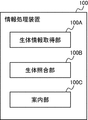
- the biometric information acquisition unit that acquires the biometric information of the user at the arrival airport, the biometric information, and the registered biometric information of the registrant who left the baggage at the airline company at the departure airport.
- the bio-verification unit that executes the collation process and the user who has been authenticated as the same person as the registrant by the collation process, the pick-up location and receipt of the baggage associated with the registered bio-information at the arrival airport.
- An information processing device including a guide unit for outputting guidance information including a start time is provided.
- the step of acquiring the biometric information of the user at the arrival airport and the collation process of the biometric information with the registered biometric information of the registrant who left the baggage at the airline company at the departure airport Guidance including the step to be executed and the pick-up location and pick-up start time of the baggage associated with the registered biometric information at the arrival airport to the user who has been authenticated as the same person as the registrant by the collation process.
- An information processing method comprising a step of outputting information is provided.
- a recording medium is provided in which a step of outputting guidance information including the time and a program for executing the step are recorded.
- an information processing device an information processing method and a recording medium that allow a user to efficiently receive baggage at an arrival airport.
- FIG. 1 is a schematic diagram showing an example of the overall configuration of the information processing system according to the present embodiment.
- the information processing system according to the present embodiment is, for example, a user (traveler) who plans to leave the first country from the airport A1 by an aircraft and enter the second country from the airport A2 in a second country different from the first country.
- the information processing system is operated by, for example, a public institution such as an immigration control bureau or a trustee entrusted with the business by the institution.
- a public institution such as an immigration control bureau or a trustee entrusted with the business by the institution.
- the information processing system includes a first airport system 1 and a second airport system 2.
- the first airport system 1 and the second airport system 2 are connected via the network NW1.
- the network NW1 is composed of a WAN (Wide Area Network) such as the Internet. Although only two airport systems are shown in FIG. 1 for convenience of explanation, the number of airport systems included in the information processing system is not limited to these.
- the first airport system 1 is a computer system installed at the airport A1 in the first country, and manages various procedures at the time of entry and departure of the user.
- the first airport system 1 includes a management server 10, a check-in terminal 20, an automatic baggage deposit machine 30, a baggage transport device 35, a security inspection device 40, a first automated gate device 50, and a boarding gate device 60.
- a second automated gate device 70, an automated customs gate device 80, a signage terminal 90, and a business terminal 95 are provided.
- the management server 10 is connected to each other device via the network NW2.
- the network NW2 is composed of a LAN (Local Area Network), a WAN, a mobile communication network, and the like.
- the connection method is not limited to the wired method and may be a wireless method.
- the second airport system 2 is a computer system installed at the airport A2 in the second country, and is composed of the same devices as the first airport system 1.
- the system configuration of the second airport system 2 can be understood by reading "first airport system” as “second airport system” and "first country” as “second country”, so detailed explanations are omitted. ..
- the management server 10 is an information processing device that manages various procedures at the time of entry and departure of a user in the first country, and realizes functions such as a control unit and a storage unit of the first airport system 1.
- the management server 10 is installed in a facility such as an airport company or an airline company, for example.
- the management server 10 does not have to be a single server, and may be configured as a server group including a plurality of servers.
- the management server 10 is photographed in each device of the automatic baggage deposit machine 30, the security inspection device 40, the first automated gate device 50, the boarding gate device 60, the second automated gate device 70, the automatic customs gate device 80, and the signage terminal 90.
- the identity of the user is confirmed by collating the face image (biological information) with the registered face image registered in the database. Details will be described later.
- the management server 10 includes a user information DB 11, a first baggage information DB 12, a second baggage information DB 13, and a required time information DB 14. Note that these databases are examples, and the management server 10 may further include other databases. In addition, a plurality of databases may be integrated into a single database.
- the user information DB 11 is a database that stores passport information, boarding reservation information, and flight information related to the user.
- the first baggage information DB 12 is a database that stores information on baggage (hereinafter referred to as “checked baggage”) that a user leaving his / her own country has checked in with an airline company before traveling.
- the second baggage information DB 13 is a database that stores information on checked baggage for users entering their own country.
- the required time information DB 14 is a database that stores information such as the required time from a predetermined point in the airport to the baggage claim (baggage claim) and the distance between the points.
- the second baggage information DB 13 on the second airport system 2 side is sequentially updated based on the baggage information extracted from the first baggage information DB 12 on the first airport system 1 side. Will be done.
- FIG. 2 is a diagram showing an example of information stored in the user information DB 11.
- the user information DB 11 includes a user ID, a registered face image, a feature amount, a passenger name, a reservation number, a departure place, a destination, an operation date, an airline code, a flight number, a seat number, a nationality, and the like.
- the data items are passport number, surname, first name, date of birth, gender, checked baggage ID and status (TP1) to status (TP7). Note that these data items are examples, and the user information DB 11 may further include other data items.
- the user ID is an identifier that uniquely identifies the user.
- the user ID is issued on condition that the collation result between the face image of the user holding the passport and the passport face image read from the passport in the check-in procedure is a collation match. It shall be.
- the phrase “collation match” means that the collation score indicating the degree of similarity between the biometric information of the user and the registered biometric information of the registrant is equal to or higher than a predetermined threshold value.
- the phrase “matching mismatch” means that the matching score is below a predetermined threshold.
- biometric information in the present embodiment means a facial image and a feature amount extracted from the facial image, but the biological information is not limited to the facial image and the facial feature amount. That is, biometric authentication may be performed using an iris image, a fingerprint image, a palm print image, an auricle image, or the like as the biometric information of the user.
- the registered face image is a face image registered for the user.
- the feature amount is a value extracted from biological information (registered face image).
- the registered face image is registered in the first procedural work performed in the series of procedural work performed at the time of departure from the first country. It is preferable that the registered face image is registered based on the consent of the user and deleted at a predetermined timing.
- the face image of the user who has the passport and the passport face image read from the passport are matched and matched.
- the registered face image may be deleted from the user information DB 11 when, for example, the user completes the customs inspection procedure at the airport A2 and finishes the trip.
- the face image taken in the first procedure work at the site shall be used.
- the face image taken in the first procedure work is newer than the passport face image, and the image and quality (appearance) taken in the subsequent authentication process are closer to those of the passport face image.
- the passport face image may be set as the registered face image (registered biometric information).
- the reservation number is an identifier that uniquely identifies the boarding reservation information.
- the airline code is an identifier that uniquely identifies the airline.
- the checked baggage ID is an identifier that uniquely identifies the checked baggage.
- Statuses (TP1) to (TP7) are a series of examination procedures (check-in procedure / baggage check-in procedure / security inspection procedure / immigration procedure / identity verification at boarding gate / immigration procedure / customs inspection procedure) at the time of entry and exit of the user. Shows the progress (incomplete / completed) respectively.
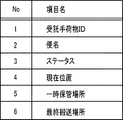
- FIG. 3 is a diagram showing an example of information stored in the first baggage information DB 12.
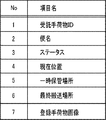
- the first baggage information DB 12 has the checked baggage ID, flight number, status, current position, temporary storage location, and final transport location as data items. Note that these data items are examples, and the first baggage information DB 12 may further include other data items.
- the status indicates the transportation status of checked baggage for those who have left the country and those who are planning to leave the country.
- the status includes "transporting", “inspecting", “temporary storage”, “loading completed on an aircraft”, and the like.
- the current location is the location of checked baggage detected at the airport.
- the current position data is registered in association with the checked baggage ID by, for example, a tag reading device (not shown) installed in the checked baggage transport path reading the baggage tag attached to the checked baggage.
- the temporary storage location indicates a container, a hangar, or the like that temporarily stores the checked baggage of the departure person before transporting it to the final transportation location.
- the final transport location indicates the location of the aircraft on which the checked baggage will be loaded.
- the status stored in the first baggage information DB 12 can be confirmed by the user in the first country using a signage terminal 90, a self-service terminal, or the like.
- the status of checked baggage can be checked by the following method.
- the signage terminal 90 photographs the user's face and transmits the user's face image to the management server 10.
- the management server 10 collates the face image received from the signage terminal 90 with the registered face image of the registrant stored in the user information DB 11 to identify the user.
- the management server 10 refers to the first baggage information DB 12 using the checked baggage ID included in the specified user information as a key, and specifies the status and the current position of the user's checked baggage.
- the management server 10 causes the signage terminal 90 to display the guidance information including the status and the current position. This allows the user to easily confirm at the time of departure whether or not the checked baggage checked in by the airline company has been properly loaded on the airplane.
- the status confirmation method is not limited to this.
- the signage terminal 90 may print guidance information including the status and the current position on a paper medium and provide it to the user. Further, the signage terminal 90 may provide the guidance information to the user by displaying a code such as a two-dimensional bar code in which the guidance information is recorded. In this case, the user can easily store the guidance information in the smartphone by reading the code using the smartphone.
- FIG. 4 is a diagram showing an example of information stored in the second baggage information DB 13.
- the second baggage information DB 13 has the checked baggage ID, flight number, status, current position, temporary storage location, baggage claim ID, and receipt start time as data items. Note that these data items are examples, and the second baggage information DB 13 may further include other data items.
- the status indicates the transportation status of checked baggage of immigrants and prospective immigrants.
- the status includes "before loading / unloading work”, “loading / unloading work completed”, “transporting”, “inspecting”, “temporary storage”, “transportation completed to baggage claim” and the like.
- the baggage claim ID is an identifier that uniquely identifies the baggage claim, which is the place where the checked baggage is received.
- the pick-up start time is the time when the user can pick up the checked baggage in the baggage claim.
- the baggage claim ID and pick-up start time associated with the aircraft may change as appropriate due to congestion in the airport and changes in the arrival gate.
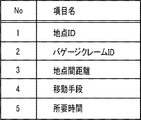
- FIG. 5 is a diagram showing an example of information stored in the required time information DB 14.
- the required time information DB 14 has a point ID, a baggage claim ID, a distance between points, a means of transportation, and a required time as data items. Note that these data items are examples, and the required time information DB 14 may further include other data items.
- the point ID is an identifier that uniquely identifies a point in the airport.
- the point ID indicates a point where the signage terminal 90 is installed.
- the distance between points is the distance between two points corresponding to the point ID and the baggage claim ID, respectively.
- the means of transportation indicate the methods that the user can choose to move from the current location to the baggage claim.
- the means of transportation include walking, a bus, a train, and the like.
- the means of transportation vary depending on the size and facilities of the airport.
- the required time is the time required for the user to move from the current position to the baggage claim, and is set for each means of transportation.
- the check-in terminal 20 is installed in the check-in lobby or check-in counter in the airport.
- the procedure area where the check-in terminal 20 is installed is referred to as "touch point TP1".
- the check-in terminal 20 is a self-terminal for performing a check-in procedure (boarding procedure) by the user operating by himself / herself. After completing the check-in procedure at Touchpoint TP1, the user will move to the baggage deposit area or security checkpoint.
- the automatic baggage deposit machine 30 is installed in an area adjacent to the baggage counter (manned counter) or in the vicinity of the check-in terminal 20 in the airport.
- the procedure area where the automatic baggage deposit machine 30 is installed is referred to as "touch point TP2".
- the automatic baggage deposit machine 30 is a self-terminal for the user to carry out a procedure for depositing baggage that is not brought into the guest room with an airline company by operating the user himself / herself. After completing the baggage check-in procedure, the user will move to the security checkpoint. If the user does not check in the baggage, the procedure at Touchpoint TP2 is omitted.
- the baggage carrier 35 is installed in the backyard in the airport.
- the phrase "baggage carrier" in the present embodiment includes a transport path configured by a belt conveyor, a tag reader installed around the belt conveyor and reading tag information from a baggage tag attached to checked baggage, and tag information. It is used to include all the sorting devices for sorting checked baggage based on the above and the turntable installed in the baggage claim.
- the baggage carrier 35 automatically transports the checked baggage of the user scheduled to leave the country from the touch point TP2 to the aircraft on which the user is boarding. In addition, the baggage carrier 35 automatically transports the checked baggage unloaded from the aircraft arriving at the destination to the baggage claim associated with the flight number of the aircraft in advance.
- the security inspection device 40 is installed at the security inspection site (hereinafter referred to as "touch point TP3") in the airport.
- the phrase "security inspection device” in this embodiment is a metal detector that confirms whether or not the user is wearing metals that can be dangerous goods, and dangers in carry-on baggage using X-rays. It is used to include all X-ray inspection devices that confirm the presence or absence of objects, traffic control devices that determine whether or not a user can pass through at the entrance / exit of a security inspection site, and the like.
- the security inspection device 40 When the user completes the security inspection procedure by the security inspection device 40 at the touch point TP3, the user moves to the immigration checkpoint.
- the first automated gate device 50 is installed at the immigration checkpoint (hereinafter referred to as "touch point TP4") in the airport.
- the first automated gate device 50 is a device that automatically performs the departure examination procedure of the user. After completing the departure examination procedure at Touchpoint TP4, the user will move to the departure area where duty-free shops and boarding gates are provided.
- the boarding gate device 60 is installed at each boarding gate (hereinafter referred to as "touch point TP5") in the airport.
- the boarding gate device 60 is a traffic control device that confirms whether or not the user is a passenger of an aircraft associated with the boarding gate. After completing the procedures at Touchpoint TP5, the user can board the aircraft and leave for a second country.
- the check-in terminal 20, the automatic baggage deposit machine 30, the security inspection device 40, the first automated gate device 50, and the boarding gate device 60 are used when the user leaves the country.
- the second automated gate device 70 is installed at the immigration office (hereinafter referred to as "touch point TP6") in the airport.
- the second automated gate device 70 is a device that automatically performs immigration procedures for users.
- the user who can use the second automated gate device 70 is, for example, a person who has pre-registered for the use of the second automated gate device 70.
- the automatic customs gate device 80 is installed at the customs inspection site (hereinafter referred to as "touch point TP7") in the airport.
- the automatic customs gate device 80 is a device that automatically performs customs inspection procedures for users.
- the user who can use the automatic customs gate device 80 is, for example, a person who has pre-registered for the use of the automatic customs gate device 80.
- the user can enter the second country after completing the procedure at Touchpoint TP7. As described above, the second automated gate device 70 and the automatic customs gate device 80 are used when the user enters the country.
- the signage terminal 90 is installed at any place in the airport.
- the signage terminal 90 is a display terminal for presenting various guidance information received from the management server 10 to the user.
- the signage terminal 90 of the present embodiment shall be arranged, for example, on the movement route from the arrival gate of the aircraft to the immigration office or from the immigration office to the baggage claim.
- the signage terminal 90 transmits a photographed face image of the user's face standing in front of the terminal to the management server 10, so that the identification information of the baggage claim for which the user receives the checked baggage, the receipt start time, and the baggage claim. Information on the means of transportation and the like is received from the management server 10. The details of the guidance information will be described later.
- the business terminal 95 is a terminal used by a staff member of an airline company or the like for business at each touch point TP1 to P7.
- the business terminal 95 is, for example, a personal computer, a tablet terminal, a smartphone, or the like.
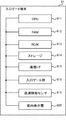
- FIG. 6 is a block diagram showing an example of the hardware configuration of the management server 10.
- the management server 10 is a computer that performs calculation, control, and storage, and includes a CPU (Central Processing Unit) 101, a RAM (Random Access Memory) 102, a ROM (Read Only Memory) 103, a storage 104, and a communication I / F. (Interface) 105, a display device 106, and an input device 107 are provided. Each device is connected to each other via a bus, wiring, a drive device, and the like.
- the CPU 101 is a processor having a function of performing a predetermined operation according to a program stored in the ROM 103 or the storage 104 and controlling each part of the management server 10.
- the RAM 102 is composed of a volatile storage medium and provides a temporary memory area necessary for the operation of the CPU 101.
- the ROM 103 is composed of a non-volatile storage medium and stores necessary information such as a program used for the operation of the management server 10.
- the storage 104 is composed of a non-volatile storage medium and stores operation programs and data of the management server 10.
- the storage 104 is composed of, for example, an HDD (Hard Disk Drive) or an SSD (Solid State Drive).
- Communication I / F105 is a communication interface based on standards such as Ethernet (registered trademark), Wi-Fi (registered trademark), and 4G, and is a module for communicating with other devices.
- the display device 106 is a liquid crystal display for displaying moving images, still images, characters, etc., an OLED (Organic Light Emitting Diode) display, and the like, and is used for presenting information to the user.
- OLED Organic Light Emitting Diode
- the input device 107 is a keyboard, a pointing device, a button, or the like, and accepts operations by the user.
- the display device 106 and the input device 107 may be integrally formed as a touch panel.
- the CPU 101 performs a predetermined arithmetic process by loading the program stored in the ROM 103, the storage 104, etc. into the RAM 102 and executing the program. Further, the CPU 101 controls each part of the management server 10 such as the communication I / F 105 based on the program.
- FIG. 7 is a block diagram showing an example of the hardware configuration of the check-in terminal 20.
- the check-in terminal 20 includes a CPU 201, a RAM 202, a ROM 203, a storage 204, a communication I / F 205, a display device 206, an input device 207, a biometric information acquisition device 208, a medium reading device 209, and a printer 210. And. Each device is connected to each other via a bus, wiring, a drive device, and the like.
- the biometric information acquisition device 208 is a device that acquires a user's face image as biometric information of the user.
- the biological information acquisition device 208 is a digital camera having, for example, a CMOS (Complementary Metal-Oxide-Semiconductor) image sensor, a CCD (Charge Coupled Device) image sensor, or the like as a light receiving element.
- the biological information acquisition device 208 for example, photographs the face of a user standing in front of the device and acquires the face image.
- the medium reading device 209 is a device that reads information recorded on a medium carried by a user.
- Examples of the medium reader 209 include a code reader, an image scanner, a non-contact IC (Integrated Circuit) reader, an OCR (Optical Character Reader) device, and the like.
- Examples of the recording medium include a paper ticket, a mobile terminal for displaying a copy of an e-ticket, and the like.
- the printer 210 Upon completion of the check-in procedure, prints a boarding pass printed with boarding information and guidance information regarding the procedure up to boarding.
- FIG. 8 is a block diagram showing an example of the hardware configuration of the automatic baggage deposit machine 30.
- the automatic baggage deposit machine 30 outputs a CPU 301, a RAM 302, a ROM 303, a storage 304, a communication I / F 305, a display device 306, an input device 307, a biometric information acquisition device 308, a medium reading device 309, and an output.
- a device 310 is provided. Each device is connected to each other via a bus, wiring, a drive device, and the like.
- the output device 310 is a device that outputs a baggage tag attached to checked baggage.
- the baggage tag in this embodiment is an RFID tag provided with an IC chip that stores tag information such as checked baggage ID, user ID, and flight number.
- the output device 310 further outputs a baggage redemption certificate necessary for redeeming checked baggage after arriving at the destination.
- a baggage tag or baggage redemption certificate is associated with at least one of a passport number, a reservation number and a user ID.
- FIG. 9 is a block diagram showing an example of the hardware configuration of the signage terminal 90.
- the signage terminal 90 includes a CPU 901, a RAM 902, a ROM 903, a storage 904, a communication I / F 905, a display device 906, an input device 907, a biometric information acquisition device 908, a medium reading device 909, and a printer 910. To prepare for.
- Each device is connected to each other via a bus, wiring, a drive device, and the like.
- the printer 910 responds to a printing request from the user, such as identification information of the baggage claim to which the user's checked baggage is to be carried, the distance and required time from the current position to the baggage claim, the receipt start time in the baggage claim, and the like.
- the guidance information including the above is printed on a paper medium.
- FIGS. 6 to 9 The hardware configuration shown in FIGS. 6 to 9 is an example, and devices other than these may be added or some devices may not be provided. Further, some devices may be replaced with other devices having similar functions. Further, some functions of the present embodiment may be provided by other devices via a network, or the functions of the present embodiment may be distributed and realized by a plurality of devices. As described above, the hardware configuration shown in FIGS. 6 to 9 can be appropriately changed.
- FIG. 10 is a layout diagram showing an example of the installation location of the signage terminal 90 in the airport A2.
- the signage terminal 90 is provided on the movement route from the arrival gate G of the airport A2 to the immigration office (touch point TP6).
- a railroad track is laid in the movement route so that the train T can reciprocate between the station St1 on the arrival gate G side and the station St2 on the immigration office side.
- six baggage claims B are provided in the area inside the immigration office. After immigration, the user receives the checked baggage at Baggage Claim B and undergoes customs inspection procedures at the adjacent Customs Inspection Center (Touchpoint TP7).
- FIG. 11 is a sequence chart showing an example of processing at the time of check-in procedure of the information processing system according to the present embodiment. This process is executed when the user performs the check-in procedure using the check-in terminal 20.
- Boarding reservation information includes user attribute information (last name, first name, gender, etc.), flight information (airline code, flight number, boarding date, departure place (departure airport), waypoint, destination (arrival airport), seat. Information on numbers, boarding times, arrival times, etc.) is included.
- the check-in terminal 20 acquires the user's passport information from the held passport (step S102).
- the passport information includes a user's passport face image, identity verification information, passport number, information on the country where the passport is issued, and the like.
- the check-in terminal 20 takes a picture of the user's face by the biological information acquisition device 208, and acquires the face image as the target face image (step S103). It is preferable to display a screen for obtaining the consent of the user before taking the face image.
- the check-in terminal 20 makes a face image collation request to the management server 10 (step S104).
- the data of the collation request includes the captured target face image and the passport face image.
- the management server 10 When the management server 10 receives the information from the check-in terminal 20, the management server 10 collates the target face image taken by the check-in terminal 20 with the passport face image of the user on a one-to-one basis (step S105), and the collation result. Is transmitted to the check-in terminal 20 (step S106).
- the check-in terminal 20 determines whether or not the check-in procedure can be executed based on the collation result received from the management server 10 (step S107). Here, if the check-in terminal 20 determines that the check-in procedure cannot be executed (step S107: NO), an error message is notified to the user (step S108), and the process ends.
- step S107 determines that the check-in procedure can be executed
- step S109 the check-in terminal 20 executes the check-in procedure such as confirmation of the itinerary and selection of a seat based on the input information of the user.
- Step S109 the check-in terminal 20 requests the management server 10 to register the user information (step S110).
- the management server 10 issues a user ID (step S111).
- the user ID is set to a unique value based on, for example, the date and time at the time of processing, the sequence number, and the like.
- the processing result data includes, for example, a boarding gate number and guidance information regarding the procedure for boarding an aircraft.
- the reason why the face image taken in the field is the registered face image is that the validity period (life cycle) of the token ID is short, and the shot image is the image and quality taken in the subsequent authentication process. (Appearance) is closer than the passport face image, etc.
- the passport face image instead of the target face image (photographed face image), the passport face image may be set as the registered face image (registered biometric information).
- the check-in terminal 20 when the check-in terminal 20 receives the processing result from the management server 10, it prints a boarding pass containing boarding reservation information and guidance information regarding the procedure up to boarding (step S114), and ends the processing.
- FIG. 12 is a sequence chart showing an example of processing at the time of baggage check-in procedure of the information processing system according to the present embodiment. This process is executed when the user who has completed the check-in procedure performs the baggage check-in procedure as necessary.
- the automatic baggage deposit machine 30 detects the user's face by the biological information acquisition device 308, the automatic baggage deposit machine 30 photographs the user's face and acquires the user's face image (step S201).
- the automatic baggage deposit machine 30 transmits the user's face image as the target face image to the management server 10 (step S202). At this time, the automatic baggage deposit machine 30 tells the management server 10 that the target face image of the user and the plurality of registered face images registered in the user information DB 11 of the management server 10 are collated in a one-to-N manner. Request.
- the management server 10 When the management server 10 receives the target face image and the matching request from the automatic baggage deposit machine 30, the management server 10 performs one-to-N matching between the target face image of the user and the registered face image (step S203), and automatically performs the matching result. It is transmitted to the baggage deposit machine 30 (step S204). If the collation result is a collation match, the management server 10 transmits the user information associated with the registered face image to the automatic baggage deposit machine 30 together with the collation result.
- step S205 when the automatic baggage deposit machine 30 receives the collation result from the management server 10, it determines whether or not the user's baggage deposit procedure can be executed.
- step S205 when the automatic baggage deposit machine 30 determines that the user's baggage deposit procedure cannot be executed (step S205: NO), the automatic baggage deposit machine 30 notifies an error message (step S206) and ends the process.
- step S205 determines that the user's baggage deposit procedure can be executed (step S205: YES).
- step S207 the process proceeds to step S207.
- step S207 the automatic baggage deposit machine 30 requests the management server 10 to issue a checked baggage ID.
- the management server 10 issues a unique checked baggage ID in response to the issuance request (step S208)
- the management server 10 transmits the checked baggage ID to the automatic baggage deposit machine 30 (step S209).
- the automatic baggage deposit machine 30 issues a baggage tag (step S210).
- the checked baggage ID and user information received from the management server 10 are recorded in the baggage tag.
- the user attaches a baggage tag to the checked baggage according to the guidance information displayed on the display device 306 of the automatic baggage deposit machine 30.
- the automatic baggage deposit machine 30 starts transporting the checked baggage placed in the storage unit after the baggage tag is attached to the checked baggage (step S211).
- the automatic baggage deposit machine 30 requests the management server 10 to register and update the database (step S212).
- the management server 10 when the management server 10 receives the registration / update request from the automatic baggage deposit machine 30, the management server 10 updates the user information DB 11 so as to associate the checked baggage ID with the user ID and the registered biometric information (step S213). ).
- the management server 10 specifies the transport location of the checked baggage based on the flight number of the aircraft on which the user is scheduled to board (step S214). Specifically, the airport management table (not shown) that associates the flight number of the aircraft with the transportation location of checked baggage is referred to to specify the transportation location.
- the management server 10 registers the baggage information in the first baggage information DB 12 (step S215), and ends the process.
- the registered face image of the user information DB 11 and the baggage information of the first baggage information DB 12 are associated with each other by the checked baggage ID.
- FIG. 13 is a sequence chart showing an example of processing between the first airport system 1 and the second airport system 2 in the information processing system according to the present embodiment. This process is executed, for example, until the aircraft takes off from the airport A1 in the first country and arrives at the airport A2 in the second country.
- the management server 10 of the first airport system 1 determines whether or not the aircraft has departed for a second country (step S301).
- the management server 10 of the first airport system 1 determines that the aircraft has departed for the second country (step S301: YES)
- the process proceeds to step S302.
- step S301 NO
- the process of step S301 is repeated at a predetermined cycle.
- step S302 the management server 10 of the first airport system 1 extracts user information from the user information DB 11 regarding the passengers of the aircraft departing for the second country.
- the management server 10 of the first airport system 1 extracts baggage information from the first baggage information DB 12 using the checked baggage ID included in the user information as a key (step S303).
- the management server 10 of the first airport system 1 transmits the extracted user information and baggage information to the second airport system 2 of the second country, and requests the registration of the database (step S304).
- the management server 10 of the second airport system 2 receives the passenger user information and the baggage information from the management server 10 of the first airport system 1, the management server 10 registers the user information in the user information DB 11 (step S305). ). That is, the user information regarding the prospective immigrant is registered in the user information DB 11 of the second country.
- the management server 10 of the second airport system 2 registers the baggage information in the second baggage information DB 13 (step S306). That is, the baggage information regarding the prospective immigrant is registered in the second baggage information DB 13 of the second country.
- the status of baggage at the time of registration is, for example, "in transit”.
- step S307 the management server 10 of the second airport system 2 determines whether or not the aircraft has arrived at the airport A2 of the second country.
- step S307 the management server 10 of the second airport system 2 determines that the aircraft has arrived at the airport A2 (step S307: YES)
- step S308 the process proceeds to step S308.
- step S307 NO
- the process of step S307 is repeated.
- the management server 10 of the second airport system 2 updates the user information DB 11 and the second baggage information DB 13 (step S308).
- the management server 10 of the second airport system 2 sets the status of immigration procedure (TP6) in the user information DB 11 to "before procedure” and the status of checked baggage in the second baggage information DB 13 to "before unloading work”. Update.
- the management server 10 of the second airport system 2 cooperates with the baggage carrying device 35 to carry and track the checked baggage (step S309).
- FIG. 14 is a sequence chart showing an example of processing at the time of transporting checked baggage at the airport A2 of the second country of the information processing system according to the present embodiment. This process is continuously performed during business hours at Airport A2.
- the baggage transport device 35 determines whether or not the tag readers distributed and installed on the transport path have detected the baggage tag of the checked baggage transported on the belt conveyor (step S401).
- step S401: YES if the baggage carrier 35 determines that the baggage tag of the checked baggage has been detected, the process proceeds to step S402. On the other hand, when the baggage carrier 35 determines that the baggage tag of the checked baggage has not been detected (step S401: NO), the process of step S401 is repeated.
- step S402 the baggage transfer device 35 reads the baggage tag of the checked baggage with the tag reading device, and transmits the tag information and the point ID indicating the installation location of the tag reading device to the management server 10.
- the tag information includes the checked baggage ID.
- the baggage carrier 35 requests the management server 10 to update the database (step S403).
- the management server 10 when the management server 10 receives the tag information and the point ID from the baggage transport device 35, the management server 10 updates the baggage position (current position) registered in the second baggage information DB 13 using these information as a key (step S404). ..
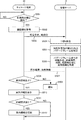
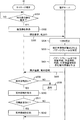
- FIG. 15 is a sequence chart showing an example of the guidance processing of baggage information at the airport A2 in the second country of the information processing system according to the present embodiment.
- the signage terminal 90 constantly or periodically photographs the front of the signage terminal 90 with the biometric information acquisition device 908, and determines whether or not the user's face is detected (step S501).
- the signage terminal 90 acquires the face image of the user standing in front of the signage terminal 90 as the target face image in the captured image (step S502).
- the signage terminal 90 transmits the collation request data including the user's face image as the target face image and the point ID indicating the location of the signage terminal 90 to the management server 10 (step S503).
- the signage terminal 90 requests the management server 10 to collate the photographed target face image of the user with a plurality of registered face images registered in the database of the management server 10 in a one-to-N manner. do.
- the management server 10 collates the target face image of the user received from the signage terminal 90 with the registered face image stored in the user information DB 11 on a one-to-N basis (step S504). At this time, if the collation result is a collation match, the user is authenticated as the same person as the registrant, and the user ID and checked baggage ID associated with the registered face image are specified.
- the management server 10 refers to the second baggage information DB 13 using the checked baggage ID specified by the collation process as a key, and specifies the baggage claim to which the checked baggage is carried (step S505).
- the management server 10 refers to the required time information DB 14 based on the point ID indicating the current position of the user and the baggage claim ID, and guides including the means of transportation to the baggage claim, the required time, the map, the route, and the like. Information is created (step S506).
- the management server 10 transmits the collation result and the guidance information to the signage terminal 90 (step S507). However, if the user cannot be authenticated in the collation process in step S504, the transmission data does not include the guidance information.
- the signage terminal 90 determines whether or not the guidance information is included in the received data from the management server 10 (step S508).
- step S508 determines that the received data includes the guidance information
- step S510 displays the guidance information for the user
- step S511 proceeds to step S511.
- step S508 NO
- the signage terminal 90 determines that the received data does not include the guidance information (step S508: NO)
- the signage terminal 90 notifies the user of an error message (step S509) and ends the process. ..
- this is the case when face matching fails.
- step S511 the signage terminal 90 determines whether or not there is a print request for guidance information from the user.
- step S511: YES the process proceeds to step S512.
- step S511: NO the process ends.
- step S512 the signage terminal 90 prints the guidance information displayed on the screen on a paper medium, and ends the process.
- FIG. 16 is a diagram showing an example of a screen displayed on the signage terminal 90.
- a screen is shown for the authenticated user to display guidance information regarding the receipt of checked baggage.
- the guide information (“Your baggage will be transported to the baggage claim A6.") G1 that guides the ID of the baggage claim, which is the place to receive the baggage, various guide information G2, and the user guides.
- a print button B1 for requesting printing of information is included.
- the guidance information G2 includes the user's current position P1, the baggage claim position P2, the map image IMG-01 that guides the route, the current time, the baggage receipt start time, the distance from the current location to the baggage claim, and each means of transportation.
- the time required for the immigration and the degree of congestion at the immigration office are included.
- the information displayed on the signage terminal 90 is not limited to these.
- the status indicating that the baggage has started to be picked up (“delivery to baggage claim completed”), until the end of receipt. It is preferable to display the remaining time, the elapsed time since the luggage was transported to the baggage claim, and the like. If the baggage claim has not been transported, it is preferable to display the status such as "Before loading / unloading work”, “Completed loading / unloading work”, “Transporting”, “Inspecting", “Temporary storage”, etc. Is.
- the user stands in front of the signage terminal 90 or performs face recognition while passing in front of the signage terminal 90, so that his / her baggage is carried to the baggage claim.
- the user can move after fully confirming the means of transportation to the baggage claim, the required time, the route, etc., so that the checked baggage can be received efficiently.
- FIG. 17 is a diagram showing an example of information stored in the first baggage information DB 12 according to the present embodiment.
- FIG. 18 is a diagram showing an example of information stored in the second baggage information DB 13 according to the present embodiment.
- the first baggage information DB 12 and the second baggage information DB 13 of the present embodiment further include a registered baggage image in the data item, unlike the case of the first embodiment. ..
- the registered baggage image is an image taken when the user deposits checked baggage at the departure airport and registered in the management server 10.
- FIG. 19 is a sequence chart showing an example of processing in the baggage deposit procedure of the information processing system according to the present embodiment.
- the process of FIG. 19 differs from the flowchart of FIG. 12 only in steps S601, S602 and S603. Therefore, the differences will be described below.
- step S601 the automatic baggage check-in machine 30 takes a picture of the checked baggage checked in by the user and acquires a baggage image. After that, the process proceeds to step S211.
- step S602 the automatic baggage deposit machine 30 requests the management server 10 to register / update the database.
- the registration / renewal request data includes a user ID, checked baggage ID, and baggage image.
- step S603 the management server 10 registers baggage information in the first baggage information DB based on the checked baggage ID and the baggage image, and ends the process.
- FIG. 20 is a sequence chart showing an example of processing at the time of transporting checked baggage at the airport A2 of the second country of the information processing system according to the present embodiment. This process is continuously performed during business hours at Airport A2.
- the baggage transport device 35 determines whether or not the sensor devices (not shown) distributed and installed on the transport path have detected the checked baggage to be transported on the belt conveyor (step S701).
- step S701 if the baggage carrier 35 determines that the checked baggage has been detected (step S701: YES), the process proceeds to step S702. On the other hand, when the baggage transfer device 35 determines that the checked baggage has not been detected (step S701: NO), the process of step S701 is repeated.
- step S702 the baggage carrier 35 takes a picture of the checked baggage from above, for example, and acquires a baggage image.
- the baggage transfer device 35 makes a baggage image collation request and a database update request to the management server 10 (step S703).
- the collation request data includes a baggage image.
- the data of the database update request includes a point ID indicating the position where the checked baggage is detected.
- the management server 10 collates the baggage image received from the baggage transport device 35 with the registered baggage image stored in the second baggage information DB 13 in a one-to-N manner (step S704).
- the management server 10 determines whether or not the collation result of the image collation is a collation match (step S705).
- the management server 10 determines that the collation result is a collation match (step S705: YES)
- the management server 10 proceeds to step S706.
- step S705 determines that the collation result is a collation mismatch
- step S706 the management server 10 updates the second baggage information DB 13 based on the checked baggage ID specified by the collation process in step S704 and the point ID received from the baggage transfer device 35.
- step S707 the management server 10 transmits error information indicating that baggage of unknown owner is being carried to the business terminal 95 used by the airport staff, and ends the process.
- the error information includes, for example, a point ID and a baggage image.
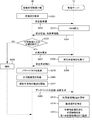
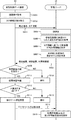
- FIG. 21 is a sequence chart showing an example of the guidance processing of baggage information at the airport A2 in the second country of the information processing system according to the present embodiment. The process of FIG. 21 differs from the flowchart of FIG. 15 of the first embodiment in steps S801 and S802.
- step S801 the management server 10 refers to the required time information DB 14 based on the point ID indicating the current position of the user and the specified baggage claim ID, and the means of transportation to the baggage claim, the required time, the route, and the baggage. Create guidance information including images.
- step S802 the management server 10 transmits the collation result and the guidance information to the signage terminal 90. If the result of the collation process in step S504 is a collation mismatch, the guidance information is not created, so that the management server 10 transmits only the collation mismatch result. After that, the process proceeds to step S508.
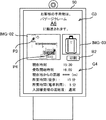
- FIG. 22 is a diagram showing an example of a screen displayed on the signage terminal 90 according to the present embodiment.
- a screen is shown for the authenticated user to display guidance information regarding the receipt of checked baggage.
- the guide information (“Your baggage will be transported to the baggage claim A6") G3 that guides the ID of the baggage claim, which is the place to receive the baggage, various guide information G4, and the user It includes a baggage image IMG-03 of baggage checked in at the departure airport and a print button B2 for the user to request printing of guidance information.
- the guidance information G4 includes the user's current position P3, the baggage claim position P4, the map image IMG-02 that guides the route, the current time, the baggage receipt start time, the distance from the current location to the baggage claim, and each means of transportation. The time required for the immigration and the degree of congestion at the immigration office are included.
- the information displayed on the signage terminal 90 is not limited to these.
- the status indicating that the baggage has started to be picked up (“delivery to baggage claim completed”), until the end of receipt. It is preferable to display the remaining time, the elapsed time since the luggage was transported to the baggage claim, and the like. If the baggage claim has not been transported, it is preferable to display the status such as "Before loading / unloading work”, “Completed loading / unloading work”, “Transporting”, “Inspecting", “Temporary storage”, etc. Is.
- the user can move after sufficiently confirming the means of transportation to the baggage claim, the required time, the route, etc., so that the checked baggage can be efficiently checked. Can be received. The user can also check whether the displayed baggage belongs to him / her.
- the combination of the user and the baggage carried by the user at the customs inspection site in the second country matches the combination of the person who checked the baggage and the checked baggage in the first country. It differs from the first and second embodiments in that it further has a function for confirming whether or not to do so.
- FIG. 23 is a schematic view showing the appearance of the entrance gate terminal 81 and the exit gate terminal 82 constituting the automatic customs gate device 80.
- FIG. 24 is a block diagram showing an example of the hardware configuration of the entrance gate terminal 81.
- FIG. 25 is a block diagram showing an example of the hardware configuration of the exit gate terminal 82.
- the automatic customs gate device 80 is an electronic gate that permits or rejects passage based on the result of face collation and the like.
- User U who is allowed to pass through the gate, can leave the customs inspection area and enter a second country.
- User U who is not allowed to pass through the gate, will receive individual measures such as undergoing a face-to-face customs inspection by a staff member at a manned booth.
- the entrance gate terminal 81 and the exit gate terminal 82 constituting the automatic customs gate device 80 are installed at the entrance and the exit of the gate passage P through which the user U should pass, respectively.
- the gate passage P is restricted from exiting from other than the exit gate terminal 82 of the user U who has entered the gate passage P by, for example, a partition plate, a wall, a fence, an inspection table, etc. installed on both sides along the gate passage P. ing.
- the entrance gate terminal 81 is a gate device installed at the entrance of the gate passage P through which the user U passes.
- the entrance gate terminal 81 includes a CPU 811, a RAM 812, a ROM 813, a storage 814, a communication I / F 815, an entrance gate door 818, a passage detection sensor 819, and a guidance display 820.
- Each device is connected to each other via a bus, wiring, a drive device, and the like.
- the entrance gate door 818 is an opening / closing door that opens and closes the door according to the control of the CPU 811, and shifts between an open state that allows the user to pass through and a closed state that blocks the user's passage.
- the opening / closing method of the entrance gate door 818 is not particularly limited, but is, for example, a flapper type, a slide type, a rotary type, or the like.
- the passage detection sensor 819 When the passage detection sensor 819 detects the passage of the user, it outputs an output signal indicating the passage of the user U.
- the CPU 811 can determine whether or not the user U has passed through the entrance gate terminal 81 and entered the gate passage P based on the output signals of the plurality of passage detection sensors 819 and their output order.
- the gate passage P is an area between the entrance gate terminal 81 and the exit gate terminal 82.
- the guidance display 820 displays a display indicating whether or not to enter the gate passage P according to the control by the CPU 811.
- the guidance display 820 indicates that the entrance to the gate passage P is permitted when the entrance gate door 818 is opened. Further, the guidance display 820 indicates that the entrance to the gate passage P is prohibited when the entrance gate door 818 is closed.
- the guidance display 820 can display, for example, whether or not to allow entry to the gate passage P by displaying colors, symbols, characters, and the like.
- the exit gate terminal 82 includes a CPU 821, a RAM 822, a ROM 823, a storage 824, a communication I / F 825, a display device 826, an exit gate door 828, a passage detection sensor 829, and a guide. It has a display 830, a first camera 831, a second camera 832, and a medium reading device 833. Each device is connected to each other via a bus, wiring, a drive device, and the like.
- the exit gate door 828 is an opening / closing door that opens and closes the door according to the control of the CPU, and shifts between a closed state that blocks the passage of the user U and an open state that allows the passage of the user U. ..
- the first camera 831 is a long-distance camera capable of taking a picture at least in the gate passage P and taking a picture farther than the second camera 832.
- the second camera 832 is a short-distance camera having at least a shooting range in front of the exit gate terminal 82.
- the positions where the first camera 831 and the second camera 832 are provided are not particularly limited, and may be any position as long as the respective shootable ranges can be realized.
- the medium reading device 833 reads the tag information from the baggage tag attached to the baggage carried by the user U.
- Examples of the medium reader 833 include a non-contact IC (Integrated Circuit) reader, a code reader, an OCR (Optical Character Reader) device, and the like.
- the baggage tag BT shown in FIG. 23 is an RFID tag
- the medium reader 833 is an RFID tag reader.
- FIG. 26 is a block diagram showing an example of the hardware configuration of the business terminal 95.
- the business terminal 95 includes a CPU 951, a RAM 952, a ROM 953, a storage 954, a communication I / F 955, a display device 956, an input device 957, and a biometric information acquisition device 958 as computers for performing calculations, controls, and storage.
- the camera 960 is a digital camera having, for example, a CMOS (Complementary Metal-Oxide-Semiconductor) image sensor, a CCD (Charge Coupled Device) image sensor, or the like as a light receiving element.
- the camera 960 of the present embodiment captures the baggage carried by the user and generates an image of the baggage.
- Each device is connected to each other via a bus, wiring, a drive device, and the like.
- FIG. 27 is a sequence chart showing an example of processing in an information processing system. This process is performed when a user who has completed immigration procedures undergoes customs inspection procedures.
- processing when a user is present in the gate passage P between the entrance gate door 818 (entrance gate terminal 81) and the exit gate door 828 (exit gate terminal 82) of the automatic customs gate device 80 will be described.
- the automatic customs gate device 80 detects the user's face by the first camera 831 and the second camera 832, the automatic customs gate device 80 photographs the user's face and acquires the user's face image (step S901).
- the automatic customs gate device 80 reads the tag information from the baggage tag attached to the baggage carried by the user by the medium reading device 833 (step S902).
- the automatic customs gate device 80 transmits the collation request including the user's face image (target face image) and the tag information to the management server 10 (step S903).
- the automatic customs gate device 80 tells the management server 10 that the target face image of the user and the plurality of registered face images registered in the user information DB 11 of the management server 10 are collated in a one-to-N manner. Request.
- the management server 10 when the management server 10 receives the verification request from the automatic customs gate device 80, the management server 10 performs face matching between the target face image of the user and the registered face image in a one-to-N manner (step S904). Then, when the collation result is a collation match, the management server 10 acquires the user information associated with the registered face image from the user information DB 11 (step S905).
- the user information includes the user ID and the checked baggage ID of the checked baggage actually checked by the user.
- the management server 10 acquires user information from the user information DB 11 using the checked baggage ID included in the received tag information as a key (step S906).
- This user information includes the user ID of the person who checked in the checked baggage, that is, the owner of the checked baggage.
- the management server 10 compares the combination of the user and the checked baggage specified in step S905 with the combination of the owner and the checked baggage specified in step S906, and the user and the user carry the combination. It is determined whether the combination of baggage is correct or incorrect (step S907).
- the management server 10 determines that the combination of the user and the baggage is correct. On the other hand, even if the user is authenticated as the same person as the registrant, the checked baggage ID of the baggage carried by the user is not the same as the checked baggage ID associated with the registrant. The management server 10 determines that the combination of the user and the baggage is incorrect. If the user cannot be authenticated in step S904, the user information cannot be acquired, so the process of step S906 is omitted. Further, the process of steps S906 to S907 may be replaced with a process of determining whether or not the checked baggage ID acquired in step S905 and the checked baggage ID included in the tag information are the same.
- the management server 10 transmits the collation result in step S904, the user information, and the determination result in step S906 to the automatic customs gate device 80 (step S908).
- the automatic customs gate device 80 receives the collation result and the determination result from the management server 10, it determines whether or not the user's customs inspection procedure can be executed (step S909). Specifically, it is a condition for executing the customs inspection procedure that the user is authenticated as the same person as the registrant and that the combination of the user and the baggage carried by the user is correct. ..
- step S910 if the automatic customs gate device 80 determines that the user's customs inspection procedure cannot be executed (step S909: NO), it notifies an error message (step S910) and ends the process.
- the content of the error message differs between the error related to personal authentication and the error related to the baggage carried by the user.
- step S909 determines that the user's customs inspection procedure can be executed (step S909: YES)
- the process proceeds to step S911.
- step S911 the automatic customs gate device 80 executes the customs inspection procedure for the user based on the user information.
- the automatic customs gate device 80 determines whether or not the user meets the predetermined immigration requirements (step S912). Here, if the automatic customs gate device 80 determines that the user does not meet the predetermined immigration requirements (step S912: NO), an error such as "Please perform the customs inspection procedure at the manned counter.” A message is notified (step S913), and the process ends.
- step S912 determines that the user satisfies the predetermined immigration requirements (step S912: YES)
- the automatic customs gate device 80 opens the exit gate door 828 (step S914). This allows the user to enter a second country.
- the automatic customs gate device 80 requests the management server 10 to update the database (step S915).
- the update request data includes, for example, a user ID and checked baggage ID.
- the management server 10 when the management server 10 receives the update request from the automatic customs gate device 80, the management server 10 updates the status in the user information DB 11 and the second baggage information DB 13 (step S916), and ends the process.
- FIG. 28 is a diagram showing an example of a screen displayed on the exit gate terminal 82.
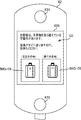
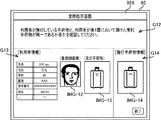
- the user will be informed of the wrong baggage message G5 ("You may have the wrong baggage. Please wait for the staff to come soon.”).
- the image IMG-04 of the baggage checked in at the time of departure and the image IMG-05 taken of the baggage carried by the user during the customs inspection procedure are displayed on the display device 826.
- FIG. 27 can be executed not only by the automatic customs gate device 80 but also by the business terminal 95 used by the staff at the customs inspection site.
- the phrase “automatic customs gate device” in the description of FIG. 27 may be read as “business terminal”.
- FIG. 29 is a diagram showing an example of a screen displayed on the business terminal 95.
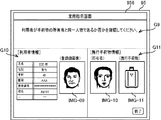
- message G6 urging the staff to check the baggage (“The baggage carried by the user is different from the baggage checked by the user in the country of departure. The user may have mistaken the baggage. Please check it because there is a possibility. ")
- User information G7 and baggage information G8 are displayed on the display device 956.
- the baggage information G8 includes the registered face image IMG-06 of the user, the image IMG-07 of the baggage that the user left at the time of departure, and the image IMG-that is a photograph of the baggage carried by the user during the customs inspection procedure. It is included as 08.
- the correctness of the combination of the user and the baggage carried by the user is determined based on the tag information.
- the present embodiment is different from the third embodiment in that the correctness of the combination of the user and the baggage is determined by collating the image of the baggage at the time of check-in with the image of the baggage at the time of inspection. There is.
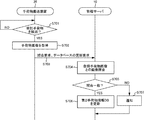
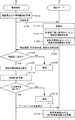
- FIG. 30 is a sequence chart showing an example of processing in the customs inspection procedure of the information processing system according to the present embodiment. This process differs from that of FIG. 27 in steps S1001 to S1006, and is common to steps S908 and subsequent steps. Therefore, the differences will be described below.
- step S1001 the automatic customs gate device 80 acquires the face image of the user and the baggage image of the baggage carried by the user.
- step S1002 the automatic customs gate device 80 transmits a collation request including a face image and a baggage image to the management server 10.
- step S1003 when the management server 10 receives the verification request from the automatic customs gate device 80, the management server 10 performs face matching between the target face image of the user and the registered face image in a one-to-N manner.
- step S1004 when the collation result is a collation match, the management server 10 acquires the user information associated with the registered face image from the user information DB 11. Further, the management server 10 acquires the registered baggage image from the second baggage information DB 13 using the checked baggage ID included in the user information as a key.
- step S1005 the management server 10 executes an image collation between the baggage image taken at the customs inspection site and the registered baggage image registered in the first country.
- step S1006 the management server 10 determines the correctness of the combination of the user and the baggage carried by the user based on the result of the face collation in step S1003 and the result of the image collation in step S1005. After that, the process proceeds to step S908.
- the management server 10 determines that the combination of the user and the baggage is correct.
- the management server 10 determines that the combination of the user and the baggage is incorrect. If the user cannot be authenticated in step S1003, the registered baggage image cannot be acquired from the second baggage information DB 13 using the checked baggage ID included in the user information as a key. Therefore, the process of step S1006 is performed. Omitted.
- FIG. 31 is a sequence chart showing an example of processing in the customs inspection procedure of the information processing system according to the present embodiment.
- the business terminal 95 photographs the user's face with the biometric information acquisition device 958 to acquire the user's face image, and also photographs the baggage carried by the user with the camera 960 to capture the baggage image. Acquire (step S1101).
- the business terminal 95 reads the tag information from the baggage tag attached to the baggage carried by the user by the medium reading device 959 (step S1102).
- the business terminal 95 transmits the collation request including the user's face image (target face image) and the tag information to the management server 10 (step S1103).
- the business terminal 95 requests the management server 10 to collate the target face image of the user with the plurality of registered face images registered in the user information DB 11 of the management server 10 in a one-to-N manner. do.
- the management server 10 collates the target face image of the user with the registered face image in a one-to-N manner (step S1104). If the collation result is a collation match, the management server 10 extracts the user information associated with the registered face image from the user information DB 11.
- the user information includes the user ID and the checked baggage ID of the checked baggage actually checked by the user.
- the management server 10 acquires user information from the user information DB 11 using the checked baggage ID included in the received tag information as a key (step S1105).
- This user information includes the user ID of the person who checked in the checked baggage, that is, the owner of the checked baggage.
- the management server 10 transmits the collation result in step S1104 and the user information to the business terminal 95 (step S1106).
- step S1107 when the business terminal 95 receives the collation result from the management server 10, it determines whether or not the user has succeeded in face authentication.
- step S1107: NO the business terminal 95 notifies an error message (step S1108) and ends the process.
- step S1107 determines that the user has succeeded in face authentication
- step S1109 the business terminal 95 displays the registered face image included in the user information received from the management server 10 on the display device 956.
- the business terminal 95 displays a face image of the baggage owner carried by the user to determine whether or not the user performing the customs inspection procedure is the same person as the baggage owner. .. If the clerk determines that the user is the same person as the owner and the combination of the user and the baggage carried by the user is correct, the process proceeds to step S1110.
- the business terminal 95 executes the customs inspection procedure for the user based on the user information (step S1110).
- step S1111 determines whether or not the user satisfies a predetermined entry requirement.
- step S1111 determines that the user does not meet the predetermined entry requirements (step S1111: NO)
- an error message such as "The entry requirements are not satisfied” is sent to the staff. Is notified (step S1112), and the process ends.
- step S1111 YES
- the user can enter the second country.
- the business terminal 95 requests the management server 10 to update the database (step S1113).
- the update request data includes, for example, a user ID and checked baggage ID.
- the management server 10 when the management server 10 receives the update request from the business terminal 95, the management server 10 updates the status in the user information DB 11 and the second baggage information DB 13 (step S1114), and ends the process.
- FIG. 32 is a diagram showing an example of a screen displayed on the business terminal 95.
- the message G9 ("Please confirm whether the owner of the baggage carried by the user and the user are the same person") and the user urging the staff to check the baggage.
- the information G10 and the carrying baggage information G11 are displayed on the display device 956.
- the user information G10 includes a registered face image IMG-09 of a user who has undergone customs inspection procedures.
- the carry-on baggage information G11 includes a face image IMG-10 of the owner of the baggage carried by the user and an image IMG-11 taken of the baggage carried by the user during the customs inspection procedure. It has been.
- the present embodiment by displaying the face image of the baggage owner on the business terminal 95, the work of confirming the correctness of the combination of the user and the baggage carried by the user is efficiently supported. can.
- the face image of the baggage owner is acquired based on the tag information, and the face image is displayed on the screen for the staff.
- the baggage image of the baggage actually checked by the user in the first country is based on the result of face collation between the user's face image taken at the customs inspection site and the registered face image. Is different from the fifth embodiment in that the baggage image is displayed on the screen for the staff.
- FIG. 33 is a sequence chart showing an example of processing in the customs inspection procedure of the information processing system according to the present embodiment. This process is common to FIG. 31 except for steps S1201 to S1206. Therefore, the differences will be described below.
- step S1201 the management server 10 acquires the user information associated with the registered face image from the user information DB 11 when the collation result of the face collation in step S1104 is a collation match.
- the user information includes the user ID and the checked baggage ID of the checked baggage actually checked by the user.
- step S1202 the management server 10 acquires the registered baggage image from the second baggage information DB 13 using the checked baggage ID included in the received tag information as a key.
- step S1203 the management server 10 transmits the collation result, the user information, and the registered baggage image to the business terminal 95.
- step S1204 when the business terminal 95 receives the collation result from the management server 10, it determines whether or not the user has succeeded in face authentication.
- step S1204 NO
- the business terminal 95 notifies an error message (step S1205) and ends the process.
- step S1204 determines that the user has succeeded in face authentication
- step S1206 the business terminal 95 displays the registered baggage image received from the management server 10 on the display device 956. Further, the business terminal 95 may further display the baggage image acquired in step S1101 on the display device 956 as a comparison target with the registered baggage image.
- the business terminal 95 carries the checked baggage checked by the user in the first country and the user in the second country. Have the staff decide if the baggage you have is the same. If the clerk determines that the baggage is the same as the checked baggage and the combination of the user and the baggage carried by the user is correct, the process proceeds to step S1110.
- FIG. 34 is a diagram showing an example of a screen displayed on the business terminal 95.
- message G12 urging the staff to check the baggage ("Check if the owner of the baggage carried by the user and the checked baggage checked by the user in the first country are the same. Please. ”)
- User information G13 is displayed on the display device 956.
- the user information G13 includes a registered face image IMG-12 of a user undergoing customs inspection procedures and an image IMG-13 of checked baggage checked in in a first country.
- the carry-on baggage information G14 includes an image IMG-14 taken of the baggage carried by the user during the customs inspection procedure.
- the user and the baggage carried by the user by displaying the image of the baggage actually checked in by the user who is performing the customs inspection procedure on the business terminal 95. It is possible to efficiently support the confirmation work of the staff regarding the correctness of the combination of.
- FIG. 35 is a functional block diagram of the information processing apparatus according to the present embodiment.
- the information processing apparatus 100 includes a biological information acquisition unit 100A, a biological collation unit 100B, and a guide unit 100C.
- the biometric information acquisition unit 100A acquires the biometric information of the user at the arrival airport.
- the bio-verification unit 100B executes collation processing between the biometric information and the registered biometric information of the registrant who left the baggage at the airline company at the departure airport.
- the guidance unit 100C outputs guidance information including the pick-up location and pick-up start time of the baggage associated with the registered biometric information at the arrival airport to the user who has been authenticated as the same person as the registrant by the collation process.
- an information processing device 100 that allows a user to efficiently receive baggage at an arrival airport.
- the notification destination (output destination) of the guidance information is limited to the signage terminal 90 installed at the airport, but the notification destination is not limited to this.
- the guidance information may be notified to the user terminal.
- an email or the like is sent to the contact information of the mobile terminal (user terminal) associated with the user ID. It may be configured so that the guidance information is transmitted by.
- the signage terminal 90 may provide the guidance information to the user by displaying a code such as a two-dimensional bar code in which the guidance information is recorded. In this case, the user can easily store the guidance information in the smartphone by reading the code using the smartphone.
- the display language of the guidance information can be switched for each user.
- the guidance information including the receiving place and the receiving start time can be obtained in the user's native language. It will be possible to display it, and convenience will be improved.
- the management server 10 performs the baggage image of the baggage carried by the user after the face image collation process, and the registered baggage registered in advance in the second baggage information DB 13 for the user.
- the configuration for collating with an image has been described. However, the order of the face image matching process and the baggage image matching process may be reversed.
- the management server 10 collates the baggage image with the registered baggage image registered in the second baggage information DB 13 on a one-to-N basis, and identifies the checked baggage ID of the collation match.
- the management server 10 acquires the registered face image of the owner from the user information DB 11 using the checked baggage ID as a key.
- the management server 10 collates the face image of the user with the registered face image of the owner on a one-to-one basis. Thereby, as in the case of the fourth embodiment, the correctness of the combination of the user and the baggage can be automatically determined.
- the image of the checked baggage deposited by the user in the first country is displayed on the business terminal 95, but the color, size, and shape of the checked baggage are displayed in place of the image or together with the image.
- Information indicating appearance features such as may be displayed.
- the registered face image of the registrant (owner) associated with the checked baggage ID included in the read tag information is displayed on the business terminal 95, and the user owns the baggage to the staff. I explained the structure to judge whether it is the same person as the person.
- the baggage image of the baggage carried by the user may be acquired.
- the management server 10 acquires the face image of the owner by collating the baggage image acquired from the business terminal 95 with the registered baggage image registered in the second baggage information DB 13, and acquires the face image of the owner, and the business terminal 95. Can be output to.
- Each embodiment also has a processing method in which a program for operating the configuration of the embodiment is recorded on a recording medium so as to realize the functions of the above-described embodiment, the program recorded on the recording medium is read out as a code, and the program is executed by a computer.
- a computer-readable recording medium is also included in the scope of each embodiment. Further, not only the recording medium on which the above-mentioned program is recorded but also the program itself is included in each embodiment.
- the recording medium for example, a floppy (registered trademark) disk, a hard disk, an optical disk, a magneto-optical disk, a CD-ROM, a magnetic tape, a non-volatile memory card, or the like can be used.
- a floppy (registered trademark) disk for example, a hard disk, an optical disk, a magneto-optical disk, a CD-ROM, a magnetic tape, a non-volatile memory card, or the like
- the program recorded on the recording medium that executes the process alone, but also the program that operates on the OS and executes the process in cooperation with other software and the function of the expansion board is also an embodiment. Is included in the category of.
- Appendix 2 A specific unit that identifies the baggage position of the baggage based on the information acquired from the device provided on the baggage transport route at the arrival airport.
- Appendix 3 Further equipped with a tag information acquisition unit that acquires tag information read by the device from the wireless tag attached to the baggage.
- the identification unit specifies the baggage position for each baggage based on the installation location of the device and the tag information.
- the information processing device according to Appendix 2.
- an image collation unit for executing a collation process between the baggage image of the baggage taken by the device on the transport route and the registered baggage image of the baggage taken at the departure airport is further provided.
- the specifying unit specifies the baggage position for each baggage based on the installation location of the device and the collation result between the baggage image and the registered baggage image.
- the guide unit includes the luggage position in the guide information and outputs the guide.
- the information processing apparatus according to any one of Supplementary note 2 to 4.
- the guide unit outputs the required time for each available moving means when the user moves from the current position to the receiving place.
- the information processing apparatus according to Appendix 6.
- the guide unit includes a map including a route from the current position to the receiving place in the guide information and outputs the map.
- the information processing apparatus according to Appendix 6 or 7.
- the guidance unit includes the congestion status at the execution location of the procedure imposed on the user while the user moves from the current position to the receiving location, and outputs the guidance information.
- the information processing apparatus according to any one of Supplementary note 6 to 8.
- the guide unit changes the display language of the guide information based on the attribute information of the registrant associated with the registered biometric information.
- the information processing apparatus according to any one of Supplementary note 1 to 9.
- the guidance unit outputs the guidance information to a display terminal installed in the section from the arrival gate of the aircraft to the receiving place.
- the information processing apparatus according to any one of Supplementary note 1 to 10.
- the guide unit outputs print data for printing the guide information on a paper medium to the display terminal.
- the information processing apparatus according to Appendix 11.
- the guidance unit outputs the guidance information to a terminal carried by the user.
- the information processing apparatus according to any one of Supplementary note 1 to 11.
- the biometric information acquisition unit further acquires the second biometric information of the user who has deposited the baggage at the departure airport.
- the bio-collation unit further executes bio-collation between the second bio-information and the registered bio-information, and further executes bio-collation.
- a processing unit that associates the baggage with the registered biometric information when the collation result of the second biometric information and the registered biometric information are collated and matched.
- the information processing apparatus according to any one of Supplementary Provisions 1 to 13, further comprising.
- the registered biometric information is any one of a face image, a fingerprint image, and an iris image.
- the information processing apparatus according to any one of Supplementary note 1 to 14.
- Steps to acquire user biometric information at the arrival airport A step of collating the biometric information with the registered biometric information of the registrant who left the baggage at the airline at the departure airport.
- Steps to acquire user biometric information at the arrival airport A step of collating the biometric information with the registered biometric information of the registrant who left the baggage at the airline at the departure airport.
- a recording medium on which a program for executing a program is recorded.
Landscapes
- Engineering & Computer Science (AREA)
- Physics & Mathematics (AREA)
- Business, Economics & Management (AREA)
- General Physics & Mathematics (AREA)
- Theoretical Computer Science (AREA)
- Health & Medical Sciences (AREA)
- Economics (AREA)
- General Health & Medical Sciences (AREA)
- General Business, Economics & Management (AREA)
- Tourism & Hospitality (AREA)
- Remote Sensing (AREA)
- Radar, Positioning & Navigation (AREA)
- Strategic Management (AREA)
- Marketing (AREA)
- Multimedia (AREA)
- Human Computer Interaction (AREA)
- Computer Vision & Pattern Recognition (AREA)
- Human Resources & Organizations (AREA)
- Development Economics (AREA)
- Toxicology (AREA)
- Artificial Intelligence (AREA)
- Quality & Reliability (AREA)
- Operations Research (AREA)
- Entrepreneurship & Innovation (AREA)
- Primary Health Care (AREA)
- Evolutionary Computation (AREA)
- Databases & Information Systems (AREA)
- Computing Systems (AREA)
- Medical Informatics (AREA)
- Software Systems (AREA)
- Oral & Maxillofacial Surgery (AREA)
- Automation & Control Theory (AREA)
- Electromagnetism (AREA)
- Educational Administration (AREA)
- Computer Security & Cryptography (AREA)
- Finance (AREA)
- Accounting & Taxation (AREA)
- Management, Administration, Business Operations System, And Electronic Commerce (AREA)
Abstract
本発明に係る情報処理装置は、到着空港において利用者の生体情報を取得する生体情報取得部と、前記生体情報と、出発空港において航空会社に手荷物を預けた登録者の登録生体情報との照合処理を実行する生体照合部と、前記照合処理によって前記登録者と同一人物として認証された前記利用者に対して、前記登録生体情報に関連付けられた前記手荷物の前記到着空港における受取場所及び受取開始時刻を含む案内情報を出力する案内部と、を備える。
Description
本発明は、情報処理装置、情報処理方法及び記録媒体に関する。
特許文献1には、利用者(旅客)が航空機に搭乗する際、利用者が航空会社に手荷物を預けるための手続を自動的に実行する搭乗セキュリティチェックシステムが開示されている。
特許文献1に記載されているシステムでは、航空機が目的地の空港に到着した後に、利用者の手荷物の受け取りを支援することまでは想定されていない。このため、利用者が目的地の空港において手荷物を効率的に受け取ることができる仕組みが求められていた。
そこで、本発明は、上述の問題に鑑み、到着空港において利用者が手荷物の受け取りを効率的に行うことができる情報処理装置、情報処理方法及び記録媒体を提供することを目的とする。
本発明の一つの観点によれば、到着空港において利用者の生体情報を取得する生体情報取得部と、前記生体情報と、出発空港において航空会社に手荷物を預けた登録者の登録生体情報との照合処理を実行する生体照合部と、前記照合処理によって前記登録者と同一人物として認証された前記利用者に対して、前記登録生体情報に関連付けられた前記手荷物の前記到着空港における受取場所及び受取開始時刻を含む案内情報を出力する案内部と、を備える情報処理装置が提供される。
本発明の他の観点によれば、到着空港において利用者の生体情報を取得するステップと、前記生体情報と、出発空港において航空会社に手荷物を預けた登録者の登録生体情報との照合処理を実行するステップと、前記照合処理によって前記登録者と同一人物として認証された前記利用者に対して、前記登録生体情報に関連付けられた前記手荷物の前記到着空港における受取場所及び受取開始時刻を含む案内情報を出力するステップと、を備える情報処理方法が提供される。
本発明の更に他の観点によれば、コンピュータに、到着空港において利用者の生体情報を取得するステップと、前記生体情報と、出発空港において航空会社に手荷物を預けた登録者の登録生体情報との照合処理を実行するステップと、前記照合処理によって前記登録者と同一人物として認証された前記利用者に対して、前記登録生体情報に関連付けられた前記手荷物の前記到着空港における受取場所及び受取開始時刻を含む案内情報を出力するステップと、を実行させるためのプログラムが記録された記録媒体が提供される。
本発明によれば、到着空港において利用者が手荷物の受け取りを効率的に行うことができる情報処理装置、情報処理方法及び記録媒体を提供することができる。
以下、図面を参照して、本発明の例示的な実施形態を説明する。図面において同様の要素又は対応する要素には同一の符号を付し、その説明を省略又は簡略化することがある。
<第1実施形態>
図1は、本実施形態に係る情報処理システムの全体構成の一例を示す概略図である。本実施形態による情報処理システムは、例えば、航空機によって空港A1から第1国を出国して第1国とは異なる第2国の空港A2から第2国に入国する予定の利用者(渡航者)について、第1国及び第2国でそれぞれ行われる一連の手続を支援するコンピュータシステムである。情報処理システムは、例えば、入出国の管理局等の公的機関又はその機関から業務の委託を受けた受託者により運用される。なお、本実施形態では国際線の場合について説明するが、国内線の場合にも本発明は適用可能である。
図1は、本実施形態に係る情報処理システムの全体構成の一例を示す概略図である。本実施形態による情報処理システムは、例えば、航空機によって空港A1から第1国を出国して第1国とは異なる第2国の空港A2から第2国に入国する予定の利用者(渡航者)について、第1国及び第2国でそれぞれ行われる一連の手続を支援するコンピュータシステムである。情報処理システムは、例えば、入出国の管理局等の公的機関又はその機関から業務の委託を受けた受託者により運用される。なお、本実施形態では国際線の場合について説明するが、国内線の場合にも本発明は適用可能である。
図1に示すように、情報処理システムは、第1空港システム1と第2空港システム2を備える。第1空港システム1及び第2空港システム2は、ネットワークNW1を介して接続されている。ネットワークNW1は、インターネット等のWAN(Wide Area Network)により構成されている。なお、図1では、説明の便宜上、2つの空港システムのみが示されているが、情報処理システムに含まれる空港システムの数はこれらに限られない。
第1空港システム1は、第1国の空港A1に設置されたコンピュータシステムであり、利用者の入出国時における各種の手続を管理する。第1空港システム1は、管理サーバ10と、チェックイン端末20と、自動手荷物預け機30と、手荷物搬送装置35と、保安検査装置40と、第1自動化ゲート装置50と、搭乗ゲート装置60と、第2自動化ゲート装置70と、自動税関ゲート装置80と、サイネージ端末90と、業務端末95とを備える。管理サーバ10は、ネットワークNW2を介して他の装置にそれぞれ接続されている。ネットワークNW2は、LAN(Local Area Network)、WAN、移動体通信網等により構成されている。接続方式は、有線方式に限らず、無線方式でもよい。
第2空港システム2は、第2国の空港A2に設置されたコンピュータシステムであり、第1空港システム1と同様の装置によって構成されている。第2空港システム2のシステム構成は、“第1空港システム”を“第2空港システム”、“第1国”を“第2国”とそれぞれ読み替えれば理解できるため、詳細な説明を省略する。
管理サーバ10は、第1国において利用者の入出国時における各種の手続を管理する情報処理装置であり、第1空港システム1の制御部及び記憶部等の機能を実現する。管理サーバ10は、例えば、空港会社、航空会社等の施設内に設置されている。なお、管理サーバ10は、単一のサーバである必要はなく、複数のサーバを含むサーバ群として構成されたものであってもよい。
管理サーバ10は、自動手荷物預け機30、保安検査装置40、第1自動化ゲート装置50、搭乗ゲート装置60、第2自動化ゲート装置70、自動税関ゲート装置80及びサイネージ端末90の各装置において撮影された顔画像(生体情報)と、データベースに登録されている登録顔画像とをそれぞれ照合することによって、利用者の本人確認を行う。詳細については、後述する。
管理サーバ10は、利用者情報DB11と、第1手荷物情報DB12と、第2手荷物情報DB13と、所要時間情報DB14とを備える。なお、これらのデータベースは一例であり、管理サーバ10は他のデータベースを更に備えてもよい。また、複数のデータベースを単一のデータベースに統合してもよい。
利用者情報DB11は、利用者に関する旅券情報、搭乗予約情報及びフライト情報を記憶するデータベースである。第1手荷物情報DB12は、自国から出国する利用者が渡航前に航空会社に預けた手荷物(以下、「受託手荷物」という。)の情報を記憶するデータベースである。第2手荷物情報DB13は、自国へ入国する利用者に関して受託手荷物の情報を記憶するデータベースである。所要時間情報DB14は、空港内における所定の地点からバゲージクレーム(手荷物受取所)までの所要時間や地点間の距離等の情報を記憶するデータベースである。
航空機が空港A1から空港A2に向かう場合には、第2空港システム2側の第2手荷物情報DB13は、第1空港システム1側の第1手荷物情報DB12から抽出された手荷物情報に基づいて逐次更新される。
図2は、利用者情報DB11が記憶する情報の一例を示す図である。ここでは、利用者情報DB11は、利用者ID、登録顔画像、特徴量、搭乗者名、予約番号、出発地、目的地、運行年月日、エアラインコード、便名、シート番号、国籍、旅券番号、姓、名、生年月日、性別、受託手荷物ID及びステータス(TP1)~ステータス(TP7)をデータ項目としている。なお、これらのデータ項目は一例であり、利用者情報DB11は他のデータ項目を更に含んでもよい。
利用者IDは、利用者を一意に識別する識別子である。本実施形態では、利用者IDは、チェックイン手続において旅券を所持する利用者を撮影した顔画像と旅券から読み取られた旅券顔画像との照合結果が照合一致であることを条件として発行されるものとする。
本実施形態において、“照合一致”の語句は、利用者の生体情報と登録者の登録生体情報との類似度を示す照合スコアが所定の閾値以上であることを意味する。逆に、“照合不一致”の語句は、照合スコアが所定の閾値未満であることを意味する。
なお、本実施形態における“生体情報”の語句は、顔画像及び顔画像から抽出される特徴量を意味するものとするが、生体情報は顔画像及び顔特徴量に限られない。すなわち、利用者の生体情報として、虹彩画像、指紋画像、掌紋画像及び耳介画像等を用いて生体認証を行ってもよい。
登録顔画像は、利用者について登録された顔画像である。特徴量は、生体情報(登録顔画像)から抽出される値である。本実施形態では、登録顔画像は、第1国からの出国時に行われる一連の手続業務のうち、最初に行われる手続業務において登録される。登録顔画像は、利用者からの同意に基づいて登録され、所定のタイミングで削除されると好適である。
例えば、登録顔画像は、利用者IDと同様に、空港A1におけるチェックイン手続において、旅券を所持する利用者を撮影した顔画像と旅券から読み取られた旅券顔画像とが照合一致であることを条件として利用者情報DB11に登録され得る。そして、登録顔画像は、利用者IDと同様に、例えば利用者が空港A2において税関検査手続を完了し、渡航を終えたときに利用者情報DB11から削除され得る。
また、登録顔画像としては、現地での最初の手続業務で撮影した顔画像を用いるものとする。その理由としては、最初の手続業務で撮影した顔画像は旅券顔画像よりも新しく、かつ、その後の認証プロセスで撮影した画像と品質(容姿)が旅券顔画像よりも近くなるからである。ただし、撮影顔画像の代わりに、旅券顔画像を登録顔画像(登録生体情報)に設定してもよい。
予約番号は、搭乗予約情報を一意に識別する識別子である。エアラインコードは、航空会社を一意に識別する識別子である。受託手荷物IDは、受託手荷物を一意に識別する識別子である。ステータス(TP1)~(TP7)は、利用者の入出国における一連の審査手続(チェックイン手続/手荷物預け入れ手続/保安検査手続/出国手続/搭乗ゲートにおける本人確認/入国手続/税関検査手続)の進捗状況(未完了/完了)をそれぞれ示す。
図3は、第1手荷物情報DB12が記憶する情報の一例を示す図である。ここでは、第1手荷物情報DB12は、受託手荷物ID、便名、ステータス、現在位置、一時保管場所及び最終搬送場所をデータ項目としている。なお、これらのデータ項目は一例であり、第1手荷物情報DB12は他のデータ項目を更に含んでもよい。
ステータスは、出国者及び出国予定者の受託手荷物の搬送状況を示す。例えば、ステータスとしては、“搬送中”、“検査中”、“一時保管中”、“航空機への積載完了”等が挙げられる。現在位置は、空港内において検出された受託手荷物の位置である。現在位置のデータは、例えば受託手荷物の搬送経路に設置されたタグ読取装置(不図示)が受託手荷物に付されたバゲージタグを読み取ることによって受託手荷物IDと関連付けて登録される。一時保管場所は、出国者の受託手荷物を最終搬送場所へ搬送する前に、一時的に保管するコンテナや格納庫等を示す。最終搬送場所は、受託手荷物が積載される航空機の場所を示す。
第1手荷物情報DB12に記憶されるステータスは、利用者がサイネージ端末90やセルフ式の端末等を用いて第1国において確認できると好適である。例えば、以下のような方法で、受託手荷物のステータスを確認できる。先ず、サイネージ端末90は、利用者の顔を撮影し、利用者の顔画像を管理サーバ10へ送信する。次に、管理サーバ10は、サイネージ端末90から受信した顔画像と、利用者情報DB11に記憶されている登録者の登録顔画像とを照合し、利用者を特定する。次に、管理サーバ10は、特定された利用者の利用者情報に含まれる受託手荷物IDをキーとして第1手荷物情報DB12を参照し、利用者の受託手荷物に関するステータスや現在位置を特定する。そして、管理サーバ10は、ステータスや現在位置を含む案内情報をサイネージ端末90に表示させる。これにより、利用者は航空会社に預けた受託手荷物が適切に飛行機に積載されたか否かを出国時に容易に確認できる。
なお、ステータスの確認方法はこれに限られない。例えば、サイネージ端末90は、ステータスや現在位置を含む案内情報を紙媒体に印刷して利用者に提供してもよい。更に、サイネージ端末90は、案内情報を記録した二次元バーコード等のコードを表示することにより、利用者に案内情報を提供してもよい。この場合、利用者はスマートフォンを用いてコードを読み取ることで、スマートフォンの中に案内情報を容易に記憶できる。
図4は、第2手荷物情報DB13が記憶する情報の一例を示す図である。ここでは、第2手荷物情報DB13は、受託手荷物ID、便名、ステータス、現在位置、一時保管場所、バゲージクレームID及び受取開始時刻をデータ項目としている。なお、これらのデータ項目は一例であり、第2手荷物情報DB13は他のデータ項目を更に含んでもよい。
ステータスは、入国者及び入国予定者の受託手荷物に関する搬送状況を示す。例えば、ステータスとしては、“積み下ろし作業前”、“積み下ろし作業完了”、“搬送中”、“検査中”、“一時保管中”、“バゲージクレームへの搬送完了”等が挙げられる。バゲージクレームIDは、受託手荷物の受取場所であるバゲージクレームを一意に識別する識別子である。受取開始時刻は、バゲージクレームにおいて利用者が受託手荷物を受け取り可能になる時刻である。航空機に関連付けられるバゲージクレームID及び受取開始時刻は、空港内の混雑状況や到着ゲートの変更に伴って適宜変更され得る。
図5は、所要時間情報DB14が記憶する情報の一例を示す図である。ここでは、所要時間情報DB14は、地点ID、バゲージクレームID、地点間距離、移動手段及び所要時間をデータ項目としている。なお、これらのデータ項目は一例であり、所要時間情報DB14は他のデータ項目を更に含んでもよい。
地点IDは、空港内における地点を一意に識別する識別子である。本実施形態では、地点IDはサイネージ端末90が設置されている地点を示すものとする。地点間距離は、地点ID及びバゲージクレームIDにそれぞれ対応する2つの地点間の距離である。移動手段は、利用者が現在地点からバゲージクレームへ移動するために選択可能な方法を示す。例えば、移動手段としては、徒歩、バス、電車等が挙げられる。移動手段は、空港の規模及び設備に応じて様々である。所要時間は、利用者が現在地点からバゲージクレームへ移動する際に要する時間であり、移動手段ごとに設定される。
続いて、第1空港システム1及び第2空港システム2において、管理サーバ10と協働して利用者に対する手続業務を担う装置について説明する。
チェックイン端末20は、空港内においてチェックインロビーやチェックインカウンタに設置されている。以下、チェックイン端末20が設置されている手続エリアを「タッチポイントTP1」という。チェックイン端末20は、利用者が自身で操作することによって、チェックイン手続(搭乗手続)を行うためのセルフ端末である。利用者は、タッチポイントTP1におけるチェックイン手続を完了すると、手荷物の預け場所あるいは保安検査場へ移動する。
自動手荷物預け機30は、空港内において手荷物カウンタ(有人カウンタ)の隣接領域あるいはチェックイン端末20の近傍領域に設置されている。以下、自動手荷物預け機30が設置されている手続エリアを「タッチポイントTP2」という。自動手荷物預け機30は、利用者が自身で操作することにより、客室内には持ち込まない手荷物を航空会社に預ける手続を行うためのセルフ端末である。利用者は、手荷物預け入れ手続を完了すると、保安検査場へ移動する。利用者が手荷物を預けない場合には、タッチポイントTP2での手続は省略される。
手荷物搬送装置35は、空港内のバックヤードに設置されている。本実施形態における“手荷物搬送装置”の語句は、ベルトコンベアによって構成された搬送経路と、ベルトコンベアの周囲に設置され、受託手荷物に付されたバゲージタグからタグ情報を読取るタグ読取装置と、タグ情報に基づいて受託手荷物を仕分ける仕分け装置と、バゲージクレームに設置されたターンテーブルとを全て含む意味で用いる。
手荷物搬送装置35は、出国予定の利用者の受託手荷物を、タッチポイントTP2から利用者が搭乗する航空機まで自動的に搬送する。また、手荷物搬送装置35は、目的地に到着した航空機から降ろされた受託手荷物を、航空機の便名に予め関連付けられているバゲージクレームまで自動的に搬送する。
保安検査装置40は、空港内において保安検査場(以下、「タッチポイントTP3」という。)に設置されている。本実施形態における“保安検査装置”の語句は、利用者が危険物となりうる金属類を身につけているか否かを確認する金属探知機、X線を用いて機内持ち込みの手荷物等の中の危険物の有無を確認するX線検査装置、保安検査場の出入口において利用者の通過可否を判定する通行制御装置等も全て含む意味で使用する。利用者は、タッチポイントTP3において保安検査装置40による保安検査手続を完了すると、出国審査場へ移動する。
第1自動化ゲート装置50は、空港内において出国審査場(以下、「タッチポイントTP4」という。)に設置されている。第1自動化ゲート装置50は、利用者の出国審査手続を自動的に行う装置である。利用者は、タッチポイントTP4における出国審査手続を完了すると、免税店や搭乗ゲートが設けられている出国エリアへ移動する。
搭乗ゲート装置60は、空港内において搭乗ゲート(以下、「タッチポイントTP5」という。)ごとに設置されている。搭乗ゲート装置60は、利用者が搭乗ゲートに関連付けられた航空機の搭乗者であるか否かを確認する通行制御装置である。利用者は、タッチポイントTP5における手続を完了すると、航空機に搭乗し、第2国へ向けて出国できる。このように、チェックイン端末20、自動手荷物預け機30、保安検査装置40、第1自動化ゲート装置50及び搭乗ゲート装置60は、利用者が出国する際に用いられる。
第2自動化ゲート装置70は、空港内において入国審査場(以下、「タッチポイントTP6」という。)に設置されている。第2自動化ゲート装置70は、利用者の入国審査手続を自動的に行う装置である。第2自動化ゲート装置70を利用可能な利用者は、例えば第2自動化ゲート装置70の利用に関する事前登録を行っている人物である。
自動税関ゲート装置80は、空港内において税関検査場(以下、「タッチポイントTP7」という。)に設置されている。自動税関ゲート装置80は、利用者の税関検査手続を自動的に行う装置である。自動税関ゲート装置80を利用可能な利用者は、例えば自動税関ゲート装置80の利用に関する事前登録を行っている人物である。利用者は、タッチポイントTP7における手続を完了すると、第2国へ入国できる。このように、第2自動化ゲート装置70及び自動税関ゲート装置80は、利用者が入国する際に用いられる。
サイネージ端末90は、空港内において任意の場所に設置されている。サイネージ端末90は、管理サーバ10から受信した各種の案内情報を利用者に提示するための表示端末である。本実施形態のサイネージ端末90は、例えば、航空機の到着ゲートから入国審査場、あるいは入国審査場からバゲージクレームまでの移動経路上に配置されるものとする。
サイネージ端末90は、端末の前に立つ利用者の顔を撮影した撮影顔画像を管理サーバ10に送信することにより、利用者が受託手荷物を受け取るバゲージクレームの識別情報、受取開始時刻、バゲージクレームまでの移動手段等に関する案内情報を管理サーバ10から受信する。案内情報の詳細については、後述する。
業務端末95は、航空会社等の係員が各タッチポイントTP1~P7における業務に使用する端末である。業務端末95は、例えば、パーソナルコンピュータ、タブレット端末、スマートフォン等である。
続いて、上述した情報処理システムを構成する複数の装置のうち、本実施形態における案内情報の作成に関連する装置のハードウェア構成を説明する。なお、複数の図面において同一名称であって符号のみが異なる機器については、同等の機能を備える機器であるため、後続の図面においては詳細な説明を省略するものとする。
図6は、管理サーバ10のハードウェア構成の一例を示すブロック図である。管理サーバ10は、演算、制御及び記憶を行うコンピュータとして、CPU(Central Processing Unit)101と、RAM(Random Access Memory)102と、ROM(Read Only Memory)103と、ストレージ104と、通信I/F(Interface)105と、表示装置106と、入力装置107とを備える。各装置は、バス、配線、駆動装置等を介して相互に接続される。
CPU101は、ROM103又はストレージ104に記憶されたプログラムに従って所定の動作を行うとともに、管理サーバ10の各部を制御する機能を有するプロセッサである。RAM102は、揮発性記憶媒体から構成され、CPU101の動作に必要な一時的なメモリ領域を提供する。
ROM103は、不揮発性記憶媒体から構成され、管理サーバ10の動作に用いられるプログラム等の必要な情報を記憶する。ストレージ104は、不揮発性記憶媒体から構成され、管理サーバ10の動作用プログラムやデータを記憶する。ストレージ104は、例えば、HDD(Hard Disk Drive)やSSD(Solid State Drive)により構成される。
通信I/F105は、イーサネット(登録商標)、Wi-Fi(登録商標)、4G等の規格に基づく通信インターフェースであり、他の装置との通信を行うためのモジュールである。
表示装置106は、動画、静止画、文字等を表示する液晶ディスプレイ、OLED(Organic Light Emitting Diode)ディスプレイ等であって、ユーザへの情報の提示に用いられる。
入力装置107は、キーボード、ポインティングデバイス、ボタン等であって、ユーザによる操作を受け付ける。表示装置106及び入力装置107は、タッチパネルとして一体に形成されていてもよい。
CPU101は、ROM103、ストレージ104等に記憶されたプログラムをRAM102にロードして実行することで、所定の演算処理を行う。また、CPU101は、当該プログラムに基づいて、通信I/F105等の管理サーバ10の各部を制御する。
図7は、チェックイン端末20のハードウェア構成の一例を示すブロック図である。チェックイン端末20は、CPU201と、RAM202と、ROM203と、ストレージ204と、通信I/F205と、表示装置206と、入力装置207と、生体情報取得装置208と、媒体読取装置209と、プリンタ210とを備える。各装置は、バス、配線、駆動装置等を介して相互に接続される。
生体情報取得装置208は、利用者の生体情報として利用者の顔画像を取得する装置である。生体情報取得装置208は、例えばCMOS(Complementary Metal-Oxide-Semiconductor)イメージセンサ、CCD(Charge Coupled Device)イメージセンサ等を受光素子として有するデジタルカメラである。生体情報取得装置208は、例えば、装置の前に立つ利用者の顔を撮影してその顔画像を取得する。
媒体読取装置209は、利用者の携帯する媒体に記録されている情報を読み取る装置である。媒体読取装置209としては、例えば、コードリーダ、イメージスキャナ、非接触IC(Integrated Circuit)リーダ、OCR(Optical Character Reader)装置等が挙げられる。また、記録媒体としては、例えば、紙の航空券、eチケットの控えを表示する携帯端末等が挙げられる。プリンタ210は、チェックイン手続の完了時に、搭乗情報及び搭乗までの手続に関する案内情報を印刷した搭乗券を印刷する。
図8は、自動手荷物預け機30のハードウェア構成の一例を示すブロック図である。自動手荷物預け機30は、CPU301と、RAM302と、ROM303と、ストレージ304と、通信I/F305と、表示装置306と、入力装置307と、生体情報取得装置308と、媒体読取装置309と、出力装置310とを備える。各装置は、バス、配線、駆動装置等を介して相互に接続される。
出力装置310は、受託手荷物に付けるバゲージタグを出力する装置である。本実施形態におけるバゲージタグは、受託手荷物ID、利用者ID、便名等のタグ情報を記憶するICチップを備えたRFIDタグである。また、出力装置310は、目的地に到着した後に受託手荷物の引き換えに必要な手荷物引き換え証を更に出力する。バゲージタグや手荷物引き換え証は、旅券番号、予約番号及び利用者IDの少なくとも1つに関連付けられる。
図9は、サイネージ端末90のハードウェア構成の一例を示すブロック図である。サイネージ端末90は、CPU901と、RAM902と、ROM903と、ストレージ904と、通信I/F905と、表示装置906と、入力装置907と、生体情報取得装置908と、媒体読取装置909と、プリンタ910とを備える。各装置は、バス、配線、駆動装置等を介して相互に接続される。
プリンタ910は、利用者からの印刷要求に応じて、利用者の受託手荷物が搬送される予定のバゲージクレームの識別情報、現在位置からバゲージクレームまでの距離及び所要時間、バゲージクレームにおける受取開始時刻等を含む案内情報を紙媒体に印刷する。
なお、図6乃至図9に示されているハードウェア構成は一例であり、これら以外の装置が追加されていてもよく、一部の装置が設けられていなくてもよい。また、一部の装置が同様の機能を有する別の装置に置換されていてもよい。また、本実施形態の一部の機能がネットワークを介して他の装置により提供されてもよく、本実施形態の機能が複数の装置に分散されて実現されてもよい。このように、図6乃至図9に示されているハードウェア構成は適宜変更可能である。
図10は、サイネージ端末90の空港A2内における設置場所の一例を示すレイアウト図である。ここでは、サイネージ端末90は、空港A2の到着ゲートGから入国審査場(タッチポイントTP6)までの移動経路上に設けられている。また、当該移動経路には、電車Tが到着ゲートG側の駅St1と入国審査場側の駅St2との間を往復移動できるように線路が敷設されている。また、入国審査場の内側の領域には、6つのバゲージクレームBが設けられている。入国審査を終えた利用者は、バゲージクレームBで受託手荷物を受け取り、隣接されている税関検査場(タッチポイントTP7)で税関検査手続を受ける。
続いて、図面を参照しながら、本実施形態に係る情報処理システムにおける装置の動作を説明する。
[チェックイン手続]
図11は、本実施形態に係る情報処理システムのチェックイン手続時の処理の一例を示すシーケンスチャートである。この処理は、利用者がチェックイン端末20を用いてチェックイン手続を行うときに実行される。
図11は、本実施形態に係る情報処理システムのチェックイン手続時の処理の一例を示すシーケンスチャートである。この処理は、利用者がチェックイン端末20を用いてチェックイン手続を行うときに実行される。
先ず、チェックイン端末20は、航空券媒体が媒体読取装置209の読取部にかざされると、かざされた航空券媒体から利用者の搭乗予約情報を取得する(ステップS101)。搭乗予約情報は、利用者の属性情報(姓、名、性別等)やフライト情報(エアラインコード、便名、搭乗日、出発地(出発空港)、経由地、目的地(到着空港)、シート番号、搭乗時間、到着時間等)の情報が含まれる。
次に、チェックイン端末20は、旅券が媒体読取装置209の読取部にかざされたとき、かざされた旅券から利用者の旅券情報を取得する(ステップS102)。旅券情報には、利用者の旅券顔画像、本人確認情報、旅券番号、旅券発行国の情報等が含まれる。
次に、チェックイン端末20は、生体情報取得装置208により利用者の顔を撮影し、顔画像を対象顔画像として取得する(ステップS103)。なお、顔画像を撮影する前に、利用者の同意を得るための画面を表示すると好適である。
次に、チェックイン端末20は、管理サーバ10に顔画像の照合要求を行う(ステップS104)。照合要求のデータには、撮影された対象顔画像及び旅券顔画像が含まれる。
管理サーバ10は、チェックイン端末20から情報を受信すると、チェックイン端末20で撮影された対象顔画像と、利用者の旅券顔画像とを1対1で照合し(ステップS105)、その照合結果をチェックイン端末20へ送信する(ステップS106)。
次に、チェックイン端末20は、管理サーバ10から受信した照合結果に基づいて、チェックイン手続を実行できるか否かを判定する(ステップS107)。ここで、チェックイン端末20が、チェックイン手続を実行できないと判定した場合(ステップS107:NO)には、利用者に対してエラーメッセージを通知し(ステップS108)、処理を終了する。
これに対し、チェックイン端末20は、チェックイン手続を実行できると判定した場合(ステップS107:YES)、利用者の入力情報に基づいて旅程の確認や座席の選択等のチェックイン手続を実行する(ステップS109)。そして、チェックイン端末20は、管理サーバ10に利用者情報の登録要求を行う(ステップS110)。
次に、管理サーバ10は、利用者IDを発行する(ステップS111)。利用者IDは、例えば処理時の日時やシーケンス番号等に基づいて固有な値に設定される。
次に、管理サーバ10は、対象顔画像を登録顔画像とし、利用者ID、登録顔画像及び搭乗予約情報を関連付ける利用者情報を利用者情報DB11へ登録すると(ステップS112)、処理結果をチェックイン端末20へ送信する(ステップS113)。処理結果のデータには、例えば搭乗ゲートの番号や航空機に搭乗するまでの手続に関する案内情報が含まれる。
本実施形態において、現地で撮影した顔画像を登録顔画像とする理由としては、トークンIDの有効期間(ライフサイクル)が短期間であること、撮影画像はその後の認証プロセスで撮影した画像と品質(容姿)が旅券顔画像よりも近くなること、等が挙げられる。ただし、対象顔画像(撮影顔画像)の代わりに、旅券顔画像を登録顔画像(登録生体情報)に設定してもよい。
そして、チェックイン端末20は、管理サーバ10から処理結果を受信すると、搭乗予約情報及び搭乗までの手続に関する案内情報を記載した搭乗券を印刷し(ステップS114)、処理を終了する。
[手荷物預け入れ手続]
図12は、本実施形態に係る情報処理システムの手荷物預け入れ手続時の処理の一例を示すシーケンスチャートである。この処理は、チェックイン手続を完了した利用者が、必要に応じて手荷物預け入れ手続を行うときに実行される。
図12は、本実施形態に係る情報処理システムの手荷物預け入れ手続時の処理の一例を示すシーケンスチャートである。この処理は、チェックイン手続を完了した利用者が、必要に応じて手荷物預け入れ手続を行うときに実行される。
先ず、自動手荷物預け機30は、生体情報取得装置308によって利用者の顔を検出すると、その利用者の顔を撮影して、利用者の顔画像を取得する(ステップS201)。
次に、自動手荷物預け機30は、対象顔画像として利用者の顔画像を管理サーバ10に送信する(ステップS202)。このとき、自動手荷物預け機30は、利用者の対象顔画像と、管理サーバ10の利用者情報DB11に登録された複数の登録顔画像とを1対Nで照合することを管理サーバ10に対して要求する。
管理サーバ10は、自動手荷物預け機30から対象顔画像及び照合要求を受信すると、利用者の対象顔画像と、登録顔画像との1対N照合を行い(ステップS203)、その照合結果を自動手荷物預け機30へ送信する(ステップS204)。なお、照合結果が照合一致である場合には、管理サーバ10は、登録顔画像に関連付けられている利用者情報を照合結果と併せて自動手荷物預け機30へ送信する。
次に、自動手荷物預け機30は、管理サーバ10から照合結果を受信すると、利用者の手荷物預け入れ手続を実行できるか否かを判定する(ステップS205)。ここで、自動手荷物預け機30は、利用者の手荷物預け入れ手続を実行できないと判定した場合(ステップS205:NO)には、エラーメッセージを通知し(ステップS206)、処理を終了する。
これに対し、自動手荷物預け機30は、利用者の手荷物預け入れ手続を実行できると判定した場合(ステップS205:YES)、処理はステップS207へ移行する。
ステップS207において、自動手荷物預け機30は、管理サーバ10に対して受託手荷物IDの発行要求を行う。管理サーバ10は、発行要求に伴い、固有の受託手荷物IDを発行すると(ステップS208)、受託手荷物IDを自動手荷物預け機30へ送信する(ステップS209)。
次に、自動手荷物預け機30は、バゲージタグを発券する(ステップS210)。バゲージタグには、管理サーバ10から受信した受託手荷物ID及び利用者情報が記録される。利用者は、自動手荷物預け機30の表示装置306に表示される案内情報に従って受託手荷物にバゲージタグを取り付ける。
次に、自動手荷物預け機30は、受託手荷物に対してバゲージタグが取り付けられた後、収納部に置かれた受託手荷物の搬送を開始する(ステップS211)。
次に、自動手荷物預け機30は、管理サーバ10に対してデータベースの登録及び更新を要求する(ステップS212)。
次に、管理サーバ10は、自動手荷物預け機30からの登録・更新要求を受信すると、利用者ID及び登録生体情報に対して受託手荷物IDを関連付けるように利用者情報DB11を更新する(ステップS213)。
次に、管理サーバ10は、利用者が搭乗する予定の航空機の便名に基づいて、受託手荷物の搬送場所を特定する(ステップS214)。具体的には、航空機の便名と受託手荷物の搬送場所を関連付ける空港管理用のテーブル(不図示)を参照し、搬送場所を特定する。
そして、管理サーバ10は、第1手荷物情報DB12に手荷物情報を登録し(ステップS215)、処理を終了する。利用者情報DB11の登録顔画像と、第1手荷物情報DB12の手荷物情報は、受託手荷物IDによって関連付けられる。
[第1国の空港システムと第2国の空港システムとの間の連携]
図13は、本実施形態に係る情報処理システムにおける第1空港システム1と第2空港システム2の間の処理の一例を示すシーケンスチャートである。この処理は、例えば第1国の空港A1から航空機が飛び立ち、第2国の空港A2に到着するまでの間に実行される。
図13は、本実施形態に係る情報処理システムにおける第1空港システム1と第2空港システム2の間の処理の一例を示すシーケンスチャートである。この処理は、例えば第1国の空港A1から航空機が飛び立ち、第2国の空港A2に到着するまでの間に実行される。
先ず、第1空港システム1の管理サーバ10は、航空機が第2国へ出発したか否かを判定する(ステップS301)。ここで、第1空港システム1の管理サーバ10は、航空機が第2国へ出発したと判定した場合(ステップS301:YES)には、処理はステップS302へ移行する。
これに対し、第1空港システム1の管理サーバ10は、航空機が第2国へ出発していないと判定した場合(ステップS301:NO)には、所定の周期でステップS301の処理を繰り返す。
ステップS302において、第1空港システム1の管理サーバ10は、第2国に向けて出発した航空機の乗客に関して、利用者情報DB11から利用者情報を抽出する。
次に、第1空港システム1の管理サーバ10は、利用者情報に含まれる受託手荷物IDをキーとして、第1手荷物情報DB12から手荷物情報を抽出する(ステップS303)。
次に、第1空港システム1の管理サーバ10は、抽出した利用者情報及び手荷物情報を第2国の第2空港システム2へ送信し、データベースの登録要求を行う(ステップS304)。
次に、第2空港システム2の管理サーバ10は、第1空港システム1の管理サーバ10から乗客の利用者情報及び手荷物情報を受信すると、利用者情報DB11に利用者情報を登録する(ステップS305)。すなわち、第2国の利用者情報DB11に入国予定者に関する利用者情報が登録される。
次に、第2空港システム2の管理サーバ10は、第2手荷物情報DB13に手荷物情報を登録する(ステップS306)。すなわち、第2国の第2手荷物情報DB13に入国予定者に関する手荷物情報が登録される。登録時における手荷物のステータスは、例えば“輸送中”とする。
次に、第2空港システム2の管理サーバ10は、航空機が第2国の空港A2に到着したか否かを判定する(ステップS307)。ここで、第2空港システム2の管理サーバ10は、航空機が空港A2に到着したと判定した場合(ステップS307:YES)には、処理はステップS308へ移行する。
これに対し、第2空港システム2の管理サーバ10は、航空機が空港A2に到着していないと判定した場合(ステップS307:NO)には、ステップS307の処理を繰り返す。
次に、第2空港システム2の管理サーバ10は、利用者情報DB11及び第2手荷物情報DB13をそれそれ更新する(ステップS308)。例えば、第2空港システム2の管理サーバ10は、利用者情報DB11における入国審査手続のステータス(TP6)を“手続前”に、第2手荷物情報DB13における受託手荷物のステータスを“積み下ろし作業前”に更新する。
そして、第2空港システム2の管理サーバ10は、航空機から乗客の受託手荷物が搬出されると、手荷物搬送装置35と協働して受託手荷物の搬送及び追跡を実行する(ステップS309)。
[到着空港における受託手荷物の追跡]
図14は、本実施形態に係る情報処理システムの第2国の空港A2における受託手荷物の搬送時の処理の一例を示すシーケンスチャートである。この処理は、空港A2における業務時間の間に継続的に実行される。
図14は、本実施形態に係る情報処理システムの第2国の空港A2における受託手荷物の搬送時の処理の一例を示すシーケンスチャートである。この処理は、空港A2における業務時間の間に継続的に実行される。
先ず、手荷物搬送装置35は、搬送経路上に分散して設置されたタグ読取装置がベルトコンベア上を搬送される受託手荷物のバゲージタグを検出したか否かを判定する(ステップS401)。
ここで、手荷物搬送装置35は、受託手荷物のバゲージタグを検出したと判定した場合(ステップS401:YES)には、処理はステップS402へ進む。これに対し、手荷物搬送装置35は、受託手荷物のバゲージタグを検出していないと判定した場合(ステップS401:NO)には、ステップS401の処理を繰り返す。
ステップS402において、手荷物搬送装置35は、受託手荷物のバゲージタグをタグ読取装置で読み取り、タグ情報及びタグ読取装置の設置場所を示す地点IDを管理サーバ10へ送信する。タグ情報には、受託手荷物IDが含まれている。
次に、手荷物搬送装置35は、管理サーバ10に対してデータベースの更新要求を行う(ステップS403)。
そして、管理サーバ10は、手荷物搬送装置35からタグ情報及び地点IDを受信すると、これらの情報をキーとして第2手荷物情報DB13に登録されている荷物位置(現在位置)を更新する(ステップS404)。
[受託手荷物の受け取りに関する案内]
図15は、本実施形態に係る情報処理システムの第2国の空港A2における手荷物情報の案内処理の一例を示すシーケンスチャートである。
図15は、本実施形態に係る情報処理システムの第2国の空港A2における手荷物情報の案内処理の一例を示すシーケンスチャートである。
先ず、サイネージ端末90は、サイネージ端末90の前を生体情報取得装置908により常時又は定期的に撮影し、利用者の顔を検出したか否かを判定する(ステップS501)。
次に、サイネージ端末90は、撮影した画像中にサイネージ端末90の前に立つ利用者の顔画像を対象顔画像として取得する(ステップS502)。
次に、サイネージ端末90は、対象顔画像とする利用者の顔画像を含む照合要求のデータと、サイネージ端末90の場所を示す地点IDとを管理サーバ10へ送信する(ステップS503)。これにより、サイネージ端末90は、撮影された利用者の対象顔画像と、管理サーバ10のデータベースに登録された複数の登録顔画像とを1対Nで照合することを管理サーバ10に対して要求する。
次に、管理サーバ10は、サイネージ端末90から受信した利用者の対象顔画像と、利用者情報DB11に記憶された登録顔画像とを1対Nで照合する(ステップS504)。このとき、照合結果が照合一致である場合には、利用者は登録者と同一人物として認証され、登録顔画像に関連付けられている利用者ID及び受託手荷物IDが特定される。
次に、管理サーバ10は、照合処理により特定された受託手荷物IDをキーとして第2手荷物情報DB13を参照し、受託手荷物が搬送されるバゲージクレームを特定する(ステップS505)。
次に、管理サーバ10は、利用者の現在位置を示す地点IDと、バゲージクレームIDに基づいて所要時間情報DB14を参照し、バゲージクレームまでの移動手段、所要時間、地図、経路等を含む案内情報を作成する(ステップS506)。
次に、管理サーバ10は、照合結果及び案内情報をサイネージ端末90へ送信する(ステップS507)。ただし、ステップS504における照合処理において利用者を認証できなかった場合には、送信データに案内情報は含まれない。
次に、サイネージ端末90は、管理サーバ10からの受信データに案内情報が含まれているか否かを判定する(ステップS508)。
ここで、サイネージ端末90は、受信データに案内情報が含まれると判定した場合(ステップS508:YES)には、利用者に対する案内情報を表示し(ステップS510)、処理はステップS511へ移行する。
これに対し、サイネージ端末90は、受信データに案内情報が含まれないと判定した場合(ステップS508:NO)には、利用者に対してエラーメッセージを通知し(ステップS509)、処理を終了する。例えば、顔照合に失敗した場合などが該当する。
ステップS511において、サイネージ端末90は、利用者から案内情報の印刷要求があったか否かを判定する。ここで、サイネージ端末90は、案内情報の印刷要求があったと判定した場合(ステップS511:YES)には、処理はステップS512へ移行する。これに対し、サイネージ端末90は、案内情報の印刷要求がないと判定した場合(ステップS511:NO)には、処理は終了する。
ステップS512において、サイネージ端末90は、画面に表示されている案内情報を紙媒体に印刷し、処理を終了する。
図16は、サイネージ端末90に表示される画面の一例を示す図である。ここでは、認証された利用者に対して、受託手荷物の受け取りに関する案内情報を表示する画面が示されている。画面には、手荷物の受取場所であるバゲージクレームのIDを案内する案内情報(「お客様の手荷物は、バゲージクレームA6に搬送されます。」)G1と、各種の案内情報G2と、利用者が案内情報の印刷を要求するための印刷ボタンB1とが含まれている。案内情報G2には、利用者の現在位置P1、バゲージクレームの位置P2、経路を案内する地図画像IMG-01と、現在時刻、手荷物の受取開始時刻、現在地からバゲージクレームまでの距離、移動手段ごとの所要時間及び入国審査場の混雑度等を含まれている。
なお、サイネージ端末90に表示される情報は、これらに限られない。例えば、手荷物が既にバゲージクレームに搬送されている場合には、受取開始時刻の代わりに、手荷物の受取が開始されていることを示すステータス(“バゲージクレームへの搬送完了”)、受取終了までの残り時間、バゲージクレームに搬送されてからの経過時間等を表示すると好適である。また、バゲージクレームに手荷物が搬送されていない場合には、“積み下ろし作業前”、“積み下ろし作業完了”、“搬送中”、“検査中”、“一時保管中”、等のステータスを表示すると好適である。
一般に、到着空港において利用者が受託手荷物を受け取るためには、例えば搭乗券に記載された航空機の便名等を手掛かりとして空港内に設けられた案内板を参照し、案内先のバゲージクレームまで移動しなければならなかった。しかし、空港の規模、到着地で使用されている言語などは様々である。このため、利用者が、航空機を降りてから受託手荷物を受け取るまでに時間と労力を要する場合があった。
これに対し、本実施形態によれば、利用者はサイネージ端末90の前に立つ、あるいは、サイネージ端末90の前を通過しながら顔認証を行うことによって、自分の手荷物がバゲージクレームに運ばれてくるまでの時間を事前に知ることができる。これにより、利用者は、バゲージクレームまでの移動手段、所要時間、経路等などを十分に確認した上で移動できるので、効率的に受託手荷物を受け取ることができる。
<第2実施形態>
以下、本実施形態における情報処理システムについて説明する。なお、第1実施形態の図中において付与した符号と共通する符号は同一の対象を示す。第1実施形態と共通する箇所の説明は省略し、異なる箇所について詳細に説明する。
以下、本実施形態における情報処理システムについて説明する。なお、第1実施形態の図中において付与した符号と共通する符号は同一の対象を示す。第1実施形態と共通する箇所の説明は省略し、異なる箇所について詳細に説明する。
図17は、本実施形態に係る第1手荷物情報DB12が記憶する情報の一例を示す図である。また、図18は、本実施形態に係る第2手荷物情報DB13が記憶する情報の一例を示す図である。図17及び図18に示されるように、本実施形態の第1手荷物情報DB12及び第2手荷物情報DB13には、第1実施形態の場合と異なり、登録手荷物画像がデータ項目に更に含まれている。登録手荷物画像は、利用者が出発空港において受託手荷物を預けた際に撮影され、管理サーバ10に登録された画像である。
[手荷物預け入れ手続]
図19は、本実施形態に係る情報処理システムの手荷物預け入れ手続における処理の一例を示すシーケンスチャートである。図19の処理は、図12のフローチャートとステップS601、ステップS602及びステップS603のみが異なる。このため、以下では相違する箇所について説明する。
図19は、本実施形態に係る情報処理システムの手荷物預け入れ手続における処理の一例を示すシーケンスチャートである。図19の処理は、図12のフローチャートとステップS601、ステップS602及びステップS603のみが異なる。このため、以下では相違する箇所について説明する。
ステップS601において、自動手荷物預け機30は、利用者から預かった受託手荷物を撮影し、手荷物画像を取得する。その後、処理はステップS211へ移行する。
ステップS602において、自動手荷物預け機30は、管理サーバ10に対してデータベースの登録・更新を要求する。登録・更新要求のデータには、利用者ID、受託手荷物ID及び手荷物画像が含まれる。
ステップS603において、管理サーバ10は、受託手荷物ID及び手荷物画像に基づいて、第1手荷物情報DBに手荷物情報を登録し、処理を終了する。
[到着空港における受託手荷物の追跡]
図20は、本実施形態に係る情報処理システムの第2国の空港A2における受託手荷物の搬送時の処理の一例を示すシーケンスチャートである。この処理は、空港A2における業務時間の間に継続的に実行される。
図20は、本実施形態に係る情報処理システムの第2国の空港A2における受託手荷物の搬送時の処理の一例を示すシーケンスチャートである。この処理は、空港A2における業務時間の間に継続的に実行される。
先ず、手荷物搬送装置35は、搬送経路上に分散して設置されたセンサ装置(不図示)がベルトコンベア上を搬送される受託手荷物を検出したか否かを判定する(ステップS701)。
ここで、手荷物搬送装置35は、受託手荷物を検出したと判定した場合(ステップS701:YES)には、処理はステップS702へ進む。これに対し、手荷物搬送装置35は、受託手荷物を検出していないと判定した場合(ステップS701:NO)には、ステップS701の処理を繰り返す。
ステップS702において、手荷物搬送装置35は、例えば上方から受託手荷物を撮影し、手荷物画像を取得する。
次に、手荷物搬送装置35は、管理サーバ10に対して手荷物画像の照合要求と、データベースの更新要求を行う(ステップS703)。照合要求のデータには手荷物画像が含まれている。また、データベースの更新要求のデータには、受託手荷物を検出した位置を示す地点IDが含まれている。
次に、管理サーバ10は、手荷物搬送装置35から受信した手荷物画像と、第2手荷物情報DB13に記憶されている登録手荷物画像とを1対Nで画像照合する(ステップS704)。
次に、管理サーバ10は、画像照合の照合結果が照合一致であるか否かを判定する(ステップS705)。ここで、管理サーバ10は、照合結果が照合一致であると判定した場合(ステップS705:YES)には、ステップS706へ移行する。
これに対し、管理サーバ10は、照合結果が照合不一致であると判定した場合(ステップS705:NO)には、処理はステップS707へ移行する。
ステップS706において、管理サーバ10は、ステップS704の照合処理により特定された受託手荷物IDと、手荷物搬送装置35から受信した地点IDに基づいて、第2手荷物情報DB13を更新する。
ステップS707において、管理サーバ10は、持主が不明の手荷物が搬送されていることを示すエラー情報を空港係員が使用する業務端末95に送信し、処理を終了する。エラー情報には、例えば地点IDと手荷物画像が含まれる。
[受託手荷物の受取に関する案内]
図21は、本実施形態に係る情報処理システムの第2国の空港A2における手荷物情報の案内処理の一例を示すシーケンスチャートである。図21の処理は、第1実施形態の図15のフローチャートとステップS801及びS802が異なる。
図21は、本実施形態に係る情報処理システムの第2国の空港A2における手荷物情報の案内処理の一例を示すシーケンスチャートである。図21の処理は、第1実施形態の図15のフローチャートとステップS801及びS802が異なる。
ステップS801において、管理サーバ10は、利用者の現在位置を示す地点IDと、特定されたバゲージクレームIDに基づいて所要時間情報DB14を参照し、バゲージクレームまでの移動手段、所要時間、経路、手荷物画像等を含む案内情報を作成する。
ステップS802において、管理サーバ10は、照合結果及び案内情報をサイネージ端末90へ送信する。なお、ステップS504における照合処理の結果が照合不一致の場合には、案内情報が作成されないため、管理サーバ10は、照合不一致の照合結果のみを送信する。その後、処理はステップS508へ移行する。
図22は、本実施形態に係るサイネージ端末90に表示される画面の一例を示す図である。ここでは、認証された利用者に対して、受託手荷物の受け取りに関する案内情報を表示する画面が示されている。画面内には、手荷物の受取場所であるバゲージクレームのIDを案内する案内情報(「お客様の手荷物は、バゲージクレームA6に搬送されます。」)G3と、各種の案内情報G4と、利用者が出発空港において預けた手荷物の手荷物画像IMG-03と、利用者が案内情報の印刷を要求するための印刷ボタンB2が含まれている。案内情報G4には、利用者の現在位置P3、バゲージクレームの位置P4、経路を案内する地図画像IMG-02と、現在時刻、手荷物の受取開始時刻、現在地からバゲージクレームまでの距離、移動手段ごとの所要時間及び入国審査場の混雑度等を含まれている。
なお、サイネージ端末90に表示される情報は、これらに限られない。例えば、手荷物が既にバゲージクレームに搬送されている場合には、受取開始時刻の代わりに、手荷物の受取が開始されていることを示すステータス(“バゲージクレームへの搬送完了”)、受取終了までの残り時間、バゲージクレームに搬送されてからの経過時間等を表示すると好適である。また、バゲージクレームに手荷物が搬送されていない場合には、“積み下ろし作業前”、“積み下ろし作業完了”、“搬送中”、“検査中”、“一時保管中”、等のステータスを表示すると好適である。
本実施形態によれば、第1実施形態の場合と同様に、利用者は、バゲージクレームまでの移動手段、所要時間、経路等などを十分に確認した上で移動できるので、効率的に受託手荷物を受け取ることができる。また、利用者は表示されている手荷物が自分のものであるか否かを確認することもできる。
<第3実施形態>
以下、本実施形態に係る情報処理システムについて説明する。なお、第1及び第2実施形態の図中において付与した符号と共通する符号は同一の対象を示す。第1及び第2実施形態と共通する箇所の説明は省略し、異なる箇所について詳細に説明する。
以下、本実施形態に係る情報処理システムについて説明する。なお、第1及び第2実施形態の図中において付与した符号と共通する符号は同一の対象を示す。第1及び第2実施形態と共通する箇所の説明は省略し、異なる箇所について詳細に説明する。
本実施形態に係る情報処理システムは、第2国の税関検査場において利用者と当該利用者が携行する手荷物との組合せが、第1国において手荷物を受託した人物と受託手荷物との組合せと一致するか否かを確認するための機能を更に備える点で第1及び第2実施形態とは異なる。
図23は、自動税関ゲート装置80を構成する入口ゲート端末81及び出口ゲート端末82の外観を示す概略図である。図24は、入口ゲート端末81のハードウェア構成の一例を示すブロック図である。図25は、出口ゲート端末82のハードウェア構成の一例を示すブロック図である。
自動税関ゲート装置80は、顔照合の結果等に基づいて、その通過を許否する電子化ゲートである。ゲートの通過を許可された利用者Uは、税関検査場から退出し、第2国へ入国することができる。ゲートの通過を許可されなかった利用者Uは、例えば、有人ブースにおいて係員による対面での税関検査を受ける等の個別の対応を受けることになる。
図23に示すように、自動税関ゲート装置80を構成する入口ゲート端末81及び出口ゲート端末82は、利用者Uが通過すべきゲート通路Pの入口及び出口にそれぞれ設置されている。ゲート通路Pは、ゲート通路Pに沿って両側に設置された例えば仕切り板、壁、柵、検査台等により、ゲート通路Pに進入した利用者Uの出口ゲート端末82以外からの退出が制限されている。
図23に示すように、入口ゲート端末81は、利用者Uが通過するゲート通路Pの入口に設置されたゲート装置である。入口ゲート端末81は、図24に示すように、CPU811と、RAM812と、ROM813と、ストレージ814と、通信I/F815と、入口ゲート扉818と、通過検知センサ819と、案内表示器820とを有している。各装置は、バス、配線、駆動装置等を介して相互に接続される。
入口ゲート扉818は、CPU811による制御に従って、開扉動作及び閉扉動作を行う開閉扉であり、利用者の通過を許す開扉状態と利用者の通過を遮る閉扉状態との間を移行する。入口ゲート扉818の開閉方式は、特に限定されるものではないが、例えば、フラッパー式、スライド式、回転式等である。
通過検知センサ819は、利用者の通過を検知すると、利用者Uの通過を示す出力信号を出力する。CPU811は、複数の通過検知センサ819の出力信号及びそれらの出力順に基づき、利用者Uが入口ゲート端末81を通過してゲート通路Pに進入したか否かを判定できる。ゲート通路Pは、入口ゲート端末81と出口ゲート端末82との間の領域である。
案内表示器820は、CPU811による制御に従って、ゲート通路Pへの進入の許否を示す表示を表示する。案内表示器820は、入口ゲート扉818が開扉された状態の場合、ゲート通路Pへの進入が許可されていることを表示する。また、案内表示器820は、入口ゲート扉818が閉扉された状態の場合、ゲート通路Pへの進入が禁止されていることを表示する。案内表示器820は、例えば、色表示、記号表示、文字表示等により、ゲート通路Pへの進入の許否を表示できる。
出口ゲート端末82は、図25に示すように、CPU821と、RAM822と、ROM823と、ストレージ824と、通信I/F825と、表示装置826と、出口ゲート扉828と、通過検知センサ829と、案内表示器830と、第1カメラ831と、第2カメラ832と、媒体読取装置833とを有している。各装置は、バス、配線、駆動装置等を介して相互に接続される。
出口ゲート扉828は、CPUによる制御に従って、開扉動作及び閉扉動作を行う開閉扉であり、利用者Uの通過を遮る閉扉状態と利用者Uの通過を許す開扉状態との間を移行する。
第1カメラ831は、ゲート通路P内を少なくとも撮影可能範囲とし、第2カメラ832よりも遠距離までを撮影可能な遠距離カメラである。第2カメラ832は、出口ゲート端末82の前を少なくとも撮影可能範囲とする近距離カメラである。なお、第1カメラ831及び第2カメラ832が設けられる位置は、特に限定されるものではなく、それぞれの撮影可能範囲を実現可能な位置であればよい。
媒体読取装置833は、利用者Uが携行する手荷物に付されたバゲージタグからタグ情報を読み取る。媒体読取装置833としては、例えば、非接触IC(Integrated Circuit)リーダ、コードリーダ、OCR(Optical Character Reader)装置等が挙げられる。本実施形態では、図23に示すバゲージタグBTはRFIDタグであり、媒体読取装置833はRFIDタグリーダとする。
図26は、業務端末95のハードウェア構成の一例を示すブロック図である。業務端末95は、演算、制御及び記憶を行うコンピュータとして、CPU951と、RAM952と、ROM953と、ストレージ954と、通信I/F955と、表示装置956と、入力装置957と、生体情報取得装置958と、媒体読取装置959と、カメラ960とを備える。カメラ960は、例えばCMOS(Complementary Metal-Oxide-Semiconductor)イメージセンサ、CCD(Charge Coupled Device)イメージセンサ等を受光素子として有するデジタルカメラである。本実施形態のカメラ960は、利用者が携行する手荷物を撮影し、その手荷物画像を生成する。各装置は、バス、配線、駆動装置等を介して相互に接続される。
図27は、情報処理システムにおける処理の一例を示すシーケンスチャートである。この処理は、入国審査手続を完了した利用者が、税関検査手続を受けるときに実行される。以下では、自動税関ゲート装置80の入口ゲート扉818(入口ゲート端末81)と出口ゲート扉828(出口ゲート端末82)の間のゲート通路Pに利用者が存在するときの処理を説明する。
先ず、自動税関ゲート装置80は、第1カメラ831及び第2カメラ832によって利用者の顔を検出すると、その利用者の顔を撮影して、利用者の顔画像を取得する(ステップS901)。
次に、自動税関ゲート装置80は、媒体読取装置833によって利用者が携行する手荷物に付されたバゲージタグからタグ情報を読み取る(ステップS902)。
次に、自動税関ゲート装置80は、利用者の顔画像(対象顔画像)を含む照合要求と、タグ情報とを管理サーバ10に送信する(ステップS903)。これにより、自動税関ゲート装置80は、利用者の対象顔画像と、管理サーバ10の利用者情報DB11に登録された複数の登録顔画像とを1対Nで照合することを管理サーバ10に対して要求する。
次に、管理サーバ10は、自動税関ゲート装置80から照合要求を受信すると、利用者の対象顔画像と、登録顔画像とを1対Nで顔照合する(ステップS904)。そして、照合結果が照合一致である場合には、管理サーバ10は、利用者情報DB11から登録顔画像に関連付けられている利用者情報を取得する(ステップS905)。利用者情報には、利用者IDと、利用者が実際に預けた受託手荷物の受託手荷物IDが含まれている。
次に、管理サーバ10は、受信したタグ情報に含まれる受託手荷物IDをキーとして、利用者情報DB11から利用者情報を取得する(ステップS906)。この利用者情報は、受託手荷物を預けた人物、すなわち、受託手荷物の所有者の利用者IDが含まれている。
次に、管理サーバ10は、ステップS905において特定された利用者と受託手荷物の組合せと、ステップS906において特定された所有者と受託手荷物の組合せを比較し、利用者と当該利用者が携行している手荷物の組合せの正誤を判定する(ステップS907)。
具体的には、利用者が登録者と同一人物であり、かつ、当該利用者が携行している手荷物の受託手荷物IDが、登録者に関連付けられている受託手荷物IDと同一の場合には、管理サーバ10は、利用者と手荷物の組合せは正しいと判定する。これに対し、利用者が登録者と同一人物であると認証されていても、当該利用者が携行している手荷物の受託手荷物IDが、登録者に関連付けられている受託手荷物IDと同一でない場合には、管理サーバ10は、利用者と手荷物の組合せは誤っていると判定する。なお、ステップS904において利用者を認証できなかった場合には、利用者情報を取得できないため、ステップS906の処理は省略される。また、ステップS906~S907の処理は、ステップS905において取得された受託手荷物IDと、タグ情報に含まれる受託手荷物IDが同一か否かを判定する処理に置き換えてもよい。
次に、管理サーバ10は、ステップS904における照合結果、利用者情報、ステップS906における判定結果を自動税関ゲート装置80へ送信する(ステップS908)。
次に、自動税関ゲート装置80は、管理サーバ10から照合結果及び判定結果を受信すると、利用者の税関検査手続を実行できるか否かを判定する(ステップS909)。具体的には、利用者が登録者と同一人物として認証されており、かつ、利用者と当該利用者が携行している手荷物の組合せが正しいことが税関検査手続を実行するための条件となる。
ここで、自動税関ゲート装置80は、利用者の税関検査手続を実行できないと判定した場合(ステップS909:NO)には、エラーメッセージを通知し(ステップS910)、処理を終了する。エラーメッセージの内容は、本人認証に関するエラーと、利用者が携行している手荷物に関するエラーとで異なる。
これに対し、自動税関ゲート装置80は、利用者の税関検査手続を実行できると判定した場合(ステップS909:YES)、処理はステップS911へ移行する。
ステップS911において、自動税関ゲート装置80は、利用者情報に基づいて利用者に関する税関検査手続を実行する。
次に、自動税関ゲート装置80は、利用者が所定の入国要件を満たすか否かを判定する(ステップS912)。ここで、自動税関ゲート装置80は、利用者が所定の入国要件を満さないと判定した場合(ステップS912:NO)には、“有人カウンタにおいて税関検査手続を行ってください。”等のエラーメッセージを通知し(ステップS913)、処理を終了する。
これに対し、自動税関ゲート装置80は、利用者が所定の入国要件を満すと判定した場合(ステップS912:YES)には、出口ゲート扉828を開扉する(ステップS914)。これにより、利用者は第2国へ入国できる。
次に、自動税関ゲート装置80は、管理サーバ10に対してデータベースの更新要求を行う(ステップS915)。更新要求のデータには、例えば利用者IDと受託手荷物IDが含まれている。
そして、管理サーバ10は、自動税関ゲート装置80から更新要求を受信すると、利用者情報DB11及び第2手荷物情報DB13におけるステータスを更新し(ステップS916)、処理を終了する。
図28は、出口ゲート端末82に表示される画面の一例を示す図である。ここでは、利用者に対して手荷物の取り違えに関する案内用のメッセージG5(「お客様は、手荷物を取り違えている可能性があります。係員がすぐに参りますので、お待ちください。」)と、利用者が出国時に預けた手荷物の画像IMG-04と、税関検査手続時に利用者が携行している手荷物を撮影した画像IMG-05とが表示装置826に表示されている。
なお、図27の処理は、自動税関ゲート装置80に限らず、税関検査場において係員が使用する業務端末95においても実行できる。この場合、図27の説明における“自動税関ゲート装置”の語句を“業務端末”に読み替えればよい。
図29は、業務端末95に表示される画面の一例を示す図である。ここでは、係員に対して手荷物の確認作業を促すメッセージG6(「利用者が携行している手荷物は、出発国において利用者が預けた手荷物と異なっています。利用者が手荷物を取り違えている可能性がありますので、確認してください。」)と、利用者情報G7と、手荷物情報G8とが表示装置956に表示されている。手荷物情報G8には、利用者の登録顔画像IMG-06と、利用者が出国時に預けた手荷物の画像IMG-07と、税関検査手続時に利用者が携行している手荷物を撮影した画像IMG-08と含まれている。
本実施形態によれば、利用者がバゲージクレームにおいて他人の手荷物を誤って受け取っていた場合でも、税関検査場において確実に検知できる。また、利用者が携行している手荷物の所有者も特定できるため、利用者(所有者)は受託手荷物の確実に受け取ることができる。
<第4実施形態>
上述した第3実施形態では、タグ情報に基づいて利用者と当該利用者が携行している手荷物の組合せの正誤を判定していた。これに対し、本実施形態は、受託時の手荷物の画像と検査時の手荷物の画像とを照合することにより、利用者と手荷物の組合せの正誤を判定する点で第3実施形態とは異なっている。
上述した第3実施形態では、タグ情報に基づいて利用者と当該利用者が携行している手荷物の組合せの正誤を判定していた。これに対し、本実施形態は、受託時の手荷物の画像と検査時の手荷物の画像とを照合することにより、利用者と手荷物の組合せの正誤を判定する点で第3実施形態とは異なっている。
図30は、本実施形態に係る情報処理システムの税関検査手続における処理の一例を示すシーケンスチャートである。この処理は、図27とステップS1001~ステップS1006の処理が異なり、ステップS908以降は共通している。このため、以下では相違する箇所について説明する。
ステップS1001において、自動税関ゲート装置80は、利用者の顔画像及び利用者が携行している手荷物の手荷物画像を取得する。
ステップS1002において、自動税関ゲート装置80は、顔画像及び手荷物画像を含む照合要求を管理サーバ10に対して送信する。
ステップS1003において、管理サーバ10は、自動税関ゲート装置80から照合要求を受信すると、利用者の対象顔画像と、登録顔画像とを1対Nで顔照合する。
ステップS1004において、管理サーバ10は、照合結果が照合一致である場合には、利用者情報DB11から登録顔画像に関連付けられている利用者情報を取得する。また、管理サーバ10は、利用者情報に含まれている受託手荷物IDをキーとして、第2手荷物情報DB13から登録手荷物画像を取得する。
ステップS1005において、管理サーバ10は、税関検査場で撮影された手荷物画像と第1国において登録された登録手荷物画像との画像照合を実行する。
ステップS1006において、管理サーバ10は、ステップS1003における顔照合の結果と、ステップS1005における画像照合の結果とに基づいて、利用者と当該利用者が携行している手荷物の組合せの正誤を判定する。その後、処理はステップS908へ移行する。
具体的には、利用者が登録者と同一人物であり、かつ、当該利用者が携行している手荷物の手荷物画像が、登録者に関連付けられている受託手荷物の登録手荷物画像と照合一致である場合には、管理サーバ10は、利用者と手荷物の組合せは正しいと判定する。これに対し、利用者が登録者と同一人物である認証されていても、当該利用者が携行している手荷物の手荷物画像が、登録者に関連付けられている受託手荷物の登録手荷物画像と照合不一致である場合には、管理サーバ10は、利用者と手荷物の組合せは誤っていると判定する。なお、ステップS1003において利用者を認証できなかった場合には、利用者情報に含まれている受託手荷物IDをキーとして、第2手荷物情報DB13から登録手荷物画像を取得できないため、ステップS1006の処理は省略される。
本実施形態によれば、第2国の税関検査場(タッチポイントTP7)において利用者が携行している手荷物を撮影した手荷物画像と、第1国の手荷物預け場所(タッチポイントTP2)において利用者が預けた手荷物の登録手荷物画像とを画像照合する。これにより、第3実施形態と同様の効果を奏することに加えて、手荷物にバゲージタグを取り付けなくてもよくなる、バゲージタグが故障あるいは搬送中に紛失した場合でも手荷物の所有者を特定できる等の効果を奏する。
<第5実施形態>
上述した第3及び第4実施形態においては、利用者と利用者が携行している手荷物との組合せの正誤を自動的に判定する場合について説明した。これに対し、本実施形態は、利用者と当該利用者が第1国において預けた手荷物の組合せ、すなわち、利用者と手荷物の正しい組合せを業務端末95に表示することで、係員の確認作業を支援する点で第3及び第4実施形態とは異なっている。
上述した第3及び第4実施形態においては、利用者と利用者が携行している手荷物との組合せの正誤を自動的に判定する場合について説明した。これに対し、本実施形態は、利用者と当該利用者が第1国において預けた手荷物の組合せ、すなわち、利用者と手荷物の正しい組合せを業務端末95に表示することで、係員の確認作業を支援する点で第3及び第4実施形態とは異なっている。
図31は、本実施形態に係る情報処理システムの税関検査手続における処理の一例を示すシーケンスチャートである。
先ず、業務端末95は、生体情報取得装置958により利用者の顔を撮影して、利用者の顔画像を取得するとともに、カメラ960により利用者が携行している手荷物を撮影して手荷物画像を取得する(ステップS1101)。
次に、業務端末95は、媒体読取装置959によって利用者が携行する手荷物に付されたバゲージタグからタグ情報を読み取る(ステップS1102)。
次に、業務端末95は、利用者の顔画像(対象顔画像)を含む照合要求と、タグ情報とを管理サーバ10に送信する(ステップS1103)。これにより、業務端末95は、利用者の対象顔画像と、管理サーバ10の利用者情報DB11に登録された複数の登録顔画像とを1対Nで照合することを管理サーバ10に対して要求する。
次に、管理サーバ10は、業務端末95から照合要求を受信すると、利用者の対象顔画像と、登録顔画像とを1対Nで顔照合する(ステップS1104)。なお、照合結果が照合一致である場合には、管理サーバ10は、利用者情報DB11から登録顔画像に関連付けられている利用者情報を抽出する。利用者情報には、利用者IDと、利用者が実際に預けた受託手荷物の受託手荷物IDが含まれている。
次に、管理サーバ10は、受信したタグ情報に含まれる受託手荷物IDをキーとして、利用者情報DB11から利用者情報を取得する(ステップS1105)。この利用者情報は、受託手荷物を預けた人物、すなわち、受託手荷物の所有者の利用者IDが含まれている。
次に、管理サーバ10は、ステップS1104における照合結果と利用者情報を業務端末95へ送信する(ステップS1106)。
次に、業務端末95は、管理サーバ10から照合結果を受信すると、利用者が顔認証に成功した否かを判定する(ステップS1107)。
ここで、業務端末95は、利用者が顔認証に失敗したと判定した場合(ステップS1107:NO)には、エラーメッセージを通知し(ステップS1108)、処理を終了する。
これに対し、業務端末95は、利用者が顔認証に成功したと判定した場合(ステップS1107:YES)、処理はステップS1109へ移行する。
ステップS1109において、業務端末95は、管理サーバ10から受信した利用者情報に含まれる登録顔画像を表示装置956に表示する。業務端末95は、利用者が携行している手荷物の所有者の顔画像を表示することにより、税関検査手続を行っている利用者が手荷物の所有者と同一人物であるか否かを判断させる。係員が、利用者は所有者と同一人物であり、利用者と当該利用者が携行している手荷物の組合せは正しいと判定した場合には、処理はステップS1110に移行する。
次に、業務端末95は、利用者情報に基づいて利用者に関する税関検査手続を実行する(ステップS1110)。
次に、業務端末95は、利用者が所定の入国要件を満たすか否かを判定する(ステップS1111)。ここで、業務端末95は、利用者が所定の入国要件を満さないと判定した場合(ステップS1111:NO)には、係員に対して“入国要件を満たしていません。”等のエラーメッセージを通知し(ステップS1112)、処理を終了する。
これに対し、業務端末95が、利用者が所定の入国要件を満すと判定した場合(ステップS1111:YES)には、利用者は第2国へ入国できる。
次に、業務端末95は、管理サーバ10に対してデータベースの更新要求を行う(ステップS1113)。更新要求のデータには、例えば利用者IDと受託手荷物IDが含まれている。
そして、管理サーバ10は、業務端末95から更新要求を受信すると、利用者情報DB11及び第2手荷物情報DB13におけるステータスを更新し(ステップS1114)、処理を終了する。
図32は、業務端末95に表示される画面の一例を示す図である。ここでは、係員に対して手荷物の確認作業を促すメッセージG9(「利用者が携行している手荷物の所有者と、利用者が同一人物か否かを確認してください。」)と、利用者情報G10と、携行手荷物情報G11とが表示装置956に表示されている。利用者情報G10には、税関検査手続を受けている利用者の登録顔画像IMG-09が含まれている。一方、携行手荷物情報G11には、利用者が携行している手荷物の所有者の顔画像IMG-10と、税関検査手続時に利用者が携行している手荷物を撮影した画像IMG-11とが含まれている。
本実施形態によれば、手荷物の所有者の顔画像を業務端末95に表示することにより、利用者と当該利用者が携行している手荷物の組合せの正誤に関する係員の確認作業を効率的に支援できる。
<第6実施形態>
上述した第5実施形態では、タグ情報に基づいて手荷物の所有者の顔画像を取得し、その顔画像を係員用の画面に表示していた。これに対し、本実施形態は、税関検査場で撮影された利用者の顔画像と登録顔画像との顔照合の結果に基づいて、利用者が第1国において実際に預けた手荷物の手荷物画像を取得し、その手荷物画像を係員用の画面に表示する点で第5実施形態とは異なる。
上述した第5実施形態では、タグ情報に基づいて手荷物の所有者の顔画像を取得し、その顔画像を係員用の画面に表示していた。これに対し、本実施形態は、税関検査場で撮影された利用者の顔画像と登録顔画像との顔照合の結果に基づいて、利用者が第1国において実際に預けた手荷物の手荷物画像を取得し、その手荷物画像を係員用の画面に表示する点で第5実施形態とは異なる。
図33は、本実施形態に係る情報処理システムの税関検査手続における処理の一例を示すシーケンスチャートである。この処理は、ステップS1201~ステップS1206以外の処理は図31と共通である。このため、以下では相違する箇所について説明する。
ステップS1201において、管理サーバ10は、ステップS1104における顔照合の照合結果が照合一致である場合には、利用者情報DB11から登録顔画像に関連付けられている利用者情報を取得する。利用者情報には、利用者IDと、利用者が実際に預けた受託手荷物の受託手荷物IDが含まれている。
ステップS1202において、管理サーバ10は、受信したタグ情報に含まれる受託手荷物IDをキーとして、第2手荷物情報DB13から登録手荷物画像を取得する。
ステップS1203において、管理サーバ10は、照合結果、利用者情報及び登録手荷物画像を業務端末95へ送信する。
ステップS1204において、業務端末95は、管理サーバ10から照合結果を受信すると、利用者が顔認証に成功した否かを判定する。
ここで、業務端末95は、利用者が顔認証に失敗したと判定した場合(ステップS1204:NO)には、エラーメッセージを通知し(ステップS1205)、処理を終了する。
これに対し、業務端末95は、利用者が顔認証に成功したと判定した場合(ステップS1204:YES)、処理はステップS1206へ移行する。
ステップS1206において、業務端末95は、管理サーバ10から受信した登録手荷物画像を表示装置956に表示する。また、業務端末95は、登録手荷物画像との比較対象として、ステップS1101で取得された手荷物画像を表示装置956に更に表示してもよい。業務端末95は、利用者が第1国において実際に預けた手荷物の登録手荷物画像を表示することにより、当該利用者が第1国で預けた受託手荷物と第2国において利用者が携行している手荷物とが同一であるか否かを係員に判断させる。係員が手荷物は受託手荷物と同一であり、利用者と当該利用者が携行している手荷物の組合せは正しいと判定した場合には、処理はステップS1110へ移行する。
図34は、業務端末95に表示される画面の一例を示す図である。ここでは、係員に対して手荷物の確認作業を促すメッセージG12(「利用者が携行している手荷物の所有者と、利用者が第1国において預けた受託手荷物が同一か否かを確認してください。」)と、利用者情報G13と、携行手荷物情報G14とが表示装置956に表示されている。利用者情報G13には、税関検査手続を受けている利用者の登録顔画像IMG-12と、第1国において預けた受託手荷物の画像IMG-13が含まれている。一方、携行手荷物情報G14には、税関検査手続時に利用者が携行している手荷物を撮影した画像IMG-14が含まれている。
本実施形態によれば、税関検査手続を行っている利用者が第1国において実際に預けた手荷物の画像を業務端末95に表示することにより、利用者と当該利用者が携行している手荷物の組合せの正誤に関する係員の確認作業を効率的に支援できる。
<第7実施形態>
図35は、本実施形態に係る情報処理装置の機能ブロック図である。情報処理装置100は、生体情報取得部100Aと、生体照合部100Bと、案内部100Cとを備える。生体情報取得部100Aは、到着空港において利用者の生体情報を取得する。生体照合部100Bは、生体情報と、出発空港において航空会社に手荷物を預けた登録者の登録生体情報との照合処理を実行する。案内部100Cは、照合処理によって登録者と同一人物として認証された利用者に対して、登録生体情報に関連付けられた手荷物の到着空港における受取場所及び受取開始時刻を含む案内情報を出力する。
図35は、本実施形態に係る情報処理装置の機能ブロック図である。情報処理装置100は、生体情報取得部100Aと、生体照合部100Bと、案内部100Cとを備える。生体情報取得部100Aは、到着空港において利用者の生体情報を取得する。生体照合部100Bは、生体情報と、出発空港において航空会社に手荷物を預けた登録者の登録生体情報との照合処理を実行する。案内部100Cは、照合処理によって登録者と同一人物として認証された利用者に対して、登録生体情報に関連付けられた手荷物の到着空港における受取場所及び受取開始時刻を含む案内情報を出力する。
本実施形態によれば、到着空港において利用者が手荷物の受け取りを効率的に行うことができる情報処理装置100が提供される。
<変形実施形態>
以上、実施形態を参照して本発明を説明したが、本発明は上述の実施形態に限定されるものではない。本発明の構成及び詳細には本発明の要旨を逸脱しない範囲で、当業者が理解し得る様々な変形が可能である。例えば、いずれかの実施形態の一部の構成を、他の実施形態に追加した実施形態、あるいは他の実施形態の一部の構成と置換した実施形態も本発明を適用し得る実施形態であると理解されるべきである。
以上、実施形態を参照して本発明を説明したが、本発明は上述の実施形態に限定されるものではない。本発明の構成及び詳細には本発明の要旨を逸脱しない範囲で、当業者が理解し得る様々な変形が可能である。例えば、いずれかの実施形態の一部の構成を、他の実施形態に追加した実施形態、あるいは他の実施形態の一部の構成と置換した実施形態も本発明を適用し得る実施形態であると理解されるべきである。
また、上述した第1及び第2実施形態では、案内情報の通知先(出力先)は空港に設置されているサイネージ端末90に限られていたが、通知先はこれに限られない。利用者の搭乗予約情報に利用者が所持するユーザ端末の連絡先を関連付けておくことにより、ユーザ端末に案内情報を通知する構成にしてもよい。
例えば、利用者がサイネージ端末90の前に立ち、顔認証により登録者と同一人物として利用者が特定されると、利用者IDに関連付けられている携帯端末(ユーザ端末)の連絡先にメールなどで案内情報が送信されるように構成してもよい。
また、上述の第1及び第2実施形態では、利用者に対して受託手荷物の受け取りに関する案内情報を画面表示紙媒体への印刷により提供する構成について説明した(図16、図22参照)が、案内情報の提供方法はこれらに限られない。例えば、サイネージ端末90は、案内情報を記録した二次元バーコード等のコードを表示することにより、利用者に案内情報を提供してもよい。この場合、利用者はスマートフォンを用いてコードを読み取ることで、スマートフォンの中に案内情報を容易に記憶できる。
また、利用者ごとに案内情報の表示言語を切り換えられるように構成すると好適である。例えば、顔認証により特定された利用者の利用者情報の中に、利用者の母国語に関する属性情報を含めておくことにより、受取場所及び受取開始時刻を含む案内情報を利用者の母国語で表示できるようになり、利便性が向上する。
また、上述した第4実施形態では、管理サーバ10が、顔画像の照合処理の後に、利用者が携行する手荷物の手荷物画像と、利用者について第2手荷物情報DB13に予め登録されている登録手荷物画像とを照合する構成について説明した。しかし、顔画像の照合処理と、手荷物画像の照合処理の順序を逆にしてもよい。具体的には、管理サーバ10は、手荷物画像と、第2手荷物情報DB13に登録されている登録手荷物画像を1対Nで照合し、照合一致の受託手荷物IDを特定する。次に、管理サーバ10は、受託手荷物IDをキーとして利用者情報DB11から所有者の登録顔画像を取得する。そして、管理サーバ10は、利用者の顔画像と、所有者の登録顔画像とを1対1で顔照合する。これにより、第4実施形態の場合と同様に、利用者と手荷物の組合せの正誤を自動判定できる。
また、上述した第6実施形態では、利用者が第1国において預けた受託手荷物の画像を業務端末95に表示していたが、画像の代わり又は画像と共に、受託手荷物の色、大きさ、形状等の外観上の特徴を示す情報を表示してもよい。
また、上述した第5実施形態では、読み取ったタグ情報に含まれる受託手荷物IDに関連付けられた登録者(所有者)の登録顔画像を業務端末95に表示し、係員に利用者が手荷物の所有者と同一人物か否かを判断させる構成について説明した。しかし、第4実施形態と同様に、利用者が携行する手荷物の手荷物画像を取得する構成にしてもよい。この場合、管理サーバ10は、業務端末95から取得した手荷物画像と第2手荷物情報DB13に登録されている登録手荷物画像とを画像照合することによって、所有者の顔画像を取得し、業務端末95に出力できる。
上述の実施形態の機能を実現するように該実施形態の構成を動作させるプログラムを記録媒体に記録させ、該記録媒体に記録されたプログラムをコードとして読み出し、コンピュータにおいて実行する処理方法も各実施形態の範疇に含まれる。すなわち、コンピュータ読取可能な記録媒体も各実施形態の範囲に含まれる。また、上述のプログラムが記録された記録媒体はもちろん、そのプログラム自体も各実施形態に含まれる。
該記録媒体としては例えばフロッピー(登録商標)ディスク、ハードディスク、光ディスク、光磁気ディスク、CD-ROM、磁気テープ、不揮発性メモリカード等を用いることができる。また該記録媒体に記録されたプログラム単体で処理を実行しているものに限らず、他のソフトウェア、拡張ボードの機能と共同して、OS上で動作して処理を実行するものも各実施形態の範疇に含まれる。
上述の実施形態の一部又は全部は、以下の付記のようにも記載されうるが、以下には限られない。
(付記1)
到着空港において利用者の生体情報を取得する生体情報取得部と、
前記生体情報と、出発空港において航空会社に手荷物を預けた登録者の登録生体情報との照合処理を実行する生体照合部と、
前記照合処理によって前記登録者と同一人物として認証された前記利用者に対して、前記登録生体情報に関連付けられた前記手荷物の前記到着空港における受取場所及び受取開始時刻を含む案内情報を出力する案内部と、
を備える情報処理装置。
到着空港において利用者の生体情報を取得する生体情報取得部と、
前記生体情報と、出発空港において航空会社に手荷物を預けた登録者の登録生体情報との照合処理を実行する生体照合部と、
前記照合処理によって前記登録者と同一人物として認証された前記利用者に対して、前記登録生体情報に関連付けられた前記手荷物の前記到着空港における受取場所及び受取開始時刻を含む案内情報を出力する案内部と、
を備える情報処理装置。
(付記2)
前記到着空港における前記手荷物の搬送経路上に設けられた機器から取得された情報に基づいて、前記手荷物の荷物位置を特定する特定部、
を更に備える付記1に記載の情報処理装置。
前記到着空港における前記手荷物の搬送経路上に設けられた機器から取得された情報に基づいて、前記手荷物の荷物位置を特定する特定部、
を更に備える付記1に記載の情報処理装置。
(付記3)
前記手荷物に付された無線タグから前記機器が読み取ったタグ情報を取得するタグ情報取得部を更に備え、
前記特定部は、前記機器の設置場所と、前記タグ情報とに基づいて前記手荷物ごとに前記荷物位置を特定する、
付記2に記載の情報処理装置。
前記手荷物に付された無線タグから前記機器が読み取ったタグ情報を取得するタグ情報取得部を更に備え、
前記特定部は、前記機器の設置場所と、前記タグ情報とに基づいて前記手荷物ごとに前記荷物位置を特定する、
付記2に記載の情報処理装置。
(付記4)
前記搬送経路上で前記機器が撮影した前記手荷物の手荷物画像と、前記出発空港において撮影された前記手荷物の登録手荷物画像との照合処理を実行する画像照合部を更に備え、
前記特定部は、前記機器の設置場所と、前記手荷物画像と前記登録手荷物画像との照合結果とに基づいて前記手荷物ごとに前記荷物位置を特定する、
付記2に記載の情報処理装置。
前記搬送経路上で前記機器が撮影した前記手荷物の手荷物画像と、前記出発空港において撮影された前記手荷物の登録手荷物画像との照合処理を実行する画像照合部を更に備え、
前記特定部は、前記機器の設置場所と、前記手荷物画像と前記登録手荷物画像との照合結果とに基づいて前記手荷物ごとに前記荷物位置を特定する、
付記2に記載の情報処理装置。
(付記5)
前記案内部は、前記荷物位置を前記案内情報に含めて出力する、
付記2乃至4のいずれかに記載の情報処理装置。
前記案内部は、前記荷物位置を前記案内情報に含めて出力する、
付記2乃至4のいずれかに記載の情報処理装置。
(付記6)
前記到着空港における前記利用者の現在位置の情報を取得する位置取得部を更に備え、
前記案内部は、前記利用者が前記現在位置から前記受取場所まで移動する場合の所要時間を前記案内情報に含めて出力する、
付記1乃至5のいずれかに記載の情報処理装置。
前記到着空港における前記利用者の現在位置の情報を取得する位置取得部を更に備え、
前記案内部は、前記利用者が前記現在位置から前記受取場所まで移動する場合の所要時間を前記案内情報に含めて出力する、
付記1乃至5のいずれかに記載の情報処理装置。
(付記7)
前記案内部は、前記利用者が前記現在位置から前記受取場所まで移動する場合に、利用可能な移動手段ごとに前記所要時間を出力する、
付記6に記載の情報処理装置。
前記案内部は、前記利用者が前記現在位置から前記受取場所まで移動する場合に、利用可能な移動手段ごとに前記所要時間を出力する、
付記6に記載の情報処理装置。
(付記8)
前記案内部は、前記現在位置から前記受取場所までの経路を含む地図を前記案内情報に含めて出力する、
付記6又は7に記載の情報処理装置。
前記案内部は、前記現在位置から前記受取場所までの経路を含む地図を前記案内情報に含めて出力する、
付記6又は7に記載の情報処理装置。
(付記9)
前記案内部は、前記利用者が前記現在位置から前記受取場所まで移動する間に前記利用者に対して課される手続の実行場所における混雑状況を前記案内情報に含めて出力する、
付記6乃至8のいずれかに記載の情報処理装置。
前記案内部は、前記利用者が前記現在位置から前記受取場所まで移動する間に前記利用者に対して課される手続の実行場所における混雑状況を前記案内情報に含めて出力する、
付記6乃至8のいずれかに記載の情報処理装置。
(付記10)
前記案内部は、前記登録生体情報に関連付けられた前記登録者の属性情報に基づいて前記案内情報の表示言語を変更する、
付記1乃至9のいずれかに記載の情報処理装置。
前記案内部は、前記登録生体情報に関連付けられた前記登録者の属性情報に基づいて前記案内情報の表示言語を変更する、
付記1乃至9のいずれかに記載の情報処理装置。
(付記11)
前記案内部は、航空機の到着ゲートから前記受取場所までの区間内に設置された表示端末に前記案内情報を出力する、
付記1乃至10のいずれかに記載の情報処理装置。
前記案内部は、航空機の到着ゲートから前記受取場所までの区間内に設置された表示端末に前記案内情報を出力する、
付記1乃至10のいずれかに記載の情報処理装置。
(付記12)
前記案内部は、前記案内情報を紙媒体に印刷するための印刷データを前記表示端末に出力する、
付記11に記載の情報処理装置。
前記案内部は、前記案内情報を紙媒体に印刷するための印刷データを前記表示端末に出力する、
付記11に記載の情報処理装置。
(付記13)
前記案内部は、前記利用者が携帯する端末に前記案内情報を出力する、
付記1乃至11のいずれかに記載の情報処理装置。
前記案内部は、前記利用者が携帯する端末に前記案内情報を出力する、
付記1乃至11のいずれかに記載の情報処理装置。
(付記14)
前記生体情報取得部は、前記出発空港において前記手荷物を預けた前記利用者の第2生体情報を更に取得し、
前記生体照合部は、前記第2生体情報と前記登録生体情報との生体照合を更に実行し、
前記第2生体情報と前記登録生体情報との照合結果が照合一致の場合に、前記登録生体情報に対して前記手荷物を関連付ける処理部、
を更に備える付記1乃至13のいずれかに記載の情報処理装置。
前記生体情報取得部は、前記出発空港において前記手荷物を預けた前記利用者の第2生体情報を更に取得し、
前記生体照合部は、前記第2生体情報と前記登録生体情報との生体照合を更に実行し、
前記第2生体情報と前記登録生体情報との照合結果が照合一致の場合に、前記登録生体情報に対して前記手荷物を関連付ける処理部、
を更に備える付記1乃至13のいずれかに記載の情報処理装置。
(付記15)
前記登録生体情報は、顔画像、指紋画像、虹彩画像のいずれかである、
付記1乃至14のいずれかに記載の情報処理装置。
前記登録生体情報は、顔画像、指紋画像、虹彩画像のいずれかである、
付記1乃至14のいずれかに記載の情報処理装置。
(付記16)
到着空港において利用者の生体情報を取得するステップと、
前記生体情報と、出発空港において航空会社に手荷物を預けた登録者の登録生体情報との照合処理を実行するステップと、
前記照合処理によって前記登録者と同一人物として認証された前記利用者に対して、前記登録生体情報に関連付けられた前記手荷物の前記到着空港における受取場所及び受取開始時刻を含む案内情報を出力するステップと、
を備える情報処理方法。
到着空港において利用者の生体情報を取得するステップと、
前記生体情報と、出発空港において航空会社に手荷物を預けた登録者の登録生体情報との照合処理を実行するステップと、
前記照合処理によって前記登録者と同一人物として認証された前記利用者に対して、前記登録生体情報に関連付けられた前記手荷物の前記到着空港における受取場所及び受取開始時刻を含む案内情報を出力するステップと、
を備える情報処理方法。
(付記17)
コンピュータに、
到着空港において利用者の生体情報を取得するステップと、
前記生体情報と、出発空港において航空会社に手荷物を預けた登録者の登録生体情報との照合処理を実行するステップと、
前記照合処理によって前記登録者と同一人物として認証された前記利用者に対して、前記登録生体情報に関連付けられた前記手荷物の前記到着空港における受取場所及び受取開始時刻を含む案内情報を出力するステップと、
を実行させるためのプログラムが記録された記録媒体。
コンピュータに、
到着空港において利用者の生体情報を取得するステップと、
前記生体情報と、出発空港において航空会社に手荷物を預けた登録者の登録生体情報との照合処理を実行するステップと、
前記照合処理によって前記登録者と同一人物として認証された前記利用者に対して、前記登録生体情報に関連付けられた前記手荷物の前記到着空港における受取場所及び受取開始時刻を含む案内情報を出力するステップと、
を実行させるためのプログラムが記録された記録媒体。
NW1、NW2・・・ネットワーク
1・・・第1空港システム
2・・・第2空港システム
10・・・管理サーバ
11・・・利用者情報DB
12・・・第1手荷物情報DB
13・・・第2手荷物情報DB
14・・・所要時間情報DB
20・・・チェックイン端末
30・・・自動手荷物預け機
35・・・手荷物搬送装置
40・・・保安検査装置
50・・・第1自動化ゲート装置
60・・・搭乗ゲート装置
70・・・第2自動化ゲート装置
80・・・自動税関ゲート装置
81・・・入口ゲート端末
82・・・出口ゲート端末
90・・・サイネージ端末
95・・・業務端末
1・・・第1空港システム
2・・・第2空港システム
10・・・管理サーバ
11・・・利用者情報DB
12・・・第1手荷物情報DB
13・・・第2手荷物情報DB
14・・・所要時間情報DB
20・・・チェックイン端末
30・・・自動手荷物預け機
35・・・手荷物搬送装置
40・・・保安検査装置
50・・・第1自動化ゲート装置
60・・・搭乗ゲート装置
70・・・第2自動化ゲート装置
80・・・自動税関ゲート装置
81・・・入口ゲート端末
82・・・出口ゲート端末
90・・・サイネージ端末
95・・・業務端末
Claims (17)
- 到着空港において利用者の生体情報を取得する生体情報取得部と、
前記生体情報と、出発空港において航空会社に手荷物を預けた登録者の登録生体情報との照合処理を実行する生体照合部と、
前記照合処理によって前記登録者と同一人物として認証された前記利用者に対して、前記登録生体情報に関連付けられた前記手荷物の前記到着空港における受取場所及び受取開始時刻を含む案内情報を出力する案内部と、
を備える情報処理装置。 - 前記到着空港における前記手荷物の搬送経路上に設けられた機器から取得された情報に基づいて、前記手荷物の荷物位置を特定する特定部、
を更に備える請求項1に記載の情報処理装置。 - 前記手荷物に付された無線タグから前記機器が読み取ったタグ情報を取得するタグ情報取得部を更に備え、
前記特定部は、前記機器の設置場所と、前記タグ情報とに基づいて前記手荷物ごとに前記荷物位置を特定する、
請求項2に記載の情報処理装置。 - 前記搬送経路上で前記機器が撮影した前記手荷物の手荷物画像と、前記出発空港において撮影された前記手荷物の登録手荷物画像との照合処理を実行する画像照合部を更に備え、
前記特定部は、前記機器の設置場所と、前記手荷物画像と前記登録手荷物画像との照合結果とに基づいて前記手荷物ごとに前記荷物位置を特定する、
請求項2に記載の情報処理装置。 - 前記案内部は、前記荷物位置を前記案内情報に含めて出力する、
請求項2乃至4のいずれか1項に記載の情報処理装置。 - 前記到着空港における前記利用者の現在位置の情報を取得する位置取得部を更に備え、
前記案内部は、前記利用者が前記現在位置から前記受取場所まで移動する場合の所要時間を前記案内情報に含めて出力する、
請求項1乃至5のいずれか1項に記載の情報処理装置。 - 前記案内部は、前記利用者が前記現在位置から前記受取場所まで移動する場合に、利用可能な移動手段ごとに前記所要時間を出力する、
請求項6に記載の情報処理装置。 - 前記案内部は、前記現在位置から前記受取場所までの経路を含む地図を前記案内情報に含めて出力する、
請求項6又は7に記載の情報処理装置。 - 前記案内部は、前記利用者が前記現在位置から前記受取場所まで移動する間に前記利用者に対して課される手続の実行場所における混雑状況を前記案内情報に含めて出力する、
請求項6乃至8のいずれか1項に記載の情報処理装置。 - 前記案内部は、前記登録生体情報に関連付けられた前記登録者の属性情報に基づいて前記案内情報の表示言語を変更する、
請求項1乃至9のいずれか1項に記載の情報処理装置。 - 前記案内部は、航空機の到着ゲートから前記受取場所までの区間内に設置された表示端末に前記案内情報を出力する、
請求項1乃至10のいずれか1項に記載の情報処理装置。 - 前記案内部は、前記案内情報を紙媒体に印刷するための印刷データを前記表示端末に出力する、
請求項11に記載の情報処理装置。 - 前記案内部は、前記利用者が携帯する端末に前記案内情報を出力する、
請求項1乃至11のいずれか1項に記載の情報処理装置。 - 前記生体情報取得部は、前記出発空港において前記手荷物を預けた前記利用者の第2生体情報を更に取得し、
前記生体照合部は、前記第2生体情報と前記登録生体情報との生体照合を更に実行し、
前記第2生体情報と前記登録生体情報との照合結果が照合一致の場合に、前記登録生体情報に対して前記手荷物を関連付ける処理部、
を更に備える請求項1乃至13のいずれか1項に記載の情報処理装置。 - 前記登録生体情報は、顔画像、指紋画像、虹彩画像のいずれかである、
請求項1乃至14のいずれか1項に記載の情報処理装置。 - 到着空港において利用者の生体情報を取得するステップと、
前記生体情報と、出発空港において航空会社に手荷物を預けた登録者の登録生体情報との照合処理を実行するステップと、
前記照合処理によって前記登録者と同一人物として認証された前記利用者に対して、前記登録生体情報に関連付けられた前記手荷物の前記到着空港における受取場所及び受取開始時刻を含む案内情報を出力するステップと、
を備える情報処理方法。 - コンピュータに、
到着空港において利用者の生体情報を取得するステップと、
前記生体情報と、出発空港において航空会社に手荷物を預けた登録者の登録生体情報との照合処理を実行するステップと、
前記照合処理によって前記登録者と同一人物として認証された前記利用者に対して、前記登録生体情報に関連付けられた前記手荷物の前記到着空港における受取場所及び受取開始時刻を含む案内情報を出力するステップと、
を実行させるためのプログラムが記録された記録媒体。
Priority Applications (9)
| Application Number | Priority Date | Filing Date | Title |
|---|---|---|---|
| JP2022508544A JP7060184B1 (ja) | 2020-06-30 | 2020-06-30 | 情報処理装置、情報処理方法及びプログラム |
| PCT/JP2020/025713 WO2022003839A1 (ja) | 2020-06-30 | 2020-06-30 | 情報処理装置、情報処理方法及び記録媒体 |
| EP20943745.8A EP4174752A4 (en) | 2020-06-30 | 2020-06-30 | INFORMATION PROCESSING DEVICE, INFORMATION PROCESSING METHOD AND RECORDING MEDIUM |
| CN202080102590.2A CN115769245A (zh) | 2020-06-30 | 2020-06-30 | 信息处理装置、信息处理方法以及存储介质 |
| US18/012,848 US12165456B2 (en) | 2020-06-30 | 2020-06-30 | Information processing apparatus, information processing method, and storage medium |
| JP2022036865A JP7300095B2 (ja) | 2020-06-30 | 2022-03-10 | 情報処理装置、情報処理方法及び記録媒体 |
| JP2022036864A JP7300094B2 (ja) | 2020-06-30 | 2022-03-10 | 情報処理装置、情報処理方法及び記録媒体 |
| US18/926,444 US20250046139A1 (en) | 2020-06-30 | 2024-10-25 | Information processing apparatus, information processing method, and storage medium |
| US18/926,527 US20250046140A1 (en) | 2020-06-30 | 2024-10-25 | Information processing apparatus, information processing method, and storage medium |
Applications Claiming Priority (1)
| Application Number | Priority Date | Filing Date | Title |
|---|---|---|---|
| PCT/JP2020/025713 WO2022003839A1 (ja) | 2020-06-30 | 2020-06-30 | 情報処理装置、情報処理方法及び記録媒体 |
Related Child Applications (3)
| Application Number | Title | Priority Date | Filing Date |
|---|---|---|---|
| US18/012,848 A-371-Of-International US12165456B2 (en) | 2020-06-30 | 2020-06-30 | Information processing apparatus, information processing method, and storage medium |
| US18/926,527 Continuation US20250046140A1 (en) | 2020-06-30 | 2024-10-25 | Information processing apparatus, information processing method, and storage medium |
| US18/926,444 Continuation US20250046139A1 (en) | 2020-06-30 | 2024-10-25 | Information processing apparatus, information processing method, and storage medium |
Publications (1)
| Publication Number | Publication Date |
|---|---|
| WO2022003839A1 true WO2022003839A1 (ja) | 2022-01-06 |
Family
ID=79315760
Family Applications (1)
| Application Number | Title | Priority Date | Filing Date |
|---|---|---|---|
| PCT/JP2020/025713 Ceased WO2022003839A1 (ja) | 2020-06-30 | 2020-06-30 | 情報処理装置、情報処理方法及び記録媒体 |
Country Status (5)
| Country | Link |
|---|---|
| US (3) | US12165456B2 (ja) |
| EP (1) | EP4174752A4 (ja) |
| JP (1) | JP7060184B1 (ja) |
| CN (1) | CN115769245A (ja) |
| WO (1) | WO2022003839A1 (ja) |
Cited By (1)
| Publication number | Priority date | Publication date | Assignee | Title |
|---|---|---|---|---|
| JP2023124299A (ja) * | 2022-02-25 | 2023-09-06 | 沖電気工業株式会社 | 情報処理システム、情報処理装置、情報処理方法、及び情報処理プログラム |
Families Citing this family (10)
| Publication number | Priority date | Publication date | Assignee | Title |
|---|---|---|---|---|
| US12525065B2 (en) * | 2023-02-01 | 2026-01-13 | Craig Mateer | System and method for security data file sharing with screening contents image file |
| US12525066B2 (en) * | 2023-02-01 | 2026-01-13 | Craig Mateer | System and method for de-personalized security data file sharing using passenger list messages |
| US12592099B2 (en) | 2023-02-01 | 2026-03-31 | Craig Mateer | System and method for fraud prevention using security screening image |
| US12499715B2 (en) | 2023-02-01 | 2025-12-16 | Craig Mateer | Security, Tracking Device, And More |
| US12518568B2 (en) | 2023-02-01 | 2026-01-06 | Craig Mateer | Security, luggage tracking, and machine learning models |
| US12505702B2 (en) | 2023-02-01 | 2025-12-23 | Craig Mateer | Security, tracking device, and more |
| US12530926B2 (en) * | 2023-02-01 | 2026-01-20 | Craig Mateer | System and method for de-personalized security data file sharing using unique passenger identifier |
| US12430952B2 (en) * | 2023-02-01 | 2025-09-30 | Craig Mateer | System and method for de-personalized security data file sharing with screening image |
| CN117993803B (zh) * | 2024-03-07 | 2024-08-27 | 浙江吉鑫祥新能源装备制造有限公司 | 一种民航机场行李牵引车智能管理系统及方法 |
| WO2025197021A1 (ja) * | 2024-03-21 | 2025-09-25 | 日本電気株式会社 | 情報処理装置、情報処理システム、情報処理方法及び記録媒体 |
Citations (5)
| Publication number | Priority date | Publication date | Assignee | Title |
|---|---|---|---|---|
| US20100076796A1 (en) * | 2008-09-24 | 2010-03-25 | Siemens Aktiengesellschaft | System and Method for Baggage Issue |
| JP4528262B2 (ja) | 2003-12-03 | 2010-08-18 | 株式会社日立製作所 | 搭乗セキュリティチェックシステムおよび方法ならびにコンピュータプログラム。 |
| JP2019021149A (ja) * | 2017-07-20 | 2019-02-07 | 株式会社野村総合研究所 | 手荷物管理方法および手荷物管理システム |
| JP2019040410A (ja) * | 2017-08-25 | 2019-03-14 | 京セラドキュメントソリューションズ株式会社 | 航空旅行者支援システム |
| JP2020055691A (ja) * | 2018-09-28 | 2020-04-09 | 株式会社デンソーウェーブ | 航空手荷物管理システム |
Family Cites Families (20)
| Publication number | Priority date | Publication date | Assignee | Title |
|---|---|---|---|---|
| US6698653B1 (en) * | 1999-10-28 | 2004-03-02 | Mel Diamond | Identification method, especially for airport security and the like |
| US6807458B2 (en) * | 2000-09-20 | 2004-10-19 | Steve Quackenbush | Baggage transportation security system |
| US20070115123A1 (en) * | 2002-04-24 | 2007-05-24 | Roberts Jon L | System and method for associating baggage with a passenger |
| US7071823B2 (en) * | 2002-04-24 | 2006-07-04 | Brian Boesch | System and method for centralized security screening |
| JP4095366B2 (ja) | 2002-07-23 | 2008-06-04 | 大日本印刷株式会社 | 携行荷物の受け渡し支援システム |
| US6970088B2 (en) * | 2002-10-17 | 2005-11-29 | Compex, Inc. | Method for tracking and processing passengers and their transported articles |
| US7231355B2 (en) * | 2002-12-06 | 2007-06-12 | The Boeing Company | Method and apparatus for correlating and tracking passengers and baggage for a trackable passenger trip |
| US20050258230A1 (en) * | 2004-05-18 | 2005-11-24 | Keith Wiater | Processing passengers, baggage and cargo |
| JP2007079656A (ja) | 2005-09-12 | 2007-03-29 | Hitachi Ltd | チケットレス搭乗システム及びチケットレス搭乗方法 |
| US20120056723A1 (en) * | 2010-09-06 | 2012-03-08 | Liping Zhu | Method and system for baggage claim at the airport |
| CN102379510A (zh) * | 2010-09-06 | 2012-03-21 | 朱丽萍 | 机场行李认领方法及系统 |
| CN103186827A (zh) * | 2011-12-30 | 2013-07-03 | 深圳富泰宏精密工业有限公司 | 机场行李监控系统及方法 |
| JP2014096043A (ja) | 2012-11-09 | 2014-05-22 | Fujitsu Frontech Ltd | 監視装置、監視方法および監視プログラム |
| KR102219731B1 (ko) | 2014-01-15 | 2021-02-24 | 한국전자통신연구원 | 공항 수하물 수취 제어장치 및 제어방법 |
| WO2015136938A1 (ja) | 2014-03-14 | 2015-09-17 | 株式会社 東芝 | 情報処理方法および情報処理システム |
| CN105069737A (zh) | 2015-09-21 | 2015-11-18 | 无锡知谷网络科技有限公司 | 用于空港服务的移动服务终端、系统及数据处理的方法 |
| WO2018115853A1 (en) | 2016-12-19 | 2018-06-28 | Portr Limited | Baggage transfer |
| EP3832588A4 (en) * | 2018-07-31 | 2022-03-16 | NEC Corporation | Information processing device, information processing method, and recording medium |
| EP3866103A4 (en) | 2018-10-11 | 2022-02-16 | NEC Corporation | INFORMATION PROCESSING DEVICE, INFORMATION PROCESSING METHOD AND RECORDING MEDIUM |
| CN109726957A (zh) * | 2018-12-19 | 2019-05-07 | 苍神自动化科技(上海)有限公司 | 一种基于人脸识别技术的机场行李精准处置系统 |
-
2020
- 2020-06-30 CN CN202080102590.2A patent/CN115769245A/zh active Pending
- 2020-06-30 JP JP2022508544A patent/JP7060184B1/ja active Active
- 2020-06-30 US US18/012,848 patent/US12165456B2/en active Active
- 2020-06-30 WO PCT/JP2020/025713 patent/WO2022003839A1/ja not_active Ceased
- 2020-06-30 EP EP20943745.8A patent/EP4174752A4/en active Pending
-
2024
- 2024-10-25 US US18/926,527 patent/US20250046140A1/en active Pending
- 2024-10-25 US US18/926,444 patent/US20250046139A1/en active Pending
Patent Citations (5)
| Publication number | Priority date | Publication date | Assignee | Title |
|---|---|---|---|---|
| JP4528262B2 (ja) | 2003-12-03 | 2010-08-18 | 株式会社日立製作所 | 搭乗セキュリティチェックシステムおよび方法ならびにコンピュータプログラム。 |
| US20100076796A1 (en) * | 2008-09-24 | 2010-03-25 | Siemens Aktiengesellschaft | System and Method for Baggage Issue |
| JP2019021149A (ja) * | 2017-07-20 | 2019-02-07 | 株式会社野村総合研究所 | 手荷物管理方法および手荷物管理システム |
| JP2019040410A (ja) * | 2017-08-25 | 2019-03-14 | 京セラドキュメントソリューションズ株式会社 | 航空旅行者支援システム |
| JP2020055691A (ja) * | 2018-09-28 | 2020-04-09 | 株式会社デンソーウェーブ | 航空手荷物管理システム |
Cited By (1)
| Publication number | Priority date | Publication date | Assignee | Title |
|---|---|---|---|---|
| JP2023124299A (ja) * | 2022-02-25 | 2023-09-06 | 沖電気工業株式会社 | 情報処理システム、情報処理装置、情報処理方法、及び情報処理プログラム |
Also Published As
| Publication number | Publication date |
|---|---|
| JPWO2022003839A1 (ja) | 2022-01-06 |
| US20230334927A1 (en) | 2023-10-19 |
| US20250046139A1 (en) | 2025-02-06 |
| CN115769245A (zh) | 2023-03-07 |
| JP7060184B1 (ja) | 2022-04-26 |
| EP4174752A4 (en) | 2023-08-09 |
| US12165456B2 (en) | 2024-12-10 |
| US20250046140A1 (en) | 2025-02-06 |
| EP4174752A1 (en) | 2023-05-03 |
Similar Documents
| Publication | Publication Date | Title |
|---|---|---|
| JP7060184B1 (ja) | 情報処理装置、情報処理方法及びプログラム | |
| JP7733875B2 (ja) | 情報処理装置、情報処理方法及び記録媒体 | |
| JP7622711B2 (ja) | 情報処理装置、情報処理方法及び記録媒体 | |
| JPWO2020026367A1 (ja) | 情報処理装置、情報処理方法及び記録媒体及びプログラム | |
| JP7215566B2 (ja) | 情報処理装置、サーバ装置、情報処理方法及びプログラム | |
| US20250022089A1 (en) | Information processing apparatus, information processing method, and storage medium | |
| US12170934B2 (en) | Information processing apparatus, information processing method, and storage medium | |
| JP7235123B2 (ja) | 情報処理装置、情報処理方法及びプログラム | |
| WO2021199337A1 (ja) | 情報処理装置、情報処理方法及び記録媒体 | |
| JP7193007B2 (ja) | 情報処理装置、情報処理方法及びプログラム | |
| JP7300095B2 (ja) | 情報処理装置、情報処理方法及び記録媒体 | |
| JP7300094B2 (ja) | 情報処理装置、情報処理方法及び記録媒体 | |
| JP7487827B2 (ja) | 情報処理装置、情報処理方法及び記録媒体 | |
| WO2022003840A1 (ja) | 情報処理装置、情報処理方法及び記録媒体 | |
| WO2022003923A1 (ja) | 情報処理装置、情報処理方法及び記録媒体 |
Legal Events
| Date | Code | Title | Description |
|---|---|---|---|
| ENP | Entry into the national phase |
Ref document number: 2022508544 Country of ref document: JP Kind code of ref document: A |
|
| 121 | Ep: the epo has been informed by wipo that ep was designated in this application |
Ref document number: 20943745 Country of ref document: EP Kind code of ref document: A1 |
|
| NENP | Non-entry into the national phase |
Ref country code: DE |
|
| ENP | Entry into the national phase |
Ref document number: 2020943745 Country of ref document: EP Effective date: 20230130 |