WO2022030383A1 - 情報処理装置および画像表示方法 - Google Patents
情報処理装置および画像表示方法 Download PDFInfo
- Publication number
- WO2022030383A1 WO2022030383A1 PCT/JP2021/028337 JP2021028337W WO2022030383A1 WO 2022030383 A1 WO2022030383 A1 WO 2022030383A1 JP 2021028337 W JP2021028337 W JP 2021028337W WO 2022030383 A1 WO2022030383 A1 WO 2022030383A1
- Authority
- WO
- WIPO (PCT)
- Prior art keywords
- image
- information processing
- image data
- processing device
- information
- Prior art date
- Legal status (The legal status is an assumption and is not a legal conclusion. Google has not performed a legal analysis and makes no representation as to the accuracy of the status listed.)
- Ceased
Links
Images





Classifications
-
- A—HUMAN NECESSITIES
- A63—SPORTS; GAMES; AMUSEMENTS
- A63F—CARD, BOARD, OR ROULETTE GAMES; INDOOR GAMES USING SMALL MOVING PLAYING BODIES; VIDEO GAMES; GAMES NOT OTHERWISE PROVIDED FOR
- A63F13/00—Video games, i.e. games using an electronically generated display having two or more dimensions
- A63F13/50—Controlling the output signals based on the game progress
- A63F13/52—Controlling the output signals based on the game progress involving aspects of the displayed game scene
-
- A—HUMAN NECESSITIES
- A63—SPORTS; GAMES; AMUSEMENTS
- A63F—CARD, BOARD, OR ROULETTE GAMES; INDOOR GAMES USING SMALL MOVING PLAYING BODIES; VIDEO GAMES; GAMES NOT OTHERWISE PROVIDED FOR
- A63F13/00—Video games, i.e. games using an electronically generated display having two or more dimensions
- A63F13/50—Controlling the output signals based on the game progress
- A63F13/53—Controlling the output signals based on the game progress involving additional visual information provided to the game scene, e.g. by overlay to simulate a head-up display [HUD] or displaying a laser sight in a shooting game
-
- A—HUMAN NECESSITIES
- A63—SPORTS; GAMES; AMUSEMENTS
- A63F—CARD, BOARD, OR ROULETTE GAMES; INDOOR GAMES USING SMALL MOVING PLAYING BODIES; VIDEO GAMES; GAMES NOT OTHERWISE PROVIDED FOR
- A63F13/00—Video games, i.e. games using an electronically generated display having two or more dimensions
- A63F13/30—Interconnection arrangements between game servers and game devices; Interconnection arrangements between game devices; Interconnection arrangements between game servers
- A63F13/31—Communication aspects specific to video games, e.g. between several handheld game devices at close range
-
- A—HUMAN NECESSITIES
- A63—SPORTS; GAMES; AMUSEMENTS
- A63F—CARD, BOARD, OR ROULETTE GAMES; INDOOR GAMES USING SMALL MOVING PLAYING BODIES; VIDEO GAMES; GAMES NOT OTHERWISE PROVIDED FOR
- A63F13/00—Video games, i.e. games using an electronically generated display having two or more dimensions
- A63F13/30—Interconnection arrangements between game servers and game devices; Interconnection arrangements between game devices; Interconnection arrangements between game servers
- A63F13/34—Interconnection arrangements between game servers and game devices; Interconnection arrangements between game devices; Interconnection arrangements between game servers using peer-to-peer connections
-
- A—HUMAN NECESSITIES
- A63—SPORTS; GAMES; AMUSEMENTS
- A63F—CARD, BOARD, OR ROULETTE GAMES; INDOOR GAMES USING SMALL MOVING PLAYING BODIES; VIDEO GAMES; GAMES NOT OTHERWISE PROVIDED FOR
- A63F13/00—Video games, i.e. games using an electronically generated display having two or more dimensions
- A63F13/30—Interconnection arrangements between game servers and game devices; Interconnection arrangements between game devices; Interconnection arrangements between game servers
- A63F13/35—Details of game servers
- A63F13/355—Performing operations on behalf of clients with restricted processing capabilities, e.g. servers transform changing game scene into an encoded video stream for transmitting to a mobile phone or a thin client
-
- A—HUMAN NECESSITIES
- A63—SPORTS; GAMES; AMUSEMENTS
- A63F—CARD, BOARD, OR ROULETTE GAMES; INDOOR GAMES USING SMALL MOVING PLAYING BODIES; VIDEO GAMES; GAMES NOT OTHERWISE PROVIDED FOR
- A63F13/00—Video games, i.e. games using an electronically generated display having two or more dimensions
- A63F13/50—Controlling the output signals based on the game progress
- A63F13/53—Controlling the output signals based on the game progress involving additional visual information provided to the game scene, e.g. by overlay to simulate a head-up display [HUD] or displaying a laser sight in a shooting game
- A63F13/533—Controlling the output signals based on the game progress involving additional visual information provided to the game scene, e.g. by overlay to simulate a head-up display [HUD] or displaying a laser sight in a shooting game for prompting the player, e.g. by displaying a game menu
-
- A—HUMAN NECESSITIES
- A63—SPORTS; GAMES; AMUSEMENTS
- A63F—CARD, BOARD, OR ROULETTE GAMES; INDOOR GAMES USING SMALL MOVING PLAYING BODIES; VIDEO GAMES; GAMES NOT OTHERWISE PROVIDED FOR
- A63F13/00—Video games, i.e. games using an electronically generated display having two or more dimensions
- A63F13/70—Game security or game management aspects
- A63F13/77—Game security or game management aspects involving data related to game devices or game servers, e.g. configuration data, software version or amount of memory
-
- G—PHYSICS
- G06—COMPUTING OR CALCULATING; COUNTING
- G06F—ELECTRIC DIGITAL DATA PROCESSING
- G06F3/00—Input arrangements for transferring data to be processed into a form capable of being handled by the computer; Output arrangements for transferring data from processing unit to output unit, e.g. interface arrangements
- G06F3/01—Input arrangements or combined input and output arrangements for interaction between user and computer
- G06F3/048—Interaction techniques based on graphical user interfaces [GUI]
- G06F3/0481—Interaction techniques based on graphical user interfaces [GUI] based on specific properties of the displayed interaction object or a metaphor-based environment, e.g. interaction with desktop elements like windows or icons, or assisted by a cursor's changing behaviour or appearance
-
- G—PHYSICS
- G06—COMPUTING OR CALCULATING; COUNTING
- G06F—ELECTRIC DIGITAL DATA PROCESSING
- G06F3/00—Input arrangements for transferring data to be processed into a form capable of being handled by the computer; Output arrangements for transferring data from processing unit to output unit, e.g. interface arrangements
- G06F3/01—Input arrangements or combined input and output arrangements for interaction between user and computer
- G06F3/048—Interaction techniques based on graphical user interfaces [GUI]
- G06F3/0481—Interaction techniques based on graphical user interfaces [GUI] based on specific properties of the displayed interaction object or a metaphor-based environment, e.g. interaction with desktop elements like windows or icons, or assisted by a cursor's changing behaviour or appearance
- G06F3/0482—Interaction with lists of selectable items, e.g. menus
-
- G—PHYSICS
- G06—COMPUTING OR CALCULATING; COUNTING
- G06T—IMAGE DATA PROCESSING OR GENERATION, IN GENERAL
- G06T11/00—Two-dimensional [2D] image generation
- G06T11/60—Creating or editing images; Combining images with text
-
- G—PHYSICS
- G06—COMPUTING OR CALCULATING; COUNTING
- G06T—IMAGE DATA PROCESSING OR GENERATION, IN GENERAL
- G06T3/00—Geometric image transformations in the plane of the image
- G06T3/40—Scaling of whole images or parts thereof, e.g. expanding or contracting
-
- A—HUMAN NECESSITIES
- A63—SPORTS; GAMES; AMUSEMENTS
- A63F—CARD, BOARD, OR ROULETTE GAMES; INDOOR GAMES USING SMALL MOVING PLAYING BODIES; VIDEO GAMES; GAMES NOT OTHERWISE PROVIDED FOR
- A63F2300/00—Features of games using an electronically generated display having two or more dimensions, e.g. on a television screen, showing representations related to the game
- A63F2300/30—Features of games using an electronically generated display having two or more dimensions, e.g. on a television screen, showing representations related to the game characterized by output arrangements for receiving control signals generated by the game device
- A63F2300/303—Features of games using an electronically generated display having two or more dimensions, e.g. on a television screen, showing representations related to the game characterized by output arrangements for receiving control signals generated by the game device for displaying additional data, e.g. simulating a Head Up Display
Definitions
- the present invention relates to a technique for displaying an image.
- Patent Document 1 discloses a technique of connecting a user's terminal device to a game device at the user's home via the Internet and logging in to the game device from a remote location.
- the terminal device transmits the user's operation information to the game device
- the game device reflects the operation information in the progress of the game to generate image data and audio data.
- the game device streams the generated image data and audio data to the terminal device, so that the user can play the game while being away from the game device. This play mode is called "remote play”.
- the remote play mechanism for example, when a user is returning home, he / she can operate the game device at his / her home to access the game device at home and play the game installed at the game device at home. That is, the user can play the game in the remote play mode without having to install the game on the game device at his / her home.
- the layout of the system screen such as the home screen provided by both game devices is the same. Therefore, it is difficult for the user to determine whether the displayed system screen is provided by the game device at home or the game device at home. Therefore, it is preferable to devise a device for the user to recognize which game device provides the displayed screen.
- the information processing apparatus of one aspect of the present disclosure is an information processing apparatus operated by a user, and is a communication processing unit that is communicably connected to another information processing apparatus via a network.
- An acquisition unit that acquires the first image data from another information processing device, a display processing unit that displays the first image corresponding to the first image data acquired by the acquisition unit, and the first image are displayed.
- it includes a reception unit that receives operation information of the input device for operating the information processing device, and an image generation unit that generates second image data corresponding to the operation information received by the reception unit.
- the display processing unit reduces the first image, and superimposes and displays the second image corresponding to the second image data on the reduced first image.
- Another aspect of the present disclosure is a method of displaying an image in an information processing apparatus, wherein the first image data is acquired from another information processing apparatus communicably connected via a network, and the first image.
- a step of displaying the first image corresponding to the data a step of receiving the operation information of the input device for operating the information processing device when the first image is displayed, and the second image corresponding to the operation information. It has a step of generating data, a step of reducing the first image, and a step of superimposing a second image corresponding to the second image data on the reduced first image.
- FIG. 1 It is a figure which shows the example of the home screen of the user provided by the 2nd information processing apparatus. It is a figure which shows the example of the home screen which is being enlarged. It is a figure which shows the example of the home screen displayed in the whole display screen. It is a figure which shows the state which moved the icon string on the home screen. It is a figure which shows the example of the game screen which is remote-played by a user. It is a figure which shows the example of the screen when a user operates a predetermined operation member.
- An example of the system screen provided by the first information processing apparatus is shown.
- An example of the system screen provided by the first information processing apparatus is shown.
- An example of the system screen provided by the second information processing apparatus is shown.
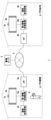
- FIG. 1 shows an aspect of the information processing system of the embodiment.
- the management server 5 provides a network service related to a game to a user.
- the management server 5 manages account information for identifying the user, and the user signs in to the network service provided by the management server 5 using the account information.
- signing in to a network service may be referred to as signing in to the management server 5.
- Account information may consist of an email address and password.
- the account information is authenticated by the management server 5 and the user can sign in to the management server 5.
- logging in to the information processing device means that the user can use the functions of the information processing device
- signing in to the management server 5 means that the user can use the network service. It means that
- the user can save the save data of the game in the management server 5 and register the award items (trophy) acquired during the game play in the management server 5.
- the user can also perform "remote play” in which the user logs in to an information processing device at a remote location and plays a game.
- the information processing system 1 shown in FIG. 1 exemplifies the usage mode when the user is returning home.
- the first information processing device 10a is installed in the user's home
- the second information processing device 10b is installed in the user's home.
- the remote play mechanism the user can access the second information processing device 10b from the first information processing device 10a of the parents' home to the home and play the game installed in the second information processing device 10b.
- the connection source first information processing device 10a and the connection destination second information processing device 10b may be connected by P2P communication via a network 3 such as the Internet.
- the first information processing device 10a is wirelessly or wiredly connected to the input device 6 operated by the user. In the normal play mode, when the first information processing device 10a receives the operation information from the input device 6, it is reflected in the processing of the system software and the application software, and the processing result is output from the output device 4a.
- the first information processing device 10a is a game device that executes an application such as a game
- the input device 6 is a game controller, and supplies user's operation information to the first information processing device 10a.
- the auxiliary storage device 2a is a large-capacity storage device such as an HDD (hard disk drive) or SSD (solid state drive), may be a built-in storage device, or is a first information processing device 10a by USB (Universal Serial Bus) or the like. It may be an external storage device connected to.
- the output device 4a may be a television having a display for outputting an image and a speaker for outputting audio.
- the output device 4a may be connected to the first information processing device 10a with a wired cable, or may be wirelessly connected.
- the access point (hereinafter referred to as “AP”) 8a has the functions of a wireless access point and a router, and the first information processing device 10a connects to the AP 8a via wireless or wired and connects to the external network 3. do.
- the camera 7a is a stereo camera and images the space around the output device 4a.
- the second information processing device 10b is installed at the user's home.
- the second information processing device 10b is connected to peripheral devices such as an auxiliary storage device 2b, an output device 4b, a camera 7b and an AP8b via wireless or wired.
- the connection of the second information processing device 10b and the peripheral device at the user's home may be the same as the connection of the first information processing device 10a and the peripheral device at the user's home.
- the second information processing device 10b is a game device of the same type as the first information processing device 10a, and hereinafter, when the first information processing device 10a and the second information processing device 10b are not particularly distinguished, they are simply It may also be called "information processing device 10".
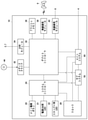
- FIG. 2 shows the hardware configuration of the information processing apparatus 10.
- the information processing device 10 includes a main power button 20, a power ON LED 21, a standby LED 22, a system controller 24, a clock 26, a device controller 30, a media drive 32, a USB module 34, a flash memory 36, a wireless communication module 38, and wired communication. It is configured with a module 40, a subsystem 50 and a main system 60.
- the main system 60 includes a main CPU (Central Processing Unit), a memory and a memory controller as a main storage device, a GPU (Graphics Processing Unit), and the like.
- the GPU is mainly used for arithmetic processing of a game program. These functions may be configured as a system-on-chip and may be formed on one chip.
- the main CPU has a function of executing a game program recorded in the auxiliary storage device 2 or the ROM medium 44.
- the subsystem 50 includes a sub CPU, a memory as a main storage device, a memory controller, and the like, does not have a GPU, and does not have a function of executing a game program.
- the number of circuit gates of the sub CPU is smaller than the number of circuit gates of the main CPU, and the operating power consumption of the sub CPU is smaller than the operating power consumption of the main CPU.
- the main power button 20 is an input unit for inputting operations from the user, and is provided on the front surface of the housing of the information processing apparatus 10 to turn on or off the power supply to the main system 60 of the information processing apparatus 10. Manipulated for.
- the power ON LED 21 lights up when the main power button 20 is turned on, and the standby LED 22 lights up when the main power button 20 is turned off.
- the system controller 24 detects that the user presses the main power button 20.
- the system controller 24 acquires the pressing operation as an "on instruction", while the main power is on when the main power is on.
- the button 20 is pressed, the system controller 24 acquires the pressing operation as an "off instruction”.
- the clock 26 is a real-time clock that generates current date and time information and supplies it to the system controller 24, the subsystem 50, and the main system 60.
- the device controller 30 is configured as an LSI (Large-Scale Integrated Circuit) that executes information transfer between devices like a south bridge. As shown in the figure, devices such as a system controller 24, a media drive 32, a USB module 34, a flash memory 36, a wireless communication module 38, a wired communication module 40, a subsystem 50, and a main system 60 are connected to the device controller 30. Ru.
- the device controller 30 absorbs the difference in electrical characteristics and the difference in data transfer speed of each device, and controls the timing of data transfer.
- the media drive 32 is a drive device that mounts and drives application software such as games and a ROM medium 44 that records license information, and reads programs, data, and the like from the ROM medium 44.
- the ROM medium 44 may be a read-only recording medium such as an optical disk, a magneto-optical disk, or a Blu-ray disc.
- the USB module 34 is a module that connects to an external device with a USB cable.
- the USB module 34 may be connected to the auxiliary storage device 2 and the camera 7 with a USB cable.
- the flash memory 36 is an auxiliary storage device that constitutes an internal storage.
- the wireless communication module 38 is a communication protocol such as a Bluetooth (registered trademark) protocol or an IEEE 802.11 protocol, and wirelessly communicates with, for example, an input device 6.
- the wired communication module 40 communicates with an external device by wire and connects to the network 3 via the AP8.
- the user first logs in to the first information processing device 10a of the parents' house and signs in to the management server 5. Then, the user executes an application for performing remote play (hereinafter referred to as "remote application”), accesses the second information processing device 10b, and logs in to the second information processing device 10b.
- remote application an application for performing remote play
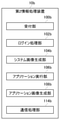
- FIG. 3 shows a functional block of the first information processing apparatus 10a.
- the first information processing device 10a includes a reception unit 100a, a login processing unit 102a, a system image generation unit 104a, an application execution unit 106a, an application image generation unit 108a, an acquisition unit 110a, a display processing unit 112a, and a communication processing unit 114a.
- the communication processing unit 114a shows the functions of the wireless communication module 38 and the wired communication module 40 shown in FIG.
- each element described as a functional block that performs various processes can be composed of a circuit block, a memory, and other LSIs in terms of hardware, and is loaded into the memory in terms of software. It is realized by a program or the like. Therefore, it is understood by those skilled in the art that these functional blocks can be realized in various forms by hardware only, software only, or a combination thereof, and the present invention is not limited to any of them.
- the login processing unit 102a When the first information processing device 10a is started, the login processing unit 102a generates a login screen and displays it on the output device 4a. On the login screen, a list of information about the user who has registered the account information in the first information processing apparatus 10a is displayed. When the user selects his / her own user information, the reception unit 100a accepts the user information selection operation, and the login processing unit 102a permits the user to log in. When a login passcode is set, the login processing unit 102a authenticates the passcode and then permits the user to log in. When the user logs in to the first information processing device 10a, the account information registered in the first information processing device 10a is authenticated by the management server 5, and the user signs in to the management server 5.
- FIG. 4 shows an example of a user's home screen provided by the first information processing apparatus 10a.
- the system image generation unit 104a When the user logs in to the first information processing device 10a, the system image generation unit 104a generates home image data for the user, and the display processing unit 112a displays the home image on the output device 4a.
- the system image generation unit 104a is realized by system software and has a function of generating system image data for presenting a menu item or the like to a user.
- Home image data is a type of system image data.
- the remote application icon 152 is an icon for executing the remote application.
- FIG. 5 shows a state in which the icon row is moved on the home screen.
- a start button 154 for launching the remote app is displayed.
- the application execution unit 106a starts the remote application.
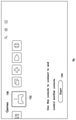
- FIG. 6 shows an example of a screen for selecting a remote play connection destination.
- the application image generation unit 108a generates a selection image of the connection destination, and the display processing unit 112a displays the selection image of the connection destination on the output device 4a.
- two information processing devices "Second house's Console” and "Bedroom's Console" are displayed as connection destination options, but the number of options may be one or three or more. good.
- the console name can be freely named by the user.
- the "Second house's Console” is an information processing device installed in the user's second house
- the "Bedroom's Console” is the second information processing device 10b installed in the user's home.
- the user operates the input device 6 to move the selection frame 156, and in this example, selects the "Bedroom's Console" installed at home and performs the determination operation.
- the communication processing unit 114a transmits a connection request to the second information processing device 10b.
- the main power supply of the second information processing apparatus 10b is in the off state, the main system 60 of the second information processing apparatus 10b is started based on the connection request.
- the first information processing device 10a and the second information processing device 10b are connected to each other by P2P communication via the network 3 to form an environment in which remote play can be performed.
- FIG. 7 shows a functional block of the second information processing apparatus 10b.
- the second information processing device 10b includes a reception unit 100b, a login processing unit 102b, a system image generation unit 104b, an application execution unit 106b, an application image generation unit 108b, and a communication processing unit 114b.
- the communication processing unit 114b shows the functions of the wireless communication module 38 and the wired communication module 40 shown in FIG.
- each element described as a functional block that performs various processes can be composed of a circuit block, a memory, and other LSIs in terms of hardware, and is loaded into the memory in terms of software. It is realized by a program or the like. Therefore, it is understood by those skilled in the art that these functional blocks can be realized in various forms by hardware only, software only, or a combination thereof, and the present invention is not limited to any of them.
- the second information processing device 10b may be a game device of the same type as the first information processing device 10a, so that the second information processing device 10b and the first information processing device 10a are the same user with respect to the user. Provides an interface.
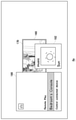
- FIG. 8 shows an example of a screen displayed when establishing a connection between the first information processing device 10a and the second information processing device 10b.
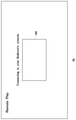
- the display processing unit 112a displays the message “Connecting to your Bedroom's console” indicating that the connection is currently being established, and sets a reduced area 160 smaller than the display area of the entire screen as a part of the display screen. indicate.
- the reduced area 160 is displayed in a manner different from that of the screen background so that the user can recognize the existence of the reduced area 160.
- the remote application transmits a user login request from the communication processing unit 114a to the second information processing device 10b.
- the communication processing unit 114b receives the user's login request from the first information processing device 10a.
- the reception unit 100b receives the login request received by the communication processing unit 114b and delivers it to the login processing unit 102b, and the login processing unit 102b permits the user to log in.
- the system image generation unit 104b When the user logs in to the second information processing device 10b, the system image generation unit 104b generates home image data for the user, and the communication processing unit 114b creates a home in the first information processing device 10a. Send image data.
- the communication processing unit 114a provides the received home image data to the acquisition unit 110a, and the acquisition unit 110a acquires the home image data.
- the display processing unit 112a displays the home image corresponding to the acquired home image data on the output device 4a.
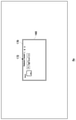
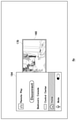
- FIG. 9 shows an example of a user's home screen provided by the second information processing apparatus 10b.
- the display processing unit 112a displays the home image in the reduced area 160.
- This reduced area 160 is an area set in the center of the display screen during connection establishment, and when the acquisition unit 110a acquires the home image data from the second information processing device 10b, the display processing unit 112a reduces the home image. It is displayed on the output device 4a in this state.
- the display processing unit 112a adds and displays information indicating that the home image data is generated by the second information processing device 10b to the home image.
- the display processing unit 112a adds and displays the outer frame 170 to the home image generated by the second information processing apparatus 10b as the information.
- the outer frame 170 may be represented by one color, but may be represented by multiple colors. In any case, the outer frame 170 is added to inform the user that the image is generated by an information processing device different from the first information processing device 10a that is directly operated, and is a color different from the background color. It is preferably expressed by.
- the display processing unit 112a may display the console information 172 of the second information processing device 10b to be connected as information indicating that the home image data is generated by the second information processing device 10b.
- the console information 172 is a console name given by the user to the second information processing device 10b, and the user sees the console information 172 to generate home image data in the second information processing device 10b. I can recognize that.
- the display processing unit 112a performs a display effect of enlarging the home image displayed in the reduced area 160 over the entire display screen.
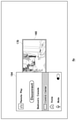
- FIG. 10 shows an example of a home screen being enlarged.
- the display processing unit 112a may magnify and display the home image at a predetermined speed.
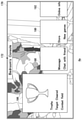
- FIG. 11 shows an example of a home screen displayed on the entire display screen. Even after the entire surface is displayed, the display processing unit 112a continues to display the outer frame 170. As a result, the user can recognize that the displayed home image is provided by the second information processing apparatus 10b.
- the display processing unit 112a may limit the display of the console information 172 to a predetermined time. Since the console information 172 is included in the image, it is expected to be an obstacle when it is always displayed. Therefore, the display processing unit 112a displays the console information 172 for a predetermined time after the display of the home image is started. For example, the display processing unit 112a may limit the display time of the console information 172 within the range of 3 to 5 seconds.
- the operation information of the user's input device 6 is basically provided to the second information processing device 10b. Only the operation information of the predetermined operation member of the input device 6 is provided to the first information processing device 10a.
- the reception unit 100a receives the user's operation information transmitted from the input device 6 and provides it to the communication processing unit 114a, and the communication processing unit 114a transfers the operation information to the second information processing device 10b. Send.
- the reception unit 100b provides the operation information to the system image generation unit 104b.
- the system image generation unit 104b When the user operates the horizontal key of the input device 6, the system image generation unit 104b generates home image data in which the icon string moves in the horizontal direction, and the communication processing unit 114b generates the home image data.
- the home image data is transmitted to the first information processing device 10a.
- the communication processing unit 114a provides the received home image data to the acquisition unit 110a, and the acquisition unit 110a acquires the home image data.
- the display processing unit 112a displays the home image corresponding to the acquired home image data on the output device 4a.
- FIG. 12 shows a state in which the icon row is moved on the home screen.
- the application execution unit 106b starts the game of the game title “Combat field”, and the application image generation unit 108b Generate game image data.
- the application image generation unit 108b includes a GPU (Graphics Processing Unit) that executes rendering processing and the like, and receives an arithmetic processing result in the virtual space by the application execution unit 106b from a viewpoint position (virtual camera) in the virtual space. Generate game image data.
- the application voice generation unit (not shown) generates game voice data, but the description of the game voice data will be omitted below.
- the communication processing unit 114b stream-transmits the game image data to the first information processing device 10a.
- the acquisition unit 110a acquires the game image data
- the display processing unit 112a displays the game image corresponding to the game image data on the output device 4a.
- FIG. 13 shows an example of a game screen that is remotely played by the user.
- the user is playing the "Combat field" executed by the second information processing device 10b
- the display processing unit 112a is a game corresponding to the game image data transmitted from the second information processing device 10b. Display the image.
- the display processing unit 112a does not add information indicating that the game image data is generated by the second information processing device 10b to the game image.
- the outer frame 170 and the console information 172 are not added to the game image, so that the user can play the game without worrying about the outer frame 170 and the console information 172.
- the operation information of the input device 6 is basically transmitted to the second information processing device 10b for processing.
- a function for operating the first information processing device 10a is assigned to a part of the operation members of the input device 6, and the user can operate the operation member during remote play to obtain the first operation member.
- the system image of the information processing apparatus 10a can be displayed.
- FIG. 14 shows an example of a screen when a user operates a predetermined operating member during game play. While the remote application is being executed, a function for the user to operate the first information processing device 10a is assigned to a part of the operation members of the input device 6, and the reception unit 100a receives the operation information of the operation member. When it is received, it is supplied to the system image generation unit 104a. The system image generation unit 104a generates system image data corresponding to the operation information received by the reception unit 100a, and the display processing unit 112a displays the system images 180 and 182 corresponding to the system image data on the output device 4a.
- the system images 180 and 182 are GUIs (graphical user interfaces) for notifying information about an active application in the first information processing apparatus 10a and information presumed to have a high priority for the user.
- the system image generation unit 104a generates a card-shaped GUI in which a part of information is described for each information unit.
- the system image 180 is a GUI related to the remote play being executed
- the system image 182 is a GUI related to the music that the user is interested in.
- the system image generation unit 104a may generate three or more system image data.
- the display processing unit 112a reduces the game image displayed on the entire surface, and displays the system images 180 and 182 superimposed on the reduced game image. In this way, when the display processing unit 112a displays the system images 180 and 182 while the game image is being displayed, the game image is reduced and displayed, and the background image is used as the background image so that the user can use the system images 180 and 182. Is easy to recognize that is an image generated by the first information processing apparatus 10a. Further, the display processing unit 112a reduces the game image to the same size as the reduction area 160, so that the user can easily recognize that the reduced game image is an image generated by the second information processing device 10b. ..
- the display processing unit 112a adds an outer frame 170 to the game image to be reduced and displayed.
- the user can further easily recognize that the reduced displayed game image is generated by the second information processing apparatus 10b.
- the system images 180 and 182 are in an active state in which the user can operate the system images 180 and 182 in the front display state, and the operation information of the input device 6 is processed by the first information processing device 10a.
- the system image generation unit 104a When the user makes a determination operation with "Bedroom's Console" selected in the system image 180, the system image generation unit 104a generates system image data for operating the second information processing device 10b by remote play. , The display processing unit 112a displays the system image corresponding to the system image data on the output device 4a.
- FIG. 15 shows an example of a system screen provided by the first information processing apparatus 10a.
- the system image 184 is generated on the first information processing apparatus 10a side, and is displayed in front of the reduced game image.
- the item "Home" is selected.
- the communication processing unit 114a transmits a home image data generation request to the second information processing device 10b.
- the system image generation unit 104b generates the home image data for the user, and the communication processing unit 114b receives the first information processing.
- the generated home image data is transmitted to the device 10a.
- the communication processing unit 114a provides the received home image data to the acquisition unit 110a, and the acquisition unit 110a acquires the home image data.
- the display processing unit 112a displays the home image corresponding to the acquired home image data on the output device 4a. At this time, as shown in FIG. 9, the display processing unit 112a displays the home image in the reduced area 160, gradually enlarges it (see FIG. 10), and finally displays it on the entire surface (see FIG. 11). Carry out the production.
- FIG. 16 shows an example of a system screen provided by the first information processing apparatus 10a.
- the item of "Control Center” is selected.
- the communication processing unit 114a transmits a system image data generation request to the second information processing device 10b.
- the system image generation unit 104b generates the system image data for the user, and the communication processing unit 114b receives the first information processing.
- the generated system image data is transmitted to the device 10a.
- the system image data is GUI (graphical user interface) data for notifying information about an active application in the second information processing apparatus 10b and information presumed to have a high priority for the user.
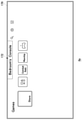
- FIG. 17 shows an example of a system screen provided by the second information processing apparatus 10b.
- the communication processing unit 114a provides the system image data received from the second information processing device 10b to the acquisition unit 110a, and the acquisition unit 110a acquires the system image data.
- the display processing unit 112a displays the system images 186, 188, 190, and 192 corresponding to the acquired system image data on the output device 4a.
- the display processing unit 112a displays the system images 186, 188, 190, and 192 in the reduced area 160, gradually enlarges the images, and finally performs a display effect of displaying the entire surface. do.
- the display processing unit 112a displays the outer frame 170 and the console information 172 as information indicating that the system image data is generated by the second information processing device 10b.
- the console information 172 may be displayed only for a predetermined time.
- the system images 186, 188, 190, and 192 are GUIs (graphical user interfaces) for notifying information about an active application in the second information processing apparatus 10b and information that is presumed to have a high priority for the user.
- the system image generation unit 104b generates a card-shaped GUI in which a part of information is described for each information unit.
- the system image 186 is a GUI related to the running game title “Combat field”
- the system image 188 is a GUI related to a message from a friend
- the system image 190 is a GUI related to a new game in which the user is interested
- the system image 192 is a GUI related to a new game.
- GUI for online friends. When the user selects any GUI, detailed information about the GUI may be presented.
- This disclosure can be used for technology for displaying images.
- 1 Information processing system, 4a ... Output device, 6 ... Input device, 10a ... First information processing device, 10b ... Second information processing device, 100a, 100b ... Reception unit , 102a, 102b ... Login processing unit, 104a, 104b ... System image generation unit, 106a, 106b ... Application execution unit, 108a, 108b ... Application image generation unit, 110a ... Acquisition unit, 112a ... Display processing unit, 114a, 114b ... Communication processing unit.
Landscapes
- Engineering & Computer Science (AREA)
- Multimedia (AREA)
- Theoretical Computer Science (AREA)
- Physics & Mathematics (AREA)
- General Physics & Mathematics (AREA)
- General Engineering & Computer Science (AREA)
- Human Computer Interaction (AREA)
- Optics & Photonics (AREA)
- General Business, Economics & Management (AREA)
- Child & Adolescent Psychology (AREA)
- Health & Medical Sciences (AREA)
- Business, Economics & Management (AREA)
- Computer Security & Cryptography (AREA)
- User Interface Of Digital Computer (AREA)
- Information Transfer Between Computers (AREA)
Abstract
Description
図10は、拡大中のホーム画面の例を示す。表示処理部112aは、所定の速度でホーム画像を拡大表示してよい。
図11は、表示画面の全体に表示したホーム画面の例を示す。全面表示した後も、表示処理部112aは、外枠170を表示し続ける。これによりユーザは、表示されているホーム画像が、第2情報処理装置10bにより提供されていることを認識できる。
Claims (6)
- ユーザによって操作される情報処理装置であって、
別の情報処理装置とネットワークを介して通信可能に接続する通信処理部と、
前記別の情報処理装置から、第1画像データを取得する取得部と、
前記取得部が取得した第1画像データに対応する第1画像を表示する表示処理部と、
第1画像が表示されているときに、前記情報処理装置を操作するための入力装置の操作情報を受け付ける受付部と、
前記受付部が受け付けた操作情報に対応する第2画像データを生成する画像生成部と、を備え、
前記表示処理部は、第1画像を縮小し、縮小した第1画像に、第2画像データに対応する第2画像を重ねて表示する、
ことを特徴とする情報処理装置。 - 前記表示処理部は、第1画像データが前記別の情報処理装置で生成されていることを示す情報を、第1画像に付加して表示する、
ことを特徴とする請求項1に記載の情報処理装置。 - 前記表示処理部は、前記情報として、第1画像に外枠を付加して表示する、
ことを特徴とする請求項2に記載の情報処理装置。 - 前記通信処理部が、前記別の情報処理装置との間で接続を確立する際、前記表示処理部は、表示画面の一部に縮小領域を設定し、接続が確立した後、当該縮小領域に第1画像を表示して、当該第1画像を、表示画面の全体に拡大する表示演出を実施する、
ことを特徴とする請求項1から3のいずれかに記載の情報処理装置。 - 情報処理装置において画像を表示する方法であって、
ネットワークを介して通信可能に接続する別の情報処理装置から、第1画像データを取得するステップと、
第1画像データに対応する第1画像を表示するステップと、
第1画像が表示されているときに、前記情報処理装置を操作するための入力装置の操作情報を受け付けるステップと、
操作情報に対応する第2画像データを生成するステップと、
第1画像を縮小し、縮小した第1画像に、第2画像データに対応する第2画像を重ねて表示するステップと、
を有することを特徴とする画像表示方法。 - コンピュータに、
ネットワークを介して通信可能に接続する情報処理装置から、第1画像データを取得する機能と、
第1画像データに対応する第1画像を表示する機能と、
第1画像が表示されているときに、前記コンピュータを操作するための入力装置の操作情報を受け付ける機能と、
操作情報に対応する第2画像データを生成する機能と、
第1画像を縮小し、縮小した第1画像に、第2画像データに対応する第2画像を重ねて表示する機能と、
を実現させるためのプログラム。
Priority Applications (4)
| Application Number | Priority Date | Filing Date | Title |
|---|---|---|---|
| US18/006,764 US12330059B2 (en) | 2020-08-07 | 2021-07-30 | Information processing device and image display method |
| CN202180047757.4A CN115777094A (zh) | 2020-08-07 | 2021-07-30 | 信息处理设备和图像显示方法 |
| KR1020237002129A KR102812546B1 (ko) | 2020-08-07 | 2021-07-30 | 정보 처리 장치 및 화상 표시 방법 |
| EP21852842.0A EP4194066A4 (en) | 2020-08-07 | 2021-07-30 | INFORMATION PROCESSING DEVICE AND IMAGE DISPLAY METHOD |
Applications Claiming Priority (2)
| Application Number | Priority Date | Filing Date | Title |
|---|---|---|---|
| JP2020135174A JP7390992B2 (ja) | 2020-08-07 | 2020-08-07 | 情報処理装置および画像表示方法 |
| JP2020-135174 | 2020-08-07 |
Publications (1)
| Publication Number | Publication Date |
|---|---|
| WO2022030383A1 true WO2022030383A1 (ja) | 2022-02-10 |
Family
ID=80118004
Family Applications (1)
| Application Number | Title | Priority Date | Filing Date |
|---|---|---|---|
| PCT/JP2021/028337 Ceased WO2022030383A1 (ja) | 2020-08-07 | 2021-07-30 | 情報処理装置および画像表示方法 |
Country Status (6)
| Country | Link |
|---|---|
| US (1) | US12330059B2 (ja) |
| EP (1) | EP4194066A4 (ja) |
| JP (1) | JP7390992B2 (ja) |
| KR (1) | KR102812546B1 (ja) |
| CN (1) | CN115777094A (ja) |
| WO (1) | WO2022030383A1 (ja) |
Families Citing this family (7)
| Publication number | Priority date | Publication date | Assignee | Title |
|---|---|---|---|---|
| JP7568388B2 (ja) * | 2019-06-06 | 2024-10-16 | 株式会社ソニー・インタラクティブエンタテインメント | 情報処理装置および画像表示方法 |
| USD1103199S1 (en) * | 2020-10-05 | 2025-11-25 | Sony Interactive Entertainment Inc. | Display screen with animated graphical user interface |
| CA202359S (en) * | 2020-10-05 | 2023-09-07 | Sony Interactive Entertainment Inc | Display screen with animated graphical user interface |
| USD1103200S1 (en) * | 2020-10-05 | 2025-11-25 | Sony Interactive Entertainment Inc. | Display screen with animated graphical user interface |
| USD1103201S1 (en) | 2020-10-05 | 2025-11-25 | Sony Interactive Entertainment Inc. | Display screen with animated graphical user interface |
| EP4726521A1 (en) | 2023-06-09 | 2026-04-15 | Sony Interactive Entertainment Inc. | Terminal device and game image display method |
| USD1117329S1 (en) * | 2023-08-04 | 2026-03-10 | Samsung Electronics Co., Ltd. | Display screen or portion thereof with graphical user interface |
Citations (2)
| Publication number | Priority date | Publication date | Assignee | Title |
|---|---|---|---|---|
| JP2016083225A (ja) * | 2014-10-27 | 2016-05-19 | 株式会社ソニー・コンピュータエンタテインメント | 情報処理装置 |
| JP2020093109A (ja) * | 2012-01-24 | 2020-06-18 | 株式会社ソニー・インタラクティブエンタテインメント | 情報処理装置およびユーザをアプリケーションに参加させる方法 |
Family Cites Families (11)
| Publication number | Priority date | Publication date | Assignee | Title |
|---|---|---|---|---|
| US9032465B2 (en) * | 2002-12-10 | 2015-05-12 | Ol2, Inc. | Method for multicasting views of real-time streaming interactive video |
| US8713474B2 (en) | 2010-10-05 | 2014-04-29 | Citrix Systems, Inc. | Providing user interfaces and window previews for hosted applications |
| US9155960B2 (en) * | 2013-01-11 | 2015-10-13 | Chris Argiro | Video-game console for allied touchscreen devices |
| JP6153450B2 (ja) * | 2013-10-30 | 2017-06-28 | 株式会社ソニー・インタラクティブエンタテインメント | 情報処理システムおよび情報処理装置 |
| EP3092621B1 (en) * | 2014-01-09 | 2025-05-07 | Square Enix Holdings Co., Ltd. | Video gaming device with remote rendering capability |
| US9795871B2 (en) * | 2014-04-15 | 2017-10-24 | Microsoft Technology Licensing, Llc | Positioning a camera video overlay on gameplay video |
| CN104615327B (zh) * | 2014-12-24 | 2017-12-22 | 广州酷狗计算机科技有限公司 | 用于游戏过程中的窗口显示方法及装置 |
| US9968856B1 (en) * | 2016-11-15 | 2018-05-15 | Genvid Technologies, Inc. | Systems and methods of video game streaming with interactive overlay and additional data |
| JP7123554B2 (ja) * | 2017-12-25 | 2022-08-23 | グリー株式会社 | ゲーム装置、制御方法及び制御プログラム |
| US20190282895A1 (en) * | 2018-03-13 | 2019-09-19 | Microsoft Technology Licensing, Llc | Control sharing for interactive experience |
| US20200090453A1 (en) * | 2018-09-19 | 2020-03-19 | Igt | Pairing augmented reality devices with electronic gaming machines |
-
2020
- 2020-08-07 JP JP2020135174A patent/JP7390992B2/ja active Active
-
2021
- 2021-07-30 KR KR1020237002129A patent/KR102812546B1/ko active Active
- 2021-07-30 CN CN202180047757.4A patent/CN115777094A/zh active Pending
- 2021-07-30 US US18/006,764 patent/US12330059B2/en active Active
- 2021-07-30 EP EP21852842.0A patent/EP4194066A4/en active Pending
- 2021-07-30 WO PCT/JP2021/028337 patent/WO2022030383A1/ja not_active Ceased
Patent Citations (2)
| Publication number | Priority date | Publication date | Assignee | Title |
|---|---|---|---|---|
| JP2020093109A (ja) * | 2012-01-24 | 2020-06-18 | 株式会社ソニー・インタラクティブエンタテインメント | 情報処理装置およびユーザをアプリケーションに参加させる方法 |
| JP2016083225A (ja) * | 2014-10-27 | 2016-05-19 | 株式会社ソニー・コンピュータエンタテインメント | 情報処理装置 |
Non-Patent Citations (2)
| Title |
|---|
| ANOYNMOUS: "Is remote gaming on a mobile notebook like the VivoBook E203NA-464G stable?", 1 October 2017 (2017-10-01), XP055893752, Retrieved from the Internet <URL:https://morimorigameblogg.blogspot.com/2017/10/vivobook-e203na-464gps4.html> * |
| See also references of EP4194066A4 * |
Also Published As
| Publication number | Publication date |
|---|---|
| KR20230028426A (ko) | 2023-02-28 |
| JP7390992B2 (ja) | 2023-12-04 |
| EP4194066A1 (en) | 2023-06-14 |
| US12330059B2 (en) | 2025-06-17 |
| JP2022030870A (ja) | 2022-02-18 |
| US20230277928A1 (en) | 2023-09-07 |
| CN115777094A (zh) | 2023-03-10 |
| KR102812546B1 (ko) | 2025-05-27 |
| EP4194066A4 (en) | 2024-09-11 |
Similar Documents
| Publication | Publication Date | Title |
|---|---|---|
| JP7390992B2 (ja) | 情報処理装置および画像表示方法 | |
| JP6782173B2 (ja) | 情報処理装置および音声データ通信管理方法 | |
| JP2014092991A (ja) | 情報処理装置および入力装置 | |
| JP7145120B2 (ja) | 情報処理装置、情報処理システムおよび承認画面生成方法 | |
| JP6240627B2 (ja) | 情報処理装置および画面生成方法 | |
| EP3981483B1 (en) | Information processing device and image display method | |
| WO2020246377A1 (ja) | 情報処理装置および画像表示方法 | |
| JP7071550B2 (ja) | 情報処理装置 | |
| JP7108048B2 (ja) | 情報処理装置および画面生成方法 | |
| JP7091289B2 (ja) | 情報処理装置および入力装置 | |
| JP6495976B2 (ja) | 情報処理装置および情報表示制御方法 | |
| JP2016174911A (ja) | 入力装置 | |
| JP7248484B2 (ja) | 情報処理装置、情報処理システムおよびアプリケーション画面表示方法 | |
| WO2021010279A1 (ja) | 情報処理装置およびログイン許可方法 | |
| WO2021054234A1 (ja) | 情報処理装置およびサーバ | |
| WO2025253532A1 (ja) | 情報処理装置 | |
| JP2018029974A (ja) | 入力装置 |
Legal Events
| Date | Code | Title | Description |
|---|---|---|---|
| 121 | Ep: the epo has been informed by wipo that ep was designated in this application |
Ref document number: 21852842 Country of ref document: EP Kind code of ref document: A1 |
|
| ENP | Entry into the national phase |
Ref document number: 20237002129 Country of ref document: KR Kind code of ref document: A |
|
| NENP | Non-entry into the national phase |
Ref country code: DE |
|
| ENP | Entry into the national phase |
Ref document number: 2021852842 Country of ref document: EP Effective date: 20230307 |
|
| WWG | Wipo information: grant in national office |
Ref document number: 18006764 Country of ref document: US |