WO2022201819A1 - 撮像装置、および撮像装置制御方法、並びにプログラム - Google Patents
撮像装置、および撮像装置制御方法、並びにプログラム Download PDFInfo
- Publication number
- WO2022201819A1 WO2022201819A1 PCT/JP2022/002357 JP2022002357W WO2022201819A1 WO 2022201819 A1 WO2022201819 A1 WO 2022201819A1 JP 2022002357 W JP2022002357 W JP 2022002357W WO 2022201819 A1 WO2022201819 A1 WO 2022201819A1
- Authority
- WO
- WIPO (PCT)
- Prior art keywords
- lens
- image
- lens selection
- user
- unit
- Prior art date
- Legal status (The legal status is an assumption and is not a legal conclusion. Google has not performed a legal analysis and makes no representation as to the accuracy of the status listed.)
- Ceased
Links
Images












Classifications
-
- H—ELECTRICITY
- H04—ELECTRIC COMMUNICATION TECHNIQUE
- H04N—PICTORIAL COMMUNICATION, e.g. TELEVISION
- H04N23/00—Cameras or camera modules comprising electronic image sensors; Control thereof
- H04N23/60—Control of cameras or camera modules
- H04N23/69—Control of means for changing angle of the field of view, e.g. optical zoom objectives or electronic zooming
-
- G—PHYSICS
- G06—COMPUTING OR CALCULATING; COUNTING
- G06F—ELECTRIC DIGITAL DATA PROCESSING
- G06F1/00—Details not covered by groups G06F3/00 - G06F13/00 and G06F21/00
- G06F1/16—Constructional details or arrangements
- G06F1/1613—Constructional details or arrangements for portable computers
- G06F1/1633—Constructional details or arrangements of portable computers not specific to the type of enclosures covered by groups G06F1/1615 - G06F1/1626
- G06F1/1684—Constructional details or arrangements related to integrated I/O peripherals not covered by groups G06F1/1635 - G06F1/1675
- G06F1/1686—Constructional details or arrangements related to integrated I/O peripherals not covered by groups G06F1/1635 - G06F1/1675 the I/O peripheral being an integrated camera
-
- G—PHYSICS
- G06—COMPUTING OR CALCULATING; COUNTING
- G06F—ELECTRIC DIGITAL DATA PROCESSING
- G06F3/00—Input arrangements for transferring data to be processed into a form capable of being handled by the computer; Output arrangements for transferring data from processing unit to output unit, e.g. interface arrangements
- G06F3/01—Input arrangements or combined input and output arrangements for interaction between user and computer
- G06F3/048—Interaction techniques based on graphical user interfaces [GUI]
- G06F3/0481—Interaction techniques based on graphical user interfaces [GUI] based on specific properties of the displayed interaction object or a metaphor-based environment, e.g. interaction with desktop elements like windows or icons, or assisted by a cursor's changing behaviour or appearance
- G06F3/04817—Interaction techniques based on graphical user interfaces [GUI] based on specific properties of the displayed interaction object or a metaphor-based environment, e.g. interaction with desktop elements like windows or icons, or assisted by a cursor's changing behaviour or appearance using icons
-
- G—PHYSICS
- G06—COMPUTING OR CALCULATING; COUNTING
- G06F—ELECTRIC DIGITAL DATA PROCESSING
- G06F3/00—Input arrangements for transferring data to be processed into a form capable of being handled by the computer; Output arrangements for transferring data from processing unit to output unit, e.g. interface arrangements
- G06F3/01—Input arrangements or combined input and output arrangements for interaction between user and computer
- G06F3/048—Interaction techniques based on graphical user interfaces [GUI]
- G06F3/0481—Interaction techniques based on graphical user interfaces [GUI] based on specific properties of the displayed interaction object or a metaphor-based environment, e.g. interaction with desktop elements like windows or icons, or assisted by a cursor's changing behaviour or appearance
- G06F3/0482—Interaction with lists of selectable items, e.g. menus
-
- G—PHYSICS
- G06—COMPUTING OR CALCULATING; COUNTING
- G06F—ELECTRIC DIGITAL DATA PROCESSING
- G06F3/00—Input arrangements for transferring data to be processed into a form capable of being handled by the computer; Output arrangements for transferring data from processing unit to output unit, e.g. interface arrangements
- G06F3/01—Input arrangements or combined input and output arrangements for interaction between user and computer
- G06F3/048—Interaction techniques based on graphical user interfaces [GUI]
- G06F3/0484—Interaction techniques based on graphical user interfaces [GUI] for the control of specific functions or operations, e.g. selecting or manipulating an object, an image or a displayed text element, setting a parameter value or selecting a range
- G06F3/04845—Interaction techniques based on graphical user interfaces [GUI] for the control of specific functions or operations, e.g. selecting or manipulating an object, an image or a displayed text element, setting a parameter value or selecting a range for image manipulation, e.g. dragging, rotation, expansion or change of colour
-
- G—PHYSICS
- G06—COMPUTING OR CALCULATING; COUNTING
- G06F—ELECTRIC DIGITAL DATA PROCESSING
- G06F3/00—Input arrangements for transferring data to be processed into a form capable of being handled by the computer; Output arrangements for transferring data from processing unit to output unit, e.g. interface arrangements
- G06F3/01—Input arrangements or combined input and output arrangements for interaction between user and computer
- G06F3/048—Interaction techniques based on graphical user interfaces [GUI]
- G06F3/0484—Interaction techniques based on graphical user interfaces [GUI] for the control of specific functions or operations, e.g. selecting or manipulating an object, an image or a displayed text element, setting a parameter value or selecting a range
- G06F3/04847—Interaction techniques to control parameter settings, e.g. interaction with sliders or dials
-
- G—PHYSICS
- G06—COMPUTING OR CALCULATING; COUNTING
- G06F—ELECTRIC DIGITAL DATA PROCESSING
- G06F3/00—Input arrangements for transferring data to be processed into a form capable of being handled by the computer; Output arrangements for transferring data from processing unit to output unit, e.g. interface arrangements
- G06F3/01—Input arrangements or combined input and output arrangements for interaction between user and computer
- G06F3/048—Interaction techniques based on graphical user interfaces [GUI]
- G06F3/0487—Interaction techniques based on graphical user interfaces [GUI] using specific features provided by the input device, e.g. functions controlled by the rotation of a mouse with dual sensing arrangements, or of the nature of the input device, e.g. tap gestures based on pressure sensed by a digitiser
- G06F3/0488—Interaction techniques based on graphical user interfaces [GUI] using specific features provided by the input device, e.g. functions controlled by the rotation of a mouse with dual sensing arrangements, or of the nature of the input device, e.g. tap gestures based on pressure sensed by a digitiser using a touch-screen or digitiser, e.g. input of commands through traced gestures
- G06F3/04883—Interaction techniques based on graphical user interfaces [GUI] using specific features provided by the input device, e.g. functions controlled by the rotation of a mouse with dual sensing arrangements, or of the nature of the input device, e.g. tap gestures based on pressure sensed by a digitiser using a touch-screen or digitiser, e.g. input of commands through traced gestures for inputting data by handwriting, e.g. gesture or text
-
- G—PHYSICS
- G06—COMPUTING OR CALCULATING; COUNTING
- G06T—IMAGE DATA PROCESSING OR GENERATION, IN GENERAL
- G06T3/00—Geometric image transformations in the plane of the image
- G06T3/40—Scaling of whole images or parts thereof, e.g. expanding or contracting
-
- H—ELECTRICITY
- H04—ELECTRIC COMMUNICATION TECHNIQUE
- H04N—PICTORIAL COMMUNICATION, e.g. TELEVISION
- H04N23/00—Cameras or camera modules comprising electronic image sensors; Control thereof
- H04N23/45—Cameras or camera modules comprising electronic image sensors; Control thereof for generating image signals from two or more image sensors being of different type or operating in different modes, e.g. with a CMOS sensor for moving images in combination with a charge-coupled device [CCD] for still images
-
- H—ELECTRICITY
- H04—ELECTRIC COMMUNICATION TECHNIQUE
- H04N—PICTORIAL COMMUNICATION, e.g. TELEVISION
- H04N23/00—Cameras or camera modules comprising electronic image sensors; Control thereof
- H04N23/60—Control of cameras or camera modules
- H04N23/63—Control of cameras or camera modules by using electronic viewfinders
- H04N23/631—Graphical user interfaces [GUI] specially adapted for controlling image capture or setting capture parameters
-
- H—ELECTRICITY
- H04—ELECTRIC COMMUNICATION TECHNIQUE
- H04N—PICTORIAL COMMUNICATION, e.g. TELEVISION
- H04N23/00—Cameras or camera modules comprising electronic image sensors; Control thereof
- H04N23/60—Control of cameras or camera modules
- H04N23/63—Control of cameras or camera modules by using electronic viewfinders
- H04N23/633—Control of cameras or camera modules by using electronic viewfinders for displaying additional information relating to control or operation of the camera
-
- H—ELECTRICITY
- H04—ELECTRIC COMMUNICATION TECHNIQUE
- H04N—PICTORIAL COMMUNICATION, e.g. TELEVISION
- H04N23/00—Cameras or camera modules comprising electronic image sensors; Control thereof
- H04N23/60—Control of cameras or camera modules
- H04N23/63—Control of cameras or camera modules by using electronic viewfinders
- H04N23/633—Control of cameras or camera modules by using electronic viewfinders for displaying additional information relating to control or operation of the camera
- H04N23/634—Warning indications
-
- G—PHYSICS
- G03—PHOTOGRAPHY; CINEMATOGRAPHY; ANALOGOUS TECHNIQUES USING WAVES OTHER THAN OPTICAL WAVES; ELECTROGRAPHY; HOLOGRAPHY
- G03B—APPARATUS OR ARRANGEMENTS FOR TAKING PHOTOGRAPHS OR FOR PROJECTING OR VIEWING THEM; APPARATUS OR ARRANGEMENTS EMPLOYING ANALOGOUS TECHNIQUES USING WAVES OTHER THAN OPTICAL WAVES; ACCESSORIES THEREFOR
- G03B19/00—Cameras
- G03B19/18—Motion-picture cameras
- G03B19/22—Double cameras
-
- G—PHYSICS
- G03—PHOTOGRAPHY; CINEMATOGRAPHY; ANALOGOUS TECHNIQUES USING WAVES OTHER THAN OPTICAL WAVES; ELECTROGRAPHY; HOLOGRAPHY
- G03B—APPARATUS OR ARRANGEMENTS FOR TAKING PHOTOGRAPHS OR FOR PROJECTING OR VIEWING THEM; APPARATUS OR ARRANGEMENTS EMPLOYING ANALOGOUS TECHNIQUES USING WAVES OTHER THAN OPTICAL WAVES; ACCESSORIES THEREFOR
- G03B30/00—Camera modules comprising integrated lens units and imaging units, specially adapted for being embedded in other devices, e.g. mobile phones or vehicles
Definitions
- the present disclosure relates to an imaging device, an imaging device control method, and a program. More specifically, the present invention relates to an imaging apparatus that improves operability of switching between lenses used in the imaging apparatus and digital zoom processing, an imaging apparatus control method, and a program.
- a multi-lens camera can take clearer images of both a distant subject and a nearby subject by switching lenses depending on the distance to the subject, for example.
- the standard lens, wide-angle lens, and telephoto lens installed in smartphones are single focal length lenses with a fixed focal length.
- many thin devices such as smartphones do not have zoom lenses. Therefore, for example, digital zoom processing is performed when generating an intermediate image between an image shot with a standard lens and an image shot with a telephoto lens.
- Digital zoom processing is performed as image enlargement processing of a captured image. For example, by cropping and enlarging a portion of an image shot with a standard lens, it is possible to generate an intermediate image between the image shot with the standard lens and the image shot with the telephoto lens. Note that digital zoom processing is described in, for example, Patent Document 1 (Japanese Patent Application Laid-Open No. 2013-175855).
- the user When shooting an image using a smartphone equipped with a multi-lens camera, the user first selects one lens to be used for shooting. Through this lens selection processing, an image captured by the selected lens, a so-called through image, is displayed on the display of the smartphone. Furthermore, when adjusting the angle of view and size of the image displayed on the display unit, the user performs zoom processing using a digital zoom function, displays the image corrected by the digital zoom on the display unit, and adjusts the angle of view of the image. and size to your liking. After that, operate the shutter to take a picture.
- the present disclosure has been made, for example, in view of the above problems, and an imaging device that improves the operability of switching lenses used in an imaging device such as a smartphone (smartphone) and digital zoom processing, and an imaging device control method. , and to provide programs.
- a first aspect of the present disclosure includes: multiple lenses available for image capture; having a display control unit that controls display data to be output to the display unit; The display control unit displaying a plurality of lens selection portions corresponding to each of the plurality of lenses on a display; a digital zoom adjustment section in which a digital zoom amount of a photographed image can be adjusted according to a slide amount of a lens selection section selected by a user in response to a user operation for selecting one of a plurality of lens selection sections displayed on the display section; It is in the imaging device to display.
- a second aspect of the present disclosure is An imaging device control method executed in an imaging device,
- the imaging device is multiple lenses available for image capture; having a display control unit that controls display data to be output to the display unit;
- the display control unit displaying a plurality of lens selection portions corresponding to each of the plurality of lenses on a display; a digital zoom adjustment section in which a digital zoom amount of a photographed image can be adjusted according to a slide amount of a lens selection section selected by a user in response to a user operation for selecting one of a plurality of lens selection sections displayed on the display section;
- a method of controlling an imaging device for display is provided.
- a third aspect of the present disclosure is A program for executing imaging device control processing in an imaging device,
- the imaging device is multiple lenses available for image capture; having a display control unit that controls display data to be output to the display unit;
- the program causes the display control unit to: a process of displaying a plurality of lens selection portions corresponding to each of the plurality of lenses on a display; a digital zoom adjustment section in which a digital zoom amount of a photographed image can be adjusted according to a slide amount of a lens selection section selected by a user in response to a user operation for selecting one of a plurality of lens selection sections displayed on the display section; It is in the program that executes the processing to display.
- the program of the present disclosure is, for example, a program that can be provided in a computer-readable format to an information processing device or computer system capable of executing various program codes via a storage medium or communication medium.
- processing according to the program is realized on the information processing device or computer system.
- a system is a logical collective configuration of a plurality of devices, and the devices of each configuration are not limited to being in the same housing.
- an operation unit that enables efficient execution of shooting lens selection processing by the user and digital zoom processing of a shot image using the selected lens.
- it has a plurality of lenses with different lens magnifications that can be used for image capturing, and a display control unit that executes control of display data to be output to the display unit.
- a plurality of lens selection sections corresponding to each are displayed on the display section, and according to a user operation of selecting one of the plurality of lens selection sections displayed on the display section, a sliding amount of the lens selection section selected by the user is displayed.
- This configuration realizes an operation unit (UI) that enables a user to efficiently perform photographing lens selection processing and digital zoom processing of a photographed image using the selected lens.
- UI operation unit
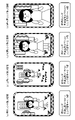
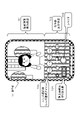
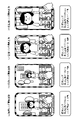
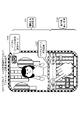
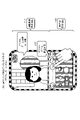
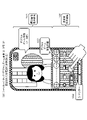
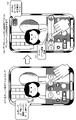
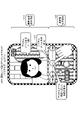
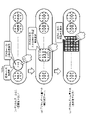
- FIG. 10 is a diagram illustrating an example of a series of operations performed by a user who operates the imaging device and an example of transition of display data according to the user's operations;
- FIG. 10 is a diagram illustrating an example of a series of operations performed by a user who operates the imaging device and an example of transition of display data according to the user's operations;
- FIG. 10 is a diagram illustrating an example of a series of operations performed by a user who operates the imaging device and an example of transition of display data according to the user's operations;
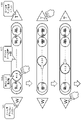
- FIG. 10 is a diagram illustrating an example of a series of operations performed by a user who operates the imaging device and an example of transition of display data according to the user's operations;
- FIG. 10 is a diagram illustrating an example of a series of operations performed by a user who operates the imaging device and an example of transition of display data according to the user's operations;
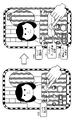
- FIG. 10 is a diagram illustrating an example of a series of operations performed by a user who operates the imaging device and an example of transition of display data according to the user's operations;
- FIG. 10 is a diagram illustrating an example of a series of operations performed by a user who operates the imaging device and an example of transition of display data according to the user's operations;
- FIG. 10 is a diagram illustrating an example of a series of operations performed by a user who operates the imaging device and an example of transition of display data according to the user's operations;
- FIG. 10 is a diagram illustrating an example of a series of operations performed by a user who operates the imaging device and an example of transition of display data according to the user's operations;
- FIG. 10 is a diagram illustrating an example of a series of operations performed by a user who operates the imaging device and an
- FIG. 10 is a diagram illustrating an example of a series of operations performed by a user who operates the imaging device and an example of transition of display data according to the user's operations;
- FIG. 10 is a diagram illustrating an example of a series of operations performed by a user who operates the imaging device and an example of transition of display data according to the user's operations;
- FIG. 10 is a diagram illustrating an example of a series of operations performed by a user who operates a lens selection unit (lens selection icon) of the imaging device and an example of transition of display data according to the user's operation;
- FIG. 10 is a diagram illustrating an example of a series of operations performed by a user who operates a lens selection unit (lens selection icon) of the imaging device and an example of transition of display data according to the user's operation;
- FIG. 10 is a diagram illustrating an example of a series of operations performed by a user who operates a lens selection unit (lens selection icon) of the imaging device and an example of transition of display data according to the user's operation;
- FIG. 10 is a diagram illustrating an example of a series of operations performed by a user who operates a lens selection unit (lens selection icon) of the imaging device and an example of transition of display data according to the user's operation;
- FIG. 10 is a diagram illustrating an example of a series of operations performed by a user who operates a lens selection unit (lens selection icon) of the imaging device and an example of transition of display data according to the user's operation;
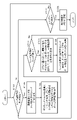
- FIG. 4 is a diagram showing a flowchart describing a processing sequence executed by the imaging device of the present disclosure
- FIG. 10 is a diagram illustrating a specific example of image enlargement processing in digital zoom processing
- FIG. 10 is a diagram illustrating a specific example of image quality degradation in digital zoom processing
- FIG. 10 is a diagram illustrating a specific example of display data for notifying a user of image quality deterioration due to digital zoom processing
- FIG. 10 is a diagram illustrating a specific example of display data for notifying a user of image quality deterioration due to digital zoom processing
- FIG. 10 is a diagram illustrating a specific example of display data for notifying a user of image quality deterioration due to digital zoom processing
- FIG. 10 is a diagram illustrating a specific example of display data for notifying a user of image quality deterioration due to digital zoom processing
- FIG. 10 is a diagram illustrating a specific example of display data for notifying a user of image quality deterioration due to digital
- FIG. 11 is a diagram illustrating a specific example of notifying a user of image quality deterioration in digital zoom processing;
- FIG. 11 is a diagram illustrating a specific example of notifying a user of image quality deterioration in digital zoom processing;
- FIG. 3 is a diagram illustrating an example of display data of an operation unit (UI unit);
- FIG. 3 is a diagram illustrating an example of display data of an operation unit (UI unit);
- FIG. 3 is a diagram illustrating an example of display data of an operation unit (UI unit);
- FIG. 10 is a diagram illustrating an example of display data of an example unit (UI unit) in a device capable of optical zoom;
- FIG. 10 is a diagram illustrating an example of display data of an example unit (UI unit) in a device capable of optical zoom;
- FIG. 10 is a diagram illustrating an example of display data of an example unit (UI unit) in a device capable of optical zoom;
- FIG. 10 is a diagram illustrating an example of display data of an example unit (UI unit) in a device capable of optical zoom
- FIG. 10 is a diagram illustrating an example of display data of an example unit (UI unit) in a device capable of optical zoom
- FIG. 10 is a diagram illustrating an example of display data of an example unit (UI unit) in a device capable of optical zoom
- It is a figure explaining the example of composition of the imaging device of this indication. It is a figure explaining the hardware structural example of the imaging device of this indication.
- FIG. 1 is a diagram showing a configuration example of an imaging device of the present disclosure.
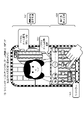
- FIG. 1 shows a smartphone (smartphone) having a camera function as an example of an imaging device 10 of the present disclosure.
- the imaging device of the present disclosure is not limited to such a smartphone, and includes, for example, a tablet terminal having a camera function, a PC, and an imaging device such as a camera.
- FIG. 1(a) shows the front side of an imaging device (smartphone) 10, in which a display unit 11 is provided.
- FIG. 1B shows the back side of an imaging device (smartphone) 10, in which a camera lens 12 is provided.
- the camera lens 12 is composed of multiple lenses with different focal lengths. That is, the imaging device 10 shown in FIG. 1 is a smartphone (smartphone) equipped with a multi-lens camera. When taking an image, the user can select a lens to be used from among these multiple lenses and perform switching processing as appropriate, so that subjects at various distances can be clearly shot.
- the imaging device (smartphone) 10 shown in FIG. 1 has the following four types of lenses.
- (d) Super-telephoto lens 12d In the figure, the telephoto lens 12c and the super-telephoto lens 12d are shown in one lens portion at the bottom of the camera lens 12. In this bottom lens portion, the telephoto lens 12c and the super-telephoto lens 12d two lenses are incorporated.
- the standard lens 12a has a focal length of 24 mm and a lens magnification of 1.0.
- the wide-angle lens 12b has a focal length of 16 mm and a lens magnification of 0.7.
- the telephoto lens 12c has a focal length of 70 mm and a lens magnification of 2.9 times.
- the super-telephoto lens 12d has a focal length of 105 mm and a lens magnification of 4.4 times.
- the user of the imaging device 10 can switch between these lenses 12a to 12d when taking an image.
- the focal length and lens magnification of each lens are examples, and the processing of the present disclosure can also be applied to an apparatus configuration including various lenses having other focal lengths and lens magnifications.
- the lens type is also an example, and the lens type is not limited to four types. is also applicable.
- FIG. 2 shows an example of images taken by switching the lenses 12a to 12d.
- FIG. 2 shows examples of the following four types of captured images.
- a standard lens shot image is an image shot using a standard lens 12a with a focal length of 24 mm and a lens magnification of 1.0.
- Wide-angle lens shot image is an image shot using a wide-angle lens 12b with a focal length of 16 mm and a lens magnification of 0.7 times.
- Telephoto lens shot image is an image shot using a telephoto lens 12c with a focal length of 70 mm and a lens magnification of 2.9 times.
- the super-telephoto lens shot image is an image shot using the super-telephoto lens 12d with a focal length of 105 mm and a lens magnification of 4.4 times.
- the image shot with the wide-angle lens is the image shot with the widest field of view.
- image, (c) image taken with a telephoto lens, and (d) image taken with a super-telephoto lens are the image shot with the wide-angle lens.
- the image shot with the super-telephoto lens is the largest.
- the order of size of the subject at the same distance is (d) image taken with a super-telephoto lens, (c) image taken with a telephoto lens, a) image taken with a standard lens, (b) image taken with a wide-angle lens, in this order of field of view range. and in reverse order.
- FIG. 3 is a diagram showing an example of an operation unit as a user interface (UI) displayed on the display unit 11 of the imaging device (smartphone) 10. As shown in FIG. The upper part of the display unit 11 is set as a captured image display area 101 , and the lower part is set as an operation unit display area 102 .
- UI user interface
- the image displayed in the captured image display area 101 is not limited to the image for which the capturing process has been completed, and includes an image before capturing.
- a so-called through image that is, an image that the user is about to capture is also displayed in the captured image display area 101 .
- the user while looking at the image displayed in the captured image display area 101 , operates the operation units such as various icons displayed in the operation unit display area 102 to capture an image.
- buttons as various operation units such as a shutter 103, a still image/moving image switching unit 104, and a lens selection unit 105 are displayed. Note that the operation unit (icon) information displayed in the operation unit display area 102 can be switched to various settings.
- the user touches the shutter 103 .
- the image displayed in the captured image display area 101 is captured and recorded in the memory.
- a still image/moving image switching unit 104 is an operation unit for switching between a still image and a moving image. Note that the processing of the present disclosure can be applied to both still image shooting processing and moving image shooting processing. However, in the following embodiments, as a representative example, a processing example in the case of shooting a still image will be described.
- a lens selection unit 105 is an operation unit for switching the lens used for image capturing, and four lens selection icons are displayed for individually selecting the four types of lenses described above with reference to FIG. .
- FIG. 3 shows the following four lens selection sections (lens selection icons). Wide-angle lens selector (x0.7) Standard lens selector (x1.0) Telephoto lens selector (x2.9) Super-telephoto lens selector (4.4x) Numerical values (0.7 to 4.4) within each icon indicate the magnification of each lens.
- the user can switch the lens used by operating (touching) one of the four lens selection sections (lens selection icons).
- FIG. 4 is a diagram showing an example of display images that are switched according to user operations (touches) on the four lens selection sections (lens selection icons), that is, an example of switching of the display images in the captured image display area 101.
- FIG. 4 is a diagram showing an example of display images that are switched according to user operations (touches) on the four lens selection sections (lens selection icons), that is, an example of switching of the display images in the captured image display area 101.
- FIG. 4 shows examples of the following four types of user operation states.
- FIG. 4A when the user operates (touches) the standard lens selection section (standard lens selection icon), a process of switching the photographing lens to the standard lens 12a is executed inside the imaging apparatus 10, and the standard lens 12a is selected. A photographed image (through image) using is displayed on the display unit 11 .
- FIG. 4B when the user operates (touches) the wide-angle lens selection section (wide-angle lens selection icon), a process of switching the photographing lens to the wide-angle lens 12b is executed inside the imaging device 10, and the wide-angle lens is selected. A photographed image (through image) using the lens 12b is displayed on the display unit 11.
- FIG. 4B when the user operates (touches) the wide-angle lens selection section (wide-angle lens selection icon), a process of switching the photographing lens to the wide-angle lens 12b is executed inside the imaging device 10, and the wide-angle lens is selected. A photographed image (through image) using the lens 12b is displayed on the display unit 11.
- FIG. 4C when the user operates (touches) the telephoto lens selection section (telephoto lens selection icon), a process of switching the photographing lens to the telephoto lens 12c is executed inside the imaging apparatus 10, and the telephoto lens is selected. A photographed image (through image) using the lens 12c is displayed on the display unit 11.
- FIG. 4D when the user operates (touches) the super-telephoto lens selection section (super-telephoto lens selection icon), a process of switching the photographing lens to the super-telephoto lens 12d is executed inside the imaging apparatus 10. Then, an image (through image) shot using the super-telephoto lens 12d is displayed on the display unit 11.
- FIG. 4D when the user operates (touches) the super-telephoto lens selection section (super-telephoto lens selection icon), a process of switching the photographing lens to the super-telephoto lens 12d is executed inside the imaging apparatus 10. Then, an image (through image) shot using the super-telephoto lens 12d is displayed on the display unit 11.
- the user selects and operates (touches) one lens selection icon from the lens selection section (lens selection icon) 105 in the operation section (UI).
- the operation section UI
- an image captured by selecting one lens selection icon from the lens selection unit (lens selection icon) 105 in the operation unit (UI) has the magnification of each lens (0.7 ⁇ , 1.0 ⁇ , 2.0 ⁇ ). 9 times, 4.4 times), there are only four types of images corresponding to these four types of magnifications.
- the standard lens photographed image shown in FIG. 4A is an image photographed according to the lens magnification (1.0) inherent to the standard lens.
- the telephoto lens photographed image shown in FIG. 4C is an image photographed according to the lens magnification (2.9 times) unique to the telephoto lens. If it is desired to shoot an intermediate image between the image taken with the standard lens shown in FIG. 4A and the image taken with the telephoto lens shown in FIG. 4C, it is necessary to perform digital zoom processing.
- Digital zoom processing is performed as image enlargement processing for captured images. For example, by cropping and enlarging a portion of an image shot with a standard lens, it is possible to generate an intermediate image between the image shot with the standard lens and the image shot with the telephoto lens.
- FIG. 5 to 12 show a series of operation examples of a user who operates the imaging device 10.
- FIG. According to the user's operation, the display state of the display unit 11 of the imaging device 10 sequentially transitions from (step S1) in FIG. 5 to (step S10) in FIG. Display data on the display unit 11 and user operations in each step will be described below.
- Step S1 The display data shown in step S1 of FIG. 5 is the initial screen when the camera is started.
- the standard lens 12a is selected by default when the camera is started.
- An image captured using the standard lens 12 is displayed in the captured image display area 101 .
- the lens selection section (lens selection icon) 105 of the operation section display area 102 only the standard lens selection icon (1.0) is changed to another lens selection icon (0) so as to indicate that the standard lens 12a is selected. .7, 2.9, 4.4) are displayed with a higher brightness or a different color.
- the user confirms the image displayed in the captured image display area 101, that is, the image captured using the standard lens 12 with a lens magnification of 1.0, and decides to capture and record this image. touches the shutter 103 .
- step S2 the processing in this case is the processing below (step S2).
- Step S2 in FIG. 5 is processing when the user wants to take a picture of a person a little larger and starts digital zoom.
- the user touches the lens selection icon of the standard lens 12a with the lens magnification of 1.0, which is the lens selection portion (lens selection icon) of the currently selected lens, and performs the process of sliding this icon. conduct.
- Step S3 When the user operates (touches) the lens selection icon of the standard lens 12a with the lens magnification of 1.0, the data processing unit inside the imaging device 10 detects the icon touch process, as shown in FIG. , a digital zoom ON state identification icon 106 and a digital zoom adjustment section 107 are displayed.
- the digital zoom ON state identification icon 106 is an icon for notifying the user that the digital zoom processing is enabled.
- a digital zoom adjustment section 107 is a slidable area for the lens selection icon, and is a section in which the digital zoom amount can be set.
- the user can set the digital zoom amount by sliding the touched lens selection icon within the digital zoom adjustment section 107 .
- This digital zoom amount adjustment processing will be described with reference to FIG. 7 and subsequent drawings.
- FIG. 7 shows the display data of (step S3) explained with reference to FIG. 6 and the display data of (step S4) thereafter.
- step S3 the digital zoom ON state identification icon 106 and the digital zoom adjustment section 107 are displayed in response to the user touching the lens selection icon of the standard lens 12a with the lens magnification of 1.0. state.
- the user slides the touched lens selection icon of the standard lens 12 a with the lens magnification of 1.0 to the right within the digital zoom adjustment section 107 . That is, the lens selection icon of the standard lens 12a with a lens magnification of 1.0 is slid (moved) toward the lens selection icon of the telephoto lens 12c with a lens magnification of 2.9.
- step S4 of FIG. 7 the lens selection icon of the standard lens 12a with the lens magnification of 1.0 times touched by the user is slid to the right. display is made.
- a photographed image display area 101 displays a digital zoom image of an image photographed by the standard lens 12a with a lens magnification of 1.0 times touched by the user. That is, an image corresponding to an image captured using a lens with a lens magnification of 1.4 is displayed.
- the data processing unit of the imaging device executes image correction processing of the image captured by the standard lens 12a with the lens magnification of 1.0 times according to the slide amount of the lens selection icon slid by the user.
- the data processing unit of the image capturing apparatus executes processing for extracting a partial region from the captured image and processing for enlarging the extracted image as correction processing for the captured image, that is, digital zoom processing, and displays the image after the enlarging processing in the captured image display area 101. indicate.
- the image displayed in the photographed image display area of (step S4) in FIG. 7 is the image subjected to this digital zoom processing. That is, a digital zoom that extracts a partial area from the image captured by the standard lens 12a with a lens magnification of 1.0 times, which is the image displayed in the captured image display area in FIG. 7 (step S3), and enlarges the extracted image. This is an image generated by executing the process. This image corresponds to an image captured using a lens with a lens magnification of 1.4 times.
- the user confirms the image displayed in the captured image display area 101, that is, the digital zoom image similar to the image captured using the lens with a lens magnification of 1.4 times, and decides to record this image. touches the shutter 103 .
- step S5 the processing in this case is the processing below.
- Step S5 The display data shown in FIG. 8 shows a state in which the user has slid the lens selection icon of the standard lens 12a with a lens magnification of 1.0 to the right within the digital zoom adjustment section 107.
- step S5 of FIG. 8 the lens selection icon of the standard lens 12a with the lens magnification of 1.0 times touched by the user is slid further to the right. ) is displayed.
- a photographed image display area 101 displays a digital zoom image of an image photographed by the standard lens 12a with a lens magnification of 1.0 times touched by the user. That is, an image corresponding to an image captured using a lens with a lens magnification of 2.9 is displayed.
- the data processing unit of the image capturing apparatus executes image correction processing for an image captured by the standard lens 12a with a lens magnification of 1.0 times according to the slide amount of the lens selection icon slid by the user.
- the amount of slide of the lens selection icon is larger than that of (step S4) of FIG. .
- an enlarged image corresponding to an image captured using a lens with a lens magnification of 2.9 is generated.
- the image displayed in the captured image display area of (step S5) in FIG. 8 is an image that has been subjected to this digital zoom processing, and corresponds to an image captured using a lens with a lens magnification of 2.9.
- Step S6 (Step S9) shown in FIG. 9 is a diagram for explaining a user operation when the user determines that the image displayed in the captured image display area 101 is desired to be recorded.
- the image displayed in the photographed image display area 101 of the display unit 11 of the imaging apparatus in (step S9) shown in FIG. 9 is the image displayed in (step S5) described with reference to FIG. That is, it is a digital zoom processed image for an image captured by a standard lens with a lens magnification of 1.0. This image is the same as the image captured using a lens with a lens magnification of 2.9.
- the user confirms this displayed image and touches the shutter 103 when he/she decides to record this image.
- the image displayed in the captured image display area 101 is captured and recorded in the memory.
- the image recorded in the memory is a digitally zoomed image of an image captured by a standard lens with a lens magnification of 1.0.
- the lens selection icon selected and slid by the user is in contact with the adjacent lens selection icon ( ⁇ 2.9) with a lens magnification of 2.9 within the digital zoom adjustment section 107. , cannot slide to the right. Therefore, when it is desired to shoot an image in which the person's face is further enlarged, the lens is switched. This processing will be described with reference to FIG.
- Step S7 In (step S6) shown in FIG. 9, the user shoots a digital zoom processed image (an image corresponding to a lens magnification of 2.9) with respect to an image captured by a standard lens with a lens magnification of 1.0. If you want to take a close-up image of your face, switch lenses.
- step S7 the user removes the finger from the lens selection icon of the standard lens 12a with the lens magnification of 1.0 that has been subjected to the slide processing, and selects the adjacent lens with the magnification of 2.9. touch the lens selection icon of the telephoto lens 12c.
- the data processing unit inside the imaging device 10 detects the icon touch process, as shown in FIG. 10 (step S8). , a digital zoom ON state identification icon 106 and a digital zoom adjustment section 107 are displayed.
- the digital zoom ON state identification icon 106 is an icon for notifying the user that the digital zoom processing is enabled.
- a digital zoom adjustment section 107 is a slidable area for the lens selection icon, and is a section in which the digital zoom amount can be set.
- the user can set the digital zoom amount by sliding the touched lens selection icon within the digital zoom adjustment section 107 .
- the user touches the lens selection icon of the telephoto lens 12c with a lens magnification of 2.9 and slides it within the digital zoom adjustment section. Through this slide processing, it is possible to adjust the digital zoom amount for an image shot using the telephoto lens 12c with a lens magnification of 2.9, which is the selected lens.
- This digital zoom amount adjustment processing will be described with reference to FIG. 11 and subsequent figures.
- FIG. 11 shows display data when the user slides the touched lens selection icon of the telephoto lens 12 c with a lens magnification of 2.9 to the right within the digital zoom adjustment section 107 .
- the user slides (moves) the lens selection icon of the telephoto lens 12c with a lens magnification of 2.9 times to the lens selection icon of the super-telephoto lens 12d with a lens magnification of 4.4 times.
- step S9 of FIG. 11 the lens selection icon of the telephoto lens 12c with a lens magnification of 2.9 times touched by the user is slid to the right. display is made.
- a digital zoom image of an image photographed by the telephoto lens 12c with a lens magnification of 2.9 times touched by the user is displayed. That is, an image corresponding to an image captured using a lens with a lens magnification of 3.5 is displayed.
- the data processing unit of the imaging device executes image correction processing of the image captured by the telephoto lens 12c with a lens magnification of 2.9 times, according to the slide amount of the lens selection icon slid by the user.
- the data processing unit of the image capturing apparatus executes processing for extracting a partial area from the captured image and processing for enlarging the extracted image as correction processing for the captured image, that is, digital zoom processing, and displays the processed image in the captured image display area 101. do.
- the image displayed in the photographed image display area in FIG. 11 is the image subjected to this digital zoom processing. That is, it is an image generated by extracting a partial area from an image captured by the telephoto lens 12c with a lens magnification of 2.9 and executing digital zoom processing to enlarge the extracted image.
- This image corresponds to an image captured using a lens with a lens magnification of 3.5 times.
- the user confirms the image displayed in the captured image display area 101, that is, the digital zoom image similar to the image captured using the lens with a lens magnification of 3.5 times, and decides to record this image. touches the shutter 103 .
- FIG. 12 shows a state in which the user touches the shutter 103. As shown in FIG. That is, it is a diagram for explaining a user operation when the user decides to record the image displayed in the captured image display area 101.
- FIG. 12 shows a diagram for explaining a user operation when the user decides to record the image displayed in the captured image display area 101.
- the image displayed in the captured image display area 101 of the display unit 11 of the imaging device 10 in (step S10) shown in FIG. 12 is the image displayed in (step S9) described with reference to FIG. That is, it is a digital zoom processed image for an image captured by a telephoto lens with a lens magnification of 2.9 times. This image is the same as the image captured using a lens with a lens magnification of 3.5 times.
- the user confirms this displayed image and touches the shutter 103 when he/she decides to record this image.
- the image displayed in the captured image display area 101 is captured and recorded in the memory.
- the image recorded in the memory is a digitally zoomed image of an image captured by a telephoto lens with a lens magnification of 2.9.
- the imaging apparatus 10 of the present disclosure displays the lens selection section (lens selection icon) 105 for selecting the lens used for shooting in the operation section display area 102 of the display section 11 . Furthermore, when the user touches one lens selection section (lens selection icon) 105, a digital zoom adjustment section 107 is displayed in which the selected one lens selection section (lens selection icon) can be slid.
- the lens selection section (lens selection icon) selected by the user is slid within the digital zoom adjustment section 107, the value of the lens magnification corresponding to the virtual lens to be used realized by the digital zoom processing is displayed in the lens selection icon. display.
- a captured image (through image) using the selected lens corresponding to the lens selection unit (lens selection icon) 105 selected by the user is displayed. Also, when the lens selection section (lens selection icon) selected by the user is slid within the digital zoom adjustment section 107, an image subjected to digital zoom processing, ie, enlargement processing, according to the slide amount is displayed.
- the user can capture the user's ideal subject image and record it in the memory only by the selection process of the lens selection unit (lens selection icon) 105 and the slide process.
- the user does not need to switch the UI of the operation unit when performing two processes of lens selection processing and digital zoom processing, and these two processes are continuously performed by operating the same icon.
- lens selection unit lens selection icon
- FIG. 13 shows the slidable section of the wide-angle lens selector 105b.
- a digital zoom adjustment section 107 corresponding to the slidable section of the wide-angle lens selection section 105b is displayed.
- the digital zoom adjustment section 107 corresponding to the slidable section of the wide-angle lens selection section 105b extends from the wide-angle lens selection section 105b (min) at the left end (p1) shown in FIG. 13 to the wide-angle lens selection section 105b (min) at the right end (p2) shown in FIG. 105b (max), and the wide-angle lens selector 105b can slide in this section (p1 to p2).
- the displayed numerical value of the wide-angle lens selection unit 105b is a numerical value indicating a virtual lens magnification when capturing a captured image or a digital zoom image. Numerical values are updated and displayed sequentially from 0.7 to 1.0.
- the position (p1) of "0.7” is the position of the wide-angle lens selection section 105b (min) at the left end, and the wide-angle lens selection section 105b is the position where the amount of slide is zero.
- the captured image itself of the wide-angle lens 12b with a lens magnification of 0.7 is displayed in the captured image display area 101.
- the numerical value displayed in the wide-angle lens selection section 105b is greater than 0.7 and less than or equal to 1.0. Numeric value.
- a digital zoom processed image is displayed in the photographed image display area 101 in these sections where the wide-angle lens selection unit 105b is slid. That is, a digital zoom image obtained by correcting the image captured by the wide-angle lens 12b with the lens magnification of 0.7 is displayed. This digital zoom image is a corrected image obtained by cutting out and enlarging a part of the image captured by the wide-angle lens 12b with a lens magnification of 0.7.
- the photographed image display area 101 displays (b(max)) in the lower part of FIG.
- a digitally zoomed image is displayed. That is, the corrected image generated by the digital zoom processing for the image captured by the wide-angle lens 12b with the lens magnification of 0.7 is displayed. Specifically, a corrected digital zoom image similar to an image captured using a virtual lens with a lens magnification of 1.0 is displayed.
- FIG. 14 shows the slidable section of the standard lens selection section 105a.
- a digital zoom adjustment section 107 corresponding to the slidable section of the standard lens selection section 105a is displayed.
- the digital zoom adjustment section 107 corresponding to the slidable section of the standard lens selection section 105a extends from the left end (p3) standard lens selection section 105a (min) shown in FIG. 14 to the right end (p4) standard lens selection section shown in FIG. 105a (max), and the standard lens selection unit 105a can slide in this section (p3 to p4).
- the displayed numerical values of the standard lens selection section 105a are updated and displayed sequentially.
- the numerical value displayed in the standard lens selection section 105a is a numerical value indicating a virtual lens magnification when capturing a captured image or a digital zoom image. Numerical values are updated and displayed sequentially from 1.0 to 2.9.
- the position of "1.0" (p3) is the position of the standard lens selection section 105a (min) at the left end. This is the position where the slide amount of 105a is zero.
- the numerical value displayed in the standard lens selection section 105a is greater than 1.0 and less than or equal to 2.9. Numeric value.
- a digital zoom processed image is displayed in the photographed image display area 101 in these sections in which the standard lens selection portion 105a is slid. That is, a digital zoom image obtained by correcting the photographed image of the standard lens 12a with the lens magnification of 1.0 is displayed. This digital zoom image is a corrected image obtained by cutting out and enlarging a part of the image captured by the standard lens 12a with the lens magnification of 1.0.
- the photographed image display area 101 displays (a (max)) in the lower part of FIG.
- a digitally zoomed image is displayed. That is, the corrected image generated by the digital zoom processing for the photographed image of the standard lens 12a with the lens magnification of 1.0 is displayed. Specifically, a corrected digital zoom image similar to an image shot using a virtual lens with a lens magnification of 2.9 is displayed.
- FIG. 15 shows the slidable section of the telephoto lens selection section 105c.
- a digital zoom adjustment section 107 corresponding to the slidable section of the telephoto lens selection section 105c is displayed.
- the digital zoom adjustment section 107 corresponding to the slidable section of the telephoto lens selection section 105c extends from the telephoto lens selection section 105c (min) at the left end (p5) shown in FIG. 15 to the telephoto lens selection section 105c (min) at the right end (p6) shown in FIG. 105c (max), and the telephoto lens selection unit 105c can slide in this section (p5 to p6).
- the displayed numerical value of the telephoto lens selection unit 105c is a numerical value indicating a virtual lens magnification when capturing a captured image or a digital zoom image. Numerical values are updated and displayed sequentially from 2.9 to 4.4.
- the position of "2.9" (p5) is the position of the telephoto lens selection section 105c (min) at the left end, and the telephoto lens selection section
- the slide amount of 105c is 0 position.
- the captured image itself of the telephoto lens 12c with the lens magnification of 2.9 is displayed in the captured image display area 101.
- the numerical value displayed in the telephoto lens selection section 105c is greater than 2.9 and less than or equal to 4.4. Numeric value.
- a digitally zoomed image is displayed in the photographed image display area 101 in these sections where the telephoto lens selection unit 105c is slid. That is, a digital zoom image obtained by correcting the photographed image of the telephoto lens 12c with the lens magnification of 2.9 is displayed. This digital zoom image is a corrected image obtained by cutting out and enlarging a part of the image captured by the telephoto lens 12c with a lens magnification of 2.9.
- the photographed image display area 101 displays (c(max)) in the lower part of FIG.
- a digitally zoomed image is displayed. That is, the corrected image generated by the digital zoom processing for the photographed image of the telephoto lens 12c with the lens magnification of 2.9 is displayed. Specifically, a corrected digital zoom image similar to an image shot using a virtual lens with a lens magnification of 4.4 times is displayed.
- FIG. 16 shows the slidable section of the super-telephoto lens selector 105d.
- a digital zoom adjustment section 107 corresponding to the slidable section of the super-telephoto lens selection section 105d is displayed.
- the digital zoom adjustment section 107 which corresponds to the slidable section of the super-telephoto lens selection unit 105d, extends from the super-telephoto lens selection unit 105d (min) at the left end (p7) shown in FIG. This is the section of the lens selection section 105d (max), and the super-telephoto lens selection section 105d can be slid in this section (p7 to p8).
- the displayed numerical values of the super-telephoto lens selection section 105d are sequentially updated.
- the displayed numerical value of the super-telephoto lens selection unit 105d is a numerical value indicating a virtual lens magnification when capturing a captured image or a digital zoom image. Numerical values are updated and displayed sequentially from 4.4 to 8.3.
- the position of "4.4" is the position of the super-telephoto lens selection section 105d (min) at the left end, and the super-telephoto lens This is the position where the sliding amount of the selection portion 105d is zero.
- the captured image itself of the super-telephoto lens 12d with a lens magnification of 4.4 is displayed in the captured image display area 101.
- the numerical value displayed in the super-telephoto lens selection section 105d is larger than 4.4 and 8.4. It becomes a numerical value of 3 or less.
- a digital zoom processed image is displayed in the photographed image display area 101 in the section where the super-telephoto lens selection unit 105d is slid. That is, a digital zoom image obtained by correcting the photographed image of the super-telephoto lens 12d with a lens magnification of 4.4 is displayed. This digital zoom image is a corrected image obtained by cutting out and enlarging a part of the image captured by the super-telephoto lens 12d with a lens magnification of 4.4.
- the photographed image display area 101 displays (d(max)) in the lower part of FIG.
- a digitally zoomed image as shown is displayed. That is, a corrected image generated by digital zoom processing for an image captured by the super-telephoto lens 12d with a lens magnification of 4.4 times is displayed. Specifically, a corrected digital zoom image similar to an image shot using a virtual lens with a lens magnification of 8.3 is displayed.
- the processing according to the flow shown in FIG. 17 can be executed in the data processing section of the imaging device 10 according to the program stored in the storage section of the imaging device 10 .
- the data processing unit has a processor such as a CPU having a program execution function, and can perform processing according to a flow by program execution processing using the processor. The processing of each step shown in the flowchart of FIG. 17 will be described below.
- Step S101 the data processing unit of the imaging device 10 determines whether or not the user's touch processing on the lens selection unit (lens selection icon) 105 displayed in the operation unit display area 102 of the display unit 11 of the imaging device 10 has been detected. determine whether
- step S102 If it is determined that the user touch process on the lens selection portion (lens selection icon) 105 has been detected, the process proceeds to step S102.
- step S107 is performed. to determine whether or not the operation (touch) of the shutter 103 by the user has been detected. If the shutter operation (touch) by the user is not detected, the process returns to step S101. On the other hand, if the shutter operation (touch) by the user is detected, the process advances to step S108 to execute image shooting and record the shot image in the memory.
- Step S102 When it is determined in step S101 that the user's touch processing on the lens selection unit (lens selection icon) 105 has been detected, the data processing unit of the imaging device 10, in step S102, selects the lens touched by the user as the image taking lens, that is, the lens selected by the user. Perform processing to switch to the lens selected by the user.
- processing is performed to switch the photographing lens to the telephoto lens.
- This state corresponds to, for example, the state of (step S7) in FIG. 10 described above.
- Step S103 the data processing unit of the imaging device 10 displays the digital zoom ON state identification icon 106 on the display unit 11 of the imaging device 10, and furthermore, digital zoom adjustment section 107 in which the touched lens selection unit can be slid. display.
- This state corresponds to, for example, the state of (step S8) in FIG. 10 described above.
- Step S104 the data processing unit of the imaging device 10 detects whether or not the touched lens selection unit has been slid by the user.
- step S105 If it is detected that the lens selection portion has been slid by the user, the process proceeds to step S105.
- step S101 if the user has not slid the lens selection section, the process returns to step S101 and the following processing is executed.
- Processes (a) to (c2) described below are processes executed when it is determined in step S104 that the user has not slid the lens selection section.
- step S101 it is determined whether or not the user has detected a new touch on the lens selection portion.
- step S102 If it is determined in step S101 that the user has detected a new touch on the lens selection portion, the process proceeds to step S102.
- step S101 if a new user touch process on the lens selection section (lens selection icon) 105 is not detected, for example, if it is detected that the user has taken his or her finger off the lens selection section 105.
- step S107 it is determined whether or not the user's operation (touch) of the shutter 103 has been detected.
- step S101 If the shutter operation (touch) by the user is not detected, the process returns to step S101.
- step S108 On the other hand, if the shutter operation (touch) by the user is detected, the process advances to step S108 to execute image shooting and record the shot image in the memory.
- step S104 when it is determined in step S104 that the touched lens selection portion is not slid by the user, the above processes (a) to (c2) are executed. On the other hand, if it is detected in step S104 that the lens selection portion has been slid by the user, the process proceeds to step S105. The processing from step S105 onward will be described below.
- Step S104 when the user's slide processing on the lens selection section (lens selection icon) 105 is detected, the data processing section of the imaging device 10 executes the following processing in steps S105 and S106.
- step S105 the data processing unit of the imaging device 10 executes digital zoom processing (enlargement processing) of the captured image according to the slide amount of the lens selection unit (lens selection icon) by the user, and displays the digital zoom processed image on the display unit. 11 is displayed in the photographed image display area 101 .
- step S106 the data processing unit of the imaging device 10 updates the lens magnification displayed in the lens selection unit (lens selection icon) slid by the user to a numerical value according to the slide amount (digital zoom processing amount). Run.
- steps S105 and S106 corresponds to, for example, the state of (step S9) in FIG. 11 described above. Note that the process of step S105 and the process of step S106 may be executed in parallel.
- step S105 After the processing of steps S105 and S106, the process returns to step S101 to determine whether or not the user has detected a new touch on the lens selection portion.
- step S102 If it is determined that the user has detected a new touch on the lens selection portion, the process proceeds to step S102. On the other hand, if a new user touch process on the lens selection portion (lens selection icon) 105 is not detected, the process proceeds to step S107. For example, when it is detected that the user's finger has left the lens selection section (lens selection icon) 105, the process proceeds to step S107.
- Step S107 The processing in step S107 is performed when no user touch processing on the lens selection section (lens selection icon) 105 is detected in step S101, for example, when it is detected that the user's finger has left the lens selection section 105. This is the process to be executed.
- step S107 the data processing unit of the imaging device 10 determines whether or not the user's touch on the shutter 103 has been detected.
- step S101 If the shutter operation (touch) by the user is not detected, the process returns to step S101. On the other hand, if the shutter operation (touch) by the user is detected, the process proceeds to step S108.
- Step S108 If the shutter operation (touch) by the user is detected in step S107, the data processing unit of the imaging device 10 executes image shooting and records the shot image in the memory in step S108.
- This image capturing process corresponds to, for example, the image capturing process of (step S6) in FIG. 9 and the image capturing process of (step S10) in FIG. 12 described above.
- the imaging apparatus 10 of the present disclosure displays the lens selection unit (lens selection icon) 105 for selecting a lens to be used for shooting in the operation unit display area 102 of the display unit 11, and the user can touches one lens selection section (lens selection icon) 105, a digital zoom adjustment section 107 is displayed in which the selected one lens selection section (lens selection icon) can be slid.
- the lens selection section (lens selection icon) selected by the user is slid within the digital zoom adjustment section 107, the value of the lens magnification corresponding to the virtual lens to be used realized by the digital zoom processing is displayed in the lens selection icon. display.
- a captured image (through image) using the selected lens corresponding to the lens selection unit (lens selection icon) 105 selected by the user is displayed. Also, when the lens selection section (lens selection icon) selected by the user is slid within the digital zoom adjustment section 107, an image subjected to digital zoom processing according to the slide amount is displayed.
- the user can capture the user's ideal subject image and record it in the memory only by the selection process of the lens selection unit (lens selection icon) 105 and the slide process.
- digital zoom processing is performed as image enlargement processing for captured images. For example, by cropping and enlarging a portion of an image shot with a standard lens, it is possible to generate an intermediate image between the image shot with the standard lens and the image shot with the telephoto lens.
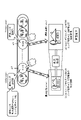
- This is a digital zoom processed image of the image captured by the standard lens 12a. That is, by cutting out and enlarging the dotted-line rectangular area of the “captured image (min)” shown on the lower left side of FIG. 18, the “captured image (max)” shown on the lower right side of FIG. 18 is generated.
- the digital zoom processed image can be generated by enlarging a partial area of the original image, that is, the captured image that has not undergone the digital zoom processing, at an enlargement ratio according to the digital zoom amount.
- the number of pixels of a photographed image that is not subjected to any enlargement processing is “n ⁇ m”
- the number of pixels of the dotted line image area extracted in the digital zoom processing is larger than “n ⁇ m”.
- FIG. 19 shows the following two images.
- Image B Image taken without sliding the telephoto lens selection section 105c
- (Image A) is a digitally zoomed image. That is, the dotted-line rectangular area of the “captured image (min)” photographed without sliding the standard lens selection section 105a shown in the lower left of FIG. is a digitally zoomed image.
- (Image B) is an image captured without sliding the telephoto lens selection portion 105c, and is an image without digital zoom processing.
- Both (Image A) and (Image B) correspond to images captured using a lens with a lens magnification of 2.9 times, and are images having the same angle of view setting and the same subject size.
- (image A) is a digitally zoomed image obtained by cutting out and enlarging a partial area (s ⁇ t pixels) of the original photographed image (n ⁇ m pixels). is an image generated based on
- (image B) has not undergone digital zoom processing (enlargement processing), and has a data amount corresponding to the number of constituent pixels (n ⁇ m pixels) of the original captured image.
- the (image A) subjected to the digital zoom processing (enlargement processing) is an image generated based on less pixel data than the (image B) not subjected to the digital zoom processing (enlargement processing).
- (image A) subjected to digital zoom processing (enlargement processing) is an image whose image quality is lower than (image B) not subjected to digital zoom processing.
- the example described below is an example in which display control is performed to notify the user of deterioration in image quality due to digital zoom processing.
- the imaging apparatus 10 of the present disclosure executes display processing for notifying the user of image quality deterioration due to digital zoom processing on the operation unit display area 102 of the display unit 11 . Examples of a plurality of display data for notification of image quality deterioration will be described below.
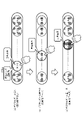
- FIG. 20 is a diagram showing an example of display data for notification of image quality deterioration due to digital zoom processing.
- the data processing unit of the imaging device 10 of the present disclosure sets the output light of the standard lens selection unit 105a to white when the standard lens selection unit 105a is at this position (the left end of the slide section). By setting the output light of the standard lens selection unit 105a to white, the user is notified that the digital zoom amount is 0 and that image quality is not degraded.
- An image captured at this position is an image that has undergone digital zoom processing, that is, image clipping and enlargement processing. However, the enlargement ratio is small and the level of image quality deterioration is small.
- the data processing unit of the imaging device 10 of the present disclosure sets the output light of the standard lens selection unit 105a to yellow when the standard lens selection unit 105a is at this position (approximately at the center of the slide section). By setting the output light of the standard lens selection unit 105a to be yellow, the user is notified that the digital zoom amount is small, but the image quality will be reduced to a small extent.
- (c) shows a state in which the standard lens selection section 105a has been slid further to the right and moved almost to the right end of the slide section. That is, the slide amount is almost the entire slide section.
- An image captured at this position is an image that has undergone digital zoom processing, that is, image clipping and enlargement processing, and has a large enlargement ratio and a large level of image quality deterioration.
- the data processing unit of the imaging device 10 of the present disclosure sets the output light of the standard lens selection unit 105a to red when the standard lens selection unit 105a is at this position (approximately at the right end of the slide section). By setting the output light of the standard lens selection unit 105a to be red, the user is notified that the digital zoom amount is large and the image quality will be significantly degraded.
- the data processing unit of the imaging device 10 of the present disclosure executes display control to change the output light of the lens selection unit 105 according to the slide amount of the lens selection unit 105 .
- display control it is possible to notify the user of the digital zoom amount and the image quality deterioration level corresponding to the amount of slide of the lens selection unit 105 .
- the user can take measures such as switching the lens to be used to another lens when the deterioration in image quality is large.
- FIG. 21 is a diagram showing an example of different display data for notifying image quality deterioration due to digital zoom processing.
- (c) shows a state in which the standard lens selection unit 105a is further slid to the right and moved almost to the right end of the slide section.
- the data processing unit of the imaging device 10 of the present disclosure sets the output light of the standard lens selection unit 105a to white.
- the user is notified that the digital zoom amount is 0 and that image quality is not degraded.
- This display control process is the same display control process as in FIG.
- the output light of the standard lens selection unit 105a is made yellow, and the shape is also changed. That is, the shape of the standard lens selection portion 105a is set to a rounded square shape. In the state of (c), the output light from the standard lens selection unit 105a is red, and the shape is changed to rectangular.
- the example shown in FIG. 21 is configured to perform display control processing for changing the shape of the standard lens selection unit 105a in accordance with the change in the color of the output light of the standard lens selection unit 105a.
- display control it is possible to notify the user of the digital zoom amount and the image quality deterioration level corresponding to the slide amount of the lens selection unit 105 in an easy-to-understand manner.
- display control may be performed to change the size in accordance with the change of the color and shape of the output light of the standard lens selection unit 105a.
- FIG. 22 also shows the following three states.
- (c) shows a state in which the standard lens selection unit 105a is further slid to the right and moved almost to the right end of the slide section.
- the output light of the standard lens selection section 105a is yellow, the shape is rounded square, and the size of the standard lens selection section 105a is increased.
- the output light of standard lens selection section 105a is red, the shape is changed to rectangular, and the size of standard lens selection section 105a is made larger than in state (b).
- the example shown in FIG. 22 is a configuration that performs display control processing for changing the size in accordance with the change in the color and shape of the output light of the standard lens selection unit 105a. By performing such display control, it is possible to notify the user of the digital zoom amount and the image quality deterioration level corresponding to the slide amount of the lens selection unit 105 in an easy-to-understand manner.
- FIG. 23 shows the following three states.
- (c) shows a state in which the standard lens selection unit 105a is further slid to the right and moved almost to the right end of the slide section.
- vibration processing is not performed. By not generating vibration, the user is notified that the digital zoom amount is 0 and that image quality is not degraded.
- FIG. 24 also shows the following three states.
- (c) shows a state in which the standard lens selection unit 105a is further slid to the right and moved almost to the right end of the slide section.
- Example of processing for displaying a digital zoom adjustment icon independent of the lens selection unit and making it available (b) Example of processing for outputting a message indicating that the digital zoom is ON (c) Independent of the lens selection unit (d) Example of display processing of zoom adjustment section in a device with a configuration capable of optical zoom
- the lens selection unit 105 displays a slidable digital zoom adjustment section 107, and on the left and right of the digital zoom adjustment section 107, a zoom amount down instruction icon (W) 121 for reducing the digital zoom amount and a digital zoom A zoom amount up instruction icon (T) 122 for increasing the amount is displayed.
- W means "wide” and "T” means "tele”.
- the user can also adjust the digital zoom amount by sliding the lens selection unit 105 within the digital zoom adjustment section 107. Further, the zoom amount down instruction icon (W) 121 and the zoom amount up instruction icon ( It is also possible to adjust the digital zoom amount by touching T) 122 .
- the lens selection unit 105 can be moved to the left within the digital zoom adjustment section 107 to reduce the digital zoom amount. Also, when the user touches the zoom amount increase instruction icon (T) 122, the lens selection unit 105 can move to the right within the digital zoom adjustment section 107 to increase the digital zoom amount.
- the digital zoom ON state identification icon 106 and the digital zoom adjustment section 107 are displayed as shown in FIG. Furthermore, a digital zoom ON state notification message 125 is displayed.
- the digital zoom ON state notification message 125 is, for example, "Digital zoom is ON" Such is the message. By outputting this message, the user can reliably confirm the processing status of the digital zoom.
- the digital zoom ON state identification icon 106 and the digital zoom adjustment section 107 are displayed as shown in FIG.
- the lens selection section (lens selection icon) 105 touched by the user and the digital zoom adjustment section 107 are displayed at positions different from the other lens selection sections (lens selection icons) 105. .
- Such display processing enables the user to more clearly distinguish between the selected lens and the non-selected lens.
- devices such as smartphones that do not have a zoom lens were explained.
- devices such as smartphones that do not have a zoom lens perform digital zoom processing when generating an intermediate image between an image shot with a standard lens and an image shot with a telephoto lens.
- the wide-angle lens, the standard lens, the telephoto lens, and the super-telephoto lens may be periscope type optical zoom lenses.
- the telephoto lens 12c with a lens magnification of 2.9 times is a periscope type lens compatible with optical zoom
- the section corresponding to the lens magnification of 2.9 times to 4.4 times is all digital zoom. It is possible to shoot a clear image by optical zoom without performing
- FIG. 28 shows display examples of the following two slidable sections.
- A Slidable section of standard lens selection section 105a
- B Slidable section of telephoto lens selection section 105c
- the standard lens 12a is not a periscope type optical zoom lens, but the telephoto lens 12c is a periscope type optical zoom lens and is capable of optical zoom.
- the slidable section (p3 to p4) of the standard lens selection section 105a shown in FIG. 28(A) corresponds to a lens magnification of 1.0 to 2.9, as described with reference to FIG. is displayed as a digital zoom adjustment section in which a digital zoom image can be captured.
- Zoomable section identification data 151 is additionally displayed. The user can see this "optical zoomable section identification data 151" and recognize that a clear image is captured by the optical zoom.
- an optical zoom ON state identification icon 152 may be displayed on the display unit 11 as shown in FIG. The user can confirm the optical zoom ON state identification icon 152 and recognize that a clear image is captured by the optical zoom.
- the telephoto lens 12c is a lens capable of optical zooming
- the standard lens 12a is a lens incapable of optical zooming. may be all the lenses, or may be a part of the lenses.
- optical zoomable section identification data 151 as shown in FIG. 28B is displayed in the slidable section of all lens selection portions. Furthermore, an optical zoom ON state identification icon 152 shown in FIG. 29 is also displayed.
- FIG. 30 is a diagram showing an example of display data capable of notifying the user of a position where optical zoom is possible.
- the slidable section of the telephoto lens selection unit 105c corresponding to the telephoto lens 12c capable of optical zooming only at a specific lens magnification point includes a plurality of "optical zoomable section identification data 153". displayed discretely. The user can see this "optical zoomable section identification data 153" and recognize that a clear image is captured only at these multiple positions by optical zoom.
- either the digital zoom ON identification icon 106 or the optical zoom ON state identification icon 152 is displayed on the display unit 11 as shown in FIG. 31 according to the slide position of the telephoto lens selection unit 105c. is preferred.
- an optical zoom ON state identification icon 152 is displayed as shown in FIG. 31(b).
- the digital zoom ON state identification icon 106 is displayed as shown in FIG. 31(a).
- the user can reliably determine whether the zoom position is for optical zooming or the digital zooming position.
- FIG. 32 shows the following two diagrams.
- the telephoto lens selection unit display data is normal display data for the telephoto lens selection unit 105c.
- the telephoto lens selection unit display data is different from the normal telephoto lens selection unit 105c. . That is, it is displayed as the telephoto lens selection section 155 with additional optical zoomable position identification display.
- the display mode of the lens selection section may be changed when the lens selection section is slid to a position where optical zooming is possible.
- FIG. 33 A configuration example of the imaging device of the present disclosure will be described with reference to FIG. 33 .
- An imaging device 200 shown in FIG. 33 corresponds to the imaging device 10 described in the above embodiments.
- the imaging device 200 includes an operation information analysis unit 201, a lens switching control unit 202, an imaging unit 203, an image processing unit 204, a memory (storage unit) 205, a display control unit 206, a display unit 210, an apparatus It has a control unit 215 .
- the display control unit 206 includes a captured image display control unit 207 and an operation unit (UI unit) display control unit 208 .
- the display unit 210 includes an image display unit 211 and an operation unit (UI unit) display unit 212 .
- the operation information analysis unit 201 analyzes a user operation on an operation unit (UI unit) display unit 212 displayed on the display unit 210 . For example, it detects and analyzes touch processing and slide processing on the lens selection unit (lens selection icon) 105 and touch processing on the shutter 103 described in the previous embodiment.
- UI unit operation unit
- the operation information analysis unit 201 analyzes a user operation on an operation unit (UI unit) display unit 212 displayed on the display unit 210 . For example, it detects and analyzes touch processing and slide processing on the lens selection unit (lens selection icon) 105 and touch processing on the shutter 103 described in the previous embodiment.
- the user operation information analyzed by the operation information analysis unit 201 is output to the lens switching control unit 202, the imaging unit 203, the image processing unit 204, the captured image display control unit 207, etc. according to the analyzed user operation.
- the lens switching control unit 202 outputs information about the lens to be selected according to the touched lens selection unit (lens selection icon) 105. output to
- the operation unit (UI unit) display control unit 208 is notified that the lens selection unit (lens selection icon) 105 has been touched.
- the operation unit (UI unit) display control unit 208 displays the digital zoom ON state identification icon 106 described in the previous embodiment and the digital zoom adjustment on the display unit 210 in response to this lens selection unit (lens selection icon) 105 touch detection notification. Display processing and the like for the section 107 are executed.
- the image processing unit 204 determines the digital zoom amount according to the slide amount input from the operation information analysis unit 201, and performs image area selection processing and selection area selection processing from the captured image input from the imaging unit 203 according to the determined digital zoom amount. image enlargement processing.
- the digital zoom image generated by the image processing unit 204 is output to the image display unit 211 of the display unit 210 via the captured image display control unit 207 and displayed. Also, if the user operation information analyzed by the operation information analysis unit 201 is a shutter operation, the image processing unit 204 is notified that the shutter operation has been performed. The image processing unit 204 stores the image captured by the imaging unit 203 or its digital zoom processed image in the memory (storage unit) 205 in response to this shutter operation detection notification.
- the lens switching control unit 202 receives information on the lens selection unit (lens selection icon) touched by the user from the operation information analysis unit 201, and selects a lens to be applied for shooting according to the input information. Execute the switching process.
- the imaging unit 203 is composed of an imaging control unit, multiple lenses, an imaging device, and the like.
- the lens to be applied for photographing is changed according to the lens switching control command input from the lens switching control unit 202 , and the photographed image is output to the image processing unit 204 .
- the image processing unit 204 performs image processing on the captured image input from the imaging unit 203 , outputs the processed image to the captured image display control unit 207 , and causes the image display unit 211 of the display unit 210 to display the processed image. Note that when the slide information of the lens selection unit (lens selection icon) 105 is input from the operation information analysis unit 201, the image processing unit 204 determines the digital zoom amount according to the slide amount, and according to the determined digital zoom amount, It executes image area selection processing and image enlargement processing of the selected area from the captured image input from the imaging unit 203 .
- the image processing unit 204 stores the image captured by the imaging unit 203 or its digital zoom processed image in the memory (storage unit) 205 .
- a captured image display control unit 207 displays a captured image input from the imaging unit 203 by the image processing unit 204 or a digital zoom processed image generated based on a captured image input by the image processing unit 203 from the imaging unit 203 on the display unit 210 .
- the image is output to the image display unit 211 and displayed.
- a memory (storage unit) 205 records a captured image input from the imaging unit 203 to the image processing unit 204 or a digital zoom processed image generated by the image processing unit 204 based on the captured image input from the imaging unit 203 .
- the memory (storage unit) 205 also stores programs for processing executed in the imaging apparatus 200, parameters used for various processing, and the like.
- An operation unit (UI unit) display control unit 208 executes display control of data to be displayed in the operation unit display area 102 described in the previous embodiment. For example, when the operation information analysis unit 201 notifies that the user's touch processing on the lens selection unit (lens selection icon) 105 has been detected, the operation unit (UI unit) display control unit 208 outputs this touch detection notification. Accordingly, the display processing of the digital zoom ON state identification icon 106 and the digital zoom adjustment section 107 described in the previous embodiment is executed on the display unit 210 .
- the operation unit (UI unit) display control unit 208 further executes display control to change at least one of the output color, shape, and size of the lens selection unit while the user is sliding according to the amount of slide.
- An image display unit 211 of the display unit 210 corresponds to the captured image display area 101 described in the previous embodiment, and displays the captured image of the imaging unit 203 and the digital zoom processed image generated by the image processing unit 204 .
- An operation unit (UI unit) display unit 212 of the display unit 210 corresponds to the operation unit display area 102 described in the previous embodiment, and includes a lens selection unit (lens selection icon) 105, a digital zoom adjustment section 107, a shutter 103, and the like. display the operation section (UI section) of the .
- the device control unit 215 executes, for example, vibration processing with an intensity corresponding to the amount of sliding of the lens selection unit (lens selection icon) 105 by the user, music output processing, and the like.
- the imaging device of the present disclosure can be configured by, for example, a smartphone (smartphone) having a camera function, a tablet terminal, a PC, or the like.
- a smartphone smart phone
- a tablet terminal a PC
- FIG. 34 A hardware configuration example of a smartphone (smartphone), a tablet terminal, and a PC, which are examples of the imaging device of the present disclosure, will be described with reference to FIG. 34 .
- the hardware shown in FIG. 34 is one configuration example of specific hardware of the imaging device of the present disclosure.
- a CPU (Central Processing Unit) 301 functions as a control section and a data processing section that execute various processes according to programs stored in a ROM (Read Only Memory) 302 or a storage section 308 . For example, the process according to the sequence described in the above embodiment is executed.
- a RAM (Random Access Memory) 303 stores programs and data executed by the CPU 301 . These CPU 301 , ROM 302 and RAM 303 are interconnected by a bus 304 .
- the CPU 301 is connected to an input/output interface 305 via a bus 304.
- the input/output interface 305 is connected to an input unit 306 including a camera, various switches, microphones, sensors, etc., and an output unit 307 including a display, speakers, etc. there is
- the CPU 301 executes various types of processing in response to commands input from the input unit 306 and outputs processing results to the output unit 307, for example.
- a storage unit 308 connected to the input/output interface 305 is composed of, for example, a flash memory, and stores programs executed by the CPU 301 and various data.
- the communication unit 309 includes a proximity communication unit such as NFC, Wi-Fi communication, Bluetooth (registered trademark) (BT) communication, and other communication units for data communication via networks such as the Internet and local area networks. device.
- a drive 310 connected to the input/output interface 305 drives a removable medium 311 such as a magnetic disk, an optical disk, a magneto-optical disk, or a semiconductor memory such as a memory card to record or read data.
- a removable medium 311 such as a magnetic disk, an optical disk, a magneto-optical disk, or a semiconductor memory such as a memory card to record or read data.
- the technique disclosed in this specification can take the following configurations.
- the plurality of lenses are lenses with different lens magnifications
- the display control unit The imaging apparatus according to (1), wherein the lens selection section displays a lens magnification corresponding to the lens selection section.
- the display control unit When the user executes the slide processing of the lens selection section, The imaging apparatus according to (1) or (2), wherein the lens magnification displayed in the lens selection section is sequentially changed and displayed.
- the display control unit When the user executes the slide processing of the lens selection section, (1) to (3) according to any one of (1) to (3), wherein the lens selection unit displays a virtual lens magnification at which an image after digital zoom processing of the captured image, which is performed according to the slide amount of the lens selection unit, can be captured.
- Imaging device When the user executes the slide processing of the lens selection section, (1) to (3) according to any one of (1) to (3), wherein the lens selection unit displays a virtual lens magnification at which an image after digital zoom processing of the captured image, which is performed according to the slide amount of the lens selection unit, can be captured.
- the display control unit outputting to the display unit an image captured using a lens corresponding to the lens selection unit selected by the user in response to a user operation for selecting one of the plurality of lens selection units displayed on the display unit; (4) The imaging device according to any one of the above.
- the display control unit When the user executes the slide processing of the lens selection section, The imaging apparatus according to any one of (1) to (5), wherein an image after digital zoom processing of the photographed image, which is executed according to the slide amount of the lens selection section, is output to the display section.
- the imaging device further includes a lens switching control unit that sets the lens corresponding to the lens selection unit selected by the user as the lens to be applied to the photographing process in accordance with the user's operation to select one of the plurality of lens selection units displayed on the display unit; (1) to (6) The imaging device according to any one of the above.
- the imaging device further includes When the user executes the slide processing of the lens selection section, The image pickup apparatus according to any one of (1) to (7), further comprising an image processing section that performs digital zoom processing on a photographed image according to the slide amount of the lens selection section.
- the display control unit The image pickup apparatus according to (8), wherein a digital zoom processed image of the captured image generated by the image processing unit is displayed on the display unit.
- the display control unit When the user executes the slide processing of the lens selection section, The image pickup apparatus according to any one of (1) to (9), which performs display control for notifying a user of deterioration in image quality caused by digital zoom processing of a captured image executed according to the slide amount of the lens selection unit.
- the display control unit As display control to notify the user of deterioration in image quality caused by digital zoom processing of captured images, The image pickup apparatus according to (10), wherein display control is performed to change at least one of the output color, shape, and size of the lens selection unit during slide by the user according to the amount of slide.
- the imaging device As display control to notify the user of image quality degradation that occurs due to digital zoom processing of captured images, The imaging according to any one of (1) to (11), wherein the device control unit executes vibration processing with intensity corresponding to the amount of slide of the lens selection unit, or music output processing with intensity according to the amount of slide of the lens selection unit.
- the device control unit executes vibration processing with intensity corresponding to the amount of slide of the lens selection unit, or music output processing with intensity according to the amount of slide of the lens selection unit.
- An imaging device control method executed in an imaging device The imaging device is multiple lenses available for image capture; having a display control unit that controls display data to be output to the display unit; The display control unit displaying a plurality of lens selection portions corresponding to each of the plurality of lenses on a display; a digital zoom adjustment section in which a digital zoom amount of a photographed image can be adjusted according to a slide amount of a lens selection section selected by a user in response to a user operation for selecting one of a plurality of lens selection sections displayed on the display section; An imaging device control method for displaying.
- a program for executing imaging device control processing in an imaging device The imaging device is multiple lenses available for image capture; having a display control unit that controls display data to be output to the display unit;
- the program causes the display control unit to: a process of displaying a plurality of lens selection portions corresponding to each of the plurality of lenses on a display; a digital zoom adjustment section in which a digital zoom amount of a photographed image can be adjusted according to a slide amount of a lens selection section selected by a user in response to a user operation for selecting one of a plurality of lens selection sections displayed on the display section;
- a program that executes the processing to be displayed A program that executes the processing to be displayed.
- the series of processes described in the specification can be executed by hardware, software, or a composite configuration of both.
- a program recording the processing sequence is installed in the memory of a computer built into dedicated hardware and executed, or the program is loaded into a general-purpose computer capable of executing various types of processing. It can be installed and run.
- the program can be pre-recorded on a recording medium.
- the program can be received via a network such as a LAN (Local Area Network) or the Internet and installed in a recording medium such as an internal hard disk.
- a system is a logical collective configuration of a plurality of devices, and the devices of each configuration are not limited to being in the same housing.
- an operation unit that enables efficient execution of shooting lens selection processing by a user and digital zoom processing of a shot image using the selected lens.
- UI operation unit
- it has a plurality of lenses with different lens magnifications that can be used for image capturing, and a display control unit that executes control of display data to be output to the display unit.
- a plurality of lens selection sections corresponding to each are displayed on the display section, and according to a user operation of selecting one of the plurality of lens selection sections displayed on the display section, a sliding amount of the lens selection section selected by the user is displayed.
- This configuration realizes an operation unit (UI) that enables a user to efficiently perform photographing lens selection processing and digital zoom processing of a photographed image using the selected lens.
- UI operation unit
- Imaging device 11 display unit 12 camera lens 101 captured image display area 102 operation unit display area 103 shutter 104 still image/video switching unit 105 lens selection unit (lens selection icon) 106 digital zoom ON state identification icon 107 digital zoom adjustment section 121 zoom amount down instruction icon 122 zoom amount up instruction icon 125 digital zoom ON state notification message 151 optical zoom enabled section identification data 152 optical zoom ON state identification icon 153 optical zoom enabled section identification data 200 Imaging device 201 Operation information analysis unit 202 Lens switching control unit 203 Imaging unit 204 Image processing unit 205 Memory (storage unit) 206 display control unit 207 captured image display control unit 208 operation unit (UI unit) display control unit 210 display unit 211 image display unit 212 operation unit (UI unit) display unit 215 device control unit 301 CPU 302 ROMs 303 RAM 304 bus 305 input/output interface 306 input unit 307 output unit 308 storage unit 309 communication unit 310 drive 311 removable media
Landscapes
- Engineering & Computer Science (AREA)
- Theoretical Computer Science (AREA)
- General Engineering & Computer Science (AREA)
- Human Computer Interaction (AREA)
- Physics & Mathematics (AREA)
- General Physics & Mathematics (AREA)
- Multimedia (AREA)
- Signal Processing (AREA)
- Computer Hardware Design (AREA)
- Studio Devices (AREA)
Abstract
Description
特に近年、複数のレンズ、例えば標準レンズの他、広角レンズや望遠レンズ等、複数の異なるレンズを備えたマルチレンズカメラを有するスマホが増加している。
マルチレンズカメラは、例えば被写体距離に応じてレンズを切り替えて利用することで、遠くの被写体から近くの被写体まで、より鮮明な画像の撮影が可能となる。
なお、デジタルズーム処理については、例えば特許文献1(特開2013-175855号公報)に記載されている。
このレンズ選択処理によって、選択したレンズによる撮影画像、いわゆるスルー画がスマホの表示部に表示される。
さらに、表示部に表示された画像の画角や大きさを調整する場合、ユーザは、デジタルズーム機能を用いてズーム処理を行い、デジタルズームによって補正された画像を表示部に表示して画像の画角や大きさを自分が気に入る設定とする。
その後、シャッターを操作して撮影を行う。
画像撮影に利用可能な複数のレンズと、
表示部に出力する表示データの制御を実行する表示制御部を有し、
前記表示制御部は、
前記複数のレンズ各々に対応する複数のレンズ選択部を表示部に表示し、
前記表示部に表示した複数のレンズ選択部の1つを選択するユーザ操作に応じて、ユーザが選択したレンズ選択部のスライド量に応じて撮影画像のデジタルズーム量を調整可能としたデジタルズーム調整区間を表示する撮像装置にある。
撮像装置において実行する撮像装置制御方法であり、
前記撮像装置は、
画像撮影に利用可能な複数のレンズと、
表示部に出力する表示データの制御を実行する表示制御部を有し、
前記表示制御部が、
前記複数のレンズ各々に対応する複数のレンズ選択部を表示部に表示し、
前記表示部に表示した複数のレンズ選択部の1つを選択するユーザ操作に応じて、ユーザが選択したレンズ選択部のスライド量に応じて撮影画像のデジタルズーム量を調整可能としたデジタルズーム調整区間を表示する撮像装置制御方法にある。
撮像装置において撮像装置制御処理を実行させるプログラムであり、
前記撮像装置は、
画像撮影に利用可能な複数のレンズと、
表示部に出力する表示データの制御を実行する表示制御部を有し、
前記プログラムは、前記表示制御部に、
前記複数のレンズ各々に対応する複数のレンズ選択部を表示部に表示する処理と、
前記表示部に表示した複数のレンズ選択部の1つを選択するユーザ操作に応じて、ユーザが選択したレンズ選択部のスライド量に応じて撮影画像のデジタルズーム量を調整可能としたデジタルズーム調整区間を表示する処理を実行させるプログラムにある。
具体的には、例えば、画像撮影に利用可能な各々レンズ倍率の異な複数のレンズと、表示部に出力する表示データの制御を実行する表示制御部を有し、表示制御部は、複数のレンズ各々に対応する複数のレンズ選択部を表示部に表示し、表示部に表示した複数のレンズ選択部の1つを選択するユーザ操作に応じて、ユーザが選択したレンズ選択部のスライド量に応じて撮影画像のデジタルズーム量を調整可能としたデジタルズーム調整区間を表示し、さらにスライド量に応じて実行されるデジタルズーム画像を表示部に表示する。
本構成により、ユーザによる撮影レンズ選択処理と、選択レンズを利用した撮影画像のデジタルズーム処理を効率的に実行可能とした操作部(UI)が実現される。
なお、本明細書に記載された効果はあくまで例示であって限定されるものではなく、また付加的な効果があってもよい。
1.本開示の撮像装置の構成とレンズ切り替え処理の概要について
2.本開示の撮像装置において実行する操作部の表示制御処理について
3.本開示の撮像装置が実行する操作部UI表示制御処理シーケンスについて
4.デジタルズームによる画質低下をユーザに通知する表示制御処理について
5.その他の表示制御処理例について
6.本開示の撮像装置の構成例について
7.撮像装置のハードウェア構成例について
8.本開示の構成のまとめ
まず、本開示の撮像装置の構成とレンズ切り替え処理の概要について説明する。
なお、本開示の撮像装置は、このようなスマホに限らず、例えばカメラ機能を備えたタブレット端末、PC、さらにカメラ等の撮像装置も含まれる。
ユーザは、画像撮影時に、これらの複数レンズから利用するレンズを選択し、適宜、切り替える処理を行うことで、様々な距離の被写体を鮮明に撮影することができる。
(a)標準レンズ12a
(b)広角レンズ12b
(c)望遠レンズ12c
(d)超望遠レンズ12d
なお、図には、望遠レンズ12cと、超望遠レンズ12dを、カメラレンズ12の最下段の1つのレンズ部内に示しているが、この最下段のレンズ部に、望遠レンズ12cと超望遠レンズ12dの2つのレンズが組み込まれている。
(b)広角レンズ12bは、焦点距離=16mm、レンズ倍率=0.7倍のレンズである。
(c)望遠レンズ12cは、焦点距離=70mm、レンズ倍率=2.9倍のレンズである。
(d)超望遠レンズ12dは、焦点距離=105mm、レンズ倍率=4.4倍のレンズである。
なお、各レンズの焦点距離やレンズ倍率は一例であり、本開示の処理は、この他の焦点距離やレンズ倍率を有する様々なレンズを備えた装置構成においても適用可能である。
また、レンズ種類も一例であり、レンズ種類は4種類に限らず、本開示の構成は、レンズ種類が2種類、3種類、4種類、5種類、6種類、さらに多数のレンズ種類の構成においても適用可能である。
図2には、以下の4種類の撮影画像の例を示している。
(a)標準レンズ撮影画像
(b)広角レンズ撮影画像
(c)望遠レンズ撮影画像
(d)超望遠レンズ撮影画像
(b)広角レンズ撮影画像は、焦点距離=16mm、レンズ倍率=0.7倍の広角レンズ12bを使用して撮影した画像である。
(c)望遠レンズ撮影画像は、焦点距離=70mm、レンズ倍率=2.9倍の望遠レンズ12cを使用して撮影した画像である。
(d)超望遠レンズ撮影画像は、焦点距離=105mm、レンズ倍率=4.4倍の超望遠レンズ12dを使用して撮影した画像である。
次に、本開示の撮像装置において実行する操作部の表示制御処理について説明する。
表示部11の上段は撮影画像表示領域101とされ、下段が操作部表示領域102に設定される。
なお、本開示の処理は静止画の撮影処理、動画の撮影処理、いずれの処理にも適用可能である。ただし、以下の実施例では、代表例として静止画を撮影する場合の処理例について説明する。
広角レンズ選択部(×0.7)
標準レンズ選択部(×1.0)
望遠レンズ選択部(×2.9)
超望遠レンズ選択部(×4.4)
各々のアイコン内の数値(0.7~4.4)は、各レンズの倍率を示している。
(a)ユーザが標準レンズ選択部(標準レンズ選択アイコン)を操作(タッチ)した状態
(b)ユーザが広角レンズ選択部(広角レンズ選択アイコン)を操作(タッチ)した状態
(c)ユーザが望遠レンズ選択部(望遠レンズ選択アイコン)を操作(タッチ)した状態
(d)ユーザが超望遠レンズ選択部(超望遠レンズ選択アイコン)を操作(タッチ)した状態
また、図4(b)に示すように、ユーザが広角レンズ選択部(広角レンズ選択アイコン)を操作(タッチ)すると、撮像装置10内部で撮影レンズを広角レンズ12bに切り替える処理が実行され、広角レンズ12bを利用した撮影画像(スルー画)が表示部11に表示される。
また、図4(d)に示すように、ユーザが超望遠レンズ選択部(超望遠レンズ選択アイコン)を操作(タッチ)すると、撮像装置10内部で撮影レンズを超望遠レンズ12dに切り替える処理が実行され、超望遠レンズ12dを利用した撮影画像(スルー画)が表示部11に表示される。
その後シャッター103をタッチすることで、表示部11に表示された画像を撮影しメモリに記録することができる。
また、図4(c)に示す望遠レンズ撮影画像は、望遠レンズ固有のレンズ倍率(2.9倍)に応じて撮影される画像である。
この図4(a)に示す標準レンズ撮影画像と、図4(c)に示す望遠レンズ撮影画像の中間的な画像を撮影したい場合は、デジタルズーム処理を行う必要がある。
ユーザ操作に応じて、撮像装置10の表示部11の表示状態が、図5の(ステップS1)から、図12の(ステップS10)まで、順次、遷移する。
以下、各ステップにおける表示部11の表示データと、ユーザ操作について説明する。
図5のステップS1に示す表示データは、カメラ起動時の初期画面である。
カメラ起動時にはデフォルトで標準レンズ12aが選択される。
撮影画像表示領域101には、標準レンズ12を利用して撮影された画像が表示される。
操作部表示領域102のレンズ選択部(レンズ選択アイコン)105は、標準レンズ12aが選択されていることを示すように、標準レンズ選択アイコン(1.0)のみが、他のレンズ選択アイコン(0.7,2.9,4.4)より高輝度、または異なる色で表示される。
図5のステップS2は、ユーザが人物をもう少し大きく撮りたいと考え、デジタルズームを開始する場合の処理である。
ユーザが、レンズ倍率=1.0倍の標準レンズ12aのレンズ選択アイコンを操作(タッチ)すると、撮像装置10内部のデータ処理部は、アイコンタッチ処理の検出に応じて、図6に示すように、デジタルズームON状態識別アイコン106と、デジタルズーム調整区間107を表示する。
デジタルズーム調整区間107は、レンズ選択アイコンのスライド可能領域であり、デジタルズーム量を設定可能な区間である。
このデジタルズーム量の調整処理について、図7以下を参照して説明する。
図7には、図6を参照して説明した(ステップS3)の表示データと、その後の(ステップS4)の表示データを示している。
すなわち、レンズ倍率=1.0倍の標準レンズ12aのレンズ選択アイコンを、レンズ倍率=2.9倍の望遠レンズ12cのレンズ選択アイコン側にスライド(移動)させる。
図7の(ステップS4)は、ユーザがタッチしたレンズ倍率=1.0倍の標準レンズ12aのレンズ選択アイコンを右側にスライドしており、この位置でアイコンには、(×1.4)の表示がなされる。
すなわち、図7の(ステップS3)の撮影画像表示領域に表示されている画像であるレンズ倍率=1.0倍の標準レンズ12aによる撮影画像から一部領域を抽出し、抽出画像を拡大するデジタルズーム処理を実行して生成した画像である。この画像は、レンズ倍率=1.4倍のレンズを用いて撮影した画像に相当する。
図8に示す表示データは、ユーザがレンズ倍率=1.0倍の標準レンズ12aのレンズ選択アイコンを、さらにデジタルズーム調整区間107内で右側にスライドさせた状態を示している。
すなわち、レンズ倍率=1.0倍の標準レンズ12aのレンズ選択アイコンを、レンズ倍率=2.9倍の望遠レンズ12cのレンズ選択アイコン側に、さらに近づけるようにスライド(移動)させる。
図8の(ステップS5)は、ユーザがタッチしたレンズ倍率=1.0倍の標準レンズ12aのレンズ選択アイコンを、さらに右側にスライドしており、この位置でアイコンには、(×2.9)の表示がなされる。
この図8の(ステップS5)は、先に説明した図7の(ステップS4)より、レンズ選択アイコンのスライド量が大きく、撮像装置のデータ処理部は、このスライド量に応じたデジタルズーム処理を行う。ここでは、レンズ倍率=2.9倍のレンズを用いて撮影した画像に相当する拡大画像を生成する
図9に示す(ステップS9)は、ユーザが、撮影画像表示領域101に表示された画像を記録したいと判断した場合のユーザ操作を説明する図である。
すなわち、レンズ倍率=1.0倍の標準レンズによる撮影画像に対するデジタルズーム処理画像である。この画像は、レンズ倍率=2.9倍のレンズを利用して撮影された画像と同様の画像である。
このタッチ処理により、撮影画像表示領域101に表示された画像の撮影処理が実行されてメモリに記録される。
メモリに記録される画像は、レンズ倍率=1.0倍の標準レンズによる撮影画像に対するデジタルズーム処理画像である。
図9に示すように、ユーザが選択しスライドしたレンズ選択アイコンは、デジタルズーム調整区間107内において隣接するレンズ倍率=2.9倍のレンズ選択アイコン(×2.9)に接しており、これ以上、右側にスライドさせることはできない。
従って、さらに人物の顔を大きくアップした画像を撮影したい場合、レンズの切り替えを行う。
この処理について、図10を参照して説明する。
ユーザが、図9に示す(ステップS6)において、レンズ倍率=1.0倍の標準レンズによる撮影画像に対するデジタルズーム処理画像(レンズ倍率=2.9倍相当の画像)を撮影した後、さらに人物の顔を大きくアップした画像を撮影したい場合、レンズの切り替えを行う。
その後、ユーザは、レンズ倍率=2.9倍の望遠レンズ12cのレンズ選択アイコンをタッチする。
図10に示す(ステップS8)の表示データは、ユーザがレンズ倍率=2.9倍の望遠レンズ12cのレンズ選択アイコンをタッチした後の表示データである。
デジタルズーム調整区間107は、レンズ選択アイコンのスライド可能領域であり、デジタルズーム量を設定可能な区間である。
このデジタルズーム量の調整処理について、図11以下を参照して説明する。
図11には、ユーザが、タッチしたレンズ倍率=2.9倍の望遠レンズ12cのレンズ選択アイコンをデジタルズーム調整区間107内で右側にスライドさせた際の表示データを示している。
ユーザは、レンズ倍率=2.9倍の望遠レンズ12cのレンズ選択アイコンを、レンズ倍率=4.4倍の超望遠レンズ12dのレンズ選択アイコン側にスライド(移動)させる。
図11の(ステップS9)は、ユーザがタッチしたレンズ倍率=2.9倍の望遠レンズ12cのレンズ選択アイコンを右側にスライドしており、この位置でアイコンには、(×3.5)の表示がなされる。
すなわち、レンズ倍率=2.9倍の望遠レンズ12cによる撮影画像から一部領域を抽出し、抽出画像を拡大するデジタルズーム処理を実行して生成した画像である。この画像は、レンズ倍率=3.5倍のレンズを用いて撮影した画像に相当する。
図12(ステップS10)には、ユーザがシャッター103をタッチした状態を示している。
すなわち、ユーザが、撮影画像表示領域101に示された画像を記録したいと判断した場合のユーザ操作を説明する図である。
すなわち、レンズ倍率=2.9倍の望遠レンズによる撮影画像に対するデジタルズーム処理画像である。この画像は、レンズ倍率=3.5倍のレンズを利用して撮影された画像と同様の画像である。
このタッチ処理により、撮影画像表示領域101に表示された画像の撮影処理が実行されてメモリに記録される。
メモリに記録される画像は、レンズ倍率=2.9倍の望遠レンズによる撮影画像に対するデジタルズーム処理画像である。
ユーザが、広角レンズ選択部105bをタッチすると、広角レンズ選択部105bのスライド可能区間に相当するデジタルズーム調整区間107が表示される。
広角レンズ選択部105bの表示数値は、撮影画像やデジタルズーム画像を撮影する場合の仮想的なレンズ倍率を示す数値である。数値は0.7~1.0まで、順次、更新表示される。
すなわち、図13の下段の(b(min))に示すように、広角レンズ12bの撮影画像そのものであり、デジタルズーム処理がなされていない撮影画像が表示される。
すなわち、レンズ倍率=0.7の広角レンズ12bの撮影画像を補正したデジタルズーム画像が表示される。このデジタルズーム画像は、レンズ倍率=0.7の広角レンズ12bの撮影画像の一部を切り出して拡大した補正画像である。
すなわち、レンズ倍率=0.7倍の広角レンズ12bの撮影画像に対するデジタルズーム処理によって生成した補正画像が表示される。具体的には、レンズ倍率=1.0倍の仮想的なレンズを利用して撮影した画像と同様の補正されたデジタルズーム画像が表示される。
ユーザが、標準レンズ選択部105aをタッチすると、標準レンズ選択部105aのスライド可能区間に相当するデジタルズーム調整区間107が表示される。
標準レンズ選択部105aの表示数値は、撮影画像やデジタルズーム画像を撮影する場合の仮想的なレンズ倍率を示す数値である。数値は1.0~2.9まで、順次、更新表示される。
すなわち、図14の下段の(a(min))に示すように、標準レンズ12aの撮影画像そのものであり、デジタルズーム処理がなされていない撮影画像が表示される。
すなわち、レンズ倍率=1.0の標準レンズ12aの撮影画像を補正したデジタルズーム画像が表示される。このデジタルズーム画像は、レンズ倍率=1.0の標準レンズ12aの撮影画像の一部を切り出して拡大した補正画像である。
すなわち、レンズ倍率=1.0倍の標準レンズ12aの撮影画像に対するデジタルズーム処理によって生成した補正画像が表示される。具体的には、レンズ倍率=2.9倍の仮想的なレンズを利用して撮影した画像と同様の補正されたデジタルズーム画像が表示される。
ユーザが、望遠レンズ選択部105cをタッチすると、望遠レンズ選択部105cのスライド可能区間に相当するデジタルズーム調整区間107が表示される。
望遠レンズ選択部105cの表示数値は、撮影画像やデジタルズーム画像を撮影する場合の仮想的なレンズ倍率を示す数値である。数値は2.9~4.4まで、順次、更新表示される。
すなわち、図15の下段の(c(min))に示すように、望遠レンズ12cの撮影画像そのものであり、デジタルズーム処理がなされていない撮影画像が表示される。
すなわち、レンズ倍率=2.9の望遠レンズ12cの撮影画像を補正したデジタルズーム画像が表示される。このデジタルズーム画像は、レンズ倍率=2.9の望遠レンズ12cの撮影画像の一部を切り出して拡大した補正画像である。
すなわち、レンズ倍率=2.9倍の望遠レンズ12cの撮影画像に対するデジタルズーム処理によって生成した補正画像が表示される。具体的には、レンズ倍率=4.4倍の仮想的なレンズを利用して撮影した画像と同様の補正されたデジタルズーム画像が表示される。
ユーザが、超望遠レンズ選択部105dをタッチすると、超望遠レンズ選択部105dのスライド可能区間に相当するデジタルズーム調整区間107が表示される。
超望遠レンズ選択部105dの表示数値は、撮影画像やデジタルズーム画像を撮影する場合の仮想的なレンズ倍率を示す数値である。数値は4.4~8.3まで、順次、更新表示される。
すなわち、図16の下段の(d(min))に示すように、超望遠レンズ12dの撮影画像そのものであり、デジタルズーム処理がなされていない撮影画像が表示される。
すなわち、レンズ倍率=4.4の超望遠レンズ12dの撮影画像を補正したデジタルズーム画像が表示される。このデジタルズーム画像は、レンズ倍率=4.4の超望遠レンズ12dの撮影画像の一部を切り出して拡大した補正画像である。
すなわち、レンズ倍率=4.4倍の超望遠レンズ12dの撮影画像に対するデジタルズーム処理によって生成した補正画像が表示される。具体的には、レンズ倍率=8.3倍の仮想的なレンズを利用して撮影した画像と同様の補正されたデジタルズーム画像が表示される。
次に、本開示の撮像装置が実行する操作部UI表示制御処理シーケンスについて説明する。
以下、図17のフローチャートに示す各ステップの処理について説明する。
撮像装置10のデータ処理部は、まず、ステップS101において、撮像装置10の表示部11の操作部表示領域102に表示したレンズ選択部(レンズ選択アイコン)105に対するユーザのタッチ処理が検出されたか否かを判定する。
ユーザによるシャッター操作(タッチ)が検出されない場合は、ステップS101に戻る。
一方、ユーザによるシャッター操作(タッチ)が検出された場合は、ステップS108に進み、画像撮影を実行して撮影画像をメモリに記録する。
ステップS101において、レンズ選択部(レンズ選択アイコン)105に対するユーザのタッチ処理が検出されたと判定した場合、撮像装置10のデータ処理部は、ステップS102において、画像撮影レンズをユーザがタッチしたレンズ、すなわちユーザが選択したレンズに切り替える処理を実行する。
この状態は、例えば、先に説明した図10の(ステップS7)の状態に相当する。
次に、撮像装置10のデータ処理部は、ステップS103において、撮像装置10の表示部11にデジタルズームON状態識別アイコン106を表示し、さらに、タッチされたレンズ選択部をスライド可能なデジタルズーム調整区間107を表示する。
次に、撮像装置10のデータ処理部は、ステップS104において、タッチされたレンズ選択部がユーザによってスライドされたか否かを検出する。
(a)ステップS101に戻り、ユーザによるレンズ選択部の新たなタッチ検出がなされたか否かを判定する。
(b1)ステップS101において、ユーザによるレンズ選択部の新たなタッチ検出がなされたと判定した場合は、ステップS102に進む。
(b2)一方、ステップS101において、レンズ選択部(レンズ選択アイコン)105に対する新たなユーザタッチ処理が検出されていない場合、例えば、ユーザがレンズ選択部105から指を離したことが検出された場合には、ステップS107に進み、ユーザによるシャッター103の操作(タッチ)が検出されたか否かを判定する。
(c1)ユーザによるシャッター操作(タッチ)が検出されない場合は、ステップS101に戻る。
(c2)一方、ユーザによるシャッター操作(タッチ)が検出された場合は、ステップS108に進み、画像撮影を実行して撮影画像をメモリに記録する。
一方、ステップS104において、レンズ選択部がユーザによってスライドされたことが検出された場合は、ステップS105に進む。
以下、ステップS105以下の処理について説明する。
ステップS104において、レンズ選択部(レンズ選択アイコン)105に対するユーザのスライド処理が検出された場合、撮像装置10のデータ処理部は、ステップS105~S106において以下の処理を実行する。
なお、ステップS105の処理と、ステップS106の処理は並列に実行してもよい。
一方、レンズ選択部(レンズ選択アイコン)105に対する新たなユーザタッチ処理が検出されていない場合は、ステップS107に進む。例えばユーザの指がレンズ選択部(レンズ選択アイコン)105から離れたことを検出した場合は、ステツプS107に進む。
ステップS107の処理は、ステップS101において、レンズ選択部(レンズ選択アイコン)105に対するユーザタッチ処理が検出されていない場合、例えば、ユーザの指がレンズ選択部105から離れたことが検出された場合に実行する処理である。
一方、ユーザによるシャッター操作(タッチ)が検出された場合は、ステップS108に進む。
ステップS107において、ユーザによるシャッター操作(タッチ)が検出された場合は、撮像装置10のデータ処理部は、ステップS108において画像撮影を実行して撮影画像をメモリに記録する。
次に、本開示の撮像装置10が実行するデジタルズームによる画質低下をユーザに通知する表示制御処理について説明する。
図18には、標準レンズ選択部105aを、スライド区間における左端(p3)の位置(レンズ倍率=1.0)に設定して撮影した撮影画像(min)と、標準レンズ選択部105aのスライド区間における右端(p4)の位置(レンズ倍率=2.9)における撮影画像(max)を示している。
すなわち、図18下段の左側に示す「撮影画像(min)」の点線矩形領域を切り出して拡大することで、図18下段の右側に示す「撮影画像(max)」が生成される。
すなわち、拡大処理を伴って生成されるデジタルズーム画像は、撮像素子から入力される「n×m」の画素領域から、デジタルズーム処理によって切り出したs×tの画素領域のデータを近傍の画素からデータを補完して「n×m」画素の画像とするため、本来の「n×m」の画素からデジタルズームを行わずに保存される画像に比べると画質や解像感が損なわれている。
(画像A)標準レンズ選択部105aをスライド区間の右端(p4)の位置(レンズ倍率=2.9)に設定して撮影した画像
(画像B)望遠レンズ選択部105cをスライドなしで撮影した画像
一方、(画像B)は、望遠レンズ選択部105cをスライドなしで撮影した画像であり、デジタルズーム処理のなされていない画像である。
しかし(画像A)は、オリジナル撮影画像(n×m画素)の一部領域(s×t画素)を切り出して拡大したデジタルズーム画像であり、n×m画素より少ないs×t画素の画素データに基づいて生成された画像である。
一方、(画像B)は、デジタルズーム処理(拡大処理)がなされておらず、オリジナル撮影画像の構成画素数(n×m画素)に相当するデータ量を有する。
結果としてデジタルズーム処理(拡大処理)がなされている(画像A)は、デジタルズーム処理の施されていない(画像B)より画質が低下した画像となる。
特にスマホ等の小さな画面では、画質の低下を明確に認識することができないため、デジタルズームを多用しがちである。
以下、画質低下通知のための複数の表示データの例について説明する。
本開示の撮像装置10のデータ処理部は、標準レンズ選択部105aがこの位置(スライド区間の左端)にあるとき標準レンズ選択部105aの出力光を白色とする。
標準レンズ選択部105aの出力光を白色とすることで、ユーザにデジタルズーム量が0であり、画質低下が無いことを通知する。
本開示の撮像装置10のデータ処理部は、標準レンズ選択部105aがこの位置(スライド区間のほぼ中央)にあるとき標準レンズ選択部105aの出力光を黄色とする。
標準レンズ選択部105aの出力光を黄色とすることで、ユーザにデジタルズーム量は小さいが、少ない画質低下が発生することを通知する。
本開示の撮像装置10のデータ処理部は、標準レンズ選択部105aがこの位置(スライド区間のほぼ右端)にあるとき標準レンズ選択部105aの出力光を赤色とする。
標準レンズ選択部105aの出力光を赤色とすることで、ユーザにデジタルズーム量が大きく、大きな画質低下が発生することを通知する。
この処理により、ユーザは、画質低下が大きい場合に、利用レンズを他のレンズに切り替えるといった対応を行うことが可能となる。
(b)は、標準レンズ選択部105aを左端位置(レンズ倍率=1.0)から右側にスライドして、スライド区間のほぼ中央まで移動させた状態。
(c)は、標準レンズ選択部105aを、さらに右側にスライドして、スライド区間のほぼ右端まで移動させた状態。
これら3状態である。
標準レンズ選択部105aの出力光を白色とすることで、ユーザにデジタルズーム量が0であり、画質低下が無いことを通知する。
この表示制御処理は、図20(a)と同様の表示制御処理である。
(c)の状態では、標準レンズ選択部105aの出力光を赤色とし、形状を角型に変更する。
このような表示制御を行うことで、ユーザにレンズ選択部105のスライド量に応じたデジタルズーム量や画質低下レベルを分かりやすく通知することが可能となる。
(a)は、標準レンズ選択部105aをスライド区間の左端位置(レンズ倍率=1.0)に設定した状態。
(b)は、標準レンズ選択部105aを左端位置(レンズ倍率=1.0)から右側にスライドして、スライド区間のほぼ中央まで移動させた状態。
(c)は、標準レンズ選択部105aを、さらに右側にスライドして、スライド区間のほぼ右端まで移動させた状態。
標準レンズ選択部105aの出力光を白色とすることで、ユーザにデジタルズーム量が0であり、画質低下が無いことを通知する。
この表示制御処理は、図20(a)と同様の表示制御処理である。
(c)の状態では、標準レンズ選択部105aの出力光を赤色とし、形状を角型に変更し、さらに標準レンズ選択部105aの大きさを、状態(b)よりも大きくする。
このような表示制御を行うことで、ユーザにレンズ選択部105のスライド量に応じたデジタルズーム量や画質低下レベルを分かりやすく通知することが可能となる。
図23にも、以下の3状態を示している。
(a)は、標準レンズ選択部105aをスライド区間の左端位置(レンズ倍率=1.0)に設定した状態。
(b)は、標準レンズ選択部105aを左端位置(レンズ倍率=1.0)から右側にスライドして、スライド区間のほぼ中央まで移動させた状態。
(c)は、標準レンズ選択部105aを、さらに右側にスライドして、スライド区間のほぼ右端まで移動させた状態。
バイブレーションが発生させないことで、ユーザにデジタルズーム量が0であり、画質低下が無いことを通知する。
(c)の状態では、強めのバイブレーションを発生させる。
このように、バイブレーションの有無、および強弱制御により、ユーザにレンズ選択部105のスライド量に応じたデジタルズーム量や画質低下レベルを通知する。
図24にも、以下の3状態を示している。
(a)は、標準レンズ選択部105aをスライド区間の左端位置(レンズ倍率=1.0)に設定した状態。
(b)は、標準レンズ選択部105aを左端位置(レンズ倍率=1.0)から右側にスライドして、スライド区間のほぼ中央まで移動させた状態。
(c)は、標準レンズ選択部105aを、さらに右側にスライドして、スライド区間のほぼ右端まで移動させた状態。
メロディ出力を行わないことで、ユーザにデジタルズーム量が0であり、画質低下が無いことを通知する。
(c)の状態では、強めのメロディを出力する。
このように、メロディ出力の有無、および出力音の強弱制御により、ユーザにレンズ選択部105のスライド量に応じたデジタルズーム量や画質低下レベルを通知する。
次に、上述した実施例と異なるその他の表示制御処理例について説明する。
(a)レンズ選択部と独立したデジタルズームの調整用アイコンを表示して利用可能とした処理例
(b)デジタルズームがON状態であることを示すメッセージを出力する処理例
(c)レンズ選択部と独立したスライド区間を表示して利用可能とした処理例
(d)光学ズームが可能な構成を持つ装置におけるズーム調整区間の表示処理例
まず、図25を参照して、「(a)レンズ選択部と独立したデジタルズームの調整用アイコンを表示して利用可能とした処理例」について説明する。
また、ユーザが、ズーム量アップ指示アイコン(T)122をタッチすると、レンズ選択部105はデジタルズーム調整区間107内で右側に移動し、デジタルズーム量を増加させることができる。
次に、図26を参照して、「(b)デジタルズームがON状態であることを示すメッセージを出力する処理例」について説明する。
さらに、デジタルズームON状態通知メッセージ125を表示する。
「デジタルズームON状態です」
このようなメッセージである。
ユーザは、このメッセージ出力により、デジタルズームの処理状況を確実に確認することが可能となる。
次に、図27を参照して、「(c)レンズ選択部と独立したスライド区間を表示して利用可能とした処理例」について説明する。
次に、光学ズームが可能な構成を持つ装置におけるズーム調整区間の表示処理例について説明する。
上述した実施例において、レンズ倍率=2.9倍の望遠レンズ12cをペリスコープ型の光学ズーム対応のレンズとした場合、レンズ倍率=2.9倍~4.4倍に相当する区間を、すべてデジタルズームを行うことなく、光学ズームによる鮮明な画像を撮影することが可能となる。
図28を参照して、このような通知を可能とした表示構成について説明する。
(A)標準レンズ選択部105aのスライド可能区間
(B)望遠レンズ選択部105cのスライド可能区間
ユーザは、この「光学ズーム可能区間識別データ151」を見て、光学ズームによる鮮明な画像が撮影されることを認識することができる。
図30は、光学ズームが可能な位置をユーザに通知可能とした表示テータの一例を示す図である。
ユーザは、この「光学ズーム可能区間識別データ153」を見て、これらの複数位置でのみ光学ズームによる鮮明な画像が撮影されることを認識することができる。
スライド可能区間内の望遠レンズ選択部105cのスライド位置が光学ズーム可能位置にある場合には、図31(b)に示すように光学ズームON状態識別アイコン152を表示する。
一方、望遠レンズ選択部105cのスライド位置が光学ズーム不可能位置にある場合には、図31(a)に示すようにデジタルズームON状態識別アイコン106を表示する。
具体例を図32に示す。図32には、以下の2つの図を示している。
(A)望遠レンズ選択部105cのスライド位置がデジタルズーム位置である場合の表示データ
(B)望遠レンズ選択部105cのスライド位置が光学ズーム位置である場合の表示データ
これに対して、(B)の場合、すなわち、望遠レンズ選択部105cのスライド位置が光学ズーム位置である場合の望遠レンズ選択部表示データは、通常の望遠レンズ選択部105cと異なる表示データとする。
すなわち、光学ズーム可能位置祖識別表示付加望遠レンズ選択部155として表示する。
次に、本開示の撮像装置の構成例について説明する。
図33に示す撮像装置200は、上述した実施例において説明した撮像装置10に対応する。
表示制御部206には、撮影画像表示制御部207、操作部(UI部)表示制御部208が含まれる。
また、表示部210には画像表示部211と、操作部(UI部)表示部212が含まれる。
例えば、先の実施例において説明したレンズ選択部(レンズ選択アイコン)105のタッチ処理やスライド処理、シャッター103に対するタッチ処理などを検出し、解析する。
操作部(UI部)表示制御部208は、このレンズ選択部(レンズ選択アイコン)105タッチ検出通知に応じて、表示部210に先の実施例において説明したデジタルズームON状態識別アイコン106や、デジタルズーム調整区間107の表示処理等を実行する。
画像処理部204は、操作情報解析部201から入力するスライド量に応じてデジタルズーム量を決定し、決定したデジタルズーム量に応じて、撮像部203から入力する撮影画像からの画像領域選択処理や選択領域の画像拡大処理を実行する。
また、操作情報解析部201が解析したユーザ操作情報がシャッター操作である場合は、シャッター操作がなされたことを画像処理部204に通知する。
画像処理部204は、このシャッター操作検出通知に応じて、撮像部203による撮影画像、あるいはそのデジタルズーム処理画像をメモリ(記憶部)205に格納する。
なお、画像処理部204は、操作情報解析部201からレンズ選択部(レンズ選択アイコン)105のスライド情報を入力した場合、スライド量に応じてデジタルズーム量を決定し、決定したデジタルズーム量に応じて、撮像部203から入力する撮影画像からの画像領域選択処理や選択領域の画像拡大処理を実行する。
メモリ(記憶部)205は、さらに、撮像装置200において実行する処理のプログラムや、様々な処理に利用するパラメータ等も格納される。
例えば、操作情報解析部201から、ユーザによるレンズ選択部(レンズ選択アイコン)105のタッチ処理が検出されたことが通知された場合、操作部(UI部)表示制御部208は、このタッチ検出通知に応じて、表示部210に先の実施例において説明したデジタルズームON状態識別アイコン106や、デジタルズーム調整区間107の表示処理を実行する。
表示部210の操作部(UI部)表示部212は、先の実施例において説明した操作部表示領域102に対応し、レンズ選択部(レンズ選択アイコン)105や、デジタルズーム調整区間107やシャッター103などの操作部(UI部)を表示する。
先に、本開示の撮像装置は、例えばカメラ機能を備えたスマホ(スマートフォン)や、タブレット端末、PC等によって構成され得る。
本開示の撮像装置の一例であるスマホ(スマートフォン)や、タブレット端末、PCのハードウェア構成例について図34を参照して説明する。図34に示すハードウェアは、本開示の撮像装置の具体的なハードウェアの一構成例である。
CPU301は、入力部306から入力される指令に対応して各種の処理を実行し、処理結果を例えば出力部307に出力する。
以上、特定の実施例を参照しながら、本開示の実施例について詳解してきた。しかしながら、本開示の要旨を逸脱しない範囲で当業者が実施例の修正や代用を成し得ることは自明である。すなわち、例示という形態で本発明を開示してきたのであり、限定的に解釈されるべきではない。本開示の要旨を判断するためには、特許請求の範囲の欄を参酌すべきである。
(1) 画像撮影に利用可能な複数のレンズと、
表示部に出力する表示データの制御を実行する表示制御部を有し、
前記表示制御部は、
前記複数のレンズ各々に対応する複数のレンズ選択部を表示部に表示し、
前記表示部に表示した複数のレンズ選択部の1つを選択するユーザ操作に応じて、ユーザが選択したレンズ選択部のスライド量に応じて撮影画像のデジタルズーム量を調整可能としたデジタルズーム調整区間を表示する撮像装置。
前記表示制御部は、
前記レンズ選択部に、レンズ選択部対応のレンズ倍率を表示する(1)に記載の撮像装置。
ユーザが前記レンズ選択部のスライド処理を実行した場合、
前記レンズ選択部に表示するレンズ倍率を順次、変更して表示する(1)または(2)に記載の撮像装置。
ユーザが前記レンズ選択部のスライド処理を実行した場合、
前記レンズ選択部のスライド量に応じて実行される撮影画像のデジタルズーム処理後の画像を撮影可能な仮想的なレンズ倍率を前記レンズ選択部に表示する(1)~(3)いずれかに記載の撮像装置。
前記表示部に表示した複数のレンズ選択部の1つを選択するユーザ操作に応じて、ユーザが選択したレンズ選択部に対応するレンズを利用した撮影画像を前記表示部に出力する(1)~(4)いずれかに記載の撮像装置。
ユーザが前記レンズ選択部のスライド処理を実行した場合、
前記レンズ選択部のスライド量に応じて実行される撮影画像のデジタルズーム処理後の画像を前記表示部に出力する(1)~(5)いずれかに記載の撮像装置。
前記表示部に表示した複数のレンズ選択部の1つを選択するユーザ操作に応じて、ユーザの選択したレンズ選択部に対応するレンズを撮影処理に適用するレンズとして設定するレンズ切り替え制御部を有する(1)~(6)いずれかに記載の撮像装置。
ユーザが前記レンズ選択部のスライド処理を実行した場合、
前記レンズ選択部のスライド量に応じて撮影画像のデジタルズーム処理を実行する画像処理部を有する(1)~(7)いずれかに記載の撮像装置。
前記画像処理部が生成した撮影画像のデジタルズーム処理画像を前記表示部に表示する(8)に記載の撮像装置。
ユーザが前記レンズ選択部のスライド処理を実行した場合、
前記レンズ選択部のスライド量に応じて実行される撮影画像のデジタルズーム処理によって発生する画質低下をユーザに通知する表示制御を実行する(1)~(9)いずれかに記載の撮像装置。
撮影画像のデジタルズーム処理によって発生する画質低下をユーザに通知する表示制御として、
ユーザがスライド中のレンズ選択部の出力色、または形状、または大きさの少なくともいずれかをスライド量に応じて変化させる表示制御を実行する(10)に記載の撮像装置。
撮影画像のデジタルズーム処理によって発生する画質低下をユーザに通知する表示制御として、
装置制御部が、レンズ選択部のスライド量に応じた強度のバイブレーション処理、またはレンズ選択部のスライド量に応じた強度の音楽出力処理を実行する(1)~(11)いずれかに記載の撮像装置。
前記撮像装置は、
画像撮影に利用可能な複数のレンズと、
表示部に出力する表示データの制御を実行する表示制御部を有し、
前記表示制御部が、
前記複数のレンズ各々に対応する複数のレンズ選択部を表示部に表示し、
前記表示部に表示した複数のレンズ選択部の1つを選択するユーザ操作に応じて、ユーザが選択したレンズ選択部のスライド量に応じて撮影画像のデジタルズーム量を調整可能としたデジタルズーム調整区間を表示する撮像装置制御方法。
前記撮像装置は、
画像撮影に利用可能な複数のレンズと、
表示部に出力する表示データの制御を実行する表示制御部を有し、
前記プログラムは、前記表示制御部に、
前記複数のレンズ各々に対応する複数のレンズ選択部を表示部に表示する処理と、
前記表示部に表示した複数のレンズ選択部の1つを選択するユーザ操作に応じて、ユーザが選択したレンズ選択部のスライド量に応じて撮影画像のデジタルズーム量を調整可能としたデジタルズーム調整区間を表示する処理を実行させるプログラム。
具体的には、例えば、画像撮影に利用可能な各々レンズ倍率の異な複数のレンズと、表示部に出力する表示データの制御を実行する表示制御部を有し、表示制御部は、複数のレンズ各々に対応する複数のレンズ選択部を表示部に表示し、表示部に表示した複数のレンズ選択部の1つを選択するユーザ操作に応じて、ユーザが選択したレンズ選択部のスライド量に応じて撮影画像のデジタルズーム量を調整可能としたデジタルズーム調整区間を表示し、さらにスライド量に応じて実行されるデジタルズーム画像を表示部に表示する。
本構成により、ユーザによる撮影レンズ選択処理と、選択レンズを利用した撮影画像のデジタルズーム処理を効率的に実行可能とした操作部(UI)が実現される。
11 表示部
12 カメラレンズ
101 撮影画像表示領域
102 操作部表示領域
103 シャッター
104 静止画動画切り替え部
105 レンズ選択部(レンズ選択アイコン)
106 デジタルズームON状態識別アイコン
107 デジタルズーム調整区間
121 ズーム量ダウン指示アイコン
122 ズーム量アップ指示アイコン
125 デジタルズームON状態通知メッセージ
151 光学ズーム可能区間識別データ
152 光学ズームON状態識別アイコン
153 光学ズーム可能区間識別データ
200 撮像装置
201 操作情報解析部
202 レンズ切り替え制御部
203 撮像部
204 画像処理部
205 メモリ(記憶部)
206 表示制御部
207 撮影画像表示制御部
208 操作部(UI部)表示制御部
210 表示部
211 画像表示部
212 操作部(UI部)表示部
215 装置制御部
301 CPU
302 ROM
303 RAM
304 バス
305 入出力インタフェース
306 入力部
307 出力部
308 記憶部
309 通信部
310 ドライブ
311 リムーバブルメディア
Claims (14)
- 画像撮影に利用可能な複数のレンズと、
表示部に出力する表示データの制御を実行する表示制御部を有し、
前記表示制御部は、
前記複数のレンズ各々に対応する複数のレンズ選択部を表示部に表示し、
前記表示部に表示した複数のレンズ選択部の1つを選択するユーザ操作に応じて、ユーザが選択したレンズ選択部のスライド量に応じて撮影画像のデジタルズーム量を調整可能としたデジタルズーム調整区間を表示する撮像装置。 - 前記複数のレンズは、各々レンズ倍率の異なるレンズであり、
前記表示制御部は、
前記レンズ選択部に、レンズ選択部対応のレンズ倍率を表示する請求項1に記載の撮像装置。 - 前記表示制御部は、
ユーザが前記レンズ選択部のスライド処理を実行した場合、
前記レンズ選択部に表示するレンズ倍率を順次、変更して表示する請求項1に記載の撮像装置。 - 前記表示制御部は、
ユーザが前記レンズ選択部のスライド処理を実行した場合、
前記レンズ選択部のスライド量に応じて実行される撮影画像のデジタルズーム処理後の画像を撮影可能な仮想的なレンズ倍率を前記レンズ選択部に表示する請求項1に記載の撮像装置。 - 前記表示制御部は、
前記表示部に表示した複数のレンズ選択部の1つを選択するユーザ操作に応じて、ユーザが選択したレンズ選択部に対応するレンズを利用した撮影画像を前記表示部に出力する請求項1に記載の撮像装置。 - 前記表示制御部は、
ユーザが前記レンズ選択部のスライド処理を実行した場合、
前記レンズ選択部のスライド量に応じて実行される撮影画像のデジタルズーム処理後の画像を前記表示部に出力する請求項1に記載の撮像装置。 - 前記撮像装置は、さらに、
前記表示部に表示した複数のレンズ選択部の1つを選択するユーザ操作に応じて、ユーザの選択したレンズ選択部に対応するレンズを撮影処理に適用するレンズとして設定するレンズ切り替え制御部を有する請求項1に記載の撮像装置。 - 前記撮像装置は、さらに、
ユーザが前記レンズ選択部のスライド処理を実行した場合、
前記レンズ選択部のスライド量に応じて撮影画像のデジタルズーム処理を実行する画像処理部を有する請求項1に記載の撮像装置。 - 前記表示制御部は、
前記画像処理部が生成した撮影画像のデジタルズーム処理画像を前記表示部に表示する請求項8に記載の撮像装置。 - 前記表示制御部は、
ユーザが前記レンズ選択部のスライド処理を実行した場合、
前記レンズ選択部のスライド量に応じて実行される撮影画像のデジタルズーム処理によって発生する画質低下をユーザに通知する表示制御を実行する請求項1に記載の撮像装置。 - 前記表示制御部は、
撮影画像のデジタルズーム処理によって発生する画質低下をユーザに通知する表示制御として、
ユーザがスライド中のレンズ選択部の出力色、または形状、または大きさの少なくともいずれかをスライド量に応じて変化させる表示制御を実行する請求項10に記載の撮像装置。 - 前記撮像装置は、
撮影画像のデジタルズーム処理によって発生する画質低下をユーザに通知する表示制御として、
装置制御部が、レンズ選択部のスライド量に応じた強度のバイブレーション処理、またはレンズ選択部のスライド量に応じた強度の音楽出力処理を実行する請求項1に記載の撮像装置。 - 撮像装置において実行する撮像装置制御方法であり、
前記撮像装置は、
画像撮影に利用可能な複数のレンズと、
表示部に出力する表示データの制御を実行する表示制御部を有し、
前記表示制御部が、
前記複数のレンズ各々に対応する複数のレンズ選択部を表示部に表示し、
前記表示部に表示した複数のレンズ選択部の1つを選択するユーザ操作に応じて、ユーザが選択したレンズ選択部のスライド量に応じて撮影画像のデジタルズーム量を調整可能としたデジタルズーム調整区間を表示する撮像装置制御方法。 - 撮像装置において撮像装置制御処理を実行させるプログラムであり、
前記撮像装置は、
画像撮影に利用可能な複数のレンズと、
表示部に出力する表示データの制御を実行する表示制御部を有し、
前記プログラムは、前記表示制御部に、
前記複数のレンズ各々に対応する複数のレンズ選択部を表示部に表示する処理と、
前記表示部に表示した複数のレンズ選択部の1つを選択するユーザ操作に応じて、ユーザが選択したレンズ選択部のスライド量に応じて撮影画像のデジタルズーム量を調整可能としたデジタルズーム調整区間を表示する処理を実行させるプログラム。
Priority Applications (4)
| Application Number | Priority Date | Filing Date | Title |
|---|---|---|---|
| US18/550,685 US12401903B2 (en) | 2021-03-26 | 2022-01-24 | Imaging apparatus, imaging apparatus control method, and program |
| CN202280022490.8A CN117015976A (zh) | 2021-03-26 | 2022-01-24 | 成像装置、成像装置控制方法和程序 |
| JP2023508702A JP7768223B2 (ja) | 2021-03-26 | 2022-01-24 | 撮像装置、および撮像装置制御方法、並びにプログラム |
| EP22774621.1A EP4319128B1 (en) | 2021-03-26 | 2022-01-24 | Imaging device, imaging device control method, and program |
Applications Claiming Priority (2)
| Application Number | Priority Date | Filing Date | Title |
|---|---|---|---|
| JP2021054027 | 2021-03-26 | ||
| JP2021-054027 | 2021-03-26 |
Publications (1)
| Publication Number | Publication Date |
|---|---|
| WO2022201819A1 true WO2022201819A1 (ja) | 2022-09-29 |
Family
ID=83395434
Family Applications (1)
| Application Number | Title | Priority Date | Filing Date |
|---|---|---|---|
| PCT/JP2022/002357 Ceased WO2022201819A1 (ja) | 2021-03-26 | 2022-01-24 | 撮像装置、および撮像装置制御方法、並びにプログラム |
Country Status (5)
| Country | Link |
|---|---|
| US (1) | US12401903B2 (ja) |
| EP (1) | EP4319128B1 (ja) |
| JP (1) | JP7768223B2 (ja) |
| CN (1) | CN117015976A (ja) |
| WO (1) | WO2022201819A1 (ja) |
Cited By (2)
| Publication number | Priority date | Publication date | Assignee | Title |
|---|---|---|---|---|
| US12328490B2 (en) * | 2020-07-22 | 2025-06-10 | Canon Kabushiki Kaisha | Electronic device with zoom control |
| EP4539482A4 (en) * | 2022-11-22 | 2025-10-29 | Honor Device Co Ltd | METHOD FOR SWITCHING PHOTOGRAPHIC MODES AND ASSOCIATED APPARATUS |
Citations (4)
| Publication number | Priority date | Publication date | Assignee | Title |
|---|---|---|---|---|
| JP2013175855A (ja) | 2012-02-24 | 2013-09-05 | Sony Corp | 表示制御装置、表示制御方法および記録媒体 |
| JP2015076717A (ja) * | 2013-10-09 | 2015-04-20 | キヤノン株式会社 | 撮像装置 |
| JP2020048202A (ja) * | 2016-06-12 | 2020-03-26 | アップル インコーポレイテッドApple Inc. | カメラ効果のためのユーザインタフェース |
| JP2021040300A (ja) * | 2019-05-06 | 2021-03-11 | アップル インコーポレイテッドApple Inc. | 視覚メディアのキャプチャ及び管理用ユーザインタフェース |
Family Cites Families (13)
| Publication number | Priority date | Publication date | Assignee | Title |
|---|---|---|---|---|
| KR100197609B1 (ko) * | 1996-07-27 | 1999-06-15 | 윤종용 | 비데오카메라의 줌(zoom)기능 수행방법 및 그 장치 |
| JP2005084632A (ja) * | 2003-09-11 | 2005-03-31 | Toshiba Corp | 電子カメラおよび電子カメラの制御方法 |
| US7064904B2 (en) * | 2004-01-23 | 2006-06-20 | Canon Kabushiki Kaisha | Image processor allowing shooting at close range |
| US7573514B2 (en) * | 2005-02-03 | 2009-08-11 | Eastman Kodak Company | Digital imaging system with digital zoom warning |
| JP4573724B2 (ja) * | 2005-08-01 | 2010-11-04 | イーストマン コダック カンパニー | 複数光学系を有する撮像装置 |
| KR101954192B1 (ko) | 2012-11-15 | 2019-03-05 | 엘지전자 주식회사 | 어레이 카메라, 휴대 단말기 및 그 동작 방법 |
| JP6558902B2 (ja) | 2015-01-21 | 2019-08-14 | キヤノン株式会社 | 複眼撮像装置、複眼撮像装置の制御方法、複眼撮像制御プログラム、および記憶媒体 |
| JP6676347B2 (ja) * | 2015-11-09 | 2020-04-08 | キヤノン株式会社 | 制御装置、制御方法、及びプログラム |
| KR102664705B1 (ko) | 2019-02-19 | 2024-05-09 | 삼성전자주식회사 | 복수의 카메라들을 이용하여 이미지의 배율을 변경하기 위한 전자 장치 및 방법 |
| US10645294B1 (en) * | 2019-05-06 | 2020-05-05 | Apple Inc. | User interfaces for capturing and managing visual media |
| CN111901475B (zh) * | 2019-05-06 | 2026-01-27 | 苹果公司 | 用于捕获和管理视觉媒体的用户界面 |
| US12108142B2 (en) * | 2020-02-21 | 2024-10-01 | Sony Group Corporation | Information processing method and electronic device |
| CN115734071A (zh) * | 2020-03-20 | 2023-03-03 | 华为技术有限公司 | 图像处理方法及装置 |
-
2022
- 2022-01-24 WO PCT/JP2022/002357 patent/WO2022201819A1/ja not_active Ceased
- 2022-01-24 JP JP2023508702A patent/JP7768223B2/ja active Active
- 2022-01-24 US US18/550,685 patent/US12401903B2/en active Active
- 2022-01-24 CN CN202280022490.8A patent/CN117015976A/zh active Pending
- 2022-01-24 EP EP22774621.1A patent/EP4319128B1/en active Active
Patent Citations (4)
| Publication number | Priority date | Publication date | Assignee | Title |
|---|---|---|---|---|
| JP2013175855A (ja) | 2012-02-24 | 2013-09-05 | Sony Corp | 表示制御装置、表示制御方法および記録媒体 |
| JP2015076717A (ja) * | 2013-10-09 | 2015-04-20 | キヤノン株式会社 | 撮像装置 |
| JP2020048202A (ja) * | 2016-06-12 | 2020-03-26 | アップル インコーポレイテッドApple Inc. | カメラ効果のためのユーザインタフェース |
| JP2021040300A (ja) * | 2019-05-06 | 2021-03-11 | アップル インコーポレイテッドApple Inc. | 視覚メディアのキャプチャ及び管理用ユーザインタフェース |
Non-Patent Citations (1)
| Title |
|---|
| See also references of EP4319128A4 |
Cited By (2)
| Publication number | Priority date | Publication date | Assignee | Title |
|---|---|---|---|---|
| US12328490B2 (en) * | 2020-07-22 | 2025-06-10 | Canon Kabushiki Kaisha | Electronic device with zoom control |
| EP4539482A4 (en) * | 2022-11-22 | 2025-10-29 | Honor Device Co Ltd | METHOD FOR SWITCHING PHOTOGRAPHIC MODES AND ASSOCIATED APPARATUS |
Also Published As
| Publication number | Publication date |
|---|---|
| CN117015976A (zh) | 2023-11-07 |
| EP4319128A1 (en) | 2024-02-07 |
| EP4319128B1 (en) | 2025-12-10 |
| US20240196093A1 (en) | 2024-06-13 |
| US12401903B2 (en) | 2025-08-26 |
| JP7768223B2 (ja) | 2025-11-12 |
| JPWO2022201819A1 (ja) | 2022-09-29 |
| EP4319128A4 (en) | 2024-09-25 |
Similar Documents
| Publication | Publication Date | Title |
|---|---|---|
| CN111294517B (zh) | 一种图像处理的方法及移动终端 | |
| US9253407B2 (en) | Digital photographing apparatus, method of controlling the same, and computer-readable recording medium | |
| JP6757268B2 (ja) | 撮像装置及びその制御方法 | |
| CN114223192A (zh) | 使用四色滤波阵列传感器进行内容增强的系统和方法 | |
| JP4250437B2 (ja) | 信号処理装置、信号処理方法およびプログラム | |
| US12328490B2 (en) | Electronic device with zoom control | |
| US20080055429A1 (en) | Imaging apparatus and method for displaying zoom information | |
| US9449584B2 (en) | Display control apparatus, method for controlling the same, and storage medium | |
| WO2023185683A1 (zh) | 微距拍摄方法、电子设备和计算机可读存储介质 | |
| JP7768223B2 (ja) | 撮像装置、および撮像装置制御方法、並びにプログラム | |
| JP2023164919A (ja) | 映像作成方法 | |
| JP7721619B2 (ja) | 表示方法 | |
| JP2025105828A (ja) | 表示方法 | |
| JP2020003760A (ja) | 撮像装置及びその制御方法 | |
| JP2011040896A (ja) | 撮像装置及びその制御方法 | |
| JP6198459B2 (ja) | 表示制御装置、表示制御装置の制御方法、プログラム及び記憶媒体 | |
| CN107295247B (zh) | 图像记录装置及其控制方法 | |
| JP7423325B2 (ja) | 表示制御装置およびその制御方法 | |
| EP3232653A1 (en) | Image recording apparatus and method for controlling the same | |
| KR20130024021A (ko) | 디지털 촬영 장치 및 이의 제어 방법 | |
| CN111565285A (zh) | 图像输出装置及其控制方法和存储介质 | |
| KR20100093955A (ko) | 디지털 영상신호 처리장치에서 이미지확대표시방법 | |
| JP6372121B2 (ja) | 撮像装置、撮影設定方法及びプログラム | |
| JP6590560B2 (ja) | 撮像制御装置およびその制御方法 | |
| RU2792413C1 (ru) | Способ обработки изображений и мобильный терминал |
Legal Events
| Date | Code | Title | Description |
|---|---|---|---|
| 121 | Ep: the epo has been informed by wipo that ep was designated in this application |
Ref document number: 22774621 Country of ref document: EP Kind code of ref document: A1 |
|
| WWE | Wipo information: entry into national phase |
Ref document number: 2023508702 Country of ref document: JP |
|
| WWE | Wipo information: entry into national phase |
Ref document number: 18550685 Country of ref document: US |
|
| WWE | Wipo information: entry into national phase |
Ref document number: 202280022490.8 Country of ref document: CN |
|
| WWE | Wipo information: entry into national phase |
Ref document number: 2022774621 Country of ref document: EP |
|
| NENP | Non-entry into the national phase |
Ref country code: DE |
|
| ENP | Entry into the national phase |
Ref document number: 2022774621 Country of ref document: EP Effective date: 20231026 |
|
| WWG | Wipo information: grant in national office |
Ref document number: 18550685 Country of ref document: US |
|
| WWG | Wipo information: grant in national office |
Ref document number: 2022774621 Country of ref document: EP |