WO2022249471A1 - 表示制御装置及び表示制御方法 - Google Patents
表示制御装置及び表示制御方法 Download PDFInfo
- Publication number
- WO2022249471A1 WO2022249471A1 PCT/JP2021/020485 JP2021020485W WO2022249471A1 WO 2022249471 A1 WO2022249471 A1 WO 2022249471A1 JP 2021020485 W JP2021020485 W JP 2021020485W WO 2022249471 A1 WO2022249471 A1 WO 2022249471A1
- Authority
- WO
- WIPO (PCT)
- Prior art keywords
- tile
- icon
- display
- controller
- display control
- Prior art date
- Legal status (The legal status is an assumption and is not a legal conclusion. Google has not performed a legal analysis and makes no representation as to the accuracy of the status listed.)
- Ceased
Links
Images


Classifications
-
- G—PHYSICS
- G06—COMPUTING OR CALCULATING; COUNTING
- G06F—ELECTRIC DIGITAL DATA PROCESSING
- G06F3/00—Input arrangements for transferring data to be processed into a form capable of being handled by the computer; Output arrangements for transferring data from processing unit to output unit, e.g. interface arrangements
- G06F3/01—Input arrangements or combined input and output arrangements for interaction between user and computer
- G06F3/048—Interaction techniques based on graphical user interfaces [GUI]
- G06F3/0481—Interaction techniques based on graphical user interfaces [GUI] based on specific properties of the displayed interaction object or a metaphor-based environment, e.g. interaction with desktop elements like windows or icons, or assisted by a cursor's changing behaviour or appearance
-
- G—PHYSICS
- G06—COMPUTING OR CALCULATING; COUNTING
- G06F—ELECTRIC DIGITAL DATA PROCESSING
- G06F3/00—Input arrangements for transferring data to be processed into a form capable of being handled by the computer; Output arrangements for transferring data from processing unit to output unit, e.g. interface arrangements
- G06F3/01—Input arrangements or combined input and output arrangements for interaction between user and computer
- G06F3/048—Interaction techniques based on graphical user interfaces [GUI]
- G06F3/0481—Interaction techniques based on graphical user interfaces [GUI] based on specific properties of the displayed interaction object or a metaphor-based environment, e.g. interaction with desktop elements like windows or icons, or assisted by a cursor's changing behaviour or appearance
- G06F3/04817—Interaction techniques based on graphical user interfaces [GUI] based on specific properties of the displayed interaction object or a metaphor-based environment, e.g. interaction with desktop elements like windows or icons, or assisted by a cursor's changing behaviour or appearance using icons
-
- B—PERFORMING OPERATIONS; TRANSPORTING
- B60—VEHICLES IN GENERAL
- B60K—ARRANGEMENT OR MOUNTING OF PROPULSION UNITS OR OF TRANSMISSIONS IN VEHICLES; ARRANGEMENT OR MOUNTING OF PLURAL DIVERSE PRIME-MOVERS IN VEHICLES; AUXILIARY DRIVES FOR VEHICLES; INSTRUMENTATION OR DASHBOARDS FOR VEHICLES; ARRANGEMENTS IN CONNECTION WITH COOLING, AIR INTAKE, GAS EXHAUST OR FUEL SUPPLY OF PROPULSION UNITS IN VEHICLES
- B60K35/00—Instruments specially adapted for vehicles; Arrangement of instruments in or on vehicles
- B60K35/10—Input arrangements, i.e. from user to vehicle, associated with vehicle functions or specially adapted therefor
-
- B—PERFORMING OPERATIONS; TRANSPORTING
- B60—VEHICLES IN GENERAL
- B60K—ARRANGEMENT OR MOUNTING OF PROPULSION UNITS OR OF TRANSMISSIONS IN VEHICLES; ARRANGEMENT OR MOUNTING OF PLURAL DIVERSE PRIME-MOVERS IN VEHICLES; AUXILIARY DRIVES FOR VEHICLES; INSTRUMENTATION OR DASHBOARDS FOR VEHICLES; ARRANGEMENTS IN CONNECTION WITH COOLING, AIR INTAKE, GAS EXHAUST OR FUEL SUPPLY OF PROPULSION UNITS IN VEHICLES
- B60K35/00—Instruments specially adapted for vehicles; Arrangement of instruments in or on vehicles
- B60K35/20—Output arrangements, i.e. from vehicle to user, associated with vehicle functions or specially adapted therefor
- B60K35/21—Output arrangements, i.e. from vehicle to user, associated with vehicle functions or specially adapted therefor using visual output, e.g. blinking lights or matrix displays
- B60K35/22—Display screens
-
- G—PHYSICS
- G06—COMPUTING OR CALCULATING; COUNTING
- G06F—ELECTRIC DIGITAL DATA PROCESSING
- G06F3/00—Input arrangements for transferring data to be processed into a form capable of being handled by the computer; Output arrangements for transferring data from processing unit to output unit, e.g. interface arrangements
- G06F3/01—Input arrangements or combined input and output arrangements for interaction between user and computer
- G06F3/048—Interaction techniques based on graphical user interfaces [GUI]
- G06F3/0481—Interaction techniques based on graphical user interfaces [GUI] based on specific properties of the displayed interaction object or a metaphor-based environment, e.g. interaction with desktop elements like windows or icons, or assisted by a cursor's changing behaviour or appearance
- G06F3/0482—Interaction with lists of selectable items, e.g. menus
-
- G—PHYSICS
- G06—COMPUTING OR CALCULATING; COUNTING
- G06F—ELECTRIC DIGITAL DATA PROCESSING
- G06F3/00—Input arrangements for transferring data to be processed into a form capable of being handled by the computer; Output arrangements for transferring data from processing unit to output unit, e.g. interface arrangements
- G06F3/01—Input arrangements or combined input and output arrangements for interaction between user and computer
- G06F3/048—Interaction techniques based on graphical user interfaces [GUI]
- G06F3/0484—Interaction techniques based on graphical user interfaces [GUI] for the control of specific functions or operations, e.g. selecting or manipulating an object, an image or a displayed text element, setting a parameter value or selecting a range
- G06F3/04845—Interaction techniques based on graphical user interfaces [GUI] for the control of specific functions or operations, e.g. selecting or manipulating an object, an image or a displayed text element, setting a parameter value or selecting a range for image manipulation, e.g. dragging, rotation, expansion or change of colour
-
- G—PHYSICS
- G06—COMPUTING OR CALCULATING; COUNTING
- G06F—ELECTRIC DIGITAL DATA PROCESSING
- G06F3/00—Input arrangements for transferring data to be processed into a form capable of being handled by the computer; Output arrangements for transferring data from processing unit to output unit, e.g. interface arrangements
- G06F3/01—Input arrangements or combined input and output arrangements for interaction between user and computer
- G06F3/048—Interaction techniques based on graphical user interfaces [GUI]
- G06F3/0484—Interaction techniques based on graphical user interfaces [GUI] for the control of specific functions or operations, e.g. selecting or manipulating an object, an image or a displayed text element, setting a parameter value or selecting a range
- G06F3/0485—Scrolling or panning
-
- G—PHYSICS
- G06—COMPUTING OR CALCULATING; COUNTING
- G06F—ELECTRIC DIGITAL DATA PROCESSING
- G06F3/00—Input arrangements for transferring data to be processed into a form capable of being handled by the computer; Output arrangements for transferring data from processing unit to output unit, e.g. interface arrangements
- G06F3/01—Input arrangements or combined input and output arrangements for interaction between user and computer
- G06F3/048—Interaction techniques based on graphical user interfaces [GUI]
- G06F3/0484—Interaction techniques based on graphical user interfaces [GUI] for the control of specific functions or operations, e.g. selecting or manipulating an object, an image or a displayed text element, setting a parameter value or selecting a range
- G06F3/0486—Drag-and-drop
-
- G—PHYSICS
- G06—COMPUTING OR CALCULATING; COUNTING
- G06F—ELECTRIC DIGITAL DATA PROCESSING
- G06F3/00—Input arrangements for transferring data to be processed into a form capable of being handled by the computer; Output arrangements for transferring data from processing unit to output unit, e.g. interface arrangements
- G06F3/01—Input arrangements or combined input and output arrangements for interaction between user and computer
- G06F3/048—Interaction techniques based on graphical user interfaces [GUI]
- G06F3/0487—Interaction techniques based on graphical user interfaces [GUI] using specific features provided by the input device, e.g. functions controlled by the rotation of a mouse with dual sensing arrangements, or of the nature of the input device, e.g. tap gestures based on pressure sensed by a digitiser
- G06F3/0488—Interaction techniques based on graphical user interfaces [GUI] using specific features provided by the input device, e.g. functions controlled by the rotation of a mouse with dual sensing arrangements, or of the nature of the input device, e.g. tap gestures based on pressure sensed by a digitiser using a touch-screen or digitiser, e.g. input of commands through traced gestures
-
- G—PHYSICS
- G06—COMPUTING OR CALCULATING; COUNTING
- G06F—ELECTRIC DIGITAL DATA PROCESSING
- G06F3/00—Input arrangements for transferring data to be processed into a form capable of being handled by the computer; Output arrangements for transferring data from processing unit to output unit, e.g. interface arrangements
- G06F3/01—Input arrangements or combined input and output arrangements for interaction between user and computer
- G06F3/048—Interaction techniques based on graphical user interfaces [GUI]
- G06F3/0487—Interaction techniques based on graphical user interfaces [GUI] using specific features provided by the input device, e.g. functions controlled by the rotation of a mouse with dual sensing arrangements, or of the nature of the input device, e.g. tap gestures based on pressure sensed by a digitiser
- G06F3/0488—Interaction techniques based on graphical user interfaces [GUI] using specific features provided by the input device, e.g. functions controlled by the rotation of a mouse with dual sensing arrangements, or of the nature of the input device, e.g. tap gestures based on pressure sensed by a digitiser using a touch-screen or digitiser, e.g. input of commands through traced gestures
- G06F3/04883—Interaction techniques based on graphical user interfaces [GUI] using specific features provided by the input device, e.g. functions controlled by the rotation of a mouse with dual sensing arrangements, or of the nature of the input device, e.g. tap gestures based on pressure sensed by a digitiser using a touch-screen or digitiser, e.g. input of commands through traced gestures for inputting data by handwriting, e.g. gesture or text
-
- G—PHYSICS
- G06—COMPUTING OR CALCULATING; COUNTING
- G06F—ELECTRIC DIGITAL DATA PROCESSING
- G06F3/00—Input arrangements for transferring data to be processed into a form capable of being handled by the computer; Output arrangements for transferring data from processing unit to output unit, e.g. interface arrangements
- G06F3/01—Input arrangements or combined input and output arrangements for interaction between user and computer
- G06F3/048—Interaction techniques based on graphical user interfaces [GUI]
- G06F3/0487—Interaction techniques based on graphical user interfaces [GUI] using specific features provided by the input device, e.g. functions controlled by the rotation of a mouse with dual sensing arrangements, or of the nature of the input device, e.g. tap gestures based on pressure sensed by a digitiser
- G06F3/0488—Interaction techniques based on graphical user interfaces [GUI] using specific features provided by the input device, e.g. functions controlled by the rotation of a mouse with dual sensing arrangements, or of the nature of the input device, e.g. tap gestures based on pressure sensed by a digitiser using a touch-screen or digitiser, e.g. input of commands through traced gestures
- G06F3/04886—Interaction techniques based on graphical user interfaces [GUI] using specific features provided by the input device, e.g. functions controlled by the rotation of a mouse with dual sensing arrangements, or of the nature of the input device, e.g. tap gestures based on pressure sensed by a digitiser using a touch-screen or digitiser, e.g. input of commands through traced gestures by partitioning the display area of the touch-screen or the surface of the digitising tablet into independently controllable areas, e.g. virtual keyboards or menus
-
- B—PERFORMING OPERATIONS; TRANSPORTING
- B60—VEHICLES IN GENERAL
- B60K—ARRANGEMENT OR MOUNTING OF PROPULSION UNITS OR OF TRANSMISSIONS IN VEHICLES; ARRANGEMENT OR MOUNTING OF PLURAL DIVERSE PRIME-MOVERS IN VEHICLES; AUXILIARY DRIVES FOR VEHICLES; INSTRUMENTATION OR DASHBOARDS FOR VEHICLES; ARRANGEMENTS IN CONNECTION WITH COOLING, AIR INTAKE, GAS EXHAUST OR FUEL SUPPLY OF PROPULSION UNITS IN VEHICLES
- B60K2360/00—Indexing scheme associated with groups B60K35/00 or B60K37/00 relating to details of instruments or dashboards
- B60K2360/11—Instrument graphical user interfaces or menu aspects
-
- B—PERFORMING OPERATIONS; TRANSPORTING
- B60—VEHICLES IN GENERAL
- B60K—ARRANGEMENT OR MOUNTING OF PROPULSION UNITS OR OF TRANSMISSIONS IN VEHICLES; ARRANGEMENT OR MOUNTING OF PLURAL DIVERSE PRIME-MOVERS IN VEHICLES; AUXILIARY DRIVES FOR VEHICLES; INSTRUMENTATION OR DASHBOARDS FOR VEHICLES; ARRANGEMENTS IN CONNECTION WITH COOLING, AIR INTAKE, GAS EXHAUST OR FUEL SUPPLY OF PROPULSION UNITS IN VEHICLES
- B60K2360/00—Indexing scheme associated with groups B60K35/00 or B60K37/00 relating to details of instruments or dashboards
- B60K2360/11—Instrument graphical user interfaces or menu aspects
- B60K2360/113—Scrolling through menu items
-
- B—PERFORMING OPERATIONS; TRANSPORTING
- B60—VEHICLES IN GENERAL
- B60K—ARRANGEMENT OR MOUNTING OF PROPULSION UNITS OR OF TRANSMISSIONS IN VEHICLES; ARRANGEMENT OR MOUNTING OF PLURAL DIVERSE PRIME-MOVERS IN VEHICLES; AUXILIARY DRIVES FOR VEHICLES; INSTRUMENTATION OR DASHBOARDS FOR VEHICLES; ARRANGEMENTS IN CONNECTION WITH COOLING, AIR INTAKE, GAS EXHAUST OR FUEL SUPPLY OF PROPULSION UNITS IN VEHICLES
- B60K2360/00—Indexing scheme associated with groups B60K35/00 or B60K37/00 relating to details of instruments or dashboards
- B60K2360/143—Touch sensitive instrument input devices
- B60K2360/1438—Touch screens
-
- B—PERFORMING OPERATIONS; TRANSPORTING
- B60—VEHICLES IN GENERAL
- B60K—ARRANGEMENT OR MOUNTING OF PROPULSION UNITS OR OF TRANSMISSIONS IN VEHICLES; ARRANGEMENT OR MOUNTING OF PLURAL DIVERSE PRIME-MOVERS IN VEHICLES; AUXILIARY DRIVES FOR VEHICLES; INSTRUMENTATION OR DASHBOARDS FOR VEHICLES; ARRANGEMENTS IN CONNECTION WITH COOLING, AIR INTAKE, GAS EXHAUST OR FUEL SUPPLY OF PROPULSION UNITS IN VEHICLES
- B60K2360/00—Indexing scheme associated with groups B60K35/00 or B60K37/00 relating to details of instruments or dashboards
- B60K2360/146—Instrument input by gesture
- B60K2360/1468—Touch gesture
Definitions
- the present invention relates to a display control device and a display control method.
- Patent Document 1 Conventionally, there has been known an invention for searching for a desired display item from among scroll displays (Patent Document 1).
- the invention described in Patent Literature 1 controls the scroll display to be slower than usual when an item that matches a predetermined search condition is displayed on the screen.
- the present invention has been made in view of the above problems, and an object thereof is to provide a display control device and a display control method capable of emphasizing that the icon is displayed in front of the tiles on the screen. be.
- a display control device detects a start trigger indicating that a user has started scrolling leftward or rightward on a display, and displays tiles along the lapse of time from the detected start trigger.
- the relative position of the tile and the icon is expanded at a predetermined acceleration, a stop trigger indicating that the user has stopped scrolling is detected, and the relative position of the tile and the icon is determined along the time elapsed from the detected stop trigger. Reduce by deceleration.
- the screen displays icons in front of the tiles.
- FIG. 1 is a configuration diagram of a display control device 1 according to an embodiment of the present invention.
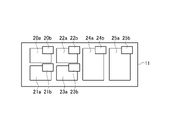
- FIG. 2 is a diagram illustrating an example of an image displayed on the display 11.
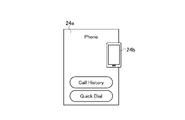
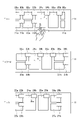
- FIG. 3 is a diagram illustrating an example of the tiles 24a and icons 24b.
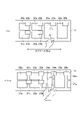
- FIG. 4 is a diagram illustrating an example of movement of the tiles 20a-25a and the icons 20b-25b.
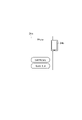
- FIG. 5 is a diagram illustrating an example of the tiles 24a and icons 24b.
- FIG. 6 is a diagram illustrating an example of movement of the tiles 20a-25a and the icons 20b-25b.
- FIG. 7 is a diagram illustrating an example of movement of the tiles 20a-25a and the icons 20b-25b.
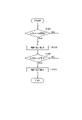
- FIG. 8 is a flow chart illustrating an operation example of the display control device 1 according to the embodiment of the present invention.
- the display control device 1 is installed inside the vehicle. As shown in FIG. 1 , the display control device 1 has a controller 10 and a display 11 .
- the display 11 is a touch panel capable of touch operation.
- the controller 10 controls the image displayed on the display 11.
- the controller 10 is a general-purpose microcomputer having a CPU (Central Processing Unit), memory, and an input/output unit.
- a computer program for functioning as the display control device 1 is installed in the microcomputer.
- the microcomputer By executing the computer program, the microcomputer functions as a plurality of information processing circuits included in the display control device 1 .
- the plurality of information processing circuits may be configured by individual hardware.
- the display 11 displays a plurality of tiles 20a-25a.
- a tile is an image for starting an application.
- a desired application is started when the user touches a tile.
- Application types include phone calls, route guidance, video playback, and music playback.
- Each tile displays an icon related to that tile (application).
- the icon 20b is displayed overlapping the tile 20a.
- part of the icon 20b overlaps the tile 20a in FIG. 2, the present invention is not limited to this.
- All of the icons 20b may overlap the tiles 20a.
- At least part of the icon 20b may overlap the tile 20a.
- the icons 20b to 25b overlap the tiles 20a to 25a on the upper right, but the present invention is not limited to this.
- the icons and tiles are rectangular in shape, they are not limited to this and may be circular.
- the tile 24a and the icon 24b are taken up as representatives among a plurality of tiles and icons.
- the tile 24a includes images "Call History” and "Quick Dial". If the user touches "Call History”, the call history will be displayed. If the user touches "Quick Dial", a call will be made to the last called number.
- the shape of the icon 24b is the shape of a smart phone. That is, icon 24b has a shape associated with tile 24a (phone). By looking at the icon 24b, the user can grasp at a glance that the tile 24a is related to the telephone.
- the icon 24b is an image that can show the user information about the application (which is activated by touching the tile 24a).
- “Scrolling” is a method of displaying content that does not fit on the screen by sliding horizontally or vertically. “Scrolling” is a well-known technology and is mainly used in smartphones, tablet terminals, and the like. In this embodiment, the direction in which the user scrolls is the horizontal direction (horizontal direction) of the display 11 as shown in FIG.
- a relative position is the relative position from one side to the other. In this embodiment, the relative position is represented by distance. That is, in this embodiment, the relative position is defined as "the distance from the tile to the icon”. More specifically, relative position is defined as "the shortest distance from the centerline of the tile to the centerline of the icon". In FIG.
- the shortest distance from the center line of the tile to the center line of the icon is denoted by L1. Therefore, the relative positions of the tile 24a and the icon 24b are expressed as the shortest distance L1 from the centerline of the tile 24a to the centerline of the icon 24b.
- a center line means a line as a concept. The centerline is not actually displayed on the display 11 . Although there is only one symbol L1 indicating the relative position in FIG. 4, this is merely omitted.
- the tiles 20a-23a, 25a and the icons 20b-23b, 25b also have the same definition of relative position.
- the controller 10 Scrolls the entire screen leftward. As a result, the tiles 20a to 25a and the icons 20b to 25b move leftward. Along with this, tiles 26 a and 27 a appear from the right end of the display 11 . Since the method of detecting scrolling is well known, detailed description thereof will be omitted.
- the horizontal axis indicates time (T), and the vertical axis indicates the horizontal position of the display 11 .
- the left side of the display 11 is positive and the right side is negative.
- Reference numerals 30 to 39 indicate lateral positions of tiles (here, tile 24a as a representative).
- Reference numerals 40 to 49 indicate horizontal positions of icons (icon 24b as a representative here).
- the relative distance L1 between the tile 24a and the icon 24b is "1".
- This numerical value "1" is a normalized numerical value. Although such normalized numerical values contain some errors, the errors are very small.
- the relative distance between tile 24a and icon 24b is indicated at 50 in FIG.
- FIG. 7 indicates that the tile 24a is moving leftward with a predetermined acceleration (see FIG. 4).
- the horizontal positions of reference numeral 40 (horizontal position “-1”) and reference numeral 41 (horizontal position “-1") are the same.
- the controller 10 moves the tile 24a leftward at a predetermined acceleration, but does not move the icon 24b.
- the tile 24a described in FIG. 7 is representative of the tiles 20a-25a, so it goes without saying that the description of FIG. 7 applies to the tiles 20a-25a.
- the icon 24b described in FIG. 7 represents the icons 20b-25b, so it goes without saying that the description of FIG. 7 applies to the icons 20b-25b. The same applies to the following description.
- the controller 10 first moves the tile 24a when it is detected that the user has started scrolling. This increases the relative distance between the tile 24a and the icon 24b.
- the relative distance after enlargement is indicated by L2 in FIG.
- the code 31 (horizontal position "0.5") moves to the code 32 (horizontal position "2.2"). This indicates that the tile 24a continues to move leftward at the predetermined acceleration.
- the reference 41 (horizontal position "-1") moves to the reference 42 (horizontal position "-0.5”).
- the code 32 (horizontal position "2.2") moves to the code 33 (horizontal position "4.2”). This indicates that the tile 24a is moving leftward at a predetermined speed.
- the reference 42 (horizontal position "-0.5") moves to the reference 43 (horizontal position "1"). This indicates that the icon 24b continues to move leftward at a predetermined acceleration.
- the period during which the user is scrolling in FIG. 7 is indicated by "touch on”. Stopping scrolling means that the user releases the finger from the display 11 . Stopping scrolling is indicated by “touch off” in FIG.
- the controller 10 decelerates and stops the tiles 24a and icons 24b.
- reference numeral 34 horizontal position "6.4" moves to reference numeral 35 (horizontal position "8.2"). This indicates that the tile 24a is moving leftward at a predetermined deceleration.
- reference numeral 44 horizontal position "3.2" moves to reference numeral 45 (horizontal position "5.4”). This indicates that the icon 24b continues to move leftward at a predetermined speed.
- the controller 10 decelerates the tile 24a first when it is detected that the user has stopped scrolling. This reduces the relative distance between the tile 24a and the icon 24b.
- the relative distance after reduction is indicated by symbol “L3" in FIG.
- the relative distance between the tile 24a and the icon 24b is reduced from "L2" (3.2) to "L3" (2.8).
- the relative positions of the tile 24a and the icon 24b are represented by a quadratic function.
- the acceleration, speed, and deceleration values described in FIG. 7 can be changed as appropriate. Therefore, the curve shown in FIG. 7 can be changed as appropriate as long as it is represented by a quadratic function.
- the above-mentioned "relative position” and “relative distance” are only a slight difference in expression, and have the same intention.
- step S101 the controller 10 detects a start trigger indicating that the user has started scrolling leftward or rightward on the display 11. As noted above, methods for detecting such start triggers are well known. If a start trigger is detected (YES in step S101), the process proceeds to step S103. In step S103, the controller 10 enlarges the relative positions of the tiles 20a-25a and the icons 20b-25b. Enlargement control is performed until the stop of scrolling is detected (NO in step S105). When the scrolling stop is detected (YES in step S105), the controller 10 reduces the relative positions of the tiles 20a to 25a and the icons 20b to 25b and restores them.
- the display control device 1 includes a touch-operable display 11 and a controller 10 that controls an image displayed on the display 11 .
- the display 11 and controller 10 are installed in the vehicle.
- the display 11 displays tiles that activate applications when touched by the user, and icons related to the applications. At least a portion of the icon is displayed overlying the tile.
- Controller 10 detects a start trigger indicating that the user has started scrolling leftward or rightward on display 11 .
- the controller 10 expands the relative positions of the tiles and icons at a predetermined acceleration along with the passage of time from the detected start trigger.
- the controller 10 detects a stop trigger indicating that the user has stopped scrolling.
- the controller 10 reduces the relative positions of the tiles and icons at a predetermined deceleration along with the lapse of time from the detected stop trigger.
- the prescribed acceleration and the prescribed deceleration are obtained by performing experiments and simulations in advance.
- One pair of tiles and icons may be provided, or a plurality of pairs may be provided. In this embodiment, pairs of tiles and icons are described as a plurality of sets.
- a plurality of tiles and icons are displayed on the display 11 respectively.
- the controller 10 may increase the interval between adjacent tiles at a predetermined acceleration along with the passage of time from the detected start trigger.
- An example of adjacent tiles is tile 24a and tile 25a shown in FIG.
- the controller 10 may reduce the interval between adjacent tiles at a predetermined deceleration along with the lapse of time from the detected stop trigger.
- the controller 10 first moves the tile at a predetermined acceleration, and then moves the icon at a predetermined acceleration. This makes it possible to emphasize that the image has an icon displayed in front of the tile.
- the controller 10 may reduce the relative positions of the tiles and the icons if it detects that the user scrolls in different directions while moving at least one of the tiles or the icons. The controller 10 then stops the movement of the tiles and icons. After that, the controller 10 moves the tiles and icons in different directions with a predetermined acceleration to enlarge the relative positions of the tiles and icons. As a result, it is possible to emphasize that the icon is displayed in front of the tile according to the scroll direction. "Different direction" here means rightward, for example, when the user first scrolls leftward and then scrolls rightward.
- the controller 10 may tilt the tile in the direction of movement. This improves the parallax effect.
- the center position of the tile and the center position of the icon do not match in the horizontal direction of the display 11. As shown in FIGS. 2 and 3, as long as the center position of the tile and the center position of the icon do not match in the horizontal direction of the display 11, the icon can be placed at any position. By shifting the center positions of the tiles and the center positions of the icons in the horizontal direction of the display 11 in this way, the parallax effect is improved.
- a stop trigger is a detection signal indicating that the user has taken his or her finger off the display 11 .
- the controller 10 may increase the predetermined acceleration or deceleration as the speed or acceleration of scrolling by the user increases. This improves the parallax effect.
- the controller 10 may increase the maximum value of the relative position as the speed or acceleration of scrolling by the user increases.
- the maximum value of the relative position was described as "3.2", but this "3.2" may be increased as the speed or acceleration of scrolling by the user increases. This improves the parallax effect.
- Processing circuitry includes programmed processing devices, such as processing devices that include electrical circuitry. Processing circuitry also includes devices such as application specific integrated circuits (ASICs) and circuit components arranged to perform the described functions.
- ASICs application specific integrated circuits
Landscapes
- Engineering & Computer Science (AREA)
- General Engineering & Computer Science (AREA)
- Theoretical Computer Science (AREA)
- Human Computer Interaction (AREA)
- Physics & Mathematics (AREA)
- General Physics & Mathematics (AREA)
- Chemical & Material Sciences (AREA)
- Combustion & Propulsion (AREA)
- Transportation (AREA)
- Mechanical Engineering (AREA)
- User Interface Of Digital Computer (AREA)
- Controls And Circuits For Display Device (AREA)
Abstract
Description
以上説明したように、本実施形態に係る表示制御装置1によれば、以下の作用効果が得られる。
Claims (11)
- 車両に設置され、タッチ操作が可能なディスプレイと、前記ディスプレイに表示される画像を制御するコントローラとを備える表示制御装置であって、
前記ディスプレイには、ユーザがタッチすることによりアプリケーションを起動するタイルと、前記アプリケーションに関連するアイコンが表示され、
前記アイコンの少なくとも一部は前記タイルに重なって表示され、
前記コントローラは、
前記ユーザが前記ディスプレイ上で左方向または右方向にスクロールを開始したことを示す開始トリガを検出し、
検出された前記開始トリガからの時間経過に沿って、前記タイルと前記アイコンとの相対位置を所定加速度で拡大させ、
前記ユーザが前記スクロールを停止したことを示す停止トリガを検出し、
検出された前記停止トリガからの時間経過に沿って、前記タイルと前記アイコンとの相対位置を所定減速度で縮小させる
ことを特徴とする表示制御装置。 - 前記タイルと前記アイコンとの相対位置は2次関数で表される
ことを特徴とする請求項1に記載の表示制御装置。 - 前記タイル及び前記アイコンは前記ディスプレイにそれぞれ複数表示され、
前記コントローラは、
検出された前記開始トリガからの時間経過に沿って、隣接するタイルの間隔を前記所定加速度で拡大させ、
検出された前記停止トリガからの時間経過に沿って、前記隣接するタイルの間隔を前記所定減速度で縮小させる
ことを特徴とする請求項1または2に記載の表示制御装置。 - 前記コントローラは、前記開始トリガが検出されたとき、先に前記タイルを前記所定加速度で移動させ、その後、前記アイコンを前記所定加速度で移動させる
ことを特徴とする請求項1~3のいずれか1項に記載の表示制御装置。 - 前記コントローラは、前記タイルまたは前記アイコンの少なくとも一方を移動させている際に、前記ユーザによる異なる方向へのスクロールが検出された場合、前記タイルと前記アイコンとの相対位置を縮小させ、
その後、前記タイルと前記アイコンの動きを停止させ、
その後、前記異なる方向に向けて前記タイルと前記アイコンを前記所定加速度で移動させ、前記タイルと前記アイコンとの相対位置を拡大させる
ことを特徴とする請求項1~4のいずれか1項に記載の表示制御装置。 - 前記コントローラは、前記タイルを移動させるとき、前記タイルの向きを移動させる方向に傾かせる
ことを特徴とする請求項1~5のいずれか1項に記載の表示制御装置。 - 前記タイルの中心位置と前記アイコンの中心位置は、前記ディスプレイの水平方向において一致しない
ことを特徴とする請求項1~6のいずれか1項に記載の表示制御装置。 - 前記停止トリガは、前記ユーザが前記ディスプレイから指を離したことを示す検出信号である
ことを特徴とする請求項1~7のいずれか1項に記載の表示制御装置。 - 前記ユーザによる前記スクロールの速度または加速度が大きいほど、前記所定加速度または前記所定減速度が大きい
ことを特徴とする請求項1~8のいずれか1項に記載の表示制御装置。 - 前記ユーザによる前記スクロールの速度または加速度が大きいほど、前記相対位置の最大値は大きい
ことを特徴とする請求項1~9のいずれか1項に記載の表示制御装置。 - 車両に設置され、タッチ操作が可能なディスプレイと、前記ディスプレイに表示される画像を制御するコントローラとを備える表示制御装置の表示制御方法であって、
前記ディスプレイには、ユーザがタッチすることによりアプリケーションを起動するタイルと、前記アプリケーションに関連するアイコンが表示され、
前記アイコンの少なくとも一部は前記タイルに重なって表示され、
前記コントローラは、
前記ユーザが前記ディスプレイ上で左方向または右方向にスクロールを開始したことを示す開始トリガを検出し、
前記開始トリガからの時間経過に沿って、前記タイルと前記アイコンとの相対位置を所定加速度で拡大させ、
前記ユーザが前記スクロールを停止したことを示す停止トリガを検出し、
前記停止トリガからの時間経過に沿って、前記タイルと前記アイコンとの相対位置を所定減速度で縮小させる
ことを特徴とする表示制御方法。
Priority Applications (7)
| Application Number | Priority Date | Filing Date | Title |
|---|---|---|---|
| PCT/JP2021/020485 WO2022249471A1 (ja) | 2021-05-28 | 2021-05-28 | 表示制御装置及び表示制御方法 |
| US17/628,283 US11983383B2 (en) | 2021-05-28 | 2021-05-28 | Display control device and display control method |
| JP2022504113A JP7318796B2 (ja) | 2021-05-28 | 2021-05-28 | 表示制御装置及び表示制御方法 |
| CN202180004639.5A CN115698932A (zh) | 2021-05-28 | 2021-05-28 | 显示控制装置和显示控制方法 |
| EP21848126.5A EP4350497B1 (en) | 2021-05-28 | 2021-05-28 | Display control device and display control method |
| JP2023117713A JP7464180B2 (ja) | 2021-05-28 | 2023-07-19 | 表示制御装置及び表示制御方法 |
| US18/625,649 US12254166B2 (en) | 2021-05-28 | 2024-04-03 | Display control device and display control method |
Applications Claiming Priority (1)
| Application Number | Priority Date | Filing Date | Title |
|---|---|---|---|
| PCT/JP2021/020485 WO2022249471A1 (ja) | 2021-05-28 | 2021-05-28 | 表示制御装置及び表示制御方法 |
Related Child Applications (2)
| Application Number | Title | Priority Date | Filing Date |
|---|---|---|---|
| US17/628,283 A-371-Of-International US11983383B2 (en) | 2021-05-28 | 2021-05-28 | Display control device and display control method |
| US18/625,649 Division US12254166B2 (en) | 2021-05-28 | 2024-04-03 | Display control device and display control method |
Publications (1)
| Publication Number | Publication Date |
|---|---|
| WO2022249471A1 true WO2022249471A1 (ja) | 2022-12-01 |
Family
ID=84229646
Family Applications (1)
| Application Number | Title | Priority Date | Filing Date |
|---|---|---|---|
| PCT/JP2021/020485 Ceased WO2022249471A1 (ja) | 2021-05-28 | 2021-05-28 | 表示制御装置及び表示制御方法 |
Country Status (5)
| Country | Link |
|---|---|
| US (2) | US11983383B2 (ja) |
| EP (1) | EP4350497B1 (ja) |
| JP (2) | JP7318796B2 (ja) |
| CN (1) | CN115698932A (ja) |
| WO (1) | WO2022249471A1 (ja) |
Families Citing this family (1)
| Publication number | Priority date | Publication date | Assignee | Title |
|---|---|---|---|---|
| CN120029514A (zh) * | 2020-08-31 | 2025-05-23 | 华为终端有限公司 | 一种页面滑动的处理方法及相关装置 |
Citations (4)
| Publication number | Priority date | Publication date | Assignee | Title |
|---|---|---|---|---|
| JPH09237080A (ja) * | 1996-02-28 | 1997-09-09 | Mitsubishi Electric Corp | 画面上書きシステム |
| JP2012230571A (ja) | 2011-04-26 | 2012-11-22 | Konica Minolta Business Technologies Inc | 操作表示装置、スクロール表示制御方法およびスクロール表示制御プログラム |
| JP2014109877A (ja) * | 2012-11-30 | 2014-06-12 | Hitachi Solutions East Japan Ltd | ガントチャート編集装置、ガントチャート編集方法及びガントチャート編集プログラム |
| WO2015063847A1 (ja) * | 2013-10-29 | 2015-05-07 | 発紘電機株式会社 | プログラマブル表示器、プログラム |
Family Cites Families (19)
| Publication number | Priority date | Publication date | Assignee | Title |
|---|---|---|---|---|
| US20100107100A1 (en) * | 2008-10-23 | 2010-04-29 | Schneekloth Jason S | Mobile Device Style Abstraction |
| JP5628621B2 (ja) * | 2010-10-06 | 2014-11-19 | 任天堂株式会社 | 表示制御プログラム、表示制御システム、表示制御装置、表示制御方法 |
| JP5618858B2 (ja) * | 2011-02-16 | 2014-11-05 | 株式会社Nttドコモ | 表示装置、通信装置及びプログラム |
| JP5667469B2 (ja) * | 2011-02-24 | 2015-02-12 | 京セラ株式会社 | 電子機器、表示制御方法および表示制御プログラム |
| JP5866957B2 (ja) * | 2011-10-17 | 2016-02-24 | ソニー株式会社 | 情報処理装置、表示制御方法及びプログラム |
| US9268423B2 (en) * | 2012-09-08 | 2016-02-23 | Stormlit Limited | Definition and use of node-based shapes, areas and windows on touch screen devices |
| KR102022050B1 (ko) * | 2012-11-12 | 2019-09-19 | 삼성전자주식회사 | 패럴랙스 스크롤 기능을 가지는 모바일 장치 및 그 제어 방법 |
| KR20140146954A (ko) * | 2013-06-18 | 2014-12-29 | 삼성전자주식회사 | 서비스 제공 방법 및 이를 위한 전자 기기 |
| WO2015045640A1 (ja) * | 2013-09-30 | 2015-04-02 | ソニー株式会社 | 情報処理装置、情報処理方法、及びプログラム |
| US8869062B1 (en) * | 2013-11-27 | 2014-10-21 | Freedom Scientific, Inc. | Gesture-based screen-magnified touchscreen navigation |
| JP5942978B2 (ja) * | 2013-12-26 | 2016-06-29 | ソニー株式会社 | 情報処理装置、情報処理方法およびプログラム |
| EP2930049B1 (de) * | 2014-04-08 | 2017-12-06 | Volkswagen Aktiengesellschaft | Anwenderschnittstelle und Verfahren zur Anpassung einer Ansicht auf einer Anzeigeeinheit |
| US20160253837A1 (en) * | 2015-02-26 | 2016-09-01 | Lytro, Inc. | Parallax bounce |
| US20170192642A1 (en) * | 2015-12-31 | 2017-07-06 | Opentv, Inc. | Systems and methods for enabling transitions between items of content based on swipe gestures |
| JP6658212B2 (ja) * | 2016-03-30 | 2020-03-04 | ブラザー工業株式会社 | 表示装置、および制御プログラム |
| JP6742881B2 (ja) * | 2016-10-11 | 2020-08-19 | キヤノン株式会社 | 情報処理装置とその制御方法及びプログラム |
| US10891044B1 (en) * | 2016-10-25 | 2021-01-12 | Twitter, Inc. | Automatic positioning of content items in a scrolling display for optimal viewing of the items |
| US11196875B2 (en) * | 2017-09-20 | 2021-12-07 | Fujifilm Business Innovation Corp. | Application apparatus, image processing apparatus, and non-transitory computer readable medium with plurality of recovery methods for applications switching to be in operation target state |
| JP2020177072A (ja) * | 2019-04-16 | 2020-10-29 | 株式会社デンソー | 車両用装置、車両用装置の制御方法 |
-
2021
- 2021-05-28 JP JP2022504113A patent/JP7318796B2/ja active Active
- 2021-05-28 CN CN202180004639.5A patent/CN115698932A/zh active Pending
- 2021-05-28 WO PCT/JP2021/020485 patent/WO2022249471A1/ja not_active Ceased
- 2021-05-28 US US17/628,283 patent/US11983383B2/en active Active
- 2021-05-28 EP EP21848126.5A patent/EP4350497B1/en active Active
-
2023
- 2023-07-19 JP JP2023117713A patent/JP7464180B2/ja active Active
-
2024
- 2024-04-03 US US18/625,649 patent/US12254166B2/en active Active
Patent Citations (4)
| Publication number | Priority date | Publication date | Assignee | Title |
|---|---|---|---|---|
| JPH09237080A (ja) * | 1996-02-28 | 1997-09-09 | Mitsubishi Electric Corp | 画面上書きシステム |
| JP2012230571A (ja) | 2011-04-26 | 2012-11-22 | Konica Minolta Business Technologies Inc | 操作表示装置、スクロール表示制御方法およびスクロール表示制御プログラム |
| JP2014109877A (ja) * | 2012-11-30 | 2014-06-12 | Hitachi Solutions East Japan Ltd | ガントチャート編集装置、ガントチャート編集方法及びガントチャート編集プログラム |
| WO2015063847A1 (ja) * | 2013-10-29 | 2015-05-07 | 発紘電機株式会社 | プログラマブル表示器、プログラム |
Non-Patent Citations (1)
| Title |
|---|
| See also references of EP4350497A4 |
Also Published As
| Publication number | Publication date |
|---|---|
| JP7318796B2 (ja) | 2023-08-01 |
| EP4350497A4 (en) | 2024-07-10 |
| US20240248578A1 (en) | 2024-07-25 |
| EP4350497B1 (en) | 2025-07-16 |
| EP4350497A1 (en) | 2024-04-10 |
| US11983383B2 (en) | 2024-05-14 |
| JPWO2022249471A1 (ja) | 2022-12-01 |
| US12254166B2 (en) | 2025-03-18 |
| JP7464180B2 (ja) | 2024-04-09 |
| US20230367447A1 (en) | 2023-11-16 |
| CN115698932A (zh) | 2023-02-03 |
| JP2023129524A (ja) | 2023-09-14 |
Similar Documents
| Publication | Publication Date | Title |
|---|---|---|
| US11392283B2 (en) | Device, method, and graphical user interface for window manipulation and management | |
| JP5489379B1 (ja) | スクロール装置、スクロール方法及びプログラム | |
| JP5572059B2 (ja) | 表示装置 | |
| US9733716B2 (en) | Proxy gesture recognizer | |
| JP5970086B2 (ja) | タッチスクリーンホバリング入力処理 | |
| EP3279786A1 (en) | Terminal control method and device, and terminal | |
| JP2003143286A (ja) | 携帯電話機 | |
| KR20150092672A (ko) | 복수 개의 윈도우를 디스플레이하는 방법 및 장치 | |
| CN103176734A (zh) | 启用触摸屏的终端及其应用控制方法 | |
| JP2014006671A (ja) | 画像表示装置、画像表示方法、及び、画像表示プログラム | |
| JP7318796B2 (ja) | 表示制御装置及び表示制御方法 | |
| JPWO2013125103A1 (ja) | タッチパネル入力装置及びその制御方法 | |
| US10437376B2 (en) | User interface and method for assisting a user in the operation of an operator control unit | |
| JP2015049685A (ja) | 電子機器、電子機器の制御方法及びプログラム | |
| JP6213125B2 (ja) | 電子機器、電子機器の制御方法及びプログラム | |
| KR101354991B1 (ko) | 이동통신단말기 및 그것의 멀티 터치에 의한 편집 방법 | |
| JP2015046123A (ja) | 情報処理装置、情報処理方法及びプログラム | |
| JP5579914B2 (ja) | スクロール装置、スクロール方法及びプログラム | |
| JP2013200826A (ja) | 表示システムおよび表示プログラム | |
| JP2023177948A (ja) | オブジェクト操作用のプログラム | |
| JP5913771B2 (ja) | タッチ式ディスプレイの入力システムおよび入力パネルの表示方法 | |
| US10845977B2 (en) | Method and apparatus for displaying content | |
| JP2017211903A (ja) | 表示装置及び表示方法 | |
| JP2016053948A (ja) | 情報処理装置、情報処理方法及び情報処理プログラム | |
| JP6940172B2 (ja) | 情報端末、表示制御方法、及びプログラム |
Legal Events
| Date | Code | Title | Description |
|---|---|---|---|
| ENP | Entry into the national phase |
Ref document number: 2022504113 Country of ref document: JP Kind code of ref document: A |
|
| 121 | Ep: the epo has been informed by wipo that ep was designated in this application |
Ref document number: 21848126 Country of ref document: EP Kind code of ref document: A1 |
|
| NENP | Non-entry into the national phase |
Ref country code: DE |
|
| WWE | Wipo information: entry into national phase |
Ref document number: 2021848126 Country of ref document: EP |
|
| ENP | Entry into the national phase |
Ref document number: 2021848126 Country of ref document: EP Effective date: 20240102 |
|
| WWG | Wipo information: grant in national office |
Ref document number: 2021848126 Country of ref document: EP |