WO2023120044A1 - 表示装置、表示方法および表示プログラム - Google Patents
表示装置、表示方法および表示プログラム Download PDFInfo
- Publication number
- WO2023120044A1 WO2023120044A1 PCT/JP2022/043663 JP2022043663W WO2023120044A1 WO 2023120044 A1 WO2023120044 A1 WO 2023120044A1 JP 2022043663 W JP2022043663 W JP 2022043663W WO 2023120044 A1 WO2023120044 A1 WO 2023120044A1
- Authority
- WO
- WIPO (PCT)
- Prior art keywords
- display
- unit
- display unit
- person
- warning
- Prior art date
- Legal status (The legal status is an assumption and is not a legal conclusion. Google has not performed a legal analysis and makes no representation as to the accuracy of the status listed.)
- Ceased
Links
Images





Classifications
-
- G—PHYSICS
- G08—SIGNALLING
- G08B—SIGNALLING SYSTEMS, e.g. PERSONAL CALLING SYSTEMS; ORDER TELEGRAPHS; ALARM SYSTEMS
- G08B21/00—Alarms responsive to a single specified undesired or abnormal condition and not otherwise provided for
- G08B21/02—Alarms for ensuring the safety of persons
-
- G—PHYSICS
- G06—COMPUTING OR CALCULATING; COUNTING
- G06F—ELECTRIC DIGITAL DATA PROCESSING
- G06F3/00—Input arrangements for transferring data to be processed into a form capable of being handled by the computer; Output arrangements for transferring data from processing unit to output unit, e.g. interface arrangements
- G06F3/01—Input arrangements or combined input and output arrangements for interaction between user and computer
-
- G—PHYSICS
- G06—COMPUTING OR CALCULATING; COUNTING
- G06T—IMAGE DATA PROCESSING OR GENERATION, IN GENERAL
- G06T7/00—Image analysis
- G06T7/70—Determining position or orientation of objects or cameras
-
- H—ELECTRICITY
- H04—ELECTRIC COMMUNICATION TECHNIQUE
- H04N—PICTORIAL COMMUNICATION, e.g. TELEVISION
- H04N21/00—Selective content distribution, e.g. interactive television or video on demand [VOD]
- H04N21/40—Client devices specifically adapted for the reception of or interaction with content, e.g. set-top-box [STB]; Operations thereof
- H04N21/43—Processing of content or additional data, e.g. demultiplexing additional data from a digital video stream; Elementary client operations, e.g. monitoring of home network or synchronising decoder's clock; Client middleware
- H04N21/431—Generation of visual interfaces for content selection or interaction; Content or additional data rendering
-
- H—ELECTRICITY
- H04—ELECTRIC COMMUNICATION TECHNIQUE
- H04N—PICTORIAL COMMUNICATION, e.g. TELEVISION
- H04N21/00—Selective content distribution, e.g. interactive television or video on demand [VOD]
- H04N21/40—Client devices specifically adapted for the reception of or interaction with content, e.g. set-top-box [STB]; Operations thereof
- H04N21/43—Processing of content or additional data, e.g. demultiplexing additional data from a digital video stream; Elementary client operations, e.g. monitoring of home network or synchronising decoder's clock; Client middleware
- H04N21/431—Generation of visual interfaces for content selection or interaction; Content or additional data rendering
- H04N21/4312—Generation of visual interfaces for content selection or interaction; Content or additional data rendering involving specific graphical features, e.g. screen layout, special fonts or colors, blinking icons, highlights or animations
-
- H—ELECTRICITY
- H04—ELECTRIC COMMUNICATION TECHNIQUE
- H04N—PICTORIAL COMMUNICATION, e.g. TELEVISION
- H04N21/00—Selective content distribution, e.g. interactive television or video on demand [VOD]
- H04N21/40—Client devices specifically adapted for the reception of or interaction with content, e.g. set-top-box [STB]; Operations thereof
- H04N21/43—Processing of content or additional data, e.g. demultiplexing additional data from a digital video stream; Elementary client operations, e.g. monitoring of home network or synchronising decoder's clock; Client middleware
- H04N21/431—Generation of visual interfaces for content selection or interaction; Content or additional data rendering
- H04N21/4318—Generation of visual interfaces for content selection or interaction; Content or additional data rendering by altering the content in the rendering process, e.g. blanking, blurring or masking an image region
-
- H—ELECTRICITY
- H04—ELECTRIC COMMUNICATION TECHNIQUE
- H04N—PICTORIAL COMMUNICATION, e.g. TELEVISION
- H04N21/00—Selective content distribution, e.g. interactive television or video on demand [VOD]
- H04N21/40—Client devices specifically adapted for the reception of or interaction with content, e.g. set-top-box [STB]; Operations thereof
- H04N21/43—Processing of content or additional data, e.g. demultiplexing additional data from a digital video stream; Elementary client operations, e.g. monitoring of home network or synchronising decoder's clock; Client middleware
- H04N21/442—Monitoring of processes or resources, e.g. detecting the failure of a recording device, monitoring the downstream bandwidth, the number of times a movie has been viewed, the storage space available from the internal hard disk
-
- H—ELECTRICITY
- H04—ELECTRIC COMMUNICATION TECHNIQUE
- H04N—PICTORIAL COMMUNICATION, e.g. TELEVISION
- H04N21/00—Selective content distribution, e.g. interactive television or video on demand [VOD]
- H04N21/40—Client devices specifically adapted for the reception of or interaction with content, e.g. set-top-box [STB]; Operations thereof
- H04N21/47—End-user applications
- H04N21/488—Data services, e.g. news ticker
-
- G—PHYSICS
- G06—COMPUTING OR CALCULATING; COUNTING
- G06T—IMAGE DATA PROCESSING OR GENERATION, IN GENERAL
- G06T2207/00—Indexing scheme for image analysis or image enhancement
- G06T2207/30—Subject of image; Context of image processing
- G06T2207/30196—Human being; Person
Definitions
- the present disclosure relates to a display device, a display method, and a display program that detect an approach to an object and issue a warning regarding the approach.
- Patent Document 2 a technology has been proposed to prevent children from approaching the device by detecting the presence of a child near the television and issuing a warning when the number of detections exceeds a predetermined number (see, for example, Patent Document 2). 1).
- the present disclosure proposes a display device, a display method, and a display program that can more effectively suppress the approach of a person to a predetermined target.
- a display device includes a display control unit that displays an image on a display unit, and a person viewing the display unit based on information acquired by a sensor. a determination unit that determines whether or not the display unit is closer than a predetermined distance; and if the determination unit determines that the person and the display unit are closer than the predetermined distance, the person and an output control unit that outputs a first warning to
- FIG. 11 is a diagram (1) for explaining display processing according to the embodiment
- FIG. 2B is a diagram (2) for explaining display processing according to the embodiment
- FIG. 13 is a diagram (3) for explaining display processing according to the embodiment
- It is a diagram (1) for explaining the measurement process according to the embodiment.
- It is a diagram (2) for explaining the measurement process according to the embodiment.
- It is a figure which shows the structural example of the display apparatus which concerns on embodiment.
- It is a figure which shows an example of the setting memory
- 6 is a flowchart showing the flow of measurement processing according to the embodiment; 6 is a flowchart showing the flow of display processing according to the embodiment; It is a diagram (1) for explaining display processing according to a modification. It is a diagram (2) for explaining the display processing according to the modification. It is a diagram (3) for explaining the display processing according to the modification. It is a diagram (1) for explaining the measurement process according to the modification. It is a diagram (2) for explaining the measurement process according to the modification. 1 is a hardware configuration diagram showing an example of a computer that implements functions of a display device; FIG.
- Embodiment 1-1 Overview of Display Processing According to Embodiment 1-2.
- Configuration of display device according to embodiment 1-3 Procedure of Display Processing According to Embodiment 1-4. Modified example according to the embodiment 2.
- Other embodiments Effects of the display device according to the present disclosure4.
- Hardware configuration
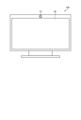
- FIG. 1 is a diagram showing an overview of a display device 100 according to an embodiment. Specifically, FIG. 1 is a front view of the display device 100 according to the embodiment, and shows components included in the display device 100 .
- the display device 100 is a so-called television having a display section 20 that displays still images or moving images.
- the display device 100 has a camera 10 for capturing an image above the display section 20 .
- the camera 10 captures an image in the direction in which a still image or moving image is displayed on the display unit 20 .
- the display device 100 analyzes an image captured by the camera 10 and determines whether or not a person (hereinafter collectively referred to as “user”) is shown in the image.
- the display device 100 analyzes the captured image and measures the distance between the user and the camera 10 (that is, the distance between the user and the display unit 20). Then, when the user and the display unit 20 are closer than a predetermined distance, the display device 100 issues a warning to avoid the proximity. As a result, the display device 100 prevents the user from approaching the display unit 20 , thereby preventing the user's visual acuity from deteriorating, colliding with the display device 100 , and overturning the display device 100 .
- the display device 100 displays an image on the display unit 20 that conveys that the user is leaving the display device 100, or emits a warning sound from a speaker (not shown in FIG. 1). Such processing will be described with reference to FIG. 2 and subsequent drawings.
- FIG. 2 is a diagram (1) for explaining display processing according to the embodiment.
- FIG. 2 shows a display device 100 installed in a living room and a user 50 who is a child watching video content displayed by the display device 100 .
- the user 50 is closer to the display device 100 than a preset distance.
- the display device 100 detects that the user 50 is viewing the display unit 20 and that the user 50 is closer to the display unit 20 than a predetermined distance based on the image recognition processing for the image captured by the camera 10. determined to be
- the display device 100 displays the first warning on the display unit 20 to the user 50 . Specifically, the display device 100 displays the warning frame 30 at the bottom of the display section 20 .
- the warning frame 30 has a warning text 32 (characters "Move away” in the example of FIG. 2) instructing the player to leave the screen, and a release button 34.
- a warning text 32 characters "Move away” in the example of FIG. 2
- a release button 34 At the stage of the first warning display shown in FIG. 2, only part of the warning frame 30 is displayed at the bottom of the display unit 20, and the actual warning frame 30 is shown by the dotted line in FIG. It has a wider viewing range.
- the user 50 or the parent's user viewing the display unit 20 together with the user 50 is prompted to move away from the display unit 20 by displaying the warning frame 30 on the display unit 20 being viewed.
- the warning frame 30 can be erased by pressing the cancel button 34 to temporarily cancel the warning processing. be able to.
- the display device 100 continues to measure the distance to the user 50 even after issuing the first warning that the warning frame 30 is displayed at the bottom of the display unit 20 . Then, if the user 50 is still within a predetermined distance from the display unit 20 after a predetermined time (for example, 3 seconds after the warning frame 30 is displayed) has elapsed, the display device 100 issues a second warning. emit.
- a predetermined time for example, 3 seconds after the warning frame 30 is displayed
- FIG. 3 is a diagram (2) for explaining display processing according to the embodiment.
- FIG. 3 shows user 50 continuing to be in close proximity to display device 100 .
- the display device 100 displays the entire warning frame 30 on the display unit 20 as a second warning.
- the display device 100 performs an animation display in which a part of the warning frame 30 is displayed slides upward, and transitions the screen so that the entire warning frame 30 is displayed on the display unit 20 .
- the warning frame 30 includes a warning text 32 and a cancel button 34, as well as a virtual image to prompt the user to leave the screen.
- a virtual image is a screen in which the user 50 is assumed to be the character 36 and the distance between the user 50 and the display unit 20 in the real space is virtually displayed on the screen.
- the virtual image includes an appropriate position display 38 and an arrow 40 prompting the direction of travel. These displays are automatically formed based on the information captured by camera 10 .
- the display device 100 performs processing such as gradually darkening the original image (image hidden behind the warning frame 30 ) that has been displayed on the display unit 20 . may As a result, the line of sight of the user 50 is attracted to the warning frame 30 instead of the standard image that has been displayed so far.
- the display device 100 may output a warning sound 42 such as "please move away from the TV".
- the character 36 on the screen is linked with the movement of the user 50 in the real space. That is, when the user 50 moves away from the display unit 20, the character 36 moves in the direction indicated by the arrow 40 with animation processing. Further, when the user 50 approaches the display unit 20 further, the character 36 moves in the direction opposite to the direction indicated by the arrow 40 with animation processing.
- the user 50 understands that the character 36 on the screen moves when he or she moves, and furthermore, by listening to the warning sound emitted from the display device 100, such as "Please go down to the circle on the screen and look", the user 50 can move to the appropriate position. Motivation to move to display 38 is provided. Accordingly, the display device 100 prevents the user 50 from approaching the display device 100 . In addition, the display device 100 emphasizes the appropriate position display 38 on the screen (blinking display, display brighter than other displays, etc.) to prompt the user 50 to move to the appropriate position display 38. may
- FIG. 4 is a diagram (3) for explaining display processing according to the embodiment.
- FIG. 4 shows an example in which the user 50 has moved out of the range of the predetermined distance at which the warning is issued.
- the display device 100 When the character 36 in the virtual image moves to the proper position display 38, the display device 100 performs effect processing such as lighting or blinking the proper position display 38, and then slides the warning frame 30 to the lower part of the display unit 20.
- the warning frame 30 is erased from the display section 20. Further, when the warning frame 30 is erased, the display device 100 restores the darkened image on the display unit 20 to the standard display.
- the user 50 can recognize that the screen display has returned to its original state according to his/her own behavior, and can change his/her behavior so as not to approach the display unit 20 thereafter. That is, according to the display processing according to the embodiment, it is possible to prevent the user 50 from approaching the display unit 20 and to encourage the user 50 not to approach the display unit 20 thereafter. can demonstrate.
- the display processing executed by the display device 100 has been described above. By the way, it is desirable that the user can arbitrarily determine how close the display device 100 is to issue a warning according to the size of the room in which the display device 100 is installed, the age of the user, and the like.
- the display device 100 executes measurement processing so that the user can arbitrarily set a predetermined distance for issuing a warning. This point will be described with reference to FIG. 5 and subsequent drawings.
- FIG. 5 is a diagram (1) for explaining the measurement process according to the embodiment.
- FIG. 5 shows a display device 100 and a user 60 who is an adult trying to set a predetermined distance for issuing a warning.
- the display device 100 When the display device 100 receives a request for setting a predetermined distance from the user 60, the display device 100 provides a setting screen as a user interface for setting. For example, as shown in FIG. 5, the display device 100 displays on the display unit 20 an instruction 62 including text prompting measurement, an imaging display 64 by the camera 10, and a measurement start button 68.
- FIG. 5 the display device 100 displays on the display unit 20 an instruction 62 including text prompting measurement, an imaging display 64 by the camera 10, and a measurement start button 68.
- the imaged display 64 is an image captured by the camera 10 of the user 60 trying to set the predetermined distance. That is, the imaged display 64 includes a person 66 corresponding to the imaged user 60 .
- the user 60 moves to a reference position where a warning is issued when the user 60 approaches the display device 100 any further, and presses the measurement start button 68 .
- the user 60 presses the measurement start button 68 after being in a position where the user views the display device 100 on a daily basis.
- the display device 100 displays a measurement availability determination 67 indicating whether the measurement process can be started.
- FIG. 6 is a diagram (2) for explaining the measurement process according to the embodiment.
- the display device 100 when the display device 100 finishes measuring the distance to the user 60, it displays on the display unit 20 an instruction 70 asking whether to set the measured distance as the predetermined distance.
- the display device 100 also displays the measurement result 72 of the distance to the person 66 on the imaging display 64 .
- a measurement result 72 is the result of measuring the distance from the display device 100 to the person 66 and is displayed near the person 66 .
- the user 60 presses the decision button 74 when setting the measurement result to the predetermined distance.
- the user 60 may request re-measurement in situations such as when the user 60 is not recognized, when an appropriate distance has not been measured, or when the user wants to set a longer or shorter distance. If the user 60 wants to set a distance slightly shorter or longer than the measured distance as the predetermined distance, the user 60 may set the predetermined distance by manually adjusting the measured distance.
- the display device 100 stores this setting information as a predetermined distance for issuing a warning.
- the display device 100 may store different settings of the predetermined distance for each user who sets the distance or for each room in which the setting is performed.
- measurement results and setting information may be uploaded to a cloud server via a network and imported into other devices.
- the display device 100 may import measurement results and setting information generated by other devices from the cloud server.
- the display device 100 displays an image on the display unit 20, and determines whether or not the user viewing the image and the display unit 20 are closer than a predetermined distance. judge.
- the display device 100 determines that the user and the display unit 20 are closer than the predetermined distance
- the display device 100 issues a first warning to the user, such as displaying a warning frame 30 on a part of the display unit 20. emitted.
- the display device 100 issues a second warning that displays the entire warning frame 30 .
- the display device 100 uses an image to recognize a user who is visually recognizing a video, and issues a warning to the recognized user. It is possible to reliably issue a warning to the user viewing the image without reacting to animals or the like.
- the display device 100 can prompt the user to return to the standard image by issuing a warning step by step so as to cover the display unit 20, thereby effectively discouraging the user from approaching the display device 100. can be suppressed.
- FIG. 7 is a diagram showing a configuration example of the display device 100 according to the embodiment.
- the display device 100 has a communication unit 110, a storage unit 120, a control unit 130, a detection unit 140, and an output unit 150.
- the display device 100 may have an input unit (for example, a touch display, operation buttons, etc.) that receives various operations from an administrator who manages the display device 100, the user 50, or the like.
- the communication unit 110 is implemented by, for example, a NIC (Network Interface Card), a network interface controller, or the like.
- the communication unit 110 is connected to the network N by wire or wirelessly, and transmits/receives information to/from an external device or the like via the network N.
- the network N is realized by a wireless communication standard or method such as Bluetooth (registered trademark), the Internet, Wi-Fi (registered trademark), UWB (Ultra Wide Band), LPWA (Low Power Wide Area), or the like.
- the detection unit 140 is a functional unit (sensor) for detecting various types of information.
- the detection unit 140 is, for example, an image sensor that records the imaged space as pixel information (still image or moving image).
- the camera 10 illustrated in FIG. 1 corresponds to an example of the detection unit 140 .
- the camera 10 is an image sensor that captures an image in a direction facing the display unit 20, and is arranged so as to be close to the display unit 20 as shown in FIG. embedded in the outer frame (bezel) of the display unit 20).
- the image sensor (camera 10) includes a pre-learned AI chip for image recognition of a human face and estimation of a user's skeleton based on image analysis. good too.
- the detection unit 140 may include a depth sensor (ToF sensor) that measures the distance to a user or object located in the space, a microphone that detects sounds in the space, and the like.
- ToF sensor depth sensor
- the detection unit 140 does not necessarily have to be provided inside the display device 100 .
- the detection unit 140 may be installed outside the display device 100 as long as it can transmit sensed information to the display device 100 using communication or the like.
- the output unit 150 is a functional unit that outputs video, audio, etc. to the outside.
- the output unit 150 includes a display 151 that displays video and a speaker 152 that outputs audio.
- the display unit 20 illustrated in FIG. 1 corresponds to an example of the output unit 150 .
- the storage unit 120 is implemented by, for example, a semiconductor memory device such as RAM (Random Access Memory) or flash memory, or a storage device such as a hard disk or optical disk.
- Storage unit 120 has setting storage unit 121 and warning information storage unit 122 .
- each storage unit will be described in order with reference to FIGS. 8 and 9.
- FIG. 1 A block diagram illustrating an exemplary computing environment in accordance with the present disclosure.
- FIG. 8 is a diagram showing an example of the setting storage unit 121 according to the embodiment.
- the setting storage unit 121 has items such as "setting ID” and "setting distance". 8 and 9, the information stored in the storage unit 120 may be conceptually indicated as “A01”, but in reality, each piece of information described later is stored in the storage unit 120.
- FIG. 8 is a diagram showing an example of the setting storage unit 121 according to the embodiment.
- the setting storage unit 121 has items such as "setting ID” and "setting distance”.
- the information stored in the storage unit 120 may be conceptually indicated as “A01”, but in reality, each piece of information described later is stored in the storage unit 120.
- “Setting ID” is identification information for identifying the setting of the distance (predetermined distance) that serves as a reference for determining that the display unit 20 is in proximity. “Set distance” is information about a predetermined distance set for determining that a person has approached the display unit 20 . For example, the set distance may be set for each user, or may be used for each space such as a room in which the display device 100 is installed.
- FIG. 9 is a diagram showing an example of the warning information storage unit 122 according to the embodiment. As shown in FIG. 9, the warning information storage unit 122 has items such as "warning information ID" and "warning information”.
- Warning information ID is identification information that identifies warning information used for display processing.
- the "warning information” includes image data of a warning screen used for warning, warning audio data, data describing operation processing such as how the image changes, and the like.
- the control unit 130 for example, by CPU (Central Processing Unit), MPU (Micro Processing Unit), GPU (Graphics Processing Unit), etc., the program stored inside the display device 100 (for example, the display program according to the present disclosure) It is realized by executing RAM (Random Access Memory) etc. as a work area. Also, the control unit 130 is a controller, and may be realized by an integrated circuit such as an ASIC (Application Specific Integrated Circuit) or an FPGA (Field Programmable Gate Array).
- ASIC Application Specific Integrated Circuit
- FPGA Field Programmable Gate Array
- control unit 130 has a display control unit 131, a measurement unit 132, a determination unit 133, and an output control unit 134.
- the display control unit 131 controls to display the image on the display unit 20 (display 151) by outputting the image to the output unit 150.
- the measurement unit 132 Upon receiving a distance measurement request from the user, the measurement unit 132 measures the distance from the user located within the detection range of the sensor to the display unit 20 based on the information acquired by the sensor. Further, when receiving a request for setting the predetermined distance after the measurement, the measuring unit 132 sets the measured distance as the predetermined distance. After setting the predetermined distance, the measurement unit 132 stores this information in the setting storage unit 121 .
- the measurement unit 132 measures the distance from the user located within the detection range (field angle range) of the camera 10 to the display unit 20 based on the analysis of the image captured by the camera 10 .
- Distance measurement is performed based on existing image analysis processing (processing performed by an AI chip or the like incorporated in the camera 10).
- the measurement unit 132 provides a user interface displayed on the display unit 20 as shown in FIGS. 4 and 5 when measuring the distance.
- the user interface includes an image captured by camera 10 (that is, an image showing a situation where display device 100 is capturing an image of the user).
- the user interface displays the measurement result of the distance from the user located in the detection range of the camera 10 to the display unit 20 superimposed on the image captured by the camera 10. .
- the measurement unit 132 receives, via the user interface, whether or not to set the measurement result as the predetermined distance.
- a user can easily and appropriately set a predetermined distance by setting while looking at a user interface that allows him/herself to be photographed and the measured distance to be confirmed at a glance.
- the camera 10 includes an AI chip having a pre-learned model that has learned a specific object, such as human face recognition, so that it can recognize whether the object being imaged is a person or not. can be done.
- the measurement unit 132 acquires a flag indicating whether or not a person is present within the angle of view from the camera 10, and measures the distance to the person when the person is present within the angle of view. Note that when the angle of view includes a plurality of people, the measurement unit 132 may measure the distance to the person closest to the display unit 20, or may return an error.
- the determination unit 133 determines whether the user viewing the display unit 20 and the display unit 20 are closer than a predetermined distance based on information acquired by the sensor (detection unit 140).
- the determination unit 133 determines whether the user and the display unit 20 are closer than a predetermined distance.
- the determination unit 133 may determine whether or not the user is viewing the display unit 20 based on the user's skeleton estimation (bone estimation) recognized in the image. This is because there is no need to issue a warning if the user is not gazing at the display unit 20 . Specifically, when the determination unit 133 determines that the user's face captured by the camera 10 is sideways or backward based on the skeleton estimation, the determination unit 133 determines that the display unit 20 is not viewed. Thereby, the determination unit 133 can exclude a user who simply crosses in front of the display device 100 or a user who is not gazing at the display unit 20 from the target of the warning.
- the determination unit 133 can exclude a user who simply crosses in front of the display device 100 or a user who is not gazing at the display unit 20 from the target of the warning.
- the determination unit 133 may determine whether the user viewing the display unit 20 satisfies a predetermined criterion based on the estimation of the user's skeleton (bone estimation) recognized in the image. This is because the user who visually recognizes the display unit 20 may be a user who does not need to be warned. Specifically, when the determination unit 133 determines that the user captured by the camera 10 is under a predetermined age or is a preset user based on the skeleton estimation, the determination unit 133 determines that the user is subject to warning. . Accordingly, the determination unit 133 can display a warning only for users who need to be warned.
- the determining unit 133 determines that the user viewing the display unit 20 and the display unit 20 are closer than the predetermined distance, a part of the warning frame 30 is displayed on the display unit 20 as shown in FIG. A first warning is given that Further, the determination unit 133 determines whether or not the user and the display unit 20 continue to be closer than a predetermined distance for a predetermined time (for example, 3 seconds) after the first warning is output. judge. If the determination unit 133 determines that the user and the display unit 20 have continued to be closer than the predetermined distance for a predetermined time after the first warning was output, a second warning is issued. be. Further, when the determination unit 133 determines that the distance between the user and the display unit 20 is further reduced after the output of the first warning, the second warning is issued without waiting for the elapse of the predetermined time. may
- the output control unit 134 When the determination unit 133 determines that the user and the display unit 20 are closer than the predetermined distance, the output control unit 134 outputs a first warning to the user. Note that when the determination unit 133 determines that the user and the display unit 20 are closer than a predetermined distance and determines that the user is visually recognizing the display unit 20, the output control unit 134 A first warning may be output to the user.
- the output control unit 134 has a larger display area than the first warning screen (corresponding to the entire warning screen; for example, the warning frame 30 whose entirety is displayed as shown in FIG. 3 corresponds).
- a small second warning screen (corresponding to part of the warning screen, for example, corresponding to the warning frame 30 shown in FIG. 2) is output so as to be superimposed on at least part of the image displayed on the display unit 20 .
- the output control unit 134 Output a second warning to the user.
- the output control unit 134 displays the first warning screen on which an instruction to move away from the display unit is displayed based on the information acquired by the sensor as the second warning.
- the output control unit 134 outputs an entire warning screen displaying an instruction to move away from the display unit 20 so as to be superimposed on the image displayed on the display unit 20. . That is, the output control unit 134 first displays the second warning screen corresponding to part of the first warning screen as the first warning, and then displays the first warning screen, which is the entire warning screen, as the second warning. display.
- the output control unit 134 may output the entire warning screen and output a voice instruction (warning voice) to move away from the display unit 20 .
- the output control unit 134 when displaying the entire warning screen, the output control unit 134 outputs the entire warning screen to the display unit 20, accompanied by animation display of moving the warning screen, which was only partially displayed on the display unit 20. good too. For example, as shown in FIGS. 2 and 3 , the output control unit 134 slides the warning frame 30 displayed at the bottom of the display unit 20 to the middle of the display unit 20 as time elapses. Output processing may be performed so that the entire warning frame 30 is displayed in the vicinity.
- the output control unit 134 may perform filter processing in conjunction with the passage of time on the image on which the warning screen is superimposed. Specifically, the output control unit 134 may perform filter processing such that the original image on which the warning screen is superimposed is gradually reduced in luminance to become darker. As a result, the user is motivated to return to the original image as soon as possible, and is encouraged to move away from the display device 100 .
- the filtering process is not limited to brightness adjustment, and may be any process that changes the original image, such as changing the resolution or performing mosaic processing.
- the output control unit 134 displays a warning screen in which the character corresponding to the user and the first object corresponding to the display unit 20 are separated from the display unit 20 by a predetermined distance.
- a virtual image including a second object indicating the position of the object may be displayed.
- the output control unit 134 may animate the character in conjunction with the actual distance between the user and the display unit 20 .
- the output control unit 134 moves the character to the second object in the virtual image in conjunction with the movement.
- the second object may be subjected to predetermined effect processing.
- the output control unit 134 performs effect processing such as blinking the second object (the mark indicating the predetermined distance).
- effect processing such as blinking the second object (the mark indicating the predetermined distance).
- the output control unit 134 displays an animation that moves the warning screen out of the display unit 20, and displays the warning screen. is erased from the display unit 20.
- the output control unit 134 may erase the warning screen from the display unit 20 when receiving a request from the user to stop outputting the warning via the warning screen after displaying the warning screen. For example, when the user presses the cancel button 34 shown in FIG. 2 on the screen, the output control unit 134 cancels subsequent display processing and clears the warning screen.
- FIG. 10 is a flowchart showing the flow of measurement processing according to the embodiment.
- the display device 100 determines whether or not a measurement request has been received from the user (step S101). For example, the display device 100 provides an initial setting screen or the like for a predetermined distance determined to be close to the display device 100, and receives a measurement request from the user. If the measurement request is not accepted (step S101; No), the display device 100 waits until the request is accepted.
- step S101 if a measurement request has been received (step S101; Yes), the display device 100 checks whether the camera 10 provided in the display device 100 is covered with a cover or the like (step S102). If the camera 10 is blocked (step S102; No), the display device 100 warns the user to remove the cover of the camera 10 (step S103).
- step S102 the display device 100 captures an image of the front of the display unit 20 with the camera 10, and recognizes a person from the obtained image (step S104).
- the display device 100 measures the distance to the person closest to the display unit 20 (step S105).
- the display device 100 displays the measured distance near the person in the image of the camera 10 reflected on the setting screen (user interface) (step S106).
- the “person” in this case may be the same as the user who made the measurement request, or may be a different person.
- the display device 100 determines whether or not it has received from the user that the measured distance is to be set as the predetermined distance (step S107). If the setting is not accepted from the user (step S107; No), the display device 100 accepts another measurement request. On the other hand, when receiving the setting from the user (step S107; Yes), the display device 100 sets the measured distance as the predetermined distance (step S108).
- FIG. 11 is a flowchart showing the flow of display processing according to the embodiment.
- the display device 100 controls the display unit 20 to display a standard image before performing display processing (step S201). Then, the display device 100 always captures an image with the camera 10 arranged near the display unit 20, and determines whether or not a person is recognized based on the captured image (step S202). If the person is not recognized (step S202; No), the display device 100 continues displaying the standard screen.
- step S202 determines whether the person is closer to the display unit 20 than the predetermined distance. If the distance is not closer than the predetermined distance (step S203; No), the display device 100 continues displaying the standard screen.
- the display device 100 issues a first stage warning (step S204). For example, the display device 100 displays only part of the warning screen on the lower part of the display unit 20 and prompts the person to move away from the display unit 20 .
- the display device 100 determines whether or not the approach to the display unit 20 continues for a predetermined time (step S205).
- a predetermined time for example, 3 seconds
- the display device 100 erases the warning screen and returns to displaying the standard screen. do.
- step S206 the display device 100 slides a part of the warning screen displayed at the bottom of the display unit 20 and displays the entire warning screen on the display unit 20 by superimposing it on the original image.
- the display device 100 determines whether or not the approach to the display unit 20 continues for a predetermined time (step S207).
- the predetermined time in this case may be set to a time different from that in step S205 (for example, 1 second).
- the display device 100 erases the warning screen and returns to displaying the standard screen.
- step S207 the display device 100 further executes step-by-step screen display etc. for the second stage warning (step S206).
- the display device 100 performs display processing such as gradually darkening the original image on which the warning screen is superimposed, and transitions to a state in which it is difficult for a person to visually recognize the image. Thereby, the display device 100 prompts the person to leave the display unit 20 .
- the display device 100 receives from the user an instruction to end the display of the video (when the power of the display device 100 as a television is turned off, etc.) or when the cancel button 34 is pressed, the display process exit.
- the display device 100 may measure the distance using a depth sensor (ToF sensor), an infrared sensor, or the like instead of measuring the distance to the person based on image analysis captured by the camera 10 .
- the display device 100 acquires map information of the space where the user is located using techniques such as SLAM (Simultaneous Localization and Mapping) using depth sensors and image sensors, and measures the distance to the user from this information.
- SLAM Simultaneous Localization and Mapping
- the display device 100 may have a plurality of cameras instead of having one camera 10 near the display unit 20 .
- a plurality of cameras are connected to the display device 100, there is a possibility that misrecognition may occur.
- a flexible configuration may be adopted, such as enabling the camera and using the image obtained from the camera for processing.
- the display unit 20 is exemplified as an object to prevent the user from approaching.
- the processing according to the embodiment may be applied not only to prevent the user from approaching the display unit 20 but also to prevent the user from approaching a predetermined target near the camera 10 .
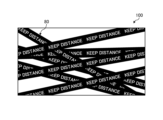
- FIG. 12 is a diagram (1) for explaining display processing according to the modification.
- the display device 100 displays a superimposed display 80 so as to cover the original video as a second warning, for example.
- the superimposed display 80 is in the form of a tape on which characters are written to warn the user to stay away from the display unit 20, and is drawn by animation processing so as to cover a wide range of images as time elapses.
- the display device 100 determines whether or not the user and the display unit 20 continue to be closer than a predetermined distance for a predetermined time after the first warning is output. Then, when the display device 100 determines that the user and the display unit 20 have continued to be closer than the predetermined distance for a predetermined time, the display device 100 issues an object superimposed on the image as a second warning to the user. An object is displayed in animation, the range of which is superimposed on the image increases in conjunction with the elapsed time. As a result, the display device 100 can prevent the user from continuing to view the video and strongly prompt the user to move away from the display unit 20 beyond the predetermined distance. Note that the display device 100 may output the superimposed display 80 as the first warning instead of the second warning.
- the display device 100 may perform different screen display processing besides the example shown in FIG. An example of such modification will be described with reference to FIG.
- FIG. 13 is a diagram (2) for explaining display processing according to the modification.
- the display device 100 superimposes a shadow 82 corresponding to the user on the image as a second warning, for example.
- the shadow 82 is an object corresponding to the user captured by the camera 10 , and is, for example, a silhouette that moves in conjunction with the movement of the user captured by the camera 10 .
- the user is motivated to move away from the display unit 20 because the user feels that the image is hidden due to his or her own actions.
- the display device 100 determines that the user and the display unit 20 continue to be closer than the predetermined distance for a predetermined time, a second warning to the user is superimposed on the video.
- a shadow 82 that is an object linked to the user's motion information acquired by the camera 10 is displayed.
- the display device 100 can prompt the user to remove the shadow 82 that disturbs viewing of the video, that is, prompt the user to move away from the display unit 20 beyond the predetermined distance.
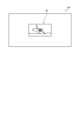
- FIG. 14 is a diagram (3) for explaining display processing according to the modification.
- the display device 100 performs a process of reducing the original video over time as the second warning, for example.
- An image 84 shown in FIG. 14 shows the original image that has been reduced over time.
- the display device 100 may perform animation processing such that the image gradually moves away from the screen.
- the display device 100 determines that the user and the display unit 20 are closer than the predetermined distance for a predetermined time, the display device 100 adjusts the range in which the image is displayed in conjunction with the elapsed time. You may control to narrow. Accordingly, the display device 100 can prompt the user to move away from the display unit 20 beyond the predetermined distance in order to continue viewing the video.
- FIG. 15 is a diagram (1) for explaining the measurement process according to the modification.
- the display device 100 measures the distance to the person displayed in the captured image 86. Then, the display device 100 performs the process of measuring the distance to the user while displaying the image 86 on the display unit 20 so that the user can visually recognize it (step S301).
- the display device 100 may display an image 88 in which the grid display is superimposed on the original image by animation processing during measurement.
- the user can watch the display transition from image 86 to image 88 on the user interface.
- the display device 100 can entertain the user during measurement and motivate the user to actively perform the measurement.
- FIG. 16 is a diagram (2) for explaining the measurement processing according to the modification.
- the display device 100 measures the distance to the person displayed in the captured image 86, as in the example of FIG. Then, the display device 100 performs the process of measuring the distance to the user while displaying the image 86 on the display unit 20 so that the user can visually recognize it (step S302).
- the display device 100 may display an image 90 in which scanning lines that scan the image 86 from above are superimposed on the original image by animation processing during measurement.
- the user can view the transition from image 86 to image 90 on the user interface that displays the image of the user being captured.
- the display device 100 when displaying the measurement result of the distance from the user located in the detection range of the camera 10 to the display unit 20 on the user interface, recognizes the distance in the image. Effect processing is performed to indicate the progress of the measurement for the user who performed the measurement. By applying such a visual effect, the display device 100 can provide interest to the user during measurement and accurately inform the user which person in the image has been recognized by the display device 100. Therefore, the display device 100 can avoid problems such as erroneous measurement or setting of an unnatural distance as the predetermined distance.
- each component of each device illustrated is functionally conceptual and does not necessarily need to be physically configured as illustrated.
- the specific form of distribution and integration of each device is not limited to the one shown in the figure, and all or part of them can be functionally or physically distributed and integrated in arbitrary units according to various loads and usage conditions. Can be integrated and configured.
- the display device according to the present disclosure includes a display control unit (display control unit 131 in the embodiment), a determination unit (determination unit 133 in the embodiment), and an output control unit (output control unit 134 in the embodiment).
- the display control unit displays an image on the display unit (display unit 20 in the embodiment).
- the determination unit determines whether or not a person viewing the display unit and the display unit are closer than a predetermined distance based on information acquired by the sensor.
- the output control unit outputs a first warning to the person when the determination unit determines that the person and the display unit are closer than a predetermined distance.
- the display device determines the proximity of the person viewing the image to the display unit and issues a warning to the person, thereby making the person's approach to the display unit more effective. can be effectively suppressed.
- the determination unit determines whether or not the person and the display unit are closer than a predetermined distance based on the analysis of the image captured by the image sensor (camera 10 in the embodiment).
- the display device recognizes a person based on image analysis and determines the distance between the recognized person and the display unit, thereby excluding the approach of non-humans such as animals and accurately determining the approach of the person. can do.
- the determination unit determines whether or not the person is visually recognizing the display unit based on the skeleton estimation of the person recognized in the image.
- the output control unit outputs the first output to the person. output a warning of
- the display device can exclude a person or the like who simply crosses the front of the display unit from the determination target, so that a warning can be reliably issued only to the person viewing the image. can be done.
- the output control unit displays a first warning screen (meaning the entire warning screen In the embodiment, the warning frame 30 displayed in its entirety as shown in Fig. 3 corresponds) is output as the second warning. Further, after the first warning is output, the output control unit outputs a first warning screen having a smaller display area than the first warning screen on which an instruction to move away from the display unit is displayed based on information acquired by the sensor. 2 A warning screen (meaning a part of the warning screen; in the embodiment, the warning frame 30 shown in FIG. 2 corresponds) is output so as to be superimposed on at least part of the image displayed on the display unit 20 . Also, the second warning screen corresponds to part of the first warning screen.
- the display device displays only a part of the warning screen as the first warning, so that viewing of the video is not hindered and the user can be encouraged to leave the display unit.
- the display device can effectively suppress approaching by giving a stepwise warning as compared with a case where a simple warning is issued.
- the determination unit determines whether or not the person and the display unit continue to be closer than a predetermined distance for a predetermined time after the first warning is output.
- the output control unit outputs a second warning to the person when it is determined by the determination unit that the person and the display unit continue to be closer than the predetermined distance for a predetermined time.
- the display device can effectively suppress approach by issuing a step-by-step warning compared to simply issuing a warning.
- the output control unit superimposes, as a second warning, the first warning screen, which is the entire warning screen on which an instruction to leave the display unit is displayed, on at least a part of the image displayed on the display unit. output to let
- the display device can more strongly urge the person to move away from the display unit, compared to a state in which a part of the warning screen is displayed.
- the output control unit outputs a voice instruction (audio 42 in the embodiment) to move away from the display unit along with the first warning screen.
- the display device can strongly urge the person to move away from the display unit by emitting a sound along with the warning screen.
- the output control unit displays the first warning, which is the entire warning screen on which an instruction to move away from the display unit is displayed, accompanied by an animation display that moves the second warning screen, which was only partially displayed on the display unit. Outputs the screen to the display unit.
- the display device outputs the entire warning screen to the display unit with screen effects such as animation display, thereby making the person strongly aware of moving away from the display unit.
- the determination unit determines whether or not the person has moved to a position away from the display unit by more than a predetermined distance after the second warning is output.
- the output control unit controls the image on which the first warning screen is superimposed in conjunction with the passage of time. Apply filtering.
- the display device reduces the visibility of the image by performing filter processing such as reducing the brightness of the image. Thereby, the display device can strongly urge the person to move away from the display unit.
- the output control unit displays a warning screen as a character (character 36 in the embodiment) corresponding to a person, a first object corresponding to the display unit, and a second object indicating a position away from the display unit by a predetermined distance.
- a virtual image including an object is displayed, and the character is animated in conjunction with the actual distance between the person and the display unit.
- the display device displays an animation linked to the person and prompts the user to move along the display, thereby effectively prompting the user to leave the vicinity of the display unit.
- the determination unit determines whether or not the person has moved to a position away from the display unit by more than a predetermined distance after the second warning is output.
- the output control unit moves the character to the second object in the virtual image in conjunction with the movement. Predetermined effect processing is applied to the object.
- the display device performs processing such as blinking the second object when the person moves, so that the child or the like who is amused by the processing can effectively move away from the vicinity of the display unit. can encourage
- the determination unit determines whether or not the person has moved to a position away from the display unit by more than a predetermined distance after the second warning is output.
- the output control unit displays the warning screen from the display unit with an animation display that moves the warning screen out of the display unit. to erase.
- the display device can effectively encourage the person to leave the vicinity of the display unit by erasing the warning screen and restoring the original image when the person leaves the display unit.
- the output control unit receives a request to stop the output of the warning via the warning screen after displaying the warning screen, the output control unit erases the warning screen from the display unit.
- the display device can eliminate the annoyance of outputting a warning screen in an unnecessary situation by erasing the warning screen in response to a request.
- the display device when the display device receives the measurement request, the display device measures the distance from the person located in the detection range of the sensor to the display unit based on the information acquired by the sensor, and sets the measured distance as the predetermined distance. It further includes a measurement unit (measurement unit 132 in the embodiment). The determination unit determines whether or not a person viewing the display unit and the display unit are closer than a predetermined distance, using the distance set by the measurement unit as a predetermined distance. Further, when receiving a request for setting the predetermined distance after the measurement, the measuring unit sets the measured distance as the predetermined distance.
- the display device can arbitrarily set a predetermined distance that serves as a reference for proximity according to a person's request. As a result, the display device can issue a warning that matches the daily lifestyle of each person.
- the measurement unit measures the distance from the person located in the detection range of the image sensor to the display unit based on the analysis of the image captured by the image sensor.
- the display device can quickly and accurately measure the distance to the person by measuring the distance based on image analysis.
- the measurement unit is a user interface displayed on the display unit, and includes an image captured by the image sensor and the measurement result of the distance from the person located in the detection range of the sensor to the display unit superimposed on the image.
- a request for setting a predetermined distance is received via a user interface including
- the display device enables the person to visually understand the setting procedure by making the captured image visible to the person.
- the measurement unit when displaying the measurement result of the distance from the person located in the detection range of the sensor to the display unit on the user interface, the measurement unit performs effect processing that indicates the progress of the measurement for the person recognized in the image. .
- the display device can provide the person with a setting procedure accompanied by a visual effect by performing effect processing such as scanning the person.
- the display device further includes, as a sensor, an image sensor (camera 10 in the embodiment), which is an image sensor that captures an image in a direction facing the display section and is arranged so as to be close to the display section.
- the determination unit determines whether or not the person and the display unit are closer than a predetermined distance based on analysis of an image captured by the provided image sensor.
- the display device may have a configuration in which it is equipped with an image sensor. Thereby, the display device can accurately recognize a person who is close to the display device.
- FIG. 17 is a hardware configuration diagram showing an example of a computer 1000 that implements the functions of the display device 100.
- the computer 1000 has a CPU 1100 , a RAM 1200 , a ROM (Read Only Memory) 1300 , a HDD (Hard Disk Drive) 1400 , a communication interface 1500 and an input/output interface 1600 .
- Each part of computer 1000 is connected by bus 1050 .
- the CPU 1100 operates based on programs stored in the ROM 1300 or HDD 1400 and controls each section. For example, the CPU 1100 loads programs stored in the ROM 1300 or HDD 1400 into the RAM 1200 and executes processes corresponding to various programs.
- the ROM 1300 stores a boot program such as BIOS (Basic Input Output System) executed by the CPU 1100 when the computer 1000 is started, and programs dependent on the hardware of the computer 1000.
- BIOS Basic Input Output System
- the HDD 1400 is a computer-readable recording medium that non-temporarily records programs executed by the CPU 1100 and data used by such programs.
- HDD 1400 is a recording medium that records a display program according to the present disclosure, which is an example of program data 1450 .
- a communication interface 1500 is an interface for connecting the computer 1000 to an external network 1550 (for example, the Internet).
- CPU 1100 receives data from another device via communication interface 1500, and transmits data generated by CPU 1100 to another device.
- the input/output interface 1600 is an interface for connecting the input/output device 1650 and the computer 1000 .
- the CPU 1100 receives data from input devices such as a keyboard and mouse via the input/output interface 1600 .
- the CPU 1100 transmits data to an output device such as a display, a speaker, or a printer via the input/output interface 1600 .
- the input/output interface 1600 may function as a media interface for reading a program or the like recorded on a predetermined recording medium.
- Media include, for example, optical recording media such as DVD (Digital Versatile Disc) and PD (Phase change rewritable disk), magneto-optical recording media such as MO (Magneto-Optical disk), tape media, magnetic recording media, semiconductor memories, etc. is.
- optical recording media such as DVD (Digital Versatile Disc) and PD (Phase change rewritable disk)
- magneto-optical recording media such as MO (Magneto-Optical disk)
- tape media magnetic recording media
- magnetic recording media semiconductor memories, etc. is.
- the CPU 1100 of the computer 1000 implements the functions of the control unit 130 and the like by executing the display program loaded on the RAM 1200.
- the HDD 1400 also stores the display program according to the present disclosure and the data in the storage unit 120 .
- CPU 1100 reads and executes program data 1450 from HDD 1400 , as another example, these programs may be obtained from another device via external network 1550 .
- the present technology can also take the following configuration.
- a display control unit that displays an image on a display unit; a determination unit that determines whether or not a person viewing the display unit and the display unit are closer than a predetermined distance based on information acquired by a sensor; an output control unit that outputs a first warning to the person when the determination unit determines that the person and the display unit are closer than a predetermined distance; A display device.
- the output control unit is After the first warning is output, based on the information acquired by the sensor, a first warning screen displaying an instruction to leave the display unit is output as a second warning.
- the output control unit is As the first warning, a second warning screen having a smaller display area than the first warning screen is output so as to be superimposed on at least a part of the image displayed on the display unit.
- the second warning screen corresponds to part of the first warning screen, The display device according to (3) above.
- the determination unit is After the first warning is output, determining whether or not a state in which the person and the display unit are closer than a predetermined distance continues for a predetermined time, The output control unit is outputting a second warning to the person when it is determined by the determination unit that the person and the display unit continue to be closer than a predetermined distance for a predetermined time; The display device according to any one of (2) to (4) above.
- the output control unit is As the second warning, a first warning screen, which is the entire warning screen displaying an instruction to leave the display unit, is output so as to be superimposed on at least a part of the image displayed on the display unit. do, The display device according to (4) above. (7) The output control unit is Along with the first warning screen, outputting a voice instruction to leave the display unit; The display device according to any one of (2) to (6). (8) The output control unit is Displaying the first warning screen, which is the entirety of the warning screen on which an instruction to leave the display is displayed, accompanied by an animation display of moving the second warning screen, only a part of which was displayed on the display. output to the The display device according to (6) above.
- the determination unit is After the second warning is output, determining whether the person has moved to a position more than a predetermined distance from the display unit,
- the output control unit is When the determination unit determines that the person has not moved to a position more than a predetermined distance from the display unit, a filter linked to the passage of time is applied to the image on which the first warning screen is superimposed. to process, The display device according to (5) above.
- the output control unit is A virtual image including a character corresponding to the person, a first object corresponding to the display unit, and a second object indicating a position away from the display unit by a predetermined distance or more is displayed as the first warning screen.
- the determination unit is After the second warning is output, determining whether the person has moved to a position more than a predetermined distance from the display unit,
- the output control unit is When the determination unit determines that the person has moved to a position away from the display unit by more than a predetermined distance, the character is moved to the second object in the virtual image in conjunction with the movement, and subjecting the second object to predetermined effect processing;
- the display device according to (10) above.
- (12) When a measurement request is received, the distance from a person located in the detection range of the sensor to the display unit is measured based on the information acquired by the sensor, and the measured distance is set as the predetermined distance.
- the determination unit is Determining whether the distance set by the measurement unit is the predetermined distance, and the person viewing the display unit and the display unit are closer than the predetermined distance; The display device according to any one of (1) to (11).
- the measuring unit Upon receiving the measurement request, measuring the distance from the person located in the detection range of the image sensor to the display unit based on the analysis of the image captured by the image sensor; The display device according to (12) above.
- the measuring unit The display device according to (13), wherein when a request for setting a predetermined distance is received after measurement, the measured distance is set as the predetermined distance.
- the measuring unit A user interface displayed on the display unit, wherein an image captured by the image sensor and a measurement result of the distance from the person located in the detection range of the sensor to the display unit are superimposed on the image. receiving a request to set the predetermined distance via a user interface including The display device according to (14) above.
- the determination unit is Determining whether the person and the display unit are closer than a predetermined distance based on analysis of the image captured by the image sensor; The display device according to any one of (1) to (15) above.
- the determination unit is determining whether the person is visually recognizing the display unit based on the estimated skeleton of the person recognized in the image;
- the output control unit is When the determination unit determines that the person and the display unit are closer than a predetermined distance and determines that the person is visually recognizing the display unit, outputs 1 warning,
- the display device according to (16) above.
- the display device according to any one of (16) and (17) above.
- the computer Display the image on the display, determining whether or not a person viewing the display unit and the display unit are closer than a predetermined distance based on information acquired by a sensor; When the determination determines that the person and the display unit are closer than a predetermined distance, outputting a first warning to the person.
- display method including (20) the computer, a display control unit that displays an image on a display unit; a determination unit that determines whether or not a person viewing the display unit and the display unit are closer than a predetermined distance based on information acquired by a sensor; an output control unit that outputs a first warning to the person when the determination unit determines that the person and the display unit are closer than a predetermined distance; display program to function as
Landscapes
- Engineering & Computer Science (AREA)
- Multimedia (AREA)
- Signal Processing (AREA)
- Physics & Mathematics (AREA)
- General Physics & Mathematics (AREA)
- Theoretical Computer Science (AREA)
- Emergency Management (AREA)
- Business, Economics & Management (AREA)
- General Engineering & Computer Science (AREA)
- Computer Vision & Pattern Recognition (AREA)
- Human Computer Interaction (AREA)
- Computer Networks & Wireless Communication (AREA)
- Databases & Information Systems (AREA)
- Controls And Circuits For Display Device (AREA)
- User Interface Of Digital Computer (AREA)
- Control Of Indicators Other Than Cathode Ray Tubes (AREA)
Abstract
Description
1.実施形態
1-1.実施形態に係る表示処理の概要
1-2.実施形態に係る表示装置の構成
1-3.実施形態に係る表示処理の手順
1-4.実施形態に係る変形例
2.その他の実施形態
3.本開示に係る表示装置の効果
4.ハードウェア構成
(1-1.実施形態に係る表示処理の概要)
図1を用いて、本開示に係る表示処理を実行する表示装置100について説明する。図1は、実施形態に係る表示装置100の概要を示す図である。具体的には、図1は、実施形態に係る表示装置100の正面図であり、表示装置100が含む構成要素を示す。
次に、表示装置100の構成について説明する。図7は、実施形態に係る表示装置100の構成例を示す図である。
次に、図10および図11を用いて、実施形態に係る処理の手順について説明する。図10は、実施形態に係る計測処理の流れを示すフローチャートである。
上記各実施形態で示した表示装置100の構成や、実施形態に係る表示処理は、様々な変形を伴ってもよい。
上述した各実施形態に係る処理は、上記各実施形態以外にも種々の異なる形態にて実施されてよい。
上述のように、本開示に係る表示装置(実施形態では表示装置100)は、表示制御部(実施形態では表示制御部131)と、判定部(実施形態では判定部133)と、出力制御部(実施形態では出力制御部134)とを備える。表示制御部は、映像を表示部(実施形態では表示部20)に表示する。判定部は、センサにより取得される情報に基づいて、表示部を視認する人物と表示部とが所定距離よりも近接しているか否かを判定する。出力制御部は、判定部によって人物と表示部とが所定距離よりも近接していると判定されると、人物に対して第1の警告を出力する。
上述してきた各実施形態に係る表示装置100等の情報機器は、例えば図17に示すような構成のコンピュータ1000によって実現される。以下、本開示に係る表示装置100を例に挙げて説明する。図17は、表示装置100の機能を実現するコンピュータ1000の一例を示すハードウェア構成図である。コンピュータ1000は、CPU1100、RAM1200、ROM(Read Only Memory)1300、HDD(Hard Disk Drive)1400、通信インターフェイス1500、及び入出力インターフェイス1600を有する。コンピュータ1000の各部は、バス1050によって接続される。
(1)
映像を表示部に表示する表示制御部と、
センサにより取得される情報に基づいて、前記表示部を視認する人物と前記表示部とが所定距離よりも近接しているか否かを判定する判定部と、
前記判定部によって前記人物と前記表示部とが所定距離よりも近接していると判定されると、当該人物に対して第1の警告を出力する出力制御部と、
を備える表示装置。
(2)
前記出力制御部は、
前記第1の警告が出力されたのちに、前記センサにより取得される情報に基づいて、前記表示部から離れる旨の指示が表示された第1警告画面を、第2の警告として出力する、
前記(1)に記載の表示装置。
(3)
前記出力制御部は、
前記第1の警告として、前記第1警告画面よりも表示面積の小さい第2警告画面を、前記表示部に表示されていた前記映像の少なくとも一部に重畳させるよう出力する、
前記(2)に記載の表示装置。
(4)
前記第2警告画面は、前記第1警告画面の一部に対応する、
前記(3)に記載の表示装置。
(5)
前記判定部は、
前記第1の警告が出力されたのちに、所定時間、前記人物と前記表示部とが所定距離よりも近接している状態が継続しているか否かを判定し、
前記出力制御部は、
前記判定部によって、所定時間、前記人物と前記表示部とが所定距離よりも近接している状態が継続していると判定されると、当該人物に対して第2の警告を出力する、
前記(2)~(4)のいずれかに記載の表示装置。
(6)
前記出力制御部は、
前記第2の警告として、前記表示部から離れる旨の指示が表示された警告画面の全体である第1警告画面を、前記表示部に表示されていた前記映像の少なくとも一部に重畳させるよう出力する、
前記(4)に記載の表示装置。
(7)
前記出力制御部は、
前記第1警告画面とともに、前記表示部から離れる旨の音声指示を出力する、
前記(2)~(6)のいずれかに記載の表示装置。
(8)
前記出力制御部は、
一部のみが前記表示部に表示されていた前記第2警告画面を移動させるアニメーション表示を伴い、当該表示部から離れる旨の指示が表示された警告画面の全体である第1警告画面を前記表示部に出力する、
前記(6)に記載の表示装置。
(9)
前記判定部は、
前記第2の警告が出力されたのちに、前記人物が前記表示部から所定距離よりも離れた位置に移動したか否かを判定し、
前記出力制御部は、
前記判定部によって前記人物が前記表示部から所定距離よりも離れた位置に移動していないと判定されると、前記第1警告画面が重畳されている映像に対して、時間経過と連動したフィルタ処理を施す、
前記(5)に記載の表示装置。
(10)
前記出力制御部は、
前記第1警告画面として、前記人物に対応するキャラクタと、前記表示部に対応する第1オブジェクトと、前記表示部から所定距離よりも離れた位置を示した第2オブジェクトとを含む仮想映像を表示するとともに、前記人物と前記表示部との現実の距離に連動させて前記キャラクタをアニメーション動作させる、
前記(2)~(9)のいずれかに記載の表示装置。
(11)
前記判定部は、
前記第2の警告が出力されたのちに、前記人物が前記表示部から所定距離よりも離れた位置に移動したか否かを判定し、
前記出力制御部は、
前記判定部によって前記人物が前記表示部から所定距離よりも離れた位置に移動したと判定されると、当該移動に連動させて、前記仮想映像において前記キャラクタを前記第2オブジェクトまで移動させるとともに、前記第2オブジェクトに所定のエフェクト処理を施す、
前記(10)に記載の表示装置。
(12)
計測要求を受け付けると、前記センサにより取得される情報に基づいて、前記センサの検知範囲に所在する人物から前記表示部までの距離の計測を行い、前記計測した距離を前記所定距離として設定する計測部をさらに備え、
前記判定部は、
前記計測部により設定された距離を前記所定距離として、前記表示部を視認する人物と前記表示部とが当該所定距離よりも近接しているか否かを判定する、
前記(1)~(11)のいずれかに記載の表示装置。
(13)
前記計測部は、
前記計測要求を受け付けると、イメージセンサによって撮像された画像の解析に基づき、当該イメージセンサの検知範囲に所在する人物から前記表示部までの距離を計測する、
前記(12)に記載の表示装置。
(14)
前記計測部は、
計測ののちに所定距離の設定要求を受け付けると、前記計測した距離を前記所定距離として設定する
前記(13)に記載の表示装置。
(15)
前記計測部は、
前記表示部に表示するユーザインターフェイスであって、前記イメージセンサによって撮像された画像と、当該画像に重畳される、前記センサの検知範囲に所在する人物から前記表示部までの距離の計測結果とを含むユーザインターフェイスを介して、前記所定距離の設定要求を受け付ける、
前記(14)に記載の表示装置。
(16)
前記判定部は、
イメージセンサによって撮像された画像の解析に基づき、前記人物と前記表示部とが所定距離よりも近接しているか否かを判定する、
前記(1)~(15)のいずれかに記載の表示装置。
(17)
前記判定部は、
前記画像内で認識された人物の骨格推定に基づいて、前記人物が前記表示部を視認しているか否かを判定し、
前記出力制御部は、
前記判定部によって前記人物と前記表示部とが所定距離よりも近接していると判定され、かつ、前記人物が前記表示部を視認していると判定された場合に、当該人物に対して第1の警告を出力する、
前記(16)に記載の表示装置。
(18)
前記表示部に対面する方向を撮像するためのイメージセンサであって、当該表示部に近接するよう配置されるイメージセンサをさらに備え、
前記判定部は、
備えられた前記イメージセンサによって撮像された画像の解析に基づき、前記人物と前記表示部とが所定距離よりも近接しているか否かを判定する、
前記(16)または(17)のいずれかに記載の表示装置。
(19)
コンピュータが、
映像を表示部に表示し、
センサにより取得される情報に基づいて、前記表示部を視認する人物と前記表示部とが所定距離よりも近接しているか否かを判定し、
前記判定によって前記人物と前記表示部とが所定距離よりも近接していると判定されると、当該人物に対して第1の警告を出力する、
ことを含む表示方法。
(20)
コンピュータを、
映像を表示部に表示する表示制御部と、
センサにより取得される情報に基づいて、前記表示部を視認する人物と前記表示部とが所定距離よりも近接しているか否かを判定する判定部と、
前記判定部によって前記人物と前記表示部とが所定距離よりも近接していると判定されると、当該人物に対して第1の警告を出力する出力制御部と、
として機能させるための表示プログラム。
20 表示部
100 表示装置
110 通信部
120 記憶部
121 設定記憶部
122 警告情報記憶部
130 制御部
131 表示制御部
132 計測部
133 判定部
134 出力制御部
140 検知部
150 出力部
Claims (20)
- 映像を表示部に表示する表示制御部と、
センサにより取得される情報に基づいて、前記表示部を視認する人物と前記表示部とが所定距離よりも近接しているか否かを判定する判定部と、
前記判定部によって前記人物と前記表示部とが所定距離よりも近接していると判定されると、当該人物に対して第1の警告を出力する出力制御部と、
を備える表示装置。 - 前記出力制御部は、
前記第1の警告が出力されたのちに、前記センサにより取得される情報に基づいて、前記表示部から離れる旨の指示が表示された第1警告画面を、第2の警告として出力する、
請求項1に記載の表示装置。 - 前記出力制御部は、
前記第1の警告として、前記第1警告画面よりも表示面積の小さい第2警告画面を、前記表示部に表示されていた前記映像の少なくとも一部に重畳させるよう出力する、
請求項2に記載の表示装置。 - 前記第2警告画面は、前記第1警告画面の一部に対応する、
請求項3に記載の表示装置。 - 前記判定部は、
前記第1の警告が出力されたのちに、所定時間、前記人物と前記表示部とが所定距離よりも近接している状態が継続しているか否かを判定し、
前記出力制御部は、
前記判定部によって、所定時間、前記人物と前記表示部とが所定距離よりも近接している状態が継続していると判定されると、当該人物に対して第2の警告を出力する、
請求項2に記載の表示装置。 - 前記出力制御部は、
前記第2の警告として、前記表示部から離れる旨の指示が表示された警告画面の全体である第1警告画面を、前記表示部に表示されていた前記映像の少なくとも一部に重畳させるよう出力する、
請求項4に記載の表示装置。 - 前記出力制御部は、
前記第1警告画面とともに、前記表示部から離れる旨の音声指示を出力する、
請求項2に記載の表示装置。 - 前記出力制御部は、
一部のみが前記表示部に表示されていた前記第2警告画面を移動させるアニメーション表示を伴い、当該表示部から離れる旨の指示が表示された警告画面の全体である第1警告画面を前記表示部に出力する、
請求項6に記載の表示装置。 - 前記判定部は、
前記第2の警告が出力されたのちに、前記人物が前記表示部から所定距離よりも離れた位置に移動したか否かを判定し、
前記出力制御部は、
前記判定部によって前記人物が前記表示部から所定距離よりも離れた位置に移動していないと判定されると、前記第1警告画面が重畳されている映像に対して、時間経過と連動したフィルタ処理を施す、
請求項5に記載の表示装置。 - 前記出力制御部は、
前記第1警告画面として、前記人物に対応するキャラクタと、前記表示部に対応する第1オブジェクトと、前記表示部から所定距離よりも離れた位置を示した第2オブジェクトとを含む仮想映像を表示するとともに、前記人物と前記表示部との現実の距離に連動させて前記キャラクタをアニメーション動作させる、
請求項2に記載の表示装置。 - 前記判定部は、
前記第2の警告が出力されたのちに、前記人物が前記表示部から所定距離よりも離れた位置に移動したか否かを判定し、
前記出力制御部は、
前記判定部によって前記人物が前記表示部から所定距離よりも離れた位置に移動したと判定されると、当該移動に連動させて、前記仮想映像において前記キャラクタを前記第2オブジェクトまで移動させるとともに、前記第2オブジェクトに所定のエフェクト処理を施す、
請求項10に記載の表示装置。 - 計測要求を受け付けると、前記センサにより取得される情報に基づいて、前記センサの検知範囲に所在する人物から前記表示部までの距離の計測を行い、前記計測した距離を前記所定距離として設定する計測部をさらに備え、
前記判定部は、
前記計測部により設定された距離を前記所定距離として、前記表示部を視認する人物と前記表示部とが当該所定距離よりも近接しているか否かを判定する、
請求項1に記載の表示装置。 - 前記計測部は、
前記計測要求を受け付けると、イメージセンサによって撮像された画像の解析に基づき、当該イメージセンサの検知範囲に所在する人物から前記表示部までの距離を計測する、
請求項12に記載の表示装置。 - 前記計測部は、
計測ののちに所定距離の設定要求を受け付けると、前記計測した距離を前記所定距離として設定する
請求項13に記載の表示装置。 - 前記計測部は、
前記表示部に表示するユーザインターフェイスであって、前記イメージセンサによって撮像された画像と、当該画像に重畳される、前記センサの検知範囲に所在する人物から前記表示部までの距離の計測結果とを含むユーザインターフェイスを介して、前記所定距離の設定要求を受け付ける、
請求項14に記載の表示装置。 - 前記判定部は、
イメージセンサによって撮像された画像の解析に基づき、前記人物と前記表示部とが所定距離よりも近接しているか否かを判定する、
請求項1に記載の表示装置。 - 前記判定部は、
前記画像内で認識された人物の骨格推定に基づいて、前記人物が前記表示部を視認しているか否かを判定し、
前記出力制御部は、
前記判定部によって前記人物と前記表示部とが所定距離よりも近接していると判定され、かつ、前記人物が前記表示部を視認していると判定された場合に、当該人物に対して第1の警告を出力する、
請求項16に記載の表示装置。 - 前記表示部に対面する方向を撮像するためのイメージセンサであって、当該表示部に近接するよう配置されるイメージセンサをさらに備え、
前記判定部は、
備えられた前記イメージセンサによって撮像された画像の解析に基づき、前記人物と前記表示部とが所定距離よりも近接しているか否かを判定する、
請求項16に記載の表示装置。 - コンピュータが、
映像を表示部に表示し、
センサにより取得される情報に基づいて、前記表示部を視認する人物と前記表示部とが所定距離よりも近接しているか否かを判定し、
前記判定によって前記人物と前記表示部とが所定距離よりも近接していると判定されると、当該人物に対して第1の警告を出力する、
ことを含む表示方法。 - コンピュータを、
映像を表示部に表示する表示制御部と、
センサにより取得される情報に基づいて、前記表示部を視認する人物と前記表示部とが所定距離よりも近接しているか否かを判定する判定部と、
前記判定部によって前記人物と前記表示部とが所定距離よりも近接していると判定されると、当該人物に対して第1の警告を出力する出力制御部と、
として機能させるための表示プログラム。
Priority Applications (3)
| Application Number | Priority Date | Filing Date | Title |
|---|---|---|---|
| JP2023569206A JPWO2023120044A1 (ja) | 2021-12-20 | 2022-11-28 | |
| EP22910762.8A EP4455835A4 (en) | 2021-12-20 | 2022-11-28 | DISPLAY DEVICE, DISPLAY METHOD, AND DISPLAY PROGRAM |
| US18/718,543 US20250046169A1 (en) | 2021-12-20 | 2022-11-28 | Display Device, Display Method, And Display Program |
Applications Claiming Priority (2)
| Application Number | Priority Date | Filing Date | Title |
|---|---|---|---|
| JP2021206386 | 2021-12-20 | ||
| JP2021-206386 | 2021-12-20 |
Publications (1)
| Publication Number | Publication Date |
|---|---|
| WO2023120044A1 true WO2023120044A1 (ja) | 2023-06-29 |
Family
ID=86902282
Family Applications (1)
| Application Number | Title | Priority Date | Filing Date |
|---|---|---|---|
| PCT/JP2022/043663 Ceased WO2023120044A1 (ja) | 2021-12-20 | 2022-11-28 | 表示装置、表示方法および表示プログラム |
Country Status (5)
| Country | Link |
|---|---|
| US (1) | US20250046169A1 (ja) |
| EP (1) | EP4455835A4 (ja) |
| JP (1) | JPWO2023120044A1 (ja) |
| TW (1) | TW202332246A (ja) |
| WO (1) | WO2023120044A1 (ja) |
Families Citing this family (1)
| Publication number | Priority date | Publication date | Assignee | Title |
|---|---|---|---|---|
| US20250363251A1 (en) * | 2024-05-22 | 2025-11-27 | GM Global Technology Operations LLC | Display privacy system |
Citations (6)
| Publication number | Priority date | Publication date | Assignee | Title |
|---|---|---|---|---|
| JPH08317304A (ja) * | 1995-05-19 | 1996-11-29 | Utec:Kk | テレビ受像機 |
| JP2011059528A (ja) * | 2009-09-11 | 2011-03-24 | Sony Corp | 表示装置および制御方法 |
| JP2014078956A (ja) | 2013-11-19 | 2014-05-01 | Sony Corp | 表示装置および制御方法 |
| JP2018005663A (ja) * | 2016-07-05 | 2018-01-11 | 株式会社リコー | 情報処理装置、表示システム、プログラム |
| JP2019003332A (ja) * | 2017-06-13 | 2019-01-10 | コニカミノルタ株式会社 | 空中映像表示装置 |
| JP2021035826A (ja) * | 2020-10-06 | 2021-03-04 | 株式会社ユピテル | 電子機器及びプログラム |
Family Cites Families (4)
| Publication number | Priority date | Publication date | Assignee | Title |
|---|---|---|---|---|
| JP2006013938A (ja) * | 2004-06-25 | 2006-01-12 | Funai Electric Co Ltd | 表示装置 |
| BR112019001199A2 (pt) * | 2016-07-21 | 2019-08-13 | Visionapp Solutions S L | sistema e método para prevenção da deterioração visual causada pela utilização próxima a aparelhos com ecrãs eletrónicos |
| CN111654751B (zh) * | 2019-04-16 | 2023-03-03 | 上海铼锶信息技术有限公司 | 一种调整电视观看距离的交互方法及系统 |
| CN113423013A (zh) * | 2021-06-21 | 2021-09-21 | 北京紫光展锐通信技术有限公司 | 观看距离提醒方法及装置、设备和存储介质 |
-
2022
- 2022-11-22 TW TW111144545A patent/TW202332246A/zh unknown
- 2022-11-28 WO PCT/JP2022/043663 patent/WO2023120044A1/ja not_active Ceased
- 2022-11-28 JP JP2023569206A patent/JPWO2023120044A1/ja active Pending
- 2022-11-28 EP EP22910762.8A patent/EP4455835A4/en active Pending
- 2022-11-28 US US18/718,543 patent/US20250046169A1/en active Pending
Patent Citations (6)
| Publication number | Priority date | Publication date | Assignee | Title |
|---|---|---|---|---|
| JPH08317304A (ja) * | 1995-05-19 | 1996-11-29 | Utec:Kk | テレビ受像機 |
| JP2011059528A (ja) * | 2009-09-11 | 2011-03-24 | Sony Corp | 表示装置および制御方法 |
| JP2014078956A (ja) | 2013-11-19 | 2014-05-01 | Sony Corp | 表示装置および制御方法 |
| JP2018005663A (ja) * | 2016-07-05 | 2018-01-11 | 株式会社リコー | 情報処理装置、表示システム、プログラム |
| JP2019003332A (ja) * | 2017-06-13 | 2019-01-10 | コニカミノルタ株式会社 | 空中映像表示装置 |
| JP2021035826A (ja) * | 2020-10-06 | 2021-03-04 | 株式会社ユピテル | 電子機器及びプログラム |
Non-Patent Citations (1)
| Title |
|---|
| See also references of EP4455835A4 |
Also Published As
| Publication number | Publication date |
|---|---|
| US20250046169A1 (en) | 2025-02-06 |
| TW202332246A (zh) | 2023-08-01 |
| EP4455835A1 (en) | 2024-10-30 |
| JPWO2023120044A1 (ja) | 2023-06-29 |
| EP4455835A4 (en) | 2025-04-30 |
Similar Documents
| Publication | Publication Date | Title |
|---|---|---|
| US9195305B2 (en) | Recognizing user intent in motion capture system | |
| US10225492B1 (en) | User interfaces to configure a thermal imaging system | |
| EP3369038B1 (en) | Tracking object of interest in an omnidirectional video | |
| JP5418093B2 (ja) | 表示装置および制御方法 | |
| US11695908B2 (en) | Information processing apparatus and information processing method | |
| KR20170026164A (ko) | 가상 현실 디스플레이 장치 및 그 장치의 표시 방법 | |
| JP6973394B2 (ja) | 情報処理装置、情報処理方法、およびプログラム | |
| US20130021491A1 (en) | Camera Device Systems and Methods | |
| CN112106114A (zh) | 程序、记录介质、增强现实感呈现装置及增强现实感呈现方法 | |
| CN105279459A (zh) | 一种终端防偷窥方法及移动终端 | |
| US11477433B2 (en) | Information processor, information processing method, and program | |
| WO2012083415A1 (en) | System and method for interacting with and analyzing media on a display using eye gaze tracking | |
| KR20160121287A (ko) | 이벤트에 기반하여 화면을 디스플레이하는 방법 및 장치 | |
| US9298246B2 (en) | Information processing device, system, and information processing method | |
| CN102193624A (zh) | 用于基于姿势的用户界面的物理交互区 | |
| KR20180132989A (ko) | 주의 기반 렌더링 및 피델리티 | |
| CN110825220A (zh) | 眼球追踪控制方法、装置、智能投影仪及存储介质 | |
| KR102655625B1 (ko) | 피사체의 근접 여부에 따라 촬영 장치를 제어하는 방법 및 촬영 장치. | |
| JP5834941B2 (ja) | 注目対象特定装置、注目対象特定方法、及びプログラム | |
| JPWO2012147959A1 (ja) | 入力装置、入力方法及びプログラム | |
| WO2023120044A1 (ja) | 表示装置、表示方法および表示プログラム | |
| KR101405439B1 (ko) | 동작인식 배경영상 제공시스템, 동작인식 배경영상 제공방법 및 그 기록매체 | |
| US20090136157A1 (en) | System and/or Method for Combining Images | |
| US20200066116A1 (en) | Information processing apparatus, information processing method, and program | |
| US10891003B2 (en) | System, method, and apparatus for an interactive container |
Legal Events
| Date | Code | Title | Description |
|---|---|---|---|
| 121 | Ep: the epo has been informed by wipo that ep was designated in this application |
Ref document number: 22910762 Country of ref document: EP Kind code of ref document: A1 |
|
| ENP | Entry into the national phase |
Ref document number: 2023569206 Country of ref document: JP Kind code of ref document: A |
|
| WWE | Wipo information: entry into national phase |
Ref document number: 18718543 Country of ref document: US |
|
| NENP | Non-entry into the national phase |
Ref country code: DE |
|
| ENP | Entry into the national phase |
Ref document number: 2022910762 Country of ref document: EP Effective date: 20240722 |