WO2023134492A1 - 页面的显示方法、装置、电子设备、存储介质和程序产品 - Google Patents
页面的显示方法、装置、电子设备、存储介质和程序产品 Download PDFInfo
- Publication number
- WO2023134492A1 WO2023134492A1 PCT/CN2023/070042 CN2023070042W WO2023134492A1 WO 2023134492 A1 WO2023134492 A1 WO 2023134492A1 CN 2023070042 W CN2023070042 W CN 2023070042W WO 2023134492 A1 WO2023134492 A1 WO 2023134492A1
- Authority
- WO
- WIPO (PCT)
- Prior art keywords
- video
- area
- page
- interactive control
- preset
- Prior art date
- Legal status (The legal status is an assumption and is not a legal conclusion. Google has not performed a legal analysis and makes no representation as to the accuracy of the status listed.)
- Ceased
Links
Images




Classifications
-
- G—PHYSICS
- G06—COMPUTING OR CALCULATING; COUNTING
- G06F—ELECTRIC DIGITAL DATA PROCESSING
- G06F3/00—Input arrangements for transferring data to be processed into a form capable of being handled by the computer; Output arrangements for transferring data from processing unit to output unit, e.g. interface arrangements
- G06F3/01—Input arrangements or combined input and output arrangements for interaction between user and computer
- G06F3/048—Interaction techniques based on graphical user interfaces [GUI]
- G06F3/0481—Interaction techniques based on graphical user interfaces [GUI] based on specific properties of the displayed interaction object or a metaphor-based environment, e.g. interaction with desktop elements like windows or icons, or assisted by a cursor's changing behaviour or appearance
- G06F3/04817—Interaction techniques based on graphical user interfaces [GUI] based on specific properties of the displayed interaction object or a metaphor-based environment, e.g. interaction with desktop elements like windows or icons, or assisted by a cursor's changing behaviour or appearance using icons
-
- G—PHYSICS
- G06—COMPUTING OR CALCULATING; COUNTING
- G06F—ELECTRIC DIGITAL DATA PROCESSING
- G06F3/00—Input arrangements for transferring data to be processed into a form capable of being handled by the computer; Output arrangements for transferring data from processing unit to output unit, e.g. interface arrangements
- G06F3/01—Input arrangements or combined input and output arrangements for interaction between user and computer
- G06F3/048—Interaction techniques based on graphical user interfaces [GUI]
- G06F3/0487—Interaction techniques based on graphical user interfaces [GUI] using specific features provided by the input device, e.g. functions controlled by the rotation of a mouse with dual sensing arrangements, or of the nature of the input device, e.g. tap gestures based on pressure sensed by a digitiser
- G06F3/0488—Interaction techniques based on graphical user interfaces [GUI] using specific features provided by the input device, e.g. functions controlled by the rotation of a mouse with dual sensing arrangements, or of the nature of the input device, e.g. tap gestures based on pressure sensed by a digitiser using a touch-screen or digitiser, e.g. input of commands through traced gestures
-
- G—PHYSICS
- G06—COMPUTING OR CALCULATING; COUNTING
- G06F—ELECTRIC DIGITAL DATA PROCESSING
- G06F3/00—Input arrangements for transferring data to be processed into a form capable of being handled by the computer; Output arrangements for transferring data from processing unit to output unit, e.g. interface arrangements
- G06F3/01—Input arrangements or combined input and output arrangements for interaction between user and computer
- G06F3/048—Interaction techniques based on graphical user interfaces [GUI]
- G06F3/0481—Interaction techniques based on graphical user interfaces [GUI] based on specific properties of the displayed interaction object or a metaphor-based environment, e.g. interaction with desktop elements like windows or icons, or assisted by a cursor's changing behaviour or appearance
-
- G—PHYSICS
- G06—COMPUTING OR CALCULATING; COUNTING
- G06F—ELECTRIC DIGITAL DATA PROCESSING
- G06F3/00—Input arrangements for transferring data to be processed into a form capable of being handled by the computer; Output arrangements for transferring data from processing unit to output unit, e.g. interface arrangements
- G06F3/01—Input arrangements or combined input and output arrangements for interaction between user and computer
- G06F3/048—Interaction techniques based on graphical user interfaces [GUI]
- G06F3/0484—Interaction techniques based on graphical user interfaces [GUI] for the control of specific functions or operations, e.g. selecting or manipulating an object, an image or a displayed text element, setting a parameter value or selecting a range
- G06F3/04845—Interaction techniques based on graphical user interfaces [GUI] for the control of specific functions or operations, e.g. selecting or manipulating an object, an image or a displayed text element, setting a parameter value or selecting a range for image manipulation, e.g. dragging, rotation, expansion or change of colour
-
- G—PHYSICS
- G06—COMPUTING OR CALCULATING; COUNTING
- G06F—ELECTRIC DIGITAL DATA PROCESSING
- G06F3/00—Input arrangements for transferring data to be processed into a form capable of being handled by the computer; Output arrangements for transferring data from processing unit to output unit, e.g. interface arrangements
- G06F3/01—Input arrangements or combined input and output arrangements for interaction between user and computer
- G06F3/048—Interaction techniques based on graphical user interfaces [GUI]
- G06F3/0487—Interaction techniques based on graphical user interfaces [GUI] using specific features provided by the input device, e.g. functions controlled by the rotation of a mouse with dual sensing arrangements, or of the nature of the input device, e.g. tap gestures based on pressure sensed by a digitiser
- G06F3/0488—Interaction techniques based on graphical user interfaces [GUI] using specific features provided by the input device, e.g. functions controlled by the rotation of a mouse with dual sensing arrangements, or of the nature of the input device, e.g. tap gestures based on pressure sensed by a digitiser using a touch-screen or digitiser, e.g. input of commands through traced gestures
- G06F3/04883—Interaction techniques based on graphical user interfaces [GUI] using specific features provided by the input device, e.g. functions controlled by the rotation of a mouse with dual sensing arrangements, or of the nature of the input device, e.g. tap gestures based on pressure sensed by a digitiser using a touch-screen or digitiser, e.g. input of commands through traced gestures for inputting data by handwriting, e.g. gesture or text
-
- G—PHYSICS
- G06—COMPUTING OR CALCULATING; COUNTING
- G06F—ELECTRIC DIGITAL DATA PROCESSING
- G06F9/00—Arrangements for program control, e.g. control units
- G06F9/06—Arrangements for program control, e.g. control units using stored programs, i.e. using an internal store of processing equipment to receive or retain programs
- G06F9/44—Arrangements for executing specific programs
- G06F9/451—Execution arrangements for user interfaces
-
- G—PHYSICS
- G06—COMPUTING OR CALCULATING; COUNTING
- G06F—ELECTRIC DIGITAL DATA PROCESSING
- G06F2203/00—Indexing scheme relating to G06F3/00 - G06F3/048
- G06F2203/048—Indexing scheme relating to G06F3/048
- G06F2203/04804—Transparency, e.g. transparent or translucent windows
-
- G—PHYSICS
- G06—COMPUTING OR CALCULATING; COUNTING
- G06F—ELECTRIC DIGITAL DATA PROCESSING
- G06F2203/00—Indexing scheme relating to G06F3/00 - G06F3/048
- G06F2203/048—Indexing scheme relating to G06F3/048
- G06F2203/04808—Several contacts: gestures triggering a specific function, e.g. scrolling, zooming, right-click, when the user establishes several contacts with the surface simultaneously; e.g. using several fingers or a combination of fingers and pen
Definitions
- Embodiments of the present disclosure relate to the technical field of computers, for example, to a page display method, device, electronic device, storage medium, and program product.
- the user needs to go through a series of operations to view the video screen blocked by the interactive controls in the video playback area, and the operations are cumbersome, resulting in poor user experience.
- Embodiments of the present disclosure provide a page display method, device, electronic device, storage medium, and program product, so as to simplify operations required for viewing a complete video image.
- an embodiment of the present disclosure provides a method for displaying a page, including:
- the preset duration can be set according to needs, for example, the preset duration can be set to 200ms.
- the video can be stopped.
- the first interactive control and video information are displayed in the playback area, and the second interactive control is displayed in a preset area outside the video playback area; when the trigger duration of the zoom-in second multi-finger operation gesture performed by the user is greater than or equal to 200ms,
- the video picture may be zoomed in based on the second multi-finger operation gesture.
- control display gesture may be a gesture instructing the electronic device to re-display multiple interactive controls in the video playback page at the original display position, such as a second multi-finger operation gesture or a single-point sliding gesture along a preset direction.
- the second multi-finger operation gesture may be a gesture different from the first multi-finger operation gesture, for example, when the first multi-finger operation gesture is a multi-finger zoom-in gesture, the second multi-finger operation gesture may be a multi-finger zoom-out gesture; When the first multi-finger operation gesture is a multi-finger zoom-out gesture, the second multi-finger operation gesture may be a multi-finger zoom-in gesture.
- the preset direction can be set as required, for example, the preset direction can be set as upward.
- S205 Re-display the first interactive control and the video information in the video playback area in response to the trigger operation on the restoration control, and stop displaying the second interactive control in the preset area, and end the operation .
- the user can watch the currently playing video on the video playing page, and when wanting to zoom in on the video screen displayed in the video playing area, execute the first multi-finger trigger on the video playing page whose trigger duration is greater than or equal to the preset duration.
- Action gestures when the electronic device receives the user's first multi-finger operation gesture, if it determines that the triggering duration of the first multi-finger operation gesture is greater than or equal to the preset duration, the video can be updated based on the first multi-finger operation gesture.
- the original video picture displayed in the playing area is enlarged to obtain a target video picture, and the target video picture is displayed in the video playing area.
- the execution of the first multi-finger operation gesture ends, it is judged whether the execution duration of the first multi-finger operation gesture is shorter than the preset duration, if so, stop displaying the first interactive control and video information in the video playback area, and The preset area outside the area displays the second interactive control, and the video picture displayed in the video playback area is switched to the original video picture without zooming in; video screen, and keep displaying the first interactive control and video information originally displayed in the video playing area.
- the manner of zooming in on the original video image can be flexibly set, for example, the original video image can be zoomed in based on the zoom factor and the distance increase value between the two touch points.
- the first The multi-finger operation gesture is a two-finger operation gesture
- the zooming in on the original video image includes: based on the zoom factor and the distance increase value between the two touch points corresponding to the first multi-finger operation gesture.
- the current original video image displayed in the video playback area can be enlarged only when the current magnification is greater than 1; or equal to 1, directly display the current original video frame in the video play area, so as to avoid the situation that the video frame displayed in the video play area shrinks when the user performs the first multi-finger operation gesture.
- the zooming in on the current original video picture based on the current magnification includes: if the current magnification is greater than 1, performing magnification on the current original video picture based on the current magnification Zoom in.
- the user can instruct the electronic device to stop displaying interactive controls in the video playback area through a simple first multi-finger gesture, or to zoom in on the video screen; through a simple second multi-finger gesture Finger operation gestures, single-point sliding gestures in a preset direction, or trigger gestures for restoring controls can instruct electronic devices to redisplay interactive controls in the video playback area, which can meet the user's needs for clearing the screen, zooming in on the video screen and restoring On the premise of meeting the needs, simplify the operations required by the user and improve the user's video viewing experience.
- FIG. 8 is a structural block diagram of a page display device provided by an embodiment of the present disclosure.
- the device can be implemented by software and/or hardware, and can be configured in electronic equipment, for example, can be configured in a mobile phone or a tablet computer, and can display a video playback page by executing a page display method.
- the page display device provided in this embodiment may include: a page display module 801 and a response module 802, wherein,
- the page display module 801 is configured to display a video playing page, wherein the original video picture, video information and first interactive controls of the currently playing video are displayed in the video playing page, and the original video picture is displayed on the video playing page In the video playing area, the video information and at least one of the first interactive controls are displayed on the upper layer of the original video screen;
- the response module 802 is configured to stop displaying the first interactive control and the video information in the video playing area in response to the first multi-finger operation gesture acting on the video playing page, and display the first interactive control and the video information in the video playing area A second interactive control is displayed outside the preset area.
- the response module 802 may be configured to: stop displaying all the first interactive controls and the video information displayed on the video playing page; or stop displaying the first interactive controls located in the video playing area An interactive control and said video information.
- the response module 802 may be configured to: control the first interactive control and the video information to move out of the video playing page along a corresponding moving direction.
- the page display device may further include: a first control display module, configured to respond to the control display after the display of the first interactive control and the video information in the video playback area is stopped Gesture, re-displaying the first interactive control and the video information in the video playback area, and stopping displaying the second interactive control in the preset area, wherein the control display gesture includes a second multi-finger operation gesture or a single-tap swipe gesture in a preset direction.
- a first control display module configured to respond to the control display after the display of the first interactive control and the video information in the video playback area is stopped Gesture, re-displaying the first interactive control and the video information in the video playback area, and stopping displaying the second interactive control in the preset area
- the control display gesture includes a second multi-finger operation gesture or a single-tap swipe gesture in a preset direction.
- the response module 802 may be configured to: stop displaying the first interactive control and the video information in the video playback area if the trigger duration of the first multi-finger gesture is shorter than a preset duration , and display the second interactive control in a preset area outside the video playback area.
- the first multi-finger operation gesture may be a two-finger operation gesture
- the first response module 802 may be configured to: The original video picture is enlarged by increasing the distance between them.
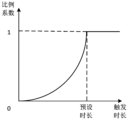
- the first response module 802 may include: a coefficient determination unit configured to determine the current magnification scale coefficient according to the current trigger duration and the preset magnification scale coefficient curve, and The current distance increase value between the two touch points determines the current magnification, wherein the preset magnification scale coefficient curve is a change curve of the magnification scale coefficient with the trigger duration; the multiple determination unit is configured to be based on the current magnification scale coefficient and The current magnification determines the current magnification of the current original video frame; the magnification processing unit is configured to perform magnification processing on the current original video frame based on the current magnification.
- the magnification processing unit may be configured to: when the current magnification factor is greater than 1, perform magnification processing on the current original video picture based on the current magnification factor.
- the response module 802 may be set to:
- the original video is processed based on the zoom factor and the distance increase value between the two touch points corresponding to the first multi-finger operation gesture.
- the screen is enlarged to obtain the target video picture, and the target video picture is displayed in the video playback area; when the execution of the first multi-finger operation gesture ends, if the trigger time of the first multi-finger operation gesture is long is less than the preset duration, stop displaying the first interactive control and the video information in the video playback area, display the second interactive control in a preset area outside the video playback area, and turn the video playback area
- the target video frame displayed in is restored to the original video frame before the enlargement process.
- the page display device provided by the embodiments of the present disclosure can execute the page display method provided by any embodiment of the present disclosure, and has corresponding functional modules and beneficial effects for executing the page display method.
- the page display method provided in any embodiment of the present disclosure can execute the page display method provided by any embodiment of the present disclosure, and has corresponding functional modules and beneficial effects for executing the page display method.
- FIG. 9 it shows a schematic structural diagram of an electronic device (such as a terminal device) 900 suitable for implementing an embodiment of the present disclosure.
- the terminal equipment in the embodiment of the present disclosure may include but not limited to such as mobile phone, notebook computer, digital broadcast receiver, PDA (personal digital assistant), PAD (tablet computer), PMP (portable multimedia player), vehicle terminal (such as mobile terminals such as car navigation terminals) and fixed terminals such as digital TVs, desktop computers and the like.
- the electronic device shown in FIG. 9 is only an example, and should not limit the functions and application scope of the embodiments of the present disclosure.
- an electronic device 900 may include a processing device (such as a central processing unit, a graphics processing unit, etc.) 901, which may be randomly accessed according to a program stored in a read-only memory (ROM) 902 or loaded from a storage device 908.
- a processing device such as a central processing unit, a graphics processing unit, etc.
- RAM read-only memory
- various appropriate actions and processes are executed by programs in the memory (RAM) 903 .
- RAM 903 In the RAM 903, various programs and data necessary for the operation of the electronic device 900 are also stored.
- the processing device 901, ROM 902, and RAM 903 are connected to each other through a bus 904.
- An input/output (I/O) interface 905 is also connected to the bus 904 .
- the following devices can be connected to the I/O interface 905: input devices 906 including, for example, a touch screen, touchpad, keyboard, mouse, camera, microphone, accelerometer, gyroscope, etc.; including, for example, a liquid crystal display (LCD), speakers, vibration an output device 907 such as a computer; a storage device 908 including, for example, a magnetic tape, a hard disk, etc.; and a communication device 909.
- the communication means 909 may allow the electronic device 900 to perform wireless or wired communication with other devices to exchange data. While FIG. 9 shows electronic device 900 having various means, it is to be understood that implementing or having all of the means shown is not a requirement. More or fewer means may alternatively be implemented or provided.
- embodiments of the present disclosure include a computer program product, which includes a computer program carried on a non-transitory computer readable medium, where the computer program includes program code for executing the method shown in the flowchart.
- the computer program may be downloaded and installed from a network via communication means 909, or from storage means 908, or from ROM 902.
- the processing device 901 When the computer program is executed by the processing device 901, the above-mentioned functions defined in the methods of the embodiments of the present disclosure are performed.
- a computer-readable storage medium may be any tangible medium that contains or stores a program that can be used by or in conjunction with an instruction execution system, apparatus, or device.
- a computer-readable signal medium may include a data signal propagated in baseband or as part of a carrier wave carrying computer-readable program code therein. Such propagated data signals may take many forms, including but not limited to electromagnetic signals, optical signals, or any suitable combination of the foregoing.
- a computer-readable signal medium may also be any computer-readable medium other than a computer-readable storage medium, which can transmit, propagate, or transmit a program for use by or in conjunction with an instruction execution system, apparatus, or device .
- Program code embodied on a computer readable medium may be transmitted by any appropriate medium, including but not limited to wires, optical cables, RF (radio frequency), etc., or any suitable combination of the above.
- the client and the server can communicate using any currently known or future network protocols such as HTTP (HyperText Transfer Protocol, Hypertext Transfer Protocol), and can communicate with digital data in any form or medium
- HTTP HyperText Transfer Protocol
- the communication eg, communication network
- Examples of communication networks include local area networks (“LANs”), wide area networks (“WANs”), internetworks (e.g., the Internet), and peer-to-peer networks (e.g., ad hoc peer-to-peer networks), as well as any currently known or future developed network of.
- the above-mentioned computer-readable medium carries one or more programs, and when the above-mentioned one or more programs are executed by the electronic device, the electronic device: displays a video playing page, wherein the currently playing video is displayed on the video playing page
- the original video picture, video information and first interactive controls the original video picture is displayed in the video play area of the video play page, the video information and at least one of the first interactive controls are displayed in the original video
- the upper layer of the screen in response to the first multi-finger operation gesture acting on the video playback page, stop displaying the first interactive control and the video information in the video playback area, and stop displaying the first interactive control and the video information outside the video playback area
- the preset area of the display shows the second interactive control.
- Computer program code for carrying out operations of the present disclosure may be written in one or more programming languages, or combinations thereof, including but not limited to object-oriented programming languages—such as Java, Smalltalk, C++, and Includes conventional procedural programming languages - such as the "C" language or similar programming languages.
- the program code may execute entirely on the user's computer, partly on the user's computer, as a stand-alone software package, partly on the user's computer and partly on a remote computer or entirely on the remote computer or server.
- the remote computer can be connected to the user computer through any kind of network, including a local area network (LAN) or a wide area network (WAN), or it can be connected to an external computer (such as through an Internet service provider). Internet connection).
- LAN local area network
- WAN wide area network
- Internet service provider such as AT&T, MCI, Sprint, EarthLink, MSN, GTE, etc.
- each block in a flowchart or block diagram may represent a module, program segment, or portion of code that contains one or more logical functions for implementing specified executable instructions.
- the functions noted in the block may occur out of the order noted in the figures. For example, two blocks shown in succession may, in fact, be executed substantially concurrently, or they may sometimes be executed in the reverse order, depending upon the functionality involved.
- each block of the block diagrams and/or flowchart illustrations, and combinations of blocks in the block diagrams and/or flowchart illustrations can be implemented by a dedicated hardware-based system that performs the specified functions or operations , or may be implemented by a combination of dedicated hardware and computer instructions.
- the units involved in the embodiments described in the present disclosure may be implemented by software or by hardware. Wherein, the name of the module does not constitute a limitation of the unit itself under certain circumstances.
- FPGAs Field Programmable Gate Arrays
- ASICs Application Specific Integrated Circuits
- ASSPs Application Specific Standard Products
- SOCs System on Chips
- CPLD Complex Programmable Logical device
- a machine-readable medium may be a tangible medium that may contain or store a program for use by or in conjunction with an instruction execution system, apparatus, or device.
- a machine-readable medium may be a machine-readable signal medium or a machine-readable storage medium.
- a machine-readable medium may include, but is not limited to, electronic, magnetic, optical, electromagnetic, infrared, or semiconductor systems, apparatus, or devices, or any suitable combination of the foregoing.
- machine-readable storage media would include one or more wire-based electrical connections, portable computer discs, hard drives, random access memory (RAM), read only memory (ROM), erasable programmable read only memory (EPROM or flash memory), optical fiber, compact disk read only memory (CD-ROM), optical storage, magnetic storage, or any suitable combination of the foregoing.
- RAM random access memory
- ROM read only memory
- EPROM or flash memory erasable programmable read only memory
- CD-ROM compact disk read only memory
- magnetic storage or any suitable combination of the foregoing.
- Example 1 provides a page display method, including:
- Example 2 According to the method described in Example 1, the stopping of displaying the first interactive control and the video information in the video playback area includes:
- Stop displaying the first interactive control and the video information located in the video playing area.
- Example 3 According to the method described in Example 2, the stopping display of all first interactive controls and the video information displayed on the video playback page includes:
- Example 4 is according to the method described in any one of Examples 1-3, after stopping displaying the first interactive control and the video information in the video playback area, further comprising: :
- control display gesture includes the first Two multi-finger gestures or a single-point swipe gesture in a preset direction.
- example 5 is according to the method described in any one of examples 1-3, the second interaction control includes a restoration control, and the stop displaying the first interaction in the video playback area After the controls and video information, also include:
- example 6 is according to the method described in any one of examples 1-3, the displaying of the first interactive control and the video information in the video playback area is stopped, and in the The preset area outside the video playback area displays the second interactive controls, including:
- the original video image is enlarged to obtain a target video image, and the target video image is displayed in the video playback area.
- example 8 is based on the method described in example 6, the first multi-finger operation gesture is a two-finger operation gesture, and the zooming in on the original video image includes:
- the original video image is enlarged based on the enlargement scale factor and the distance increase value between the two touch points corresponding to the first multi-finger operation gesture.
- Enlargement processing is performed on the current original video picture based on the current magnification factor.
- the current magnification factor is greater than 1, the current original video picture is enlarged based on the current magnification factor.
- Example 12 is according to the method described in Example 8, in response to the first multi-finger operation gesture acting on the video playback page, stop displaying in the video playback area The first interactive control and the video information, and displaying the second interactive control in a preset area outside the video playback area, including:
- the original video is processed based on the zoom factor and the distance increase value between the two touch points corresponding to the first multi-finger operation gesture. Enlarging the picture to obtain a target video picture, and displaying the target video picture in the video playback area;
- the trigger duration of the first multi-finger operation gesture is shorter than a preset duration, stop displaying the first interactive control and the video information in the video playback area, A second interactive control is displayed in a preset area outside the video playing area, and the target video frame displayed in the video playing area is restored to an original video frame before zooming in.
- Example 13 provides a page display device, including:
- the page display module is configured to display a video playing page, wherein the original video picture, video information and the first interactive control of the currently played video are displayed in the video playing page, and the original video picture is displayed on the video playing page In the video playing area, the video information and at least one of the first interactive controls are displayed on the upper layer of the original video screen;
- the response module is configured to respond to the first multi-finger operation gesture acting on the video playback page, stop displaying the first interactive control and the video information in the video playback area, and A second interactive control is displayed outside the preset area.
- Example 14 provides an electronic device, comprising:
- processors one or more processors
- memory arranged to store one or more programs
- the one or more processors When the one or more programs are executed by the one or more processors, the one or more processors implement the method for displaying a page as described in any one of Examples 1-12.
- Example 15 provides a computer-readable storage medium, on which a computer program is stored, and when the program is executed by a processor, the page as described in any one of Examples 1-12 is implemented. display method.
- Example 16 provides a computer program product, when the computer program product is executed by a computer, the computer implements the page display method described in any one of Examples 1-12 .
Landscapes
- Engineering & Computer Science (AREA)
- Theoretical Computer Science (AREA)
- General Engineering & Computer Science (AREA)
- Human Computer Interaction (AREA)
- Physics & Mathematics (AREA)
- General Physics & Mathematics (AREA)
- Software Systems (AREA)
- User Interface Of Digital Computer (AREA)
- Two-Way Televisions, Distribution Of Moving Picture Or The Like (AREA)
Abstract
Description
Claims (16)
- 一种页面的显示方法,包括:显示视频播放页面,其中,所述视频播放页面中显示有当前播放视频的原始视频画面、视频信息和第一交互控件,所述原始视频画面显示于所述视频播放页面的视频播放区域内,所述视频信息和至少一个所述第一交互控件显示于所述原始视频画面的上层;响应于作用在所述视频播放页面内的第一多指操作手势,停止在所述视频播放区域中显示所述第一交互控件和所述视频信息,并在所述视频播放区域之外的预设区域显示第二交互控件。
- 根据权利要求1所述的方法,其中,所述停止在所述视频播放区域中显示所述第一交互控件和所述视频信息,包括:停止显示所述视频播放页面中所显示的所有第一交互控件和所述视频信息;或者,停止显示位于所述视频播放区域之内的第一交互控件和所述视频信息。
- 根据权利要求2所述的方法,其中,所述停止显示所述视频播放页面中所显示的所述第一交互控件和所述视频信息,包括:控制所述第一交互控件和所述视频信息沿对应的移动方向移出所述视频播放页面。
- 根据权利要求1-3任一所述的方法,在所述停止在所述视频播放区域中显示所述第一交互控件和所述视频信息之后,还包括:响应于控件显示手势,重新在所述视频播放区域中显示第一交互控件和所述视频信息,并停止在所述预设区域显示所述第二交互控件,其中,所述控件显示手势包括第二多指操作手势或者沿预设方向的单点滑动手势。
- 根据权利要求1-3任一所述的方法,所述第二交互控件包括还原控件,在所述停止在所述视频播放区域中显示所述第一交互控件和所述视频信息之后,还包括:响应于对所述还原控件的触发操作,重新在所述视频播放区域中显示所述第一交互控件和所述视频信息,并停止在所述预设区域显示所述第二交互控件。
- 根据权利要求1-3任一所述的方法,其中,所述停止在所述视频播放区域中显示所述第一交互控件和所述视频信息,并在所述视频播放区域之外的预设区域显示第二交互控件,包括:响应于确定所述第一多指操作手势的触发时长小于预设时长,停止在所述视频播放区域中显示所述第一交互控件和所述视频信息,并在所述视频播放区域之外的预设区域显示第二交互控件。
- 根据权利要求6所述的方法,还包括:响应于确定所述第一多指操作手势的触发时长大于或等于所述预设时长,对所述原始视频画面进行放大处理,得到目标视频画面,并在所述视频播放区域中显示所述目标视频画面。
- 根据权利要求6所述的方法,其中,所述第一多指操作手势为两指操作手势,所述对所述原始视频画面进行放大处理,包括:基于放大比例系数以及所述第一多指操作手势对应的两触摸点之间的距离增加值对所述原始视频画面进行放大处理。
- 根据权利要求8所述的方法,其中,所述基于放大比例系数以及所述第一多指操作手势对应的两触摸点之间的距离增加值对所述原始视频画面进行放大处理,包括:根据当前触发时长和预设放大比例系数曲线确定当前放大比例系数,并根据所述第一多指操作手势对应的两触摸点之间的当前距离增加值确定当前放大倍率,其中,所述预设放大比例系数曲线为放大比例系数随触发时长的变化曲线;根据所述当前放大比例系数和所述当前放大倍率确定当前原始视频画面的当前放大倍数;基于所述当前放大倍数对所述当前原始视频画面进行放大处理。
- 根据权利要求9所述的方法,其中,在所述预设放大比例系数曲线中,响应于确定所述第一多指操作手势的触发时长小于所述预设时长,所述放大比例系数小于1;响应于确定所述第一多指操作手势的触发时长大于或等于所述预设时长,所述放大比例系数大于或等 于1。
- 根据权利要求10所述的方法,其中,所述基于所述当前放大倍数对所述当前原始视频画面进行放大处理,包括:响应于确定所述当前放大倍数大于1,基于所述当前放大倍数对所述当前原始视频画面进行放大处理。
- 根据权利要求8所述的方法,其中,所述响应于作用在所述视频播放页面内的第一多指操作手势,停止在所述视频播放区域中显示所述第一交互控件和所述视频信息,并在所述视频播放区域之外的预设区域显示第二交互控件,包括:在作用在所述视频播放页面内的第一多指操作手势的执行过程中,基于放大比例系数以及所述第一多指操作手势对应的两触摸点之间的距离增加值对所述原始视频画面进行放大处理,得到目标视频画面,并在所述视频播放区域中显示所述目标视频画面;响应于确定所述第一多指操作手势执行结束,且所述第一多指操作手势的触发时长小于预设时长,停止在所述视频播放区域内显示所述第一交互控件和所述视频信息,在所述视频播放区域之外的预设区域显示第二交互控件,并将所述视频播放区域中所显示的所述目标视频画面还原为放大处理之前的原始视频画面。
- 一种页面的显示装置,包括:页面显示模块,设置为显示视频播放页面,其中,所述视频播放页面中显示有当前播放视频的原始视频画面、视频信息和第一交互控件,所述原始视频画面显示于所述视频播放页面的视频播放区域内,所述视频信息和至少一个所述第一交互控件显示于所述原始视频画面的上层;响应模块,设置为响应于作用在所述视频播放页面内的第一多指操作手势,停止在所述视频播放区域中显示所述第一交互控件和所述视频信息,并在所述视频播放区域之外的预设区域显示第二交互控件。
- 一种电子设备,包括:一个或多个处理器;存储器,设置为存储一个或多个程序,当所述一个或多个程序被所述一个或多个处理器执行,使得所述一个或多个处理器实现如权利要求1-12中任一所述的页面的显示方法。
- 一种计算机可读存储介质,其上存储有计算机程序,所述计算机程序被处理器执行时实现如权利要求1-12中任一所述的页面的显示方法。
- 一种计算机程序产品,当所述计算机程序产品被计算机执行,使得所述计算机实现如权利要求1-12任一所述的页面的显示方法。
Priority Applications (3)
| Application Number | Priority Date | Filing Date | Title |
|---|---|---|---|
| EP23739836.7A EP4425331B1 (en) | 2022-01-11 | 2023-01-03 | Page display method and apparatus, electronic device, storage medium and program product |
| JP2024532992A JP7824016B2 (ja) | 2022-01-11 | 2023-01-03 | ページ表示方法、装置、電子機器、記憶媒体及びプログラム |
| US18/736,426 US12353704B2 (en) | 2022-01-11 | 2024-06-06 | Page display method and apparatus, electronic device, storage medium and program product |
Applications Claiming Priority (2)
| Application Number | Priority Date | Filing Date | Title |
|---|---|---|---|
| CN202210028254.9A CN114385297A (zh) | 2022-01-11 | 2022-01-11 | 页面的显示方法、装置、电子设备、存储介质和程序产品 |
| CN202210028254.9 | 2022-01-11 |
Related Child Applications (1)
| Application Number | Title | Priority Date | Filing Date |
|---|---|---|---|
| US18/736,426 Continuation US12353704B2 (en) | 2022-01-11 | 2024-06-06 | Page display method and apparatus, electronic device, storage medium and program product |
Publications (1)
| Publication Number | Publication Date |
|---|---|
| WO2023134492A1 true WO2023134492A1 (zh) | 2023-07-20 |
Family
ID=81202495
Family Applications (1)
| Application Number | Title | Priority Date | Filing Date |
|---|---|---|---|
| PCT/CN2023/070042 Ceased WO2023134492A1 (zh) | 2022-01-11 | 2023-01-03 | 页面的显示方法、装置、电子设备、存储介质和程序产品 |
Country Status (5)
| Country | Link |
|---|---|
| US (1) | US12353704B2 (zh) |
| EP (1) | EP4425331B1 (zh) |
| JP (1) | JP7824016B2 (zh) |
| CN (1) | CN114385297A (zh) |
| WO (1) | WO2023134492A1 (zh) |
Families Citing this family (8)
| Publication number | Priority date | Publication date | Assignee | Title |
|---|---|---|---|---|
| CN114385297A (zh) * | 2022-01-11 | 2022-04-22 | 北京字跳网络技术有限公司 | 页面的显示方法、装置、电子设备、存储介质和程序产品 |
| CN117339203A (zh) * | 2022-06-29 | 2024-01-05 | 北京字跳网络技术有限公司 | 视频交互方法、装置、电子设备和存储介质 |
| CN115426531B (zh) * | 2022-08-30 | 2024-06-04 | 北京字跳网络技术有限公司 | 一种直播间访问方法、装置、设备及介质 |
| CN115484490B (zh) * | 2022-09-15 | 2024-06-11 | 北京字跳网络技术有限公司 | 一种视频处理方法、装置、设备及存储介质 |
| CN115604500A (zh) * | 2022-11-10 | 2023-01-13 | 北京字跳网络技术有限公司(Cn) | 直播间页面显示方法、装置、电子设备及存储介质 |
| CN116055783B (zh) * | 2022-12-20 | 2025-04-11 | 北京达佳互联信息技术有限公司 | 一种视频播放方法、装置、电子设备及存储介质 |
| CN119200907A (zh) * | 2024-09-25 | 2024-12-27 | 北京字跳网络技术有限公司 | 媒体内容的展示方法、设备及存储介质 |
| CN119562003B (zh) * | 2024-11-12 | 2026-03-06 | 北京达佳互联信息技术有限公司 | 播放处理方法及装置 |
Citations (6)
| Publication number | Priority date | Publication date | Assignee | Title |
|---|---|---|---|---|
| US20110010626A1 (en) * | 2009-07-09 | 2011-01-13 | Jorge Fino | Device and Method for Adjusting a Playback Control with a Finger Gesture |
| CN103019594A (zh) * | 2012-12-06 | 2013-04-03 | 鸿富锦精密工业(深圳)有限公司 | 电子装置及其页面缩放方法 |
| CN110647286A (zh) * | 2019-10-09 | 2020-01-03 | 北京字节跳动网络技术有限公司 | 屏幕元素控制方法、装置、设备、存储介质 |
| CN111078112A (zh) * | 2019-12-27 | 2020-04-28 | 上海闻泰电子科技有限公司 | 终端设备控制方法、装置、计算机设备及存储介质 |
| CN111294637A (zh) * | 2020-02-11 | 2020-06-16 | 北京字节跳动网络技术有限公司 | 视频播放方法、装置、电子设备和计算机可读介质 |
| CN114385297A (zh) * | 2022-01-11 | 2022-04-22 | 北京字跳网络技术有限公司 | 页面的显示方法、装置、电子设备、存储介质和程序产品 |
Family Cites Families (20)
| Publication number | Priority date | Publication date | Assignee | Title |
|---|---|---|---|---|
| US9075441B2 (en) * | 2006-02-08 | 2015-07-07 | Oblong Industries, Inc. | Gesture based control using three-dimensional information extracted over an extended depth of field |
| US20110252357A1 (en) * | 2010-04-07 | 2011-10-13 | Imran Chaudhri | Device, Method, and Graphical User Interface for Managing Concurrently Open Software Applications |
| CN108681424B (zh) * | 2010-10-01 | 2021-08-31 | Z124 | 用户界面上的拖移手势 |
| US9239674B2 (en) * | 2010-12-17 | 2016-01-19 | Nokia Technologies Oy | Method and apparatus for providing different user interface effects for different implementation characteristics of a touch event |
| KR101199618B1 (ko) * | 2011-05-11 | 2012-11-08 | 주식회사 케이티테크 | 화면 분할 표시 장치 및 방법 |
| US20130080932A1 (en) * | 2011-09-27 | 2013-03-28 | Sanjiv Sirpal | Secondary single screen mode activation through user interface toggle |
| US20140033040A1 (en) * | 2012-07-24 | 2014-01-30 | Apple Inc. | Portable device with capability for note taking while outputting content |
| US10133472B2 (en) * | 2013-03-15 | 2018-11-20 | Disney Enterprises, Inc. | Gesture based video clipping control |
| US20150100885A1 (en) * | 2013-10-04 | 2015-04-09 | Morgan James Riley | Video streaming on a mobile device |
| KR102410212B1 (ko) | 2015-09-18 | 2022-06-17 | 엘지전자 주식회사 | 이동 단말기 및 그 제어 방법 |
| CN105554553B (zh) * | 2015-12-15 | 2019-02-15 | 腾讯科技(深圳)有限公司 | 通过悬浮窗口播放视频的方法及装置 |
| WO2018152437A1 (en) * | 2017-02-17 | 2018-08-23 | Vid Scale, Inc. | Systems and methods for selective object-of-interest zooming in streaming video |
| CN108762634B (zh) * | 2018-05-15 | 2022-04-15 | 维沃移动通信有限公司 | 一种控制方法及终端 |
| CN108924633B (zh) * | 2018-07-16 | 2021-04-27 | 腾讯科技(深圳)有限公司 | 视频播放速率控制方法、装置、系统及存储介质 |
| CN109343916A (zh) * | 2018-08-10 | 2019-02-15 | 北京微播视界科技有限公司 | 显示界面切换方法、装置及电子设备 |
| CN109529319B (zh) | 2018-11-28 | 2020-06-02 | 腾讯科技(深圳)有限公司 | 界面控件的显示方法、设备及存储介质 |
| CN110032326A (zh) * | 2019-03-29 | 2019-07-19 | 网易(杭州)网络有限公司 | 移动终端显示画面的控制方法、装置、设备和存储介质 |
| CN111263170B (zh) * | 2020-01-17 | 2021-06-08 | 腾讯科技(深圳)有限公司 | 一种视频播放方法、装置、设备及可读存储介质 |
| CN111475070B (zh) * | 2020-04-01 | 2022-04-01 | 维沃移动通信有限公司 | 一种应用界面的显示方法及电子设备 |
| CN112104915B (zh) * | 2020-09-14 | 2022-08-26 | 腾讯科技(深圳)有限公司 | 一种视频数据处理方法、装置及存储介质 |
-
2022
- 2022-01-11 CN CN202210028254.9A patent/CN114385297A/zh active Pending
-
2023
- 2023-01-03 JP JP2024532992A patent/JP7824016B2/ja active Active
- 2023-01-03 WO PCT/CN2023/070042 patent/WO2023134492A1/zh not_active Ceased
- 2023-01-03 EP EP23739836.7A patent/EP4425331B1/en active Active
-
2024
- 2024-06-06 US US18/736,426 patent/US12353704B2/en active Active
Patent Citations (6)
| Publication number | Priority date | Publication date | Assignee | Title |
|---|---|---|---|---|
| US20110010626A1 (en) * | 2009-07-09 | 2011-01-13 | Jorge Fino | Device and Method for Adjusting a Playback Control with a Finger Gesture |
| CN103019594A (zh) * | 2012-12-06 | 2013-04-03 | 鸿富锦精密工业(深圳)有限公司 | 电子装置及其页面缩放方法 |
| CN110647286A (zh) * | 2019-10-09 | 2020-01-03 | 北京字节跳动网络技术有限公司 | 屏幕元素控制方法、装置、设备、存储介质 |
| CN111078112A (zh) * | 2019-12-27 | 2020-04-28 | 上海闻泰电子科技有限公司 | 终端设备控制方法、装置、计算机设备及存储介质 |
| CN111294637A (zh) * | 2020-02-11 | 2020-06-16 | 北京字节跳动网络技术有限公司 | 视频播放方法、装置、电子设备和计算机可读介质 |
| CN114385297A (zh) * | 2022-01-11 | 2022-04-22 | 北京字跳网络技术有限公司 | 页面的显示方法、装置、电子设备、存储介质和程序产品 |
Non-Patent Citations (1)
| Title |
|---|
| See also references of EP4425331A4 * |
Also Published As
| Publication number | Publication date |
|---|---|
| CN114385297A (zh) | 2022-04-22 |
| EP4425331C0 (en) | 2026-03-11 |
| US20240319865A1 (en) | 2024-09-26 |
| EP4425331A1 (en) | 2024-09-04 |
| EP4425331B1 (en) | 2026-03-11 |
| EP4425331A4 (en) | 2025-03-05 |
| JP7824016B2 (ja) | 2026-03-04 |
| JP2024543224A (ja) | 2024-11-19 |
| US12353704B2 (en) | 2025-07-08 |
Similar Documents
| Publication | Publication Date | Title |
|---|---|---|
| WO2023134492A1 (zh) | 页面的显示方法、装置、电子设备、存储介质和程序产品 | |
| CN112423084B (zh) | 热点榜单的显示方法、装置、电子设备和存储介质 | |
| CN113110783A (zh) | 控件的显示方法、装置、电子设备和存储介质 | |
| CN114760515A (zh) | 媒体内容的显示方法、装置、设备、存储介质和程序产品 | |
| CN114296611B (zh) | 直播间控制方法、装置、电子设备、介质及程序产品 | |
| JP2025523441A (ja) | 表示方法、装置、電子機器、コンピュータ可読媒体 | |
| WO2023216936A1 (zh) | 视频播放方法、装置、电子设备、存储介质和程序产品 | |
| JP2025522335A (ja) | コメント情報の投稿方法、装置、電子機器、記憶媒体及びコンピュータプログラム | |
| CN114363686A (zh) | 多媒体内容的发布方法、装置、设备、介质和程序产品 | |
| WO2022022689A1 (zh) | 交互方法、装置和电子设备 | |
| JP2025503492A (ja) | コントロールの表示方法、装置、電子機器、記憶媒体及びプログラム製品 | |
| WO2024114623A1 (zh) | 媒体内容的展示方法、装置、电子设备和存储介质 | |
| WO2023217081A1 (zh) | 信息输入页面的元素控制方法、装置、设备、介质 | |
| CN115515014A (zh) | 媒体内容的分享方法、装置、电子设备和存储介质 | |
| CN110633126B (zh) | 信息显示方法、装置和电子设备 | |
| JP7769153B2 (ja) | 情報の表示方法、装置、電子機器、記憶媒体、及びプログラム | |
| CN114911395A (zh) | 页面交互方法、装置、设备及存储介质 | |
| WO2024114513A1 (zh) | 媒体内容的展示方法、装置、电子设备和存储介质 | |
| WO2024012451A1 (zh) | 显示控制方法、装置、电子设备和存储介质 | |
| WO2023174139A1 (zh) | 作品的显示方法、装置、电子设备、存储介质和程序产品 | |
| CN115190368A (zh) | 播放控制方法、装置、电子设备和存储介质 | |
| EP4369188B1 (en) | Progress adjustment method, electronic device and storage medium | |
| CN116248910A (zh) | 直播页面的显示方法、装置、设备、存储介质和程序产品 | |
| WO2024061361A1 (zh) | 播放方法、装置和电子设备 | |
| WO2023155708A1 (zh) | 视角的切换方法、装置、电子设备、存储介质和程序产品 |
Legal Events
| Date | Code | Title | Description |
|---|---|---|---|
| 121 | Ep: the epo has been informed by wipo that ep was designated in this application |
Ref document number: 23739836 Country of ref document: EP Kind code of ref document: A1 |
|
| WWE | Wipo information: entry into national phase |
Ref document number: 2023739836 Country of ref document: EP |
|
| ENP | Entry into the national phase |
Ref document number: 2023739836 Country of ref document: EP Effective date: 20240529 |
|
| ENP | Entry into the national phase |
Ref document number: 2024532992 Country of ref document: JP Kind code of ref document: A |
|
| NENP | Non-entry into the national phase |
Ref country code: DE |
|
| WWG | Wipo information: grant in national office |
Ref document number: 2023739836 Country of ref document: EP |