WO2023181522A1 - 携帯端末装置 - Google Patents
携帯端末装置 Download PDFInfo
- Publication number
- WO2023181522A1 WO2023181522A1 PCT/JP2022/045507 JP2022045507W WO2023181522A1 WO 2023181522 A1 WO2023181522 A1 WO 2023181522A1 JP 2022045507 W JP2022045507 W JP 2022045507W WO 2023181522 A1 WO2023181522 A1 WO 2023181522A1
- Authority
- WO
- WIPO (PCT)
- Prior art keywords
- coupon
- information
- electronic receipt
- mobile terminal
- control unit
- Prior art date
- Legal status (The legal status is an assumption and is not a legal conclusion. Google has not performed a legal analysis and makes no representation as to the accuracy of the status listed.)
- Ceased
Links
Images






Classifications
-
- G—PHYSICS
- G06—COMPUTING OR CALCULATING; COUNTING
- G06Q—INFORMATION AND COMMUNICATION TECHNOLOGY [ICT] SPECIALLY ADAPTED FOR ADMINISTRATIVE, COMMERCIAL, FINANCIAL, MANAGERIAL OR SUPERVISORY PURPOSES; SYSTEMS OR METHODS SPECIALLY ADAPTED FOR ADMINISTRATIVE, COMMERCIAL, FINANCIAL, MANAGERIAL OR SUPERVISORY PURPOSES, NOT OTHERWISE PROVIDED FOR
- G06Q30/00—Commerce
- G06Q30/02—Marketing; Price estimation or determination; Fundraising
- G06Q30/0207—Discounts or incentives, e.g. coupons or rebates
- G06Q30/0238—Discounts or incentives, e.g. coupons or rebates at point-of-sale [POS]
-
- G—PHYSICS
- G06—COMPUTING OR CALCULATING; COUNTING
- G06Q—INFORMATION AND COMMUNICATION TECHNOLOGY [ICT] SPECIALLY ADAPTED FOR ADMINISTRATIVE, COMMERCIAL, FINANCIAL, MANAGERIAL OR SUPERVISORY PURPOSES; SYSTEMS OR METHODS SPECIALLY ADAPTED FOR ADMINISTRATIVE, COMMERCIAL, FINANCIAL, MANAGERIAL OR SUPERVISORY PURPOSES, NOT OTHERWISE PROVIDED FOR
- G06Q30/00—Commerce
- G06Q30/02—Marketing; Price estimation or determination; Fundraising
- G06Q30/0207—Discounts or incentives, e.g. coupons or rebates
- G06Q30/0235—Discounts or incentives, e.g. coupons or rebates constrained by time limit or expiration date
-
- G—PHYSICS
- G06—COMPUTING OR CALCULATING; COUNTING
- G06Q—INFORMATION AND COMMUNICATION TECHNOLOGY [ICT] SPECIALLY ADAPTED FOR ADMINISTRATIVE, COMMERCIAL, FINANCIAL, MANAGERIAL OR SUPERVISORY PURPOSES; SYSTEMS OR METHODS SPECIALLY ADAPTED FOR ADMINISTRATIVE, COMMERCIAL, FINANCIAL, MANAGERIAL OR SUPERVISORY PURPOSES, NOT OTHERWISE PROVIDED FOR
- G06Q20/00—Payment architectures, schemes or protocols
- G06Q20/04—Payment circuits
- G06Q20/047—Payment circuits using payment protocols involving electronic receipts
-
- G—PHYSICS
- G06—COMPUTING OR CALCULATING; COUNTING
- G06Q—INFORMATION AND COMMUNICATION TECHNOLOGY [ICT] SPECIALLY ADAPTED FOR ADMINISTRATIVE, COMMERCIAL, FINANCIAL, MANAGERIAL OR SUPERVISORY PURPOSES; SYSTEMS OR METHODS SPECIALLY ADAPTED FOR ADMINISTRATIVE, COMMERCIAL, FINANCIAL, MANAGERIAL OR SUPERVISORY PURPOSES, NOT OTHERWISE PROVIDED FOR
- G06Q20/00—Payment architectures, schemes or protocols
- G06Q20/38—Payment protocols; Details thereof
- G06Q20/387—Payment using discounts or coupons
-
- G—PHYSICS
- G06—COMPUTING OR CALCULATING; COUNTING
- G06Q—INFORMATION AND COMMUNICATION TECHNOLOGY [ICT] SPECIALLY ADAPTED FOR ADMINISTRATIVE, COMMERCIAL, FINANCIAL, MANAGERIAL OR SUPERVISORY PURPOSES; SYSTEMS OR METHODS SPECIALLY ADAPTED FOR ADMINISTRATIVE, COMMERCIAL, FINANCIAL, MANAGERIAL OR SUPERVISORY PURPOSES, NOT OTHERWISE PROVIDED FOR
- G06Q30/00—Commerce
- G06Q30/02—Marketing; Price estimation or determination; Fundraising
-
- G—PHYSICS
- G06—COMPUTING OR CALCULATING; COUNTING
- G06Q—INFORMATION AND COMMUNICATION TECHNOLOGY [ICT] SPECIALLY ADAPTED FOR ADMINISTRATIVE, COMMERCIAL, FINANCIAL, MANAGERIAL OR SUPERVISORY PURPOSES; SYSTEMS OR METHODS SPECIALLY ADAPTED FOR ADMINISTRATIVE, COMMERCIAL, FINANCIAL, MANAGERIAL OR SUPERVISORY PURPOSES, NOT OTHERWISE PROVIDED FOR
- G06Q30/00—Commerce
- G06Q30/02—Marketing; Price estimation or determination; Fundraising
- G06Q30/0207—Discounts or incentives, e.g. coupons or rebates
- G06Q30/0225—Avoiding frauds
-
- G—PHYSICS
- G07—CHECKING-DEVICES
- G07G—REGISTERING THE RECEIPT OF CASH, VALUABLES, OR TOKENS
- G07G1/00—Cash registers
- G07G1/01—Details for indicating
- G07G1/06—Details for indicating with provision for the noting of the money to be paid
-
- G—PHYSICS
- G07—CHECKING-DEVICES
- G07G—REGISTERING THE RECEIPT OF CASH, VALUABLES, OR TOKENS
- G07G1/00—Cash registers
- G07G1/12—Cash registers electronically operated
-
- G—PHYSICS
- G06—COMPUTING OR CALCULATING; COUNTING
- G06Q—INFORMATION AND COMMUNICATION TECHNOLOGY [ICT] SPECIALLY ADAPTED FOR ADMINISTRATIVE, COMMERCIAL, FINANCIAL, MANAGERIAL OR SUPERVISORY PURPOSES; SYSTEMS OR METHODS SPECIALLY ADAPTED FOR ADMINISTRATIVE, COMMERCIAL, FINANCIAL, MANAGERIAL OR SUPERVISORY PURPOSES, NOT OTHERWISE PROVIDED FOR
- G06Q20/00—Payment architectures, schemes or protocols
- G06Q20/08—Payment architectures
- G06Q20/20—Point-of-sale [POS] network systems
Definitions
- Embodiments of the present invention relate to a mobile terminal device.
- a coupon is, for example, a coupon that gives you a certain discount on the total amount of products purchased at a store.
- a system known as an electronic receipt in which a receipt or invoice given to a customer from a store at the time of purchasing a product is converted into electronic data and sent to the customer's mobile terminal or the like.
- the problem to be solved by the present invention is to provide a mobile terminal device that can prevent used coupons from being reused with a simple configuration.
- the mobile terminal device of the embodiment includes: a coupon storage unit that stores coupon information related to a coupon; a display unit that displays an image of a coupon including a specified coupon code related to the coupon and a use button for the coupon; an operation determining means for determining whether the use button has been operated; a progress determining means for determining whether a predetermined time has elapsed since determining that the use button has been operated; and the display means when determining that the predetermined time has elapsed. processing means for prohibiting the use of the coupon displayed by the user.
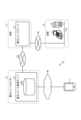
- FIG. 1 is a configuration diagram showing the entire configuration of an electronic receipt system according to an embodiment.
- FIG. 2 is a block diagram showing the hardware configuration of the POS terminal.
- FIG. 3 is a block diagram showing the hardware configuration of the electronic receipt server.
- FIG. 4 is a block diagram showing the hardware configuration of the electronic receipt management server.
- FIG. 5 is a memory map showing the memory configuration of the member management section.
- FIG. 6 is a block diagram showing the hardware configuration of the mobile terminal.
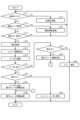
- FIG. 7 is a flowchart showing the flow of control processing of the POS terminal.
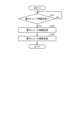
- FIG. 8 is a flowchart showing the flow of control processing of the electronic receipt server.
- FIG. 9 is a flowchart showing the flow of control processing of the electronic receipt management server.
- FIG. 1 is a configuration diagram showing the entire configuration of an electronic receipt system according to an embodiment.
- FIG. 2 is a block diagram showing the hardware configuration of the POS terminal.
- FIG. 3 is a block diagram showing the hardware configuration of the electronic receipt
- FIG. 10 is a functional block diagram showing the functional configuration of the mobile terminal.
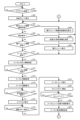
- FIG. 11 is a flowchart showing the flow of control processing of the mobile terminal.
- FIG. 12 is a diagram showing a display example of a mobile terminal.
- FIG. 13 is a diagram showing another display example of the mobile terminal.
- FIG. 14 is a diagram showing still another display example of the mobile terminal.
- a mobile terminal will be described as an example of a mobile terminal device. Additionally, in embodiments, coupons are distributed using an electronic receipt mechanism. Note that the present invention is not limited to the embodiments described below.
- FIG. 1 is a configuration diagram showing the entire configuration of an electronic receipt system 10 according to an embodiment.
- the electronic receipt system 10 includes a POS (Point of Sales) terminal 1 and a store server 2 installed at a store P such as a shopping center, an electronic receipt server 3 installed at a headquarters H, and an electronic receipt system 10. It has an electronic receipt management server 4 installed in a receipt center D and a mobile terminal 7 carried by a customer.
- POS Point of Sales
- the POS terminal 1 is connected to a network 82 that connects the store P and the headquarters H.
- the network 82 is, for example, a dedicated line such as the Internet or a VPN (Virtual Private Network).
- the POS terminal 1 is a product sales data processing device that performs product registration processing and accounting processing regarding products sold at the store P.
- Product registration processing refers to the process of acquiring product specific information related to a product to be sold and displaying the product name and price (product information) of the product on the display unit based on the obtained product specific information. .
- the product registration process also includes a process of storing the product information in the product information section 132 (see FIG. 2).
- Accounting processing refers to display of the total amount of the transaction and payment processing using media such as cash or credit card based on the product information stored in the product information section 132 during the product registration process.
- the accounting process includes a process of calculating and displaying change based on the deposit in the case of cash settlement.
- the accounting process also includes a process of instructing a change machine to issue change.
- the accounting process also includes the process of issuing a receipt from the printing unit with product information and accounting information (total amount, deposited amount, change amount, etc.) printed.
- the POS terminal 1 generates receipt information in an unstructured format, which is printed information related to a transaction, based on product information and accounting information. Further, the POS terminal 1 issues a paper receipt by printing the generated receipt information using a printing unit 21, which will be described later.
- the POS terminal 1 converts the data format of the receipt information into a structured format different from the unstructured format as necessary to generate electronic electronic receipt information.
- Electronic receipt information is receipt information that is obtained by converting receipt information originally printed on receipt paper into a structured format such as a CSV (Comma-Separated Values) format or a J-son format.
- the electronic receipt information is transmitted to the electronic receipt management server 4 via the electronic receipt server 3 and stored in the electronic receipt management server 4.
- the electronic receipt information stored in the electronic receipt management server 4 can be downloaded to the mobile terminal 7 and viewed.
- the mobile terminal 7 displays the electronic receipt information in almost the same format as the receipt information printed on receipt paper.
- Coupon information is various information related to coupons, such as information indicating the type of coupon, information on the amount of discount provided by the coupon (information such as how many yen off, how many percent off, etc.), information on the expiration date of the coupon, and information on when the coupon was issued. It includes information on stores P (sometimes companies or manufacturers), information on stores P where coupons can be used, etc.
- the POS terminal 1 When generating receipt information, the POS terminal 1 searches for the presence or absence of a coupon to be distributed to the customer. If there is a coupon to be distributed, the POS terminal 1 associates information regarding the coupon with receipt information. In the case of a coupon related to a specific product, the product and coupon information of the coupon are associated. In the case of a coupon that is not a coupon related to a specific product, it is associated with the entire generated receipt information. When receipt information is converted into electronic receipt information (converted into a structured format), the associated coupon information is also converted into a structured format.
- the POS terminal 1 transmits the generated electronic receipt information to the electronic receipt server 3 via the network 82 along with the member ID that identifies the customer who is the member.
- the method of transmitting the electronic receipt information transmitted by the POS terminal 1 is not particularly limited, and a general-purpose protocol such as HTTP or HTTPS may be used.
- the number of POS terminals 1 provided in the store P is not particularly limited, and may be a plurality of POS terminals.
- the store server 2 manages the sales of the store P as a whole.
- the store server 2 is connected to the POS terminal 1 through a communication line 81 configured with a LAN (Local Area Network) or the like provided within the store P.
- the store server 2 manages sales information of the store P based on sales information at the POS terminal 1.
- the store server 2 collects sales information (product registration information and accounting information) from each POS terminal 1 of the store P as payment receipt information.
- the settlement receipt information is information that is aggregation of sales information made by the store P during a predetermined period (for example, one day).
- the electronic receipt server 3 is provided at the headquarters H of the company that operates the store P, and functions as a receipt management server for the company that manages receipt information for each company that operates the store P.
- the electronic receipt server 3 receives the member ID and electronic receipt information transmitted from the POS terminal 1 via the network 82. Further, the electronic receipt server 3 sends the received member ID and electronic receipt information (if coupon information is added, also the coupon information) via the network 83 connecting the headquarters H and the electronic receipt center D. It is sent to the electronic receipt management server 4.
- the network 83 is, for example, a dedicated line such as the Internet or a VPN.
- the method of transmitting the electronic receipt information is not particularly limited, and a general-purpose protocol such as HTTP or HTTPS may be used.
- the electronic receipt management server 4 is provided at the electronic receipt center D.
- the electronic receipt center D manages electronic receipt information of each company whose receipt information is managed by the electronic receipt server 3, for example.
- the electronic receipt center D is a third party organization other than the headquarters H that operates the electronic receipt server 3. Note that the electronic receipt server 3 may also be managed by a third party organization.
- the electronic receipt management server 4 functions as a customer receipt management server that manages electronic receipt information of various companies that operate the store P in a cross-sectional manner.
- the electronic receipt management server 4 stores and manages the following information in the member master held in the database DB. That is, the electronic receipt management server 4 stores the name of each customer (member) who has registered as a member, a member ID which is a customer code, and a unique terminal code for identifying the mobile terminal 7 that transmits the electronic receipt information.
- Member data such as a terminal ID (equal to the member ID in the embodiment) and destination information (e.g., e-mail address) of the mobile terminal 7 to which electronic receipt information is to be sent is stored and managed in the member master.
- a configuration may be adopted in which a member management server or the like that stores and manages member data is provided separately from the electronic receipt management server 4.
- the electronic receipt management server 4 receives the member ID and electronic receipt information transmitted from the electronic receipt server 3 via the network 83, and stores this electronic receipt information in a member management section 442 (described later) held in the database DB. (See FIG. 4) for each member.
- the electronic receipt management server 4 stores the electronic receipt information with the coupon information added to the member management unit 442 (see FIG. 4) for each member.
- the electronic receipt information includes elements such as the store information and member ID of the store P that transmits the electronic receipt information, and corresponds to the member ID of the corresponding member. It is managed by attaching it.
- the electronic receipt management server 4 determines the destination (mobile terminal 7) by referring to the destination information associated with the member ID of this electronic receipt information. Identify. Then, the electronic receipt management server 4 notifies the destination of the electronic receipt information to be transmitted via the network 84, which will be described later.
- the electronic receipt management server 4 upon receiving an electronic receipt inquiry specifying a member ID from the mobile terminal 7 connected via the network 84, extracts electronic receipt information corresponding to the member ID from the member management unit 442. and transmits it to the mobile terminal 7. Note that if additional information such as coupon information is added to the electronic receipt information, the electronic receipt management server 4 also transmits this additional information to the mobile terminal 7 that received the inquiry at another timing.
- the mobile terminal 7 is a mobile terminal device, such as a smartphone, a mobile phone, a PDA (Personal Digital Assistant), or a tablet computer, which is carried and used by a user (member) of this system.
- the mobile terminal 7 is equipped with an application such as a web browser for viewing various information provided on the network 84.
- the mobile terminal 7 registers as a member of this system by accessing the electronic receipt management server 4 via the network 84.
- the network 84 is the Internet or various public networks.
- membership registration of a customer for receiving electronic receipt information on the mobile terminal 7 is performed, for example, in the following procedure.
- the customer sends a blank email to the electronic receipt management server 4 from the mobile terminal 7 via the network 84.
- the electronic receipt management server 4 transmits a URL (Uniform Resource Locator) indicating a page for member registration to the received email address to the mobile terminal 7.
- the customer accesses the URL indicating the page for membership registration from the mobile terminal 7 and inputs the information necessary for membership registration (name, address, telephone number, destination information (email address information of the mobile terminal 7, etc.))
- the input screen is displayed.
- the electronic receipt management server 4 executes membership registration on the member master.
- the electronic receipt management server 4 sends an email to the mobile terminal 7 (the above email address).
- a member registration completion email containing the member ID and password will be delivered.This completes the member registration.
- the member ID will be displayed as a code symbol on the display of the mobile terminal 7 that has been authenticated after logging in.
- the converted barcode or two-dimensional code will be displayed.
- the mobile terminal 7 receives a notification from the electronic receipt management server 4 indicating that the electronic receipt that can be viewed on the mobile terminal 7 is stored in the electronic receipt management server 4.
- the member's electronic receipt information is received from the electronic receipt management server 4. If coupon information is added to the received electronic receipt information, the mobile terminal 7 also receives notification information indicating that the coupon has been added.
- the mobile terminal 7 displays a coupon button 781 (see FIGS. 6 and 12) indicating that a coupon has been added. If the coupon is attached to the electronic receipt itself, the mobile terminal 7 displays the coupon at a position on the display section 77 that indicates that the coupon is attached to the electronic receipt (see FIG. 12(a)). Display button 781. In addition, when the coupon is attached to a specific product, the mobile terminal 7 displays the display section 77 at a position corresponding to the display position of the product (for example, a position close to the product name, see FIG. 12(b)). ) displays a coupon button 781.
- the mobile terminal 7 when the mobile terminal 7 operates the coupon button 781, the corresponding coupon is downloaded from the electronic receipt management server 4 and displayed on the display section 77.
- the displayed coupon includes a coupon code 778 (see FIG. 13(c)) that includes information for specifying the coupon.
- the coupon code 778 displayed on the mobile terminal 7 is imaged (or optically scanned) and read by the code reader 20 of the POS terminal 1 .
- the POS terminal 1 executes a discount process based on the discount amount information included in the read coupon code 778, from the product amount or the subtotal amount of the transaction.
- the timer 80 (see FIG. 6) is activated.
- the timer 80 times out when a predetermined time (for example, 2 minutes) has elapsed.
- a predetermined time for example, 2 minutes
- the mobile terminal 7 hides the coupon code 778 displayed on the display section 77.
- the code reader 20 cannot read the coupon code 778.
- the POS terminal 1 will no longer be able to perform discount processing based on the coupon (that is, the coupon will no longer be usable).
- electronic receipt information indicating the details of one transaction generated by product sales data processing and accounting processing at the POS terminal 1 of the store P is sent via the electronic receipt server 3.
- the received data is transmitted to the electronic receipt management server 4 and published on the Web. Therefore, by specifying a URL (Uniform Resource Locator), the mobile terminal 7 equipped with a web browser can download electronic receipt information published on the web to the mobile terminal 7 and view it using the web browser. can. Note that an application for viewing receipt information may be installed on the mobile terminal 7 to view the receipt information.
- URL Uniform Resource Locator
- FIG. 2 is a block diagram showing the hardware configuration of the POS terminal 1.
- the POS terminal 1 includes a CPU (Central Processing Unit) 11, which is an example of a microprocessor, a ROM (Read Only Memory) 12, a RAM (Random Access Memory) 13, a memory section 14, etc. .
- the CPU 11 is the main control body for the POS terminal 1.
- the ROM 12 stores various programs.
- the RAM 13 stores programs and various data.
- the memory unit 14 stores various programs.
- the CPU 11, ROM 12, RAM 13, and memory section 14 are connected to each other via a bus 15.
- the CPU 11, ROM 12, and RAM 13 constitute a control unit 100. That is, the control unit 100 executes control processing for the POS terminal 1, which will be described later, by the CPU 11 operating according to a control program stored in the ROM 12 or the memory unit 14 and developed in the RAM 13.
- the RAM 13 has a member ID section 131, a product information section 132, and a sales information section 133.
- the member ID section 131 stores the member ID included in the code symbol (barcode or two-dimensional code) read by the code reader 20 and displayed on the display section 77 of the mobile terminal 7 .
- the product information section 132 stores product information (product code for identifying the product, product name, price, etc.) of the product that has undergone product registration processing.
- the sales information unit 133 stores, as sales information, product information and accounting information of products processed at the POS terminal 1 within a predetermined period (for example, one day).
- the memory unit 14 is composed of a nonvolatile memory such as an HDD (Hard Disc Drive) that retains stored information even when the power is turned off, and a flash memory, and includes a control program unit 141 that stores control programs, a product master 142, and an electronic receipt. It has a generation program section 143 and a coupon information section 144.
- the product master 142 stores product information for each product in correspondence with a product code that specifies the product.
- the electronic receipt generation program section 143 stores a program for converting receipt information into electronic receipt information.
- the coupon information section 144 stores coupon information of coupons distributed to members.
- control section 100 is connected to an operation section 17, a store clerk display section 18, a customer display section 19, a code reader 20, a printing section 21, and a card reader 22 via a bus 15 and a controller 16.
- the operation unit 17 has a closing key 171.
- the closing key 171 is a key operated by the customer when proceeding from the product registration process to the checkout process at the POS terminal 1.
- the store clerk display section 18 displays information to an operator (for example, a store clerk) who operates the POS terminal 1.
- the customer display section 19 displays information to customers and members.
- the code reader 20 images and reads the code symbol displayed on the mobile terminal 7, the code symbol attached to the product, and the coupon code 778.
- the printing unit 21 issues a receipt on which receipt information including product registration information and accounting information related to the processed product is printed.
- the card reader 22 reads card information from a credit card or debit card, for example, when performing accounting processing using the card.
- the controller 16 receives instructions from the control unit 100 and controls the operation unit 17, the clerk display unit 18, the customer display unit 19, the code reader 20, the printing unit 21, and the card reader 22. However, for convenience of explanation, the explanation will be given assuming that the control unit 100 performs the control performed by the controller 16.
- control unit 100 is connected to the communication unit 23 via the bus 15.
- the communication unit 23 is electrically connected to other POS terminals 1 and the store server 2 via a communication line 81.
- FIG. 3 is a block diagram showing the hardware configuration of the electronic receipt server 3.
- the electronic receipt server 3 includes a CPU 31, which is an example of a microprocessor, a ROM 32, a RAM 33, a memory section 34, and the like.
- the CPU 31 is the main control body for the electronic receipt server 3.
- the ROM 32 stores various programs.
- the RAM 33 stores programs and various data.
- the memory unit 34 stores various programs.
- the CPU 31, ROM 32, RAM 33, and memory section 34 are connected to each other via a bus 35.
- the CPU 31, ROM 32, and RAM 33 constitute a control unit 300. That is, the control unit 300 executes control processing for the electronic receipt server 3, which will be described later, by the CPU 31 operating according to a control program stored in the ROM 32 or the memory unit 34 and developed in the RAM 33.
- the memory unit 34 is composed of a nonvolatile memory such as an HDD or flash memory that retains stored information even when the power is turned off, and includes a control program unit 341 that stores a control program and an electronic receipt management unit 342.
- the electronic receipt management unit 342 stores electronic receipt information received from the POS terminal 1.
- the electronic receipt information stored in the electronic receipt management unit 342 includes a company code (identification code of the company that operates the store), industry/business type code, store code, shopper's member ID, POS number of POS terminal 1, and receipt number. , product information, accounting information, etc. Further, if coupon information is added to the electronic receipt information, the coupon information is stored.
- control unit 300 is connected to a display unit 37 and an operation unit 38 via a bus 35 and a controller 36.
- the display unit 37 displays information to the operator of the electronic receipt server 3.
- the operation unit 38 is a keyboard operated by an operator.
- the controller 36 receives instructions from the control unit 300 and controls the display unit 37 and the operation unit 38. However, for convenience of explanation, the explanation will be given assuming that the control unit 300 performs the control performed by the controller 36.
- control unit 300 is connected to the communication unit 39 via the bus 35.
- the communication unit 39 is connected to the POS terminal 1 and the store server 2 via the network 82.
- the communication unit 39 is also connected to the electronic receipt management server 4 via a network 83.
- FIG. 4 is a block diagram showing the hardware configuration of the electronic receipt management server 4.
- the electronic receipt management server 4 includes a CPU 41, which is an example of a microprocessor, a ROM 42, a RAM 43, a memory section 44, and the like.
- the CPU 41 is the main control entity for the electronic receipt management server 4.
- the ROM 42 stores various programs.
- the RAM 43 stores programs and various data.
- the memory section 44 stores various programs.
- the CPU 41, ROM 42, RAM 43, and memory section 44 are connected to each other via a bus 45.
- the CPU 41, ROM 42, and RAM 43 constitute a control unit 400. That is, the control unit 400 executes control processing of the electronic receipt management server 4, which will be described later, by the CPU 41 operating according to a control program stored in the ROM 42 or the memory unit 44 and developed in the RAM 43.
- the memory unit 44 is composed of a nonvolatile memory such as an HDD or flash memory that retains stored information even when the power is turned off, and includes a control program unit 441 that stores control programs and a member management unit 442.
- the member management unit 442 stores various information about customers who have become members. The member management section 442 will be described later with reference to FIG.
- control unit 400 is connected to a display unit 47 and an operation unit 48 via a bus 45 and a controller 46.
- the display unit 47 displays information to the operator of the electronic receipt management server 4.
- the operation unit 48 is a keyboard operated by an operator.
- the controller 46 receives instructions from the control unit 400 and controls the display unit 47 and the operation unit 48. However, for convenience of explanation, the explanation will be given assuming that the control unit 400 performs the control performed by the controller 46.
- control section 400 is connected to a communication section 49 via a bus 45.
- the communication unit 49 is connected to the electronic receipt server 3 via the network 83. Further, the communication unit 49 is connected to the mobile terminal 7 via the network 84.
- FIG. 5 is a memory map showing the memory configuration of the member management section 442.
- the member management section 442 includes a member ID section 4421, a member information section 4422, and an electronic receipt information section 4423.
- the member ID section 4421 stores a member ID that identifies a member.
- the member ID is also terminal information that specifies the mobile terminal 7 carried by the member.
- the member information section 4422 stores various information regarding the members (name, address, telephone number, e-mail address of the mobile terminal 7, etc.) for each member in association with the member ID stored in the member ID section 4421. .
- the electronic receipt information section 4423 stores electronic receipt information received from the electronic receipt server 3 for each member in association with the member ID stored in the member ID section 4421.
- the electronic receipt information stored in the electronic receipt information section 4423 includes a company code (identification code of the company that operates the store), industry/business type code, store code, shopper's member ID, POS number of POS terminal 1, and receipt number. , product information, accounting information, etc. Further, if coupon information is added to the electronic receipt information, the coupon information is stored.
- FIG. 6 is a block diagram showing the hardware configuration of the mobile terminal 7.
- the mobile terminal 7 includes a CPU 71, which is an example of a microprocessor, a ROM 72, a RAM 73, a memory section 74, and the like.
- the CPU 71 mainly controls the mobile terminal 7.
- ROM72 stores various programs.
- the RAM 73 stores programs and various data.
- the memory section 74 stores various programs.
- the CPU 71, ROM 72, RAM 73, and memory section 74 are connected to each other via a bus 75.
- the CPU 71, ROM 72, and RAM 73 constitute a control unit 700. That is, the control unit 700 executes control processing for the mobile terminal 7, which will be described later, by the CPU 71 operating according to a control program stored in the ROM 72 or the memory unit 74 and developed in the RAM 73.
- the RAM 73 has an electronic receipt information section 731 (coupon storage section).
- the electronic receipt information section 731 stores electronic receipt information downloaded from the electronic receipt management server 4. Further, the electronic receipt information section 731 stores coupon information downloaded from the electronic receipt management server 4.
- the memory unit 74 is composed of a nonvolatile memory such as an HDD or flash memory that retains stored information even when the power is turned off, and includes a control program unit 741 that stores control programs, an electronic receipt viewing program unit 742, and a member ID unit 743. has.
- the electronic receipt viewing program section 742 stores a viewing program for downloading and viewing electronic receipt information.
- the member ID section 743 stores a member ID that identifies the member who owns the mobile terminal 7.
- the member ID is also a terminal ID that specifies the mobile terminal 7 in which the member ID is stored.
- control section 700 is connected to a display section 77 and an operation section 78 via a bus 75 and a controller 76.
- the display section 77 displays information to members.
- the operation unit 78 is a keyboard operated by the operator of the mobile terminal 7.
- the operation unit 78 includes a coupon button 781, a use declaration button 782, a confirmation button 783 (use button), and an inquiry button 784.
- the coupon button 781 is a button that is displayed on the display unit 77 together with the electronic receipt when a coupon is added to the electronic receipt information.
- the coupon button 781 is a button for displaying coupon information of the attached coupon on the display section 77.
- the use declaration button 782 is a button for declaring the use of a coupon.
- the member When using the displayed coupon, the member operates the use declaration button 782.
- the confirmation button 783 is a button for confirming the use of the coupon.
- the member operates the confirmation button 783 when confirming the use of the displayed coupon.
- the inquiry button 784 is a button for making an inquiry to display the electronic receipt on the mobile terminal 7.
- the controller 76 receives instructions from the control section 700 and controls the display section 77 and the operation section 78. However, for convenience of explanation, the explanation will be given assuming that the control unit 700 performs the control performed by the controller 76.
- control section 700 is connected to a communication section 79 via a bus 75.
- the communication unit 79 is connected to the electronic receipt management server 4 via the network 84 .
- control unit 700 is connected to a timer 80 via a bus 75.
- the timer 80 measures time.
- FIG. 7 is a flowchart showing the flow of control processing of the POS terminal 1.
- the control unit 100 of the POS terminal 1 determines whether a member ID has been input by having the code reader 20 read the code symbol displayed on the display unit 77 of the mobile terminal 7 (S11). . If it is determined that a member ID has been input (Yes in S11), the control unit 100 stores the member ID in the member ID section 131 (S12). The control unit 100 then returns to S11.
- the control unit 100 specifies the product by having the code reader 20 read a code symbol such as a barcode attached to the product. It is determined whether the code has been acquired (S13). If it is determined that the product code has been acquired (Yes in S13), the control unit 100 searches the product master 142 based on the acquired product code, and stores the product information (product name, product information) corresponding to the product code. price, etc.) and executes product registration processing (S14). The control unit 100 then returns to S11. Every time the code symbol attached to the product is read, the control unit 100 repeats the process of S13 and the process of S14.
- control unit 100 determines whether the close key 171 has been operated (S15). If it is determined that the closing key 171 has been operated (Yes in S15), the control unit 100 executes accounting processing based on the product information that has been processed for product registration and stored in the product information unit 132 (S16). .
- the control unit 100 generates receipt information to be printed out as a receipt based on the product information and accounting information of the purchased product (S17).
- the control unit 100 investigates whether there is a coupon to be distributed regarding the transaction (S18). Specifically, the control unit 100 searches the coupon information unit 144 based on the member ID, product information, and accounting information stored in the member ID unit 131, and searches the coupon information unit 144 for the member. Investigate whether there are any coupons to be distributed. For example, the control unit 100 checks the rank of the member and checks whether there is a coupon corresponding to the customer's rank. Further, for example, the control unit 100 checks whether there are any coupons to be distributed to the member because the campaign is in progress.
- control unit 100 investigates, based on the product information, whether there is a coupon to be distributed for the product purchased by the member. Further, for example, the control unit 100 investigates, based on accounting information, whether there is a coupon to be distributed when the total amount of purchased products is a predetermined amount or more.
- coupon information unit 144 stores coupon information of various coupons, such as coupons distributed to specific members and coupons distributed to all customers who purchase products. In this process, as a result of the investigation, coupon information related to coupons to be distributed to the member concerned is investigated.
- the control unit 100 determines whether there are any coupons to be distributed to members or customers as a result of the investigation (S19). If it is determined that there are coupons to be distributed (Yes in S19), the control unit 100 determines whether to digitize the receipt information generated in S17 (S20). For example, if the member ID is stored in the member ID section 131, the control section 100 determines to digitize the receipt information. Further, for example, if there is a response from the POS terminal 1 to the electronic receipt management server 4 indicating that digitization is required, the control unit 100 determines that the receipt information should be digitized.
- the control unit 100 examines the receipt information generated in the processing in S17 in S18 based on the program stored in the electronic receipt generation program unit 143. Then, electronic receipt information is generated to which coupon information of the coupon to be distributed is added (S21). Then, the control unit 100 transmits the generated electronic receipt information to the electronic receipt server 3 (S22). Then, the control unit 100 ends the process.
- the control unit 100 uses the printing unit 21 to print the receipt information generated in S17 and the receipt information in S18.
- the coupon to be added is printed and issued (S23). Then, the control unit 100 ends the process.
- the control unit 100 determines whether to digitize the receipt information generated in S17 (same determination as in S20) (S24). ). If it is determined that the receipt information is to be digitized (Yes in S24), the control unit 100 converts the receipt information generated in the process of S17 into an electronic form based on the program stored in the electronic receipt generation program unit 143. Receipt information is generated (S25). Then, the control unit 100 transmits the generated electronic receipt information to the electronic receipt server 3 (S22). Then, the control unit 100 ends the process.
- the control unit 100 issues a receipt in which the receipt information generated in S17 is printed by the printing unit 21 (S26). . Then, the control unit 100 ends the process. Note that if it is determined in S15 that the closing key 171 is not operated (No in S15), the control unit 100 returns to S11.
- FIG. 8 is a flowchart showing the flow of control processing of the electronic receipt server 3.
- the control unit 300 of the electronic receipt server 3 determines whether or not the electronic receipt information transmitted from the POS terminal 1 has been received (S31). The control unit 300 waits until it is received (No in S31), and if it is determined that it has been received (Yes in S31), the control unit 300 stores it in the electronic receipt management unit 342 as electronic receipt information for each company (S32). Then, the control unit 300 transmits the stored electronic receipt information to the electronic receipt management server 4 (S33). Then, the control unit 300 ends the process.
- FIG. 9 is a flowchart showing the flow of control processing of the electronic receipt management server 4.
- the control unit 400 of the electronic receipt management server 4 determines whether electronic receipt information has been received from the electronic receipt server 3 (S41). If it is determined that electronic receipt information has been received (Yes in S41), the control unit 400 stores the received electronic receipt information in the electronic receipt information section 4423 corresponding to the member ID that was received at the same time (S42). That is, the control unit 400 stores the received electronic receipt information as the electronic receipt information of the member identified by the received member ID. If coupon information is added to the received electronic receipt information, the control unit 400 also stores the coupon information in the electronic receipt information unit 4423 in the process of S42.
- control unit 400 calls the email address of the mobile terminal 7 from the corresponding member information unit 4422 to the mobile terminal 7 specified by the member ID, and notifies the mobile terminal 7 of information indicating that there is an electronic receipt to be distributed. (S43).
- the control unit 400 determines whether inquiry information related to viewing the electronic receipt has been received from the mobile terminal 7. (S44). If it is determined that the inquiry information has been received (Yes in S44), the control unit 400 searches the member management unit 442 based on the member ID received at the same time, and searches the member ID section in which the corresponding member ID is stored. The electronic receipt is extracted from the electronic receipt information section 4423 corresponding to 4421 (S45). Then, the control unit 400 transmits (distributes) the extracted electronic receipt information to the mobile terminal 7 specified by the member ID (S46).
- the control unit 400 transmits information indicating that the coupon is added together with the electronic receipt information. Specifically, when coupon information is added to the entire electronic receipt, the control unit 400 associates and transmits information indicating that a coupon is added to the electronic receipt information. If coupon information is attached to a specific product included in the electronic receipt information, the control unit 400 transmits information indicating that a coupon is attached to the information of the specific product in association with the information.
- the control unit 400 sends a coupon from the mobile terminal 7 indicating that the coupon button 781 has been operated. It is determined whether button information has been received (S47). If it is determined that the coupon button information has been received (Yes in S47), the control unit 400 searches the member management unit 442 based on the member ID received at the same time, and searches the member ID for which the corresponding member ID is stored. Coupon information is extracted from the electronic receipt information section 4423 corresponding to the section 4421 (S48). The control unit 400 then transmits the extracted electronic receipt information to the mobile terminal 7 specified by the member ID (S49).
- the control unit 400 receives the member ID and coupon invalidation information (including information specifying the coupon) from the mobile terminal 7. is received (S50). If it is determined that coupon invalidation information has been received (Yes in S50), the control unit 400 adds the coupon information of the applicable member stored in the electronic receipt information unit 4423 based on the received member ID. Information indicating that the coupon cannot be used is stored. Coupons for which information indicating that the coupon cannot be used are stored are not extracted in the process of S48. Then, the control unit 400 ends the process. If it is determined that the coupon invalidation information has not been received (No in S50), the control unit 400 returns to S41.
- FIG. 10 is a functional block diagram showing the functional configuration of the mobile terminal 7.
- the control section 700 controls the display means 701, the operation judgment means 702, and the progress judgment means 703 by following the control program stored in the control program section 741 of the ROM 72 and the memory section 74 and the program stored in the electronic receipt viewing program section 742. , functions as a processing means 704.
- the display means 701 displays a coupon image including a coupon code 778 related to the specified coupon and a button for using the coupon. Specifically, the display means 701 displays a coupon code 778 related to a specified coupon from among the coupon information stored in the electronic receipt information section 731, which is a coupon storage section, and a use button (confirmation button 783) for the coupon. Display images of coupons that include.
- the operation determining means 702 determines the operation of the use button (confirm button 783).
- the progress determining means 703 determines whether a predetermined time has elapsed since determining that the use button (confirmation button 783) was operated.
- the processing means 704 prohibits the use of the coupon displayed by the display means 701 when it is determined that the predetermined time has elapsed. For example, the processing means 704 prohibits the use of the coupon displayed by the display means 701 by hiding the displayed coupon code 778 when determining that a predetermined time has elapsed. For example, when the processing means 704 determines that a predetermined time has elapsed, the processing means 704 displays another image on the displayed coupon code 778 to make the coupon code 778 unreadable. Prohibit use. For example, the processing means 704 transmits prohibition information (coupon invalidation information) that prohibits the use of the displayed coupon when it is determined that a predetermined time has elapsed to the electronic receipt management server 4 that manages the coupon. The use of the coupon displayed by the display means 701 is prohibited.
- prohibition information coupon invalidation information
- FIG. 11 is a flowchart showing the flow of control processing of the mobile terminal 7.
- the control unit 700 of the mobile terminal 7 determines whether the viewing program stored in the electronic receipt viewing program unit 742 has been activated in the mobile terminal 7 (S61).
- the control unit 700 waits until the viewing program is started (No in S61), and when it is determined that the viewing program has started (Yes in S61), the control unit 700 generates a code symbol containing information on the member ID stored in the member ID unit 743. (for example, a barcode) is displayed on the display section 77 (S62).
- the POS terminal 1 executes the determination in S11 and the process in S12.
- the control unit 700 determines whether an electronic receipt information notification indicating that the electronic receipt management server 4 stores the electronic receipt information to be distributed to the mobile terminal 7 is received from the electronic receipt management server 4 ( S63). If it is determined that the electronic receipt information notification has been received (S63: Yes), the control unit 700 displays the received electronic receipt information notification on the display unit 77 (S64). Furthermore, in the process of S64, the control unit 700 displays an inquiry button 784 for inquiring about the electronic receipt. When the electronic receipt information notification is displayed on the display unit 77, the member carrying the mobile terminal 7 recognizes that the electronic receipt information can now be viewed on the mobile terminal 7. When the member requests to view the electronic receipt, the member operates the inquiry button 784. The control unit 700 then returns to S63.
- the control unit 700 determines whether the inquiry button 784 has been operated (S65). If it is determined that the inquiry button 784 has been operated (Yes in S65), the control unit 700 transmits the member ID stored in the member ID unit 743 and the inquiry information of the electronic receipt to the electronic receipt management server 4. (S66). The control unit 700 then returns to S63.
- the control unit 700 determines whether electronic receipt information in response to the inquiry of the electronic receipt information has been received from the electronic receipt management server 4. (S67). If it is determined that electronic receipt information has been received (Yes in S67), the control section 700 stores the received electronic receipt information in the electronic receipt information section 731, and displays an electronic receipt based on the stored electronic receipt information on the display section. 77 (S68). The control unit 700 then returns to S63.
- FIGS. 12(a) and 12(b) show examples of electronic receipts displayed on the display unit 77 by the control unit 700.
- the control unit 700 displays the store name and logo 772, the date and time of transaction processing and the store name 773, and product information 774 of the product for which product registration processing has been performed (i.e., the purchased product) as an electronic receipt. do. Further, the control unit 700 displays a coupon button 781 at the bottom of the display unit 77, indicating that a coupon is attached to the electronic receipt. The coupon button 781 is displayed at the bottom of the electronic receipt, not at a position corresponding to product information.
- the attached coupon is, for example, a coupon that gives a discount to the total amount (eg, 5% off the total amount, 100 yen off the total amount).
- the control unit 700 stores the store name/logo 772, the date and time of transaction processing and the store name 773, and product information 774 of the product for which product registration processing has been performed (i.e., the purchased product) as an electronic receipt. Display.
- the control unit 700 determines that a coupon is attached to the electronic receipt at a position corresponding to the display position of a specific product (in FIG. 12(b), a position horizontally adjacent to the display position of product A).
- a coupon button 781 indicating . Since the coupon button 781 is displayed horizontally and adjacent to the product information display position, the attached coupon gives a discount (product A in FIG. 12(b)) for a specific product (product A in FIG. 12(b)). For example, it is a coupon that gives a discount of 5% off the price of product A and a discount of 100 yen off the price of product A.
- the control unit 700 determines whether the coupon button 781 has been operated (S71). If it is determined that the coupon button 781 has been operated (Yes in S71), the control unit 700 transmits coupon button information indicating that the coupon button 781 has been operated to the electronic receipt management server 4 (S72).
- the control unit 700 determines whether the coupon information transmitted from the electronic receipt management server 4 has been received (S73). The control unit 700 waits until the coupon information is received (No in S73), and if it is determined that the coupon information has been received (Yes in S73), the control unit 700 stores the received coupon information in the electronic receipt information unit 731 (S74). The display unit 701 then displays the coupon information 775 stored in the electronic receipt information section 731 on the display section 77 (S75).
- FIG. 13(a) is an example of a coupon for discounting the total purchase price at store P.
- the display unit 701 displays coupon information 775 such as the name of the store eligible for the discount, discount information (5% discount coupon), and expiration date on the display unit 77 .
- the display means 701 also displays an image of a use declaration button 782 for declaring the use of the coupon at a position below the coupon information 775. The position corresponding to the image on the operation unit 78 functions as a use declaration button 782.
- FIG. 14(a) shows an example of a coupon related to a coupon for a specific product.
- the display unit 701 displays, on the display unit 77, a coupon related to the product eligible for the discount.
- FIG. 14(a) multiple types of coupons are displayed in a scrollable manner in the vertical direction. These coupons are coupons distributed to the members.
- the member selects one coupon (touches the specified coupon)
- the selected coupon is displayed as shown in FIG. 14(b).
- the display unit 701 displays coupon information 775 related to the selected coupon and an image of a use declaration button 782 on the display section 77 .
- the operation determining means 702 determines whether the displayed use declaration button 782 has been operated (S76).
- the control unit 700 waits until it is operated (No in S76), and if it is determined that the use declaration button 782 has been operated (Yes in S76), the control unit 700 displays a dialog screen (S77).
- FIGS. 13(b) and 14(c) show examples of the dialog screen 776 displayed in the process of S77.
- the control unit 700 determines that the coupon code 778 is displayed for a predetermined period of time on the dialog screen 776 of FIGS. 13(b) and 14(c), and that the coupon cannot be used after a predetermined period of time (for example, 2 minutes) has elapsed. , display a description of .
- the control unit 700 also displays an image of a confirmation button 783 for confirming the contents of the dialog screen and starting time counting.
- the operation determining means 702 determines whether the displayed confirmation button 783 has been operated (S78).
- the control unit 700 waits until the confirmation button 783 is operated (No in S78), and displays the coupon code 778 on the display unit 77 for a predetermined period of time (for example, 2 minutes) if it is determined that the confirmation button 783 has been operated (Yes in S78). is displayed (S79).
- the control unit 700 then activates the timer 80 to start counting down a predetermined period of time (for example, 2 minutes) (S80).
- the member presents the coupon code 778 displayed on the display section 77 to the clerk operating the POS terminal 1.
- the store clerk reads the presented coupon code 778 with the code reader 20 and executes a discount process using the coupon.
- FIGS. 13(c) and 14(d) show examples of the coupon code 778 and the predetermined time 777 (for example, 2 minutes) displayed by the control unit 700 in the process of S79. Then, the control unit 700 starts counting down from the displayed predetermined time 777 until it reaches "0" (until the time is up).
- the progress determining means 703 determines whether the timer 80 has counted a predetermined time and has timed out (S81).
- the processing means 704 waits until the time is up (No in S81), and if it is determined that the time is up (Yes in S81), the processing means 704 performs a process of hiding the coupon code 778 processed in S79 (S82). . That is, the processing means 704 performs processing to prohibit the use of the coupon.
- FIGS. 13(d) and 14(e) show examples of screens in which the coupon code 778 is hidden in the process of S82.
- the processing means 704 displays a message 779 indicating that the coupon has expired at the position where the coupon code 778 is hidden. Further, the processing means 704 counts down the predetermined time and displays that the predetermined time has reached "0".
- control unit 700 transmits the coupon invalidation information indicating that the coupon is no longer usable and the member ID to the electronic receipt management server 4 (S83).
- the control unit 700 then returns to S63. Note that the code symbol displayed in S62 is always displayed during subsequent processing, or can be displayed by a simple operation.
- the processing means 704 performs control to hide the coupon code 778 displayed on the display section 77 after a predetermined time has elapsed, so that the processing means 704 displays the coupon code 778 on the code reader after the predetermined time has elapsed. 20 and cannot be read. Therefore, a coupon cannot be used after a predetermined period of time has passed. Note that if it is determined in S71 that the coupon button 781 is not operated (No in S71), the control unit 700 returns to S63.
- the mobile terminal 7 of the embodiment includes an electronic receipt information section 731 that stores coupon information related to a coupon, a coupon code 778 related to a specified coupon, and a confirmation button 783 for the coupon.
- a display means 701 that displays an image
- an operation determination means 702 that determines whether the confirmation button 783 has been operated
- a progress determination means 703 that determines whether a predetermined time has elapsed since it is determined that the confirmation button 783 has been operated
- a predetermined A processing means 704 is provided that hides the coupon code 778 related to the coupon displayed by the display means 701 when it is determined that the time has elapsed.
- the mobile terminal 7 of such an embodiment hides the coupon code 778 of the coupon after a predetermined time has elapsed, so it is possible to prevent the reuse of the coupon with a simple configuration (just by controlling the mobile terminal 7). becomes possible.
- the processing means 704 performs a process of hiding the displayed coupon code 778 when a predetermined time has elapsed.
- the processing means 704 may display other information (for example, a message 779) on top of the displayed coupon code 778 after a predetermined period of time has elapsed so that the coupon code 778 becomes invisible.
- the coupon code 778 may be made unreadable and the use of the coupon may be prohibited.
- the processing means 704 does not hide the coupon code 778 (keeps it displayed), but displays the message 779 in a size and position that makes it impossible to read the coupon code 778, for example. In this way, the processing means 704 may prohibit reuse of the coupon.
- the processing means 704 may prohibit the use of the coupon by transmitting coupon invalidation information to the electronic receipt management server 4 when the time is up, without executing the process of S82.
- the confirmation button 783 has been described as an example of a button to be used.
- the present invention is not limited to this, and for example, both the use declaration button 782 and the confirmation button 783 may be used as use buttons.
- the operation determining means 702 confirms the operation of the use declaration button 782 and the confirmation button 783.
- coupon information is added to the electronic receipt distributed to the member and displayed on the mobile terminal 7 using the electronic receipt mechanism.
- the present invention is not limited to this, and the present invention may be implemented without using the electronic receipt mechanism. That is, the coupon according to the present invention may be a coupon other than a coupon added to an electronic receipt. For example, it may be a coupon that is electronically distributed by a store, manufacturer, etc. through a homepage or direct mail, and acquired by a member and stored in the mobile terminal 7.
- the program executed on the mobile terminal 7 of the embodiment is a file in an installable or executable format and can be stored on a computer such as a CD-ROM, a flexible disk (FD), a CD-R, or a DVD (Digital Versatile Disk). Provided recorded on a readable recording medium.
- the program executed by the mobile terminal 7 of the embodiment may be stored on a computer connected to a network such as the Internet, and may be provided by being downloaded via the network. Further, the program executed on the mobile terminal 7 of the embodiment may be provided or distributed via a network such as the Internet.
- the program to be executed by the mobile terminal 7 of the embodiment may be configured to be provided by being pre-installed in a ROM or the like.
Landscapes
- Business, Economics & Management (AREA)
- Accounting & Taxation (AREA)
- Finance (AREA)
- Strategic Management (AREA)
- Engineering & Computer Science (AREA)
- Development Economics (AREA)
- Physics & Mathematics (AREA)
- General Physics & Mathematics (AREA)
- General Business, Economics & Management (AREA)
- Theoretical Computer Science (AREA)
- Entrepreneurship & Innovation (AREA)
- Game Theory and Decision Science (AREA)
- Economics (AREA)
- Marketing (AREA)
- Cash Registers Or Receiving Machines (AREA)
- Management, Administration, Business Operations System, And Electronic Commerce (AREA)
Abstract
Description
Claims (5)
- クーポンに係るクーポン情報を記憶するクーポン記憶部と、
指定された前記クーポンに係るクーポンコードと当該クーポンの使用ボタンとを含むクーポンの画像を表示する表示手段と、
前記使用ボタンの操作を判断する操作判断手段と、
前記使用ボタンが操作されたと判断してから所定時間を経過したかを判断する経過判断手段と、
所定時間を経過したと判断した場合に前記表示手段が表示したクーポンの使用を禁止する処理手段と、
を備えた携帯端末装置。 - 前記処理手段は、所定時間を経過したと判断した場合に表示した前記クーポンコードを非表示とする、
請求項1に記載の携帯端末装置。 - 前記処理手段は、所定時間を経過したと判断した場合に表示した前記クーポンコード上に他の情報を表示させて当該クーポンコードを読み取れなくする、
請求項1に記載の携帯端末装置。 - 前記処理手段は、所定時間を経過したと判断した場合に表示した前記クーポンの使用を禁止する禁止情報を、当該クーポンを管理する装置に送信する、
請求項1に記載の携帯端末装置。 - 前記クーポン記憶部は、電子レシートに付加されたクーポンに係るクーポン情報を記憶する、
請求項1に記載の携帯端末装置。
Priority Applications (4)
| Application Number | Priority Date | Filing Date | Title |
|---|---|---|---|
| CN202280089193.5A CN118648013A (zh) | 2022-03-25 | 2022-12-09 | 便携终端装置 |
| EP22933651.6A EP4502906A4 (en) | 2022-03-25 | 2022-12-09 | PORTABLE TERMINAL DEVICE |
| KR1020247023412A KR20240124962A (ko) | 2022-03-25 | 2022-12-09 | 휴대 단말 장치 |
| US18/771,304 US20240362667A1 (en) | 2022-03-25 | 2024-07-12 | Portable terminal device |
Applications Claiming Priority (2)
| Application Number | Priority Date | Filing Date | Title |
|---|---|---|---|
| JP2022-049700 | 2022-03-25 | ||
| JP2022049700A JP2023142682A (ja) | 2022-03-25 | 2022-03-25 | 携帯端末装置およびプログラム |
Related Child Applications (1)
| Application Number | Title | Priority Date | Filing Date |
|---|---|---|---|
| US18/771,304 Continuation US20240362667A1 (en) | 2022-03-25 | 2024-07-12 | Portable terminal device |
Publications (1)
| Publication Number | Publication Date |
|---|---|
| WO2023181522A1 true WO2023181522A1 (ja) | 2023-09-28 |
Family
ID=88100877
Family Applications (1)
| Application Number | Title | Priority Date | Filing Date |
|---|---|---|---|
| PCT/JP2022/045507 Ceased WO2023181522A1 (ja) | 2022-03-25 | 2022-12-09 | 携帯端末装置 |
Country Status (6)
| Country | Link |
|---|---|
| US (1) | US20240362667A1 (ja) |
| EP (1) | EP4502906A4 (ja) |
| JP (2) | JP2023142682A (ja) |
| KR (1) | KR20240124962A (ja) |
| CN (1) | CN118648013A (ja) |
| WO (1) | WO2023181522A1 (ja) |
Citations (6)
| Publication number | Priority date | Publication date | Assignee | Title |
|---|---|---|---|---|
| JP2009069985A (ja) * | 2007-09-11 | 2009-04-02 | Nec Corp | クーポン流通システム、クーポン流通方法、クーポン管理装置および携帯端末 |
| JP2016206710A (ja) * | 2015-04-15 | 2016-12-08 | シャープ株式会社 | 電子クーポン管理装置、システム、電子クーポンを管理する方法及びプログラム |
| JP2019101578A (ja) * | 2017-11-29 | 2019-06-24 | サン電子株式会社 | 情報処理装置及びコンピュータプログラム |
| JP2019125018A (ja) * | 2018-01-12 | 2019-07-25 | グローリー株式会社 | 取引管理システム及び取引管理方法 |
| JP2021185508A (ja) | 2020-06-16 | 2021-12-09 | 東芝テック株式会社 | 情報端末及びそのプログラム |
| JP2021193622A (ja) * | 2020-03-25 | 2021-12-23 | 東芝テック株式会社 | 情報処理装置、プログラム、情報処理装置における表示方法、およびサーバ |
Family Cites Families (9)
| Publication number | Priority date | Publication date | Assignee | Title |
|---|---|---|---|---|
| WO2005043438A1 (en) * | 2003-10-20 | 2005-05-12 | Chameleon Network Inc. | Portable electronic authorization system and method |
| JP5218080B2 (ja) * | 2009-01-15 | 2013-06-26 | ソニー株式会社 | 電子クーポン処理システム、ユーザ管理サーバ装置、サービス提供方法、およびプログラム |
| US20110015976A1 (en) * | 2009-07-20 | 2011-01-20 | Eric Lempel | Method and system for a customized voucher |
| US20110010235A1 (en) * | 2010-02-04 | 2011-01-13 | CouponCabin, Inc. | Method and System for Setting an Online Coupon Cookie |
| US10438214B1 (en) * | 2012-10-12 | 2019-10-08 | Walgreen Co. | System and method for mobile distribution and use of coupons |
| US20140149197A1 (en) * | 2012-11-29 | 2014-05-29 | Woo James | Coupon or Voucher Verification Method, System, and Apparatus |
| JP5890351B2 (ja) * | 2013-07-03 | 2016-03-22 | 東芝テック株式会社 | 情報処理装置およびプログラム |
| JP6225861B2 (ja) * | 2014-09-25 | 2017-11-08 | 京セラドキュメントソリューションズ株式会社 | 画像処理装置 |
| JP7298132B2 (ja) * | 2018-10-15 | 2023-06-27 | 富士フイルムビジネスイノベーション株式会社 | 情報処理装置及びプログラム |
-
2022
- 2022-03-25 JP JP2022049700A patent/JP2023142682A/ja active Pending
- 2022-12-09 WO PCT/JP2022/045507 patent/WO2023181522A1/ja not_active Ceased
- 2022-12-09 EP EP22933651.6A patent/EP4502906A4/en active Pending
- 2022-12-09 KR KR1020247023412A patent/KR20240124962A/ko active Pending
- 2022-12-09 CN CN202280089193.5A patent/CN118648013A/zh active Pending
-
2024
- 2024-07-12 US US18/771,304 patent/US20240362667A1/en active Pending
-
2025
- 2025-06-24 JP JP2025106050A patent/JP2025123512A/ja active Pending
Patent Citations (6)
| Publication number | Priority date | Publication date | Assignee | Title |
|---|---|---|---|---|
| JP2009069985A (ja) * | 2007-09-11 | 2009-04-02 | Nec Corp | クーポン流通システム、クーポン流通方法、クーポン管理装置および携帯端末 |
| JP2016206710A (ja) * | 2015-04-15 | 2016-12-08 | シャープ株式会社 | 電子クーポン管理装置、システム、電子クーポンを管理する方法及びプログラム |
| JP2019101578A (ja) * | 2017-11-29 | 2019-06-24 | サン電子株式会社 | 情報処理装置及びコンピュータプログラム |
| JP2019125018A (ja) * | 2018-01-12 | 2019-07-25 | グローリー株式会社 | 取引管理システム及び取引管理方法 |
| JP2021193622A (ja) * | 2020-03-25 | 2021-12-23 | 東芝テック株式会社 | 情報処理装置、プログラム、情報処理装置における表示方法、およびサーバ |
| JP2021185508A (ja) | 2020-06-16 | 2021-12-09 | 東芝テック株式会社 | 情報端末及びそのプログラム |
Non-Patent Citations (1)
| Title |
|---|
| See also references of EP4502906A4 |
Also Published As
| Publication number | Publication date |
|---|---|
| CN118648013A (zh) | 2024-09-13 |
| JP2025123512A (ja) | 2025-08-22 |
| EP4502906A4 (en) | 2025-08-13 |
| JP2023142682A (ja) | 2023-10-05 |
| EP4502906A1 (en) | 2025-02-05 |
| US20240362667A1 (en) | 2024-10-31 |
| KR20240124962A (ko) | 2024-08-19 |
Similar Documents
| Publication | Publication Date | Title |
|---|---|---|
| US10395269B2 (en) | Message broker for redemption of digital incentives | |
| US20090271265A1 (en) | Electronic receipt system and method | |
| JP6322383B2 (ja) | 決済支援システム、決済支援装置、決済支援プログラム、決済支援方法 | |
| WO2009134807A2 (en) | Electronic receipt system and method | |
| JP6449560B2 (ja) | 情報処理装置、情報処理システムおよびプログラム | |
| CN107657521A (zh) | 信息处理装置及控制方法 | |
| JP2016015108A (ja) | 電子レシート管理サーバ、商品販売データ処理装置、印字制御装置およびプログラム | |
| JP2016536717A (ja) | カスタマープロファイル確立方法 | |
| JP2026032525A (ja) | アプリケーションプログラム、電子決済方法、および端末装置 | |
| JP2014002682A (ja) | 電子クーポンの使用方法およびクーポン配布サーバ、コンピュータプログラム | |
| JP7445074B1 (ja) | 決済管理装置、決済管理方法、プログラム、および決済管理システム | |
| JP6947890B2 (ja) | 電子レシートシステムおよび情報処理方法 | |
| WO2023181522A1 (ja) | 携帯端末装置 | |
| JP7348259B2 (ja) | サーバ装置およびプログラム | |
| JP2019050050A (ja) | 商品販売処理システム | |
| JP2018170032A (ja) | 情報処理装置、電子レシートシステム、プログラムおよび制御方法 | |
| JP7221095B2 (ja) | 電子マネー決済システム | |
| JP2021192263A (ja) | 情報処理装置およびプログラム | |
| JP5428819B2 (ja) | 売上データ処理システム及びプログラム | |
| JP2022113541A (ja) | 情報処理装置、情報処理システム及びプログラム | |
| JP7014847B2 (ja) | 電子レシートサーバ、プログラムおよび電子レシートシステム | |
| JP6940650B2 (ja) | 情報処理装置、電子レシートシステムおよびプログラム | |
| JP7700331B2 (ja) | 携帯端末装置およびプログラム | |
| JP7758896B1 (ja) | 決済管理装置、決済管理システム、決済管理装置の制御方法、およびプログラム | |
| JP7350109B2 (ja) | 情報処理装置、情報処理方法、およびプログラム |
Legal Events
| Date | Code | Title | Description |
|---|---|---|---|
| 121 | Ep: the epo has been informed by wipo that ep was designated in this application |
Ref document number: 22933651 Country of ref document: EP Kind code of ref document: A1 |
|
| ENP | Entry into the national phase |
Ref document number: 20247023412 Country of ref document: KR Kind code of ref document: A |
|
| WWE | Wipo information: entry into national phase |
Ref document number: 12024551702 Country of ref document: PH Ref document number: 202447053904 Country of ref document: IN Ref document number: 2401004621 Country of ref document: TH |
|
| WWE | Wipo information: entry into national phase |
Ref document number: 202280089193.5 Country of ref document: CN |
|
| WWE | Wipo information: entry into national phase |
Ref document number: 2022933651 Country of ref document: EP |
|
| NENP | Non-entry into the national phase |
Ref country code: DE |
|
| ENP | Entry into the national phase |
Ref document number: 2022933651 Country of ref document: EP Effective date: 20241025 |