CN101470570B - System and method for moving web page reports - Google Patents
System and method for moving web page reports Download PDFInfo
- Publication number
- CN101470570B CN101470570B CN2007102034572A CN200710203457A CN101470570B CN 101470570 B CN101470570 B CN 101470570B CN 2007102034572 A CN2007102034572 A CN 2007102034572A CN 200710203457 A CN200710203457 A CN 200710203457A CN 101470570 B CN101470570 B CN 101470570B
- Authority
- CN
- China
- Prior art keywords
- cursor
- scroll bar
- state
- title
- area
- Prior art date
- Legal status (The legal status is an assumption and is not a legal conclusion. Google has not performed a legal analysis and makes no representation as to the accuracy of the status listed.)
- Expired - Fee Related
Links
Images


Classifications
-
- G—PHYSICS
- G06—COMPUTING OR CALCULATING; COUNTING
- G06F—ELECTRIC DIGITAL DATA PROCESSING
- G06F3/00—Input arrangements for transferring data to be processed into a form capable of being handled by the computer; Output arrangements for transferring data from processing unit to output unit, e.g. interface arrangements
- G06F3/01—Input arrangements or combined input and output arrangements for interaction between user and computer
- G06F3/048—Interaction techniques based on graphical user interfaces [GUI]
- G06F3/0484—Interaction techniques based on graphical user interfaces [GUI] for the control of specific functions or operations, e.g. selecting or manipulating an object, an image or a displayed text element, setting a parameter value or selecting a range
- G06F3/0485—Scrolling or panning
- G06F3/04855—Interaction with scrollbars
-
- G—PHYSICS
- G06—COMPUTING OR CALCULATING; COUNTING
- G06F—ELECTRIC DIGITAL DATA PROCESSING
- G06F40/00—Handling natural language data
- G06F40/10—Text processing
- G06F40/103—Formatting, i.e. changing of presentation of documents
-
- G—PHYSICS
- G06—COMPUTING OR CALCULATING; COUNTING
- G06F—ELECTRIC DIGITAL DATA PROCESSING
- G06F40/00—Handling natural language data
- G06F40/10—Text processing
- G06F40/166—Editing, e.g. inserting or deleting
- G06F40/177—Editing, e.g. inserting or deleting of tables; using ruled lines
- G06F40/18—Editing, e.g. inserting or deleting of tables; using ruled lines of spreadsheets
Landscapes
- Engineering & Computer Science (AREA)
- Theoretical Computer Science (AREA)
- General Engineering & Computer Science (AREA)
- Physics & Mathematics (AREA)
- General Physics & Mathematics (AREA)
- Health & Medical Sciences (AREA)
- Artificial Intelligence (AREA)
- Audiology, Speech & Language Pathology (AREA)
- Computational Linguistics (AREA)
- General Health & Medical Sciences (AREA)
- Human Computer Interaction (AREA)
- User Interface Of Digital Computer (AREA)
Abstract
一种移动网页报表的方法,该方法包括如下步骤:通过脚本语言将网页报表分为标题区域和数据区域;分别对所述的标题区域及数据区域设置属性,使数据区域产生滚动条;读取光标的位置及状态;根据光标的位置及状态判断光标是否能移动滚动条;当光标能拖动滚动条时,读取滚动条移动之前及移动之后在显示器上像素的差值;根据所述像素的差值计算光标拖动滚动条的距离;将滚动条对应的标题区域也移动上述计算的距离以使网页报表中标题与数据对应。另外,本发明还提供一种移动网页报表的系统。
A method for moving a webpage report, the method comprising the steps of: dividing the webpage report into a title area and a data area by a script language; setting attributes for the title area and the data area respectively, so that the data area produces a scroll bar; reading The position and state of the cursor; judge whether the cursor can move the scroll bar according to the position and state of the cursor; when the cursor can drag the scroll bar, read the difference between the pixels on the display before and after the scroll bar moves; according to the pixel Calculate the distance that the cursor drags the scroll bar; move the title area corresponding to the scroll bar by the distance calculated above so that the title in the web report corresponds to the data. In addition, the invention also provides a system for moving web page reports.
Description
技术领域technical field
本发明涉及一种移动网页报表的系统及方法。The invention relates to a system and a method for moving a web page statement.
背景技术Background technique
企业在营运中会产生各种各样的报表,如:利润报表、成本报表、员工报表等,随着信息化的推广、网络的运用,几乎所有的大型公司、企业都有自己的报表系统,即:通过将所制作的报表以网页的形式显示出来,企业内的各个用户可以通过网络访问该报表系统,从而查询到所需要的报表,它的主要目的是加强用户之间的联系,使用户们能更好的协同工作,提高工作效率。它能为企业带来的最大益处是加强部门内、部门间的通讯协作,使整个企业内部的信息流有组织、高效的按照一定规范流程流动,令整个企业高效的运作起来。Enterprises will generate various reports during operation, such as profit reports, cost reports, employee reports, etc. With the promotion of informatization and the use of the Internet, almost all large companies and enterprises have their own report systems. That is: by displaying the prepared reports in the form of web pages, each user in the enterprise can access the report system through the network, so as to query the required reports. Its main purpose is to strengthen the connection between users and make users They can work together better and improve work efficiency. The biggest benefit it can bring to the enterprise is to strengthen communication and collaboration within and between departments, so that the information flow within the entire enterprise can be organized and efficiently flow in accordance with certain standardized procedures, so that the entire enterprise can operate efficiently.
通常网页中报表分标题区域及数据区域,数据区域用于存放数据,并将数据显示在对应的表格中,标题区域用于存放数据对应的属性信息,用户通过查看数据对应的标题可以很清楚的看到每个数据具体的含义。然而,用户通过页面中的数据区域的滚动条拖动报表时,标题区域不会移动,这样就造成了数据不能与标题对应。Usually, the report in the webpage is divided into title area and data area. The data area is used to store data and display the data in the corresponding table. The title area is used to store the attribute information corresponding to the data. Users can clearly see the data by viewing the title corresponding to the data. See the specific meaning of each data. However, when the user drags the report through the scroll bar of the data area on the page, the title area will not move, thus causing the data not to correspond to the title.
发明内容Contents of the invention
鉴于以上内容,有必要提供一种移动网页报表的系统,其可以通过在数据区域的滚动条拖动报表时也能同时移动标题区域,从而使数据与标题对应。In view of the above, it is necessary to provide a system for moving web page reports, which can move the title area at the same time when the report is dragged by the scroll bar of the data area, so that the data corresponds to the title.
鉴于以上内容,还有必要提供一种移动网页报表的方法,其可以通过在数据区域的滚动条拖动报表时也能同时移动标题区域,从而使数据与标题对应。In view of the above, it is also necessary to provide a method for moving the webpage report, which can move the title area at the same time when the scroll bar in the data area is dragging the report, so that the data corresponds to the title.
一种移动网页报表的系统,该系统运行于计算机主机中,该计算机主机连接一显示器,该系统包括:划分模块,用于通过脚本语言将网页报表分为标题区域和数据区域;设置模块,用于分别对所述的标题区域及数据区域设置属性,使数据区域产生滚动条;读取模块,用于读取光标的位置及状态;判断模块,用于根据光标的位置及状态判断光标是否能移动滚动条;所述读取模块,还用于当光标能拖动滚动条时,读取滚动条移动之前及移动之后在显示器上像素的差值;计算模块,用于根据所述像素的差值计算光标拖动滚动条的距离;移动模块,用于将滚动条对应的标题区域也移动上述计算的距离以使网页报表中标题与数据对应。A system for moving web page reports, the system runs on a computer mainframe connected to a display, the system includes: a division module, which is used to divide the web page report into a title area and a data area through a script language; the setting module is used to Set attribute respectively to described title area and data area, make data area produce scroll bar; Read module, be used for reading the position and state of cursor; Judgment module, be used for judging whether cursor can according to the position of cursor and state Move the scroll bar; the reading module is also used to read the difference of the pixels on the display before and after the movement of the scroll bar when the cursor can drag the scroll bar; The value calculates the distance that the cursor drags the scroll bar; the moving module is used to move the title area corresponding to the scroll bar by the distance calculated above so that the title in the web report corresponds to the data.
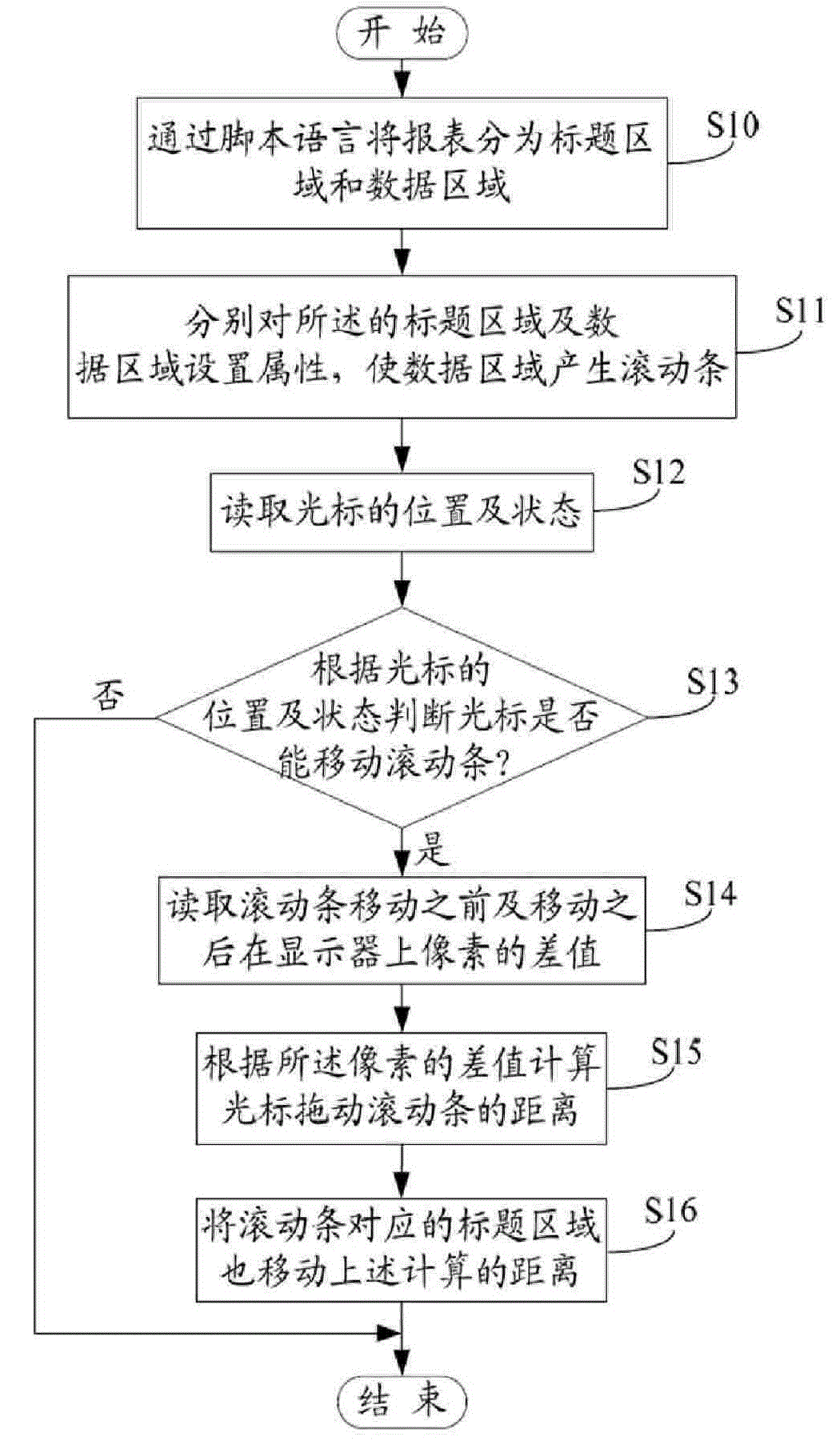
一种移动网页报表的方法,该方法包括如下步骤:通过脚本语言将网页报表分为标题区域和数据区域;分别对所述的标题区域及数据区域设置属性,使数据区域产生滚动条;读取光标的位置及状态;根据光标的位置及状态判断光标是否能移动滚动条;当光标能拖动滚动条时,读取滚动条移动之前及移动之后在显示器上像素的差值;根据所述像素的差值计算光标拖动滚动条的距离;将滚动条对应的标题区域也移动上述计算的距离以使网页报表中标题与数据对应。A method for moving a webpage report, the method comprising the steps of: dividing the webpage report into a title area and a data area by a script language; setting attributes for the title area and the data area respectively, so that the data area produces a scroll bar; reading The position and state of the cursor; judge whether the cursor can move the scroll bar according to the position and state of the cursor; when the cursor can drag the scroll bar, read the difference between the pixels on the display before and after the scroll bar moves; according to the pixel Calculate the distance that the cursor drags the scroll bar; move the title area corresponding to the scroll bar by the distance calculated above so that the title in the web report corresponds to the data.
相较于现有技术,所述的移动网页报表的系统及方法,其可以通过在数据区域的滚动条拖动报表时也能同时移动标题区域,从而使数据与标题对应。Compared with the prior art, the system and method for moving a webpage report can move the title area at the same time when the scroll bar in the data area drags the report, so that the data corresponds to the title.
附图说明Description of drawings
图1是本发明移动网页报表的系统较佳实施例的硬件架构图。FIG. 1 is a hardware architecture diagram of a preferred embodiment of the mobile web report system of the present invention.
图2是图1中所示计算机主机的功能模块图。FIG. 2 is a functional block diagram of the computer mainframe shown in FIG. 1 .
图3是本发明网页中报表的显示图。Fig. 3 is a display diagram of a report in the webpage of the present invention.
图4是本发明移动网页报表的方法较佳实施例的流程图。Fig. 4 is a flow chart of a preferred embodiment of the method for moving a web page report in the present invention.
具体实施方式Detailed ways
如图1所示,是本发明移动网页报表的系统较佳实施例的硬件架构图。该系统运行于计算机主机2中。所述计算机主机2连接有显示器1、键盘3及鼠标4,用作具体操作时的输入、输出设备。As shown in FIG. 1 , it is a hardware architecture diagram of a preferred embodiment of the mobile web report system of the present invention. The system runs in the
如图2所示,是图1中所示计算机主机2的功能模块图。所述计算机主机2包括划分模块210、设置模块211、读取模块212、判断模块213、计算模块214及移动模块215。本发明所称的模块是完成一特定功能的计算机程序段,比程序更适合于描述软件在计算机中的执行过程,因此在本发明以下对软件描述中都以模块描述。As shown in FIG. 2 , it is a functional block diagram of the
其中,所述划分模块210用于通过脚本语言将网页报表分为标题区域和数据区域。具体而言,如图3所示,是报表在网页中的一种格式,图中有文字的表格是标题区域,从图中可以看出,标题区域有横向标题,纵向标题,图中空白的表格是数据区域,用于存放数据,每个数据都有对应的横向标题栏位及纵向标题栏位,用户可以很清楚的看到每个数据在表格中的位置及具体的含义。在本较佳实施例中,所述的脚本语言是指HTML(Hypertext Markup Language:超文本链接标示语言)脚本语言。Wherein, the
所述设置模块211用于分别对所述的标题区域及数据区域设置属性,使数据区域产生滚动条。滚动条有两种,包括上下滚动条及左右滚动条,如图3所示,所述上下滚动条112只能拖动页面上下移动,所述左右滚动条110只能拖动页面左右移动。由于标题和数据在网页上分为不同的区域,因此,滚动条只能拖动数据区域(例如,在图3中的上下滚动条112只能拖动空白的表格区域上下移动)。The
所述读取模块212用于读取光标的位置及状态。所述光标的状态包括,但不限于,光标左键单击状态、左键双击状态及右键单击状态。The
所述判断模块213用于根据光标的位置及状态判断光标是否能移动滚动条。具体而言,若光标在滚动条上,且光标的状态为左键单击状态,则光标能够拖动滚动条。The
所述读取模块212还用于当光标能拖动滚动条时,读取滚动条移动之前及移动之后在显示器1上像素的差值。具体而言,显示器1上都有对应的分辨率(如:1024*768个像素,该像素值表明显示器1横向有1024个像素点,纵向有768个像素点),由于滚动条只有上下滚动条或左右滚动条,因此,若光标拖动的是上下滚动条,则读取光标拖动上下滚动条在显示器上移动的纵向像素点的值,例如,上下滚动条移动之前的像素点为:20,移动之后的像素点的值为:120,则上下滚动条纵向移动了100个像素点。The
所述计算模块214用于根据所述像素的差值计算光标拖动滚动条的距离。具体而言,计算公式为:L=M*S/N,其中,若滚动条为上下滚动条,L为上下移动的距离,则M为纵向移动的像素值、S为显示器1的实际宽度、N为分辨率中纵向像素点的值,若滚动条为左右滚动条,L为左右移动的距离,则M为横向移动的像素值、S为显示器1的实际长度、N为分辨率中横向像素点的值,例如,假设滚动条为上下滚动条,用户设置的分辨率为:1024*768个像素,该滚动条纵向移动了100个像素点,该显示器1屏幕宽度为23.04厘米,则该上下滚动条移动的距离为:100*23.04/768=3厘米。The calculating
所述移动模块215用于将滚动条对应的标题区域也移动上述计算的距离以确保网页报表中标题与数据对应。具体而言,假设上下滚动条移动3厘米,则标题区域中纵向标题栏位也移动3厘米,以使报表中标题与数据对应,此外,在移动上下滚动条的时候,标题区域中横向栏位保持不动。The moving
如图3所示,是本发明移动网页报表的方法较佳实施例的流程图。As shown in FIG. 3 , it is a flow chart of a preferred embodiment of the method for moving a web page report in the present invention.
步骤S10,首先,划分模块210通过脚本语言将网页报表分为标题区域和数据区域。具体而言,如图3所示,是报表在网页中的一种格式,图中有文字的表格是标题区域,从图中可以看出,标题区域有横向标题,纵向标题,图中空白的表格是数据区域,用于存放数据,每个数据都有对应的横向标题栏位及纵向标题栏位,用户可以很清楚的看到每个数据在表格中的位置及具体的含义。在本教佳实施例中,所述的脚本语言是指HTML(Hypertext Markup Language:超文本链接标示语言)脚本语言。In step S10, firstly, the
步骤S11,设置模块211分别对所述的标题区域及数据区域设置属性,使数据区域产生滚动条。滚动条有两种,包括上下滚动条及左右滚动条,如图3所示,所述上下滚动条112只能拖动页面上下移动,所述左右滚动条110只能拖动页面左右移动。由于标题和数据在网页上分为不同的区域,因此,滚动条只能拖动数据区域(例如,在图3中的上下滚动条112只能拖动空白的表格区域上下移动)。In step S11, the
步骤S12,读取模块212读取光标的位置及状态。所述光标的状态包括,但不限于,光标左键单击状态、左键双击状态及右键单击状态。In step S12, the
步骤S13,判断模块213根据光标的位置及状态判断光标是否能移动滚动条。具体而言,若光标在滚动条上,且光标的状态为左键单击状态,则光标能够拖动滚动条。In step S13, the judging
步骤S14,当光标能拖动滚动条时,读取模块212读取滚动条移动之前及移动之后在显示器1上像素的差值。具体而言,显示器1上都有对应的分辨率(如:1024*768个像素,该像素值表明显示器1横向有1024个像素点,纵向有768个像素点),由于滚动条只有上下滚动条或左右滚动条,因此,若光标拖动的是上下滚动条,则读取光标拖动上下滚动条在显示器上移动的纵向像素点的值,例如,上下滚动条移动之前的像素点为:20,移动之后的像素点的值为:120,则上下滚动条纵向移动了100个像素点,读取模块212读取到的像素值为100。Step S14 , when the cursor can drag the scroll bar, the
步骤S15,计算模块214根据所述像素的差值计算光标拖动滚动条的距离。具体而言,计算公式为:L=M*S/N,其中,若滚动条为上下滚动条,L为上下移动的距离,则M为纵向移动的像素值、S为显示器1的实际宽度、N为分辨率中纵向像素点的值,若滚动条为左右滚动条,L为左右移动的距离,则M为横向移动的像素值、S为显示器1的实际长度、N为分辨率中横向像素点的值,例如,假设滚动条为上下滚动条,用户设置的分辨率为:1024*768个像素,该滚动条纵向移动了100个像素点,该显示器1屏幕宽度为23.04厘米,则该上下滚动条移动的距离为:100*23.04/768=3厘米。In step S15, the
步骤S16,移动模块215将滚动条对应的标题区域也移动上述距离以确保网页报表中标题与数据对应。具体而言,假设上下滚动条移动3厘米,则标题区域中纵向标题栏位也移动3厘米,以使报表中标题与数据对应,此外,在移动上下滚动条的时候,标题区域中横向栏位保持不动。In step S16, the moving
在步骤S13中,当光标不能拖动滚动条时,则直接结束流程。In step S13, when the cursor cannot drag the scroll bar, the process ends directly.
最后所应说明的是,以上实施例仅用以说明本发明的技术方案而非限制,尽管参照以上较佳实施例对本发明进行了详细说明,本领域的普通技术人员应当理解,可以对本发明的技术方案进行修改或等同替换,而不脱离本发明技术方案的精神和范围。Finally, it should be noted that the above embodiments are only used to illustrate the technical solutions of the present invention without limitation, although the present invention has been described in detail with reference to the above preferred embodiments, those of ordinary skill in the art should understand that the present invention can be The technical solution shall be modified or equivalently replaced without departing from the spirit and scope of the technical solution of the present invention.
Claims (5)
Priority Applications (2)
| Application Number | Priority Date | Filing Date | Title |
|---|---|---|---|
| CN2007102034572A CN101470570B (en) | 2007-12-27 | 2007-12-27 | System and method for moving web page reports |
| US12/344,221 US20090172588A1 (en) | 2007-12-27 | 2008-12-25 | System and method for controlling dragging scroll bars in a web table |
Applications Claiming Priority (1)
| Application Number | Priority Date | Filing Date | Title |
|---|---|---|---|
| CN2007102034572A CN101470570B (en) | 2007-12-27 | 2007-12-27 | System and method for moving web page reports |
Publications (2)
| Publication Number | Publication Date |
|---|---|
| CN101470570A CN101470570A (en) | 2009-07-01 |
| CN101470570B true CN101470570B (en) | 2011-02-02 |
Family
ID=40800233
Family Applications (1)
| Application Number | Title | Priority Date | Filing Date |
|---|---|---|---|
| CN2007102034572A Expired - Fee Related CN101470570B (en) | 2007-12-27 | 2007-12-27 | System and method for moving web page reports |
Country Status (2)
| Country | Link |
|---|---|
| US (1) | US20090172588A1 (en) |
| CN (1) | CN101470570B (en) |
Families Citing this family (9)
| Publication number | Priority date | Publication date | Assignee | Title |
|---|---|---|---|---|
| KR20110092677A (en) * | 2010-02-10 | 2011-08-18 | 연윤호 | Betting game system and betting method of betting games using the same |
| CN102236509A (en) * | 2010-04-23 | 2011-11-09 | 三竹资讯股份有限公司 | Device and method for full-window horizontal touch scrolling stock name field of touch-sensitive mobile device financial watch software |
| JP5732854B2 (en) | 2011-01-05 | 2015-06-10 | ソニー株式会社 | Display control apparatus, display control method, and program |
| CN104142836A (en) * | 2013-05-10 | 2014-11-12 | 鸿富锦精密工业(深圳)有限公司 | Data processing system and method |
| US9612734B1 (en) * | 2013-09-30 | 2017-04-04 | EMC IP Holding Company LLC | Random access browser scrolling for large pages |
| CN106557491A (en) * | 2015-09-25 | 2017-04-05 | 北京奇虎科技有限公司 | A kind of method and apparatus for showing list data in webpage |
| CN107728868B (en) * | 2016-08-11 | 2021-03-09 | 阿里巴巴集团控股有限公司 | Method and device for synchronizing components in mobile page and mobile terminal |
| CN110262736B (en) * | 2019-06-20 | 2021-09-17 | 北京字节跳动网络技术有限公司 | Data table creating method and device |
| CN110737495A (en) * | 2019-10-14 | 2020-01-31 | 北京字节跳动网络技术有限公司 | Window display method, device, terminal and storage medium |
Family Cites Families (15)
| Publication number | Priority date | Publication date | Assignee | Title |
|---|---|---|---|---|
| US4506343A (en) * | 1982-05-17 | 1985-03-19 | International Business Machines Corporation | Column layout reference area display management |
| JPH07152528A (en) * | 1993-11-26 | 1995-06-16 | Fujitsu Ltd | Screen scroll device and method |
| JP3404931B2 (en) * | 1994-11-15 | 2003-05-12 | カシオ計算機株式会社 | Table processing equipment |
| US6199080B1 (en) * | 1996-08-30 | 2001-03-06 | Sun Microsystems, Inc. | Method and apparatus for displaying information on a computer controlled display device |
| US6023714A (en) * | 1997-04-24 | 2000-02-08 | Microsoft Corporation | Method and system for dynamically adapting the layout of a document to an output device |
| US6323844B1 (en) * | 1997-08-11 | 2001-11-27 | Fu-Kuo Yeh | Cursor controlling device and the method of the same |
| US6300947B1 (en) * | 1998-07-06 | 2001-10-09 | International Business Machines Corporation | Display screen and window size related web page adaptation system |
| US6556217B1 (en) * | 2000-06-01 | 2003-04-29 | Nokia Corporation | System and method for content adaptation and pagination based on terminal capabilities |
| US6988241B1 (en) * | 2000-10-16 | 2006-01-17 | International Business Machines Corporation | Client side, web-based spreadsheet |
| US6983331B1 (en) * | 2000-10-17 | 2006-01-03 | Microsoft Corporation | Selective display of content |
| ITRM20010032A1 (en) * | 2001-01-24 | 2002-07-24 | Fabrizio Giacomelli | METHOD OF MOVING A GRAPHIC POINTER ON A WORK AREA OF A SCREEN OF A PROCESSOR. |
| US7071919B2 (en) * | 2001-02-26 | 2006-07-04 | Microsoft Corporation | Positional scrolling |
| US6657639B2 (en) * | 2001-09-20 | 2003-12-02 | International Business Machines Corporation | Apparatus and method for improved scrolling |
| US20040135811A1 (en) * | 2003-01-14 | 2004-07-15 | Craig Pickering | Method and system for displaying data fields |
| US20060117051A1 (en) * | 2004-11-26 | 2006-06-01 | Chin Philip K | Method of displaying data in a table |
-
2007
- 2007-12-27 CN CN2007102034572A patent/CN101470570B/en not_active Expired - Fee Related
-
2008
- 2008-12-25 US US12/344,221 patent/US20090172588A1/en not_active Abandoned
Also Published As
| Publication number | Publication date |
|---|---|
| US20090172588A1 (en) | 2009-07-02 |
| CN101470570A (en) | 2009-07-01 |
Similar Documents
| Publication | Publication Date | Title |
|---|---|---|
| CN101470570A (en) | System and method for moving web page reports | |
| US9720898B2 (en) | Row heights in electronic documents | |
| US8640022B2 (en) | Integration of spreadsheet objects on web page | |
| CN110781423A (en) | Webpage generation method and device and electronic equipment | |
| US10048854B2 (en) | Drag and drop interaction between components of a web application | |
| US20120096344A1 (en) | Rendering or resizing of text and images for display on mobile / small screen devices | |
| US20150169504A1 (en) | Layer based reorganization of document components | |
| CN102314502A (en) | Method and equipment for displaying webpage main content on mobile terminal | |
| US8972853B2 (en) | Rendering digital report elements using a layout optimization tool | |
| CN102334098A (en) | Multi-condition filtering on interactive summary tables | |
| CN100561415C (en) | Method and device for adjusting frame in web page | |
| CN106570098A (en) | Page refreshing method and device | |
| US20160062585A1 (en) | Managing objects in panorama display to navigate spreadsheet | |
| WO2022057470A1 (en) | Bill content recognition method and apparatus, and computer device, and medium | |
| US20220164408A1 (en) | System and method of integrating collaboration tools | |
| CN111651966A (en) | Method, device and electronic device for generating data report file | |
| CN105069092B (en) | A kind of method, system and the mobile terminal of report displaying | |
| CN113342249B (en) | Content management method, device, equipment and storage medium capable of previewing in real time | |
| US8782510B2 (en) | Cell content scrolling | |
| CN103593345A (en) | Webpage flow chart editing method and system | |
| EP3036614A1 (en) | Navigating fixed format document in e-reader application | |
| CN103092479A (en) | Method, device and system for information switching through right button | |
| CN102541534B (en) | Webpage window generating method of mobile device | |
| US9721155B2 (en) | Detecting document type of document | |
| TWI402696B (en) | System and method for moving the report in webpage |
Legal Events
| Date | Code | Title | Description |
|---|---|---|---|
| C06 | Publication | ||
| PB01 | Publication | ||
| C10 | Entry into substantive examination | ||
| SE01 | Entry into force of request for substantive examination | ||
| C14 | Grant of patent or utility model | ||
| GR01 | Patent grant | ||
| CF01 | Termination of patent right due to non-payment of annual fee |
Granted publication date: 20110202 Termination date: 20151227 |
|
| EXPY | Termination of patent right or utility model |