CN103473016A - Multi-window display method and touch control terminal - Google Patents
Multi-window display method and touch control terminal Download PDFInfo
- Publication number
- CN103473016A CN103473016A CN2013104406344A CN201310440634A CN103473016A CN 103473016 A CN103473016 A CN 103473016A CN 2013104406344 A CN2013104406344 A CN 2013104406344A CN 201310440634 A CN201310440634 A CN 201310440634A CN 103473016 A CN103473016 A CN 103473016A
- Authority
- CN
- China
- Prior art keywords
- window
- area
- see
- windows
- user
- Prior art date
- Legal status (The legal status is an assumption and is not a legal conclusion. Google has not performed a legal analysis and makes no representation as to the accuracy of the status listed.)
- Granted
Links
Images


Landscapes
- User Interface Of Digital Computer (AREA)
- Telephone Function (AREA)
Abstract
本发明公开了多窗口显示方法及触控终端,其多窗口显示方法包括:A、当多个窗口被开启时,按预设方式层叠显示各窗口;B、检测用户框选的透视区域,在所述透视区域中显示相应的下层窗口对应该透视区域的内容。本发明实现了在当前窗口框选的透视区域中显示相应的下层窗口的内容,从而在一个窗口中可同时获取其它窗口中的信息,提高了触控终端的易用性和操作便捷性。
The invention discloses a multi-window display method and a touch terminal. The multi-window display method includes: A. when multiple windows are opened, each window is stacked and displayed in a preset manner; The content of the corresponding lower window corresponding to the perspective area is displayed in the perspective area. The present invention realizes displaying the content of the corresponding lower window in the perspective area selected by the current window, so that the information in other windows can be obtained in one window at the same time, and the usability and operation convenience of the touch terminal are improved.
Description
技术领域 technical field
本发明涉及显示控制技术,特别涉及一种多窗口显示方法及触控终端。 The invention relates to display control technology, in particular to a multi-window display method and a touch terminal.
背景技术 Background technique
随着智能移动终端的普及化及其不断加快的上网速度,通过智能移动终端获取外界的信息成为大多数用户必不可少的途径。网页浏览器成为了目前智能移动终端用户最主流的上网利器,加上各大智能移动终端厂家都在推出更大的屏幕,以增强用户的感受程度和操作的便捷程度,所以对浏览器中打开网页的操作成为智能移动终端用户最直接的应用。 With the popularization of smart mobile terminals and their ever-increasing speed of accessing the Internet, obtaining information from the outside world through smart mobile terminals has become an indispensable way for most users. Web browsers have become the most mainstream Internet access tool for smart mobile terminal users, and major smart mobile terminal manufacturers are launching larger screens to enhance user experience and ease of operation. The operation of web pages has become the most direct application for smart mobile terminal users.
目前,在使用智能移动终端上网浏览时,比如看小说、微博、视频等等时,如果希望能够将同一网页的前后内容对比,用户只能通过上下滑动界面,使用户看到网页前后的内容;如果用户需要将先后打开的网页前后对比,一般是用户在最上层的网页的一个位置浏览了一段文字,再在浏览器最上面一栏点选所在的浏览窗口,然后再通过同样的操作跳回到原先浏览的位置继续信息的获取。 At present, when using a smart mobile terminal to browse the Internet, such as reading novels, microblogs, videos, etc., if you want to compare the content before and after the same web page, the user can only slide the interface up and down to make the user see the content before and after the web page ; If the user needs to compare the web pages opened successively, generally the user browses a paragraph of text at a position on the top web page, then clicks the browsing window in the top column of the browser, and then jumps through the same operation Return to the original browsing position to continue obtaining information.
上述的显示方式,无法在同一个界面上同时浏览不同位置或者不同浏览窗口中的信息,比如两段或者多段文字的同时浏览、两张图片或者是多张图片的同时欣赏、以及两段或者多段视频的同时播放等,加上智能移动终端使用场合(如移动的公共场合:公交车和地铁等)的限制,减弱了现有操作的便捷程度和用户体验的程度。 The above-mentioned display method cannot browse information in different locations or in different browsing windows on the same interface at the same time, such as browsing two or more paragraphs of text at the same time, viewing two pictures or multiple pictures at the same time, and viewing two or more paragraphs at the same time. Simultaneous video playback, etc., coupled with restrictions on the use of smart mobile terminals (such as mobile public places: buses and subways, etc.), have weakened the convenience of existing operations and the degree of user experience.
发明内容 Contents of the invention
鉴于上述现有技术的不足之处,本发明的目的在于提供一种多窗口显示方法及触控终端,以解决现有技术不能在同一界面上同时浏览不同窗口的问题。 In view of the shortcomings of the prior art above, the purpose of the present invention is to provide a multi-window display method and a touch terminal to solve the problem in the prior art that different windows cannot be browsed simultaneously on the same interface.
为了达到上述目的,本发明采取了以下技术方案: In order to achieve the above object, the present invention has taken the following technical solutions:
一种多窗口显示方法,其包括: A multi-window display method, comprising:
A、当多个窗口被开启时,按预设方式层叠显示各窗口; A. When multiple windows are opened, each window will be stacked and displayed in a preset manner;
B、检测用户框选的透视区域,在所述透视区域中显示相应的下层窗口对应该透视区域的内容。 B. Detect the perspective area selected by the user, and display the content of the corresponding lower window corresponding to the perspective area in the perspective area.
所述的多窗口显示方法,还包括: The multi-window display method also includes:
C、当移动所述透视区域时,根据所述透视区域移动的位置定位透视区域显示的内容。 C. When the perspective area is moved, the content displayed in the perspective area is positioned according to the moved position of the perspective area.
所述的多窗口显示方法中,所述步骤A具体包括: In the multi-window display method, the step A specifically includes:
A11、当多个窗口被开启时,根据各窗口的开启顺序层叠显示各窗口。 A11. When multiple windows are opened, display each window in a cascaded manner according to the opening order of each window.
所述的多窗口显示方法中,所述步骤A具体包括: In the multi-window display method, the step A specifically includes:
A21、将窗口按用户界面大小分成多个子窗口,并按预设叠置方式层叠显示各子窗口。 A21. Divide the window into multiple sub-windows according to the size of the user interface, and display each sub-window in a stacked manner according to a preset stacking manner.
所述的多窗口显示方法中,所述步骤B具体包括: In the multi-window display method, the step B specifically includes:
B11、检测用户框选的透视区域,在当前窗口中对各层可透视显示的窗口生成相应的标记; B11. Detect the perspective area selected by the user, and generate corresponding marks for the windows that can be displayed in perspective on each layer in the current window;
B12、当所述标记被触发时,在所述透视区域内显示该标记关联的窗口对应该透视区域的内容。 B12. When the marker is triggered, display the contents of the perspective area corresponding to the window associated with the marker in the perspective area.
所述的多窗口显示方法中,所述步骤B具体包括: In the multi-window display method, the step B specifically includes:
B21、检测用户框选的透视区域,及在该透视区域中点击的次数; B21. Detect the perspective area selected by the user, and the number of clicks in the perspective area;
B22、根据用户在该透视区域点击的次数,显示相应的下层窗口在该透视区域中对应的内容。 B22. According to the number of times the user clicks in the perspective area, display the corresponding content of the corresponding lower window in the perspective area.
一种用于实现上述多窗口显示方法的触控终端中,包括: A touch terminal for implementing the above multi-window display method, comprising:
设置模块,用于当多个窗口被开启时,按预设方式层叠显示各窗口; The setting module is used for cascading and displaying each window in a preset manner when multiple windows are opened;
检测模块,用于检测用户框选的透视区域; The detection module is used to detect the perspective area selected by the user;
控制模块,用于在所述透视区域中显示相应的下层窗口对应该透视区域的内容。 A control module, configured to display in the perspective area the content of the corresponding lower window corresponding to the perspective area.
所述的触控终端,还包括: The touch terminal also includes:
移动模块,用于根据用户的触控指令移动所述透视区域; a moving module, configured to move the see-through area according to a user's touch command;
所述控制模块,还用于根据所述透视区域移动的位置定位透视区域显示的内容。 The control module is further configured to locate the content displayed in the perspective area according to the moving position of the perspective area.
所述的触控终端中,所述设置模块包括第一设置单元,用于当多个窗口被开启时,根据各窗口的开启顺序层叠显示各窗口。 In the touch terminal, the setting module includes a first setting unit, configured to stack and display the windows according to the order in which the windows are opened when multiple windows are opened.
所述的触控终端中,所述设置模块包括第二设置单元,用于将窗口按用户界面大小分成多个子窗口,并按预设叠置方式层叠显示各子窗口。 In the touch terminal, the setting module includes a second setting unit, configured to divide the window into multiple sub-windows according to the size of the user interface, and display each sub-window in a stacked manner according to a preset stacking manner.
所述的触控终端中,还包括: The touch terminal also includes:
标记单元,用于在当前窗口中对各层可透视显示的窗口生成相应的标记; A marking unit is used to generate corresponding marks for windows that can be displayed in perspective on each layer in the current window;
所述控制模块,还用于当所述标记被触发时,在所述透视区域内显示该标记关联的窗口对应该透视区域的内容。 The control module is further configured to, when the marker is triggered, display the contents of the perspective area corresponding to the window associated with the marker in the perspective area.
所述的触控终端中,所述检测模块,还用于检测用户在该透视区域中点击的次数; In the touch terminal, the detection module is also used to detect the number of times the user clicks in the see-through area;
所述控制模块,还用于根据用户在该透视区域点击的次数,显示相应的下层窗口在该透视区域中对应的内容。 The control module is further configured to display the corresponding content of the corresponding lower window in the perspective area according to the number of times the user clicks in the perspective area.
相较于现有技术,本发明提供的多窗口显示方法及触控终端,首先在多个窗口被开启时,按预设方式层叠显示各窗口;之后检测用户框选的透视区域,在所述透视区域中显示相应的下层窗口对应该透视区域的内容,实现了在当前窗口框选的透视区域中显示相应的下层窗口的内容,从而在一个窗口中可同时获取其它窗口中的信息,提高了触控终端的易用性和操作便捷性。 Compared with the prior art, in the multi-window display method and touch terminal provided by the present invention, firstly, when multiple windows are opened, each window is stacked and displayed in a preset manner; then, the perspective area selected by the user is detected, and in the The content of the corresponding lower window corresponding to the perspective area is displayed in the perspective area, and the content of the corresponding lower window is displayed in the perspective area selected by the current window, so that information in other windows can be obtained in one window at the same time, improving the Ease of use and convenient operation of the touch terminal.
附图说明 Description of drawings
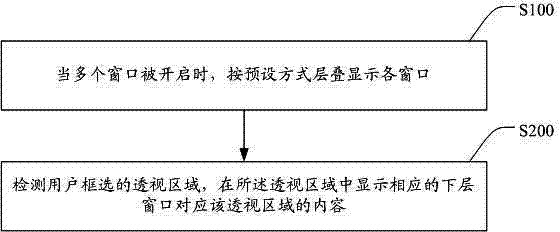
图1为本发明多窗口显示方法的流程图。 FIG. 1 is a flow chart of the multi-window display method of the present invention.
图2为本发明多窗口显示方法一应用实施例的示意图。 FIG. 2 is a schematic diagram of an application embodiment of the multi-window display method of the present invention.
图3为本发明多窗口显示方法另一应用实施例的示意图。 FIG. 3 is a schematic diagram of another application embodiment of the multi-window display method of the present invention.
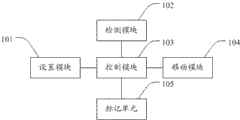
图4为本发明触控终端的结构框图。 FIG. 4 is a structural block diagram of a touch terminal according to the present invention.
具体实施方式 Detailed ways
本发明提供一种多窗口显示方法及触控终端,为使本发明的目的、技术方案及效果更加清楚、明确,以下参照附图并举实施例对本发明进一步详细说明。应当理解,此处所描述的具体实施例仅用以解释本发明,并不用于限定本发明。 The present invention provides a multi-window display method and a touch terminal. In order to make the purpose, technical solution and effect of the present invention more clear and definite, the present invention will be further described in detail below with reference to the accompanying drawings and examples. It should be understood that the specific embodiments described here are only used to explain the present invention, not to limit the present invention.
请参阅图1,其为本发明多窗口显示方法的流程图。如图1所示,本发明的多窗口显示方法包括: Please refer to FIG. 1 , which is a flow chart of the multi-window display method of the present invention. As shown in Figure 1, the multi-window display method of the present invention includes:
S100、当多个窗口被开启时,按预设方式层叠显示各窗口; S100. When multiple windows are opened, display each window in a stacked manner according to a preset method;
S200、检测用户框选的透视区域,在所述透视区域中显示相应的下层窗口对应该透视区域的内容。 S200. Detect the perspective area selected by the user, and display the content of the corresponding lower window corresponding to the perspective area in the perspective area.
本实施例中,用户框选的透视区域可为一个或者多个,并且透视区域的大小和位置也由用户自定义,可以在同一窗口上浏览不同的下层窗口在不同位置显示的内容。 In this embodiment, there can be one or more perspective areas selected by the user, and the size and position of the perspective areas can also be customized by the user, and the content displayed in different positions of different lower windows can be browsed on the same window.
本发明提供的多窗口显示方法可在当前窗口上框选一个透视区域或多个透视区域,在透视区域中可显示相应的下层窗口对应透视区域的内容,实现了在当前界面上同时观看不同窗口在不同位置的文字、图片、视频等,其操作便捷,提升了用户体验效果。 The multi-window display method provided by the present invention can frame a perspective area or multiple perspective areas on the current window, and display the content of the corresponding perspective area of the corresponding lower window in the perspective area, realizing simultaneous viewing of different windows on the current interface Text, pictures, videos, etc. in different positions are easy to operate and improve user experience.
以智能手机为例,用户框选的透视区域可以是智能手机默认的选取框,如矩形框、圆形框、椭圆形框等。如用户选择了矩形框,可根据用户手指在屏幕上框选出的矩形框大小来设置透视区域,该透视区域的大小就是可显示下层窗口的内容的大小。为了提高操作的便捷性,用户还可直接在屏幕布上画一个封闭曲线,该封闭曲线围绕的区域即为透视区域。 Taking a smart phone as an example, the perspective area selected by the user may be a default marquee of the smart phone, such as a rectangular frame, a circular frame, an elliptical frame, and the like. If the user selects a rectangular frame, the perspective area can be set according to the size of the rectangular frame selected by the user's finger on the screen. The size of the perspective area is the size that can display the content of the lower window. In order to improve the convenience of operation, the user can also directly draw a closed curve on the screen cloth, and the area surrounded by the closed curve is the perspective area.
由于在框选时,用户不能看到下层窗口的内容,很可能用户框选的区域并非是用户最想浏览的区域,在优选的实施例中,用户还可以移动透视区域来定位需要浏览的位置。因此,本发明的多窗口显示方法还包括:当移动所述透视区域时,根据所述透视区域移动的位置定位透视区域显示的内容。 Since the user cannot see the content of the lower window when selecting a frame, it is likely that the area selected by the user is not the area that the user most wants to browse. In a preferred embodiment, the user can also move the perspective area to locate the position that needs to be browsed . Therefore, the multi-window display method of the present invention further includes: when moving the see-through area, locating the content displayed in the see-through area according to the moving position of the see-through area.
在其它实施例中,用户还可以在该透视区域中滑动屏幕,即通过透视区域的位置固定、下层窗口的界面移动的方式,来定位下层窗口在该透视区域显示的内容。 In other embodiments, the user can also slide the screen in the see-through area, that is, fix the position of the see-through area and move the interface of the lower window to locate the content displayed in the see-through area of the lower window.
由于用户打开的窗口可能为两个以上,所述步骤S100具体包括:当多个窗口被开启时,根据各窗口的开启顺序层叠显示各窗口。在叠置各窗口时,可根据各个窗口开启的先后顺序,从下至上叠置各窗口,即最后打开的窗口放在最上层,将最先打开的窗口放在最下层,用户能够浏览最后一次开启的窗口。当然,本发明也可以将最先打开的窗口放在最上层,将最后打开的窗口放在最下层,本发明对此不作限制。 Since there may be more than two windows opened by the user, the step S100 specifically includes: when multiple windows are opened, displaying each window in a stacked manner according to the opening order of each window. When stacking windows, the windows can be stacked from bottom to top according to the opening order of each window, that is, the last opened window is placed on the top layer, and the first opened window is placed on the bottom layer, so that users can browse the last window. open window. Of course, the present invention can also place the first opened window on the uppermost layer, and place the last opened window on the lowermost layer, which is not limited by the present invention.
其中,用户打开的窗口包括打开网页时各网页的页面,及打开各应用时各应用的用户界面,本发明在用户同时打开多个界面和网页时,也按先后顺序显示各应用的窗口。譬如,用户打开一个网页后,再打开短信应用进行文字编辑,可将短信应用对应的窗口叠加在网页之上。 Wherein, the windows opened by the user include the pages of each webpage when opening the webpage, and the user interface of each application when opening each application. When the user opens multiple interfaces and webpages at the same time, the present invention also displays the windows of each application in sequence. For example, after the user opens a webpage, and then opens the SMS application for text editing, the window corresponding to the SMS application can be superimposed on the webpage.
由于某些网页、或某些应用的窗口一般大于用户界面,使用户需要浏览网页的不同区域时只能通过滑动屏幕来浏览网页的其它区域,为了便于用户同时观看该网页的不同区域的内容,所述步骤S100具体包括:将窗口按用户界面大小分成多个子窗口,并按预设叠置方式层叠显示各子窗口。所述预设叠置方式包括从左至右、从上至下将窗口按用户界面大小分割成多个子窗口,然后按从左至右、从上至下的方式进行排序。例如,一个网页的窗口比用户界面宽一倍长两倍,则可按用户界面按从左至右、从上至下的方式将该窗口分成6个子窗口,然后按从左至右、从上至下叠置这6个子窗口,使位于左侧最上面的子窗口在最上层,位于右侧最下面的子窗口在最下层,根据用户浏览习惯形成层叠的窗口。用户在浏览时可以在当前窗口(即位于左侧最上面的子窗口)中透视选择其下层的窗口,同时浏览。应当说明的是,在分割子窗口时,如果分割界面位于网页版面的中间时,本实施例优选的分割方式为,根据网页的版面来分割,以保持网页版面的完整性。 Since the windows of some web pages or some applications are generally larger than the user interface, users can only browse other areas of the web page by sliding the screen when they need to browse different areas of the web page. In order to facilitate users to watch the content of different areas of the web page at the same time, The step S100 specifically includes: dividing the window into multiple sub-windows according to the size of the user interface, and stacking and displaying each sub-window in a preset stacking manner. The preset stacking method includes dividing the window into multiple sub-windows according to the size of the user interface from left to right and from top to bottom, and then sorting them from left to right and from top to bottom. For example, if the window of a web page is twice as wide and twice as long as the user interface, the window can be divided into 6 sub-windows according to the user interface from left to right and from top to bottom, and then divided into 6 sub-windows according to the left to right and top to bottom These 6 sub-windows are superimposed downwards, so that the uppermost sub-window on the left side is on the uppermost layer, and the lowermost sub-window on the right side is on the lowermost layer, forming stacked windows according to the user's browsing habits. When browsing, the user can perspectively select the lower window in the current window (that is, the uppermost sub-window on the left), and browse at the same time. It should be noted that when splitting the sub-window, if the splitting interface is located in the middle of the webpage layout, the preferred splitting method in this embodiment is to split according to the webpage layout, so as to maintain the integrity of the webpage layout.
为了便于用户选择需要浏览的下层窗口,在本发明的一实施例中,所所述步骤S200具体包括:检测用户框选的透视区域,在当前窗口中对各层可透视显示的窗口生成相应的标记;之后,当所述标记被触发时,在所述透视区域内显示该标记关联的窗口对应该透视区域的内容。 In order to facilitate the user to select the lower layer window that needs to be browsed, in an embodiment of the present invention, the step S200 specifically includes: detecting the perspective area selected by the user, and generating corresponding mark; afterward, when the mark is triggered, display the contents of the perspective area corresponding to the window associated with the mark in the perspective area.
其中,所述标记可为数字(如1、2、3、……)、字母(如a、b、c、……或)、圆点(如以圆点的数量表示客口的叠置顺序)、图形等。譬如,当采用数字标记时,数字1表示该数字关联的是第一层窗口、数字2表示该数字关联的第二层窗口、…、以此类推。当用户选择数字1时表示不透明到下层窗口,当用户选择数字2时,在透视区域将最上层窗口(即第一层窗口)透明化,在透视区域显示第二层窗口(即下一层窗口),当用户选择数字3时,在透视区域将第一层窗口和第二层窗口透明化,在透视区域显示第三层窗口、…、以此类推。
Wherein, the marks can be numbers (such as 1, 2, 3, ...), letters (such as a, b, c, ... or), dots (such as the number of dots to indicate the stacking order of the customer port ), graphics, etc. For example, when numbers are used, the number 1 indicates that the number is associated with the first-level window, the
本实施例中,用户框选的透视区域时,所述标记可在透视区域的边缘显示(如图3所示),为了不影响当前窗口的浏览,所述标记可设置为半透明状态。 In this embodiment, when the user frames the perspective area, the mark can be displayed on the edge of the see-through area (as shown in FIG. 3 ). In order not to affect the browsing of the current window, the mark can be set to a translucent state.
为了提供更便捷的操作,在本发明的另一实施例中,所述步骤S200具体包括:检测用户框选的透视区域,及在该透视区域中点击的次数;之后、根据用户在该透视区域点击的次数,显示相应的下层窗口在该透视区域中对应的内容。 In order to provide more convenient operation, in another embodiment of the present invention, the step S200 specifically includes: detecting the perspective area selected by the user, and the number of clicks in the perspective area; The number of clicks displays the corresponding content of the corresponding lower window in the perspective area.
为了防止误触发,本实施例对用户点击屏幕的时间有一定的要求,如可通过长按(按屏幕的时间一般超过2秒)屏幕的方式来表示用户点击了屏幕。如用户在透视区域长按一次,可在透视区域透明显示下一层窗口在该透视区域对应的内容;再次长按,可在透视区域透明显示下两层窗口在该透视区域对应的内容、…、以此类推。并且,用户点击屏幕时,也可在屏幕的其它位置长按,本发明对此不作限制。 In order to prevent false triggering, this embodiment has certain requirements on the time the user clicks on the screen. For example, the user can indicate that the user has clicked the screen by long pressing the screen (the time of pressing the screen generally exceeds 2 seconds). If the user presses and holds once in the see-through area, the content corresponding to the next layer of windows in the see-through area can be transparently displayed in the see-through area; long press again, the content corresponding to the see-through area of the next two layers of windows can be transparently displayed in the see-through area,… , and so on. Moreover, when the user clicks on the screen, he can also press and hold on other positions of the screen, which is not limited in the present invention.
同样以智能手机为例,可通过智能手机的设置功能开启本发明的多窗口显示功能,在设置时,可以设置框选的透视区域的操作方式,及选取透视到相应的下层窗口的操作方式。其中,框选的透视区域的方式包括:手机系统自带的几何图形框(如矩形框、圆形框等)和自定义框等。在用户选择自定义框时,只需用户用手指在触摸屏上画一个封闭区域形成透视区域。用户在选取需透视显示的下层窗口时:可通过标记选择关联的窗口、也可点击屏幕来选择;如果用户选择标记方式,则进一步提供是通过数字标记、字母标记、还是圆点标记等。如果用户选择了点击屏幕方式,还可进一步设置点击屏幕的时间,使与其它触控操作区别开。 Also taking the smart phone as an example, the multi-window display function of the present invention can be enabled through the setting function of the smart phone. During setting, the operation mode of the frame-selected perspective area can be set, and the operation mode of selecting the perspective to the corresponding lower window can be set. Among them, the methods of frame-selecting the perspective area include: the geometric frame (such as rectangular frame, circular frame, etc.) that comes with the mobile phone system, and a custom frame. When the user selects the custom frame, the user only needs to draw a closed area on the touch screen with a finger to form a perspective area. When the user selects the lower window to be displayed in perspective: he can select the associated window by marking, or click the screen to select; if the user chooses the marking method, it will further provide whether it is marked by numbers, letters, or dots. If the user selects the method of tapping the screen, the time for tapping the screen can be further set to distinguish it from other touch operations.
请参阅图2,其为本发明多窗口显示方法一应用实施例的示意图。本实施例以在手机上打开网页为例,对本发明的多窗口显示方法举例说明: Please refer to FIG. 2 , which is a schematic diagram of an application embodiment of the multi-window display method of the present invention. This embodiment takes opening a webpage on a mobile phone as an example to illustrate the multi-window display method of the present invention:
当用户打开多个网页后,将最后浏览的网页放在顶层如图2中的(a)所示,用户手指在手机屏幕上画一个矩形框,如图2中的(b)所示。该矩形框作为可透视下层窗口的区域,直接显示为透明状态,如图2中的(b)所示(此时在该区域可看到最上层网页),然后根据用户点击屏幕的次数来透视其下层窗口在该区域对应的内容。如用户点击两次屏幕后,手机屏幕出现图2中的(c)所示的画面,在用户框选的区域显示下两层窗口在该区域的内容,实现了在一个窗口中同时浏览两个不同窗口的内容。当然,本实施例,在透视之前填充透视区域,用户点击一次屏幕,透视到最上层窗口,点击两次透视到下一层窗口,、…、以此类推。 After the user opens multiple webpages, the last webpage browsed is placed on the top layer, as shown in (a) in Figure 2, and the user draws a rectangular frame on the screen of the mobile phone, as shown in (b) in Figure 2. The rectangular frame is used as the area where the lower window can be seen through, and is directly displayed in a transparent state, as shown in (b) in Figure 2 (the top-level web page can be seen in this area at this time), and then see through according to the number of times the user clicks the screen The content corresponding to the lower window in this area. For example, after the user clicks the screen twice, the screen shown in (c) in Figure 2 appears on the screen of the mobile phone, and the content of the lower two-level windows in the area is displayed in the area selected by the user, realizing the simultaneous browsing of two windows in one window. Contents of different windows. Of course, in this embodiment, the see-through area is filled before the see-through, and the user clicks once on the screen to see through to the uppermost window, and clicks twice to see through to the lower-level window, ..., and so on.
请参阅图3,其为本发明多窗口显示方法另一应用实施例的示意图。本实施例以在手机上打开浏览器应用和文本编辑应用为例,对本发明的多窗口显示方法举例说明: Please refer to FIG. 3 , which is a schematic diagram of another application embodiment of the multi-window display method of the present invention. This embodiment takes opening a browser application and a text editing application on a mobile phone as an example to illustrate the multi-window display method of the present invention:
具体操作为:用户可先打开浏览器应用,再打开文本编辑应用,并将后打开的文本编辑应用放在顶层如图3中的(a)所示,用于手指在手机屏幕下方画一个矩形框,在透视之前可以进行填充(即不透明),如图3的(b)所示;当然也可以直接显示为透明状态(此时在该区域可看到文本编辑下方的空白区域)。然后用户触摸位于透视区域附近的标记“2”,此时可显示如图3中的(c)所示的界面,实现了用户在文本编辑应用窗口的空白区域引用一段网页上的内容,从而可以及时地摘取想要的文字,即实现了在一个应用中同时浏览多个应用的内容。 The specific operation is: the user can first open the browser application, then open the text editing application, and put the opened text editing application on the top layer, as shown in (a) in Figure 3, and use the finger to draw a rectangle at the bottom of the mobile phone screen The box can be filled (that is, opaque) before perspective, as shown in (b) of Figure 3; of course, it can also be directly displayed as a transparent state (at this time, the blank area below the text edit can be seen in this area). Then the user touches the mark "2" located near the perspective area, and the interface shown in (c) in Figure 3 can be displayed at this time, enabling the user to quote a piece of content on the web page in the blank area of the text editing application window, so that the user can The desired text is extracted in a timely manner, that is, the content of multiple applications can be browsed in one application at the same time.
在进一步的实施例中,所述步骤S200还包括:在透视区域根据窗口的性质提供编辑功能。其中,所述编辑功能包括:复制、剪切、粘贴、编辑等。如,当透视区域所显示的下层窗口为网页时,可在该透视区域对透视显示的网页进行复制操作;当透视区域所显示的下层窗口为短信、邮件、office文档等可编辑的窗口时,可在该透视区域对透视显示的下层窗口进行复制、剪切、粘贴、编辑等操作。如图3所示的应用实施例,透视显示的下层窗口为网页,上层窗口为文本编辑窗口,用户可以在透视区域中复制下层网页的内容,然后粘贴到上层的文本编辑窗口中。 In a further embodiment, the step S200 further includes: providing an editing function in the perspective area according to the properties of the window. Wherein, the editing function includes: copy, cut, paste, edit and so on. For example, when the lower window displayed in the perspective area is a webpage, the webpage displayed in perspective can be copied in the perspective area; In this perspective area, operations such as copying, cutting, pasting, and editing can be performed on the lower windows displayed in perspective. In the application example shown in Figure 3, the lower window displayed in perspective is a web page, and the upper window is a text editing window. The user can copy the content of the lower web page in the perspective area, and then paste it into the upper text editing window.
本发明还相应提供一种用于实现多窗口显示方法的触控终端,其包括:设置模块101、检测模块102和控制模块103。其中,所述设置模块101用于当多个窗口被开启时,按预设方式层叠显示各窗口。所述预设方式层叠窗口时,可根据用户打开窗口的时间顺序由下至上层叠,即将先打开的窗口放在下层,将后打开的窗口放在上层。所述检测模块102用于检测用户框选的透视区域,其中检测的内容包括检测用户框选的透视区域的数量、位置、大小等。所述控制模块103用于在所述透视区域中显示相应的下层窗口对应该透视区域的内容。具体请参见上述实施例。
The present invention also correspondingly provides a touch terminal for implementing a multi-window display method, which includes: a setting
进一步地,本发明的触控终端还包括移动模块104,该移动模块104用于根据用户的触控指令移动所述透视区域,对透视区域进行定位。所述控制模块103还用于根据所述透视区域移动的位置显示相应的下层窗口对应该透视区域的内容。
Further, the touch terminal of the present invention further includes a moving
具体实施过程中,所述设置模块101包括第一设置单元,用于当多个窗口被开启时,根据各窗口的开启顺序层叠显示各窗口。具体请参见上述实施例。
In a specific implementation process, the
其中,所述设置模块101还包括第二设置单元,用于将窗口按用户界面大小分成多个子窗口,并按预设叠置方式层叠显示各子窗口。将大于用户界面的窗口分割形成多个子窗口。具体请参见上述实施例。
Wherein, the
进一步的,本发明的触控终端还包括:标记单元105,用于在当前窗口中对各层可透视显示的窗口生成相应的标记。所述控制模块103,还用于当所述标记被触发时,在所述透视区域内显示该标记关联的窗口对应该透视区域的内容。具体请参见上述实施例。
Further, the touch terminal of the present invention further includes: a marking
更进一步的,本发明的触控终端中,所述检测模块102,还用于检测用户在该透视区域中点击的次数。所述控制模块103,还用于根据用户在该透视区域中点击的次数,显示相应的下层窗口在该透视区域中对应的内容。另外,该控制模块103还用于控制各窗口的编辑功能,使用户在透视区域能够完成上层窗口和各个下层窗口的编辑操作。具体请参见上述实施例。
Furthermore, in the touch terminal of the present invention, the
综上所述,本发明提供的多窗口显示方法及触控终端,实现了在当前窗口框选的透视区域中显示相应的下层窗口的内容,从而在一个窗口中可同时获取其它窗口中的信息,提高了触控终端的易用性和操作便捷性。并且,还可以移动透视区域进行定位,使用户能够方便的选取下层窗口中需透视的位置,提升了用户体验效果。本发明在不增加硬件成本的前提下,增加了触控终端的功能,提高了触控终端的市场竞争力。 To sum up, the multi-window display method and touch terminal provided by the present invention realize the display of the content of the corresponding lower window in the perspective area selected by the current window, so that information in other windows can be obtained in one window at the same time , improving the usability and operation convenience of the touch terminal. Moreover, the perspective area can also be moved for positioning, so that the user can conveniently select the position to be seen through in the lower window, which improves the user experience effect. The present invention increases the functions of the touch terminal and improves the market competitiveness of the touch terminal without increasing the hardware cost.
可以理解的是,对本领域普通技术人员来说,可以根据本发明的技术方案及其发明构思加以等同替换或改变,而所有这些改变或替换都应属于本发明所附的权利要求的保护范围。 It can be understood that those skilled in the art can make equivalent replacements or changes according to the technical solutions and inventive concepts of the present invention, and all these changes or replacements should belong to the protection scope of the appended claims of the present invention.
Claims (12)
Priority Applications (1)
| Application Number | Priority Date | Filing Date | Title |
|---|---|---|---|
| CN201310440634.4A CN103473016B (en) | 2013-09-25 | 2013-09-25 | Multi-window display method and touch control terminal |
Applications Claiming Priority (1)
| Application Number | Priority Date | Filing Date | Title |
|---|---|---|---|
| CN201310440634.4A CN103473016B (en) | 2013-09-25 | 2013-09-25 | Multi-window display method and touch control terminal |
Publications (2)
| Publication Number | Publication Date |
|---|---|
| CN103473016A true CN103473016A (en) | 2013-12-25 |
| CN103473016B CN103473016B (en) | 2016-08-24 |
Family
ID=49797894
Family Applications (1)
| Application Number | Title | Priority Date | Filing Date |
|---|---|---|---|
| CN201310440634.4A Active CN103473016B (en) | 2013-09-25 | 2013-09-25 | Multi-window display method and touch control terminal |
Country Status (1)
| Country | Link |
|---|---|
| CN (1) | CN103473016B (en) |
Cited By (13)
| Publication number | Priority date | Publication date | Assignee | Title |
|---|---|---|---|---|
| CN103810039A (en) * | 2014-01-28 | 2014-05-21 | 深圳市中兴移动通信有限公司 | Mobile terminal, operation method thereof and terminal device |
| CN104461287A (en) * | 2014-11-27 | 2015-03-25 | 东莞宇龙通信科技有限公司 | Handling method and device for floating object and terminal |
| CN105335084A (en) * | 2014-08-08 | 2016-02-17 | 富泰华工业(深圳)有限公司 | Electronic apparatus and method for processing multilayer stacking interface operation |
| CN105760073A (en) * | 2016-02-01 | 2016-07-13 | 锐达互动科技股份有限公司 | Method for achieving graphical perspective in interactive electronic whiteboard software |
| CN106302543A (en) * | 2016-10-17 | 2017-01-04 | 腾讯科技(深圳)有限公司 | A kind of multimedia display method, Apparatus and system |
| WO2017181594A1 (en) * | 2016-04-19 | 2017-10-26 | 乐视控股(北京)有限公司 | Video display method and apparatus |
| CN107643866A (en) * | 2017-08-21 | 2018-01-30 | 广州视源电子科技股份有限公司 | Method and device for operating different-level pictures, terminal equipment and storage medium |
| CN108415637A (en) * | 2018-01-18 | 2018-08-17 | 珠海金山网络游戏科技有限公司 | A kind of the multilayer methods of exhibiting and system at list type interface |
| CN109558026A (en) * | 2017-10-20 | 2019-04-02 | 北京仁光科技有限公司 | Multi-window touch control method, unit and computer readable storage medium |
| CN110727484A (en) * | 2018-07-17 | 2020-01-24 | 优视科技有限公司 | Information display method and device and electronic equipment |
| CN110865758A (en) * | 2019-10-29 | 2020-03-06 | 维沃移动通信有限公司 | A display method and electronic device |
| CN111124391A (en) * | 2019-12-18 | 2020-05-08 | 中科全维科技(苏州)有限公司 | Desktop end software pendant window management method and system |
| CN115640092A (en) * | 2022-10-31 | 2023-01-24 | 维沃移动通信有限公司 | Interface display method, device, electronic device and readable storage medium |
Citations (8)
| Publication number | Priority date | Publication date | Assignee | Title |
|---|---|---|---|---|
| US20040100498A1 (en) * | 2002-11-21 | 2004-05-27 | International Business Machines Corporation | Annotating received world wide web/internet document pages without changing the hypertext markup language content of the pages |
| US20040119727A1 (en) * | 2002-12-19 | 2004-06-24 | International Business Machines Corporation | Extracting displayed numerical data from displayed documents received from communication networks, e.g. World Wide Web, and processing the extracted numerical data independent of the received document |
| CN101183524A (en) * | 2007-11-08 | 2008-05-21 | 腾讯科技(深圳)有限公司 | Lyric characters display process and system |
| CN101697107A (en) * | 2009-10-30 | 2010-04-21 | 青岛海信移动通信技术股份有限公司 | Method and device for inputting characters in touch mobile communication terminal |
| CN101882432A (en) * | 2010-02-01 | 2010-11-10 | 深圳市同洲电子股份有限公司 | Focus element display method, device and digital television receiving terminal |
| CN102609414A (en) * | 2011-01-20 | 2012-07-25 | 中兴通讯股份有限公司 | Picture hot zone highlighting display method, device and system based on browser |
| CN102722588A (en) * | 2012-06-14 | 2012-10-10 | 北京小米科技有限责任公司 | Method, device and electronic terminal for browsing files |
| CN102752664A (en) * | 2012-06-29 | 2012-10-24 | 奇智软件(北京)有限公司 | A method and device for displaying text subtitle information in a web page |
-
2013
- 2013-09-25 CN CN201310440634.4A patent/CN103473016B/en active Active
Patent Citations (8)
| Publication number | Priority date | Publication date | Assignee | Title |
|---|---|---|---|---|
| US20040100498A1 (en) * | 2002-11-21 | 2004-05-27 | International Business Machines Corporation | Annotating received world wide web/internet document pages without changing the hypertext markup language content of the pages |
| US20040119727A1 (en) * | 2002-12-19 | 2004-06-24 | International Business Machines Corporation | Extracting displayed numerical data from displayed documents received from communication networks, e.g. World Wide Web, and processing the extracted numerical data independent of the received document |
| CN101183524A (en) * | 2007-11-08 | 2008-05-21 | 腾讯科技(深圳)有限公司 | Lyric characters display process and system |
| CN101697107A (en) * | 2009-10-30 | 2010-04-21 | 青岛海信移动通信技术股份有限公司 | Method and device for inputting characters in touch mobile communication terminal |
| CN101882432A (en) * | 2010-02-01 | 2010-11-10 | 深圳市同洲电子股份有限公司 | Focus element display method, device and digital television receiving terminal |
| CN102609414A (en) * | 2011-01-20 | 2012-07-25 | 中兴通讯股份有限公司 | Picture hot zone highlighting display method, device and system based on browser |
| CN102722588A (en) * | 2012-06-14 | 2012-10-10 | 北京小米科技有限责任公司 | Method, device and electronic terminal for browsing files |
| CN102752664A (en) * | 2012-06-29 | 2012-10-24 | 奇智软件(北京)有限公司 | A method and device for displaying text subtitle information in a web page |
Cited By (18)
| Publication number | Priority date | Publication date | Assignee | Title |
|---|---|---|---|---|
| CN103810039A (en) * | 2014-01-28 | 2014-05-21 | 深圳市中兴移动通信有限公司 | Mobile terminal, operation method thereof and terminal device |
| CN105335084A (en) * | 2014-08-08 | 2016-02-17 | 富泰华工业(深圳)有限公司 | Electronic apparatus and method for processing multilayer stacking interface operation |
| CN104461287B (en) * | 2014-11-27 | 2018-06-15 | 东莞宇龙通信科技有限公司 | A kind of processing method of levitated object, device and terminal |
| CN104461287A (en) * | 2014-11-27 | 2015-03-25 | 东莞宇龙通信科技有限公司 | Handling method and device for floating object and terminal |
| CN105760073A (en) * | 2016-02-01 | 2016-07-13 | 锐达互动科技股份有限公司 | Method for achieving graphical perspective in interactive electronic whiteboard software |
| CN105760073B (en) * | 2016-02-01 | 2018-11-06 | 锐达互动科技股份有限公司 | A method of realizing graphical perspectives in interactive electric whiteboard software |
| WO2017181594A1 (en) * | 2016-04-19 | 2017-10-26 | 乐视控股(北京)有限公司 | Video display method and apparatus |
| CN106302543B (en) * | 2016-10-17 | 2019-12-27 | 腾讯科技(深圳)有限公司 | Multimedia display method, device and system |
| CN106302543A (en) * | 2016-10-17 | 2017-01-04 | 腾讯科技(深圳)有限公司 | A kind of multimedia display method, Apparatus and system |
| CN107643866A (en) * | 2017-08-21 | 2018-01-30 | 广州视源电子科技股份有限公司 | Method and device for operating different-level pictures, terminal equipment and storage medium |
| WO2019037351A1 (en) * | 2017-08-21 | 2019-02-28 | 广州视源电子科技股份有限公司 | Method and apparatus for operating pictures at different levels, terminal device and storage medium |
| CN109558026A (en) * | 2017-10-20 | 2019-04-02 | 北京仁光科技有限公司 | Multi-window touch control method, unit and computer readable storage medium |
| CN108415637A (en) * | 2018-01-18 | 2018-08-17 | 珠海金山网络游戏科技有限公司 | A kind of the multilayer methods of exhibiting and system at list type interface |
| CN108415637B (en) * | 2018-01-18 | 2021-02-02 | 珠海金山网络游戏科技有限公司 | Multi-layer display method and system for list-type interface |
| CN110727484A (en) * | 2018-07-17 | 2020-01-24 | 优视科技有限公司 | Information display method and device and electronic equipment |
| CN110865758A (en) * | 2019-10-29 | 2020-03-06 | 维沃移动通信有限公司 | A display method and electronic device |
| CN111124391A (en) * | 2019-12-18 | 2020-05-08 | 中科全维科技(苏州)有限公司 | Desktop end software pendant window management method and system |
| CN115640092A (en) * | 2022-10-31 | 2023-01-24 | 维沃移动通信有限公司 | Interface display method, device, electronic device and readable storage medium |
Also Published As
| Publication number | Publication date |
|---|---|
| CN103473016B (en) | 2016-08-24 |
Similar Documents
| Publication | Publication Date | Title |
|---|---|---|
| CN103473016B (en) | Multi-window display method and touch control terminal | |
| US12346536B2 (en) | Navigating through documents in a document viewing application | |
| JP5908130B2 (en) | Application for generating journals | |
| US9400601B2 (en) | Techniques for paging through digital content on touch screen devices | |
| CN104123078B (en) | The method and apparatus of input information | |
| US10007402B2 (en) | System and method for displaying content | |
| US9582175B2 (en) | Information processing apparatus, information processing method, and information processing program | |
| CN102981704B (en) | A kind of icon placement method of display interface and mobile terminal | |
| TWI669652B (en) | Information processing device, information processing method and computer program | |
| CN109085965A (en) | Take down notes generation method, electronic equipment and computer storage medium | |
| CN109933733A (en) | Method and device for displaying pages | |
| AU2014287943A1 (en) | User terminal device for supporting user interaction and methods thereof | |
| EP4180923A1 (en) | Method for adding annotations, electronic device and related apparatus | |
| CN103324439B (en) | The batch method of tab file and device thereof in the electronic equipment with touch screen | |
| CN107368511A (en) | A kind of information displaying method and device | |
| CN104156140A (en) | A method and device for quickly editing text using a gravity sensor | |
| CN104424318A (en) | Method and device for controlling page elements | |
| CN106445972A (en) | Page display method and apparatus | |
| US20130238973A1 (en) | Application of a touch based interface with a cube structure for a mobile device | |
| KR20150021722A (en) | Method, apparatus and recovering medium for screen display by executing scroll | |
| CN104679389A (en) | Interface display method and device | |
| CN106951172A (en) | Display methods and device applied to the web page contents of mobile terminal | |
| CN106708349A (en) | Method and equipment for providing object information | |
| CN107885708A (en) | Object editing method and device, electronic equipment | |
| CN104793963B (en) | Information makes a copy of method and device |
Legal Events
| Date | Code | Title | Description |
|---|---|---|---|
| C06 | Publication | ||
| PB01 | Publication | ||
| C10 | Entry into substantive examination | ||
| SE01 | Entry into force of request for substantive examination | ||
| C14 | Grant of patent or utility model | ||
| GR01 | Patent grant | ||
| TR01 | Transfer of patent right | ||
| TR01 | Transfer of patent right |
Effective date of registration: 20251125 Address after: 325000 Zhejiang Province, Wenzhou City, Agricultural Foreign Cooperation Comprehensive Development Zone, Wenhuilu Road No. 19, Room 318-15 Patentee after: Zhejiang Lanbo Sports Culture Development Co.,Ltd. Country or region after: China Address before: 523500 Songshan Lake Science and Technology Industrial Park, Dongguan City, Guangdong Province Patentee before: Dongguan Yulong Communication Technology Co.,Ltd. Country or region before: China Patentee before: YULONG COMPUTER TELECOMMUNICATION SCIENTIFIC (SHENZHEN) Co.,Ltd. |