CN1237806C - Transmission device, transmission method, content distribution system, content distribution method and program thereof - Google Patents
Transmission device, transmission method, content distribution system, content distribution method and program thereof Download PDFInfo
- Publication number
- CN1237806C CN1237806C CNB028035240A CN02803524A CN1237806C CN 1237806 C CN1237806 C CN 1237806C CN B028035240 A CNB028035240 A CN B028035240A CN 02803524 A CN02803524 A CN 02803524A CN 1237806 C CN1237806 C CN 1237806C
- Authority
- CN
- China
- Prior art keywords
- content
- viewing
- listening
- distribution
- user terminal
- Prior art date
- Legal status (The legal status is an assumption and is not a legal conclusion. Google has not performed a legal analysis and makes no representation as to the accuracy of the status listed.)
- Expired - Fee Related
Links
Images


Classifications
-
- H—ELECTRICITY
- H04—ELECTRIC COMMUNICATION TECHNIQUE
- H04N—PICTORIAL COMMUNICATION, e.g. TELEVISION
- H04N1/00—Scanning, transmission or reproduction of documents or the like, e.g. facsimile transmission; Details thereof
-
- H—ELECTRICITY
- H04—ELECTRIC COMMUNICATION TECHNIQUE
- H04L—TRANSMISSION OF DIGITAL INFORMATION, e.g. TELEGRAPHIC COMMUNICATION
- H04L12/00—Data switching networks
- H04L12/02—Details
- H04L12/16—Arrangements for providing special services to substations
- H04L12/18—Arrangements for providing special services to substations for broadcast or conference, e.g. multicast
- H04L12/1813—Arrangements for providing special services to substations for broadcast or conference, e.g. multicast for computer conferences, e.g. chat rooms
- H04L12/1822—Conducting the conference, e.g. admission, detection, selection or grouping of participants, correlating users to one or more conference sessions, prioritising transmission
-
- H—ELECTRICITY
- H04—ELECTRIC COMMUNICATION TECHNIQUE
- H04N—PICTORIAL COMMUNICATION, e.g. TELEVISION
- H04N21/00—Selective content distribution, e.g. interactive television or video on demand [VOD]
- H04N21/20—Servers specifically adapted for the distribution of content, e.g. VOD servers; Operations thereof
- H04N21/23—Processing of content or additional data; Elementary server operations; Server middleware
- H04N21/238—Interfacing the downstream path of the transmission network, e.g. adapting the transmission rate of a video stream to network bandwidth; Processing of multiplex streams
- H04N21/2381—Adapting the multiplex stream to a specific network, e.g. an Internet Protocol [IP] network
-
- H—ELECTRICITY
- H04—ELECTRIC COMMUNICATION TECHNIQUE
- H04N—PICTORIAL COMMUNICATION, e.g. TELEVISION
- H04N21/00—Selective content distribution, e.g. interactive television or video on demand [VOD]
- H04N21/40—Client devices specifically adapted for the reception of or interaction with content, e.g. set-top-box [STB]; Operations thereof
- H04N21/45—Management operations performed by the client for facilitating the reception of or the interaction with the content or administrating data related to the end-user or to the client device itself, e.g. learning user preferences for recommending movies, resolving scheduling conflicts
- H04N21/462—Content or additional data management e.g. creating a master electronic programme guide from data received from the Internet and a Head-end or controlling the complexity of a video stream by scaling the resolution or bit-rate based on the client capabilities
- H04N21/4622—Retrieving content or additional data from different sources, e.g. from a broadcast channel and the Internet
-
- H—ELECTRICITY
- H04—ELECTRIC COMMUNICATION TECHNIQUE
- H04N—PICTORIAL COMMUNICATION, e.g. TELEVISION
- H04N21/00—Selective content distribution, e.g. interactive television or video on demand [VOD]
- H04N21/40—Client devices specifically adapted for the reception of or interaction with content, e.g. set-top-box [STB]; Operations thereof
- H04N21/47—End-user applications
- H04N21/478—Supplemental services, e.g. displaying phone caller identification, shopping application
- H04N21/4782—Web browsing, e.g. WebTV
-
- H—ELECTRICITY
- H04—ELECTRIC COMMUNICATION TECHNIQUE
- H04N—PICTORIAL COMMUNICATION, e.g. TELEVISION
- H04N21/00—Selective content distribution, e.g. interactive television or video on demand [VOD]
- H04N21/60—Network structure or processes for video distribution between server and client or between remote clients; Control signalling between clients, server and network components; Transmission of management data between server and client, e.g. sending from server to client commands for recording incoming content stream; Communication details between server and client
- H04N21/61—Network physical structure; Signal processing
- H04N21/6106—Network physical structure; Signal processing specially adapted to the downstream path of the transmission network
- H04N21/6125—Network physical structure; Signal processing specially adapted to the downstream path of the transmission network involving transmission via Internet
-
- H—ELECTRICITY
- H04—ELECTRIC COMMUNICATION TECHNIQUE
- H04N—PICTORIAL COMMUNICATION, e.g. TELEVISION
- H04N7/00—Television systems
- H04N7/14—Systems for two-way working
- H04N7/141—Systems for two-way working between two video terminals, e.g. videophone
- H04N7/147—Communication arrangements, e.g. identifying the communication as a video-communication, intermediate storage of the signals
Landscapes
- Engineering & Computer Science (AREA)
- Multimedia (AREA)
- Signal Processing (AREA)
- Databases & Information Systems (AREA)
- General Engineering & Computer Science (AREA)
- Computer Networks & Wireless Communication (AREA)
- Information Transfer Between Computers (AREA)
- Management, Administration, Business Operations System, And Electronic Commerce (AREA)
Abstract
一种发送装置,其有效地把由观众提供的内容发送至发送者,使得该内容用于即时配送。节目内容由充当发送者的用户终端(10)即时配送,而发送者特定信息用来指明因特网(11)上的用户终端(10),该节目内容和发送者特定信息经流配送服务(13)配送至客户终端(12)。基于发送者特定信息把客户终端(12)提供的内容直接发送至用户终端(10)。用户终端(10)使用从客户终端(12)发来的内容执行即时配送。
A transmitting device effectively transmits content provided by a viewer to a sender, making the content available for immediate distribution. Program content is immediately distributed by a user terminal (10) acting as a sender, and sender-specific information is used to identify the user terminal (10) on the Internet (11). The program content and sender-specific information are distributed to a client terminal (12) via a streaming distribution service (13). Based on the sender-specific information, the content provided by the client terminal (12) is directly transmitted to the user terminal (10). The user terminal (10) performs immediate distribution using the content sent from the client terminal (12).
Description
技术领域technical field
本发明涉及一种内容配送系统,其包括数台计算机和服务装置、其连接至网络,并配送内容、其由充当发送者的第1台计算机经服务装置发送至观众/听众的计算机,还涉及内容配送方法,以及涉及内容发送程序、其实施该内容配送系统。The present invention relates to a content distribution system comprising several computers and a service device, which are connected to a network, and distribute content, which is sent by a first computer acting as a sender to a viewer/listener's computer via a service device, and to A content delivery method, and a content delivery program that implements the content delivery system.
背景技术Background technique
所谓因特网已被广泛用于含许多连接起来的计算机的计算机网络。因特网使得计算机能够使用各种协议(互联手续)彼此自由传送各种信息,一种典型的协议是TCP/IP(传输控制协议/网际协议)。The so-called Internet has been widely used for a computer network comprising many connected computers. The Internet enables computers to freely transfer various information to each other using various protocols (Internet Protocol), a typical protocol being TCP/IP (Transmission Control Protocol/Internet Protocol).
由数字摄影机等影像捕获仪所捕获的运动影像,其使用因特网被配送至许多观众/听众,这是由以下方法来变成可能的。Moving images captured by image capture devices such as digital cameras are distributed to many viewers/listeners using the Internet, which becomes possible by the following method.
具体地,第1种方法包括把含运动影像的文件从发送者的计算机上载至服务装置,而为了响应另一台计算机向服务装置签发的下载要求,还要使传送文件适可下载。这使得观众/听众能够使用连接至因特网的计算机、从服务装置下载运动影像,并在计算机的显示画面上阅览该运动影像。Specifically, the first method includes uploading a file containing moving images from the sender's computer to the server, and making the transmitted file available for download in response to a download request issued by another computer to the server. This enables viewers/listeners to use a computer connected to the Internet, download a moving picture from a service device, and view the moving picture on a display screen of the computer.
第2种方法包括由运动影像的发送者备好服务装置,并把含运动影像的文件以可下载的状态存储。像在第1种方法里一样,服务装置可把运动影像配送至观众/听众的计算机。The second method includes that the sender of the moving image prepares the service device, and stores the file including the moving image in a downloadable state. As in the first method, the service device can distribute the motion picture to the computer of the viewer/listener.
在发送者备好服务装置的场合里,可以配送编辑完成的运动影像文件。把影像捕获仪连接至服务装置、或发送者的计算机连接至服务装置允许实时地即时配送影像捕获仪所捕获的运动影像。When the sender prepares the service device, the edited video file can be distributed. Connecting the image capture device to the service device, or the sender's computer to the service device, allows instant distribution of motion images captured by the image capture device in real time.
这种即时配送是使用各种流配送技术来实现的,即,这种技术可用来时序地播放存入服务装置的运动影像数据,并同时经计算机网络下载运动影像数据。流配送技术的例子有Real Network Inc.的“Real System”,苹果计算机公司的“QuickTime Streaming Server”和微软公司的“Windows MediaTechnology”。This real-time delivery is realized using various streaming delivery techniques, that is, this technique can be used to time-sequentially play the moving picture data stored in the service device, and download the moving picture data via the computer network at the same time. Examples of the streaming distribution technology include "Real System" of Real Network Inc., "QuickTime Streaming Server" of Apple Computer Inc. and "Windows Media Technology" of Microsoft Corporation.
运动影像等经网络以上述方式的即时配送受到限制,即一次即时配送仅允许一个发送者。这种即时配送不适用的配送包括:把远离发送者的异地提供者供给的运动影像导入即时配送的节目、并以中继技术连接至数处地点。The instant distribution of moving images and the like via the network in the above-mentioned manner is restricted, that is, only one sender is allowed for one instant distribution. Distributions where such instant distribution is not applicable include importing moving images from remote providers away from the sender into programs for instant distribution and connecting to several locations with relay technology.
例如,把观众/听众的讯息和观点反映在即时配送的节目里需要一种不同于执行即时配送的系统。具体地,例如,观众/听众的讯息和观点是以字符和静止影像的形式获得的,这需要使用实现电子邮件和聊天的应用软件,而获得的字符和静止影像被读入执行即时配送的系统。另外,需要使用实现电子邮件和聊天的应用软件来交换讯息和观点,与执行即时配送的系统同时操作。For example, reflecting the viewer/listener's information and opinions in a program for instant delivery requires a system different from that for performing instant delivery. Specifically, for example, the viewer/listener's information and opinions are obtained in the form of characters and still images, which requires the use of application software that realizes e-mail and chat, and the obtained characters and still images are read into a system that performs instant delivery . In addition, applications that implement email and chat are required to exchange messages and ideas, operating in parallel with systems that perform instant delivery.
为了按上述方法、在执行即时配送的同时与观众/听众交换讯息和观点,需要操作数个彼此无甚联系的应用软件,结果使得操作复杂。不能避免与即时配送的运动影像无甚联系的聊天讯息。运动影像的发送者和观众/听众彼此难于顺畅地交换讯息和观点。当记录即时配送的运动影像时,仅由该运动影像不能实现单一节目。In order to exchange information and opinions with viewers/listeners while performing real-time delivery in the above-mentioned method, it is necessary to operate several application software which are not closely related to each other, resulting in complicated operation. Chat messages that have little to do with instant delivery of moving images cannot be avoided. It is difficult for the sender of the moving image and the viewer/listener to smoothly exchange information and views with each other. When recording a moving picture for instant delivery, a single program cannot be realized by the moving picture alone.
鉴于上述的背景状况,本发明的目的是提供发送装置、发送方法、内容配送系统、内容配送方法及其程序,以使发送者能够自由使用内容,例如运动影像、静止影像、或观众/听众所提供的文本。In view of the above-mentioned background situation, an object of the present invention is to provide a transmitting device, a transmitting method, a content distribution system, a content distribution method, and a program thereof, so that a sender can freely use content such as moving images, still images, or content desired by viewers/listeners. provided text.
发明内容Contents of the invention
本发明的发送装置是这样的发送装置:其经网络连接至配送内容的服务装置和接收由服务装置配送的内容的数台观看/收听装置,该发送装置包括:The transmitting device of the present invention is a transmitting device that is connected via a network to a service device that distributes content and several viewing/listening devices that receive content distributed by the service device, and the transmitting device includes:
通信装置,用来经网络与另一装置通信;和a communication device for communicating with another device via a network; and
控制装置,用来生成内容、其经服务装置配送至观看/收听装置,control means for generating content which is distributed via service means to viewing/listening means,
其中控制装置获得第1内容、其经服务装置配送至观看/收听装置;从另一连接至网络的装置直接获得第2内容、其经服务装置配送至观看/收听装置;使用第1内容和第2内容生成传输内容、其发送至服务装置;并经通信装置把传输内容发送至服务装置。Wherein the control device obtains the first content, which is distributed to the viewing/listening device through the service device; directly obtains the second content from another device connected to the network, and which is distributed to the viewing/listening device through the service device; using the first content and the second content 2. Content Generate transmission content, send it to the service device; and send the transmission content to the service device via the communication device.
本发明的发送方法是这样的发送方法:其用来经配送内容的服务装置把内容配送至数台观看/收听装置,该发送方法包括:The distribution method of the present invention is a distribution method for distributing content to several viewing/listening devices via a service device for distributing content, and the distribution method includes:
获得第1内容的步骤,该第1内容经服务装置配送至观看/收听装置;从另一连接至网络的装置获得第2内容的步骤,该第2内容经服务装置配送至观看/收听装置;使用第1内容和第2内容生成传输内容的步骤,该传输内容被发送至服务装置;和把传输内容发送至服务装置的步骤。The step of obtaining the first content, the first content is distributed to the viewing/listening device through the service device; the step of obtaining the second content from another device connected to the network, and the second content is distributed to the viewing/listening device through the service device; A step of generating delivery content using the first content and the second content, and sending the delivery content to the service device; and a step of sending the delivery content to the service device.
本发明的程序是这样的程序:其用来指令装置、其经网络连接至配送内容的服务装置,并指令数台观看/收听装置、其接收由服务装置配送的内容,以执行内容发送处理,该程序包括:The program of the present invention is a program for instructing a device, which is connected to a service device distributing content via a network, and instructs several viewing/listening devices, which receive content distributed by the service device, to execute content delivery processing, The program includes:
控制以获得第1内容、其经服务装置配送至观看/收听装置;控制以从另一连接至网络的装置直接获得第2内容、其经服务装置配送至观看/收听装置;控制以使用第1内容和第2内容生成传输内容、其发送至服务装置;和控制以把传输内容发送至服务装置。Control to obtain the first content, which is distributed to the viewing/listening device via the service device; control to directly obtain the second content from another network-connected device, which is distributed to the viewing/listening device via the service device; control to use the first The content and the second content generate transmission content, transmit it to the service device; and control to transmit the transmission content to the service device.
本发明的内容配送系统是经网络连接至数台观看/收听装置的内容配送系统,包括:The content distribution system of the present invention is a content distribution system connected to several viewing/listening devices via a network, comprising:
配送装置,用来把内容配送至数台观看/收听装置;和生成装置,用来生成内容、其经配送装置配送至观看/收听装置,其中生成装置获得第1内容、其经配送装置配送至观看/收听装置;从另一连接至网络的装置直接获得第2内容、其经配送装置配送至观看/收听装置;和使用第1内容和第2内容生成配送内容、其经配送装置配送至观看/收听装置,并且Distributing device, is used for distributing content to several viewing/listening devices; viewing/listening device; directly obtaining the second content from another device connected to the network, which is distributed to the viewing/listening device via the distribution device; and using the first content and the second content to generate distribution content, which is distributed to the viewing device via the distribution device /listen to the device, and
其中配送装置把生成装置所生成的配送内容配送至数台观看/收听装置。The distributing device distributes the distribution content generated by the generating device to several viewing/listening devices.
本发明的内容配送方法是这样的内容配送方法,其用来在内容配送系统里配送内容,该内容配送系统包括配送装置,用来把内容配送至数台观看/收听装置、和生成装置,用来生成内容、其经配送装置配送至观看/收听装置,该内容配送方法包括:The content distribution method of the present invention is a content distribution method for distributing content in a content distribution system comprising distribution means for distributing content to several viewing/listening devices, and generating means for To generate content, which is distributed to the viewing/listening device via the distribution device, the content distribution method includes:
获得第1内容的步骤,该第1内容经配送装置配送至观看/收听装置;从另一连接至网络的装置获得第2内容的步骤,该第2内容经配送装置配送至观看/收听装置;使用第1内容和第2内容生成配送内容的步骤,该配送内容经配送装置配送至观看/收听装置;和把配送装置所生成的配送内容配送至数台观看/收听装置的步骤。The step of obtaining the first content, the first content is distributed to the viewing/listening device through the distribution device; the step of obtaining the second content from another device connected to the network, and the second content is distributed to the viewing/listening device through the distribution device; A step of generating distribution content using the first content and the second content, and distributing the distribution content to the viewing/listening device via the distribution device; and a step of distributing the distribution content generated by the distribution device to a plurality of viewing/listening devices.
本发明的程序是这样的程序,其用来指令一种系统、其包括配送装置,用来把内容配送至数台观看/收听装置、和生成装置,用来生成内容、其经配送装置配送至观看/收听装置,以执行内容发送处理,该程序包括:The program of the present invention is a program for instructing a system that includes distribution means for distributing content to several viewing/listening devices, and generating means for generating content that is distributed to Viewing/listening device to perform content delivery processing, the procedure includes:
获得第1内容,该第1内容经配送装置配送至观看/收听装置;从另一连接至网络的装置获得第2内容,该第2内容经配送装置配送至观看/收听装置;使用第1内容和第2内容生成配送内容,该配送内容经配送装置配送至观看/收听装置;和把配送装置所生成的配送内容配送至数台观看/收听装置。Obtain the first content, and distribute the first content to the viewing/listening device through the distribution device; obtain the second content from another device connected to the network, and distribute the second content to the viewing/listening device through the distribution device; use the first content and the second content to generate distribution content, and the distribution content is distributed to the viewing/listening device through the distribution device; and the distribution content generated by the distribution device is distributed to several viewing/listening devices.
本发明提供了一种发送装置,其经网络连接至配送内容的服务装置和接收由服务装置配送的内容的数台观看/收听装置,该发送装置包括:通信装置,用来经网络与观看/收听装置通信;和控制装置,用来生成内容、其经服务装置配送至观看/收听装置,其中控制装置执行以下处理,包括:获得第1内容、其经服务装置配送至观看/收听装置;经通信装置从一个观看/收听装置获得第2内容,并然后将该第2内容经服务装置配送至观看/收听装置;使用第1内容和第2内容生成传输内容、其发送至服务装置;和经通信装置把传输内容发送至服务装置,其中,控制装置把用来指明网络上的发送装置的发送者特定信息发送至服务装置;基于已从服务装置获得发送者特定信息的一个观看/收听装置的连接要求,与所述一个观看/收听装置建立连接;并从已与之建立连接的所述一个观看/收听装置接收第2内容。The present invention provides a sending device, which is connected to a service device that distributes content and several viewing/listening devices that receive content distributed by the service device via a network. The listening device communicates; and the control device is used to generate content, which is distributed to the viewing/listening device via the service device, wherein the control device performs the following processing, including: obtaining the first content, which is distributed to the viewing/listening device via the service device; The communication device obtains the second content from a viewing/listening device, and then distributes the second content to the viewing/listening device via the service device; generates transmission content using the first content and the second content, sends it to the service device; and The communication device sends the transmission content to the service device, wherein the control device sends the sender specific information used to specify the sender on the network to the service device; The connection request establishes a connection with the one viewing/listening device; and receives the second content from the one viewing/listening device connected thereto.
本发明还提供了一种发送方法,用来经配送内容的服务装置把内容配送至数台观看/收听装置,该发送方法包括:获得第1内容的步骤,该第1内容经服务装置配送至观看/收听装置;经通信装置从一个观看/收听装置获得第2内容,并然后将该第2内容经服务装置配送至观看/收听装置的步骤;使用第1内容和第2内容生成传输内容的步骤,该传输内容被发送至服务装置;和把传输内容发送至服务装置的步骤,其中,该发送方法还包括:把用来指明网络上的发送装置的发送者特定信息发送至服务装置;基于已从服务装置获得发送者特定信息的一个观看/收听装置的连接要求,与所述一个观看/收听装置建立连接;以及从已与之建立连接的所述一个观看/收听装置接收第2内容。The present invention also provides a sending method for distributing content to several viewing/listening devices via a content distributing service device. The sending method includes: a step of obtaining first content, and the first content is distributed to Watching/listening device; a step of obtaining second content from a viewing/listening device via a communication device, and then distributing the second content to a viewing/listening device via a service device; generating transmission content using the first content and the second content step, the transmission content is sent to the service device; and the step of sending the transmission content to the service device, wherein the sending method further includes: sending sender specific information used to specify the sending device on the network to the service device; based on A connection request of a viewing/listening device having obtained sender specific information from the service device, establishing a connection with the one viewing/listening device; and receiving the second content from the one viewing/listening device having established the connection therewith.
本发明还提供了一种内容配送系统,其经网络连接至数台观看/收听装置,包括:配送装置,用来把内容配送至数台观看/收听装置;和生成装置,用来生成内容、其经配送装置配送至观看/收听装置,其中生成装置执行以下处理,包括:获得第1内容、其经配送装置配送至观看/收听装置;经通信装置从一个观看/收听装置获得第2内容,并然后将该第2内容经配送装置配送至观看/收听装置;使用第1内容和第2内容生成配送内容、其经配送装置配送至观看/收听装置,而其中配送装置把生成装置所生成的配送内容配送至数台观看/收听装置,其中该生成装置执行以下处理,包括:经配送装置配送用来指明网络上的配送内容的发送者的发送者特定信息;基于已从配送装置获得发送者特定信息的一个观看/收听装置的连接要求,与所述一个观看/收听装置建立连接;和从已与之建立连接的所述一个观看/收听装置接收第2内容。The present invention also provides a content distribution system, which is connected to several viewing/listening devices via a network, comprising: a distribution device for distributing content to several viewing/listening devices; and a generating device for generating content, It is distributed to the viewing/listening device via the distribution device, wherein the generation device performs the following processing, including: obtaining the first content, which is distributed to the viewing/listening device via the distribution device; obtaining the second content from a viewing/listening device via the communication device, And then distribute the 2nd content to the viewing/listening device through the distributing device; use the 1st content and the 2nd content to generate the distribution content, which is distributed to the viewing/listening device through the distributing device, and wherein the distributing device generates the content generated by the generating device The distributed content is distributed to several viewing/listening devices, wherein the generating device executes the following processes including: distributing sender-specific information for specifying the sender of the distributed content on the network via the distribution device; A connection request of a viewing/listening device of specific information, establishing a connection with the one viewing/listening device; and receiving the second content from the one viewing/listening device with which the connection has been established.
本发明还提供了一种内容配送方法,用来在内容配送系统里配送内容,该内容配送系统包括配送装置,用来把内容配送至数台观看/收听装置、和生成装置,用来生成内容、其经配送装置配送至观看/收听装置,该内容配送方法包括:获得第1内容的步骤,该第1内容经配送装置配送至观看/收听装置;经通信装置从一个观看/收听装置获得第2内容,并然后将该第2内容经配送装置配送至观看/收听装置的步骤;使用第1内容和第2内容生成配送内容的步骤,该配送内容经配送装置配送至观看/收听装置;和把生成装置所生成的配送内容配送至数台观看/收听装置的步骤,其中该内容配送方法还包括:经配送装置配送用来指明网络上的配送内容的发送者的发送者特定信息;基于已从配送装置获得发送者特定信息的一个观看/收听装置的连接要求,与所述一个观看/收听装置建立连接;和从已与之建立连接的所述一个观看/收听装置接收第2内容。The present invention also provides a content distribution method for distributing content in a content distribution system. The content distribution system includes a distribution device for distributing content to several viewing/listening devices, and a generating device for generating content 1. It is distributed to a viewing/listening device via a distribution device, the content distribution method includes: a step of obtaining a first content, the first content is distributed to a viewing/listening device via a distribution device; obtaining the first content from a viewing/listening device via a communication device 2 content, and then a step of distributing the second content to the viewing/listening device via the distributing device; a step of generating distribution content using the first content and the second content, and distributing the distribution content to the viewing/listening device via the distributing device; and A step of distributing the distribution content generated by the generation device to several viewing/listening devices, wherein the content distribution method further includes: distributing sender-specific information for specifying the sender of the distribution content on the network via the distribution device; Obtaining a connection request of a viewing/listening device of sender specific information from a distribution device, establishing a connection with said one viewing/listening device; and receiving a second content from said one viewing/listening device having established a connection therewith.
附图说明Description of drawings
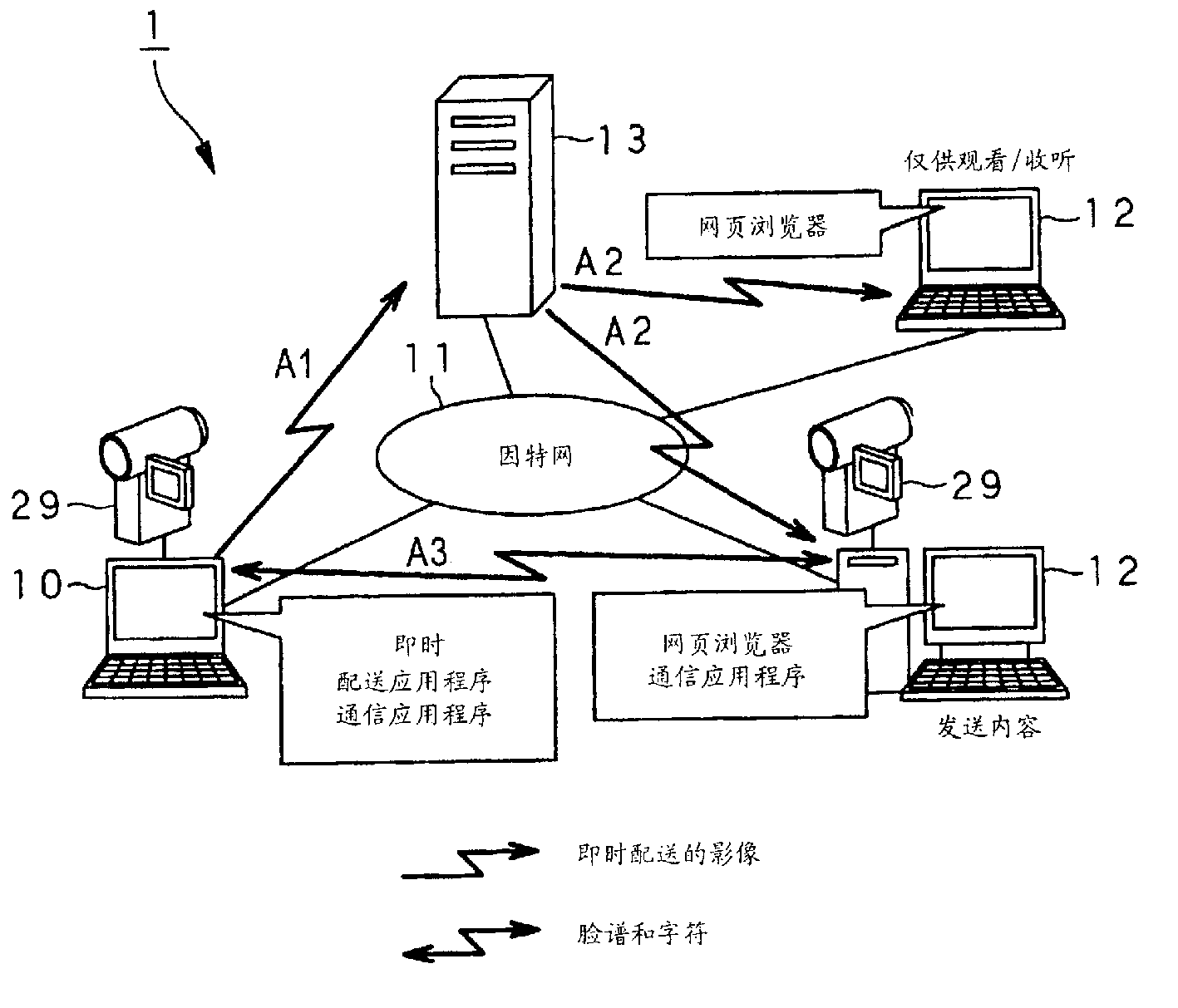
图1是说明图,表示根据本发明实施例的全体内容配送系统的基本构成。FIG. 1 is an explanatory diagram showing the basic configuration of an overall content delivery system according to an embodiment of the present invention.
图2是功能框图,表示内容配送系统里使用的用户终端。Fig. 2 is a functional block diagram showing a user terminal used in the content distribution system.
图3是说明图,表示内容配送系统里由用户终端执行的即时配送应用程序所显示的主视窗。Fig. 3 is an explanatory diagram showing a main window displayed by an instant delivery application executed by a user terminal in the content delivery system.
图4是说明图,表示内容配送系统里的用户终端和客户终端之间的连接关系。FIG. 4 is an explanatory diagram showing a connection relationship between user terminals and client terminals in the content distribution system.
图5是说明图,表示显示画面,其中通信应用程序处于被内容配送系统里由用户终端执行的即时配送应用程序所激活的状态。5 is an explanatory diagram showing a display screen in which the communication application is activated by the instant delivery application executed by the user terminal in the content delivery system.
图6是说明图,表示客户终端的显示画面的例子,该客户终端观看/收听由内容配送系统配送的内容。FIG. 6 is an explanatory diagram showing an example of a display screen of a client terminal viewing/listening to content delivered by the content delivery system.
图7是说明图,表示通信视窗的例子,其由内容配送系统里由用户终端执行的通信应用程序所创建。FIG. 7 is an explanatory diagram showing an example of a communication window created by a communication application executed by a user terminal in the content distribution system.
图8是说明图,表示在以下场合里显示画面的例子、即从客户终端发送的内容被用户终端插入内容配送系统。Fig. 8 is an explanatory diagram showing an example of a display screen in a case where content transmitted from a client terminal is inserted into the content distribution system by the user terminal.
图9是说明图,表示客户终端的显示画面的例子,该客户终端观看/收听内容、其含有被用户终端插入内容配送系统的内容。9 is an explanatory diagram showing an example of a display screen of a client terminal viewing/listening to content including content inserted into the content distribution system by the user terminal.
图10是说明图,表示在以下场合里显示画面的例子、即通信应用程序输入了文本数据的状态,该通信应用程序运行于内容配送系统的客户终端上。Fig. 10 is an explanatory diagram showing an example of a display screen in a state where text data is input by a communication application running on a client terminal of the content distribution system.
图11是说明图,表示在以下场合里显示画面的例子、即从客户终端输入的文本数据由内容配送系统里的用户终端获得并使用。Fig. 11 is an explanatory diagram showing an example of a display screen in a case where text data input from a client terminal is acquired and used by a user terminal in the content distribution system.
图12是说明图,表示在以下场合里显示画面的例子、即从客户终端观看/收听内容、其含有被用户终端插入内容配送系统的文本数据。FIG. 12 is an explanatory diagram showing an example of a display screen in a case where a client terminal is viewing/listening to content including text data inserted into the content distribution system by the user terminal.
图13是流程图,表示内容配送系统里由用户终端执行的通信应用程序所执行的处理的例子。Fig. 13 is a flowchart showing an example of processing executed by a communication application executed by a user terminal in the content distribution system.
图14是流程图,表示内容配送系统里由通信应用程序准备建立会话的处理的例子。Fig. 14 is a flowchart showing an example of the process of preparing to establish a session by the communication application in the content distribution system.
图15是说明图,表示内容配送系统里由通信应用程序使用的发送特定信息(连接数据)的例子。Fig. 15 is an explanatory diagram showing an example of transmission specific information (connection data) used by a communication application in the content distribution system.
图16是流程图,表示内容配送系统里由通信应用程序加入参与者的处理的例子。Fig. 16 is a flowchart showing an example of the process of adding a participant by a communication application in the content distribution system.
图17是流程图,表示内容配送系统里由通信应用程序选择参与者以出现在节目上的处理的例子。Fig. 17 is a flow chart showing an example of the process of selecting a participant to appear on a program by a communication application in the content delivery system.
图18是流程图,表示内容配送系统里把字符或影像从通信应用程序传送至即时配送应用程序的处理的例子。Fig. 18 is a flowchart showing an example of the process of transferring characters or images from the communication application to the instant delivery application in the content distribution system.
图19是流程图,表示内容配送系统里由即时配送应用程序插入内容的处理的例子。Fig. 19 is a flow chart showing an example of the process of inserting content by the instant delivery application in the content delivery system.
图20是说明图,表示在以下场合里显示画面的例子、即数个内容被插入内容配送系统。Fig. 20 is an explanatory diagram showing an example of a display screen in a case where a plurality of contents are inserted into the contents distribution system.
图21是说明图,表示以下场合里客户终端的显示画面所显示的通信视窗的例子、即数个内容被插入内容配送系统。Fig. 21 is an explanatory diagram showing an example of a communication window displayed on a display screen of a client terminal in a case where a plurality of contents are inserted into the contents distribution system.
图22是说明图,表示显示画面的例子,此时,客户终端签发了合并脸谱与标记的要求,这是在数个内容被插入内容配送系统的场合。FIG. 22 is an explanatory diagram showing an example of a display screen. At this time, the client terminal issues a request to combine Facebook and tags. This is the case where several contents are inserted into the contents distribution system.
图23是说明图,表示显示画面的例子,此时,从特定参与者输入的字符与原影像合并,并配送合并后的影像,这是在数个内容被插入内容配送系统的场合。23 is an explanatory diagram showing an example of a display screen. In this case, characters input from a specific participant are merged with the original video, and the merged video is distributed. This is the case where several contents are inserted into the content distribution system.
图24是说明图,表示在以下场合里用户终端的RAM里分配的记忆域的内容、即数个内容被插入内容配送系统。Fig. 24 is an explanatory diagram showing the case where the contents of the storage area allocated in the RAM of the user terminal, that is, a plurality of contents are inserted into the contents distribution system.
图25是流程图,表示在以下场合里由即时配送应用程序执行的处理的例子、即数个内容被插入内容配送系统。Fig. 25 is a flow chart showing an example of processing executed by the instant delivery application in the case where a number of contents are inserted into the contents delivery system.
图26是流程图,表示出场开始处理、该处理是由即时配送应用程序执行的处理的一部分,这是在数个内容被插入内容配送系统的场合。Fig. 26 is a flow chart showing an appearance start process, which is part of the process performed by the instant delivery application, when several contents are inserted into the content delivery system.
图27是流程图,表示出场取消处理的例子、该处理是由即时配送应用程序执行的处理的一部分,这是在数个内容被插入内容配送系统的场合。Fig. 27 is a flow chart showing an example of exit cancellation processing, which is part of the processing performed by the instant delivery application, when several contents are inserted into the content delivery system.
图28是流程图,表示变更标识处理、该处理是由即时配送应用程序执行的处理的一部分,这是在数个内容被插入内容配送系统的场合。Fig. 28 is a flow chart showing change flag processing, which is part of the processing performed by the instant delivery application, where several contents are inserted into the content delivery system.
图29是流程图,表示影像更新定时器处理、该处理是由即时配送应用程序执行的处理的一部分,这是在数个内容被插入内容配送系统的场合。Fig. 29 is a flowchart showing image update timer processing, which is part of the processing performed by the instant delivery application, when several contents are inserted into the content delivery system.
图30是流程图,表示把内容传送至即时配送应用程序的处理、该处理是由即时配送应用程序执行的处理的一部分,这是在数个内容被插入内容配送系统的场合。Figure 30 is a flowchart showing the process of delivering content to the instant delivery application as part of the processing performed by the instant delivery application, where several contents are inserted into the content delivery system.
图31是流程图,表示把准备内容、以传送至即时配送应用程序的处理、该处理是由即时配送应用程序执行的处理的一部分,这是在数个内容被插入内容配送系统的场合。Fig. 31 is a flowchart showing the process of preparing content for delivery to the instant delivery application as part of the processing performed by the instant delivery application when several contents are inserted into the content delivery system.
具体实施方式Detailed ways
下面参照附图详细说明本发明的实施例。本发明适宜于这种场合,即:使用数台连接至计算机网络的计算机和服务装置,充当发送者的第1台计算机所生成的内容经服务装置被配送至观众/听众的计算机。现在说明以此方式配送内容的基本系统的构成。Embodiments of the present invention will be described in detail below with reference to the accompanying drawings. The present invention is suitable for a situation where content generated by the first computer acting as a sender is distributed to viewers/listeners' computers via the service device using several computers and server devices connected to a computer network. The configuration of a basic system for distributing contents in this manner will now be described.
(1)内容配送系统的基本构成(1) Basic structure of content distribution system
如图1所示,本例记述的内容配送系统执行例如,内容至数台客户终端12a,12b,12c,…经因特网11等计算机网络的即时配送。内容包括视讯数据或声讯数据、其是由用户终端10捕获的,该用户终端10包括个人计算机,并有内藏或外接的数码视讯相机(DV相机);内容或可包括文本数据、其是从用户终端10的键盘等输入单元输入的。As shown in FIG. 1, the content distribution system described in this example executes real-time distribution of content to several client terminals 12a, 12b, 12c, . . . via a computer network such as the Internet 11, for example. The content includes video data or audio data, which is captured by the user terminal 10, which includes a personal computer, and has a built-in or external digital video camera (DV camera); the content may include text data, which is obtained from input from an input unit such as a keyboard of the user terminal 10 .
这里记述的用户终端10和客户终端12a,12b,12c,…是个人计算机、PDA(个人数字助理)、有通信功能的蜂窝电话等。被配送的内容是预编辑的视讯数据、声讯数据或文本数据、其存入用户终端10。The user terminal 10 and client terminals 12a, 12b, 12c, . . . described here are personal computers, PDAs (Personal Digital Assistants), cellular phones with communication functions, and the like. The distributed content is pre-edited video data, audio data or text data, which is stored in the user terminal 10 .
在内容配送系统1里,用户终端10具有多窗功能,以在显示画面上同时显示数个视窗。特别地,用户终端10使得用户在充当主视窗的视窗与充当设定视窗的视窗之间无缝地移动,该主视窗是根据进行内容配送时执行的应用程序的各功能而显示在显示画面上的,该设定视窗是用户在上面进行各种设定的,这就明确了主视窗和设定视窗的关联,并为用户提供容易理解的界面。具体地,用户终端10引入面板视窗的概念,面板视窗是根据显示画面上的各功能垂直分割主视窗、而生成的,目的是代表显示画面上的各种功能。这裨益于实施容易操作的个人投掷服务。In the content distribution system 1, the user terminal 10 has a multi-window function to simultaneously display several windows on the display screen. In particular, the user terminal 10 allows the user to seamlessly move between a window serving as a main window displayed on a display screen according to each function of an application executed when content distribution is performed, and a window serving as a setting window Yes, the setting window is where the user performs various settings, which clarifies the relationship between the main window and the setting window, and provides an easy-to-understand interface for the user. Specifically, the user terminal 10 introduces the concept of a panel window, which is generated by vertically dividing the main window according to various functions on the display screen, and aims to represent various functions on the display screen. This facilitates the implementation of an easy-to-operate personal throwing service.
在详细说明用户终端10之前,先说明内容配送系统1的基本整体构成。Before explaining the user terminal 10 in detail, the basic overall configuration of the content distribution system 1 will be described.
如图1所示,内容配送系统1包括用户终端10、其配送内容,数台客户终端12a,12b,12c,…,其接收并观看/收听用户终端10所配送的内容,服务使用预约管理中心14、其管理预约信息,以使用户终端10能够内容配送功能、其由下述的流配送服务器13提供,和流配送服务器13、其把用户终端10配送的内容配送至数台客户终端12a,12b,12c,…As shown in Figure 1, the content distribution system 1 includes a user terminal 10, its distribution content, several client terminals 12a, 12b, 12c, ..., which receive and watch/listen to the content distributed by the user terminal 10, and a service use reservation management center 14. It manages reservation information to enable the user terminal 10 to have a content distribution function, which is provided by the streaming distribution server 13 described below, and the streaming distribution server 13, which distributes the content distributed by the user terminal 10 to several client terminals 12a, 12b, 12c, ...
用户终端10具有内藏或外接的数码视讯相机。由数码视讯相机捕获的视讯数据或声讯数据被发出,同时基于预定编码格式实时地压缩。用户终端10也可发送例如,预编辑的视讯数据、声讯数据,其录入硬盘等记录单元。The user terminal 10 has a built-in or external digital video camera. Video data or audio data captured by a digital video camera is transmitted while being compressed in real time based on a predetermined encoding format. The user terminal 10 can also send, for example, pre-edited video data and audio data, which are recorded into a recording unit such as a hard disk.
具体地,用户终端10处于这种环境里:即用户终端10可连接至因特网11,其可经ISP(因特网服务提供者)和公众回路网络15,其包括电话网络15a、有线电视网络15b、或ADSL(非对称数字订户链路)网络15c。该连接可以是有线或无线的,皆可使用户终端10连接至因特网11。例如,用户终端10可经所谓个人手机系统(下文称作PHS)连接至因特网11。Specifically, the user terminal 10 is in an environment where the user terminal 10 can be connected to the Internet 11, which can be connected via an ISP (Internet Service Provider) and a public loop network 15, which includes a telephone network 15a, a cable TV network 15b, or ADSL (Asymmetric Digital Subscriber Link) network 15c. The connection can be wired or wireless, which enables the user terminal 10 to connect to the Internet 11 . For example, the user terminal 10 can be connected to the Internet 11 via a so-called Personal Handyphone System (hereinafter referred to as PHS).
在发送内容之前,用户终端10需要在服务使用预约管理中心14预约内容配送。用户终端10经公众回路网络15和因特网11访问服务使用预约管理中心14,并登录预定预约信息,包括:希望的日期和时间,用来使用内容流配送功能、其由流配送服务器13提供,观众/听众的固定数量,和观众/听众的口令。Before sending content, the user terminal 10 needs to reserve content delivery at the service usage reservation management center 14 . The user terminal 10 accesses the service use reservation management center 14 via the public loop network 15 and the Internet 11, and logs in the reservation reservation information, including: desired date and time, for using the content streaming distribution function, which is provided by the streaming distribution server 13, and the viewer /fixed number of listeners, and the passphrase of viewers/listeners.
在接受预约后,用户终端10经公众回路网络15和因特网11把内容发送至流配送服务器13。用户终端10经公众回路网络15与服务器连接专用网络16的访问端口建立例如,PPP(点对点协议)连接,籍以建立至流配送服务器13的传输路。从而,用户终端10可经传输路把内容发送至流配送服务器13。必要时,用户终端10可把已发送的内容录入硬盘等记录单元。After accepting the subscription, the user terminal 10 transmits the content to the streaming distribution server 13 via the public loop network 15 and the Internet 11 . The user terminal 10 establishes, for example, a PPP (Point-to-Point Protocol) connection with the access port of the server connection private network 16 via the public loop network 15 to establish a transmission path to the streaming distribution server 13 . Thus, the user terminal 10 can send the content to the streaming distribution server 13 via the transmission path. When necessary, the user terminal 10 can record the sent content into a recording unit such as a hard disk.
客户终端12a,12b,12c,…是信息处理装置,例如个人计算机或PDA,其处于能连接至因特网11的环境里。通过输入观众/听众的口令等预定信息,客户终端12a,12b,12c,…皆作为观看/收听终端而参与内容配送系统1。在用户终端10所预约并登录的内容配送开始日期和时间,内容经因特网11配送至各客户终端12a,12b,12c,…。各客户终端12a,12b,12c,…接收配送内容,对接收内容实时地进行解码,并使用显示画面、扬声器等输出内容。The client terminals 12a, 12b, 12c, . The client terminals 12a, 12b, 12c, . The content is distributed to the client terminals 12a, 12b, 12c, . Each of the client terminals 12a, 12b, 12c, .
服务使用预约管理中心14管理预约信息,以使用户终端10能够内容配送功能、其由流配送服务器13提供。当用户终端10登录了预定预约信息时,服务使用预约管理中心14预约用户终端10对流配送服务器13的使用。服务使用预约管理中心14经租用线路17连接至流配送服务器13。当认证用户终端10和客户终端12a,12b,12c,…时,服务使用预约管理中心14经租用线路17与流配送服务器13交换认证数据。The service usage reservation management center 14 manages reservation information to enable the user terminal 10 with a content distribution function, which is provided by the streaming distribution server 13 . When the user terminal 10 registers the reservation reservation information, the service use reservation management center 14 makes a reservation for the user terminal 10 to use the streaming distribution server 13 . The service usage reservation management center 14 is connected to the streaming distribution server 13 via a leased line 17 . When authenticating the user terminal 10 and the client terminals 12a, 12b, 12c, . . . , the service usage reservation management center 14 exchanges authentication data with the streaming distribution server 13 via the leased line 17.
流配送服务器13接收内容、其从用户终端10经因特网11或服务器连接专用网络16发送,并执行内容的流配送、其经因特网11其配送至客户终端12a,12b,12c,…。同时,流配送服务器13经租用线路17连接至服务使用预约管理中心14。当认证用户终端10和客户终端12a,12b,12c,…时,流配送服务器13经租用线路17与服务使用预约管理中心14交换认证数据。在用户终端10所预约并登录的内容配送开始日期和时间,流配送服务器13接收内容、其从用户终端10经因特网11或服务器连接专用网络16发送,把内容存入缓冲(未示出)并同时从缓冲读出内容,于是把内容配送至客户终端12a,12b,12c,…、其已签发了配送要求。Streaming distribution server 13 receives content, which is transmitted from user terminal 10 via Internet 11 or server connection dedicated network 16, and performs streaming of content, which is distributed to client terminals 12a, 12b, 12c, . . . via Internet 11. Meanwhile, the streaming distribution server 13 is connected to the service use reservation management center 14 via the leased line 17 . When authenticating the user terminal 10 and the client terminals 12a, 12b, 12c, . . . , the streaming distribution server 13 exchanges authentication data with the service use reservation management center 14 via the leased line 17. On the content distribution start date and time reserved and registered by the user terminal 10, the streaming distribution server 13 receives the content, which is sent from the user terminal 10 via the Internet 11 or the server connection dedicated network 16, stores the content in a buffer (not shown) and At the same time, the content is read from the buffer, and the content is then delivered to the client terminals 12a, 12b, 12c, . . . , which have issued a delivery request.
在上述内容配送系统1里,用户充当了内容的配送者、并经用户终端10访问服务使用预约管理中心14,并登录上述预约信息,籍以预约内容的即时配送。In the above-mentioned content distribution system 1, the user acts as a content distributor, accesses the service use reservation management center 14 through the user terminal 10, and registers the above-mentioned reservation information to reserve the instant distribution of the content.
具体地,在内容配送系统1里,用户终端10的显示画面显示网页的WWW(万维网)浏览视窗,该网页提供了内容配送系统1的服务。用户经用户终端10在内容配送系统1进行用户登录,并通过输入给定的用户ID(身份)和口令登入内容配送系统1。从而,用户终端10的显示画面显示预定的视窗,以预约内容配送。Specifically, in the content distribution system 1 , the display screen of the user terminal 10 displays a WWW (World Wide Web) browsing window of a web page that provides services of the content distribution system 1 . The user performs user login in the content distribution system 1 via the user terminal 10, and logs in to the content distribution system 1 by inputting a given user ID (identity) and password. Accordingly, a predetermined window is displayed on the display screen of the user terminal 10, and the predetermined content is distributed.
用户经用户终端10的显示画面所显示的视窗输入预定信息。当用户输入信用卡号码等、结果认证成功时,在指定日期和时间的内容的即时配送即被预约。在内容配送系统1里,当接受即时配送的预约时,从服务使用预约管理中心14把预约设定文件下载至用户终端10。预约设定文件包括预设预约信息、IP(网际协议)地址和执行即时配送的流配送服务器13的端口、用户ID、口令等。The user inputs predetermined information through a window displayed on the display screen of the user terminal 10 . When the user enters the credit card number, etc., and the result of authentication is successful, the instant delivery of the content on the specified date and time is reserved. In the content distribution system 1, when receiving a reservation for instant distribution, the reservation setting file is downloaded from the service use reservation management center 14 to the user terminal 10. The reservation setting file includes preset reservation information, IP (Internet Protocol) address and port of the streaming distribution server 13 that performs instant distribution, user ID, password, and the like.
在内容配送系统1里,即时配送应用程序(下述)由用户终端10来执行,以自动读入这些信息,从而毋需要求用户执行复杂的设定即执行即时配送。In the content delivery system 1, an instant delivery application (described below) is executed by the user terminal 10 to automatically read these information, thereby performing instant delivery without requiring the user to perform complicated settings.
在内容配送系统1里,用户终端10获得预约确认,即确认是否真的执行预约的即时配送,其是从服务使用预约管理中心14在配送开始日期和时间之前的预定时间,例如约3小时。具体地,在内容配送系统1里,用户终端10在显示画面上显示WWW浏览视窗,用来访问服务使用预约管理中心14。当用户在视窗上输入预定信息时,即获得了预约确认。在内容配送系统1里,用户必须把观众/听众口令等观看/收听内容必需的信息事先通知(即在配送开始日期和时间之前)所望的客户(被用户要求观看/收听内容的人)。In the content distribution system 1, the user terminal 10 obtains reservation confirmation, that is, confirms whether the reserved real-time delivery is actually performed, which is a predetermined time from the service use reservation management center 14 before the delivery start date and time, for example, about 3 hours. Specifically, in the content distribution system 1, the user terminal 10 displays a WWW browsing window on the display screen for accessing the service usage reservation management center 14. When the user enters the reservation information on the window, the reservation confirmation is obtained. In the content distribution system 1, the user must notify in advance (that is, before the distribution start date and time) the desired customer (the person requested by the user to view/listen to the content) of information necessary for watching/listening to the content such as the viewer/listener password.
在内容配送系统1里,用户终端10与流配送服务器13建立连接,其是在配送开始日期和时间之前的预定时间,例如约5分钟。在配送开始日期和时间,用户终端10由内藏或外接的数码视讯相机捕获视讯数据和声讯数据。同时用户终端10把视讯数据和声讯数据发送至流配送服务器13,并基于预定编码格式实时地压缩视讯数据和声讯数据。在内容配送系统1里,充当观众/听众的客户可经客户终端12a,12b,12c,…接收并观看/收听内容,这需要输入观众/听众口令等预定信息。In the content distribution system 1, the user terminal 10 establishes a connection with the streaming distribution server 13, which is a predetermined time before the distribution start date and time, for example, about 5 minutes. At the delivery start date and time, the user terminal 10 captures video data and audio data by a built-in or external digital video camera. At the same time, the user terminal 10 sends the video data and the audio data to the streaming distribution server 13, and compresses the video data and the audio data in real time based on a predetermined encoding format. In the content distribution system 1, clients acting as viewers/listeners can receive and watch/listen to content via client terminals 12a, 12b, 12c, .
如上所述,内容配送系统1把内容经因特网11即时配送至客户终端12a,12b,12c,…。内容包括用户终端10所捕获的视讯数据或声讯数据、存入用户终端10的预编辑的视讯数据或声讯数据、使用用户终端10的输入单元输入的文本数据等。换言之,内容配送系统1实施所谓个人投掷服务,其使用户能够把内容即时配送至数个观众/听众。As described above, the content distribution system 1 instantly distributes content to the client terminals 12a, 12b, 12c, . . . via the Internet 11. The content includes video data or audio data captured by the user terminal 10 , pre-edited video data or audio data stored in the user terminal 10 , text data input using the input unit of the user terminal 10 , and the like. In other words, the content distribution system 1 implements a so-called personal casting service, which enables a user to instantly distribute content to several viewers/listeners.
在内容配送系统1里,在用户终端10做出了上述即时配送预约并完成设定后,在实际配送开始之前,可首先设定和登录节目必要的效果组、和录入用户终端10的硬盘的档案组等。用户终端10使用预定的导游功能执行各种设定。在内容配送系统1里,在预约时间以外,用户终端10可使用硬盘等记录单元执行被即时配送内容的测试捕获。在实际配送里,用户终端10可把各种效果应用于内容,或在由充当可选输入源的数码视讯相机捕获影像所得的视讯数据或声讯数据、与存入硬盘的视讯数据或声讯数据之间切换。In the content distribution system 1, after the user terminal 10 has made the above-mentioned instant distribution reservation and completed the setting, before the actual distribution starts, it can first set and register the necessary effect group of the program and the data recorded in the hard disk of the user terminal 10. file group etc. The user terminal 10 performs various settings using a predetermined guide function. In the content delivery system 1, the user terminal 10 can use a recording unit such as a hard disk to perform test capture of the content to be delivered on the fly outside of the scheduled time. In actual distribution, the user terminal 10 can apply various effects to the content, or between the video data or audio data captured by a digital video camera serving as an optional input source, and the video data or audio data stored in the hard disk. switch between.
在内容配送系统1里,在以下状态里、即:用户终端10与流配送服务器13之间已建立了连接、且内容已被即时配送,当用户执行操作以加入效果、切换文件等时,该操作被反映在根据操作而配送的流里。结果,该操作被反映在各客户终端12a,12b,12c,…的显示画面里。In the content distribution system 1, in a state where a connection has been established between the user terminal 10 and the streaming distribution server 13 and the content has been distributed instantly, when the user performs an operation to add effects, switch files, etc., the Operations are reflected in the stream dispatched according to the operation. As a result, the operation is reflected in the display screens of the respective client terminals 12a, 12b, 12c, . . .
在内容配送系统1里,在配送终止时间,内容配送被自动结束,并在各客户终端12a,12b,12c,…的显示画面上结束了程序。在内容配送系统1里,关于完成配送的内容的信息以相册格式被录入用户终端10的硬盘等记录单元。用户终端10可读出并浏览配送记录的细节和配送内容。In the content distribution system 1, the content distribution is automatically terminated at the distribution end time, and the process is ended on the display screens of the respective client terminals 12a, 12b, 12c, . . . In the content delivery system 1, information on the delivered content is recorded in a recording unit such as a hard disk of the user terminal 10 in an album format. The user terminal 10 can read and browse the details of the delivery record and delivery contents.
(2)用户终端的构成(2) Composition of user terminal
下面说明上述内容配送系统1内含的用户终端10的构成。为简化说明,给出了含数码视讯相机的用户终端10。另外,作为外部单元的数码视讯相机可有线或无线地连接至用户终端10。另外,用户终端10可使用数码视讯相机、其直接连接至LAN(局域网)等连接了用户终端10的计算机网络,并获得数码视讯相机所捕获的视讯数据或声讯数据、和经计算机网络将其载入用户终端10。Next, the configuration of the user terminal 10 included in the content delivery system 1 described above will be described. For simplicity of illustration, a user terminal 10 including a digital video camera is shown. In addition, a digital video camera as an external unit may be connected to the user terminal 10 by wire or wirelessly. In addition, the user terminal 10 can use a digital video camera, which is directly connected to a computer network connected to the user terminal 10, such as LAN (Local Area Network), and obtain video data or audio data captured by the digital video camera, and upload it via the computer network. into the user terminal 10.
如图2所示,用户终端10包括CPU(中央处理单元)20、其执行各种数学演算并控制每一组件;RAM(随机访问存储存储器)21、其作为CPU20的工作区;ROM(只读存储器)22、其存储信息,包括CPU20执行的各种程序;HDD(硬盘驱动器)23、其记录各种程序,例如CPU20执行的操作系统和应用程序,并读/写各种数据,包括配送内容;显示单元24、其显示各种信息;显示接口25、其使数据能够在显示单元24与CPU20之间交换;操作单元26,用来由用户输入各种信息、指令、和操作;操作接口27,用来使数据能够在操作单元26与CPU20之间交换;网络接口28、其使数据能够与外部单元交换,该外部单元经上述公众回路网络15连接至因特网11或服务器连接专用网络16;数码视讯相机29、其捕获事物的影像并获得视讯数据或声讯数据;MPEG2编解码30、其基于所谓MPEG2(运动图像专家组第2级)进行压缩编码和解码。As shown in FIG. 2 , the user terminal 10 includes a CPU (Central Processing Unit) 20, which executes various mathematical calculations and controls each component; a RAM (Random Access Memory) 21, which serves as a work area for the CPU 20; memory) 22, which stores information, including various programs executed by the CPU 20; HDD (hard disk drive) 23, which records various programs, such as operating systems and application programs executed by the CPU 20, and reads/writes various data, including distribution contents Display unit 24, which displays various information; Display interface 25, which enables data to be exchanged between display unit 24 and CPU20; Operation unit 26, used to input various information, instructions, and operations by the user; Operation interface 27 , used to enable data to be exchanged between the operating unit 26 and the CPU 20; a network interface 28, which enables data to be exchanged with an external unit, which is connected to the Internet 11 or the server to the private network 16 via the above-mentioned public loop network 15; Video camera 29, which captures images of things and obtains video data or audio data; MPEG2 codec 30, which performs compression encoding and decoding based on so-called MPEG2 (Moving Picture Experts Group Level 2).
在用户终端10里,这些组件中的CPU20、RAM21、ROM22、HDD23、显示接口25、操作接口27、网络接口28、数码视讯相机29、MPEG2编解码30经总线31彼此连接。In the user terminal 10, CPU20, RAM21, ROM22, HDD23, display interface 25, operation interface 27, network interface 28, digital video camera 29, and MPEG2 codec 30 among these components are connected to each other via bus 31.
用户终端10里的数码视讯相机29未必内藏于用户终端10。相反,例如,数码视讯相机29可经预定接口连接至总线31,用来与外部单元、网络接口28等建立连接。必要时,不仅HDD23,还有例如可移动读/写单元也可内藏或外接至用户终端10、该可移动读/写单元对可移动记录媒质进行读/写。由该读/写单元可对各种数据进行写和读。The digital video camera 29 in the user terminal 10 may not necessarily be embedded in the user terminal 10 . On the contrary, for example, a digital video camera 29 may be connected to the bus 31 via a predetermined interface for establishing connection with external units, the network interface 28 and the like. If necessary, not only the HDD 23 but also a removable read/write unit that reads/writes a removable recording medium may be incorporated or externally connected to the user terminal 10 . Various data can be written and read by this read/write unit.
CPU20经总线31连接至RAM21、ROM22、HDD23、显示接口25、操作接口27、网络接口28、数码视讯相机29、和MPEG2编解码30。CPU20控制各组件并执行录入HDD23等的操作系统和各种应用程序。特别地,CPU20处理并控制在服务使用预约管理中心14的内容配送的预约、把内容发送至流配送服务器13、和把已发送的内容录入HDD23。CPU 20 is connected to RAM 21 , ROM 22 , HDD 23 , display interface 25 , operation interface 27 , network interface 28 , digital video camera 29 , and MPEG2 codec 30 via bus 31 . The CPU 20 controls each component and executes an operating system and various application programs recorded in the HDD 23 and the like. In particular, the CPU 20 processes and controls reservation of content distribution at the service usage reservation management center 14 , transmission of the content to the streaming distribution server 13 , and recording of the transmitted content into the HDD 23 .
RAM21当CPU20执行各种程序时作为CPU20的工作区。在CPU20的控制下,RAM21暂时存储各种数据。The RAM 21 serves as a work area of the CPU 20 when the CPU 20 executes various programs. The RAM 21 temporarily stores various data under the control of the CPU 20 .
ROM22存储各种程序和设定信息,这是用户终端10的激活所必要的。存入ROM22的各种程序和设定信息是在用户终端10的激活时读出的,并由CPU20使用。The ROM 22 stores various programs and setting information necessary for activation of the user terminal 10 . Various programs and setting information stored in the ROM 22 are read out when the user terminal 10 is activated, and are used by the CPU 20 .
在CPU20的控制下,HDD23读/写各种程序,例如操作系统和应用程序、数据等。而且,HDD23能存储已发送的内容。而且,HDD23还能记录预编辑的内容,并在CPU20的控制下,在配送时读出内容。Under the control of the CPU 20, the HDD 23 reads/writes various programs such as an operating system and application programs, data, and the like. Moreover, HDD23 can store the transmitted content. Furthermore, the HDD23 can record pre-edited content, and read out the content at the time of distribution under the control of the CPU20.
显示单元24由例如LCD(液晶屏)形成。在CPU20的控制下,显示单元24在显示画面上显示各种信息,例如录入HDD23的数据。特别地,在CPU20的控制下,显示单元24在显示画面上显示预定的图形用户界面,包括WWW浏览器视窗、用来访问服务使用预约管理中心14和流配送服务器13,和预定视窗、用来执行各种应用程序,以进行各种处理,包括处理所发送的内容。The display unit 24 is formed of, for example, an LCD (Liquid Crystal Display). Under the control of the CPU 20 , the display unit 24 displays various information such as data recorded in the HDD 23 on a display screen. Specifically, under the control of the CPU 20, the display unit 24 displays a predetermined GUI on the display screen, including a WWW browser window for accessing the service usage reservation management center 14 and the streaming distribution server 13, and a predetermined window for Various applications are executed to perform various processing, including processing the sent content.
显示接口25使数据能够在CPU20与显示单元24之间交换。换言之,显示接口25把从CPU20供给的各种信息经总线31提供给显示单元24。The display interface 25 enables data to be exchanged between the CPU 20 and the display unit 24 . In other words, the display interface 25 supplies various information supplied from the CPU 20 to the display unit 24 via the bus 31 .
操作单元26接受使用用户接口的用户操作,用户接口包括:例如,指点装置,例如键盘或鼠标器;或旋转操作开关,例如所谓滚轮,并把指示操作细节的控制信号经操作接口27提供给CPU20。The operation unit 26 accepts user operations using a user interface, and the user interface includes: for example, a pointing device such as a keyboard or a mouse;
操作接口27使数据能够在CPU20与操作单元26之间交换。换言之,操作接口27把从操作单元26供给的控制信号经总线31提供给CPU20。The operation interface 27 enables data to be exchanged between the CPU 20 and the operation unit 26 . In other words, the operation interface 27 supplies the control signal supplied from the operation unit 26 to the CPU 20 via the bus 31 .
在CPU20的控制下,网络接口28充当外部通信接口。换言之,设有网络接口28能使数据在用户终端10和外部单元之间交换,该外部单元经公众回路网络15连接至因特网11或服务器连接专用网络16。特别地,在CPU20的控制下,网络接口28外置地发送内容并发/收各种信息,包括上述预约信息、预约ID等。Under the control of the CPU 20, the network interface 28 serves as an external communication interface. In other words, the presence of the network interface 28 enables data to be exchanged between the user terminal 10 and an external unit connected to the Internet 11 or the server connected to the private network 16 via the public loop network 15 . In particular, under the control of the CPU 20, the network interface 28 externally sends content and sends/receives various information, including the above-mentioned reservation information, reservation ID, and the like.
数码视讯相机29由用来捕获事物的影像的预定光学系统、CCD(电荷耦合装置)等光电转换器等形成。在CPU20的控制下,数码视讯相机29捕获影像而获得的视讯数据或声讯数据经总线31提供给MPEG2编解码30。The digital video camera 29 is formed of a predetermined optical system for capturing images of objects, a photoelectric converter such as a CCD (Charge Coupled Device), and the like. Under the control of the CPU 20 , the video data or audio data captured by the digital video camera 29 is provided to the MPEG2 codec 30 via the bus 31 .
在CPU20的控制下,MPEG2编解码30基于MPEG2格式对视讯数据或声讯数据进行压缩和编码,该压缩和编码是经总线31从数码视讯相机29提供的。在CPU20的控制下,MPEG2编解码30实时地对视讯数据或声讯数据进行压缩和编码。而且,MPEG2编解码30可基于MPEG2格式对已压缩和编码的数据进行解码。Under the control of the CPU 20 , the MPEG2 codec 30 compresses and encodes video data or audio data based on the MPEG2 format, and the compression and encoding is provided from the digital video camera 29 via the bus 31 . Under the control of the CPU 20, the MPEG2 codec 30 compresses and encodes the video data or audio data in real time. Also, the MPEG2 codec 30 can decode compressed and encoded data based on the MPEG2 format.
(3)即时配送应用程序(3) Instant Delivery App
下面说明由上述用户终端10执行的即时配送应用程序。即时配送应用程序由一系列程序组构成,其合并了数个实现单独功能的模块。例如,即时配送应用程序被录入用户终端10的HDD23。用户终端10通过由CPU20来执行内容的即时配送,从而执行即时配送应用程序。即时配送应用程序可由预定记录媒质提供,例如所谓光盘、或因特网等传输媒介。The instant delivery application executed by the user terminal 10 described above will be described below. The instant delivery application consists of a series of program groups that incorporate several modules that perform individual functions. For example, an instant delivery application is recorded in the HDD 23 of the user terminal 10 . The user terminal 10 executes the instant delivery application program by executing the instant delivery of content by the CPU 20 . The instant delivery application can be provided by a predetermined recording medium, such as a so-called optical disc, or a transmission medium such as the Internet.
执行即时配送应用程序使用户终端10的显示单元24能够显示例如,如图3所示的视窗。Executing the instant delivery application enables the display unit 24 of the user terminal 10 to display, for example, a window as shown in FIG. 3 .
如图3所示,视窗在主模块上创建主视窗50、该主模块充当即时配送应用程序的主干,该视窗包括主模块创建的导游条51和状态条52,以及由相应功能模块创建的数个面板视窗53a,53b,53c,53d,和53e。As shown in Figure 3, the window creates a
主视窗50包括导游条51、其形状为顶部的水平带,和状态条52、其形状为底部的水平带。数个面板视窗53a,53b,53c,53d,和53e是根据相应功能的分隔的水平视窗,他们被置于导游条51和状态条52之间,并显示在显示单元24上。各面板视窗53a,53b,53c,53d,和53e皆成为单独的视窗。The
在图3里,包括了以下显示的面板视窗:声音面板视窗53a,用来执行有关声音的操作;相机输入面板视窗53b,用来执行有关视讯数据的操作,该视讯数据是由充当可选输入源的数码视讯相机29捕获影像所得的;主监视面板视窗53c,用来执行有关即时配送的内容的操作;文件输入面板视窗53d,用来执行有关视讯数据的操作,该视讯数据是录入充当可选输入源的HDD23的;和效果面板视窗53e,用来执行有关效果的操作,该效果应用于被配送的内容。In Fig. 3, the following display panel windows are included: the sound panel window 53a, which is used to perform operations related to sound; the camera
导游条51提供了数个按钮,用来输入各种操作的指令。用户用鼠标器点击导游条51里显示的按钮,以在即时配送应用程序上执行各种操作。The
状态条52提供了显示区域,显示了例如,当上述PHS被用于连接因特网11时的电波状态,当建立上述PPP连接时的连接状态,用户终端10里所含电池的残余电荷,或HDD23的残余容量。The status bar 52 provides a display area showing, for example, the electric wave state when the above-mentioned PHS is used to connect to the Internet 11, the connection state when the above-mentioned PPP connection is established, the remaining charge of the battery contained in the user terminal 10, or the state of the HDD 23. residual capacity.
声音面板视窗53a包括数个图标53a1、用来显示波形文件等声讯/音乐数据,其登录为即时配送时所播放的背景音乐,按钮53a2、用来选择这些图标之一,按钮53a3、用来对应于所选图标播放或停止声讯/音乐数据,等。在声音面板视窗53a里,可往清单里自由加入其他声讯/音乐数据,或可消去在清单里登录的声讯/音乐数据。The sound panel window 53a includes several icons 53a1, which are used to display sound information/music data such as wave files, which are registered as the background music played during instant delivery, and button 53a2, which is used to select one of these icons, and button 53a3, which is used for corresponding Play or stop audio/music data, etc. on the selected icon. In the sound panel window 53a, other audio/music data can be freely added to the list, or the audio/music data registered in the list can be deleted.
相机输入面板视窗53b提供了预览区域53b1、其显示预览影像,用来预览视讯数据,该视讯数据是由充当可选输入源的数码视讯相机29捕获影像所得的;按钮53b2,用来设定至视讯数据的输入源,该视讯数据是由数码视讯相机29捕获影像所得的;按钮53b3,用来应用所谓后记录,即,把数码视讯相机29捕获影像所得的声讯数据与录入充当可选输入源的HDD23的视讯数据合并;按钮53b4,用来激活用于数码视讯相机29的设定应用程序;等。The camera
主监视面板视窗53c提供了预览区域53c1、用来预览即时配送的内容,按钮53c2、用来开始测试捕获或实际配送,按钮53c3、用来暂停播放或内容的配送,按钮53c4、用来对声讯数据消音,时间显示区域53c5、其显示配送所耗时间或残余时间,等。The main
文件输入面板视窗53d提供了缩略图区域53d1、其显示缩略图,用来表示录入充当可选输入源的HDD23的视讯数据清单,预览区域53d2、其显示预览影像,用来预览视讯数据,按钮53d3、用来从清单里的缩略影像里选择一个缩略影像,按钮53d4、用来对应于所选缩略影像播放或停止视讯数据,等。The file input panel window 53d provides a thumbnail area 53d1, which displays a thumbnail, used to represent the list of video data entered into the HDD23 as an optional input source, a preview area 53d2, which displays a preview image, used to preview video data, and a button 53d3 , used to select a thumbnail image from the thumbnail images in the list, button 53d4, used to play or stop video data corresponding to the selected thumbnail image, and so on.
效果面板视窗53e提供了缩略图区域53e1、其显示缩略图,用来表示应用于即时配送的内容的各种效果材料的清单,按钮53e2、用来选择一个缩略影像,按钮53e3、用来对应于所选缩略影像执行或取消该效果,盒53e4、用户在其中输入字符串,以实时地显示为字幕、其充当视讯数据上的效果,等。在效果面板视窗53e里,可往清单里加入其他效果材料,或可消去在清单里登录的效果材料。The effect panel window 53e provides a thumbnail area 53e1, which displays thumbnails, which are used to represent a list of various effect materials applied to the content of instant delivery, button 53e2, which is used to select a thumbnail image, and button 53e3, which is used to correspond to To execute or cancel the effect on the selected thumbnail image, box 53e4, where the user enters a character string to be displayed in real time as a subtitle, which acts as an effect on the video data, etc. In the effect panel window 53e, other effect materials can be added to the list, or effect materials registered in the list can be deleted.
如上所述,为了表示各种功能的任务,用户终端10对应于功能、在显示单元24上显示分隔的水平视窗53a,53b,53c,53d,和53e。这使用户能够容易直观地检出根据各功能的操作与必要的按钮组之间的关联。例如,当用户想执行有关效果的操作时,用户只需注意效果面板视窗53e。As described above, in order to represent the tasks of various functions, the user terminal 10 displays divided
使用上述即时配送应用程序,用户终端10自由合并视讯数据、声讯数据、文本数据等,以创建所配送的内容。所创建的内容经因特网11或服务器连接专用网络16发送至流配送服务器13。流配送服务器13把内容配送至客户终端12a,12b,12c,…Using the instant delivery application described above, the user terminal 10 freely combines video data, audio data, text data, etc. to create delivered content. The created content is sent to the streaming distribution server 13 via the Internet 11 or the server connection private network 16 . The streaming distribution server 13 distributes the contents to the client terminals 12a, 12b, 12c, . . .
(4)用来从观众/听众获得内容的内容配送系统(4) Content distribution system for obtaining content from viewers/listeners
基于上述内容配送系统1的基本构成,下面参照图4来说明一种场合,即:用户终端10直接从充当观众/听众的客户终端获得内容、并使用所获得的内容执行即时配送。Based on the basic configuration of the above-mentioned content distribution system 1, a situation will be described below with reference to FIG.
图4示出了一种场合,即:充当用户终端10的外部单元的数码视讯相机(DV相机)29被连接到用户终端10。FIG. 4 shows a case where a digital video camera (DV camera) 29 serving as an external unit of the user terminal 10 is connected to the user terminal 10. As shown in FIG.
在内容配送系统1里,如上所述,当用户终端10执行即时配送时,如图4的箭头A1所示,把内容经因特网11从用户终端10发送至流配送服务器13,该内容是由运行于用户终端10上的即时配送应用程序所创建的。流配送服务器13把内容配送至数台客户终端12,如图中箭头A2所示。In the content distribution system 1, as described above, when the user terminal 10 executes instant distribution, as shown by the arrow A1 in FIG. Created by the instant delivery application program on the user terminal 10. The streaming distribution server 13 distributes the content to several client terminals 12, as shown by arrow A2 in the figure.
不仅是上述即时配送应用程序,还有通信应用程序、其用来获得并使用从客户终端发来的内容,也是运行于用户终端10上的。Not only the instant delivery application described above but also a communication application for acquiring and using content sent from the client terminal also runs on the user terminal 10 .
通信应用程序与即时配送应用程序相同,皆例如存入用户终端10的HDD23。通过由CPU20来执行通信应用程序,用户终端10可获得并使用从容户终端发来的内容。通信应用程序可由预定记录媒质提供,例如所谓光盘、或因特网等传输媒介。The communication application is the same as the instant delivery application, and both are stored in the HDD 23 of the user terminal 10, for example. By executing the communication application program by the CPU 20, the user terminal 10 can obtain and use the content transmitted from the user terminal. The communication application program may be provided by a predetermined recording medium, such as a so-called optical disc, or a transmission medium such as the Internet.
如下所述,通信应用程序与上述即时配送应用程序紧密配合而操作。通信应用程序可独立于即时配送应用程序而执行。As described below, the communication application operates in close cooperation with the instant delivery application described above. The communication application may execute independently of the instant delivery application.
在内容配送系统1里,客户终端12大体可以分为:仅供观看/收听之用的终端、用来观看/收听从流配送服务器13配送的内容,以及能够把内容发送至执行即时配送的用户终端10。In the content delivery system 1, the client terminal 12 can be roughly divided into: a terminal for watching/listening only, a terminal for watching/listening to content delivered from the streaming delivery server 13, and a user capable of sending the content to perform instant delivery. Terminal 10.
仅供观看/收听之用的客户终端12只需能够执行网页浏览器等应用程序,用来观看/收听配送的内容。The client terminal 12 for viewing/listening only needs to be able to execute application programs such as a web browser to view/listen to delivered content.
能够发送内容的客户终端12具有图4所示的内藏或外接的DV相机29,像在用户终端10里那样。不仅有应用程序、用来观看/收听配送的内容(例如网页浏览器),客户终端12至少还要能够执行通信应用程序、用来把内容发送至用户终端10。The client terminal 12 capable of transmitting content has a built-in or external DV camera 29 as shown in FIG. 4 , as in the user terminal 10 . In addition to an application for viewing/listening to delivered content (such as a web browser), the client terminal 12 must at least be able to execute a communication application for sending content to the user terminal 10 .
在能够发送内容的客户终端12里、其中内容例如,由DV相机29捕获的视讯数据或声讯数据、或从客户终端12的输入单元输入的文本数据,如图4的箭头A3所示,直接经因特网11发送至用户终端10,而不经流配送服务器13。In the client terminal 12 capable of sending content, wherein the content, for example, video data or audio data captured by the DV camera 29, or text data input from the input unit of the client terminal 12, as shown by arrow A3 in FIG. The Internet 11 is sent to the user terminal 10 without passing through the streaming server 13 .
在内容配送系统1里,把内容直接从客户终端12发送至用户终端10是由以下方法来实现的。In the content distribution system 1, direct delivery of content from the client terminal 12 to the user terminal 10 is realized by the following method.
具体地,用户终端10把即时配送的内容和用来指明因特网11上的用户终端10的发送者特定信息发送至流配送服务器13。流配送服务13把内容和发送者特定信息发送至各客户终端12。Specifically, the user terminal 10 transmits the content for instant distribution and sender specific information specifying the user terminal 10 on the Internet 11 to the streaming distribution server 13 . The streaming distribution service 13 transmits content and sender specific information to each client terminal 12 .
发送者特定信息包括例如,分配给用户终端10、且在网络上唯一的信息,例如IP地址或端口号,其由用户终端10上的通信应用程序所使用,以接收来自客户终端12的内容。The sender specific information includes, for example, information assigned to the user terminal 10 and unique on the network, such as an IP address or a port number, which is used by a communication application on the user terminal 10 to receive content from the client terminal 12 .
基于发送者特定信息、其是对应于来自流配送服务器13的内容而配送的,把内容发送至用户终端10的客户终端12指明因特网11上的用户终端10,并建立连接(会话)、以对因特网11上的用户终端10上进行内容的发/收。与经流配送服务器13不同,客户终端12经所谓对等通信直接把内容发送至用户终端10。换言之,客户终端12把内容发送至用户终端10,而不是发送至网络上的特定服务器。Based on the sender specific information, which is distributed corresponding to the content from the streaming distribution server 13, the client terminal 12 that transmits the content to the user terminal 10 specifies the user terminal 10 on the Internet 11, and establishes a connection (session) to Content is transmitted/received on the user terminal 10 on the Internet 11 . Unlike the streaming server 13, the client terminal 12 directly transmits the content to the user terminal 10 via so-called peer-to-peer communication. In other words, the client terminal 12 sends the content to the user terminal 10 rather than to a specific server on the network.
在内容配送系统1里,如上所述,客户终端12基于发送者特定信息把内容发送至用户终端10,而不经流配送服务器13等特定的服务装置。这使客户终端12与用户终端10之间能够流畅地交换内容,而毋需考虑服务装置的负荷。In the content distribution system 1, as described above, the client terminal 12 transmits content to the user terminal 10 based on the sender specific information without passing through a specific service device such as the streaming distribution server 13 or the like. This enables smooth exchange of content between the client terminal 12 and the user terminal 10 regardless of the load on the service device.
(5)客户终端与用户终端之间的实际内容交换(5) Actual content exchange between client terminal and user terminal
下面将要更详细地说明一种场合,即,如上所述,用户终端10获得了从客户终端12发来的内容、并使用该内容执行即时配送。A case where, as described above, the user terminal 10 obtains the content transmitted from the client terminal 12 and performs instant delivery using the content will be described in more detail below.
当用户终端10想使用从客户终端12发来的内容、同时还执行上述即时配送应用程序时,用户终端10选择通信应用程序激活按钮51a、其显示在主视窗50的导游条51里,如图3所示。When the user terminal 10 wants to use the content sent from the client terminal 12 while also executing the above-mentioned instant delivery application, the user terminal 10 selects the communication application activation button 51a, which is displayed in the
与此响应,在用户终端10里,配合即时配送应用程序而操作的通信应用程序被激活。如图5所示,由通信应用程序创建的通信视窗70显示在即时配送应用程序的主视窗50的底部。In response to this, in the user terminal 10, a communication application operating in conjunction with the instant delivery application is activated. As shown in FIG. 5, the
通信应用程序激活按钮51a显示在主视窗50的导游条51里,该激活按钮51a仅当从客户终端12发来了内容时才选择。当内容没有从容户终端12发来时,通信应用程序激活按钮51a可显示为不可选择。A communication application activation button 51 a is displayed in the
如图5所示,预览区域71被置于通信视窗70,该预览区域71用来显示影像,其是由各客户终端12的DV相机29捕获的、并发送至用户终端10。在预览区域71里显示的各影像皆是由各客户终端12的DV相机29捕获的、并发送至用户终端10。各影像皆是运动影像或静止影像。As shown in FIG. 5 , a
在预览区域71里显示的影像包括例如,客户终端12操作者的脸,其是由相应的DV相机29捕获的。各客户终端12不仅允许把DV相机29捕获的视讯影像发送至用户终端10,还允许发送例如,视讯数据、其由DV相机29捕获并记录,影像数据、其由各种影像创建应用程序创建,或事先备好的影像数据、其是在由客户终端12所执行的通信应用程序里的,这将在以下进行说明。The image displayed in the
在通信视窗70里,插入开始按钮72可用来选择把预览区域71里显示的各影像(从客户终端12发来的影像)插入即时配送的视讯影像,插入停止按钮73可用来停止把从客户终端12发来的影像插入即时配送的视讯影像,帮助参照按钮74可用来参照有关通信应用程序的帮助信息,以及结束按钮75可用来结束通信应用程序,这些按钮皆处于预览区域71的底部。In the
在图5所示的状态里,由用户终端10的DV相机29捕获的影像显示在即时配送应用程序的主视窗50的相机输入面板视窗53b的预览区域53b1。该影像被选择为即时配送,因而也显示在主监视面板视窗53c的预览区域53c1。在图5所示的状态里,显示在预览区域53c1的视讯影像从用户终端10发送至流配送服务器13,并即时配送。In the state shown in FIG. 5, the image captured by the DV camera 29 of the user terminal 10 is displayed in the preview area 53b1 of the camera
显示在预览区域53c1的视讯影像包括例如,用户终端10操作者的脸,即,即时配送的节目的发送者的脸,其是由用户终端10的DV相机29捕获的。The video image displayed in the preview area 53c1 includes, for example, the face of the operator of the user terminal 10 , that is, the face of the sender of the program for instant distribution, which is captured by the DV camera 29 of the user terminal 10 .
在内容配送系统1里,在各客户终端12上皆激活了网页浏览器。如图6所示,由网页浏览器创建的视窗80显示在显示画面上。客户终端12上的网页浏览器接收从流配送服务器13配送的内容。网页浏览器基于从流配送服务器13获得的HTML(超文本标记语言)文件,在视窗80里显示预定的细节。In the content distribution system 1, a web browser is activated on each client terminal 12. As shown in FIG. 6, a
网页浏览器设有预定的插件程序,用来显示/播放内容,包括从流配送服务器13配送的运动影像、静止影像、和声讯数据。由插件程序创建的显示区域81显示在由网页浏览器创建的视窗80的预定位置。The web browser is provided with a predetermined plug-in program for displaying/playing contents including moving images, still images, and audio data distributed from the streaming distribution server 13 . The
由于配送的内容显示在网页浏览器的视窗80里,故不必准备专门的应用程序来观看/收听即时配送的节目。由于内容显示在网页浏览器的视窗80里,故容易显示有关配送的内容的信息等。而且,各种信息皆可从流配送服务器13提供给客户终端12。于是配送了多样化和灵活的内容。Since the distributed content is displayed in the
由于内容显示在网页浏览器的视窗80里,故有可能可靠和满足地观看/收听内容,而不在乎由客户终端12上操作系统等决定的环境。Since the content is displayed in the
从用户终端10发来的内容在内容显示区域81里显示/播放。结果,从用户终端10发来的内容,即,该内容已显示在用户终端10的主监视面板视窗53c的预览区域53c1,并即时配送;该内容显示在客户终端12的内容显示区域81里。Content sent from the user terminal 10 is displayed/played in the
不仅是上述插件程序所创建的内容显示区域81,还有网页浏览器的视窗80也显示内容显示区域81里显示的节目的细节、或以文本或影像的形式显示有关发送者的信息。客户终端12可从流配送服务器13以HTML文件的形式获得节目的细节、有关发送者的信息等。Not only the
在网页浏览器的视窗80里,参与按钮82可用来使客户终端12的操作者能够参与由流配送服务器13配送的节目,该按钮82显示在内容显示区域81的底部。当选择参与按钮82时,在客户终端12上激活了通信应用程序、还有网页浏览器。In the
在客户终端12上激活的通信应用程序能够与在用户终端10上激活的通信应用程序直接交换各种数据。在客户终端12上激活的通信应用程序可以是分离的程序,其对应于在用户终端10上激活的通信应用程序,也可以等价于在用户终端10上激活的通信应用程序。当所执行的通信应用程序由客户终端12和用户终端10分享时,通信应用程序的激活模式可适当地由用户指定、或由状态自动决定而变更。The communication application activated on the client terminal 12 can directly exchange various data with the communication application activated on the user terminal 10 . The communication application program activated on the client terminal 12 may be a separate program corresponding to the communication application program activated on the user terminal 10 or equivalent to the communication application program activated on the user terminal 10 . When the executed communication application is shared by the client terminal 12 and the user terminal 10, the activation mode of the communication application can be appropriately specified by the user, or changed automatically by the state.
当客户终端12上激活通信应用程序时,如图7所示,由通信应用程序创建的通信视窗90显示在客户终端12的显示画面上。通信视窗90和网页浏览器的视窗80可同时显示在显示画面上、或一次显示一个。When the communication application is activated on the client terminal 12 , a
如图7所示,通信视窗90包括肖像显示区域91、其显示由客户终端12内藏或外接的DV相机29捕获的影像。在肖像显示区域91周围,放置了数个按钮92a乃至92g、用来选择各种指令和操作。在数个按钮92a乃至92g外围,放置了数个影像显示区域93其显示从客户终端12发来的影像。As shown in FIG. 7 , the
肖像显示区域91显示由客户终端12内藏或外接的DV相机29捕获的影像、该客户终端12执行通信应用程序。一般地,肖像显示区域91显示客户终端12操作者的脸谱。The portrait display area 91 displays images captured by the built-in or external DV camera 29 of the client terminal 12 executing a communication application. Generally, the portrait display area 91 displays the face of the operator of the client terminal 12 .
按钮92a乃至92g具有以下功能。The buttons 92a to 92g have the following functions.
网页浏览器激活按钮92a可用来激活网页浏览器。当选择网页浏览器激活按钮92a时,外部网页浏览器就被触动并激活,或激活通信应用程序内藏的网页浏览器。A web browser activation button 92a may be used to activate a web browser. When the web browser activation button 92a is selected, an external web browser is touched and activated, or a web browser embedded in the communication application is activated.
情绪按钮92b可用来把代表各种情绪的效果加入肖像显示区域91里显示的影像。当选择情绪按钮92b时,各种情绪例如,“哭泣”、“欢笑”、“忧郁”由加入效果所代表,该效果包括动画和音效、其被加入肖像显示区域91里显示的影像。The
动作按钮92c可用来把代表各种动作的效果加入影像之一,该影像显示在影像显示区域93里、并从客户终端12发来。当选择动作按钮92c时,各种动作例如,“打”、“拍”、“捏”由加入效果所代表,该效果包括动画和音效、其被加入影像显示区域93里显示的影像。The action button 92c can be used to add effects representing various actions to one of the images displayed in the
帮助按钮92d可用来参照有关通信应用程序的帮助信息。当选择帮助按钮92d时,打开了显示帮助信息的视窗。用户可阅读各种操作说明并确认设定方法等。Help button 92d can be used to refer to help information about the communication application. When the help button 92d is selected, a window displaying help information is opened. Users can read various operating instructions and confirm setting methods, etc.
返回按钮92e可用来结束通信应用程序或后退一步至上一选单显示步骤。当选择返回按钮92e时,可结束通信应用程序,或显示后退一步至上一选单显示步骤,即后退一步至选单显示里的上一显示步骤,该选单显示是层级结构的。The back button 92e can be used to end the communication application or go back one step to the previous menu display step. When the back button 92e is selected, the communication application program can be ended, or the display can go back one step to the previous menu display step, that is, go back one step to the previous display step in the menu display, and the menu display is hierarchical.
影像/声讯按钮92f可用来选择肖像显示区域91里显示的影像。当选择影像/声讯按钮92f时,从事先在通信应用程序里登录的脸谱里再度选择影像、以显示在肖像显示区域91里、或选择由连接至客户终端12的DV相机29捕获的运动影像,其充当肖像、以显示在肖像显示区域91里。当选择由DV相机29捕获的运动影像时,可设定从DV相机29输入的声音的输出电平。The image/
聊天日志按钮92g可用来显示日志数据,此时使用了所谓聊天功能。如下所述,聊天功能涉及从通信应用程序输入的文本数据与用户终端10或其他客户终端12的交换。The chat log button 92g can be used to display log data, and a so-called chat function is used at this time. As described below, the chat function involves the exchange of text data entered from the communication application with the user terminal 10 or other client terminal 12 .
在客户终端12处,当参与按钮82显示在由网页浏览器创建的视窗80、该网页浏览器如图6所示、而选择该按钮82以激活通信应用程序并显示通信视窗90时,通信应用程序基于从流配送服务器13发来的发送者特定信息,与用户终端10直接交换各种数据,并把肖像显示区域91里显示的运动影像或静止影像发送至用户终端10。At the client terminal 12, when the
从而,如图5所示,从客户终端12发来的运动影像或静止影像显示在通信视窗70的预览区域71里,该通信视窗70显示在用户终端10的显示单元24上。Therefore, as shown in FIG.
在预览区域71里,如图5所示,显示了客户终端12所提供的内容清单。操作用户终端10的用户于是看到显示并容易确定哪位参与者能参与即时配送的节目。用户可直观地选择一(几)位参与者,其获准参与节目。In the
在用户终端10里,当选择通信视窗70的插入开始按钮72、以选择并排显示在预览区域71里的脸谱时,如图8所示,所选的脸谱被插入影像的预定位置处,该影像显示在主监视面板视窗53c的预览区域53c1里。In the user terminal 10, when the
在图8里,影像显示在客户终端12的通信视窗90的肖像显示区域91里,如图7所示,该影像被反映为通信视窗70的预览区域71之一里的脸谱71a。通过选择脸谱71a,脸谱71a被作为脸谱100而插入主监视面板视窗53c的预览区域53c1里。In FIG. 8, the image is displayed in the portrait display area 91 of the
当从客户终端12发来的脸谱100由用户终端10插入原先配送的影像时,含已插入其中的脸谱100的运动影像被发送至流配送服务器13,而运动影像被即时配送至客户终端12。换言之,在各客户终端12里,如图9所示,运动影像对应于显示在主监视面板视窗53c的预览区域53c1里的影像,如图8所示,该运动影像显示在网页浏览器的视窗80的内容显示区域81里,该网页浏览器用来浏览所配送的节目。When the
在客户终端12所执行的通信应用程序里,例如,当鼠标器指针移动至肖像显示区域91时,如图10所示,在对应于肖像显示区域91的位置显示了文本键入盒91a。In the communication application executed by the client terminal 12, for example, when the mouse pointer moves to the portrait display area 91, a text input box 91a is displayed at a position corresponding to the portrait display area 91 as shown in FIG.
下面将说明这种场合,即:客户终端12的脸谱已被用户终端10选择、以插入即时配送的运动影像,该客户终端12使用键盘等在文本键入盒91a里输入单元输入文本数据,例如“嘿!”。This occasion will be described below, that is, the facebook of the client terminal 12 has been selected by the user terminal 10 to insert a moving image for instant delivery, and the client terminal 12 uses a keyboard or the like to input text data such as " Hey!".
此时,客户终端12所执行的通信应用程序基于由流配送服务器13配送的发送者特定信息、指定因特网11上的用户终端10,并把键入文本键入盒91a的文本数据直接发送至用户终端10。At this time, the communication application program executed by the client terminal 12 specifies the user terminal 10 on the Internet 11 based on the sender specific information distributed by the streaming distribution server 13, and directly transmits the text data entered into the text input box 91a to the user terminal 10. .
与此响应,用户终端10如图11所示,合并显示主监视面板视窗53c的预览区域53c1里的影像与从客户终端12发来的文本数据“嘿!”,如上所述,该文本数据已被插入影像了。In response to this, user terminal 10, as shown in FIG. image has been inserted.
用户终端10把显示在主监视面板视窗53c的预览区域53c1里的影像发送至流配送服务器13,该影像也即:含从容户终端12发来的脸谱100、和文本数据“嘿!”的运动影像,两者皆已被插入运动影像了。运动影像由流配送服务器13即时配送至各客户终端12。The user terminal 10 sends the image displayed in the preview area 53c1 of the main
从而,如图12所示,含脸谱100和文本数据“嘿!”的运动影像、两者皆已被插入运动影像了,该运动影像显示在各客户终端12的网页浏览器的视窗80的内容显示区域81里。Thereby, as shown in FIG. 12 , the moving
在如上所述配备的内容配送系统1里,客户终端12充当即时配送的节目的观众/听众,该客户终端12基于发送者特定信息、把影像或文本等内容直接发送至用户终端10、其充当发送者。用户终端10自由使用从容户终端12发来的内容,并把内容反映在即时配送的节目里。In the content distribution system 1 equipped as described above, the client terminal 12 acts as the viewer/listener of the program distributed instantly, and the client terminal 12 directly transmits content such as video or text to the user terminal 10 based on sender specific information, which acts as sender. The user terminal 10 freely uses the content sent from the user terminal 12, and reflects the content in the program distributed instantly.
根据内容配送系统1,所谓听众参与节目是以非常简易、用户友好的方式使用因特网而实现的。例如,向观众/听众提出许多问题、或进行测验,并使用文本来显示他们的回答。从而容易即时配送多样化和灵活的节目。例如,观众/听众在远离充当发送者的用户终端10的远方捕获影像或键入文本,该捕获的影像或键入的文本被自由地与运动影像合并、该运动影像由用户终端10即时配送。从而,该节目以这样的方式配送:仿佛通过中继技术连接了数处地点,该节目是使用因特网实现的。According to the content distribution system 1, so-called audience participation programs are realized using the Internet in a very simple and user-friendly manner. For example, ask the viewer/listener many questions, or take a quiz, and use text to display their answers. It is thus easy to distribute diverse and flexible programs in real time. For example, a viewer/listener captures an image or types text at a remote place away from the user terminal 10 acting as a sender, and the captured image or typed text is freely combined with a moving image that is instantly distributed by the user terminal 10. Thus, the program is distributed in such a manner that the program is realized using the Internet as if several places are connected by relay technology.
(6)通信应用程序的处理(6) Processing of communication application
下面参照流程图,按时序来说明一系列处理、其是由用户终端10上的上述通信应用程序执行的。A series of processing, which is executed by the above-mentioned communication application program on the user terminal 10, will be described in chronological order with reference to a flowchart.
通信应用程序可以例如,被激活以进入不同状态、即在两种场合之间:由用户终端10上的即时配送应用程序激活,和由客户终端12上的网页浏览器激活。在这在两种场合里,可执行不同的功能。下面给出说明,如图5,8,和11所示,在由即时配送应用程序激活的场合里的通信应用程序的处理系列。实施下述处理系列需通过由用户终端10的CPU20执行各种数学演算、和根据写入通信应用程序的各处理的流而控制各组件的操作。The communication application may, for example, be activated to enter different states, ie between two occasions: activation by the instant delivery application on the user terminal 10, and activation by the web browser on the customer terminal 12. On these two occasions, different functions may be performed. A description is given below, as shown in FIGS. 5, 8, and 11, of the processing series of the communication application in the case of activation by the instant delivery application. Carrying out the series of processes described below requires performing various mathematical calculations by the CPU 20 of the user terminal 10, and controlling the operations of the components according to the flow of the processes written in the communication application program.
当通信应用程序由即时配送应用程序激活时,如图13所示流程图的步骤S10所示,通信应用程序准备建立会话。在步骤S10处,通信应用程序与即时配送应用程序交换各种数据,以准备获得从客户终端12发来的脸谱等内容。后面还要详细说明步骤S10的处理。When the communication application is activated by the instant delivery application, as shown in step S10 of the flowchart shown in FIG. 13 , the communication application is ready to establish a session. At step S10 , the communication application program exchanges various data with the instant delivery application program in order to obtain content such as Facebook sent from the client terminal 12 . The processing of step S10 will be described in detail later.
在步骤S11处,判定是否从客户终端12上激活的通信应用程序收到了连接要求。换言之,在步骤S11处,判定是否从客户终端12发来了脸谱100等内容。当判定收到了连接要求时,处理前进至步骤S12。当没有收到连接要求时,处理前进至步骤S13。At step S11, it is determined whether a connection request has been received from a communication application activated on the client terminal 12. In other words, at step S11 , it is determined whether content such as
在步骤S12处,从客户终端12发来的脸谱等内容被加入通信视窗70的某个预览区域71。下面准备有参与者来参与从用户终端10发来的节目。后面还要详细说明步骤S12的处理。At step S12 , content such as Facebook sent from the client terminal 12 is added to a
在步骤S13处,判定是否选择了处于通信视窗70的插入开始按钮72、以使新参与者能够出现在节目上。当判定选择了插入开始按钮72时,处理前进至步骤S14。当没有选择插入开始按钮72时,处理前进至步骤S15。At step S13, it is determined whether the
在步骤S14处,判定在通信视窗70的预览区域71里选择了哪个内容、作为节目参与者而插入即时配送的内容。后面还要详细说明步骤S14的处理。In step S14, it is determined which content is selected in the
在步骤S15处,判定是否选择了处于通信视窗70里的插入停止按钮73、以取消已在步骤S14处插入的内容的插入。换言之,当来自客户终端12的节目参与者已被插入即时配送的节目时,判定是否取消该参与者的出场。当判定选择了插入停止按钮73时,处理前进至步骤S16。当没有选择插入停止按钮73时,处理前进至步骤S17。At step S15, it is determined whether the
在步骤S16处,发送了一则讯息以要求即时配送应用程序取消参与者的出场、该参与者已被插入即时配送的节目。即,即时配送应用程序被要求取消插入来自客户终端12的内容。于是,即时配送应用程序取消了把来自客户终端12的内容插入从用户终端10发来的节目。At step S16, a message is sent to request the instant delivery application to cancel the appearance of the participant who has been inserted into the instant delivery program. That is, the instant delivery application is required to cancel the insertion of the content from the client terminal 12 . Thus, the instant delivery application cancels the insertion of the content from the client terminal 12 into the program transmitted from the user terminal 10 .
在步骤S17处,判定是否已从客户终端12发来了影像数据或文本数据等新内容、该客户终端12是插入即时配送的节目的内容源,以及判定是否已收到了该新内容。当判定从目前出现在节目上的客户终端12收到了新内容时,处理前进至步骤S18。当没有收到新内容时,处理前进至步骤S19。In step S17, it is determined whether new content such as image data or text data has been sent from the client terminal 12, which is the source of the content inserted into the program for instant distribution, and whether the new content has been received. When it is determined that new content has been received from the client terminal 12 currently appearing on the program, the process proceeds to step S18. When no new content is received, the process proceeds to step S19.
在步骤S18处,把从目前出现在节目上的客户终端12收到的影像数据或文本数据等新内容发送至即时配送应用程序。从而,即时配送应用程序把新内容插入即时配送的节目,并显示含新内容的节目。In step S18, new content such as image data or text data received from the client terminal 12 currently appearing on the program is sent to the instant delivery application. Thus, the instant delivery application inserts the new content into the instant delivery program and displays the program with the new content.
在步骤S19处,把从目前出现在节目上的客户终端12收到的影像数据或文本数据等新内容发送并传送至即时配送应用程序,从而更新插入即时配送的节目中的内容。In step S19, new content such as video data or text data received from the client terminal 12 presently appearing on the program is sent and delivered to the instant delivery application, thereby updating the content inserted into the instant delivery program.
在步骤S20处,判定用户即用户终端10的操作者是否签发了结束通信应用程序的要求。该要求是例如,通过选择处于通信视窗70里的结束按钮而签发的,或由包括例如键盘等的操作单元26来输入结束通信应用程序的要求。当判定签发了结束要求时,结束通信应用程序、并关闭通信视窗70。显示画面进入图3所示的状态。当没有签发结束要求时,处理返回步骤S11,并连续执行上述系列的步骤。At step S20, it is determined whether the user, ie, the operator of the user terminal 10, issues a request to end the communication application. The request is issued, for example, by selecting an end button in the
下面参照图14说明上述步骤S10处的会话建立准备。Next, the session establishment preparation at step S10 described above will be described with reference to FIG. 14 .
当步骤S10的处理开始时,如在图14的步骤S30处所示,用户终端10从即时配送应用程序获得其所属IP地址。IP地址是用来在因特网11上指明用户终端10的信息。一般地,IP地址由4段数字代表,形如“134.55.22.33”。When the process of step S10 starts, as shown at step S30 of FIG. 14 , the user terminal 10 obtains its own IP address from the instant delivery application. The IP address is information for specifying the user terminal 10 on the Internet 11 . Generally, an IP address is represented by 4 digits, in the form of "134.55.22.33".
在步骤S31处,生成了连接数据、其是客户终端12连接运行于用户终端10上的通信应用程序,也即发送者特定信息。发送者特定信息被传送至即时配送应用程序。At step S31, connection data is generated, which is that the client terminal 12 is connected to the communication application running on the user terminal 10, that is, sender specific information. Sender specific information is passed to the instant delivery application.
发送者特定信息包括例如,如图15所示,访问密钥、用来当企图访问运行于用户终端10上的通信应用程序时进行认证等,用户终端10的网络接口28的端口号、其由通信应用程序使用,用来连接至通信应用程序的IP地址号,用来连接至通信应用程序的一系列IP地址,等。The sender specific information includes, for example, as shown in FIG. 15 , an access key, used for authentication when attempting to access a communication application running on the user terminal 10, etc., a port number of the network interface 28 of the user terminal 10, which is determined by The communication application uses, the IP address number used to connect to the communication application, the range of IP addresses used to connect to the communication application, etc.
在步骤S32处,通信应用程序开始了服务器处理、以保障与客户终端12的连接。从而,用户终端10可获得从客户终端12发来的内容,或用户终端10可与客户终端12彼此交换各种数据。At step S32 , the communication application starts server processing to secure the connection with the client terminal 12 . Thereby, the user terminal 10 can obtain content transmitted from the client terminal 12, or the user terminal 10 and the client terminal 12 can exchange various data with each other.
当如上所述执行了步骤S10处的会话建立准备的一系列步骤后,处理返回步骤S11。When the series of steps of session establishment preparation at step S10 are performed as described above, the process returns to step S11.
下面参照图16说明上述步骤S12处的参与者加入处理。The participant joining process at step S12 described above will be described below with reference to FIG. 16 .
当步骤S12的参与者加入处理开始时,在图16的步骤S40处,从客户终端12发来的数据所含的访问密钥与图15所示发送者特定信息所含的访问密钥进行比较,以判定前者访问密钥是否与通信应用程序创建的访问密钥一致。即,判定从客户终端12发来的内容是否被发送而由通信应用程序使用。当判定两个访问密钥彼此一致时,处理前进至步骤S41。当两个访问密钥彼此不符时,取消步骤S12处的参与者加入处理,而处理前进至步骤S13。When the participant joining process in step S12 starts, at step S40 in FIG. 16, the access key included in the data transmitted from the client terminal 12 is compared with the access key included in the sender specific information shown in FIG. , to determine whether the former access key is the same as the access key created by the communication application. That is, it is determined whether or not the content transmitted from the client terminal 12 is transmitted and used by the communication application. When it is determined that the two access keys coincide with each other, the process proceeds to step S41. When the two access keys do not match each other, the participant joining process at step S12 is cancelled, and the process proceeds to step S13.
在步骤S41处,从客户终端12发来的内容被加入并登录在参与者清单里。参与者清单对应于显示在通信视窗70的预览区域71里的脸谱等内容的清单。At step S41, the content sent from the client terminal 12 is added and registered in the participant list. The participant list corresponds to a list of content such as Facebook displayed in the
在步骤S42处,从客户终端12获得了脸谱100和登录名等内容。在步骤S43处,在步骤S42处获得的脸谱100和登录名显示在预览区域71里。换言之,基于参与者清单,通信视窗70的预览区域71显示登录在参与者清单里的内容的细节。At step S42, content such as
当如上所述执行了步骤S12处的参与者加入处理的一糸列步骤后,处理返回步骤S13。When the series of steps of the participant joining process at step S12 are performed as described above, the process returns to step S13.
下面参照图17说明上述步骤S14处的参与者选择处理。The participant selection process at step S14 described above will be described below with reference to FIG. 17 .
当步骤S14的参与者选择处理开始时,如在图17的步骤S50处所示,处理进入这种模式,即:从放置在通信视窗70的预览区域71里的数张脸谱等内容中选择一个内容。When the participant selection process of step S14 started, as shown in step S50 of FIG. content.
在步骤S51处,判定从放置在预览区域71里的数张脸谱等内容中选择了哪一个内容。选择一个内容是通过例如,使用用户终端10的操作单元26所含的鼠标器等点击某张脸谱。当判定选择了一个内容时,处理前进至步骤S52。当没有选择内容时,处理前进至步骤S55。At step S51 , it is determined which content is selected from the several content such as faces placed in the
在步骤S52处,在步骤S51处选择的内容被存储为参与者、其被插入即时配送的节目并在节目上出现。在步骤S53处,从客户终端12获得了内容的细节,该客户终端12是内容的发送源。在步骤S54处,有关在步骤S53处所得内容的信息被传送至即时配送应用程序。从而,即时配送应用程序把从客户终端12发来的内容插入即时配送的节目。在完成步骤S54后,处理前进至步骤S56。At step S52, the content selected at step S51 is stored as a participant, inserted into the program for instant delivery, and appears on the program. At step S53, details of the content are obtained from the client terminal 12, which is the transmission source of the content. At step S54, information about the content obtained at step S53 is transmitted to the instant delivery application. Accordingly, the instant delivery application program inserts the content transmitted from the client terminal 12 into the instant delivery program. After completing step S54, the process proceeds to step S56.
在步骤S55处,判定是否使用操作单元26所含的鼠标器等点击了放置在预览区域71里的数张脸谱等内容以外的地方。当判定点击了内容以外的地方时,处理前进至步骤S56。当没有点击该地方时,处理返回步骤S51。换言之,在步骤S55处判定是否取消选择脸谱等内容的模式。In step S55, it is determined whether or not a place other than the contents such as several faces placed in the
在步骤S56处,取消了选择脸谱等内容的模式,而处理返回步骤S15。At step S56, the mode for selecting content such as Facebook is canceled, and the process returns to step S15.
下面参照图18说明上述步骤S19处把内容传送至即时配送应用程序的处理。The process of transmitting the content to the instant delivery application at the above step S19 will be described below with reference to FIG. 18 .
当在步骤S19处把内容传送至即时配送应用程序的处理开始时,如在图18的步骤S60处所示,判定即时配送应用程序是否做出了查询、以询问所插入的文本数据或影像数据等内容的大小。被询问的大小可表示为例如,所插入的内容的水平和垂直像素的数量。当判定做出了查询时,处理前进至步骤S61。当没有做出查询时,处理前进至步骤S62。When the process of transmitting content to the instant delivery application at step S19 starts, as shown at step S60 of FIG. etc. content size. The queried size may be expressed, for example, as the number of horizontal and vertical pixels of the inserted content. When it is determined that an inquiry has been made, the process proceeds to step S61. When no inquiry has been made, the process proceeds to step S62.
在步骤S61处,计算所插入的内容的大小,其由即时配送应用程序询问,并把计算的大小通知即时配送应用程序。从而,即时配送应用程序判定插入即时配送的节目的内容的大小,然后接收内容,从而执行各种前处理。At step S61, the size of the inserted content is calculated, which is queried by the instant delivery application, and the instant delivery application is notified of the calculated size. Accordingly, the instant delivery application determines the size of the content inserted into the instant delivery program, receives the content, and executes various pre-processing.
在步骤S62处,由即时配送应用程序判定是否交换信息、该信息有关由即时配送应用程序与通信应用程序分享的存储器(共享内存)。有关共享内存的信息包括例如,用户终端10所含RAM21里的开始地址,RAM21里分配给共享内存的块的量,等。当判定交换了有关共享内存的信息时,处理前进至步骤S63。当没有交换该信息时,从步骤S19往后把内容传送至即时配送应用程序的处理被结束,而处理前进至步骤S20。At step S62, it is determined by the instant delivery application whether to exchange information about the memory (shared memory) shared by the instant delivery application and the communication application. The information on the shared memory includes, for example, the start address in the RAM 21 included in the user terminal 10, the amount of blocks allocated to the shared memory in the RAM 21, and the like. When it is determined that the information on the shared memory has been exchanged, the process proceeds to step S63. When the information is not exchanged, the process of transferring the content to the instant delivery application from step S19 onwards is ended, and the process proceeds to step S20.
在步骤S63处,获得了从客户终端12发来的脸谱等内容。在步骤S64处,在步骤S63处获得的内容的细节被存入共享内存,该内容例如,含脸谱或文本数据等影像数据。在步骤S65处,RAM21里分配给共享内存的存储区被释放(关闭),而处理前进至步骤S20。At step S63, content such as Facebook sent from the client terminal 12 is obtained. At step S64, the details of the content obtained at step S63 are stored in the shared memory, the content includes image data such as Facebook or text data, for example. At step S65, the memory area allocated to the shared memory in RAM 21 is released (closed), and the process proceeds to step S20.
如上所述,在用户终端10里,由通信应用程序执行了一系列处理。通过由通信应用程序执行的上述一系列处理,用户终端10收到了从客户终端12发来的内容、并把该内容传送至即时配送应用程序。As described above, in the user terminal 10, a series of processes are executed by the communication application. Through the above-described series of processes performed by the communication application, the user terminal 10 receives the content transmitted from the client terminal 12 and transmits the content to the instant delivery application.
(7)即时配送应用程序的处理(7) Processing of instant delivery application
下面参照图19的流程图来说明从客户终端12发来的内容的插入处理、其是在用户终端10上的上述即时配送应用程序执行的一系列处理的一部分。实施下述一系列步骤需通过由用户终端10的CPU20执行各种数学演算、和根据写入通信应用程序的各处理的流而控制各组件的操作。Next, the insertion process of the content transmitted from the client terminal 12, which is part of a series of processes executed by the above-mentioned instant delivery application on the user terminal 10, will be described with reference to the flowchart of FIG. 19 . Carrying out a series of steps described below requires performing various mathematical calculations by the CPU 20 of the user terminal 10, and controlling the operation of each component according to the flow of each process written in the communication application program.
当插入从容户终端12发来的内容时、同时在用户终端10上激活即时配送应用程序,在图19的步骤S70处,判定是否从通信应用程序发来了影像数据或文本数据等内容。步骤S70对应于通信应用程序在步骤S18处的处理。当判定所插入的内容从通信应用程序发来时,处理前进至步骤S71。当没有发来该内容时,处理前进至步骤S76。When inserting the content sent from the user terminal 12, the instant delivery application is activated on the user terminal 10 at the same time, and at step S70 of FIG. 19, it is determined whether content such as image data or text data has been sent from the communication application. Step S70 corresponds to the processing of the communication application at step S18. When it is determined that the inserted content is sent from the communication application, the process proceeds to step S71. When the content has not been sent, the process proceeds to step S76.
在步骤S71处,向通信应用程序做出查询、以询问所插入的文本数据或影像数据等内容的大小。步骤S71处的处理对应于通信应用程序在步骤S60处的处理。当从通信应用程序获得了所插入的内容的大小后,处理前进至步骤S72。At step S71, a query is made to the communication application program to inquire about the size of the inserted content such as text data or image data. The processing at step S71 corresponds to the processing at step S60 by the communication application. When the size of the inserted content is obtained from the communication application, the process proceeds to step S72.
在步骤S72处,基于在步骤S72处获得的内容的大小,把容量足够存储该内容的共享内存分配在RAM21里。At step S72, based on the size of the content obtained at step S72, a shared memory with a capacity sufficient to store the content is allocated in the RAM 21.
在步骤S73处,有关共享内存的信息被传送至通信应用程序。步骤S73处的处理对应于通信应用程序在步骤S62处的处理。At step S73, information about the shared memory is transmitted to the communication application. The processing at step S73 corresponds to the processing at step S62 by the communication application.
当从容户终端12发来的内容的细节由通信应用程序存入共享内存后,在步骤S74处,从共享内存中读出内容,并通过把该内容与即时配送的节目合并、从而插入节目。在步骤S75处,分配给共享内存的存储区被释放,而处理前进至步骤S76。After the details of the content sent from the user terminal 12 are stored in the shared memory by the communication application program, at step S74, the content is read from the shared memory and inserted into the program by merging the content with the program for instant distribution. At step S75, the storage area allocated to the shared memory is released, and the process proceeds to step S76.
在步骤S76处,判定是否从通信应用程序发送了一则讯息以要求取消即时配送的节目里参与者的出场。步骤S76对应于通信应用程序在步骤S16处的处理。当判定已发送了要求取消出场的讯息时,处理前进至步骤S77。当没有发来该讯息时,暂停已发送内容的插入处理,并继续执行其他处理。At step S76, it is determined whether a message has been sent from the communication application to request cancellation of the participant's appearance in the instant delivery program. Step S76 corresponds to the processing of the communication application at step S16. When it is determined that a message requesting cancellation of an appearance has been transmitted, the process proceeds to step S77. When the message is not sent, the insertion processing of the sent content is suspended, and other processing is continued.
在即时配送应用程序的各种处理里,图19所示的一系列步骤对应于已发送内容的插入处理。按预定周期、或按预定时间间隔重复从步骤S70往后的处理,同时执行其他各种处理。Among the various processes of the instant delivery application, a series of steps shown in FIG. 19 corresponds to the insertion process of the sent content. The processing from step S70 onwards is repeated at a predetermined cycle, or at predetermined time intervals, while performing other various processing.
在步骤S77处,结束了已从通信应用程序传来的内容的插入处理。即时配送的执行需使用事先存入用户终端10的内容、或用户终端10内藏或外接的DV相机29所捕获的内容。At step S77, the insertion processing of the content that has been transferred from the communication application is ended. The execution of instant distribution needs to use the content stored in the user terminal 10 in advance, or the content captured by the DV camera 29 built in or connected to the user terminal 10 .
(8)插入数个内容时画面的例子(8) Example of screen when inserting several contents
在以上说明里,说明了这种场合,即:选择了脸谱之一,其作为清单显示在用户终端10的通信视窗70的预览区域71里,并把含所选脸谱的运动影像即时配送至客户终端12。In the above description, this situation has been described, that is, one of the faces is selected, and it is displayed as a list in the
在内容配送系统1里,当用户终端10从数台客户终端12获得脸谱等内容、并生成即时配送的内容时,用户终端10可插入这些内容。In the content distribution system 1, when the user terminal 10 obtains content such as Facebook from several client terminals 12 and generates content for immediate distribution, the user terminal 10 can insert these contents.
下面说明这种场合,即:即执行即时配送,同时把数个内容插入所配送的原影像。此时,例如,在图5所示的状态里,参照图20说明这种场合,即:选择了通信视窗70的预览区域71里显示的三张脸谱。Next, the case where instant distribution is performed and several contents are simultaneously inserted into the distributed original video will be described below. At this time, for example, in the state shown in FIG. 5 , the situation is described with reference to FIG. 20 , that is, three faces displayed in the
选择数张脸谱是通过例如,由用户终端10的用户使用鼠标器点击脸谱,其作为清单显示在预览区域71里。要麽,例如,可在预览区域71附近显示一个“全部参与”按钮,其类似于上述插入开始按钮72。当用户选择“全部参与”按钮时,对应于已与之建立会话的用户的全部脸谱皆被插入即时配送的影像。Several Facebooks are selected by, for example, clicking on the Facebooks by the user of the user terminal 10 with a mouse, which are displayed in the
当以这种方式选择了数张脸谱时,如图20所示,所选脸谱被插入主监视面板视窗53c的预览区域53c1的预定位置。图20描绘了这种场合,即:选择了三张脸谱100a,100b,100c并插入预览区域53c1。When several faces are selected in this way, as shown in FIG. 20, the selected face is inserted into a predetermined position of the preview area 53c1 of the main
当从客户终端12发来的三张脸谱100a,100b,100c被插入所配送的原影像时,含插入影像的所配送的影像被发送至流配送服务器13并即时配送至客户终端12。从而,客户终端12浏览含三张插入脸谱100a,100b,100c的配送影像。When the three
如上所述,由于内容配送系统1能执行即时配送、这是通过把内容插入所配送的影像、该内容是从数台客户终端12(脸谱100a,100b,100c)获得的,故内容配送系统1例如,使数个用户能够参与节目以主持讨论或会议。于是执行了更为多样化和灵活的内容的即时配送。下面将说明以这种方式主持讨论或会议的场合的特定例子。As described above, since the content distribution system 1 can perform real-time distribution by inserting content, which is obtained from several client terminals 12 (
下面给出一种场合的说明,即:运行于客户终端12上的通信应用程序具有这种功能,把各种标记(符号、图表等影像)与发送至用户终端10的脸谱合并,并发送这种合并影像。此时,由通信应用程序显示于客户终端12上的通信视窗90例如,处于图21所示的状态。图21所示的通信视窗90类似于图7所示。在图21示出的状态里,实现标记合并功能的功能模块运行于具有模块化构造的通信应用程序。An explanation of a situation is given below, that is: the communication application program running on the client terminal 12 has this function, and various marks (symbols, charts, etc. images) are combined with the Facebook sent to the user terminal 10, and send this A merged image. At this time, the
如图21所示,按钮94a乃至94f取代了图7所示的按钮92a乃至92g,而排列在肖像显示区域91周围。按钮94a乃至94f对应于以下功能。As shown in FIG. 21 , buttons 94 a to 94 f are arranged around the portrait display area 91 instead of the buttons 92 a to 92 g shown in FIG. 7 . Buttons 94a to 94f correspond to the following functions.
圆形按钮94a、×按钮94b、三角形按钮94c、四边形按钮94d分别对应于“圆形”标记、“×”标记、“三角形”标记、和“四边形”标记与显示在肖像显示区域91的脸谱合并的功能。当用户选择这些按钮之一时,对应于所选按钮的标记即与脸谱合并。含合并标记的脸谱被发送至用户终端10。帮助按钮94e和返回按钮94f的功能分别对应于图7所示的帮助按钮92d和返回按钮92e。Circular button 94a, × button 94b, triangular button 94c, quadrangular button 94d respectively correspond to "circular" mark, "×" mark, "triangle" mark, and "quadron" mark are merged with the Facebook face displayed in portrait display area 91 function. When the user selects one of these buttons, the badge corresponding to the selected button is merged with Facebook. The Facebook with the merge mark is sent to the user terminal 10 . The functions of the help button 94e and the return button 94f correspond to the help button 92d and the return button 92e shown in FIG. 7, respectively.
例如,当图21所示的通信视窗90里的圆形按钮94a由客户终端12选中时,“圆形”标记即与从客户终端12发来的脸谱合并,并把合并影像发送至用户终端10。以这种方式发送的脸谱由用户终端10上的通信应用程序获得。如图22所示,带有合并“圆形”标记的脸谱显示在通信视窗70的某个预览区域71里。For example, when the circular button 94a in the
由于即时配送应用程序从通信应用程序获得所插入的脸谱,故带有合并“圆形”标记的脸谱100a被插入原影像并显示在主监视面板视窗53c的预览区域53c1里。预览区域53c1里的影像包含带有合并标记的脸谱,该影像被配送至客户终端12,如上所述。Since the instant delivery application obtains the inserted face from the communication application, the face 100a with the merged "circle" mark is inserted into the original image and displayed in the preview area 53c1 of the main
在内容配送系统1里,如上所述,各种标记可与即时配送的脸谱合并。例如,当回答问题时,被发送者要求回答问题的参与者指明自己的相应标记,例如“圆形”、“×”等。以这种方式,可主持测验拉力、会议、或讨论。容易创建并配送更为灵活和多样化的听众参与节目。In the content distribution system 1, as described above, various tags can be combined with Facebook for instant distribution. For example, when answering a question, the sender requires the participant who answers the question to indicate his own corresponding mark, such as "circle", "×" and so on. In this manner, quiz pulls, meetings, or discussions can be hosted. Easily create and deliver more flexible and diverse audience engagement programs.
下面的说明给出了一种场合,其中用户终端10获得从客户终端12发来的文本数据,同时数张脸谱被插入原影像。以下说明对应于参照图10乃至图12说明的场合。The following description shows a case where the user terminal 10 obtains text data sent from the client terminal 12, and several faces are inserted into the original image. The following description corresponds to the case described with reference to FIGS. 10 to 12 .
此时,如参照图10所述,当把文本数据(例如文本“嘿!”)输入运行于预定客户终端12上的通信应用程序时,客户终端12上的通信应用程序把文本数据发送至用户终端10上的通信应用程序。At this time, as described with reference to FIG. 10, when text data (for example, the text "Hey!") is input to a communication application running on a predetermined client terminal 12, the communication application on the client terminal 12 sends the text data to the user. A communication application on the terminal 10.
如图23所示,用户终端10上的通信应用程序显示所得文本数据(“嘿!”)的内容,其显示位置对应于通信视窗70里客户终端12的相应脸谱。As shown in FIG. 23 , the communication application program on the user terminal 10 displays the content of the obtained text data (“Hey!”) in a display position corresponding to the corresponding Facebook of the client terminal 12 in the
即时配送应用程序从通信应用程序获得文本数据。如图23所示,即时配送应用程序把文本数据(“嘿!”)插入预览区域53c1,并显示带有文本数据的脸谱。The instant delivery application gets text data from the communication application. As shown in FIG. 23, the instant delivery application inserts text data ("Hey!") into the preview area 53c1, and displays Facebook with the text data.
更好是由即时配送应用程序把放大等预定效果应用于用户的脸谱,其对应于所插入的文本数据源(本例里的脸谱100b)。从而,可容易检出到底是哪一个对应于脸谱100a,100b,100c的用户输入了文本数据、其插入即时配送的影像。应用于脸谱的效果不限定于放大。只要能够容易检出到底是哪一个用户输入了文本数据,该效果就足够了。这种效果可以是例如,脸谱的歪曲、应用预定的动画效果、或变调等。Preferably, the instant delivery application applies a predetermined effect such as magnification to the user's Facebook corresponding to the inserted text data source (
(9)当插入数个内容时的处理(9) Processing when inserting several contents
当执行即时配送、同时以上述方式插入数个内容时,参照流程图,由用户终端10上的通信应用程序执行的一系列处理将按时序说明。When instant delivery is performed while inserting several contents in the above-described manner, a series of processes performed by the communication application on the user terminal 10 will be explained in chronological order with reference to the flowchart.
在用户终端10里、其充当内容配送系统1里的发送者,在RAM21里分配的存储区的内容用来执行即时配送,下面参照图24对该内容进行说明。如图24所示,存储区的内容可归为用作通信应用程序的工作区域的存储区200、用作即时配送应用程序的工作区域的存储区201、和由通信应用程序与即时配送应用程序分享的存储区202。In the user terminal 10, which acts as a sender in the content distribution system 1, the content of the storage area allocated in the RAM 21 for performing instant distribution will be described below with reference to FIG. 24. As shown in Figure 24, the contents of the storage area can be classified into the storage area 200 used as the work area of the communication application program, the storage area 201 used as the work area of the instant delivery application program, and the storage area 201 used by the communication application program and the instant delivery application program. Shared memory area 202 .
存储区200包括参与者清单,用来存储关于用户的信息、该用户充当客户,由通信应用程序与之建立会话,以及字符准备存储器和影像准备存储器,用来准备文本数据和影像数据以传送至即时配送应用程序,其需从客户终端12获得文本数据和影像数据。参与者清单存储了如附图里所示的“参与者0”、“参与者1”、“参与者2”…等根据各参与者的一组必要信息。The storage area 200 includes a participant list for storing information about a user acting as a client with whom a session is established by a communication application, and a character preparation memory and an image preparation memory for preparing text data and image data for transmission to The instant delivery application needs to obtain text data and image data from the client terminal 12 . The participant list stores a set of necessary information for each participant such as "participant 0", "participant 1", "participant 2", etc. as shown in the drawing.
参与者清单里关于各参与者的信息包括例如,用来识别参与者的参与者ID、参与者的姓名、参与者的相应脸谱、指示脸谱是否变更的脸谱变更标识、从参与者发来的文本数据(字符)、指示字符是否变更的字符变更标识、从参与者发来的标记、指示标记是否变更的标记变更标识,等。Information about each participant in the participant list includes, for example, the participant ID used to identify the participant, the participant's name, the participant's corresponding Facebook profile, a Facebook change flag indicating whether the profile has changed, text messages sent from the participant Data (character), character change flag indicating whether the character is changed, flag sent from the participant, flag change flag indicating whether the flag is changed, etc.
在用户终端10的RAM21里分配上述存储区的同时,当即时配送应用程序激活通信应用程序时,如图25里流程的步骤S100所示,通信应用程序与即时配送应用程序交换各种数据以准备获得内容,例如从容户终端12发来的脸谱。由于步骤S100的处理等价于图14所示步骤S30乃至S32的处理,故在本例里省略了其说明。While allocating the above storage areas in the RAM 21 of the user terminal 10, when the instant delivery application activates the communication application, as shown in step S100 of the flow in Figure 25, the communication application exchanges various data with the instant delivery application to prepare Obtain content, such as Facebook sent from the user terminal 12. Since the processing of step S100 is equivalent to the processing of steps S30 to S32 shown in FIG. 14, its description is omitted in this example.
在步骤S101处,判定是否从客户终端12上激活的通信应用程序收到了连接要求。换言之,在步骤S101处,判定是否从客户终端12发来了脸谱100等内容。当判定收到了连接要求时,处理前进至步骤S102。当没有收到连接要求时,处理前进至步骤S103。At step S101 , it is determined whether a connection request has been received from a communication application activated on the client terminal 12 . In other words, at step S101 , it is determined whether content such as
在步骤S102处,从客户终端12发来的脸谱100等内容被加入通信视窗70的某个预览区域71。下面准备一个新参与者参与从用户终端10发来的节目。由于步骤S102的处理等价于图16所示步骤S40乃至S43的处理,故在本例里省略了其说明。At step S102 , content such as
在步骤S103处,判定是否要求由通信应用程序与之建立会话的全部用户皆参与由即时配送应用程序配送的节目、该参与需通过例如,选择放置在通信视窗70里的“全部参与”按钮。当判定要求全部用户皆参与节目时,处理前进至步骤S104。当没有要求全部用户皆参与节目时,处理前进至步骤S105。At step S103, it is determined whether all users with whom the communication application establishes a session are required to participate in the program delivered by the instant delivery application. When it is determined that all users are required to participate in the program, the process proceeds to step S104. When not all users are required to participate in the program, the process proceeds to step S105.
在步骤S104处,准备使各客户终端12的用户(参与者)参与(出现在)由即时配送应用程序配送的节目里。后面还要详细说明步骤S104的处理At step S104, the user (participant) of each client terminal 12 is prepared to participate (appear) in the program delivered by the instant delivery application. The processing of step S104 will be described in detail later
在步骤S105处,判定是否要求取消已在步骤S104处开始参与节目的各参与者的出场。该取消需通过例如,由用户选择放置在通信视窗70里的插入停止按钮73。当判定要求取消出场时,处理前进至步骤S106。当没有要求取消出场时,处理前进至步骤S107。At step S105, it is determined whether it is required to cancel the appearance of each participant who has started participating in the program at step S104. The cancellation is performed by, for example, selecting the
在步骤S106处,取消已在步骤S104处开始参与节目的各参与者的出场。后面还要详细说明步骤S106的处理。At step S106, the appearance of each participant who has started participating in the program at step S104 is cancelled. The processing of step S106 will be described in detail later.
在步骤S107处,判定从客户终端12发来的内容(例如脸谱、文本、标记等)是否变更了。当判定该内容变更时,处理前进至步骤S108。当该内容没有变更时,处理前进至步骤S109。At step S107, it is determined whether the content sent from the client terminal 12 (such as Facebook, text, mark, etc.) has changed. When it is determined that the content has changed, the process proceeds to step S108. When the content has not been changed, the process proceeds to step S109.
在步骤S108处,图24所示的变更标识、即脸谱变更标识、字符变更标识、和/或标记变更标识变更了。依步骤S108的处理,更新了插入即时配送应用程序的内容细节。后面还要详细说明步骤S108的处理。At step S108, the change flags shown in FIG. 24, ie, the facebook change flag, the character change flag, and/or the mark change flag are changed. According to the processing of step S108, the details of the content inserted into the instant delivery application are updated. The processing of step S108 will be described in detail later.
在步骤S109处,执行关于影像更新定时器的处理。依步骤S109的处理,从客户终端12获得的内容(即脸谱、文本、标记等)按预定的时间间隔传送至即时配送应用程序。用户终端10的处理负荷得以免于无谓升高。后面还要详细说明步骤S109的处理。At step S109, processing regarding the image update timer is performed. According to the processing of step S109, the content obtained from the client terminal 12 (ie, Facebook, text, tags, etc.) is transmitted to the instant delivery application program at predetermined time intervals. The processing load of the user terminal 10 can be avoided from needlessly increasing. The processing of step S109 will be described in detail later.
在步骤S110处,从客户终端12获得的内容被实际传送至即时配送应用程序。后面还要详细说明步骤S110的处理。At step S110, the content obtained from the client terminal 12 is actually transmitted to the instant delivery application. The processing of step S110 will be described in detail later.
在步骤S111处,判定是否由用户即操作用户终端10的发送者签发了结束通信应用程序的要求。当判定要求结束时,即通过例如,关闭通信视窗70而结束通信应用程序。当没有要求结束时,处理返回步骤S101处,并重复上述一系列步骤。At step S111, it is determined whether a request to end the communication application is issued by the user, ie, the sender operating the user terminal 10. When it is determined that the end is required, the communication application is terminated by, for example, closing the
下面参照图26说明上述步骤S104处的出场开始处理。Next, the appearance start process at step S104 described above will be described with reference to FIG. 26 .
当步骤S104的处理开始时,如在图26的步骤S120处所示,变更标识、即脸谱变更标识、字符变更标识、和/或标记变更标识被初始化(清零)。在步骤S121处,把影像更新讯息发送至即时配送应用程序、以要求插入更新影像。在步骤S122处,开始了影像更新定时器。影像更新定时器是用来按预定时间间隔把从客户终端12获得的内容传送至即时配送应用程序的定时器。例如,影像更新定时器由变量实现,其计数按预定时间间隔累加。当完成步骤S122处的处理时,处理前进至步骤S105。When the processing of step S104 starts, as shown in step S120 of FIG. 26 , the change flags, ie, facebook change flags, character change flags, and/or mark change flags are initialized (cleared). In step S121, an image update message is sent to the instant delivery application to request to insert an update image. At step S122, the image update timer is started. The image update timer is a timer for transferring content obtained from the client terminal 12 to the instant delivery application at predetermined time intervals. For example, an image update timer is implemented by a variable whose count is incremented at predetermined intervals. When the processing at step S122 is completed, the processing proceeds to step S105.
下面参照图27说明上述步骤S106处的出场取消处理。Next, the appearance cancel processing at step S106 described above will be described with reference to FIG. 27 .
当步骤S106的处理开始时,如在图27的步骤S130处所示,停止了影像更新定时器。在步骤S131处,变更标识、即脸谱变更标识、字符变更标识、和/或标记变更标识被清零。在步骤S132处,输出一则讯息、以要求即时配送应用程序取消插入内容。在完成步骤S132处的处理后,处理前进至步骤S107。When the process of step S106 starts, as shown at step S130 of FIG. 27 , the image update timer is stopped. At step S131, the change flag, ie, the Facebook change flag, the character change flag, and/or the mark change flag is cleared. At step S132, output a message to request the instant delivery application to cancel the inserted content. After completing the processing at step S132, the process proceeds to step S107.
下面参照图28说明上述步骤S108处的变更标识处理。The change flag processing at step S108 described above will be described below with reference to FIG. 28 .
当步骤S108的处理开始时,如在图28的步骤S140处所示,参照参与者清单以判定各参与者的脸谱、文本、和/或标记是否变更了。获得经历变更的参与者的参与者ID。下文把所得的参与者ID称作“参与者IDx”。When the process of step S108 starts, as shown at step S140 of FIG. 28 , the participant list is referred to to determine whether the facebook, text, and/or tag of each participant has been changed. Get the participant ID of the participant that underwent the change. The resulting participant ID is hereinafter referred to as "participant IDx".
在步骤S141处,判定脸谱是否变更了。当脸谱变更了时,处理前进至步骤S142。当脸谱没有变更时,处理前进至步骤S143。At step S141, it is determined whether the face profile has been changed. When the face profile has been changed, the process proceeds to step S142. When the face profile has not been changed, the process proceeds to step S143.
在步骤S142处,设定了对应于参与者清单里参与者IDx的脸谱变更标识。下文“设定标识”一词指把标识的值从“0”变成“1”。在步骤S142处的处理后,处理前进至步骤S143。At step S142, the facebook change flag corresponding to the participant IDx in the participant list is set. The term "setting flag" below refers to changing the value of flag from "0" to "1". After the processing at step S142, the process proceeds to step S143.
在步骤S143处,判定字符是否变更了。当字符变更了时,处理前进至步骤S144。当字符没有变更时,处理前进至步骤S147。At step S143, it is determined whether the character has been changed. When the character has been changed, the process proceeds to step S144. When the character has not been changed, the process proceeds to step S147.
在步骤S144处,设定了对应于参与者清单里参与者IDx的字符变更标识。在步骤S145处,把字符更新讯息发送至即时配送应用程序、以指示从参与者获得了文本数据(字符),并要求即时配送应用程序把字符与所配送的影像合并。在步骤S146处,把影像更新讯息发送至即时配送应用程序。在完成步骤S146处的处理后,处理前进至步骤S147。At step S144, the character change flag corresponding to the participant IDx in the participant list is set. At step S145, a character update message is sent to the instant delivery application to indicate that text data (characters) are obtained from the participant, and the instant delivery application is required to combine the characters with the delivered image. At step S146, the image update message is sent to the instant delivery application. After completing the processing at step S146, the process advances to step S147.
在步骤S147处,判定标记是否变更了。当标记变更了时,处理前进至步骤S148。当标记没有变更时,即完成了变更标记处理,而处理前进至步骤S109。At step S147, it is determined whether the flag has been changed. When the flag has been changed, the process proceeds to step S148. When the flag has not been changed, the change flag processing is completed, and the process proceeds to step S109.
在步骤S148处,设定了对应于参与者清单里参与者IDx的标记变更标识。在步骤S149处,设定了对应于参与者清单里参与者IDx的脸谱变更标识。在完成步骤S149处的处理后,即完成了变更标记处理,而处理前进至步骤S109。At step S148, the mark change flag corresponding to the participant IDx in the participant list is set. At step S149, the facebook change flag corresponding to the participant IDx in the participant list is set. After the processing at step S149 is completed, the change flag processing is completed, and the processing proceeds to step S109.
下面参照图29说明上述步骤S109处的影像更新定时器处理。Next, the image update timer processing at step S109 described above will be described with reference to FIG. 29 .
当步骤S109的处理开始时,如在图29的步骤S150处所示,判定是否已开始了影像更新定时器。当判定影像更新定时器尚未开始时,不更新插入即时配送应用程序的影像。于是完成了影像更新定时器处理,而处理前进至步骤S110。当影像更新定时器已开始时,处理前进至步骤S151。When the process of step S109 starts, as shown at step S150 of FIG. 29 , it is determined whether or not the image update timer has started. When it is determined that the image update timer has not started, the image inserted into the instant delivery application is not updated. The image refresh timer processing is thus completed, and the process proceeds to step S110. When the image update timer has started, the process proceeds to step S151.
在步骤S151处,参照影像更新定时器的值来判定自上次影像更新定时器处理以来,是否逝去了预定时间(本例里是1秒钟)。当判定尚未逝去预定时间时,不更新插入即时配送应用程序的影像。于是完成了影像更新定时器处理,而处理前进至步骤S110。当逝去了预定时间时,处理前进至步骤S152。At step S151, it is determined whether or not a predetermined time (one second in this example) has elapsed since the last image update timer process with reference to the value of the image update timer. When it is determined that the predetermined time has not elapsed, the image inserted into the instant delivery application is not updated. The image refresh timer processing is thus completed, and the process proceeds to step S110. When the predetermined time has elapsed, the process proceeds to step S152.
在步骤S152处,参照参与者清单查找具有已设定脸谱变更标识的任何参与者。当判定有此参与者时,处理前进至步骤S153。当没有此参与者时,处理前进至步骤S155。At step S152, refer to the list of participants to search for any participant with a set Facebook change ID. When it is determined that there is such a participant, the process proceeds to step S153. When there is no such participant, the process proceeds to step S155.
在步骤S153处,把影像更新讯息发送至即时配送应用程序。在步骤S154处,参与者清单里的脸谱变更标识被清零。在完成步骤S154处的处理后,处理前进至步骤S155。In step S153, the image update message is sent to the instant delivery application. At step S154, the facebook change flag in the participant list is cleared. After completing the processing at step S154, the process proceeds to step S155.
在步骤S155处,判定自设定字符变更标识以来,是否逝去了预定时间(本例里是10秒钟)。当判定逝去了预定时间时,处理前进至步骤S156。当尚未逝去预定时间时,处理前进至步骤S110。依步骤S155的处理,当把字符插入即时配送的原影像时,字符仅显示预定时间(10秒钟)。At step S155, it is determined whether a predetermined time (10 seconds in this example) has elapsed since the character change flag was set. When it is determined that the predetermined time has elapsed, the process proceeds to step S156. When the predetermined time has not elapsed, the process proceeds to step S110. According to the processing of step S155, when characters are inserted into the original image for instant delivery, the characters are only displayed for a predetermined time (10 seconds).
在步骤S156处,把影像更新讯息发送至即时配送应用程序。在步骤S157处,参与者清单里的字符变更标识被清零。在完成步骤S157处的处理后,处理前进至步骤S110。In step S156, the image update message is sent to the instant delivery application. At step S157, the character change flag in the participant list is cleared. After the processing at step S157 is completed, the process proceeds to step S110.
下面参照图30说明上述步骤S110处的处理。The processing at step S110 described above will be described below with reference to FIG. 30 .
当步骤S110的处理开始时,如在图30的步骤S160处所示,判定是否做出了查询、以询问文本的大小(字符)或影像的大小(例如水平和垂直像素数),以插入由即时配送应用程序配送的影像。当判定做出了该查询时,处理前进至步骤S161。当没有做出该查询时,处理前进至步骤S163。When the processing of step S110 starts, as shown at step S160 of FIG. An image delivered by an instant delivery app. When it is determined that the inquiry has been made, the process proceeds to step S161. When the inquiry has not been made, the process proceeds to step S163.
在步骤S161处,执行处理以准备把字符或影像传送至即时配送应用程序。在完成该处理后,处理前进至步骤S162。后面还要详细说明步骤S161的处理。At step S161, processing is performed to prepare to transmit characters or images to the instant delivery application. After completing this process, the process proceeds to step S162. The processing of step S161 will be described in detail later.
在步骤S162处,由后续处理传送的字符数或影像大小被通知给即时配送应用程序。即时配送应用程序于是事先得知字符数或影像大小。在完成步骤S162处的处理后,处理前进至步骤S163。At step S162, the number of characters or image size transmitted by subsequent processing is notified to the instant delivery application. The instant delivery application then knows the character count or image size in advance. After completing the processing at step S162, the process proceeds to step S163.
在步骤S163处,从即时配送应用程序获得地址信息(指示共享内存的地址的信息等)、以判定是否已设定了共享内存的地址,该共享内存用于在通信应用程序与即时配送应用程序之间传送内容,例如字符或影像。当判定设定了该地址时,处理前进至步骤S164。当没有设定该地址时,结束内容传送,而处理前进至步骤S111。At step S163, the address information (information indicating the address of the shared memory, etc.) is obtained from the instant delivery application to determine whether the address of the shared memory has been set for the communication application and the instant delivery application. transfer content, such as characters or images, between When it is determined that the address is set, the process proceeds to step S164. When the address is not set, the content transfer is ended, and the process proceeds to step S111.
在步骤S164处,基于所设定的地址可访问(打开)共享内存。在步骤S165处,从通信应用程序传送至即时配送应用程序的字符或影像被从字符准备存储器或影像准备存储器传送(拷贝)至共享内存。在步骤S166处,结束(关闭)对在步骤S164处打开的共享内存的访问。At step S164, the shared memory is accessible (opened) based on the set address. At step S165, characters or images transferred from the communication application to the instant delivery application are transferred (copied) from the character preparation memory or the image preparation memory to the shared memory. At step S166, access to the shared memory opened at step S164 is ended (closed).
如上所述,通过把传送至即时配送应用程序的字符或影像拷贝至共享内存,即时配送应用程序通过参照共享内存,可获得必须从通信应用程序获得的内容。在完成步骤S164处的处理后,处理前进至步骤S111。As described above, by copying the characters or images sent to the instant delivery application to the shared memory, the instant delivery application can obtain the content that must be obtained from the communication application by referring to the shared memory. After completing the processing at step S164, the process proceeds to step S111.
下面参照图31说明上述步骤S161处的处理。The processing at step S161 described above will be described below with reference to FIG. 31 .
当步骤S161的处理开始时,如在图31的步骤S170处所示,判定是否准备把字符传送至即时配送应用程序。当判定其做好了准备时,处理前进至步骤S171。当没有做好准备、或不必传送字符时,处理前进至步骤S172。When the process of step S161 starts, as shown at step S170 of FIG. 31 , it is determined whether characters are to be transmitted to the instant delivery application. When it is judged that it is ready, the process proceeds to step S171. When it is not ready, or it is not necessary to transmit characters, the process proceeds to step S172.
在步骤S171处,传送至即时配送应用程序的文本(字符)被拷贝至字符准备存储器。在完成步骤S171处的处理后,处理前进至步骤S162。At step S171, the text (characters) transmitted to the instant delivery application is copied to the character preparation memory. After completing the processing at step S171, the process proceeds to step S162.
在步骤S172处,把变量i的值设成“0”,该变量i用于对出现在影像里的各参与者执行一系列的后续步骤。在步骤S173处,参照参与者清单以获得第i个参与者(下文简称为参与者i)的相应脸谱。该脸谱被存入影像准备存储器。At step S172, the value of the variable i used to perform a series of subsequent steps for each participant appearing in the image is set to "0". At step S173, refer to the participant list to obtain the corresponding face profile of the i-th participant (hereinafter simply referred to as participant i). The face is stored in the image preparation memory.
在步骤S174处,参照参与者清单以判定是否设定了参与者i的相应字符变更标识。当判定设定了该字符变更标识时,处理前进至步骤S175。当没有设定该字符变更标识时,处理前进至步骤S176。At step S174, refer to the participant list to determine whether the corresponding character change flag of participant i is set. When it is determined that the character change flag is set, the process proceeds to step S175. When the character change flag is not set, the process proceeds to step S176.
在步骤S175处,放大参与者i的脸谱、其被存入影像准备存储器。依步骤S175的处理,如图23所示,放大并显示参与者的脸谱,该参与者充当插入字符的发送源。在完成步骤S175处的处理后,处理前进至步骤S176。At step S175, the face of participant i is enlarged and stored in the image preparation memory. According to the processing of step S175, as shown in FIG. 23, the face of the participant serving as the transmission source of the inserted character is enlarged and displayed. After completing the processing at step S175, the process proceeds to step S176.
在步骤S176处,参照参与者清单以判定是否设定了参与者i的相应标记变更标识。当判定设定了该标记变更标识时,处理前进至步骤S177。当没有设定该标记变更标识时,处理前进至步骤S178。At step S176, refer to the participant list to determine whether the corresponding flag change flag of participant i is set. When it is determined that the flag change flag is set, the process proceeds to step S177. When the flag change flag is not set, the process proceeds to step S178.
在步骤S177处,把预定标记熔入参与者i的脸谱、其被存入影像准备存储器。在完成步骤S177处的处理后,处理前进至步骤S178。At step S177, a predetermined mark is fused into the face of participant i, which is stored in the image preparation memory. After completing the processing at step S177, the process proceeds to step S178.
在步骤S178处,对变量i的当前值加1。在步骤S179处,判定变量i的值是否小于出现在所配送的节目上的参与者数,即,是否对于全部参与者皆完成了从步骤S173往后的处理。当尚未对于全部参与者皆完成处理时,处理返回步骤S173。对于下一个参与者执行从步骤S173往后的处理。当对于全部参与者皆完成了处理时,处理前进至步骤S162。At step S178, 1 is added to the current value of the variable i. At step S179, it is determined whether the value of the variable i is smaller than the number of participants appearing on the distributed program, that is, whether the processing from step S173 onwards has been completed for all participants. When the processing has not been completed for all participants, the process returns to step S173. The processing from step S173 onwards is executed for the next participant. When the processing is completed for all participants, the process proceeds to step S162.
在内容配送系统1里,通信应用程序执行上述处理、以把通信应用程序获得的内容从数台客户终端12传送至即时配送应用程序。从而,即时配送应用程序可把数个内容插入所配送的影像。In the content distribution system 1, the communication application executes the above-described processing to transfer the content obtained by the communication application from the plurality of client terminals 12 to the instant delivery application. Thus, the instant delivery application can insert several contents into the delivered video.
在前面的说明里,通信应用程序使用影像准备存储器合并全部参与者的影像,此后,通信应用程序把合并的影像传送至即时配送应用程序。因此,即时配送应用程序执行两个合并处理。一个处理涉及把全部参与者的合并前影像与原影像合并。另一个处理涉及把从通信应用程序获得的“嘿!”等合并文本(字符)与原影像合并。In the previous description, the communication application merged the images of all participants using the image preparation memory, after which the communication application sent the merged image to the instant delivery application. Therefore, the instant delivery application performs two merge processes. One process involves merging the pre-merged images of all participants with the original images. Another process involves combining merged text (characters) such as "Hey!" obtained from the communication application with the original image.
在内容配送系统1里,由通信应用程序与即时配送应用程序之中任意一个、以任意程度来执行合并处理。In the content delivery system 1, any one of the communication application and the instant delivery application executes the integration process to an arbitrary degree.
(10)结束语(10) Conclusion
如上所述,根据内容配送系统1,即时配送应用程序与通信应用程序紧密配合,这使得从容户终端12发来的内容能够插入由用户终端10即时配送的内容。实施上述一系列的处理不限定于即时配送应用程序与通信应用程序的配合执行。例如,上述一系列的处理可由单一应用程序来实施。As described above, according to the content delivery system 1, the instant delivery application closely cooperates with the communication application, which enables the content sent from the user terminal 12 to be inserted into the content instantly delivered by the user terminal 10. The implementation of the series of processes described above is not limited to the cooperative execution of the instant delivery application and the communication application. For example, the series of processing described above can be implemented by a single application program.
在上述内容配送系统1里,内容发送系统包括用户终端10、其接收从客户终端12发来的内容并生成即时配送的内容,以及流配送服务器13、其把内容配送至客户终端12,该内容由用户终端10生成以即时配送。要麽,用户终端10可包括服务功能,即把即时配送的内容配送至数台客户终端12a,12b,12c,…。此时,充当发送者的用户终端10自由使用由各台客户终端12提供的运动影像、静止影像或文本等内容,并配送该内容。可与配送内容的观众/听众流畅地交换讯息和观点。In the above-mentioned content distribution system 1, the content distribution system includes a user terminal 10, which receives content sent from a client terminal 12 and generates content for immediate distribution, and a streaming distribution server 13, which distributes the content to the client terminal 12, and the content Generated by the user terminal 10 for instant delivery. Or, the user terminal 10 may include a service function, that is, to deliver the instant delivery content to several client terminals 12a, 12b, 12c, . . . At this time, the user terminal 10 serving as the sender freely uses content such as moving images, still images, and text provided by each client terminal 12, and distributes the content. Fluid exchange of messages and opinions with viewers/listeners of distributed content.
另外,软件程序可用来指令希望的电子器材执行处理、该处理对应于上述通信应用程序和即时配送应用程序所执行的处理,这种软件程序可由各种记录媒质提供,在该记录媒质上存储了该软件程序。In addition, a software program can be used to instruct a desired electronic device to perform processing corresponding to the processing performed by the above-mentioned communication application program and instant delivery application program, and this software program can be provided by various recording media on which the the software program.
根据本发明,把内容直接从另一装置发送至发送者的装置。于是流畅地交换插入配送内容的内容。根据本发明,充当发送者的装置把观众/听众发来的内容插入所发送的内容、并配送该内容。发送者的装置自由使用由观众/听众的装置提供的运动影像、静止影像或文本等内容,并配送该内容。于是可在配送内容的发送者与观众/听众之间非常流畅地交换讯息和观点。According to the invention, content is sent directly from another device to the sender's device. Then, the content inserted into the delivery content is exchanged smoothly. According to the present invention, a device acting as a sender inserts content sent by a viewer/listener into transmitted content and distributes the content. The sender's device freely uses content such as moving images, still images, or text provided by the viewer/listener's device, and distributes the content. Information and opinions can then be exchanged very smoothly between the sender of the distributed content and the viewer/listener.
根据本发明,内容配送涉及把远离发送者的异地提供者供给的运动影像导入即时配送的节目、并以中继技术连接至数处地点,可容易地成为可能。According to the present invention, content distribution involves importing moving images provided by remote providers away from the sender into programs for instant distribution, and connecting to several locations with relay technology, which can be easily made possible.
Claims (11)
Applications Claiming Priority (5)
| Application Number | Priority Date | Filing Date | Title |
|---|---|---|---|
| JP2001284192 | 2001-09-18 | ||
| JP284192/2001 | 2001-09-18 | ||
| JP023376/2002 | 2002-01-31 | ||
| JP23376/2002 | 2002-01-31 | ||
| JP2002023376 | 2002-01-31 |
Related Child Applications (1)
| Application Number | Title | Priority Date | Filing Date |
|---|---|---|---|
| CN 200510126987 Division CN1783795A (en) | 2001-09-18 | 2002-09-13 | Device and method for transmission |
Publications (2)
| Publication Number | Publication Date |
|---|---|
| CN1493155A CN1493155A (en) | 2004-04-28 |
| CN1237806C true CN1237806C (en) | 2006-01-18 |
Family
ID=26622459
Family Applications (1)
| Application Number | Title | Priority Date | Filing Date |
|---|---|---|---|
| CNB028035240A Expired - Fee Related CN1237806C (en) | 2001-09-18 | 2002-09-13 | Transmission device, transmission method, content distribution system, content distribution method and program thereof |
Country Status (6)
| Country | Link |
|---|---|
| US (1) | US8510441B2 (en) |
| EP (1) | EP1429559B1 (en) |
| JP (1) | JP4609737B2 (en) |
| KR (1) | KR100919313B1 (en) |
| CN (1) | CN1237806C (en) |
| WO (1) | WO2003026302A1 (en) |
Families Citing this family (65)
| Publication number | Priority date | Publication date | Assignee | Title |
|---|---|---|---|---|
| US20050134578A1 (en) * | 2001-07-13 | 2005-06-23 | Universal Electronics Inc. | System and methods for interacting with a control environment |
| CN1237806C (en) * | 2001-09-18 | 2006-01-18 | 索尼公司 | Transmission device, transmission method, content distribution system, content distribution method and program thereof |
| JP2003146437A (en) * | 2001-11-07 | 2003-05-21 | Hitachi Ltd | Distribution management method and system |
| JP4704659B2 (en) * | 2002-04-26 | 2011-06-15 | 株式会社日立製作所 | Storage system control method and storage control device |
| US7275215B2 (en) | 2002-07-29 | 2007-09-25 | Cerulean Studios, Llc | System and method for managing contacts in an instant messaging environment |
| US7398470B2 (en) * | 2003-08-22 | 2008-07-08 | Vistaprint Technologies Limited | System and method for remote assistance |
| JP4900637B2 (en) * | 2003-12-25 | 2012-03-21 | 独立行政法人産業技術総合研究所 | Program broadcast system, communication terminal device, program composition method, and program broadcast program |
| JP4413629B2 (en) * | 2004-01-09 | 2010-02-10 | パイオニア株式会社 | Information display method, information display device, and information distribution display system |
| JP4059214B2 (en) | 2004-03-04 | 2008-03-12 | ソニー株式会社 | Information reproducing system control method, information reproducing system, information providing apparatus, and information providing program |
| US9161068B2 (en) | 2004-03-24 | 2015-10-13 | Onstream Media Corporation | Remotely accessed virtual recording room |
| JP4079121B2 (en) * | 2004-06-07 | 2008-04-23 | ソニー株式会社 | Graphical user interface device and connection method in interactive communication system |
| US20060085515A1 (en) * | 2004-10-14 | 2006-04-20 | Kevin Kurtz | Advanced text analysis and supplemental content processing in an instant messaging environment |
| GB0425355D0 (en) * | 2004-11-18 | 2004-12-22 | Ibm | Publishing documents in a publish subscribe data processing system |
| KR100678206B1 (en) * | 2005-07-22 | 2007-02-02 | 삼성전자주식회사 | Emotion display method in video call mode of mobile device |
| US20070224613A1 (en) * | 2006-02-18 | 2007-09-27 | Strathmann Michael P | Massively Multiplexed Sequencing |
| US20090037826A1 (en) * | 2007-07-31 | 2009-02-05 | Christopher Lee Bennetts | Video conferencing system |
| USD576634S1 (en) * | 2007-09-27 | 2008-09-09 | Adobe Systems Incorporated | Graphical user interface for a display screen |
| USD612860S1 (en) * | 2007-12-20 | 2010-03-30 | Yahoo! Inc. | Graphical user interface for computer screen |
| JP5200665B2 (en) * | 2008-05-29 | 2013-06-05 | ソニー株式会社 | Content distribution server and content distribution method |
| KR101584304B1 (en) | 2009-07-20 | 2016-01-11 | 삼성전자주식회사 | Apparatus and method for requesting content |
| US8850354B1 (en) * | 2010-05-21 | 2014-09-30 | Google Inc. | Multi-window web-based application structure |
| PL392068A1 (en) * | 2010-08-05 | 2012-02-13 | Zuza Pictures Spółka Z Ograniczoną Odpowiedzialnością | Portable video-telecommunication device, method for data transmission, especially audio/video data and their application |
| USD684991S1 (en) * | 2010-11-29 | 2013-06-25 | Cisco Technology, Inc. | Display screen with a graphical interface |
| USD691613S1 (en) * | 2010-11-29 | 2013-10-15 | Cisco Technology, Inc. | Display screen with a graphical interface |
| USD690712S1 (en) * | 2010-11-29 | 2013-10-01 | Cisco Technology, Inc. | Display screen with a graphical interface |
| USD684986S1 (en) | 2010-11-29 | 2013-06-25 | Cisco Technology, Inc. | Display screen with a graphical interface |
| USD684985S1 (en) * | 2010-11-29 | 2013-06-25 | Cisco Technology, Inc. | Display screen with a graphical interface |
| US10739941B2 (en) | 2011-03-29 | 2020-08-11 | Wevideo, Inc. | Multi-source journal content integration systems and methods and systems and methods for collaborative online content editing |
| US20120251083A1 (en) | 2011-03-29 | 2012-10-04 | Svendsen Jostein | Systems and methods for low bandwidth consumption online content editing |
| US11748833B2 (en) | 2013-03-05 | 2023-09-05 | Wevideo, Inc. | Systems and methods for a theme-based effects multimedia editing platform |
| USD738905S1 (en) | 2013-06-09 | 2015-09-15 | Apple Inc. | Display screen or portion thereof with animated graphical user interface |
| USD737833S1 (en) | 2013-06-09 | 2015-09-01 | Apple Inc. | Display screen or portion thereof with graphical user interface |
| USD746831S1 (en) | 2013-09-10 | 2016-01-05 | Apple Inc. | Display screen or portion thereof with graphical user interface |
| USD760752S1 (en) | 2013-09-10 | 2016-07-05 | Apple Inc. | Display screen or portion thereof with graphical user interface |
| USD711427S1 (en) | 2013-10-22 | 2014-08-19 | Apple Inc. | Display screen or portion thereof with icon |
| WO2015166573A1 (en) * | 2014-05-01 | 2015-11-05 | 貴弘 市橋 | Live broadcast system |
| USD753678S1 (en) | 2014-06-01 | 2016-04-12 | Apple Inc. | Display screen or portion thereof with animated graphical user interface |
| USD771679S1 (en) * | 2015-09-01 | 2016-11-15 | Grand Rounds, Inc. | Display screen with graphical user interface |
| USD771680S1 (en) * | 2015-09-01 | 2016-11-15 | Grand Rounds, Inc. | Display screen with graphical user interface |
| USD788161S1 (en) | 2015-09-08 | 2017-05-30 | Apple Inc. | Display screen or portion thereof with graphical user interface |
| USD808403S1 (en) * | 2015-09-30 | 2018-01-23 | Apple Inc. | Display screen or portion thereof with graphical user interface |
| US11430411B2 (en) * | 2015-11-26 | 2022-08-30 | Barco Nv | Content sharing protocol |
| USD808423S1 (en) * | 2016-05-27 | 2018-01-23 | Visa International Service Association | Display screen or portion thereof with icon |
| USD826245S1 (en) * | 2016-06-03 | 2018-08-21 | Visa International Service Association | Display screen with graphical user interface |
| US10575030B2 (en) | 2016-06-22 | 2020-02-25 | DeNA Co., Ltd. | System, method, and program for distributing video |
| USD825612S1 (en) | 2016-07-27 | 2018-08-14 | Apple Inc. | Display screen or portion thereof with graphical user interface |
| USD962954S1 (en) | 2016-09-06 | 2022-09-06 | Apple Inc. | Display screen or portion thereof with graphical user interface |
| WO2018074516A1 (en) * | 2016-10-21 | 2018-04-26 | 株式会社Myth | Information processing system |
| US10353663B2 (en) * | 2017-04-04 | 2019-07-16 | Village Experts, Inc. | Multimedia conferencing |
| US11169661B2 (en) | 2017-05-31 | 2021-11-09 | International Business Machines Corporation | Thumbnail generation for digital images |
| USD851111S1 (en) | 2017-09-09 | 2019-06-11 | Apple Inc. | Electronic device with graphical user interface |
| USD843442S1 (en) | 2017-09-10 | 2019-03-19 | Apple Inc. | Type font |
| JP6385543B1 (en) | 2017-09-29 | 2018-09-05 | 株式会社ドワンゴ | Server apparatus, distribution system, distribution method, and program |
| USD879132S1 (en) | 2018-06-03 | 2020-03-24 | Apple Inc. | Electronic device with graphical user interface |
| USD938968S1 (en) | 2018-09-06 | 2021-12-21 | Apple Inc. | Electronic device with animated graphical user interface |
| JP7105675B2 (en) | 2018-11-02 | 2022-07-25 | 株式会社東芝 | Transmission device, server device, transmission method and program |
| JP6667853B1 (en) * | 2018-11-13 | 2020-03-18 | 株式会社Theater Guild | Composition frame management device, composition frame management system, composition frame management method, and composition frame management program |
| JP7280698B2 (en) * | 2019-01-11 | 2023-05-24 | キヤノン株式会社 | IMAGING DEVICE, CONTROL METHOD AND PROGRAM THEREOF |
| USD902221S1 (en) | 2019-02-01 | 2020-11-17 | Apple Inc. | Electronic device with animated graphical user interface |
| USD900871S1 (en) | 2019-02-04 | 2020-11-03 | Apple Inc. | Electronic device with animated graphical user interface |
| USD913315S1 (en) | 2019-05-31 | 2021-03-16 | Apple Inc. | Electronic device with graphical user interface |
| USD924912S1 (en) | 2019-09-09 | 2021-07-13 | Apple Inc. | Display screen or portion thereof with graphical user interface |
| KR102291293B1 (en) * | 2020-02-26 | 2021-08-20 | 가부시끼가이샤 도시바 | Transmission device, comunication system, transmission method, and non-transitory computer readable recording medium |
| CN111460315B (en) * | 2020-03-10 | 2023-09-29 | 平安科技(深圳)有限公司 | Social portrait construction method, device, equipment and storage medium |
| USD1119941S1 (en) | 2024-05-07 | 2026-03-24 | Apple Inc. | Display screen or portion thereof with graphical user interface |
Family Cites Families (33)
| Publication number | Priority date | Publication date | Assignee | Title |
|---|---|---|---|---|
| US5517652A (en) * | 1990-05-30 | 1996-05-14 | Hitachi, Ltd. | Multi-media server for treating multi-media information and communication system empolying the multi-media server |
| JP3191315B2 (en) | 1990-05-30 | 2001-07-23 | 株式会社日立製作所 | Media processing device |
| US6656888B1 (en) * | 1992-08-28 | 2003-12-02 | Cognis Corporation | Biodegradable two-cycle engine oil compositions, grease compositions, and ester base stocks use therein |
| JPH0715707A (en) * | 1993-06-25 | 1995-01-17 | Nec Corp | Question accepting type television education system |
| US6513069B1 (en) * | 1996-03-08 | 2003-01-28 | Actv, Inc. | Enhanced video programming system and method for providing a distributed community network |
| US6006241A (en) * | 1997-03-14 | 1999-12-21 | Microsoft Corporation | Production of a video stream with synchronized annotations over a computer network |
| US6449653B2 (en) * | 1997-03-25 | 2002-09-10 | Microsoft Corporation | Interleaved multiple multimedia stream for synchronized transmission over a computer network |
| US6041359A (en) * | 1997-06-09 | 2000-03-21 | Microsoft Corporation | Data delivery system and method for delivering computer data over a broadcast network |
| US6553404B2 (en) * | 1997-08-08 | 2003-04-22 | Prn Corporation | Digital system |
| US6154771A (en) * | 1998-06-01 | 2000-11-28 | Mediastra, Inc. | Real-time receipt, decompression and play of compressed streaming video/hypervideo; with thumbnail display of past scenes and with replay, hyperlinking and/or recording permissively intiated retrospectively |
| US6314466B1 (en) * | 1998-10-06 | 2001-11-06 | Realnetworks, Inc. | System and method for providing random access to a multimedia object over a network |
| US6871220B1 (en) * | 1998-10-28 | 2005-03-22 | Yodlee, Inc. | System and method for distributed storage and retrieval of personal information |
| JP2000137752A (en) * | 1998-10-29 | 2000-05-16 | Recruit Co Ltd | Information delivery system |
| JP2000152201A (en) * | 1998-11-09 | 2000-05-30 | Mega Chips Corp | Electronic speech system |
| US6433813B1 (en) | 1998-12-28 | 2002-08-13 | Ameritech Corporation | Videoconferencing method and system for connecting a host with a plurality of participants |
| US6636888B1 (en) * | 1999-06-15 | 2003-10-21 | Microsoft Corporation | Scheduling presentation broadcasts in an integrated network environment |
| US7330875B1 (en) * | 1999-06-15 | 2008-02-12 | Microsoft Corporation | System and method for recording a presentation for on-demand viewing over a computer network |
| JP2001045463A (en) * | 1999-07-29 | 2001-02-16 | Ist Kikaku:Kk | Television commercial system |
| JP3836637B2 (en) * | 1999-08-09 | 2006-10-25 | 富士通株式会社 | INFORMATION DISTRIBUTION CONTROL DEVICE, INFORMATION DISTRIBUTION CONTROL METHOD, COMPUTER-READABLE RECORDING MEDIUM CONTAINING INFORMATION DISTRIBUTION CONTROL PROGRAM, AND COMPUTER-READABLE RECORDING MEDIUM CONTAINING INFORMATION REPRODUCTION CONTROL PROGRAM |
| JP4076303B2 (en) | 1999-09-30 | 2008-04-16 | 富士通株式会社 | Information registration apparatus and recording medium in information bulletin system |
| JP2001148841A (en) | 1999-11-19 | 2001-05-29 | Nec Corp | Method and system for forming television community |
| AU2135801A (en) | 1999-12-17 | 2001-06-25 | Telum Canada, Inc. | Network-based talk show system |
| JP2001242775A (en) * | 2000-02-24 | 2001-09-07 | Eastman Kodak Co | Digitized interactive study method |
| JP4813001B2 (en) * | 2000-04-08 | 2011-11-09 | オラクル・アメリカ・インコーポレイテッド | Media resynchronization during streaming |
| JP2001346173A (en) * | 2000-05-31 | 2001-12-14 | Sony Corp | Image data communication system and method, imaging apparatus and image data processing method |
| US7103668B1 (en) * | 2000-08-29 | 2006-09-05 | Inetcam, Inc. | Method and apparatus for distributing multimedia to remote clients |
| US7150017B1 (en) * | 2000-08-29 | 2006-12-12 | International Business Machines Corporation | System and method for scheduling digital information transmission and retransmission on a network during time slots |
| US7213075B2 (en) * | 2000-12-15 | 2007-05-01 | International Business Machines Corporation | Application server and streaming server streaming multimedia file in a client specific format |
| US20020116716A1 (en) * | 2001-02-22 | 2002-08-22 | Adi Sideman | Online video editor |
| US20020138552A1 (en) * | 2001-03-21 | 2002-09-26 | Debruine Timothy S. | Method and system for optimizing private network file transfers in a public peer-to-peer network |
| JP4465577B2 (en) * | 2001-04-19 | 2010-05-19 | ソニー株式会社 | Information processing apparatus and method, information processing system, recording medium, and program |
| CN1237806C (en) | 2001-09-18 | 2006-01-18 | 索尼公司 | Transmission device, transmission method, content distribution system, content distribution method and program thereof |
| US7305449B2 (en) * | 2001-10-30 | 2007-12-04 | Hewlett-Packard Development Company, L.P. | Web-based imaging service providing reservation |
-
2002
- 2002-09-13 CN CNB028035240A patent/CN1237806C/en not_active Expired - Fee Related
- 2002-09-13 KR KR1020037006559A patent/KR100919313B1/en not_active Expired - Fee Related
- 2002-09-13 WO PCT/JP2002/009455 patent/WO2003026302A1/en not_active Ceased
- 2002-09-13 US US10/432,023 patent/US8510441B2/en not_active Expired - Fee Related
- 2002-09-13 EP EP02765545.5A patent/EP1429559B1/en not_active Expired - Lifetime
-
2008
- 2008-06-06 JP JP2008149328A patent/JP4609737B2/en not_active Expired - Fee Related
Also Published As
| Publication number | Publication date |
|---|---|
| KR20040034570A (en) | 2004-04-28 |
| CN1493155A (en) | 2004-04-28 |
| KR100919313B1 (en) | 2009-10-01 |
| US8510441B2 (en) | 2013-08-13 |
| US20040064510A1 (en) | 2004-04-01 |
| EP1429559A4 (en) | 2009-11-25 |
| EP1429559B1 (en) | 2017-04-12 |
| HK1067482A1 (en) | 2005-04-08 |
| WO2003026302A1 (en) | 2003-03-27 |
| JP4609737B2 (en) | 2011-01-12 |
| JP2008210417A (en) | 2008-09-11 |
| EP1429559A1 (en) | 2004-06-16 |
Similar Documents
| Publication | Publication Date | Title |
|---|---|---|
| CN1237806C (en) | Transmission device, transmission method, content distribution system, content distribution method and program thereof | |
| CN1200364C (en) | Server use method, server use reservation management apparatus, and program storage medium | |
| CN1167270C (en) | Content distribution method, reservation control device and method | |
| CN1252963C (en) | Network conference system and method for preparing conference files, and conference management server and method for preparing conference files | |
| CN1263302C (en) | Remote meeting system, supporting method of same, and computer program | |
| CN1171456C (en) | Content distribution retention method, content distribution method and retention control device | |
| CN1258291C (en) | Multimedia information communication service system, user terminal program, and recording medium | |
| CN1777273A (en) | Information processing apparatus and method, recording medium, and program | |
| CN1278557C (en) | Information transmission system and method, and information processing device and method | |
| CN1852431A (en) | System and method for realizing video frequency information sharing | |
| CN1684423A (en) | Information-provision control method and information reproduction system | |
| CN1214330C (en) | Network connection apparatus and network system using this | |
| CN1393083A (en) | Network conference system, device management method and data presentation method | |
| CN1518699A (en) | Information image utilization system, information image management device, information image management method, user information image, program, and recording medium | |
| CN101060553A (en) | Communication system, information processing device, information processing method, and program | |
| CN1615646A (en) | Communication apparatus | |
| CN1148775A (en) | interactive television system | |
| CN1722170A (en) | Content system, content terminal, reference server, content program, and reference program | |
| CN1381119A (en) | Network conference system, attendance authentication method, and presentation method | |
| CN1438601A (en) | Apapratus with negotiation function and agreement formation system | |
| CN1698038A (en) | Information processing system, information processing apparatus, method and program | |
| CN101057237A (en) | Method and system for correlating content with linear media | |
| CN1290026C (en) | Information providing method, information providing system, and information server appts. | |
| CN1293476C (en) | Information image use systme using information image | |
| CN1201557C (en) | Interactive display system |
Legal Events
| Date | Code | Title | Description |
|---|---|---|---|
| C06 | Publication | ||
| PB01 | Publication | ||
| C10 | Entry into substantive examination | ||
| SE01 | Entry into force of request for substantive examination | ||
| REG | Reference to a national code |
Ref country code: HK Ref legal event code: DE Ref document number: 1067482 Country of ref document: HK |
|
| C14 | Grant of patent or utility model | ||
| GR01 | Patent grant | ||
| CF01 | Termination of patent right due to non-payment of annual fee | ||
| CF01 | Termination of patent right due to non-payment of annual fee |
Granted publication date: 20060118 Termination date: 20210913 |