EP0076931A2 - Key-controlled method for invoking automatic row and column addition in an interactive text processing system - Google Patents
Key-controlled method for invoking automatic row and column addition in an interactive text processing system Download PDFInfo
- Publication number
- EP0076931A2 EP0076931A2 EP82108523A EP82108523A EP0076931A2 EP 0076931 A2 EP0076931 A2 EP 0076931A2 EP 82108523 A EP82108523 A EP 82108523A EP 82108523 A EP82108523 A EP 82108523A EP 0076931 A2 EP0076931 A2 EP 0076931A2
- Authority
- EP
- European Patent Office
- Prior art keywords
- operator
- cursor
- key
- sequence
- numbers
- Prior art date
- Legal status (The legal status is an assumption and is not a legal conclusion. Google has not performed a legal analysis and makes no representation as to the accuracy of the status listed.)
- Ceased
Links
Images

Classifications
-
- G—PHYSICS
- G06—COMPUTING OR CALCULATING; COUNTING
- G06F—ELECTRIC DIGITAL DATA PROCESSING
- G06F3/00—Input arrangements for transferring data to be processed into a form capable of being handled by the computer; Output arrangements for transferring data from processing unit to output unit, e.g. interface arrangements
- G06F3/01—Input arrangements or combined input and output arrangements for interaction between user and computer
- G06F3/048—Interaction techniques based on graphical user interfaces [GUI]
- G06F3/0487—Interaction techniques based on graphical user interfaces [GUI] using specific features provided by the input device, e.g. functions controlled by the rotation of a mouse with dual sensing arrangements, or of the nature of the input device, e.g. tap gestures based on pressure sensed by a digitiser
- G06F3/0489—Interaction techniques based on graphical user interfaces [GUI] using specific features provided by the input device, e.g. functions controlled by the rotation of a mouse with dual sensing arrangements, or of the nature of the input device, e.g. tap gestures based on pressure sensed by a digitiser using dedicated keyboard keys or combinations thereof
- G06F3/04892—Arrangements for controlling cursor position based on codes indicative of cursor displacements from one discrete location to another, e.g. using cursor control keys associated to different directions or using the tab key
-
- G—PHYSICS
- G06—COMPUTING OR CALCULATING; COUNTING
- G06F—ELECTRIC DIGITAL DATA PROCESSING
- G06F40/00—Handling natural language data
- G06F40/10—Text processing
- G06F40/166—Editing, e.g. inserting or deleting
- G06F40/177—Editing, e.g. inserting or deleting of tables; using ruled lines
Definitions
- This invention relates in " general to interactive text processing systems having a keyboard, a display screen, a printer and a microprocessor, and, in particular, to an improved method for generating and entering during creation of a document the arithmetic total of a displayed sequence of numbers disposed in either a row or a column.
- the background art has disclosed various interactive text processing systems. These systems generally comprise a keyboard, a display screen for displaying text that is entered into the system by an operator, a microprocessor, and an output printer. Generally, a program is supplied to the system from a diskette storage device and stored in the memory of the microprocessor.
- the program provides several functions. In most systems, a portion of the program is devoted to what can be referred to as operator guidance, the objective being to make it as simple as possible for the operator to perform a desired task.
- the program causes a series of "menus" to be sequentially displayed to the operator and prompts selection of one or more of the available options listed on the menus by the operator. Based on the sequence of selected options, the microprocessor enables other programs be accessed which control the interaction of the keyboard, display and storage devices to permit the completion or execution of the desired task in an interactive mode.
- the numbers may be arranged in a horizontal row with the total at the right side of the row.
- a monthly financial spread sheet with a yearly total at the rightmost entry.
- the numbers are generally entered in the column format with the aid of tab stops, and some systems will automatically align the decimal points of separate numerical entries.
- a space is left for the total to be inserted.
- the totalizing of the column is achieved by the operator placing the text system in an arithmetic mode and positioning the cursor to the left of the first number in the column to be added by operating the cursor move keys in an appropriate manner.
- the operator then actuates the column add key which places the first number in an accumulator and displays it on the screen at the position of the total line.
- the operator then actuates the cursor down key to position the cursor adjacent the second number to be added.
- the second number is then added to the accumulator and again displayed on the total line.
- the operator continues the two-key step operation for each number in the column to be added until the last number is reached.
- the operator presses the enter key and the total is stored for subsequent printout when the document is printed.
- the operator is involved in an identical process when the numbers are arranged in a.horizontal row, except that the cursor right move key is employed in place of the cursor down key, and the row add key is used in place of the column add key.
- the present invention is directed to an improved method which is considered faster for the operator and involves less risk of error.
- the improved method is similar in concept to the function of certain keys which are made typamatic -- that is, they repeat automatically when the key is held depressed, generally at a rate that is considerably faster than could be achieved by single keystrokes.
- the present invention permits the operator to add a sequence of numbers by merely pressing and holding down a designated key, such as the column add key, which causes the cursor to be positioned to the next sequential number and the addition step to occur repeatedly as long as the key is depressed.
- an object of the present invention to provide an improved method in an interactive text processing system for the operator to total a sequence of numbers.
- the present invention allows to simplify the method that an operator of an interactive text processing system employs to add a sequence of displayed numbers disposed either in a row or column arrangement.
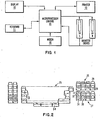
- FIG. 1 a typical interactive text processing system is illustrated in which the method of the present invention is advantageously employed.
- the major components of the system shown in FIG. 1 comprise the display device 10, the keyboard 11, the printer 13, the diskette storage devices 14L and 14R, and the microprocessor 15 which includes an internal memory for storing programs and data entered from the keyboard 11 or from the diskette storage devices 14L and 14R.
- Device 14 functions to store data on either a single- sided diskette at density Dl only or to store data on a two- sided diskette at double density D2.
- the 2S2D diskette can store four times the information stored on the lSlD diskette.
- a modem 16 is also shown in FIG. 1 and functions to permit the system to communicate with other similar text processing systems or to a data processing system.
- the system is activated by the operator turning on the power and inserting a basic text processing program diskette into one of the diskette drives 14L or 14R.
- the basic program diskette is an SlDl type diskette and, since an SlDl type diskette can be read by either device, either device may be used.
- the system automatically reads the appropriate sector of track 0 to initialize the system. This involves reading into the memory of the microprocessor the IPL program and programs for displaying menus and programs for causing the system to perform the tasks indicated by the menus or for directing the operator to other diskettes when the programs to accomplish the selected tasks are not on the operating diskette.
- a task selection menu is displayed to the operator on display device 10 listing the various tasks which the operator may perform by selecting one of the options on the displayed menu.
- the operator interacts with the display and keyboard such that the system receives the necessary information for the system to perform the selected task.
- the keyboard as shown in FIG. 2, is a conventional keyboard of an interactive text processing system and includes a standard character section 25, the function key section 26, and the cursor control key section 27.
- the function key section includes a column add key 28 and a row add key 29, while the cursor control section 27 includes the cursor right key 30, the cursor left key 31, the cursor up key 32, and the cursor down key 33.
- the column add key 28 and row add key 29 are dedicated function keys in that their function never changes. These keys are typamatic in that when they are held down their function is repeated automatically. If desired, the column add and the row add function key may be obtained from general purpose function keys whose personalities, characters or functions are established by the operator following a simple algorithm which assigns the desired function to a special key for a limited period of time as is well known the prior art.
- the operator selects the typing task by keying in an appropriate identifying character assigned to that option on the menu.
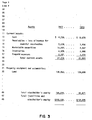
- program modules necessary. to implement typing tasks will be transferred into the system from the diskette and a sequence of one or more menus will be presented to the operator who enters requested data into the system, such as format data, on the column and row layout of the document to be created, as shown in FIG. 3 (step 40 in Fig. 4).
- the operator then enters the text entry mode by placing the system in document create mode (step 41) where the text beginning on line 9 of FIG. 3 is entered and displayed (step 42). The operator continues entering the data through all of the text data on line 18 (step 43). After the word "assets" is entered, the operator positions the cursor at a point relative to the first entry in column 1 (step 44). In the preferred embodiment, the cursor is positioned initially adjacent the first character in the first line (step 45), which in this case is the dollar sign. The next step in the process, as identified by block 46 in FIG. 4, is for the operator to depress and hold the column add key 28 in FIG. 2.
- the system adds the first entry of column 1 to the contents of an accumulator and stores the result back into the accumulator register which is displayed in a highlighted fashion in the total fields on line 18 of column 1 or the accumulator could be displayed at some convenient location, such as on the prompt line.
- the system then steps the cursor to the next entry in column 1, i.e., line 14, and that subtotal is. then displayed. As long as the operator holds the column add key depressed, successive entries in column 1 are accumulated and displayed. The operator releases the key when the cursor reaches line 18. The total of column 1 is displayed on line 18 and will be entered into the system by the operator pressing the Enter key 34 (step 47).
- step 48 When the concerned column is not the last one (step 48) the cursor is moved to the next column (step 49).
Landscapes
- Engineering & Computer Science (AREA)
- Theoretical Computer Science (AREA)
- General Engineering & Computer Science (AREA)
- Physics & Mathematics (AREA)
- General Physics & Mathematics (AREA)
- Computational Linguistics (AREA)
- General Health & Medical Sciences (AREA)
- Health & Medical Sciences (AREA)
- Audiology, Speech & Language Pathology (AREA)
- Artificial Intelligence (AREA)
- Human Computer Interaction (AREA)
- Document Processing Apparatus (AREA)
- Input From Keyboards Or The Like (AREA)
Abstract
A method is disclosed for assisting the operator of an interactive text processing system to add a list of numbers that have been entered into the system during the creation of a document (40-49). The method involves the operator positioning the cursor (44, 45) adjacent the first number in the sequence by operating the cursor move keys. The next step (46) involves the operator pressing and holding either the "column add" or the "row add" function key while watching the movement of the cursor from the first number in the sequence to succeeding numbers in the sequence until the cursor is positioned adjacent the last number in the sequence, at which time the function key is released. The last step (47) in the process is for the operator to press the Enter key which enters the total into the system for subsequent processing and displays the total in the appropriate location on the display. The provision in the system for the operator to total a sequence of displayed numbers by means of a function key which is made typamatic greatly enhances operator efficiency and system throughput.
Description
- This invention relates in " general to interactive text processing systems having a keyboard, a display screen, a printer and a microprocessor, and, in particular, to an improved method for generating and entering during creation of a document the arithmetic total of a displayed sequence of numbers disposed in either a row or a column.
- The background art has disclosed various interactive text processing systems. These systems generally comprise a keyboard, a display screen for displaying text that is entered into the system by an operator, a microprocessor, and an output printer. Generally, a program is supplied to the system from a diskette storage device and stored in the memory of the microprocessor.
- In text processing systems which are currently commercially available, the program provides several functions. In most systems, a portion of the program is devoted to what can be referred to as operator guidance, the objective being to make it as simple as possible for the operator to perform a desired task. In order to guide the operator, the program causes a series of "menus" to be sequentially displayed to the operator and prompts selection of one or more of the available options listed on the menus by the operator. Based on the sequence of selected options, the microprocessor enables other programs be accessed which control the interaction of the keyboard, display and storage devices to permit the completion or execution of the desired task in an interactive mode.
- In the creation of certain financial type documents, it is often necessary to enter in the text a column of numbers which require a total at the end. Alternately, the numbers may be arranged in a horizontal row with the total at the right side of the row..An example of the latter type of entry is a monthly financial spread sheet with a yearly total at the rightmost entry.
- The numbers are generally entered in the column format with the aid of tab stops, and some systems will automatically align the decimal points of separate numerical entries. At the end of the column, a space is left for the total to be inserted. In one known system, the totalizing of the column is achieved by the operator placing the text system in an arithmetic mode and positioning the cursor to the left of the first number in the column to be added by operating the cursor move keys in an appropriate manner. The operator then actuates the column add key which places the first number in an accumulator and displays it on the screen at the position of the total line. The operator then actuates the cursor down key to position the cursor adjacent the second number to be added. When the column add key is again activated, the second number is then added to the accumulator and again displayed on the total line. The operator continues the two-key step operation for each number in the column to be added until the last number is reached. When the total has been generated, the operator then presses the enter key and the total is stored for subsequent printout when the document is printed.
- The operator is involved in an identical process when the numbers are arranged in a.horizontal row, except that the cursor right move key is employed in place of the cursor down key, and the row add key is used in place of the column add key.
- While the above arrangements operate satisfactorily where the need to total columns and rows is somewhat limited, it has been found that the process can be tiring to an operator if a large quantity of additions are required. As a result, errors occur and operator efficiency is decreased.
- The present invention is directed to an improved method which is considered faster for the operator and involves less risk of error. The improved method is similar in concept to the function of certain keys which are made typamatic -- that is, they repeat automatically when the key is held depressed, generally at a rate that is considerably faster than could be achieved by single keystrokes. The present invention permits the operator to add a sequence of numbers by merely pressing and holding down a designated key, such as the column add key, which causes the cursor to be positioned to the next sequential number and the addition step to occur repeatedly as long as the key is depressed.
- It is, therefore, an object of the present invention to provide an improved method in an interactive text processing system for the operator to total a sequence of numbers.
- The present invention allows to simplify the method that an operator of an interactive text processing system employs to add a sequence of displayed numbers disposed either in a row or column arrangement.
- The foregoing and other objects, features and advantages of the invention will be apparent from the following more particular description of a preferred embodiment of the invention as illustrated in the accompanying drawings.
-
- FIG. 1 is a functional diagram of an interactive text processing system in which the present method may be employed;
- FIG. 2 is a view of a portion of the keyboard shown as a functional block in FIG. 1 in which the column add and row add keys are disposed;
- FIG. 3 is a copy of a typical document which can be created by the system shown in FIG. 1;
- FIG. 4 is a flow chart of the steps involved in the addition of the numbers in the columns shown in the document of FIG. 3.
- With reference to FIG. 1; a typical interactive text processing system is illustrated in which the method of the present invention is advantageously employed. The major components of the system shown in FIG. 1 comprise the
display device 10, thekeyboard 11, theprinter 13, the diskette storage devices 14L and 14R, and themicroprocessor 15 which includes an internal memory for storing programs and data entered from thekeyboard 11 or from the diskette storage devices 14L and 14R.Device 14 functions to store data on either a single- sided diskette at density Dl only or to store data on a two- sided diskette at double density D2. The 2S2D diskette,. therefore, can store four times the information stored on the lSlD diskette. Amodem 16 is also shown in FIG. 1 and functions to permit the system to communicate with other similar text processing systems or to a data processing system. - The system, as shown in FIG. 1, is activated by the operator turning on the power and inserting a basic text processing program diskette into one of the diskette drives 14L or 14R. The basic program diskette is an SlDl type diskette and, since an SlDl type diskette can be read by either device, either device may be used. The system automatically reads the appropriate sector of track 0 to initialize the system. This involves reading into the memory of the microprocessor the IPL program and programs for displaying menus and programs for causing the system to perform the tasks indicated by the menus or for directing the operator to other diskettes when the programs to accomplish the selected tasks are not on the operating diskette. After the system has been initialized, a task selection menu is displayed to the operator on
display device 10 listing the various tasks which the operator may perform by selecting one of the options on the displayed menu. The operator interacts with the display and keyboard such that the system receives the necessary information for the system to perform the selected task. The keyboard, as shown in FIG. 2, is a conventional keyboard of an interactive text processing system and includes astandard character section 25, thefunction key section 26, and the cursorcontrol key section 27. - The function key section includes a column add
key 28 and arow add key 29, while thecursor control section 27 includes the cursorright key 30, the cursor left key 31, the cursor upkey 32, and the cursor downkey 33. The column addkey 28 and row addkey 29 are dedicated function keys in that their function never changes. These keys are typamatic in that when they are held down their function is repeated automatically. If desired, the column add and the row add function key may be obtained from general purpose function keys whose personalities, characters or functions are established by the operator following a simple algorithm which assigns the desired function to a special key for a limited period of time as is well known the prior art. - The manner in which a key is made typamatic in a text processing system which includes a microprocessor to capture keystrokes is well-known in the art. The particular subroutines to achieve this function will depend on the instruction set of the microprocessor and the interaction of the processor with the keyboard and the other elements of the system.
- After the system has been IPLed and the initial task selection menu is displayed to the operator as a result of the basic text processing task programs having been read into the system, the operator selects the typing task by keying in an appropriate identifying character assigned to that option on the menu. As a result of selecting the typing task menu, program modules necessary. to implement typing tasks will be transferred into the system from the diskette and a sequence of one or more menus will be presented to the operator who enters requested data into the system, such as format data, on the column and row layout of the document to be created, as shown in FIG. 3 (
step 40 in Fig. 4). - Refering to Fig.3 and 4, the operator then enters the text entry mode by placing the system in document create mode (step 41) where the text beginning on line 9 of FIG. 3 is entered and displayed (step 42). The operator continues entering the data through all of the text data on line 18 (step 43). After the word "assets" is entered, the operator positions the cursor at a point relative to the first entry in column 1 (step 44). In the preferred embodiment, the cursor is positioned initially adjacent the first character in the first line (step 45), which in this case is the dollar sign. The next step in the process, as identified by
block 46 in FIG. 4, is for the operator to depress and hold the column addkey 28 in FIG. 2. The system adds the first entry ofcolumn 1 to the contents of an accumulator and stores the result back into the accumulator register which is displayed in a highlighted fashion in the total fields online 18 ofcolumn 1 or the accumulator could be displayed at some convenient location, such as on the prompt line. The system then steps the cursor to the next entry incolumn 1, i.e.,line 14, and that subtotal is. then displayed. As long as the operator holds the column add key depressed, successive entries incolumn 1 are accumulated and displayed. The operator releases the key when the cursor reachesline 18. The total ofcolumn 1 is displayed online 18 and will be entered into the system by the operator pressing the Enter key 34 (step 47). - When the concerned column is not the last one (step 48) the cursor is moved to the next column (step 49).
- A similar operation occurs in connection with the row add function key. The cursor is stepped horizontally and the number on the second line, i.e., row, in the successive columns are accumulated. In both column and row add functions when the number of entries that can be displayed is less than the number to be added, the system will automatically scroll vertically or horizontally until the operator releases the key or until the field for the total is reached. The accumulated subtotals are displayed at some convenient location in the same manner as the column add function.
- While the invention has been particularly shown and described with reference to a preferred embodiment thereof, it will be understood by those skilled in the art that various other changes by equivalent means may be made such as, for example, selecting other types of input/output devices for entering or displaying data, or other equivalent method steps without departing from the scope of the invention as defined by the claims.
Claims (5)
1. Method for effecting the addition of a sequence of numbers which are displayed on a display screen of an interactive text processing system by the operator, said numbers being stored in the memory of the system's microprocessor at memory locations which can be determined in accordance with the displayed position of the cursor on said screen, said method being characterized in that it comprises the steps of :
a. positioning said cursor adjacent the first number to be added;
b. depressing one predetermined key to cause said microprocessor to (1) add said first number to an accumulator, (2) step said cursor to said next number, (3) display the number in said accumulator, and (4) repeat steps 1-3 for each number in the sequence provided said one predetermined key is held depressed; and
c. releasing said key when said cursor is moved adjacent the last number in said sequence.
2. Method according to claim. 1 characterized in that said sequence of numbers is arranged in a columnar format, said cursor is stepped downwardly to the next line, and said number in said accumulator is displayed on said screen in a predetermined location.
3. Method according to claim 1 characterized in that said sequence of numbers is arranged in a horizontal way, said cursor is stepped horizontally to the next number in said sequence, and said number in said accumulator is displayed on said screen in a predetermined location.
4. Method according to any one of claims 1 to 3 further includes the step of pressing a second predetermined key to enter the displayed contents of said accumulator into said system.
5. Method according to any one of claims 1 to 4 characterized in that said first predetermined key is a dedicated function key.
Applications Claiming Priority (2)
| Application Number | Priority Date | Filing Date | Title |
|---|---|---|---|
| US311085 | 1981-10-13 | ||
| US06/311,085 US4520457A (en) | 1981-10-13 | 1981-10-13 | Key-controlled method for invoking automatic row and column addition in an interactive text processing system |
Publications (2)
| Publication Number | Publication Date |
|---|---|
| EP0076931A2 true EP0076931A2 (en) | 1983-04-20 |
| EP0076931A3 EP0076931A3 (en) | 1984-04-18 |
Family
ID=23205332
Family Applications (1)
| Application Number | Title | Priority Date | Filing Date |
|---|---|---|---|
| EP82108523A Ceased EP0076931A3 (en) | 1981-10-13 | 1982-09-16 | Key-controlled method for invoking automatic row and column addition in an interactive text processing system |
Country Status (3)
| Country | Link |
|---|---|
| US (1) | US4520457A (en) |
| EP (1) | EP0076931A3 (en) |
| JP (1) | JPS5876943A (en) |
Families Citing this family (14)
| Publication number | Priority date | Publication date | Assignee | Title |
|---|---|---|---|---|
| US4648037A (en) * | 1984-03-15 | 1987-03-03 | Metropolitan Life Insurance Company | Method and apparatus for benefit and financial communication |
| EP0211151B1 (en) * | 1985-05-30 | 1992-09-09 | International Business Machines Corporation | Procedure for controlling the order of editing cells in a spreadsheet |
| US5041967A (en) * | 1987-10-13 | 1991-08-20 | Bell Communications Research, Inc. | Methods and apparatus for dynamic menu generation in a menu driven computer system |
| JPH02155033A (en) * | 1988-12-07 | 1990-06-14 | Hitachi Ltd | Slip sort control method and data processor |
| JPH0427259U (en) * | 1990-06-27 | 1992-03-04 | ||
| US5765005A (en) * | 1992-06-01 | 1998-06-09 | Hitachi, Ltd. | Method for preparing form |
| US5778240A (en) * | 1992-12-04 | 1998-07-07 | Buchman; David Alan | Referential edit checking tabular form data |
| US5600314A (en) * | 1995-07-27 | 1997-02-04 | Oliveros; Ernesto V. | Data input device and correlative encoding technique |
| US5682151A (en) * | 1995-07-27 | 1997-10-28 | Oliveros; Ernesto Vidal | Data input device and correlative encoding technique |
| US5696504A (en) * | 1995-07-27 | 1997-12-09 | Oliveros; Ernesto Vidal | 4 bit based binary encoding technique |
| WO2002045321A2 (en) * | 2000-11-29 | 2002-06-06 | Unilogic, Inc. | A collaborative, fault-tolerant, scaleable, flexible, interactive real-time display and processing method and apparatus |
| US8255791B2 (en) | 2000-11-29 | 2012-08-28 | Dov Koren | Collaborative, flexible, interactive real-time displays |
| US7236979B2 (en) * | 2002-06-26 | 2007-06-26 | Microsoft Corporation | Menu-less system and method for interactively manipulating and reformatting data entered in a tabular format in a data processing application |
| US20080172597A1 (en) * | 2007-01-16 | 2008-07-17 | Siemens Medical Solutions Usa, Inc. | Data Field Referencing Text Processing System |
Family Cites Families (7)
| Publication number | Priority date | Publication date | Assignee | Title |
|---|---|---|---|---|
| JPS5087244A (en) * | 1973-12-05 | 1975-07-14 | ||
| JPS5177049A (en) * | 1974-12-27 | 1976-07-03 | Tokyo Electric Co Ltd | |
| US4053735A (en) * | 1975-08-07 | 1977-10-11 | Foudos James N | Assured-check computer-based bank credit disbursing system |
| US4241521A (en) * | 1976-09-13 | 1980-12-30 | Dufresne Armand F | Multi-symbol message communicator for a speechless, handicapped person |
| JPS5498549A (en) * | 1978-01-20 | 1979-08-03 | Fujitsu Ltd | Document totalizer |
| GB2029614B (en) * | 1978-08-14 | 1982-04-28 | Ibm | Data entry apparatus |
| US4198685A (en) * | 1978-11-13 | 1980-04-15 | Wang Laboratories, Inc. | Text editing system having flexible repetitive operation capability with keyboard interactive feature |
-
1981
- 1981-10-13 US US06/311,085 patent/US4520457A/en not_active Expired - Lifetime
-
1982
- 1982-09-16 EP EP82108523A patent/EP0076931A3/en not_active Ceased
- 1982-10-13 JP JP57178618A patent/JPS5876943A/en active Granted
Also Published As
| Publication number | Publication date |
|---|---|
| JPH0261059B2 (en) | 1990-12-19 |
| EP0076931A3 (en) | 1984-04-18 |
| JPS5876943A (en) | 1983-05-10 |
| US4520457A (en) | 1985-05-28 |
Similar Documents
| Publication | Publication Date | Title |
|---|---|---|
| US4520457A (en) | Key-controlled method for invoking automatic row and column addition in an interactive text processing system | |
| US4417322A (en) | Report generation control system for text processing machines | |
| US5704029A (en) | System and method for completing an electronic form | |
| JPH04246791A (en) | Survey data collection and analysis system | |
| Griffith | SPSS for Dummies | |
| US5982365A (en) | System and methods for interactively generating and testing help systems | |
| JPH04252351A (en) | Computing apparatus | |
| Startz | Eviews illustrated | |
| JPS5856191A (en) | Adjustment of margin between text columns | |
| US4556954A (en) | Method for displaying selected text processing task options corresponding to the contents of the combined program diskette | |
| EP0197091A1 (en) | Data entry terminal and process | |
| US4435778A (en) | Method for editing spatially related data in an interactive text processing system | |
| US5189731A (en) | Character processing system having editing function | |
| US4934851A (en) | Text processing system including plural text and corresponding memories | |
| JPS5929892B2 (en) | Display method of data input device | |
| GB1036116A (en) | Business machine | |
| JPH07175870A (en) | Form creation method | |
| EP0288262B1 (en) | Character processing system having editing function | |
| EP0786729B1 (en) | Portable calculator | |
| JPH0149988B2 (en) | ||
| JPS6051128B2 (en) | Search data input method | |
| JPS6043730A (en) | document layout display device | |
| Lindgaard et al. | Improving user performance | |
| EP0094515B1 (en) | Method in word processing system for queuing cursored pages of a document | |
| Scott | Automatic calculation of specific activities from liquid scintillation counter data using a desk-top computer |
Legal Events
| Date | Code | Title | Description |
|---|---|---|---|
| PUAI | Public reference made under article 153(3) epc to a published international application that has entered the european phase |
Free format text: ORIGINAL CODE: 0009012 |
|
| AK | Designated contracting states |
Designated state(s): DE FR GB |
|
| 17P | Request for examination filed |
Effective date: 19830823 |
|
| PUAL | Search report despatched |
Free format text: ORIGINAL CODE: 0009013 |
|
| AK | Designated contracting states |
Designated state(s): DE FR GB |
|
| STAA | Information on the status of an ep patent application or granted ep patent |
Free format text: STATUS: THE APPLICATION HAS BEEN REFUSED |
|
| 18R | Application refused |
Effective date: 19860502 |
|
| RIN1 | Information on inventor provided before grant (corrected) |
Inventor name: HAGLER, BRENDA JOAN Inventor name: REPASS, JAMES TERRY |