EP0087947A2 - Méthode et appareil de correction de formes - Google Patents
Méthode et appareil de correction de formes Download PDFInfo
- Publication number
- EP0087947A2 EP0087947A2 EP83301004A EP83301004A EP0087947A2 EP 0087947 A2 EP0087947 A2 EP 0087947A2 EP 83301004 A EP83301004 A EP 83301004A EP 83301004 A EP83301004 A EP 83301004A EP 0087947 A2 EP0087947 A2 EP 0087947A2
- Authority
- EP
- European Patent Office
- Prior art keywords
- magnification
- data
- shape
- reduction ratio
- correcting
- Prior art date
- Legal status (The legal status is an assumption and is not a legal conclusion. Google has not performed a legal analysis and makes no representation as to the accuracy of the status listed.)
- Withdrawn
Links
Images




Classifications
-
- G—PHYSICS
- G06—COMPUTING OR CALCULATING; COUNTING
- G06F—ELECTRIC DIGITAL DATA PROCESSING
- G06F3/00—Input arrangements for transferring data to be processed into a form capable of being handled by the computer; Output arrangements for transferring data from processing unit to output unit, e.g. interface arrangements
- G06F3/01—Input arrangements or combined input and output arrangements for interaction between user and computer
- G06F3/048—Interaction techniques based on graphical user interfaces [GUI]
- G06F3/0484—Interaction techniques based on graphical user interfaces [GUI] for the control of specific functions or operations, e.g. selecting or manipulating an object, an image or a displayed text element, setting a parameter value or selecting a range
- G06F3/04842—Selection of displayed objects or displayed text elements
-
- G—PHYSICS
- G06—COMPUTING OR CALCULATING; COUNTING
- G06F—ELECTRIC DIGITAL DATA PROCESSING
- G06F3/00—Input arrangements for transferring data to be processed into a form capable of being handled by the computer; Output arrangements for transferring data from processing unit to output unit, e.g. interface arrangements
- G06F3/01—Input arrangements or combined input and output arrangements for interaction between user and computer
- G06F3/03—Arrangements for converting the position or the displacement of a member into a coded form
- G06F3/033—Pointing devices displaced or positioned by the user, e.g. mice, trackballs, pens or joysticks; Accessories therefor
-
- G—PHYSICS
- G06—COMPUTING OR CALCULATING; COUNTING
- G06F—ELECTRIC DIGITAL DATA PROCESSING
- G06F3/00—Input arrangements for transferring data to be processed into a form capable of being handled by the computer; Output arrangements for transferring data from processing unit to output unit, e.g. interface arrangements
- G06F3/01—Input arrangements or combined input and output arrangements for interaction between user and computer
- G06F3/048—Interaction techniques based on graphical user interfaces [GUI]
- G06F3/0484—Interaction techniques based on graphical user interfaces [GUI] for the control of specific functions or operations, e.g. selecting or manipulating an object, an image or a displayed text element, setting a parameter value or selecting a range
- G06F3/04845—Interaction techniques based on graphical user interfaces [GUI] for the control of specific functions or operations, e.g. selecting or manipulating an object, an image or a displayed text element, setting a parameter value or selecting a range for image manipulation, e.g. dragging, rotation, expansion or change of colour
-
- G—PHYSICS
- G05—CONTROLLING; REGULATING
- G05B—CONTROL OR REGULATING SYSTEMS IN GENERAL; FUNCTIONAL ELEMENTS OF SUCH SYSTEMS; MONITORING OR TESTING ARRANGEMENTS FOR SUCH SYSTEMS OR ELEMENTS
- G05B2219/00—Program-control systems
- G05B2219/30—Nc systems
- G05B2219/36—Nc in input of data, input key till input tape
- G05B2219/36349—Compensation part program with form of tool, in memory
-
- Y—GENERAL TAGGING OF NEW TECHNOLOGICAL DEVELOPMENTS; GENERAL TAGGING OF CROSS-SECTIONAL TECHNOLOGIES SPANNING OVER SEVERAL SECTIONS OF THE IPC; TECHNICAL SUBJECTS COVERED BY FORMER USPC CROSS-REFERENCE ART COLLECTIONS [XRACs] AND DIGESTS
- Y02—TECHNOLOGIES OR APPLICATIONS FOR MITIGATION OR ADAPTATION AGAINST CLIMATE CHANGE
- Y02P—CLIMATE CHANGE MITIGATION TECHNOLOGIES IN THE PRODUCTION OR PROCESSING OF GOODS
- Y02P90/00—Enabling technologies with a potential contribution to greenhouse gas [GHG] emissions mitigation
- Y02P90/02—Total factory control, e.g. smart factories, flexible manufacturing systems [FMS] or integrated manufacturing systems [IMS]
Definitions
- This invention relates to a shape correction method and apparatus employing a coordinate input device. More particularly, but not necessarily exclusively, the invention relates to a shape correction method and apparatus well-suited for application to the creation of numerical control data.
- a method of shape correction employing coordinate input means comprising the steps of:
- an apparatus for shape correction employing coordinate input means, the apparatus being adapted and arranged to employ a method of operation comprising the steps of:
- an apparatus for shape correction employing coordinate input means, the apparatus being adapted and arranged to employ a method of operation comprising the steps of:
- an apparatus for shape correction having coordinate input means, comprising:
- NC data is created by digitizing directly the dimensions of the object being measured or the positions of prescribed points, and feeding the digitized quantities into an NC data creating apparatus. Since the object being measured may enlarge or shrink in size, however, the NC data created will include an error unless a correction is applied whenever such a change in article size takes place.
- a drawing (the object being measured) which appears on, say, a blueprint or fabric will have a degree of shrinkage which, depending upon the properties of the paper or fabric, will not be
- An embodiment of the present invention may provide a novel method and apparatus capable of applying an accurate shape correction for an object being measured even if the object has a different degree of shrinkage along each axis thereof.
- An embodiment of the present invention may provide a method and apparatus capable of processing a shape, which appears on a drawing, in accordance with the actual size of the original, by using shrinkage or reduction ratios and the magnification of the object being measured, relative to the original.
- An embodiment of the invention may provide a method and apparatus for shape correction characterized by specifying a shape through designating a plurality of points on an object being measured, entering a reduction ratio for each axis of the object, and correcting the shape on the basis of each reduction ratio. Further, in addition to the reduction ratios, a magnification of the object may be relative to the original thereof / entered and used along with reduction ratios to allow correction of the shape in a highly accurate manner.
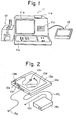
- the system includes the main body 11 of an apparatus for creating NC data.
- the main body 11 comprises a keyboard lla having a multiplicity of keys, a graphic display device llb, a magnetic tape unit llc for loading a magnetic tape cassette, a printer lld, and a control unit, not shown.
- the latter is constituted by a microcomputer which executes processing for the input and output of information, for digitizing and for the creation of NC data, all executed by means of a tablet described hereinbelow, based on a system program stored previously in memory means such as a ROM (read-only memory).
- the mulitplicity of keys provided on the keyboard lla are for responding to prompts which appear on the system CRT, for designating system program loading, and for entering NC data.
- the graphic display device llb displays, in graphical form, coordinate values obtained by digitization of positions designated by the tablet, as well as input data, numerical values, NC data and various messages or prompts for conversational interaction with the operator.
- the magnetic tape unit llc is used to enter a system program into the main body of the NC data creating apparatus 11. By way of example, when using a tablet to enter coordinate values directly from a drawing and prepare NC data, the software (system program) for digitizing processing must be fed into the main body 11.
- Thrs is done by selecting"the magnetic tape cassette containing the digitizing program, and loading the cassette into the magnetic tape unit llc.
- the operator need only touch a load button on the keyboard lla after the cassette has been set in the tape unit llc.
- the printer lld is adapted to print out characters which appear on the screen of the graphic display device llb, data punched in a paper tape, described later, and information which has been written into the loaded magnetic tape.
- the system also includes a paper tape reader/puncher 12 for preparing an NC tape by punching a paper tape with perforations indicative of the NC data prepared by main body 11, and for reading NC or other data which has already been punched into an NC tape.
- the system tablet designated at 13, comprises a board which uses the principle of electromagnetic induction to enter data. By relying upon a coordinate designating device such as a cursor unit or stylus pen as means for designating coordinates, the tablet 13 is operable to input positional coordinates from a drawing laid on the tablet surface, these coordinates being fed into the main body 11 as an input thereto.
- the perspective view of Fig. 2 shows the external appearance of the tablet 13 in greater detail.
- the tablet 13 comprises a tablet main body or board 13a, a tablet cover 13b, a cursor unit 13c serving as the coordinate designating device, a stylus pen 13d, a buzzer 13e, a group of lamps l3f indicating, e.g., coordinate input mode and introduction of power, an input/output connector for connecting the tablet 13 to the main body 11, a power unit 13h for supplying the table body 13a with D.C. power, an A.C. cable 13i for connecting the power unit 13h to an A.C. source, a D.C. cable 13j for the connection between the tablet body and power unit, and a pen stand 13m for holding the stylus pen 13 when not in use.
- the cursor unit I3c.or stylus pen 13d is used to enter coordinate and other data.
- the details of the cursor unit 13c are illustrated in the enlarged view of Fig. 3, in which a top view of the cursor unit is shown.
- the cursor unit 13c has a main body CSB, first and second switches SWl, SW2, a position reader PR having a cross-hair arrangement, a connector CNT and a cable CNT leading from the connector CNT to the main body CSB.
- a position reader PR having a cross-hair arrangement
- the connector CNT and a cable CNT leading from the connector CNT to the main body CSB.
- the intersection Pc of the cross hairs provided on the position reader PR are aligned with the desired point on a drawing laid on the tablet body, followed by depressing the first switch SW1 or second switch SW2.
- FIG. 4 A flowchart for describing the general features of an N C data creation method is depicted in Fig. 4.
- the method may be broadly classified into operations of preprocessing, data input, NC data editing and data output. Reference will now be had to Fig. 4 to describe the general features of NC data creation and output.
- the operator sets the magnetic tape cassette containing the prescribed software (system program) in the magnetic tape unit llc (Fig. 1) and touches the load button on the keyboard lla to store the system program in a main memory incorporated within main body 11 of the system.
- This causes the title (e.g. FAPT DIGITIZER) of the system program, as well as a prompt calling for pressing of an R-key, to appear on the screen of the graphic display device llb, as shown in Fig. 5.
- the keyboard lla includes an array of eight F-keys (F to F 7 ) which remain locked in the on state when depressed.
- the operator by setting the desired F-keys in the on (depressed) or off state, selects the operating mode of the tablet 13 as well as the output device to be used.
- Table I shown below, gives the function and meaning of each F-key, as well as the associated subject matter. It should be noted that the F-keys can be set prior to the system loading step if desired.
- the conditions which can be set are, e.g., machine tool parameters, input/output units (English or metric system, etc.) and special codes.
- the machine tool parameters may include the name of each axis of movement (X, Y, Z%), the minimum unit set for each axis of movement, and G-function instruction codes (indicating quick feed, linear cutting feed, clockwise and counter-clockwise circular interpolation, absolute command and incremental commands, etc.).
- the operator depresses the R 1 key to set various conditions for system program execution.
- the information shown in Fig. 6 will appear on the CRT screen of the graphic display device llb when the R 1 key is depressed.
- the operator may select one of the eight items numbered 01 to 08 shown in Fig. 6.
- a prompt appears on the display screen for each of various conditions to be set with regard to the entered item number.
- the entry of conditions with regard to the particular item number ends.
- the operator then depresses the NL key a number of times in succession to return the CRT screen to the display shown in Fig. 6, upon which he may set the conditions for a new item number.
- Table II shown below gives the meaning of each numbered item.
- Item No. 1 designates whether rapid-traverse motion, namely the path of a tool in the rapid-traverse mode, is to be displayed. Entering "RAPID" opposite this item number will cause the path to be displayed.
- Item Nos. 2 and 3 are for selecting print and display items, respectively. Prescribed outputs can be printed or displayed by entering the parameters shown in the left column of Table III, included hereinbelow. In order for an output to be capable of print out or display, it is necessary that either key F 2 or key F 3 of the eight F-keys be placed in the ON state.
- Item No. 5 is provided for setting a menu position (information input zone) on the tablet. Since the tablet has the.capability of identifying designated points, it can also be made to function as a switch if a portion of the tablet surface is partitioned into a plurality of areas and each area is assigned a specific meaning. For example, if a certain area is set to serve as an absolute command area, designating said area will cause the NC data creating apparatus to create NC data in the form of absolute values from then on.
- a design drawing is laid on the tablet surface and the position of a predetermined point on the drawing is entered by designating the point.
- a portion of the tablet surface (specifically an information input zone described below) which is to made to function as a switch or data input key is fixed in area or position, there will be occasions where said information input zone of the tablet surface is covered by the design drawing diagram because of the size of the design drawing or the type of design. In such case, the tablet will not be able to discriminate whether a certain designated area on the tablet surface is a point on the design or an area which is to function as a switch or data input key.
- the graphic itself will not overlay the switch function zone on the tablet surface, inconveniences can still be encountered because this part of the tablet surface may be covered by a blank portion of the drawing.
- any area on the tablet surface can be made to serve as an information input zone through use of Item No. 5 mentioned above.
- Item No. 5 mentioned above.
- FIG. 7 is useful in explaining how an information input zone is set
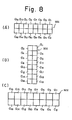
- F ig. 8 showing examples of menu configurations for designating the size of the information input zone, the boundaries of areas a l through a 16 constituting the zone, and the meaning of each area.
- a menu MN printed on, e.g., white paper or wax paper, may have a horizontal configuration composed of 16 areas a 1 through a 16 in a two-row by eight-column array, as depicted in Figs.
- Fig. 8A and 8C or a vertical configuration composed of 16 areas a l through a 16 in an eight-row by two-column array, as shown in Fig. 8B.
- the size of an information input zone depends upon the size of the menu and can be set at will.
- the menu MN in Fig. 8C for example, takes up more space than the menu in Fig. 8A.
- the numbers of rows and columns also can be set as desired.
- the menu will be of the horizontal type if x > y holds, and of the vertical type if x ⁇ y holds.
- the type of menu is decided by the magnitudes of x, y. If a horizontal menu is set in advance to have two rows and eight columns and a vertical menu is set in advance to have eight rows and two columns, by way of example, then, in the case of Fig. 7, x > y will hold (horizontal menu), and the horizontal and vertical dimensions x l , y', respectively, of each area will be: thereby specifying the boundaries of the areas a 1 through a 16 . This ends the processing for setting an information input zone.
- Item No. 6, constituting a feature of the present invention, is for designating scale.(magnification) and paper reduction ratio (also referred to as ratio of shrinkage) for read coordinate values.
- an object shown on a drawing is not drawn to actual size, i.e., small objects are drawn large and large objects small.
- paper length and width may enlarge or contract on the order of several percent during copying.
- Many copying machines moreover, have a magnification and reduction function for magnifying or reducing the information appearing on the drawing. The shape of an object appearing on a drawing must therefore be processed in accordance with the actual size of the original.
- the operator responds by entering the magnification shown on the drawing. For example, if the drawing states a magnification of "2X”, then the operator enters "2.0" from the keyboard.
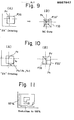
- the point adopted as the center of the scale (magnification) is that used when the origin, or reference point, of the NC data coordinate system is designated. Said point is entered by the cursor unit.
- Figs. 9 and 10 are useful in describing the center of the scale. Assume that a point Pr on a drawing specifying a magnification of "2X" (Fig.
- Item No. 7 is for entering an NC tape output code, allowing selection and entry of either an EIA code or ISO code.
- Such data may consist of (a) mode data such as point mode, linear cutting mode and circular arc cutting mode, and (b) point data relating to points on a drawing.
- mode data is entered by designating, through use of the cursor unit, a predetermined area on the information input zone established in step (4).
- Fig. 13 illustrates the details of a horizontal-type menu MN used in setting an information input zone, in which each area is assigned boundary lines and as well as a particular meaning.
- the areas a 12' a 13 , a 14' a 15' a 16 are mode selection areas.
- Area a 1 is a menu selection area which must always be designated before selecting a new mode.
- the areas a 12 , a 13 are areas for designating a point mode, and the areas a 14 , a 16 are for designating linear and circular arc cutting modes.
- the point mode is a mode in which points are entered one at a time to create cutting-feed/rapid-traverse NC data. Selecting the point mode makes it possible to enter points from a drawing by using the tablet. In other words, assume that the operator selects area a12 or a 13 to establish the point mode, places the cross-hair intersection P c of the cursor unit 13c on prescribed position on the tablet surface and presses the first switch SW1 or second switch SW2 (Fig. 3). This will create an item of NC data for rapid-traverse or cutting-feed movement from the previous position to the just indicated position.
- Fig. 14 shows an example of a graphic which is entered in the point mode by selecting area a l3 and designating a series of points on a drawing one after another using the cursor unit while selectively pressing switch SW1 or SW2 at each point.
- the dotted lines indicate the creation of NC data for rapid-traverse, while the solid lines indicate the creation of NC data for linear cutting.
- Each numerical value "1" indicates when the first switch SW1 was pressed, and each numerical value "2" shows when the second switch SW2 was pressed.
- the cutting mode is one in which an item of linear cutting data or circular arc cutting data is created on the basis of each successively entered point (coordinate values). Selecting the cutting mode of operation makes it possible to enter points from a drawing by using the tablet 13a. The following will serve as examples:
- FIG. 19 A block diagram of an apparatus for correcting shapes in accordance with the present invention is illustrated in Fig. 19.
- the apparatus includes a first register 101a for storing the X and Y coordinates (x ,y ) of the scale center P (Figs. 9 and 10), a second register 101b for storing the coordinates (x ,y ) of a point designated by the cursor unit of a tablet 102, a third register 101c for storing magnification (scale) M, a fourth register 101d for storing reduction ratio Rx (%) along the X axis, and a fifth register lOle for storing reduction ratio Ry (%) along the Y axis.
- an arithmetic unit 103 which performs the following operations, based on the data stored in the first through fifth registers lOla.through lOle, for correcting coordinate values (x p ,y p ), entered by the cursor unit, into coordinate values x p ', y p ', and for producing an output indicative of these corrected coordinate values:
- the output indicative of x ', y p ' is applied to an NC data creating unit 104 for creating NC data based on these coordinate values.
- the created NC data is stored in a data memory 105.
- accurate shape for example, data can be entered even if,/a drawing has a different reduction ratio along each axis thereof. This is made possible by correcting coordinate values in accordance with reduction ratios entered for each axis of the drawing.
- a method and apparatus for shape correction characterized by specifying a shape through designating a plurality of points on an object being measured, entering a reduction ratio for each axis of the object, and correcting the shape on the basis of each reduction ratio.
- Accurate shape data can be entered even if a drawing has a different reduction ratio along each axis thereof. This is made possible by correcting coordinate values in accordance with the reduction ratios entered for each axis of the drawing.
Landscapes
- Engineering & Computer Science (AREA)
- General Engineering & Computer Science (AREA)
- Theoretical Computer Science (AREA)
- Human Computer Interaction (AREA)
- Physics & Mathematics (AREA)
- General Physics & Mathematics (AREA)
- Numerical Control (AREA)
Applications Claiming Priority (2)
| Application Number | Priority Date | Filing Date | Title |
|---|---|---|---|
| JP31616/82 | 1982-02-27 | ||
| JP57031616A JPS58149580A (ja) | 1982-02-27 | 1982-02-27 | 形状補正方式 |
Publications (2)
| Publication Number | Publication Date |
|---|---|
| EP0087947A2 true EP0087947A2 (fr) | 1983-09-07 |
| EP0087947A3 EP0087947A3 (fr) | 1983-12-14 |
Family
ID=12336139
Family Applications (1)
| Application Number | Title | Priority Date | Filing Date |
|---|---|---|---|
| EP83301004A Withdrawn EP0087947A3 (fr) | 1982-02-27 | 1983-02-25 | Méthode et appareil de correction de formes |
Country Status (2)
| Country | Link |
|---|---|
| EP (1) | EP0087947A3 (fr) |
| JP (1) | JPS58149580A (fr) |
Cited By (1)
| Publication number | Priority date | Publication date | Assignee | Title |
|---|---|---|---|---|
| EP0131109A3 (fr) * | 1983-07-11 | 1986-11-05 | M.A.N.-ROLAND Druckmaschinen Aktiengesellschaft | Dispositif de détection et évaluation au moyen d'un densitomètre de témoins de couleur sur une feuille placée sur une table de mesure |
Families Citing this family (2)
| Publication number | Priority date | Publication date | Assignee | Title |
|---|---|---|---|---|
| JPH02148307A (ja) * | 1988-11-30 | 1990-06-07 | Kobe Steel Ltd | 工業用ロボットの教示データ作成装置 |
| US6914423B2 (en) | 2000-09-05 | 2005-07-05 | Cascade Microtech, Inc. | Probe station |
Family Cites Families (2)
| Publication number | Priority date | Publication date | Assignee | Title |
|---|---|---|---|---|
| US4042866A (en) * | 1974-09-20 | 1977-08-16 | Daihatsu Motor Company, Limited | Method of preparing NC tapes |
| JPS5719809A (en) * | 1980-07-10 | 1982-02-02 | Fanuc Ltd | Numerical control information generating system |
-
1982
- 1982-02-27 JP JP57031616A patent/JPS58149580A/ja active Pending
-
1983
- 1983-02-25 EP EP83301004A patent/EP0087947A3/fr not_active Withdrawn
Cited By (1)
| Publication number | Priority date | Publication date | Assignee | Title |
|---|---|---|---|---|
| EP0131109A3 (fr) * | 1983-07-11 | 1986-11-05 | M.A.N.-ROLAND Druckmaschinen Aktiengesellschaft | Dispositif de détection et évaluation au moyen d'un densitomètre de témoins de couleur sur une feuille placée sur une table de mesure |
Also Published As
| Publication number | Publication date |
|---|---|
| JPS58149580A (ja) | 1983-09-05 |
| EP0087947A3 (fr) | 1983-12-14 |
Similar Documents
| Publication | Publication Date | Title |
|---|---|---|
| EP0044192B1 (fr) | Procédé pour la préparation d'information pour une commande numérique | |
| US5177689A (en) | Cad/cam apparatus for enhancing operator entry of machining attributes and geometric shapes | |
| US4627003A (en) | Method and apparatus for creating numerical control data | |
| EP0078856B2 (fr) | Dispositif de commande numerique | |
| US4660148A (en) | Part program creation method | |
| EP0087948B1 (fr) | Procédé et appareil de création de données de programme de piéces | |
| EP0305537A1 (fr) | Procede de programmation automatique | |
| JPH07111646B2 (ja) | 部品形状入力方法 | |
| EP0089132A1 (fr) | Méthode et appareil de placement d'une zone d'entrée d'information d'un dispositif de lecture de coordonnées | |
| US4555590A (en) | Method and apparatus for entering graphics | |
| EP0088565A1 (fr) | Méthode et appareil de contrôle d'entrée d'information d'un dispositif de lecture de coordonnées | |
| JP2828271B2 (ja) | Cadシステムにおける形状生成方式 | |
| US4901250A (en) | Graphic communication processing apparatus capable of chaining graphic information with a small number of processes | |
| GB2309142A (en) | Drawing three-dimensional objects in computer-aided design systems | |
| EP0087947A2 (fr) | Méthode et appareil de correction de formes | |
| EP0087949B1 (fr) | Méthode et appareil de création de données de commande numérique | |
| EP0087945B1 (fr) | Méthode et appareil de placement d'un système de coordonneés | |
| EP0194316B1 (fr) | Procede de preparation de donnees nc | |
| EP0087943B1 (fr) | Méthode et appareil de placement d'origine d'un système de coordonnées | |
| US5632008A (en) | Method of and apparatus for navigation display | |
| JP2744081B2 (ja) | 測定支援装置 | |
| EP0393844A2 (fr) | Ordinateur avec des possibilités graphiques | |
| JPH0675243B2 (ja) | 数値制御用マシンプログラム作成装置 | |
| JP3000749B2 (ja) | 文字編集装置 | |
| JPH09147000A (ja) | Cad装置及び図面作成方法 |
Legal Events
| Date | Code | Title | Description |
|---|---|---|---|
| PUAI | Public reference made under article 153(3) epc to a published international application that has entered the european phase |
Free format text: ORIGINAL CODE: 0009012 |
|
| AK | Designated contracting states |
Designated state(s): CH DE FR GB LI |
|
| PUAL | Search report despatched |
Free format text: ORIGINAL CODE: 0009013 |
|
| AK | Designated contracting states |
Designated state(s): CH DE FR GB LI |
|
| 17P | Request for examination filed |
Effective date: 19840601 |
|
| STAA | Information on the status of an ep patent application or granted ep patent |
Free format text: STATUS: THE APPLICATION IS DEEMED TO BE WITHDRAWN |
|
| 18D | Application deemed to be withdrawn |
Effective date: 19850624 |
|
| RIN1 | Information on inventor provided before grant (corrected) |
Inventor name: KUNIO, TANAKA Inventor name: MASAKI, SEKI Inventor name: HAJIMU, KISHI |