EP0136409A2 - Méthode de création de pages de texte vidéo (Btx) et son dispositif d'entrée - Google Patents
Méthode de création de pages de texte vidéo (Btx) et son dispositif d'entrée Download PDFInfo
- Publication number
- EP0136409A2 EP0136409A2 EP84107231A EP84107231A EP0136409A2 EP 0136409 A2 EP0136409 A2 EP 0136409A2 EP 84107231 A EP84107231 A EP 84107231A EP 84107231 A EP84107231 A EP 84107231A EP 0136409 A2 EP0136409 A2 EP 0136409A2
- Authority
- EP
- European Patent Office
- Prior art keywords
- character
- input unit
- keys
- characters
- graphics
- Prior art date
- Legal status (The legal status is an assumption and is not a legal conclusion. Google has not performed a legal analysis and makes no representation as to the accuracy of the status listed.)
- Withdrawn
Links
Images


Classifications
-
- G—PHYSICS
- G06—COMPUTING OR CALCULATING; COUNTING
- G06F—ELECTRIC DIGITAL DATA PROCESSING
- G06F3/00—Input arrangements for transferring data to be processed into a form capable of being handled by the computer; Output arrangements for transferring data from processing unit to output unit, e.g. interface arrangements
- G06F3/01—Input arrangements or combined input and output arrangements for interaction between user and computer
- G06F3/02—Input arrangements using manually operated switches, e.g. using keyboards or dials
- G06F3/0202—Constructional details or processes of manufacture of the input device
- G06F3/0219—Special purpose keyboards
-
- G—PHYSICS
- G06—COMPUTING OR CALCULATING; COUNTING
- G06F—ELECTRIC DIGITAL DATA PROCESSING
- G06F3/00—Input arrangements for transferring data to be processed into a form capable of being handled by the computer; Output arrangements for transferring data from processing unit to output unit, e.g. interface arrangements
- G06F3/01—Input arrangements or combined input and output arrangements for interaction between user and computer
- G06F3/02—Input arrangements using manually operated switches, e.g. using keyboards or dials
- G06F3/0202—Constructional details or processes of manufacture of the input device
- G06F3/021—Arrangements integrating additional peripherals in a keyboard, e.g. card or barcode reader, optical scanner
Definitions
- the invention relates to a method for creating screen text (Btx) pages using the characters contained in the character tables for "oblique mosaic” and "line graphics”, with an input unit and a keyboard, the keys of which are actuated for the purpose of inputting a character.
- the invention also relates to the input unit for carrying out the method.
- Screen text - also referred to as Btx for short - is a procedure in which the user can use the postal telephone network to call up text information and graphics from a B tx center and display it on the screen of his television set.
- the screen text pages must of course be created by the providers beforehand and accessed via the Btx headquarters (or via a central computer) be ready.
- the subscriber and the Btx center can then "communicate" in dialogue in a simple question and answer form, so that the subscriber receives the specific information he or she desires.
- on-screen text pages by a provider - for example, large department stores whose assortment the on-screen text participant can have displayed on their television set - is particularly time-consuming and time-consuming if the on-screen text page is graphic as well as text Representations should contain.
- Editing i.e. entering or changing a screen text page, takes place at an editing location using the keyboard of an input unit.
- a monitor is also available at the editing station in order to optically track the structure of a screen text page and to make any corrections.
- the keyboard of the input unit corresponds to that of a typewriter.
- "A" key When the "A" key is pressed, for example, this letter appears immediately on the monitor screen, so that text information with alphanumeric characters (letters and numbers) can be easily created.
- a graphical representation is now to be built up when creating a screen text page, the following steps are necessary for the operator: first, the desired symbol is sought in one of the standardized tables. Then it must be noted in which row and row of the table the particular graphic symbol is located. Once this has been done, the operator has to go to another table and determine which alphanumeric character is assigned to the selected graphic symbol. After the operating mode of the input device has previously been switched to graphic characters, the key which bears the alphanumeric character which is assigned to the graphic characters can now be pressed. Is another graphic sign ge - assignment of the particular character to an alphanumeric character - - calls the process described above must be repeated.
- the invention is the object of creating a screen text page at Ver - application of the font from the tables "oblique mosaic” and “line graph” to simplify the operator and speed.
- the invention is intended to provide an input device with which the method for simplified input can be carried out.
- the operator must therefore press certain keys three times in succession in order to generate a graphic character on the screen (by the way, different keys do not always have to be pressed, it is also possible for one key to be pressed several times).
- the method according to the invention appears to be more cumbersome than the known input method, since only one key has to be pressed.
- the invention provides a significantly faster and easier way of entering graphic and line characters.
- the invention is based on the idea that the characters in question are not defined by an assigned alphanumeric character, but rather by the key operations themselves, in such a way that the local position of the keys to be operated on the input unit describes the respective character ".
- the characters from the "Oblique Mosaic" table can be defined and defined using three corner points.
- the operator then only needs to transfer the corner points of the character known to him to the keys, the three keys being actuated, the local position of which corresponds in each case to the local position of the mentioned corner points. It is therefore no longer necessary to first look for the desired character in the graphics table and then to enter the character in the same place in the alphanumeric table using the keyboard.
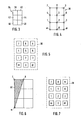
- a character is displayed graphically on the screen within a character field with two times three vertical fields or segments.
- the twelve corner or cross points formed in this way can be used as marking points in the sense of the invention.
- An input unit designed according to the invention for carrying out the described method therefore has a keypad consisting of twelve keys, each key corresponding to one of the marking points mentioned.
- the so-called number pad can expediently be used here, as is already provided for entering numbers in known input units.
- Such a keypad consists of four horizontal rows, each with three keys, so that there are a total of the twelve keys required here.
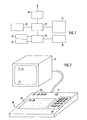
- 1 in the form of a block diagram for editing screen text pages comprises an input unit 10, which is connected via a decoder 12 to a monitor 14 on which the input Characters are visible.
- a connection to the telephone network is possible via a modem 16, e.g. store the completed screen pages in a screen text center for retrieval by participants in the screen text procedure.
- Modem 16 is therefore only required for online operation.
- 1 also includes a computer 18 with two drives 20 and 22 connected to the decoder 12.
- a second monitor 24 is connected to the computer 18.
- Stored screen text pages can be called up and displayed on a monitor via diskettes which can be inserted into the drives 20 or 22.
- the screen text pages created via the input unit 10 can be stored on the diskettes.
- the input unit 10 which, in a manner known per se, has a keypad 26 (only indicated schematically) for alphanumeric. Characters (letters, numbers and special characters). Furthermore, the input unit 10 has selection buttons 28 with which a standardized character table provided for the input can be selected. If, for example, the known table GO is selected (see FIG. 10), the basic state is switched on and the input unit 10 works in alpha mode.
- the keypad 26 can be used as is known from a typewriter. For example, when the key with the letter "P" is pressed, that letter appears on the screen 34 of the monitor 14.
- a cursor 32 (so-called “cursor") can be seen on the top left of the screen 34.
- This write mark 32 is the size of a character and is used to mark the respective writing position in a known manner. The cursor 32 thus indicates where the next character is entered.
- the input unit 10 also comprises a changeover switch 11, with which the input unit can be set to an operating mode in which a keypad 30 is used in the sense of the invention for the input of characters from the tables "oblique mosaic” and “line graphics” is what is explained in more detail below.
- FIGS. Fig. 3 shows the conventional in teletext character field 36, which löft to divide in two vertical rows of three total six segments 38, 4 0, 42, 44, 46 and 48.
- the maximum size of the respective character is determined by the character field 36.
- the previously selected designations of the marking points correspond to the usual standard of a keypad .30 according to FIG. 5, so that this keypad known per se can be used advantageously in the invention.
- the surprising and novel measure according to the invention creates a simple possibility of a clear definition of graphics and lines characters and thus a simplified input by the operator.
- FIG. 6 shows a known character 50 from the "oblique mosaic” table (see FIG. 11, left column, 11th character from above) as an example. This sign can be marked by its corner points. As illustrated in FIG. 7 by the keys highlighted with thick lines, the keys “7", “8", and “ * " are actuated to represent the character 50. The keys of the keypad 30 mentioned can be operated in any order.
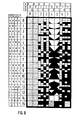
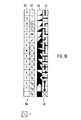
- FIGS. 8 and 9 show standardized character sets in the form of tables for illustration.
- the four left columns on the left margin and the three upper columns on the top margin can be disregarded here.
- the two vertical columns “4” and “5”, which represent the character table 52 for “oblique mosaic”, are of importance in the context of the invention.
- FIG. 9 reference is made to the vertical columns "4", "5", “6” and “7”, which show the character table 54 with the characters of the line graphics and oblique mosaic.
- the two columns “6” and “7” show the inverse characters to those according to the columns "4" and "5" in FIG. 8.
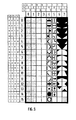
- FIG. 10 shows two character sets 56 (tables GO and G2; alphanumeric characters) and 58 (tables G1 and G3; graphic and line characters). This figure can be used to explain the cumbersome and time-consuming input procedure for graphics and line characters when the graphics are input using alphanumeric keys.
- the graphic and line characters are each assigned a threefold entry via the keypad 30, in such a way that the operator can immediately enter the respective character without much deliberation, because the characters are marked or defined by their corner points.
- FIG. 10 The example explained with reference to FIG. 10 is used again, where the key with the letter "R" had to be pressed to enter the mosaic character.
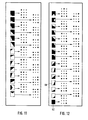
- the associated mosaic symbol 60 is shown in FIG. 12.
- an arrow now points to the associated keypad for each character (see keypad 30 in FIG. 5), the keys being here for simplicity are symbolized by crosses.
- a circle around a cross indicates that this key must be pressed. If there are two circles around a cross, the corresponding key must be pressed twice in succession (ent speaking in three circles).
- 15 and 16 are based on the consideration of the second upper row (keys “4", “5" and “6” for thin horizontal lines) and the second row for the thick transverse lines (buttons “1 ",” 2 “and” 3 ") to use.
- 16 and 68 in F is made to the numeral 67 in Fig. Ig. 15 pointed out.
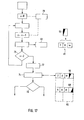
- the identification signal associated with the pressed key - that is, a marking point as shown in FIG. 4 - is placed in a buffer 82.
- the buffer 82 has three memory locations here, and it is assumed that the "7" key was pressed first when entering. The first memory location of the buffer 82 is then occupied with the identification signal assigned to the "7" key.
- the next step is to check the number of be pressed buttons.
- the memory content of the buffer 82 is fed to a sorter 72.
- the entered identification commands are sorted in a correct order. It is in fact irrelevant when entering via the keypad itself, in which order the three keys are pressed.
- the sorter 72 is followed by a comparator 74 which compares the sorted memory content of the buffer 82 with the table located in a memory 80.
- the assignments according to FIGS. 11-16 are stored in the memory 80 in the form of a table.
- the comparator 74 recognizes in the memory 80 that the graphic characters 50 assigned to the three keys "7", “8" and " * ". As indicated by the diamond 78, the character 50 is output after recognition and on the Screen shown. In the event that the operator made an incorrect entry, that is to say three buttons were pressed, none of which Characters are assigned, no recognition can take place. In this case, "Error" appears on the screen, e.g. B. in the form of an inverted question mark.
- the character 60 from FIG. 12 is also included in the table shown. If the "6", "0" and "#" keys were pressed - in any order - the character 60 would be displayed on the monitor screen.
Landscapes
- Engineering & Computer Science (AREA)
- General Engineering & Computer Science (AREA)
- Theoretical Computer Science (AREA)
- Human Computer Interaction (AREA)
- Physics & Mathematics (AREA)
- General Physics & Mathematics (AREA)
- Input From Keyboards Or The Like (AREA)
Applications Claiming Priority (2)
| Application Number | Priority Date | Filing Date | Title |
|---|---|---|---|
| DE3331520 | 1983-09-01 | ||
| DE3331520A DE3331520A1 (de) | 1983-09-01 | 1983-09-01 | Verfahren zum erstellen von bildschirmtext (btx)- seiten und eingabeeinrichtung dazu |
Publications (1)
| Publication Number | Publication Date |
|---|---|
| EP0136409A2 true EP0136409A2 (fr) | 1985-04-10 |
Family
ID=6207971
Family Applications (1)
| Application Number | Title | Priority Date | Filing Date |
|---|---|---|---|
| EP84107231A Withdrawn EP0136409A2 (fr) | 1983-09-01 | 1984-06-23 | Méthode de création de pages de texte vidéo (Btx) et son dispositif d'entrée |
Country Status (3)
| Country | Link |
|---|---|
| EP (1) | EP0136409A2 (fr) |
| DE (1) | DE3331520A1 (fr) |
| ZA (1) | ZA846860B (fr) |
-
1983
- 1983-09-01 DE DE3331520A patent/DE3331520A1/de not_active Withdrawn
-
1984
- 1984-06-23 EP EP84107231A patent/EP0136409A2/fr not_active Withdrawn
- 1984-08-31 ZA ZA846860A patent/ZA846860B/xx unknown
Also Published As
| Publication number | Publication date |
|---|---|
| DE3331520A1 (de) | 1985-04-18 |
| ZA846860B (en) | 1985-06-26 |
Similar Documents
| Publication | Publication Date | Title |
|---|---|---|
| DE3629104C2 (fr) | ||
| DE2818974A1 (de) | Datenstation fuer datenverarbeitungsanlagen | |
| DE3134282A1 (de) | Verfahren zur darstellung ideografischer zeichen und vergleichbarer graphiken | |
| DE3112958A1 (de) | "tastenfeld mit signalaufbereitungsschaltung fuer elektrische geraete" | |
| DE3400093C2 (fr) | ||
| DE3148685A1 (de) | Verfahren zur aenderung des zeichenvorrates einer ideografischen schreibmaschine | |
| DE3233630C2 (fr) | ||
| DE3209187A1 (de) | Verfahren zur darstellung eines textes auf einer einzeiligen anzeigevorrichtung eines texterstellungsgeraetes | |
| DE2213953C3 (de) | Schaltungsanordnung zum Darstellen von Zeichen auf dem Bildschirm eines Sichtgerätes | |
| DE3142138A1 (de) | Verfahren zur eingabe chinesischer zeichen sowie vorrichtung zur durchfuehrung des verfahrens | |
| EP0044930B1 (fr) | Dispositif de traitement du texte ayant un dispositif indicateur | |
| DE2103480A1 (de) | Dateneingabevorrichtung fur Daten verarbeitungsanlagen | |
| DE3151357C2 (de) | Einrichtung zum Steuern der Bewegung eines Cursors | |
| DE2558362A1 (de) | Bildanzeigegeraet | |
| DE2006672B2 (de) | Datensichtgerät | |
| CH493045A (de) | Anlage zur Darstellung von Daten | |
| DE2029710A1 (de) | Anzeigevorrichtung für an diskreten Adressenplätzen eines Bildschirms erscheinende Zeichen | |
| EP0136409A2 (fr) | Méthode de création de pages de texte vidéo (Btx) et son dispositif d'entrée | |
| DE3042145A1 (de) | Korrektursteuerung in textbearbeitungsgeraeten | |
| EP0990218B1 (fr) | Procede de saisie et de lecture selectives d'une chaine de signes | |
| EP0262548B1 (fr) | Méthode et dispositif d'affichage de textes munis de codes de commande y appartenant | |
| DE3725194A1 (de) | Wortprozessor | |
| DE2743790C2 (de) | Mikroprozessorgesteuertes Bildschirmgerät | |
| EP0115047B1 (fr) | Procédé et dispositif de marquage d'éléments de texte sur une unité d'affichage | |
| EP0116867A2 (fr) | Méthode et dispositif d'affichage de textes sur l'écran d'un terminal de traitement de textes |
Legal Events
| Date | Code | Title | Description |
|---|---|---|---|
| PUAI | Public reference made under article 153(3) epc to a published international application that has entered the european phase |
Free format text: ORIGINAL CODE: 0009012 |
|
| AK | Designated contracting states |
Designated state(s): AT CH DE LI |
|
| RTI1 | Title (correction) | ||
| STAA | Information on the status of an ep patent application or granted ep patent |
Free format text: STATUS: THE APPLICATION IS DEEMED TO BE WITHDRAWN |
|
| 18D | Application deemed to be withdrawn |
Effective date: 19881231 |
|
| RIN1 | Information on inventor provided before grant (corrected) |
Inventor name: ALTMANN, ALBRECHT, ING.-GRAD. Inventor name: HOFFMANN, HEINZ, ING.-GRAD. |