EP0220386A2 - Système de communication en milieu médical - Google Patents
Système de communication en milieu médical Download PDFInfo
- Publication number
- EP0220386A2 EP0220386A2 EP86110056A EP86110056A EP0220386A2 EP 0220386 A2 EP0220386 A2 EP 0220386A2 EP 86110056 A EP86110056 A EP 86110056A EP 86110056 A EP86110056 A EP 86110056A EP 0220386 A2 EP0220386 A2 EP 0220386A2
- Authority
- EP
- European Patent Office
- Prior art keywords
- screen
- items
- operator
- message
- set forth
- Prior art date
- Legal status (The legal status is an assumption and is not a legal conclusion. Google has not performed a legal analysis and makes no representation as to the accuracy of the status listed.)
- Withdrawn
Links
Images


Classifications
-
- G—PHYSICS
- G06—COMPUTING OR CALCULATING; COUNTING
- G06F—ELECTRIC DIGITAL DATA PROCESSING
- G06F3/00—Input arrangements for transferring data to be processed into a form capable of being handled by the computer; Output arrangements for transferring data from processing unit to output unit, e.g. interface arrangements
- G06F3/01—Input arrangements or combined input and output arrangements for interaction between user and computer
- G06F3/048—Interaction techniques based on graphical user interfaces [GUI]
- G06F3/0487—Interaction techniques based on graphical user interfaces [GUI] using specific features provided by the input device, e.g. functions controlled by the rotation of a mouse with dual sensing arrangements, or of the nature of the input device, e.g. tap gestures based on pressure sensed by a digitiser
- G06F3/0489—Interaction techniques based on graphical user interfaces [GUI] using specific features provided by the input device, e.g. functions controlled by the rotation of a mouse with dual sensing arrangements, or of the nature of the input device, e.g. tap gestures based on pressure sensed by a digitiser using dedicated keyboard keys or combinations thereof
- G06F3/04895—Guidance during keyboard input operation, e.g. prompting
-
- G—PHYSICS
- G16—INFORMATION AND COMMUNICATION TECHNOLOGY [ICT] SPECIALLY ADAPTED FOR SPECIFIC APPLICATION FIELDS
- G16H—HEALTHCARE INFORMATICS, i.e. INFORMATION AND COMMUNICATION TECHNOLOGY [ICT] SPECIALLY ADAPTED FOR THE HANDLING OR PROCESSING OF MEDICAL OR HEALTHCARE DATA
- G16H40/00—ICT specially adapted for the management or administration of healthcare resources or facilities; ICT specially adapted for the management or operation of medical equipment or devices
- G16H40/20—ICT specially adapted for the management or administration of healthcare resources or facilities; ICT specially adapted for the management or operation of medical equipment or devices for the management or administration of healthcare resources or facilities, e.g. managing hospital staff or surgery rooms
-
- G—PHYSICS
- G16—INFORMATION AND COMMUNICATION TECHNOLOGY [ICT] SPECIALLY ADAPTED FOR SPECIFIC APPLICATION FIELDS
- G16H—HEALTHCARE INFORMATICS, i.e. INFORMATION AND COMMUNICATION TECHNOLOGY [ICT] SPECIALLY ADAPTED FOR THE HANDLING OR PROCESSING OF MEDICAL OR HEALTHCARE DATA
- G16H40/00—ICT specially adapted for the management or administration of healthcare resources or facilities; ICT specially adapted for the management or operation of medical equipment or devices
- G16H40/60—ICT specially adapted for the management or administration of healthcare resources or facilities; ICT specially adapted for the management or operation of medical equipment or devices for the operation of medical equipment or devices
- G16H40/67—ICT specially adapted for the management or administration of healthcare resources or facilities; ICT specially adapted for the management or operation of medical equipment or devices for the operation of medical equipment or devices for remote operation
Definitions
- This invention relates generally to communication systems and more particularly to a patient care system for use in hospitals and other patient care environments to provide a means for a highly efficient multiple-message and information communication facility.
- Such systems include a main facility computer with communication terminals located throughout the facility at strategic locations. For example, there may be two or three nursing stations on each floor of a hospital with each station having a communication terminal and being responsible for the care and treatment of a predetermined number of patients in the immediate area. Additionally, each specified area, such as radiology, pharmacy, laboratory and nutrition, may have a separate terminal by which communications and test results may be sent to and/or received from any other specialized area or nursing station terminal.
- an object of the present invention to provide an improved patient care communication system which is menu driven for maximum user friendliness and which couples a general message transmission facility with a multiple selection of destinations, patients, work-to-be- done, and/or common message text displays or menus to substantially reduce the need for repetitive typing of the same input data in a patient care program utilized by hospitals and other patient care facilities.
- a message concerning one or a plurality of patients selected from a screen census can be transmitted selectively to a number of different departments or units within the hospital concerning work to be performed with respect to those patients.
- a work-list-oriented message including worklist items selected from a menu can be sent to selected units with respect to particular patients.
- the present invention as disclosed herein, is shown in a patient care operating environment, although the invention may be applied in various other fields of activity to effect more efficient and less time consuming communications among groups of users of computer-related communications and data processing equipment.
- a typical patient care facility includes many different functional areas such as a plurality of nursing units each with the responsibility for a number of patients, various laboratories and analysis areas such as blood analysis, and x-ray, together with specialized areas such as intensive care and coronary care.
- the present invention may be implemented in a system which includes a communications station at each of these locations.
- a communications station would include a keyboard for entering data along with a display screen and a printer.
- the terminals may be so called “intelligent terminals" tied together by a network with a central computer for information processing or so called “dumb terminals" which totally rely on and are connected together by means of a central computer system.
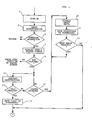
- the computer system is programmed in accordance with the flow charts illustrated in the attached figures to accomplish the communication of a common message referencing a plurality of patients to a number of predetermined addressees or to send worklist related messages to various units also referencing a plurality of patients in such units.
- the terminal operator is assumed to already be "on-line", i.e., the user has already logged onto the system and entered a password which is automatically checked before the user is authorized to continue processing information on his particular terminal. That procedure is indicated in block 1 "SIGN ON” and block 3 "CHECK AUTHORIZATION" in Fig. 1. If the user does not have the proper sign-on procedure or does not have a valid password, the terminal is returned to the SIGN ON screen or may be directed to a HELP screen or other procedure required to effect proper initialization of the system terminal.
- the MASTER SCREEN generally displays a list of functions or operations available to the user which may be implemented by selecting the desired function. That selection process may be accomplished by means of keying in a number identified with the function on the screen or keying a program function ("PF") key, or by indicating the selected functions by using a light pen or any other input means generally known and available for such systems. Note: In the sample screens which follow, selection may be accomplished by a light pen or by typing. The "! does not appear on the screen but is shown to indicate an immediate computer response when the light pen is used. The "?" is used to indicate a delayed computer response and is used when more than one selection is desired on the screen. If typing a selection, the operator would type an "X" in the field delimited by a " ⁇ " and ">". Typically those delimiters are not displayed on the screen.
- a typical nursing UNIT SUPERVISOR MASTER screen is shown below:
- One of the functions on the MASTER screen is identified as "Send Patient-Oriented Message" (POM). If the Patient-Oriented Message function is not selected, the program will check the input to determine which function was selected on the master screen as indicated by the decision block 9. If the POM function has been selected, the program next displays the DESTINATION screen as indicated by block 11.
- POM Send Patient-Oriented Message
- the DESTINATION screen as shown below is also menu-driven and designed to have the user identify the DESTINATIONS to which the message is to be sent.
- the destination screen in the present example specifies an "All Destinations” input which, if selected by the user, will save all of the possible destinations in the destination file as addressees for the message to be sent as represented by blocks 13 and 15.
- the individual groups are identified as "Nursing Units", “Departments", and “other areas", and beside each group the user may select either an "All" or "Selected” input.
- the user may select that the message should go only to Dietary Unit and, therefore, would check the "Selected” block on the menu. That choice is indicated at decision block 17 in Fig. 1. If the user wishes the message to go only to a selected department, the user would identify only the "Selected” block corresponding to the "Departments" group. At that point the program would display the individual department units comprising that group as shown in block 19. It should be noted that the list of destinations may be displayed from an existing file of destinations or an individually coded screen format.
- the department group units may include the various departments in the hospital which perform a service such as testing and analysis required in the care of patients such as laboratory, pharmacy, radiology, nuclear medicine, dietary, physical therapy, respiratory therapy, cytopathology, and various others depending upon the particular hospital environment.
- a service such as testing and analysis required in the care of patients such as laboratory, pharmacy, radiology, nuclear medicine, dietary, physical therapy, respiratory therapy, cytopathology, and various others depending upon the particular hospital environment.
- a typical DEPARTMENT DESTINATIONS screen is shown below:
- the user may indicate only the Dietary department on the menu and the program would save only the dietary location as the addressee for the message to be sent.
- the program would determine if any other groups were identified at decision block 23. If other groups were selected, the program would return to display the individual units in the other groups for selection and save those addressees as appropriate. If no additional groups were selected, the program returns to the mainstream flow which is continued at the top of Fig. 2. At that point, the program displays a PATIENT CENSUS for the user to identify one or more patients to which the message relates.
- An exemplary LOCATION CENSUS screen is shown below:
- the Patient Census file is maintained when patients check into or out of the patient care facility and may be accessed by the terminals throughout the facility as needed.
- that data is also stored and accessible.
- the Patient Census screen is displayed at block 25, the user may identify, by key input or light pen input or otherwise, the patients to which the message applies.
- a loop is set up in the program to Collect and Save the identities of the selected patients together with room and bed numbers as appropriate, as indicated by block 27 and decision block 29. After all of the patient selections have been collected and saved in the program, a common message screen is displayed as shown in block 31 in Fig. 2.
- the COMMON MESSAGE screen as shown below, is designed to display a plurality of frequently occurring messages which are routinely sent and received during the normal operation of the patient care facility. It should be noted that the list of common messages may be displayed from an existing file of common messages or from an individually coded screen format.
- This screen is designed in accordance with the particular requirements of the patient care facility but may include common messages such as "DELAY BREAKFAST”, “DELAY LUNCH”, “DELAY DINNER”, “PROVIDE TRANSPORTATION”.
- the COMMON MESSAGE screen includes many common responses that are required to be sent in order to confirm that messages from other units have been received and have been acted upon.
- the COMMON MESSAGE screen includes common response and/or confirmation messages such as "PATIENTS PREPARED”, “SPECIMENS COLLECTED”, etc.
- each screen contains a function selection by which the user may exit at any time to return to the master menu in the event that there is no longer a need to send the message being prepared.
- the user would check the selection specified as "DELAY LUNCH” in order to advise the dietary department to delay lunch for the identified patients.
- the terminal operator can quickly and easily send an electronic message to "RESUME LUNCH” to the dietary department so that all of the patients returning to the nursing unit may enjoy a delicious and freshly prepared lunch at their convenience.
- Another example would allow the nursing unit to request that the transportation department take one or more specific patients to a specific department.
- This invention makes it very easy to compose these types of requests and provide hard-copy for the receiving destination.
- Still another use is for a nursing unit to use the invention to create a type of worklist by sending itself a message such as: typing BATHE THE FOLLOWING PATIENTS after selecting patients from the census display.
- the program Collects and Saves those messages as indicated in block 33 and then Displays those Common Messages at block 35 in a format which allows the user to input unique data or specific messages if required. If such specific messages are keyed in, the program Collects and Saves the total message at 37 and then determines the name of the Sender of the message at 39.
- the sender's identity is gleaned from the user file in the system unless the operator wishes to input another identification such as, for example, when one user is at a terminal in another department or unit.
- the program Collects and Assembles the selected patient data, Addressees and Total Message to Display to the user as shown in 41.
- the user can transmit the message as shown in decision block 43 at which time the message in total is transmitted to the selected addressees and automatically printed at those locations for proper handling as shown in block 45. If the message is not to be transmitted, the operator may make another selection by which the entire message may be cancelled and the user returned to the Main Menu screen.
- a typical PATIENT-ORIENTED MESSAGE screen which would include selected Addressees and referenced patients, together with selected common messages and keyed messages, is shown below:
- FIG. 3 and 4 Another example of the multi item message facility herein disclosed is illustrated with reference to Figs. 3 and 4 with respect to facilities required of departments in the patient care facility.
- Many such departments have a need to send what are known as "worklist-oriented messages" which relate more to services which must be performed by the departments in response to work orders placed by nurses or physicians in the facility.
- departments need to know what has to be accomplished in the next several hours or within a certain period of time in order to assign those work items to personnel to insure the timely performance of the service.
- the attending physician may require a blood sample analysis within one hour or immediately in emergency situations. In other cases where there is no immediate need, such analysis may be routinely accomplished in the normal time frame.
- the time requirement for sample analysis is critical and must be made known to the proper personnel and also the results of such analysis must be communicated to the appropriate station or terminal as soon as possible after they are known in order to determine or complete the most effective treatment program for the patient. Since the requirements for a department may differ from those of a nursing unit, normally the MASTER SCREEN for the department includes functions not found on the MASTER SCREEN for the nursing unit. One of the functions on the department MASTER MENU is designated "Send Worklist-Oriented Message" (WLO).
- WLO Send Worklist-Oriented Message
- Fig. 3 The processing associated with the selection of that function is illustrated in Fig. 3 and continued in Fig. 4.
- the "Sign On" process and DISPLAY OPERATOR MASTER SCREEN routines 51-57 are similar to those heretofore explained in connection with Fig. 1.
- a DESTINATIONS screen 51 is presented and the routine for identifying and saving the Addressees of the message to be created, as shown in block 63-73 of Fig. 3, correspond to those heretofore explained in connection with blocks 13-23 of Fig. 1.
- the program displays a screen entitled “TYPES OF WORKLISTS” as shown in block 75 of Fig. 4.
- the "Types of Worklist” items which are displayed on the WORKLIST screen include time-related items such as "Next Hour”, “Next Four Hours”, “Next Eight Hours”, “Today 7-3”, “Today 3-11”, “Today 11-7”, “Tomorrow”, etc. Other items available for selection on the menu include “Uncompleted Orders”, “Unverified Results”, “Verified Results”, etc.
- a typical WORKLIST TYPE screen for a clinical laboratory is shown below:
- the particular worklist for the selected type is displayed as indicated at block 77.
- physician orders are placed upon departments relative to the particular patients referenced, then that information is saved in a file which is recalled in connection with the display of the worklist for a selected type of worklist.
- the DEPARTMENT WORKLIST display for the particular type of worklist includes information such as the referenced patient and the particular item ordered, with each item representing a separate service required of a single patient. If more than one service is required of a patient, then there will be a corresponding number of items in the displayed worklist.
- a typical DEPARTMENT WORKLIST screen is shown below:
- All of the work items ordered by physicians with regard to particular patients are entered as separate items in the worklist. For example, the items designated "Within the Next Hour" were selected with the worklist "type". There may appear several requirements listed as separate items with regard to an individual patient. Patient Hahn, for example, may require both a blood analysis and an x-ray within the next hour and both of those items would be individually listed on clinical laboratory and radiology worklists, respectively. If the message were originating from the blood analysis lab, for example, the terminal user would select or identify the item designated as the blood analysis (CBC) for patient Hahn since that is the only worklist item to which his message relates.
- CBC blood analysis
- the program Collects and Saves the selected Worklist-Patient Items at block 79 and determines whether additional items have been selected at 81.
- a loop is included to process any additional items and when the list is complete and no additional items have been selected and unprocessed, the program Displays a MESSAGE INPUT SCREEN at block 83.
- the MESSAGE INPUT SCREEN allows the operator to key in particular messages related to the particular Worklist Item and patient selected. That input message is Collected and Saved as indicated in block 85 together with the addressees previously selected by the operator.
- the program then Collects and Assembles the selected Worklist-Patient Items together with the particular message keyed in at block 87 and displays a WORKLIST-ORIENTED MESSAGE screen as shown below.
- the operator may then "send" the message to the Addressees for Printing at the location(s) as indicated in blocks 89 and 91. Again, if the operator decides not to transmit the message, the program will return him to the MASTER DEPARTMENT SCREEN to select other functions or compose other messages as required.
Landscapes
- Engineering & Computer Science (AREA)
- Health & Medical Sciences (AREA)
- Business, Economics & Management (AREA)
- General Business, Economics & Management (AREA)
- Biomedical Technology (AREA)
- General Engineering & Computer Science (AREA)
- General Health & Medical Sciences (AREA)
- Medical Informatics (AREA)
- Primary Health Care (AREA)
- Public Health (AREA)
- Epidemiology (AREA)
- Theoretical Computer Science (AREA)
- Physics & Mathematics (AREA)
- General Physics & Mathematics (AREA)
- Human Computer Interaction (AREA)
- Medical Treatment And Welfare Office Work (AREA)
- Measuring And Recording Apparatus For Diagnosis (AREA)
- Management, Administration, Business Operations System, And Electronic Commerce (AREA)
- Digital Computer Display Output (AREA)
- Computer And Data Communications (AREA)
Applications Claiming Priority (2)
| Application Number | Priority Date | Filing Date | Title |
|---|---|---|---|
| US06/771,320 US5101476A (en) | 1985-08-30 | 1985-08-30 | Patient care communication system |
| US771320 | 2001-01-26 |
Publications (2)
| Publication Number | Publication Date |
|---|---|
| EP0220386A2 true EP0220386A2 (fr) | 1987-05-06 |
| EP0220386A3 EP0220386A3 (fr) | 1990-09-12 |
Family
ID=25091435
Family Applications (1)
| Application Number | Title | Priority Date | Filing Date |
|---|---|---|---|
| EP19860110056 Withdrawn EP0220386A3 (fr) | 1985-08-30 | 1986-07-22 | Système de communication en milieu médical |
Country Status (3)
| Country | Link |
|---|---|
| US (1) | US5101476A (fr) |
| EP (1) | EP0220386A3 (fr) |
| JP (1) | JPS6252653A (fr) |
Cited By (2)
| Publication number | Priority date | Publication date | Assignee | Title |
|---|---|---|---|---|
| FR2667709A1 (fr) * | 1990-10-05 | 1992-04-10 | Roney J Paul | Methodes de fonctionnement d'un terminal de ventilation de soins. |
| EP0314183A3 (fr) * | 1987-10-29 | 1992-05-20 | Sharp Kabushiki Kaisha | Système de recherche documentaire |
Families Citing this family (74)
| Publication number | Priority date | Publication date | Assignee | Title |
|---|---|---|---|---|
| US5760704A (en) * | 1992-04-03 | 1998-06-02 | Expeditor Systems | Patient tracking system for hospital emergency facility |
| US5371675A (en) * | 1992-06-03 | 1994-12-06 | Lotus Development Corporation | Spreadsheet program which implements alternative range references |
| US5319543A (en) * | 1992-06-19 | 1994-06-07 | First Data Health Services Corporation | Workflow server for medical records imaging and tracking system |
| US5748907A (en) * | 1993-10-25 | 1998-05-05 | Crane; Harold E. | Medical facility and business: automatic interactive dynamic real-time management |
| US5469353A (en) * | 1993-11-26 | 1995-11-21 | Access Radiology Corp. | Radiological image interpretation apparatus and method |
| US5633621A (en) * | 1995-05-30 | 1997-05-27 | Mcdonald; Michael S. | Evacuation assistance locator |
| US5974389A (en) * | 1996-03-01 | 1999-10-26 | Clark; Melanie Ann | Medical record management system and process with improved workflow features |
| US9619841B2 (en) | 1996-03-28 | 2017-04-11 | Integrated Claims Systems, Llc | Systems to assist in the creation, transmission, and processing of health insurance claims |
| US6003007A (en) * | 1996-03-28 | 1999-12-14 | Dirienzo; Andrew L. | Attachment integrated claims system and operating method therefor |
| US5987481A (en) * | 1997-07-01 | 1999-11-16 | Microsoft Corporation | Method and apparatus for using label references in spreadsheet formulas |
| US6339410B1 (en) | 1997-07-22 | 2002-01-15 | Tellassist, Inc. | Apparatus and method for language translation between patient and caregiver, and for communication with speech deficient patients |
| US6876991B1 (en) | 1999-11-08 | 2005-04-05 | Collaborative Decision Platforms, Llc. | System, method and computer program product for a collaborative decision platform |
| US20040260577A1 (en) * | 1999-11-15 | 2004-12-23 | Recare, Inc. | Electronic healthcare information and delivery management system with an integrated medical search architecture and capability |
| US8688474B2 (en) * | 2000-06-26 | 2014-04-01 | Epic Systems Corporation | Patient health record access system |
| US8050944B2 (en) * | 2000-09-20 | 2011-11-01 | Epic Systems Corporation | Intelligent patient visit information management and navigation system |
| US7251610B2 (en) * | 2000-09-20 | 2007-07-31 | Epic Systems Corporation | Clinical documentation system for use by multiple caregivers |
| US6988088B1 (en) | 2000-10-17 | 2006-01-17 | Recare, Inc. | Systems and methods for adaptive medical decision support |
| US20020055918A1 (en) * | 2000-11-08 | 2002-05-09 | Patrick Hlathein | Operating room resource management system incorporating an interactive, visual method for coordinating multiple, interdependent |
| CN1443329A (zh) * | 2000-11-22 | 2003-09-17 | 里科尔公司 | 记录医疗体检结果的系统和方法 |
| US20050107672A1 (en) * | 2000-11-22 | 2005-05-19 | Recare, Inc. | System and method for external input of disease management algorithm |
| US8301462B2 (en) | 2000-11-22 | 2012-10-30 | Catalis, Inc. | Systems and methods for disease management algorithm integration |
| US20090125322A9 (en) * | 2000-11-22 | 2009-05-14 | Recare, Inc. | Integrated virtual consultant |
| AU2002225739A1 (en) * | 2000-11-22 | 2002-06-03 | Recare, Inc. | Systems and methods for integrating disease management into a physician workflow |
| US6983423B2 (en) * | 2000-12-22 | 2006-01-03 | Epic Systems Corporation | Electronic system for collecting and communicating clinical order information in an acute care setting |
| US7275220B2 (en) * | 2000-12-22 | 2007-09-25 | Epic Systems Corporation | System and method for a seamless user interface for an integrated electronic health care information system |
| US20020138746A1 (en) * | 2001-03-23 | 2002-09-26 | Mark Buttner | Method of generating a secure output file |
| US20020138636A1 (en) * | 2001-03-23 | 2002-09-26 | Mark Buttner | Method for automatically mass generating personalized data report outputs |
| JP2005509312A (ja) | 2001-03-30 | 2005-04-07 | ヒル−ロム サービシーズ,インコーポレイティド | 病院のベッドとネットワークシステム |
| US20020165898A1 (en) * | 2001-05-03 | 2002-11-07 | Joe Duffy | Recipient-determined method for sharing tasks in an advanced electronic messaging/workflow system |
| US20030061073A1 (en) * | 2001-08-01 | 2003-03-27 | Khiang Seow | Method and system for displaying patient information |
| US20030154110A1 (en) * | 2001-11-20 | 2003-08-14 | Ervin Walter | Method and apparatus for wireless access to a health care information system |
| US20030130872A1 (en) * | 2001-11-27 | 2003-07-10 | Carl Dvorak | Methods and apparatus for managing and using inpatient healthcare information |
| US20030216945A1 (en) * | 2002-03-25 | 2003-11-20 | Dvorak Carl D. | Method for analyzing orders and automatically reacting to them with appropriate responses |
| US20030220816A1 (en) * | 2002-04-30 | 2003-11-27 | Andy Giesler | System and method for managing interactions between machine-generated and user-defined patient lists |
| US20030220821A1 (en) * | 2002-04-30 | 2003-11-27 | Ervin Walter | System and method for managing and reconciling asynchronous patient data |
| US20030220817A1 (en) * | 2002-05-15 | 2003-11-27 | Steve Larsen | System and method of formulating appropriate subsets of information from a patient's computer-based medical record for release to various requesting entities |
| US20040010422A1 (en) * | 2002-05-20 | 2004-01-15 | Cliff Michalski | Method and apparatus for batch-processed invoicing |
| US20040010465A1 (en) * | 2002-05-20 | 2004-01-15 | Cliff Michalski | Method and apparatus for exception based payment posting |
| US20030229515A1 (en) * | 2002-06-11 | 2003-12-11 | Syed Rizvi | Error free medical and surgical consent |
| US7979294B2 (en) * | 2002-07-31 | 2011-07-12 | Epic Systems Corporation | System and method for providing decision support to appointment schedulers in a healthcare setting |
| AU2003264044A1 (en) * | 2002-08-09 | 2004-02-25 | Recare, Inc. | Method and system for context-sensitive recognition of human input |
| US20040172306A1 (en) * | 2002-12-02 | 2004-09-02 | Recare, Inc. | Medical data entry interface |
| AU2003298751A1 (en) * | 2002-12-03 | 2004-06-23 | Recare, Inc. | Data structures for context based rule application |
| US20050002483A1 (en) * | 2003-07-03 | 2005-01-06 | Wilcox John Richardson | Apparatus and method for radiological image interpretation using different time zones |
| US20050071195A1 (en) * | 2003-09-30 | 2005-03-31 | Cassel David A. | System and method of synchronizing data sets across distributed systems |
| US8825502B2 (en) * | 2003-09-30 | 2014-09-02 | Epic Systems Corporation | System and method for providing patient record synchronization in a healthcare setting |
| US20060080140A1 (en) * | 2004-02-09 | 2006-04-13 | Epic Systems Corporation | System and method for providing a clinical summary of patient information in various health care settings |
| US20050234741A1 (en) * | 2004-04-16 | 2005-10-20 | Sumit Rana | Electronic appointment scheduling for medical resources |
| US8428968B2 (en) * | 2004-05-10 | 2013-04-23 | Epic Systems Corporation | Interactive system for patient access to electronic medical records |
| US20060004762A1 (en) * | 2004-05-20 | 2006-01-05 | Berning Ross A | Electronic release of information method and apparatus |
| US20050273363A1 (en) * | 2004-06-02 | 2005-12-08 | Catalis, Inc. | System and method for management of medical and encounter data |
| WO2005122042A2 (fr) * | 2004-06-02 | 2005-12-22 | Catalis, Inc. | Procede et systeme permettant de generer un bilan medical |
| US20060004605A1 (en) * | 2004-06-21 | 2006-01-05 | Epic Systems Corporation | System and method for a comprehensive interactive graphical representation of a health care facility for managing patient care and health care facility resources |
| US20050283387A1 (en) * | 2004-06-21 | 2005-12-22 | Epic Systems Corporation | System for providing an interactive anatomical graphical representation of a body for use in a health care environment |
| US20060029273A1 (en) * | 2004-08-03 | 2006-02-09 | Catalis, Inc. | Physician communication system |
| US20060031097A1 (en) * | 2004-08-09 | 2006-02-09 | Catalis, Inc. | Practice management system |
| US20060047554A1 (en) * | 2004-08-24 | 2006-03-02 | Steven Larsen | Rules based resource scheduling |
| US8725547B2 (en) * | 2004-08-24 | 2014-05-13 | Epic Systems Corporation | Utilization indicating schedule scanner |
| US20060053034A1 (en) * | 2004-09-08 | 2006-03-09 | Epic Systems Corporation | System and method for providing a real-time status for managing encounters in health care settings |
| US20060085381A1 (en) * | 2004-10-20 | 2006-04-20 | Epic Systems Corporation | Remote deployment access system and method |
| US20060117021A1 (en) * | 2004-11-29 | 2006-06-01 | Epic Systems Corporation | Shared account information method and apparatus |
| US7443303B2 (en) | 2005-01-10 | 2008-10-28 | Hill-Rom Services, Inc. | System and method for managing workflow |
| US8140370B2 (en) * | 2005-01-20 | 2012-03-20 | Epic Systems Corporation | System and method for reducing the steps involved in searching for available appointment times and scheduling appointments in a health care environment |
| US20080189132A1 (en) * | 2007-02-05 | 2008-08-07 | Matthew Minson | Automatic Hospital Bed Accounting System |
| US20110281597A1 (en) * | 2010-05-11 | 2011-11-17 | pomdevices, LLC | Aided construction of sms status messages to caregivers |
| US8681009B2 (en) | 2010-05-18 | 2014-03-25 | pomdevices, LLC | Activity trend detection and notification to a caregiver |
| US8890656B2 (en) | 2010-08-31 | 2014-11-18 | pomdevices, LLC | Mobile panic button for health monitoring system |
| US9503902B1 (en) | 2014-08-06 | 2016-11-22 | Lillie Bruce Coney | Proximity-based system that secures linked IP enabled devices |
| AP2015008571A0 (en) | 2012-12-18 | 2015-07-31 | Lillie Bruce Coney | Secure healthcare management and communication system |
| US10510439B2 (en) | 2014-06-09 | 2019-12-17 | Upmc | System and method for processing healthcare information |
| US10028147B1 (en) | 2014-08-06 | 2018-07-17 | Bruce Corporation | Dynamic defenses to secure a proximity-based communication system of linked wireless-enabled devices |
| KR102580747B1 (ko) * | 2015-11-03 | 2023-09-20 | 프리시젼바이오 주식회사 | 의료 기기, 의료 검사 요청 제어 시스템, 의료 검사 요청 제어 방법 및 기록 매체에 저장된 프로그램 |
| US20200034926A1 (en) | 2018-07-24 | 2020-01-30 | Experian Health, Inc. | Automatic data segmentation system |
| US11645344B2 (en) | 2019-08-26 | 2023-05-09 | Experian Health, Inc. | Entity mapping based on incongruent entity data |
Family Cites Families (8)
| Publication number | Priority date | Publication date | Assignee | Title |
|---|---|---|---|---|
| US3727190A (en) * | 1970-11-09 | 1973-04-10 | Chromalloy American Corp | Patient signal dispatcher |
| US4135241A (en) * | 1971-02-22 | 1979-01-16 | Medelco, Incorporated | Inventory control, bed allocation and accounting data handling system |
| US3737863A (en) * | 1971-10-20 | 1973-06-05 | Bio Logics Inc | Medical testing system |
| US3774158A (en) * | 1972-01-06 | 1973-11-20 | Rca Corp | Multiple terminal display system |
| US4430639A (en) * | 1981-05-21 | 1984-02-07 | Benvar Associates, C/O Dale Bennett | Visual message intercommunication unit and system |
| US4611306A (en) * | 1983-05-11 | 1986-09-09 | International Business Machines Corp. | Display menu/chart key |
| US4680729A (en) * | 1983-06-17 | 1987-07-14 | Tektronix, Inc. | Method and apparatus for storing and updating user entered command strings for use with otherwise unassigned softkeys |
| US4591974A (en) * | 1984-01-31 | 1986-05-27 | Technology Venture Management, Inc. | Information recording and retrieval system |
-
1985
- 1985-08-30 US US06/771,320 patent/US5101476A/en not_active Expired - Fee Related
-
1986
- 1986-07-15 JP JP61164894A patent/JPS6252653A/ja active Pending
- 1986-07-22 EP EP19860110056 patent/EP0220386A3/fr not_active Withdrawn
Cited By (3)
| Publication number | Priority date | Publication date | Assignee | Title |
|---|---|---|---|---|
| EP0314183A3 (fr) * | 1987-10-29 | 1992-05-20 | Sharp Kabushiki Kaisha | Système de recherche documentaire |
| US5347623A (en) * | 1987-10-29 | 1994-09-13 | Sharp Kabushiki Kaisha | Information retrieval apparatus with user interface for displaying and printing of retrieved data in different selected sequences |
| FR2667709A1 (fr) * | 1990-10-05 | 1992-04-10 | Roney J Paul | Methodes de fonctionnement d'un terminal de ventilation de soins. |
Also Published As
| Publication number | Publication date |
|---|---|
| EP0220386A3 (fr) | 1990-09-12 |
| JPS6252653A (ja) | 1987-03-07 |
| US5101476A (en) | 1992-03-31 |
Similar Documents
| Publication | Publication Date | Title |
|---|---|---|
| US5101476A (en) | Patient care communication system | |
| US5146562A (en) | Patient care communication system | |
| US6018713A (en) | Integrated system and method for ordering and cumulative results reporting of medical tests | |
| US8204760B2 (en) | Systems, methods, and computer program products for facilitating communications, workflow, and task assignments in medical practices and clinics | |
| US6983423B2 (en) | Electronic system for collecting and communicating clinical order information in an acute care setting | |
| US7703042B2 (en) | System and method for a seamless user interface for an integrated electronic health care information system | |
| EP2504948B1 (fr) | Système et procédé de gestion et de distribution d'images de diagnostic | |
| US20040019501A1 (en) | Patient scheduling, tracking and status system | |
| US20040088192A1 (en) | Medical office electronic management system | |
| US20040128165A1 (en) | Method and apparatus for accessing and synchronizing multiple health care databases | |
| US20030195774A1 (en) | Medical practice management system | |
| AU2002231124A1 (en) | Electronic system for collecting and communicating clinical order information in an acute care setting | |
| Hiltz et al. | Coverage List: a provider-patient database supporting advanced hospital information services | |
| US20050114181A1 (en) | Radiology order entry and reporting system | |
| US20090112679A1 (en) | Appointment Scheduling Method and User Interface | |
| Prophet | Patient discharge referral: Interdisciplinary collaboration | |
| Munnecke et al. | Large-scale portability of hospital information system software within the Veterans Administration | |
| Barnhard et al. | The computerized diagnostic radiology department: update 1982. | |
| Hamilton | Health Care Systems-An Integrated Approach | |
| Fenna et al. | System Outline—The Applications | |
| Henzler et al. | Process models, its inefficiencies and recommendations of the emergency department of the Marienhospital | |
| Ball | Medical data processing in the United States | |
| Bauman | William TenBroek, MS Staff Analyst, Honeywell | |
| Gavant | Development and implementation of the Veterans Administration’s multihospital radiology information system | |
| WO2011063529A1 (fr) | Outil et procédé de confirmation |
Legal Events
| Date | Code | Title | Description |
|---|---|---|---|
| PUAI | Public reference made under article 153(3) epc to a published international application that has entered the european phase |
Free format text: ORIGINAL CODE: 0009012 |
|
| AK | Designated contracting states |
Kind code of ref document: A2 Designated state(s): DE FR GB |
|
| RIN1 | Information on inventor provided before grant (corrected) |
Inventor name: KUKLA, ROBERT WILLIAM |
|
| 17P | Request for examination filed |
Effective date: 19870623 |
|
| PUAL | Search report despatched |
Free format text: ORIGINAL CODE: 0009013 |
|
| AK | Designated contracting states |
Kind code of ref document: A3 Designated state(s): DE FR GB |
|
| RHK1 | Main classification (correction) |
Ipc: G06F 15/42 |
|
| 17Q | First examination report despatched |
Effective date: 19921012 |
|
| STAA | Information on the status of an ep patent application or granted ep patent |
Free format text: STATUS: THE APPLICATION IS DEEMED TO BE WITHDRAWN |
|
| 18D | Application deemed to be withdrawn |
Effective date: 19940127 |
|
| RIN1 | Information on inventor provided before grant (corrected) |
Inventor name: KUKLA, ROBERT WILLIAM |