EP0294657A2 - Méthode et dispositif de manipulation de données et d'image par contact et commande vocale - Google Patents
Méthode et dispositif de manipulation de données et d'image par contact et commande vocale Download PDFInfo
- Publication number
- EP0294657A2 EP0294657A2 EP88108402A EP88108402A EP0294657A2 EP 0294657 A2 EP0294657 A2 EP 0294657A2 EP 88108402 A EP88108402 A EP 88108402A EP 88108402 A EP88108402 A EP 88108402A EP 0294657 A2 EP0294657 A2 EP 0294657A2
- Authority
- EP
- European Patent Office
- Prior art keywords
- screen
- patterns
- signals
- stored
- voice
- Prior art date
- Legal status (The legal status is an assumption and is not a legal conclusion. Google has not performed a legal analysis and makes no representation as to the accuracy of the status listed.)
- Withdrawn
Links
Images

Classifications
-
- G—PHYSICS
- G06—COMPUTING OR CALCULATING; COUNTING
- G06F—ELECTRIC DIGITAL DATA PROCESSING
- G06F3/00—Input arrangements for transferring data to be processed into a form capable of being handled by the computer; Output arrangements for transferring data from processing unit to output unit, e.g. interface arrangements
- G06F3/01—Input arrangements or combined input and output arrangements for interaction between user and computer
- G06F3/03—Arrangements for converting the position or the displacement of a member into a coded form
- G06F3/033—Pointing devices displaced or positioned by the user, e.g. mice, trackballs, pens or joysticks; Accessories therefor
-
- G—PHYSICS
- G06—COMPUTING OR CALCULATING; COUNTING
- G06F—ELECTRIC DIGITAL DATA PROCESSING
- G06F3/00—Input arrangements for transferring data to be processed into a form capable of being handled by the computer; Output arrangements for transferring data from processing unit to output unit, e.g. interface arrangements
- G06F3/01—Input arrangements or combined input and output arrangements for interaction between user and computer
- G06F3/048—Interaction techniques based on graphical user interfaces [GUI]
- G06F3/0481—Interaction techniques based on graphical user interfaces [GUI] based on specific properties of the displayed interaction object or a metaphor-based environment, e.g. interaction with desktop elements like windows or icons, or assisted by a cursor's changing behaviour or appearance
- G06F3/04812—Interaction techniques based on cursor appearance or behaviour, e.g. being affected by the presence of displayed objects
-
- G—PHYSICS
- G06—COMPUTING OR CALCULATING; COUNTING
- G06F—ELECTRIC DIGITAL DATA PROCESSING
- G06F3/00—Input arrangements for transferring data to be processed into a form capable of being handled by the computer; Output arrangements for transferring data from processing unit to output unit, e.g. interface arrangements
- G06F3/01—Input arrangements or combined input and output arrangements for interaction between user and computer
- G06F3/048—Interaction techniques based on graphical user interfaces [GUI]
- G06F3/0484—Interaction techniques based on graphical user interfaces [GUI] for the control of specific functions or operations, e.g. selecting or manipulating an object, an image or a displayed text element, setting a parameter value or selecting a range
- G06F3/04845—Interaction techniques based on graphical user interfaces [GUI] for the control of specific functions or operations, e.g. selecting or manipulating an object, an image or a displayed text element, setting a parameter value or selecting a range for image manipulation, e.g. dragging, rotation, expansion or change of colour
-
- G—PHYSICS
- G06—COMPUTING OR CALCULATING; COUNTING
- G06F—ELECTRIC DIGITAL DATA PROCESSING
- G06F3/00—Input arrangements for transferring data to be processed into a form capable of being handled by the computer; Output arrangements for transferring data from processing unit to output unit, e.g. interface arrangements
- G06F3/16—Sound input; Sound output
-
- G—PHYSICS
- G10—MUSICAL INSTRUMENTS; ACOUSTICS
- G10L—SPEECH ANALYSIS TECHNIQUES OR SPEECH SYNTHESIS; SPEECH RECOGNITION; SPEECH OR VOICE PROCESSING TECHNIQUES; SPEECH OR AUDIO CODING OR DECODING
- G10L15/00—Speech recognition
Definitions
- the invention relates to a device for data and image manipulation by voice and touch commands, and in particular to an improved device by means of which a person can identify, change and add data in a data processing system.
- the commands or data are entered by an operator via a keyboard.
- data can also be entered simultaneously or at a different time via automatic readers, sensors, other computers or other devices or apparatuses, but in the vast majority of cases the data is entered by an operator via a keyboard, in some special cases using a "mouse"", a light pen or touching the screen can be used.
- the keyboard has some disadvantages as an input device, especially as a sole input device in some situations. These disadvantages include the fact that the keyboard occupies the operator's hands and reduces or prevents simultaneous use of the hands for other tasks.
- the use of the keyboard also requires practice and knowledge of the arrangement of the keys and the sequence of input, as well as manual dexterity, the required agility, practice and ability depending on the task to be performed.
- the keyboard is particularly disadvantageous when the operator has to look through other documents or refer to them while he is busy with the keyboard.
- a solution would be extremely advantageous in which a person could work with the computer at a point with a decision function without having to use the keyboard.
- the keyboard is more of an obstacle than an aid to some types of disability.
- the object of the present invention is to provide advantageous methods for using the human voice as input to systems for data processing systems for both control and for the purpose of limited data input, and furthermore the use of the voice as input for data and instructions under the circumstances in which it is faster and more effective than typing using the keyboard or other methods.
- the invention also includes a device for carrying out the method, in which the voice can be used as input in connection with other input methods, for example touching the screen.
- the invention resides in a method for using a voice input to a data processing device of the type which is equipped with a visual display screen, a device for displaying selectable images being provided on the screen, wherein a set of visual divisions on the Screen provides that divide the screen into sections that can be clearly described with one or more alphanumeric symbols and a storage location for data bits is provided, from which a representation can be generated on the screen.
- the memory location is functionally divided into a plurality of memory locations, the number of which corresponds at least to the number of sections of the screen, so that the address of the memory locations can be functionally related to the image representations on the screen.
- a voice responsive transducer is used to convert the received utterances into electrical signals that represent speech patterns and are stored in a speech pattern dictionary with a variety of utterances, the utterances including the alphanumeric symbols that the sectors and preselected Identify instructions.
- the speech patterns received by the converter are compared to the stored dictionary of patterns, inputs of recognized utterances being generated either as an instruction or sector identification with subsequent instruction, and matching patterns being defined as recognition of an utterance. Recognition is followed by execution of a received command relating to a particular sector when a specific sector is identified.
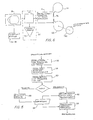
- a device is shown, the first part of which corresponds to that of the aforementioned U.S. Patent No. 4,553,261.
- documents 10 containing text with or without graphics are fed in sequence to a printer 12, in which they are provided with an identifying code.
- a digital converter 16 forms part of the reader 14 and generates digital signals which produce digital approximation patterns of the letters, numbers and graphic representations that appear on a source document 10.
- the printing, reading and digitizing functions are monitored by a control device 18, which is normally supplied as part of the reading device 14 and digital converter 16 and can easily be adapted for additional control of the printer function.
- the documents 10 are fed to a source document storage location 20 for documents where they are available for subsequent review, if necessary, but from which they are not normally removed.
- the digital converter 16 is connected in both directions to a buffer memory 22 for digital patterns on channels 24 and 25 for the purpose of communication, which are used for data transmission and feedback with regard to available storage space and other operating functions.
- the patterns stored in the memory 22 are fed to a display device 26, which may be a conventional CRT display, the display device 26 communicating with the memory 22 on channels 28 and 29.
- a primary purpose of this part of the device illustrated in the aforementioned patent is to present the patterns of the source document 10 in digital form on the display 26 so that various forms of document disposition can be determined and achieved at this stage.
- patterns received by a transmission system such as electronic mail or previously stored material are included.
- a special function is the selection of certain Units of information from each source document so that the patterns can be encoded in a standard digital code, such as ASC11, and stored in a mass digital memory 30. Therefore, it may be convenient for an operator to operate a keyboard from which the display 26 is visible so that that person can position indicators to identify and identify material to be stored, after which only the selected part is encoded, while the rest of the digital memory is removed, making optimal use of the storage capacity.
- the operator 32 is provided with a speech responsive transducer, including a receiver 34, a speech recognition device 36, and an assembler 38 connected to monitor certain functions of the display 26.
- the speech recognition device 36 can record electrical speech signals generated by a microphone 34 on the basis of acoustic expressions by the operator.
- a defined number of processing steps are stored in the speech recognition device 36 and it is also able to identify certain expressions within a defined lexicon as alphanumeric symbols and predetermined instructions which are part of the defined number of steps. Unrecognized statements can only produce a visual display or an audible display, which means "not recognized".
- the recognized utterances are fed to the assembler 38, in which they are implemented by means of the display 26 performing a specific task, in that the display 26 is caused to carry out the processing step according to the instructions.
- This approach can also be used by using voice input with other input or command devices.
- the systems for touching the screen are particularly important because the operator can identify the representations or locations shown on the screen by touching them with a finger.
- the screen reacts to this touch because wires are embedded in the screen structure or because infrared sensors are connected to the screen and respond to the operator's finger or, for example, a light pen.
- the touch can only serve an identification function, with instructions regarding what to do being given by other means got to.
- Voice input in connection with the touch is particularly useful for giving instructions.
- the situation of a manager who receives various documents and has to check each one, decide on their disposition and issue an instruction should be considered.
- Even a relatively limited dictionary of known words in the voice recognition device allows the manager great flexibility in the review.
- the documents are first scanned (or sent as electronic mail or retrieved from memory) so that signals representing digitized patterns derived from the character sub-images or from graphics contained in the documents are formed and at least temporarily stored.
- the screen of the display device at the manager's workplace is touch-sensitive, ie it responds when tapped with a finger or with another object, such as a pen or light pen.
- the screen can be tilted accordingly so that it is almost horizontal so that it has a surface that is easier to reach when tapped.
- the images are displayed on the screen in any order. The manager looks through each image and makes a decision the disposition and transmits this decision using a combined use of touch and voice or even just using the voice.
- Another application example is a clerk for orders. He can request verification of an address or discount scale by pointing to the item and saying "check”, then pointing to the destination and saying "send to” and similarly checking that the items ordered are in stock and then send the order on for processing by labeling the whole image and saying "fill in”.
- An engineer can use the method similarly to CAD (computer-aided design) by pointing to the start and end points and saying "line”, causing a line to be drawn between these points.
- the software to draw a line between two points that are identified by the position of the position indicator or by Coordinate identification is known. Other examples of use will occur to those skilled in the art.
- a particularly useful function of the entire facility is the ability to rearrange the sequence of data fields. For example, if it is assumed that an order arrives for a number of products in which the order format first gives the date, secondly the customer's order number, thirdly his name, fourthly the quantity, fifthly the model number of the product and sixthly the price the recipient may want to change this order for storage. For example, the recipient may want the customer's name to be in the first place, the model number in second place, the quantity in third place, and so on.
- This reordering of the order for storage purposes is easily accomplished by displaying the image of the original document on the screen 26 and touching the customer's name and then e.g. "save” is pronounced, after which the model number is touched and "save” etc. are repeated in the desired order.
- Another example relates to rearranging the order or arrangement of segments in desktop publishing.
- text or graphical representations can be enlarged or reduced in order to fit into an equally identified position.
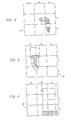
- a grid system according to FIGS. 2, 3 and 4 is to be used.
- a flat image appears on the screen, in a simplified form as square 35.
- Vertical and horizontal lines are present on the screen either permanently outside or by means of a video line generator inside, the vertical and horizontal lines being identified by alphanumeric symbols according to FIG. 2. It is believed that the operator desires to enlarge the portion of an image that is in box C3 as FIG. 2. All the operator needs to do is say "C, 3, whole screen” because this utterance is interpreted as an instruction to enlarge C3 to the whole screen size, as shown in FIG. 3.
- This process can be repeated by the operator by saying "A, 1, full screen", after which the material shown in square A1 is enlarged to occupy the entire screen area, as shown in FIG. 4. This part can then be saved or a part of it can be saved by the operator by saying "B, 2, save”.
- the cursor movement is much faster and other forms of testing and activity are also much faster if this technique is used instead of keyboard operation.
- a primary goal is to allow selected individuals access to the images of documents stored in memory 30.
- a primary goal is to allow selected individuals access to the images of documents stored in memory 30.
- a person is in a decision function receives a screen 40 with a buffer memory 42 which is connected in both directions via a cable 43 to a memory 30.
- the person 44 is equipped with a microphone 46, a speech recognition unit 48 and a position and command assembler 50, which is connected to the buffer memory 42.
- those documents which are intended for a specific person 44 according to any business code are called up from the memory 30 to the buffer memory 42 and are available for simultaneous or sequential display.
- the person 44 can determine the disposition of various documents by either returning the specific documents to the storage without processing, feeding them to another person in the company, or by forwarding them to someone outside the company or otherwise. References to addresses by the sectors identified in Figs. 2, 3 and 4 are possible, with the actual number of divisions on the screen normally being slightly higher than shown in Figs. 2-4.
- the device shown in FIG. 1 is also suitable for correcting text or, to a limited extent, for adding data. It is apparent from the aforementioned U.S. patent that another function performed by operator 32 while viewing the digitized text prior to encoding and storing is to insert letters that were not recognized by reader 14 or to correct letters and symbols that were not read correctly. This is a function that can be performed much faster with the voice than with the conventional keyboard by issuing commands such as "position indicators jump to" followed by a digit. For example, if the screen grid is divided into five sections by horizontal lines and four sections by vertical lines, a command "A1 position indicator jump to B4 "cause it to be moved to a zone where it needs to be corrected or which requires additional data, the whole process being much quicker than with the conventional keyboard.
- a further refinement of the position is by commands" left, right "or possible by pressing a key.
- Repositioning of the position indicator is also possible by means of a combination control by voice and touch, for example by touching the position indicator at an existing point and issuing the voice command" jump to ", after which the new point is touched
- Corrections in the text can be made simply by pointing to the wrong character during a correction phase and pronouncing the correct character.Addition of text is only possible within the limits determined by the size and precondition of the lexicon, although it it is obvious that letters and Numbers can be added without difficulty because they represent fundamentally necessary symbols that can be recognized by the recognition device 36 or 48.
- a typical device for recognizing speech is shown in FIG. 5, in which a speech input signal in electrical form is received by microphone 34 or 46. This signal is subjected to an analysis and a pattern comparison method, in which the signal analysis and the acquisition of parameters take place in block 56. A major problem with language recognition facilities is generally in the individual word endings. Thus, the next stage 58 is to determine the end of each pronunciation. A next stage 60 is the normalization of frequency and time, after which, in the detection state, the signal is subjected to a time chaining, which is a type of dynamic programming, of which several examples exist.
- a dictionary 64 is provided with utterance patterns which the Device, and these patterns are compared with the processed speech signals, the extent of the similarity being determined in a similarity evaluation method 66.
- the resulting decision indicates whether or not an instruction or an alphanumeric symbol is recognized, after which a suitable note is given.
- Such devices are normally subjected to a training procedure in which the distinctive formats of the operator's voice are recognized and stored as part of the dictionary, normally averaging a large number of repeated statements of the same expression, so that the device is subsequently able to Recognize spoken expressions from the same person.
- a very high level of accuracy can be achieved with a very limited dictionary that is discussed by the same person, the level of accuracy decreasing with other people.
- the combination of voice and touch or just voice can also be used to create graphic illustrations on the screen. The production of "drawings" on the screen only with the help of the keyboard requires that you are familiar with the specific computer and with the programming language. A lot of learning time is eliminated with the voice alone or with the voice and touching the screen. The operator can be largely untrained except for learning a small dictionary of command words.
- the operator need only touch the two points and pronounce the command word specified in the dictionary, which is defined as a "line".
- the touches and command provide all of the information that is normally entered into the keyboard, ie the end points in a Cartesian coordinate system and instructions for drawing a line in a relatively large number of keystrokes. It is It is important to note that normally no changes are necessary in the basic program of the machine.
- the program for graphic purposes usually recognizes an instruction that includes a small number of input words. These words are provided by the assembler, which is necessarily tailored to the computer language and the operating system in response to the spoken instructions.
- a more fancy diagram than a line is almost as easy to draw, two points and a "circle" command suffice to define the center and radius of a circle, but parts can also be deleted by defining the same type of borders. This type of procedure therefore requires less skill than using a keyboard.
- FIG. 6 shows a further aspect of the present invention, in which the selection and the coding method can also be used for increased microform storage.
- the selection of the parts of the device achieved by FIG. 1 is shown again in FIG. 6, the coding device 70 and the memory 30 being separated into a coding device and a mass memory 72.
- the coding device 70 and the memory 30 being separated into a coding device and a mass memory 72.
- the coded signals are fed to a high-resolution digital video converter 74, which is actually an inverted video camera and is used to record digital signals and to produce high-resolution images that can be fed to a microfilm 76 by a conventional optical system are, which is unwound from a supply reel 78 and fed to a take-up reel 80, which is driven in a known manner by a stepper drive or by an intermittent drive 82.
- a normal one Coil film is shown, it is understandable that films of any size and also microfiche or microdot memory, video disc or other types of mass data storage can be used.
Landscapes
- Engineering & Computer Science (AREA)
- Theoretical Computer Science (AREA)
- General Engineering & Computer Science (AREA)
- Human Computer Interaction (AREA)
- Physics & Mathematics (AREA)
- General Physics & Mathematics (AREA)
- Audiology, Speech & Language Pathology (AREA)
- Health & Medical Sciences (AREA)
- Computational Linguistics (AREA)
- Acoustics & Sound (AREA)
- Multimedia (AREA)
- General Health & Medical Sciences (AREA)
- Position Input By Displaying (AREA)
- Document Processing Apparatus (AREA)
Applications Claiming Priority (2)
| Application Number | Priority Date | Filing Date | Title |
|---|---|---|---|
| US6047387A | 1987-06-11 | 1987-06-11 | |
| US60473 | 1987-06-11 |
Publications (2)
| Publication Number | Publication Date |
|---|---|
| EP0294657A2 true EP0294657A2 (fr) | 1988-12-14 |
| EP0294657A3 EP0294657A3 (fr) | 1991-07-24 |
Family
ID=22029701
Family Applications (1)
| Application Number | Title | Priority Date | Filing Date |
|---|---|---|---|
| EP19880108402 Withdrawn EP0294657A3 (fr) | 1987-06-11 | 1988-05-26 | Méthode et dispositif de manipulation de données et d'image par contact et commande vocale |
Country Status (1)
| Country | Link |
|---|---|
| EP (1) | EP0294657A3 (fr) |
Cited By (5)
| Publication number | Priority date | Publication date | Assignee | Title |
|---|---|---|---|---|
| EP0747807A1 (fr) * | 1995-04-11 | 1996-12-11 | Dragon Systems Inc. | Déplacement d'un élément montré sur un écran d'ordinateur |
| EP0543566A3 (en) * | 1991-11-22 | 1996-12-11 | Ibm | Touch screen |
| CN105573534A (zh) * | 2014-10-09 | 2016-05-11 | 中兴通讯股份有限公司 | 操作对象的处理方法及装置 |
| CN106569771A (zh) * | 2015-10-09 | 2017-04-19 | 百度在线网络技术(北京)有限公司 | 对象控制方法及装置 |
| CN115064169A (zh) * | 2022-08-17 | 2022-09-16 | 广州小鹏汽车科技有限公司 | 语音交互方法、服务器和存储介质 |
Family Cites Families (1)
| Publication number | Priority date | Publication date | Assignee | Title |
|---|---|---|---|---|
| US4726065A (en) * | 1984-01-26 | 1988-02-16 | Horst Froessl | Image manipulation by speech signals |
-
1988
- 1988-05-26 EP EP19880108402 patent/EP0294657A3/fr not_active Withdrawn
Cited By (7)
| Publication number | Priority date | Publication date | Assignee | Title |
|---|---|---|---|---|
| EP0543566A3 (en) * | 1991-11-22 | 1996-12-11 | Ibm | Touch screen |
| EP0747807A1 (fr) * | 1995-04-11 | 1996-12-11 | Dragon Systems Inc. | Déplacement d'un élément montré sur un écran d'ordinateur |
| US5818423A (en) * | 1995-04-11 | 1998-10-06 | Dragon Systems, Inc. | Voice controlled cursor movement |
| CN105573534A (zh) * | 2014-10-09 | 2016-05-11 | 中兴通讯股份有限公司 | 操作对象的处理方法及装置 |
| CN106569771A (zh) * | 2015-10-09 | 2017-04-19 | 百度在线网络技术(北京)有限公司 | 对象控制方法及装置 |
| CN115064169A (zh) * | 2022-08-17 | 2022-09-16 | 广州小鹏汽车科技有限公司 | 语音交互方法、服务器和存储介质 |
| CN115064169B (zh) * | 2022-08-17 | 2022-12-13 | 广州小鹏汽车科技有限公司 | 语音交互方法、服务器和存储介质 |
Also Published As
| Publication number | Publication date |
|---|---|
| EP0294657A3 (fr) | 1991-07-24 |
Similar Documents
| Publication | Publication Date | Title |
|---|---|---|
| EP0150813A2 (fr) | Méthode pour la manipulation par commande vocale d'images visualisées sur écran | |
| DE69428590T2 (de) | Auf kombiniertem lexikon und zeichenreihenwahrscheinlichkeit basierte handschrifterkennung | |
| DE69220583T2 (de) | Vorrichtung zum Anzeigen von Gebieten auf einem Sichtgerät | |
| DE69630928T2 (de) | Vorrichtung und Verfahren zum Anzeigen einer Übersetzung | |
| DE3850595T2 (de) | Dokumentverarbeitungssystem. | |
| DE69400869T2 (de) | System zum transkribieren von texteingaben | |
| DE69123083T2 (de) | Dokumentverarbeitung | |
| DE69533479T2 (de) | Zeichensatz mit zeichen aus mehreren strichen und handschrifterkennungssystem | |
| EP0144361B1 (fr) | Installation et procede pour manipuler et retrouver des documents et des donnees | |
| DE69328802T2 (de) | Vorrichtung und Verfahren zur Identifizierung von Eingabedaten, die von einer Stift-basierten Benutzerschnittstelle erzeugt werden | |
| EP0424803B1 (fr) | Méthode de transformation au moins partielle de données d'image en texte avec préparation pour stockage ou traitement ultérieure | |
| DE60125696T2 (de) | Universelle Fernsteuerung geeignet zum Empfang von Spracheingaben | |
| DE69032645T2 (de) | Datenverarbeitungssystem mit auf Gesten basierenden Eingabedaten | |
| DE69216588T2 (de) | System zur erklaerung von dokumenten | |
| DE69618274T2 (de) | Informationsprozessor mit bidimensionaler Strichkode Bearbeitungsfunktion | |
| DE69828065T2 (de) | Mittel zum Eingeben von Zeichen und Befehlen in einen Computer | |
| DE19610759A1 (de) | Verfahren zum Codieren eines Dokumentes und Verfahren zum Senden eines Dokumentes von einem Sendecomputersystem zu einem Empfangscomputersystem | |
| DE69421326T2 (de) | Verfahren und Gerät zum Steuern der Darstellungen von Objekten auf einer Benutzerschnittstelle eines Datenverarbeitungssystems | |
| DE2939919A1 (de) | Anordnung zum codieren von ideographischen zeichen | |
| DE3142138C2 (de) | Verfahren zur Eingabe chinesischer Zeichen sowie Vorrichtung zur Durchführung des Verfahrens | |
| EP1125278B1 (fr) | Systeme de traitement de donnees ou terminal de communication dote d'un dispositif de reconnaissance vocale et procede de reconnaissance de certains objets acoustiques | |
| EP0294657A2 (fr) | Méthode et dispositif de manipulation de données et d'image par contact et commande vocale | |
| DE3326538C2 (fr) | ||
| DE1949897A1 (de) | Geraet und Verfahren zur Verarbeitung von Daten | |
| DE69425009T2 (de) | Zeichenerkennung |
Legal Events
| Date | Code | Title | Description |
|---|---|---|---|
| PUAI | Public reference made under article 153(3) epc to a published international application that has entered the european phase |
Free format text: ORIGINAL CODE: 0009012 |
|
| AK | Designated contracting states |
Kind code of ref document: A2 Designated state(s): AT BE CH DE ES FR GB GR IT LI LU NL SE |
|
| PUAL | Search report despatched |
Free format text: ORIGINAL CODE: 0009013 |
|
| AK | Designated contracting states |
Kind code of ref document: A3 Designated state(s): AT BE CH DE ES FR GB GR IT LI LU NL SE |
|
| 17P | Request for examination filed |
Effective date: 19911218 |
|
| 17Q | First examination report despatched |
Effective date: 19931202 |
|
| STAA | Information on the status of an ep patent application or granted ep patent |
Free format text: STATUS: THE APPLICATION IS DEEMED TO BE WITHDRAWN |
|
| 18D | Application deemed to be withdrawn |
Effective date: 19940413 |