EP0338770A2 - System zur Herstellung eines Einkaufsbelegs - Google Patents
System zur Herstellung eines Einkaufsbelegs Download PDFInfo
- Publication number
- EP0338770A2 EP0338770A2 EP89303817A EP89303817A EP0338770A2 EP 0338770 A2 EP0338770 A2 EP 0338770A2 EP 89303817 A EP89303817 A EP 89303817A EP 89303817 A EP89303817 A EP 89303817A EP 0338770 A2 EP0338770 A2 EP 0338770A2
- Authority
- EP
- European Patent Office
- Prior art keywords
- user
- items
- entries
- display screen
- entry
- Prior art date
- Legal status (The legal status is an assumption and is not a legal conclusion. Google has not performed a legal analysis and makes no representation as to the accuracy of the status listed.)
- Withdrawn
Links
Images



Classifications
-
- G—PHYSICS
- G06—COMPUTING OR CALCULATING; COUNTING
- G06F—ELECTRIC DIGITAL DATA PROCESSING
- G06F17/00—Digital computing or data processing equipment or methods, specially adapted for specific functions
-
- G—PHYSICS
- G06—COMPUTING OR CALCULATING; COUNTING
- G06Q—INFORMATION AND COMMUNICATION TECHNOLOGY [ICT] SPECIALLY ADAPTED FOR ADMINISTRATIVE, COMMERCIAL, FINANCIAL, MANAGERIAL OR SUPERVISORY PURPOSES; SYSTEMS OR METHODS SPECIALLY ADAPTED FOR ADMINISTRATIVE, COMMERCIAL, FINANCIAL, MANAGERIAL OR SUPERVISORY PURPOSES, NOT OTHERWISE PROVIDED FOR
- G06Q10/00—Administration; Management
- G06Q10/08—Logistics, e.g. warehousing, loading or distribution; Inventory or stock management
- G06Q10/087—Inventory or stock management, e.g. order filling, procurement or balancing against orders
Definitions
- This invention is directed to a computer system for generating purchasing documents such as purchase orders and requisitions. More particularly, it relates to a user friendly personal computer system which generates purchasing documents through a mainframe computer system having rigid input requirements.
- mainframe purchasing systems which serve many users typically have very stringent input require severelyments.
- An example of such mainframe purchasing software is the Walker system which consists of a set of programs residing in a central computer and providing a standard for purchasing, receiving and accounting department data entry.
- the Walker system is a very powerful software system which provides centralized integrated purchasing, receiving and related accounting control for a large organization with multiple units.
- the Walker system requires that the user input information in a very controlled and rigid format. Seldom does this format match the methods and techniques that a user is already accustomed to using.
- the Walker system has requirements beyond those of previous systems.
- the user spends a great deal of time and energy learning to serve the Walker system. It takes months of experience before many people become comfortable with it.
- mainframe system such as the Walker system
- a mainframe system such as the Walker system
- users can only access the system when the mainframe is operational.
- mainframe computer or maintenance is being conducted, the user is unable to do his or her job.
- the major problem is that it is extremely difficult to make changes to the Walker system.
- the services of a skilled programmer are required to make even minor modifications.
- a system for generating purchasing documents in a mainframe computer having rigid coded input requirements which includes a personal computer which interacts with the user in a form understandable to the user to generate a completely new purchasing document or one derived from an easy to use template, and which then transforms the document created into the rigid coded format of the mainframe system.
- the personal computer presents on a visual display screen suggested items for a purchasing document some of which require user entries.
- a list of selectable entries for the indicated item is presented in user readable form in a box on the display screen adjacent the item.
- User selection of an entry results in display of that selection at the indicated location in the user readable form from the list and generation for entry into the mainframe computer of a corresponding entry coded to the rigid input requirements of the mainframe system.
- This coded entry is stored for transmittal to the mainframe computer at a convenient time, thus freeing the user from the operational schedule of the mainframe computer.
- This invention has the advantage that for some items, a list of selectable items generated at installation is presented within a window which remains on the display screen.
- a rule base list of items which can be customized to a location or user, is presented within a removable window which is overlaid on the screen.
- the removal window is placed such that adjacent items remain substantially visible so that the user remains oriented while making the particular selection.
- the rule base lists are programmable. Manual entries inserted by a user in place of a selectable entry from such a list are automatically added to the list. Selection of an entry from a rule based list not only enters the item on the screen and generates a corresponding coded entry for the mainframe, but also removes the removable window from the screen.
- the system has the further advantage in that it also provides for more efficient generation of commonly used documents, by offering the user the capability of generating templates from any previously generated documents.
- the template is formatted by assigning a user identifiable name to it and by designating which of the user supplied entries to the previous document are to be retained and which are to be left blank when a template is called up. The user fills in the remaining blank items as required for the document being generated.
- the list of the templates available is presented to the user in one of the removable windows.
- the Walker system resident in the mainframe computer indicated in Figures 1A and B at 1, is a widely used system for generating purchasing documents such as purchase orders and requisitions. It provides a centralized purchasing system for a large organization with numerous units which may, but not necessarily, be widely separated geographically.
- the Walker system presents to the user on a video screen at each location a form of the document to be generated, and sequentially provides prompts to the user indicating locations where information is required to complete the form.
- the necessary information must be supplied by the user in the format and code required by the Walker system.
- the coded information is not in a form easily recognized or recalled by the user. Thus, the user finds it necessary to look up the required coded information in a manual, which is time consuming.
- the Walker system permits the user to call up a previously generated document so that a similar document can be created. However, this requires the user to remember or record the identification, such as the encoded document number, of a suitable earlier prepared document. The user must then replace entries made in the previously generated document with the information derived in the new document; again, after looking up appropriate codes.
- a particularly bothersome aspect of the Walker system is that it can only be accessed when the mainframe is operational, usually during working hours in the locality of the mainframe computer. This can be very inconvenient for users of the system in other time zones.
- the present invention encompasses a unique system by which a complex procurement process resident in a mainframe computer and having rigid input requirements is transformed onto a user friendly personal computer system.
- the resultant system provides accurate order placement uninterrupted by text and code look-ups. This is accomplished through rule base screen integration of typical choices for items requiring user selection, with the list of choices customized for the particular user or situation.
- the user selection is not only indicated on the screen, but is automatically encoded into the Walker format, and stored for input into the mainframe computer system.
- the system also bundles contracts into template, or model copies, for quick entry of standard type orders.
- the mainframe system in which the Walker system is resident includes memory 3 which stores data in the Walker format, designated as CORPORATE DATA, for generating the purchasing documents.
- Memory 3 also stores time sharing operation (TSO) data associated with the communication link 5 between the mainframe system and the stand alone personal computer systems 7.
- TSO time sharing operation
- P.C. personal computer
- Each PC system 7 includes a personal computer 9 having a screen 11, a keyboard 13 or other user input device, and a program system 15.
- the PC program system 15 menu 17 includes a main menu 19 for generating procurement documents.
- the main menu 19 offers the following selections:
- a security clearance for entry into the P.C. system is initiated by asking the user for a password at 21 which is validated at 23 with PC security data stored on a security memory disc 25.
- the retrieval of the information from the security disc 25 is indicated by the tags "1" at 23 and 25. If the password is not validated, the user is given another opportunity to enter a valid password.
- the first screen for generating the purchase order document is presented to the user.
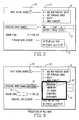
- An exemplary screen 27 is shown in Figure 2. Successively presented screens systematically guide the user in providing information needed to generate the desired purchase order.
- the first request is for the type of action desired.
- a cursor in the form of a flashing block 29 indicates the item which is to be specified.
- a permanent window 31 adjacent the block lists the available choices in reader understandable form, in this case text, and provides a coded symbol to be entered by the user through the keyboard. Assuming the user selects "add new purchase order", an "A" appears in reverse video in place of the flashing cursor in the first line as shown in Figure 3. Selection of the desired action is indicated at block 33 of the software flow diagram shown in Figure 1.
- the second item of information requested is the purchase order number as shown on the screen of Figures 2-4.
- a permanent window 35 adjacent the inquiry displays the required format.
- the purchase order number comprises three parts: (1) the location initiating the purchase order; (2) the requisition number; and (3) the class number.
- the location code, MN in the example is presented in the window since it will be the same for all purchase orders generated at a given location.
- the requisition number is provided on the requisition from which the purchase order is generated, and the class code indicates the type of purchase order.
- the operator inserts the purchase order number as indicated at 37 in Figure 3.
- the purchase order number entered at 39 is checked at 41 against previous purchase order numbers stored in a purchase order data memory disc 43.
- the encircled numerals 3 indicate the information flow. Since a new purchase order is being generated, the operator is notified if the selected number is already on file so that a unique number can be identified.
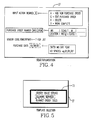
- the next item on the screen is a request for a vendor code as indicated by the flashing cursor 45 in Figure 3. If the user knows the vendor code, it can be typed in directly. If not, the "?" key is pressed to call up a list of vendors which appear in the heavily outlined window 47 which is overlaid on the screen. Within the window 47 is a list of vendors. The list presented, in user readable form, can be customized for each user or location. The user selects a vendor by use of an arrow key or other indexer on the keyboard which, for instance, highlights the selected entry by use of reverse video as indicated at 49. While only five vendors are presented at a time in the exemplary system, additional groups of five vendors can be called up by advancing the highlighted block beyond the list shown.
- Entry of the vendor selection by the user, performs several functions. It encrypts the vendor code into the Walker format and stores the coded entry on the P.C. purchase order data memory disc 43. For a vendor selected from the list, it also inserts the vendor identification in the user readable form of the list into the space occupied by the flashing cursor 45 as shown in Figure 4. Finally, entry of a vendor selected from the list removes the window 47 from the screen as shown in Figure 4. This process of selecting the vendor is shown at blocks 51, 53 and 55 in Figure 1. If the user types in a vendor at 51 rather than selecting one from the list presented in the window, this new vendor is automatically added to the list. Selection of a vendor from the list is indicated at block 53. Entry of the typed in or listed vendor identification is indicated at 55.
- the next piece of information requested is the date, as indicated at block 57 in Figure 1.
- the current date is automatically presented on the screen as shown in Figures 2-4. This date can either be accepted or a different date can be typed in.
- additional screens some of which include additional rule base lists as indicated at 61. These additional lists are presented within a window overlaid on the screen in the manner described above in connection with the vendor list. Again, selection of an item can be made from the list or can be typed in directly. Entry of the selected item inserts it into the screen, encrypts the selection in the Walker format and removes the selection window, as in the case of the vendor list.
- additional rule base lists are provided for delivery location and the class of purchase order, however, it is evident that such flexible, user friendly lists can be provided for many types of information needed to complete a purchase order.
- the user is asked at block 65 if the purchase order just constructed should be used as a template for generating future purchase orders. If so, the template is formatted and given an identifying label at 67, and is stored in the P.C. template memory disc 69. Whether the newly constructed purchase order is used as a template or not, the information gathered is formatted at block 71 for entry into the P.C. purchase order data memory disc 43.
- the template feature of the program greatly speeds up generation of standard types of purchase orders. In order to provide the capability of generating a wide variety of purchase orders, the program necessarily requests information required to provide this flexibility. However, most specific purchase orders do not require all of this information.
- the template feature permits the user to store selected purchase order forms as models containing just the terms required for a particular type of purchase order.
- a rule base list of the templates available is presented in a window 73 on the screen as indicated in Figure 5.
- the list contains the identification selected for the template by the user when the template was created at block 67.
- the templates may be general such as a blanket order applicable for different types of items, or specific, such as an order for a certain vendor to perform a specific service on a specific piece of equipment. The degree of generality or specificity is selected by the user. The user selects the template identifier accordingly.
- the user selects the desired template at 75 from a user prepared list in the same manner as described above in connection with vendor selections. Entry of the selection results in retrieval of the template at block 76 from the template storage disc.
- the retrieved template includes the information selected at creation for inclusion into the model purchase order. This can include fixed entries for items which the user would had to have selected had a template not been used. For instance, in certain types of purchase orders, the delivery location and the terms of payment may be the same for every such order, so that such standard information is presented by the template.
- the information contained in the template is presented to the user who can edit the proposed purchase order by adding the required information not pre-entered, and/or if desired, changing the presented information as indicated at block 77.
- This editing does not modify the template; only the current purchase order being generated.
- the purchase order generated from the template is formatted at block 71 for entry in the P.C. purchase order data base 43.
- the program Upon entry of purchase order information into the P.C. purchase order data base 43, the program, as indicated by the tags "B" in Figure 1, returns to the presentation on the user screen of the actions available in block 33.
- the second action available to a user is to edit a previously generated purchase order which is stored on the P.C. purchase order memory disc, but which has not yet been transmitted to the Walker system in the mainframe computer.
- the user Upon selection of this option by entering "C" in the space provided in the screen (see Figure 2), the user is requested to enter the number of the purchase order to be edited at block 79.
- the memory 43 is checked for this purchase order at block 81 with the flow of the information indicated by the tags "3". If no such purchase order number is stored in memory 43, the user is requested to reenter the desired number.
- the designated purchase order is retrieved from memory 43 in block 83 and sequentially presented on the screen so that the user can make any desired changes.
- the edited purchase order is returned to memory 43 and the program reverts to block 33.
- the letter "D" is entered as the action code as indicated in block 33. If the number of the purchase order selected in block 85 is on file, as indicated in block 87, the information is retrieved from memory 43 and deleted in block 89. The program again returns to block 33.
- purchase order documents can be composed on the P.C.'s 7, independently of the operational status of the mainframe system 1.
- the information required to generate a document is stored on the P.C. purchase order data memory disc 43 for transmission to the Walker system on command.
- the users are not compelled to adjust their work schedules to the operational schedule of the mainframe computer system 1.
- rule base lists such as the vendor lists, shown in Figure 3
- files customized to the user are set up for the information to be presented in the rule base lists as indicated at block 101.
- the window size, the title and the number of lines to be presented are also specified at installation.
- These files and window parameters are stored on the purchase order data disc 43.
- the main program calls for a list the pertinent information and window parameters are called from the memory disc 43 and loaded into P.C. memory as indicated at block 103.
- the original screen graphics presented at the time the list is called for are stored in the P.C.'s random access memory (RAM) as indicated at block 105, for recall at a later time.
- RAM random access memory
- the original screen graphics are also retained in the P.C. memory where they are refreshed with the window containing a selected reference list as indicated at block 107. This is accomplished by mapping the window to the screen. Methods of overlaying such a window on a screen are well known in the programming art.
- the original screen with the overlaid list is presented in real time to the user as indicated at 109.
- a call is then made to the D.O.S. keyboard control routine as indicated at block 111. This routine enables the user to select the desired entry from the list using, for instances, the arrow keys on the keyboard 13 as discussed above.
- the selected item is stored in the RAM with the original screen graphics as indicated at block 115.
- This selected item is then integrated into the stored original screen as indicated at block 117.
- the selected item is also entered into the main program which records the entries made by the user before the routine is exited at block 119.
- the screen updated with the selected items is presented to the user at block 121 and the data is stored in the P.C. data base 43.
Landscapes
- Engineering & Computer Science (AREA)
- Business, Economics & Management (AREA)
- Theoretical Computer Science (AREA)
- Physics & Mathematics (AREA)
- General Physics & Mathematics (AREA)
- Economics (AREA)
- Tourism & Hospitality (AREA)
- Finance (AREA)
- Marketing (AREA)
- Operations Research (AREA)
- Quality & Reliability (AREA)
- Strategic Management (AREA)
- Entrepreneurship & Innovation (AREA)
- Development Economics (AREA)
- General Business, Economics & Management (AREA)
- Human Resources & Organizations (AREA)
- Accounting & Taxation (AREA)
- Data Mining & Analysis (AREA)
- Databases & Information Systems (AREA)
- Mathematical Physics (AREA)
- Software Systems (AREA)
- General Engineering & Computer Science (AREA)
- Management, Administration, Business Operations System, And Electronic Commerce (AREA)
- Digital Computer Display Output (AREA)
Applications Claiming Priority (2)
| Application Number | Priority Date | Filing Date | Title |
|---|---|---|---|
| US18265388A | 1988-04-18 | 1988-04-18 | |
| US182653 | 1988-04-18 |
Publications (1)
| Publication Number | Publication Date |
|---|---|
| EP0338770A2 true EP0338770A2 (de) | 1989-10-25 |
Family
ID=22669456
Family Applications (1)
| Application Number | Title | Priority Date | Filing Date |
|---|---|---|---|
| EP89303817A Withdrawn EP0338770A2 (de) | 1988-04-18 | 1989-04-18 | System zur Herstellung eines Einkaufsbelegs |
Country Status (3)
| Country | Link |
|---|---|
| EP (1) | EP0338770A2 (de) |
| JP (1) | JPH01316868A (de) |
| KR (1) | KR890016482A (de) |
Cited By (4)
| Publication number | Priority date | Publication date | Assignee | Title |
|---|---|---|---|---|
| FR2680255A1 (fr) * | 1991-08-09 | 1993-02-12 | Gerbaulet Jean Pierre | Dispositif pour une meilleure gestion des operations courantes d'achat de produits et de services. |
| EP0537391A1 (de) * | 1991-10-04 | 1993-04-21 | Moore Business Forms, Inc. | Rechnergestutztes Formularsbestellungssystem |
| US5241464A (en) * | 1990-08-17 | 1993-08-31 | Moore Business Forms, Inc. | Desktop forms order system |
| EP0585932A3 (de) * | 1992-09-03 | 1995-03-15 | Monarch Marking Systems Inc | System zur Etikettenherstellung und Datenüberwachung für die Bearbeitung des Auftragseingangs. |
Families Citing this family (2)
| Publication number | Priority date | Publication date | Assignee | Title |
|---|---|---|---|---|
| JPS59188641A (ja) | 1983-04-11 | 1984-10-26 | Fuji Photo Film Co Ltd | ハロゲン化銀写真乳剤 |
| JPH03257664A (ja) * | 1990-03-08 | 1991-11-18 | Nec Corp | 帳票作成方式 |
-
1989
- 1989-04-18 EP EP89303817A patent/EP0338770A2/de not_active Withdrawn
- 1989-04-18 KR KR1019890005114A patent/KR890016482A/ko not_active Withdrawn
- 1989-04-18 JP JP1098657A patent/JPH01316868A/ja active Pending
Cited By (7)
| Publication number | Priority date | Publication date | Assignee | Title |
|---|---|---|---|---|
| US5241464A (en) * | 1990-08-17 | 1993-08-31 | Moore Business Forms, Inc. | Desktop forms order system |
| US6018338A (en) * | 1990-08-17 | 2000-01-25 | Moore Business Forms, Inc. | Desktop forms order system |
| FR2680255A1 (fr) * | 1991-08-09 | 1993-02-12 | Gerbaulet Jean Pierre | Dispositif pour une meilleure gestion des operations courantes d'achat de produits et de services. |
| WO1993003447A1 (fr) * | 1991-08-09 | 1993-02-18 | Gerbaulet Jean Pierre | Dispositif pour une meilleure gestion des operations courantes d'achat de produits et de services |
| US5544040A (en) * | 1991-08-09 | 1996-08-06 | Gerbaulet; Jean-Pierre | System for management of common purchase operations for goods and services |
| EP0537391A1 (de) * | 1991-10-04 | 1993-04-21 | Moore Business Forms, Inc. | Rechnergestutztes Formularsbestellungssystem |
| EP0585932A3 (de) * | 1992-09-03 | 1995-03-15 | Monarch Marking Systems Inc | System zur Etikettenherstellung und Datenüberwachung für die Bearbeitung des Auftragseingangs. |
Also Published As
| Publication number | Publication date |
|---|---|
| JPH01316868A (ja) | 1989-12-21 |
| KR890016482A (ko) | 1989-11-29 |
Similar Documents
| Publication | Publication Date | Title |
|---|---|---|
| US5475833A (en) | Database system for facilitating comparison of related information stored in a distributed resource | |
| KR100597644B1 (ko) | 인터넷 프리젠테이션 시스템 | |
| US4885694A (en) | Automated building control design system | |
| JP2759669B2 (ja) | 電子予定表の機密保護管理方法 | |
| US5727164A (en) | Apparatus for and method of managing the availability of items | |
| US5222236A (en) | Multiple integrated document assembly data processing system | |
| US5778381A (en) | Computer aided maintenance and repair information system for equipment subject to regulatory compliance | |
| CA2094526C (en) | Method and apparatus for creating a multi-media footnote control in a video data | |
| US5146404A (en) | Electronic maintenance support work station | |
| US6292806B1 (en) | Computer aided maintenance and repair information system for equipment subject to regulatory compliance | |
| US5692206A (en) | Method and apparatus for automating the generation of a legal document | |
| US5025395A (en) | Data processing system capable of executing data processing using resources by designating displayed graphic patterns representing selected resources | |
| US6308188B1 (en) | System and method for building a web site with automated workflow | |
| US6044384A (en) | Document processing apparatus | |
| US20030187878A1 (en) | Computer aided maintenance and repair information system for equipment subject to regulatory compliance | |
| JPH02278458A (ja) | 電子文書承認システム | |
| EP0740258A2 (de) | Datenverwaltungssystem | |
| US7511697B2 (en) | Facility reference system and method | |
| KR20100047220A (ko) | 문서관리장치, 방법 및 프로그램 | |
| US6745195B1 (en) | System, method and computer program product for generating software cards that summarize and index information | |
| JPH01316868A (ja) | 伝票作成装置 | |
| JP3057794B2 (ja) | ハイパーテキスト装置およびハイパーテキスト生成方法 | |
| EP0269875B1 (de) | Formularverarbeitungsgerät mit ferngesteuerter Überarbeitung | |
| JPH07239767A (ja) | 利用資格別メニュー編集表示方法 | |
| US6850963B1 (en) | Method of providing subscription based information services through an information service provider |
Legal Events
| Date | Code | Title | Description |
|---|---|---|---|
| PUAI | Public reference made under article 153(3) epc to a published international application that has entered the european phase |
Free format text: ORIGINAL CODE: 0009012 |
|
| AK | Designated contracting states |
Kind code of ref document: A2 Designated state(s): BE CH ES FR GB IT LI |
|
| STAA | Information on the status of an ep patent application or granted ep patent |
Free format text: STATUS: THE APPLICATION HAS BEEN WITHDRAWN |
|
| 18W | Application withdrawn |
Withdrawal date: 19920330 |