EP0355458A2 - Méthode et appareil pour selectionner les données d'un menu - Google Patents
Méthode et appareil pour selectionner les données d'un menu Download PDFInfo
- Publication number
- EP0355458A2 EP0355458A2 EP89113847A EP89113847A EP0355458A2 EP 0355458 A2 EP0355458 A2 EP 0355458A2 EP 89113847 A EP89113847 A EP 89113847A EP 89113847 A EP89113847 A EP 89113847A EP 0355458 A2 EP0355458 A2 EP 0355458A2
- Authority
- EP
- European Patent Office
- Prior art keywords
- items
- menu
- cursor
- central point
- display
- Prior art date
- Legal status (The legal status is an assumption and is not a legal conclusion. Google has not performed a legal analysis and makes no representation as to the accuracy of the status listed.)
- Withdrawn
Links
Images





Classifications
-
- G—PHYSICS
- G06—COMPUTING OR CALCULATING; COUNTING
- G06F—ELECTRIC DIGITAL DATA PROCESSING
- G06F3/00—Input arrangements for transferring data to be processed into a form capable of being handled by the computer; Output arrangements for transferring data from processing unit to output unit, e.g. interface arrangements
- G06F3/01—Input arrangements or combined input and output arrangements for interaction between user and computer
- G06F3/048—Interaction techniques based on graphical user interfaces [GUI]
- G06F3/0481—Interaction techniques based on graphical user interfaces [GUI] based on specific properties of the displayed interaction object or a metaphor-based environment, e.g. interaction with desktop elements like windows or icons, or assisted by a cursor's changing behaviour or appearance
- G06F3/0482—Interaction with lists of selectable items, e.g. menus
Definitions
- This invention relates to an apparatus and a method for selecting an item from a menu of a graphic display with minimal cursor movement, while also allowing for broader cursor movement by a novice terminal user. More specifically, the items of the display are displayed about a central point on the display with radii extending from that central point. An item is then selected by positioning the cursor anywhere in a corresponding area having two of the radii as sides of its perimeter.
- U.S. Patent 4,586,035 to Baker et al. This patent describes a multiple overlapping window type display on an interactive display terminal.
- One or more of the windows have an associated virtual distributed menu which is made of menu items which are distributed about the periphery of the associated window but not displayed during normal operations.
- a cursor moves across a selected region in a window periphery, a selected menu item associated with the particular selected region will be displayed.
- the Baker patent requires that a cursor be moved about the periphery of a window in order to select an item in a menu.
- the items on the menu are not visible.
- U.S. Patent 4,692,858 to Redford et al discloses a method for assigning menu items to locations on a display. With this method, the first 16 items are placed in a single column, the next 16 items are split into two columns, the third set of 16 items are split into three columns, and so on. Selection of an item in a menu could require the user to move the cursor up to eight rows vertically and an indeterminate distance horizontally.
- the present invention provides a method and apparatus for selecting items of a menu on a graphic display with minimal cursor movement.
- This invention comprises means for displaying the items of a menu about a central point on a graphic display.
- This invention also comprises a means, responsive to the positioning of a cursor, for selecting one of the items when the cursor is positioned in an area between two radii extending from the central point.
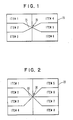
- FIGS. 1-4 Shown in each of FIGS. 1-4 is a menu 20 of this invention which would appear on a graphic display.
- a user of the display terminal can select any one of six items (see items 1-6) on the menu.
- Shown also in each of FIGS. 1-4 is a central point 30 with radii 25 extending therefrom.
- cursor 35 is also shown in a position between two radii corresponding to the selection of item 2 of the menu. Notice that with this menu, any item on the menu may be chosen with minimal or broad cursor movement.
- the central point 30 appears at the last cursor position, thereby minimizing reestablishment of the locus of attention.
- the user When, for example a user wishes to choose any one of the items of the menu, the user need merely move the cursor only a slight distance form the central point. For example, suppose the user decided to select item 8 of the menu. Since the cursor is typically at the central point, the user need merely move the cursor so that it appears in a corresponding area having two radii which form at least two sides of its perimeter. The area in this example corresponds to item 8.
- FIGS. 5-7 Shown in FIGS. 5-7 are examples of areas that could be used to correspond to the selection of an item on a menu. Notice that all three areas have two radii 25 which extend from central point 30. Each pair of radii is also used to form the perimeter of a corresponding area.
- FIGS. 5 & 6 show an area with the perimeter also having two parallel sides 27 orthogonal to a third side 29. The use of the areas shown in FIGS. 5 & 6 would facilitate the listing of items of a menu in a series of columns about a central point.
- FIG. 7 shows a more general type of area that could be used.
- This embodiment involves the use of an all-points-addressable (APA) display, which allows the drawing of diagonal lines, attached to a general-purpose personal computer.
- the display may be in color, may be monochrome, or may allow shades of gray.
- the computer and attendant system software must have some method for displaying and moving an on-screen cursor.
- the preferred pointing device for moving the cursor and also selecting menu items is a mouse or stylus, although the technique works with the use of keyboard keys alone.
- Application software must have the capability, through use of the underlying system software, to obtain input from the pointing device and to re-position the cursor at any desired location on the display.
- the underlying system software is also assumed to enable the generation of at least a limited repertoire of graphic primitives, including lines, polygons and text strings.
- this technique requires that two lines (radii) radiating from a central point in the menu be included in the perimeter of the area corresponding to each item.
- the corresponding areas can otherwise be of arbitrary shape (see FIG. 7).
- the entire menu could be circular (as illustrated in FIG. 18), with lines radiating from the center of the circle, making the corresponding areas resemble slices of a pie. This form might be appropriate when the menu items are to be labeled with icons.
- FIGS. 1, 2, 3, and 4 illustrate these menus with various numbers of items.
- coordinate values are real numbers between 0 and 1, with (0,0) representing the lower left-hand corner of the screen and (1,1) the upper right-hand corner.
- the menus to be displayed can be generated once for a given application, or they might be dynamically created during the execution of a given application.
- the algorithm presented here is simple enough that it could be used in either circumstance.
- Each menu will be stored as though centered at (0,0) and can be displayed at any location on the screen by adding a constant offset to the stored values.
- a menu is represented as a list of menu items.
- the internal representation of each menu item contains at least the following information: . the text of the label for the item . a list of the vertices of the polygonal perimeter of the area corresponding to the item.
- the internal representation of a menu item might optionally contain other information such as: . how to display the item (background color, background texture pattern, text color, etc.) . the status of the item (for example, whether it can currently be selected) . navigation (the name of another menu to display when this item is selected, or the name of a program or procedure to execute)
- the internal representation of a menu will contain some global information: . the coordinates of the upper-right corner of the menu
- Procedure to generate menus The following procedure "menu_list” (see also FIG. 19) generates the coordinates of menu items. It returns an array of lists of points defining the polygonal perimeters of the menu items. The items are ordered from top to bottom in the column, and each item's list of points is ordered in clockwise order.
- This algorithm produces coordinates as though the menu were centered at (0,0).
- a constant offset can be added and a coordinate transformation applied to obtain coordinates for displaying the menu at any desired location on the actual hardware screen.
- the algorithm produces coordinates for the right-hand side of a menu only.
- the coordinates for the left-hand side are obtained by negating the x coordinate values. If a menu is to contain an odd number of items, it would be possible to generate a menu containing an even number of items on one side and an odd number on the other. For example, a menu with 11 items might have six items on the left-hand side and five on the right-hand side (see FIG. 10). However, it may well be visually preferable to add an empty item and to have the same number of items on each half of the menu. This would not necessarily require that an entry for the empty item actually be generated and maintained, just that the other items be generated as though the empty item existed. Thus a menu with 11 items might have six items on each half, with the last item on the right-hand side unused (see FIG. 11).
- the function is given as parameters (code line 100): . the height of each area corresponding to each item . the width of the labels (i.e. the length of the longest label to appear on the menu) . the number of items appearing on each side of the menu.
- the height and width are positive real numbers, and the number of items is a positive integer.
- the procedure returns an array, each element of which is a list of (x,y) coordinate pairs (code lines 101, 114).
- the total height of the menu is the height of each area corresponding to each item times the number of items (code line 102).
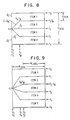
- the total width is the width of the labels plus the rightmost endpoint (x w ) of any of the lines radiating from the central point (code line 105). See FIG. 8 for an illustration of the points involved.
- i w is the index of the item containing this rightmost endpoint (code line 103). Note that this is an integer, so that if n is even, the value (n - 1)/2 is truncated.
- the point (x w , y w ) is the intersection of the radiating line l w with the horizontal line at y w (code line 104).
- Initial values for the loop are set up in code line 106.
- the loop is repeated for each menu item (code line 107).
- Code line 108 causes items to be generated from top (higher y values) to bottom.
- x i is again the intersection of the radiating line with the horizontal line at y i .
- menulist i is the list of coordinate points for menu item number i. All lists begin with the central point (0,0) (code line 109). See FIGS. 8 and 9 for illustrations of menus with both even and odd numbers of items. Note that some items contain four sides and some contain five.
- the tests at code lines 110 and 112 provide that duplicate points are not included in the list.
- the points at the right end of each item are included in the list in code line 111. There is an implied side from the last point on the list back to (0,0) (the first point on the list).
- the preferred location for a menu which will be displayed and subsequently removed, typically after a choice has been made from the menu, is as close as possible to the current on-screen cursor location at the moment the display of the menu is initiated. This allows the user's attention to remain focused at the site of the cursor and minimizes the motion required by the hand controlling the pointing device.
- the menu can be centered exactly at the cursor location. Otherwise, the center of the menu will have to be moved to allow the entire menu to be shown on-screen.
- the offset which should be added to the stored menu coordinates in order to display the menu is: (min(max(x c , x m ), 1-x c ), min(max(y c , y m ), 1-y c ))
- the cursor is moved to (redisplayed at) the center of the menu. This is essential to allow all choices to be made with an equal motion of the pointing device.
- the cursor may be moved back to the location it was at before the menu was displayed, or it may remain at the location it was at immediately before the menu was removed.
- the menus may be displayed always at the same location on the screen, for example one of the corners.
- the only requirement to gain the benefit of the menus described here is that the cursor be moved to the center of the menu after it is displayed. This may, however, require a shift of attention by the user from one area of the screen to another.
- the actual display of the menu may be done in a variety of ways, so long as the polygonal perimeter of each menu item, especially the two radii extending from the central point of the menu, is visible to the user.
- the perimeter of each item might be drawn with lines, or the body of each item might be drawn as a solid or patterned polygon. In the latter case, the radii extending from the central point are visible as boundaries between the areas enclosing menu items.
- Procedure to test for inclusion in a polygon The following procedure "test_inside" tests whether a point is contained inside a polygon (see also FIG. 20).
- the algorithm is based upon the well-known mathematical fact that a straight line extended from a point in a plane will intersect a closed figure in the same plane an odd number of times if the point lies inside the curve and an even number of times if it lies outside the curve.
- This procedure uses a line extending horizontally to the left from the point in question.
- the procedure returns an integer value which will be 0 if the point lies outside the polygon and 1 if it lies inside the polygon (code line 201).
- the number of points in the polygon list is either stored explicitly as part of the data structure representing the list or can be obtained by scanning through the list, counting the points (code line 202).
- the algorithm considers the intersection of the line extending from p with successive line segments extending from point p1 to point p2.
- the endpoint p2 is initialized to the last point in the polygon point list (code line 203) so that the first line segment considered will be from the last point to the first.
- variable "inside” will contain the parity of the number of crossings seen so far (0 if even, 1 if odd). Initially, no line crossings have been detected (code line 204).
- the loop (code lines 205-214) is repeated for each line segment in the polygon.
- the previous endpoint becomes the current startpoint, and the current endpoint is the next point in the polygon list (code line 206).
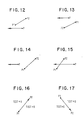
- FIGS. 12-17 for an illustration of the various cases being tested for in code lines 207-213. If p lies below the line segment, there can be no crossing (code line 207; see FIG. 12). If it lies above the segment, there can be no crossing (code line 208; see FIG. 13). If it lies to the left of the segment, there can be no crossing (code line 209; see FIG. 14). If it lies to the right of the line segment (and is known not to be either above or below), then there must be a crossing (code line 210 and 211; see FIG. 15). The last two tests are not strictly necessary, since the test value calculated in code line 212 is general. However, performing them reduces the number of times the more expensive calculation in code line 212 needs to be done.
- the test value (code line 212) is derived from the formula for the line passing between point p1 and p2. If the line segment (directed from p1 to p2) extends upward and the test value is positive (see FIG. 16), or if the line segment extends downward and the test value is negative (see FIG. 17), the point lies to the right of the line and a crossing occurs (code line 213 and 213′).
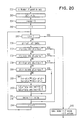
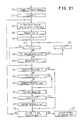
- Procedure to highlight menu items The following procedure "track” handles the tracking of the pointing device and highlighting of the menu items see also FIG. 21). It assumes that only one menu is currently displayed on the screen, but can be generalized in a straightforward manner to handle multiple menus.
- the procedure is passed as a parameter (code line 300): . a list of menu items, as generated with the aid of procedure "menu_list"
- the procedure returns the index of the item selected (code line 301). As written, the procedure does not terminate until some valid selection is made.
- the test at code line 315 can easily be expanded to test for any exceptional inputs or conditions which might cause the procedure to terminate without a valid choice, in which case the return value would be 0.
- the number of items in the menu list is either stored explicitly as part of the data structure representing the list or can be obtained by scanning through the list, counting the items (code line 302). Initially, no menu item is selected or highlighted (code line 303).
- the outer loop (code line 304-316) is executed indefinitely until explicitly terminated.
- the notation "exitdo" signifies that the nearest enclosing do loop is terminated. Any additional outer loops are not terminated.
- the new cursor location is obtained, and the on-screen cursor moved to that location (code line 305).
- the underlying system software is assumed to employ well-known techniques for handling interrupts from the pointing device hardware, applying hysteresis to the input if necessary, translating to a desired coordinate system if necessary, and storing the values in an input buffer, allowing application programs to retrieve the succession of values from the input buffer.
- the new cursor location is initially assumed to lie outside all menu items (code line 306).
- the loop at code lines 307-310 checks whether it lies inside the perimeter of any item.
- the procedure "test_inside” is called for each menu item to determine if the point lies inside the perimeter of the item (code line 308). If so, the index is remembered and the search terminates (code line 309).
- Highlighting of a menu item can be done in a number of ways, for example by changing the colors of the items or by drawing a bounding polygon around the item. The specifics of highlighting and removing the highlight from an item are not given here.
- tracking can terminate (code line 315). If the cursor is not inside the perimeter of any menu item, tracking continues.
Landscapes
- Engineering & Computer Science (AREA)
- General Engineering & Computer Science (AREA)
- Theoretical Computer Science (AREA)
- Human Computer Interaction (AREA)
- Physics & Mathematics (AREA)
- General Physics & Mathematics (AREA)
- Digital Computer Display Output (AREA)
- Input From Keyboards Or The Like (AREA)
Applications Claiming Priority (2)
| Application Number | Priority Date | Filing Date | Title |
|---|---|---|---|
| US23235388A | 1988-08-15 | 1988-08-15 | |
| US232353 | 1988-08-15 |
Publications (2)
| Publication Number | Publication Date |
|---|---|
| EP0355458A2 true EP0355458A2 (fr) | 1990-02-28 |
| EP0355458A3 EP0355458A3 (fr) | 1990-12-05 |
Family
ID=22872773
Family Applications (1)
| Application Number | Title | Priority Date | Filing Date |
|---|---|---|---|
| EP19890113847 Withdrawn EP0355458A3 (fr) | 1988-08-15 | 1989-07-27 | Méthode et appareil pour selectionner les données d'un menu |
Country Status (2)
| Country | Link |
|---|---|
| EP (1) | EP0355458A3 (fr) |
| JP (1) | JPH0276324A (fr) |
Cited By (5)
| Publication number | Priority date | Publication date | Assignee | Title |
|---|---|---|---|---|
| EP0464742A3 (en) * | 1990-07-02 | 1992-05-27 | Xerox Corporation | Graphics display system with improved dynamic menu selection |
| EP0498082A1 (fr) * | 1991-02-01 | 1992-08-12 | Koninklijke Philips Electronics N.V. | Dispositif de traitement interactif d'objets |
| GB2391148A (en) * | 2002-07-19 | 2004-01-28 | Autodesk Canada Inc | Selecting functions via a graphical user interface |
| US6947062B2 (en) | 2001-07-23 | 2005-09-20 | Koninklijke Philips Electronics N.V. | Seamlessly combined freely moving cursor and jumping highlights navigation |
| JP2016181201A (ja) * | 2015-03-25 | 2016-10-13 | コニカミノルタ株式会社 | 表示装置、画像処理装置及びプログラム |
Families Citing this family (3)
| Publication number | Priority date | Publication date | Assignee | Title |
|---|---|---|---|---|
| JP4856804B2 (ja) * | 2000-03-15 | 2012-01-18 | 株式会社リコー | メニュー表示制御装置、情報処理装置、電子黒板システム、メニュー表示システムの制御方法、情報処理システムの制御方法およびこれらの方法をコンピュータに実行させるためのプログラムを記録したコンピュータ読み取り可能な記録媒体 |
| KR100377222B1 (ko) * | 2000-12-27 | 2003-03-26 | 삼성전자주식회사 | 디스플레이 장치 및 osd 제어방법 |
| KR100433396B1 (ko) * | 2001-10-29 | 2004-06-02 | 삼성전자주식회사 | 온 스크린 디스플레이 장치를 구비한 전자기기의 기능변경장치 및 방법 |
Family Cites Families (3)
| Publication number | Priority date | Publication date | Assignee | Title |
|---|---|---|---|---|
| JPS60201425A (ja) * | 1984-03-27 | 1985-10-11 | Nippon Telegr & Teleph Corp <Ntt> | デイスプレイ装置におけるマ−ク移動制御方法 |
| US4710763A (en) * | 1984-10-19 | 1987-12-01 | Texas Instruments Incorporated | Method for generating and displaying tree structures in a limited display area |
| JPS63229515A (ja) * | 1987-03-18 | 1988-09-26 | Fujitsu Ltd | マウスによる文字デ−タ入力方式 |
-
1989
- 1989-06-14 JP JP1149772A patent/JPH0276324A/ja active Pending
- 1989-07-27 EP EP19890113847 patent/EP0355458A3/fr not_active Withdrawn
Cited By (6)
| Publication number | Priority date | Publication date | Assignee | Title |
|---|---|---|---|---|
| EP0464742A3 (en) * | 1990-07-02 | 1992-05-27 | Xerox Corporation | Graphics display system with improved dynamic menu selection |
| EP0498082A1 (fr) * | 1991-02-01 | 1992-08-12 | Koninklijke Philips Electronics N.V. | Dispositif de traitement interactif d'objets |
| US6947062B2 (en) | 2001-07-23 | 2005-09-20 | Koninklijke Philips Electronics N.V. | Seamlessly combined freely moving cursor and jumping highlights navigation |
| GB2391148A (en) * | 2002-07-19 | 2004-01-28 | Autodesk Canada Inc | Selecting functions via a graphical user interface |
| GB2391148B (en) * | 2002-07-19 | 2006-01-04 | Autodesk Canada Inc | Selecting functions via a graphical user interface |
| JP2016181201A (ja) * | 2015-03-25 | 2016-10-13 | コニカミノルタ株式会社 | 表示装置、画像処理装置及びプログラム |
Also Published As
| Publication number | Publication date |
|---|---|
| JPH0276324A (ja) | 1990-03-15 |
| EP0355458A3 (fr) | 1990-12-05 |
Similar Documents
| Publication | Publication Date | Title |
|---|---|---|
| US20230110688A1 (en) | Item selection using enhanced control | |
| EP0656608B1 (fr) | Procédé et appareil pour le placement d'annotations sur un écran sans chevauchement | |
| EP0694829B1 (fr) | Procédé et dispositif pour visualiser des résultats de recherche de base de données | |
| US5821930A (en) | Method and system for generating a working window in a computer system | |
| US5339390A (en) | Operating a processor to display stretched continuation of a workspace | |
| EP0494106B1 (fr) | Dispositif pour afficher des régions sur un écran | |
| KR100532342B1 (ko) | 사용자 인터랙티브 디스플레이 인터페이스에서 온-스크린포인터에 의해 승인된 특정 아이콘들로 사용자의 주의를향하게 하기 위한 방법 및 장치 | |
| US5568604A (en) | Method and system for generating a working window in a computer system | |
| US6404443B1 (en) | Three-dimensional graphical user interface for managing screen objects | |
| US5550967A (en) | Method and apparatus for generating and displaying visual cues on a graphic user interface | |
| Johnson et al. | Tree-maps: A space filling approach to the visualization of hierarchical information structures | |
| CA2124505C (fr) | Interface homme-machine a deplacement simultane de curseur et d'outils | |
| US7385605B2 (en) | Computer display system for dynamically modifying stacked area line graphs to change the order or presence of a set of stacked areas in the graph respectively representative of the proportions contributed to a total by each of a set of time dependent variables | |
| EP0694878B1 (fr) | Procédé et dispositif pour augmenter le détail d'une structure en arbre | |
| EP0740246A2 (fr) | Méthode d'affichage analytique de données et appareil | |
| CN104137043A (zh) | 用于在图形用户界面(gui)上进行人机交互的方法 | |
| JPH0756841A (ja) | プロセッサーベースの装置の操作方法 | |
| JPS62276673A (ja) | マルチウインドウ表示装置 | |
| US6339440B1 (en) | Method and apparatus for positioning a cursor | |
| Maguire | A review of human factors guidelines and techniques for the design of graphical human-computer interfaces | |
| JP3186241B2 (ja) | 図形編集装置 | |
| EP0355458A2 (fr) | Méthode et appareil pour selectionner les données d'un menu | |
| JP2000172398A (ja) | 表示装置上の表示領域の間で切り替えるためのインタ―フェ―ス・コントロ―ル | |
| CN105243469A (zh) | 一种多维空间映射到低维空间的方法及其展示方法和系统 | |
| JPH0991299A (ja) | 階層的に関連した情報の生成方法及びコンピュータ制御ディスプレイシステム |
Legal Events
| Date | Code | Title | Description |
|---|---|---|---|
| PUAI | Public reference made under article 153(3) epc to a published international application that has entered the european phase |
Free format text: ORIGINAL CODE: 0009012 |
|
| AK | Designated contracting states |
Kind code of ref document: A2 Designated state(s): DE FR GB |
|
| 17P | Request for examination filed |
Effective date: 19900621 |
|
| PUAL | Search report despatched |
Free format text: ORIGINAL CODE: 0009013 |
|
| AK | Designated contracting states |
Kind code of ref document: A3 Designated state(s): DE FR GB |
|
| STAA | Information on the status of an ep patent application or granted ep patent |
Free format text: STATUS: THE APPLICATION HAS BEEN WITHDRAWN |
|
| 18W | Application withdrawn |
Withdrawal date: 19930126 |