EP0470837A2 - Appareil autonome d'aide à l'examen et de stockage d'information - Google Patents
Appareil autonome d'aide à l'examen et de stockage d'information Download PDFInfo
- Publication number
- EP0470837A2 EP0470837A2 EP91307280A EP91307280A EP0470837A2 EP 0470837 A2 EP0470837 A2 EP 0470837A2 EP 91307280 A EP91307280 A EP 91307280A EP 91307280 A EP91307280 A EP 91307280A EP 0470837 A2 EP0470837 A2 EP 0470837A2
- Authority
- EP
- European Patent Office
- Prior art keywords
- computer
- examination
- memory
- processor
- indicia
- Prior art date
- Legal status (The legal status is an assumption and is not a legal conclusion. Google has not performed a legal analysis and makes no representation as to the accuracy of the status listed.)
- Withdrawn
Links
Images



Classifications
-
- G—PHYSICS
- G06—COMPUTING OR CALCULATING; COUNTING
- G06F—ELECTRIC DIGITAL DATA PROCESSING
- G06F3/00—Input arrangements for transferring data to be processed into a form capable of being handled by the computer; Output arrangements for transferring data from processing unit to output unit, e.g. interface arrangements
- G06F3/01—Input arrangements or combined input and output arrangements for interaction between user and computer
- G06F3/03—Arrangements for converting the position or the displacement of a member into a coded form
- G06F3/033—Pointing devices displaced or positioned by the user, e.g. mice, trackballs, pens or joysticks; Accessories therefor
- G06F3/038—Control and interface arrangements therefor, e.g. drivers or device-embedded control circuitry
- G06F3/0386—Control and interface arrangements therefor, e.g. drivers or device-embedded control circuitry for light pen
-
- G—PHYSICS
- G06—COMPUTING OR CALCULATING; COUNTING
- G06F—ELECTRIC DIGITAL DATA PROCESSING
- G06F3/00—Input arrangements for transferring data to be processed into a form capable of being handled by the computer; Output arrangements for transferring data from processing unit to output unit, e.g. interface arrangements
- G06F3/01—Input arrangements or combined input and output arrangements for interaction between user and computer
- G06F3/03—Arrangements for converting the position or the displacement of a member into a coded form
- G06F3/033—Pointing devices displaced or positioned by the user, e.g. mice, trackballs, pens or joysticks; Accessories therefor
-
- G—PHYSICS
- G16—INFORMATION AND COMMUNICATION TECHNOLOGY [ICT] SPECIALLY ADAPTED FOR SPECIFIC APPLICATION FIELDS
- G16H—HEALTHCARE INFORMATICS, i.e. INFORMATION AND COMMUNICATION TECHNOLOGY [ICT] SPECIALLY ADAPTED FOR THE HANDLING OR PROCESSING OF MEDICAL OR HEALTHCARE DATA
- G16H10/00—ICT specially adapted for the handling or processing of patient-related medical or healthcare data
- G16H10/60—ICT specially adapted for the handling or processing of patient-related medical or healthcare data for patient-specific data, e.g. for electronic patient records
-
- G—PHYSICS
- G16—INFORMATION AND COMMUNICATION TECHNOLOGY [ICT] SPECIALLY ADAPTED FOR SPECIFIC APPLICATION FIELDS
- G16H—HEALTHCARE INFORMATICS, i.e. INFORMATION AND COMMUNICATION TECHNOLOGY [ICT] SPECIALLY ADAPTED FOR THE HANDLING OR PROCESSING OF MEDICAL OR HEALTHCARE DATA
- G16H40/00—ICT specially adapted for the management or administration of healthcare resources or facilities; ICT specially adapted for the management or operation of medical equipment or devices
- G16H40/60—ICT specially adapted for the management or administration of healthcare resources or facilities; ICT specially adapted for the management or operation of medical equipment or devices for the operation of medical equipment or devices
- G16H40/63—ICT specially adapted for the management or administration of healthcare resources or facilities; ICT specially adapted for the management or operation of medical equipment or devices for the operation of medical equipment or devices for local operation
-
- G—PHYSICS
- G16—INFORMATION AND COMMUNICATION TECHNOLOGY [ICT] SPECIALLY ADAPTED FOR SPECIFIC APPLICATION FIELDS
- G16H—HEALTHCARE INFORMATICS, i.e. INFORMATION AND COMMUNICATION TECHNOLOGY [ICT] SPECIALLY ADAPTED FOR THE HANDLING OR PROCESSING OF MEDICAL OR HEALTHCARE DATA
- G16H40/00—ICT specially adapted for the management or administration of healthcare resources or facilities; ICT specially adapted for the management or operation of medical equipment or devices
- G16H40/60—ICT specially adapted for the management or administration of healthcare resources or facilities; ICT specially adapted for the management or operation of medical equipment or devices for the operation of medical equipment or devices
- G16H40/67—ICT specially adapted for the management or administration of healthcare resources or facilities; ICT specially adapted for the management or operation of medical equipment or devices for the operation of medical equipment or devices for remote operation
-
- G—PHYSICS
- G16—INFORMATION AND COMMUNICATION TECHNOLOGY [ICT] SPECIALLY ADAPTED FOR SPECIFIC APPLICATION FIELDS
- G16H—HEALTHCARE INFORMATICS, i.e. INFORMATION AND COMMUNICATION TECHNOLOGY [ICT] SPECIALLY ADAPTED FOR THE HANDLING OR PROCESSING OF MEDICAL OR HEALTHCARE DATA
- G16H70/00—ICT specially adapted for the handling or processing of medical references
- G16H70/20—ICT specially adapted for the handling or processing of medical references relating to practices or guidelines
Definitions
- This application relates to a computerized apparatus and method for assisting and/or guiding examination of a person or an article in accordance with preset categories.
- keyboard allergy The second drawback of conventional computers has been referred to as "keyboard allergy". Many people find it difficult to operate a keyboard and to learn the techniques needed to make full use of the computer's capabilities; learning to use a computer keyboard is a barrier to many.
- the note-pad computer discussed above is capable of recognizing printing, but the characters must be carefully drawn, and entering data by printing on a screen would be a slow method of entering data for many users.
- the apparatus and method are particularly useful in making a medical examination.
- a computer apparatus in accordance with this invention comprises a portable hand-held enclosure, and a microprocessor including a memory within the enclosure.
- a series of examination items or categories appear on one side of the enclosure, preferably in a changeable display panel. Adjacent each of the examination items is mounted an infrared transmitter.
- An infrared generator is sequentially connected to the transmitters and it activates the transmitters to sequentially transmit infrared signals, each of the signals being related or associated with one of the examination items.
- a hand-held stylus is connected to the microprocessor by a wire or tether and includes an infrared sensor.
- a user of the apparatus enters data in the microprocessor by scanning one of the transmitters using the light pen.
- the enclosure further includes a miniature tape recorder.
- a small microphone which may be mounted in the stylus, is used for dictating comments during use of the apparatus.
- a main or central computer and a dataport connected to the main computer are provided.
- the portable apparatus may be glugged into the dataport in order to load data from the processor of the apparatus into the main computer.
- the dataport also includes a display panel connected to the main computer, whereby the dataport may function as a bulletin board for displaying information, under the control of the main computer.
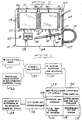
- Fig. 1 is a block diagram of a physician's office complex 10 embodying a centralized patient information storage and retrieval system 12 in accordance with this invention.
- System 12 includes a central computer 14 having internal memory and suitable control programming for driving a printer to generate a chart note 16 for placement in the patient file, for printing patient prescriptions 18 and corresponding treatment instructions 20, and for receiving patient history input 22 from a patient or medical technician and generating a corresponding history hardcopy 24 for placement in the patient file.
- central computer 14 also receives input from one or more dataports 26, which in turn are electronically coupled to corresponding portable computers 28.
- a portable computer is defined as a portable apparatus of the character illustrated in Figs. 2, 5 and 10.
- a dataport is defined as apparatus adapted to be connected to a central computer and to a portable computer and of the character shown in Figs. 2, 7 and 8.
- one embodiment of the portable computer 28 comprises a flat rectangular enclosure 30 having a front panel 32 for displaying examination information and prompting data input by the physician.
- the panel 32 includes a first display 34 listing general examination categories 34a-34ff along opposed side edges of panel 32.
- category display 34 comprises general information diagnosis categories identified by suitable indicia permanently and legibly printed along the left-hand panel side edge--e.g., "vital signs" 34a, "appearance” 34b, "cardiovascular” 34e and "neurological" 34m.
- general examination treatment categories 34r-34ff are permanently and legibly printed in suitable indicia along the right-hand edge of panel 32--e.g., "chemistry profile” 34s, “medications” 34z and "follow-up” 34ee.
- a bar code 36a-36ff for uniquely optically identifying the corresponding adjacent category.
- an LED 38a-38ff appears immediately adjacent to each category indicia 34a-34ff for indicating the general examination category selected by a physician.
- LCD liquid crystal display
- the several segments of LCD 40 display specific examination indicia coordinated with the individual general examination (diagnosis or treatment) category 34 selected by the physician.
- a corresponding bar code segment 42a-42jj for uniquely identifying the corresponding display segment, and an LED 44a-44jj for indicating to the physician the display segments selected.
- Dataport 26 (Fig. 2) comprises a generally rectangular housing 60 having an open upper edge 62 for removably receiving penboard 32, and suitable means (not shown) on the rear face for mounting housing 60 on a wall or the like.
- the portable computer 28 internally includes a microprocessor-based controller 64 with internal memory having prestored therein sets of specific examination indicia for display at segments 40a-40jj of LCD 40 and associated with each general examination category 34a-34ff. Controller 64 also includes suitable memory space for storing patient examination information as will be described, and control programming for operating panel 32, receiving and storing patient examination data, and subsequently transmitting or downloading such data through dataport 26 to central computer 14 (FIG. 1). Microcontroller 64 has output ports P1.0 - P1.7 connected through LED drivers 66, 68 to drive LEDs 38a-38ff and 48c-56c on panel 32.
- microcontroller 64 has output ports PAO-PB7 connected through an LCD data and control driver 70 for driving LCD 46 and the several segments 40a-40jj of LCD 40.
- Microcontroller 64 and the remainder of the computer 28 circuitry receive power from a power supply 72 coupled to a battery 74 contained within computer enclosure 30 (Fig. 2).
- a reset input to microcontroller 64 is coupled to an operator pushbutton 76, and to a delay circuit 78 for resetting the microcontroller on the initial power-up.
- a further input to microcontroller 64 is received from a stylus 80 that is manipulated by the physician for scanning one or more bar codes on panel 32.
- Stylus 80 is connected through a socket 82 (Figs. 2 and 3) on a sidewall of enclosure 30, through filtering circuitry 84 (Fig. 3) and through Schmitt triggers 86 to ports PC 6 and 7 of microcontroller 64.
- the input/output ports PC0 and PC3 of microcontroller 64 are coupled to a connector 88 positioned at the lower edge of computer 28, as are the transmit/receive and interrupt ports of the microcontroller 64.
- a mating connector 90 is internally positioned at the lower portion of dataport housing 60 for mating engagement with connector 88 when computer 28 is fully inserted into dataport 26, as shown in Fig. 2.
- microcontroller 64 The input/output data and control ports of microcontroller 64 are thus connected through dataport 26 to central computer 14 (Fig. 1) for downloading patient examination information and/or uploading modified control programming to the computer 28.
- a battery-charger 92 within dataport 26 is responsive to a switch 94 for detecting insertion of computer 28 to recharge the computer battery 74 through connectors 90, 88.
- dataport housing 60 also includes a slot 96 at the lower edge thereof for selectively receiving computer 28 so as to mate connectors 88, 90 for downloading patient data without inserting computer 28 into dataport 26.
- the computer 28 in the preferred embodiment of the invention has general examination category indicia 34a-34ff permanently preprinted along with the side edges of panel 32.
- the general category indicia illustrated in Figs. 2 and 4 represent suitable examination categories for a general practice physician. It will be noted that a number of blank spaces are provided in general information category dis-play 34 for entry of suitable general examination or treatment categories as desired by the individual practitioner.
- the computer 28 also has specific examination indicia prestored in microcontroller 64 coordinated with each general examination category.
- the physician may add or modify specific examination indicia to be displayed at LCD 40.
- the specific indicia at display 40 illustrated in FIGS. 2 and 4 correspond to "neurologic" general examination category 34m.
- Table 1 lists computer 28 display abbreviations 40a-40jj and the corresponding text which would be printed on chart note 16 (Fig. 1) for the patient file copy: Likewise, the following Table lists penboard display abbreviations appearing at LCD 40, and corresponding chartnote text, for "cardiovascular" general examination through category 34e: Indicia and text for the other general examination (diagnosis and treatment) categories may be selected and/or modified as desired.
- the computer 28 is now ready for use by the physician in examining a patient.
- the examining physician first employs stylus 80 to scan a bar code or other suitable indicia on the patient file, resulting in storage of patient identification data in the portable computer's microcontroller 64 and display of patient's name at LCD 46 (Figs. 2 and 4).
- the physician first scans bar code 36m (Fig. 4) to indicate examination in general category 34m.
- Specific examination indicia as shown in Fig. 4 is then displayed at LCD segments 40a-40jj, and LED 38m is illuminated to remind the physician that general examination category 34m is under study.
- the physician then scans bar code 48b with the stylus to indicate commencement of a data-entry process, and LED 48c is correspondingly illuminated.
- the physician then scans one or more bar codes 42a-42jj reflecting examination of the patient, with LEDs 44a-44jj being illuminated as appropriate.
- the physician may rescan the corresponding bar code, whereupon selection is cancelled and the LED is extinguished.
- the physician scans bar code 50b and LED 50c is illuminated.
- the physician may then select another (diagnosis or treatment) category and repeat the specific display selection process. If the physician wishes to dictate information for the patient's file not reflected in the prestored indicia, bar code 36ff is scanned during the examination process.
- microcontroller 64 When examination is complete, the computer 28 is returned to dataport 26 so that connectors 88, 90 (Fig. 3) are brought into mating engagement.
- the patient information stored in microcontroller 64 is then downloaded to central computer 14 (Fig. 1) for preparation of file charts, prescription forms, etc.
- the computer 28 may alternatively be inserted into dataport slot 96 (Fig. 2) for transmission of patient data and reset pushbutton 76 (Fig. 3) may be depressed to reset the microcontroller, whereupon computer 28 is ready for examination of a new patient.
- Suitable software for operating central computer 14 and microcontroller 64 in the manner described will be self-evident to the artisan.
- the self-contained examination guide and information storage apparatus has been described in conjunction with the foregoing embodiment thereof, it will be readily appreciated that modifications may be implemented without departing from the general principles of the invention.
- the portable computer 28 may be configured for inspection of automobile engines, with general inspection categories such as "carburetor”, “valve timing”, etc. being listed along with outside edges of the computer panel, and specific examination indicia such as "idle screw adjust" displayed at LCD 40 as a function of selected general examination category.
- a stylus 80 aid of bar code's on the computer panel is described above, other means for entering general and specific examination information may be employed, such as membrane switches or the like positioned in place of the various bar codes adjacent to the indicia as shown in Figs. 2 and 4, and the embodiments to be described hereinafter.
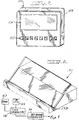
- Figs. 5 and 6 illustrate another construction of the portable computer, which comprises an enclosure or case 101 having a size which may be conveniently held in one hand.
- the computer components including memory and auxiliary parts,shown in Fig. 6, are mounted within the enclosure 101.
- the enclosure includes a generally flat, rectangular front panel 102, four sides 103, and a back panel (not shown) which may be plain.
- a stylus 104 is connected to a tether or cord 106 which terminates in a telephone-type plug 107, the receptacle of the plug 107 being connected to the computer shown in Fig. 6.
- Adjacent the plug 107 is an elongated slot 108 formed in a side 103 of the enclosure 102, for storing the stylus 104 when it isn't in use. It is preferred that a plug 107 and storage slot 108 be provided on both the right and left sides of the enclosure for the convenience of both right and left-handed persons.
- Two display segments 111 and 112 which are preferably backlit LCD displays, are mounted on the front panel 102.
- the displays 111 and 112 are, of course, connected to and under the control of the computer shown in Fig. 6.
- Each of the displays is substantially square in the specific example shown in Fig. 5, and rows of infrared emitters are provided adjacent the edges of each display.
- left and right vertical rows 113 and 114 are adjacent the display 111 and left and right vertical rows 115 and 116 are adjacent the display 112.
- bottom rows 117 and 118 are provided adjacent the lower edges of the displays 111 and 112 respectively.
- Each of the rows 113 to 118 includes a plurality of infrared emitters 121.
- each of the vertical rows includes twelve emitters and each of the bottom rows includes five emitters.
- the stylus 104 has an infrared sensor or receiver 122 built into its tip. When the sensor 122 is placed on a selected transmitter 121, it will detect an infrared signal generated by the selected transmitter, and the signal will be fed to the internal computer via the cord 106.
- the tip portion (including the sensor 122) may be movably mounted on the shaft of the stylus, and a switch in the stylus may be connected to respond to movement of the tip portion.
- the transmitter-receiver circuits would normally be inactive, and they would be energized only when an operator presses the tip of the stylus down against a transmitter. The pressure on the stylus tip closes the above-mentioned switch and thereby energizes the circuits.
- the portable computer further includes a built-in miniature tape recorder 126 (to be discussed further hereinafter) and an eject button 127.
- a microphone 128 is mounted in the stylus 104, and an on-off switch 129 is mounted on the shaft of the stylus 104.
- the block diagram of Fig. 6 illustrates the construction and operation of the built-in computer and auxiliary circuits of the portable computer.
- the block 131 represents all of the infrared transmitters 121 in the six rows 113 to 118, and the block 132 represents the sensor 122 in the stylus 104.
- a scanner/multiplexer 133 connected to the blocks 131 and 132 serves a number of functions.
- a block 133 circuit is connected to the transmitters 121 and to a power supply (battery) and causes the transmitters 121 to be energized in sequence. This sequential energization occurs repetitively and all of the transmitters are sequentially energized a number of times per second.
- the senor 122 When the sensor 122 is adjacent a selected transmitter 121, it, of course, detects the signal at the time when the selected transmitter is energized, and the detected signal is fed back to the block 133. In essence, the block 133 compares the sensed signal with the position of the scanner at that instant and thereby determines the location of the stylus and the selected transmitter.
- the identification of the selected transmitter 121 is passed to the block 134 which generates a keycode signal that is specific to the identified transmitter.
- the block 134 functions similarly to the circuit in an ordinary computer keyboard which generates a signal that is specific to a pressed key of the keyboard.
- the output of the block 134 is fed to a microprocessor or core computer 136 which preferably is compatible with a PC such as an IBM PC.
- the core computer 136 is further connected to a memory block 137 which functions as a hard disk of a PC and stores entered information, patient information, and programs for operating the system.
- the block 138 represents the two displays 111 and 112; the block 139 represents a built-in rechargeable battery which powers all of the components; the block 141 represents a port for interconnecting the portable computer components with a dataport; and the block 142 represents an interface between the recorder 126 and the computer.
- the interface block 142 preferably includes an automatic queuing circuit connected to the core computer 136. As will be described hereinafter, during use an operator enters information using the stylus 104 and selected transmitters 121.
- a tag may be formed, for example, by moving the sensor 122 a second time past the transmitter of a selected indicia. At a later time the operator dictates the commentary, which is transcribed and made a part of the record.
- the recorded tags thus provide a prompting framework for the dictated information; the tags reference each block of audio data to a category or indicia entered by use of the stylus.
- FIG. 8 shows a desk top dataport 151 having an inclined shelf 152 and a port (not illusttated) for connection with the port 141 of the portable computer.
- the dataport 151 also includes a cable (not shown) extending to a central or office main computer (the unit 14 in Fig. 1).
- This dataport 151 is shaped to hold the computer shown in Fig. 5 at an inclined angle so that it may be operated while positioned on a desk.
- the dataport 154 shown in Fig. 7 is specially designed for wall mounting but could be used on a desk instead. It includes a slot 155 formed in its upper side, the slot 155 being sized to receive the computer. At the bottom of the slot 155 is provided a port (not shown) connected by a cable to the office computer, the port being adapted to mate with the port of the computer so that the data in the computer may be uploaded to the central office computer.
- the dataport 154 is further provided with an LCD display 156 and a keypad 157 which are controlled by the central office computer.
- the display 156 may receive and display messages from the central computer and thus operate as a remote bulletin board for passing messages to a physician.
- the keypad 157 may be used to enter information in the computer or to call up information, for example.
- Both dataports 151 and 154 are preferably also provided with means for coupling with the battery system 139 and recharging the battery.
- the computer 136 may be configured or programmed to operate in a variety of ways, and the following is a preferred mode of operation.
- the portable computer shown in Fig. 5 is plugged into a dataport and the central computer is directed, using a conventional keyboard, to download patient information to the portable computer relating to the list of patients to be examined.
- the records of the patients are then stored in the computer memory within the enclosure 101.
- the physician removes the computer from the dataport, and an initial menu appears on one or both displays 111 and/or 112 which lists the patients whose records are in the memory.
- the physician makes a patient selection by moving the stylus 104 past the transmitter adjacent the selected patient's name.
- the next screen is a list of examination categories which appears on the two displays. These categories are shown in left and right columns in each of the displays 111 and 112, the left columns being adjacent and associated with the transmitters 121 of the left rows 113 and 115 and the right columns being adjacent the right rows 114 and 116. These examination categories correspond to, for example, the categories 34 shown in Fig. 4.
- the operator selects one of the categories by pressing the sensor 122 against the transmitter adjacent the selected category.
- the circuit shown in Fig. 6 then functions as previously described to identify the selected transmitter and the category associated with it.
- there is a list of examination indicia for each category and after a category has been selected the next screen shows the indicia of the selected category, which appears in two columns in each display adjacent the transmitters of the four rows 113 to 116.
- the physician then proceeds with the examination guided by the indicia shown in the displays 111 and 112, and touches the stylus on the transmitters for selected indicia. When appropriate, comments may later be dictated and queued in the computer, as previously described.
- the computer may also be programmed to show a third screen of a more condition specific indicia, which may be entered using the transmitters and the receiver as previously described.
- the numbers "1, 2, 3---9, 0" may appear near the bottom edge of the two displays adjacent the ten transmitters.
- One of the indicia may state, for example, "enter patient's temperature", or "enter pulse rate”. The physician may do so by touching the transmitters of the rows 117 and 118 adjacent the appropriate numbers.
- the entered data are stored in the memory 137, and the physician may follow the foregoing procedure for more than one patient. Thereafter the portable computer is inserted into a dataport and all of the data are uploaded to the central computer.
- Fig. 9 illustrates an alternative circuit for energizing and responding to the infrared transmitters.
- a code signal generator circuit 161 generates a distinctive coded digital signal for each of the transmitters 121 (represented by the block 162).
- the stylus 163 senses the coded signal of one of the transmitters and feeds it through the generator 161 to a keycode generator 164 which correlates the coded signal with the selected transmitter and provides a keycode.
- the remainder of the construction and operation may be the same as described for Fig. 6.
- Fig. 10 illustrates a preferred embodiment of the portable computer apparatus which also includes a generally rectangular box-like housing 171.
- Computer circuitry as illustrated in Fig. 6 is mounted within the housing 71, and a stylus 172 and a cord 173 similar to the stylus 104 and the cord 106 are connected to the computer.
- a recorder including a tape cassette 176 and an eject switch 177 are again provided.
- Two vertically elongated, back lighted LED display panels 180 and 181 are formed on the front 182 of the housing 171, a vertically extending space 183 being provided between the two panels 180 and 181. Further, a horizontal panel 184 is provided across the top of the two panels 180 and 181, and information such as a patient's name may be displayed in the panel 184.
- the three panels 180, 181 and 184 may be formed by a single back lighted LED display.
- the transmitters 191 function similarly to the transmitters 121 shown in Fig. 5, and, of course, the stylus 172 includes a receiver 192 in its tip.
- the physician inserts the housing 171 into a dataport such as the unit shown in Fig. 7.
- the apparatus of Fig. 10 includes a port (not illustrated) as previously described which connects with a port in the dataport, and the records of a number of patients are loaded into the computer of the portable unit from a central computer.
- the patient's names are displayed on the panels 180 and 181, and the physician selects one by use of the stylus 172 and the transmitter 191 which is aligned with the selected name.
- the patient's identification then appears in the panel 184.
- each of the panels 180 and 181 two vertical rows of examination categories are displayed by each of the panels 180 and 181, and each category is aligned and associated with one of the transmitters 191.
- the physician selects a category which is appropriate for the patient being examined. Following this selection, the categories are removed and, in their place, a series of indicia appear on the panels adjacent the transmitters. The physician then examines the patient and makes appropriate entries using the stylus 172 and the transmitters 191 to enter indicia, the lines of which are adjacent the transmitters.
- an electronic tag may be recorded by moving the receiver 192 past a transmitter 193 or 193a. After the examination has been completed, a "dictate" screen appears on the panels wherein all of the tagged indicia are listed adjacent the transmitters. The physician then selects the tagged indicia sequentially andcomments are dictated into a microphone 194 in the stylus 172. After the examination, the physician inserts the portable apparatus into the dataport in order to load the entered data into the central computer and to load the next series of patient's files into the portable apparatus. The tape cassette with dictated matter on it may be removed and replaced by a fresh cassette.
- the unit may be actuated to return to a primary or top level screen by moving the receiver 192 past a home transmitter 195 or 195a.
- Two sets of transmitters 193, 193a, 195, 195a may be provided for the convenience of right and left-handed persons.
- infrared transmitters and a receiver as described herein for selecting categories and indicia at various levels is advantageous because the categories and indicia may easily be changed or expanded by modifying the program. In the apparatus of Fig. 1, the categories are printed and, of course, more difficult to change.
- the present invention is also advantageous compared with a light pen arrangement of a note-pad computer. A light pen requires a raster type of display screen whereas the present invention may utilize a simpler and less expensive LED display.
- the portable computer may be either hardware or software controlled to function as described.
Landscapes
- Engineering & Computer Science (AREA)
- Health & Medical Sciences (AREA)
- General Engineering & Computer Science (AREA)
- Theoretical Computer Science (AREA)
- Biomedical Technology (AREA)
- Epidemiology (AREA)
- General Health & Medical Sciences (AREA)
- Medical Informatics (AREA)
- Primary Health Care (AREA)
- Public Health (AREA)
- Physics & Mathematics (AREA)
- Human Computer Interaction (AREA)
- General Physics & Mathematics (AREA)
- General Business, Economics & Management (AREA)
- Business, Economics & Management (AREA)
- Measuring And Recording Apparatus For Diagnosis (AREA)
- Medical Treatment And Welfare Office Work (AREA)
Applications Claiming Priority (2)
| Application Number | Priority Date | Filing Date | Title |
|---|---|---|---|
| US56548390A | 1990-08-10 | 1990-08-10 | |
| US565483 | 1990-08-10 |
Publications (2)
| Publication Number | Publication Date |
|---|---|
| EP0470837A2 true EP0470837A2 (fr) | 1992-02-12 |
| EP0470837A3 EP0470837A3 (en) | 1992-07-29 |
Family
ID=24258807
Family Applications (1)
| Application Number | Title | Priority Date | Filing Date |
|---|---|---|---|
| EP19910307280 Withdrawn EP0470837A3 (en) | 1990-08-10 | 1991-08-08 | Self-contained examination guide and storage apparatus |
Country Status (3)
| Country | Link |
|---|---|
| EP (1) | EP0470837A3 (fr) |
| JP (1) | JPH04273380A (fr) |
| CA (1) | CA2048122A1 (fr) |
Cited By (7)
| Publication number | Priority date | Publication date | Assignee | Title |
|---|---|---|---|---|
| WO1993017614A1 (fr) * | 1992-03-12 | 1993-09-16 | Paolo Fardin | Appareil electronique servant a localiser des lesions dans le systeme nerveux peripherique |
| FR2694104A1 (fr) * | 1992-07-24 | 1994-01-28 | Sextant Avionique | Terminal de communication ergonomique et son application à un procédé d'assistance au pilotage d'un aéronef. |
| US5475594A (en) * | 1992-07-24 | 1995-12-12 | Sextant Avionique | Method and device for assisting the piloting of an aircraft from a voluminous set of memory-stored documents |
| EP0796588A1 (fr) * | 1996-03-20 | 1997-09-24 | Siemens-Elema AB | Procédé et système de transfert de données physiologiques vers une station de traitement de données |
| GB2350450A (en) * | 1999-07-24 | 2000-11-29 | Lewis Jones | Pen-like data storer |
| EP1344119A4 (fr) * | 2000-11-07 | 2007-03-07 | Antaeus Healthcom Inc | Systeme de creation de base de donnees et informations structurees provenant d'une entree vocale |
| ITPR20100011A1 (it) * | 2010-02-16 | 2011-08-17 | Hersell S R L | Apparato di assistenza medico-sanitaria. |
Families Citing this family (1)
| Publication number | Priority date | Publication date | Assignee | Title |
|---|---|---|---|---|
| JP4695274B2 (ja) * | 2001-03-01 | 2011-06-08 | 東芝医用システムエンジニアリング株式会社 | 医用画像情報の転送方法および装置 |
Family Cites Families (7)
| Publication number | Priority date | Publication date | Assignee | Title |
|---|---|---|---|---|
| US3768073A (en) * | 1972-01-03 | 1973-10-23 | Searle Medidata Inc | Entry confirming input terminal |
| US4104617A (en) * | 1977-01-21 | 1978-08-01 | Westinghouse Electric Corp. | Control panel system |
| JPS56158381A (en) * | 1980-05-12 | 1981-12-07 | Suwa Seikosha Kk | Liquid crystal display unit |
| US4695831A (en) * | 1985-05-06 | 1987-09-22 | Humphrey Instruments, Inc. | Light pen having actuating accelerometer |
| JPS63234447A (ja) * | 1987-03-20 | 1988-09-29 | Sawa Denshi Kogyo:Kk | 音声・画像記録再生装置 |
| US4814759A (en) * | 1987-07-08 | 1989-03-21 | Clinicom Incorporated | Flat panel display monitor apparatus |
| US4991091A (en) * | 1988-08-23 | 1991-02-05 | Gregory Allen | Self-contained examination guide and information storage and retrieval apparatus |
-
1991
- 1991-07-30 CA CA002048122A patent/CA2048122A1/fr not_active Abandoned
- 1991-08-08 EP EP19910307280 patent/EP0470837A3/en not_active Withdrawn
- 1991-08-09 JP JP3200945A patent/JPH04273380A/ja active Pending
Cited By (7)
| Publication number | Priority date | Publication date | Assignee | Title |
|---|---|---|---|---|
| WO1993017614A1 (fr) * | 1992-03-12 | 1993-09-16 | Paolo Fardin | Appareil electronique servant a localiser des lesions dans le systeme nerveux peripherique |
| FR2694104A1 (fr) * | 1992-07-24 | 1994-01-28 | Sextant Avionique | Terminal de communication ergonomique et son application à un procédé d'assistance au pilotage d'un aéronef. |
| US5475594A (en) * | 1992-07-24 | 1995-12-12 | Sextant Avionique | Method and device for assisting the piloting of an aircraft from a voluminous set of memory-stored documents |
| EP0796588A1 (fr) * | 1996-03-20 | 1997-09-24 | Siemens-Elema AB | Procédé et système de transfert de données physiologiques vers une station de traitement de données |
| GB2350450A (en) * | 1999-07-24 | 2000-11-29 | Lewis Jones | Pen-like data storer |
| EP1344119A4 (fr) * | 2000-11-07 | 2007-03-07 | Antaeus Healthcom Inc | Systeme de creation de base de donnees et informations structurees provenant d'une entree vocale |
| ITPR20100011A1 (it) * | 2010-02-16 | 2011-08-17 | Hersell S R L | Apparato di assistenza medico-sanitaria. |
Also Published As
| Publication number | Publication date |
|---|---|
| JPH04273380A (ja) | 1992-09-29 |
| EP0470837A3 (en) | 1992-07-29 |
| CA2048122A1 (fr) | 1992-02-11 |
Similar Documents
| Publication | Publication Date | Title |
|---|---|---|
| EP0355707A2 (fr) | Appareil autonome d'aide à l'examen et de stockage d'information | |
| US6061666A (en) | Automatic bank teller machine for the blind and visually impaired | |
| US7217135B2 (en) | Electronic educational toy having a contact-sensitive display screen | |
| US6662998B2 (en) | Electronic voting system | |
| US5899855A (en) | Modular microprocessor-based health monitoring system | |
| US4770636A (en) | Cognometer | |
| US6572378B1 (en) | Electronic drawing assist toy | |
| US8991701B2 (en) | Integrated voting system and method for accommodating paper ballots and audio ballots | |
| EP0320749A2 (fr) | Dispositif portable pour la saisie d'historiques médicaux | |
| WO1999034274A2 (fr) | Carte commentaire electronique configurable de maniere dynamique | |
| US7675504B1 (en) | Personal interfaces for independent living and health | |
| WO1993012618A1 (fr) | Dispositif organisateur et de messagerie portable comprenant un poste de base | |
| US8655259B2 (en) | System and method for monitoring a physiological condition | |
| WO1998047121A1 (fr) | Procede informatique d'affichage d'un livre d'enfant a lecture directe | |
| EP1122524B1 (fr) | Dispositif de régulation pour calorie à reconnaissance vocale | |
| JP2002203211A (ja) | カード読取装置 | |
| US20120009557A1 (en) | Interactive apparatus having contact sensitive display screen capable of detecting two or more coincident contacts | |
| JPH04273380A (ja) | 自蔵式検査ガイド及び情報記憶装置 | |
| US4971406A (en) | Telephone order entry system and terminal therefor | |
| US4773860A (en) | Multiple aptitude testing device with data terminal input | |
| US6065972A (en) | Hand held quiz computer and educational device | |
| US20020160340A1 (en) | Character recognition educational system | |
| EP0942383A1 (fr) | Dispositif pour afficher la date de préemption de produits dans un congélateur | |
| JPH08161614A (ja) | 情報提供装置付自動販売機 | |
| JPH05134595A (ja) | 教育機器 |
Legal Events
| Date | Code | Title | Description |
|---|---|---|---|
| PUAI | Public reference made under article 153(3) epc to a published international application that has entered the european phase |
Free format text: ORIGINAL CODE: 0009012 |
|
| AK | Designated contracting states |
Kind code of ref document: A2 Designated state(s): DE FR GB |
|
| PUAL | Search report despatched |
Free format text: ORIGINAL CODE: 0009013 |
|
| AK | Designated contracting states |
Kind code of ref document: A3 Designated state(s): DE FR GB |
|
| STAA | Information on the status of an ep patent application or granted ep patent |
Free format text: STATUS: THE APPLICATION IS DEEMED TO BE WITHDRAWN |
|
| 18D | Application deemed to be withdrawn |
Effective date: 19930130 |