EP0538167A2 - Nichtlinearer Rollbalken - Google Patents
Nichtlinearer Rollbalken Download PDFInfo
- Publication number
- EP0538167A2 EP0538167A2 EP92480139A EP92480139A EP0538167A2 EP 0538167 A2 EP0538167 A2 EP 0538167A2 EP 92480139 A EP92480139 A EP 92480139A EP 92480139 A EP92480139 A EP 92480139A EP 0538167 A2 EP0538167 A2 EP 0538167A2
- Authority
- EP
- European Patent Office
- Prior art keywords
- region
- document
- computer system
- size
- current position
- Prior art date
- Legal status (The legal status is an assumption and is not a legal conclusion. Google has not performed a legal analysis and makes no representation as to the accuracy of the status listed.)
- Withdrawn
Links
Images



Classifications
-
- G—PHYSICS
- G06—COMPUTING OR CALCULATING; COUNTING
- G06F—ELECTRIC DIGITAL DATA PROCESSING
- G06F3/00—Input arrangements for transferring data to be processed into a form capable of being handled by the computer; Output arrangements for transferring data from processing unit to output unit, e.g. interface arrangements
- G06F3/01—Input arrangements or combined input and output arrangements for interaction between user and computer
- G06F3/048—Interaction techniques based on graphical user interfaces [GUI]
- G06F3/0484—Interaction techniques based on graphical user interfaces [GUI] for the control of specific functions or operations, e.g. selecting or manipulating an object, an image or a displayed text element, setting a parameter value or selecting a range
- G06F3/0485—Scrolling or panning
- G06F3/04855—Interaction with scrollbars
-
- Y—GENERAL TAGGING OF NEW TECHNOLOGICAL DEVELOPMENTS; GENERAL TAGGING OF CROSS-SECTIONAL TECHNOLOGIES SPANNING OVER SEVERAL SECTIONS OF THE IPC; TECHNICAL SUBJECTS COVERED BY FORMER USPC CROSS-REFERENCE ART COLLECTIONS [XRACs] AND DIGESTS
- Y10—TECHNICAL SUBJECTS COVERED BY FORMER USPC
- Y10S—TECHNICAL SUBJECTS COVERED BY FORMER USPC CROSS-REFERENCE ART COLLECTIONS [XRACs] AND DIGESTS
- Y10S715/00—Data processing: presentation processing of document, operator interface processing, and screen saver display processing
- Y10S715/974—Slider control as on-screen object in operator interface
Definitions
- This invention relates to the data processing field. More particularly, this invention relates to a scroll bar associated with a display window that provides a view into a presentation space.
- a scroll bar is commonly associated with a display window, and is most useful when only a small portion of a document can be displayed in a display window at any one time.
- the scroll bar contains what is known as a"slider.
- the sliders relative position in the scroll bar graphically indicates the relative position of the entire document that is currently displayed in the display window.
- One scroll bar is often used to indicate relative vertical position, while a second scroll bar can be used to indicate relative horizontal position.
- a scroll bar is normally used in conjunction with an input device such as a mouse, track ball, or light pen.
- an input device such as a mouse, track ball, or light pen.
- a user wants to move to a different section of a document, he can either move the mouse cursor to a new position on the scroll bar (click operation), or can place the mouse cursor on the slider, press and hold one of the mouse buttons, and move the mouse cursor either one side or the other of the slider (drag operation). While both of these operations are helpful in rapidly moving from one section of a document to another section, they don't do much to help a user find the specific section of the document he is looking for.
- the scroll bar is associated with a window or viewport on a computer display as part of a computer system, and contains a slider to indicate relative positioning in the window of a document, such as a data file, image file, audio file, text file, or spreadsheet.
- the current position of a user in a document is monitored by the computer system.
- a first region containing upper and lower boundaries of a portion of the document that envelop the current position in the document is created in a portion of memory called "scroll data".
- the initial size of the region is determined by a predetermined region growth rate. For example, if the current position of a 1000 line document is line 450, and if a 5% region growth rate is specified, a region having a lower boundary of line 425 and an upper boundary of line 475 is created in scroll data.
- the computer system again checks the current position in the document. If the current position is still within the first region, the size of the first region is expanded by the amount of the predetermined region growth rate. This expansion continues incrementally for as long as the current position remains in the first region, up until a maximum region size is reached.
- the computer system checks scroll data to see if the new current position in the document is within the first region. If so, the computer system snaps back the slider to the midpoint of the first region and displays the corresponding portion of the document. The longer the current position is in the first region, the larger the first region becomes, and the easier the midpoint of this first region is for the user to find through course positioning of the scroll bar slider. This technique effectively expands the target area of portions of the scroll bar without requiring the visual appearance of the scroll bar itself to change.
- the midpoint of the first region can migrate based on the exact positioning within the first region as each sampling period expires.
- the top of the region is expanded as the current cursor position remains in the top segment of the region, and the bottom of the region is expanded as the current cursor position remains in the bottom segment of the region.
- a second region is created containing the new current position.
- the size of the first region is reduced by a predetermined region reduction rate, while the size of the second region is expanded by a predetermined region growth rate. This continues until the size of the first region is reduced to a minimum region size and disappears, and until the size of the second region reaches a maximum region size.
- the computer system continues to monitor the current position in the document as long as the document is in use, or until a suspend sampling indication is received from the user. Once work on the document is completed, the computer system saves the present state of all active regions of the scroll bar in storage for the next time the document is used.
- Fig. 1 shows a block diagram of the computer system of the invention.
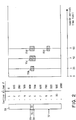
- Fig. 2 shows how non-linear regions of a scroll bar are created and get larger and smaller based on the current position in a document.
- Fig. 3 shows how a specific section of a document that has been viewed for a period of time can be found again through course positioning of the scroll bar slider.
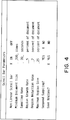
- Fig. 4 shows an exemplary screen used to set scroll bar parameters.
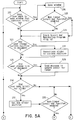
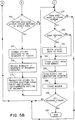
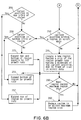
- Figs. 5-6 show the flowcharts of the operation of the scroll bar of the invention.
- Fig. 1 shows a block diagram of computer system 10 of the invention.
- Computer system 10 has display 17, keyboard 18, and input device 19, each of which is connected to system unit 11.
- System unit 11 contains processor 12 connected to memory 13, storage 14, and display adapter 15.
- Processor 12 is suitably programmed to carry out this invention, as described in more detail in the flowcharts of Figs. 5 and 6.
- computer system 10 is an IBM PS/2, where processor 12 is an Intel 80386 microprocessor.
- Display adapter 15 is an IBM 8515 display adapter, and display 17 is an IBM 8515 display.
- Input device 19 is preferably an IBM mouse but may also be a track ball, light pen, or other input device.
- Storage 14 is a magnetic hard disk file and contains operating system software, preferably OS/2 with Presentation Manager but optionally Microsoft Windows 3.0, as well as preferably one or more OS/2 application programs such as Word Perfect or optionally DOS application programs such as Microsoft Word for Windows. When running, these programs are partially or completely installed in memory 13 and executed by processor 12.
- Computer system 10 could also be another type of computer system, whether it be another microcomputer such as an Apple Macintosh, a minicomputer such as an IBM AS/400, or a mainframe computer such as an IBM System/390, and still fall within the spirit and scope of this invention.
- computer system 10 can be a microcomputer such as described above, connected to a larger computer system such as an IBM AS/400.
- Display 17 contains window 20.
- a "window or viewport can occupy anywhere from substantially all of the display screen to a very small portion of the display screen, and may be displayed in conjunction with (possibly overlaying portions of) other windows in a multi-tasking environment such as OS/2, or be by itself in a single-tasking environment such as DOS.
- a portion of document 21 is displayed in window 20.
- the name document shall be used to refer to any data file, text file, image file, audio file, spreadsheet, etc, that cannot be fully displayed or otherwise represented in window 20.
- Window 20 also contains scroll bar 30.
- Scroll bar 30 has slider 32. The relative position of slider 32 in scroll bar 30 indicates the relative position of document 21 currently displayed in window 20.
- document 21 a portion of which is shown in window 20 of Fig. 1, is part of a Policy and Procedures manual for a hypothetical large corporation.
- Our hypothetical large corporation has deemed that this manual be reviewed on a regular basis by all employees. To save paper, employees must review the document online and must not even think about printing off the whole document.
- Fig. 2 shows how non-linear regions of a scroll bar are created in a portion of memory 13 called “scroll data" (shown in Fig. 1 as scroll data 16) and get larger and smaller based on the current position in a document, as a function of elapsed time.
- This figure will be discussed in conjunction with Figs. 3A-3C and Fig. 4.
- Fig. 2 shows how this manual is mapped to a conventional scroll bar. The document is linearally represented through the scroll bar.
- a user would use a drag operation to move his mouse pointer to point 31 of scroll bar 30.
- Slider 32 would move to point 31 on scroll bar 30.
- Fig. 3A shows the section of document 21 visible to our user in window 20, and shows the location of slider 32 at point 31 of scroll bar 30.
- Fig. 2 shows how a first region is created and mapped to scroll bar 30 in the preferred embodiment of the invention. Since our user has his text cursor 33 (or other position marking device) on line 450 of document 21 (Fig. 3A), line 450 is considered to be our current position in document 21. After a first sampling rate has elapsed (set to be 20 seconds, as shown in Fig. 4), the first region for this document is created in scroll data 16, as shown by the reference numeral 35b. The initial size of region 35b is determined by a specified region growth rate. In our example, the current position of a 1000 line document is line 450, and a 5% region growth rate has been specified, as shown in Fig. 4.
- region 35b is initially a 50 line region from line 425 to line 475. Therefore the lower boundary of region 35b (line 425) and the upper boundary of region 35b (line 475) is stored in scroll data 16. Note that the midpoint of region 35b is our current position in document 21 of line 450.
- the size of the first region is expanded by the amount of the predetermined region growth rate. Since a 5% region growth rate was specified (Fig. 4), the first region is expanded from its size of 50 lines shown by region 35b to a size of 100 lines (lines 400 to 500) shown by region 35c of Fig. 2.
- the size of the first region is reduced by the region reduction rate of 2% specified in Fig. 4. Therefore, the size of our first region is reduced by 20 lines from 100 lines to 80 lines, as shown by region 35d. Region 35d now has lower and upper boundaries of line 410 and line 490, respectively.
- moving the mouse pointer to point 39 will also return the user to line 450 and snap back the slider.
- moving the mouse pointer to any point in a target area on scroll bar 32 that corresponds to a document location within region 35d (hereinafter alternatively referred to as "selecting a point in the region") will return the user to line 450.
- the existence of the first region in scroll data 16 makes scroll bar 30 non--linear -selecting any point in region 35d will return the user to the midpoint of the region -- line 450 in our example.
- Fig. 4 shows the scroll bar parameters, most of which have been previously discussed. These parameters are normally assigned default values, but can be presented to the user upon demand for possible modifications.
- the first parameter asks whether the non-linear scroll bar should be on or off. There may be instances where the user would prefer that the scroll bar operate in a conventional (linear) fashion.
- the next parameter specifies a minimum document size. Since many of the advantages of a non-linear scroll bar are lost with small documents, this function is disabled for documents smaller than the specified minimum size.
- the next three parameters -- sampling rate, region growth rate, and region reduction rate, have already been discussed. Completely different results can be obtained based on how these parameters are selected. This flexibility can be used to closely fit a users specific situation. For example, if it is desirable to have regions grow very slowly over time, a user might want to set a sample rate of 5 minutes and a region growth rate of 1%.
- the next parameter is a maximum region size. This parameter specifies how large a region will be allowed to grow.
- the next parameter asks if a user wants to suspend sampling. This parameter can be selected via the screen shown in Fig. 4, or a special key sequence can be set up to toggle this parameter on or off. This parameter could be quite useful to minimize the effects of bathroom breaks or other interruptions on the non-linear nature of the scroll bar.
- the next parameter asks if the regions created during the viewing of this document should be saved when the document is no longer in use. If so, historical information about how the document has been used is maintained from session to session, and the boundaries of the regions are stored on storage 14 of Fig. 1. If not, all regions are erased when the document is exited, and the scroll bar is initialized to its conventional, linear settings the next time this document is accessed.
- block 101 asks if the user has requested that a window be opened that contains a scroll bar. If so, block 106 opens the window in a conventional manner. In the preferred embodiment, Presentation Manager performs this step.
- Block 105 checks to see if the non-linear scroll bar parameter (Fig. 4) is enabled. If so, block 115 starts the scroll bar monitoring program, shown in Fig. 6. Note that the program shown in Fig. 5 executes concurrently with the program shown in Fig. 6.
- block 201 checks to see if block 185 of Fig. 5 has indicated that the monitoring program should be stopped. If so, the program ends in block 299. If not, block 204 checks to see if it has received an indication from the user (Fig. 4) that the sampling should be suspended. If such an indication has been received, the program loops back to block 201. If no such indication has been received, flow of control moves to block 210. Block 210 checks to see if the sample period specified in Fig. 4 has elapsed. If not, flow of control goes back to block 201. If a sample period has elapsed, block 215 checks to see if the document size (determined by Presentation Manager) is greater than the minimum document size specified in Fig. 4.
- block 220 checks a portion of memory 13 referred to as scroll data 16 to see if one or more regions are specified for this document. If there is no “scroll data” in memory 13, block 220 checks to see if there is any "scroll data" in storage 14 saved from a previous session with this document (block 181 of Fig. 5B). If there is “scroll data” in storage 14, this "scroll data” is copied into memory 13. Scroll data 16 contains the upper and lower boundaries of each region. If a region is specified in scroll data 16, this region is passed on to block 225. Block 225 checks to see if the current position for this document is contained in this region.
- Block 227 reduces the size of this region by the reduction rate. For example, if our region is between lines 400 and 500, and if the document is 1000 lines long and the reduction rate is 2%, block 227 reduces the size of this region to have a lower and upper boundary of lines 410 and 490, respectively.
- Block 230 checks to see if this region is now less than or equal to a predetermined minimum region size.
- the minimum region size is hard coded to be zero, although this could be another user-defined scroll bar parameter such as those shown in Fig. 4. If block 230 is answered affirmatively, block 232 removes the region from scroll data. In either event, flow of control returns back to block 220, where the next region is passed to block 225. When block 220 determines that all the regions contained in scroll data have been processed, flow of control moves to block 250.
- Block 250 asks if the current position for this document is within any of the regions designated in scroll data. For example, if the current position is line 450, block 250 would check the regions specified in scroll data to see if line 450 falls within any of their specified boundaries. If not, a new region needs to be created.
- Block 255 creates a new region the size of the region growth rate specified in Fig. 4, with the midpoint of the region being the current position for this document. For example, if the current position of a 1000 line document is line 450, and a 5% growth rate was specified, a 50 line region from line 425 to 475 is created in block 255. This newly created region is added to the front of the-list of regions contained in scroll data. This is done to assure the most newly created region is selected (by block 60) in the event the current cursor position is contained in more than one region (i.e., there are overlapping regions).
- block 250 indicates that the current position for this document is within a region designated in scroll data, this means that a region has already been created and it needs to be expanded.
- Block 256 checks to see if the current cursor position is in the top segment of the region. In the preferred embodiment, this is the top one-third of the region. If so, only the top of the region is expanded by the region growth rate in block 257. This allows a region to migrate to reflect current positioning within the region. If block 256 is answered negatively, block 258 checks to see if the current cursor position is in the bottom segment of the region. In the preferred embodiment, this is the bottom one-third of the region. If so, the bottom of the region is expanded by the region growth rate in block 259, thereby allowing the region to migrate downwardly to reflect the current positioning. If block 258 is answered negatively, the current cursor position is in the middle segment of the region.
- Block 270 expands the region equally on both ends by one-half of the region growth rate specified in Fig. 4. For example, if the current position of a 1000 line document is in a 50 line region from line 425 to 475, and a 5% region growth rate was specified, the region is expanded to 100 lines, from line 400 to line 500. In this case the midpoint of the region remains the original midpoint of line 450, and the region does not migrate.
- block 290 ultimately checks to see if the region created exceeds the maximum region size specified in Fig. 4. If so, block 292 reduces the region size equally on both ends to be within the maximum region size specified in block 292. Flow of control returns to block 201.
- block 115 starts the scroll bar monitoring program of Fig. 6.
- block 120 asks if the user changed the current position in the document. This would normally be done by moving the cursor that marks the position where text or other information can be inserted into the document. If block 120 is answered affirmatively, block 122 repositions the slider in the scroll bar to reflect the new current position.
- a scroll bar paint event is generated by Presentation Manager to update the visual appearance of the scroll bar.
- block 120 Regardless of how block 120 is answered, flow of control eventually goes to block 125, which asks if the size of the document has changed.
- the document size can change either from the addition or deletion of information, such as text.
- block 126 sends a message to update the scroll bar range. This step is conventionally performed by Presentation Manager in the preferred embodiment.
- a scroll bar paint event may be generated by Presentation Manager to update the visual appearance of the scroll bar.
- Block 126 also shifts or otherwise adjusts the upper and/or lower boundaries of the regions in scroll data 16 to correspond to the change in document size, if necessary.
- Block 150 then asks if the user moved the scroll bar slider.
- the user moves the mouse cursor to a new position on the scroll bar by placing the mouse cursor on the slider, pressing and holding one of the mouse buttons, and moving the mouse cursor either one side or the other of the slider (drag operation).
- Block 152 gets the new current position in the document that corresponds to the new slider position. In the preferred embodiment, this information is obtained by querying Presentation Manager in a conventional manner well known to those skilled in the art.
- Block 155 then checks to see if the non-linear scroll bar feature has been enabled (Fig. 4). If not, flow of control skips to block 175. If so, block 160 asks if the current position falls within the boundaries of a region specified in the scroll data stored in memory 13.
- block 160 starts at the beginning of the scroll data list of regions and stores when it finds a region having this position. Since newly created regions are placed at the top of the list, the newest created region is selected by block 160 in the event of overlapping regions. If so, block 165 changes the current position to be the midpoint of the specified region. For example, if the user moved the scroll bar slider, and Presentation Manager indicated a corresponding current position in the document of line 485, and block 160 indicated that line 485 fell within a region in scroll data having boundaries of line 400 and line 500, block 165 will change the current position (line 485) to the midpoint of the region (line 450).
- Block 166 check to see that the midpoint of the region falls within the boundaries of the document. If not, this point is adjusted to be either the beginning or end of the document, whichever is appropriate.
- Block 170 updates the global variable in memory 13 that keeps track of the current position within the document, and repositions the slider to the new current position and displays the corresponding portion of the document.
- the operation performed by block 170 is referred to as a "snap back" operation, since a user will generally be able to perceive that the slider has moved slightly (but quickly) from where he had positioned it.
- block 170 could display the portion of the document at the new current position but not move the slider. Flow of control moves on to block 175.
- Block 175 asks if the user wants to exit the window. A user normally exits a window by moving the mouse cursor to a special "exit" icon in the window and double clicking the mouse. If block 175 is answered affirmatively, block 180 asks if the user has indicated that any regions created should be saved (Fig. 4). If not, the scroll data in memory 13 is erased in block 182, and will not be available to the user the next time he accesses this document. If block 180 is answered affirmatively, block 181 writes the scroll data associated with this document to storage 14, so it can be reloaded back into memory 13 the next time this document is accessed. Block 185 stops the scroll bar monitoring program of Fig. 6. Block 188 then exits the window in a conventional manner.
- Block 190 then asks if all windows have been closed. If so, the program ends in block 199. If not, flow of control returns to block 101. For purposes of this patent application, changing documents within a window will be considered to be the same as closing the window and opening a new window.
Landscapes
- Engineering & Computer Science (AREA)
- General Engineering & Computer Science (AREA)
- Theoretical Computer Science (AREA)
- Human Computer Interaction (AREA)
- Physics & Mathematics (AREA)
- General Physics & Mathematics (AREA)
- User Interface Of Digital Computer (AREA)
- Digital Computer Display Output (AREA)
Applications Claiming Priority (2)
| Application Number | Priority Date | Filing Date | Title |
|---|---|---|---|
| US07/777,842 US5371846A (en) | 1991-10-16 | 1991-10-16 | Non-linear scroll bar |
| US777842 | 1991-10-16 |
Publications (2)
| Publication Number | Publication Date |
|---|---|
| EP0538167A2 true EP0538167A2 (de) | 1993-04-21 |
| EP0538167A3 EP0538167A3 (en) | 1994-07-06 |
Family
ID=25111476
Family Applications (1)
| Application Number | Title | Priority Date | Filing Date |
|---|---|---|---|
| EP19920480139 Withdrawn EP0538167A3 (en) | 1991-10-16 | 1992-09-25 | Non-linear scroll bar |
Country Status (3)
| Country | Link |
|---|---|
| US (1) | US5371846A (de) |
| EP (1) | EP0538167A3 (de) |
| JP (1) | JPH0760376B2 (de) |
Cited By (1)
| Publication number | Priority date | Publication date | Assignee | Title |
|---|---|---|---|---|
| WO2007049132A1 (en) * | 2005-10-26 | 2007-05-03 | Nokia Corporation | Improved mobile communication terminal |
Families Citing this family (82)
| Publication number | Priority date | Publication date | Assignee | Title |
|---|---|---|---|---|
| US5581275A (en) * | 1992-02-28 | 1996-12-03 | Hewlett-Packard Company | Method and apparatus for locating a predetermined position in a computer file |
| US5398310A (en) * | 1992-04-13 | 1995-03-14 | Apple Computer, Incorporated | Pointing gesture based computer note pad paging and scrolling interface |
| US5623588A (en) | 1992-12-14 | 1997-04-22 | New York University | Computer user interface with non-salience deemphasis |
| US8381126B2 (en) | 1992-12-14 | 2013-02-19 | Monkeymedia, Inc. | Computer user interface with non-salience deemphasis |
| US20080158261A1 (en) | 1992-12-14 | 2008-07-03 | Eric Justin Gould | Computer user interface for audio and/or video auto-summarization |
| US5533182A (en) * | 1992-12-22 | 1996-07-02 | International Business Machines Corporation | Aural position indicating mechanism for viewable objects |
| US6259446B1 (en) | 1992-12-23 | 2001-07-10 | Object Technology Licensing Corporation | Menu state system |
| EP0664025B1 (de) | 1992-12-23 | 1997-04-23 | Otlc | Objektorientiertes fachwerksystem |
| US5600825A (en) * | 1993-05-10 | 1997-02-04 | Apple Computer, Inc. | Method and apparatus for displaying on computer display device a portion of sorted list and corresponding indicator of location within list |
| JPH08210862A (ja) * | 1995-02-07 | 1996-08-20 | Mitsubishi Electric Corp | ナビゲーション用地図の表示方法 |
| JPH0962478A (ja) * | 1995-08-18 | 1997-03-07 | Internatl Business Mach Corp <Ibm> | コンピュータ・システム |
| JP3784110B2 (ja) * | 1996-07-30 | 2006-06-07 | 東京エレクトロン株式会社 | 処理装置 |
| US6108637A (en) | 1996-09-03 | 2000-08-22 | Nielsen Media Research, Inc. | Content display monitor |
| US6256785B1 (en) * | 1996-12-23 | 2001-07-03 | Corporate Media Patners | Method and system for providing interactive look-and-feel in a digital broadcast via an X-Y protocol |
| US5931908A (en) * | 1996-12-23 | 1999-08-03 | The Walt Disney Corporation | Visual object present within live programming as an actionable event for user selection of alternate programming wherein the actionable event is selected by human operator at a head end for distributed data and programming |
| US5872566A (en) * | 1997-02-21 | 1999-02-16 | International Business Machines Corporation | Graphical user interface method and system that provides an inertial slider within a scroll bar |
| US5874961A (en) * | 1997-03-19 | 1999-02-23 | International Business Machines Corporation | Scroll bar amplification apparatus and method |
| US6643696B2 (en) | 1997-03-21 | 2003-11-04 | Owen Davis | Method and apparatus for tracking client interaction with a network resource and creating client profiles and resource database |
| US6005573A (en) * | 1997-06-12 | 1999-12-21 | Siemens Information And Communication Networks, Inc. | Method and system for establishing area boundaries in computer applications |
| US5903267A (en) * | 1997-07-11 | 1999-05-11 | International Business Machines Corporation | Document interface mechanism and method for navigating through large documents |
| US6157381A (en) * | 1997-11-18 | 2000-12-05 | International Business Machines Corporation | Computer system, user interface component and method utilizing non-linear scroll bar |
| US6208343B1 (en) | 1997-12-10 | 2001-03-27 | International Business Machines Corporation | Graphical user interface scroll bar that provides varied levels of access granularity |
| US6249284B1 (en) | 1998-04-01 | 2001-06-19 | Microsoft Corporation | Directional navigation system in layout managers |
| US6169546B1 (en) | 1998-04-01 | 2001-01-02 | Microsoft Corporation | Global viewer scrolling system |
| US6191790B1 (en) | 1998-04-01 | 2001-02-20 | Microsoft Corporation | Inheritable property shading system for three-dimensional rendering of user interface controls |
| US6204846B1 (en) | 1999-02-16 | 2001-03-20 | International Business Machines Corporation | Data set user interface control for use in accessing information in a computer |
| US6529920B1 (en) | 1999-03-05 | 2003-03-04 | Audiovelocity, Inc. | Multimedia linking device and method |
| US10051298B2 (en) | 1999-04-23 | 2018-08-14 | Monkeymedia, Inc. | Wireless seamless expansion and video advertising player |
| US6393158B1 (en) | 1999-04-23 | 2002-05-21 | Monkeymedia, Inc. | Method and storage device for expanding and contracting continuous play media seamlessly |
| US6339438B1 (en) | 1999-07-27 | 2002-01-15 | International Business Machines Corporation | Scroll bar with integrated advertisement |
| AUPQ206399A0 (en) | 1999-08-06 | 1999-08-26 | Imr Worldwide Pty Ltd. | Network user measurement system and method |
| US6803930B1 (en) * | 1999-12-16 | 2004-10-12 | Adobe Systems Incorporated | Facilitating content viewing during navigation |
| CA2396565A1 (en) | 2000-01-12 | 2001-07-19 | Jupiter Media Metrix, Inc. | System and method for estimating prevalence of digital content on the world-wide-web |
| US6856326B1 (en) | 2000-01-28 | 2005-02-15 | International Business Machines Corporation | Smooth scrolling system and method |
| US7081905B1 (en) * | 2000-06-30 | 2006-07-25 | International Business Machines Corporation | Method and apparatus for dynamically controlling scroller speed employed for a user interface of a wearable appliance |
| US6734882B1 (en) * | 2000-09-29 | 2004-05-11 | Apple Computer, Inc. | Combined menu-list control element in a graphical user interface |
| US7380216B2 (en) * | 2000-11-30 | 2008-05-27 | International Business Machines Corporation | Zoom-capable scrollbar |
| US20020089540A1 (en) * | 2001-01-08 | 2002-07-11 | Freddie Geier | Media editing and creating interface |
| US7103851B1 (en) * | 2001-02-15 | 2006-09-05 | Denny Jaeger | Scroll bar for computer display |
| US7202857B2 (en) * | 2001-08-29 | 2007-04-10 | Microsoft Corporation | Manual controlled scrolling |
| US6690365B2 (en) | 2001-08-29 | 2004-02-10 | Microsoft Corporation | Automatic scrolling |
| JP2003296015A (ja) * | 2002-01-30 | 2003-10-17 | Casio Comput Co Ltd | 電子機器 |
| US7117450B1 (en) * | 2002-03-15 | 2006-10-03 | Apple Computer, Inc. | Method and apparatus for determining font attributes |
| US7296243B2 (en) | 2002-03-19 | 2007-11-13 | Aol Llc | Animating display motion |
| US8271778B1 (en) | 2002-07-24 | 2012-09-18 | The Nielsen Company (Us), Llc | System and method for monitoring secure data on a network |
| JP2004219810A (ja) * | 2003-01-16 | 2004-08-05 | Toshiba Corp | 情報処理装置及び表示制御方法 |
| US7328412B1 (en) * | 2003-04-05 | 2008-02-05 | Apple Inc. | Method and apparatus for displaying a gain control interface with non-linear gain levels |
| US20040216056A1 (en) * | 2003-04-22 | 2004-10-28 | Computer Associates Think, Inc. | System and method for supporting scrolling of contents in a display |
| US20060174214A1 (en) * | 2003-08-13 | 2006-08-03 | Mckee Timothy P | System and method for navigation of content in multiple display regions |
| JP2005251008A (ja) * | 2004-03-05 | 2005-09-15 | Fuji Photo Film Co Ltd | 表示処理装置 |
| GB0417953D0 (en) * | 2004-08-12 | 2004-09-15 | Ibm | A method and apparatus for searching data |
| US9830066B2 (en) * | 2004-12-22 | 2017-11-28 | Conversant Wireless Licensing S.A R.L. | Mobile communications terminal and method |
| CN101078965B (zh) * | 2006-05-24 | 2010-08-04 | 鸿富锦精密工业(深圳)有限公司 | 非线性页面定位系统及方法 |
| US8689132B2 (en) | 2007-01-07 | 2014-04-01 | Apple Inc. | Portable electronic device, method, and graphical user interface for displaying electronic documents and lists |
| US8314789B2 (en) | 2007-09-26 | 2012-11-20 | Autodesk, Inc. | Navigation system for a 3D virtual scene |
| GB2465028A (en) * | 2008-11-11 | 2010-05-12 | Aeroflex Internat Ltd | Using graphical sliders to control portions of a parameter in a user interface |
| US9658760B2 (en) * | 2009-05-07 | 2017-05-23 | Creative Technology Ltd. | Methods for searching digital files on a user interface |
| US8418077B2 (en) * | 2009-08-18 | 2013-04-09 | International Business Machines Corporation | File content navigation using binary search |
| JP4727755B2 (ja) | 2009-10-06 | 2011-07-20 | シャープ株式会社 | 電子文書処理装置、電子文書表示装置、電子文書処理方法、電子文書処理プログラム、および記録媒体 |
| KR20110040352A (ko) * | 2009-10-14 | 2011-04-20 | 삼성전자주식회사 | 리스트 스크롤 방법 및 이를 지원하는 디바이스 |
| US9223475B1 (en) | 2010-06-30 | 2015-12-29 | Amazon Technologies, Inc. | Bookmark navigation user interface |
| US9367227B1 (en) * | 2010-06-30 | 2016-06-14 | Amazon Technologies, Inc. | Chapter navigation user interface |
| US9864501B2 (en) * | 2010-07-30 | 2018-01-09 | Apaar Tuli | Displaying information |
| JP5762117B2 (ja) * | 2011-04-28 | 2015-08-12 | キヤノン株式会社 | 撮像装置、制御方法、プログラム、及び記録媒体 |
| US9219928B2 (en) | 2013-06-25 | 2015-12-22 | The Nielsen Company (Us), Llc | Methods and apparatus to characterize households with media meter data |
| US9323428B1 (en) | 2013-07-26 | 2016-04-26 | Bank Of America Corporation | On-boarding framework |
| US10500479B1 (en) | 2013-08-26 | 2019-12-10 | Venuenext, Inc. | Game state-sensitive selection of media sources for media coverage of a sporting event |
| US10282068B2 (en) * | 2013-08-26 | 2019-05-07 | Venuenext, Inc. | Game event display with a scrollable graphical game play feed |
| US9277265B2 (en) | 2014-02-11 | 2016-03-01 | The Nielsen Company (Us), Llc | Methods and apparatus to calculate video-on-demand and dynamically inserted advertisement viewing probability |
| US9442646B2 (en) * | 2014-03-26 | 2016-09-13 | Onshape Inc. | Numeric input control through a non-linear slider |
| US10219039B2 (en) | 2015-03-09 | 2019-02-26 | The Nielsen Company (Us), Llc | Methods and apparatus to assign viewers to media meter data |
| US9848224B2 (en) | 2015-08-27 | 2017-12-19 | The Nielsen Company(Us), Llc | Methods and apparatus to estimate demographics of a household |
| US10203860B2 (en) | 2016-03-18 | 2019-02-12 | Ebay Inc. | Graphical user interface element adjustment |
| US10978204B2 (en) | 2016-04-01 | 2021-04-13 | Gambro Lundia Ab | Bar-type parameter adjustment elements |
| US10891040B2 (en) * | 2016-04-01 | 2021-01-12 | Gambro Lundia Ab | Systems and methods including bar-type parameter adjustment elements |
| KR101811344B1 (ko) * | 2016-07-28 | 2017-12-26 | 네이버 주식회사 | 디스플레이 제어 방법, 장치 및 컴퓨터프로그램 |
| US10283082B1 (en) | 2016-10-29 | 2019-05-07 | Dvir Gassner | Differential opacity position indicator |
| US10791355B2 (en) | 2016-12-20 | 2020-09-29 | The Nielsen Company (Us), Llc | Methods and apparatus to determine probabilistic media viewing metrics |
| US10542832B2 (en) * | 2018-03-15 | 2020-01-28 | Michelle Marciano | Food serving plate systems |
| US11321857B2 (en) | 2018-09-28 | 2022-05-03 | Apple Inc. | Displaying and editing images with depth information |
| JP7193797B2 (ja) * | 2018-11-06 | 2022-12-21 | 任天堂株式会社 | ゲームプログラム、情報処理システム、情報処理装置、および、ゲーム処理方法 |
| US11126344B2 (en) * | 2019-01-22 | 2021-09-21 | Facebook, Inc. | Systems and methods for sharing content |
Family Cites Families (5)
| Publication number | Priority date | Publication date | Assignee | Title |
|---|---|---|---|---|
| US4586035A (en) * | 1984-02-29 | 1986-04-29 | International Business Machines Corporation | Display terminal with a cursor responsive virtual distributed menu |
| JPS6324462A (ja) * | 1986-07-17 | 1988-02-01 | Toshiba Corp | ウインドウ状態表示方式 |
| US5185698A (en) * | 1989-02-24 | 1993-02-09 | International Business Machines Corporation | Technique for contracting element marks in a structured document |
| JPH0368997A (ja) * | 1989-08-08 | 1991-03-25 | Nec Corp | 画面スクロール方法 |
| US5196838A (en) * | 1990-12-28 | 1993-03-23 | Apple Computer, Inc. | Intelligent scrolling |
-
1991
- 1991-10-16 US US07/777,842 patent/US5371846A/en not_active Expired - Lifetime
-
1992
- 1992-08-17 JP JP4217644A patent/JPH0760376B2/ja not_active Expired - Fee Related
- 1992-09-25 EP EP19920480139 patent/EP0538167A3/en not_active Withdrawn
Cited By (1)
| Publication number | Priority date | Publication date | Assignee | Title |
|---|---|---|---|---|
| WO2007049132A1 (en) * | 2005-10-26 | 2007-05-03 | Nokia Corporation | Improved mobile communication terminal |
Also Published As
| Publication number | Publication date |
|---|---|
| JPH0760376B2 (ja) | 1995-06-28 |
| EP0538167A3 (en) | 1994-07-06 |
| JPH0744352A (ja) | 1995-02-14 |
| US5371846A (en) | 1994-12-06 |
Similar Documents
| Publication | Publication Date | Title |
|---|---|---|
| US5371846A (en) | Non-linear scroll bar | |
| US5973663A (en) | Visually aging scroll bar | |
| US5532715A (en) | Visually aging scroll bar | |
| US5140677A (en) | Computer user interface with window title bar mini-icons | |
| US5365360A (en) | Method and apparatus for presenting information contained within a data icon by assigning attributes to various dimensions of the data icon | |
| KR950014976B1 (ko) | 데이타 아이콘을 이용하는 방법과 장치 | |
| US6014140A (en) | Method and system for locating and displaying the position of a cursor contained within a page of a compound document | |
| US6201539B1 (en) | Method and system for customizing a data processing system graphical user interface | |
| JP3773452B2 (ja) | コンピュータ制御情報管理システム及び情報管理方法 | |
| US5483632A (en) | Method and system of help-information control | |
| US6803930B1 (en) | Facilitating content viewing during navigation | |
| EP0403125B1 (de) | Zoommodusbetriebsarten in einem Anzeigegerät | |
| US5969708A (en) | Time dependent cursor tool | |
| EP0249089B1 (de) | Textverarbeitungssystem | |
| US5408599A (en) | Editing apparatus for simultaneously editing two different types of data with a single edit command | |
| US6907569B1 (en) | “Show me” user interface command with scroll tracking | |
| JPH0561632A (ja) | アイコン表示装置 | |
| US5604858A (en) | Method and system for apparent direct editing of fixed display elements within a data processing system | |
| JPH0628145A (ja) | アイコン処理方法 | |
| JP2000187547A (ja) | スクロール制御装置および方法 | |
| JPH0563819B2 (de) | ||
| JPH0736656A (ja) | メニュー表示装置 | |
| JP2000305686A (ja) | ユーザインターフェース方式及びプログラムを記録したコンピューターにより読み取り可能な記録媒体 | |
| JP2613024B2 (ja) | グラフィック表示を制御する方法及びシステム | |
| JPH01191269A (ja) | 画像制御装置 |
Legal Events
| Date | Code | Title | Description |
|---|---|---|---|
| PUAI | Public reference made under article 153(3) epc to a published international application that has entered the european phase |
Free format text: ORIGINAL CODE: 0009012 |
|
| AK | Designated contracting states |
Kind code of ref document: A2 Designated state(s): DE FR GB |
|
| 17P | Request for examination filed |
Effective date: 19930819 |
|
| PUAL | Search report despatched |
Free format text: ORIGINAL CODE: 0009013 |
|
| AK | Designated contracting states |
Kind code of ref document: A3 Designated state(s): DE FR GB |
|
| 17Q | First examination report despatched |
Effective date: 19960529 |
|
| 18D | Application deemed to be withdrawn |
Effective date: 19961009 |