EP0540925A1 - Multicônes - Google Patents
Multicônes Download PDFInfo
- Publication number
- EP0540925A1 EP0540925A1 EP92117809A EP92117809A EP0540925A1 EP 0540925 A1 EP0540925 A1 EP 0540925A1 EP 92117809 A EP92117809 A EP 92117809A EP 92117809 A EP92117809 A EP 92117809A EP 0540925 A1 EP0540925 A1 EP 0540925A1
- Authority
- EP
- European Patent Office
- Prior art keywords
- icons
- behavior
- state
- icon
- behaviors
- Prior art date
- Legal status (The legal status is an assumption and is not a legal conclusion. Google has not performed a legal analysis and makes no representation as to the accuracy of the status listed.)
- Withdrawn
Links
Images



Classifications
-
- G—PHYSICS
- G06—COMPUTING OR CALCULATING; COUNTING
- G06F—ELECTRIC DIGITAL DATA PROCESSING
- G06F3/00—Input arrangements for transferring data to be processed into a form capable of being handled by the computer; Output arrangements for transferring data from processing unit to output unit, e.g. interface arrangements
- G06F3/01—Input arrangements or combined input and output arrangements for interaction between user and computer
- G06F3/048—Interaction techniques based on graphical user interfaces [GUI]
- G06F3/0481—Interaction techniques based on graphical user interfaces [GUI] based on specific properties of the displayed interaction object or a metaphor-based environment, e.g. interaction with desktop elements like windows or icons, or assisted by a cursor's changing behaviour or appearance
- G06F3/04817—Interaction techniques based on graphical user interfaces [GUI] based on specific properties of the displayed interaction object or a metaphor-based environment, e.g. interaction with desktop elements like windows or icons, or assisted by a cursor's changing behaviour or appearance using icons
Definitions
- the present invention relates generally to the management of application programs and other data structures within a data processing system. More particularly, it relates to an improved graphical user interface with which the user can interact to manipulate a icon or symbol which opens onto multiple points of an object in the data processing system.
- a graphical user interface which enables the user to interact with the computer system and the data stored therein by using an object-action paradigm.
- the interfaces represent information such as data files and the applications which manipulate the data files as objects.
- the objects generally have associated certain properties which constrain their behavior when acted upon by the computer system. Examples of such graphical environments include: IBM's OS/2 (TM) with Presentation Manager (TM), Hewlett-Packard's NewWave (TM) and MicroSoft Windows 3.0 (TM) and the operating system of the Apple Corporation.
- the objects e.g., application and data files
- Icons provide a convenient pictorial means of allowing end users to recognize the object being displayed by the computer system.
- the system allows the user to "point and shoot" by moving a cursor or pointer to an icon and pressing one or more buttons on a mouse or a keyboard to achieve a desired result. For example, a user may drag an icon representing a text file to an icon representing a printer. This will result in the text file being printed on the system printer.
- dragging an icon representing one data file from a folder icon representing a first subdirectory, which comprises several data files, to another folder icon representing a second subdirectory comprising a different set of data files moves the location of the data file object from the first subdirectory to the second.
- One of the basic operations used in the graphical user interface occurs when the user first begins interacting with a particular object.
- One typical means of invoking an object is by moving a pointer with a mouse pointing device to an icon representing the object and double clicking with a mouse button. This "opens" the object.
- "open” is a subjective action which depends on the behavior selected by the application programmer. This ambiguity results in confusion for the user of the computer system.
- a programmer would be to run, edit, view or print the selected object.
- a single icon represents a single object.
- this icon associated with the object generally does not inform the user about the objects available functions. It offers a single point of entry to the program, but does not inform the user which, of many possible function will be executed by the data processing system.
- the graphical user environment is known to greatly facilitate the interaction between user and computer system, the user is forced to navigate through many menus and screens to activate a function which is not the function selected by the programmer upon opening the object.
- the present invention introduces a solution to these and other problems.
- a multicon which comprises a set of icons, is assigned to an object in the system; each icon represents a different system behavior to be invoked when the object is opened.
- the set of icons resemble a stack of cards.
- Each card icon in the set has a main pictorial centered on the card, representing the object, and a secondary pictorial representing a behavior, such as run, edit or send, at a selected corner or border of the card.
- the card icon on top of the stack represents the active or default behavior which will be invoked when the multicon is opened by the user. If the default behavior is not desired, a user will unstack the card icons to show the faces of the card icons associated with the other modes of behavior and then select the desired behavior by selecting the appropriate card icon to open the object.
- the multicon provides multiple entry points to an object while requiring a minimal display space in the graphical user interface. Further, as each card icon has an indicia which clearly indicates which behavior will be invoked upon opening the object, the ambiguity of the prior art graphical user interfaces is eliminated.
- the invention may be run on a variety of computers under a number of different operating systems.
- the computer could be, for example, a personal computer, a mini computer or a main frame computer.
- the computer may be a standalone system, part of a network such as a local area network or wide area network or a larger teleprocessing system.
- TM IBM's PS/2
- the invention is described below as implemented on a personal computer, such as IBM's PS/2 (TM) series, although the specific choice of computer is limited only by memory and disk storage requirements.
- IBM's PS/2 series of computers the reader is referred to Technical Reference Manual Personal System/2 (Model 50, 60 Systems) , IBM Corporation, Part No. 68X2224, Order No. S68X-2224, and Technical Reference Manual, Personal System/2 (Model 80) , IBM Corporation, Part No. 68X2256, Order No. S68X-2256.
- IBM's OS/2 with Presentation Manager TM
- IBM Operating System/2 Version 1.2, Standard Edition Technical Reference , IBM Corporation.
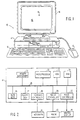
- a personal computer 10 comprising a system unit 11, a keyboard 12, a mouse 13 and a graphics display device or monitor 14.
- the keyboard 12 and the mouse 13 constitute user input devices
- the display device 14 is a user output device.
- the mouse 13 is used to control a cursor 15 displayed on the screen 16 of the display device 14.
- the graphic user interface (GUI) supported by this system allows the user to "point-and-shoot" by moving the pointer or cursor 15 to an icon representing an object at a specific location on the screen 16 and then press one of the mouse buttons to perform a user command or selection.
- pointing devices such as a touch sensor, graphic tablet, trackball or joystick could alternatively be used to manipulate the pointer across the graphical user interface.
- Fig. 2 shows in block diagram form the components of the personal computer shown in Fig. 1.
- the system unit 11 includes a system bus 21 to which the various components are attached and by which communication between the various components is accomplished.
- a microprocessor 22 is connected to the system bus 21 and is supported by read only memory (ROM) 23 and random access memory (RAM) 24, also connected to system bus 21.
- ROM read only memory
- RAM random access memory
- the microprocessor 22 in the IBM PS/2 series of computers is one of the Intel family of microprocessors including the 80286, 80386 or 80486 microprocessors, but other microprocessors including, but not limited to, Motorola's family of microprocessors such as the 68000, 68020 or 68030 microprocessors and various RISC (Reduced Instruction Set Computer) microprocessors manufactured by IBM, Hewlett-Packard, Sun Microsystems, Intel, Motorola and others may be used in a specific computer.
- RISC Reduced Instruction Set Computer
- the ROM 23 contains, among other code, the Basic Input/Output System (BIOS) which controls basic hardware operations, such as interactions of the disk drives and the keyboard.
- BIOS Basic Input/Output System
- the RAM 24 is the main memory into which the operating system, data files and application programs are loaded.
- a memory management chip 25 is connected to the system bus 21 and controls Direct Memory Access (DMA) operations, including paging data between RAM 24 and a hard disk drive 26 and a floppy disk drive 27.
- DMA Direct Memory Access
- the keyboard controller 28 provides the hardware interface for the keyboard 12
- the mouse controller 29 hardware interface for the mouse 13
- the video controller 30 provides the hardware interface for the graphic display device 14.
- the hardware illustrated in Figs. 1 and 2 is typical but may vary for a specific application; that is, there may be other peripherals, such as optical storage media, audio I/O, printers and the like.
- the invention is specifically directed to an enhancement to the operating system which controls or "runs" the hardware.
- the invention may be added to an existing operating system or it may provide the basis of an entirely new operating system, preferably the operating system supports a graphical user interface.
- data is encapsulated as a plurality of objects.
- the applications or processes which manipulate the data can also be defined as objects.
- Each object is constrained in its behavior by certain rules which apply for that object or class of objects. It is convenient to represent the objects as pictorial symbols or icons.
- An icon serves as a readily identifiable face to the user to recognize the data or process which he wishes to manipulate.
- Objects can be represented in a nongraphical manner, e.g., as a cryptic text string, but with a concomitant loss in usability. Human factors studies have shown that a user will find it much easier to "grab" a document icon and “drag" it to the printer icon to have it printed, than to issue a cryptic print command for an equally cryptic file name.
- the present invention assigns more than one icon to an object.
- Each icon corresponding to a specific view or behavior of that object upon opening.
- "Views” and “behaviors” are considered to be interchangeable terms as the differing operations performed by the system, or behaviors, accomplish results which must eventually be communicated back to the user in some way, usually visually on the system display or by printing on the system printer, or views.
- the range of possible views for a given object depend on the rules that define and control the object's contents. For example, an object that contains data arranged in rows and columns could have a matrix view as well as an X-Y graphed view. Different views allow the same data to be interpreted in different ways. Multicons reinforce the notion that there is a single place for the data and multiple ways it can be viewed.
- An object may have any number of card icons assigned to it in a multicon, each card corresponding to a specific view or behavior.
- a program written in assembler language may have a multicon which would permit a user to directly access the edit, executable list and debug versions of it. By grouping all possible functions into a single, stackable multicon, valuable display space is saved.
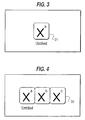
- Fig. 3 depicts a generic multicon 31 in a stacked state.
- a multicon resembles a stack of cards with each card representing a different behavior of the object. The card on top represents the active or default behavior. If the mouse pointer were brought to the multicon and the multicon opened, the active behavior of the object would be invoked. While the preferred embodiment below discusses manipulation of icons by a mouse pointing device, other input devices such as touch sensors, trackballs and joysticks can be used to manipulate a pointer in the GUI to select an object. If the user did not wish the default behavior, he could splay the multicon to reveal other views or behaviors of the object, as shown in Fig. 4.
- each card in the multicon 31' is divided into two areas.
- the central area contains an indicia, shown as "X” in the figures, which represents the object.
- a second area shown in the figures at the upper right hand corner of each card, contains an indicia, e.g., "a", "b” or "c", which represents the behavior or view which will result when that particular card is opened.
- object "X" may be opened.
- each card icon belonging to the object which remains constant across views, representing the object itself, e.g., a document, a spreadsheet, an application program, and a second portion of the icon which varies, depicting what action will be performed when the object is opened.
- the varying portion should be standardized across objects so that the function upon opening is easily and consistently identified.
- a graphics toolkit which allows developers to generate and store bit maps for icons for use in the GUI as well as make graphical calls to the operating system when drawing services are required.
- Applications or the operating system can call the toolkit to draw icons at selected locations within the display space controlled by the object.
- a new piece of code most likely residing in the applications or operating system, which recognizes the stacked and splayed state of the multicon and knows how to present each state is required for the present invention.
- Data structures which keep track of the state as well as the order of the card icons in each multicon are also required. The data structures could be kept with the object as part of its extended attributes or in a master index of objects in the operating system.
- the multicon graphical code searches the appropriate data structure for the current status and order of the cards in the multicon.
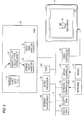
- Figs. 5 and 6 depict opening a spreadsheet file object in two different operating systems.
- the GUI presented on system display 14 depicts both the data files and the application which manipulate the data files as separate icons.
- a spreadsheet file icon 33 and a spreadsheet application 35 are presented in the GUI.
- the user elects to open the spreadsheet file icon 33, he moves the mouse pointer via the mouse 13 to the icon 33 and double-clicks on the icon 33.
- the electrical signals from the mouse 13 are processed by the mouse controller 29 and sent to the operating system 37 in RAM 24 via the system bus 21.
- the operating system 37 checks to see which application 38 is associated with the opened data file 39, usually by file type.
- the operating system 37 then executes the application 38 with the file name of the data file 39 passed on it as a parameter.
- the application 38 then opens the data file 39.
- the user may alternatively open the application and then call the data file.
- MicroSoft Windows 3.0 and IBM OS/2 with PM are examples of this type of operating system. In this type of operating system, both the applications and data files can be represented by multicons.
- FIG. 6 an object-based GUI is shown. Applications are hidden below the surface, thus, only data file icons, such as the spreadsheet icon 40, are presented on the system display 14.
- an object router 41 checks the type of object being opened and invokes the handler 42 appropriate for that object 44.
- Hewlett-Packard's NewWave and IBM's OfficeVision/2 are examples of GUI platforms having routes and handlers which cause the operating system to behave in this manner. In this type of operating system, only the data files can be represented by multicons.
- the "open" command will result in a single initial view exposed to the user.
- a speadsheet will usually open to a matrix of text and numbers. But what if the user wanted to see a pie chart? The user would then have to issue commands to the spreadsheet application or handler to change the view of the object. With Multicons, mouse selection will specify, before the object is opened, the type of view the user wants. Of course, a certain amount of programming might need to be done, since the handler would have to recognize the extra parameter to the "open” command. Rather than an "open” command, the operating system would receive a "open spreadsheet view” versus "open pie chart view” command.
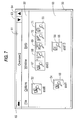
- Fig. 7 depicts a graphical user interface for an application designed according to the principles of the present invention.
- An application called Oversee/2 is displayed in its window 50 having multicons 52, 54, 56 and 58 represented in its client area 60.
- Standard items such as the title bar 61, action bar 62, icons 63, 64 for minimizing or maximizing the window 50 and an icon 65 to close the window 50 are also depicted in the Figure.
- Oversee/2 is an application which works to control a set of personal computers, such as several PS/2s, in a Local Area Network (LAN), each computer is represented by a multicon 52, 54, 56 or 58. The status of each server can be monitored and controlled from a central computer by referring to the different views offered by each multicon.
- LAN Local Area Network
- Three multicons 52, 54 and 58, representing the asd8, asd1 and asd13 servers are in their stacked state.
- the multicon 56 representing the asd3 server is in its splayed state.
- the magnifying glass icon 16 on each card represents a monitoring function for the respective file server.
- the splayed multicon 56 for the asd3 server depicts all the ways that the servers could be monitored.
- the display and system unit icon 67 represents a view of the asd3 device by hardware summary.
- the flow chart icon 68 represents a view of the asd3 server by operating processes. A view of asd3 by operating statistics can be opened by bringing the pointer to the icon with the graphical icon 69.
- views of the asd3 server by triggers installed or by files installed can be opened by bringing the pointer to the icons with the pistol icon 70 or the paper sheet icon 71 respectively.
- Multicons can also be used for existing applications.
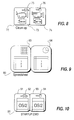
- the ability to fit multicons to existing applications is primarily dependent on whether the application or object handler has a means by which a certain view of an object can be specified automatically, that is, without requiring the end user to issue interface commands. If such a means is available, the programmer or end user can map each of the multicon cards to a specific command for that application or handler. For example, in Fig. 8, the "Clean-up" application would have to support a "RUN” and a "PROFILE” command at invocation time.
- Fig. 8 shows a multicon 72 for an object created by means of a "recorder” function which can be provided with the operating system.
- the recorder tool enables an application programmer to create a file containing a sequence of commands which would normally issue to the operating system and its presentation manager interactively. When the file is played back, the prerecorded commands are automatically issued to operating system.
- the "Clean-Up” application is used to tidy up the graphical user interface by arranging the icons in rows, columns, etc.
- the "Clean-Up” multicon 75 in Fig. 8 is in its splayed state. The default behavior is to execute the file, which is denoted by the running car 75 at the upper right hand corner of the run card icon 73.
- the convention adopted in the preferred embodiment is to present the default behavior in the left most position when the multicon is in its splayed state. If the user wants to edit the "Clean-up" object properties, he double clicks with the left button on the card 74 with the magnifying glass 76.
- a spreadsheet data file multicon 80 is shown in Fig. 9.
- the system detects that the user double-clicked on the "Graph” multicon card 83 for example, the system would look up in a data structure that correlates to that card under POSITION 2, extract the command OPEN "GRAPH" and pass it to the spreadsheet application or handler.
- the structure would be persistent between system usages and would describe the type of icon to use at what position as well as the current status of that particular multicon, splayed or stacked.
- the SHEET and GRAPH names correspond to pictorial icon files 83, 84 that can be created using a variety of existing icon editing tools.
- a file management tool shipped with PM a user can replace the command file STARTUP.CMD with a multicon 90, as shown in Fig. 10.
- the running of the command file is mapped to the card 91 that has the little car 92 and the editing of the command file to the card 93 with the magnifying glass icon 94.
- the Multicon would generally be stacked with the "Run” card 91 on top, as the default behavior.
- the user would temporarily splay the multicon as shown in the Figure and open the "Edit” card. The system would then automatically invoke the editor with the "Edit" command.
- the cards in a multicon can either point to different entry points of the same application (handler) as shown in Fig. 9, or to send the object to different handlers as shown in FIG 10.
- the EXECUTE command is sent to the operating system and the EDIT command is sent to the system editor.
- multicons use a 2 button mouse, which is standard on PS/2s.
- the mouse actions which are summarized below are contained interface code for the code which handles mouse input for the operating system.
- the code could be written at an application level.
- the mouse pointer is oriented above the multicon or one of its splayed cards before the button command is activated:
- the spring-loaded splay mode allows the user to quickly open an unexposed view of a stacked MULTICON.
- Fig. 3 to illustrate, if the user wishes to activate view "b", he clicks and holds button 2 on the stacked MULTICON, the MULTICON responds by splaying in Fig. 4. Still with button 2 down, the arrow pointer is moved to card “b”, and the button is released. View “b” opens up and the MULTICON automatically snaps back to its stacked form. This is identical to executing a pull-down item in an action bar by clicking on it, moving the arrow pointer to the selection within the pull-down, and releasing the mouse button all in one motion. "Selecting" as opposed to “opening” is an operation which marks the object for future operations rather than invoking the behavior which the programmer has chosen for opening.
- Figs. 11-14 show one method for changing the default behavior of the Clean-Up multicon 72.
- the multicon is splayed by a double click on button 2 of the mouse.
- the edit card 74 is grabbed by the user by holding button 2.
- the edit card 74 is dragged while depressing button 2 on the mouse, left of the card 73 representing run behavior.
- Fig. 11-14 show one method for changing the default behavior of the Clean-Up multicon 72.
- a picture 101 of the mail item sender is the main icon representing the object across the possible views.
- the envelope pictorial 103 represents this view.
- a card 104 with the film pictorial 105 represents a video playback only view
- a card 106 with the speaker pictorial 107 represents a audio playback only view
- a card 108 with the alphanumeric character 109 represents a text only view.
- Multimedia can be delivered at the multicon level by enabling the multicon card to be composed of AVC full-color bitmaps that can be animated. Combined with sound, the total effect would result in a rich GUI with greatly improved usability.
Landscapes
- Engineering & Computer Science (AREA)
- General Engineering & Computer Science (AREA)
- Theoretical Computer Science (AREA)
- Human Computer Interaction (AREA)
- Physics & Mathematics (AREA)
- General Physics & Mathematics (AREA)
- Digital Computer Display Output (AREA)
- User Interface Of Digital Computer (AREA)
Applications Claiming Priority (2)
| Application Number | Priority Date | Filing Date | Title |
|---|---|---|---|
| US78573291A | 1991-10-31 | 1991-10-31 | |
| US785732 | 1991-10-31 |
Publications (1)
| Publication Number | Publication Date |
|---|---|
| EP0540925A1 true EP0540925A1 (fr) | 1993-05-12 |
Family
ID=25136466
Family Applications (1)
| Application Number | Title | Priority Date | Filing Date |
|---|---|---|---|
| EP92117809A Withdrawn EP0540925A1 (fr) | 1991-10-31 | 1992-10-19 | Multicônes |
Country Status (3)
| Country | Link |
|---|---|
| EP (1) | EP0540925A1 (fr) |
| JP (1) | JPH0823803B2 (fr) |
| CA (1) | CA2081180A1 (fr) |
Cited By (16)
| Publication number | Priority date | Publication date | Assignee | Title |
|---|---|---|---|---|
| DE9409238U1 (de) * | 1994-06-08 | 1995-01-19 | Materna, Dieter, 59075 Hamm | Elektronische Steuervorrichtung zum Erstellen von Bildern, graphischen Darstellungen o.dgl. |
| EP0740286A3 (fr) * | 1995-04-26 | 1996-11-27 | Ibm | |
| GB2315139A (en) * | 1996-07-06 | 1998-01-21 | Ibm | Selecting operations in an object-oriented user interface |
| GB2315577A (en) * | 1996-07-20 | 1998-02-04 | Ibm | Grouping of operations in a computer system |
| WO1998022866A1 (fr) * | 1996-11-22 | 1998-05-28 | Surfvision | Interface pour cederoms |
| WO1998025377A1 (fr) * | 1996-12-06 | 1998-06-11 | Northern Telecom Limited | Interface d'utilisateur graphique de gestion de reseau |
| US6100885A (en) * | 1996-07-06 | 2000-08-08 | International Business Machines Corporation | Supporting modification of properties via a computer system's user interface |
| EP1026574A3 (fr) * | 1999-02-08 | 2002-12-11 | Sharp Kabushiki Kaisha | Interface utilisateur graphique pour régler la condition de traitement par une opération glisser-déplacer |
| EP0844555A3 (fr) * | 1996-11-20 | 2003-03-12 | International Business Machines Corporation | Objet multifonctionnel |
| EP1303806A1 (fr) * | 2000-06-30 | 2003-04-23 | Nokia Corporation | Procede et appareil de commande de selection |
| FR2849511A1 (fr) * | 2002-12-26 | 2004-07-02 | Jacques Albert Molho | Album multimedia a ecran tactile |
| WO2007071027A1 (fr) * | 2005-12-19 | 2007-06-28 | Research In Motion | Dispositif indiquant l'etat de programmes d'application a l'aide d'icones |
| US20100211914A1 (en) * | 2009-02-18 | 2010-08-19 | Kyocera Mita Corporation | Computer-readable recording medium storing driver program, image forming system, image forming apparatus, method for controlling image forming apparatus, and driver program |
| US8286101B2 (en) | 2003-07-28 | 2012-10-09 | Sig G Kupka | Manipulating an on-screen object using zones surrounding the object |
| WO2014155023A1 (fr) * | 2013-03-29 | 2014-10-02 | My Precious Life | Appareil electronique et procede de recherche d'objets de donnees par filtrage des pictogrammes associes aux dits objets de donnees |
| CN107380596A (zh) * | 2017-07-31 | 2017-11-24 | 宁波麦博韦尔移动电话有限公司 | 一种自动imei码读写机 |
Citations (2)
| Publication number | Priority date | Publication date | Assignee | Title |
|---|---|---|---|---|
| WO1989011694A1 (fr) * | 1988-05-27 | 1989-11-30 | Wang Laboratories, Inc. | Pictogramme representant un classeur de documents destine a etre affiche dans un systeme de traitement de donnees |
| FR2662009A1 (fr) * | 1990-05-09 | 1991-11-15 | Apple Computer | Icone manupulable a faces multiples pour affichage sur ordinateur. |
-
1992
- 1992-08-25 JP JP4225974A patent/JPH0823803B2/ja not_active Expired - Lifetime
- 1992-10-19 EP EP92117809A patent/EP0540925A1/fr not_active Withdrawn
- 1992-10-22 CA CA002081180A patent/CA2081180A1/fr not_active Abandoned
Patent Citations (2)
| Publication number | Priority date | Publication date | Assignee | Title |
|---|---|---|---|---|
| WO1989011694A1 (fr) * | 1988-05-27 | 1989-11-30 | Wang Laboratories, Inc. | Pictogramme representant un classeur de documents destine a etre affiche dans un systeme de traitement de donnees |
| FR2662009A1 (fr) * | 1990-05-09 | 1991-11-15 | Apple Computer | Icone manupulable a faces multiples pour affichage sur ordinateur. |
Non-Patent Citations (1)
| Title |
|---|
| INSPEC DN C90058345 * |
Cited By (24)
| Publication number | Priority date | Publication date | Assignee | Title |
|---|---|---|---|---|
| DE9409238U1 (de) * | 1994-06-08 | 1995-01-19 | Materna, Dieter, 59075 Hamm | Elektronische Steuervorrichtung zum Erstellen von Bildern, graphischen Darstellungen o.dgl. |
| EP0740286A3 (fr) * | 1995-04-26 | 1996-11-27 | Ibm | |
| US5706454A (en) * | 1995-04-26 | 1998-01-06 | International Business Machines Corporation | Changeable live icon with visual state indicator option |
| GB2315139A (en) * | 1996-07-06 | 1998-01-21 | Ibm | Selecting operations in an object-oriented user interface |
| US6100885A (en) * | 1996-07-06 | 2000-08-08 | International Business Machines Corporation | Supporting modification of properties via a computer system's user interface |
| US5892512A (en) * | 1996-07-06 | 1999-04-06 | International Business Machines Corporation | Selection of operations in a computer system |
| US5929851A (en) * | 1996-07-20 | 1999-07-27 | International Business Machines Corporation | Grouping of operations in a computer system |
| GB2315577A (en) * | 1996-07-20 | 1998-02-04 | Ibm | Grouping of operations in a computer system |
| EP0844555A3 (fr) * | 1996-11-20 | 2003-03-12 | International Business Machines Corporation | Objet multifonctionnel |
| FR2756393A1 (fr) * | 1996-11-22 | 1998-05-29 | Chevalier Miguel | Icone et inferface notamment pour cederoms |
| WO1998022866A1 (fr) * | 1996-11-22 | 1998-05-28 | Surfvision | Interface pour cederoms |
| WO1998025377A1 (fr) * | 1996-12-06 | 1998-06-11 | Northern Telecom Limited | Interface d'utilisateur graphique de gestion de reseau |
| EP1026574A3 (fr) * | 1999-02-08 | 2002-12-11 | Sharp Kabushiki Kaisha | Interface utilisateur graphique pour régler la condition de traitement par une opération glisser-déplacer |
| US6976224B2 (en) | 1999-02-08 | 2005-12-13 | Sharp Kabushiki Kaisha | Information processing apparatus and method with graphical user interface allowing processing condition to be set by drag and drop, and medium on which processing program thereof is recorded |
| EP1303806A1 (fr) * | 2000-06-30 | 2003-04-23 | Nokia Corporation | Procede et appareil de commande de selection |
| FR2849511A1 (fr) * | 2002-12-26 | 2004-07-02 | Jacques Albert Molho | Album multimedia a ecran tactile |
| US8286101B2 (en) | 2003-07-28 | 2012-10-09 | Sig G Kupka | Manipulating an on-screen object using zones surrounding the object |
| WO2007071027A1 (fr) * | 2005-12-19 | 2007-06-28 | Research In Motion | Dispositif indiquant l'etat de programmes d'application a l'aide d'icones |
| US8887080B2 (en) | 2005-12-19 | 2014-11-11 | Blackberry Limited | Indicating status of application program with icons |
| US20100211914A1 (en) * | 2009-02-18 | 2010-08-19 | Kyocera Mita Corporation | Computer-readable recording medium storing driver program, image forming system, image forming apparatus, method for controlling image forming apparatus, and driver program |
| US8799790B2 (en) * | 2009-02-18 | 2014-08-05 | Kyocera Document Solutions Inc. | Computer-readable recording medium storing driver program, image forming system, image forming apparatus, method for controlling image forming apparatus, and driver program |
| WO2014155023A1 (fr) * | 2013-03-29 | 2014-10-02 | My Precious Life | Appareil electronique et procede de recherche d'objets de donnees par filtrage des pictogrammes associes aux dits objets de donnees |
| FR3003965A1 (fr) * | 2013-03-29 | 2014-10-03 | My Precious Life | Procede de recherche d'objets de donnees |
| CN107380596A (zh) * | 2017-07-31 | 2017-11-24 | 宁波麦博韦尔移动电话有限公司 | 一种自动imei码读写机 |
Also Published As
| Publication number | Publication date |
|---|---|
| JPH0823803B2 (ja) | 1996-03-06 |
| JPH05216610A (ja) | 1993-08-27 |
| CA2081180A1 (fr) | 1993-05-01 |
Similar Documents
| Publication | Publication Date | Title |
|---|---|---|
| US8799813B2 (en) | Method and system for providing an embedded application tool bar | |
| US5668964A (en) | Graphical user interface for creating a new notebook with a dragged page | |
| US5936623A (en) | Method and apparatus for selecting a particular object from among a large number of objects | |
| US7913183B2 (en) | System and method for managing software applications in a graphical user interface | |
| US6072486A (en) | System and method for creating and customizing a deskbar | |
| EP0698241B1 (fr) | Systeme d'interface ordinateur-humain pour documents composites | |
| US7895511B2 (en) | Copy and paste of cells in a multi-dimensional spreadsheet | |
| US5572644A (en) | System and methods for multi-dimensional information processing | |
| US5835919A (en) | Computer-human interface system which manipulates parts between a desktop and a document | |
| US5345550A (en) | User-modifiable popup menus for object oriented behavior | |
| US5384911A (en) | Method of transferring programs from action oriented GUI paradigm to object oriented GUI paradigm | |
| US6026416A (en) | System and method for storing, viewing, editing, and processing ordered sections having different file formats | |
| US6275227B1 (en) | Computer system and method for controlling the same utilizing a user interface control integrated with multiple sets of instructional material therefor | |
| JP3353812B2 (ja) | Guiを表示するコンピュータ・システム及び操作方法 | |
| US5917483A (en) | Advanced windows management for a computer system | |
| EP0540925A1 (fr) | Multicônes | |
| US5764960A (en) | Method and system for sharing a menu by multiple components in a component-based computer system | |
| EP1526463A1 (fr) | Pense-bête électronique | |
| JP3565441B2 (ja) | データ処理システム | |
| EP0622729A2 (fr) | Générateur d'un interface utilisateur pour un serveur d'interface utilisateur | |
| JPH05298047A (ja) | オブジェクトを作成するためのシステム及び方法 | |
| JP2001092914A (ja) | 異なるモードによるセル名前付き範囲内の新しい要素の導入のための電子スプレッドシート内の方法およびシステム | |
| KR100321838B1 (ko) | 정보처리시스템과정보처리시스템내에서의객체편성방법 | |
| US20030037310A1 (en) | Visual programming tool and execution environment for developing computer software applications | |
| US7272783B2 (en) | Method and system in an electronic spreadsheet for managing and handling user-defined options |
Legal Events
| Date | Code | Title | Description |
|---|---|---|---|
| PUAI | Public reference made under article 153(3) epc to a published international application that has entered the european phase |
Free format text: ORIGINAL CODE: 0009012 |
|
| AK | Designated contracting states |
Kind code of ref document: A1 Designated state(s): DE FR GB IT |
|
| 17P | Request for examination filed |
Effective date: 19930819 |
|
| 17Q | First examination report despatched |
Effective date: 19950331 |
|
| STAA | Information on the status of an ep patent application or granted ep patent |
Free format text: STATUS: THE APPLICATION IS DEEMED TO BE WITHDRAWN |
|
| 18D | Application deemed to be withdrawn |
Effective date: 19951011 |