EP0542658B1 - Méthode et dispositif utilisant icÔnes de données - Google Patents
Méthode et dispositif utilisant icÔnes de données Download PDFInfo
- Publication number
- EP0542658B1 EP0542658B1 EP92480155A EP92480155A EP0542658B1 EP 0542658 B1 EP0542658 B1 EP 0542658B1 EP 92480155 A EP92480155 A EP 92480155A EP 92480155 A EP92480155 A EP 92480155A EP 0542658 B1 EP0542658 B1 EP 0542658B1
- Authority
- EP
- European Patent Office
- Prior art keywords
- data
- icon
- size
- minimized
- data icon
- Prior art date
- Legal status (The legal status is an assumption and is not a legal conclusion. Google has not performed a legal analysis and makes no representation as to the accuracy of the status listed.)
- Expired - Lifetime
Links
Images



Classifications
-
- G—PHYSICS
- G06—COMPUTING OR CALCULATING; COUNTING
- G06F—ELECTRIC DIGITAL DATA PROCESSING
- G06F3/00—Input arrangements for transferring data to be processed into a form capable of being handled by the computer; Output arrangements for transferring data from processing unit to output unit, e.g. interface arrangements
- G06F3/01—Input arrangements or combined input and output arrangements for interaction between user and computer
- G06F3/048—Interaction techniques based on graphical user interfaces [GUI]
- G06F3/0481—Interaction techniques based on graphical user interfaces [GUI] based on specific properties of the displayed interaction object or a metaphor-based environment, e.g. interaction with desktop elements like windows or icons, or assisted by a cursor's changing behaviour or appearance
- G06F3/04817—Interaction techniques based on graphical user interfaces [GUI] based on specific properties of the displayed interaction object or a metaphor-based environment, e.g. interaction with desktop elements like windows or icons, or assisted by a cursor's changing behaviour or appearance using icons
-
- G—PHYSICS
- G06—COMPUTING OR CALCULATING; COUNTING
- G06Q—INFORMATION AND COMMUNICATION TECHNOLOGY [ICT] SPECIALLY ADAPTED FOR ADMINISTRATIVE, COMMERCIAL, FINANCIAL, MANAGERIAL OR SUPERVISORY PURPOSES; SYSTEMS OR METHODS SPECIALLY ADAPTED FOR ADMINISTRATIVE, COMMERCIAL, FINANCIAL, MANAGERIAL OR SUPERVISORY PURPOSES, NOT OTHERWISE PROVIDED FOR
- G06Q10/00—Administration; Management
- G06Q10/10—Office automation; Time management
- G06Q10/109—Time management, e.g. calendars, reminders, meetings or time accounting
Definitions
- This invention relates in general to graphical user interface systems, and in particular to a method and apparatus which allows direct entry of data into, and editing of data in, a hybrid icon/window without the necessity of switching in and out of standard windows and icons.
- icons which may be graphical representations of windows which have been taken from their operating state to some minimized view giving a minimum of identification data only, i.e., enough information so the operator knows what the window would be if selected.
- icons are representations or pictures that suggest what the window is or what the window does.
- the icon When opened, the icon enlarges or zooms to a conventional window with action bars, title bars, other icons and application data.
- action bars title bars
- other icons and application data are forced to deal with the full complexity of graphical interfaces.
- the window is closed, it is shrunk down, or tokenized, to an icon and at a fixed location, generally positioned at the bottom of a screen, and the information entered into the window is not visible.
- an icon may represent a window.
- information may be entered into the window.
- the operator must first select the icon to open the window and then select an action within the window such as, for example, "Add an Event". Upon selection of the action, another window appears to allow the operator to fill in the new event information. Subsequently, the operator selects the command to store the new information which allows the new information to be integrated into any information previously entered. The operator must then close the second window into which information was added, and, finally, close the first window which allowed the selection of a window for the adding of information. Thereafter, the operator would be returned to the screen from which the original icon was selected and the updated information would again be available for viewing by the operator only when the icon is again selected and a window is opened.
- RESEARCH DISCLOSURE vol. 328, August 1991, EMSWORTH, GB, XP217895, N.32825: "Dynamic Icons for Information Visualization” discloses a method for creating and maintaining icons of dynamically varying size and features in order to indicate the data of the corresponding application, whereby the data icon has a first minimized size which can be directly manipulated, and the data driving the icon's size is automatically changed as direct manipulation occurs.
- IEEE COMPUTER GRAPHICS AND APPLICATIONS vol. 8, no. 5, September 1988, NEW YORK, US, pages 65-84, XP99068; MYERS B.A.: "A taxonomy of window manager user interfaces" discloses a method of interactively entering data into an application in a data processing system which includes a monitor and at least one input device, in the method the input device selects a data icon appearing on the monitor, the data icon having a first minimized size and upon selection thereof an enlarged size. Data can be entered with the input device into said enlarged size data icon or in the first minimized size data icon.
- the invention disclosed herein comprises a method and apparatus for utilizing hybrid icons/windows to directly input information hybrid icons/windows to directly input information which substantially eliminates or reduces the problems of inputting information using both standard windows and standard icons.
- the method and apparatus described herein allow direct user interaction with information contained in the hybrid icons/windows.
- a method of interactively entering data into an application in a data processing system which includes a monitor and at least one input device, the method comprising the steps of selecting with the input device a data icon appearing on the monitor, said data icon having a first minimized size and upon selection thereof an enlarged size, wherein said first minimized size data icon may be selectively directly manipulated; entering data with the input device into said enlarged size data icon, wherein a textual portion of said data is presented for observation in said first minimized size data icon; and directly conducting limited editing of said data in said first minimized size data icon.
- a computer system for interactively inputting data into an application running thereon comprising a monitor; means determining a data icon on the monitor having a first minimized size and, upon selection of said first minimized size, a second enlarged size, wherein said first minimized size data icon may be selectively directly manipulated; means for entering with an input device, data into said enlarged size data icon, wherein a textual portion of the data is presented for observation in said first minimized size data icon; and means for directly conducting limited editing of said data in said first minimized size data icon.
- the present invention has the technical advantage of allowing direct user interaction with information contained in icons.
- the present invention has the further advantage of saving operator and computer time by simplifying the steps necessary to enter and/or edit information.
- the present invention has the still further advantage of reducing the amount of space which is required for use on a screen during information entry.
- an example of a conventional calendar window is generally identified by the reference numeral 10.
- the window 10 provides information about the daily schedule of an individual listing events in textual form.
- a second window generally identified by the reference numeral 11, see Fig. 2, must be opened.
- the information is then typed into the appropriate fields, such as date 12, start time 14, end time 16, and description 18, by an operator.
- an "operator” is defined as a person who uses a computer program installed on a computer system.
- the term “user” may be used interchangeably herein to mean the same as an "operator”.
- the window 11 is shrunk down or tokenized back into the icon (not shown) from which it originated thus allowing viewing of information entered in the window 10 (Fig. 1).
- the window 11 is selected for the entry of new information, the information previously displayed in the window 10 is obscured. Additionally, the information entered into the window 10 via the window 11 can be seen to have little correlation to the arrangement of information in the window 10. For example, a line of information 13 indicating a time frame of 12:30 - 16:30 does not match with the corresponding time frame on a time bar 15.
- a window incorporating data icons in accordance with the present invention is generally indicated by the reference numeral 20.
- a data icon as used herein is a mixture or hybrid of the advantages available from the use of conventional icons and conventional windows.
- the window 20 includes examples of an enlarged data icon 22 and minimized data icons 24.
- the enlarged data icon 22 allows display of interactive information such as data entry fields, lists and other controls plus direct manipulation move, borders, copying, and etc.
- the minimized data icons 24 display a subset of the interactive information from the enlarged data icon 22.
- the minimized data icons 24 may be sized by the amount of information therein, by the time frame to which they refer, duration, priority and etc.
- the data icon is a hybrid of the features available with conventional windows and conventional icons, as well as improvements thereover.
- Change Data feature it is demonstrated that by changing information in a conventional window, no information can be seen in the related conventional icon.
- the information in the data icon the information is available for viewing directly (either enlarged or minimized data icons).
- the entry of new information may change the location and size of the data icon.
- changing the information in one of the minimized data icons 24 (such as the time for start and duration of the event) will change the location of the data icon 24 relative to a time bar 29 as well as changing the size of the data icon 24 to reflect duration.
- moving the location of the data icon 24 will change the information therein. For example, by dragging the data icon 24 to a new position opposite the time bar 29, the time for starting and ending the event will be changed.
- Some other advantages of the present invention over the known prior art are: simplified entry and editing of information and reduced use of screen space during information entry. By using the present invention it is no longer necessary to jump from window to window to enter and view information. Additionally, due to the use of minimized data icons, screen space usage is reduced.
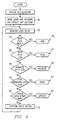
- FIG. 4 flowcharts of the present invention are provided.
- icons and windows are opened for default applications, i.e. whatever the standard opening screen produces.
- the system is waiting for user instructions.
- the user instruction are: new data object in decision block 34, open data icon in decision block 36, minimize data icon in decision block 38, drag minimized data icon in decision block 40, update data icon's information in decision block 42 or perform other actions at block 45.
- a NEW sub-routine 35 is called.
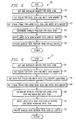
- the NEW subroutine 35 allows the entry of new information into a data icon, for example, such as shown in the enlarged data icon 22 in Figure 2. Referring to Figure 5, the NEW sub-routine 35 is illustrated in more detail.
- memory for the data icon is obtained and initialized.
- the fields for the data icon are obtained and written into memory.
- the visual frame for the enlarged data icon is obtained and written into memory at block 50.
- the overlay position for the data icon is then determined at block 52.
- Memory for the enlarged data icon is written into a display buffer at block 54 and the display is updated with refresh from the display buffer at block 56.
- the NEW sub-routine 35 then returns to block 32.
- OPEN sub-routine 37 If it is desired to open a minimized data icon to an enlarged data icon, decision block 36 is chosen.
- the OPEN sub-routine as identified by the reference numeral 37 is called. Referring to Figure 6, the OPEN sub-routine 37 is illustrated in more detail. As with the NEW sub-routine 35, the OPEN sub-routine 37 first obtains and initializes memory for the data icon at block 60 and obtains and writes the fields for the data icon into memory at block 62. Then, at block 64, data for the fields is obtained and written into the field memory locations. The visual frame for the enlarged data icon is obtained and written into memory. The overlay position for the enlarged data icon and the minimized data icon is determined at block 68. The enlarged data icon is written into the display buffer and the minimized data icon is erased at block 70. The display is then updated with refresh from the display buffer at block 72. The OPEN sub-routine 37 then returns to block 32.
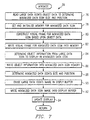
- the MINIMIZE sub-routine as identified by the reference numeral 39 is called. Referring to Figure 7, the MINIMIZE sub-routine 39 is illustrated in more detail.
- the enlarged data icon's object data is read to determine the required size and position for the minimized data icon at block 76.
- the memory for the minimized data icon is obtained and initialized at block 78 after which the visual frame is constructed for the minimized data icon based upon the object data at block 80.
- the visual frame for the minimized data icon is written into memory at block 82.
- the object information for display in the minimized data icon from the large data icon is determined.
- the object information is then written into the minimized data icon memory at block 86 followed by a determination of the minimized data icon's size and position.
- the enlarged data icon's image is erased from the display buffer at block 90, and the minimized data icon's image is written into the display buffer at block 92.
- the display is then updated with the minimized data icon at block 94.
- the sub-routine 39 then returns to block 32.
- decision block 40 is selected.
- the DRAG sub-routine, as identified by the reference numeral 41, is called. Referring to Figure 8, the DRAG sub-routine 41 is illustrated in more detail.
- the data icon may be moved at decision block 98, copied at decision block 100 or some other action performed at block 104.
- the other actions at block 104 may comprise, for example, creating a link between two events, as is known in the art, and then the sub-routine 41 returns to block 32.
- copy at decision block 100 is to be performed, the data icon is duplicated at block 102. After move at block 98 or after duplication at block 102, the icon position is monitored at block 106.
- the icon is dropped at decision block 108 or returned to decision block 98. If the icon is dropped, the icon position is read for data values at block 110. Any differences in data values are determined at block 112 and if a change in size is required at decision block 114, the data icon's visual frame is adjusted at block 116. If no change in size at decision block 114 is required or after block 116, the data icon's data is updated at block 110. The display buffer is updated at block 120 followed by updating the display at block 122. The sub-routine 41 then returns to block 32.
- the UPDATE sub-routine As identified by the reference numeral 43, is called.
- the UPDATE sub-routine 43 is illustrated in more detail in Figure 9.
- the user input is monitored at block 130. Any differences between the information already stored and the new information is determined at block 132.
- decision block 134 it is determined whether any difference in the information requires a change in data icon size. If a change in size is required, the minimized data icon visual frame is adjusted at block 136 followed by the change in position at block 138. If no change in size is required at block 134, block 136 is bypassed to the change position decision block 138.
- the minimized data icon's position is adjusted in object at block 140 followed by an update of the display buffer at block 142. If no position change at block 138 is required, block 140 is bypassed to the update display buffer at block 142. The updated information is then displayed at block 144. The sub-routine 43 then returns to block 32.
- the system 160 includes a processor 162, which includes a central processing unit (CPU) 164 and a memory 166. Additional memory, in the form of a hard disk storage 168 and a floppy disk device 170, is connected to the processor 162.
- the floppy disk device 170 receives a floppy disk 172 which has computer program code recorded therein that implements the present invention in the system 160.
- the system 160 further includes user interface hardware such as, for example, a mouse 174 and a keyboard 176 for allowing user input to the processor 162, and a display 178 for presenting visual data to the user.
- the system 160 may also include a printer 180.
- the present invention provides a method for scheduling meetings which substantially reduces the problems with the prior art.
- the present invention allows the scheduling of meetings by utilizing an organization chart and calendars.
- a method for scheduling meetings comprises selecting a calendar program.
- An organization chart is then selected which may have sub-charts therein listing members of specific portions of the organization chart.
- a calendar for a specific member of the organization chart is available for checking to see whether that member is available for the meeting.
- a person may then be chosen from the organization chart for the meeting.
- the present invention provides the technical advantage of allowing the scheduling of meetings without the need to refer to other resources.
Landscapes
- Engineering & Computer Science (AREA)
- Business, Economics & Management (AREA)
- Theoretical Computer Science (AREA)
- Human Resources & Organizations (AREA)
- Strategic Management (AREA)
- Entrepreneurship & Innovation (AREA)
- Physics & Mathematics (AREA)
- General Physics & Mathematics (AREA)
- General Engineering & Computer Science (AREA)
- Economics (AREA)
- Data Mining & Analysis (AREA)
- Human Computer Interaction (AREA)
- Marketing (AREA)
- Operations Research (AREA)
- Quality & Reliability (AREA)
- Tourism & Hospitality (AREA)
- General Business, Economics & Management (AREA)
- Digital Computer Display Output (AREA)
- User Interface Of Digital Computer (AREA)
- Management, Administration, Business Operations System, And Electronic Commerce (AREA)
Claims (12)
- Procédé de saisie interactive de données vers une application, dans un système de traitement de données qui comprend un moniteur (178) et au moins un dispositif d'entrée (174, 176), comprenant les étapes consistant à :sélectionner avec le dispositif d'entrée une icône de données (24) apparaissant sur le moniteur, ladite icône de données présentant une première taille minimisée et, lors de la sélection de celle-ci, une taille agrandie, dans laquelle l'icône de données de ladite première taille minimisée peut être manipulée directement de façon sélective,saisir des données avec le dispositif d'entrée dans l'icône de données de ladite taille agrandie, dans laquelle une partie textuelle desdites données est présentée pour être observée dans l'icône de données de ladite première taille minimisée, eteffectuer directement une édition limitée desdites données dans l'icône de données de ladite première taille minimisée.
- Procédé selon la revendication 1, comprenant en outre les étapes consistant à :
réduire l'icône de données de ladite taille agrandie en une icône de données de ladite première taille minimisée. - Procédé selon la revendication 2, comprenant en outre l'étape consistant à :
éditer lesdites données dans une icône de données de ladite taille agrandie. - Procédé selon la revendication 1, comprenant en outre l'étape consistant à :
faire glisser l'icône de ladite première taille minimisée vers une position différente dans l'application pour pouvoir modifier les données dans l'icône de ladite première taille minimisée. - Procédé selon la revendication 1, comprenant en outre les étapes consistant à :
modifier un emplacement d'une icône de données de ladite première taille minimisée en modifiant les données dans l'icône de données de ladite première taille minimisée. - Procédé selon la revendication 1, comprenant en outre l'étape consistant à :
modifier ladite première taille minimisée d'icône de données en saisissant des données supplémentaires dans ladite icône de données. - Système informatique destiné à entrer de façon interactive des données dans une application s'exécutant sur celui-ci, comprenant :un moniteur (178),un moyen (162) déterminant une icône de données (24) sur le moniteur présentant une première taille minimisée et, lors de la sélection de ladite première taille minimisée, une seconde taille agrandie, dans laquelle l'icône de données de ladite première taille minimisée peut être manipulée directement de façon sélective,un moyen destiné à saisir avec un dispositif d'entrée (174, 176), des données dans une icône de données de ladite taille agrandie, dans laquelle une partie textuelle des données est présentée pour être observée dans l'icône de données de ladite première taille minimisée, etun moyen (162, 176) destiné à effectuer directement une édition limitée desdites données dans une icône de données de ladite première taille minimisée.
- Système informatique selon la revendication 7, comprenant en outre :
un moyen destiné à réduire une icône de données de ladite taille agrandie en une icône de données de ladite première taille minimisée. - Système informatique selon la revendication 8, comprenant en outre :
un moyen destiné à éditer lesdites données dans une icône de données de ladite taille agrandie. - Système informatique selon la revendication 7, comprenant en outre :
un moyen destiné à faire glisser ladite première icône de données vers un emplacement différent dans l'application pour pouvoir modifier les données dans une icône de données de ladite première taille minimisée. - Système informatique selon la revendication 7, comprenant en outre :
un moyen destiné à modifier un emplacement d'une icône de données de ladite première taille minimisée en changeant les données dans une icône de données de ladite première taille minimisée. - Système informatique selon la revendication 7, comprenant en outre :
un moyen destiné à modifier ladite première taille minimisée d'icône de données en saisissant des données supplémentaires dans ladite icône de données.
Applications Claiming Priority (2)
| Application Number | Priority Date | Filing Date | Title |
|---|---|---|---|
| US79298491A | 1991-11-15 | 1991-11-15 | |
| US792984 | 1991-11-15 |
Publications (2)
| Publication Number | Publication Date |
|---|---|
| EP0542658A1 EP0542658A1 (fr) | 1993-05-19 |
| EP0542658B1 true EP0542658B1 (fr) | 1997-04-23 |
Family
ID=25158720
Family Applications (1)
| Application Number | Title | Priority Date | Filing Date |
|---|---|---|---|
| EP92480155A Expired - Lifetime EP0542658B1 (fr) | 1991-11-15 | 1992-10-23 | Méthode et dispositif utilisant icÔnes de données |
Country Status (7)
| Country | Link |
|---|---|
| US (1) | US5428736A (fr) |
| EP (1) | EP0542658B1 (fr) |
| JP (1) | JPH0812591B2 (fr) |
| KR (1) | KR950014976B1 (fr) |
| CN (1) | CN1043382C (fr) |
| CA (1) | CA2071309C (fr) |
| DE (1) | DE69219281T2 (fr) |
Families Citing this family (37)
| Publication number | Priority date | Publication date | Assignee | Title |
|---|---|---|---|---|
| US5519606A (en) * | 1992-01-21 | 1996-05-21 | Starfish Software, Inc. | System and methods for appointment reconciliation |
| JPH06342357A (ja) * | 1993-06-01 | 1994-12-13 | Mitsubishi Electric Corp | ユーザインタフェース方式 |
| US6201539B1 (en) * | 1994-01-04 | 2001-03-13 | International Business Machines Corporation | Method and system for customizing a data processing system graphical user interface |
| US5500938A (en) * | 1994-03-07 | 1996-03-19 | International Business Machines, Corporation | Method and apparatus for directly selecting and signalling start and stop times in an electronic calendar |
| US5528745A (en) * | 1994-10-28 | 1996-06-18 | King; C. David | Method and system for the display of scheduling information for users within a single viewport |
| US6535230B1 (en) * | 1995-08-07 | 2003-03-18 | Apple Computer, Inc. | Graphical user interface providing consistent behavior for the dragging and dropping of content objects |
| JP3461412B2 (ja) * | 1995-10-11 | 2003-10-27 | シャープ株式会社 | データ処理装置およびデータ処理方法 |
| US5734597A (en) * | 1995-11-24 | 1998-03-31 | International Business Machines Corporation | Graphical user interface interaction between time and date controls |
| US6337699B1 (en) * | 1996-06-27 | 2002-01-08 | Sun Microsystems, Inc. | Visualizing degrees of information object attributes |
| US5956031A (en) * | 1996-08-02 | 1999-09-21 | Autodesk, Inc. | Method and apparatus for control of a parameter value using a graphical user interface |
| US6018343A (en) | 1996-09-27 | 2000-01-25 | Timecruiser Computing Corp. | Web calendar architecture and uses thereof |
| JP3681242B2 (ja) * | 1996-11-27 | 2005-08-10 | 株式会社富士データシステム | 記録またはスケジュールの管理システムの制御方法 |
| GB2321377B (en) * | 1997-01-21 | 2001-07-25 | Ibm | Method and apparatus for presenting a data range for user selection of a value within the range via a graphical user interface |
| US6034683A (en) * | 1997-03-26 | 2000-03-07 | Netscape Communications Corporation | Time line for desktop metaphor |
| US5973691A (en) * | 1997-04-30 | 1999-10-26 | Sony Corporation | Display of multiple images based on a temporal relationship among them with various operations available to a user as a function of each displayed image size |
| US6105036A (en) * | 1997-08-27 | 2000-08-15 | International Business Machines Corporation | Computer system and method of displaying a source code file with an ordered arrangement of object definitions |
| US6147693A (en) * | 1998-05-29 | 2000-11-14 | Hewlett-Packard Company | Localizable date time spinner |
| US6593942B1 (en) * | 2000-03-31 | 2003-07-15 | Matsushita Electric Industrial Co., Ltd. | Event programming guide |
| US6983424B1 (en) | 2000-06-23 | 2006-01-03 | International Business Machines Corporation | Automatically scaling icons to fit a display area within a data processing system |
| US7313767B2 (en) * | 2002-10-31 | 2007-12-25 | Sun Microsystems, Inc. | System and method for presenting time related data on a small screen device |
| US7263661B2 (en) * | 2003-04-28 | 2007-08-28 | Lexmark International, Inc. | Multi-function device having graphical user interface incorporating customizable icons |
| JP4543166B2 (ja) * | 2004-03-05 | 2010-09-15 | 独立行政法人産業技術総合研究所 | データベース及び解析サービスの操作統合システム、その方法、及びそのプログラム |
| US7992103B2 (en) * | 2004-04-26 | 2011-08-02 | Microsoft Corporation | Scaling icons for representing files |
| US20050240878A1 (en) * | 2004-04-26 | 2005-10-27 | Microsoft Corporation | System and method for scaling icons |
| JP3735364B2 (ja) * | 2004-11-15 | 2006-01-18 | 株式会社富士データシステム | 記録またはスケジュールの管理システムおよび方法 |
| JP3735365B2 (ja) * | 2005-02-10 | 2006-01-18 | 株式会社富士データシステム | 記録またはスケジュールの管理システムおよびその制御方法 |
| JP4682322B2 (ja) * | 2005-03-23 | 2011-05-11 | 国立大学法人九州工業大学 | 対話情報処理装置及び対話情報処理方法 |
| KR100678126B1 (ko) * | 2006-03-24 | 2007-02-02 | 삼성전자주식회사 | 이동 통신 단말기에서의 중복 일정 관리 방법 |
| US9304675B2 (en) | 2006-09-06 | 2016-04-05 | Apple Inc. | Portable electronic device for instant messaging |
| US8564544B2 (en) | 2006-09-06 | 2013-10-22 | Apple Inc. | Touch screen device, method, and graphical user interface for customizing display of content category icons |
| US8689132B2 (en) | 2007-01-07 | 2014-04-01 | Apple Inc. | Portable electronic device, method, and graphical user interface for displaying electronic documents and lists |
| US20080165149A1 (en) * | 2007-01-07 | 2008-07-10 | Andrew Emilio Platzer | System, Method, and Graphical User Interface for Inputting Date and Time Information on a Portable Multifunction Device |
| US9374429B2 (en) * | 2012-12-18 | 2016-06-21 | Sony Corporation | System and method for sharing event information using icons |
| EP2988845B1 (fr) | 2013-01-21 | 2019-10-23 | Aquasana, Inc. | Systèmes, éléments, et procédés de filtration de liquide |
| KR102561108B1 (ko) | 2016-04-21 | 2023-07-31 | 삼성전자주식회사 | 전자 장치 및 전자 장치의 디스플레이 방법 |
| US11194467B2 (en) | 2019-06-01 | 2021-12-07 | Apple Inc. | Keyboard management user interfaces |
| CN115638504B (zh) * | 2022-10-25 | 2025-02-18 | 珠海格力电器股份有限公司 | 温控器控制方法、装置、计算机设备和存储介质 |
Family Cites Families (14)
| Publication number | Priority date | Publication date | Assignee | Title |
|---|---|---|---|---|
| US4714918A (en) * | 1984-04-30 | 1987-12-22 | International Business Machines Corporation | Window view control |
| US5001697A (en) * | 1988-02-10 | 1991-03-19 | Ibm Corp. | Method to automatically vary displayed object size with variations in window size |
| US5023851A (en) * | 1988-04-06 | 1991-06-11 | Ibm Corp. | Method for presenting electronic calendar information in an interactive information handling system |
| US5079695A (en) * | 1988-04-25 | 1992-01-07 | Hewlett-Packard Company | Object management facility which includes a snapshot facility for providing data transfer between two objects |
| US5161213A (en) * | 1988-05-27 | 1992-11-03 | Wang Laboratories, Inc. | Method for black and white image reduction based upon averaging black/white pixel counts of neighboring blocks |
| US5060135A (en) * | 1988-09-16 | 1991-10-22 | Wang Laboratories, Inc. | Apparatus for manipulating documents in a data processing system utilizing reduced images of sheets of information which are movable |
| JPH0245821A (ja) * | 1988-08-08 | 1990-02-15 | Hitachi Medical Corp | 画像表示装置 |
| US5146556A (en) * | 1988-10-11 | 1992-09-08 | Next Computer, Inc. | System and method for managing graphic images |
| US5199102A (en) * | 1988-10-31 | 1993-03-30 | Kabushiki Kaisha Toshiba | Image processing apparatus having multiple display areas for editing |
| US4982345A (en) * | 1989-01-23 | 1991-01-01 | International Business Machines Corporation | Interactive computer graphics display system processing method for identifying an operator selected displayed object |
| US5546525A (en) * | 1989-11-13 | 1996-08-13 | Lotus Development Corporation | Computer user interface with multimode selection of displayed controls |
| US5140678A (en) * | 1990-05-04 | 1992-08-18 | International Business Machines Corporation | Computer user interface with window title bar icons |
| US5140677A (en) * | 1990-05-11 | 1992-08-18 | International Business Machines Corporation | Computer user interface with window title bar mini-icons |
| US5227771A (en) * | 1991-07-10 | 1993-07-13 | International Business Machines Corporation | Method and system for incrementally changing window size on a display |
-
1992
- 1992-06-16 CA CA002071309A patent/CA2071309C/fr not_active Expired - Fee Related
- 1992-09-29 JP JP25995892A patent/JPH0812591B2/ja not_active Expired - Lifetime
- 1992-10-19 CN CN92111698.5A patent/CN1043382C/zh not_active Expired - Fee Related
- 1992-10-23 DE DE69219281T patent/DE69219281T2/de not_active Expired - Fee Related
- 1992-10-23 EP EP92480155A patent/EP0542658B1/fr not_active Expired - Lifetime
- 1992-11-09 KR KR1019920020970A patent/KR950014976B1/ko not_active Expired - Fee Related
-
1994
- 1994-10-05 US US08/318,575 patent/US5428736A/en not_active Expired - Fee Related
Also Published As
| Publication number | Publication date |
|---|---|
| CA2071309A1 (fr) | 1993-05-16 |
| JPH05224869A (ja) | 1993-09-03 |
| US5428736A (en) | 1995-06-27 |
| JPH0812591B2 (ja) | 1996-02-07 |
| DE69219281T2 (de) | 1997-10-30 |
| KR950014976B1 (ko) | 1995-12-20 |
| CA2071309C (fr) | 1998-01-20 |
| CN1043382C (zh) | 1999-05-12 |
| EP0542658A1 (fr) | 1993-05-19 |
| DE69219281D1 (de) | 1997-05-28 |
| CN1072517A (zh) | 1993-05-26 |
Similar Documents
| Publication | Publication Date | Title |
|---|---|---|
| EP0542658B1 (fr) | Méthode et dispositif utilisant icÔnes de données | |
| US5365360A (en) | Method and apparatus for presenting information contained within a data icon by assigning attributes to various dimensions of the data icon | |
| US5936625A (en) | Computerized calendar showing scheduled events which may be edited, magnified, or scrolled within a monthly view | |
| US5960199A (en) | Model trace view for object-oriented systems | |
| US5867678A (en) | Method and system for searching and retrieving specific types of objects contained within a compound document | |
| US5384910A (en) | Method and apparatus for facilitating operator reconfiguration of a graphical user interface in a data processing system | |
| US5550967A (en) | Method and apparatus for generating and displaying visual cues on a graphic user interface | |
| US7010755B2 (en) | Virtual desktop manager | |
| RU2107322C1 (ru) | Терминал системы резервирования (варианты) и способ работы терминального компьютера (варианты) | |
| US6175364B1 (en) | Framework and method for interfacing a GUI, container with a GUI component | |
| US9235428B2 (en) | User interface method and system for application programs implemented with component architectures | |
| EP0508633B1 (fr) | Panneaux utilisateur dynamiques | |
| US5339393A (en) | Graphical user interface for displaying available source material for editing | |
| EP0538166A2 (fr) | Vieillissement visible de la barre de défilement | |
| US5572731A (en) | Sequentially navigated object oriented computer system | |
| EP0542662A1 (fr) | Calendrier visuel | |
| JPH05205024A (ja) | 情報管理方法及びそれを用いたマルチメディアシステム | |
| US6037943A (en) | Multimedia digital foil presentation system | |
| EP0847006B1 (fr) | Interface utilisateur graphique à région sensible au temps | |
| JPH06332661A (ja) | コントロール・ウィンドウ・コンテナ、コンピュータ・システムおよびファイル・ウィンドウ管理方法 | |
| EP0583030A2 (fr) | Méthode et système pour annotation directe apparente d'éléments graphiques transitoires dans un système de traitement de données | |
| EP0497327B1 (fr) | Processeur d'affichage à images d'animation | |
| US5995984A (en) | Apparatus and method for zoom-in entry of an element in a table | |
| EP0770244B1 (fr) | Procede et systeme pour integrer des parties de documents et pour synchroniser des vues multiples de ces parties | |
| EP0548709A2 (fr) | Affichage de contrôle et manipulation directe de plusieurs fenêtres |
Legal Events
| Date | Code | Title | Description |
|---|---|---|---|
| PUAI | Public reference made under article 153(3) epc to a published international application that has entered the european phase |
Free format text: ORIGINAL CODE: 0009012 |
|
| AK | Designated contracting states |
Kind code of ref document: A1 Designated state(s): DE FR GB IT |
|
| 17P | Request for examination filed |
Effective date: 19930918 |
|
| 17Q | First examination report despatched |
Effective date: 19950213 |
|
| GRAG | Despatch of communication of intention to grant |
Free format text: ORIGINAL CODE: EPIDOS AGRA |
|
| GRAH | Despatch of communication of intention to grant a patent |
Free format text: ORIGINAL CODE: EPIDOS IGRA |
|
| GRAH | Despatch of communication of intention to grant a patent |
Free format text: ORIGINAL CODE: EPIDOS IGRA |
|
| GRAA | (expected) grant |
Free format text: ORIGINAL CODE: 0009210 |
|
| AK | Designated contracting states |
Kind code of ref document: B1 Designated state(s): DE FR GB IT |
|
| PG25 | Lapsed in a contracting state [announced via postgrant information from national office to epo] |
Ref country code: IT Free format text: LAPSE BECAUSE OF FAILURE TO SUBMIT A TRANSLATION OF THE DESCRIPTION OR TO PAY THE FEE WITHIN THE PRE;WARNING: LAPSES OF ITALIAN PATENTS WITH EFFECTIVE DATE BEFORE 2007 MAY HAVE OCCURRED AT ANY TIME BEFORE 2007. THE CORRECT EFFECTIVE DATE MAY BE DIFFERENT FROM THE ONE RECORDED.SCRIBED TIME-LIMIT Effective date: 19970423 |
|
| REF | Corresponds to: |
Ref document number: 69219281 Country of ref document: DE Date of ref document: 19970528 |
|
| ET | Fr: translation filed | ||
| PLBE | No opposition filed within time limit |
Free format text: ORIGINAL CODE: 0009261 |
|
| 26N | No opposition filed | ||
| PGFP | Annual fee paid to national office [announced via postgrant information from national office to epo] |
Ref country code: DE Payment date: 19981019 Year of fee payment: 7 |
|
| PG25 | Lapsed in a contracting state [announced via postgrant information from national office to epo] |
Ref country code: DE Free format text: LAPSE BECAUSE OF NON-PAYMENT OF DUE FEES Effective date: 20000801 |
|
| PGFP | Annual fee paid to national office [announced via postgrant information from national office to epo] |
Ref country code: GB Payment date: 20011001 Year of fee payment: 10 |
|
| REG | Reference to a national code |
Ref country code: GB Ref legal event code: IF02 |
|
| PGFP | Annual fee paid to national office [announced via postgrant information from national office to epo] |
Ref country code: FR Payment date: 20021014 Year of fee payment: 11 |
|
| PG25 | Lapsed in a contracting state [announced via postgrant information from national office to epo] |
Ref country code: GB Free format text: LAPSE BECAUSE OF NON-PAYMENT OF DUE FEES Effective date: 20021023 |
|
| GBPC | Gb: european patent ceased through non-payment of renewal fee |
Effective date: 20021023 |
|
| PG25 | Lapsed in a contracting state [announced via postgrant information from national office to epo] |
Ref country code: FR Free format text: LAPSE BECAUSE OF NON-PAYMENT OF DUE FEES Effective date: 20040630 |
|
| REG | Reference to a national code |
Ref country code: FR Ref legal event code: ST |