EP0543566A2 - Berührungsempfindliche Anzeige - Google Patents
Berührungsempfindliche Anzeige Download PDFInfo
- Publication number
- EP0543566A2 EP0543566A2 EP92310335A EP92310335A EP0543566A2 EP 0543566 A2 EP0543566 A2 EP 0543566A2 EP 92310335 A EP92310335 A EP 92310335A EP 92310335 A EP92310335 A EP 92310335A EP 0543566 A2 EP0543566 A2 EP 0543566A2
- Authority
- EP
- European Patent Office
- Prior art keywords
- gestures
- touch screen
- display
- locations
- information
- Prior art date
- Legal status (The legal status is an assumption and is not a legal conclusion. Google has not performed a legal analysis and makes no representation as to the accuracy of the status listed.)
- Withdrawn
Links
Images


Classifications
-
- G—PHYSICS
- G06—COMPUTING OR CALCULATING; COUNTING
- G06F—ELECTRIC DIGITAL DATA PROCESSING
- G06F3/00—Input arrangements for transferring data to be processed into a form capable of being handled by the computer; Output arrangements for transferring data from processing unit to output unit, e.g. interface arrangements
- G06F3/01—Input arrangements or combined input and output arrangements for interaction between user and computer
- G06F3/03—Arrangements for converting the position or the displacement of a member into a coded form
- G06F3/033—Pointing devices displaced or positioned by the user, e.g. mice, trackballs, pens or joysticks; Accessories therefor
- G06F3/038—Control and interface arrangements therefor, e.g. drivers or device-embedded control circuitry
-
- G—PHYSICS
- G06—COMPUTING OR CALCULATING; COUNTING
- G06F—ELECTRIC DIGITAL DATA PROCESSING
- G06F3/00—Input arrangements for transferring data to be processed into a form capable of being handled by the computer; Output arrangements for transferring data from processing unit to output unit, e.g. interface arrangements
- G06F3/01—Input arrangements or combined input and output arrangements for interaction between user and computer
- G06F3/048—Interaction techniques based on graphical user interfaces [GUI]
- G06F3/0484—Interaction techniques based on graphical user interfaces [GUI] for the control of specific functions or operations, e.g. selecting or manipulating an object, an image or a displayed text element, setting a parameter value or selecting a range
- G06F3/04845—Interaction techniques based on graphical user interfaces [GUI] for the control of specific functions or operations, e.g. selecting or manipulating an object, an image or a displayed text element, setting a parameter value or selecting a range for image manipulation, e.g. dragging, rotation, expansion or change of colour
-
- G—PHYSICS
- G06—COMPUTING OR CALCULATING; COUNTING
- G06F—ELECTRIC DIGITAL DATA PROCESSING
- G06F3/00—Input arrangements for transferring data to be processed into a form capable of being handled by the computer; Output arrangements for transferring data from processing unit to output unit, e.g. interface arrangements
- G06F3/01—Input arrangements or combined input and output arrangements for interaction between user and computer
- G06F3/048—Interaction techniques based on graphical user interfaces [GUI]
- G06F3/0487—Interaction techniques based on graphical user interfaces [GUI] using specific features provided by the input device, e.g. functions controlled by the rotation of a mouse with dual sensing arrangements, or of the nature of the input device, e.g. tap gestures based on pressure sensed by a digitiser
- G06F3/0488—Interaction techniques based on graphical user interfaces [GUI] using specific features provided by the input device, e.g. functions controlled by the rotation of a mouse with dual sensing arrangements, or of the nature of the input device, e.g. tap gestures based on pressure sensed by a digitiser using a touch-screen or digitiser, e.g. input of commands through traced gestures
- G06F3/04883—Interaction techniques based on graphical user interfaces [GUI] using specific features provided by the input device, e.g. functions controlled by the rotation of a mouse with dual sensing arrangements, or of the nature of the input device, e.g. tap gestures based on pressure sensed by a digitiser using a touch-screen or digitiser, e.g. input of commands through traced gestures for inputting data by handwriting, e.g. gesture or text
-
- G—PHYSICS
- G06—COMPUTING OR CALCULATING; COUNTING
- G06Q—INFORMATION AND COMMUNICATION TECHNOLOGY [ICT] SPECIALLY ADAPTED FOR ADMINISTRATIVE, COMMERCIAL, FINANCIAL, MANAGERIAL OR SUPERVISORY PURPOSES; SYSTEMS OR METHODS SPECIALLY ADAPTED FOR ADMINISTRATIVE, COMMERCIAL, FINANCIAL, MANAGERIAL OR SUPERVISORY PURPOSES, NOT OTHERWISE PROVIDED FOR
- G06Q10/00—Administration; Management
- G06Q10/10—Office automation; Time management
-
- G—PHYSICS
- G06—COMPUTING OR CALCULATING; COUNTING
- G06F—ELECTRIC DIGITAL DATA PROCESSING
- G06F2203/00—Indexing scheme relating to G06F3/00 - G06F3/048
- G06F2203/038—Indexing scheme relating to G06F3/038
- G06F2203/0381—Multimodal input, i.e. interface arrangements enabling the user to issue commands by simultaneous use of input devices of different nature, e.g. voice plus gesture on digitizer
-
- G—PHYSICS
- G06—COMPUTING OR CALCULATING; COUNTING
- G06F—ELECTRIC DIGITAL DATA PROCESSING
- G06F2203/00—Indexing scheme relating to G06F3/00 - G06F3/048
- G06F2203/048—Indexing scheme relating to G06F3/048
- G06F2203/04808—Several contacts: gestures triggering a specific function, e.g. scrolling, zooming, right-click, when the user establishes several contacts with the surface simultaneously; e.g. using several fingers or a combination of fingers and pen
Definitions
- This invention generally relates to touch screens and more particularly to providing an interactive apparatus for a method of capturing and presenting descriptive gestures from one computer to another.
- keyboards were used to interact with display devices. Developing requirements of particular users lead to a number of alternative methods of interacting with display devices. Included in the alternatives were mice, light pens, tablets, joysticks and touch screens. The development of touch screens provided an alternative that did not require additional hardware, other than the display, for the user to interact with.
- the tool provides a virtual sketchbook that is shared by two or more collaborators to see each others drawings as they are created.
- the tool uses a pair of video cameras, a pair of display devices and a microphone headset for each of the collaborators.
- the four displays and other video equipment allow each of the participants to observe the other participant's drawings, hand gestures and other information in realtime.
- One outcome of this research work was the importance of conveying user hand gestures to the other participants.
- the effectiveness of gestures of this type depends on maintaining a relationship between the hands and the sketches on the screen.
- apparatus for creating a figure on a touch screen display comprising: means for detecting touch contact points on the touch screen display; means for calculating dimensions of the figure based on the location of the contact points on the touch screen display; and means for displaying the figure at the location of the contact points on the touch screen display.
- the present invention thus advantageously provides a system and method for exploiting the capabilities of computer attached touch screens to accurately and conveniently portray hand gestures associated with computer displayed information in real time at one or more locations to one or more users.
- an algorithm in the memory of a processor and a display Under the control of the algorithm, the processor detects each contact point as an entry to the computer display via, for example, a touch screen. Based on a particular mode of operation and the number of points that are entered, various geometric figures are used to represent the user gesture on the display. Any spoken phrases associated with the gestures are also multiplexed with the graphic display information and communicated to other users participating via a multiplexed data and voice data network.
- the data network conveys display information to the networked displays and voice information to the networked phones associated with the collaborators. All of the collaborators exchange spoken and graphical information on a real time basis.
- FIG. 1 illustrates a typical hardware configuration of a workstation with a central processing unit 10 , such as a conventional microprocessor, and a number of other units interconnected via a system bus 12.
- the workstation shown in Figure 1 includes a random access memory (RAM) 14, read only memory (ROM) 16 , an I/O adapter 18 for connecting peripheral devices such as disk units 20 to the bus, a user interface adapter 22 for connecting a keyboard 24 , a mouse 26, a loudspeaker 28, a microphone 32, and/or other user interface devices to the bus, a communications adapter 34 for connecting the workstation to a data processing network or other communication device and a display adapter 36 for connecting the bus to a display device 38.
- RAM random access memory
- ROM read only memory
- I/O adapter 18 for connecting peripheral devices such as disk units 20 to the bus
- user interface adapter 22 for connecting a keyboard 24 , a mouse 26, a loudspeaker 28, a microphone 32, and/or other user interface devices to the bus
- the invention is preferably practiced in the context of a touch screen display such as the Model 3002 Serial Controller and Touch Screen marketed by Interaction Systems, Inc. described in the Operator's Manual (1986) and incorporated by reference in its entirety herein.
- the touch screen is preferably mounted on a conventional microprocessor display, such as the display shown in Figure 1 at 38 .
- the faceplate 39 is mounted on the display 38 and connected via a controller 37 , ascii cable 35 and an asynchronous communication adapter 34 to the workstation.
- Figure 1 shows a typical 'intelligent' workstation
- a workstation may in fact be a dumb terminal with only a limited processing capability, under the control of a host processor. This will be made clear in connection with Figure 2 .
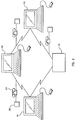
- Figure 2 illustrates a data processing system comprising a number of workstations (here, three workstations W1 , W2 and W3 ) interconnected via a data network so as to permit communication between the workstations. It is assumed that the data processing system shown in Figure 2 is of a type which will permit concurrent real time communication between the users.
- the workstations are connected as part of a local area network under the control of a File Server (FS) .
- FS File Server
- the network operates according to a conventional network protocol, such as the token ring protocol.
- Figure 2 shows just one possible hardware configuration for a data processing network.
- the data processing system could be based upon a star network, or based upon a host processor connected to a plurality of dumb terminals, or based upon a plurality of remote processors connected by a communications network.
- the network could also be based upon the telephone network, an ISDN network or any other 'dial up' network.
- the workstations could be located within a single workspace, or within a local area (eg in a building), or could be remote from one another.
- visual communication between a user and a workspace concerns the ability of that user to see screen objects displayed in that workspace on the associated display.
- full visual communication allows the user to manipulate those objects using tools and utilities in the workspace itself.
- a typical application might be that of a first user having full visual access to a second user's workspace. In this case, the two users would both be able to see, manipulate, and operate upon screen objects displayed in the workspace.
- This principle 'what you see is what I see', or 'WYSIWIS', has been described in an article by Stefik et al, entitled 'Beyond the Chalkboard: Computer Support for Collaboration and Problem Solving in Meetings', Communications of the ACM 30, pages 32 to 47.
- the present invention offers the ability to hear what the other collaborators are discussing in conjunction with seeing their gestures reflected via the display.
- This capability is provided by networking the workstations or intelligent workstations via a multiplexed voice and data link such as an ISDN link.
- a telephone 210 and attached speaker 200 facilitates voice communication between the collaborators over the ISDN link that also ties their computer data communication network together.
- Each of the collaborators see the same information on their individual displays.
- a shape is displayed, and a corresponding shape is displayed at the same position on each of the other displays.
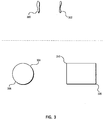
- a user points to a first location 300 and a second location 302 with a thumb and a finger. This gesture would be accompanied by spoken phrases such as: this part of the assembly, from here to here.
- the invention detects the particular points that have been selected by touch on the touch screen display and highlights them on the user's display using a shape determined by context and the number of touch points. Then, a corresponding shape is displayed on each of the collaborator's displays as the voice information is communicated via the speaker attached to the phone. In this way, all of the collaborators are cognizant of the shared information that is being discussed.
- a circle is defined by a pair of two touch contact points 304 and 306 .
- the circle is the unique circle that has the diameter with end points 304 and 306.
- a rectangle is defined as being the unique rectangle having a diagonal with end points 310 and 320 .
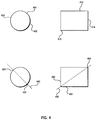
- An alternate approach is illustrated in Figure 4 .
- the circle is the unique circle which passes through each of the contact points 400 , 402 and 404 which are not collinear.
- a similar technique is illustrated with the rectangle defined by the three points 410, 412 , and 414 .
- the rectangle has a diagonal that passes through the highest contact point 410 and the corner determined by taking the Y coordinate of the lowest contact point 414 and the X coordinate of the highest contact point 412.
- Figure 4 illustrates examples of another use of gestures to communicate information with the use of contact points combined with diagonal lines to clearly delineate the meaning of the gestures.
- a circle and a square are used as demonstrative figures.
- the bisecting diagonals 440 and 464 are used to clearly convey the nature of the hand gestures to the other collaborators.
- the other points 420, 430, 464, 462 and 460 are as previously described.
- FIG. 5 is a flow diagram of the detailed logic in accordance with the subject invention. Processing begins at 500 where gesture processing commences. At input block 510 , the number (n) and positions of the contact points (p1, ..., pn) are detected. If there are more than three contact points detected, then the additional contact points are discarded. The gesture mode is determined based on an integer value entered by a user to specify a particular mode. If no points are detected, and a user specified time has elapsed, then the previous gesture is cleared from the displays. If a single point is detected, then a pointer (arrow) shaped cursor is drawn at p1 as set forth in function block 513.
- Decision block 514 processes two points (p1 and p2) based on the gesture mode. If gesture mode is set to one, then the gesture mode is SPAN and two vertical bars are drawn on the display at p1 and p2 as shown in function block 520. If gesture mode is set to two, then the gesture mode is CIRCLE and a circle is drawn around the diameter line with endpoints p1 and p2 as shown in function block 522 . If gesture mode is set to three, then the gesture mode is RECTANGLE and a rectangle is drawn that has one corner at p1 and a diagonal corner at p2 as shown in function block 524.
- Decision block 515 processes three points (p1, p2 and p3) based on the gesture mode. If gesture mode is set to one, then the gesture mode is CIRCLE and the unique circle is drawn which passes through p1, p2 and p3 if the points are not collinear as shown in function block 526 . If the points are collinear, then the shape is a line passing through the three points. If gesture mode is set to two, then the gesture mode is RECTANGLE and a rectangle with a corner at p1 and opposite edges passing through p2 and p3, with the upper edge being determined by the point that is closest to p1 in the horizontal direction is drawn as depicted in function block 528.
- the display shape is then drawn on all the displays participating in this work session as shown in function block 530, 540, 550, and 560 .
- the multiplexed display information and voice information is transmitted to the participating work sessions.
- the display information includes the number and position of the contact points.
- the information is displayed on each of the participating displays as shown in function block 550.
- the spoken information is communicated to all of the participating collaborators and control is passed to function block 510 to await the next gesture.
- the shapes used in the algorithm above are particularly useful for communicating regions of interest or discussion in geographically distributed cooperative work activities.
- this invention can be practiced in many other shapes and in environments involving many displays located great distances apart by, for example, compressing the audio and/or display information before transmitting it. Then, at the receiving end, the information can be decompressed before presenting it to the distant user.
Landscapes
- Engineering & Computer Science (AREA)
- Theoretical Computer Science (AREA)
- General Engineering & Computer Science (AREA)
- Physics & Mathematics (AREA)
- General Physics & Mathematics (AREA)
- Human Computer Interaction (AREA)
- Business, Economics & Management (AREA)
- Strategic Management (AREA)
- Human Resources & Organizations (AREA)
- Entrepreneurship & Innovation (AREA)
- Marketing (AREA)
- Operations Research (AREA)
- General Business, Economics & Management (AREA)
- Economics (AREA)
- Tourism & Hospitality (AREA)
- Quality & Reliability (AREA)
- Data Mining & Analysis (AREA)
- Information Transfer Between Computers (AREA)
- Position Input By Displaying (AREA)
- Computer And Data Communications (AREA)
- Digital Computer Display Output (AREA)
Applications Claiming Priority (2)
| Application Number | Priority Date | Filing Date | Title |
|---|---|---|---|
| US79628791A | 1991-11-22 | 1991-11-22 | |
| US796287 | 1991-11-22 |
Publications (2)
| Publication Number | Publication Date |
|---|---|
| EP0543566A2 true EP0543566A2 (de) | 1993-05-26 |
| EP0543566A3 EP0543566A3 (en) | 1996-12-11 |
Family
ID=25167817
Family Applications (1)
| Application Number | Title | Priority Date | Filing Date |
|---|---|---|---|
| EP92310335A Withdrawn EP0543566A3 (en) | 1991-11-22 | 1992-11-12 | Touch screen |
Country Status (2)
| Country | Link |
|---|---|
| EP (1) | EP0543566A3 (de) |
| JP (1) | JP3159407B2 (de) |
Cited By (9)
| Publication number | Priority date | Publication date | Assignee | Title |
|---|---|---|---|---|
| US8024185B2 (en) | 2007-10-10 | 2011-09-20 | International Business Machines Corporation | Vocal command directives to compose dynamic display text |
| US8139036B2 (en) | 2007-10-07 | 2012-03-20 | International Business Machines Corporation | Non-intrusive capture and display of objects based on contact locality |
| US8441702B2 (en) | 2009-11-24 | 2013-05-14 | International Business Machines Corporation | Scanning and capturing digital images using residue detection |
| US8610924B2 (en) | 2009-11-24 | 2013-12-17 | International Business Machines Corporation | Scanning and capturing digital images using layer detection |
| EP2452254A4 (de) * | 2009-07-08 | 2014-01-22 | N trig ltd | System und verfahren für multi-touch-interaktionen mit einem berührungsempfindlichen schirm |
| US8650634B2 (en) | 2009-01-14 | 2014-02-11 | International Business Machines Corporation | Enabling access to a subset of data |
| TWI426462B (zh) * | 2010-09-28 | 2014-02-11 | Inst Information Industry | 幾何形狀處理裝置、方法以及儲存幾何形狀處理方法之電腦可讀取記錄媒體 |
| US9134904B2 (en) | 2007-10-06 | 2015-09-15 | International Business Machines Corporation | Displaying documents to a plurality of users of a surface computer |
| US9203833B2 (en) | 2007-12-05 | 2015-12-01 | International Business Machines Corporation | User authorization using an automated Turing Test |
Families Citing this family (2)
| Publication number | Priority date | Publication date | Assignee | Title |
|---|---|---|---|---|
| KR20010079212A (ko) * | 2001-06-23 | 2001-08-22 | 강경진 | 필기영상 발생 및 표시기 |
| KR100408363B1 (ko) * | 2001-10-05 | 2003-12-06 | 인피닉스 주식회사 | 전자공책 |
Family Cites Families (10)
| Publication number | Priority date | Publication date | Assignee | Title |
|---|---|---|---|---|
| JPS5114223A (ja) * | 1974-07-26 | 1976-02-04 | Hitachi Ltd | Seikonbaazensusochi |
| JPS51142223A (en) * | 1975-06-03 | 1976-12-07 | Nippon Telegr & Teleph Corp <Ntt> | Communications device for handwriting |
| JPS59214941A (ja) * | 1983-05-20 | 1984-12-04 | Toshiba Corp | 位置入力装置 |
| JPS63193276A (ja) * | 1987-02-06 | 1988-08-10 | Alps Electric Co Ltd | 図形の描画方式 |
| US4746770A (en) * | 1987-02-17 | 1988-05-24 | Sensor Frame Incorporated | Method and apparatus for isolating and manipulating graphic objects on computer video monitor |
| EP0294657A3 (de) * | 1987-06-11 | 1991-07-24 | FROESSL, Horst | Verfahren und Einrichtung zur Daten- und Ebenbildmanipulation durch Sprach- und Berührungsbefehle |
| US4827085A (en) * | 1987-11-19 | 1989-05-02 | Ovonic Imaging Systems, Inc. | Voice and image teleconferencing system including paperless facsimile means |
| JPH01238265A (ja) * | 1988-03-18 | 1989-09-22 | Hitachi Ltd | 画像対話通信方式 |
| JP2589999B2 (ja) * | 1988-03-18 | 1997-03-12 | 株式会社竹中工務店 | 図形入出力装置 |
| JPH02150974A (ja) * | 1988-12-02 | 1990-06-11 | Fuji Xerox Co Ltd | 遠隔図面操作システム |
-
1992
- 1992-09-04 JP JP23659792A patent/JP3159407B2/ja not_active Expired - Fee Related
- 1992-11-12 EP EP92310335A patent/EP0543566A3/en not_active Withdrawn
Cited By (10)
| Publication number | Priority date | Publication date | Assignee | Title |
|---|---|---|---|---|
| US9134904B2 (en) | 2007-10-06 | 2015-09-15 | International Business Machines Corporation | Displaying documents to a plurality of users of a surface computer |
| US8139036B2 (en) | 2007-10-07 | 2012-03-20 | International Business Machines Corporation | Non-intrusive capture and display of objects based on contact locality |
| US8024185B2 (en) | 2007-10-10 | 2011-09-20 | International Business Machines Corporation | Vocal command directives to compose dynamic display text |
| US9203833B2 (en) | 2007-12-05 | 2015-12-01 | International Business Machines Corporation | User authorization using an automated Turing Test |
| US8650634B2 (en) | 2009-01-14 | 2014-02-11 | International Business Machines Corporation | Enabling access to a subset of data |
| EP2452254A4 (de) * | 2009-07-08 | 2014-01-22 | N trig ltd | System und verfahren für multi-touch-interaktionen mit einem berührungsempfindlichen schirm |
| US9182854B2 (en) | 2009-07-08 | 2015-11-10 | Microsoft Technology Licensing, Llc | System and method for multi-touch interactions with a touch sensitive screen |
| US8441702B2 (en) | 2009-11-24 | 2013-05-14 | International Business Machines Corporation | Scanning and capturing digital images using residue detection |
| US8610924B2 (en) | 2009-11-24 | 2013-12-17 | International Business Machines Corporation | Scanning and capturing digital images using layer detection |
| TWI426462B (zh) * | 2010-09-28 | 2014-02-11 | Inst Information Industry | 幾何形狀處理裝置、方法以及儲存幾何形狀處理方法之電腦可讀取記錄媒體 |
Also Published As
| Publication number | Publication date |
|---|---|
| JP3159407B2 (ja) | 2001-04-23 |
| EP0543566A3 (en) | 1996-12-11 |
| JPH05224817A (ja) | 1993-09-03 |
Similar Documents
| Publication | Publication Date | Title |
|---|---|---|
| US11520458B2 (en) | Communications interface and a communications method, a corresponding computer program, and a corresponding registration medium | |
| Billinghurst et al. | Experiments with face-to-face collaborative AR interfaces | |
| KR100404918B1 (ko) | 컴퓨터식대화시스템및그형성방법 | |
| Ou et al. | Gestural communication over video stream: supporting multimodal interaction for remote collaborative physical tasks | |
| Hinckley | Synchronous gestures for multiple persons and computers | |
| Benko et al. | Collaborative mixed reality visualization of an archaeological excavation | |
| Bauer et al. | A collaborative wearable system with remote sensing | |
| US5655066A (en) | Remote display of objects and cursor movement in a conferencing system | |
| EP0543566A2 (de) | Berührungsempfindliche Anzeige | |
| Wolff et al. | A review of telecollaboration technologies with respect to closely coupled collaboration | |
| Dumas et al. | Spin: a 3d interface for cooperative work | |
| KR20060033433A (ko) | 작업 공간을 공유하는 원격 회의 방법 | |
| CN108196780A (zh) | 一种大屏幕显示终端触摸控制方法与系统 | |
| JPH0659813A (ja) | 電子情報描画装置 | |
| US20020126085A1 (en) | Computerized interactor systems and methods for providing same | |
| JP2008118301A (ja) | 電子黒板システム | |
| JPH0628095A (ja) | 座標入力制御装置 | |
| CN112035047A (zh) | 跨平台多人在线交互方法、系统以及存储介质 | |
| CN102760034A (zh) | 一种显示设备的多窗口交互方法及设备 | |
| CN103631558B (zh) | 具书写内容互动显示的方法与一体机 | |
| Dumas et al. | A 3-d interface for cooperative work | |
| Koike et al. | Enhancedtable: Supporting a small meeting in ubiquitous and augmented environment | |
| Neale et al. | RelicPad: A hands-on, mobile approach to collaborative exploration of virtual museum artifacts | |
| JP3320601B2 (ja) | 画像表示方法およびシステム | |
| JP2000011207A (ja) | 仮想共有空間形成方法および仮想空間の形成プログラムを記録した記録媒体 |
Legal Events
| Date | Code | Title | Description |
|---|---|---|---|
| PUAI | Public reference made under article 153(3) epc to a published international application that has entered the european phase |
Free format text: ORIGINAL CODE: 0009012 |
|
| AK | Designated contracting states |
Kind code of ref document: A2 Designated state(s): DE FR GB |
|
| 17P | Request for examination filed |
Effective date: 19930918 |
|
| PUAL | Search report despatched |
Free format text: ORIGINAL CODE: 0009013 |
|
| AK | Designated contracting states |
Kind code of ref document: A3 Designated state(s): DE FR GB |
|
| 18W | Application withdrawn |
Withdrawal date: 19980216 |