EP0561606A1 - Verfahren und System zur Markierung eines Dokumentes für Speicherung, Handhabung und Wiederauffindung - Google Patents
Verfahren und System zur Markierung eines Dokumentes für Speicherung, Handhabung und Wiederauffindung Download PDFInfo
- Publication number
- EP0561606A1 EP0561606A1 EP93301972A EP93301972A EP0561606A1 EP 0561606 A1 EP0561606 A1 EP 0561606A1 EP 93301972 A EP93301972 A EP 93301972A EP 93301972 A EP93301972 A EP 93301972A EP 0561606 A1 EP0561606 A1 EP 0561606A1
- Authority
- EP
- European Patent Office
- Prior art keywords
- document
- file
- data
- image
- selection
- Prior art date
- Legal status (The legal status is an assumption and is not a legal conclusion. Google has not performed a legal analysis and makes no representation as to the accuracy of the status listed.)
- Granted
Links
- 238000000034 method Methods 0.000 title claims description 31
- 238000002372 labelling Methods 0.000 title description 2
- 238000012545 processing Methods 0.000 claims abstract description 83
- 230000008569 process Effects 0.000 claims description 12
- 238000006243 chemical reaction Methods 0.000 claims description 7
- 238000003384 imaging method Methods 0.000 claims description 6
- 230000009471 action Effects 0.000 description 46
- 230000002093 peripheral effect Effects 0.000 description 14
- 238000004891 communication Methods 0.000 description 8
- 230000006870 function Effects 0.000 description 7
- 230000005540 biological transmission Effects 0.000 description 5
- 230000004044 response Effects 0.000 description 5
- 238000010586 diagram Methods 0.000 description 4
- 230000003287 optical effect Effects 0.000 description 3
- 238000013500 data storage Methods 0.000 description 2
- 238000012015 optical character recognition Methods 0.000 description 2
- 238000004590 computer program Methods 0.000 description 1
- 238000010276 construction Methods 0.000 description 1
- 238000012217 deletion Methods 0.000 description 1
- 230000037430 deletion Effects 0.000 description 1
- 230000004069 differentiation Effects 0.000 description 1
- 239000000284 extract Substances 0.000 description 1
- 230000007246 mechanism Effects 0.000 description 1
- 230000001343 mnemonic effect Effects 0.000 description 1
- 238000012986 modification Methods 0.000 description 1
- 230000004048 modification Effects 0.000 description 1
- 239000003607 modifier Substances 0.000 description 1
- 238000012634 optical imaging Methods 0.000 description 1
- 230000008520 organization Effects 0.000 description 1
- 239000002243 precursor Substances 0.000 description 1
- 238000003672 processing method Methods 0.000 description 1
- 238000006467 substitution reaction Methods 0.000 description 1
- 238000012546 transfer Methods 0.000 description 1
Images




Classifications
-
- H—ELECTRICITY
- H04—ELECTRIC COMMUNICATION TECHNIQUE
- H04N—PICTORIAL COMMUNICATION, e.g. TELEVISION
- H04N1/00—Scanning, transmission or reproduction of documents or the like, e.g. facsimile transmission; Details thereof
- H04N1/32—Circuits or arrangements for control or supervision between transmitter and receiver or between image input and image output device, e.g. between a still-image camera and its memory or between a still-image camera and a printer device
- H04N1/32101—Display, printing, storage or transmission of additional information, e.g. ID code, date and time or title
- H04N1/32106—Display, printing, storage or transmission of additional information, e.g. ID code, date and time or title separate from the image data, e.g. in a different computer file
- H04N1/32122—Display, printing, storage or transmission of additional information, e.g. ID code, date and time or title separate from the image data, e.g. in a different computer file in a separate device, e.g. in a memory or on a display separate from image data
-
- H—ELECTRICITY
- H04—ELECTRIC COMMUNICATION TECHNIQUE
- H04N—PICTORIAL COMMUNICATION, e.g. TELEVISION
- H04N1/00—Scanning, transmission or reproduction of documents or the like, e.g. facsimile transmission; Details thereof
- H04N1/21—Intermediate information storage
- H04N1/2166—Intermediate information storage for mass storage, e.g. in document filing systems
-
- H—ELECTRICITY
- H04—ELECTRIC COMMUNICATION TECHNIQUE
- H04N—PICTORIAL COMMUNICATION, e.g. TELEVISION
- H04N1/00—Scanning, transmission or reproduction of documents or the like, e.g. facsimile transmission; Details thereof
- H04N1/32—Circuits or arrangements for control or supervision between transmitter and receiver or between image input and image output device, e.g. between a still-image camera and its memory or between a still-image camera and a printer device
- H04N1/327—Initiating, continuing or ending a single-mode communication; Handshaking therefor
- H04N1/32765—Initiating a communication
- H04N1/32771—Initiating a communication in response to a request, e.g. for a particular document
-
- H—ELECTRICITY
- H04—ELECTRIC COMMUNICATION TECHNIQUE
- H04N—PICTORIAL COMMUNICATION, e.g. TELEVISION
- H04N1/00—Scanning, transmission or reproduction of documents or the like, e.g. facsimile transmission; Details thereof
- H04N1/32—Circuits or arrangements for control or supervision between transmitter and receiver or between image input and image output device, e.g. between a still-image camera and its memory or between a still-image camera and a printer device
- H04N1/327—Initiating, continuing or ending a single-mode communication; Handshaking therefor
- H04N1/32765—Initiating a communication
- H04N1/32771—Initiating a communication in response to a request, e.g. for a particular document
- H04N1/32778—Initiating a communication in response to a request, e.g. for a particular document using a mark-sheet or machine-readable code request
-
- H—ELECTRICITY
- H04—ELECTRIC COMMUNICATION TECHNIQUE
- H04N—PICTORIAL COMMUNICATION, e.g. TELEVISION
- H04N1/00—Scanning, transmission or reproduction of documents or the like, e.g. facsimile transmission; Details thereof
- H04N1/32—Circuits or arrangements for control or supervision between transmitter and receiver or between image input and image output device, e.g. between a still-image camera and its memory or between a still-image camera and a printer device
- H04N1/32101—Display, printing, storage or transmission of additional information, e.g. ID code, date and time or title
- H04N1/32106—Display, printing, storage or transmission of additional information, e.g. ID code, date and time or title separate from the image data, e.g. in a different computer file
- H04N1/32112—Display, printing, storage or transmission of additional information, e.g. ID code, date and time or title separate from the image data, e.g. in a different computer file in a separate computer file, document page or paper sheet, e.g. a fax cover sheet
-
- H—ELECTRICITY
- H04—ELECTRIC COMMUNICATION TECHNIQUE
- H04N—PICTORIAL COMMUNICATION, e.g. TELEVISION
- H04N2201/00—Indexing scheme relating to scanning, transmission or reproduction of documents or the like, and to details thereof
- H04N2201/32—Circuits or arrangements for control or supervision between transmitter and receiver or between image input and image output device, e.g. between a still-image camera and its memory or between a still-image camera and a printer device
- H04N2201/3201—Display, printing, storage or transmission of additional information, e.g. ID code, date and time or title
- H04N2201/3204—Display, printing, storage or transmission of additional information, e.g. ID code, date and time or title of data relating to a user, sender, addressee, machine or electronic recording medium
- H04N2201/3211—Display, printing, storage or transmission of additional information, e.g. ID code, date and time or title of data relating to a user, sender, addressee, machine or electronic recording medium of a company logo or the like
-
- H—ELECTRICITY
- H04—ELECTRIC COMMUNICATION TECHNIQUE
- H04N—PICTORIAL COMMUNICATION, e.g. TELEVISION
- H04N2201/00—Indexing scheme relating to scanning, transmission or reproduction of documents or the like, and to details thereof
- H04N2201/32—Circuits or arrangements for control or supervision between transmitter and receiver or between image input and image output device, e.g. between a still-image camera and its memory or between a still-image camera and a printer device
- H04N2201/3201—Display, printing, storage or transmission of additional information, e.g. ID code, date and time or title
- H04N2201/3225—Display, printing, storage or transmission of additional information, e.g. ID code, date and time or title of data relating to an image, a page or a document
-
- H—ELECTRICITY
- H04—ELECTRIC COMMUNICATION TECHNIQUE
- H04N—PICTORIAL COMMUNICATION, e.g. TELEVISION
- H04N2201/00—Indexing scheme relating to scanning, transmission or reproduction of documents or the like, and to details thereof
- H04N2201/32—Circuits or arrangements for control or supervision between transmitter and receiver or between image input and image output device, e.g. between a still-image camera and its memory or between a still-image camera and a printer device
- H04N2201/3201—Display, printing, storage or transmission of additional information, e.g. ID code, date and time or title
- H04N2201/3225—Display, printing, storage or transmission of additional information, e.g. ID code, date and time or title of data relating to an image, a page or a document
- H04N2201/3226—Display, printing, storage or transmission of additional information, e.g. ID code, date and time or title of data relating to an image, a page or a document of identification information or the like, e.g. ID code, index, title, part of an image, reduced-size image
-
- H—ELECTRICITY
- H04—ELECTRIC COMMUNICATION TECHNIQUE
- H04N—PICTORIAL COMMUNICATION, e.g. TELEVISION
- H04N2201/00—Indexing scheme relating to scanning, transmission or reproduction of documents or the like, and to details thereof
- H04N2201/32—Circuits or arrangements for control or supervision between transmitter and receiver or between image input and image output device, e.g. between a still-image camera and its memory or between a still-image camera and a printer device
- H04N2201/3201—Display, printing, storage or transmission of additional information, e.g. ID code, date and time or title
- H04N2201/3269—Display, printing, storage or transmission of additional information, e.g. ID code, date and time or title of machine readable codes or marks, e.g. bar codes or glyphs
-
- H—ELECTRICITY
- H04—ELECTRIC COMMUNICATION TECHNIQUE
- H04N—PICTORIAL COMMUNICATION, e.g. TELEVISION
- H04N2201/00—Indexing scheme relating to scanning, transmission or reproduction of documents or the like, and to details thereof
- H04N2201/32—Circuits or arrangements for control or supervision between transmitter and receiver or between image input and image output device, e.g. between a still-image camera and its memory or between a still-image camera and a printer device
- H04N2201/3201—Display, printing, storage or transmission of additional information, e.g. ID code, date and time or title
- H04N2201/3271—Printing or stamping
-
- H—ELECTRICITY
- H04—ELECTRIC COMMUNICATION TECHNIQUE
- H04N—PICTORIAL COMMUNICATION, e.g. TELEVISION
- H04N2201/00—Indexing scheme relating to scanning, transmission or reproduction of documents or the like, and to details thereof
- H04N2201/32—Circuits or arrangements for control or supervision between transmitter and receiver or between image input and image output device, e.g. between a still-image camera and its memory or between a still-image camera and a printer device
- H04N2201/3201—Display, printing, storage or transmission of additional information, e.g. ID code, date and time or title
- H04N2201/3273—Display
-
- H—ELECTRICITY
- H04—ELECTRIC COMMUNICATION TECHNIQUE
- H04N—PICTORIAL COMMUNICATION, e.g. TELEVISION
- H04N2201/00—Indexing scheme relating to scanning, transmission or reproduction of documents or the like, and to details thereof
- H04N2201/32—Circuits or arrangements for control or supervision between transmitter and receiver or between image input and image output device, e.g. between a still-image camera and its memory or between a still-image camera and a printer device
- H04N2201/3201—Display, printing, storage or transmission of additional information, e.g. ID code, date and time or title
- H04N2201/3274—Storage or retrieval of prestored additional information
Definitions
- the present invention relates generally to document processing methods and systems, and more specifically to a method and system for labeling a document with an arbitrary, image domain document label for document storage, manipulation, and retrieval.
- Scanning documents for processing on a digital computer such as a personal computer ("p.c.”), a workstation, or other digital data processing resource is now routine.
- remote document storage, manipulation, and retrieval is becoming more commonplace today given the improving interfaces between computers and telecommunication devices such as fax machines.
- a user can now "fax" a document to his computer for the purposes of storing the document on the computer, redistributing the document via the computer, etc.
- What ties these two different document processes together is that they both involve apparatus peripheral to the data processing resource.
- the present invention is concerned with facilitating the use of such peripheral apparatus, specifically the naming and referring to files stored on the data processing resource.
- the digital data processing resource such as the p.c., workstation, and the like will be referred to herein as a computer.
- Document as used herein shall be understood to mean a carrier; such as paper, for carrying markings, as well as the markings, if any, applied to the carrier.
- a file as used herein shall be understood to mean a collection of data, for example that representing a scanned image of a document, stored or accessible to a computer.
- the term electronic representation of data will be used herein, although the representation of the data (i.e., data representation) may be electronic, magnetic, optical, or other appropriate representation. Furthermore, the data may be in analog or digital format.
- document storage, manipulation, and retrieval will be understood to represent all actions that a user may perform on a document and its electronic representation, including those requiring communication between a peripheral apparatus and the computer. For example, this includes document scanning and transmission to the computer from a "remote" scanner, retrieving a file from the computer, transferring a document from one computer to another computer, etc.
- the document in order to perform any task on a document requiring communication between a peripheral apparatus and the computer, the document must be represented by data, i.e., an electronic representation of the document must be generated.
- an electronic representation of a document will be generated by a document scanner, which generates a description of the on/off state of the picture elements ("pixels") comprising the image, and packages the representation as a file.
- the form of the electronic representation may, for example, be a bitmap of the document or a coded collection of data representing the document.
- an electronic representation of the document (hereafter referred to as an "electronic document") is generated, there must be a way of uniquely identifying it. This requirement is most commonly handled by the disk operating system resident on the computer. For convenience, virtually every disk operating systems permits, and in fact requires either the user or the computer to assign a file name to the file containing the electronic document for subsequent identification of the file. According to known document storage, manipulation and retrieval systems, the user-selected file name must be in a format which is recognizable by the computer, for example encoded text such as EBCDIC or ASCII which may be entered from a keyboard.
- Electronic documents transmitted to a computer for storage and/or processing from a peripheral device are typically named at the time of transmission to or receipt by the computer in association with the task of document storage.
- a user may enter via a keyboard attached to the sending or receiving device an encoded text name for the electronic document.
- the sending or receiving device may automatically assign an encoded text name to the electronic document according to a preestablished rule for name assignment.
- the task of document storage involves establishing a destination for the file in a memory media, such as a physical location on a magnetic disk, in RAM, etc., and a system identification ("system ID") of that destination.
- system ID system identification
- the disk operating system establishes and maintains a correspondence between the assigned file name and the system ID.
- the file name when assigned by the user, is often a mnemonic device or other label allowing a user to identify from the file name the general or specific contents of the file.
- the file name When the file name is assigned by the system, it is most often a generic name such as, for example, the user's name, the name of the device from which the file was transmitted, the date and time of creation of the file, etc.
- a user is typically more likely to be able to identify the contents of a file when the user assigns the file name than when it is assigned by the system.
- peripheral devices are accompanied by a keyboard allowing the user to enter an appropriate file name, for example for assigning a file name for file storage, accessing prestored files, etc.
- a typical stand-alone scanner comprises optical imaging components, software for processing images, and possibly paper document handling mechanisms.
- Typical facsimile devices include the above as well as a numerical keypad, but rarely include all of the keys of a full alpha-numeric keyboard.
- present peripheral apparatus limit the ability of the user to assign a meaningful file name to files and access previously stored files.
- the present invention provides an image processing system comprising processor means; memory means, connected to said processor means, containing a data item; conversion means, connected to said processor means, for converting a printed document into a file of data representing the printed document; image processing means connected to said conversion means for extracting from the file data representing selected indications imparted on the printed document; and means for establishing a relationship between the data representing selected indications imparted on the printed document and the data item such that selection of the data representing selected indications imparted on the printed document will be interpreted as selection of the data item.
- the conversion means of a system in accordance with the present invention may be a facsimile machine.
- the selected indications imparted on the printed document may include at least an arbitrary, image domain file label.
- the arbitrary, image domain file label may be a document label for the second document.
- the image domain file label may be a user imparted handwritten file label.
- a document storage manipulation and retrieval system comprising processor means; memory means connected to the processor means such that the processor means may store and retrieve electronic data therefrom; document imaging means connected to the processor means, for acquiring an image of a printed document and converting the acquired image into a data representation of the document; image processing means connected to said document imaging means for identifying from the data representation of the document at least one selected region of the document; software product means communicationally connected to said processor means and said image processing means for assigning a first file name to a data representation of a first document acquired by said document imaging means, for assigning a second file name to the selected region of a second document identified by the image processing means from the data representation of the second document, and for establishing a relationship between the first and second file names such that identification of the contents of the second file may be interpreted by the processor means as identification of the contents of the first file.
- the selected region of the second document identified by the image processing means may contain an arbitrary, image domain document label.
- the image domain document label may be a user imparted handwritten document label.
- the present invention further provides a data storage medium communicationally interconnected with a digital data processing resource, said data storage medium having stored thereon a data structure defining a relationship between data representing a file and data representing an arbitrary, image domain file label such that a selection of the data representing an arbitrary, image domain file label will be interpreted by the data processing resource as a selection of the file.
- the arbitrary, image domain file label may be a document label.
- the image domain document label may be a user imparted handwritten document label.
- the present invention also provides a method for assigning an arbitrary, image domain file label to a first file having a first file name stored in the memory of a digital data processing resource, comprising the steps of converting a first document containing at least one field for receiving an arbitrary, image domain file label to a data representation thereof; determining the location of said at least one field in the data representation of the first document; assigning a second file name to the data representation of the contents of the at least one field; and establishing a relationship between the first and second file names such that a selection of the second file name will be interpreted by the digital data processing resource as a selection of the first file name.
- the digital data processing resource utilizes a data base for at least a part of its data processing tasks
- the relationship between the first and second file names may be a link in the data base.
- a method for operating a document processing system in which first and second files are stored, and further in which a relationship has been established between the contents of the first and second files such that selection of the contents of the first file is interpreted by the document processing system as a selection of the contents of the second file, comprising the steps of designating a processing task to be performed on a document; selecting the contents of the first file for the processing task; and obtaining, by way of selection of the contents of the first file, the processing task being performed on the contents of the second file.
- the contents of the first file may be data representing an arbitrary, image domain file label, in which the case the method may further include the steps of displaying the arbitrary, image domain file label contents of the first file for selection, and selecting the arbitrary, image domain file label so as to select the contents of the first file for the processing task.
- the present invention further provides a method for operating a data processing resource, comprising the steps of inputting a first paper document into a facsimile apparatus; causing the facsimile apparatus to convert an image of the first paper document into an electronic data representation thereof, and transmitting the electronic data representation of the first paper document to the data processing resource; storing in a first file the electronic data representation of the first paper document in a memory apparatus connected to the data processing resource such that a first file name is assigned thereto; inputting a second paper document having at least a user-imparted arbitrary, image domain document label imparted thereon into the facsimile apparatus; causing the facsimile apparatus to convert an image of the second paper document, including the user-imparted arbitrary, image domain document label, into an electronic data representation thereof, and transmitting the electronic data representation of the second paper document to the data processing resource; storing in a second file the electronic data representation of the second paper document in a memory apparatus connected to the data processing resource such that a second file name is assigned thereto; determining
- the present invention overcomes the problem of the limits imposed on a user in entering a file name by providing a method and system for assigning a meaningful user-selected file label to files which uses existing peripheral devices. Specifically, for a file having an assigned file name, a relationship is established between an image domain file label and the file name assigned by the computer, so that the label may be employed to assist the user in identifying the file.
- the present invention builds on the methods and systems of the prior art by providing a relationship between the assigned file name and the image domain file label for a file. This allows establishing a meaningful file label for a file which can stand in the place of the less meaningful assigned file name. Furthermore, by establishing this relationship, a user may more easily and directly identify a desired file in a system lacking a text entry device than heretofore provided by the prior art.
- the file is initially a document consisting of a carrier means such as paper, plastic, etc., having markings such as printing or writing thereon.
- a special cover form is employed which includes a region in which the user imparts an image domain label (for example a handwritten name or illustration) for the file.
- the document, prefaced by the cover form is scanned by a scanning means whose output is an electronic data file containing the image of the form and the document.
- This data file is transmitted to a computer, where it is assigned a file name and stored as a file either in the computer's memory or in a memory media associated with the computer.
- the computer Associated with the transmission of the data file to the computer will be an instruction to the computer to store the file (the instruction being read from the form or other input device).
- the computer establishes a location in which to store the file and creates a file name for the file.
- the computer maintains the association between the location of the file and the file name according to methods well known in the art.
- the computer distinguishes the data representing the form and the data representing the document, locates representation of the image domain label imparted on the form, and establishes a relationship by way of data base entries between the data representing the image domain label and the data representing the document.
- the computer When the computer is called on to access the document, it displays or prints the image domain label in such a manner that selection of the image domain label is interpreted by the computer to mean selection of the document.
- Another aspect of the present invention involves accessing for sending, retrieving, deleting, etc., a previously stored electronic document having related to it an image domain file label.
- a user would request a listing of the labels of an appropriate set of files which are stored on or accessible to the computer.
- the computer In response to the request for the listing, the computer generates a display of the image domain file label, if any, and possibly other indications, for each file.
- the display may be an image formed on a computer display, a printed paper document, etc. From this display, the user selects the item(s) of interest by selecting the image domain file label, for example by highlighting the file label on the computer display or imparting a check mark in a check box field on a paper or other printed document of the display.
- the computer Based on the preestablished relationship between the image domain file label and the file name, the computer is able to interpret the user's selection as a selection of the associated file.
- an image domain label may be assigned to a file and used to identify that file without resort to character recognition software such as optical character recognition ("OCR"). That is, there is no requirement to convert the image domain file label into a machine recognizable format.
- OCR optical character recognition
- the file to which the image domain label is assigned need not be an electronic document.
- the file may be data representing one or more instructions, or a program of instructions, which the computer will follow to accomplish specific tasks. That is, the underlying subject matter having the associated image domain label may be a computer program which may be referred to, loaded, and/or run in or by the computer by referring to the image domain label.
- the file to which the image domain label is related may be one or more of many other types of files, such as binary files in formats utilized by other data processing resources.
- the term "file” is used herein in its broadest sense to refer to the element to which the image domain label is assigned, and shall be understood to mean any data item or portion of a data item which is appropriate for assignment of an image domain label.
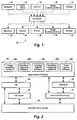
- an apparatus 10 which includes a computer 12 (such as a p.c., workstation, server, or other digital data processing resource) to which one or more peripheral devices may be communicationally interconnected.
- peripheral devices include devices designed primarily for communicating to computer 12, such as a network connection 14, a form editor 16, a scanner 18, an image communication means 20 (such as a facsimile or "fax" machine), and a storage device 22 (such as a magnetic, optical or electrical storage device), and devices designed primarily for receiving communication from computer 12, such as a network connection 24, a display device 26 (such as a CRT), a printer 28, an image communications means 30 (such as a fax machine), and a storage device 32 (such as a magnetic, optical or electrical storage device).
- Computer 12 will generally include a central processing unit (not shown) which performs processing of data under control of various software modules.
- these modules include, inter alia , disk operating software module 40, a user interface software module 42, a fax interface software module 44, a data base software module 46, applications software module 48, and optionally, a terminate and stay resident (“TSR") software module 50 whose instructions may be loaded from either or both of the fax interface software module 44 and the applications software module 48.
- TSR terminate and stay resident
- One or more of the various modules may form a software product. The various modules would typically be in communication with one another roughly as illustrated.
- applications software module will include image processing software module 48a, data base instruction software module 48b, interface and I/O software module 48c, form description language software module 48d, form layout software 48e, and other modules for accessing and processing data as will be understood by one skilled in the art.
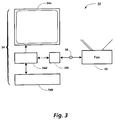
- an apparatus 52 is illustrated in Fig. 3 which includes a computer 54, and a single peripheral device, which in this embodiment is a fax machine 56 capable of both sending data to computer 54 and receiving data from computer 54 via common telephone lines 58.
- computer 54 will be assumed to include, inter alia , a display device 54a, an input device 54b, a fax card interface module 54c (including fax interface software module 44 (Fig. 2), and any additional hardware and software for enabling the computer to receive and send fax data via telephone lines 58), and processing and memory unit 54d.
- apparatus 52 is, at least in part, to allow a user to convert a paper document to an electronic document via fax machine 56, send the electronic document over telephone lines 58 to computer 54 via standard facsimile communication protocols, such as CCITT group 3, to command computer 54 to perform certain operations (hereafter referred to as "tasks") by way of marks made on paper which are converted and sent to computer 54 per the above, and to print documents at fax machine 56.
- fax machine 56 serves to perform the tasks of 3 separate devices - (a) an input scanner, (b) a computer operator's interface, and (c) a printer.
- a user is at a physically distant location from computer 54, but that fax machine 56 is located at the user's distant location.
- a user has a paper document which the user desires to store in electronic format on computer 54.
- This task will be referred to as remote document storage (or more succinctly as the "store" task).
- the paper document may be of virtually any type, for example one having text and/or illustrations imparted thereon. The steps in accomplishing this task will be discussed with reference to Figs. 4 and 5.
- the user will assemble together one or more pages which comprise a document 60, and preface document 60 by an instruction form 62.
- Instruction form 62 will generally be a single page form, although multiple page instruction forms may be appropriate in certain circumstances.
- document 60 and the instruction form 62 are referred to as job 64.
- a user may input to computer 54 (Fig. 3) one job at a time, or may submit plural jobs 64, 64', etc., together.
- the job or jobs assembled for transmitting to computer 54 is referred to as a batch 66.
- batch 66 is loaded into fax machine 56 (Fig. 3) where its image is captured and an electronic form of the image of the batch generated (hereafter referred to as "batch image data"). Fax machine 56 will generate the batch image data for transmission to computer 54 in a standard format, such as the CCITT group 3 encoding format.
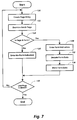
- Figs. 5 through 8 are flowcharts illustrating the steps for performing remote document storage on computer 54.
- Fig. 5 shows the initial steps performed by fax machine 56 to accomplish remote document storage.
- fax machine 56 dials the number of the fax interface module 54c, which is provided to it by the user, as shown at step 100.
- Fax module 54c is then polled at step 102 to determine if it is ready to receive the batch image data. If the fax interface module 54c is not ready to receive the batch image data, the fax machine may disconnect the line and retry dialing the fax interface module at a later time.
- the fax interface module 54c is ready to receive the batch image data, the batch image data is generated by the scanning and processing hardware and software of fax machine 56, as shown at step 104.
- the batch image data is then transmitted via telephone line 58 to the fax interface module 54c at step 106.
- the batch image data is received by the fax interface module 54c, which has resident memory or utilizes a portion of the memory of processing and memory unit 54d for temporarily storing the batch image data.
- Fax interface module 54c will automatically assign an appropriate file name and/or system ID to the batch image data file.
- Computer 54 then processes the batch image data as follows.
- step 110 is to determine whether a complete batch has been received. One method for doing so is to determine whether the telephone connection between fax interface module 54c and fax machine 56 has been broken. If so, it may be assumed that the received batch image data is a complete batch. If it is determined that a complete batch has been received, the batch must next be transferred to the computer.
- TSR software module 50 acts as an interface between fax card interface software module 44 and applications software module 48. This is a convenience which facilitates processing, and represents only one of many ways to establish such an interface.
- a data base called a job data base may be used as a scheduler to control the performing of certain tasks by the computer.
- the job data base is comprised of defined entries called actions, each action having a link to other actions and/or to entries in a second data base referred to as an information data base, which functions primarily as a repository for data used by, inter alia , the job data base.
- An action entry will include data indicating the action's function, and data that can be used in scheduling performance or execution of the action's function.
- Each task will have at least one action associated with it.
- Appendix 1, attached hereto A list of possible actions with their definitions is given in Appendix 1, attached hereto. It will be appreciated that the scheduling of actions and organization of stored items may be handled by traditional methods involving a CPU, main memory, etc. as well known in the art.
- the next step is to transfer the batch to computer 54 for processing.
- a file is created at step 112 (hereinafter referred to as an "event file") for maintaining relevant information about the batch.
- the event file is assigned a name automatically by the computer, for example of the type FAXAAAA.EVT, where AAAA represents a four digit integer. This may be handled, for example, by TSR software module 50, by maintaining and/or referring to a portion of the computer's memory reserved for keeping track of the value of the last integer assigned to a file name. In this way, each event file gets a sequentially numbered file name.
- TSR software module 50 will then cause certain information to be written into the event file including, for example, that there is a new batch image data file stored, and the file name assigned by the fax interface module 54c to that batch image data file. This facilitates processing of the batch by the applications software module 48 as follows.
- Applications software module 48 will periodically poll the TSR software module 50 to determine if there is a new batch image data file for processing, as shown at step 114 of Fig. 6.
- One convenient way of accomplishing this is to ask TSR for the current event file number. If TSR has no new event file, the current event file number would be set to 0. Thus, the applications software would interpret a 0 in response to its poll as an indication of no new event file. However, if TSR has a new event file to pass to the applications software module 48, TSR would respond to a poll with an integer representing the integer assigned to the event file as described above. Thus, applications software module 48 would interpret receipt of a non-zero integer, for example BBBB, in response to its polling by forming the file name FAXBBBB.EVT.
- the batch image data file is a DOS file in a standard encoded fax format, and may be stored in a file format particular to fax interface module 54c.
- the applications software module calls a conversion function which, using the information in the event file, converts the batch image data into an appropriate intermediate data format. This step is shown at 118 of Fig. 6.
- the batch is treated as a collection of discrete pages; the standard fax format which fax machine 56 (Fig. 3) created the batch image data in will contain indications, such as start or end of page indications, allowing page differentiation.
- This facilitates the first step in processing the job, execution of the batch action, which creates a data base entry in the job data base for each page of the batch image data at step 120. This may be accomplished by examining the batch image data for the aforementioned page indicators, or by transferring from the fax interface module 54c a count of the number of pages in the batch, for example by way of the event file.
- data may include whether a page is an instruction form 62 or not, which batch the page is a part of, etc.
- Execution of the batch action will cause a page action to be associated with each page entry in the information data base.
- These page actions causes image processing software module 48a to examine each page in the batch image data to determine whether the page is a form or not, and record the form/not form information in the page entry in the information data base. This is shown at steps 122 to 128.
- each instruction form 62 includes a form data region 68 which can carry coded data of various types.
- coded form data region 68 contains a code which allows computer 54 to identify the form and the steps required to process the form and associated document(s), if any.
- coded data region 68 may contain a complete description of the form and how to process the form and associated document(s) as described in United States Patent No. 5,060,980.
- the format of the coding may be of the type described in European Patent Application No. 0 469 864 or may be another computer readable coding scheme as appropriate.
- the applications software module may determine whether the subject page is a form or not.
- the presence of coded data in form data region 68 indicates that the page is a form, while the absence of coded data indicates the page is not a form.
- An alternative method and device for determining whether a subject page is a form or not is to include on form pages a logo or monogram in region 70, and to employ appropriate image processing software to determine whether a page contains the logo or monogram in that region. Again, presence of the logo or monogram in region 70 indicates that the page is a form, while absence of the logo or monogram indicates that the page is not a form.
- image processing software module 48a next examines the form data region 68, and identifies the form.
- the information encoded in region 68 will be a form identifier, pointing to a form description, and steps for processing the form and any associated document(s), stored in the information data base or in the computer's memory.
- the form identity is then also stored in the page entry for the form page in the information data base. Returning to Fig. 7, this processing is shown at steps 132 and 134.
- a job set action is executed, which is also established by the batch action.
- the job set action will be described with regard to Fig. 8.
- the function of the job set action is to break the batch up into discrete jobs comprising a form and associated document(s), if any.
- the page entries for the batch are examined at step 138.
- the determination of whether a page is a form or not is made at step 140. If a page entry is indicated to be a form, a new entry is created in the job data base, called a job entry, at step 142.
- the page entry containing a form indication is then entered into this job entry at step 144.
- the page entry does not contain an indication that the page is a form, the page entry is entered into the current job entry. A determination is then made at step 146 as to whether the page entry just processed was the last page entry for the batch. If not, the next page is examined at step 138 per the above. If so, the end of the batch is reached, the batch has been fully divided into jobs, and the job set action is complete.
- Form 150 will be divided into one or more distinct regions, for example header region 152, store region 154, retrieve region 156, list region 158, etc. Each region may carry markings such as writing, coded information, or illustration, and user-modifiable fields such as clip region 160 or check boxes 162. Other such fields are within the scope of the present invention as well.
- the form identification is used to access the form description in the information data base. Specifically, a data structure is created which contains a description of the location of the various user modifiable fields located on the form (if any).
- the form description and the batch image data file name are then presented to image processing software, which examines the user-modifiable regions for user modifications. That is, if the form is defined to have a clip region at a particular location, the image processing software locates that clip region on the form and clips the contents of (i.e., extracts the image from) that region. Likewise, if a form has a check box defined to be located at a particular location, the image processing software determines whether the box has been checked or not.
- the output of the image processing software analysis of the form is in the form of entries in a table established by the applications software module as follows.
- An example of a table 170 is shown in Fig. 10.
- Table 170 will have a number of entries, one or more of which correspond to a task which the form will cause the computer to perform.
- the steps for filling in table 170 are illustrated in Fig. 11.
- the form identification will be made available to form layout software module 48e as shown at step 172.
- form layout software module 48e is capable of constructing files whose contents indicate the positions of the various check boxes and clip regions, as shown at step 174. This indication might, for example, be in x-y coordinate values from a convenient reference point on the form.
- the position files are then passed to the image processing software module 48a along with the page entry corresponding to the form page.
- the image processing software locates the check boxes, if any, and determines for each check box whether the box is checked or not. This information is entered into a file.
- the image processing software also locates the clip regions, if any, and for each clip region clips the contents of the region and places the contents in a file.
- the file names for the files containing the contents of the clip regions are then put into a file. Together, these processes are shown at step 176.
- the form description language software module may construct a blank table corresponding to that form at step 178.
- the files containing the information about which check boxes are checked and the file names of the files containing the contents of the clip regions are then accessed at step 180, and the data these files contain are used to fill in the blank table, resulting in a complete table 170 (Fig. 10) at step 182.
- table 170 will be divided into 4 columns.
- a first column 184 will be reserved for a pre-action step. The entries in this column will be used to determine which action entries will be made in the job data base to accomplish the task. For example, if the task is retrieve, the entry in column 184 will cause pre-retrieve and retrieve actions to be entered into the job data base.
- a second column 186 will be reserved for a modifier for the pre-action step. The entries in this column further determine what the action will be entered in the job data base. For example, if the task is to produce a list, the entry in column 186 will indicate whether the list is a retrieve list, send list, delete list, etc.
- a third column 188 will be reserved for a state indication.
- the entries in this column indicate whether a corresponding check box has been determined to be checked or not.
- a fourth column 190 will be reserved for a parameter indication.
- the entries in this column are, for example, the name of the file containing the clip region image forming the image domain file label.
- processing of the job proceeds by establishing appropriate actions in the job data base to execute the actions indicated in the pre-action step column 174, and to facilitate their execution by providing the items called for in the parameter column 180.
- the table is circulated through a sufficient number of times such that a sequential execution of the actions in the job data base will cause the desired result. For example, for the store task, an association between the file name of the document to be stored and the file name for the arbitrary, image domain document label must be established and maintained. The document itself is all pages of the job except for the form.
- the page entries in the job data base for the job are examined, and those entries which indicate that their associated page is not a form are entered into a document entry in the information data base.
- the file name of the arbitrary, image domain document label entered into the parameter column 190 of table 170 is linked with the pages of the document by way of an entry into the document entry. In this way, a relationship is established between the electronic document and the arbitrary, image domain document label.
- this relationship may be subsequently altered by the user as convenient.
- the user may have resorted to the image domain label because a keyboard was unavailable.
- the user may desire to convert the image domain label to a format which is recognizable by the computer, for example encoded text such as EBCDIC or ASCII which may be entered from a keyboard. This may be accomplished by establishing a function, in the manner of renaming a file, which permits the deletion of the image domain file name and the substitution of a text domain file name. Substituting an image domain file name for a text domain file name may be achieved by a similar operation in association with, for example, a scanner.
- a user has stored the document on the remotely located computer, and a relationship has been established between the document and the document label. As will be shown, this will facilitate the user's performing many operations on the document, including retrieving the document, sending the document to another party, deleting the document, etc. For convenience, the following discussion focuses on sending the document. Since it will be understood that the description readily extends to many tasks that may be performed on, by or with the stored document, these other tasks are only discussed where their performance requires a substantial deviation from the description.
- the user In order to implement the send task, the user first requests from the computer a list of stored documents. In one embodiment of the present invention, this request is made by way of a paper form, such as form 150 of Fig. 9.
- the form may be a dedicated list request form, or may be a multi purpose form, in which case the the user may be required to select the list task and sections in which the list will be presented, such as send, retrieve, delete, etc.
- This form is sent to computer 54, where it is received by fax interface module 54c, while the input action is executed, etc., as detailed above.
- the form requesting a list of documents will then be determined to be one invoking the list task, and processing will proceed to determine what actions must be invoked in order to accomplish the requested task.
- a form will be generated having a list of possible recipients and a list of the documents which may be sent, and check boxes associated with each such that selection of a check box will ultimately be interpreted by computer 54 as a selection of the recipient or document associated with that check box.
- This form will then be transmitted to the user, for example by the computer dialing the user's fax machine and transmitting the form to the user's fax machine for printing.
- the user will then indicate (i.e., select) on the send form the recipient(s) for the document(s) and the document(s) to be sent by placing an appropriate mark in the check boxes corresponding to each.
- This marked form is then sent to computer 54, where it is received by fax interface module 54c, while the input action is executed, etc., as detailed above.
- a pre-send action is entered into the job data base which converts the indicated documents into the appropriate format for fax interface module 54c, and enters a send action for each recipient indicated on the form.
- Each send action then queues all indicated converted documents and instructs the TSR software module to coordinate the sending of each document, whether it be by way of fax transmission, network communication, or otherwise.
- Retrieving a form will proceed in much the same fashion, with pre-retrieve and retrieve actions established and appropriate documents indicated. (It will be appreciated that by designating as a recipient the remote location that the user is at, it is possible to retrieve a document as an alternative to the retrieve task.)
- labels 200 and 202 are handwritten character-based image labels
- label 204 is a typewritten character-based image label (for example, in a text type recognizable by the computer)
- label 206 is a illustration-based image label
- label 208 is a non English language character based image label.
- An alternative to invoking the send, retrieve, etc., actions by way of a form is to do so on a display, such as a CRT, of a computer.
- a display such as a CRT
- the application software will facilitate obtaining a list of all or selected sets of the stored documents.
- a display screen 210 showing such a document list 212 in a windowing environment is illustrated in Fig. 13.
- List 212 will include, for each listed item, an item type icon 214 (for example, a document icon, etc.), an image domain label 216, and other pertinent data 218 (for example, file size, creation date, etc.) when appropriate.
- an item type icon 214 for example, a document icon, etc.
- image domain label 216 for example, file size, creation date, etc.
- other pertinent data 218 for example, file size, creation date, etc.
- a table is constructed for managing the various file names, although this table is not displayed.
- the information data base is examined to determine what files have been stored.
- the document entries of the information data base are examined, and the document file name and the file name of the related image label are entered into the table.
- This table is used to construct list 212 such that the file containing the image label is displayed, with a link to the related document. That is, at each row in the list an image label is displayed. A user's selection of a row will be interpreted to mean a selection of the document related to the image
- the user interface will have a particular protocol for identification (i.e., selection) of a displayed item. For example, clicking a button on a mouse input device is commonly interpreted as a selection of the region at which the pointer on the display screen is pointing.
- identification i.e., selection
- clicking a button on a mouse input device is commonly interpreted as a selection of the region at which the pointer on the display screen is pointing.
- the applications software does not necessarily know whether the form it receives comes from a scanner, a fax machine, another computer, etc.
- one variation of the above involves providing a document to the computer for storing, sending, etc., from another computer.
- the document which would be stored as a file on one computer, could be prefaced by an electronic form which the destination computer would interpret just as if the form and document were originally in paper form and were faxed to it as described above.
- One consequence of storing a document in this regime is that the document label will appear in the font of the computer on which the form was generated. However, the document label will be treated just as any other document label, and will not be stored in a computer recognizable form.
Landscapes
- Engineering & Computer Science (AREA)
- Multimedia (AREA)
- Signal Processing (AREA)
- General Engineering & Computer Science (AREA)
- Processing Or Creating Images (AREA)
- Character Input (AREA)
- Information Retrieval, Db Structures And Fs Structures Therefor (AREA)
- Storing Facsimile Image Data (AREA)
Applications Claiming Priority (2)
| Application Number | Priority Date | Filing Date | Title |
|---|---|---|---|
| US07/855,987 US5448375A (en) | 1992-03-20 | 1992-03-20 | Method and system for labeling a document for storage, manipulation, and retrieval |
| US855987 | 1992-03-20 |
Publications (2)
| Publication Number | Publication Date |
|---|---|
| EP0561606A1 true EP0561606A1 (de) | 1993-09-22 |
| EP0561606B1 EP0561606B1 (de) | 1999-10-20 |
Family
ID=25322622
Family Applications (1)
| Application Number | Title | Priority Date | Filing Date |
|---|---|---|---|
| EP93301972A Expired - Lifetime EP0561606B1 (de) | 1992-03-20 | 1993-03-16 | Verfahren und System zur Markierung eines Dokumentes für Speicherung, Handhabung und Wiederauffindung |
Country Status (4)
| Country | Link |
|---|---|
| US (2) | US5448375A (de) |
| EP (1) | EP0561606B1 (de) |
| JP (1) | JP3277014B2 (de) |
| DE (1) | DE69326789T2 (de) |
Cited By (11)
| Publication number | Priority date | Publication date | Assignee | Title |
|---|---|---|---|---|
| DE4408327A1 (de) * | 1994-03-11 | 1995-09-28 | Sietec Systemtechnik Gmbh & Co | Verfahren und Gerät zur elektronischen Archivierung der von einem Rechner aufbereiteten Dokumente |
| EP0621721A3 (de) * | 1993-04-22 | 1997-03-26 | Xerox Corp | Dokumentensurrogate. |
| EP0751672A3 (de) * | 1995-06-27 | 1997-09-17 | Matsushita Electric Industrial Co Ltd | System und Verfahren zur Archivierung digitaler Dokumente und zur Erzeugung qualitativ hochwertiger Druckdokumente davon |
| US5745610A (en) * | 1993-07-22 | 1998-04-28 | Xerox Corporation | Data access based on human-produced images |
| US5859935A (en) * | 1993-07-22 | 1999-01-12 | Xerox Corporation | Source verification using images |
| EP1193592A2 (de) | 1995-07-31 | 2002-04-03 | Canon Kabushiki Kaisha | Bildverarbeitungsgerät |
| EP1182859A3 (de) * | 2000-08-17 | 2003-04-16 | Eastman Kodak Company | Produkt und Verfahren zur Organisierung und zum Suchen von digitalen Bildern |
| EP0838767A3 (de) * | 1996-10-22 | 2003-05-14 | Fuji Photo Film Co., Ltd. | Fotobilderabspeicherungsverfahren und -vorrichtung |
| EP1353492A3 (de) * | 1996-11-20 | 2004-05-12 | Fuji Photo Film Co., Ltd. | System zur Speicherung und zum Gebrauch von Bilddaten, die von einer digitalen Kamera aufgezeichnet werden |
| EP1466470A4 (de) * | 2001-12-24 | 2005-07-27 | Mmf Systems Inc | System für digitale benutzer zur verwaltung empfangener analoginformationen |
| US7561287B1 (en) | 2000-09-16 | 2009-07-14 | Mmf Systems, Inc. | System and method for automatically routing and storing coded information and displaying an interaction device |
Families Citing this family (136)
| Publication number | Priority date | Publication date | Assignee | Title |
|---|---|---|---|---|
| JPH04321183A (ja) * | 1991-04-20 | 1992-11-11 | Ricoh Co Ltd | ファイリング装置の文書登録方法 |
| US5448375A (en) * | 1992-03-20 | 1995-09-05 | Xerox Corporation | Method and system for labeling a document for storage, manipulation, and retrieval |
| US5710843A (en) * | 1992-04-03 | 1998-01-20 | Canon Kabushiki Kaisha | Document processing apparatus having a communication/facsimile function with selective memory switching |
| JP3323535B2 (ja) * | 1992-05-19 | 2002-09-09 | キヤノン株式会社 | 画像記憶装置及び画像記憶装置の制御方法 |
| JP3402659B2 (ja) * | 1993-05-13 | 2003-05-06 | オリンパス光学工業株式会社 | 画像取り扱い装置 |
| JPH0795373A (ja) * | 1993-09-22 | 1995-04-07 | Toshiba Corp | 画像形成装置 |
| US6408082B1 (en) | 1996-04-25 | 2002-06-18 | Digimarc Corporation | Watermark detection using a fourier mellin transform |
| US6122403A (en) | 1995-07-27 | 2000-09-19 | Digimarc Corporation | Computer system linked by using information in data objects |
| US6424725B1 (en) | 1996-05-16 | 2002-07-23 | Digimarc Corporation | Determining transformations of media signals with embedded code signals |
| US7044395B1 (en) | 1993-11-18 | 2006-05-16 | Digimarc Corporation | Embedding and reading imperceptible codes on objects |
| US6549638B2 (en) | 1998-11-03 | 2003-04-15 | Digimarc Corporation | Methods for evidencing illicit use of a computer system or device |
| US6516079B1 (en) | 2000-02-14 | 2003-02-04 | Digimarc Corporation | Digital watermark screening and detecting strategies |
| US6614914B1 (en) | 1995-05-08 | 2003-09-02 | Digimarc Corporation | Watermark embedder and reader |
| US6611607B1 (en) | 1993-11-18 | 2003-08-26 | Digimarc Corporation | Integrating digital watermarks in multimedia content |
| JP3150246B2 (ja) * | 1993-12-09 | 2001-03-26 | キヤノン株式会社 | データ管理方法及び装置 |
| US6522770B1 (en) | 1999-05-19 | 2003-02-18 | Digimarc Corporation | Management of documents and other objects using optical devices |
| US7039214B2 (en) | 1999-11-05 | 2006-05-02 | Digimarc Corporation | Embedding watermark components during separate printing stages |
| US6869023B2 (en) | 2002-02-12 | 2005-03-22 | Digimarc Corporation | Linking documents through digital watermarking |
| JPH07271826A (ja) * | 1994-03-31 | 1995-10-20 | Toshiba Corp | 画像形成記憶装置 |
| US5671067A (en) * | 1994-09-26 | 1997-09-23 | Matsushita Graphic Communication Systems, Inc. | Facsimile apparatus for optically recognizing characters and transmitting the recognized characters and communication system for transmitting the recognized characters between a terminal and a center |
| JP3563783B2 (ja) * | 1994-10-19 | 2004-09-08 | キヤノン株式会社 | 複合画像形成装置 |
| US8094949B1 (en) | 1994-10-21 | 2012-01-10 | Digimarc Corporation | Music methods and systems |
| US5740428A (en) * | 1995-02-07 | 1998-04-14 | Merge Technologies, Inc. | Computer based multimedia medical database management system and user interface |
| US5717940A (en) | 1995-04-28 | 1998-02-10 | Ricoh Company, Ltd. | Method of selecting a target document using features of an example page |
| US5903904A (en) * | 1995-04-28 | 1999-05-11 | Ricoh Company | Iconic paper for alphabetic, japanese and graphic documents |
| KR100206317B1 (ko) * | 1995-07-21 | 1999-07-01 | 윤종용 | 팩시밀리 표시창에 관리기록 표시하는 방법 |
| US7171018B2 (en) | 1995-07-27 | 2007-01-30 | Digimarc Corporation | Portable devices and methods employing digital watermarking |
| US6577746B1 (en) * | 1999-12-28 | 2003-06-10 | Digimarc Corporation | Watermark-based object linking and embedding |
| US5597995A (en) * | 1995-11-08 | 1997-01-28 | Automated Prescription Systems, Inc. | Automated medical prescription fulfillment system having work stations for imaging, filling, and checking the dispensed drug product |
| US6078915A (en) * | 1995-11-22 | 2000-06-20 | Fujitsu Limited | Information processing system |
| US6000621A (en) * | 1995-12-21 | 1999-12-14 | Xerox Corporation | Tilings of mono-code and dual-code embedded data pattern strips for robust asynchronous capture |
| EP0817461A3 (de) * | 1996-06-25 | 2000-08-16 | Matsushita Electric Industrial Co., Ltd. | Bildinformationsverarbeitungsgerät und Bildinformationsübertragungsgerät |
| US6819783B2 (en) | 1996-09-04 | 2004-11-16 | Centerframe, Llc | Obtaining person-specific images in a public venue |
| US20030118216A1 (en) * | 1996-09-04 | 2003-06-26 | Goldberg David A. | Obtaining person-specific images in a public venue |
| US5765176A (en) * | 1996-09-06 | 1998-06-09 | Xerox Corporation | Performing document image management tasks using an iconic image having embedded encoded information |
| US6005972A (en) * | 1996-11-19 | 1999-12-21 | Eastman Kodak Company | Method for adding personalized text and/or graphics to composite digital image products |
| US6519046B1 (en) * | 1997-03-17 | 2003-02-11 | Fuji Photo Film Co., Ltd. | Printing method and system for making a print from a photo picture frame and a graphic image written by a user |
| JPH10285378A (ja) * | 1997-03-28 | 1998-10-23 | Internatl Business Mach Corp <Ibm> | 複写装置及びその制御方法 |
| JPH113352A (ja) | 1997-06-12 | 1999-01-06 | Fuji Xerox Co Ltd | 電子文書のファイル処理方法および装置 |
| US6561428B2 (en) | 1997-10-17 | 2003-05-13 | Hand Held Products, Inc. | Imaging device having indicia-controlled image parsing mode |
| US6562077B2 (en) | 1997-11-14 | 2003-05-13 | Xerox Corporation | Sorting image segments into clusters based on a distance measurement |
| US6085199A (en) * | 1997-11-24 | 2000-07-04 | International Business Machines Corporation | Method for distributing a file in a plurality of different file formats |
| US6674924B2 (en) | 1997-12-30 | 2004-01-06 | Steven F. Wright | Apparatus and method for dynamically routing documents using dynamic control documents and data streams |
| US6427032B1 (en) | 1997-12-30 | 2002-07-30 | Imagetag, Inc. | Apparatus and method for digital filing |
| US6744936B2 (en) | 1997-12-30 | 2004-06-01 | Imagetag, Inc. | Apparatus and method for simultaneously managing paper-based documents and digital images of the same |
| US6192165B1 (en) | 1997-12-30 | 2001-02-20 | Imagetag, Inc. | Apparatus and method for digital filing |
| US6240421B1 (en) | 1998-09-08 | 2001-05-29 | Edwin J. Stolarz | System, software and apparatus for organizing, storing and retrieving information from a computer database |
| US6167462A (en) * | 1998-12-11 | 2000-12-26 | Hewlett-Packard Company | Remote scanning through a computer system network |
| US6604157B1 (en) * | 1999-02-19 | 2003-08-05 | Hewlett-Packard Development Company | System and method for allowing a user to select and scan from a peripheral to a target application on a host system |
| US6871107B1 (en) | 1999-07-01 | 2005-03-22 | Ftr Pty, Ltd. | Digital audio transcription system |
| WO2001039043A2 (en) * | 1999-11-23 | 2001-05-31 | Microsoft Corporation | Content-specific filename systems |
| JP4630453B2 (ja) * | 1999-12-22 | 2011-02-09 | キヤノン株式会社 | 画像形成装置 |
| US20070260974A1 (en) * | 1999-12-27 | 2007-11-08 | Hauser Carl H | System and method for assigning a disposition to a document through information flow knowledge |
| US6718517B1 (en) * | 1999-12-28 | 2004-04-06 | Roxio, Inc. | Methods of and computer readable media for automatically setting up page files for labels for compact disc media |
| US6885481B1 (en) * | 2000-02-11 | 2005-04-26 | Hewlett-Packard Development Company, L.P. | System and method for automatically assigning a filename to a scanned document |
| US7180638B1 (en) | 2000-02-16 | 2007-02-20 | Ricoh Co., Ltd. | Network fax machine using a web page as a user interface |
| US20010054106A1 (en) * | 2000-03-23 | 2001-12-20 | Patrik Anderson | Method and apparatus for an image server |
| JP2001337995A (ja) * | 2000-05-26 | 2001-12-07 | Noritsu Koki Co Ltd | 画像管理装置および方法、ならびに、画像データを管理するプログラムを記録したコンピュータ読み取り可能な記録媒体 |
| US20010053252A1 (en) * | 2000-06-13 | 2001-12-20 | Stuart Creque | Method of knowledge management and information retrieval utilizing natural characteristics of published documents as an index method to a digital content store |
| JP4204744B2 (ja) * | 2000-07-05 | 2009-01-07 | 富士フイルム株式会社 | 画像分類システム |
| US6873336B1 (en) | 2000-08-17 | 2005-03-29 | Eastman Kodak Company | Computer software product and method for organizing and manipulating of images |
| EP1202549A3 (de) * | 2000-10-31 | 2004-03-17 | Eastman Kodak Company | Verfahren und Vorrichtung für langzeitige Dokumentkonservierung |
| US6993594B2 (en) | 2001-04-19 | 2006-01-31 | Steven Schneider | Method, product, and apparatus for requesting a resource from an identifier having a character image |
| US6942151B2 (en) | 2001-05-15 | 2005-09-13 | Welch Allyn Data Collection, Inc. | Optical reader having decoding and image capturing functionality |
| US7111787B2 (en) | 2001-05-15 | 2006-09-26 | Hand Held Products, Inc. | Multimode image capturing and decoding optical reader |
| US6834807B2 (en) | 2001-07-13 | 2004-12-28 | Hand Held Products, Inc. | Optical reader having a color imager |
| US7063264B2 (en) | 2001-12-24 | 2006-06-20 | Digimarc Corporation | Covert variable information on identification documents and methods of making same |
| JP5339657B2 (ja) * | 2001-09-11 | 2013-11-13 | キヤノン株式会社 | 文書登録システム、方法、プログラム及び記憶媒体 |
| US20100194976A1 (en) * | 2001-10-10 | 2010-08-05 | Smith Peter H | Computer based aids for independent living and health |
| US7747655B2 (en) | 2001-11-19 | 2010-06-29 | Ricoh Co. Ltd. | Printable representations for time-based media |
| US7861169B2 (en) | 2001-11-19 | 2010-12-28 | Ricoh Co. Ltd. | Multimedia print driver dialog interfaces |
| PT1456810E (pt) | 2001-12-18 | 2011-07-25 | L 1 Secure Credentialing Inc | Características de segurança com imagens múltiplas para documentos de identificação e processo para as efectuar |
| ATE555911T1 (de) | 2001-12-24 | 2012-05-15 | L 1 Secure Credentialing Inc | Verfahren zur vollfarb-markierung von id- dokumenten |
| US7694887B2 (en) | 2001-12-24 | 2010-04-13 | L-1 Secure Credentialing, Inc. | Optically variable personalized indicia for identification documents |
| US7728048B2 (en) | 2002-12-20 | 2010-06-01 | L-1 Secure Credentialing, Inc. | Increasing thermal conductivity of host polymer used with laser engraving methods and compositions |
| US8996416B2 (en) * | 2002-01-22 | 2015-03-31 | Lavante, Inc. | OCR enabled management of accounts payable and/or accounts receivable auditing data |
| DE10203870A1 (de) * | 2002-01-31 | 2003-08-14 | Oce Printing Systems Gmbh | Verfahren, Computersystem und Computerprogramm-Modul zum Erstellen von Dokumentenbearbeitungsaufträgen aus variablen, seitenindividuellen Daten und aus Resourcendaten |
| US7824029B2 (en) | 2002-05-10 | 2010-11-02 | L-1 Secure Credentialing, Inc. | Identification card printer-assembler for over the counter card issuing |
| US20040083119A1 (en) * | 2002-09-04 | 2004-04-29 | Schunder Lawrence V. | System and method for implementing a vendor contract management system |
| US7494045B2 (en) * | 2002-09-04 | 2009-02-24 | Carestream Health, Inc. | Patient identification method for X-ray film user-interfaces |
| US20040054664A1 (en) * | 2002-09-17 | 2004-03-18 | Infotrend, Inc. | Methods for facilitating extensions of computer calculations |
| US20040103055A1 (en) * | 2002-11-26 | 2004-05-27 | Xerox Corporation | System and methodology for custom authenticating trading cards and other printed collectibles |
| US7804982B2 (en) | 2002-11-26 | 2010-09-28 | L-1 Secure Credentialing, Inc. | Systems and methods for managing and detecting fraud in image databases used with identification documents |
| US20040101159A1 (en) * | 2002-11-26 | 2004-05-27 | Xerox Corporation | System and methodology for authenticating and providing hidden feature information for trading cards and other printed collectibles |
| US20040101158A1 (en) * | 2002-11-26 | 2004-05-27 | Xerox Corporation | System and methodology for authenticating trading cards and other printed collectibles |
| US7712673B2 (en) | 2002-12-18 | 2010-05-11 | L-L Secure Credentialing, Inc. | Identification document with three dimensional image of bearer |
| US7405847B2 (en) * | 2003-02-28 | 2008-07-29 | Hewlett-Packard Development Company, L.P. | Device with scanning feature and method |
| US7509569B2 (en) * | 2003-03-31 | 2009-03-24 | Ricoh Co., Ltd. | Action stickers for nested collections |
| US7552381B2 (en) * | 2003-03-31 | 2009-06-23 | Ricoh Co., Ltd. | Check boxes for identifying and processing stored documents |
| US20070050696A1 (en) * | 2003-03-31 | 2007-03-01 | Piersol Kurt W | Physical key for accessing a securely stored digital document |
| US7536638B2 (en) * | 2003-03-31 | 2009-05-19 | Ricoh Co., Ltd. | Action stickers for identifying and processing stored documents |
| US7703002B2 (en) | 2003-03-31 | 2010-04-20 | Ricoh Company, Ltd. | Method and apparatus for composing multimedia documents |
| US7757162B2 (en) | 2003-03-31 | 2010-07-13 | Ricoh Co. Ltd. | Document collection manipulation |
| US7739583B2 (en) * | 2003-03-31 | 2010-06-15 | Ricoh Company, Ltd. | Multimedia document sharing method and apparatus |
| CA2522551C (en) | 2003-04-16 | 2009-12-22 | Digimarc Corporation | Three dimensional data storage |
| US7637430B2 (en) | 2003-05-12 | 2009-12-29 | Hand Held Products, Inc. | Picture taking optical reader |
| US7275159B2 (en) | 2003-08-11 | 2007-09-25 | Ricoh Company, Ltd. | Multimedia output device having embedded encryption functionality |
| US7221800B2 (en) * | 2003-08-29 | 2007-05-22 | Hewlett-Packard Development Company, L.P. | Document rendering with substituted matching text |
| DE10342594B4 (de) * | 2003-09-15 | 2005-09-15 | Océ Document Technologies GmbH | Verfahren und System zum Erfassen von Daten aus mehreren maschinell lesbaren Dokumenten |
| JP4350476B2 (ja) * | 2003-09-24 | 2009-10-21 | キヤノン株式会社 | 画像記録読取装置 |
| DE10345526A1 (de) * | 2003-09-30 | 2005-05-25 | Océ Document Technologies GmbH | Verfahren und System zum Erfassen von Daten aus maschinell lesbaren Dokumenten |
| US20050071738A1 (en) * | 2003-09-30 | 2005-03-31 | Park David J. | Scan document identification-send scanning using a template so that users can handwrite the destination and identification information |
| US7744002B2 (en) | 2004-03-11 | 2010-06-29 | L-1 Secure Credentialing, Inc. | Tamper evident adhesive and identification document including same |
| JP2005275820A (ja) * | 2004-03-25 | 2005-10-06 | Canon Inc | 帳票認識装置、方法、プログラムおよび記憶媒体 |
| US20060045344A1 (en) * | 2004-09-02 | 2006-03-02 | Adi, Llc | Handprint recognition test deck |
| JP4536461B2 (ja) * | 2004-09-06 | 2010-09-01 | 株式会社沖データ | 画像処理装置 |
| US7293712B2 (en) | 2004-10-05 | 2007-11-13 | Hand Held Products, Inc. | System and method to automatically discriminate between a signature and a dataform |
| US7567364B2 (en) * | 2004-11-23 | 2009-07-28 | Xerox Corporation | Pull model network image scanning system |
| US7546528B2 (en) * | 2004-12-20 | 2009-06-09 | Ricoh Co., Ltd. | Stamp sheets |
| WO2006091869A2 (en) | 2005-02-25 | 2006-08-31 | Youfinder Intellectual Property Licensing Limited Liability Company | Automated indexing for distributing event photography |
| JP2006260546A (ja) * | 2005-03-15 | 2006-09-28 | Oce Technologies Bv | ドキュメント管理システム |
| US20060238830A1 (en) * | 2005-04-21 | 2006-10-26 | Peter Dikeman | Color image capture system |
| DE102005032046A1 (de) * | 2005-07-08 | 2007-01-11 | Océ Document Technologies GmbH | Verfahren, System und Computerprogramm-Produkt zum Übertragen von Daten aus einer Dokumentenanwendung in eine Datenanwendung |
| US8306284B2 (en) | 2005-07-18 | 2012-11-06 | Hysterical Sunset Limited | Manually-assisted automated indexing of images using facial recognition |
| US20070055696A1 (en) * | 2005-09-02 | 2007-03-08 | Currie Anne-Marie P G | System and method of extracting and managing knowledge from medical documents |
| US20070055653A1 (en) * | 2005-09-02 | 2007-03-08 | Guerra Currie Anne-Marie P | System and method of generating automated document analysis tools |
| US20070055670A1 (en) * | 2005-09-02 | 2007-03-08 | Maycotte Higinio O | System and method of extracting knowledge from documents |
| US20080033969A1 (en) * | 2006-08-04 | 2008-02-07 | Sing Chi Koo | Electronic document management method and system |
| US8055104B2 (en) * | 2007-03-02 | 2011-11-08 | Adi, Llc | Process performance evaluation for Enterprise data systems |
| US20080235263A1 (en) * | 2007-03-02 | 2008-09-25 | Adi, Llc | Automating Creation of Digital Test Materials |
| TW201014333A (en) * | 2008-09-16 | 2010-04-01 | Avision Inc | File transmitting method and scanning device |
| US8675220B2 (en) * | 2008-10-22 | 2014-03-18 | J2 Global Communications, Inc. | Internet fax message searching and fax content delivery using keyword detection |
| US20100214609A1 (en) * | 2009-02-23 | 2010-08-26 | Diwakaran Avinash Ratnam | Process for storing and accessing documents by facsimile |
| EP2474155A1 (de) | 2009-09-02 | 2012-07-11 | Image Holdings | Verfahren und system zum anzeigen, verwalten und verkaufen von digitalen bildern |
| EP2478499A1 (de) | 2009-09-16 | 2012-07-25 | Image Holdings | Verfahren und system zum anzeigen, verwalten und verkaufen von bildern in einer eventfotografieumgebung |
| US8453922B2 (en) * | 2010-02-09 | 2013-06-04 | Xerox Corporation | Method for one-step document categorization and separation using stamped machine recognizable patterns |
| FR2976097A1 (fr) * | 2011-06-01 | 2012-12-07 | Myriad France | Procede d'etiquetage de document electronique, dispositif associe et procede d'acces a un document electronique associe. |
| US8657200B2 (en) | 2011-06-20 | 2014-02-25 | Metrologic Instruments, Inc. | Indicia reading terminal with color frame processing |
| US9333777B2 (en) | 2013-07-16 | 2016-05-10 | Esselte Ipr Ab | Label printer |
| USD763350S1 (en) | 2014-05-08 | 2016-08-09 | Esselte Ipr Ab | Cartridge for printer |
| USD775274S1 (en) | 2014-05-08 | 2016-12-27 | Esselte Ipr Ab | Printer |
| USD753585S1 (en) | 2014-05-08 | 2016-04-12 | Esselte Ipr Ab | Battery module for a printer |
| JP2015215853A (ja) * | 2014-05-13 | 2015-12-03 | 株式会社リコー | システム、画像処理装置、画像処理方法およびプログラム |
| JP6102900B2 (ja) * | 2014-12-11 | 2017-03-29 | 株式会社リコー | 依頼業務管理システム、依頼業務管理装置、依頼業務管理方法および依頼業務管理プログラム |
| JP7043929B2 (ja) * | 2018-03-29 | 2022-03-30 | 株式会社リコー | 情報処理システムおよび情報処理方法 |
| US10241992B1 (en) | 2018-04-27 | 2019-03-26 | Open Text Sa Ulc | Table item information extraction with continuous machine learning through local and global models |
Citations (4)
| Publication number | Priority date | Publication date | Assignee | Title |
|---|---|---|---|---|
| WO1990009716A1 (en) * | 1989-02-09 | 1990-08-23 | Berkeley Speech Technologies, Inc. | Text-to-speech converter of a facsimile graphic image |
| EP0388093A2 (de) * | 1989-03-14 | 1990-09-19 | Cardiff Software, Inc. | Interaktives Faksimilesystem und Methode zur Informationswiederauffindung |
| EP0459793A1 (de) * | 1990-05-30 | 1991-12-04 | Xerox Corporation | Dokumentverarbeitung |
| EP0488676A2 (de) * | 1990-11-28 | 1992-06-03 | Sony Corporation | Compact Disc und Verfahren zum Abrufen von darauf gespeicherten Daten |
Family Cites Families (28)
| Publication number | Priority date | Publication date | Assignee | Title |
|---|---|---|---|---|
| US4587633A (en) * | 1982-11-10 | 1986-05-06 | Wang Laboratories, Inc. | Management communication terminal system |
| US5265242A (en) * | 1985-08-23 | 1993-11-23 | Hiromichi Fujisawa | Document retrieval system for displaying document image data with inputted bibliographic items and character string selected from multiple character candidates |
| US4833720A (en) * | 1986-03-03 | 1989-05-23 | Garcia Serra Mario J | Encoding system capable of use with an optical scanner and serving as a man-machine interface language |
| US4972496A (en) * | 1986-07-25 | 1990-11-20 | Grid Systems Corporation | Handwritten keyboardless entry computer system |
| JPS6395578A (ja) * | 1986-10-13 | 1988-04-26 | Canon Inc | 画像情報処理装置 |
| US5172245A (en) * | 1986-10-17 | 1992-12-15 | Sharp Kabushiki Kaisha | Electronic information retrieval apparatus for image information using primary and secondary menus |
| JP2735187B2 (ja) * | 1987-03-17 | 1998-04-02 | 株式会社東芝 | 情報検索方法 |
| JP2752062B2 (ja) * | 1987-03-30 | 1998-05-18 | 三洋電機株式会社 | 情報フアイル装置 |
| US4943868A (en) * | 1988-03-01 | 1990-07-24 | Kabushiki Kaisha Toshiba | Handy image data filing apparatus |
| US4918722A (en) * | 1988-05-11 | 1990-04-17 | Brooktrout Technology, Inc. | Control of electronic information delivery |
| US5084769A (en) * | 1988-06-13 | 1992-01-28 | Canon Kabushiki Kaisha | Image processing apparatus |
| US5010500A (en) * | 1989-01-26 | 1991-04-23 | Xerox Corporation | Gesture-modified diagram for retrieval of image resembling diagram, with parts selectable for further interactive retrieval |
| US5099340A (en) * | 1989-05-15 | 1992-03-24 | Sharp Kabushiki Kaisha | Electronic filing apparatus |
| US5291592A (en) * | 1989-05-15 | 1994-03-01 | Sharp Kabushiki Kaisha | System having document scanner for optically scanning information whereby a first information contains control information indicating a number of sheets to be scanned |
| JPH041835A (ja) * | 1990-04-19 | 1992-01-07 | Nec Corp | ファイル管理装置 |
| US5363214A (en) * | 1990-05-30 | 1994-11-08 | Xerox Corporation | Facsimile transmission system |
| US5444840A (en) * | 1990-06-12 | 1995-08-22 | Froessl; Horst | Multiple image font processing |
| JPH04125773A (ja) * | 1990-09-17 | 1992-04-27 | Mitsubishi Electric Corp | 画像ファイリングシステム |
| US5051779A (en) * | 1990-10-10 | 1991-09-24 | Fuji Xerox Co., Ltd. | Job control sheet for image processing system |
| US5126858A (en) * | 1990-10-10 | 1992-06-30 | Fuji Xerox Co., Ltd. | Picture image processing system |
| DE69032542T2 (de) * | 1990-10-27 | 1999-04-22 | International Business Machines Corp., Armonk, N.Y. | Automatische Unterschriftsprüfung |
| US5231510A (en) * | 1991-04-22 | 1993-07-27 | Worthington Cristian A | Information retrieval system utilizing facsimile communication and paper forms with preset format |
| US5267047A (en) * | 1991-04-30 | 1993-11-30 | International Business Machines Corporation | Apparatus and method of operation for a facsimilie subsystem in an image archiving system |
| US5448375A (en) * | 1992-03-20 | 1995-09-05 | Xerox Corporation | Method and system for labeling a document for storage, manipulation, and retrieval |
| US5267303A (en) * | 1992-03-20 | 1993-11-30 | Xerox Corporation | Using a form to request automatic creation of form with fields for requesting operations in relation to items |
| US5282052A (en) * | 1992-03-20 | 1994-01-25 | Xerox Corporation | Techniques for automatic form creation by combining partial operations |
| US5299018A (en) * | 1992-03-20 | 1994-03-29 | Xerox Corporation | System and method for storing received facsimile image data in computer memory |
| US5465167A (en) * | 1992-03-20 | 1995-11-07 | Xerox Corporation | Using an image from a form in automatic creation of a form or sheet |
-
1992
- 1992-03-20 US US07/855,987 patent/US5448375A/en not_active Expired - Lifetime
-
1993
- 1993-03-16 EP EP93301972A patent/EP0561606B1/de not_active Expired - Lifetime
- 1993-03-16 JP JP05615893A patent/JP3277014B2/ja not_active Expired - Lifetime
- 1993-03-16 DE DE69326789T patent/DE69326789T2/de not_active Expired - Fee Related
-
1995
- 1995-05-15 US US08/441,102 patent/US5680223A/en not_active Expired - Lifetime
Patent Citations (4)
| Publication number | Priority date | Publication date | Assignee | Title |
|---|---|---|---|---|
| WO1990009716A1 (en) * | 1989-02-09 | 1990-08-23 | Berkeley Speech Technologies, Inc. | Text-to-speech converter of a facsimile graphic image |
| EP0388093A2 (de) * | 1989-03-14 | 1990-09-19 | Cardiff Software, Inc. | Interaktives Faksimilesystem und Methode zur Informationswiederauffindung |
| EP0459793A1 (de) * | 1990-05-30 | 1991-12-04 | Xerox Corporation | Dokumentverarbeitung |
| EP0488676A2 (de) * | 1990-11-28 | 1992-06-03 | Sony Corporation | Compact Disc und Verfahren zum Abrufen von darauf gespeicherten Daten |
Non-Patent Citations (4)
| Title |
|---|
| GALLERANI R., LESI L., MAIO D.: "ARFAX: A DOCUMENT FILING SYSTEM WHICH USES A FACSIMILE AS ACQUISITION DEVICE.", ALTA FREQUENZA, IT, vol. 56., no. 6., 1 August 1987 (1987-08-01), IT, pages 283 - 289., XP000051584, ISSN: 0002-6557 * |
| PATENT ABSTRACTS OF JAPAN vol. 11, no. 257 (E-534)20 August 1987 & JP-A-62 066 765 ( TAMURA ELECTRIC WORKS LTD. ) 26 March 1987 * |
| PATENT ABSTRACTS OF JAPAN vol. 15, no. 419 (E-1126)24 October 1991 & JP-A-3 174 866 ( SHIMADZU CORP. ) 30 July 1991 * |
| PATENT ABSTRACTS OF JAPAN vol. 16, no. 499 (E-1280)15 October 1992 & JP-A-4 185 069 ( RICOH LTD. ) 1 July 1992 * |
Cited By (16)
| Publication number | Priority date | Publication date | Assignee | Title |
|---|---|---|---|---|
| EP0621721A3 (de) * | 1993-04-22 | 1997-03-26 | Xerox Corp | Dokumentensurrogate. |
| US5682540A (en) * | 1993-04-22 | 1997-10-28 | Xerox Corporation | System for representing electronic files using a paper based medium |
| US5745610A (en) * | 1993-07-22 | 1998-04-28 | Xerox Corporation | Data access based on human-produced images |
| US5859935A (en) * | 1993-07-22 | 1999-01-12 | Xerox Corporation | Source verification using images |
| US5940584A (en) * | 1994-03-11 | 1999-08-17 | Oce Printing Systems Gmbh | Method and apparatus for electronically filing documents prepared by a computer |
| DE4408327A1 (de) * | 1994-03-11 | 1995-09-28 | Sietec Systemtechnik Gmbh & Co | Verfahren und Gerät zur elektronischen Archivierung der von einem Rechner aufbereiteten Dokumente |
| EP0751672A3 (de) * | 1995-06-27 | 1997-09-17 | Matsushita Electric Industrial Co Ltd | System und Verfahren zur Archivierung digitaler Dokumente und zur Erzeugung qualitativ hochwertiger Druckdokumente davon |
| EP1762923A3 (de) * | 1995-07-31 | 2007-04-04 | Canon Kabushiki Kaisha | Bildverarbeitungsgerät |
| EP1193592A2 (de) | 1995-07-31 | 2002-04-03 | Canon Kabushiki Kaisha | Bildverarbeitungsgerät |
| EP0838767A3 (de) * | 1996-10-22 | 2003-05-14 | Fuji Photo Film Co., Ltd. | Fotobilderabspeicherungsverfahren und -vorrichtung |
| US6625334B1 (en) | 1996-10-22 | 2003-09-23 | Fuji Photo Film Co., Ltd. | Picture image filing method and device and storage medium |
| EP1353492A3 (de) * | 1996-11-20 | 2004-05-12 | Fuji Photo Film Co., Ltd. | System zur Speicherung und zum Gebrauch von Bilddaten, die von einer digitalen Kamera aufgezeichnet werden |
| EP1182859A3 (de) * | 2000-08-17 | 2003-04-16 | Eastman Kodak Company | Produkt und Verfahren zur Organisierung und zum Suchen von digitalen Bildern |
| US6745186B1 (en) | 2000-08-17 | 2004-06-01 | Eastman Kodak Company | Product and method for organizing and searching digital images |
| US7561287B1 (en) | 2000-09-16 | 2009-07-14 | Mmf Systems, Inc. | System and method for automatically routing and storing coded information and displaying an interaction device |
| EP1466470A4 (de) * | 2001-12-24 | 2005-07-27 | Mmf Systems Inc | System für digitale benutzer zur verwaltung empfangener analoginformationen |
Also Published As
| Publication number | Publication date |
|---|---|
| US5680223A (en) | 1997-10-21 |
| DE69326789T2 (de) | 2000-04-27 |
| US5448375A (en) | 1995-09-05 |
| EP0561606B1 (de) | 1999-10-20 |
| JPH0683879A (ja) | 1994-03-25 |
| DE69326789D1 (de) | 1999-11-25 |
| JP3277014B2 (ja) | 2002-04-22 |
Similar Documents
| Publication | Publication Date | Title |
|---|---|---|
| EP0561606B1 (de) | Verfahren und System zur Markierung eines Dokumentes für Speicherung, Handhabung und Wiederauffindung | |
| US5907835A (en) | Electronic filing system using different application program for processing drawing commands for printing | |
| US5555101A (en) | Forms creation and interpretation system | |
| US5267303A (en) | Using a form to request automatic creation of form with fields for requesting operations in relation to items | |
| US5781914A (en) | Converting documents, with links to other electronic information, between hardcopy and electronic formats | |
| US7948654B2 (en) | Image processing system for displaying operational display screens | |
| US7965906B2 (en) | Image registration system | |
| US6348970B1 (en) | Apparatus and method for interfacing a computer network to a facsimile machine | |
| US6332039B1 (en) | Structured document preparation apparatus and structured document preparation method | |
| US7215434B1 (en) | Automated scan processing | |
| US6697056B1 (en) | Method and system for form recognition | |
| US20040049738A1 (en) | Computer implemented system and method of transforming a source file into a transfprmed file using a set of trigger instructions | |
| US7296059B2 (en) | Device, method, and program for transmitting reduced quality images linked to original quality images | |
| JPH08305731A (ja) | 文書格納等の方法及び文書サーバ | |
| EP0388093A2 (de) | Interaktives Faksimilesystem und Methode zur Informationswiederauffindung | |
| US5887088A (en) | Inputting device and inputting method for information processing system | |
| EP1675376A1 (de) | Dokumenttrennseiten | |
| US5666549A (en) | Method and system for processing a document transmitted via facsimile in an initially input form stored in a knowledge base | |
| US5970484A (en) | Method for retrieving texts which are similar to a sample text | |
| JP3924106B2 (ja) | 画像処理装置、画像処理方法およびその方法をコンピュータに実行させるプログラムを記録したコンピュータ読み取り可能な記録媒体 | |
| JP2008059157A (ja) | 書類確認支援システム、書類確認支援装置およびプログラム | |
| WO2004008331A1 (en) | Method of using printed forms to transmit the information necessary to create electronic forms | |
| US20100023517A1 (en) | Method and system for extracting data-points from a data file | |
| US20020054373A1 (en) | Device, system, method, and program for image data handling, and device for image processing | |
| JPH11353317A (ja) | 図面ファイリング装置、図面識別コード判別装置、図面ファイリングシステム、図面ファイリング方法及び図面識別コード判別方法 |
Legal Events
| Date | Code | Title | Description |
|---|---|---|---|
| PUAI | Public reference made under article 153(3) epc to a published international application that has entered the european phase |
Free format text: ORIGINAL CODE: 0009012 |
|
| AK | Designated contracting states |
Kind code of ref document: A1 Designated state(s): DE FR GB |
|
| 17P | Request for examination filed |
Effective date: 19940228 |
|
| 17Q | First examination report despatched |
Effective date: 19960329 |
|
| GRAG | Despatch of communication of intention to grant |
Free format text: ORIGINAL CODE: EPIDOS AGRA |
|
| GRAG | Despatch of communication of intention to grant |
Free format text: ORIGINAL CODE: EPIDOS AGRA |
|
| GRAH | Despatch of communication of intention to grant a patent |
Free format text: ORIGINAL CODE: EPIDOS IGRA |
|
| GRAH | Despatch of communication of intention to grant a patent |
Free format text: ORIGINAL CODE: EPIDOS IGRA |
|
| GRAA | (expected) grant |
Free format text: ORIGINAL CODE: 0009210 |
|
| AK | Designated contracting states |
Kind code of ref document: B1 Designated state(s): DE FR GB |
|
| REF | Corresponds to: |
Ref document number: 69326789 Country of ref document: DE Date of ref document: 19991125 |
|
| ET | Fr: translation filed | ||
| PLBE | No opposition filed within time limit |
Free format text: ORIGINAL CODE: 0009261 |
|
| STAA | Information on the status of an ep patent application or granted ep patent |
Free format text: STATUS: NO OPPOSITION FILED WITHIN TIME LIMIT |
|
| 26N | No opposition filed | ||
| REG | Reference to a national code |
Ref country code: GB Ref legal event code: IF02 |
|
| PGFP | Annual fee paid to national office [announced via postgrant information from national office to epo] |
Ref country code: FR Payment date: 20050308 Year of fee payment: 13 |
|
| PGFP | Annual fee paid to national office [announced via postgrant information from national office to epo] |
Ref country code: DE Payment date: 20050310 Year of fee payment: 13 |
|
| PGFP | Annual fee paid to national office [announced via postgrant information from national office to epo] |
Ref country code: GB Payment date: 20050316 Year of fee payment: 13 |
|
| PG25 | Lapsed in a contracting state [announced via postgrant information from national office to epo] |
Ref country code: GB Free format text: LAPSE BECAUSE OF NON-PAYMENT OF DUE FEES Effective date: 20060316 |
|
| PG25 | Lapsed in a contracting state [announced via postgrant information from national office to epo] |
Ref country code: DE Free format text: LAPSE BECAUSE OF NON-PAYMENT OF DUE FEES Effective date: 20061003 |
|
| GBPC | Gb: european patent ceased through non-payment of renewal fee |
Effective date: 20060316 |
|
| REG | Reference to a national code |
Ref country code: FR Ref legal event code: ST Effective date: 20061130 |
|
| PG25 | Lapsed in a contracting state [announced via postgrant information from national office to epo] |
Ref country code: FR Free format text: LAPSE BECAUSE OF NON-PAYMENT OF DUE FEES Effective date: 20060331 |