EP0576178A2 - Procédé pour maintenir les relations entre des éléments - Google Patents
Procédé pour maintenir les relations entre des éléments Download PDFInfo
- Publication number
- EP0576178A2 EP0576178A2 EP93304530A EP93304530A EP0576178A2 EP 0576178 A2 EP0576178 A2 EP 0576178A2 EP 93304530 A EP93304530 A EP 93304530A EP 93304530 A EP93304530 A EP 93304530A EP 0576178 A2 EP0576178 A2 EP 0576178A2
- Authority
- EP
- European Patent Office
- Prior art keywords
- creating
- graphical elements
- substep
- criteria includes
- alignment
- Prior art date
- Legal status (The legal status is an assumption and is not a legal conclusion. Google has not performed a legal analysis and makes no representation as to the accuracy of the status listed.)
- Granted
Links
Images






Classifications
-
- G—PHYSICS
- G06—COMPUTING OR CALCULATING; COUNTING
- G06T—IMAGE DATA PROCESSING OR GENERATION, IN GENERAL
- G06T11/00—Two-dimensional [2D] image generation
- G06T11/60—Creating or editing images; Combining images with text
-
- Y—GENERAL TAGGING OF NEW TECHNOLOGICAL DEVELOPMENTS; GENERAL TAGGING OF CROSS-SECTIONAL TECHNOLOGIES SPANNING OVER SEVERAL SECTIONS OF THE IPC; TECHNICAL SUBJECTS COVERED BY FORMER USPC CROSS-REFERENCE ART COLLECTIONS [XRACs] AND DIGESTS
- Y10—TECHNICAL SUBJECTS COVERED BY FORMER USPC
- Y10S—TECHNICAL SUBJECTS COVERED BY FORMER USPC CROSS-REFERENCE ART COLLECTIONS [XRACs] AND DIGESTS
- Y10S715/00—Data processing: presentation processing of document, operator interface processing, and screen saver display processing
- Y10S715/961—Operator interface with visual structure or function dictated by intended use
Definitions
- This invention generally relates to computer drawing programs and, more specifically, to a system and method for specifying graphical alignment and distribution criteria between graphical elements to be displayed and/or printed.
- a number of currently available desktop publishing and other computer programs allow a user to draw and manipulate graphical elements within a document.
- the ability to draw and manipulate graphical elements has become increasingly important because the use of organizational charts, data tables, bar charts and other graphical aids continues to increase as information purveyors attempt to communicate extensive and often detailed facts, figures and other concepts.
- Examples of currently available programs having graphical elements, drawing and manipulating capabilities include SuperPaint® from Silicon Beach Software, MacDrawTM from Claris Corporation, CanvasTM from the Deneba Corporation, and PageMake® from Aldus Corporation.
- a primary goal of users of programs having drawing and manipulating capabilities is to input, manipulate and present (on-screen or through an output device) graphical elements as efficiently as possible.
- Currently available programs generally include alignment features that allow graphical elements to be precisely aligned and spaced relative to one another.
- the alignment command is executed, the user is free to move the graphical elements out of alignment.
- This presents a significant disadvantage during editing, because a user is required to continually apply alignment commands to ensure that graphical elements remain aligned and spaced as desired during editing.
- the present invention is a method of specifying spatial relationships of elements in a graphics environment.
- the method includes the steps of (a) creating a distribution frame; (b) specifying a set of elements to be linked by the distribution frame; and (c) selecting alignment and distribution criteria that determine spatial relationships between the elements in the set and the distribution frame. In this manner the spatial relationships specified between each element is maintained throughout modification and editing of the elements.
- the method of selecting alignment and distribution criteria further includes selecting spatial relationships for the set of elements along a vertical axis and selecting spatial relationships for the set of elements along a horizontal axis.
- the method further includes selecting resizing options wherein the distribution frame is sized to fit the set of elements.
- Other resizing options that may be selected include sizing the elements within the set to fit the distribution frame.
- the resizing options may be implemented both vertically and horizontally. Further spacing criteria may be designated between the elements.
- Another feature of the invention is that the order of elements in the distribution frame may be locked such that they cannot be rearranged within the frame.
- a method for solving constraints between graphical elements includes (a) creating a link between pairs of elements that are to be coupled by a constraint; (b) creating a dirty list of links whose constraints are not currently satisfied; (c) assigning a priority to each link in the dirty list that indicates a link whose constraint is to be solved first; and (d) solving the constraint associated with the link having the highest priority by changing the attributes of one of the graphical elements attached to the link.
- a graphical applications program 20 for specifying alignment and distribution criteria between graphical elements is shown generally in FIGURE 1.
- the graphical applications program 20 runs on a central processing unit (CPU) 22 controlled by an operating system 24.
- a memory 26 is connected to the CPU and generally comprises, for example, random access memory (RAM), read only memory (ROM), and magnetic storage media such as a hard drive, floppy disk, or magnetic tape.
- the CPU 22 may be housed within a personal computer, minicomputer, or a mainframe (with one or more users), as the benefits and functionality of the graphical applications program 20 may be implemented on a number of types of computers.
- reference in the specification and drawings is generally made to personal computers and their operating systems.
- a graphical applications program formed in accordance with this invention may, for example, run on MacintoshTM, International Business Machine (IBMTM) and IBMTM compatible personal computers.
- the operating system 24 may utilize a windowing environment such as Microsoft WindowsTM.
- the graphical applications program 20 includes a user interface 28 that interacts with the operating system 24 through an application shell 30. Coupled between the user interface 28 and operating system 24 are a document engine 32, a graphics engine 34 and a constraint engine 36.
- Software program "engines" are generally defined as the portions of a program that determine how the program manages and manipulates data.
- the document engine 32 manages a display list that contains a list of all of the graphical elements in a document.
- the document engine 34 saves and continually updates an element database that includes a set of "values" for each graphical element.
- the values of a graphical element determines attributes such as its shape, size, color, etc.
- the term "graphical element" is used to generally refer to display objects and other objects, for example, nonprinting objects, which may be manipulated by the graphical applications program.
- the graphics engine 34 utilizes the values stored within the element database of the document engine to render or display the graphical elements on a cathode-ray tube or other output device. Because the document engine 32 and graphics engine 34 can be implemented using technology that is generally known to those skilled in the art, the details of these engines are not described here.
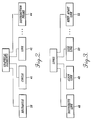
- FIGURE 2 illustrates a subset of some of the graphical elements that may be created using the graphical applications program 20. Included are a rectangle 38, a circle 40, a line 42 and a distribution frame 44. The rectangle, circle and line are all printable display objects.
- the distribution frame 44 is a nonprintable graphical element that comprises an area surrounded by a boundary which is preferably rectangular in shape. A distribution frame is considered to be a nonprinting graphical element because it will only appear when the user is editing a document but will not appear when the document is sent to an output device. Graphical elements positioned within the distribution frame are governed by alignment and distribution criteria set up for the frame. The distribution frame 44 and its attributes are discussed more fully below.
- the constraint engine 36 utilizes "links" to specify spatial relationships, i.e., constraints, between graphical elements. Spatial relationships between graphical elements may take on a variety of forms, and are specified by the user through the user interface. Links are generally not seen by the user and act as message carriers among graphical elements. Links can, however, be displayed and printed to allow the user to fully understand and control links that have been established between graphical elements. The links provide persistence between graphical elements, in that the constraint relationship imposed on two graphical elements by a link must be maintained throughout editing of the elements.
- the subset includes a distribute link 46, an align link 48, a size link 50 and a keep-apart link 52.
- the distribute link 46 is used to link graphical elements to a distribution frame.
- the align link 48 specifies how two graphical elements are to be aligned relative to one another.
- the align link can be used to align two elements vertically by their centers.
- the size link 50 may be used to establish a size relationship such that if the size of one graphical element changes, the linked graphical element follows suit.
- the keep-apart link 52 is a constraint requiring that a specified distance be maintained between two graphical elements, but outside of this distance the elements can be freely moved relative to one another.
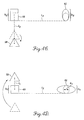
- FIGURES 4A-4D illustrate an exemplary, three-element spatial arrangement within a document showing some of the constraint features of the graphical applications program 20.
- the minimum number of links needed to couple N elements together is generally N - 1, although a greater number of links may always be utilized, thereby adding additional constraint relationships between pairs of graphical elements.
- Each link 56 is represented by a dashed rectangle and line extending between the graphical elements.
- Link 56a couples the triangle 58 to the rectangle 60 by a constraint that requires that their centers remain vertically aligned.
- any horizontal movement of the triangle 58 will be tracked by the rectangle 60, and vice versa.
- vertical movement of either graphical element will not affect the other because the centers remain aligned along the vertical axis.
- Links 56b and 56c couple the rectangle 60 to the oval 62.
- the constraint provided by link 56b is that the bottom portions of the frames bounding the rectangle and oval stay aligned with one another.
- the constraint imposed by link 56c is that the height of the oval 62 remain the same as that of the rectangle 60.
- FIGURES 4B-4D depict three illustrative spatial configurations of the elements 54 which meet the constraints set up by the links in FIGURE 4A.
- FIGURE 4B it is shown that all of the constraints of the links 56 have been met in that (a) the centers of the triangle 58 and rectangle 60 are aligned as shown by line l1, (b) the bottom of the frame bounding each of the rectangle and oval 62 are aligned as indicated by the line l2, and (c) the height h1 of the oval is the same as that of the rectangle.
- FIGURE 4D two of the graphical elements 58 and 62 have been moved in a way that has no effect on the other elements.
- the triangle 58 has been moved from below rectangle 60 to above the rectangle.
- the shape of the oval 62 has been altered by extending what used to be the minor axis of the oval (axis a1) horizontally such that the minor axis has become the major axis.
- the height h1 of the oval remains constant due to the prohibition created by link 56c, assuming link 56c is a unidirectional link (discussed below).
- moving pairs of elements closer together or farther apart would also likely include more than one step, for example, the steps of first (a) changing the distance and then (b) realigning the graphical elements.
- steps of first (a) changing the distance and then (b) realigning the graphical elements can become increasingly burdensome as additional graphical elements are added to a document.
- the align command in frame 68 is a feature of the graphical applications program that provides alignment options based upon the spatial relationships of two graphical elements that have been aligned by a user.
- An example of an alignment suggestion is that a first graphical element placed within a second graphical element should be centered in the second graphical element.
- the auto align on option 70 directs the graphical applications program to "snap" things into a perceived, user-desired alignment during drawing and editing. For example, if a user moves the edge of one graphical element to near vertical alignment with the edge of another graphical element, the graphical applications program will automatically align the edges vertically as long as they are within a programmed tolerance.
- the keep aligned command 71 allows a user to "lock" objects that have been aligned through the automatic alignment feature to create a link between the graphical elements, thereby forming a persistent constraint relationship that will remain throughout editing.
- the clear links command 72 provides a means for removing established links.
- the match command 73 is a method of setting up links between two or more graphical elements by matching, for example, element width, height, size, or text.
- the show links command 74 allows a user to see and subsequently edit links that have been created between a set of graphical elements.
- FIGURE 6 illustrates what a user would actually see after executing this command on the set of graphical elements illustrated in FIGURES 4A-4D.
- FIGURE 6 the triangle 58, rectangle 60, and oval 62 of FIGURES 4A-4D are represented by icons 76, 78, and 80, respectively.
- Link 56a is represented by an icon that includes two squares having their centers vertically aligned.
- the icon for link 56b depicts two squares that are aligned along their bottom edges.
- the icon for link 56c represents to the user that a "numerical" relationship exists between two graphical elements, such that the size of one element affects or controls the size of the other.
- the graphical applications program provides a concise way (the use of icons) to communicate the links that have been established between graphical elements.
- changing the attributes of a link is simply a matter of selecting (i.e., double clicking) the link to bring up a dialog box (not shown) and inputting new constraint criteria.
- suitable keyboard commands can be used.
- Each link in the graphical applications program is either a unidirectional link or a bidirectional link.
- a unidirectional link establishes a constraint between two graphical elements such that the editing of a value or position of a first "master” element connected to the link controls the value or position, respectively, of the second "slave” element attached to the link.
- any change to the master element that affects the linked property will change the slave element.
- Any attempt to change the slave element in a way that would affect the linked property is prohibited.
- An example of a unidirectional link is the link 56c shown in FIGURE 4A.
- Link 56c requires that the height of a first element (rectangle 60) dictate the height of a second element (oval 62).
- the height of the oval 62 will track the variance accordingly.
- any attempt to change the height of the oval 62 will be blocked by the constraint.
- a bidirectional link is a link in which the spatial relationship of two elements is interdependent upon one another, i.e., if either element in the relationship changes, the other element is modified to reflect that change.
- the interdependence of the elements is based upon the specific constraints set up by the link.
- both links 56a and 56b are examples of bidirectional links since they are independent of either one of the graphical elements to which they relate.
- link 56a in order to satisfy the constraint that the centers of the elements be aligned, any movement of triangle 58 in a horizontal direction will also move rectangle 60 in that same direction and vice versa.
- movement of triangle 58 in a vertical direction does not affect the position of rectangle 60 because vertical movement of triangle 58 will not affect the alignment of the centers of the elements. In other words, no constraint exists on vertical movement, only on horizontal movement.
- the graphical applications program 20 includes a user interface tool that allows the spatial relationships of numerous graphical elements to be manipulated by changing the characteristics of a single, nonprinting graphical element.
- This graphical element is the distribution frame, which was discussed briefly in relation to FIGURE 2.
- a distribution frame defines a rectangularly-shaped area that may be used to link graphical elements within the frame such that alignment and distribution of the graphical elements are controlled by the distribution frame. This avoids the need for a user to be concerned with graphical elements on an element-link-element level.
- the size of the distribution frame is selected by the user, and may be edited at any time.
- the frame may be created and the graphical elements subsequently added to it, or the frame may be created to enclose existing graphical elements. When a distribution frame is created around a set of graphical elements, the elements are located in the frame as close to their current location as possible that will satisfy the alignment and distribution relationship specified for the frame.
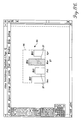
- FIGURE 7 depicts an Align/Distribute Frame (ADF) dialog box 84 from an actual embodiment of the graphical applications program that is used to set spatial criteria for graphical elements enclosed within a distribution frame.
- the ADF dialog box 84 illustrates exemplary "alignment” and "distribution" relationships that are available in the graphical applications program.
- Alignment refers to a graphical relationship between a set of elements that specifies how the elements are to be arranged or ordered.
- Distribution distributed refers to a graphical relationship between a set of elements that specifies that the elements should be evenly spaced apart.
- the ADF dialog box 84 includes eight horizontal criteria for specifying spatial relationships between graphical elements in the distribution frame. The criteria are illustrated by icons, including a horizontal null icon 85, an upper row 86 of horizontal alignment icons and a lower row 87 of horizontal distribution icons. There are also eight vertical criteria, including a vertical null icon 88, a column 89 of vertical alignment icons and a column 90 of vertical distribution icons.
- a preview box 91 within the ADF dialog box 84 indicates the effect of alignment and distribution selections. TABLE 1 presents an explanation of the icons in the ADF dialog box 84.
- the ADF dialog box 84 also includes vertical resizing 92 and horizontal resizing 93 options.
- Each resizing option 92 and 93 includes three mutually exclusive options: (1) none (no resizing desired in that direction), (2) resize frame to fit objects (graphical elements), (3) resize objects to fit frame. Under any of the resizing options, a distance between the graphical elements in the frame may be input to provide uniformity.
- the resizing options are advantageous from a number of standpoints. For example, often a user will have a predefined area in which graphical elements are to be placed. In this case, a user can adjust the distribution frame to be equal to the predefined area and use the resize objects command to have the graphical elements fill that area.
- the ADF dialog box 84 also includes a lock order option 94 that, when activated, prohibits the reordering of graphical elements.
- FIGURES 8A-8C illustrate a bar chart created using a distribution frame 96 in accordance with the invention.
- the distribution frame encloses six rectangular elements 97, each representing a different month for the months ranging from January to June.
- the resize frame to fit objects option has been selected with a predetermined (for example, one-quarter inch) spacing between graphical elements.
- FIGURE 8B illustrates this concept. Specifically, in FIGURE 8B, the months of May and June have been deleted. In response, the graphical applications program has automatically resized the distribution frame 96 to enclose only the remaining graphical elements. In FIGURE 8C, it is assumed that the user starts with the distribution frame 96 of FIGURE 8A, only in this instance the resize objects to fit frame option (horizontal) has been selected. Thereafter, the months of May and June are once again deleted. In response, the graphical applications program automatically resizes the rectangular elements 97 to fill (horizontally) the distribution frame. It should be noted that the predetermined spacing between the graphical elements remains the same.
- the distribution frame includes a number of inherent features that make it extremely advantageous in a graphics environment.
- One feature of the distribution frame is that it is very easy for a user to modify the alignment/distribution relationship between graphical elements. For example, in one embodiment all that is required is to double click on the distribution frame (using a mouse), bringing up the ADF dialog box shown in FIGURE 7 and presenting options for redefining spatial relationships. Also, when a distribution frame is moved or resized, all the elements within the frame are moved or resized such that the elements maintain their relationship to the distribution frame.
- Another feature of the distribution frame is that a user can quickly change the order in which graphical elements are distributed by simply clicking on an object in the frame and dragging it to a new position. All of the elements are rearranged to make room for the new position of the dragged element. This feature can be defeated by choosing the lock order option.
- the constraint engine 36 provides a means for solving spatial relationships between graphical elements by establishing and manipulating various links and/or distribution frames within a document.
- the constraint engine used in the graphical applications program 20 is preferably implemented using an object oriented programming language. Object oriented programming languages have the ability to efficiently define classes of objects and use these objects to improve the efficiency with which applications are developed, run, and maintained.
- the constraint engine comprises a number of C++ classes, although other programming languages can also be used to implement the constraint engine.
- Each class includes class attributes and methods which are used to interact with the remaining classes in the constraint engine. In TABLE 2, the attributes and methods for each class are listed below the corresponding class.
- the graphical applications program includes a global routine that is continually checking for and able to identify modifications made to graphical elements within a document.
- the flow of the global routine is the following: (a) an edit is performed on a graphical element wherein Element Set_Dirty is called, thereby adding the links coupled to the edited graphical element to the dirty list; (b) the Solve method is called; and (c) the screen is updated to reflect the changes implemented by Solve and the methods called by Solve.
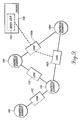
- FIGURE 9 The data structure used by the constraint engine is illustrated in FIGURE 9.
- Four graphical elements 100 are shown coupled together by links 102. It is assumed that the right-most graphical element 100a is in some respect edited by the user, for example, by moving or resizing the graphical element.
- the links 102a and 102b are added to a dirty list 104 by the Element Set_Dirty method. After the addition of the links to the dirty list, a call is made by the global routine to the Solve method of the Solver class 106.
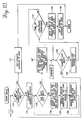
- the Solve method subroutine of the graphical applications program is depicted in a flow diagram (FIGURE 10) and described next.
- a test is made to determine if the dirty and priority lists are empty. If the lists are empty, a pass through the Solve method subroutine is unnecessary. As a result, the variable current distance is set equal to zero at block 112, and the subroutine is done. If the dirty and priority lists are not empty, the subroutine proceeds to block 114 where the current distance is incremented.
- a test is made to determine if the dirty list is empty. If not, a loop formed by blocks 118, 120 and 122 is entered. The loop (a) assigns a link in the dirty list to one of the four priority lists, (b) assigns a resolve direction to the link (FIGURE 11), and then (c) removes the assigned link from the dirty list.
- Links are assigned to the priority list according to the definitions provided in TABLE 2. Unidirectional links are always assigned to List 1. Bidirectional links are assigned to the remaining three lists based on element distances of the two graphical elements coupled to the link. Element distances are measured in relation to a source node, which is a graphical element that was edited by a user. Passes are made through the loop comprising test block 116 and blocks 118-122, until all of the links on the dirty list have been placed on one of the four priority lists. As a result, the dirty list is empty.
- variable current list is set equal to the priority list that contains at least one link and has the highest priority.
- a test is made to determine if the current priority list is empty. If not, a pass is made through a Resolve_Link subroutine at block 130.
- the Resolve_Link subroutine is illustrated in FIGURE 12 and described below.
- a test is made to determine whether the Solve method program is taking too long to solve the constraint. Block 132 is included because some constraints may be unsolvable or may simply take too much time to solve, with the solution being perhaps a few pixels off.
- the program loops back to block 128. If the allotted time has run, the links remaining in the priority lists are moved back onto the dirty list at block 134. Then at block 136 the current distance is set equal to zero. Thereafter, the program exits the Solve method subroutine.
- FIGURE 11 illustrates in more detail the assign resolve direction part (block 120) of the Solve method subroutine.
- a test is made to determine if the link is a unidirectional link. If the link is a unidirectional link, the resolve direction is set to the direction of the link at block 142 and the program shifts to block 122 (FIGURE 10). If not, a determination is made (block 144) as to whether source A of the link is set and source B is not set. If source A is set and source B is not set, the resolve direction is set to A ⁇ B at block 146, and the program shifts to block 122. Otherwise, a test is made to determine (block 148) whether source B is set and source A is not set.
- the resolve direction is set to B ⁇ A at block 150 and the program shifts to block 122. Otherwise, at block 152, a test is made to determine whether one graphical element has a lower element distance than the other. If the determination is yes, the resolve direction is set at block 154 so that it points from the graphical element with a lower element distance to the graphical element with a higher element distance (i.e., such that the graphical element furthest from the source node will be changed). Then, the program shifts to block 122. If both graphical elements have the same distance, a random resolve direction is selected at block 156 and the program shifts to block 122.
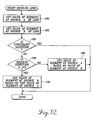
- FIGURE 12 is a flow diagram illustrating the Resolve_Link part of the Solve method subroutine shown in FIGURE 10.
- Resolve_Link changes either the value of the graphical object at source A of a link or at source B of a link so that the constraint specified by the link will be satisfied.
- the Solve method subroutine provides a resolve direction for each link as a parameter to Resolve_Link indicating which of the two graphical elements should be changed to satisfy the constraint imposed by the link.
- a Get_Value procedure retrieves the value of the graphical element at source A of the link.
- Get_Value retrieves the value of the graphical element at source B of the link.
- a test is made to determine if the constraint imposed by the link is satisfied by comparing the value of the graphical element at source A to the value of the graphical element at source B. If the constraint is satisfied, Resolve_Link is done and the program shifts to block 132 (FIGURE 10). If the constraint is not satisfied, the Resolve_Link proceeds to block 186.
- a test is made to determine if the resolve direction is A ⁇ B. If the resolve direction is not A ⁇ B (i.e., the direction is B ⁇ A), at block 188 the value of the graphical element at source A is set based on the value of the graphical element at source B in light of the constraint and the program ends. If the resolve direction is A ⁇ B, at block 190 the value of the graphical element at source B is set based on the value of the graphical element at source A. After the resolve direction has been set, the program shifts to block 132 of the Solve method subroutine (FIGURE 10).
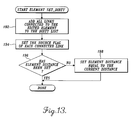
- FIGURE 13 is a flow diagram illustrating a subroutine suitable for carrying out the Set_Dirty method of the graphical applications program.
- each link that is coupled to the edited graphical element is added to the dirty list.
- a source flag i.e., A or B
- a test is made to determine if the element distance has been set. If the element distance has been set, the subroutine ends. This indicates that the graphical element connected to the link has already been assigned an element distance from the source node. If the element distance has not been set, the element distance is set equal to the current distance (block 198) and the subroutine ends.
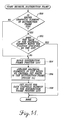
- FIGURE 14 illustrates a subroutine for resolving links that are attached to a distribution frame. This method is called whenever a distribution frame is created or modified. The method may be called from a global routine or from the Solve method subroutine, although this call is not shown in FIGURE 10.
- a test is made to determine if an edited graphical element, for example, a newly added element or one that has been modified, is in the distribution frame element position list (frame position list). If the edited graphical element is not in the frame position list, the program jumps ahead to block 204. If the graphical element is in the frame position list, a test is made to determine (block 202) whether the value of the graphical element matches the position specified by the list. If the value and the position match, the subroutine ends. If there is not a match, the program proceeds to block 204.
- a new frame position list is built by including each graphical element that is attached to the distribution frame.
- the graphical elements are arranged based on criteria set forth in the distribution frame.
- the values for each graphical element in the position list are set.
- each graphical element is placed in the appropriate location and has the size specified by the position list. Then, the subroutine ends.
- FIGURE 14 is explained further in FIGURE 15.
- the concepts underlining arrangement of graphical elements within the distribution frame stem from the vertical and horizontal alignment and distribution criteria generally set forth in FIGURE 7 and described in TABLE 1.
- a general rule of arrangement is that the graphical element positions are chosen such that the movement of elements from their original locations is minimized.
- FIGURE 15 is a hierarchical block diagram addressing the arrangement of graphical elements on the horizontal axis. As will be appreciated, vertical element arrangement is similar. Extending downwardly from an arrange block 210 are the distribution and alignment options at blocks 212 and 214, respectively. The distribution of elements is broken into two categories: (a) distribution by size, as indicated by block 216, and (b) distribution via graphical element edges, as indicated by block 218. Distribution by size refers to evenly spacing the graphical elements regardless of individual element sizes The edges of graphical elements at block 218 may be aligned according to three attributes, the left edges of the elements (block 220), the centers of the elements (block 222), and the right edges of the elements (block 226).
- resizing options may also be selected to affect the graphical element arrangement. These are indicated at block 228, and include a no resizing option at block 230, a resize frame to fit elements option at block 232, and resize elements to fit frame option at block 234. If the user chooses to resize the frame to fit the elements enclosed in the frame, the width of the distribution frame will equal the sum of the element widths plus the desired space between each graphical element, as indicated at block 236. If the resize elements to fit the frame option is chosen, the width of each element will be set equal to (the width of the frame divided by the number of elements) minus the space between each element. This is indicated at block 238. The left, center and right branches of the edges of block 218 include the same resizing options described in blocks 228-238.
- the align block 214 also includes left, center and right alignment options at blocks 240, 242, and 244, respectively. Resizing options for the align branch are indicated at blocks 246. These also include no resizing at block 248, resize frame to fit elements at block 250, and resize elements to fit frame at block 252. If the frame is resized to fit the elements, the frame width is set equal to the width of the widest element, as indicated at block 254. If the elements are being resized to fit the frame, the width of all of the objects is set equal to the width of the frame as indicated at block 256.
- FIGURE 15 indicates in general terms the flow that may be used to arrange graphical elements based on criteria set forth in the ADF dialog tool.
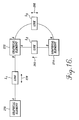
- FIGURE 16 is a block diagram of a set of three graphical elements 270, 272, and 274 that will be used to explain the operation of the constraint engine when taken in conjunction with the foregoing discussion.
- Graphical element 270 is linked to graphical element 272 by a link L1 having a source A at element 270 and a source B at element 272.
- the link L1 is assumed to be bidirectional, as is indicated by reference numeral 278.
- a unidirectional link L2 couples the graphical element 272 with the graphical element 274. The direction of the link is toward the graphical element 272, as is indicated by arrow 282.
- a third link L3 also couples the graphical elements 272 and 274.
- Link L3 is bidirectional (indicated by reference numeral 292) that has its source A coupled to graphical element 272 and source B coupled to graphical element 274.
- the graphical applications program includes a global routine that is continually checking for and able to identify modifications made to graphical elements in a document.
- the global routine performs the following steps: (1) perceives that the user has modified a graphical element and thus makes a call to element Set_Dirty (FIGURE 13), (2) makes a call to the Solve method subroutine within the constraint engine, and (3) updates the screen, thereby displaying the modifications made to the document.
- link L1 Upon calling Element Set_Dirty, link L1 is added to the dirty list and the source A of link L1 is set in blocks 192 and 194 of that routine. A call is then made to solve, wherein the current distance is set to one at block 114, link L1 is added to Priority List 2 and the resolve direction for link L1 is set to A ⁇ B at block 120. This yields the data found in snapshot 1 of TABLE 3.
- Resolve_Link is called and the graphical element 270 is compared to the graphical element 272 to see if the constraint of link L1 is satisfied. Assuming that the constraint of link L1 is not satisfied, Set_Value is called at block 190 wherein the graphical element 272 will be set based upon the value of graphical element 270. Thereafter, the Set_Value method calls Element Set_Dirty where, at block 192, link L2 and link L3 are added to the dirty list and the source flags that are coupled to graphical element 272 (A in both cases) are set. Control is then returned to Solve, which loops back to block 110. At block 114, the current distance is incremented to two.
- link L2 is assigned to List 1 and set with a resolve direction B ⁇ A. Also in this loop, link L3 is added to List 2, and its resolve direction is set to A ⁇ B. At block 126, the current list is set equal to List 1.
- the snapshot 2 at TABLE 3 indicates the current status of the links present in the priority lists.
- the Resolve_Link routine is called, where the constraints between graphical elements 272 and 274 are tested at block 184. Assuming the constraint is not satisfied, the value of the element 274 will be set equal to the value of the element 272 at block 188.
- the Set_Value method will again call Element Set_Dirty, which will add link L1 to the dirty list, because graphical element 272 was modified. Control returns to the Solve method where the current distance is incremented to three and link L1 is added to List 4. Further, at block 120 a resolve direction of B ⁇ A is set for link L1.
- the current list is set equal to List 2 as it is the highest priority list that is not empty. The current state of the example is evidenced at snapshot 3 in TABLE 3.
- Resolve_Link is called at block 130.
- Block 184 of Resolve_Link it is determined whether the constraint of link L3 is satisfied by comparing the value of graphical element 272 to graphical element 274. Assuming that the constraint is not satisfied, the value of graphical element 274 is changed based on the value of element 272. Thereafter, element Set_Dirty is called and link L2 is added to the dirty list. Control is then returned to block 128 of the Solve method, which branches to block 110. The current distance is incremented to four at block 114 and link L2 is added to List 1 in blocks 116-122. The current list is then set equal to List 1 at block 126. The current status of the variables of interest is at snapshot 4 of TABLE 3. Resolve_Link is called at block 130.
- the constraint engine is a very efficient means for solving constraints.
- Constraint solvers used in other arts typically have a planning stage that preplans the ordering of constraints by looking at the constraints specified by different values. It is thus the preplanning stage that develops an evaluation order for the constraints.
- the constraint engine of the invention essentially "plans" as it solves constraints, through the use of the priority lists, element distance values and link directions.
- the constraint engine is also advantageous in that it provides incremental and partial solutions to constraint problems. Incremental solutions can be provided in that the way the Dirty_List is implemented, the Solve method can be stopped at any time for a partial solution to a constraint problem. There is no overhead in setup or cleanup time for starting or stopping the Solve method. Partial solutions are provided in that if the Solve method takes too long to find a solution or there is no solution, a partial solution is presented to the user. Further advantages of the constraint engine are that graphical element internals are hidden from the constraints. This is because the only access to the internals of graphical elements is through the Get_Value and Set_Value methods. Finally, the constraint internals are hidden in that the only access by the Solve method to the constraints is through the Resolve_Link method. This makes the implementation of constraints very flexible.
Landscapes
- Physics & Mathematics (AREA)
- General Physics & Mathematics (AREA)
- Engineering & Computer Science (AREA)
- Theoretical Computer Science (AREA)
- Processing Or Creating Images (AREA)
- User Interface Of Digital Computer (AREA)
- Image Generation (AREA)
Applications Claiming Priority (2)
| Application Number | Priority Date | Filing Date | Title |
|---|---|---|---|
| US07/904,059 US5437008A (en) | 1992-06-23 | 1992-06-23 | Method of establishing constraints and links in a distribution frame between graphical elements and resolving the constaints |
| US904059 | 1997-07-31 |
Publications (3)
| Publication Number | Publication Date |
|---|---|
| EP0576178A2 true EP0576178A2 (fr) | 1993-12-29 |
| EP0576178A3 EP0576178A3 (fr) | 1995-01-25 |
| EP0576178B1 EP0576178B1 (fr) | 2003-03-05 |
Family
ID=25418476
Family Applications (1)
| Application Number | Title | Priority Date | Filing Date |
|---|---|---|---|
| EP93304530A Expired - Lifetime EP0576178B1 (fr) | 1992-06-23 | 1993-06-10 | Procédé pour maintenir les relations entre des éléments |
Country Status (6)
| Country | Link |
|---|---|
| US (3) | US5437008A (fr) |
| EP (1) | EP0576178B1 (fr) |
| JP (2) | JPH0696180A (fr) |
| AU (1) | AU4013193A (fr) |
| CA (1) | CA2098163A1 (fr) |
| DE (1) | DE69332731T2 (fr) |
Cited By (15)
| Publication number | Priority date | Publication date | Assignee | Title |
|---|---|---|---|---|
| EP0631251A3 (fr) * | 1993-06-21 | 1995-08-30 | Canon Kk | Procédé de correction de graphiques et système l'employant. |
| EP0647921A3 (fr) * | 1993-10-08 | 1996-01-31 | Xerox Corp | Format structure d'image pour la description d'images en trame complexes en couleur. |
| EP0690415A3 (fr) * | 1994-06-30 | 1996-12-04 | Xerox Corp | Edition d'images d'un document balayé utilisant des interprétations simples |
| NL1000701C2 (nl) * | 1995-06-30 | 1996-12-31 | Oce Nederland Bv | Inrichting en werkwijze voor het extraheren van artikelen uit een document. |
| EP0848351A3 (fr) * | 1996-12-13 | 1999-10-27 | Adobe Systems, Inc. | Procédé et appareil pour modifier automatiquement la présentation des documents |
| WO2000063844A1 (fr) * | 1999-04-20 | 2000-10-26 | Koninklijke Philips Electronics N.V. | Procede et appareil de construction interactive d'objets geometriques relationnels |
| WO2009036031A1 (fr) * | 2007-09-11 | 2009-03-19 | Vistaprint Technologies Limited | Outil de caricature |
| WO2021097141A1 (fr) | 2019-11-13 | 2021-05-20 | Figma, Inc. | Système et procédé pour mettre en œuvre un système de conception pour fournir une prévisualisation de conflits de contrainte |
| US11106339B2 (en) * | 2017-09-19 | 2021-08-31 | Adobe Inc. | Designing and resizing graphical user interfaces |
| US11733973B2 (en) | 2020-09-16 | 2023-08-22 | Figma, Inc. | Interactive graphic design system to enable creation and use of variant component sets for interactive objects |
| US11966572B2 (en) | 2021-11-16 | 2024-04-23 | Figma, Inc. | Commenting feature for graphic design systems |
| US12067208B2 (en) | 2021-04-20 | 2024-08-20 | Figma, Inc. | Cursor text representation of user in a collaborative platform |
| US12333278B2 (en) | 2020-02-06 | 2025-06-17 | Figma, Inc. | Interface object manipulation based on aggregated property values |
| US12429995B2 (en) | 2022-03-16 | 2025-09-30 | Figma, Inc. | Collaborative widget state synchronization |
| US12524213B2 (en) | 2021-10-19 | 2026-01-13 | Figma, Inc. | Code block element for integrated graphic design system |
Families Citing this family (101)
| Publication number | Priority date | Publication date | Assignee | Title |
|---|---|---|---|---|
| US5519606A (en) * | 1992-01-21 | 1996-05-21 | Starfish Software, Inc. | System and methods for appointment reconciliation |
| US5437008A (en) * | 1992-06-23 | 1995-07-25 | Adobe Systems Incorporated | Method of establishing constraints and links in a distribution frame between graphical elements and resolving the constaints |
| US5951300A (en) * | 1997-03-10 | 1999-09-14 | Health Hero Network | Online system and method for providing composite entertainment and health information |
| ES2090834T3 (es) * | 1993-02-08 | 1996-10-16 | Patrick Megard | Sistema de concepcion y de fabricacion asistida por ordenador. |
| US5990888A (en) * | 1994-03-22 | 1999-11-23 | International Business Machines Corporation | Method and system for manipulating graphical objects |
| US5546520A (en) * | 1994-09-30 | 1996-08-13 | International Business Machines Corporation | Method, system, and memory for reshaping the frame edges of a window around information displayed in the window |
| US5682468A (en) * | 1995-01-23 | 1997-10-28 | Intergraph Corporation | OLE for design and modeling |
| US5671378A (en) * | 1995-03-31 | 1997-09-23 | International Business Machines Corporation | Method and system for sizing of graphical user interface objects for localization |
| US5692184A (en) | 1995-05-09 | 1997-11-25 | Intergraph Corporation | Object relationship management system |
| US5771342A (en) * | 1995-06-05 | 1998-06-23 | Saltire Software | Method and apparatus for dynamically displaying consistently dimensioned two-dimensional drawings |
| JP3109421B2 (ja) * | 1995-09-08 | 2000-11-13 | 富士ゼロックス株式会社 | 図表処理装置 |
| US6081277A (en) * | 1995-09-28 | 2000-06-27 | Sony Corporation | Apparatus and method for controlling image display |
| TW331612B (en) * | 1996-03-05 | 1998-05-11 | Soft Future Design Kk | Data processing apparatus and register address translation method. |
| US5751283A (en) * | 1996-07-17 | 1998-05-12 | Microsoft Corporation | Resizing a window and an object on a display screen |
| US6061067A (en) * | 1996-08-02 | 2000-05-09 | Autodesk, Inc. | Applying modifiers to objects based on the types of the objects |
| US6215502B1 (en) * | 1996-10-28 | 2001-04-10 | Cks Partners | Method and apparatus for automatically reconfiguring graphical objects relative to new graphical layouts |
| US6157380A (en) * | 1996-11-05 | 2000-12-05 | International Business Machines Corporation | Generic mechanism to create opendoc parts from workplace shell objects |
| US6304272B1 (en) * | 1996-12-10 | 2001-10-16 | Micrografx, Inc. | Graphics system and method having objects conformed to a template |
| US5999186A (en) * | 1997-05-23 | 1999-12-07 | 3-Design L.L.C. | Reference based parametric dimensioning method and system |
| US6236407B1 (en) * | 1997-07-10 | 2001-05-22 | Bruce Leban | Method for creating graphical images |
| US6035305A (en) * | 1997-08-29 | 2000-03-07 | The Boeing Company | Computer-based method of structuring product configuration information and configuring a product |
| US6774899B1 (en) * | 1997-09-18 | 2004-08-10 | Mitsubishi Electric Research Laboratories, Inc. | Drawing graphs using user selectable visual oragnization features and/or other user controlled constraints |
| JPH11154240A (ja) | 1997-11-20 | 1999-06-08 | Nintendo Co Ltd | 取込み画像を用いて画像を作成するための画像作成装置 |
| US6435969B1 (en) | 1998-11-03 | 2002-08-20 | Nintendo Co., Ltd. | Portable game machine having image capture, manipulation and incorporation |
| US6295056B1 (en) * | 1998-12-03 | 2001-09-25 | International Business Machines | Modulating the dimensions of environmentally related and proportionally sized displayed objects to conform selected object dimensions to limitations of a defined display space |
| JP3556501B2 (ja) * | 1999-01-14 | 2004-08-18 | 株式会社山武 | 図面作成装置 |
| US6469716B1 (en) | 1999-03-19 | 2002-10-22 | Corel Inc. | System and method for processing data for a graphical object |
| US6469715B1 (en) | 1999-03-19 | 2002-10-22 | Corel Inc. | System and method for controlling the operation of a graphical object using a project |
| US6480203B1 (en) | 1999-03-19 | 2002-11-12 | Corel Inc. | System and method for processing an event of a graphical object |
| US6549199B1 (en) | 1999-03-19 | 2003-04-15 | Corel Inc. | System and method for adjusting a graphical object |
| US7233326B1 (en) * | 1999-04-29 | 2007-06-19 | Autodesk, Inc. | Three dimensional modeling and animation system using master objects and modifiers |
| US6369829B1 (en) * | 1999-09-02 | 2002-04-09 | Autodesk, Inc. | Constructive systems for objects in a computer-implemented graphics system |
| US6483524B1 (en) | 1999-10-01 | 2002-11-19 | Global Graphics Software Limited | Prepress workflow method using raster image processor |
| US6624908B1 (en) | 1999-10-01 | 2003-09-23 | Global Graphics Software Limited | Method for arranging a prepress workflow |
| US6380951B1 (en) | 1999-10-01 | 2002-04-30 | Global Graphics Software Limited | Prepress workflow method and program |
| US8132097B2 (en) * | 1999-10-15 | 2012-03-06 | Saepio Technologies, Inc. | Computer-implemented system for creating a publication and method thereof |
| US6931591B1 (en) * | 1999-10-15 | 2005-08-16 | Saepio Technologies, Inc. | Publishing layout wizard |
| US6826727B1 (en) | 1999-11-24 | 2004-11-30 | Bitstream Inc. | Apparatus, methods, programming for automatically laying out documents |
| US7266762B1 (en) | 2000-03-10 | 2007-09-04 | International Business Machines Corporation | Method and system for distributed autonomous maintenance of bidirectional hyperlink metadata on the web and similar hypermedia repository |
| US7771482B1 (en) * | 2000-05-09 | 2010-08-10 | Ben-Zion Karmon | Method for tissue expansion and regeneration using bioresorbable inflatable devices |
| US7076412B1 (en) * | 2000-05-12 | 2006-07-11 | Autodesk, Inc. | Method and apparatus for storing and selectively retrieving dimensions of geometry pieces of a mechanical design |
| US6894686B2 (en) | 2000-05-16 | 2005-05-17 | Nintendo Co., Ltd. | System and method for automatically editing captured images for inclusion into 3D video game play |
| JP2002042126A (ja) | 2000-05-19 | 2002-02-08 | Sony Computer Entertainment Inc | 表示制御プログラムが記憶された記憶媒体、エンタテインメント装置および表示制御プログラム |
| US6686935B1 (en) * | 2000-05-24 | 2004-02-03 | International Business Machines Corporation | Method and apparatus for object kerning |
| US7093196B1 (en) * | 2000-06-10 | 2006-08-15 | Oracle International Corporation | Method and apparatus for aligning items relatively within an electronic document |
| US6993708B1 (en) * | 2000-07-27 | 2006-01-31 | Robert B Gillig | System for automated generation and assembly of specifications documents in CADD environments |
| US6919890B2 (en) * | 2000-09-28 | 2005-07-19 | Curl Corporation | Grid and table layout using elastics |
| US20020111969A1 (en) * | 2000-09-28 | 2002-08-15 | Halstead Robert H. | System and method for processing graphical objects for layout using an elastic difference operation |
| US7181699B2 (en) * | 2001-06-13 | 2007-02-20 | Microsoft Corporation | Dynamic resizing of dialogs |
| US6950993B2 (en) * | 2001-08-02 | 2005-09-27 | Microsoft Corporation | System and method for automatic and dynamic layout of resizable dialog type windows |
| US7068271B2 (en) * | 2001-09-05 | 2006-06-27 | Autodesk, Inc. | Assembly patterns by feature association |
| US6907573B2 (en) | 2001-09-28 | 2005-06-14 | Autodesk, Inc. | Intelligent constraint definitions for assembly part mating |
| US6928618B2 (en) * | 2001-10-23 | 2005-08-09 | Autodesk, Inc. | Intelligent drag of assembly components |
| US20030163786A1 (en) * | 2002-02-25 | 2003-08-28 | Harold Shields | Image presentation system |
| US7339597B1 (en) | 2002-06-21 | 2008-03-04 | Adobe Systems Incorporated | Creating and manipulating related vector objects in an image |
| US7027071B2 (en) * | 2002-07-02 | 2006-04-11 | Hewlett-Packard Development Company, L.P. | Selecting elements from an electronic document |
| US20040221265A1 (en) * | 2003-02-07 | 2004-11-04 | Smart Technologies Inc. | Connected and overlapped shapes enhancements |
| US20080143725A1 (en) | 2004-02-09 | 2008-06-19 | Smart Technologies Inc. | Connected and overlapped shapes enhancements |
| US20040207607A1 (en) * | 2003-04-15 | 2004-10-21 | Will Specks | Operating element having an integrated display element, and a method for command output using an operating element |
| US7360157B1 (en) | 2003-09-19 | 2008-04-15 | Microsoft Corporation | Aligning content in an electronic document |
| DE10352341A1 (de) * | 2003-11-06 | 2005-11-03 | Mediacare Gmbh & Co. Kg | Verfahren zur Veränderung der Abmessungen eines elektronisch gespeicherten Bildes |
| JP4241410B2 (ja) * | 2004-01-30 | 2009-03-18 | キヤノン株式会社 | レイアウト調整方法および装置およびレイアウト調整プログラム |
| JP4165888B2 (ja) * | 2004-01-30 | 2008-10-15 | キヤノン株式会社 | レイアウト制御方法、レイアウト制御装置及びレイアウト制御プログラム |
| JP4110105B2 (ja) * | 2004-01-30 | 2008-07-02 | キヤノン株式会社 | 文書処理装置及び文書処理方法及び文書処理プログラム |
| JP4250540B2 (ja) * | 2004-01-30 | 2009-04-08 | キヤノン株式会社 | レイアウト調整方法および装置およびレイアウト調整プログラム |
| US8661332B2 (en) | 2004-04-30 | 2014-02-25 | Microsoft Corporation | Method and apparatus for document processing |
| US7359902B2 (en) * | 2004-04-30 | 2008-04-15 | Microsoft Corporation | Method and apparatus for maintaining relationships between parts in a package |
| US7383500B2 (en) | 2004-04-30 | 2008-06-03 | Microsoft Corporation | Methods and systems for building packages that contain pre-paginated documents |
| US8243317B2 (en) | 2004-05-03 | 2012-08-14 | Microsoft Corporation | Hierarchical arrangement for spooling job data |
| US7580948B2 (en) * | 2004-05-03 | 2009-08-25 | Microsoft Corporation | Spooling strategies using structured job information |
| US7607141B2 (en) * | 2004-05-03 | 2009-10-20 | Microsoft Corporation | Systems and methods for support of various processing capabilities |
| US7519899B2 (en) * | 2004-05-03 | 2009-04-14 | Microsoft Corporation | Planar mapping of graphical elements |
| US7755786B2 (en) | 2004-05-03 | 2010-07-13 | Microsoft Corporation | Systems and methods for support of various processing capabilities |
| US7634775B2 (en) | 2004-05-03 | 2009-12-15 | Microsoft Corporation | Sharing of downloaded resources |
| US20050246384A1 (en) * | 2004-05-03 | 2005-11-03 | Microsoft Corporation | Systems and methods for passing data between filters |
| US8363232B2 (en) | 2004-05-03 | 2013-01-29 | Microsoft Corporation | Strategies for simultaneous peripheral operations on-line using hierarchically structured job information |
| JP4095592B2 (ja) * | 2004-08-06 | 2008-06-04 | キヤノン株式会社 | 情報処理装置、情報処理方法ならびにプログラム |
| JP4047308B2 (ja) * | 2004-08-06 | 2008-02-13 | キヤノン株式会社 | レイアウト処理方法、情報処理装置及びコンピュータプログラム |
| US7889361B2 (en) * | 2004-10-15 | 2011-02-15 | Electronics For Imaging, Inc. | Methods and apparatus for adaptive imposition templates |
| US7584111B2 (en) * | 2004-11-19 | 2009-09-01 | Microsoft Corporation | Time polynomial Arrow-Debreu market equilibrium |
| JP4393444B2 (ja) * | 2005-11-02 | 2010-01-06 | キヤノン株式会社 | 情報処理方法およびその装置 |
| US20070157160A1 (en) * | 2005-12-30 | 2007-07-05 | Udo Arend | Auto-zoomable snippets in multiple snippet windows |
| US8694953B2 (en) * | 2006-08-14 | 2014-04-08 | Payman Khodabandehloo | Tool and methodology for enterprise software applications |
| JP2008129729A (ja) * | 2006-11-17 | 2008-06-05 | Olympus Corp | 情報処理装置、及び制御プログラム |
| US8015581B2 (en) | 2007-01-05 | 2011-09-06 | Verizon Patent And Licensing Inc. | Resource data configuration for media content access systems and methods |
| US8345043B2 (en) * | 2007-04-13 | 2013-01-01 | Autodesk, Inc. | Solving networks of geometric constraints |
| US7853887B2 (en) | 2007-06-26 | 2010-12-14 | Adobe Systems Incorporated | Detection and preview of graphical elements within a graphic |
| US9324168B2 (en) * | 2008-01-31 | 2016-04-26 | Microsoft Technology Licensing, Llc | Constraint-based correction of shape positions in a diagram |
| KR101232623B1 (ko) * | 2010-12-07 | 2013-02-13 | 삼성메디슨 주식회사 | 사용자 메뉴의 편집기능을 구현하는 방법 |
| JP5673264B2 (ja) * | 2011-03-18 | 2015-02-18 | 富士通株式会社 | 図形描画プログラム、図形描画装置 |
| USD698362S1 (en) * | 2011-05-27 | 2014-01-28 | Adobe Systems Incorporated | Portion of a display with a graphical user interface |
| USD691172S1 (en) * | 2011-09-12 | 2013-10-08 | Microsoft Corporation | Display screen with graphical user interface |
| US10467714B2 (en) | 2013-03-15 | 2019-11-05 | Stevenson Systems, Inc. | Interactive building stacking plan user interface |
| US20150160838A1 (en) * | 2013-12-06 | 2015-06-11 | Takeshi SHIRABE | Method and apparatus for automatic graphic editing with map-dependent constraints |
| US9854258B2 (en) * | 2014-01-06 | 2017-12-26 | Disney Enterprises, Inc. | Video quality through compression-aware graphics layout |
| CA3247524A1 (en) * | 2014-10-22 | 2025-10-30 | Stevenson Systems, Inc. | Interactive building stacking plan user interface |
| USD829697S1 (en) * | 2014-12-30 | 2018-10-02 | Sony Corporation | Wireless communication device |
| JP6825284B2 (ja) * | 2016-09-21 | 2021-02-03 | カシオ計算機株式会社 | イメージ作成装置、イメージ作成方法、及び、プログラム |
| US12555281B2 (en) | 2022-11-03 | 2026-02-17 | Adobe Inc. | Managing multiple datasets for data bound objects |
| US12387397B2 (en) | 2022-11-03 | 2025-08-12 | Adobe Inc. | Automatically generating axes for data visualizations including data bound objects |
| US20240153169A1 (en) * | 2022-11-03 | 2024-05-09 | Adobe Inc. | Changing coordinate systems for data bound objects |
Family Cites Families (5)
| Publication number | Priority date | Publication date | Assignee | Title |
|---|---|---|---|---|
| US4974174A (en) * | 1987-08-24 | 1990-11-27 | Wang Laboratories, Inc. | Alignment method for positioning textual and graphic objects |
| US5371845A (en) * | 1990-04-27 | 1994-12-06 | Ashlar, Inc. | Technique for providing improved user feedback in an interactive drawing system |
| US5123087A (en) * | 1990-04-27 | 1992-06-16 | Ashlar, Inc. | Geometric inference engine |
| US5333254A (en) * | 1991-10-02 | 1994-07-26 | Xerox Corporation | Methods of centering nodes in a hierarchical display |
| US5437008A (en) * | 1992-06-23 | 1995-07-25 | Adobe Systems Incorporated | Method of establishing constraints and links in a distribution frame between graphical elements and resolving the constaints |
-
1992
- 1992-06-23 US US07/904,059 patent/US5437008A/en not_active Expired - Lifetime
-
1993
- 1993-06-08 AU AU40131/93A patent/AU4013193A/en not_active Abandoned
- 1993-06-10 DE DE69332731T patent/DE69332731T2/de not_active Expired - Lifetime
- 1993-06-10 EP EP93304530A patent/EP0576178B1/fr not_active Expired - Lifetime
- 1993-06-10 CA CA002098163A patent/CA2098163A1/fr not_active Abandoned
- 1993-06-23 JP JP5151798A patent/JPH0696180A/ja active Pending
-
1995
- 1995-05-11 US US08/438,977 patent/US5577189A/en not_active Expired - Lifetime
-
1996
- 1996-08-20 US US08/700,038 patent/US5745122A/en not_active Expired - Lifetime
-
2002
- 2002-04-22 JP JP2002119372A patent/JP3634323B2/ja not_active Expired - Lifetime
Non-Patent Citations (3)
| Title |
|---|
| COMPUTERS & GRAPHICS, vol.15, no.1, 1991, UK pages 57 - 66, XP179596 COSAR ET AL. 'a text, image and graphics editor' * |
| SIGPC NOTES. ACM CONFERENCE ON PERSONAL AND SMALL COMPUTERS., vol.6, no.2, 7 December 1983, USA pages 45 - 53 JOLOBOFF 'an interactive graphics editor for document preparation' * |
| SYTEMS AND COMPUTERS IN JAPAN, vol.22, no.14, 1991, USA pages 14 - 25, XP266847 MATSUURA ET AL. 'a drawing editor key 3 with capabilities of definning figure parts and preserving connection/inclusion relationships' * |
Cited By (29)
| Publication number | Priority date | Publication date | Assignee | Title |
|---|---|---|---|---|
| US5506948A (en) * | 1993-06-21 | 1996-04-09 | Canon Kabushiki Kaisha | Topology maintaining geometric data correcting method and system employing same |
| EP0631251A3 (fr) * | 1993-06-21 | 1995-08-30 | Canon Kk | Procédé de correction de graphiques et système l'employant. |
| US6326983B1 (en) | 1993-10-08 | 2001-12-04 | Xerox Corporation | Structured image (SI) format for describing complex color raster images |
| EP0989519A1 (fr) * | 1993-10-08 | 2000-03-29 | Xerox Corporation | Format d'image structuré pour la description d'images en trame complexes en couleur |
| EP0647921A3 (fr) * | 1993-10-08 | 1996-01-31 | Xerox Corp | Format structure d'image pour la description d'images en trame complexes en couleur. |
| EP0989522A3 (fr) * | 1993-10-08 | 2000-07-19 | Xerox Corporation | Format d'image structuré pour la description d'images en trame complexes en couleur |
| US5734761A (en) * | 1994-06-30 | 1998-03-31 | Xerox Corporation | Editing scanned document images using simple interpretations |
| EP0690415A3 (fr) * | 1994-06-30 | 1996-12-04 | Xerox Corp | Edition d'images d'un document balayé utilisant des interprétations simples |
| EP0753833A1 (fr) * | 1995-06-30 | 1997-01-15 | Océ-Nederland B.V. | Appareil et procédé pour l'extraction des articles d'un document |
| NL1000701C2 (nl) * | 1995-06-30 | 1996-12-31 | Oce Nederland Bv | Inrichting en werkwijze voor het extraheren van artikelen uit een document. |
| EP0848351A3 (fr) * | 1996-12-13 | 1999-10-27 | Adobe Systems, Inc. | Procédé et appareil pour modifier automatiquement la présentation des documents |
| US6144974A (en) * | 1996-12-13 | 2000-11-07 | Adobe Systems Incorporated | Automated layout of content in a page framework |
| WO2000063844A1 (fr) * | 1999-04-20 | 2000-10-26 | Koninklijke Philips Electronics N.V. | Procede et appareil de construction interactive d'objets geometriques relationnels |
| WO2009036031A1 (fr) * | 2007-09-11 | 2009-03-19 | Vistaprint Technologies Limited | Outil de caricature |
| US20210349615A1 (en) * | 2017-09-19 | 2021-11-11 | Adobe Inc. | Resizing graphical user interfaces |
| US11106339B2 (en) * | 2017-09-19 | 2021-08-31 | Adobe Inc. | Designing and resizing graphical user interfaces |
| WO2021097141A1 (fr) | 2019-11-13 | 2021-05-20 | Figma, Inc. | Système et procédé pour mettre en œuvre un système de conception pour fournir une prévisualisation de conflits de contrainte |
| US11269501B2 (en) | 2019-11-13 | 2022-03-08 | Figma, Inc. | System and method for implementing design system to provide preview of constraint conflicts |
| US11681423B2 (en) | 2019-11-13 | 2023-06-20 | Figma, Inc. | System and method for implementing design system to provide preview of constraint conflicts |
| EP4058988A4 (fr) * | 2019-11-13 | 2023-12-06 | Figma, Inc. | Système et procédé pour mettre en oeuvre un système de conception pour fournir une prévisualisation de conflits de contrainte |
| US12026361B2 (en) | 2019-11-13 | 2024-07-02 | Figma, Inc. | System and method for implementing design system to provide preview of constraint conflicts |
| US12333278B2 (en) | 2020-02-06 | 2025-06-17 | Figma, Inc. | Interface object manipulation based on aggregated property values |
| US11733973B2 (en) | 2020-09-16 | 2023-08-22 | Figma, Inc. | Interactive graphic design system to enable creation and use of variant component sets for interactive objects |
| US12373172B2 (en) | 2020-09-16 | 2025-07-29 | Figma, Inc. | Interactive graphic design system to enable creation and use of variant component sets for interactive objects |
| US12067208B2 (en) | 2021-04-20 | 2024-08-20 | Figma, Inc. | Cursor text representation of user in a collaborative platform |
| US12524213B2 (en) | 2021-10-19 | 2026-01-13 | Figma, Inc. | Code block element for integrated graphic design system |
| US11966572B2 (en) | 2021-11-16 | 2024-04-23 | Figma, Inc. | Commenting feature for graphic design systems |
| US12210735B1 (en) | 2021-11-16 | 2025-01-28 | Figma, Inc. | Commenting feature for graphic design systems |
| US12429995B2 (en) | 2022-03-16 | 2025-09-30 | Figma, Inc. | Collaborative widget state synchronization |
Also Published As
| Publication number | Publication date |
|---|---|
| DE69332731D1 (de) | 2003-04-10 |
| JP2002373346A (ja) | 2002-12-26 |
| US5437008A (en) | 1995-07-25 |
| CA2098163A1 (fr) | 1993-12-24 |
| US5745122A (en) | 1998-04-28 |
| JPH0696180A (ja) | 1994-04-08 |
| US5577189A (en) | 1996-11-19 |
| DE69332731T2 (de) | 2003-12-18 |
| AU4013193A (en) | 1994-01-06 |
| EP0576178B1 (fr) | 2003-03-05 |
| JP3634323B2 (ja) | 2005-03-30 |
| EP0576178A3 (fr) | 1995-01-25 |
Similar Documents
| Publication | Publication Date | Title |
|---|---|---|
| EP0576178B1 (fr) | Procédé pour maintenir les relations entre des éléments | |
| US5689665A (en) | Apparatus and method for displaying windows | |
| US5712995A (en) | Non-overlapping tiling apparatus and method for multiple window displays | |
| US7181699B2 (en) | Dynamic resizing of dialogs | |
| US6243721B1 (en) | Method and apparatus for providing automatic layout capabilities for computer forms | |
| JP2547964B2 (ja) | 図形表示画面上のビューの領域レイアウト | |
| US5675753A (en) | Method and system for presenting an electronic user-interface specification | |
| US5357603A (en) | Method and system for changing a shape type while maintaining existing graphic characteristics | |
| EP0620521A2 (fr) | Méthode de composition dynamique de fenêtres de diologue | |
| US5408597A (en) | Method and apparatus for schematic routing | |
| US6215502B1 (en) | Method and apparatus for automatically reconfiguring graphical objects relative to new graphical layouts | |
| US10410318B2 (en) | Inferring diagram structure through implicit shape relationships | |
| US7071934B1 (en) | Method and apparatus for visually-oriented navigation of compared object versions | |
| KR100213953B1 (ko) | 객체 지향형 클래스 정보와 내용 정보를 디스플레이하기 위한 방법 | |
| US20040113942A1 (en) | Systems, methods, and computer program products to modify the graphical display of data entities and relational database structures | |
| US20060066610A1 (en) | Method, device, and computer program product for displaying 3D grid in designing configuration model | |
| JPH07152418A (ja) | Ncプログラムを作成および/または変更する方法 | |
| US11789687B2 (en) | Depicting display regions on a desktop | |
| US20020154149A1 (en) | System, method and computer program product for associative region generation and modification | |
| JPH11134085A (ja) | ビル自動システム内のリアルタイム情報をモニタし、制御する方法およびその装置 | |
| US6256042B1 (en) | Graphic display method and apparatus | |
| JP3138430B2 (ja) | ユーザインタフェース画面作成支援装置 | |
| EP0425414A2 (fr) | Procédé et dispositif pour traiter une hiérarchie complexe d'objets de données | |
| CN116225414A (zh) | 一种基于零代码的软件可视化快速开发系统 | |
| JP2996647B2 (ja) | 図形群編集方法 |
Legal Events
| Date | Code | Title | Description |
|---|---|---|---|
| PUAI | Public reference made under article 153(3) epc to a published international application that has entered the european phase |
Free format text: ORIGINAL CODE: 0009012 |
|
| AK | Designated contracting states |
Kind code of ref document: A2 Designated state(s): CH DE ES FR GB IT LI SE |
|
| PUAL | Search report despatched |
Free format text: ORIGINAL CODE: 0009013 |
|
| AK | Designated contracting states |
Kind code of ref document: A3 Designated state(s): CH DE ES FR GB IT LI SE |
|
| 17P | Request for examination filed |
Effective date: 19950714 |
|
| RAP1 | Party data changed (applicant data changed or rights of an application transferred) |
Owner name: ADOBE SYSTEMS INC. |
|
| 17Q | First examination report despatched |
Effective date: 19980618 |
|
| RIC1 | Information provided on ipc code assigned before grant |
Free format text: 7G 06T 11/00 A |
|
| GRAG | Despatch of communication of intention to grant |
Free format text: ORIGINAL CODE: EPIDOS AGRA |
|
| GRAG | Despatch of communication of intention to grant |
Free format text: ORIGINAL CODE: EPIDOS AGRA |
|
| GRAG | Despatch of communication of intention to grant |
Free format text: ORIGINAL CODE: EPIDOS AGRA |
|
| GRAH | Despatch of communication of intention to grant a patent |
Free format text: ORIGINAL CODE: EPIDOS IGRA |
|
| RAP1 | Party data changed (applicant data changed or rights of an application transferred) |
Owner name: ADOBE SYSTEMS, INC. |
|
| GRAH | Despatch of communication of intention to grant a patent |
Free format text: ORIGINAL CODE: EPIDOS IGRA |
|
| GRAA | (expected) grant |
Free format text: ORIGINAL CODE: 0009210 |
|
| AK | Designated contracting states |
Designated state(s): CH DE ES FR GB IT LI SE |
|
| PG25 | Lapsed in a contracting state [announced via postgrant information from national office to epo] |
Ref country code: LI Free format text: LAPSE BECAUSE OF FAILURE TO SUBMIT A TRANSLATION OF THE DESCRIPTION OR TO PAY THE FEE WITHIN THE PRESCRIBED TIME-LIMIT Effective date: 20030305 Ref country code: IT Free format text: LAPSE BECAUSE OF FAILURE TO SUBMIT A TRANSLATION OF THE DESCRIPTION OR TO PAY THE FEE WITHIN THE PRE;WARNING: LAPSES OF ITALIAN PATENTS WITH EFFECTIVE DATE BEFORE 2007 MAY HAVE OCCURRED AT ANY TIME BEFORE 2007. THE CORRECT EFFECTIVE DATE MAY BE DIFFERENT FROM THE ONE RECORDED.SCRIBED TIME-LIMIT Effective date: 20030305 Ref country code: FR Free format text: LAPSE BECAUSE OF NON-PAYMENT OF DUE FEES Effective date: 20030305 Ref country code: CH Free format text: LAPSE BECAUSE OF FAILURE TO SUBMIT A TRANSLATION OF THE DESCRIPTION OR TO PAY THE FEE WITHIN THE PRESCRIBED TIME-LIMIT Effective date: 20030305 |
|
| REG | Reference to a national code |
Ref country code: GB Ref legal event code: FG4D |
|
| REG | Reference to a national code |
Ref country code: CH Ref legal event code: EP |
|
| REF | Corresponds to: |
Ref document number: 69332731 Country of ref document: DE Date of ref document: 20030410 Kind code of ref document: P |
|
| PG25 | Lapsed in a contracting state [announced via postgrant information from national office to epo] |
Ref country code: SE Free format text: LAPSE BECAUSE OF FAILURE TO SUBMIT A TRANSLATION OF THE DESCRIPTION OR TO PAY THE FEE WITHIN THE PRESCRIBED TIME-LIMIT Effective date: 20030605 |
|
| REG | Reference to a national code |
Ref country code: CH Ref legal event code: PL |
|
| PG25 | Lapsed in a contracting state [announced via postgrant information from national office to epo] |
Ref country code: ES Free format text: LAPSE BECAUSE OF FAILURE TO SUBMIT A TRANSLATION OF THE DESCRIPTION OR TO PAY THE FEE WITHIN THE PRESCRIBED TIME-LIMIT Effective date: 20030930 |
|
| PLBE | No opposition filed within time limit |
Free format text: ORIGINAL CODE: 0009261 |
|
| STAA | Information on the status of an ep patent application or granted ep patent |
Free format text: STATUS: NO OPPOSITION FILED WITHIN TIME LIMIT |
|
| EN | Fr: translation not filed | ||
| 26N | No opposition filed |
Effective date: 20031208 |
|
| PGFP | Annual fee paid to national office [announced via postgrant information from national office to epo] |
Ref country code: DE Payment date: 20120607 Year of fee payment: 20 |
|
| PGFP | Annual fee paid to national office [announced via postgrant information from national office to epo] |
Ref country code: GB Payment date: 20120606 Year of fee payment: 20 |
|
| REG | Reference to a national code |
Ref country code: DE Ref legal event code: R071 Ref document number: 69332731 Country of ref document: DE |
|
| REG | Reference to a national code |
Ref country code: GB Ref legal event code: PE20 Expiry date: 20130609 |
|
| PG25 | Lapsed in a contracting state [announced via postgrant information from national office to epo] |
Ref country code: DE Free format text: LAPSE BECAUSE OF EXPIRATION OF PROTECTION Effective date: 20130611 Ref country code: GB Free format text: LAPSE BECAUSE OF EXPIRATION OF PROTECTION Effective date: 20130609 |